Product Management Interface v.12
The tool to search, select and mass update product templates
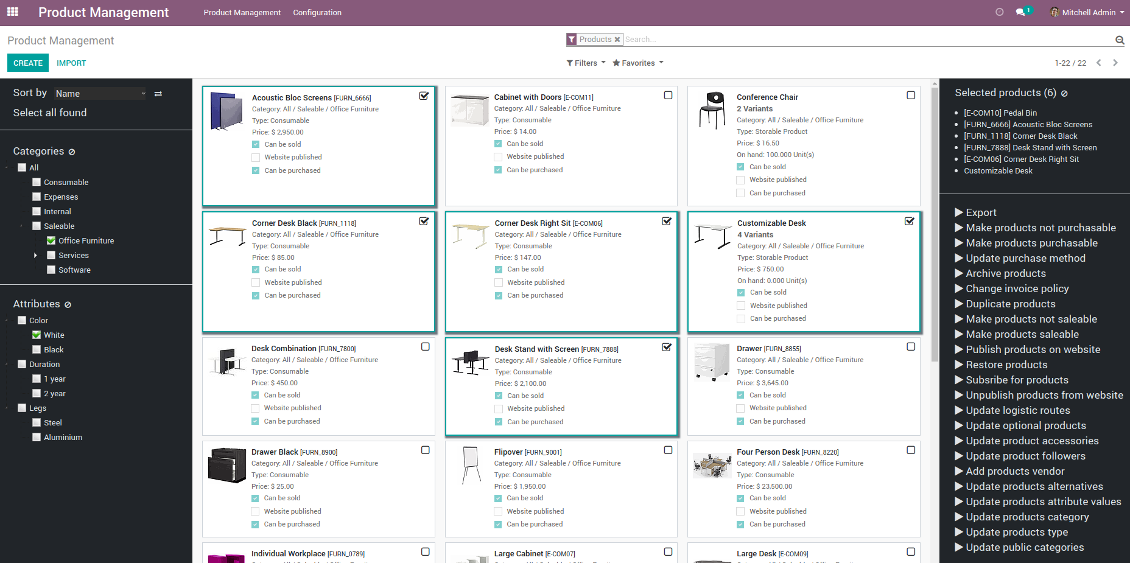
- the core app. It might be used stand-alone as a system to find, pick up, and update basic product fields.
سعره هو
198€
178€.
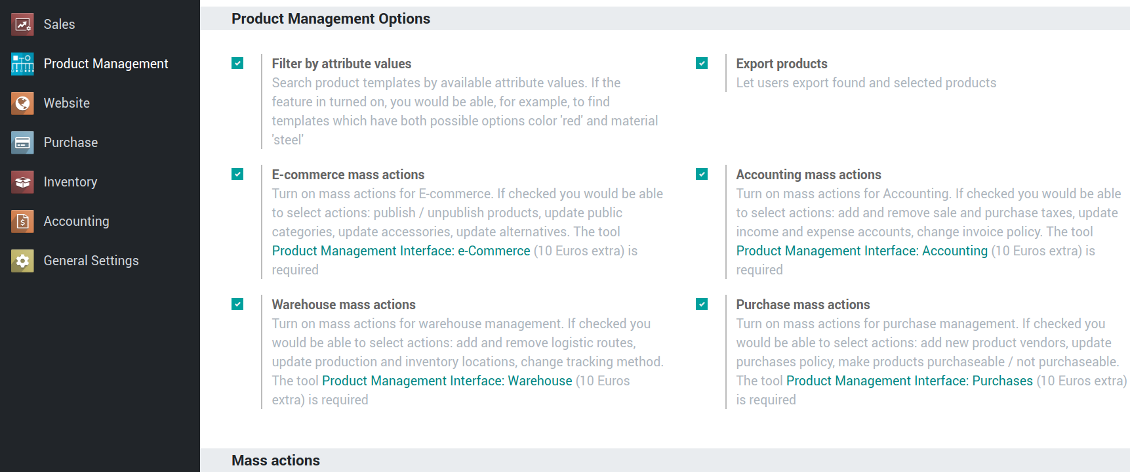
- the optional module, which introduces mass products actions to change E-shop related attributes. The features assumed by this add-on are marked by the icon .
سعره هو
10€
9€.
- the optional module to update in batch warehouse characteristics of product templates. The features assumed by this add-on are marked by the icon .
سعره هو
10€
9€.
- the optional module to manage accounting traits of products in bulk. The features assumed by this add-on are marked by the icon .
سعره هو
10€
9€.
- the optional module offering mass actions on purchase columns of products. The features assumed by this add-on are marked by the icon .
سعره هو
10€
9€.
Advanced Hierarchical Search by Categories and Attributes
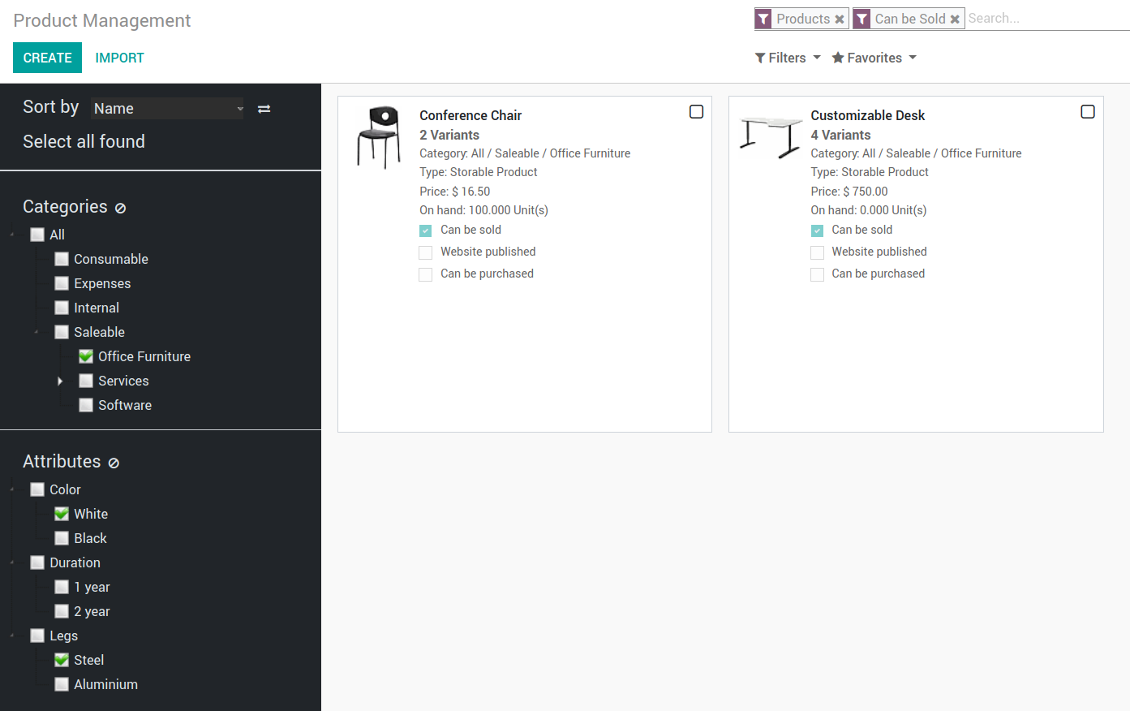
Systematize product templates by available attributes values. Now it is not a trouble to select all templates which might be both white and metal.
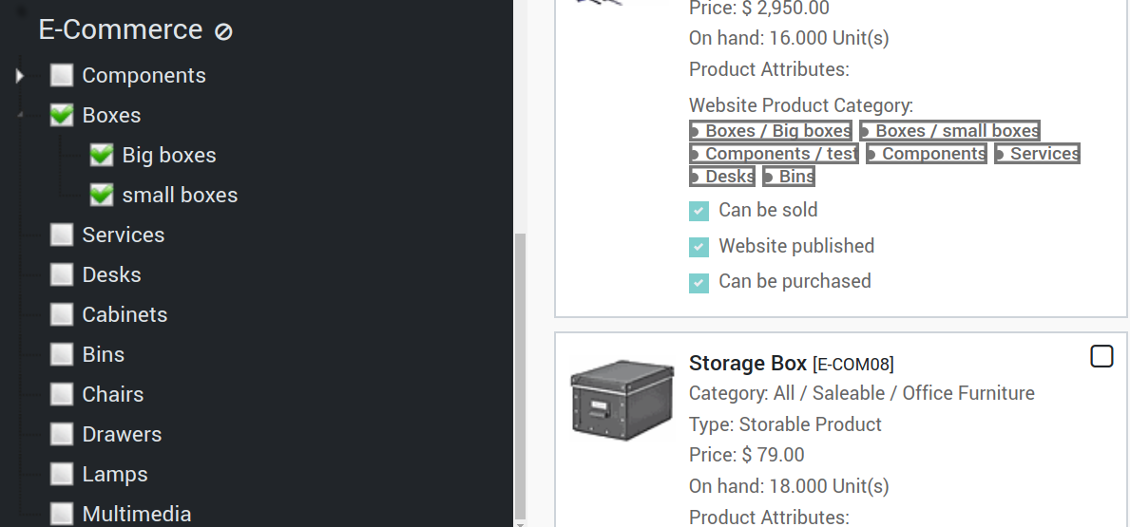
Navigate by E-commerce categories to search products from E-shop perspective.
Standard Odoo search is anyway available: narrow results according to simple product filters as far as you need.
لقطات الشاشة
Products by categories filtered by attributes and standard search for mass update
Product templates to be found quickly
E-commerce categories hierarchy in the navigation panel
Efficient Multi Selection and Mass Update
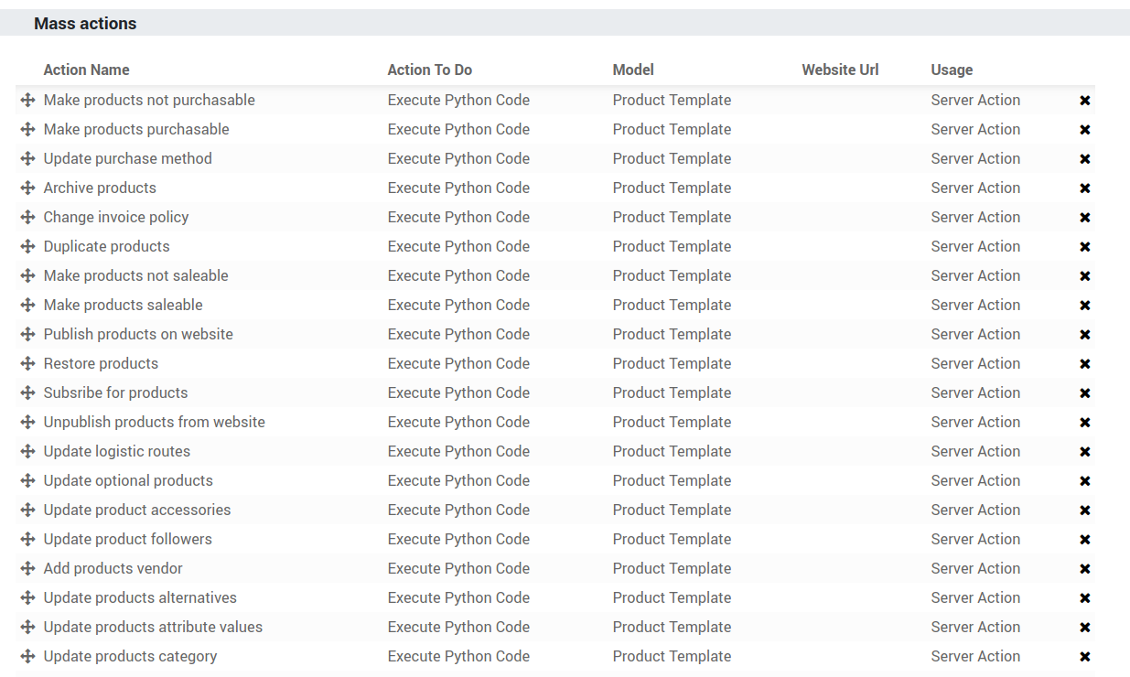
Configure the list of mass actions through selecting among multiple ones offered by the tool. Mass editing relies upon standard Odoo servers actions, so you can add a new ones by yourself.
Execute any of chosen multiple mass actions and observe results in real-time.
Mass Actions List
- Archive products in bulk
- Restore selected products which have been previously archived
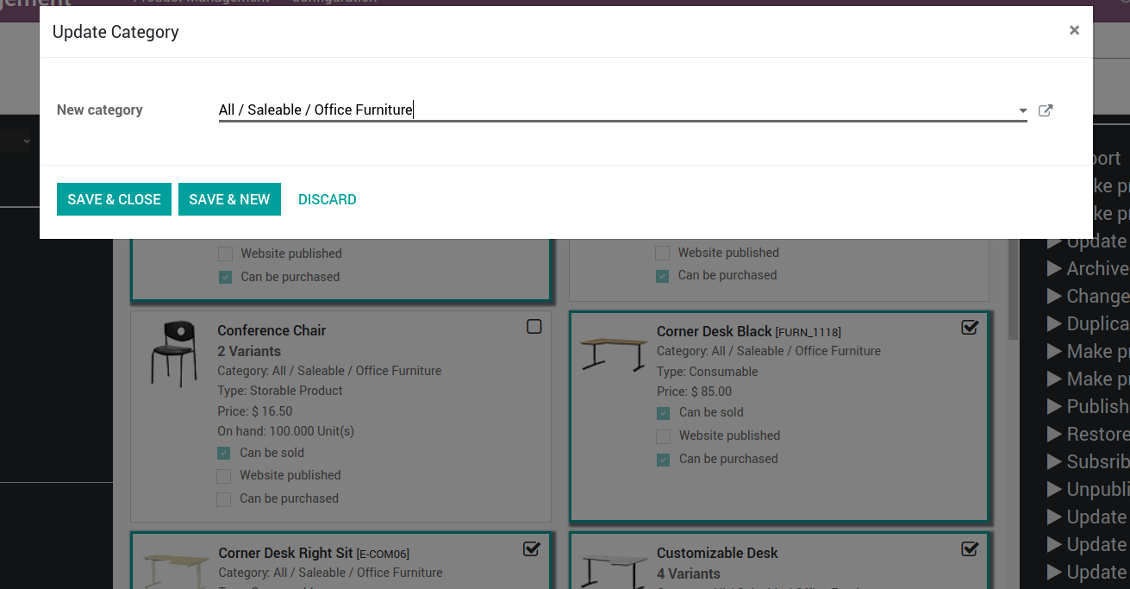
- Change product category of all selected items
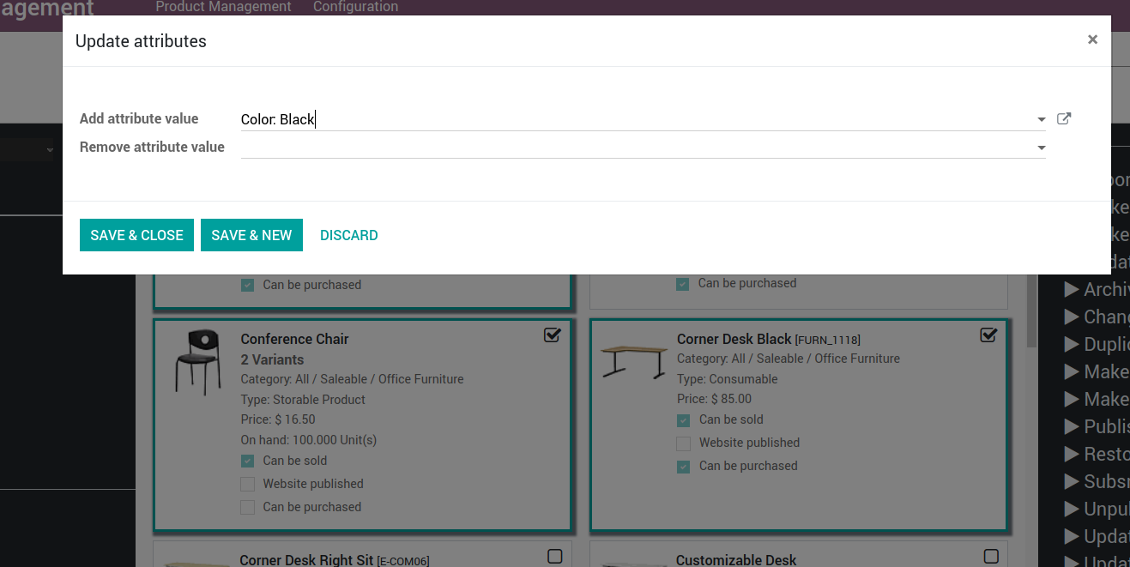
- Add / remove an attribute value to all found templates
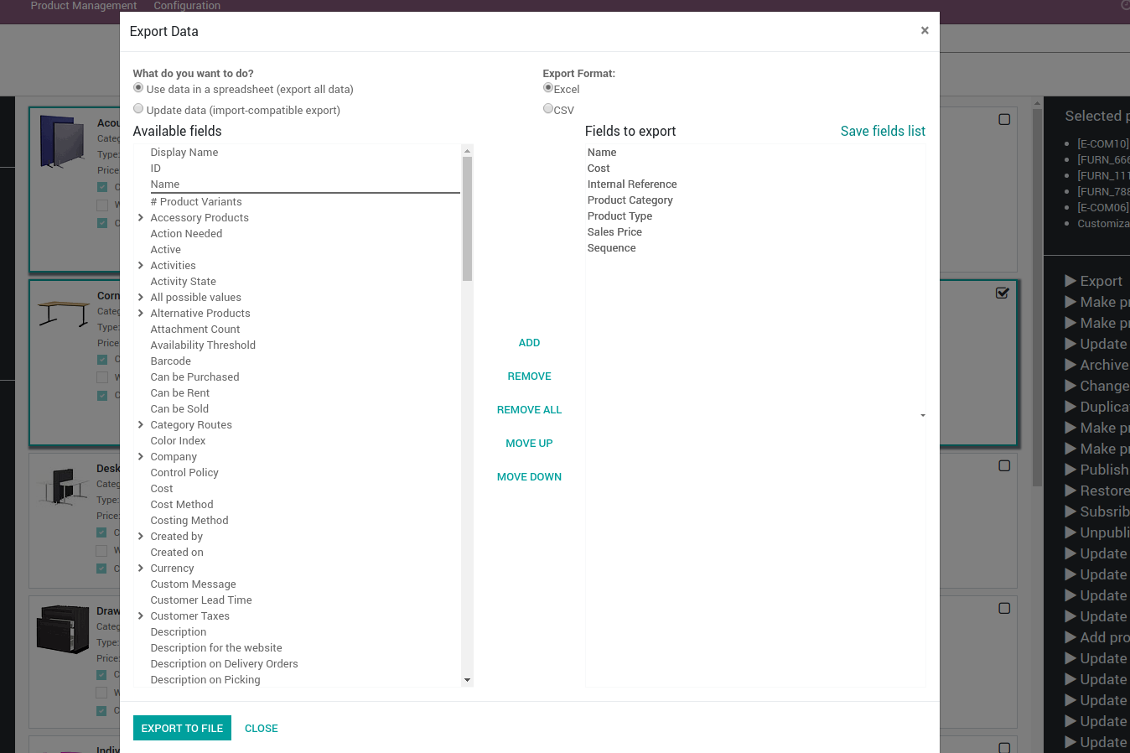
- Export chosen items (the setting 'Export products' should be turned on)
- Mass edit product type (consumable, service, storable)
- Publish or unpublish products in batch
- Update products to be saleable / not saleable
- Update products to be purchasable / not purchasable
- Add / remove public E-shop categories of selected templates
- Add / remove products' alternatives
- Add / remove products' accessories
- Assign a new vendor to product templates in bulk and make this supplier the most prioritized
- Add / remove logistic routes
- Modify invoice policy ('Ordered quantities', 'Delivered quantities')
- Duplicate a few product templates simultaneously
- Add / remove customer taxes
- Add / remove vendor taxes
- Subscribe to / unsubscribe from products' discussions
- Add / remove templates' followers
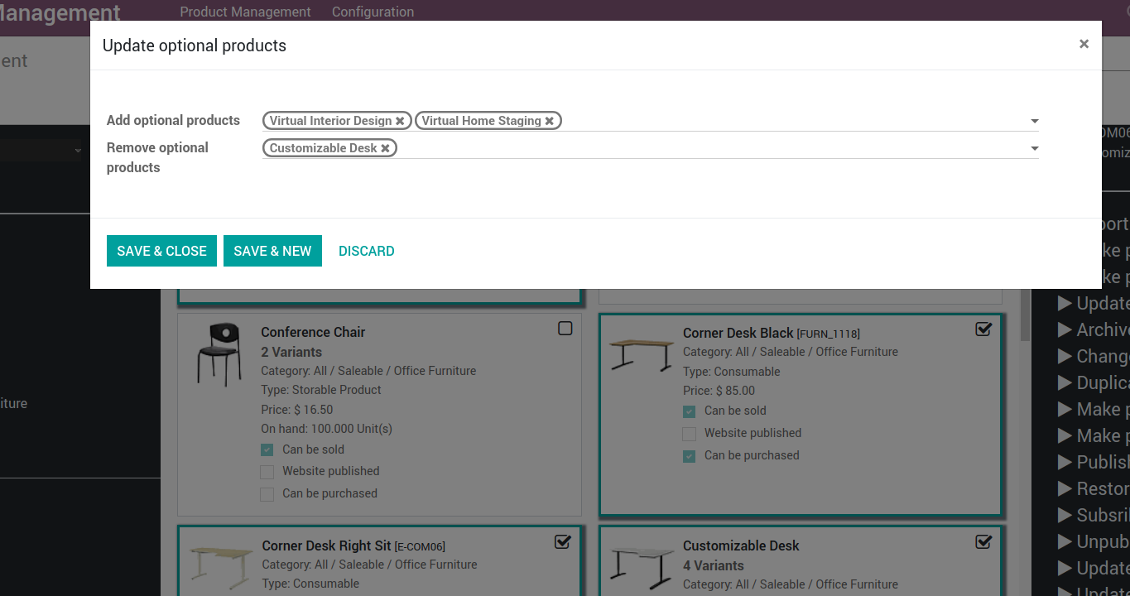
- Add / remove optional products
- Update purchase method ('On ordered quantities', 'On received quantities')
- Update tracking method
- Change price difference account
- Change income account of products
- Change expense account of templates
- Change inventory location
- Change production location
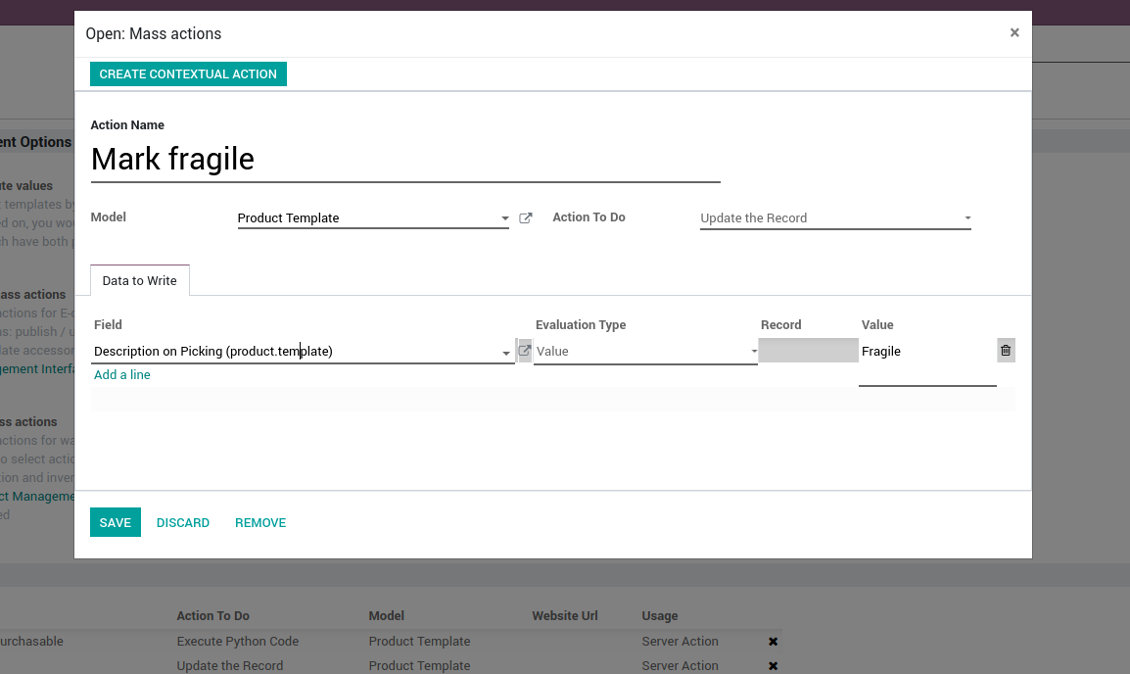
Beside the list above you can also prepare your own mass actions. Look at the configuration tab.
لقطات الشاشة
Product management configuration
Mass actions list for products
Mass action example: update attribute values
Mass action example: change internal category
Mass action example: export
Mass action example: edit optional products
Innovative Single View Interface
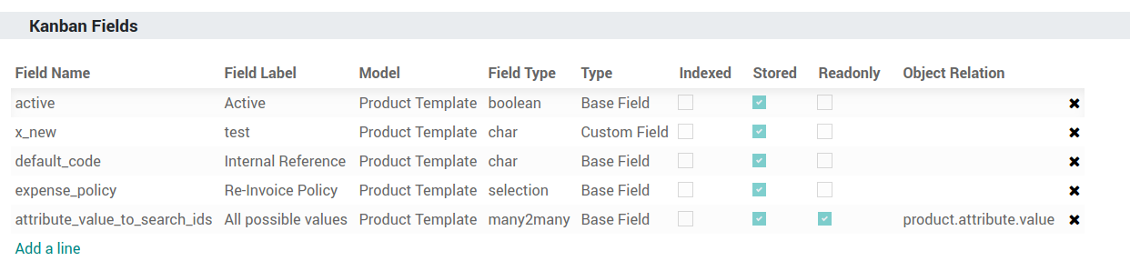
You might define by your own which product fields should be shown on a kanban card in addition to standard columns.
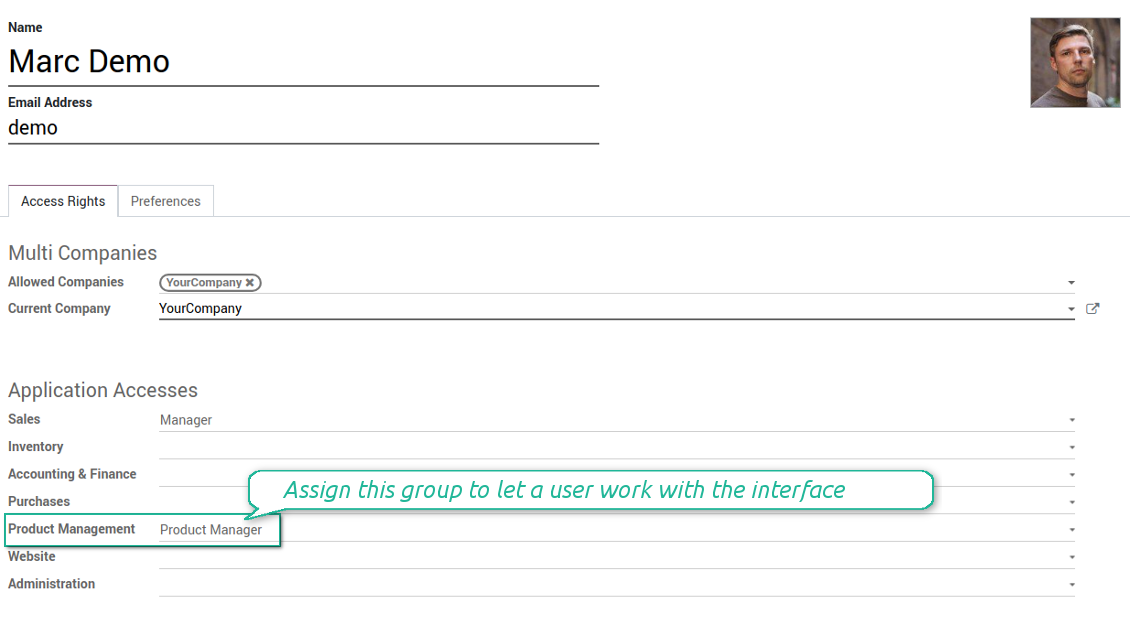
The interface is available for any user which has rights for products (e.g. sales, warehouse or purchase manager) and who has the group 'Product manager' assigned. Configuration might be done only by the group Administration / Settings.
لقطات الشاشة
Place any template field to each kanban card
Product management: security group
Fantastic module
This module earned itself back in the first day, a must have when working with lots of products. A minor issue with product attributes was solved within 12h, great service.
A life-changer ... and a massive time saver!
Fantastic app ... Provides a whole new view of your product database, nicely presented in editable kanban view, with the ability to filter and sort in various ways and combinations, I guess depending on the $10 add-ons you buy, and then perform mass updates and product changes, all controlled through a very simple and self-explanatory configuration. I only just installed the app but it immediately highlighted to me that I had some products that had somehow been duplicated - even though I thought I had changed the code to prevent that. But more importantly, from here you can get a nice quick overview of your products, their attributes, pricing, etc. You can easily add and delete fields to the kanban overview. And then you can easily select which records your want to update, amend or export, either individually or using 'select all' and then perform your changes in bulk at the click of a couple of buttons. Possibly you can do all these things in standard Odoo (although I'm not so sure you can) but it would take you ten times as long and involve many more steps - most probably with data export and re-import. This app cuts out all the messing around and makes life quick simple. I feel sure this app is going to make my product management so much quicker and simpler in future ! Highly recommended.
Works nice
I find it quite nice module for product management. After the enhancement of not requiring to click exactly on the checkbox it became convenient and fast to use for standard intended functions. Thanks guys!
نصائح التكوين والتثبيت لـ Product Management Interface Odoo v.12
Mass actions
- As the model always use 'Product Template'. Otherwise you action would not be displayed in the list of operations
- In case you want to return a wizard, such a wizard should not have a footer (only standard buttons) and should have an explicitly specified view_id. Look for examples in any module of the Product Management Bundle
Example of custom mass action
الأسئلة الشائعة حول Product Management Interface Odoo v.12
بعد اختيار المنتجات يبقى الاختيار عند التنقل بين الصفحات. كيف أعيد تعيينه بسرعة؟
في المنطقة اليمنى انقر عنوان المنتج لإزالته من القائمة. تُزال كل المنتجات بأيقونة 'Reset' يمين 'Selected products'.
ما سياسة تحديث ادواتكم؟
وفق سياسات Odoo Apps Store الحالية:
- كل وحدة مشتراة للإصدار 12.0 وما قبله تمنح الوصول إلى كل الإصدارات حتى 12.0.
- بدءا من الإصدار 13.0 تُشترى كل نسخة من الوحدة على حدة.
- بغض النظر عن الإصدار، الشراء يعطي حق كل التحديثات والإصلاحات ضمن الإصدار الرئيسي.
فريق faOtools لا يتحكم بهذه السياسات. للأسئلة تواصلوا مباشرة مع ممثلي Odoo Apps Store.
كيف اثبّت التطبيق على Odoo.sh؟
أبسط طريقة هي مسار متجر Odoo المدمج:
1. افتح صفحة الوحدة واضغط Deploy on odoo.sh
2. ستُنقل إلى GitHub. سجّل الدخول ثم Create a new repo أو استخدم مستودعا قائما. يجب أن يكون المستودع خاصا. لا يُسمح بنشر التطبيقات بترخيص OPL-1. أنشئ مستودعا جديدا لمشروع Odoo.sh عند الحاجة
3. ثم في odoo.sh اضغط Deploy وأكّد ثم Continue. يبدأ التثبيت.
هذه الخطوات تثبّت التطبيق على فرع الإنتاج. لفروع أخرى أو للتحديث:
1. نزّل الشيفرة من متجر Odoo
2. اعمل commit للوحدة في مستودع GitHub. لا تُستثنى مجلدات/ملفات التطبيق في .gitignore. مستودعات odoo.sh قد تتجاهل مسارات مهمة (مثل /lib). ارفع كل مجلدات وملفات الوحدة
3. انشر الفرع المستهدف في مشروع odoo.sh أو انتظر البناء التلقائي إن كانت الإعدادات كذلك.
كيف اثبّت التطبيق على خادمي؟
2. أعد تشغيل خادم Odoo;
3. فعّل وضع المطوّر (الإعدادات التقنية);
4. حدّث قائمة التطبيقات (قائمة التطبيقات);
5. اعثر على التطبيق واضغط Activate/Install;
6. اتبع الإرشادات في صفحة التطبيق إن وُجدت.
للتطبيق إضافات أخرى. هل اشتريها لاحقا؟
نعم. يضيف Odoo التبعيات تلقائيا إلى السلة؛ استبعد الأدوات المشتراة سابقا حتى لا تدفع مرتين.
نشرت التطبيق على Odoo.sh وأرى تحذيرا/خطأ في الاختبارات
التحذير الأحمر/البرتقالي لا يؤثر على وظائف التطبيق. أحيانا لا تتجاوز وحداتنا الاختبارات التلقائية القياسية لأنها تفترض سلوكا يتعارض مع أهداف التطبيق. مثلا نغيّر حساب السعر بينما تقارن اختبارات Odoo السعر النهائي بالخوارزمية القياسية.
تحقق أولا من وظائف قاعدة البيانات المنشورة. هل كل شيء يعمل؟
إن ظننتم أن التحذير يؤثر على وظائف حقيقية، تواصلوا معنا وأرسلوا سجلات التثبيت كاملة وقائمة الوحدات المنشورة كاملة (الأساسية والطرف الثالث).
هل يمكنني شراء التطبيق منكم مباشرة؟
لا، نوزع الأدوات فقط عبر متجر تطبيقات Odoo الرسمي.
اريد خصما
للأسف ليست لدينا وسيلة تقنية لتقديم أسعار فردية.
هل يمكن تثبيت التطبيق على قاعدة Odoo Online (SaaS)؟
لا، لا يمكن استخدام تطبيقات الطرف الثالث على Odoo Online. خدمة Odoo SaaS تمنع ذلك.
للاداة تبعيات على تطبيقات أخرى. هل اشتريها؟
نعم، تحتاج الأداة إلى كل الوحدات المذكورة في التبعيات. السعر في صفحة التطبيق يشمل هذه التبعيات.
ما سعر الوحدة بالدولار الأمريكي؟ لماذا تغيّر؟
أسعار وحداتنا باليورو. يحوّل متجر Odoo الأسعار إلى عملات أخرى حسب سعره الداخلي. لذا قد يتغيّر السعر بالدولار الأمريكي عند تحديث سعر الصرف.
تتم صياغة نصوص التطبيق والموقع الإلكتروني باللغات غير الإنجليزية بمساعدة الذكاء الاصطناعي وبما يتوافق مع ترجمات Odoo الرسمية. إذا لاحظت خطأ، أرسل تذكرة تصحيح الترجمة وسنقوم بتصحيحه.
الإبلاغ عن الأخطاء
إذا واجهت أخطاء أو سلوكًا غير متسق, فلا تتردد في الاتصال بنا. نحن نضمن تقديم الإصلاحات خلال 60 يومًا من الشراء ونهتم بشدة بتحسين أدواتنا حتى بعد هذه الفترة.
لا تحتاج إلى رقم هاتف أو بطاقة ائتمان للاتصال بنا. يجب عليك فقط اجتياز عملية تسجيل قصيرة عبر البريد الإلكتروني, والتي لا تستغرق أكثر من 30 ثانية.
يرجى تضمين أكبر قدر ممكن من التفاصيل في طلبك: لقطات الشاشة وسجلات خادم Odoo ووصف كامل لكيفية إعادة إنتاج المشكلة وما الى ذلك. عادة ما يستغرق إعداد خطة عمل للمشكلة بضعة أيام عمل (اذا تأكد وجود خطا) او تزويدك بارشادات حول ما ينبغي فعله (في الحالات الأخرى).
طلبات الميزات العامة وأفكار الوحدات (تطوير مجاني)
لدينا دوافع قوية لتحسين أدواتنا وسنكون ممتنين لأي تعليقات. إذا كانت متطلباتك ذات استخدام عام ويمكن تنفيذها بكفاءة, فسيقوم الفريق بإدراج تلك المتطلبات في قائمة المهام الخاصة بنا.
تتم معالجة قائمة المهام هذه بانتظام ولا يتم فرض رسوم إضافية. على الرغم من أننا لا نستطيع أن نعد بالمواعيد النهائية والتصميم النهائي, إلا أنها قد تكون طريقة جيدة للحصول على الميزات المطلوبة دون استثمارات ومخاطر.
لا تحتاج إلى رقم هاتف أو بطاقة ائتمان للاتصال بنا. يجب عليك فقط اجتياز عملية تسجيل قصيرة عبر البريد الإلكتروني, والتي لا تستغرق أكثر من 30 ثانية.

اداة لتنظيم مرفقات Odoo في مجلدات ومزامنة الدلائل مع Google Drive وOneDrive/SharePoint وNextcloud/ownCloud وDropbox وAmazon S3 وBox وNAS. مدير الملفات. DMS
398€

اداة لبناء قاعدة معرفة عميقة للاستخدام الداخلي والخارجي. KMS. مراجعات شبيهة بالويكي
398€


اداة لإدارة الخدمات بالمواعيد من الحجز حتى المبيعات والمراجعات
398€

