Product Management Interface v.12
The tool to search, select and mass update product templates
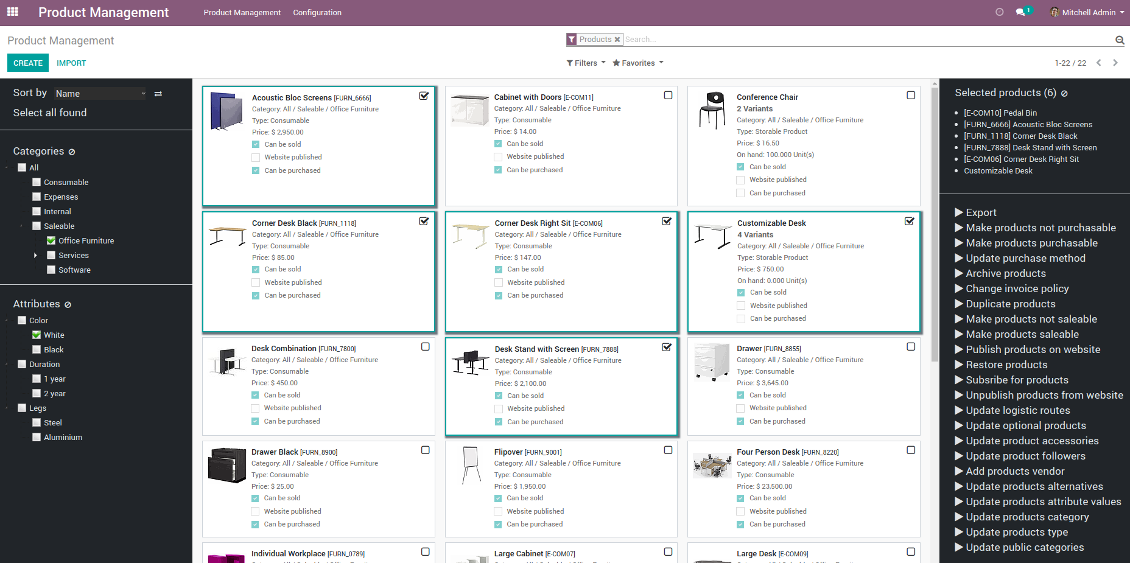
- the core app. It might be used stand-alone as a system to find, pick up, and update basic product fields.
कीमत है
198€
178€.
- the optional module, which introduces mass products actions to change E-shop related attributes. The features assumed by this add-on are marked by the icon .
कीमत है
10€
9€.
- the optional module to update in batch warehouse characteristics of product templates. The features assumed by this add-on are marked by the icon .
कीमत है
10€
9€.
- the optional module to manage accounting traits of products in bulk. The features assumed by this add-on are marked by the icon .
कीमत है
10€
9€.
- the optional module offering mass actions on purchase columns of products. The features assumed by this add-on are marked by the icon .
कीमत है
10€
9€.
Advanced Hierarchical Search by Categories and Attributes
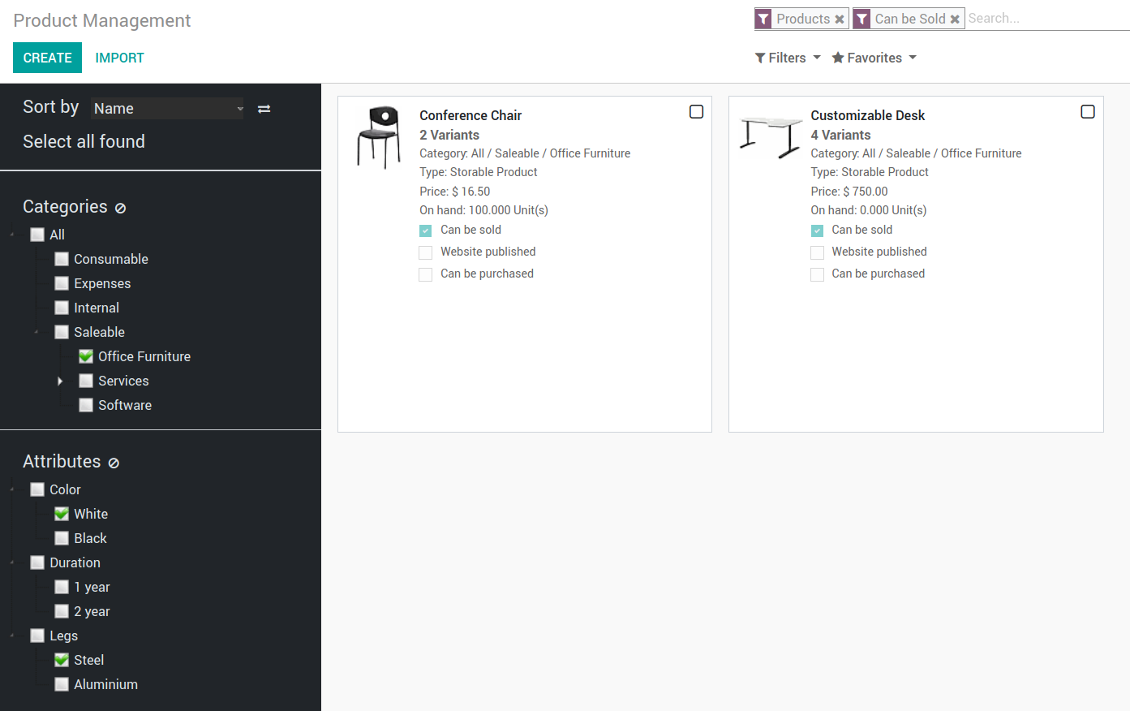
Systematize product templates by available attributes values. Now it is not a trouble to select all templates which might be both white and metal.
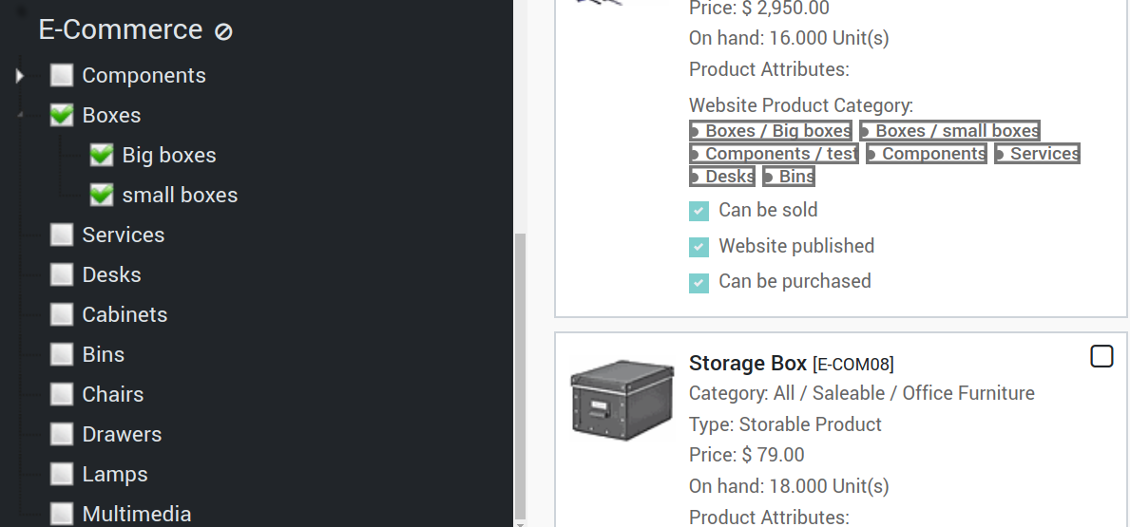
Navigate by E-commerce categories to search products from E-shop perspective.
Standard Odoo search is anyway available: narrow results according to simple product filters as far as you need.
स्क्रीनशॉट
Products by categories filtered by attributes and standard search for mass update
Product templates to be found quickly
E-commerce categories hierarchy in the navigation panel
Efficient Multi Selection and Mass Update
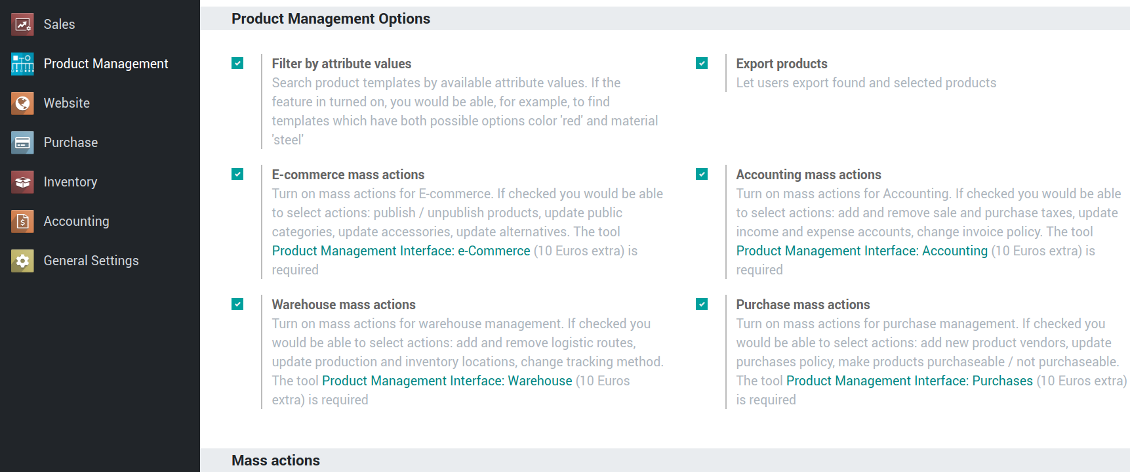
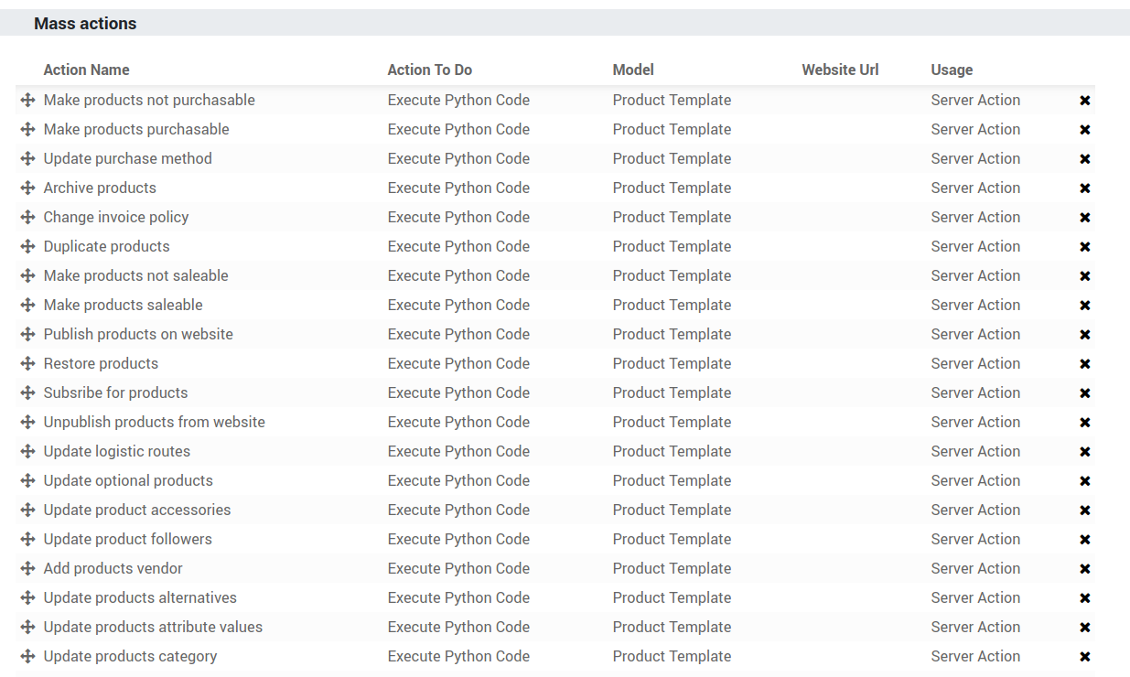
Configure the list of mass actions through selecting among multiple ones offered by the tool. Mass editing relies upon standard Odoo servers actions, so you can add a new ones by yourself.
Execute any of chosen multiple mass actions and observe results in real-time.
Mass Actions List
- Archive products in bulk
- Restore selected products which have been previously archived
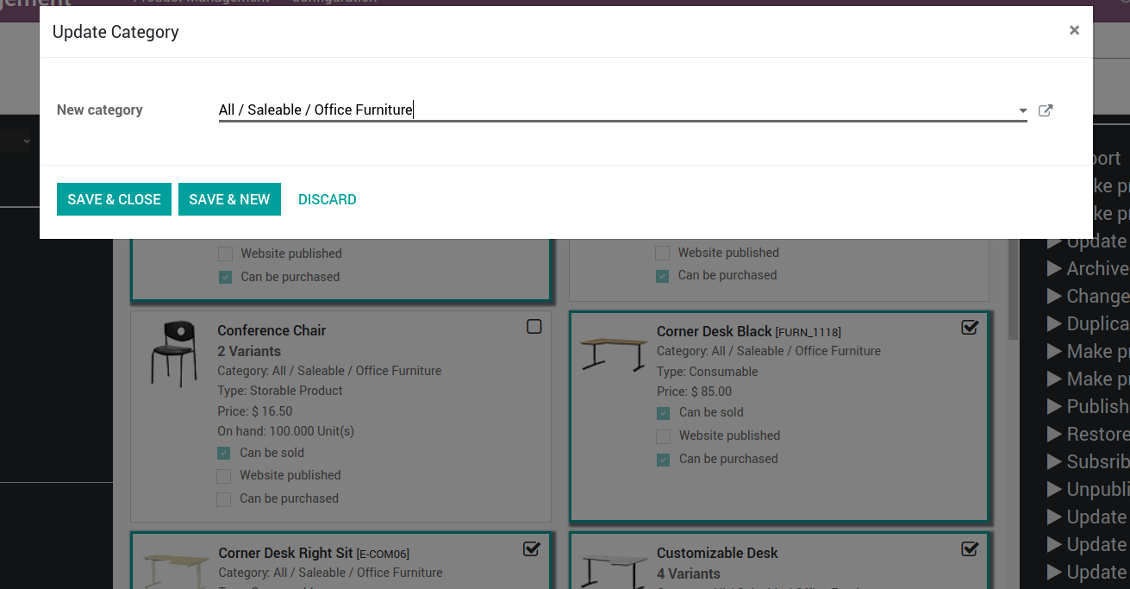
- Change product category of all selected items
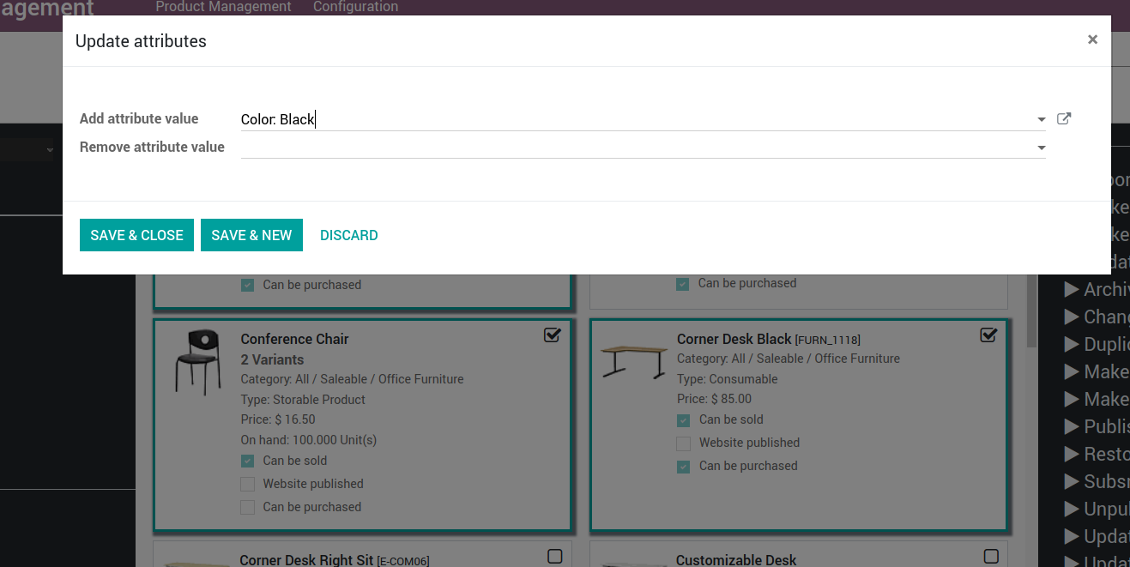
- Add / remove an attribute value to all found templates
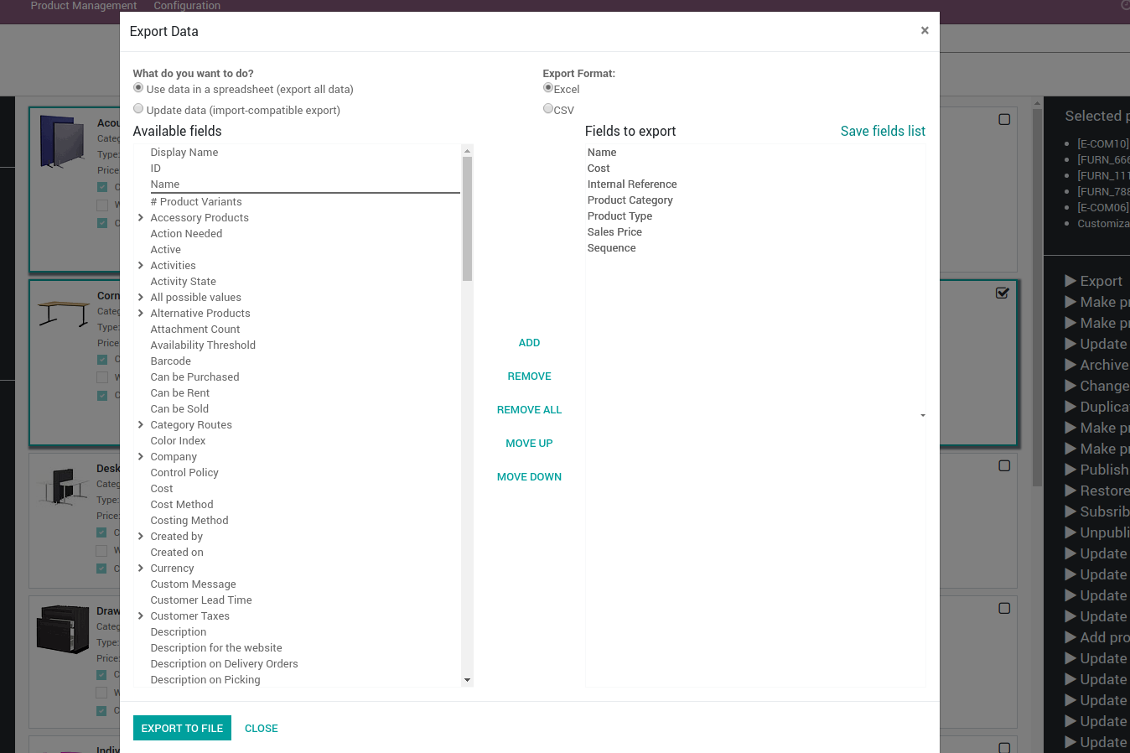
- Export chosen items (the setting 'Export products' should be turned on)
- Mass edit product type (consumable, service, storable)
- Publish or unpublish products in batch
- Update products to be saleable / not saleable
- Update products to be purchasable / not purchasable
- Add / remove public E-shop categories of selected templates
- Add / remove products' alternatives
- Add / remove products' accessories
- Assign a new vendor to product templates in bulk and make this supplier the most prioritized
- Add / remove logistic routes
- Modify invoice policy ('Ordered quantities', 'Delivered quantities')
- Duplicate a few product templates simultaneously
- Add / remove customer taxes
- Add / remove vendor taxes
- Subscribe to / unsubscribe from products' discussions
- Add / remove templates' followers
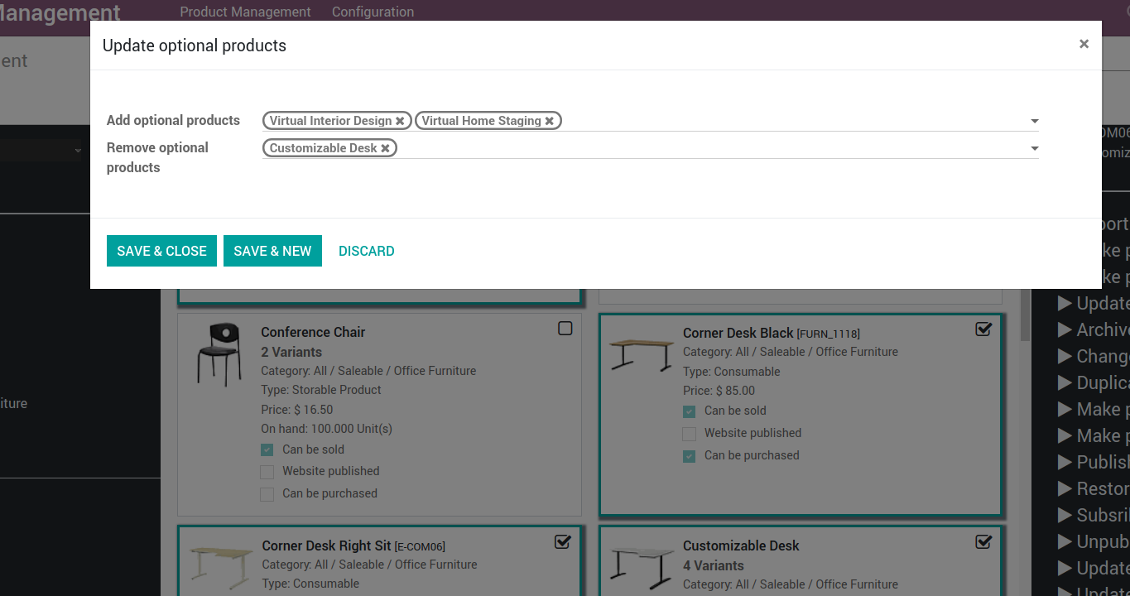
- Add / remove optional products
- Update purchase method ('On ordered quantities', 'On received quantities')
- Update tracking method
- Change price difference account
- Change income account of products
- Change expense account of templates
- Change inventory location
- Change production location
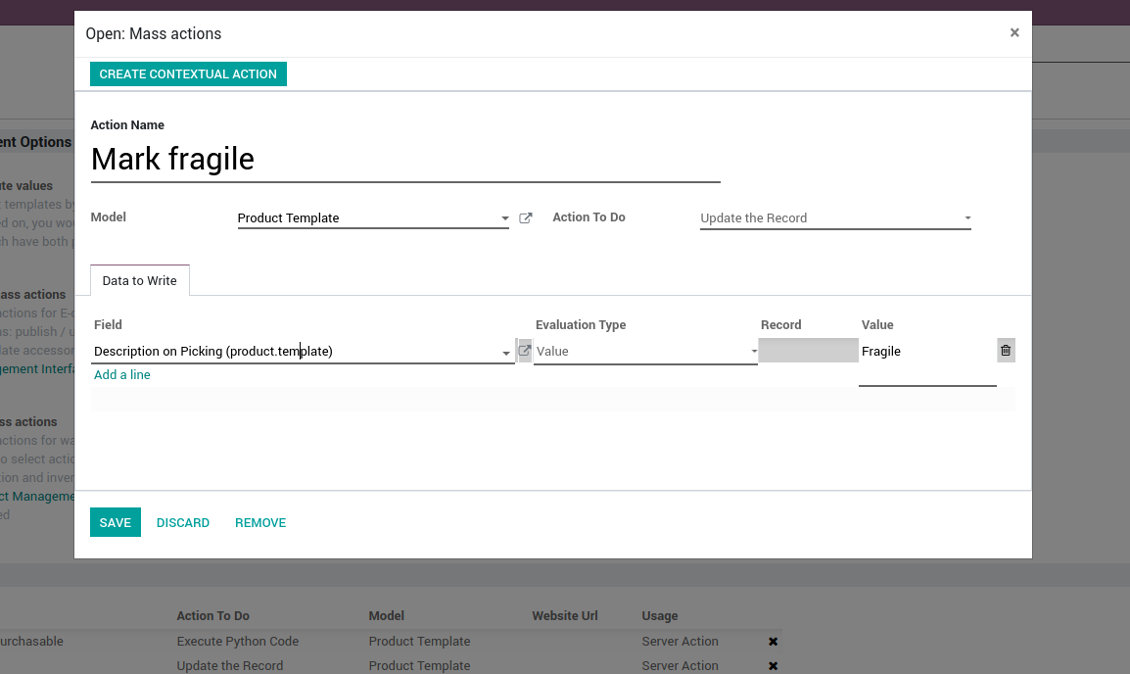
Beside the list above you can also prepare your own mass actions. Look at the configuration tab.
स्क्रीनशॉट
Product management configuration
Mass actions list for products
Mass action example: update attribute values
Mass action example: change internal category
Mass action example: export
Mass action example: edit optional products
Innovative Single View Interface
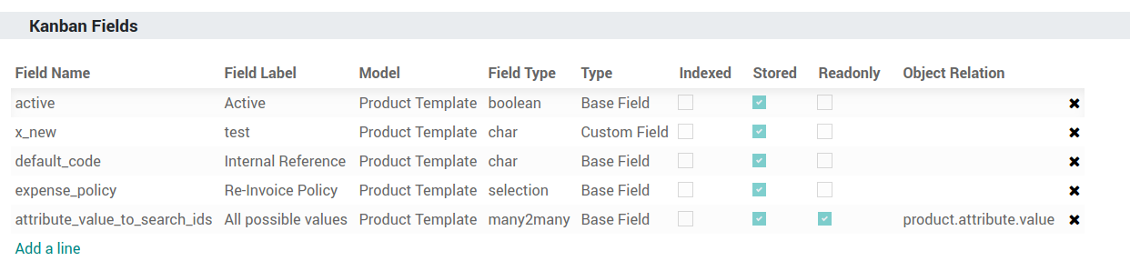
You might define by your own which product fields should be shown on a kanban card in addition to standard columns.
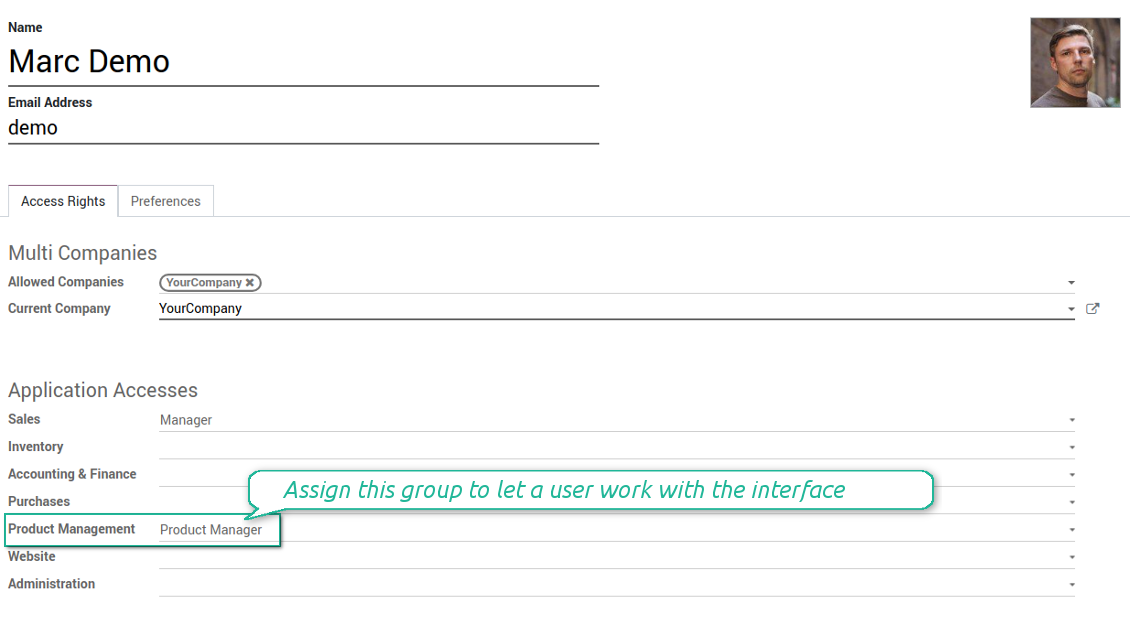
The interface is available for any user which has rights for products (e.g. sales, warehouse or purchase manager) and who has the group 'Product manager' assigned. Configuration might be done only by the group Administration / Settings.
स्क्रीनशॉट
Place any template field to each kanban card
Product management: security group
Fantastic module
This module earned itself back in the first day, a must have when working with lots of products. A minor issue with product attributes was solved within 12h, great service.
A life-changer ... and a massive time saver!
Fantastic app ... Provides a whole new view of your product database, nicely presented in editable kanban view, with the ability to filter and sort in various ways and combinations, I guess depending on the $10 add-ons you buy, and then perform mass updates and product changes, all controlled through a very simple and self-explanatory configuration. I only just installed the app but it immediately highlighted to me that I had some products that had somehow been duplicated - even though I thought I had changed the code to prevent that. But more importantly, from here you can get a nice quick overview of your products, their attributes, pricing, etc. You can easily add and delete fields to the kanban overview. And then you can easily select which records your want to update, amend or export, either individually or using 'select all' and then perform your changes in bulk at the click of a couple of buttons. Possibly you can do all these things in standard Odoo (although I'm not so sure you can) but it would take you ten times as long and involve many more steps - most probably with data export and re-import. This app cuts out all the messing around and makes life quick simple. I feel sure this app is going to make my product management so much quicker and simpler in future ! Highly recommended.
Works nice
I find it quite nice module for product management. After the enhancement of not requiring to click exactly on the checkbox it became convenient and fast to use for standard intended functions. Thanks guys!
कॉन्फ़िगरेशन और इंस्टॉलेशन सुझाव: Product Management Interface Odoo v.12
Mass actions
- As the model always use 'Product Template'. Otherwise you action would not be displayed in the list of operations
- In case you want to return a wizard, such a wizard should not have a footer (only standard buttons) and should have an explicitly specified view_id. Look for examples in any module of the Product Management Bundle
Example of custom mass action
के बारे में अक्सर पूछे जाने वाले प्रश्न Product Management Interface Odoo v.12
उत्पाद चुनने के बाद पेज बदलने पर भी चयन बना रहता है। इसे जल्दी कैसे रीसेट करें?
दाएँ कार्य क्षेत्र में उत्पाद के शीर्षक पर क्लिक कर उसे सूची से हटाएँ। 'Selected products' के दाएँ 'Reset' आइकन से सभी उत्पाद हटाएँ।
आपके टूल की अपडेट नीतियाँ क्या हैं?
वर्तमान Odoo Apps Store नीतियों के अनुसार:
- संस्करण 12.0 और उससे पहले के लिए खरीदा प्रत्येक मॉड्यूल 12.0 तक सभी संस्करणों तक पहुँच देता है।
- संस्करण 13.0 से प्रत्येक मॉड्यूल संस्करण अलग खरीदना होता है।
- संस्करण चाहे जो हो, खरीद से उस प्रमुख संस्करण के सभी अपडेट और बग ठीक करने का अधिकार मिलता है।
ध्यान दें कि faOtools टीम इन नीतियों को नियंत्रित नहीं करती। सभी प्रश्नों के लिए सीधे Odoo Apps Store प्रतिनिधियों से संपर्क करें।
आपका ऐप Odoo.sh पर कैसे इंस्टॉल करूँ?
सबसे सीधा तरीका Odoo स्टोर की अंतर्निहित वर्कफ़्लो का उपयोग करना है:
1. मॉड्यूल का पृष्ठ खोलें और Deploy on odoo.sh बटन पर क्लिक करें
2. उसके बाद आपको GitHub पृष्ठ पर भेजा जाएगा। अपने खाते में लॉग इन करें, फिर 'Create a new repo' पर क्लिक करें या मौजूदा का उपयोग करें। सुनिश्चित करें कि रिपॉज़िटरी निजी हो। OPL-1 लाइसेंस के तहत ऐप प्रकाशित करना अनुमति नहीं है। ज़रूरत हो तो Odoo.sh प्रोजेक्ट के लिए नया repo बनाएँ
3. फिर odoo.sh पर जाएँ और Deploy बटन पर क्लिक करें। पॉप-अप विंडो में निर्णय जमा करें और 'Continue.' पर क्लिक करें। इससे इंस्टॉलेशन शुरू होगा।
ये चरण प्रोजेक्ट की production शाखा पर ऐप इंस्टॉल करेंगे। अन्य शाखाओं पर ऐप तैनात करने या मॉड्यूल अपडेट करने के लिए ये क्रियाएँ करें:
1. Odoo स्टोर से ऐप का स्रोत कोड अपलोड करें
2. मॉड्यूल को आवश्यक GitHub रिपॉज़िटरी में commit करें। सुनिश्चित करें कि ऐप के कोई फ़ोल्डर/फ़ाइल अनदेखी न हों (यानी repo के .gitignore में न हों)। रिपॉज़िटरी odoo.sh अपने आप बनाता है और डिफ़ॉल्ट रूप से कुछ ज़रूरी चीजें शामिल हो सकती हैं (जैसे /lib)। मॉड्यूल की सभी निर्देशिकाएँ, उपनिर्देशिकाएँ और फ़ाइलें बिना अपवाद अपलोड करें
3. odoo.sh प्रोजेक्ट की लक्ष्य शाखा Deploy करें या, अगर सेटिंग्स ऐसा मानती हैं, स्वतः बनने तक प्रतीक्षा करें।
अपने सर्वर पर आपका ऐप कैसे इंस्टॉल करूँ?
2. Odoo सर्वर पुनः प्रारंभ करें;
3. डेवलपर मोड चालू करें (तकनीकी सेटिंग्स);
4. ऐप सूची अपडेट करें (ऐप्स मेनू);
5. ऐप खोजें और 'Activate'/'Install' दबाएँ;
6. ऐप पृष्ठ पर दिशानिर्देश हों तो उनका पालन करें।
आपके ऐप में अतिरिक्त ऐड-ऑन हैं। क्या बाद में खरीद सकता हूँ?
हाँ, ज़रूर। साथ ही Odoo सभी निर्भरताएँ कार्ट में अपने आप जोड़ता है, इसलिए दोहरी भुगतान से बचने के लिए पहले खरीदे टूल हटा दें।
मैंने आपका ऐप Odoo.sh पर डिप्लॉय किया और टेस्ट में चेतावनी/त्रुटि दिख रही है
लाल/नारंगी चेतावनी ऐप की सुविधाओं को प्रभावित नहीं करती। खेद है कि कभी-कभी हमारे मॉड्यूल मानक स्वचालित परीक्षण पास नहीं करते, क्योंकि वे ऐसा व्यवहार मानते हैं जो ऐप के लक्ष्यों से टकराता है। उदाहरण के लिए हम मूल्य गणना बदलते हैं, जबकि मानक Odoo मॉड्यूल परीक्षण अंतिम मूल्य की तुलना मानक एल्गोरिदम से करते हैं।
सबसे पहले तैनात डेटाबेस की सुविधाएँ जाँचें। क्या सब सही काम कर रहा है?
यदि फिर भी मानते हैं कि चेतावनी वास्तविक सुविधाओं को प्रभावित करती है, तो संपर्क करें और पूर्ण इंस्टॉलेशन लॉग तथा तैनात मॉड्यूलों की पूरी सूची (कोर और तृतीय-पक्ष सहित) भेजें।
क्या मैं ऐप आपकी कंपनी से सीधे खरीद सकता हूँ?
नहीं, हम उपकरण केवल आधिकारिक Odoo ऐप स्टोर.
मुझे छूट चाहिए
खेद है, हमारे पास व्यक्तिगत कीमतें देने के तकनीकी साधन नहीं हैं।
क्या मैं ऐप अपने Odoo Online (SaaS) डेटाबेस पर इंस्टॉल कर सकता हूँ?
नहीं, तृतीय-पक्ष ऐप Odoo Online पर नहीं चल सकते। दुर्भाग्य से Odoo SaaS यह संभावना रोकता है।
आपके टूल की अन्य ऐप पर निर्भरता है। क्या मुझे वे खरीदनी चाहिए?
हाँ, सही काम के लिए टूल को निर्भरता में चिह्नित सभी मॉड्यूल चाहिए। ऐप पृष्ठ पर दी गई कीमत में आवश्यक निर्भरताएँ पहले से शामिल हैं।
मॉड्यूल की कीमत अमेरिकी डॉलर में क्या है? यह क्यों बदली?
हमारे मॉड्यूल की कीमत यूरो में है। Odoo स्टोर आंतरिक विनिमय दर से अन्य मुद्राओं में बदलता है। इसलिए अमेरिकी डॉलर में कीमत दर अपडेट होने पर बदल सकती है।
अंग्रेज़ी के अलावा अन्य भाषाओं में ऐप और वेबसाइट का शब्द AI-सहायता से है और आधिकारिक Odoo अनुवादों से मेल खाता है। यदि आपको कोई गलती दिखे, अनुवाद शुद्धता का टिकट भेजें और हम इसे ठीक करेंगे।
बग रिपोर्टिंग
यदि आपको बग या असंगत व्यवहार मिले तो हमसे संपर्क करें। हम खरीद के 60 दिनों के भीतर सुधार देने की गारंटी देते हैं और इस अवधि के बाद भी टूल सुधारने में रुचि रखते हैं।
हमसे संपर्क करने के लिए फ़ोन नंबर या क्रेडिट कार्ड की आवश्यकता नहीं है। केवल एक छोटी ईमेल साइन-अप करनी है, जिसमें 30 सेकंड से अधिक नहीं लगता।
अपने अनुरोध में जितना संभव हो उतना विवरण शामिल करें: स्क्रीनशॉट, Odoo सर्वर लॉग, समस्या को दोहराने का पूरा वर्णन आदि। आमतौर पर किसी मुद्दे की कार्य योजना तैयार करने (यदि बग पुष्टि हो) या आगे क्या करना है इसके दिशानिर्देश देने (अन्यथा) में कुछ कार्यदिवस लगते हैं।
सार्वजनिक सुविधा अनुरोध और मॉड्यूल विचार (निःशुल्क विकास)
हम अपने टूल सुधारने के लिए दृढ़ता से प्रेरित हैं और किसी भी प्रतिक्रिया के आभारी होंगे। यदि आपकी आवश्यकताएँ सार्वजनिक उपयोग की हैं और कुशलता से लागू की जा सकती हैं, तो टीम उन्हें हमारी कार्य सूची में शामिल करेगी।
ऐसी कार्य सूची नियमित रूप से संसाधित होती है और अतिरिक्त शुल्क नहीं लगती। यद्यपि हम समय सीमा और अंतिम डिज़ाइन का वादा नहीं कर सकते, यह बिना निवेश और जोखिम के वांछित सुविधाएँ पाने का अच्छा तरीका हो सकता है।
हमसे संपर्क करने के लिए फ़ोन नंबर या क्रेडिट कार्ड की आवश्यकता नहीं है। केवल एक छोटी ईमेल साइन-अप करनी है, जिसमें 30 सेकंड से अधिक नहीं लगता।

Odoo अनुलग्नकों को फ़ोल्डरों में लचीले ढंग से व्यवस्थित करने और निर्देशिकाओं को क्लाउड क्लाइंट से सिंक करने का उपकरण: Google Drive, OneDrive/SharePoint, Nextcloud/ownCloud, Dropbox, Amazon S3, Box और NAS. DMS. फ़ाइल प्रबंधक. दस्तावेज़ प्रबंधन प्रणाली
398€

आंतरिक और बाहरी उपयोग के लिए गहरी और संरचित ज्ञान आधार बनाने का उपकरण। Knowledge System. KMS. विकि जैसी पुनरीक्षण।
398€
Odoo अनुलग्नकों को OneDrive फ़ाइलों के साथ स्वचालित रूप से दोनों दिशाओं में सिंक करने का उपकरण
487€
KPI लक्ष्य सेट करने और अवधियों के अनुसार पूर्ति नियंत्रित करने का उपकरण। KPI डैशबोर्ड। डैशबोर्ड डिज़ाइनर। KPI चार्ट

Odoo अनुलग्नकों को Google Drive फ़ाइलों के साथ स्वचालित रूप से दोनों दिशाओं में सिंक करने का उपकरण
487€
अपॉइंटमेंट बुकिंग से बिक्री और समीक्षा तक समय-आधारित सेवा प्रबंधन का उपकरण
398€

इन्वेंटरी डेटा को विश्लेषण के लिए आवश्यक और सहज बनाने वाला उपकरण। स्टॉक विश्लेषण
38€