Real-time duplicates search
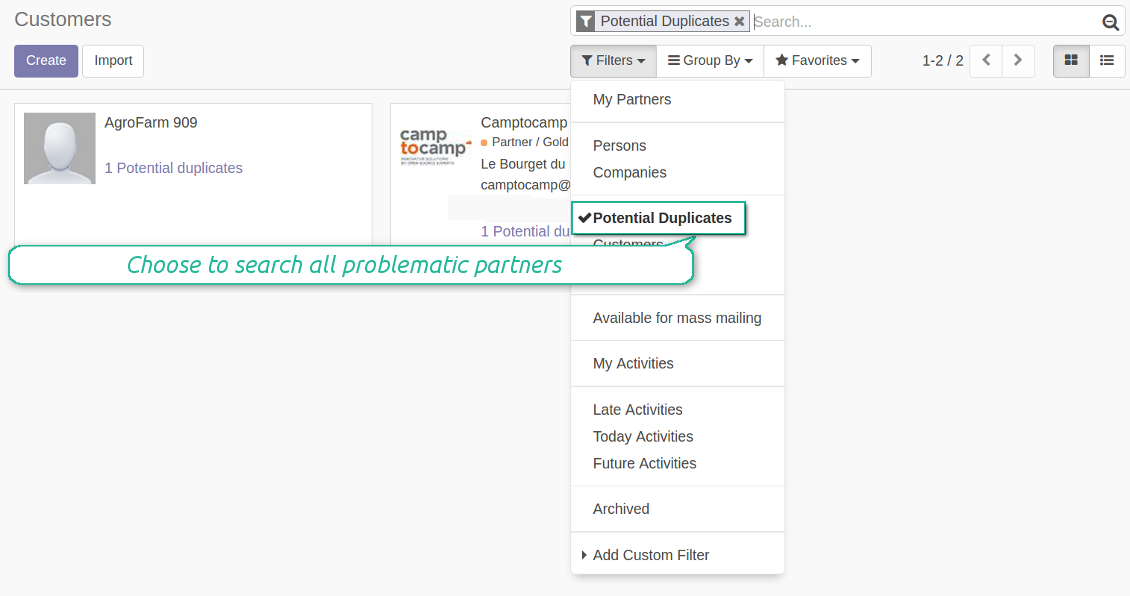
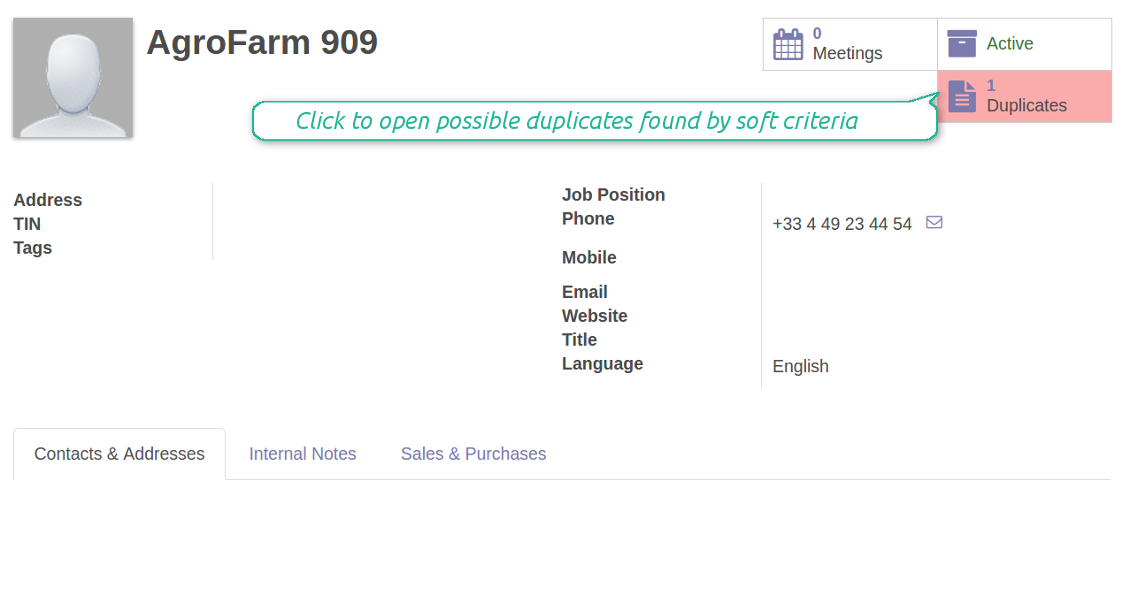
Duplicates are shown on kanban, tree, and form views. Using the special button you can open candidates to check whether those are actual duplicates. Besides, users may select possible copies by applying the filter 'Potential Duplicates'.
Performance issues
Since the search is done in real-time Odoo has to check all shown records for duplicates among all existing records. For example, when you open customers' kanban with 80 items, and you have 10,000 partners, the tool make 80 searches by your criteria among 10000 documents. It may result in slowdowns of the following operations:
- Opening kanban and list views of Odoo contacts
- Saving changes after update of partners
The tool is optimized to make searches as efficient as Odoo ORM allows it. Simultaneously, with a growing number of documents a search will become slower.
截图
Instant access to partner possible duplicates from kanban
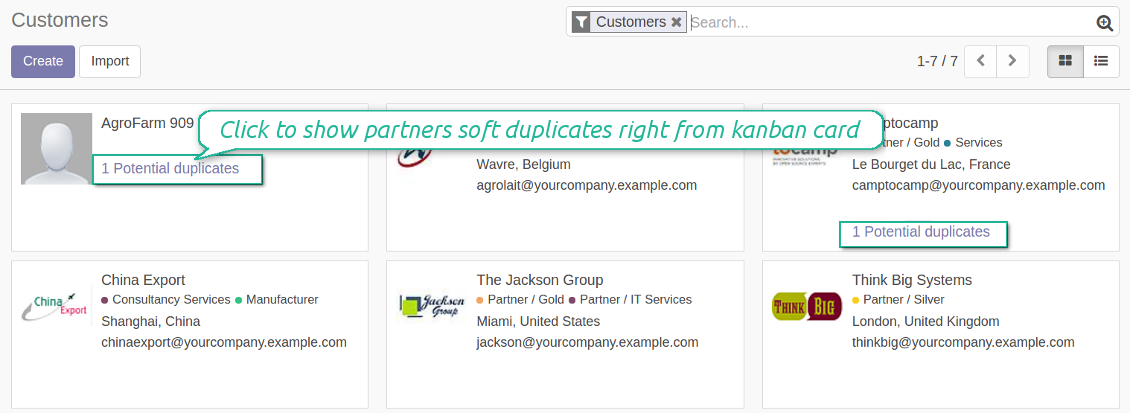
Contacts overall duplicates analysis
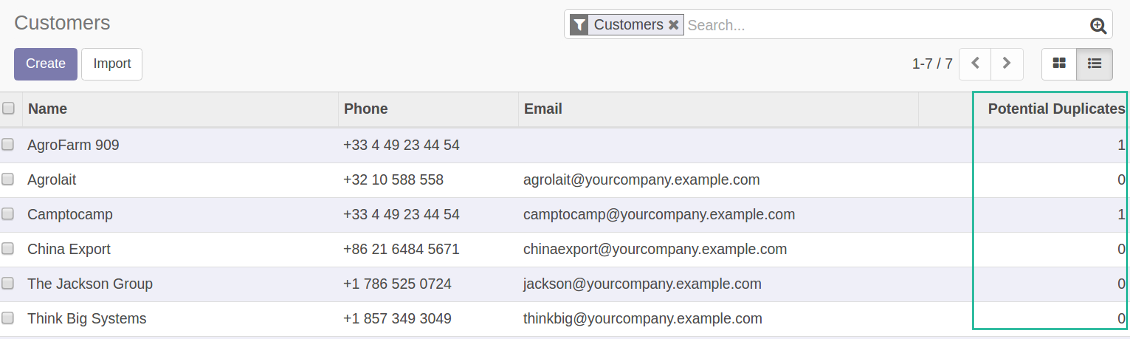
Partners tree: observe potential duplciates counter
Configurable duplicates' criteria
How rules work
As a duplicate criteria use any stored field of the following types: char (name, email, phone, mobile, etc.), text (descriptions), many2one (e.g, reference for a parent company), selection (for instance, type), date and datetime (e.g. birthday), integer and float (any unique code or even a credit limit).
For all field a duplicate should have absolutely the same value (e.g. '123' = '123', but '123' is not equal '1234'). Only for the case of soft search by char fields it is the operator 'ilike'. Thus, 'agro' is considered to be a potential duplicate of 'Agrolait' (but Agrolait is not considered as a duplicate of 'agro').
You may also restrict search only for companies and stand-alone individuals. If the option is checked, Odoo will search only for and only among partners without parent.
截图
Configure soft and rigid criteria to search duplicates of contacts
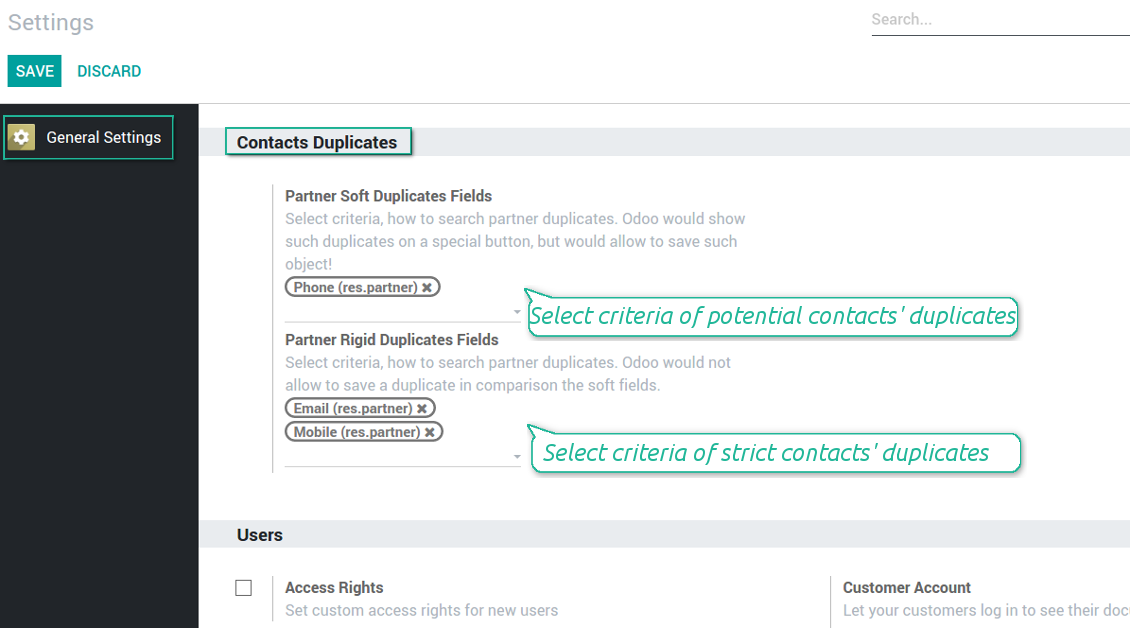
Rigid or soft duplicates
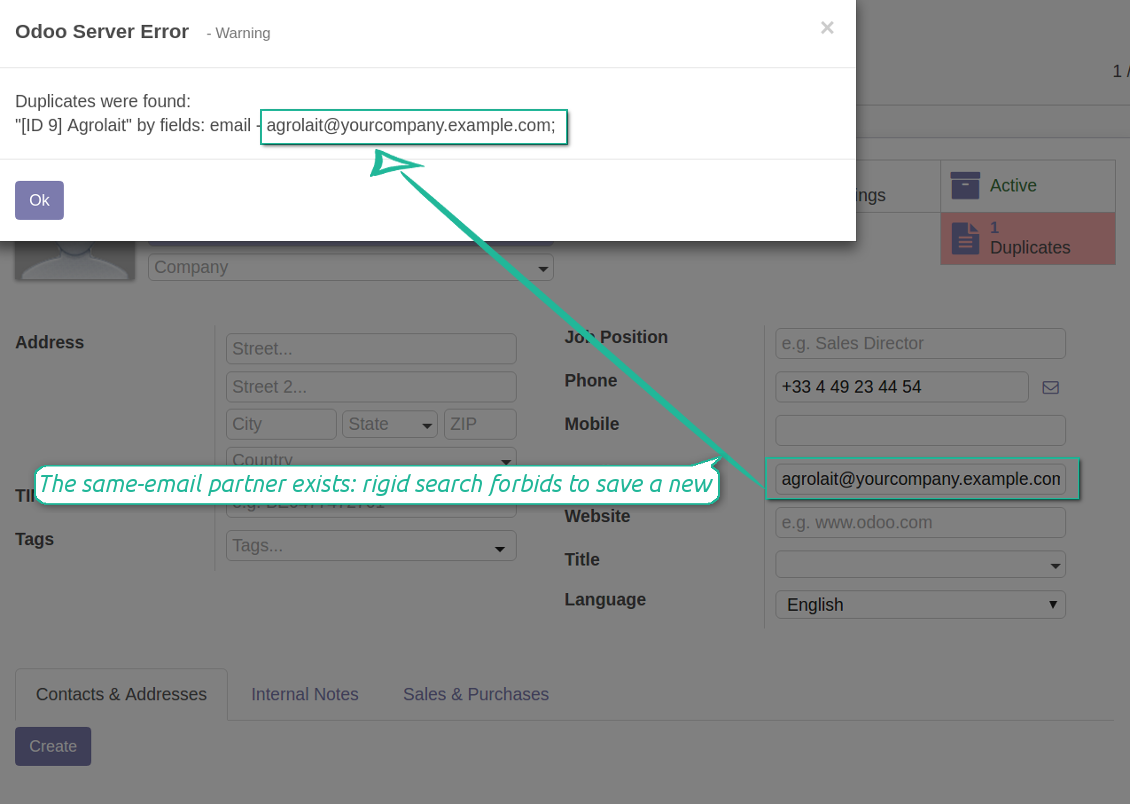
Use soft criteria to warn salespersons of possible duplicates but not restrict them in such duplicates creation. An instance access to potential duplicates is available from form and kanban views.
截图
Users can't save a partner if there is a rigid duplicate found
Warn salespersons of possible contact duplicates
Compatible with Odoo standard features
Found partners' duplicates might be merged through the standard Odoo merging tool.
Very satisfied, ideal tool for real and potential duplicates
We use it on Odoo V12 enterprise with our helpdesk application and we can easily manage potential and real duplicates ! Thanks you to Odoo Tools
相关常见问题 Contacts Duplicates Real Time Search Odoo v.12
您的工具的更新政策是什么?
根据当前 Odoo Apps Store 政策:
- 为 12.0 及更早版本购买的每个模块,均可使用直至 12.0 的所有版本。
- 从 13.0 起,每个模块版本需单独购买。
- 无论版本如何,购买工具即获得该主版本内的 全部更新和缺陷修复权利。
请注意,faOtools 团队不控制这些政策。如有疑问,请直接联系 Odoo Apps Store 代表。
如何在 Odoo.sh 上安装您的应用?
最直接的做法是使用 Odoo 商店的内置流程:
1. 打开模块页面并点击 Deploy on odoo.sh 按钮
2. 之后会跳转到 GitHub 页面。登录帐户,然后点击 'Create a new repo' 或使用现有仓库。请确保仓库为私有。不得以 OPL-1 许可公开发布应用。如有需要,为 Odoo.sh 项目新建 repo
3. 然后转到 odoo.sh 并点击 Deploy 按钮。在弹出窗口中提交决定并点击 'Continue.' 这将触发安装过程。
这些步骤会将应用安装到项目的生产分支。若要部署到其他分支或更新模块,请执行以下操作:
1. 从 Odoo 商店上传应用的源代码
2. 将模块提交到所需的 GitHub 仓库。确保没有任何应用文件夹/文件被忽略(即未列入 repo 的 .gitignore)。仓库由 odoo.sh 自动创建,默认可能包含关键项(例如 /lib)。应上传模块的全部目录、子目录和文件,不得遗漏
3. 部署 odoo.sh 项目的目标分支,或在设置如此假定时 等待其自动构建。
应如何在自己的服务器上安装您的应用?
2. 重新启动 Odoo 服务器;
3. 打开开发者模式(技术设置);
4. 更新应用列表(应用菜单);
5. 找到应用并点击“Activate”/“Install”;
6. 如应用页面有指南,请按指南操作。
我注意到您的应用有额外附加模块。可以之后再购买吗?
可以。同时 Odoo 会自动把所有依赖加入购物车,因此应排除已购买的工具以免重复付款。
我在 Odoo.sh 上部署了您的应用,测试中出现警告/错误
红/橙色警告不影响应用功能。遗憾的是,标准自动测试有时假定与本应用目标冲突的行为,因此我们的模块会未通过。例如我们改了价格计算,而标准 Odoo 模块测试把最终价格与标准算法比较。
请先检查已部署数据库的功能。是否都正常?
若仍认为该警告影响真实功能,请联系我们并转发完整安装日志以及已部署模块的完整清单(含核心与第三方)。
我可以直接向贵公司购买应用吗?
不,我们只通过 官方 Odoo 应用商店.
希望获得折扣
很遗憾,我们没有技术手段 提供单独报价。
我可以在 Odoo Online (SaaS) 数据库上安装该应用吗?
不能,第三方应用无法在 Odoo Online 上使用。遗憾的是 Odoo SaaS 会阻止这种可能。
您的工具依赖其他应用。我需要购买那些应用吗?
是的,工具需要依赖中列出的全部模块才能正常工作。应用页上的价格已包含所有必要依赖。
该模块的美元价格是多少?为什么变了?
我们的模块价格以欧元标价。Odoo 商店按内部汇率换成其他货币。因此美元价格可能随汇率更新而变化。
非英语的应用和网站措辞由 AI 辅助 并与官方 Odoo 翻译对齐。若发现错误, 发送翻译正确性工单 我们会修好。
缺陷反馈
如遇缺陷或不一致行为,请随时联系我们。我们保证在购买后 60 天内提供修复,并在此期限后仍积极改进工具。
联系我们无需电话号码或信用卡。只需完成不超过 30 秒的简短电子邮件注册。
请在请求中尽可能提供详细信息:截图、Odoo 服务器日志、完整的问题复现说明等。通常需要几个工作日来准备问题的工作计划(若确认是缺陷)或提供应采取的指引(否则)。
公开功能请求与模块构想(免费开发)
我们非常希望改进工具,并感谢任何反馈。若您的需求具有普遍价值且能高效实现,团队会将其列入待办清单。
此类待办清单会定期处理,不产生额外费用。虽然我们无法承诺截止日期和最终设计,但这可能是在无投入、无风险的情况下获得所需功能的好办法。
联系我们无需电话号码或信用卡。只需完成不超过 30 秒的简短电子邮件注册。

用于将 Odoo 附件灵活归入文件夹并将目录与云客户端同步的工具:Google Drive、OneDrive/SharePoint、Nextcloud/ownCloud、Dropbox、Amazon S3、Box 和 NAS。DMS。文件管理器。文档管理系统
398€






