Product Management Interface v.17
The tool to search, select and mass update product templates
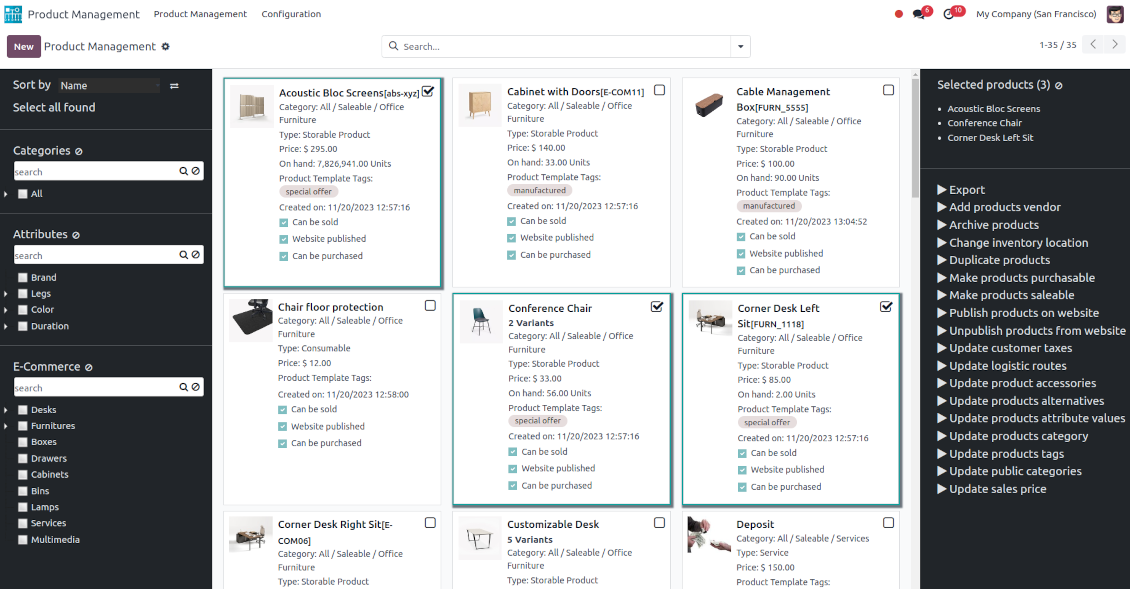
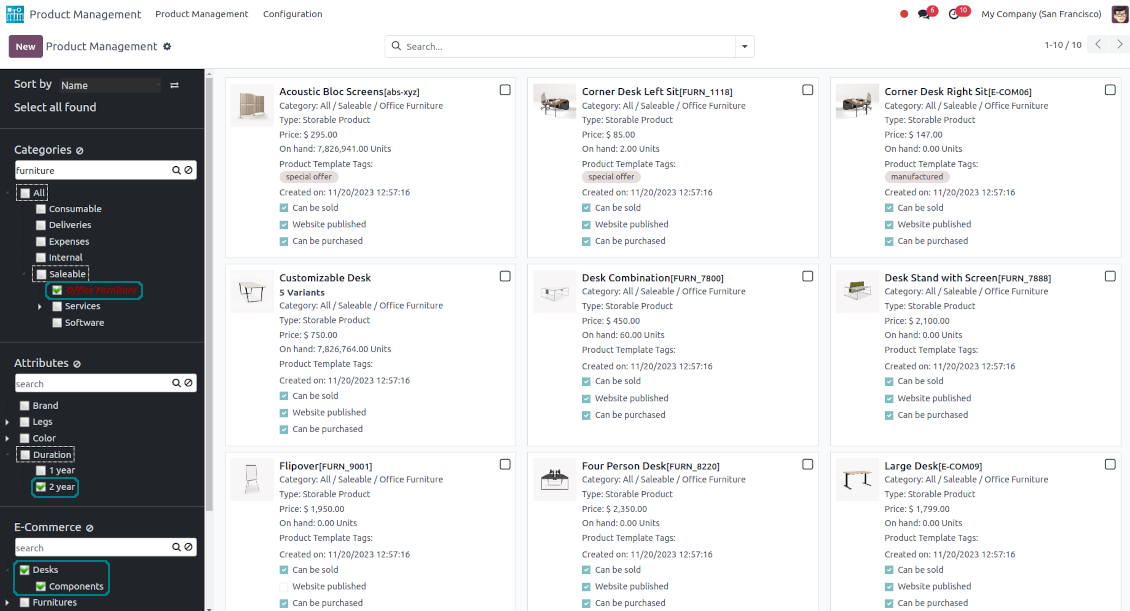
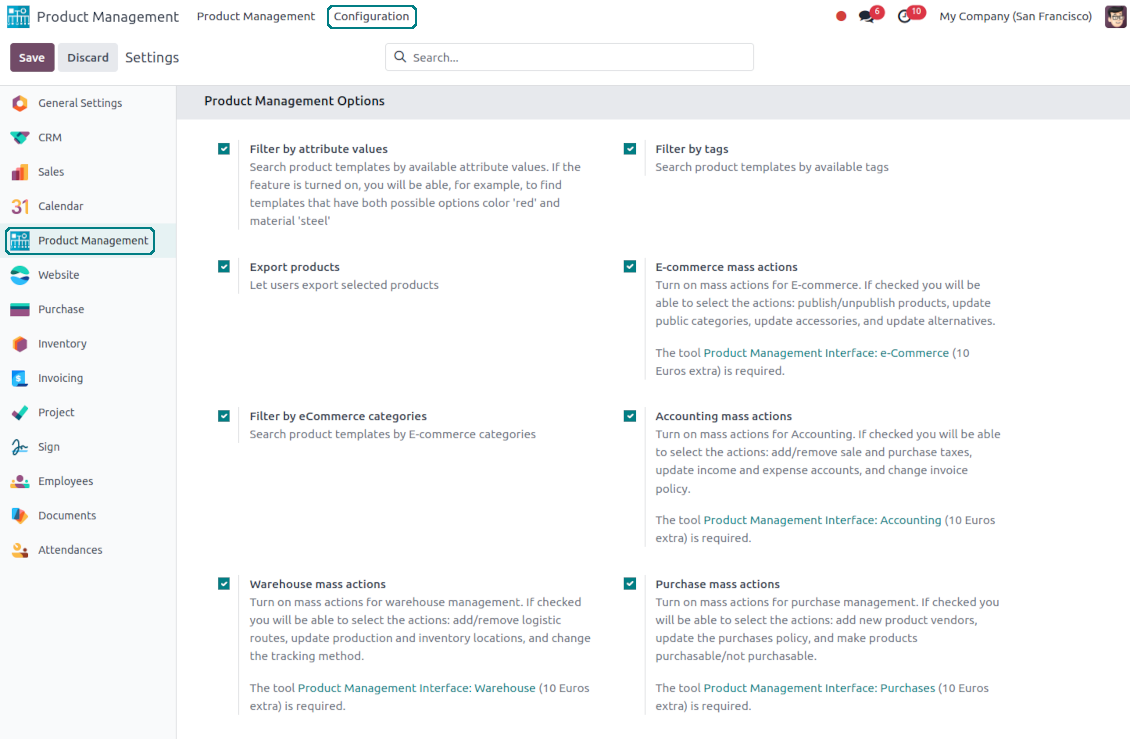
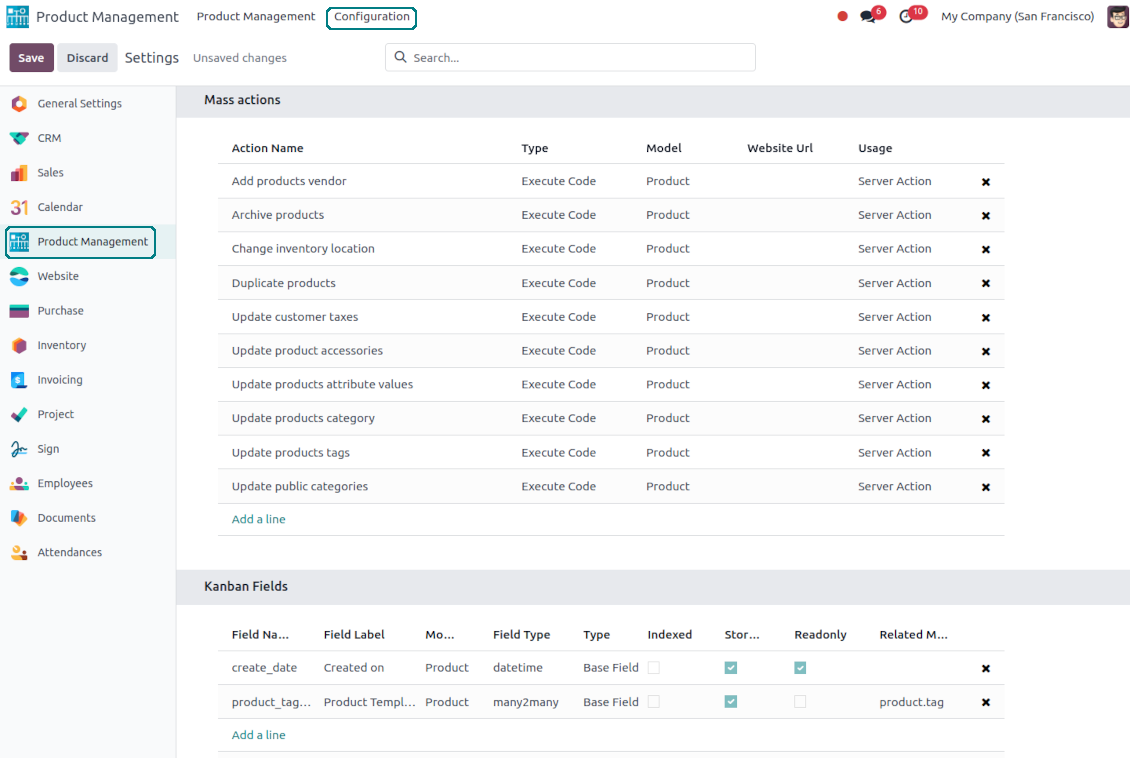
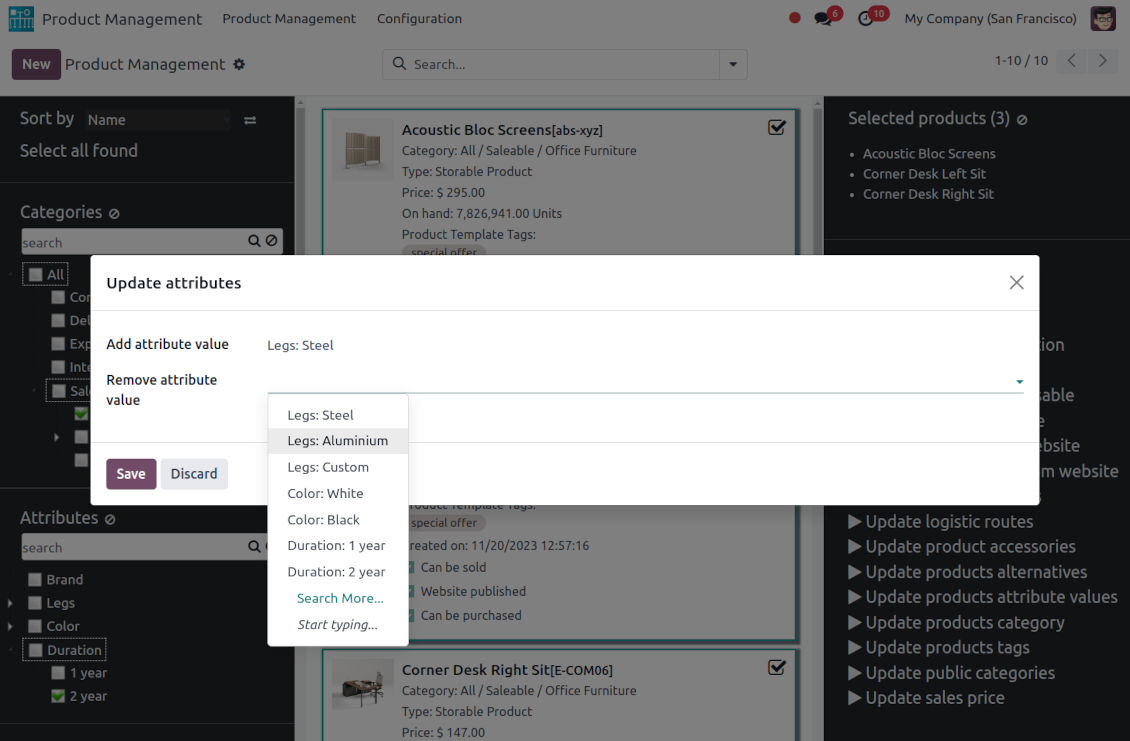
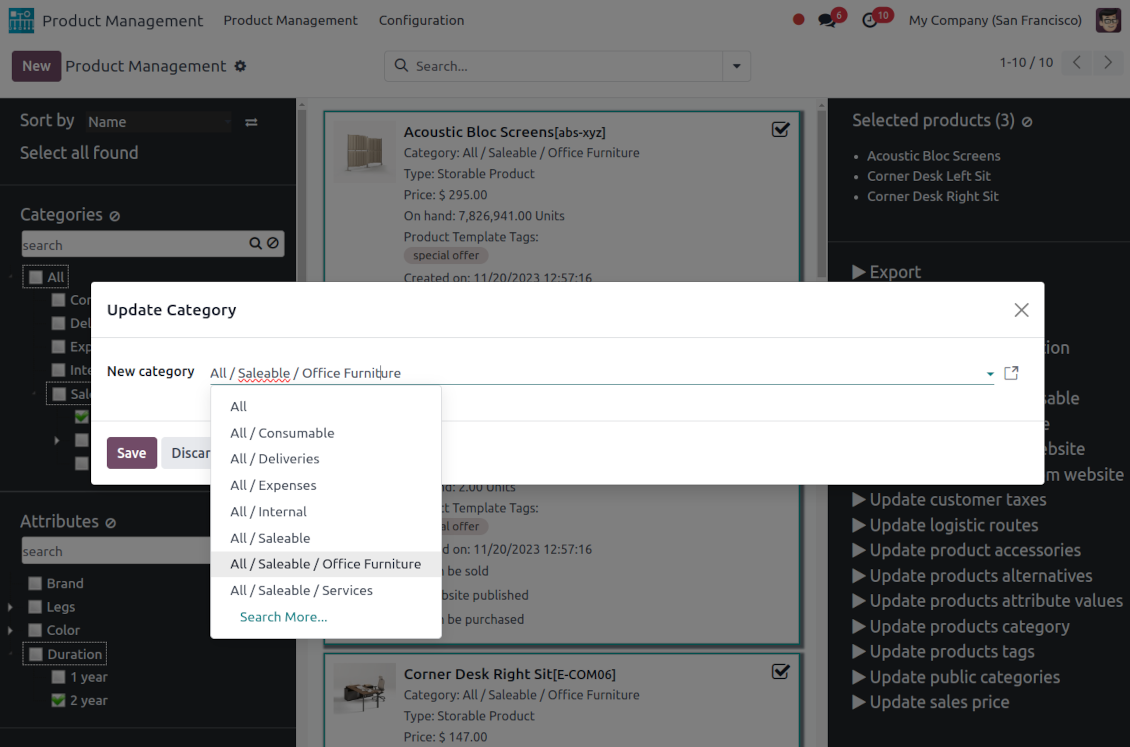
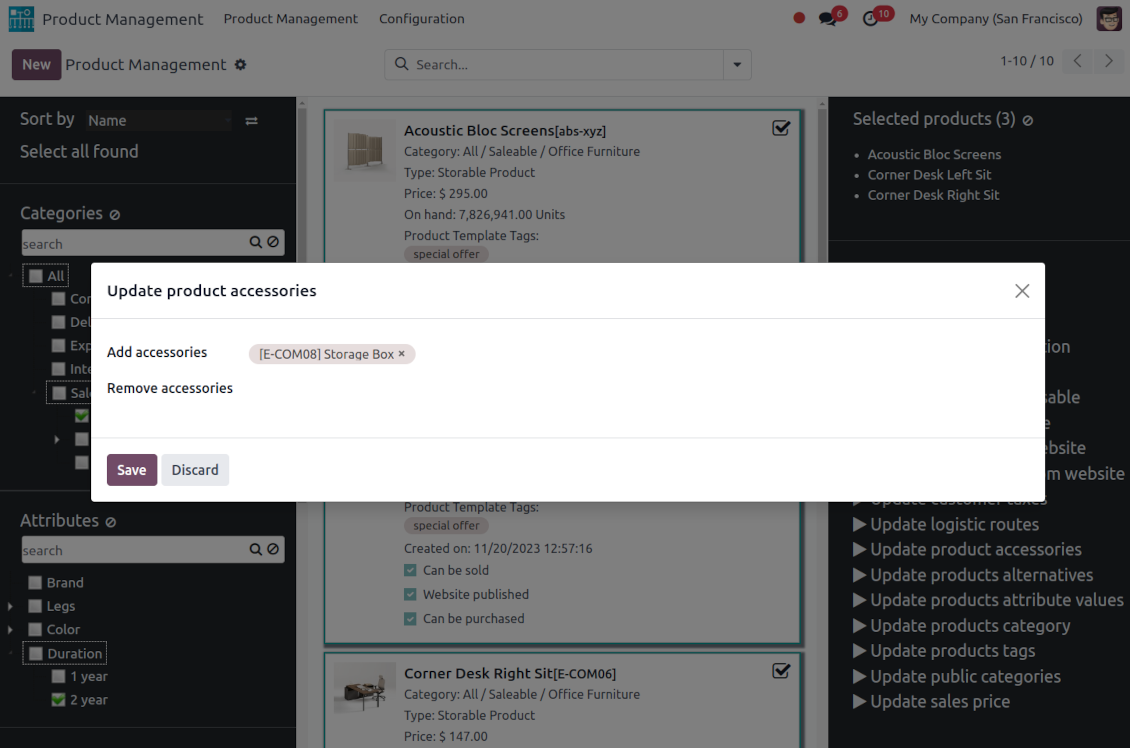
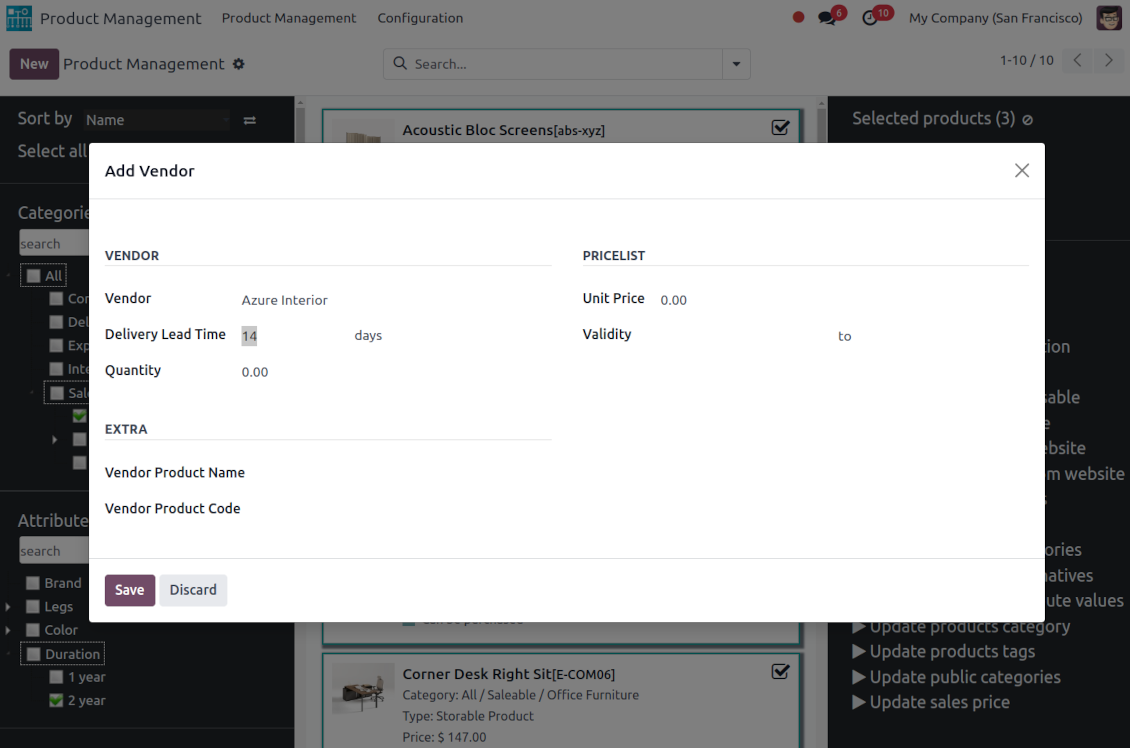
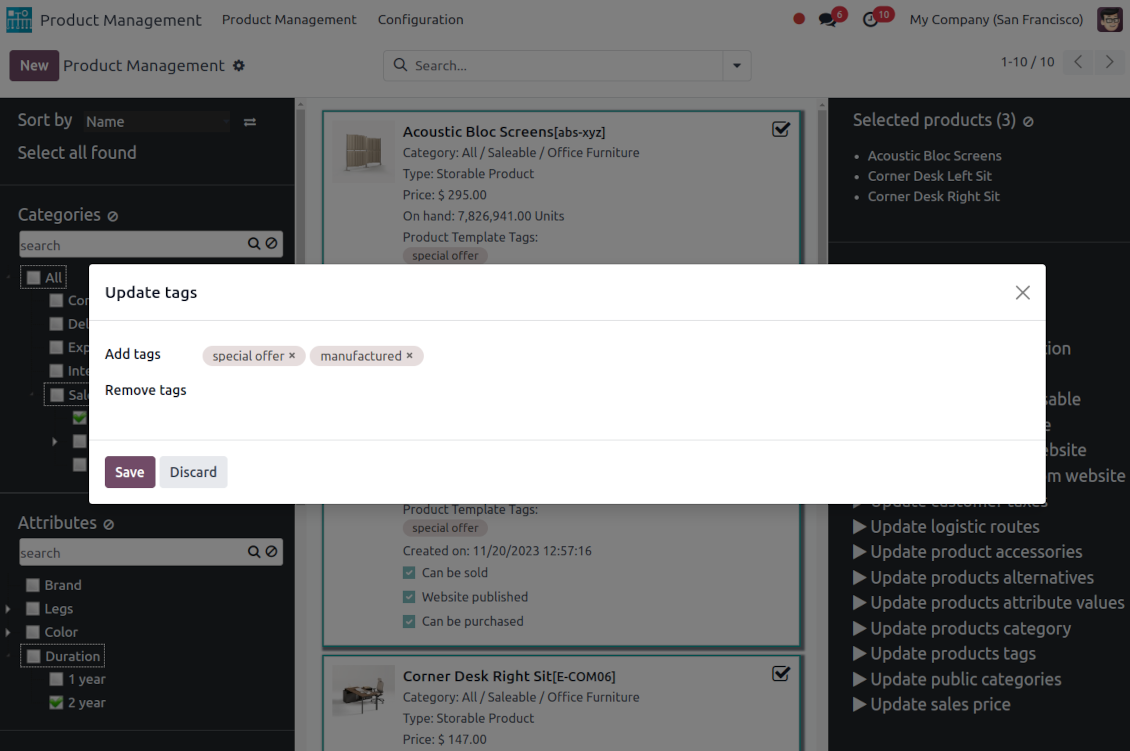
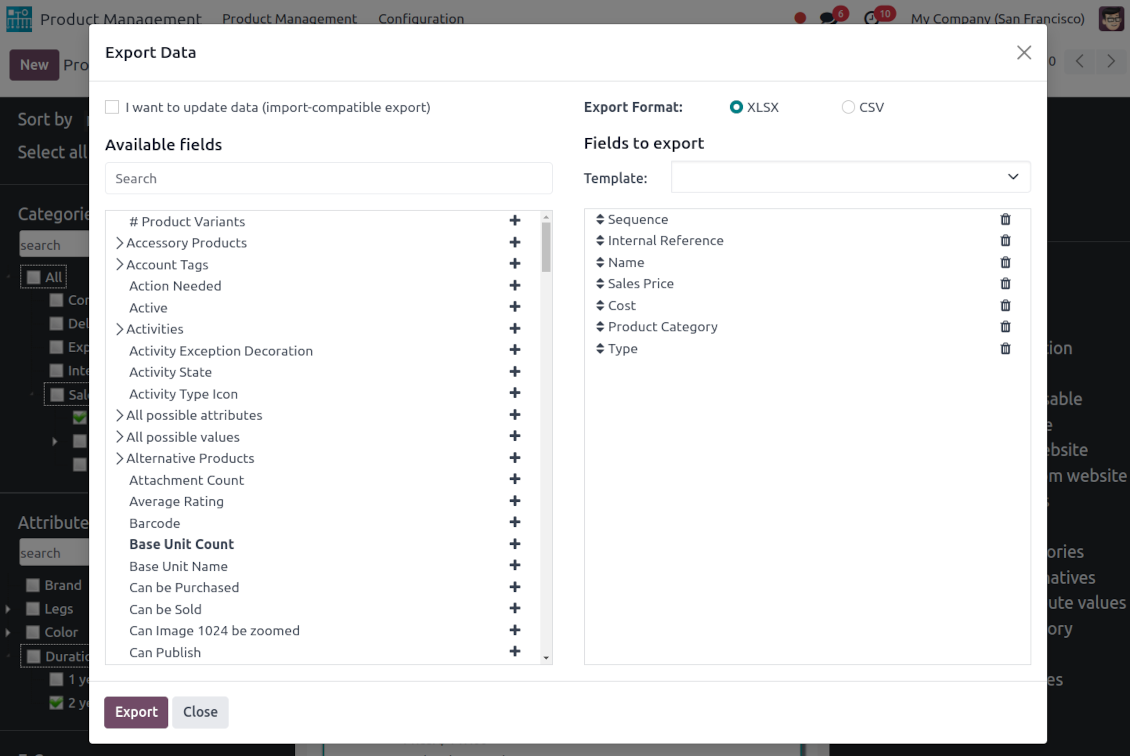
This is an Odoo product management tool that aims to improve catalog administration and simplify the implementation of changes. The app introduces an innovative interface to search, analyze, select, and mass edit Odoo product templates.
- the core app. It might be used stand-alone as a system to find, pick up, and update basic product fields.
Dess pris är
198€
178€.
- the optional module, which introduces mass product actions to change E-shop-related attributes. The features assumed by this add-on are marked by the icon .
Dess pris är
10€
9€.
- the optional module to update batch warehouse characteristics of product templates. The features assumed by this add-on are marked by the icon .
Dess pris är
10€
9€.
- the optional module to manage accounting traits of products in bulk. The features assumed by this add-on are marked by the icon .
Dess pris är
10€
9€.
- the optional module offering mass actions on purchase columns of products. The features assumed by this add-on are marked by the icon .
Dess pris är
10€
9€.
Comfortable navigation
Filter products by the hierarchy of categories: select one or a few ones.
Systematize products by attributes: e.g. find both white and metal templates.
Navigate by e-commerce categories
Structure catalog by Odoo product tags.
Single view interface
Sort product templates by name, reference, category, type, and price.
Apply to standard Odoo search.
Click on an image to open a product form; on a card - to add it for selection
Efficient multi-selection and mass update
Pick products up step by step: the selection is not cleared with a new search or when you opened a record. Proceed mass action(s) for all chosen templates
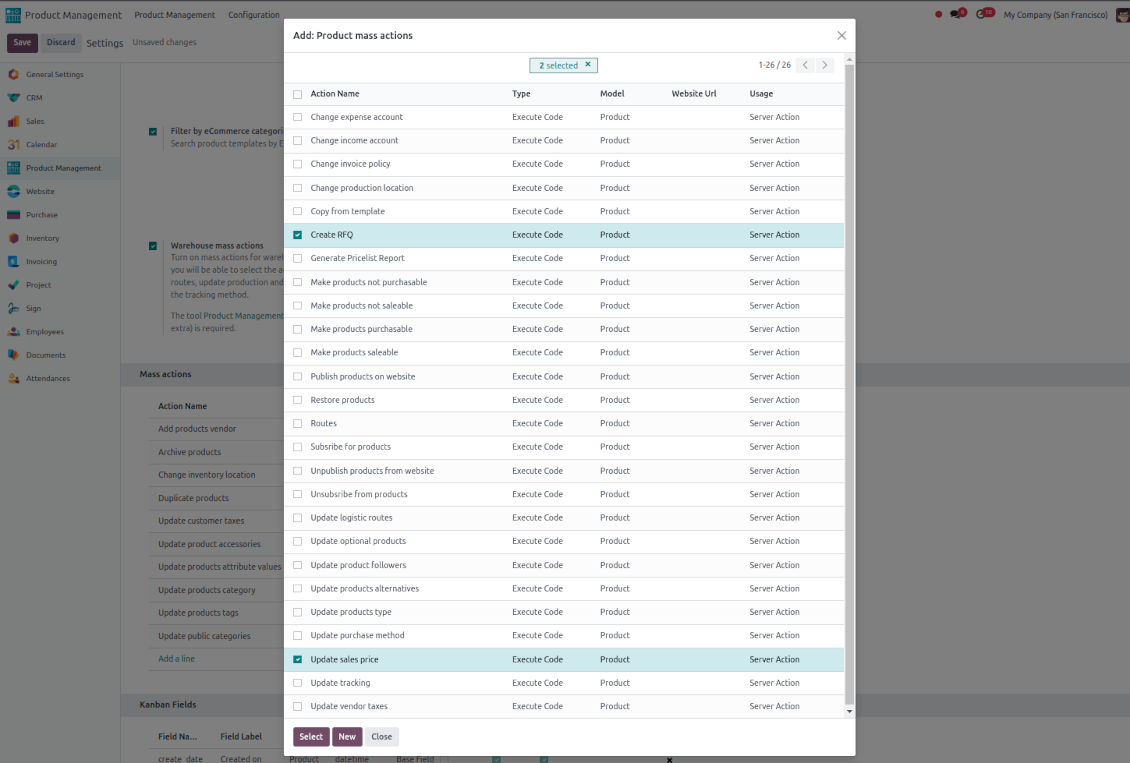
Configurable list of mass actions
Define which mass operations are available from a predefined list or prepare your own server actions. Just a few clicks to update the category, add attribute values, withdraw from sales, change price ...
Drag and drop to update
Drop selected products to the left navigation panel to change their internal category, assign new attribute values, and add tags and public categories
Customizable kanban view
Add any product template fields for kanban cards for an instant overview.
Secured interface and actions
The interface is restricted for the user group Product Management > Product Manager. A user must also have rights for product management (e.g. sales, warehouse, or purchase manager).
Fantastic module
This module earned itself back in the first day, a must have when working with lots of products. A minor issue with product attributes was solved within 12h, great service.
A life-changer ... and a massive time saver!
Fantastic app ... Provides a whole new view of your product database, nicely presented in editable kanban view, with the ability to filter and sort in various ways and combinations, I guess depending on the $10 add-ons you buy, and then perform mass updates and product changes, all controlled through a very simple and self-explanatory configuration. I only just installed the app but it immediately highlighted to me that I had some products that had somehow been duplicated - even though I thought I had changed the code to prevent that. But more importantly, from here you can get a nice quick overview of your products, their attributes, pricing, etc. You can easily add and delete fields to the kanban overview. And then you can easily select which records your want to update, amend or export, either individually or using 'select all' and then perform your changes in bulk at the click of a couple of buttons. Possibly you can do all these things in standard Odoo (although I'm not so sure you can) but it would take you ten times as long and involve many more steps - most probably with data export and re-import. This app cuts out all the messing around and makes life quick simple. I feel sure this app is going to make my product management so much quicker and simpler in future ! Highly recommended.
Works nice
I find it quite nice module for product management. After the enhancement of not requiring to click exactly on the checkbox it became convenient and fast to use for standard intended functions. Thanks guys!
Configurable mass actions for product templates
Mass actions are operations that might be proceeded for a number of product templates in batch. The tool offers multiple default actions, among which you can select the required ones.
-
Add/remove an attribute value to all found templates
-
Change the Odoo product category of all selected items
-
Copy any values from the master product template
-
Add/remove tags of multiple products
-
Archive products in bulk / Restore selected products that have been previously archived
-
Export chosen items (the setting 'Export products' should be turned on)
-
Mass update sales price of Odoo product templates
-
Mass edit product type (consumable, service, storable)
-
Publish or unpublish products in batch
-
Update products to be salable / not salable
-
Update products to be purchasable / not purchasable
-
Add/remove public E-shop categories of selected templates
-
Add/remove products' alternatives
-
Add/remove products' accessories
-
Add/remove optional products (the Sales Product Configurator module should be installed)
-
Assign a new vendor to product templates in bulk and make this supplier the most prioritized
-
Add products (the first possible purchaseable combination if exists) to a new RFQ
-
Add/remove logistic routes
-
Modify invoice policy ('Ordered quantities', 'Delivered quantities')
-
Duplicate a few product templates simultaneously
-
Add/remove customer taxes
-
Add/remove vendor taxes
-
Subscribe to / unsubscribe from products discussions
-
Add/remove product templates' followers
-
Update purchase method ('On ordered quantities', 'On received quantities')
-
Update tracking method ('By Unique Serial Number', 'By Lots', 'No Tracking')
-
Change income account of product templates
-
Change expense account of product templates
-
Change inventory location
-
Change production location
Besides the list above you can also prepare your own mass actions. Look at the 'Guidelines' tab.
Konfigurations- och installationstips för Product Management Interface Odoo v.17
Mass actions for product templates
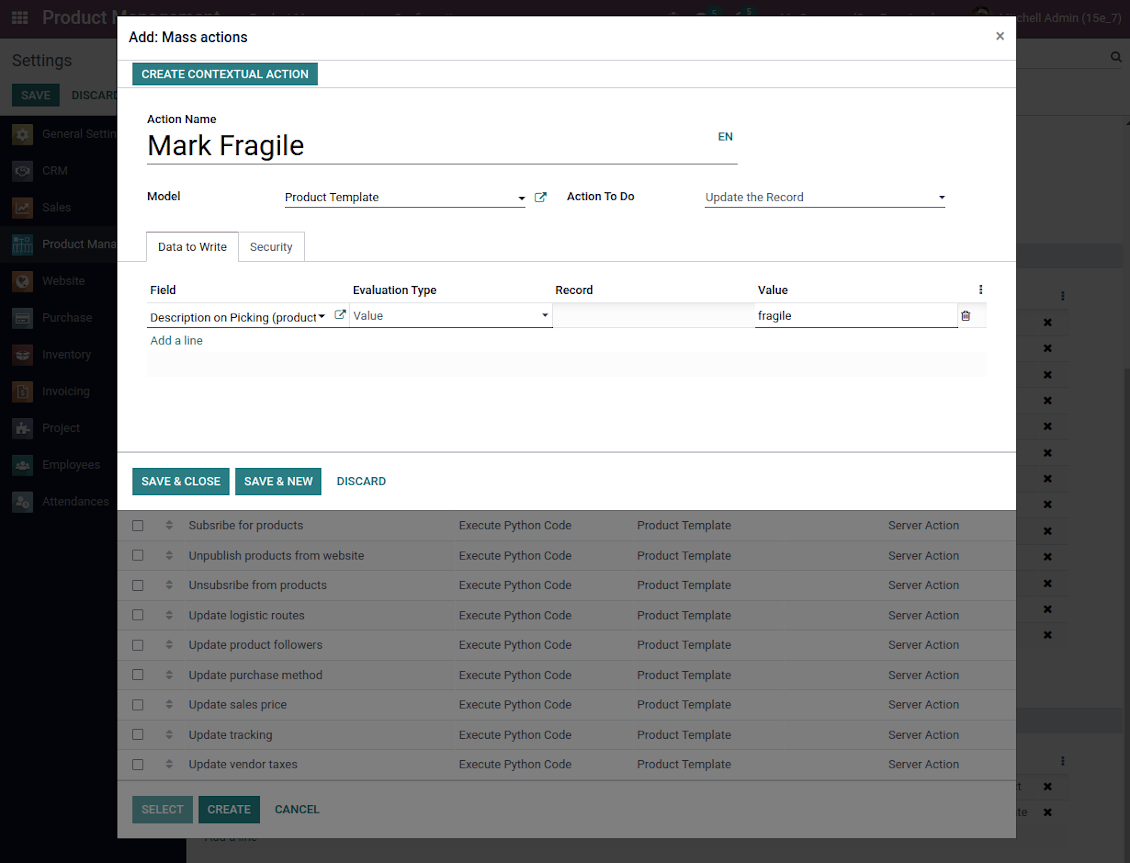
Batch actions for product templates are based on Odoo server actions. It means that you may add custom mass editing operations. Take into account the following peculiarities:
- As a model always use 'Product Template'. Otherwise your action will not be displayed in the list of operations
- In case you want to return a wizard, such a wizard should not have a footer (only standard buttons) and should have an explicitly specified view_id. Look for examples in any module of the Product Management Bundle
Example of custom mass action
Vanliga frågor om Product Management Interface Odoo v.17
Efter produktvalet sparas urvalet nar jag byter sida. Hur aterstaller jag det snabbt?
I hogerafaltet klickar du pa produktens titel for att ta bort den. Alla tas bort med ikonen 'Reset' till höger om 'Selected products'.
Vilka uppdateringsregler gäller for era verktyg?
Enligt de aktuella reglerna for Odoo Apps Store:
- Varje modul kop for version 12.0 eller tidigare ger tillgang till alla versioner upp till 12.0.
- Från och med version 13.0 måste varje modulversion kopas separat.
- Oavsett version ger kopet rätt till alla uppdateringar och felrättningar inom en huvudversion.
faOtools-teamet styr inte dessa regler. Vid frågor, kontakta representanterna for Odoo Apps Store direkt.
Hur installerar jag er app pa Odoo.sh?
Det mest direkta sättet ar Odoo-butikens inbyggda flöde:
1. Öppna modulens sida och klicka pa Deploy on odoo.sh
2. Du omdirigeras till GitHub. Logga in och klicka pa Create a new repo eller använd ett befintligt. Repot måste vara privat. Appar under OPL-1 far inte publiceras. Skapa vid behov ett nytt repo for Odoo.sh-projektet
3. Ga sedan till odoo.sh, klicka pa Deploy, bekräfta och klicka pa Continue. Installationen startar.
Stegen installerar appen pa production-grenen. For andra grenar eller uppdatering:
1. Ladda ner kallkoden från Odoo-butiken
2. Committa modulen till GitHub-repot. Ingen app-mapp/fil far sta i .gitignore. Repon som odoo.sh skapar kan ignorera viktiga sokvagar (t.ex. /lib). Ladda upp alla modulmappar och filer
3. Deploya malgrenen i odoo.sh-projektet eller vänta pa den automatiska builden om inställningarna anger det.
Hur installerar jag er app pa min egen server?
2. Starta om Odoo-servern;
3. Sla pa utvecklarlaget (tekniska inställningar);
4. Uppdatera applistan (Appar-menyn);
5. Hitta appen och klicka pa Activate/Install;
6. Följ anvisningarna pa appsidan om det finns någon.
Er app har extra tillägg. Kan jag kopa dem senare?
Ja. Odoo lägger automatiskt alla beroenden i varukorgen: uteslut redan kopta verktyg sa att du inte betalar tva gånger.
Jag deployade er app pa Odoo.sh och ser en varning/ett fel i testerna
En rod/orange varning påverkar inte appens funktioner. Ibland klarar vara moduler inte de vanliga automatiska testerna, eftersom de förväntar ett beteende som strider mot appens mal. Vi ändrar till exempel prisberakningen, medan Odoo-testerna jämför slutpriset med standardalgoritmen.
Kontrollera först funktionerna i den deployade databasen. Fungerar allt?
Om du ändå tror att varningen påverkar verkliga funktioner, kontakta oss och skicka de fullständiga installationsloggarna och den fullständiga listan över deployade moduler (karn och tredje part).
Kan jag kopa er app direkt av er?
Nej, vi distribuerar verktygen endast via den officiella Odoo-appbutiken.
Jag vill ha rabatt
Tyvärr har vi inte tekniska möjligheter att erbjuda individuella priser.
Kan jag installera appen pa min Odoo Online (SaaS)-databas?
Nej, tredjepartsappar kan inte användas pa Odoo Online. Odoo SaaS blockerar den möjligheten.
Ert verktyg beror pa andra appar. Behöver jag kopa dem?
Ja, verktyget behöver alla moduler som anges som beroenden. Priset pa appsidan inkluderar redan dessa beroenden.
Vad kostar modulen i amerikanska dollar? Varför andrades det?
Priset for vara moduler anges i euro. Odoo-butiken konverterar till andra valutor enligt sin interna vaxelkurs. Därför kan priset i amerikanska dollar andras nar kursen uppdateras.
App- och webbplatsformuleringar på andra språk än engelska är AI-assisterade och anpassade till officiella Odoo-översättningar. Om du upptäcker ett fel, skicka ett ärende om översättningskorrekthet så åtgärdar vi det.
Odoo-demodatabaser (liveförhandsvisningar)
För den här appen kan vi erbjuda en gratis personlig demodatabas.
Du behöver varken telefonnummer eller kreditkort för att kontakta oss. Det räcker med en kort e-postregistrering som tar högst 30 sekunder.
På din begäran förbereder vi en individuell liveförhandsvisningsdatabas där du kan göra tester och kontrollera antaganden i cirka två veckor.
Felrapportering
Om du stöter på fel eller inkonsekvent beteende, kontakta oss. Vi garanterar rättningar inom 60 dagar efter köpet och vill förbättra verktygen även efter det.
Du behöver varken telefonnummer eller kreditkort för att kontakta oss. Det räcker med en kort e-postregistrering som tar högst 30 sekunder.
Ta med så många detaljer som möjligt: skärmbilder, Odoo-serverloggar och en fullständig beskrivning av hur problemet återskapas. Det tar vanligtvis några arbetsdagar att ta fram en arbetsplan (om felet bekräftas) eller riktlinjer (annars).
Offentliga funktionsönskemål och modulidéer (gratis utveckling)
Vi är starkt motiverade att förbättra våra verktyg och tackar för all feedback. Om kraven är av allmänt intresse och kan implementeras effektivt tar teamet med dem i att-göra-listan.
En sådan att göra-lista behandlas regelbundet och innebär inga extraavgifter. Även om vi inte kan lova tidsfrister och slutlig design kan det vara ett bra sätt att få önskade funktioner utan investeringar och risker.
Du behöver varken telefonnummer eller kreditkort för att kontakta oss. Det räcker med en kort e-postregistrering som tar högst 30 sekunder.
17.0.1.0.12
- The mass action to add and remove values now allows the selection of multiple items.
17.0.1.0.11
- Scenariot när hierarkielement (taggar, attribut, kategorier) inte kunde läggas till när det ännu inte fanns några är åtgärdat.
17.0.1.0.10
- Felaktig uppdatering av produktattributvärden via drag-and-drop är åtgärdad.
17.0.1.0.9
- Drag-and-drop-funktioner för att massuppdatera produkter har införts: lägg till en tagg, uppdatera en kategori och lägg till ett attributvärde.
- Det blev möjligt att skapa produktkategorier, taggar, attribut och attributvärden direkt från den vänstra navigeringspanelen.
- Den valda föräldern i navigationsträden markeras korrekt.
17.0.1.0.8
- Appen är publicerad för version 17.

The tool to flexibly structure Odoo attachments in folders and synchronize directories with cloud clients: Google Drive, OneDrive/SharePoint, Nextcloud/ownCloud, Dropbox, Amazon S3, Box, and NAS. DMS. File Manager. Document management system
398€

The tool to build a deep and structured knowledge base for internal and external use. Knowledge System. KMS. Wiki-like revisions.
398€
The tool to automatically synchronize Odoo attachments with OneDrive files in both ways
487€
The tool to set up KPI targets and control their fulfillment by periods. KPI dashboards. Dashboard designer. KPI charts

The tool for time-based service management from booking appointments to sales and reviews
398€
The tool to automatically synchronize Odoo attachments with Google Drive files in both ways
487€
The tool to configure variant prices based on attributes coefficients and surpluses
98€