Product Management Interface v.17
The tool to search, select and mass update product templates
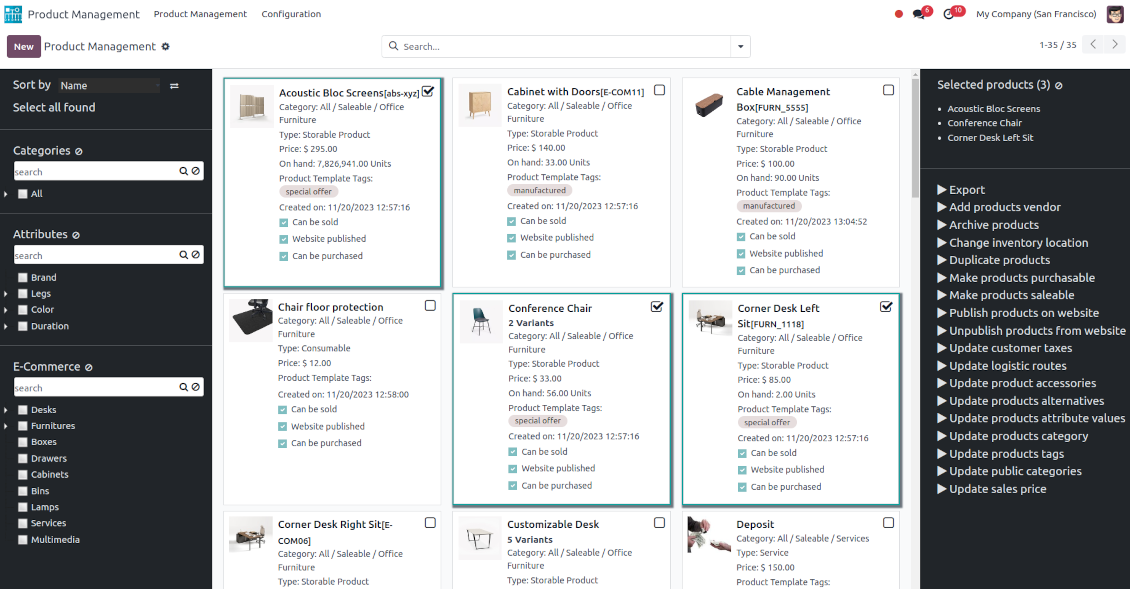
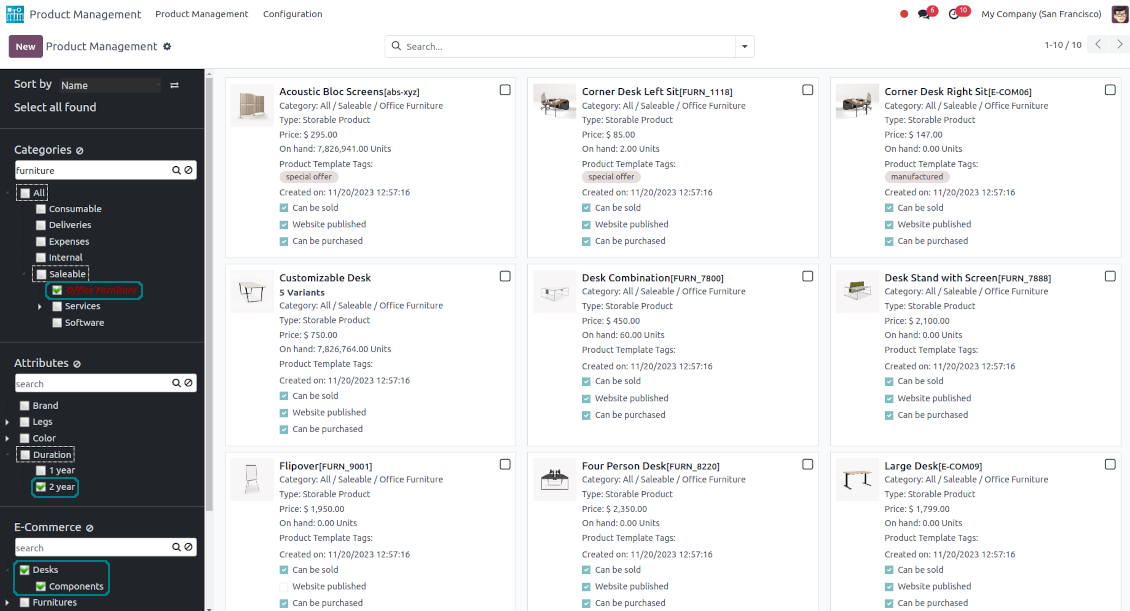
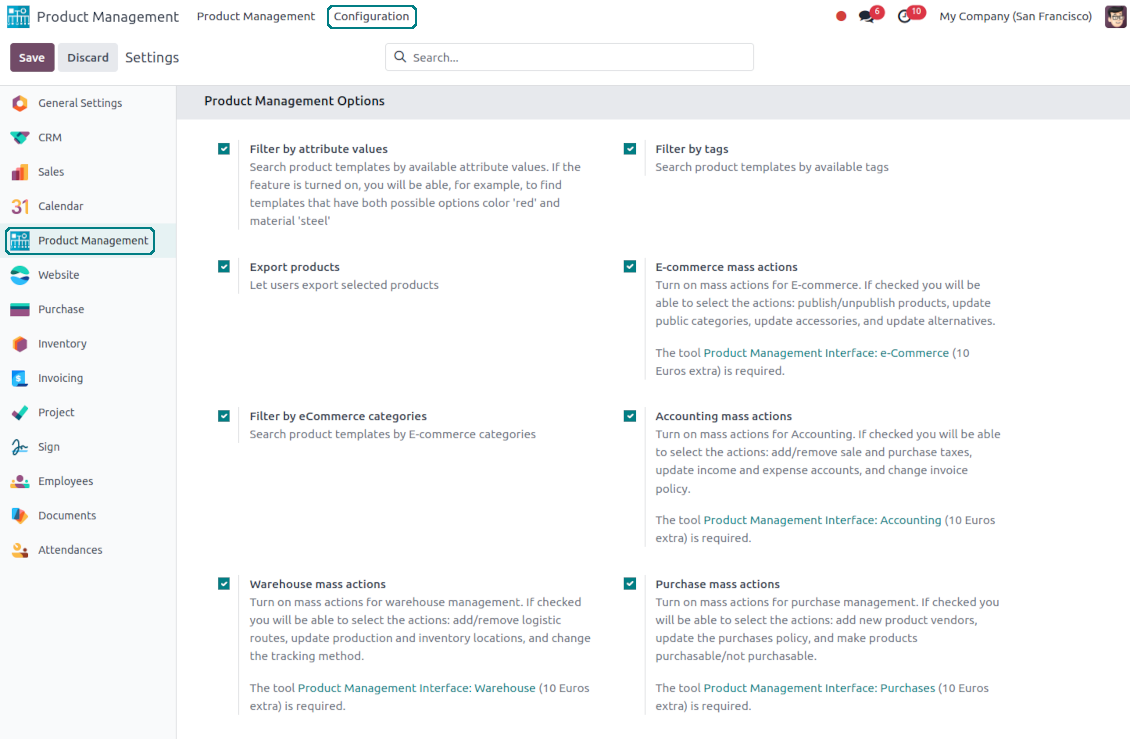
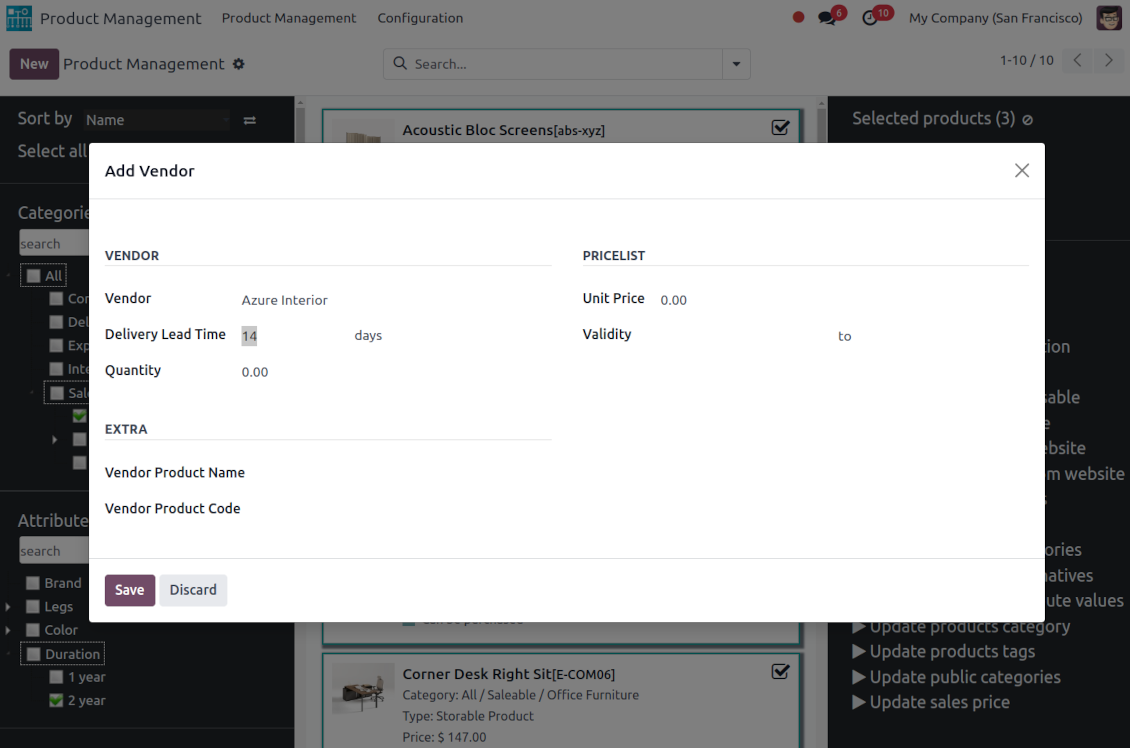
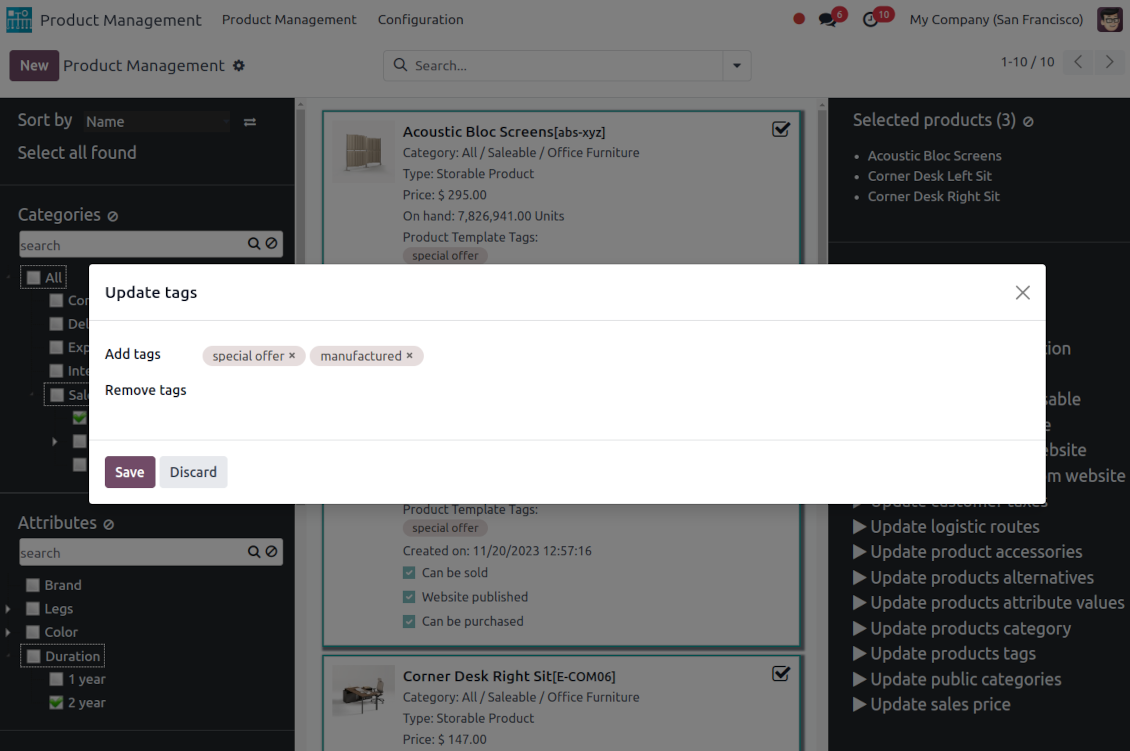
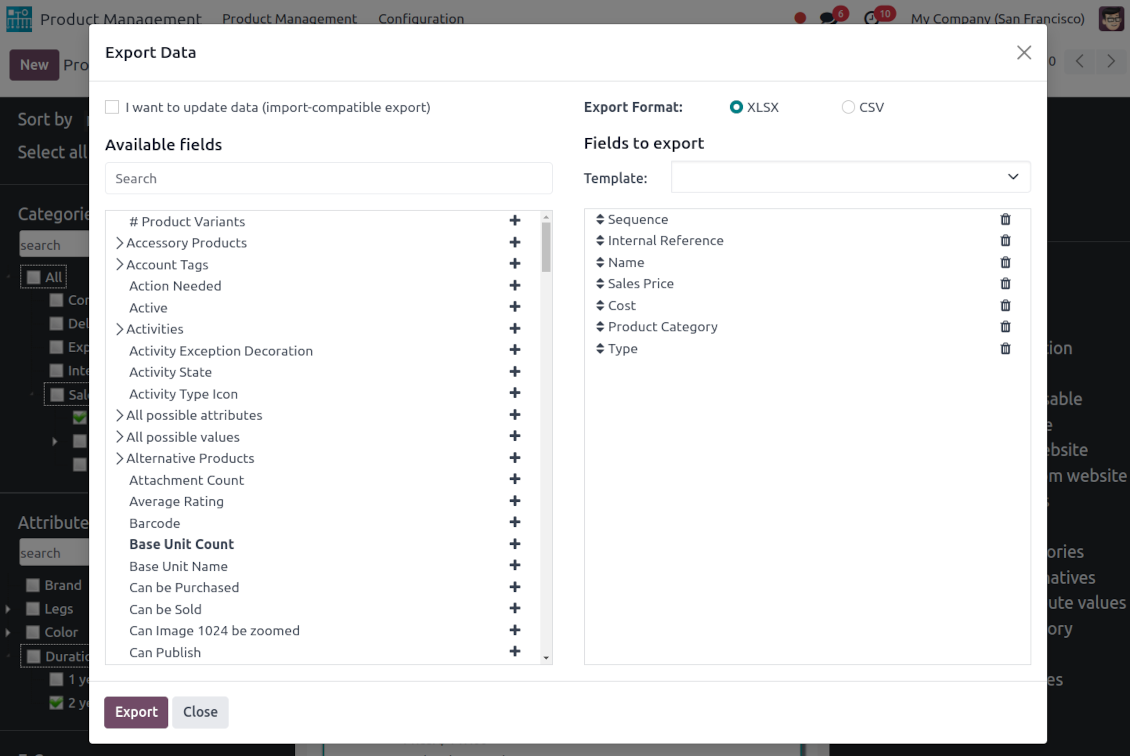
This is an Odoo product management tool that aims to improve catalog administration and simplify the implementation of changes. The app introduces an innovative interface to search, analyze, select, and mass edit Odoo product templates.
- the core app. It might be used stand-alone as a system to find, pick up, and update basic product fields.
Prisen er
198€
178€.
- the optional module, which introduces mass product actions to change E-shop-related attributes. The features assumed by this add-on are marked by the icon .
Prisen er
10€
9€.
- the optional module to update batch warehouse characteristics of product templates. The features assumed by this add-on are marked by the icon .
Prisen er
10€
9€.
- the optional module to manage accounting traits of products in bulk. The features assumed by this add-on are marked by the icon .
Prisen er
10€
9€.
- the optional module offering mass actions on purchase columns of products. The features assumed by this add-on are marked by the icon .
Prisen er
10€
9€.
Comfortable navigation
Filter products by the hierarchy of categories: select one or a few ones.
Systematize products by attributes: e.g. find both white and metal templates.
Navigate by e-commerce categories
Structure catalog by Odoo product tags.
Single view interface
Sort product templates by name, reference, category, type, and price.
Apply to standard Odoo search.
Click on an image to open a product form; on a card - to add it for selection
Efficient multi-selection and mass update
Pick products up step by step: the selection is not cleared with a new search or when you opened a record. Proceed mass action(s) for all chosen templates
Configurable list of mass actions
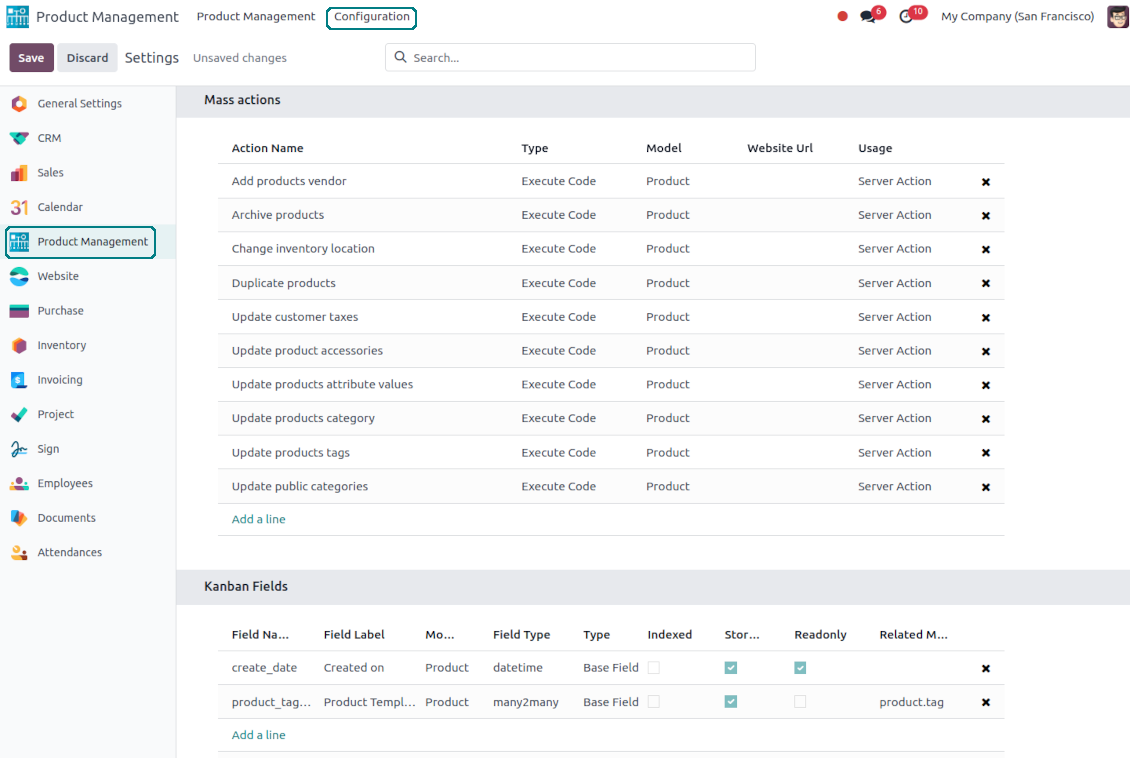
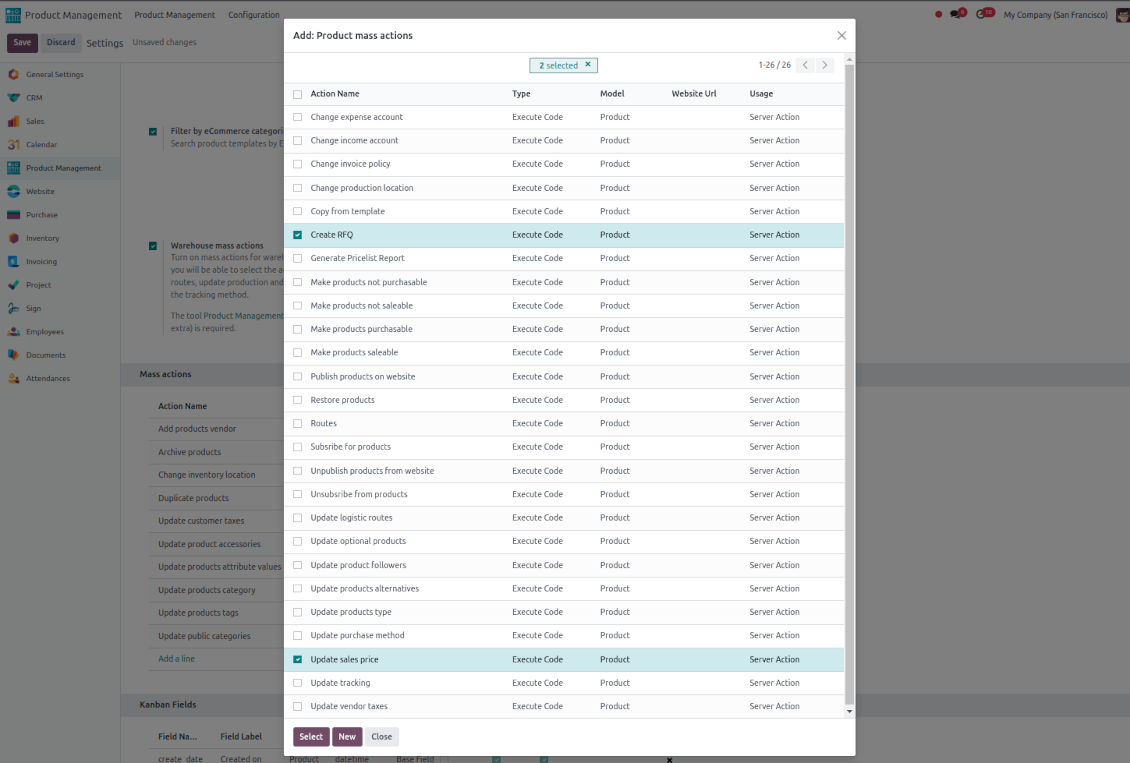
Define which mass operations are available from a predefined list or prepare your own server actions. Just a few clicks to update the category, add attribute values, withdraw from sales, change price ...
Drag and drop to update
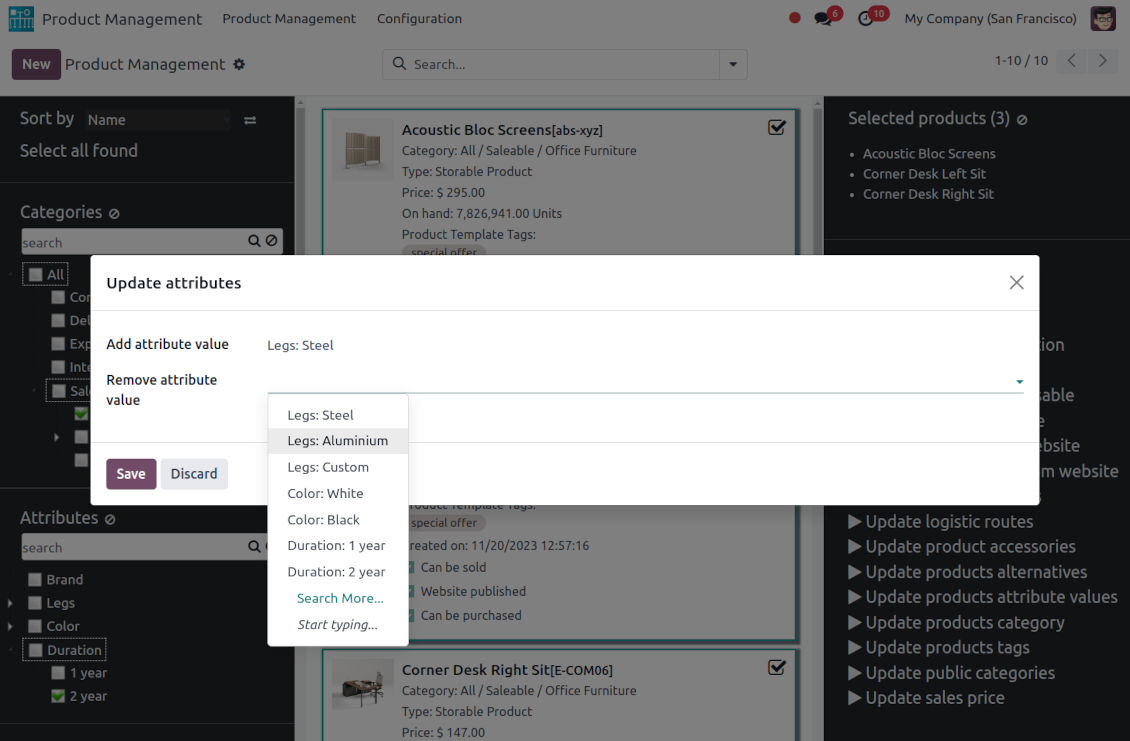
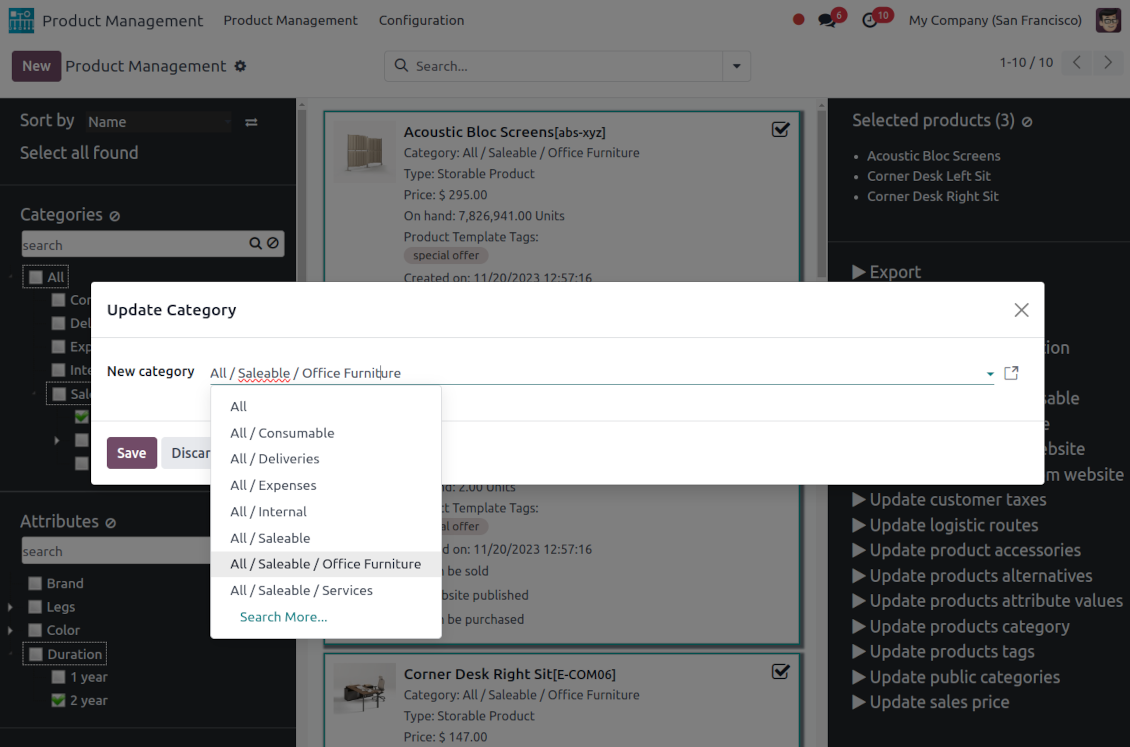
Drop selected products to the left navigation panel to change their internal category, assign new attribute values, and add tags and public categories
Customizable kanban view
Add any product template fields for kanban cards for an instant overview.
Secured interface and actions
The interface is restricted for the user group Product Management > Product Manager. A user must also have rights for product management (e.g. sales, warehouse, or purchase manager).
Fantastic module
This module earned itself back in the first day, a must have when working with lots of products. A minor issue with product attributes was solved within 12h, great service.
A life-changer ... and a massive time saver!
Fantastic app ... Provides a whole new view of your product database, nicely presented in editable kanban view, with the ability to filter and sort in various ways and combinations, I guess depending on the $10 add-ons you buy, and then perform mass updates and product changes, all controlled through a very simple and self-explanatory configuration. I only just installed the app but it immediately highlighted to me that I had some products that had somehow been duplicated - even though I thought I had changed the code to prevent that. But more importantly, from here you can get a nice quick overview of your products, their attributes, pricing, etc. You can easily add and delete fields to the kanban overview. And then you can easily select which records your want to update, amend or export, either individually or using 'select all' and then perform your changes in bulk at the click of a couple of buttons. Possibly you can do all these things in standard Odoo (although I'm not so sure you can) but it would take you ten times as long and involve many more steps - most probably with data export and re-import. This app cuts out all the messing around and makes life quick simple. I feel sure this app is going to make my product management so much quicker and simpler in future ! Highly recommended.
Works nice
I find it quite nice module for product management. After the enhancement of not requiring to click exactly on the checkbox it became convenient and fast to use for standard intended functions. Thanks guys!
Configurable mass actions for product templates
Mass actions are operations that might be proceeded for a number of product templates in batch. The tool offers multiple default actions, among which you can select the required ones.
-
Add/remove an attribute value to all found templates
-
Change the Odoo product category of all selected items
-
Copy any values from the master product template
-
Add/remove tags of multiple products
-
Archive products in bulk / Restore selected products that have been previously archived
-
Export chosen items (the setting 'Export products' should be turned on)
-
Mass update sales price of Odoo product templates
-
Mass edit product type (consumable, service, storable)
-
Publish or unpublish products in batch
-
Update products to be salable / not salable
-
Update products to be purchasable / not purchasable
-
Add/remove public E-shop categories of selected templates
-
Add/remove products' alternatives
-
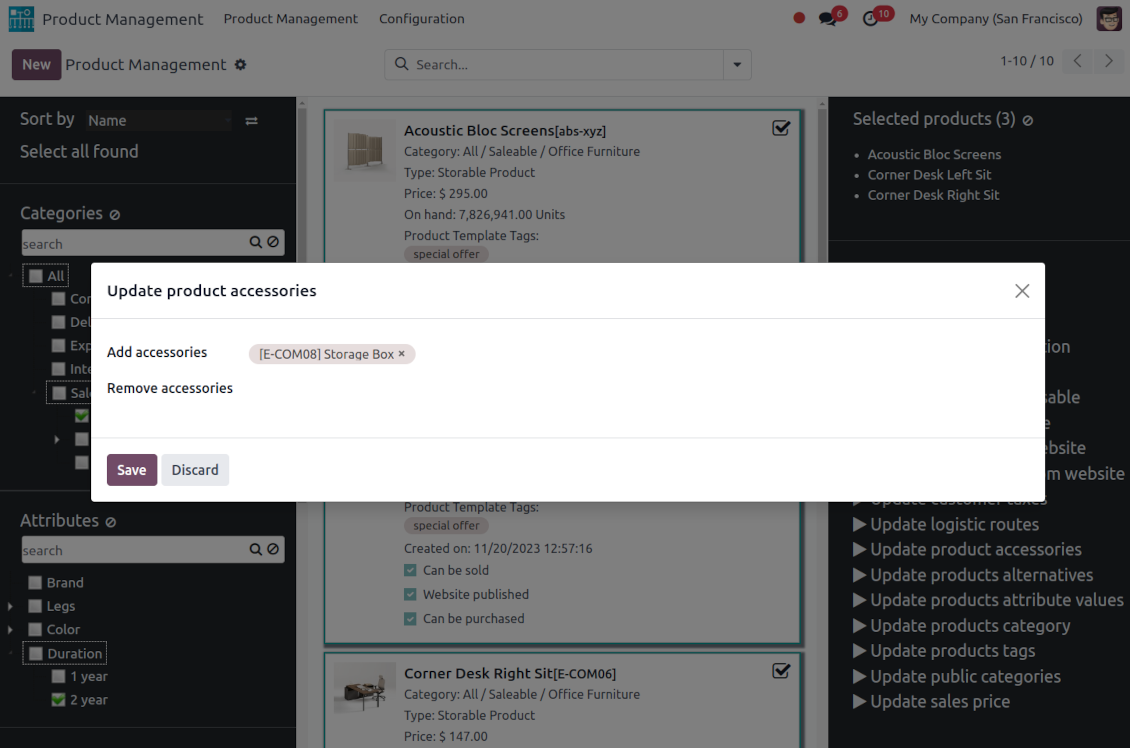
Add/remove products' accessories
-
Add/remove optional products (the Sales Product Configurator module should be installed)
-
Assign a new vendor to product templates in bulk and make this supplier the most prioritized
-
Add products (the first possible purchaseable combination if exists) to a new RFQ
-
Add/remove logistic routes
-
Modify invoice policy ('Ordered quantities', 'Delivered quantities')
-
Duplicate a few product templates simultaneously
-
Add/remove customer taxes
-
Add/remove vendor taxes
-
Subscribe to / unsubscribe from products discussions
-
Add/remove product templates' followers
-
Update purchase method ('On ordered quantities', 'On received quantities')
-
Update tracking method ('By Unique Serial Number', 'By Lots', 'No Tracking')
-
Change income account of product templates
-
Change expense account of product templates
-
Change inventory location
-
Change production location
Besides the list above you can also prepare your own mass actions. Look at the 'Guidelines' tab.
Konfigurasjons- og installasjonstips for Product Management Interface Odoo v.17
Mass actions for product templates
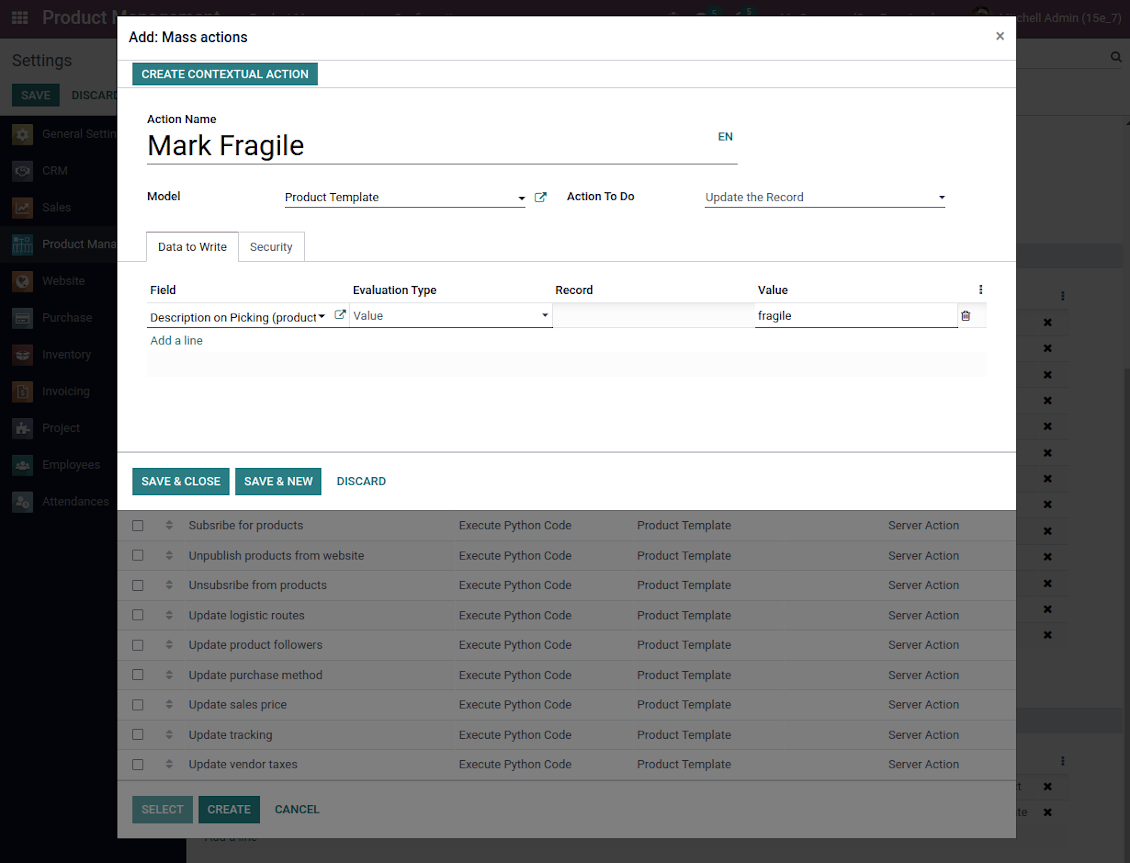
Batch actions for product templates are based on Odoo server actions. It means that you may add custom mass editing operations. Take into account the following peculiarities:
- As a model always use 'Product Template'. Otherwise your action will not be displayed in the list of operations
- In case you want to return a wizard, such a wizard should not have a footer (only standard buttons) and should have an explicitly specified view_id. Look for examples in any module of the Product Management Bundle
Example of custom mass action
Ofte stilte spørsmål om Product Management Interface Odoo v.17
Etter produktvalg beholdes valget nar jeg bytter side. Hvordan nullstiller jeg raskt?
I hoyre omrade klikker du pa produkttittelen for a fjerne den. Alle fjernes med ikonet 'Reset' til hoyre for 'Selected products'.
Hva er oppdateringsreglene for verktoyene deres?
Ifolge gjeldende retningslinjer for Odoo Apps Store:
- Hver modul kjopt for versjon 12.0 eller tidligere gir tilgang til alle versjoner opp til 12.0.
- Fra versjon 13.0 ma hver modulversjon kjopes separat.
- Uavhengig av versjon gir kjop rett til alle oppdateringer og feilrettinger innen en hovedversjon.
faOtools-teamet styrer ikke disse retningslinjene. Ved sporsmal, kontakt Odoo Apps Store-representantene direkte.
Hvordan installerer jeg appen pa Odoo.sh?
Den mest direkte fremgangsmaten er den innebygde arbeidsflyten i Odoo-butikken:
1. Åpne modulens side og klikk pa Deploy on odoo.sh
2. Du blir omdirigert til GitHub. Logg inn og klikk Create a new repo eller bruk et eksisterende. Repet ma vaere privat. Apper under OPL-1 far ikke publiseres. Opprett et nytt repo for Odoo.sh-prosjektet om nodvendig
3. Ga deretter til odoo.sh, klikk Deploy, bekreft og klikk Continue. Installasjonen starter.
Disse trinnene installerer appen pa production-grenen. For andre grener eller oppdatering:
1. Last ned kildekoden fra Odoo-butikken
2. Commit modulen til GitHub-repot. Ingen app-mapper/filer ma sta i .gitignore. Repoer opprettet av odoo.sh kan ignorere viktige stier (f.eks. /lib). Last opp alle modulmapper og -filer
3. Deploy malgrenen i odoo.sh-prosjektet, eller vent pa automatisk bygg hvis innstillingene tilsier det.
Hvordan installerer jeg appen pa min egen server?
2. Start Odoo-serveren pa nytt;
3. Sla pa utviklermodus (tekniske innstillinger);
4. Oppdater applisten (Apper-menyen);
5. Finn appen og trykk pa Activate/Install;
6. Folg retningslinjene pa appsiden hvis de finnes.
Appen har ekstra tillegg. Kan jeg kjope dem senere?
Ja. Odoo legger automatisk alle avhengigheter i handlekurven: utelat allerede kjopte verktoy for a unngå dobbel betaling.
Jeg deployet appen pa Odoo.sh og ser advarsel/feil i testene
En rod/oransje advarsel pavirker ikke appens funksjoner. Noen ganger består ikke modulene vare de vanlige automatiske testene, fordi de forventer atferd som er i konflikt med appens mal. Vi endrer for eksempel prisberegningen, mens Odoo-testene sammenligner sluttprisen med standardalgoritmen.
Sjekk forst funksjonene i den deployede databasen. Fungerer alt?
Hvis du likevel tror at advarselen pavirker reelle funksjoner, kontakt oss og send de fulle installasjonsloggene og den fulle listen over deployede moduler (kjerne og tredjepart).
Kan jeg kjope appen direkte fra dere?
Nei, vi distribuerer verktoyene bare via den offisielle Odoo-appbutikken.
Jeg onsker rabatt
Dessverre har vi ikke teknisk mulighet til a gi individuelle priser.
Kan jeg installere appen pa Odoo Online (SaaS)-databasen min?
Nei, tredjepartsapper kan ikke brukes pa Odoo Online. Odoo SaaS blokkerer den muligheten.
Verktoyet avhenger av andre apper. Ma jeg kjope dem?
Ja, verktoyet trenger alle modulene merket som avhengigheter. Prisen pa appsiden inkluderer allerede disse avhengighetene.
Hva koster modulen i amerikanske dollar? Hvorfor endret den seg?
Prisen pa modulene vare er satt i euro. Odoo-butikken konverterer til andre valutaer etter intern vekslingskurs. Derfor kan prisen i amerikanske dollar endre seg nar kursen oppdateres.
App- og nettstedstekster på andre språk enn engelsk er AI-assisterte og tilpasset offisielle Odoo-oversettelser. Hvis du oppdager en feil, send en sak om oversettelseskorrekthet så fikser vi det.
Odoo-demodatabaser (livedemoer)
For denne appen kan vi tilby en gratis personlig demodatabase.
Du trenger verken telefonnummer eller kredittkort for å kontakte oss. Det holder med en kort e-postregistrering som tar under 30 sekunder.
På forespørsel forbereder vi en individuell livedemo-database der du kan teste og sjekke antakelser i omtrent to uker.
Feilrapportering
Hvis du møter feil eller inkonsekvent oppførsel, kontakt oss. Vi garanterer rettelser innen 60 dager etter kjøp og forbedrer verktøyene også etter det.
Du trenger verken telefonnummer eller kredittkort for å kontakte oss. Det holder med en kort e-postregistrering som tar under 30 sekunder.
Ta med så mange detaljer som mulig: skjermbilder, Odoo-serverlogger og en full beskrivelse av hvordan problemet gjenskapes. Det tar vanligvis noen virkedager å lage en arbeidsplan (hvis feilen bekreftes) eller retningslinjer (ellers).
Offentlige funksjonsønsker og modulidéer (gratis utvikling)
Vi er sterkt motiverte til å forbedre verktøyene og takknemlige for all tilbakemelding. Hvis kravene er til offentlig nytte og kan implementeres effektivt, tar teamet dem med på oppgavelisten.
En slik gjøremålsliste behandles jevnlig og innebærer ingen ekstraavgifter. Selv om vi ikke kan love frister og endelig design, kan det være en god måte å få ønskede funksjoner uten investeringer og risiko.
Du trenger verken telefonnummer eller kredittkort for å kontakte oss. Det holder med en kort e-postregistrering som tar under 30 sekunder.
17.0.1.0.12
- The mass action to add and remove values now allows the selection of multiple items.
17.0.1.0.11
- Scenarioet der hierarkielementer (etiketter, attributter, kategorier) ikke kunne legges til når det ennå ikke fantes noen, er rettet.
17.0.1.0.10
- Feil oppdatering av produktattributtverdier via dra-og-slipp er rettet.
17.0.1.0.9
- Dra-og-slipp for å masseoppdatere produkter er innført: legg til etikett, oppdater kategori og legg til attributtverdi.
- Det ble mulig å opprette produktkategorier, etiketter, attributter og attributtverdier fra venstre navigasjonspanel.
- Den valgte overordnede i navigasjonstrærne utheves riktig.
17.0.1.0.8
- Appen er publisert til versjon 17.

The tool to flexibly structure Odoo attachments in folders and synchronize directories with cloud clients: Google Drive, OneDrive/SharePoint, Nextcloud/ownCloud, Dropbox, Amazon S3, Box, and NAS. DMS. File Manager. Document management system
398€

The tool to build a deep and structured knowledge base for internal and external use. Knowledge System. KMS. Wiki-like revisions.
398€
The tool to automatically synchronize Odoo attachments with OneDrive files in both ways
487€
The tool to set up KPI targets and control their fulfillment by periods. KPI dashboards. Dashboard designer. KPI charts

The tool for time-based service management from booking appointments to sales and reviews
398€
The tool to automatically synchronize Odoo attachments with Google Drive files in both ways
487€
The tool to configure variant prices based on attributes coefficients and surpluses
98€