KPI Balanced Scorecard v.18
The tool to set up KPI targets and control their fulfillment by periods. KPI dashboards. Dashboard designer. KPI charts
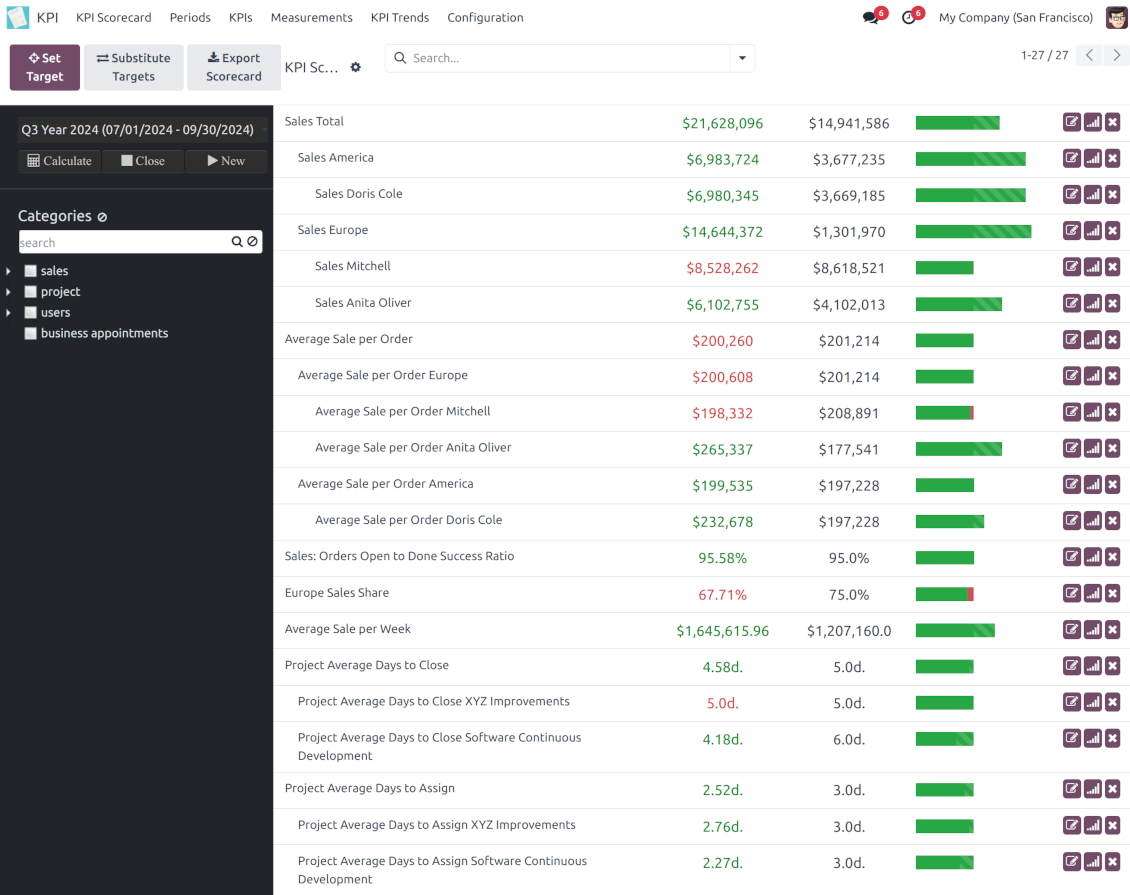
The app introduces a KPI dashboard to manage company and personal targets. The tool helps to organize work as a set of periodical goals and to control those goals in any business or functional area.
Set KPI targets by periods
The scorecard is not just a dashboard, but it is a tool to set and control measurable and time-constrained targets. Both company and individual
Use any Odoo data to calculate KPIs
The app introduces a clear system to get any Odoo storable details: a count of records, a sum or an average of numeric fields, pure Python code
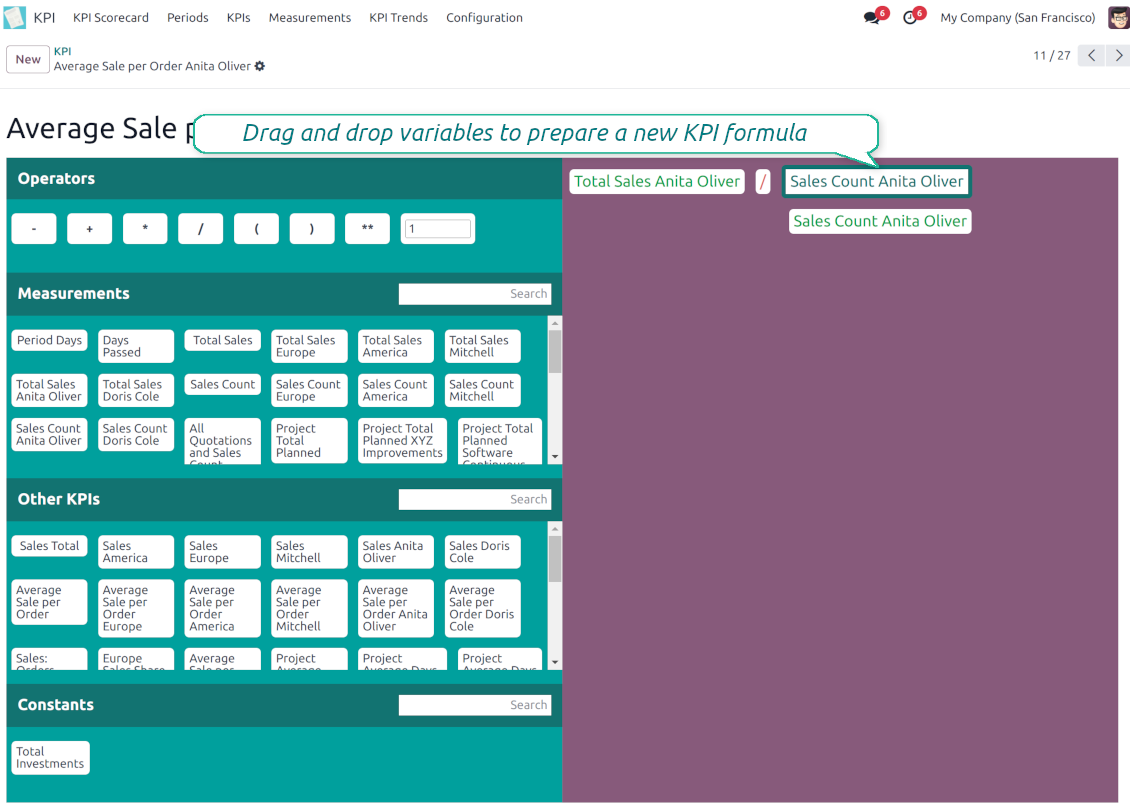
Drag and Drop interface for KPI formulas
Construct advanced formulas to calculate derivative KPIs. The complexity of each scorecard is totally up to you!
Managerial and self-control
Share KPI targets with interested users to organize a transparent dashboard of goals: from global to very specific ones
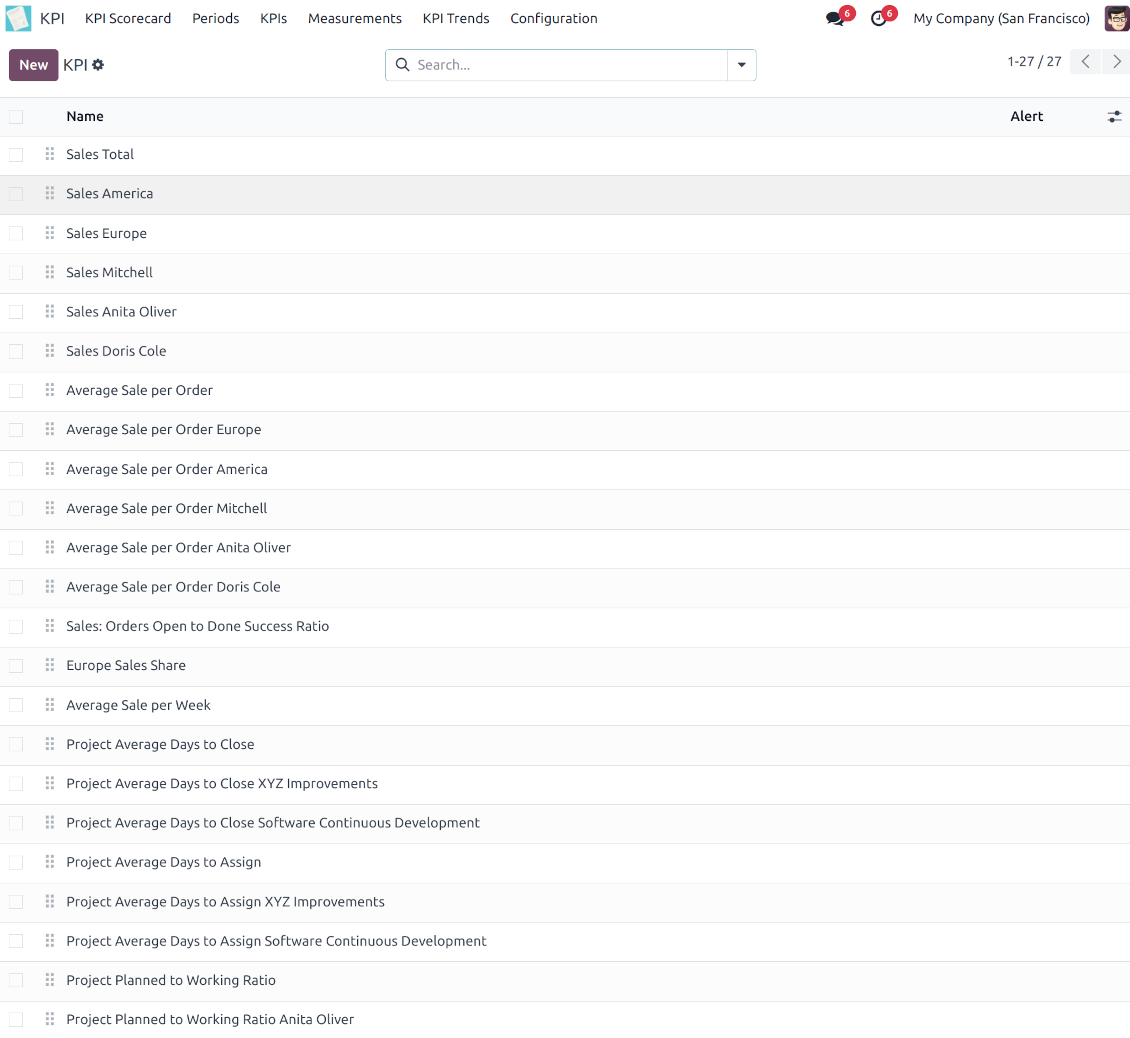
Structured hierarchically, by categories, and by tags
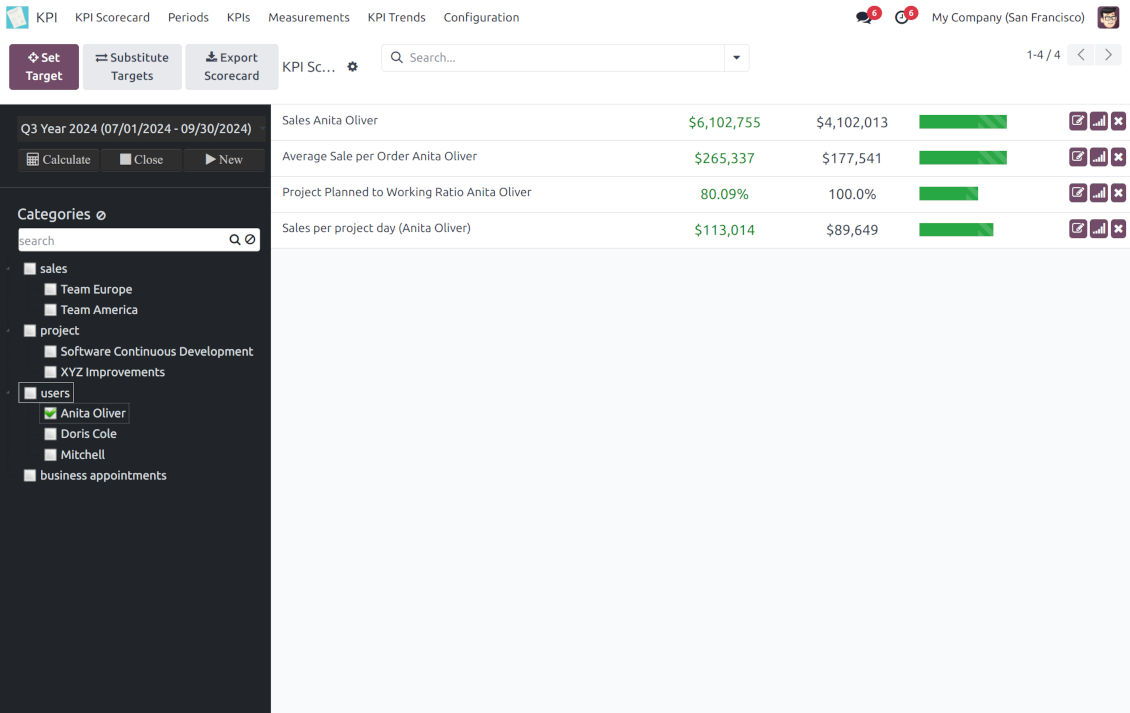
Consider only those KPIs which are of interest: for example, only sales-related or of a definite user. Hierarchy allows highlighting targets with indicative padding for an instant overview of sub-KPIs
KPIs are auto and regularly updated
Actual values are re-calculated by the special Odoo cron job. It is always possible to understand which KPIs require more attention in real-time at a first glance.
Real-time control and historical trends
-
KPIs values are calculated for a specific period according to chosen date fields (e.g. quotations by 'order date')
-
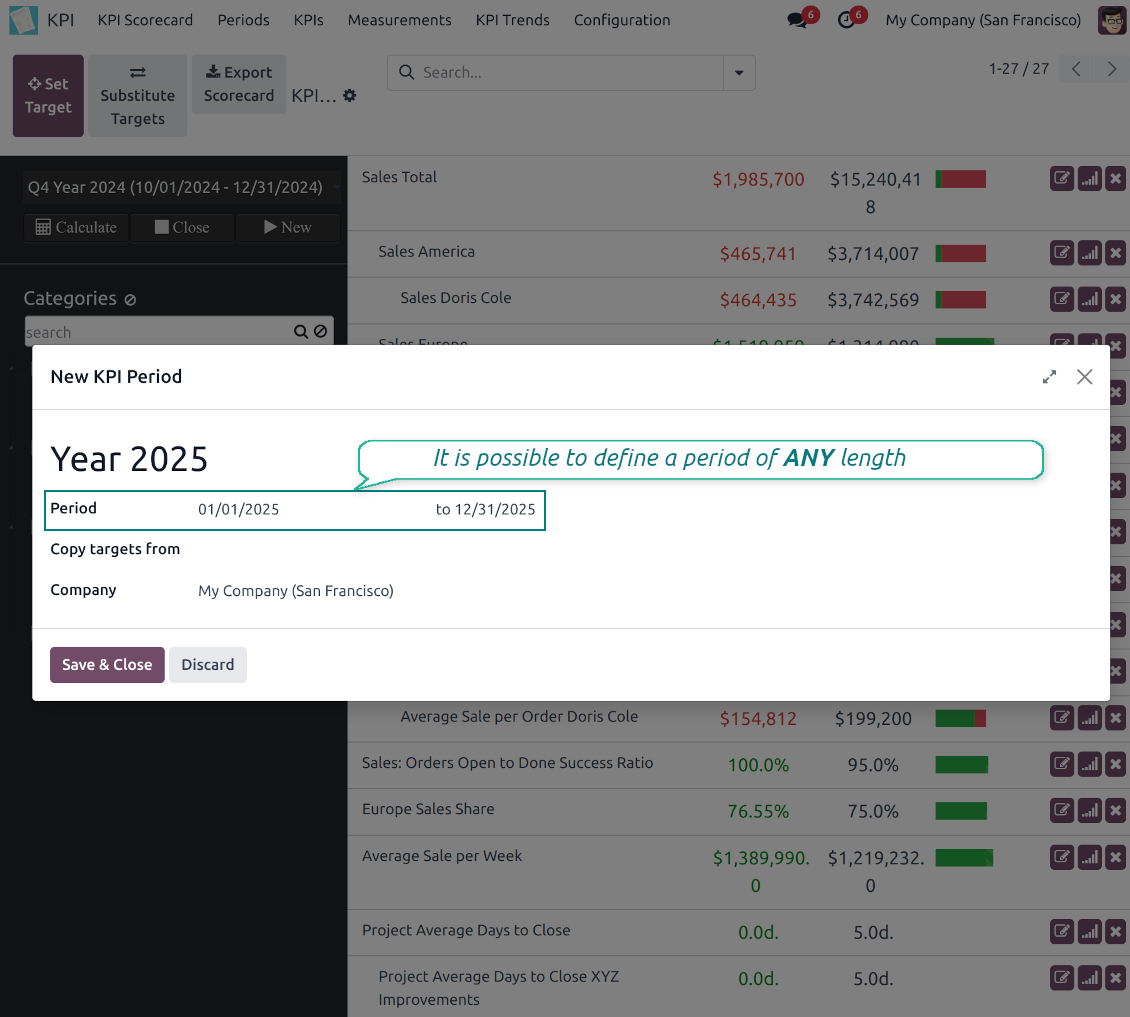
Plan KPI periods of any duration: annual, quarterly, monthly, weekly, 10-days-long, etc. KPI periods might intersect and might be different for various business areas
-
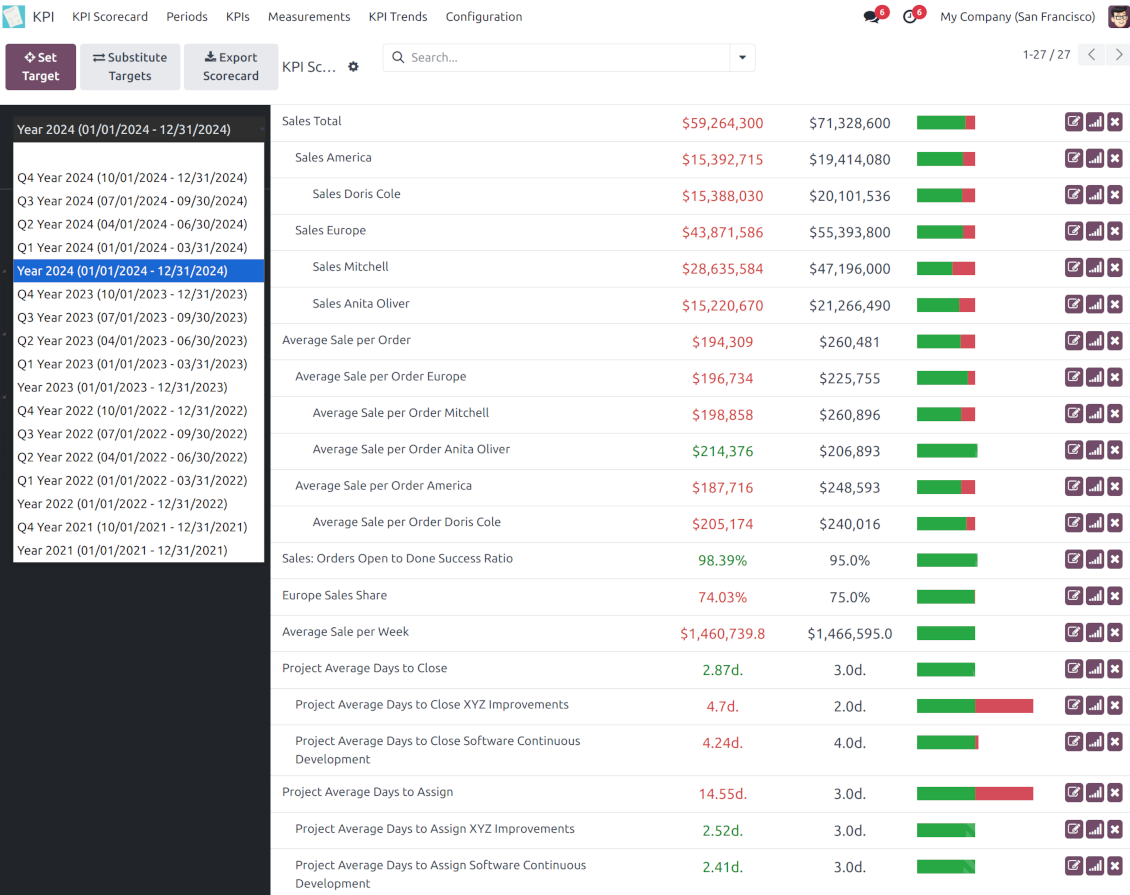
By default, KPI targets of a current period are shown for an instant overview
-
Navigate between various KPI categories and future/past KPI periods in a few clicks from the same Odoo dashboard
-
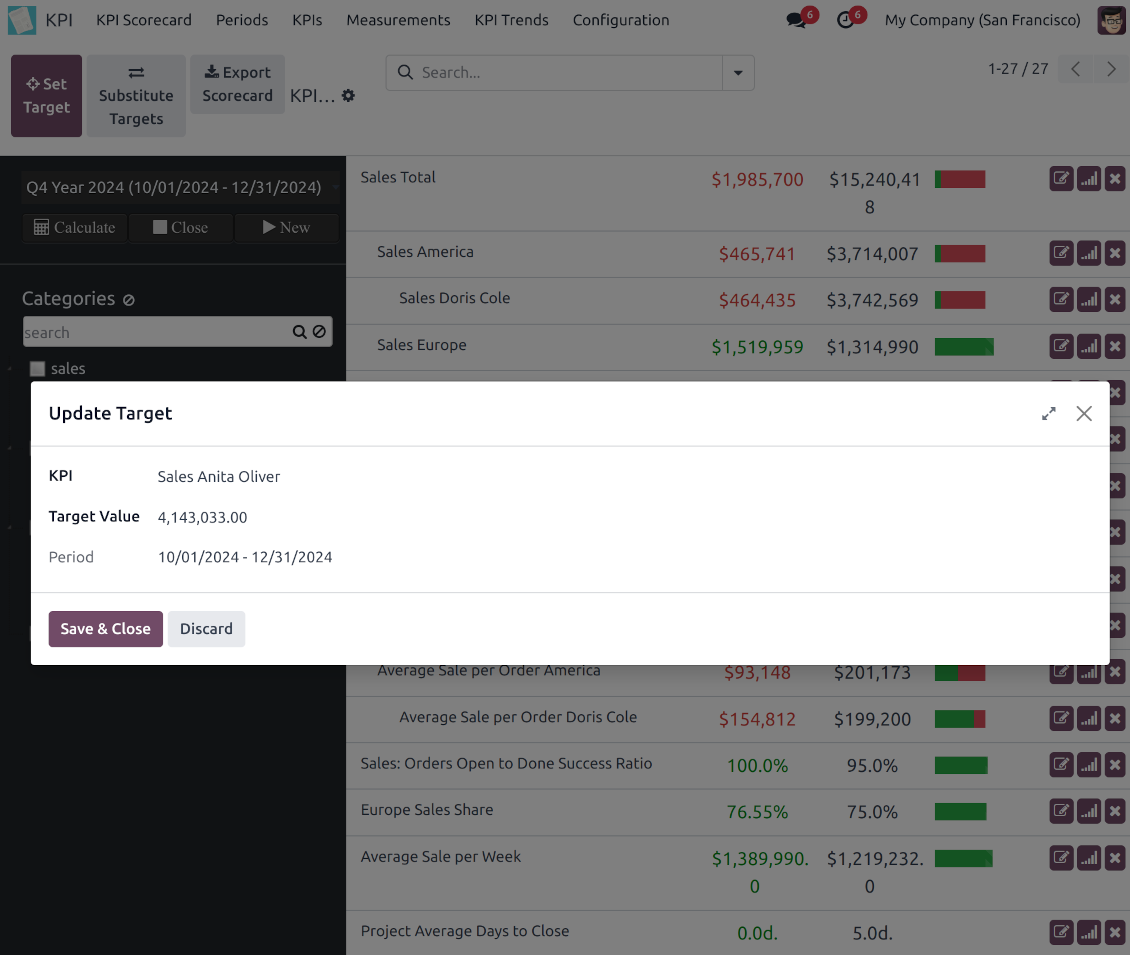
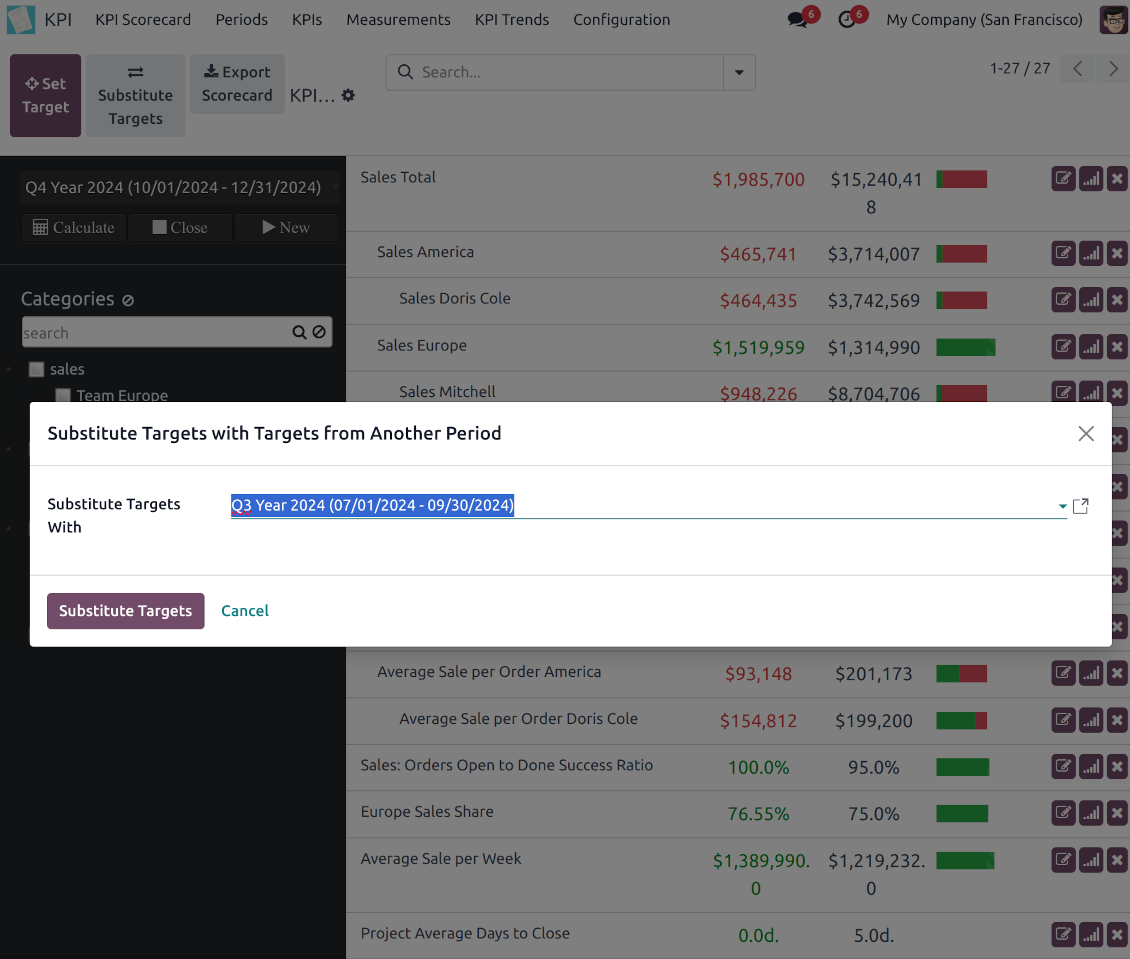
Copy or substitute KPI targets from other periods to simplify goals setting
-
Close KPI periods as it is done for fiscal and accounting purposes. It not only holds the past values but also allows also speed calculations up
-
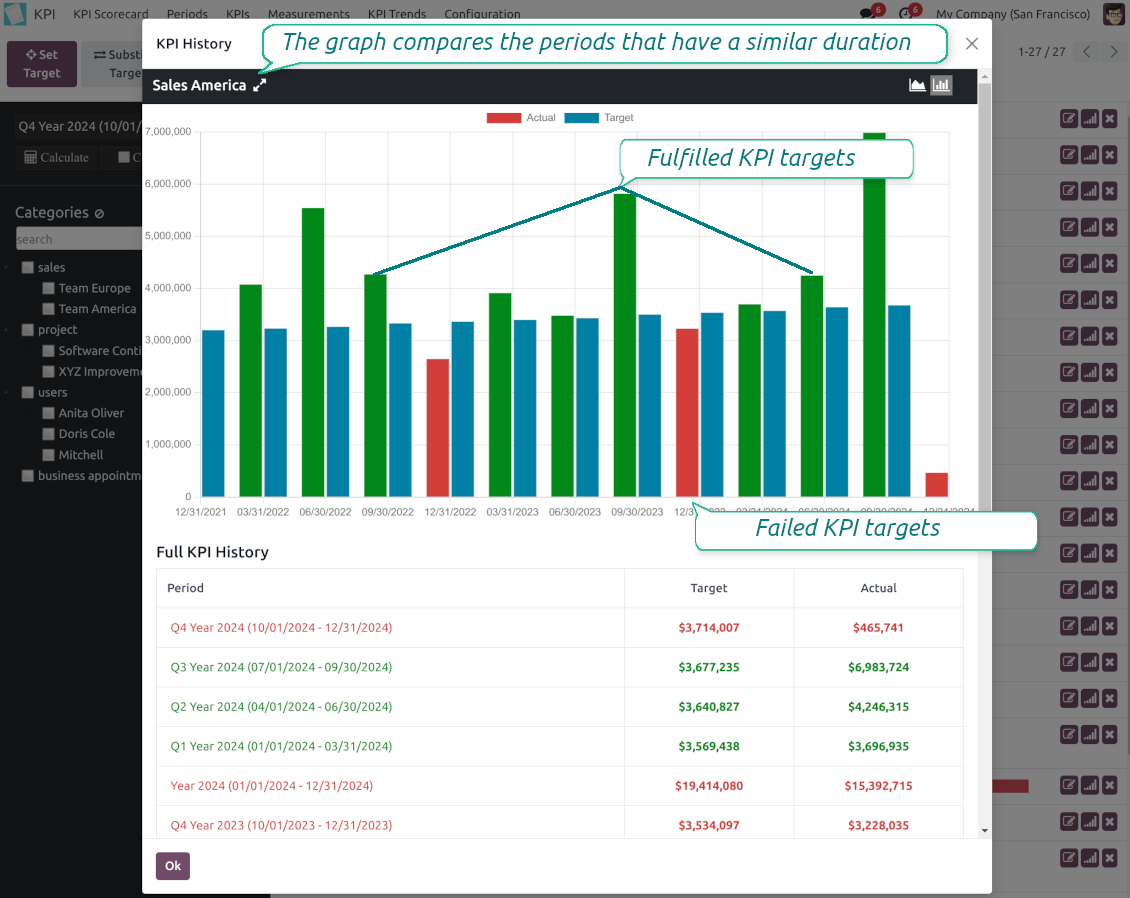
Control KPI historical values by periods. The graph and history table is available for each target line
-
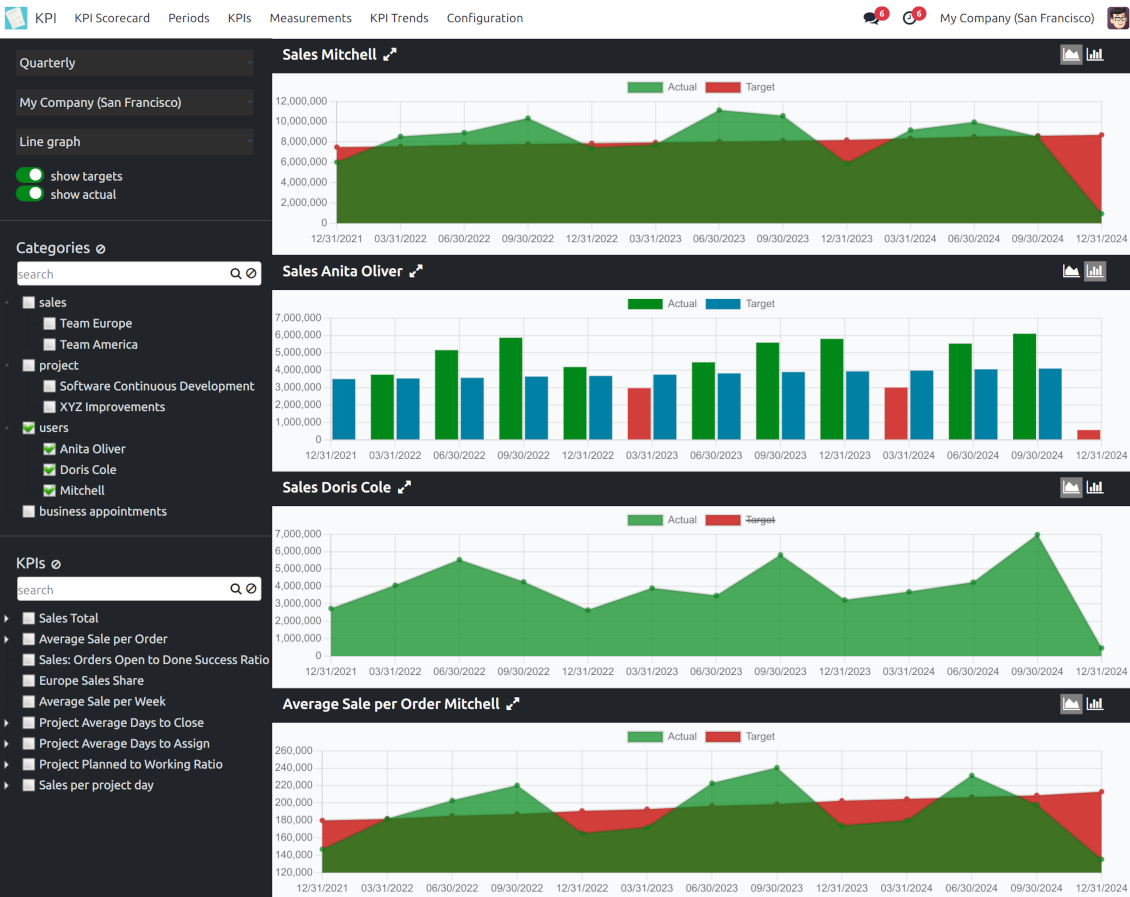
KPI admins access the special KPI trends interface to analyze KPI targets by custom period types. Build bar and line charts. Filter by KPI categories or KPIs. Show only target or actual values
-
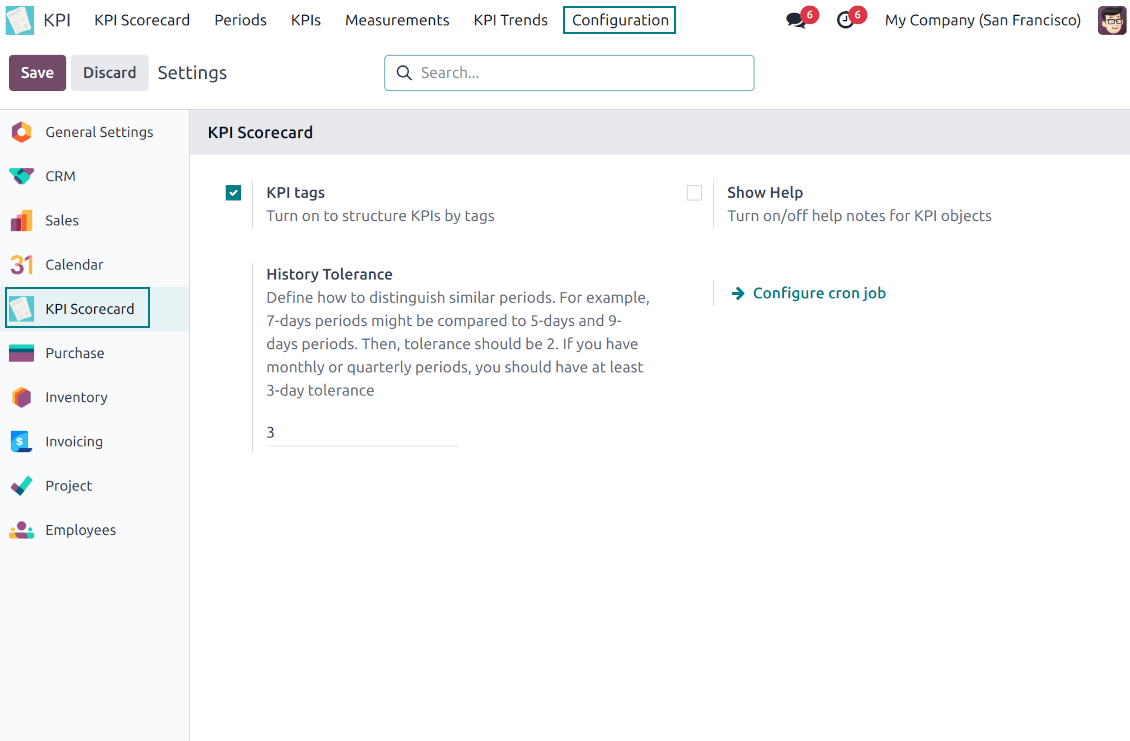
The app automatically calculates period types to compare in the report. Just define historical tolerance: e.g 2-days tolerance - for quarterly periods (90-92 days), 3-days - for months (28-31 days), etc.
-
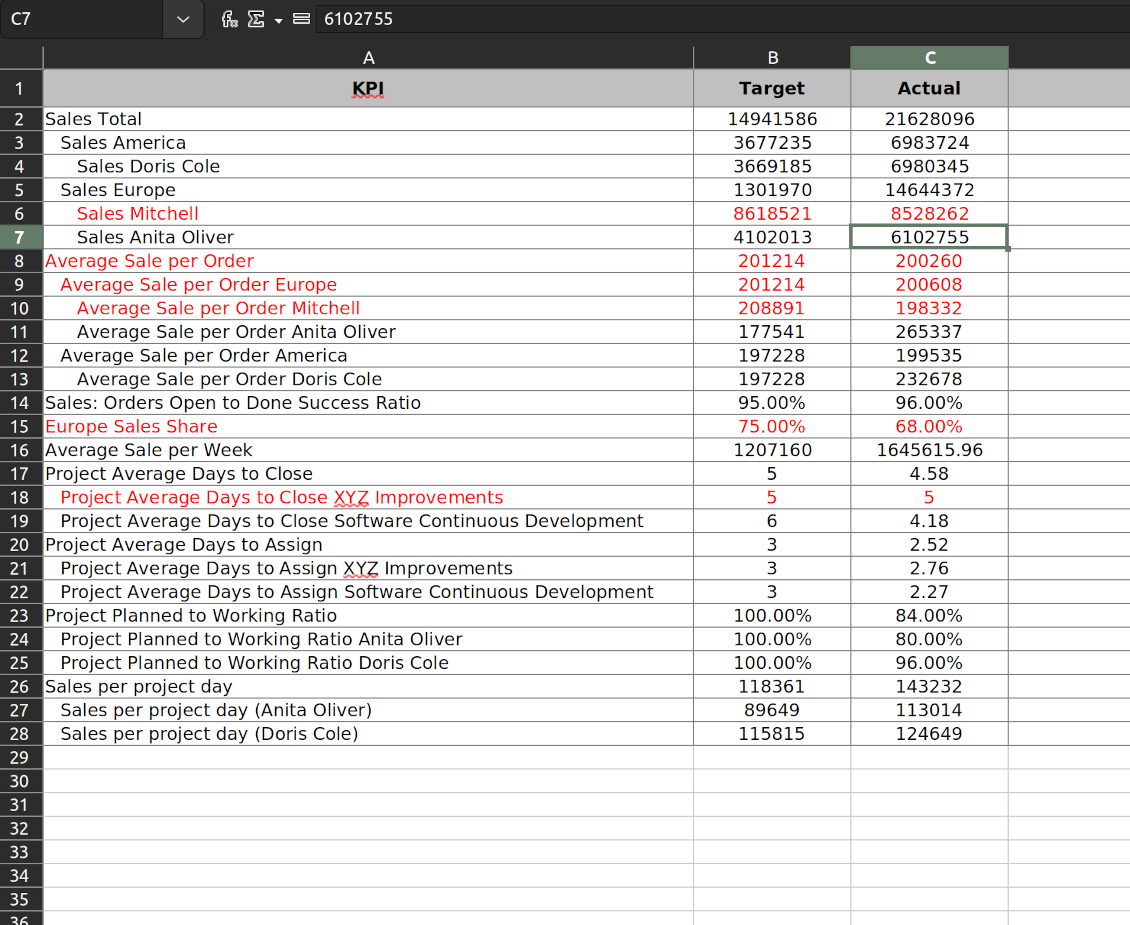
Export scorecards as an Excel table if you need
-
KPI periods and KPI targets are set up for each company individually (multi companies environment).
Drag-and-drop formulas for KPIs
-
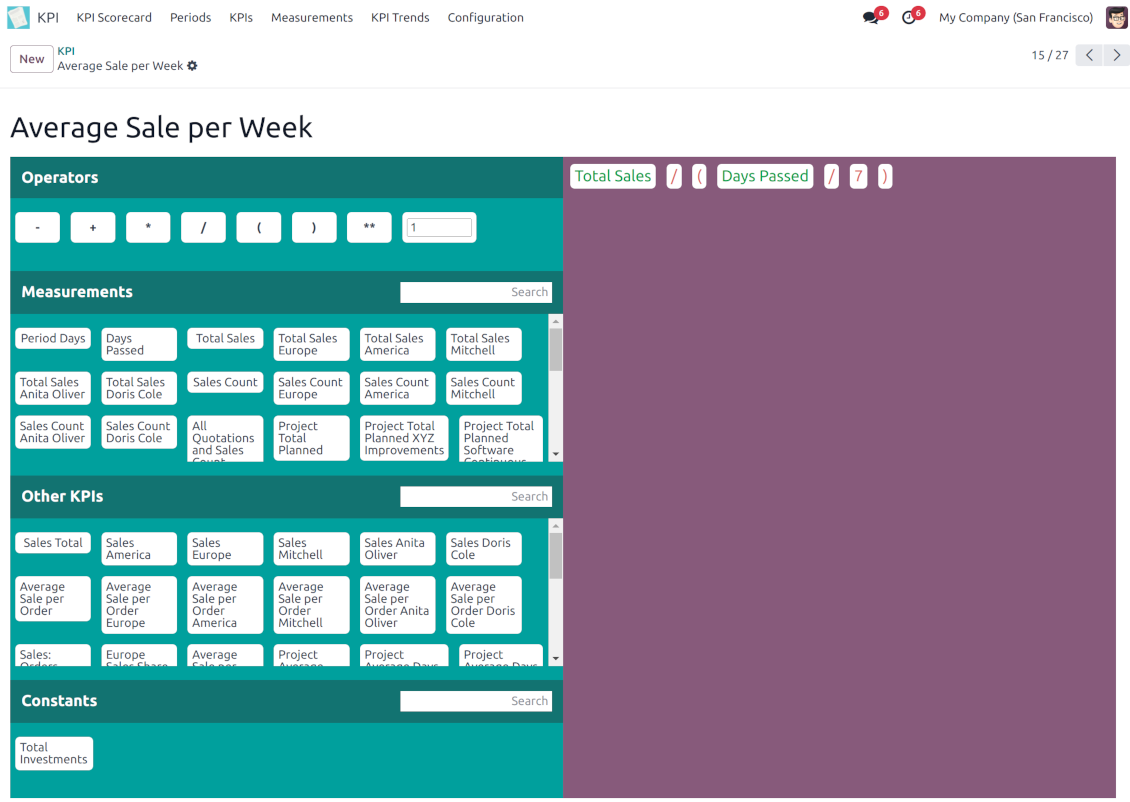
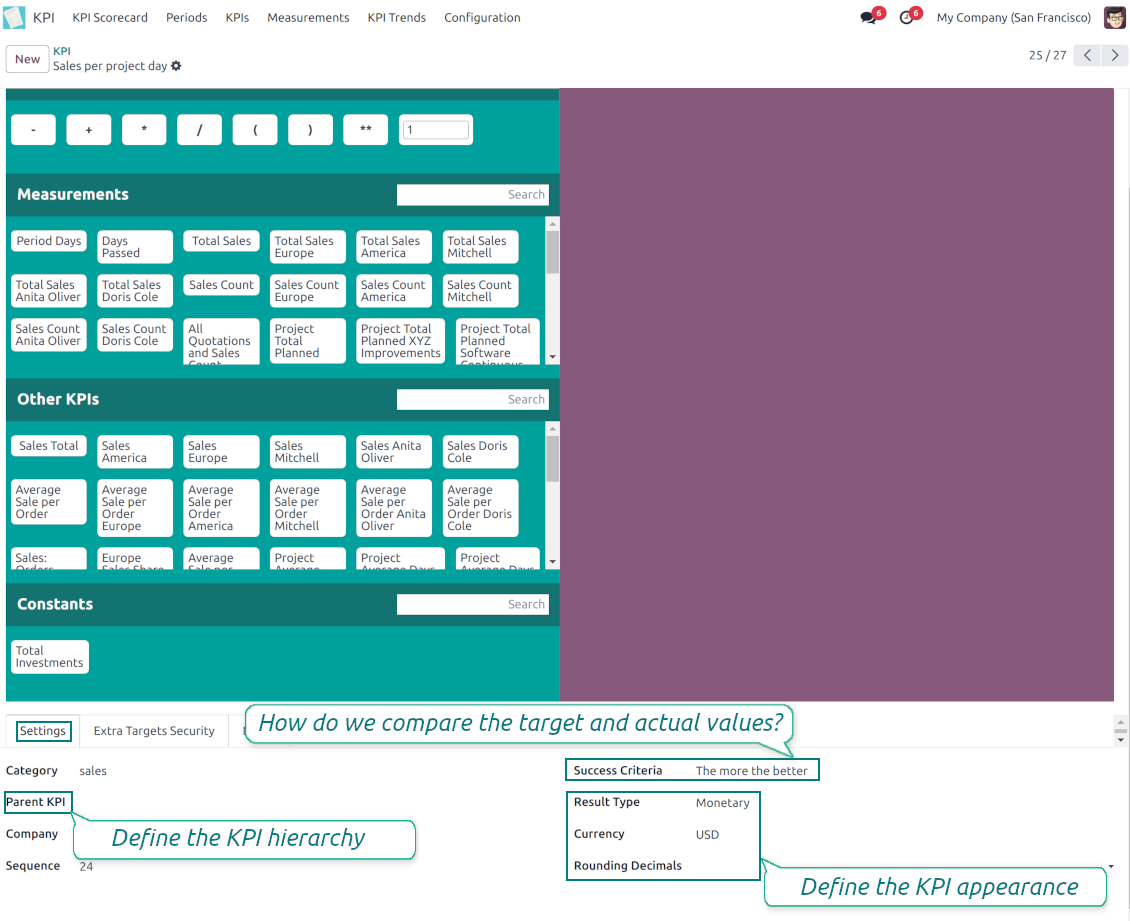
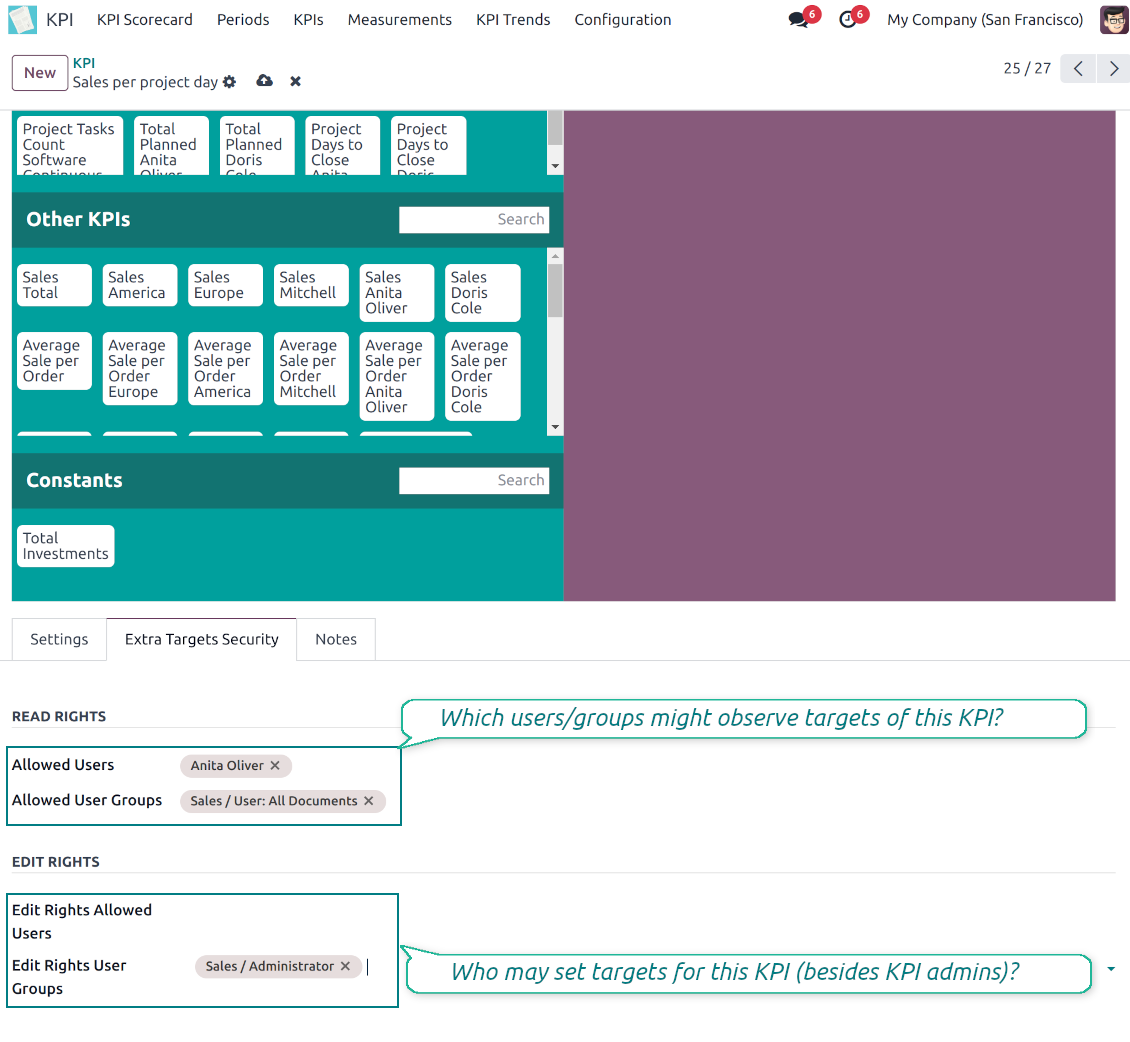
KPI construction is as simple as it is to write down a mathematical expression: just drag and drop the parts in the right order with the correct operators
-
Odoo would automatically retrieve data from a database according to a defined parts order for a specified period
-
Formulas might be as complex as you require. Merely make sure the operators (subtraction, addition, multiplication, division, exponentiation, brackets, any float number) comply with basic Math rules.
-
For each KPI configure a prefix and a suffix to make results nice looking
-
Define rounding rules from 0 to 4 decimal points (1 > 1.2 > 1.23 > 1.235 > 1.2346)
-
KPI variables indicate the rules of how to get data. For example, 'total number of sales orders' or 'number of quotations of sales team Europe'
-
Other KPIs - the parts used for derivative calculation. For example, 'Opportunity to sales success ratio' based on KPIs 'Sales count' and 'Opportunities count'
-
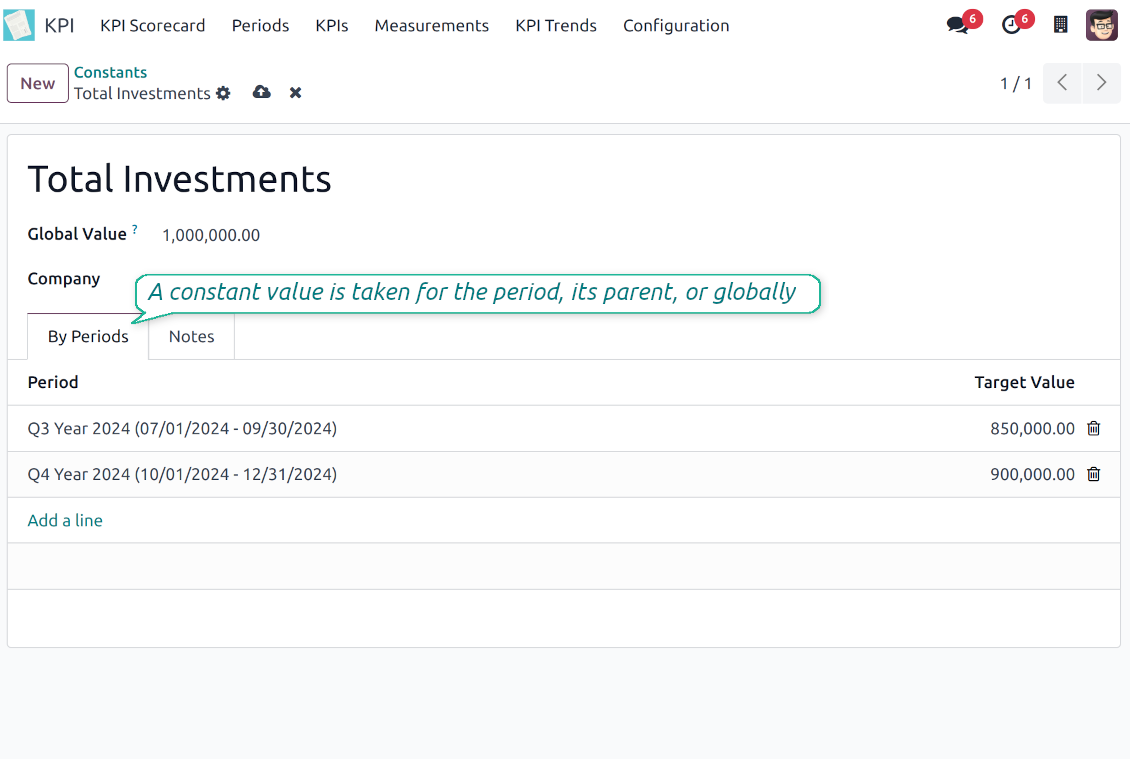
KPI constants - the parts which are frozen globally or for a specific time frame. Needed for figures which can't be retrieved from modules and/or which should remain the same during a period
-
'Period Days' is an interval length in days. 'Days Passed' is the length between the period start and today (if today is before the period end; otherwise period end). Those parameters let calculate per-time KPIs, such as, for example, 'Average sales per week'.
Shared KPIs and self-control
-
Full rights for scorecards, all KPIs, targets, and settings belong to users with the right 'KPI Management - KPI manager'. The group 'KPI Management - KPI Users' is allowed to observe the KPI interface and manage shared KPI settings
-
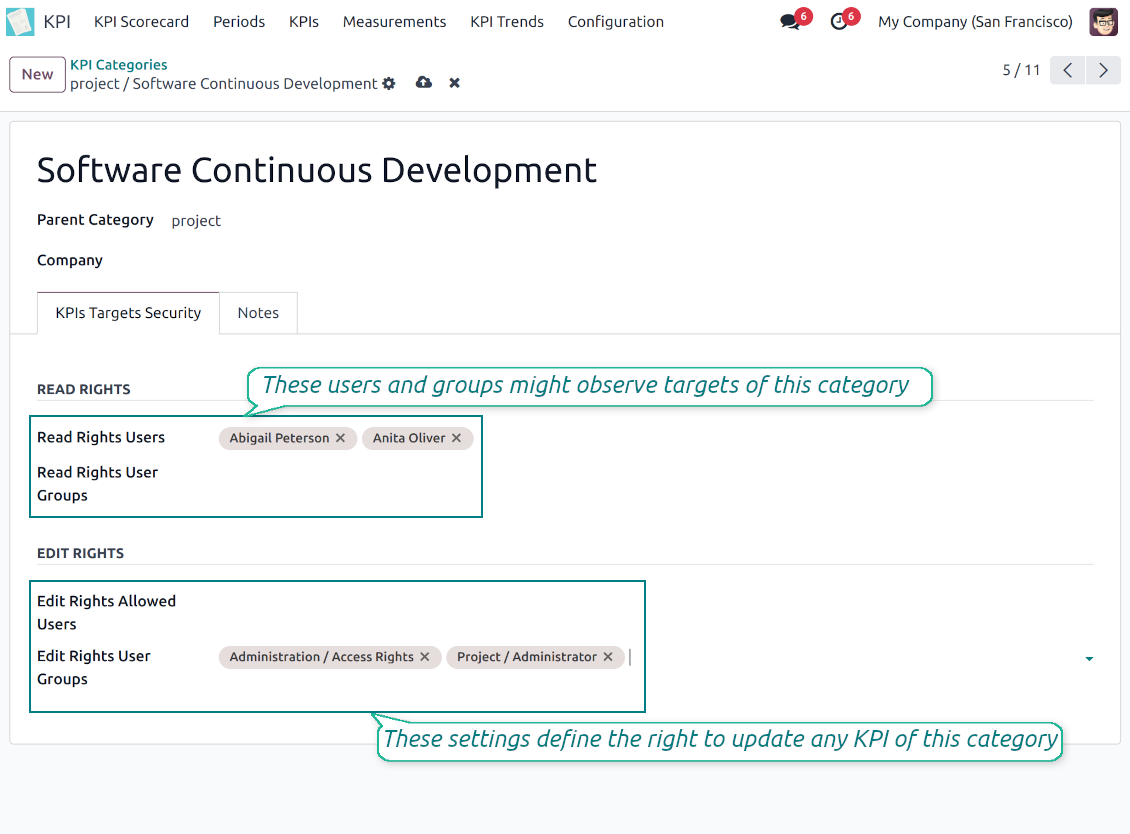
Categories of KPIs and/or individual KPI targets might be shared for specific users or user groups
-
It is possible to both grant read-only or editor rights
-
Read-only access for a target lets users only observe shared KPIs
-
The section 'Edit rights' on category or KPI forms will also allow us to set and change targets. The latter might be useful in case you ask your manager to manage goals within a department, for example
-
The security settings are additive - not restrictive. KPI managers will have full rights for all KPIs disregarding the settings, while KPI users will have rights only to KPIs which settings (or category settings) allow them so
-
The tool supports multi companies: so, make sure the user company correlates with a KPI dashboard company.
KPI settings to process Odoo data
Any storable data
-
Preparing the basis for KPIs' calculation is not a simple task. The good news is that such a job should be done only once, while results are used forever
-
KPI Settings assume 3 levels of precision: (1) basic measurements - (2) KPI variables and constants - (3) KPI drag and drop formulas
-
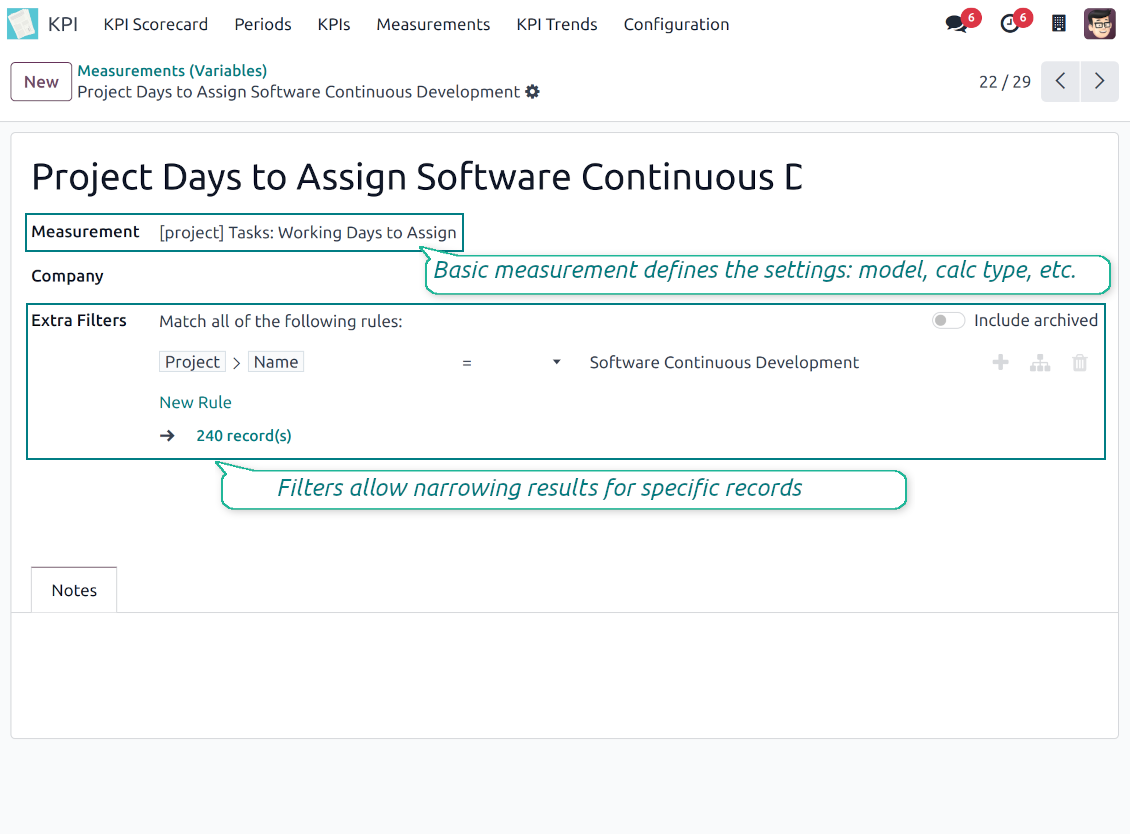
Basic measurement is the core object used for retrieving actual KPI values from the Odoo database, while KPI variables specify those. For example, 'total number of sales orders' should be a basic measurement, while narrower 'number of quotations of the sales team Europe' is recommended to be a precision of that basic measurement
-
Each basic measurement might have an unlimited number of linked KPI variables. KPI formulas might combine any number of variables, constants, and other KPIs with mathematical operators.
Python code measurements
-
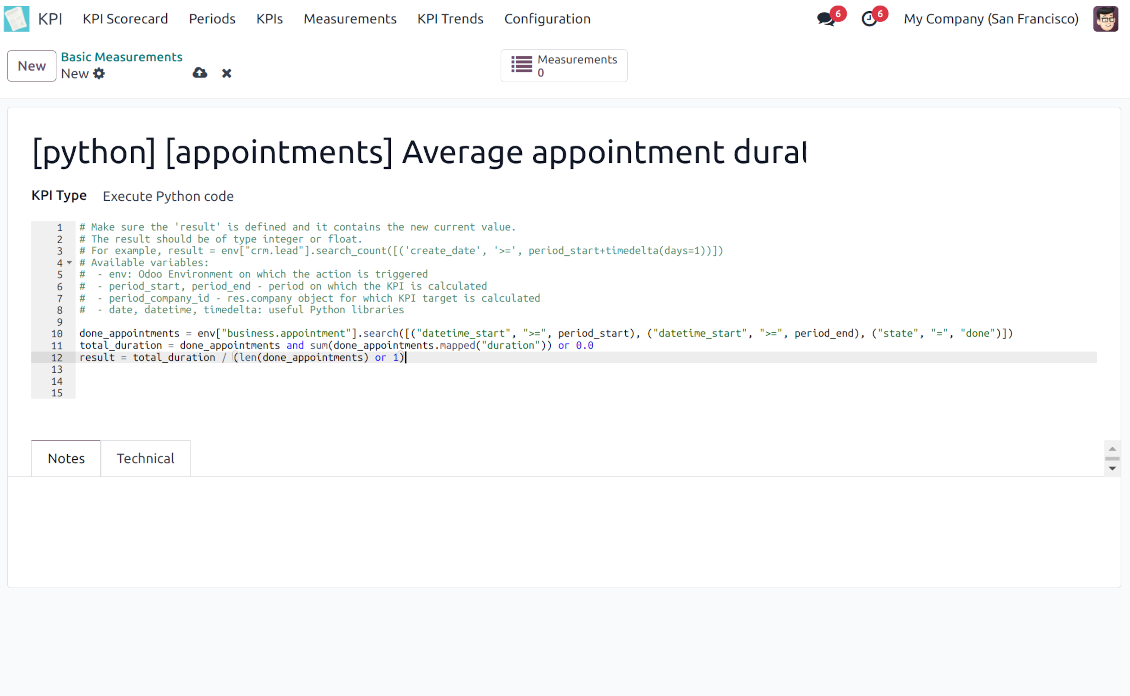
'Python code' is a special type of basic measurement. This type requires technical knowledge but lets you compute any sort of figures based on any Odoo data without restrictions
-
Such measurement might be any Python basic script with the possibility of SQL queries (through using 'env.cr')
-
In calculations you may rely upon the special variables: 'period_start' (the first date of the period), 'period_end' (the last date of the period), 'period_company_id' - res.company object for which Odoo makes calculations at the moment (according to a KPI period under consideration)
-
Correct Python code assumes saving the value into the special variable 'result'.
Basic measurements
-
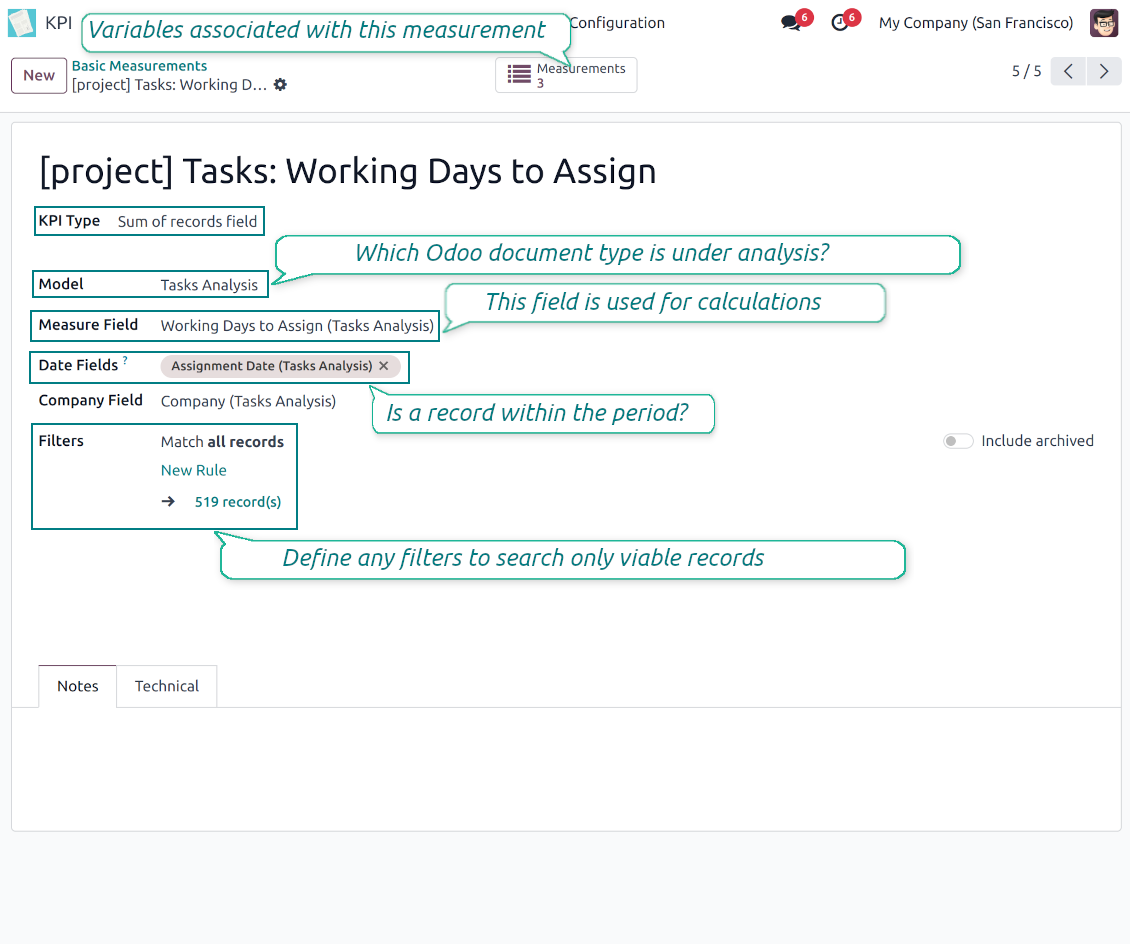
Basic measurements are not used for formulas, but they define how Odoo data should be calculated: count of records, sum, average, and pure Python code. Basic measurements assume a number of settings
-
Model - an Odoo document type with which data set you to work ('Sales Order', 'Task', etc.). Here you can rely on standard or custom objects (including those created in the Odoo studio), Odoo reports
-
Date fields - define whether a document relates to a KPI period. For example, for tasks, you might use 'create date'. It is possible to apply a few date fields (e.g. 'Opportunities opened and won in January 2021') or no date fields at all for global calculations
-
Filters - allow restrict set of records. Used for low-level filtering and then specified in KPI variables
-
Measure field - is required for calculation types 'Average' and 'Sum'. It defines which figure you use for calculations. For example, 'total amount' of Sales Analysis Report or 'work hours of tasks'
-
Company field - would be used to restrict calculation for a KPI period target company. Take into account that records without a company will be used for all companies' KPI calculations.
KPI variables and constants
-
The key idea to distinguishing KPI variables from basic measurements is to simplify data preparation. You define 'total sales' once, and then unlimitedly use it for 'sales Europe', 'sales John Brown', 'website sales', etc.
-
Specify basic measurements through the Odoo built-in domain constructor, which lets filter by any storable attributes. For instance, filter sale orders by state (only 'done'), the salesperson ('John Brown or Mike Green'), sales team, etc.
-
KPI constants are the special type of KPI variables used when data can not be retrieved from modules and/or when figures remain the same during the whole period. For example, 'total investments' or 'number of employees' are often frozen for a specific period
-
In a multi-company environment, KPI variables are applied globally or for each company. In the former case, that variable is available for any company KPI formulas, while in the latter - only for a specific one
-
Basic measurements of the type 'Execute Python code' can't be any more specified, since they do not relate to any records. Such measurements should have a single KPI variable linked.
Савети за конфигурацију и инсталацију за KPI Balanced Scorecard Odoo v.18
Scheduled jobs
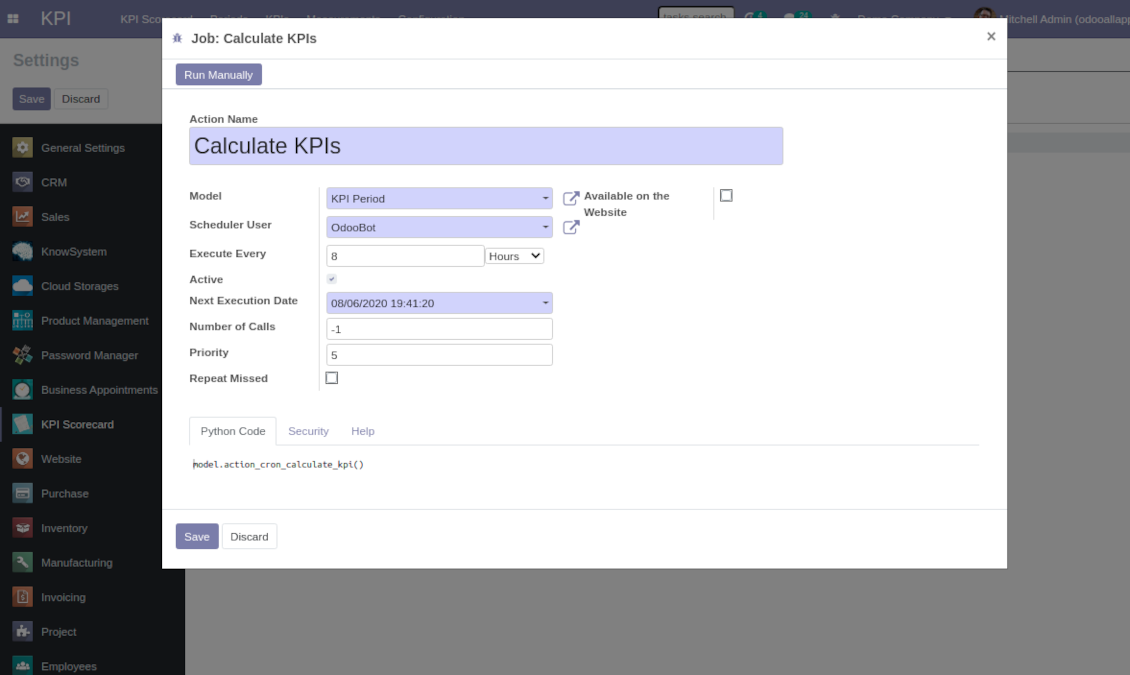
To change the frequency of KPI targets' recalculation:
- Turn on the debug mode
- Go to the menu KPI > Configuration > Settings
- Find the button 'Configure cron job'
- Feel free to update the settings 'Execute Every' and 'Next Execution Date'. However, please do not make it too frequent (e.g. once in 5 minutes). Since the job is resource demanding, it require at least a few minutes to be fully and correctly finished.
Change frequency of KPIs re-calculatinon
Често постављана питања о KPI Balanced Scorecard Odoo v.18
Направио сам Basic Measurement, али га не могу наћи у чаробњаку формула.
Basic Measurements се сами не користе за формулу. Чак и ако не желите више филтера на Basic Measurement, ипак направите Variable повезан с њим. Тада ће се тај Variable појавити на списку доступних за израду формуле.
Који подаци се могу користити за KPI. Да ли модул има сопствене податке?
Сама апликација не уводи сопствене податке (изузев KPI константи које служе управо да примене недостајуће податке) нити интеграције. Апликација рачуна и припрема интерфејсе на основу постојећих Odoo података. На пример, број налога продаје за одређени период можете добити из апликације Sales.
Модул је универзалан и може преузети податке из било ког Odoo модула, укључујући стања рачуна. На пример, укупну добит за месец можете израчунати на основу рачуна (ставке дневника).
Податке можете добити и из извора ван Odoo, повезујући га са Odoo модулом. На пример, ако у Odoo PostgreSQL имате податке Google Analytics, њима се могу припремати KPI.
Која је разлика између Basic Measurements и Measurements (Variables)?
Measurement (Variable) — прецизирање основног мерења. Идеја је да се поједностави припрема података. 'Total Sales' дефинишете једном и неограничено користите за 'Sales Europe', 'Sales John Brown', 'Website Sales' итд., додајући додатне филтере.
Које су политике ажурирања ваших алата?
Према важећим правилима Odoo Apps Store:
- Сваки модул купљен за верзију 12.0 и старију даје приступ свим верзијама до 12.0.
- Од верзије 13.0 свака верзија модула се купује засебно.
- Без обзира на верзију, куповина даје право на сва ажурирања и исправке у оквиру главне верзије.
Имајте у виду да тим faOtools не контролише та правила. За питања обратите се директно представницима Odoo Apps Store.
Како могу инсталирати вашу апликацију на Odoo.sh?
Најдиректнији приступ је да користите уграђени ток рада Odoo продавнице:
1. Отворите страницу модула и кликните дугме Deploy on odoo.sh
2. Након тога бићете преусмерени на GitHub страницу. Пријавите се на налог, затим кликните 'Create a new repo' или користите постојећи. Проверите да је спремиште приватно. Није дозвољено објављивати апликације под лиценцом OPL-1. Ако треба, направите нови repo за Odoo.sh пројекат
3. Затим идите на odoo.sh и кликните дугме Deploy. У искачућем прозору пошаљите одлуку и кликните 'Continue.' Ова радња покреће инсталацију.
Ови кораци ће инсталирати апликацију на продукциону грану пројекта. Ако желите да примените апликације на друге гране или да ажурирате модул, урадите следеће:
1. Отпремите изворни код апликације из Odoo продавнице
2. Урадите commit модула у потребно GitHub спремиште. Проверите да ниједна фасцикла/датотека апликације није игнорисана (тј. није у .gitignore репоа). Спремишта аутоматски прави odoo.sh и могу подразумевано садржати важне ставке (нпр. /lib). Отпремите све директоријуме, поддиректоријуме и датотеке модула без изузетака
3. Примените циљну грану odoo.sh пројекта или, ако то претпостављају подешавања, сачекајте да се аутоматски изгради.
Како да инсталирам вашу апликацију на сопствени сервер?
2. Поново покрените Odoo сервер;
3. Укључите режим програмера (техничка подешавања);
4. Ажурирајте листу апликација (мени апликација);
5. Пронађите апликацију и притисните „Activate“/„Install“;
6. Пратите смернице на страници апликације ако постоје.
Приметио сам да ваша апликација има додатне додатке. Могу ли их купити накнадно?
Да, наравно. Истовремено Odoo аутоматски додаје све зависности у корпу, па треба искључити већ купљене алате да не платите двапут.
Поставио сам вашу апликацију на Odoo.sh и у тестовима видим упозорење/грешку
Црвено/наранџасто упозорење не утиче на функције апликације. Нажалост, наши модули понекад не прођу стандардне аутоматске тестове јер они претпостављају понашање које је у сукобу са циљевима апликације. На пример, мењамо обрачун цене, а тестови стандардног Odoo модула упоређују коначну цену са стандардним алгоритмом.
Пре свега проверите функције постављене базе. Да ли све ради исправно?
Ако и даље сматрате да упозорење утиче на стварне функције, контактирајте нас и пошаљите потпуне дневнике инсталације и потпун списак постављених модула (укључујући језгро и треће стране).
Могу ли да купим апликацију директно од ваше компаније?
Не, алате дистрибуирамо само преко званичне продавнице апликација Odoo.
Желео бих да добијем попуст
Нажалост, немамо техничких средстава да понудимо појединачне цене.
Могу ли да инсталирам апликацију на своју Odoo Online (SaaS) базу?
Не, апликације трећих страна не могу се користити на Odoo Online. Нажалост Odoo SaaS то блокира.
Ваш алат зависи од других апликација. Треба ли да их купим?
Да, алату су потребни сви модули наведени у зависностима да би радио исправно. Цена на страници апликације већ укључује све потребне зависности.
Која је цена модула у америчким доларима? Зашто се променила?
Цена наших модула је у еврима. Odoo продавница прерачунава цене у друге валуте по свом интерном курсу. Зато се цена у америчким доларима може променити кад се курс ажурира.
Текстови апликације и сајта на језицима осим енглеског рађени су уз помоћ ВИ и усклађени са званичним Odoo преводима. Ако уочите грешку, пошаљите тикет о исправности превода и исправићемо.
Odoo демонстрационе базе (прегледи уживо)
За ову апликацију можемо обезбедити бесплатну персонализовану демо базу.
Да нас контактирате није потребан број телефона ни кредитна картица. Довољна је кратка регистрација е-поштом која не траје више од 30 секунди.
На ваш захтев припремићемо појединачну базу за преглед уживо, где можете око две недеље радити тестове и проверавати претпоставке.
Пријављивање грешака
Ако наиђете на грешке или недоследно понашање, слободно нас контактирајте. Гарантујемо исправке у року од 60 дана од куповине и веома смо заинтересовани да унапређујемо алате и после тог периода.
Да нас контактирате није потребан број телефона ни кредитна картица. Довољна је кратка регистрација е-поштом која не траје више од 30 секунди.
У захтев укључите што више детаља: снимке екрана, дневнике Odoo сервера, пун опис како поновити проблем и тако даље. Обично треба неколико радних дана да се припреми радни план (ако је грешка потврђена) или смернице шта треба урадити (у супротном).
Јавни захтеви за функције и идеје модула (бесплатан развој)
Снажно смо мотивисани да побољшамо своје алате и били бисмо захвални на свакој повратној информацији. Ако су ваши захтеви од јавне користи и могу се ефикасно спровести, тим ће их укључити у нашу листу задатака.
Таква листа задатака се обрађује редовно и не подразумева додатне накнаде. Иако не можемо обећати рокове и коначан дизајн, то може бити добар начин да добијете жељене функције без улагања и ризика.
Да нас контактирате није потребан број телефона ни кредитна картица. Довољна је кратка регистрација е-поштом која не траје више од 30 секунди.
18.0.1.1.8
- Исправљен је проблем непреведених упозорења.
18.0.1.1.7
- Kanban прикази су прилагођени новим XML принципима Odoo 18.
- Трака Archived за неактивне записе је додата на приказе формулара KPI-јева, променљивих, основних мерења, константи, категорија и ознака.
18.0.1.1.6
- Апликација је објављена за верзију 18.
17.0.1.1.6
- Вишекомпанијски приступ ознакама је исправљен.
- Исправљен је проблем недостајуће прве колоне траке.
17.0.1.1.5
- Учитавање KPI графикона је оптимизовано да поново користи исти canvas.

Алат за флексибилно слагање прилога Odoo у фасцикле и синхронизацију директоријума са cloud клијентима: Google Drive, OneDrive/SharePoint, Nextcloud/ownCloud, Dropbox, Amazon S3, Box и NAS. DMS. Менаџер датотека. Систем за управљање документима
398€
The tool to automatically synchronize Odoo attachments with OneDrive files in both ways
487€
The tool to automatically synchronize Odoo attachments with Google Drive files in both ways
487€

The tool to build a deep and structured knowledge base for internal and external use. Knowledge System. KMS. Wiki-like revisions.
398€
The tool for time-based service management from booking appointments to sales and reviews
398€
The tool to manage your Odoo from your favorite AI chats through MCP. Claude. Any MCP-supporting AI.

The tool to translate URL addresses of Odoo website pages
38€
The tool to combine different Odoo events in a few configurable super calendars