Reminder Designer and Periodic Reporting v.17
The tool to design, generate, and periodically send reports and reminders. Report designer. List generator. Auto reminders
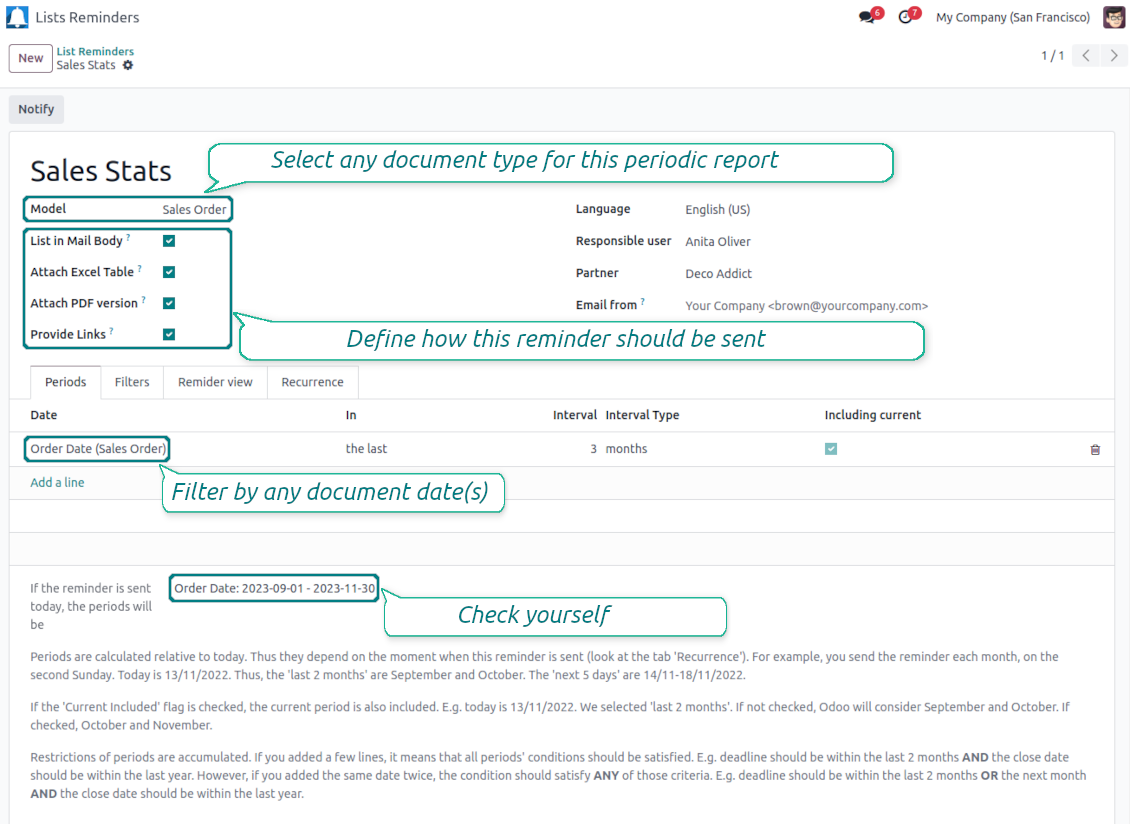
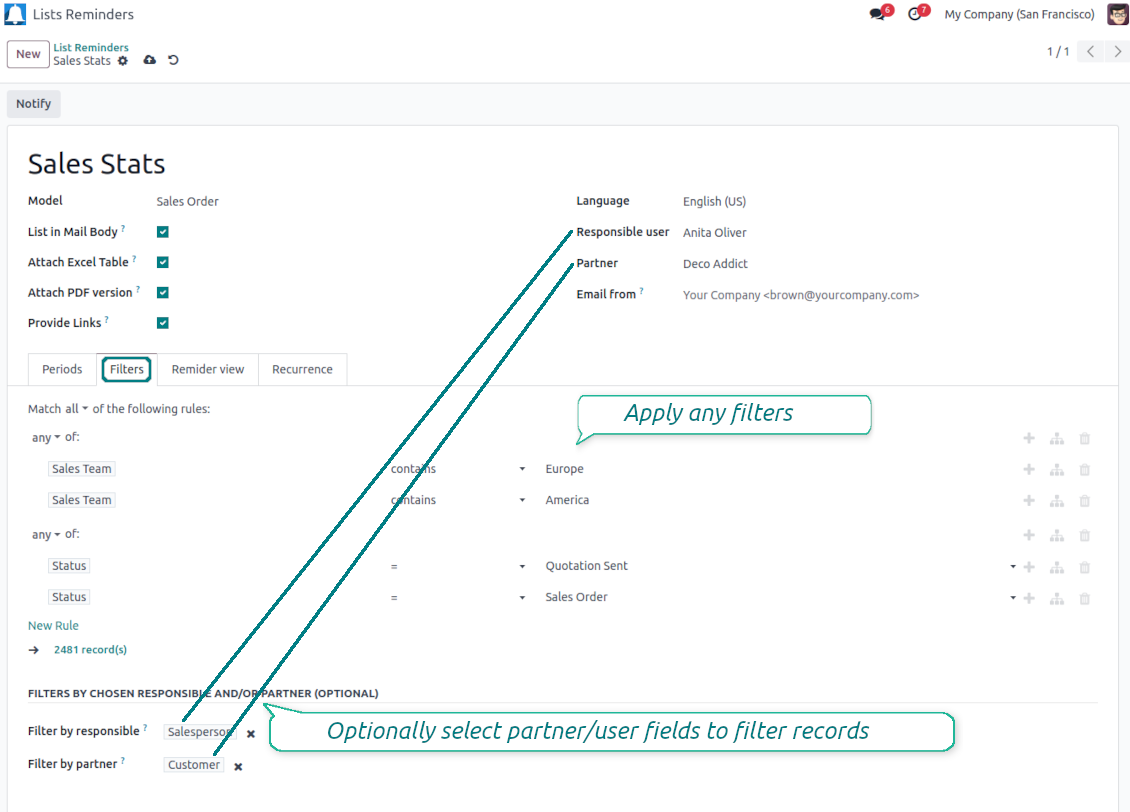
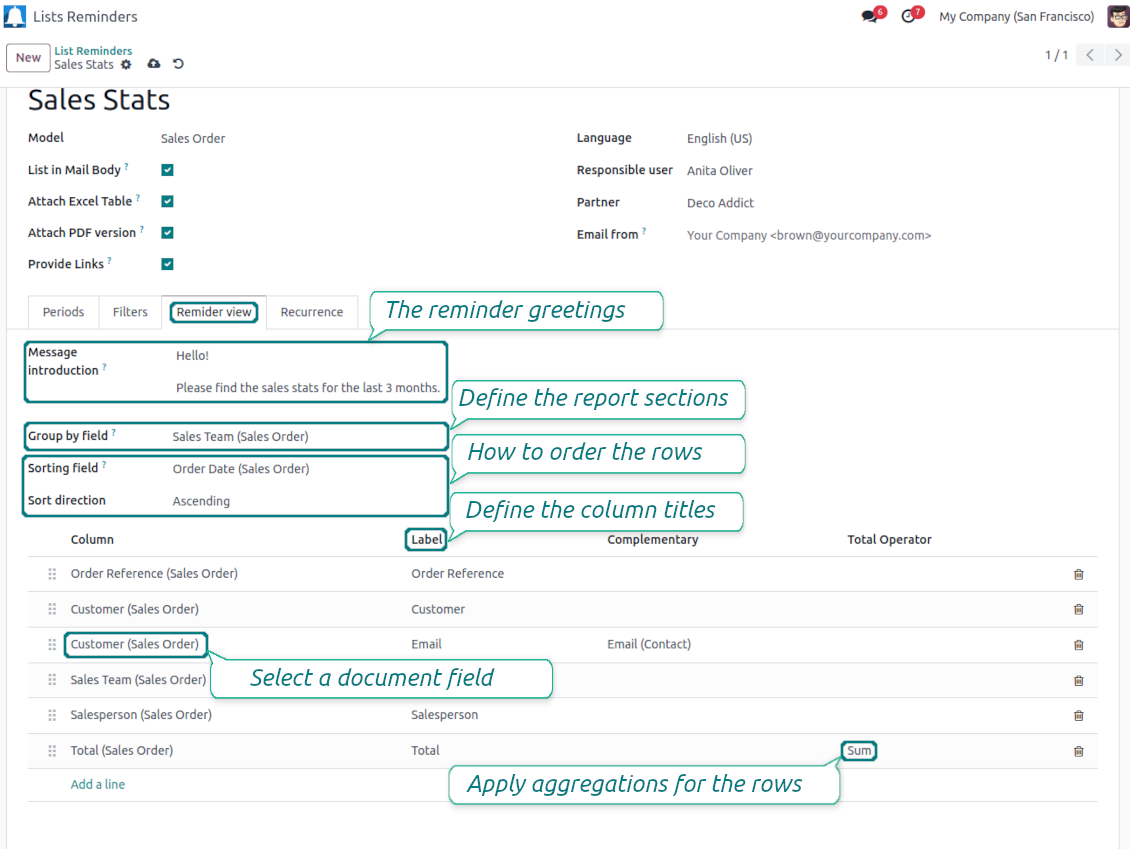
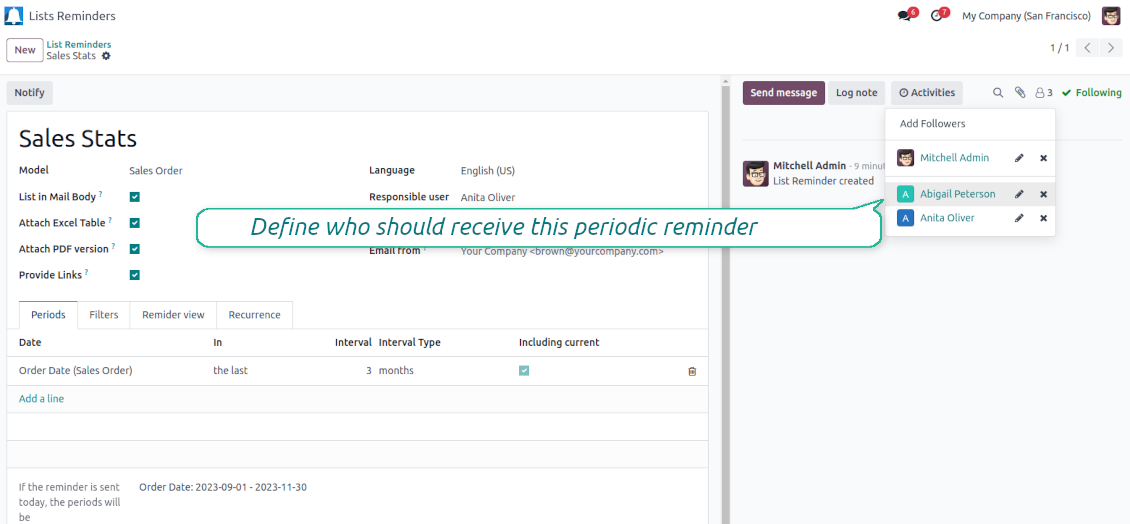
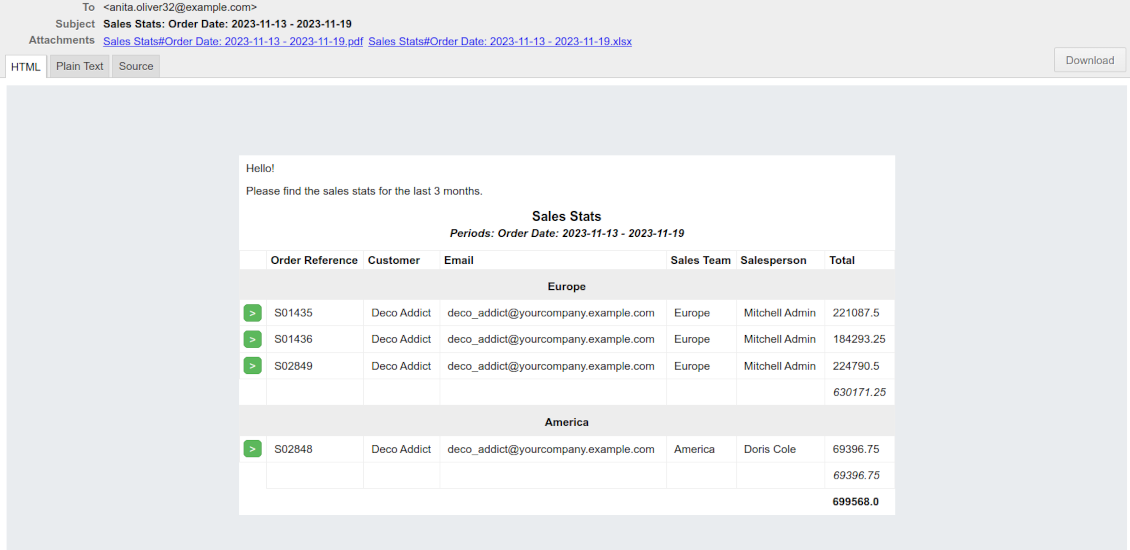
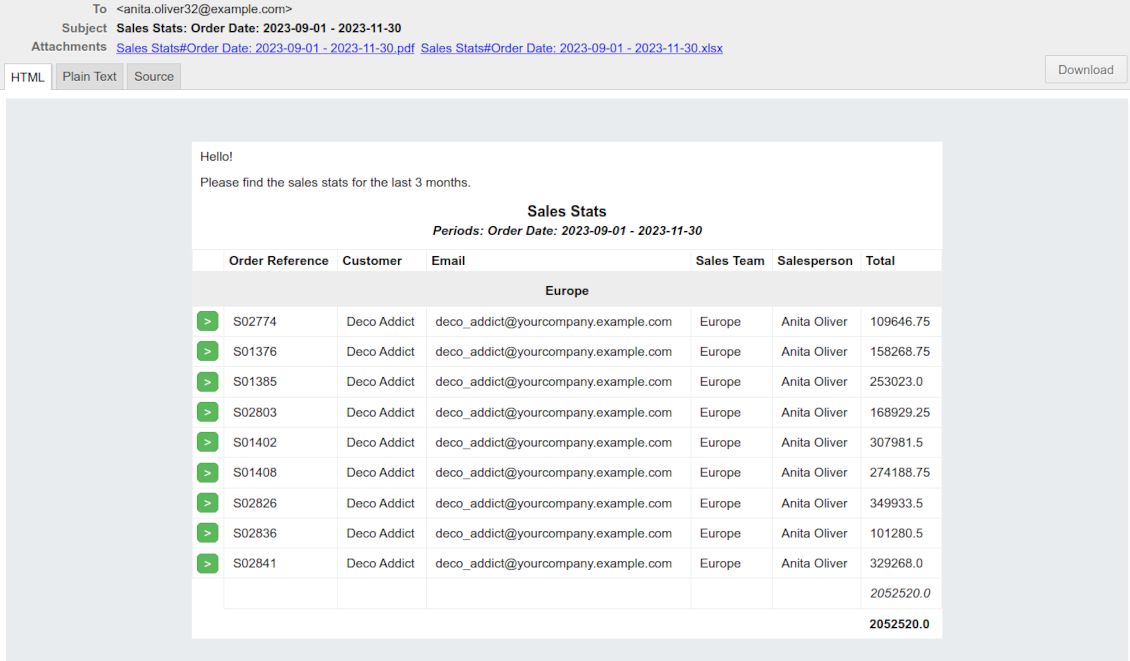
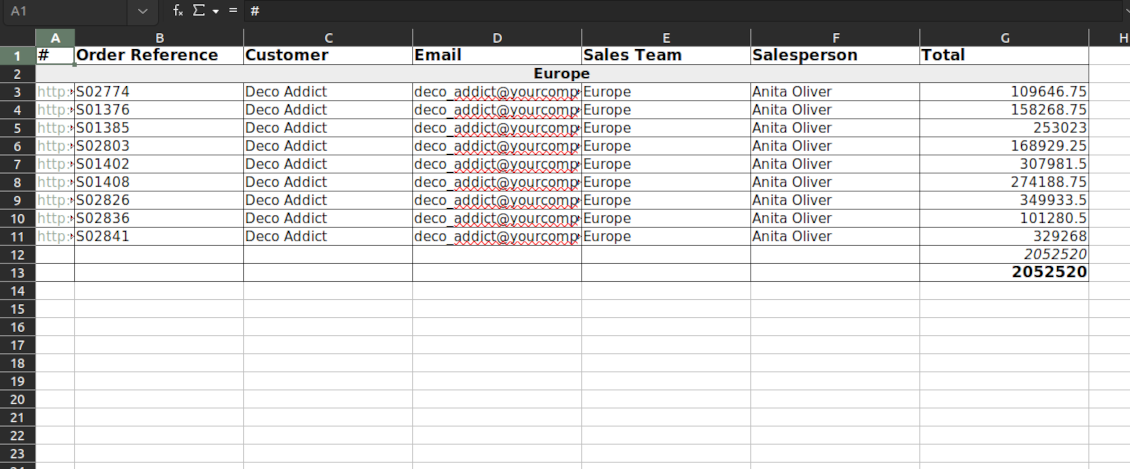
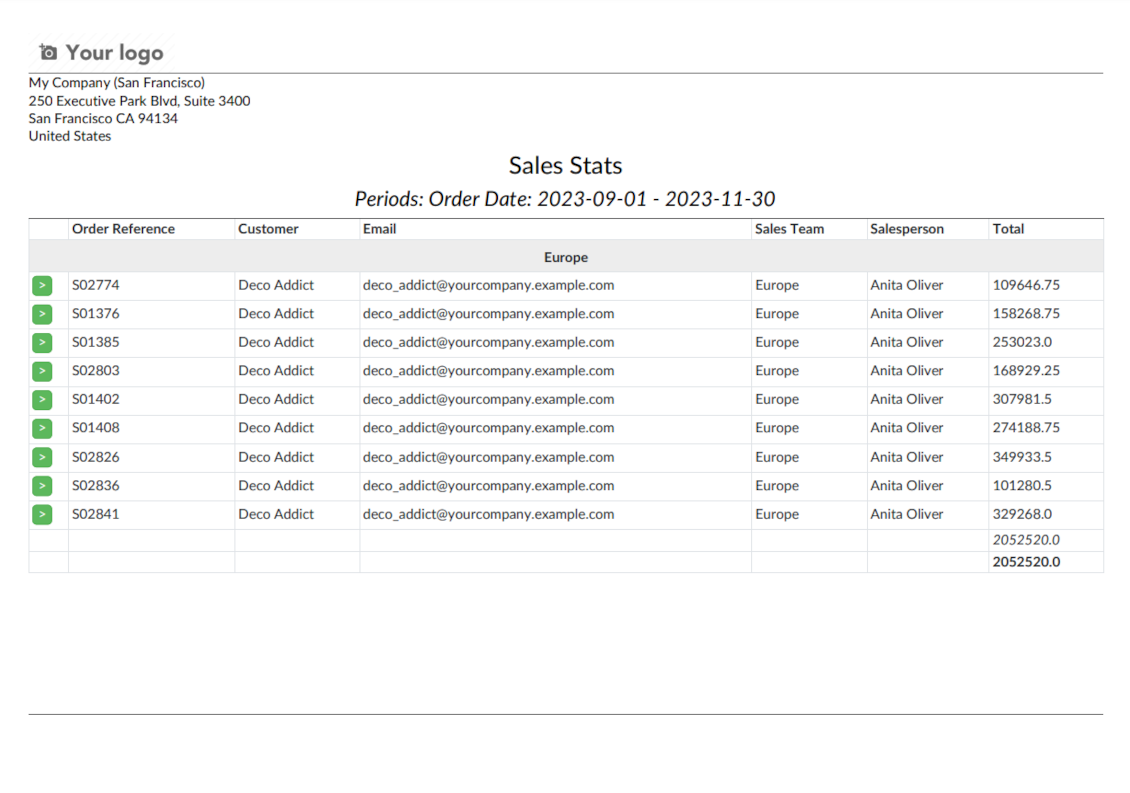
Often it is truly comfortable to open a set of documents and process them one by one without extra clicks. It is even better if the system prepares such a list regularly. For such situations this tool serves. It lets configure automatic reports for any Odoo document type in a form of lists, where each record will satisfy the criteria you have chosen, will suit pre-defined time frames, and will contain only the data you would like to share.
Reports by any Odoo object
Configure the tool to send periodic reports and reminders for any Odoo documents including custom ones: sale orders, opportunities, warehouse transfers, requests for quotations, tasks, MRP operations, etc.
Configurable statistics
Choose data columns to include. Attach the report as an electronic table (xlsx), or/and as a PDF file, or/and as a table right in the email body. Apply aggregation (average, sum) for numeric columns. Introduce email greetings. Show or hide links
Up-to-date data under analysis
Include in reporting only those objects which suit your period requirements. It is possible to filter by any date and datetime fields of a target Odoo model
Suitable information
Apply any kind of filters by stored fields to include only documents which are of interest. Filter by a chosen partner or responsible user. Sort and group table lines
Flexible recurrence
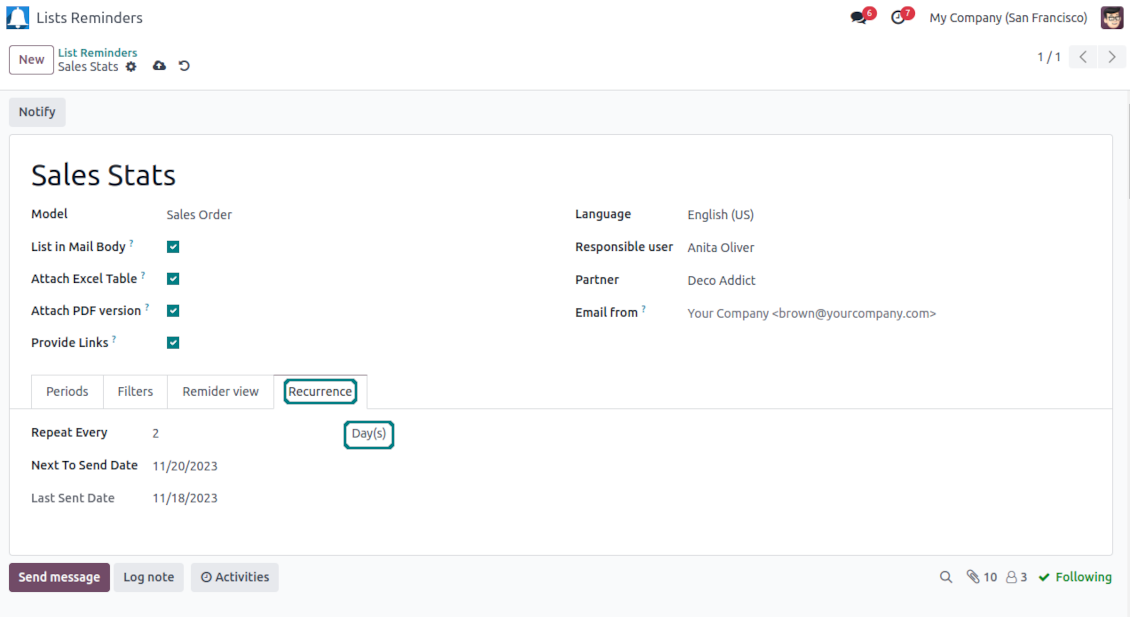
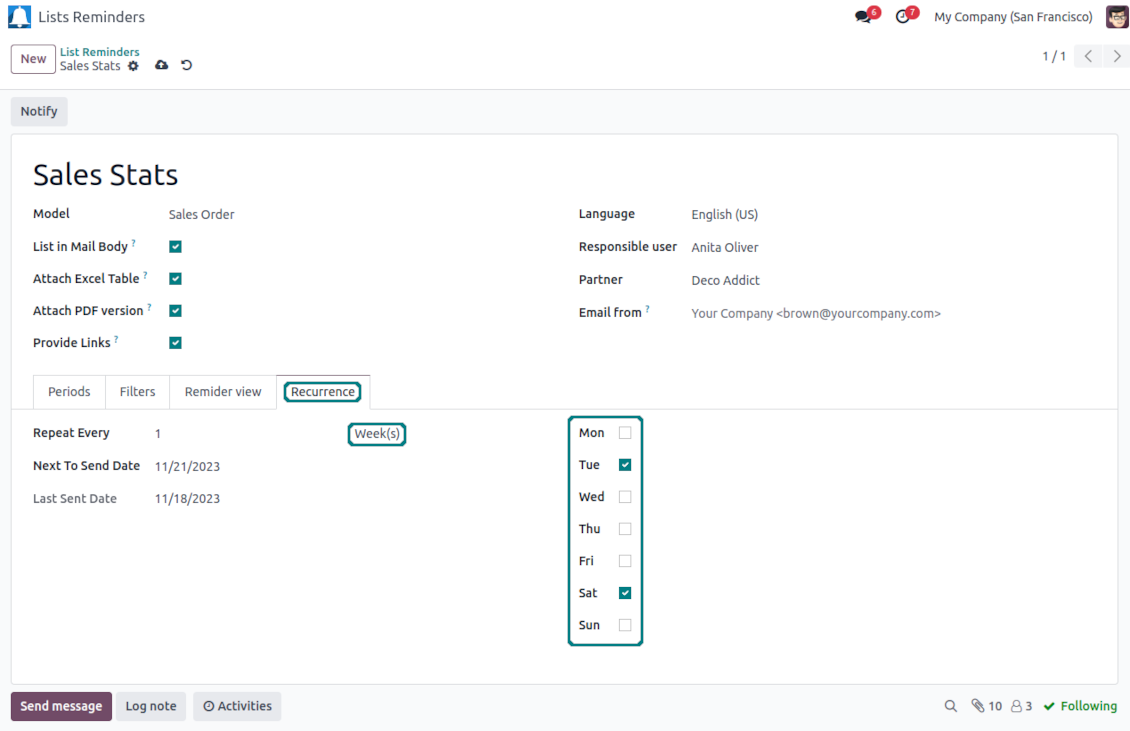
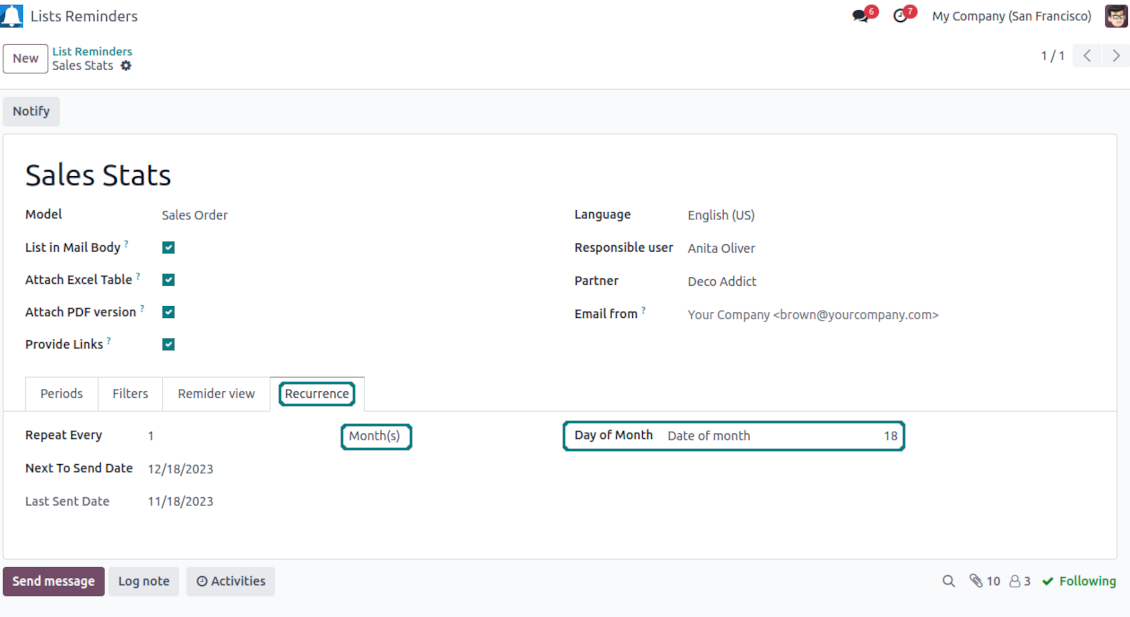
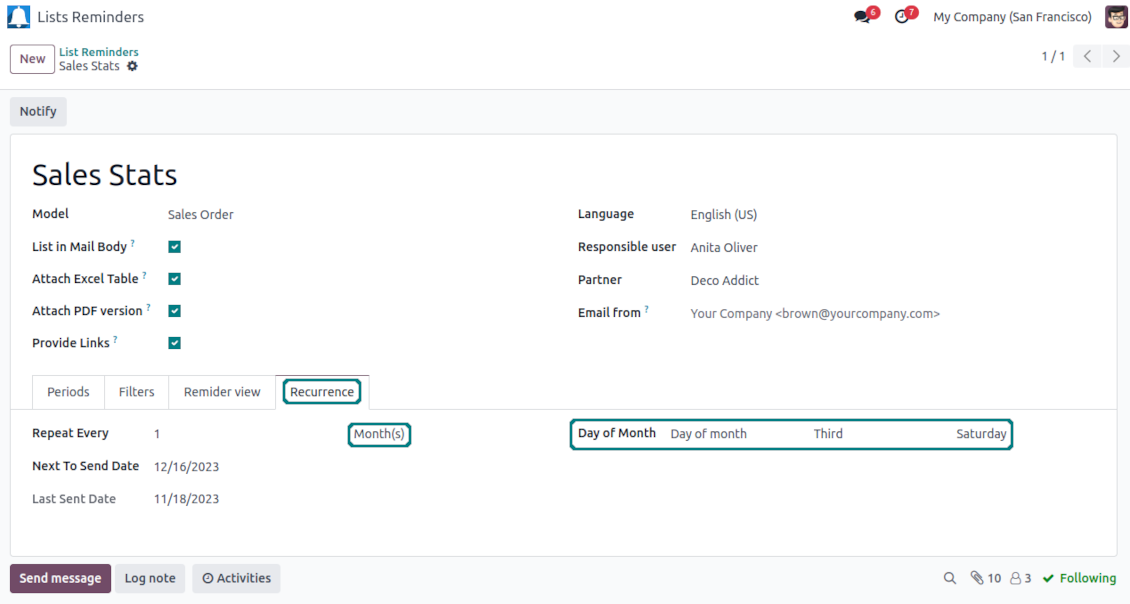
Send lists with any periodicity: every day, each last Friday of a month, on a definite date of the year, and so on. Make reports reflect company calendars
Periodic reports for external and internal use
Any partner might be one of the reminder recipients: internal or portal users, customers, suppliers, and even Odoo mail channels
Assigned statistics managers
The groups Lists Reminder 'Manager' and 'Only Own' (according to 'Responsible') allow to manage reports. Make sure you trust such users: they may send certain documents without permission for those
Reports without restrictions
Have as many periodic reports as you wish. In any system language. For any interested internal group or third-party contacts.
Great and very useful app
First of all, the team behind this app is great, support is immediate, and response is fast. The application is very useful in managing any type of notification to keep you updated with all what's happening within your company.
Topical and up-to-date reports
Filtering by relative periods
-
Restrict report time frames by any kept date or datetime fields of a target document type: deadline, create or close date, next activity day, etc. As intervals select days, weeks, months, or years
-
Apply a few periods based on different dates: e.g. select this month's closed leads that have been opened the last year. Records should satisfy each criterion, but if you selected the same date twice, records should be within any of those periods. For example, a deadline should be within the last 2 months OR the next month AND a close date should be within the last year
-
Intervals may both define previous time frames ('the last') and forthcoming periods ('the next'). Periods are relative, so they are compared to today. E.g., 'this month', 'the last year', 'the next 5 weeks'
-
Exclude or include a current period. For example, you might send a reminder on the first day of a month for a previous one. Vice versa, forward a list on the last day of this month for a current one
-
Test your settings according to a real-time-shown result below the table
-
Take into account that if a related date is not set for a document, such a document is considered as always outside periods
Filtering by any document detail
-
Filters are organized as a domain constructor: you may use the most of storable fields with any level of precision. The latter means, for example, you can filter sales orders by a related partner country or even by a state of a company of a related partner
-
Use both 'AND' ('all') and 'OR' ('any') operators to achieve the desired result
-
Check yourself by pressing the button 'Records': it will show all documents which at the moment satisfy your search criteria (and you have an access to)
-
If you feel confident to prepare Reverse Polish Notation domains: turn on the developer mode, and apply more complex expressions such as, for instance, 'category is child_of all'
-
Introduce the special filters by a chosen partner or a responsible user. In this way, the app lets quickly limit analysis for documents' owners. For example, to find all quotations of a particular customer or a salesperson
-
Apply filters thoroughly: make sure you are not forwarding confidential data to the wrong partners. Be especially cautious in case of reminders for external contacts: make sure you filter documents by a related customer/vendor.
Configurable report appearance
-
Choose an unlimited number of columns for this document. It might be any field of the following types: char, text, html, integer, float, selection, boolean, date, datetime, and relations to other documents (many2one, one2many, many2many). The set includes even computed fields
-
For the relational fields, you might choose the second level of precision. For example, you might show a phone of a customer for a sales orders reminder or tags colors for tasks
-
By default, the field description is used as a column name, but you can introduce any other
-
Define grouping for table lines. For instance, send a list of opportunities divided by a city, a salesperson, a customer, etc.
-
Set up table sorting for any document storable field. For instance, send a sales list ordered by a sales team, a country, a salesperson, etc.
-
Apply aggregation operators for columns: the app lets calculate the sum or average per records' column (applicable for integer, float, and monetary fields)
-
Optionally attach an Excel table for reports. It will have the same columns as a reminder itself. It is also possible to exclude a list from the email and leave only an XLSX table
-
Optionally attach a PDF version of the reminder table. Thus, send just an email, a PDF file, an electronic table, or altogether
-
Include or exclude links to Odoo objects. References are great in case of internal reminders, but they might be harmful in case of external ones
-
Introduce any greeting text for reminders. This introduction might be edited in a standard Odoo HTML editor
-
Define the report language to make sure the correct translation is applied
-
Enter the email address which will be shown for reminder recipients. Otherwise, it will be the user who sends the report.
Flexible periodicity of reports
-
Configure frequency of sending reports to fully reflect business calendars: by days, by weeks, by months, by years
-
By days: prepare a reminder every day, every 5 days, every 181 days
-
By weeks: send statistics on definite weekdays (e.g. on Mondays and Thursdays) each week or each 2,3,7,... weeks
-
By months: for the first or the last month day, for the exact date (e.g. the 16th), for a definite weekday (for instance, the first Monday, the last Friday, or the third Tuesday)
-
By years: on an exact year day, e.g. on the first of September each year
-
Be cautious with a month/year exact date: if it didn't exist, the last month's day will be applied: 31/09 -- 30/09
List reminders for any business purpose
The app is used to aggregate information by any Odoo document type: sale or purchase orders, leads or tasks, activities or meetings, deliveries or manufacturing operations, thus, generally all models which exist in the system. Typical goals of such reminders are:
-
To send periodical statistics for managers
-
To forward to-do lists for certain actions
-
To plan forthcoming events and actions
-
To notify customers or suppliers of done jobs
Typical use case: pipeline results
-
The goal: to get leads closed the previous month for a team manager
-
Choose Lead/Opportunity as a model
-
Define a period as Closed Date in the last month
-
Make a filter by Sales Team (e.g. to contain 'Europe')
-
As columns define Display Name, Salesperson - name, Salesperson - phone, Tags, Expected Revenue (as a total operator - use average, for example)
-
Subscribe a sales team manager for this reminder
-
Send a list each month, on the first Monday.
-
Similar lists might be configured for sale orders, deliveries, purchase orders, manufacturing operations, etc.
Typical use case: daily to-do list
-
The goal: to get activities that should be done today or previously
-
Choose Activity as a document type
-
Define a period as Due Date in the last 10000 days including this (to get even the eldest activities)
-
Make a filter Assigned to - Name contains 'John Brown', where 'John Brown' is a user to notify
-
As columns apply Display name, Category, Due Date, Note
-
Subscribe a John Brown for this reminder
-
Send a list every day
-
Similar reminders are usually prepared for project tasks, opportunities, planned deliveries or incoming shipments, etc.
-
To prepare the same reminder for another user: duplicate this one, update the filter to a new employee and subscribe him/her
Typical use case: planned events
-
The goal: to get events that will happen in forthcoming periods
-
Choose Event as an object for this reminder
-
Define a period as Start Date the last week, including this (it would be 'this week'), or the next 3 weeks
-
As columns apply Event name, Location, Start Date, End Date
-
Subscribe a John Brown for this reminder, where John Brown is an event department head
-
Send a list on Mondays
-
Similar reminders are Okay for activities, tasks, leads, deliveries, incoming shipments, etc.
Typical use case: customer project statistics
-
The goal: to notify customers about their project tasks
-
Define a period as Create Date in the last year
-
Make 2 filters: Customer - Parent name is 'Agrolait' or Customer name is 'Agrolait', where 'Agrolait' is an Odoo project customer
-
As columns apply Display name, Deadline, Description, Last Stage Update, Stage - display name
-
Subscribe a John Brown for this reminder, where John Brown is a managing partner of Agrolait
-
Send a list on the 10th of January each year
-
Similar statistics is frequently forwarded by support tickets, paid invoices, done sale orders, etc.
Nasveti za konfiguracijo in namestitev za Reminder Designer and Periodic Reporting Odoo v.17
Python dependency
To provide the feature of dynamic Excel table generation, install the Python library xlsxwriter:
pip3 install xlsxwriter
Email template
The basic reminder appearance should not be updated through Odoo email templates. In the debug mode go to:
- Settings > Users Interface > Views > 'total_notify_template'
Do not change this template! Otherwise, its styles would be broken, and you would receive blank emails.
Have you broken everything? Not a problem, remove this template and update the module. The email appearance would be recovered.
Scheduled job (cron)
By default, Odoo checks whether any reminder should be sent on a daily basis. You can change the frequency or time of the check. In the debug mode go to
- Settings > Technical > Automation > Scheduled Actions > '[Periodic Reporting and Reminders] Prepare and Send Reminders'
The situation for a higher frequency is when you have many reminders with a lot of records to search. In that case, the cron job might be not ready with all actions in time, and it is better to repeat the check. However, be cautious: do not make it too frequent. Otherwise, one job would not be fulfilled until another one, and Odoo would collapse until a reminder is sent.
The cron job interval should be bigger than your Odoo configured timeout. Sometimes it is required to increase a timeout if the number of documents in a list accounts for a few thousand records.
The module is not aimed to export data from Odoo. Do not try to send every day your whole database.
Pogosta vprašanja o Reminder Designer and Periodic Reporting Odoo v.17
Kakšne so politike posodobitev vaših orodij?
Glede na veljavna pravila Odoo Apps Store:
- Vsak modul, kupljen za različico 12.0 in starejše, omogoča dostop do vseh različic do 12.0.
- Od različice 13.0 je treba vsako različico modula kupiti posebej.
- Ne glede na različico nakup daje pravico do vseh posodobitev in popravkov znotraj glavne različice.
Upoštevajte, da ekipa faOtools teh pravil ne nadzoruje. Za vprašanja se obrnite neposredno na predstavnike Odoo Apps Store.
Kako namestim vašo aplikacijo na Odoo.sh?
Najbolj neposreden pristop je uporaba vgrajenega poteka dela trgovine Odoo:
1. Odprite stran modula in kliknite gumb Deploy on odoo.sh
2. Nato boste preusmerjeni na stran GitHub. Prijavite se v račun, nato kliknite 'Create a new repo' ali uporabite obstoječega. Poskrbite, da je skladišče zasebno. Objavljanje aplikacij pod licenco OPL-1 ni dovoljeno. Po potrebi ustvarite nov repo za projekt Odoo.sh
3. Nato pojdite na odoo.sh in kliknite gumb Deploy. V pojavnem oknu potrdite odločitev in kliknite 'Continue.' To sproži namestitev.
Ti koraki namestijo aplikacijo na produkcijsko vejo projekta. Če želite aplikacije namestiti na druge veje ali posodobiti modul, opravite naslednje:
1. Naložite izvorno kodo aplikacije iz trgovine Odoo
2. Naredite commit modula v zahtevano skladišče GitHub. Poskrbite, da ni nobena mapa/datoteka aplikacije prezrta (tj. ni v .gitignore skladišča). Skladišča samodejno ustvari odoo.sh in lahko privzeto vsebujejo ključne elemente (npr. /lib). Naložite vse imenike, podimenike in datoteke modula brez izjem
3. Namestite ciljno vejo projekta odoo.sh ali, če to predvidevajo nastavitve, počakajte, da se samodejno izgradi.
Kako namestim vašo aplikacijo na lastnem strežniku?
2. Znova zaženite strežnik Odoo;
3. Vklopite način za razvijalce (tehnične nastavitve);
4. Posodobite seznam aplikacij (meni aplikacij);
5. Poiščite aplikacijo in pritisnite „Activate“/„Install“;
6. Sledite smernicam na strani aplikacije, če obstajajo.
Opazil sem, da ima vaša aplikacija dodatne dodatke. Jih smem kupiti pozneje?
Da, seveda. Hkrati Odoo samodejno doda vse odvisnosti v košarico, zato morate predhodno kupljena orodja izključiti, da se izognete dvojnemu plačilu.
Namestil sem vašo aplikacijo na Odoo.sh in v testih vidim opozorilo/napako
Rdeče/oranžno opozorilo ne vpliva na funkcije aplikacije. Žal naši moduli včasih ne opravijo standardnih samodejnih testov, ker ti predvidevajo vedenje, ki je v nasprotju s cilji aplikacije. Na primer spreminjamo izračun cene, medtem ko testi standardnega modula Odoo primerjajo končno ceno s standardnim algoritmom.
Najprej preverite funkcije nameščene zbirke. Ali vse deluje pravilno?
Če še vedno menite, da opozorilo vpliva na resnične funkcije, nas kontaktirajte in pošljite popolne dnevnike namestitve ter popoln seznam nameščenih modulov (vključno z jedrom in tretjimi).
Ali lahko kupim aplikacijo neposredno pri vašem podjetju?
Ne, orodja razširjamo samo prek uradne trgovine aplikacij Odoo.
Rad bi dobil popust
Žal nimamo tehničnih sredstev za individualne cene.
Ali lahko namestim aplikacijo v svojo zbirko Odoo Online (SaaS)?
Ne, aplikacij tretjih oseb ni mogoče uporabljati na Odoo Online. Žal Odoo SaaS to preprečuje.
Vaše orodje je odvisno od drugih aplikacij. Ali jih moram kupiti?
Da, orodje potrebuje vse module, označene v odvisnostih, da deluje pravilno. Cena na strani aplikacije že vključuje vse potrebne odvisnosti.
Kakšna je cena modula v ameriških dolarjih? Zakaj se je spremenila?
Cena naših modulov je v evrih. Trgovina Odoo pretvarja cene v druge valute po notranjem tečaju. Zato se lahko cena v ameriških dolarjih spremeni, ko se tečaj posodobi.
Besedila aplikacije in spletnega mesta v jezikih, ki niso angleščina, so pripravljena z UI in usklajena z uradnimi prevodi Odoo. Če opazite napako, pošljite zahtevek o pravilnosti prevodov in jo bomo popravili.
Predstavitvene zbirke Odoo (predogledi v živo)
Za to aplikacijo lahko zagotovimo brezplačno prilagojeno demo zbirko.
Za stik ne potrebujete telefonske številke niti kreditne kartice. Potrebna je le kratka prijava z e-pošto, ki ne traja več kot 30 sekund.
Na vašo zahtevo pripravimo individualno zbirko za predogled v živo, kjer lahko približno dva tedna izvajate teste in preverjate predpostavke.
Prijavljanje napak
Če naletite na napake ali nedosledno vedenje, nas ne oklevajte kontaktirati. Zagotavljamo popravke v 60 dneh od nakupa in tudi po tem obdobju želimo izboljševati orodja.
Za stik ne potrebujete telefonske številke niti kreditne kartice. Potrebna je le kratka prijava z e-pošto, ki ne traja več kot 30 sekund.
V zahtevo vključite čim več podrobnosti: posnetke zaslona, dnevnike strežnika Odoo, celoten opis ponovitve težave in podobno. Običajno traja nekaj delovnih dni, da pripravimo delovni načrt (če je napaka potrjena) ali smernice, kaj storiti (sicer).
Javne zahteve za funkcije in ideje modulov (brezplačen razvoj)
Močno nas žene izboljševanje orodij in hvaležni smo za vsako povratno informacijo. Če so vaše zahteve v splošno korist in jih je mogoče učinkovito uresničiti, jih bo ekipa vključila na naš seznam opravil.
Tak seznam opravil obdelujemo redno in ne predvideva dodatnih stroškov. Čeprav ne moremo obljubiti rokov in končne zasnove, je to lahko dober način, da dobite želene funkcije brez naložb in tveganj.
Za stik ne potrebujete telefonske številke niti kreditne kartice. Potrebna je le kratka prijava z e-pošto, ki ne traja več kot 30 sekund.

The tool to flexibly structure Odoo attachments in folders and synchronize directories with cloud clients: Google Drive, OneDrive/SharePoint, Nextcloud/ownCloud, Dropbox, Amazon S3, Box, and NAS. DMS. File Manager. Document management system
398€

The tool to build a deep and structured knowledge base for internal and external use. Knowledge System. KMS. Wiki-like revisions.
398€
The tool to automatically synchronize Odoo attachments with OneDrive files in both ways
487€
The tool to set up KPI targets and control their fulfillment by periods. KPI dashboards. Dashboard designer. KPI charts

The tool to automatically synchronize Odoo attachments with Google Drive files in both ways
487€
The tool for time-based service management from booking appointments to sales and reviews
398€