OwnCloud / NextCloud Odoo Integration v.14
The tool to automatically synchronize Odoo attachments with OwnCloud / NextCloud files in both ways
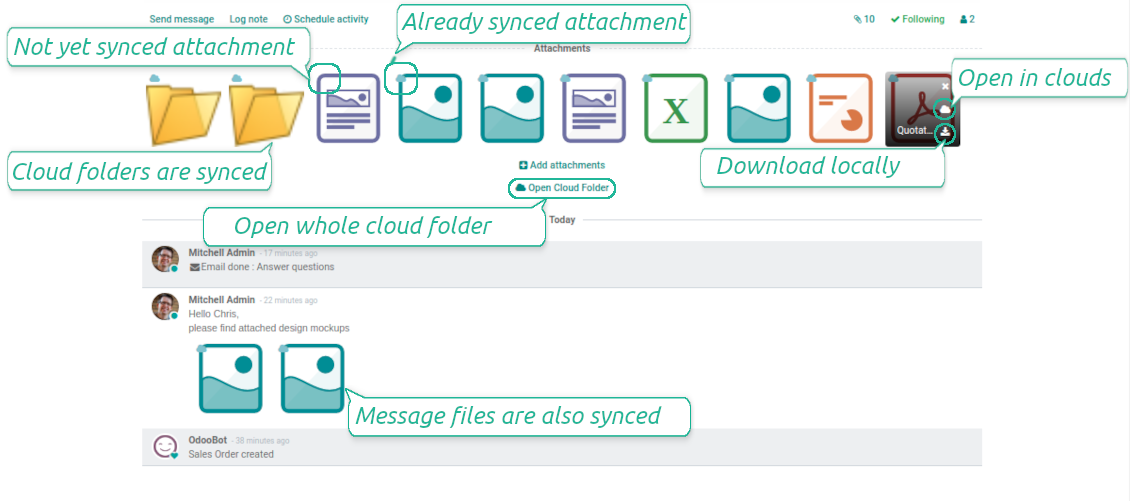



This is the tool to integrate NextCloud / OwnCloud features into your Odoo business work flow. The app automatically stores Odoo attachments in NextCloud / OwnCloud, and it provides an instant access to them via web links. In such a way users work with files comfortably in the cloud storage, while the results are fully available in Odoo.
- the technical core which provides basic mechanics of auto synchronization. This is a required module for integration. De prijs is 398€.
- the connector itself which introduces links between Odoo and NextCloud / OwnCloud. De prijs is 89€.
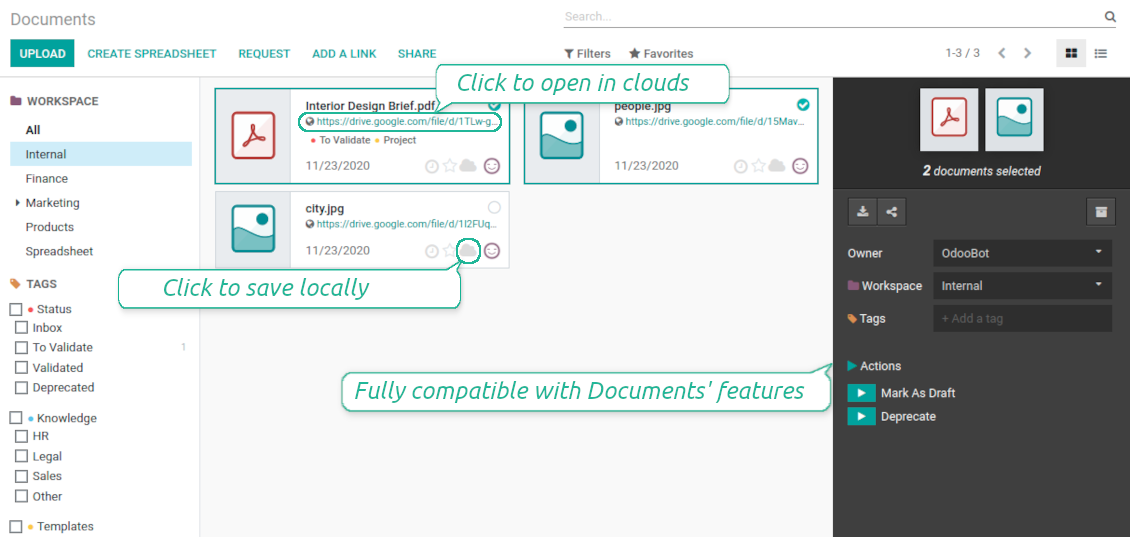
- an optional add-on to sync Odoo documents (introduced by the enterprise app 'Documents') with clouds. The features assumed by this add-on are marked by the icon . De prijs is 44€.
Automatic regular sync
Synchronization between Odoo and OwnCloud / NextCloud is based on scheduled jobs. No manual interaction is required
Bilateral OwnCloud / NextCloud sync
Odoo sends attachments to OwnCloud / NextCloud and retrieves files from there. Binary content is kept in clouds, while Odoo provides direct access to synced items
Any Odoo document types for sync
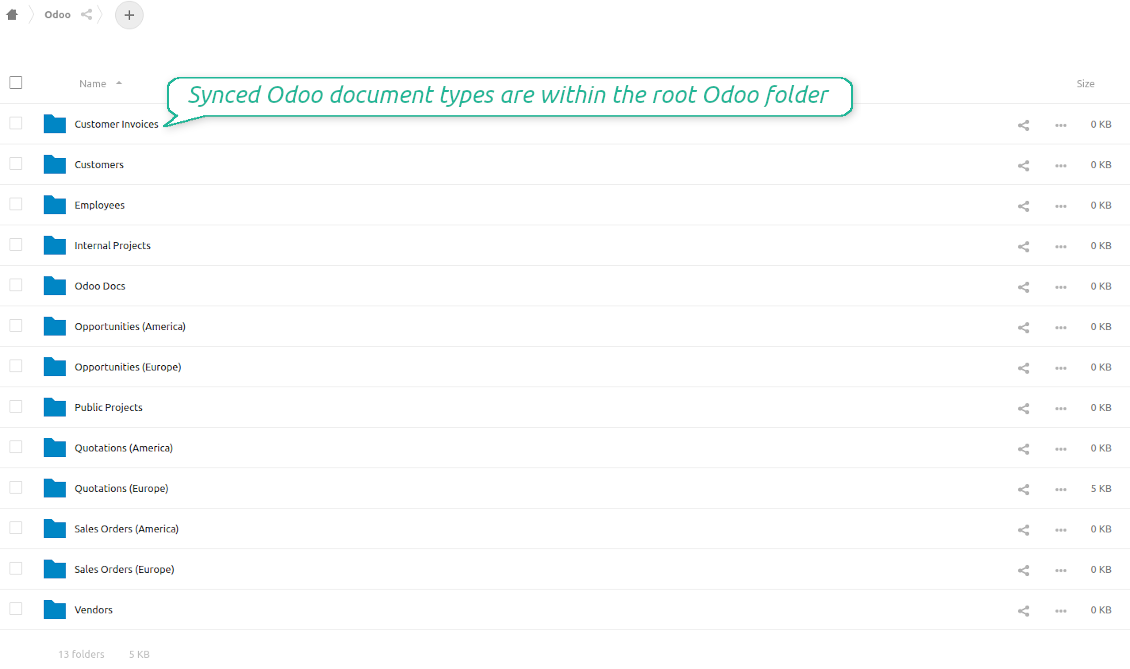
Decide which Odoo document types should be synced. Customers, opportunities, sale or purchase orders, tasks or issues, employees or users, etc. Custom models are also supported
Instant access for OwnCloud / NextCloud
The tool redefines Odoo attachments boxes to make work comfortable: download files locally without login, open files and folders in OwnCloud / NextCloud, use standard Odoo previewers
Internal and public URLs
By default links from Odoo to OwnCloud / NextCloud are internal: only authorized users may access them. Optionally make links public (the setting 'Use Public URLs'). Then, URLs would be 'shared', and everybody would access items by a direct link
Compatible with Odoo Enterprise documents
Reflect Odoo Enterprise Documents' structure and items in OwnCloud / NextCloud. All features (including sharing, downloading, and signing) would anyway work
OwnCloud / NextCloud sync history
Sync activities might be logged. Control over files and folders creations, moves, name changes and removals. Just turn on the option 'Log sync activities', and you would be able to observe the history through the button 'Sync logs'
Default folders
The tool let generate default directories' structure for this document type during the very first sync of a related object. For example, for all employees you may have pre-defined folders 'Scans', 'Scans/Official', 'Photos', etc.
Very good product
A perfect solution to integrate Owncloud with Odoo. We sync a high volume of objects across multiple Odoo models, which works seamless and stable. For us it is the perfect solution to have an external DMS instead of the Odoo native attachment handling, which also enables us to interchange files between systems in our best-of-breed setup.
The team behind this module is extremely professional and responsive. They helped us on a few occasions and provided clear answers and prompt support when required, and they even went out of their way to assist us with another requirement we had. Cannot recommend the product and team highly enough, try this if you're in the market to connect Odoo with an external document solution.
Works according to specs
I have used this app with Odoo 12 and Nextcloud 16 and it works as specified. Odoo Tools offers very responsive support which is really helpful. Of course 5 stars...!
This is Awesome
I have used Cloud Sync on Next/Own Cloud and works really great.
Sync any documents you like
Configuring models to sync
-
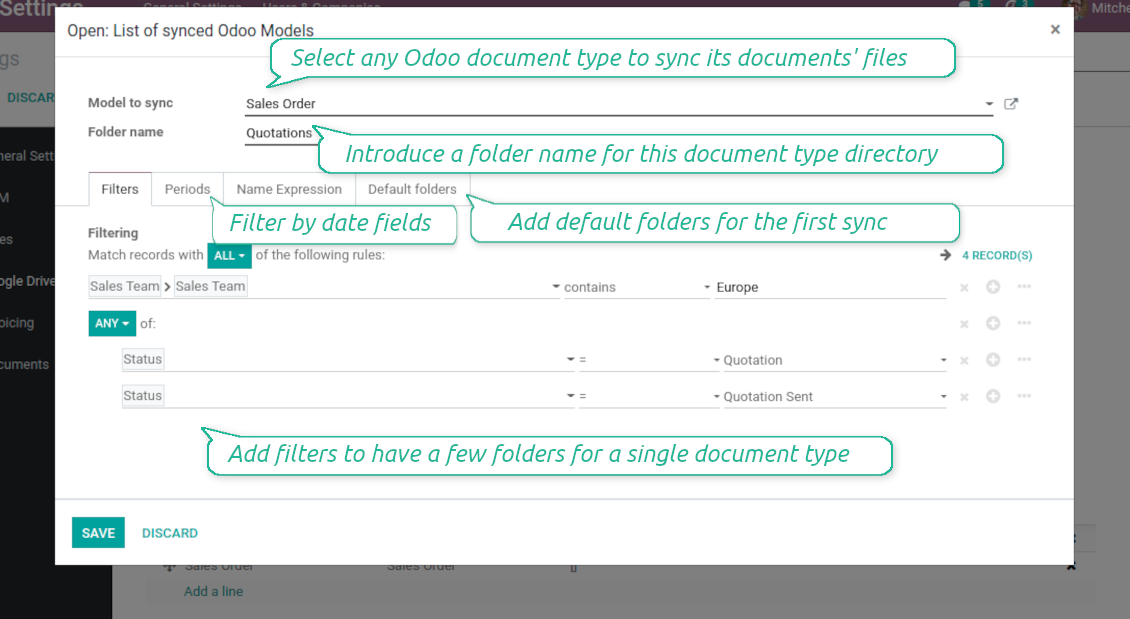
To sync a specific document type, you should add it as a model to sync. Any Odoo model might be chosen
-
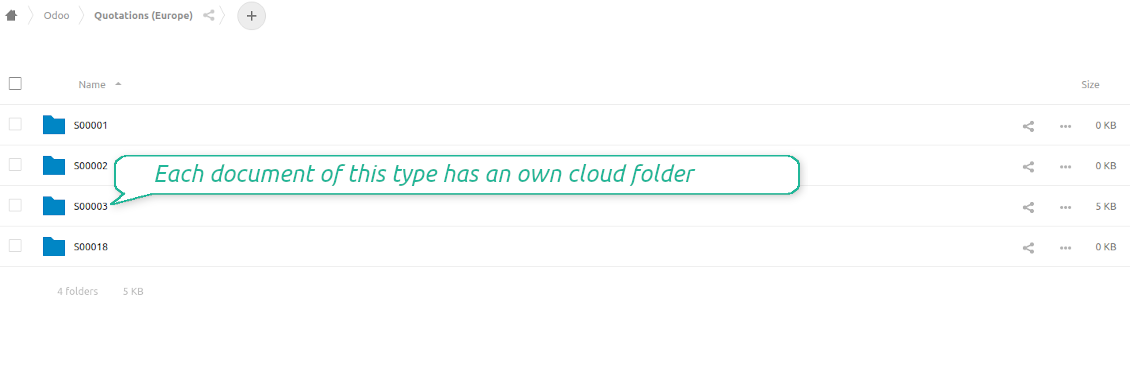
The app let split models into a few folders based on selected filters. Use any document storable field to distinguish a directory. Have a separate folder for individuals and companies, for European and American opportunities, for quotations and confirmed orders, for each project, etc.
-
Limit also documents by relative periods through using date fields of linked documents. For example, leads registered in the last 3 months or invoices updated the last week
-
Define name expressions to specify titles of documents' OwnCloud / NextCloud folders. For instance, to include project name to a task directory
-
Prepare hierarchy of default folders to be created when a document directory is synced to OwnCloud / NextCloud for the first time
Typical use cases
-
Projects: have an own OwnCloud / NextCloud folder for each customer project
-
Customers: add all partner files in a single directory available both from Odoo and from OwnCloud / NextCloud. Modify those using default cloud editors and access them when working in Odoo
-
Employees: gather all files by this employee in a single cloud folder: photos, document scans, contracts. Access and upload those from Odoo and OwnCloud / NextCloud alternatively
-
Opportunities: carefully store all specifications, requirements, any files which would let you make a good offer
-
Orders: keep all printings and contracts in OwnCloud / NextCloud with instant availability from Odoo
-
Picking operations: save warehouse docs to OwnCloud / NextCloud.
How synchronization works
Direct Sync
-
Direct synchronization is based on the scheduled job 'Synchronize attachments with cloud'
-
Direct sync make all synced Odoo attachments change their type to a link (URL), while binary content is removed with a next Odoo cleaner. So, no actual files would be stored on your Odoo server
-
Direct sync checks whether attachments are added or deleted for synced documents. If so, they would be created or removed in OwnCloud / NextCloud
-
Direct sync checks whether a new document type (e.g. sale orders) is added / renamed / replaced in the to-sync-models configurations. If so, this should be reflected in OwnCloud / NextCloud
-
Direct sync checks whether a new document (e.g. quotation SO-001) related to a synced document type is generated / updated / unlinked. If so, the connector would make the same changes in OwnCloud / NextCloud
-
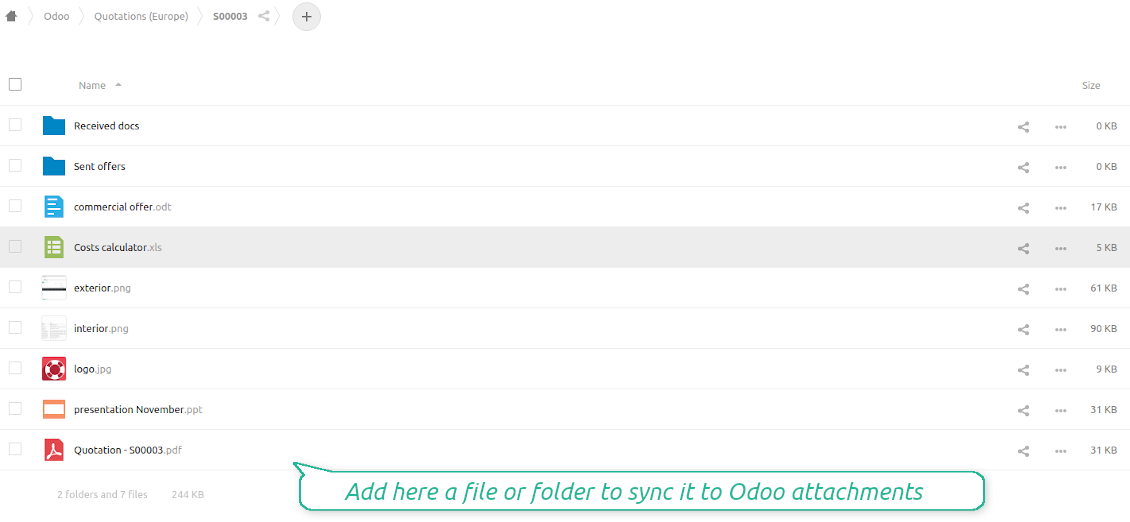
The final goal of direct OwnCloud / NextCloud integration is to have the structure 'Odoo / Document Types / Documents / Files. For example, 'Odoo / Quotations / SO019 / commercial offer.pdf'
Backward Sync
-
Backward synchronization is based on the scheduled job 'Synchronize attachments from cloud'
-
Backward sync checks whether any items are added to a OwnCloud / NextCloud document folder. If so, the app would create URL attachments for that items in a linked Odoo object
-
Backward sync checks whether any items are deleted / moved in a cloud document folder. If so, a linked Odoo attachment would be also unlinked or moved
-
Backward sync checks whether any item is renamed in OwnCloud / NextCloud. If so, a chained Odoo attachment should be also renamed
-
In OwnCloud/NextCloud folders you can put not only files but also child folders. In that case a link for this folder (not its content) would be kept in Odoo attachments
-
If you deleted a folder related to this document type or this document, their child files would be deleted as well. Thus, Odoo would remove related attachments. The folders, however, will be recovered with a next direct sync
Misc notes
-
The connector works on a queue (first in - first out) principle: it tries to firstly reflect the oldest changes
-
Each sync, especially the very first one, might take quite a long. It is not recommended to make sync too frequent: once an hour seems reasonable frequency
-
File names and content should be managed in OwnCloud / NextCloud names: each backward sync would recover OwnCloud / NextCloud names, Odoo is here less important
-
Do not add folders inside root or document types' folders. If they have the same name as newly synced folders, the latter would not be uploaded
-
Try to avoid the following symbols in folders' and files' names: *, ?, ", ', :, <, >, /, +, %, !, @, \, /,. Direct sync will replace such symbols with '-'. It is done to avoid conflicts with file systems
-
Make sure your database has a proper SSL certificate which is required to use OwnCloud API
-
Be cautious if you decide to use shared (public) URLs. Although the links would be hardly known by external users, there is a slight chance that they become available as a result of some user actions. Besides, sharing links generation is not fast and might make the synchronization slower.
Odoo Enterprise Documents
-
The special add-on 'Cloud Sync for Enterprise documents' is introduced to synchronize OwnCloud / NextCloud with the Odoo app 'Documents' (the latter is distributed under the Odoo Enterprise license)
-
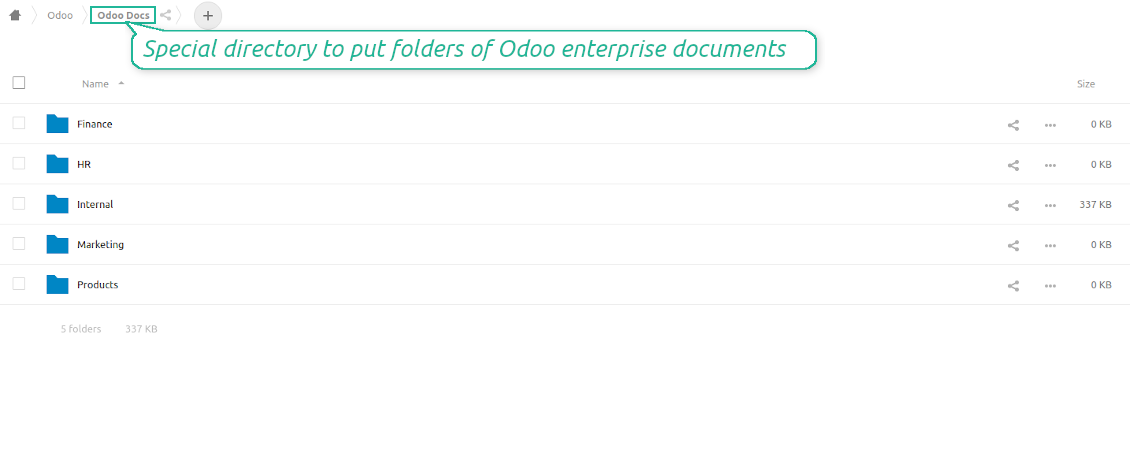
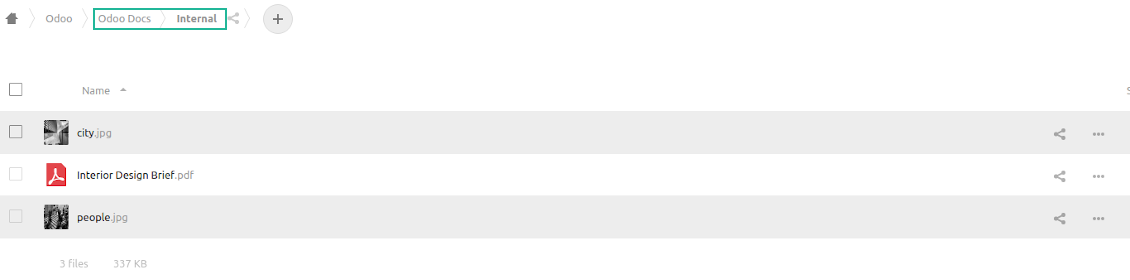
Based on that add-on the Odoo documents' hierarchy would be reflected within the folder 'Odoo / Odoo Docs'
-
Each Odoo folder would have a linked OwnCloud / NextCloud folder. Take into account that folders created in the cloud storage will be synced as Odoo attachments. The key principle is: folders are managed by Odoo, files are managed by the cloud client
-
All files are synced with the same logic as usual attachments. Files created in Odoo will be added to the cloud storage and will be replaced with links in Odoo. Files created in cloud storage will generate URL attachments within a paired documents directory
-
Standard OwnCloud / NextCloud sync and integration with Enterprise Documents are done within the same jobs. Avoid the scenarios when a single file is synced as a simple Odoo attachment and as an Odoo document simultaneously
-
Odoo spread sheet files are not synced by the connector: so, they are still manageable in Odoo
-
Please do not name synced models as 'Odoo Docs'. This is the reserved name for Odoo Enterprise Documents.
Configuratie- en installatietips voor OwnCloud / NextCloud Odoo Integration Odoo v.14
Python dependency
The tool depends on external libraries 'owncloud'. Install this library for your Odoo server through the command:
pip3 install pyocclientConfiguration and log in
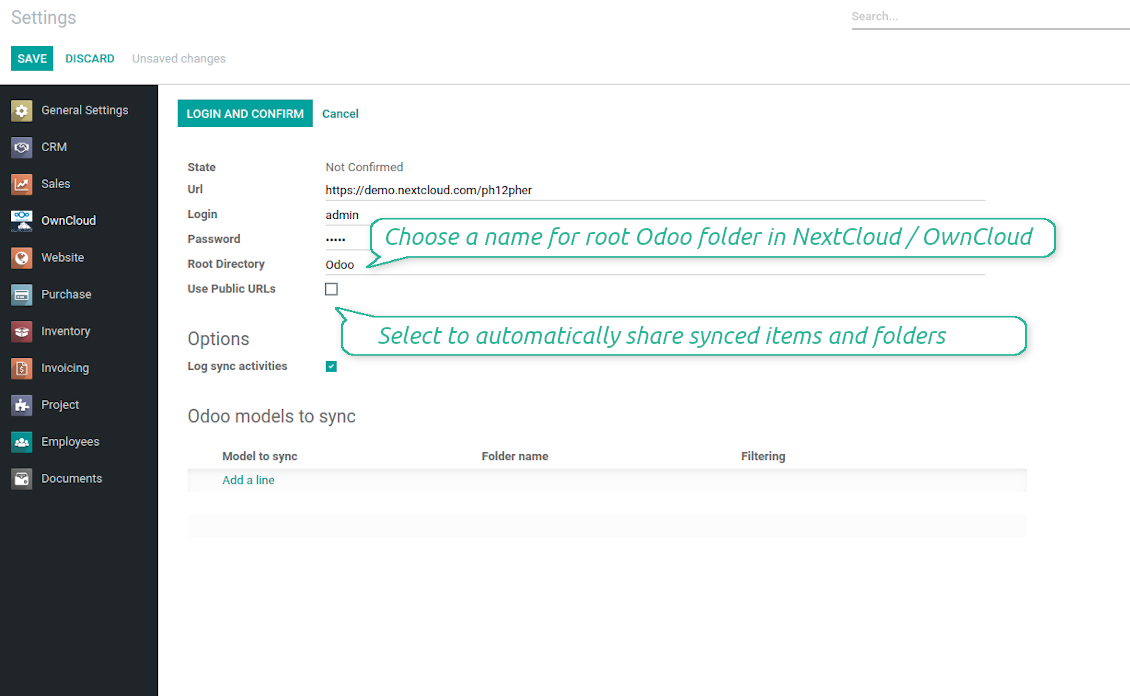
To log in in OwnCloud / NextCloud you should:
- Enter your OwnCloud / NextCloud full URL
- Select an OwnCloud / NextCloud user, which has full rights to read, create, write and delete files and folders within a root directory
- Enter login and password of this user
- Introduce the title for OwnCloud / NextCloud folder, e.g. Odoo
- Push the button 'Save', and then - the button 'Login and Confirm'
- If everything is fine, push the button 'Sync'
- Make sure that the root directory or its children are shared with your colleagues
Enter OwnCloud / NextCloud credentials
Odoo server configuration and cron job configuration
To make sure the synchronization works correctly apply proper timeouts to the Odoo configuration file: LIMIT_TIME_CPU, LIMIT_TIME_REAL, LIMIT_TIME_REAL_CRON should be more than 900 seconds.
For Odoo.sh this should not be done, since timeouts are predefined and are not configurable.
Then, timeout should be entered to your Odoo. To that goal find the section 'Settings' on the app configuration page and copy the number there.
Afterwards, it is needed to make the cron jobs suit the applied timeouts. In the debug mode go to the Settings > Technical > Automation > Scheduled Jobs:
- Set up the job 'Synchronize attachments with cloud' as (a) frequency - 2*timeout; (b) the next execution as the next hour +timeout. For example, for 900seconds timeout: frequency - as 30minutes; the next execution - at 08:15
- Set up the job 'Synchronize attachments from cloud' as (a) frequency - 2*timeout; (b) the next execution as the next hour + timeout*2. For example, for 900seconds timeout: frequency - as 30minutes; the next execution- at 08:30.
Veelgestelde vragen over OwnCloud / NextCloud Odoo Integration Odoo v.14
Kan ik de frequentie van synchronisatietaken wijzigen?
Ja, dat kan. Doe het als volgt:
Zet de debugmodus aan
Ga naar technische instellingen > Automatisering > Geplande acties
Zoek de taken «Synchronize attachments with cloud» en «Update attachments from cloud».
Maak ze niet te frequent. Een taak moet bij voorkeur klaar zijn voordat de volgende start. De instelling hangt af van hoeveel items u moet synchroniseren. Meestal ligt de frequentie tussen 15 minuten en 4 uur.
Zet ook voldoende tijdslimieten in het Odoo-configuratiebestand. LIMIT_TIME_CPU en LIMIT_TIME_REAL moeten gelijk zijn aan of groter dan de geplande crontijd. Vanaf versie 13 geldt ook LIMIT_TIME_REAL_CRON.
Belangrijke opmerking voor Odoo.sh-klanten: de maximale crontijd kan tot 15 minuten beperkt zijn.
Kan ik een andere structuur van gesynchroniseerde mappen instellen dan de synchronisatie aanneemt?
Nee, deze functie bestaat pas vanaf versie 15. Daarvoor werkt de module met een vaste mappenstructuur:
Odoo - hoofdmap voor de sync
Modellen - mappen per Odoo-documenttype. Bijvoorbeeld «Projects», «Partners». Via het domein kunnen er specifiekere mappen zijn: «Customer 1 Projects», «Projects of the Customer 2», «Internal Projects», enz.
Objecten - mappen per document, bijv. «Project 1» of «Customer 1»
Bestanden en mappen van dit Odoo-document die gesynchroniseerd worden.
Zo kunt u bijvoorbeeld hebben:
Odoo / Projects / Project 1 / bestanden en mappen van project 1
Odoo / Customer 1 Projects / Project 1; Odoo / Customer 2 Projects / Project 3, ...
Odoo / Customers / Customer 1 / bestanden en mappen van klant 1
De structuur is altijd plat: alleen die niveaus. Verschillende documenttypen horen niet in dezelfde tak. In «Customer 1» kunt u niet tegelijk orders, facturen en projecten bewaren. Elk type heeft eigen map(pen). Anders is terug-sync onmogelijk, omdat er geen criterium is.
Moet ik in Odoo specifieke gebruikerstoegangen instellen?
Nee, de tool werkt met één gebruikers-eindpunt. Alle syncprocessen lopen onder één cloudbeheerder (app). Rechten voor aangemaakte mappen / bestanden worden niet geautomatiseerd. Beheer die in uw cloudoplossing.
Waar worden gesynchroniseerde bestanden bewaard? Worden ze gedupliceerd in Odoo en in de clouds?
De app gaat ervan uit dat de binaire inhoud van bijlagen in de Cloud Client blijft, niet op de Odoo-server. Zulke bijlagen worden in Odoo van het type URL en u kunt ze altijd openen vanuit het bijlagevak of vanuit de Cloud Client.
Na de setup zijn geen handmatige acties nodig: de synchronisatie is volledig automatisch. Bepaal welke Odoo-documenttypen gesynchroniseerd moeten worden en stel per type een gerelateerd model in (klanten, verkoop- of inkooporders, taken, projecten, enz.).
Kan ik meerdere mappen hebben voor hetzelfde documenttype? Bijvoorbeeld interne projecten en klantprojecten?
Ja, dat kan. Maak daarvoor per geval een regel en pas filters toe: bijvoorbeeld op projecttype.
Maak de filters onderling uitsluitend, zodat een document eenduidig wordt toegewezen. Bijvoorbeeld: «klant maar geen leverancier», «leverancier maar geen klant». Anders springt de documentmap van het ene model naar het andere.
Heb ik alleen de Cloud Storage Solution-app nodig?
Nee, de tool is alleen een technische kern. U hebt ook de connector van uw cloudclient nodig.
Is het oké als ik veel objecten moet synchroniseren, bijvoorbeeld 10000?
Ja, hoewel het bij veel mappen/bijlagen traag kan zijn. Klanten meldden echter omgevingen met >10k partners en ~5k productvarianten, en de processen waren acceptabel.
Enkele punten:
- De sync is zo gebouwd dat elk item wordt gesynchroniseerd en niet verloren gaat, ook al is het niet snel. FIFO-wachtrijen en een commit per taak garanderen dat.
- Het aantal objecten kan logisch worden beperkt. De modelconfiguratie laat toe verouderde items uit te sluiten (bijv. gearchiveerde partners of orders van 2 jaar geleden).
Is realtime synchronisatie mogelijk?
Nee. We hebben sterke redenen om realtime sync te vermijden:
Prestaties. Bij realtime sync geeft elke bestandsupload een laadscherm.
Conflicten. Als 2 gebruikers tegelijk een item wijzigen, kan dat onoplosbaar worden. Bij gewone taken kunnen we het later herstellen; bij realtime zou een wachtrij nodig zijn, nog verwarrender.
Functionaliteit. Vooral hernoemen en herstructureren. De terug-sync steunt strikt op de mappenlogica en controleert bij elke sync 100 % van de items. Na elke update zouden dat duizenden verzoeken per seconde zijn. Zo niet, dan gaan wijzigingen verloren.
Kan ik de standaardmapnamen in de clouds wijzigen?
U kunt uw eigen naam geven aan modelmappen (verkooporders, kansen, leveranciers, enz.) voor elk documenttype.
Voor objectmappen (SO-001, John Smith, enz.) gebruikt de tool de Odoo-methode voor de weergavenaam. U kunt dat wijzigen met een naamexpressie. De syntaxis is die van Odoo-e-mailsjablonen.
Kan ik bijlagen synchroniseren naar meerdere cloudclients
Nee, deze functie is pas beschikbaar vanaf versie 15.
We gebruiken een speciale editor in onze clouds (bijv. OnlyOffice, Office 365, enz.). Worden bestanden in die editor geopend?
Ja, afhankelijk van de configuratie van uw cloudclient.
Kan ik OwnCloud-tags bijwerken met de connector?
Nee, de tags worden niet gesynchroniseerd. We hebben dit eerder overwogen, maar om verschillende redenen niet ingevoerd:
De connectorbibliotheek ondersteunt het ophalen of bijwerken van OwnCloud-tags niet
Odoo-bijlagen hebben geen attribuut «tags» en het is onduidelijk wanneer die tags aan gebruikers zouden worden toegekend.
Omdat de app tweezijdige sync biedt, kunnen er kritieke conflicten ontstaan die moeilijk op te lossen zijn.
Wat is het updatebeleid van uw tools?
Volgens het huidige beleid van de Odoo Apps Store:
- Elke module gekocht voor versie 12.0 of eerder geeft toegang tot alle versies tot 12.0.
- Vanaf versie 13.0 moet elke moduleversie apart worden gekocht.
- Ongeacht de versie geeft aankoop recht op alle updates en bugfixes binnen een hoofdversie.
Het faOtools-team bepaalt dit beleid niet. Neem voor vragen rechtstreeks contact op met vertegenwoordigers van de Odoo Apps Store.
Hoe installeer ik uw app op Odoo.sh?
De meest directe aanpak is de ingebouwde workflow van de Odoo-store:
1. Open de modulepagina en klik op Deploy on odoo.sh
2. U gaat naar GitHub. Log in en klik op Create a new repo of gebruik een bestaande. De repository moet privé zijn. Apps onder OPL-1 mogen niet openbaar. Maak zo nodig een nieuwe repo voor het Odoo.sh-project
3. Ga daarna naar odoo.sh, klik op Deploy, bevestig en klik op Continue. De installatie start.
Zo installeert u de app op de productiebranch. Voor andere branches of een update:
1. Download de broncode uit de Odoo-store
2. Commit de module naar de GitHub-repository. Geen app-mappen/bestanden in .gitignore. Repo's van odoo.sh negeren soms belangrijke paden (bijv. /lib). Upload alle modulemappen en -bestanden
3. Deploy de doelbranch van het odoo.sh-project of wacht op de automatische build.
Hoe installeer ik uw app op mijn eigen server?
2. Herstart de Odoo-server;
3. Zet de ontwikkelaarsmodus aan (technische instellingen);
4. Werk de applijst bij (Apps-menu);
5. Zoek de app en klik op Activate/Install;
6. Volg de richtlijnen op de app-pagina als die er zijn.
Uw app heeft extra add-ons. Kan ik die later kopen?
Ja. Odoo zet automatisch alle afhankelijkheden in de winkelwagen: sluit eerder gekochte tools uit om dubbel betalen te voorkomen.
Ik heb uw app op Odoo.sh gezet en zie een waarschuwing/fout in de tests
Een rode/oranje waarschuwing beinvloedt de functies van de app niet. Soms halen onze modules de standaard automatische tests niet, omdat die gedrag verwachten dat indruist tegen het doel van de app. We wijzigen bijvoorbeeld de prijscalculatie, terwijl de Odoo-tests de eindprijs met het standaardalgoritme vergelijken.
Controleer eerst de functies van de gedeployde database. Werkt alles?
Als u toch denkt dat de waarschuwing echte functies raakt, neem contact op en stuur de volledige installatielogs en de volledige lijst gedeployde modules (kern en derden).
Kan ik uw app rechtstreeks bij u kopen?
Nee, we verspreiden de tools alleen via de officiele Odoo-appwinkel.
Ik wil graag korting
Helaas hebben we geen technische mogelijkheid voor individuele prijzen.
Kan ik de app installeren op mijn Odoo Online (SaaS)-database?
Nee, apps van derden kunnen niet op Odoo Online. Odoo SaaS blokkeert die mogelijkheid.
Uw tool hangt van andere apps af. Moet ik die kopen?
Ja, de tool heeft alle modules in de afhankelijkheden nodig. De prijs op de app-pagina is inclusief die afhankelijkheden.
Wat is de prijs van de module in Amerikaanse dollars? Waarom is die veranderd?
De prijs van onze modules staat in euro. De Odoo-store rekent om volgens de interne wisselkoers. De prijs in Amerikaanse dollars kan dus wijzigen als die koers wordt bijgewerkt.
De teksten van de app en website in andere talen dan het Engels zijn met AI ondersteund en afgestemd op de officiële Odoo-vertalingen. Als u een fout ziet, een vertaalticket sturen en we corrigeren het.
Fouten melden
Als u bugs of inconsistent gedrag tegenkomt, aarzel dan niet om contact met ons op te nemen. We garanderen dat we binnen 60 dagen na aankoop oplossingen bieden en zijn zeer geïnteresseerd in het verbeteren van onze tools, zelfs na deze periode.
U heeft geen telefoonnummer of creditcard nodig om contact met ons op te nemen. U hoeft slechts een korte e-mailaanmelding door te geven, die niet langer dan 30 seconden duurt.
Vermeld zo veel mogelijk details in uw verzoek: schermafbeeldingen, Odoo-serverlogboeken, een volledige beschrijving om uw probleem te reproduceren enzovoort. Gewoonlijk kost het enkele werkdagen om een werkplan voor een probleem op te stellen (als een bug is bevestigd) of u richtlijnen te geven over wat er moet gebeuren (anders).
Aanvragen voor openbare functies en module-ideeën (gratis ontwikkeling)
We zijn sterk gemotiveerd om onze tools te verbeteren en zijn dankbaar voor alle feedback. Als uw vereisten van openbaar nut zijn en efficiënt kunnen worden geïmplementeerd, zal het team deze opnemen in onze takenlijst.
Zo'n to-dolijst wordt regelmatig verwerkt en er zijn geen extra kosten aan verbonden. Hoewel we geen deadlines en definitief ontwerp kunnen beloven, kan het een goede manier zijn om de gewenste functies te verkrijgen zonder investeringen en risico's.
U heeft geen telefoonnummer of creditcard nodig om contact met ons op te nemen. U hoeft slechts een korte e-mailaanmelding door te geven, die niet langer dan 30 seconden duurt.

De tool om wachtwoorden veilig in Odoo te bewaren voor gedeeld gebruik. Kluizen

De tool om een diepe kennisbank te bouwen, intern en extern. KMS. Wiki-achtige revisies
398€
De tool om KPI-doelen te zetten en de realisatie per periode te controleren. Dashboards. Grafieken

De tool voor tijdgebonden diensten van boeking tot verkoop en reviews
398€
De tool om Odoo vanuit AI-chats via MCP te beheren. Claude. Elke MCP-AI.

De tool om Odoo-bijlagen in mappen te structureren en te synchroniseren met Google Drive, OneDrive/SharePoint, Nextcloud/ownCloud, Dropbox, Amazon S3, Box en NAS. Bestandsbeheer. DMS
398€
De tool om Odoo-bijlagen bidirectioneel met OneDrive te synchroniseren
487€
De tool om Odoo-bijlagen bidirectioneel met Google Drive te synchroniseren
487€
De tool om Odoo-bijlagen bidirectioneel met NAS te synchroniseren. Synology, QNAP, TrueNAS, WebDAV
487€