Flexible Timetables and Shifts v.15
The tool to plan, share and control employees shifts in a form of weekly timetables. Work schedule. Work shift calendar




This is the Odoo app to organize teamwork when employees have flexible timetables. The tool allows and forces users to plan shifts in advance. Peers know their colleagues working time, while HR managers control attendance.
- the core app to plan shifts and control timetables. De prijs is 98€.
- the optional free extension that introduces the Odoo Enterprise Gantt view for shifts. The features assumed by this add-on are marked by the icon
Comfortable shifts planning
The app introduces the innovative work calendar where users create shifts just by choosing a period and update those by merely dragging a card. A minute to plan a whole week. As flexible as needed
Team collaboration
Employees can access each other shifts calendar. Work schedule can be also printed to be physically stuck in the office. Thus, users always know where and when their colleagues are available
Work calendar interface
Find a specific user shift using the built-in calendar filters by employee, department, context, or company. Analyze a single user or the whole team. Control shifts on the Odoo Enterprise Gantt view
Odoo weekly timetables
Shifts are auto-combined into weekly timetables from Monday to Sunday. There, employees check themselves while HR managers control the correctness and completeness of plans
HR control
Based on the Odoo attendance features, HR administrators supervise shift fulfillment right in employees' timetables. Turn on the approval option also to force users to get a confirmation for their shifts
Working context (reasons)
For both attendances and planned shifts, users may be asked to choose a context. The list is up to you: for example, 'distant', 'office central', 'office west'. The features let quickly understand where or why employees work
Timetable reminders
Configure Odoo to remind employees to plan shifts for the next week. Notify users of being late if they have not checked in but were previously planning to work
Multiple companies and timezones
The app fully supports multi-timezones and multi-companies environments. Perfect for geographically distributed teams where cooperation becomes really crucial.
Team Work Schedule
Shifts and working calendar
-
The app's key idea is that employees may independently and flexibly plan shifts for the next or a few next weeks
-
In this way, all team members always know when (time) and where (context) to find their colleagues. Ordinary users can access anybody else schedule but, surely, can change only their own
-
Shifts are organized in the Odoo calendar interface with instant filtering by employees, department, context, and company. To register a new shift, that's enough to choose a period and a reason. To update a shift just drag it and drop it to another time slot
-
The interface fully supports multiple timezones, so the module is perfect for geographically distributed teams
-
The tool allows printing a work schedule of a specified period (up to 31 days) to have a physical copy on a whiteboard, for instance. The layout if configurable: for example, make it A3 or A4, add or remove a company logo
Timetable interface
-
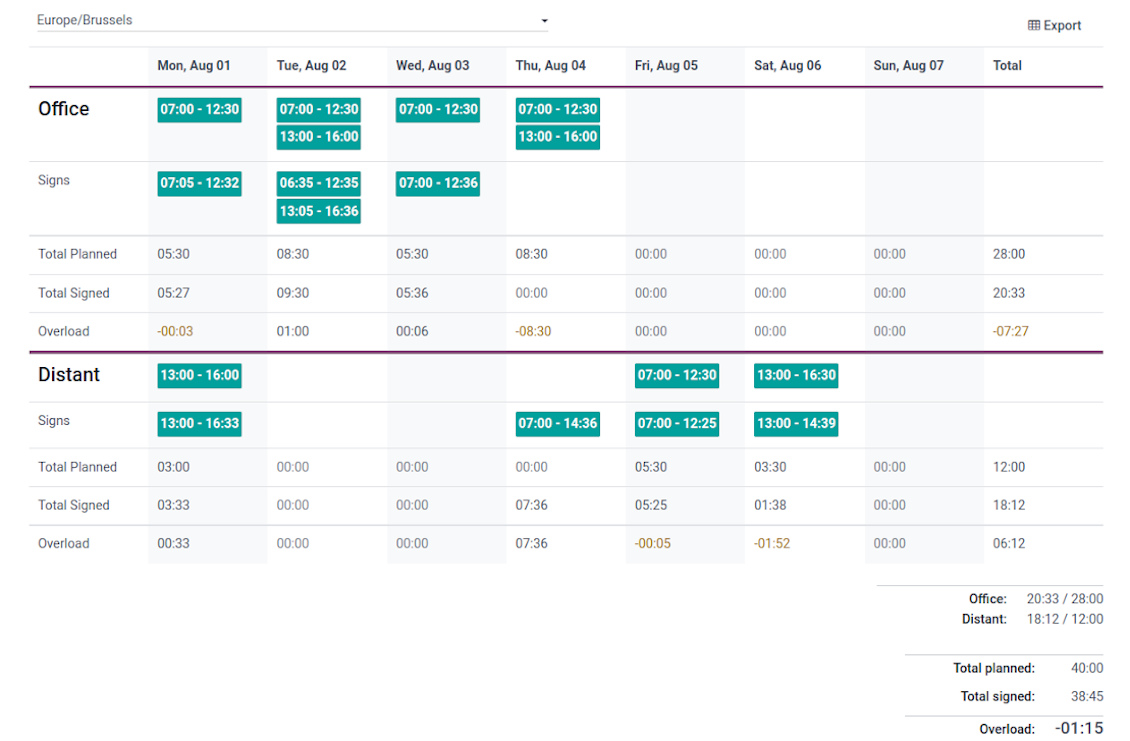
Planned shifts are automatically combined in weekly timetables from Monday to Sunday
-
There, employees can control themselves on how much working time is planned in comparison to how much it should be according to the contract
-
The timetable interface groups shifts by working contexts. It makes analysis much more comfortable and lets make corrections in time. For example, if you had certain restrictions on the 'distant work', here it is under full control
-
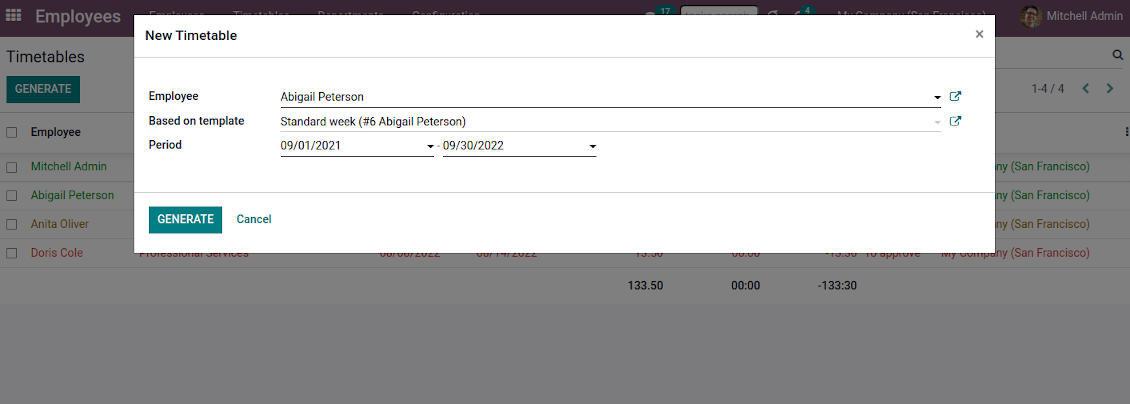
To simplify shifts planning, employees are allowed to save any timetable as a template, so they can re-use the same schedule for other weeks
-
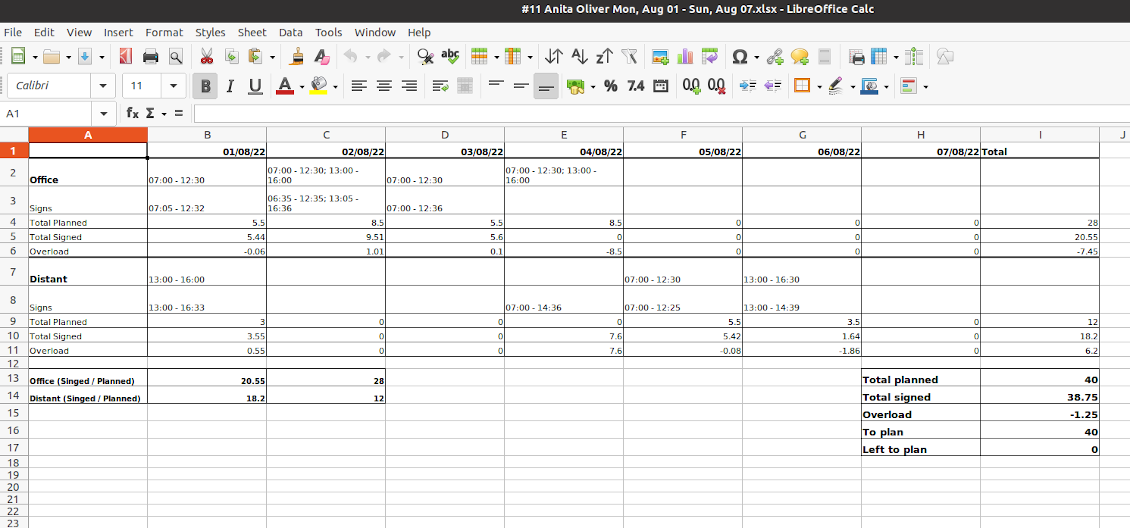
It is possible to export a specific timetable as an Excel table to share or print it out
Managerial control and attendance
-
Besides the owners, timetables are available only for this employee department manager and for all users with the access group 'HR administrators'
-
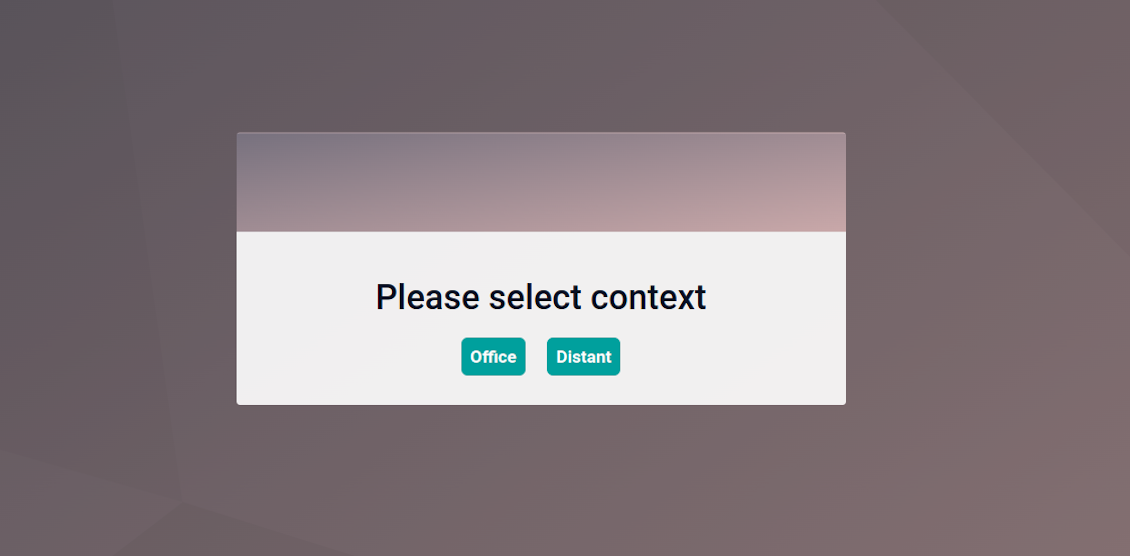
The app relies on the Odoo attendance functionality. When checked in, a user might be optionally forced to choose a working context (reason)
-
Thus, HR administrators not only see planned shifts but also control their fulfillment: when a user actually checked in and out, how much work time is planned, how much is actually spent, and what calculated overload is
-
Superiors and subordinates might discuss any scheduling issues and set up activities right under each specific weekly timetable
-
The app supports multi companies. Users can access only their real colleagues' shifts. If a user has an employee in a few companies, he/she controls timetables of all of those but the app makes sure there are no overlappings
Approval workflow
-
The tool lets optionally introduce the approval workflow for timetables based on the states update Planning > To approve > Approved
-
Then, after planning shifts, an employee should send a weekly timetable to their department manager for confirmation (the button 'Send for approval')
-
Department managers and any HR administrators subscribed for this employee 'Timetables and shifts' subtype would get a notification that a timetable state has been updated
-
Such managers or any user with the rights 'HR Administrator' may confirm (the button 'Approve') or refuse (the button 'Refuse') the shift schedule. The decision principles are fully up to you
-
As a weekly timetable is sent to approval or already approved, ordinary employees cannot any more update shifts for that week. In this way, team collaboration becomes much more predictable and might be planned beforehand.
Configuratie- en installatietips voor Flexible Timetables and Shifts Odoo v.15
Contexts (reasons) for shifts and attendances
The app allows to configure an unlimited number of working contexts on the Odoo HR configuration page.
One of those contexts should be set as default. Then, it would be entered as the first choice for planned shifts and attendances.
When a user plans shifts, he/she would be asked to introduce a context.
It is possible to turn on context selection also when a user checks in Odoo. Otherwise, default context would be entered to attendances.
Timetable combines shifts and attendances by contexts. In case you have rarely used contexts, mark those as 'Do not show if empty' to avoid too many lines.
Notifications to plan shifts
Reminders to create timetables are sent for the next week. Configure days of the previous week when to notify employees on the configuration page.
Only employees with the flagged setting "Timetable Notifications" would receive reminders.
To change the reminder email, go to the Odoo technical settings > Email > Templates. Find there 'Timetable for the next week'. You are welcome to introduce any changes to subject or body and to update translations.
Change time of the reminder through the Odoo technical settings > Automation > Scheduled jobs > 'Notify employees to plan working time for the next week'.
Notifications of being late
Reminders of being late is sent if a user at this particular moment has a planned shift, but he/she has not checked in.
Only employees with the flagged setting "Being Late Notifications" would receive reminders.
To change the reminder email, go to the Odoo technical settings > Email > Templates. Find there 'Timetable: you are late'. You are welcome to introduce any changes to subject or body and to update translations.
Set up frequency of the reminder through the Odoo technical settings > Automation > Scheduled jobs > 'Notify employees of being late'. By default check is done once an hour.
Hours to plan (contract hours)
How many hours should be planned for a week is defined per each user individually. Define contract hours on an employee form.
Veelgestelde vragen over Flexible Timetables and Shifts Odoo v.15
Kan ik een kalender maken voor werknemers die geen gebruiker zijn?
De tool laat gebruikers zelf diensten plannen: de persoon logt in en zet zijn/haar diensten zodat anderen ze zien. Daarvoor is een account nodig. Uit veiligheidsoverwegingen kan dat niet zonder account.
Wat is het updatebeleid van uw tools?
Volgens het huidige beleid van de Odoo Apps Store:
- Elke module gekocht voor versie 12.0 of eerder geeft toegang tot alle versies tot 12.0.
- Vanaf versie 13.0 moet elke moduleversie apart worden gekocht.
- Ongeacht de versie geeft aankoop recht op alle updates en bugfixes binnen een hoofdversie.
Het faOtools-team bepaalt dit beleid niet. Neem voor vragen rechtstreeks contact op met vertegenwoordigers van de Odoo Apps Store.
Hoe installeer ik uw app op Odoo.sh?
De meest directe aanpak is de ingebouwde workflow van de Odoo-store:
1. Open de modulepagina en klik op Deploy on odoo.sh
2. U gaat naar GitHub. Log in en klik op Create a new repo of gebruik een bestaande. De repository moet privé zijn. Apps onder OPL-1 mogen niet openbaar. Maak zo nodig een nieuwe repo voor het Odoo.sh-project
3. Ga daarna naar odoo.sh, klik op Deploy, bevestig en klik op Continue. De installatie start.
Zo installeert u de app op de productiebranch. Voor andere branches of een update:
1. Download de broncode uit de Odoo-store
2. Commit de module naar de GitHub-repository. Geen app-mappen/bestanden in .gitignore. Repo's van odoo.sh negeren soms belangrijke paden (bijv. /lib). Upload alle modulemappen en -bestanden
3. Deploy de doelbranch van het odoo.sh-project of wacht op de automatische build.
Hoe installeer ik uw app op mijn eigen server?
2. Herstart de Odoo-server;
3. Zet de ontwikkelaarsmodus aan (technische instellingen);
4. Werk de applijst bij (Apps-menu);
5. Zoek de app en klik op Activate/Install;
6. Volg de richtlijnen op de app-pagina als die er zijn.
Uw app heeft extra add-ons. Kan ik die later kopen?
Ja. Odoo zet automatisch alle afhankelijkheden in de winkelwagen: sluit eerder gekochte tools uit om dubbel betalen te voorkomen.
Ik heb uw app op Odoo.sh gezet en zie een waarschuwing/fout in de tests
Een rode/oranje waarschuwing beinvloedt de functies van de app niet. Soms halen onze modules de standaard automatische tests niet, omdat die gedrag verwachten dat indruist tegen het doel van de app. We wijzigen bijvoorbeeld de prijscalculatie, terwijl de Odoo-tests de eindprijs met het standaardalgoritme vergelijken.
Controleer eerst de functies van de gedeployde database. Werkt alles?
Als u toch denkt dat de waarschuwing echte functies raakt, neem contact op en stuur de volledige installatielogs en de volledige lijst gedeployde modules (kern en derden).
Kan ik uw app rechtstreeks bij u kopen?
Nee, we verspreiden de tools alleen via de officiele Odoo-appwinkel.
Ik wil graag korting
Helaas hebben we geen technische mogelijkheid voor individuele prijzen.
Kan ik de app installeren op mijn Odoo Online (SaaS)-database?
Nee, apps van derden kunnen niet op Odoo Online. Odoo SaaS blokkeert die mogelijkheid.
Uw tool hangt van andere apps af. Moet ik die kopen?
Ja, de tool heeft alle modules in de afhankelijkheden nodig. De prijs op de app-pagina is inclusief die afhankelijkheden.
Wat is de prijs van de module in Amerikaanse dollars? Waarom is die veranderd?
De prijs van onze modules staat in euro. De Odoo-store rekent om volgens de interne wisselkoers. De prijs in Amerikaanse dollars kan dus wijzigen als die koers wordt bijgewerkt.
De teksten van de app en website in andere talen dan het Engels zijn met AI ondersteund en afgestemd op de officiële Odoo-vertalingen. Als u een fout ziet, een vertaalticket sturen en we corrigeren het.
Fouten melden
Als u bugs of inconsistent gedrag tegenkomt, aarzel dan niet om contact met ons op te nemen. We garanderen dat we binnen 60 dagen na aankoop oplossingen bieden en zijn zeer geïnteresseerd in het verbeteren van onze tools, zelfs na deze periode.
U heeft geen telefoonnummer of creditcard nodig om contact met ons op te nemen. U hoeft slechts een korte e-mailaanmelding door te geven, die niet langer dan 30 seconden duurt.
Vermeld zo veel mogelijk details in uw verzoek: schermafbeeldingen, Odoo-serverlogboeken, een volledige beschrijving om uw probleem te reproduceren enzovoort. Gewoonlijk kost het enkele werkdagen om een werkplan voor een probleem op te stellen (als een bug is bevestigd) of u richtlijnen te geven over wat er moet gebeuren (anders).
Aanvragen voor openbare functies en module-ideeën (gratis ontwikkeling)
We zijn sterk gemotiveerd om onze tools te verbeteren en zijn dankbaar voor alle feedback. Als uw vereisten van openbaar nut zijn en efficiënt kunnen worden geïmplementeerd, zal het team deze opnemen in onze takenlijst.
Zo'n to-dolijst wordt regelmatig verwerkt en er zijn geen extra kosten aan verbonden. Hoewel we geen deadlines en definitief ontwerp kunnen beloven, kan het een goede manier zijn om de gewenste functies te verkrijgen zonder investeringen en risico's.
U heeft geen telefoonnummer of creditcard nodig om contact met ons op te nemen. U hoeft slechts een korte e-mailaanmelding door te geven, die niet langer dan 30 seconden duurt.

De tool om Odoo-bijlagen in mappen te structureren en te synchroniseren met Google Drive, OneDrive/SharePoint, Nextcloud/ownCloud, Dropbox, Amazon S3, Box en NAS. Bestandsbeheer. DMS
398€
De tool om wachtwoorden veilig in Odoo te bewaren voor gedeeld gebruik. Kluizen

De tool om een diepe kennisbank te bouwen, intern en extern. KMS. Wiki-achtige revisies
398€
De tool om Odoo-bijlagen bidirectioneel met OneDrive te synchroniseren
487€
De tool om KPI-doelen te zetten en de realisatie per periode te controleren. Dashboards. Grafieken

De tool voor tijdgebonden diensten van boeking tot verkoop en reviews
398€
De tool om Odoo-bijlagen bidirectioneel met Google Drive te synchroniseren
487€
De tool groepeert gebruikers in rollen en vereenvoudigt groepen. Toegangsbeheer. Massa-update

De app om Odoo-klanten en -leveranciers te beoordelen, scoren en rangschikken