Flexible Timetables and Shifts v.15
The tool to plan, share and control employees shifts in a form of weekly timetables. Work schedule. Work shift calendar




This is the Odoo app to organize teamwork when employees have flexible timetables. The tool allows and forces users to plan shifts in advance. Peers know their colleagues working time, while HR managers control attendance.
- the core app to plan shifts and control timetables. Prisen er 98€.
- the optional free extension that introduces the Odoo Enterprise Gantt view for shifts. The features assumed by this add-on are marked by the icon
Comfortable shifts planning
The app introduces the innovative work calendar where users create shifts just by choosing a period and update those by merely dragging a card. A minute to plan a whole week. As flexible as needed
Team collaboration
Employees can access each other shifts calendar. Work schedule can be also printed to be physically stuck in the office. Thus, users always know where and when their colleagues are available
Work calendar interface
Find a specific user shift using the built-in calendar filters by employee, department, context, or company. Analyze a single user or the whole team. Control shifts on the Odoo Enterprise Gantt view
Odoo weekly timetables
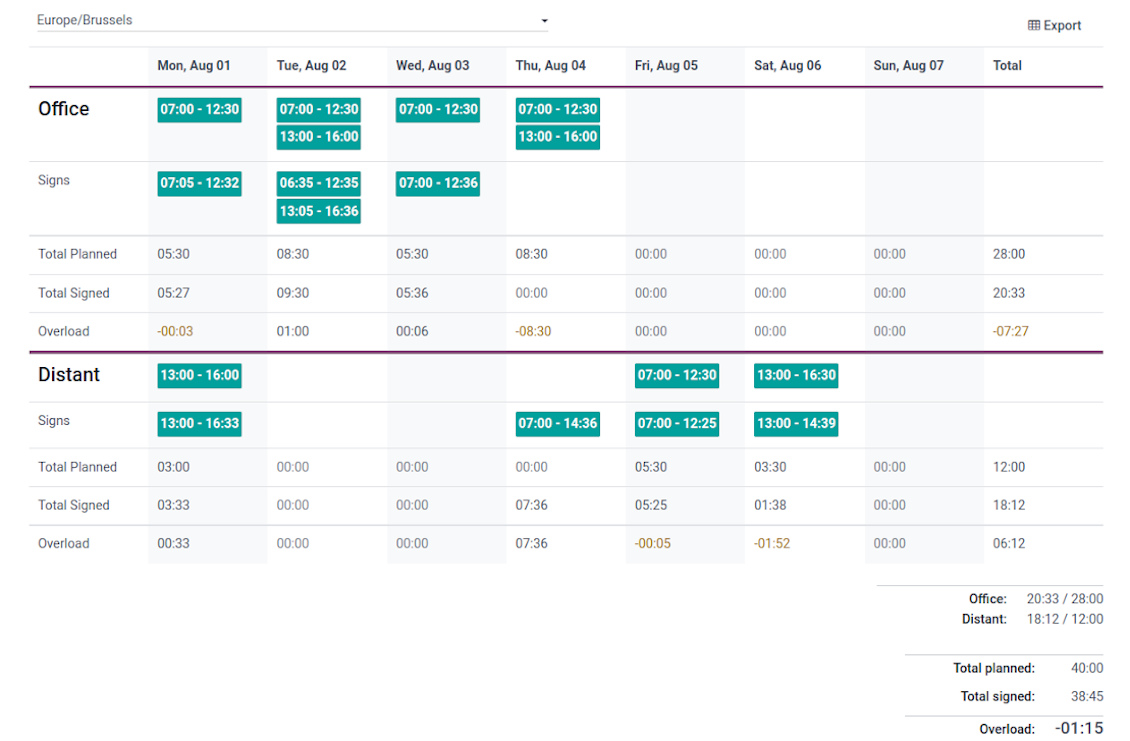
Shifts are auto-combined into weekly timetables from Monday to Sunday. There, employees check themselves while HR managers control the correctness and completeness of plans
HR control
Based on the Odoo attendance features, HR administrators supervise shift fulfillment right in employees' timetables. Turn on the approval option also to force users to get a confirmation for their shifts
Working context (reasons)
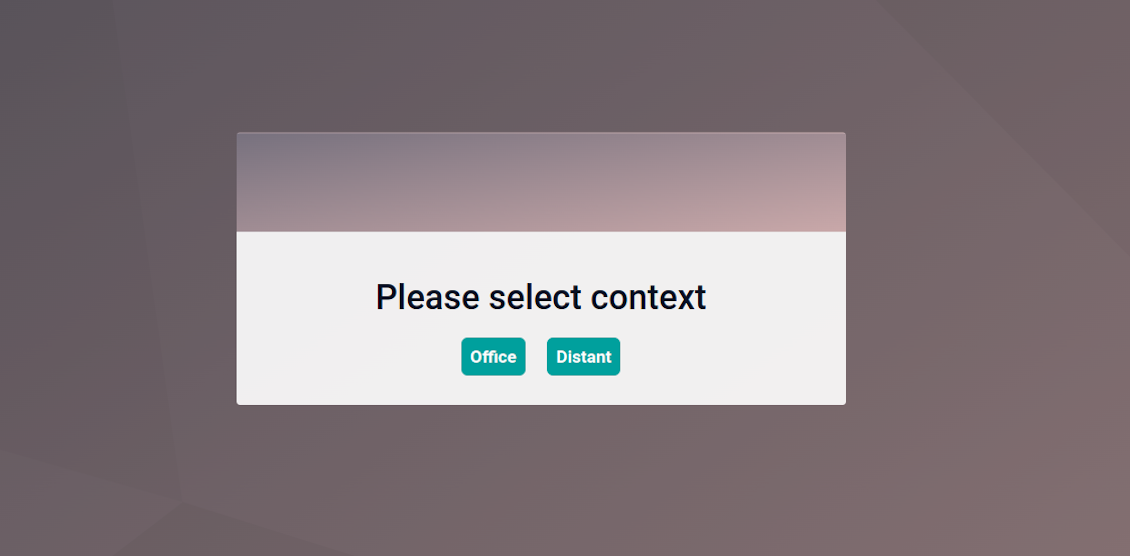
For both attendances and planned shifts, users may be asked to choose a context. The list is up to you: for example, 'distant', 'office central', 'office west'. The features let quickly understand where or why employees work
Timetable reminders
Configure Odoo to remind employees to plan shifts for the next week. Notify users of being late if they have not checked in but were previously planning to work
Multiple companies and timezones
The app fully supports multi-timezones and multi-companies environments. Perfect for geographically distributed teams where cooperation becomes really crucial.
Team Work Schedule
Shifts and working calendar
-
The app's key idea is that employees may independently and flexibly plan shifts for the next or a few next weeks
-
In this way, all team members always know when (time) and where (context) to find their colleagues. Ordinary users can access anybody else schedule but, surely, can change only their own
-
Shifts are organized in the Odoo calendar interface with instant filtering by employees, department, context, and company. To register a new shift, that's enough to choose a period and a reason. To update a shift just drag it and drop it to another time slot
-
The interface fully supports multiple timezones, so the module is perfect for geographically distributed teams
-
The tool allows printing a work schedule of a specified period (up to 31 days) to have a physical copy on a whiteboard, for instance. The layout if configurable: for example, make it A3 or A4, add or remove a company logo
Timetable interface
-
Planned shifts are automatically combined in weekly timetables from Monday to Sunday
-
There, employees can control themselves on how much working time is planned in comparison to how much it should be according to the contract
-
The timetable interface groups shifts by working contexts. It makes analysis much more comfortable and lets make corrections in time. For example, if you had certain restrictions on the 'distant work', here it is under full control
-
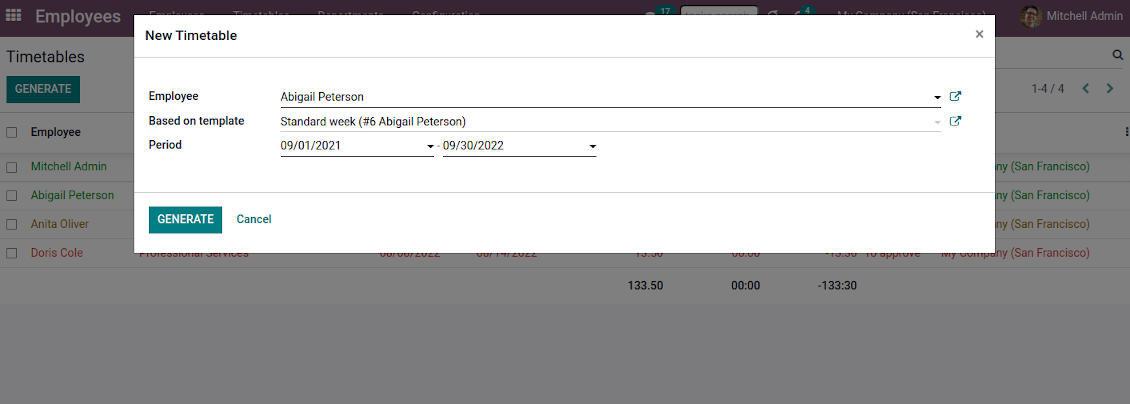
To simplify shifts planning, employees are allowed to save any timetable as a template, so they can re-use the same schedule for other weeks
-
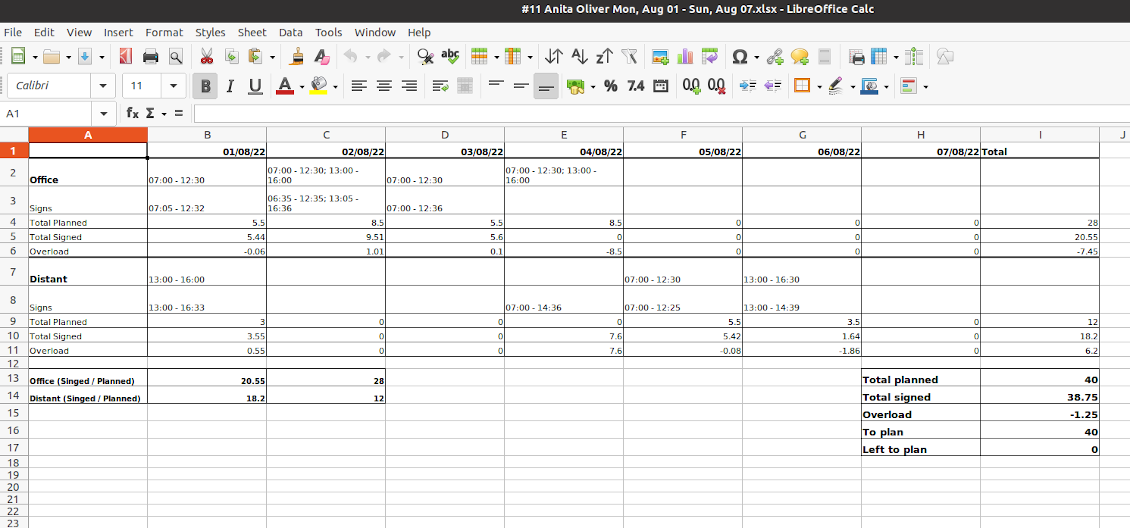
It is possible to export a specific timetable as an Excel table to share or print it out
Managerial control and attendance
-
Besides the owners, timetables are available only for this employee department manager and for all users with the access group 'HR administrators'
-
The app relies on the Odoo attendance functionality. When checked in, a user might be optionally forced to choose a working context (reason)
-
Thus, HR administrators not only see planned shifts but also control their fulfillment: when a user actually checked in and out, how much work time is planned, how much is actually spent, and what calculated overload is
-
Superiors and subordinates might discuss any scheduling issues and set up activities right under each specific weekly timetable
-
The app supports multi companies. Users can access only their real colleagues' shifts. If a user has an employee in a few companies, he/she controls timetables of all of those but the app makes sure there are no overlappings
Approval workflow
-
The tool lets optionally introduce the approval workflow for timetables based on the states update Planning > To approve > Approved
-
Then, after planning shifts, an employee should send a weekly timetable to their department manager for confirmation (the button 'Send for approval')
-
Department managers and any HR administrators subscribed for this employee 'Timetables and shifts' subtype would get a notification that a timetable state has been updated
-
Such managers or any user with the rights 'HR Administrator' may confirm (the button 'Approve') or refuse (the button 'Refuse') the shift schedule. The decision principles are fully up to you
-
As a weekly timetable is sent to approval or already approved, ordinary employees cannot any more update shifts for that week. In this way, team collaboration becomes much more predictable and might be planned beforehand.
Konfigurasjons- og installasjonstips for Flexible Timetables and Shifts Odoo v.15
Contexts (reasons) for shifts and attendances
The app allows to configure an unlimited number of working contexts on the Odoo HR configuration page.
One of those contexts should be set as default. Then, it would be entered as the first choice for planned shifts and attendances.
When a user plans shifts, he/she would be asked to introduce a context.
It is possible to turn on context selection also when a user checks in Odoo. Otherwise, default context would be entered to attendances.
Timetable combines shifts and attendances by contexts. In case you have rarely used contexts, mark those as 'Do not show if empty' to avoid too many lines.
Notifications to plan shifts
Reminders to create timetables are sent for the next week. Configure days of the previous week when to notify employees on the configuration page.
Only employees with the flagged setting "Timetable Notifications" would receive reminders.
To change the reminder email, go to the Odoo technical settings > Email > Templates. Find there 'Timetable for the next week'. You are welcome to introduce any changes to subject or body and to update translations.
Change time of the reminder through the Odoo technical settings > Automation > Scheduled jobs > 'Notify employees to plan working time for the next week'.
Notifications of being late
Reminders of being late is sent if a user at this particular moment has a planned shift, but he/she has not checked in.
Only employees with the flagged setting "Being Late Notifications" would receive reminders.
To change the reminder email, go to the Odoo technical settings > Email > Templates. Find there 'Timetable: you are late'. You are welcome to introduce any changes to subject or body and to update translations.
Set up frequency of the reminder through the Odoo technical settings > Automation > Scheduled jobs > 'Notify employees of being late'. By default check is done once an hour.
Hours to plan (contract hours)
How many hours should be planned for a week is defined per each user individually. Define contract hours on an employee form.
Ofte stilte spørsmål om Flexible Timetables and Shifts Odoo v.15
Kan jeg lage en kalender for ansatte som ikke er brukere?
Verktoyet er laget for at brukere selv planlegger skift: personen logger inn og setter skiftene sine sa andre ser dem. En konto kreves. Av sikkerhetshensyn gar det ikke uten konto.
Hva er oppdateringsreglene for verktoyene deres?
Ifolge gjeldende retningslinjer for Odoo Apps Store:
- Hver modul kjopt for versjon 12.0 eller tidligere gir tilgang til alle versjoner opp til 12.0.
- Fra versjon 13.0 ma hver modulversjon kjopes separat.
- Uavhengig av versjon gir kjop rett til alle oppdateringer og feilrettinger innen en hovedversjon.
faOtools-teamet styrer ikke disse retningslinjene. Ved sporsmal, kontakt Odoo Apps Store-representantene direkte.
Hvordan installerer jeg appen pa Odoo.sh?
Den mest direkte fremgangsmaten er den innebygde arbeidsflyten i Odoo-butikken:
1. Åpne modulens side og klikk pa Deploy on odoo.sh
2. Du blir omdirigert til GitHub. Logg inn og klikk Create a new repo eller bruk et eksisterende. Repet ma vaere privat. Apper under OPL-1 far ikke publiseres. Opprett et nytt repo for Odoo.sh-prosjektet om nodvendig
3. Ga deretter til odoo.sh, klikk Deploy, bekreft og klikk Continue. Installasjonen starter.
Disse trinnene installerer appen pa production-grenen. For andre grener eller oppdatering:
1. Last ned kildekoden fra Odoo-butikken
2. Commit modulen til GitHub-repot. Ingen app-mapper/filer ma sta i .gitignore. Repoer opprettet av odoo.sh kan ignorere viktige stier (f.eks. /lib). Last opp alle modulmapper og -filer
3. Deploy malgrenen i odoo.sh-prosjektet, eller vent pa automatisk bygg hvis innstillingene tilsier det.
Hvordan installerer jeg appen pa min egen server?
2. Start Odoo-serveren pa nytt;
3. Sla pa utviklermodus (tekniske innstillinger);
4. Oppdater applisten (Apper-menyen);
5. Finn appen og trykk pa Activate/Install;
6. Folg retningslinjene pa appsiden hvis de finnes.
Appen har ekstra tillegg. Kan jeg kjope dem senere?
Ja. Odoo legger automatisk alle avhengigheter i handlekurven: utelat allerede kjopte verktoy for a unngå dobbel betaling.
Jeg deployet appen pa Odoo.sh og ser advarsel/feil i testene
En rod/oransje advarsel pavirker ikke appens funksjoner. Noen ganger består ikke modulene vare de vanlige automatiske testene, fordi de forventer atferd som er i konflikt med appens mal. Vi endrer for eksempel prisberegningen, mens Odoo-testene sammenligner sluttprisen med standardalgoritmen.
Sjekk forst funksjonene i den deployede databasen. Fungerer alt?
Hvis du likevel tror at advarselen pavirker reelle funksjoner, kontakt oss og send de fulle installasjonsloggene og den fulle listen over deployede moduler (kjerne og tredjepart).
Kan jeg kjope appen direkte fra dere?
Nei, vi distribuerer verktoyene bare via den offisielle Odoo-appbutikken.
Jeg onsker rabatt
Dessverre har vi ikke teknisk mulighet til a gi individuelle priser.
Kan jeg installere appen pa Odoo Online (SaaS)-databasen min?
Nei, tredjepartsapper kan ikke brukes pa Odoo Online. Odoo SaaS blokkerer den muligheten.
Verktoyet avhenger av andre apper. Ma jeg kjope dem?
Ja, verktoyet trenger alle modulene merket som avhengigheter. Prisen pa appsiden inkluderer allerede disse avhengighetene.
Hva koster modulen i amerikanske dollar? Hvorfor endret den seg?
Prisen pa modulene vare er satt i euro. Odoo-butikken konverterer til andre valutaer etter intern vekslingskurs. Derfor kan prisen i amerikanske dollar endre seg nar kursen oppdateres.
App- og nettstedstekster på andre språk enn engelsk er AI-assisterte og tilpasset offisielle Odoo-oversettelser. Hvis du oppdager en feil, send en sak om oversettelseskorrekthet så fikser vi det.
Feilrapportering
Hvis du møter feil eller inkonsekvent oppførsel, kontakt oss. Vi garanterer rettelser innen 60 dager etter kjøp og forbedrer verktøyene også etter det.
Du trenger verken telefonnummer eller kredittkort for å kontakte oss. Det holder med en kort e-postregistrering som tar under 30 sekunder.
Ta med så mange detaljer som mulig: skjermbilder, Odoo-serverlogger og en full beskrivelse av hvordan problemet gjenskapes. Det tar vanligvis noen virkedager å lage en arbeidsplan (hvis feilen bekreftes) eller retningslinjer (ellers).
Offentlige funksjonsønsker og modulidéer (gratis utvikling)
Vi er sterkt motiverte til å forbedre verktøyene og takknemlige for all tilbakemelding. Hvis kravene er til offentlig nytte og kan implementeres effektivt, tar teamet dem med på oppgavelisten.
En slik gjøremålsliste behandles jevnlig og innebærer ingen ekstraavgifter. Selv om vi ikke kan love frister og endelig design, kan det være en god måte å få ønskede funksjoner uten investeringer og risiko.
Du trenger verken telefonnummer eller kredittkort for å kontakte oss. Det holder med en kort e-postregistrering som tar under 30 sekunder.

Verktøyet for å strukturere Odoo-vedlegg i mapper og synkronisere kataloger med skyklienter: Google Drive, OneDrive/SharePoint, Nextcloud/ownCloud, Dropbox, Amazon S3, Box og NAS. DMS. Filbehandler. Dokumenthåndteringssystem
398€
Verktøyet for å oppbevare passord trygt i Odoo for felles bruk. Delte hvelv

Verktøyet for å bygge en dyp og strukturert kunnskapsbase til intern og ekstern bruk. Knowledge System. KMS. Wiki-lignende revisjoner.
398€
Verktøyet for å synkronisere Odoo-vedlegg automatisk med OneDrive-filer begge veier
487€
Verktøyet for å sette KPI-mål og styre oppfyllelsen deres etter perioder. KPI-dashbord. Dashboard-designer. KPI-diagrammer

Verktøyet for tidsbasert tjenestestyring, fra booking av avtaler til salg og anmeldelser
398€
Verktøyet for å synkronisere Odoo-vedlegg automatisk med Google Drive-filer begge veier
487€
Verktøyet samler brukere i roller og forenkler tildeling av sikkerhetsgrupper. Administrasjon av tilgangsgrupper. Masseoppdatering av brukere

Appen for å evaluere, poengsette og rangere Odoo-kunder og -leverandører