Stock Demand Trends and Forecast v.13
The tool to calculate stock demand trends and make prediction for future demand statistically. Stock Forecast





When this tool should be used
- You have enough historical stock demand data (per location or company), since it is senseless to make forecast based on last 5 days of operations.
- Stock demand is regular and is not chaotic, meaning that your decisions do not have 100% impact and there is at least some correlation between market demand and your WMS operations.
- You consider seasonal changes and/or trends, which you noticed but can't fully analyze. You understand which assumptions you try to check.
- You have clear understanding how statistics works.
Stock demand forecasting interface
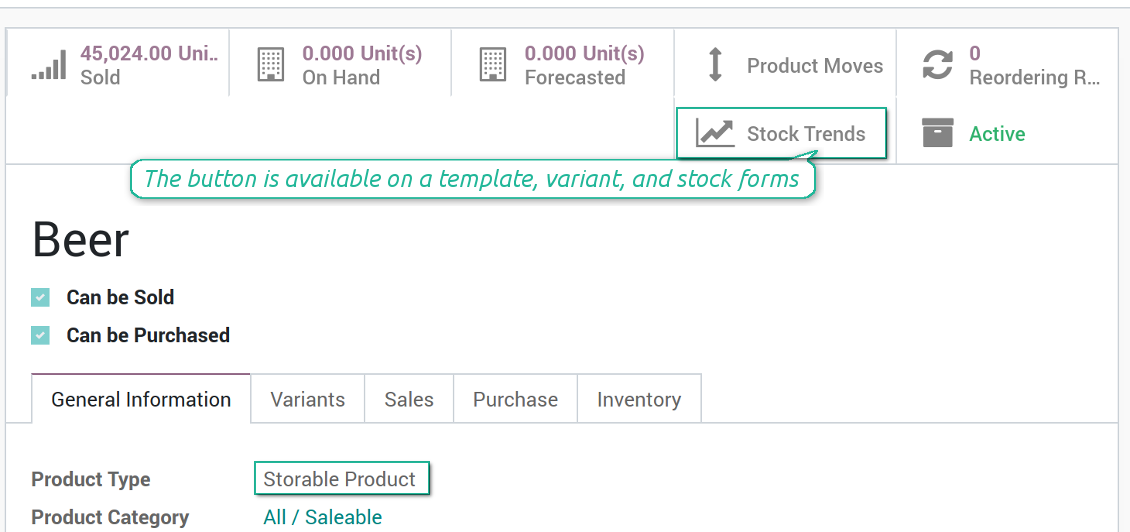
The right for trends analysis might be granted to any WMS user, but be cautious: all stock moves of a current company will be under consideration.
Ekrānšāviņi
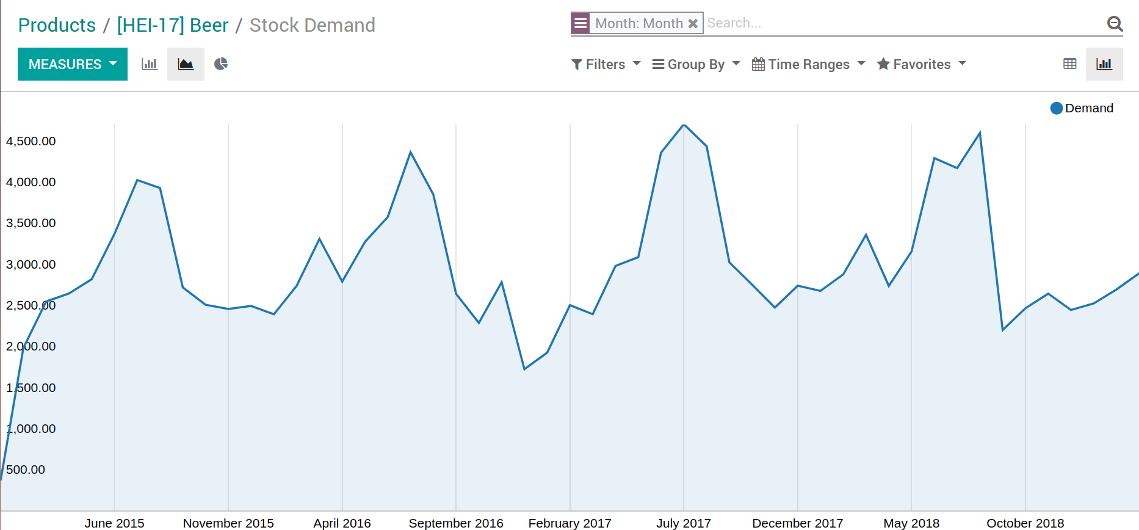
Stock demand trends and forecast chart
Stock demand trends and forecast as an xlsx table
Odoo pivot view of stock trends and forecast
Stock demand forecast in a few clicks
Grant the right for the forecast report
Scientific approach for forecasting
Forecast as many intervals as you like, but remember that prediction for the next 10 years would be hardly reliable.
Based on your historical data and applied coefficients, sometimes Odoo is not able to reveal trends and make forecasts. In that case only historical data would be shown in reports. But even historical trends might have analytical use.
Statistical methods for forecast
Autoregression (AutoReg)
It is the simplest but still widely used statistical method for time series forecast.
Autoregressive Distributed Lag (ARDR)
The moving average method takes into account 'errors' in previous observations.
The autoregressive moving average method is a combination of both AR and MA methods. To apply the ARMA method use the MA method with auto regression coefficient (P coefficient) as 2
Autoregressive Integrated Moving Average (ARIMA)
The method which also combines the methods AR and MA, but also tries to make data stationary. It is appropriate to use for historical data with pure trend but without seasonal changes.
Seasonal Autoregressive Integrated Moving-Average (SARIMA)
The SARIMA method enriches the ARIMA method with considering seasonal changes. It is one of the most complex and wide spread methods utilized for forecasting time series now
Simple Exponential Smoothing (SES)
The SES model usage is similar to the AR method, but instead of relying upon linear function, it exploits exponential one
Holt Winter's Exponential Smoothing (HWES)
The HWES method enriches the SES method to work with time series trends and seasonal effects.
Ekrānšāviņi
Experiment with various statistical models
Topical data under consideration
Make analysis per the whole company or per a definite location. In the latter case optionally include or exclude child locations.
Apply time frames of historical data which is used as an analytic basis. Forecast periods are ones which follow after the end of defined frame. In such a way you make check statistical reliability 'predicting' actually passed intervals.
Stock demand is calculated as all done stock moves for this period which source location is one of internal location under consideration and which destination location is not of this range.
Ekrānšāviņi
Target your analysis by locations
Konfigurācijas un instalācijas padomi Stock Demand Trends and Forecast Odoo v.13
Python dependencies
To guarantee tool correct work you would need a number of Python libraries: pandas, numpy, statsmodels, scipy, xlsxwriter. To install those packages execute the command:
pip3 install pandas numpy statsmodels scipy xlsxwriter
If you run Odoo on Python prior or equal to version 3.7, please install the following versions of the packages pandas==1.3.5, statsmodels==0.13.1
Default values
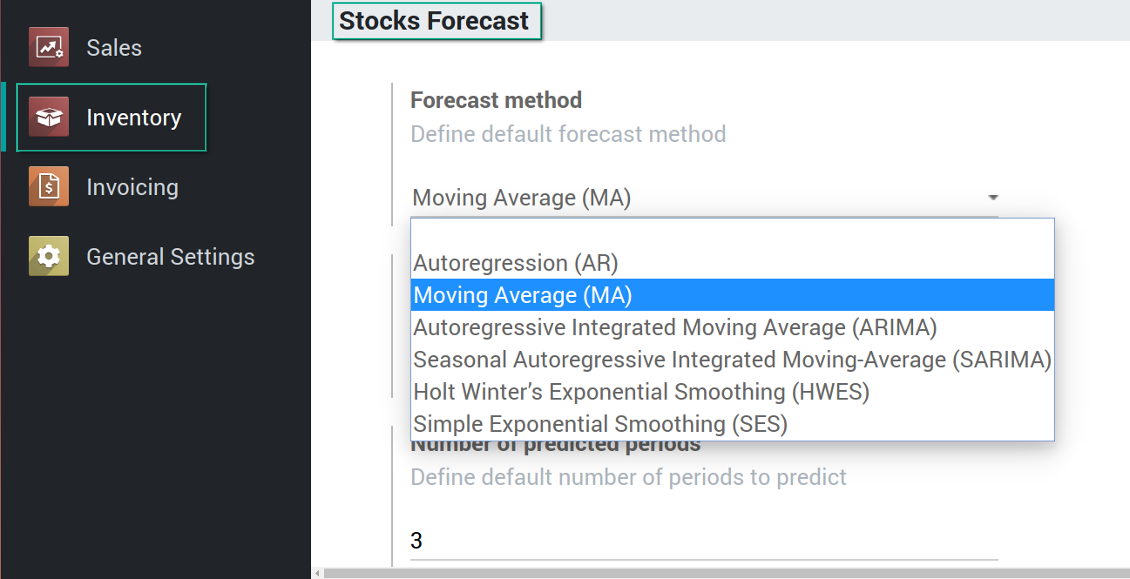
Demand trends and forecast configuration
Bieži uzdotie jautājumi par Stock Demand Trends and Forecast Odoo v.13
Kādas ir jūsu rīku atjaunināšanas politikas?
Saskaņā ar spēkā esošajiem Odoo Apps Store noteikumiem:
- Katrs 12.0 un vecākai versijai pirktais modulis dod piekļuvi visām versijām līdz 12.0.
- Sākot ar 13.0. versiju, katra moduļa versija jāpērk atsevišķi.
- Neatkarīgi no versijas pirkums dod tiesības uz visiem atjauninājumiem un labojumiem galvenās versijas ietvaros.
Ņemiet vērā, ka faOtools komanda šos noteikumus nekontrolē. Jautājumus adresējiet tieši Odoo Apps Store pārstāvjiem.
Kā instalēt jūsu lietotni Odoo.sh?
Visiešākā pieeja ir izmantot Odoo veikala iebūvēto darbplūsmu:
1. Atveriet moduļa lapu un noklikšķiniet pogu Deploy on odoo.sh
2. Pēc tam jūs novirzīs uz GitHub lapu. Pierakstieties kontā, pēc tam noklikšķiniet 'Create a new repo' vai izmantojiet esošu. Pārliecinieties, ka krātuve ir privāta. Lietotnes nedrīkst publicēt ar OPL-1 licenci. Ja vajag, izveidojiet jaunu repo Odoo.sh projektam
3. Pēc tam dodieties uz odoo.sh un noklikšķiniet pogu Deploy. Uznirstošajā logā iesniedziet lēmumu un noklikšķiniet 'Continue.' Šī darbība sāk instalēšanu.
Šīs darbības instalēs lietotni projekta produkcijas zarā. Ja vēlaties izvietot lietotnes citos zaros vai atjaunināt moduli, veiciet šīs darbības:
1. Augšupielādējiet lietotnes pirmkodu no Odoo veikala
2. Veiciet moduļa commit vajadzīgajā GitHub krātuvē. Pārliecinieties, ka neviens lietotnes mape/fails netiek ignorēts (t.i., nav repo .gitignore). Krātuves automātiski izveido odoo.sh, un pēc noklusējuma tajās var būt svarīgi elementi (piem., /lib). Augšupielādējiet visus moduļa katalogus, apakškatalogus un failus bez izņēmumiem
3. Izvietojiet odoo.sh projekta mērķa zaru vai, ja iestatījumi to paredz, gaidiet, līdz tas tiek automātiski būvēts.
Kā instalēt jūsu lietotni savā serverī?
2. Restartējiet Odoo serveri;
3. Ieslēdziet izstrādātāja režīmu (tehniskie iestatījumi);
4. Atjauniniet lietotņu sarakstu (lietotņu izvēlne);
5. Atrodiet lietotni un nospiediet „Activate“/„Install“;
6. Sekojiet lietotnes lapas vadlīnijām, ja tādas ir.
Pamanīju, ka jūsu lietotnei ir papildu papildinājumi. Vai varu tos iegādāties vēlāk?
Jā, protams. Vienlaikus Odoo automātiski pievieno visas atkarības grozam, tāpēc iepriekš iegādātie rīki jāizslēdz, lai izvairītos no dubultas samaksas.
Izvietoju jūsu lietotni Odoo.sh un testos redzu brīdinājumu/kļūdu
Sarkans/oranžs brīdinājums neietekmē lietotnes funkcijas. Diemžēl mūsu moduļi dažkārt neiztur standarta automātiskos testus, jo tie pieņem uzvedību, kas ir pretrunā ar lietotnes mērķiem. Piemēram, mēs mainām cenas aprēķinu, bet standarta Odoo moduļa testi salīdzina galīgo cenu ar standarta algoritmu.
Vispirms pārbaudiet izvietotās datubāzes funkcijas. Vai viss darbojas pareizi?
Ja joprojām uzskatāt, ka brīdinājums ietekmē īstas funkcijas, sazinieties ar mums un nosūtiet pilnus instalācijas žurnālus un pilnu izvietoto moduļu sarakstu (ieskaitot kodolu un trešo pušu).
Vai es varu iegādāties lietotni tieši no jūsu uzņēmuma?
Nē, rīkus izplatām tikai caur oficiālo Odoo lietotņu veikalu.
Es vēlētos saņemt atlaidi
Diemžēl mums nav tehnisku līdzekļu individuālu cenu piedāvāšanai.
Vai es varu instalēt lietotni savā Odoo Online (SaaS) datubāzē?
Nē, trešo pušu lietotnes nevar izmantot Odoo Online. Diemžēl Odoo SaaS to bloķē.
Jūsu rīkam ir atkarības no citām lietotnēm. Vai tās jāiegādājas?
Jā, rīkam ir nepieciešami visi atkarībās atzīmētie moduļi, lai darbotos pareizi. Lietotnes lapā norādītā cena jau ietver visas nepieciešamās atkarības.
Kāda ir moduļa cena ASV dolāros? Kāpēc tā mainījās?
Mūsu moduļu cena ir eiro. Odoo veikals konvertē cenas citās valūtās pēc iekšējā kursa. Tāpēc cena ASV dolāros var mainīties, kad kurss tiek atjaunināts.
Lietotnes un vietnes teksti valodās, kas nav angļu, ir sagatavoti ar MI palīdzību un saskaņoti ar oficiālajiem Odoo tulkojumiem. Ja pamanāt kļūdu, nosūtiet biļeti par tulkojumu pareizību un mēs to labosim.
Kļūdu ziņošana
Ja sastopaties ar kļūdām vai nekonsekventu uzvedību, sazinieties ar mums. Garantējam labojumus 60 dienu laikā pēc pirkuma un esam ieinteresēti rīkus uzlabot arī pēc šī perioda.
Lai sazinātos, nav vajadzīgs tālruņa numurs vai kredītkarte. Pietiek ar īsu e-pasta reģistrāciju, kas neaizņem vairāk par 30 sekundēm.
Iekļaujiet pieprasījumā pēc iespējas vairāk informācijas: ekrānuzņēmumus, Odoo servera žurnālus, pilnu problēmas atkārtošanas aprakstu u. tml. Parasti darba plāna sagatavošana (ja kļūda ir apstiprināta) vai norādījumu sniegšana (citādi) prasa dažas darba dienas.
Publiski funkciju pieprasījumi un moduļu idejas (bezmaksas izstrāde)
Mēs esam stipri motivēti uzlabot savus rīkus un būsim pateicīgi par jebkuru atsauksmi. Ja jūsu prasības ir vispārīgi noderīgas un tās var efektīvi īstenot, komanda tās iekļaus mūsu uzdevumu sarakstā.
Šāds uzdevumu saraksts tiek apstrādāts regulāri un neparedz papildu maksas. Lai gan mēs nevaram solīt termiņus un galīgo dizainu, tas var būt labs veids, kā iegūt vēlamās funkcijas bez ieguldījumiem un riskiem.
Lai sazinātos, nav vajadzīgs tālruņa numurs vai kredītkarte. Pietiek ar īsu e-pasta reģistrāciju, kas neaizņem vairāk par 30 sekundēm.

Rīks Odoo pielikumu elastīgai kārtošanai mapēs un katalogu sinhronizācijai ar mākoņa klientiem: Google Drive, OneDrive/SharePoint, Nextcloud/ownCloud, Dropbox, Amazon S3, Box un NAS. DMS. Failu pārvaldnieks. Dokumentu pārvaldības sistēma
398€

Rīks dziļas un strukturētas zināšanu bāzes veidošanai iekšējai un ārējai lietošanai. Knowledge System. KMS. Viki līdzīgas revīzijas.
398€
Rīks Odoo pielikumu automātiskai abpusējai sinhronizācijai ar OneDrive failiem
487€
Rīks KPI mērķu iestatīšanai un izpildes kontrolei pa periodiem. KPI paneļi. Paneļu dizainers. KPI diagrammas

Rīks Odoo pielikumu automātiskai abpusējai sinhronizācijai ar Google Drive failiem
487€
Rīks uz laiku balstītai pakalpojumu pārvaldībai no pierakstu rezervēšanas līdz pārdošanai un atsauksmēm
398€
