DropBox Odoo Integration v.11
The tool to automatically synchronize Odoo attachments with DropBox files in both ways

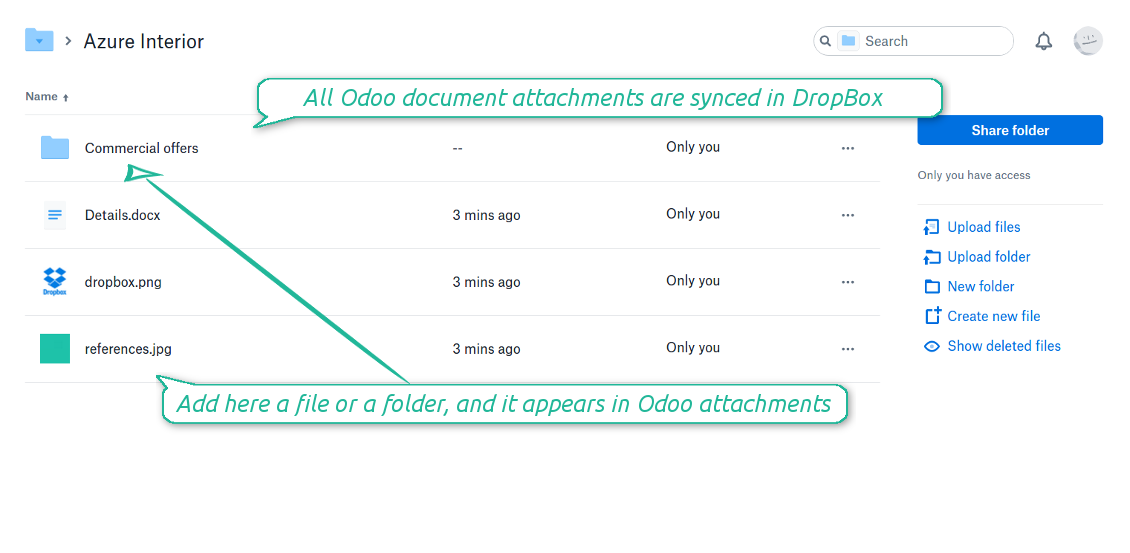
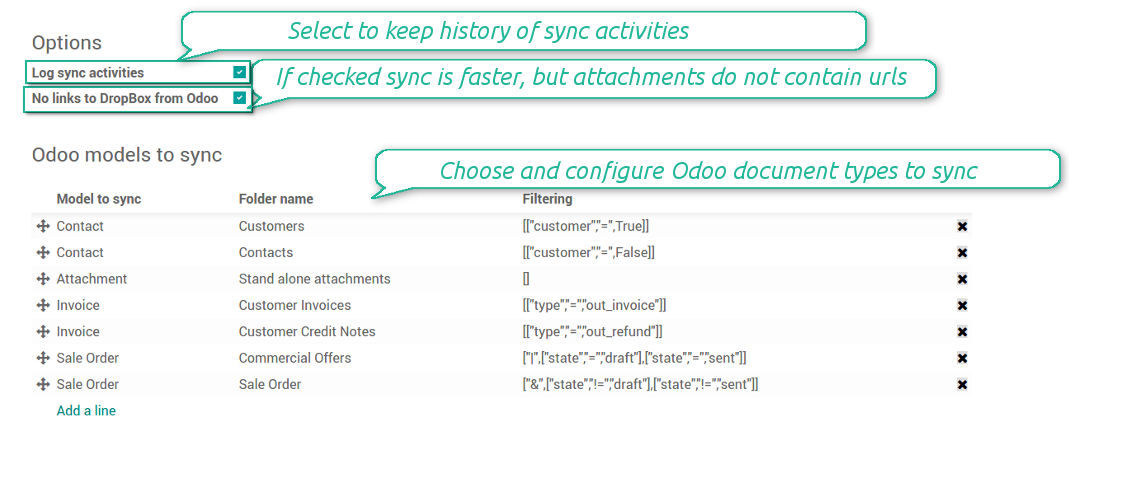



Synchronization is bilateral. All Odoo attachments are put in DropBox regularly. DropBox files create attachments in Odoo in case they are placed in a correct folder. Look at the sections From Odoo to DropBox and From DropBox to Odoo
Integration is automatic in both ways. Based on scheduled jobs, Odoo send attachments to DropBox and retrieve files from there
Any Odoo document might be synced: customers, opportunities, sale or purchase orders, tasks or issues, employees or users, etc. You decide by your own which records should be in DropBox, and which should be left in Odoo
Synchronization works for any DropBox tariff, including Personal DropBox (Basic, Plus, Family) and business DropBox (Professional, Standard, Advanced)
All synced files are easily accessible though clicking on an attachment. You might also open a whole document folder by clicking on 'Open folder' on the attachment widget. This feature migth be optionally turned off: look at the section DropBox URLs
All sync activities might be logged. Control over files and folders creations, moves, name changes and removals. Just turn on the option 'Log sync activities' and access history through the button 'Sync logs'
New For each document of this type you may create a default directories' structure. When this folder is firstly synced, Odoo would generate default folders. For example, for all employees you may have pre-defined folders 'Scans', 'Scans/Official', 'Photos', etc.
The tool is compatible with Odoo reporting and mailing apps. If such an app faces a synced file, it retrieves a real content from DropBox. In particular, the reports 'always reload' feature and messages & mass mailing attachments work properly
Integration is based on a single user endpoint. It means that a single user login/password of DropBox is used. Afterwards for integrations Odoo would use that credentials disregarding an actual Odoo user
- Prepare and keep updated folders' structure in DropBox
- Upload new attachments to a correct folder
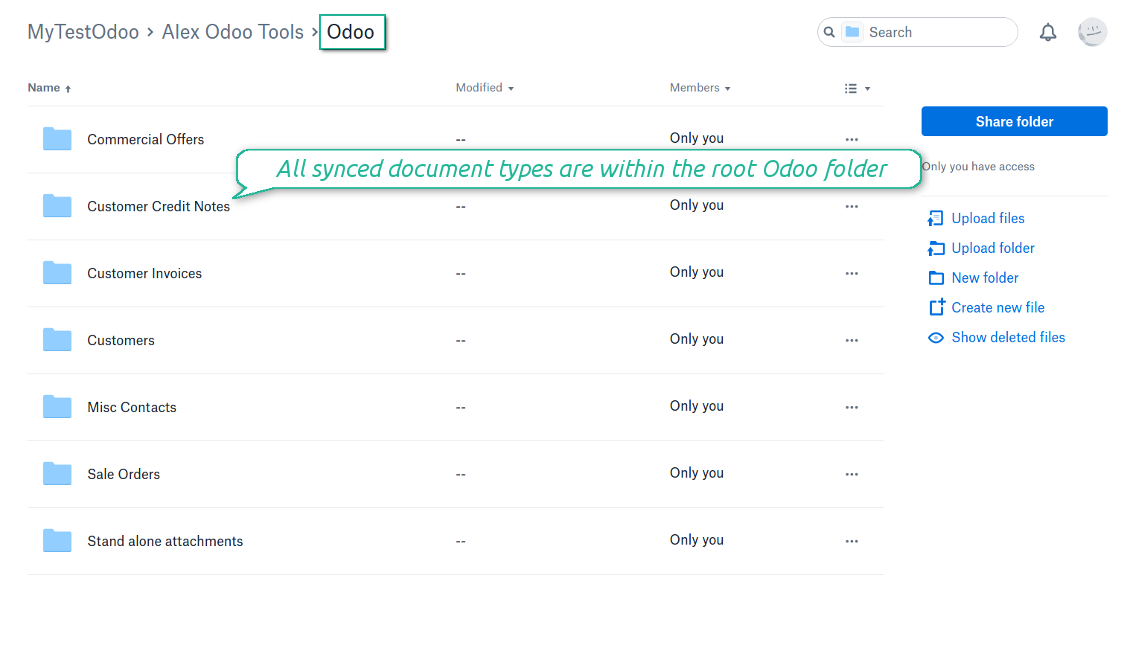
Odoo creates a convenient directory structure in DropBox: Odoo / Document type name / Document name / Files, where:
- Odoo is a central directory for Odoo Sync in your cloud storage.
- Document type is a synced Odoo model, for example, 'Sale orders', 'Opportunities', 'Customers'
- You select document types by yourself. It might be any document type
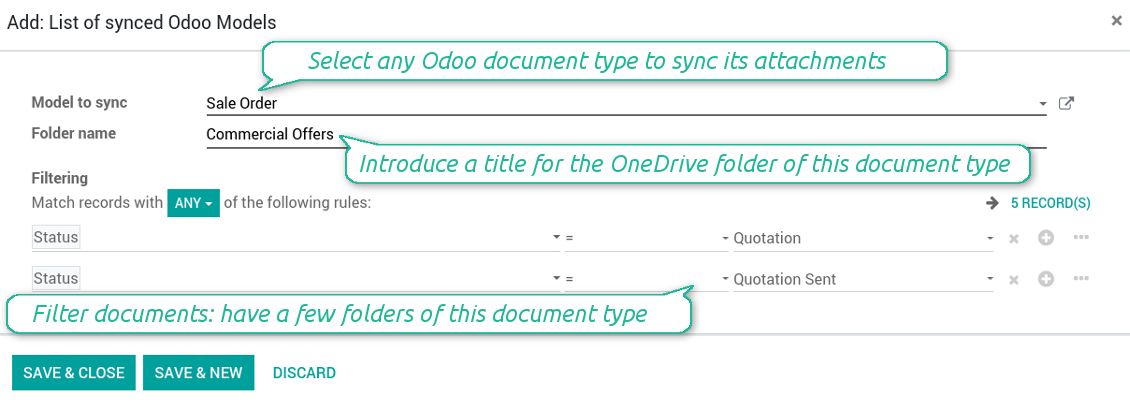
- Moreover, you might have a few folders for a single document type. Use Odoo domains to have not global 'Partners, but 'Customers' and 'Suppliers', not just 'Sale orders' but 'Commercial offers', 'To deliver', and 'Done orders'
- With each sync Odoo would try to update document types' folders. Add a new document type at any moment. It will appear in DropBox with a next sync
- You are welcome to introduce or change document types folder names at any moment in Odoo. Take into account: renaming in DropBox will be recovered to Odoo names
- If you remove a model from integration, it will not be deleted from DropBox to keep already synced files safe. However, new documents of this type would not be synced
- In case you removed a directory in DropBox, but it is still configured in Odoo, with a next sync a folder structure is going to be recovered (not files, surely).
- Document is an exact object to sync. For instance, 'Agrolait' or 'SO019'
- Documents are synced in case they relate to a synced document type and satisfy its filters. For example, you are not obliged to sync all partners, you may integrate only 'Customers' and 'Vendors' or only 'Companies', not 'Contacts'
- Odoo would generate a folder in DropBox for each suitable document even for documents without attachments. It is needed for a backward sync to easily add new files
- DropBox folder name equals a real document name. It relies upon Odoo name_get method. Thus, Odoo 'Michael Fletcher' (a contact of 'Agrolait') would be DropBox 'Agrolait, Michael Fletcher'
- If an exact document changes its document type (e.g. a quotation is now confirmed), Odoo will automatically relocate its related folder to a proper parent directory (in the example: from 'Commercial offers' to 'To deliver')
- In case a document relates to a few types (for instance, you have 'Vendors' and 'Customers', while Agrolait is both), this document folder would be put into the most prioritized document type. A document type priority is higher as closer to the top in Odoo interfaces it is
- If an Odoo document is removed, the next sync will remove a corresponding DropBox directory
- In case you remove a directory in DropBox, but it still exists in Odoo, DropBox folder structure would be recovered (while files would be unlinked in both Odoo and DropBox)
- Folders renaming in DropBox will be replaced with Odoo names, Odoo document names are more important
- Files are real files taken from Odoo attachments
The resulted path would be, for example, 'Odoo / Quotations / SO019 / commercial offer.png'.
The only exclusion of the rule are stand alone attachments which do not relate to any Odoo documents (their document type is 'ir.attachment'). Such attachments' path is 'Odoo / Stand Alone Attachments / image.png'.
The direct sync might take quite a long, since a lot of folders should be created. It is not recommended to make sync too frequent: once an hour or two hours is fine.
FilesWith each direct sync, Odoo tries to find not yet synced attachments. If such attachments suit any document type to sync, a file will be uploaded to DropBox to a proper folder. In Odoo such attachments will become of 'url' type (look also at the section DropBox URLs). It means that a file is not any more kept in Odoo server space, but now it is in DropBox. Until sync is done, Odoo attachment remains binary and stores an actual file. Such approach helps Odoo to work faster.
If you unlinked an attachment from Odoo, it would be deleted in DropBox as well.
Take into account that file names should be managed in DropBox: each backward sync would recover DropBox names, Odoo is here less important.
- If a new file is added to a proper document folder (e.g. to 'Odoo / Customers / Agrolait'), the same attachment will be added to Odoo document (in the example - to 'Agrolait')
- In document folders you can put not only files but also child folders. In that case a link for this folder (not its content) is kept in attachments
- In case you rename a file in DropBox, it will be renamed in Odoo as well
- Files' removal from DropBox leads to related Odoo attachments' removal
- If you move a file to another document folder, in Odoo a related attachment would be re-attached to this new document. Take into account: if you move a file for a not document folder, this Odoo attachment will be deleted as it has been removed from DropBox
- If you deleted a document type or document folder, their child files are deleted as well. Thus, Odoo would remove related attachments. The folders, however, will be recovered with a next direct sync. Folders' move to another directory is also considered as a removal. Avoid such situations by following the simple rule: folders are managed mostly by Odoo, files - mostly by DropBox.
Backward DropBox might take quite much time, since each folder should be checked (the more folders, the more time the backward sync requires). It is recommended to make frequency oftener than once an hour or two hours.
DropBox has a specific way to generate links for existing files and folders. In particular, there are no concepts of internal or private URLs. Instead, each DropBox item might get so-called shared URLs. Such shared links are either public or team-only. Moreover, the latter feature is available only for DropBox business account.
This tool relies upon share links' mechanics. It means, that each attachment link is either public (all personal DropBox accounts) or team-only (all business DropBox accounts).
Sometimes it is considered to be not fully safe. Although website URLs will be hardly known by external users, there is a slight chance that they become available as a result of some user actions. Besides, sharing links generation is not super fast and might make a sync process slower. That is why the feature to switch off sharing urls is introduced.
If checked, all DropBox urls in Odoo will be of type https://www.dropbox.com/home/Odoo/[PATH]. Such links will not work in quite a many cases. Thus, if you need to open DropBox files / folders from Odoo, do not switch off the feature 'No links to DropBox from Odoo'.
Configuration and Login
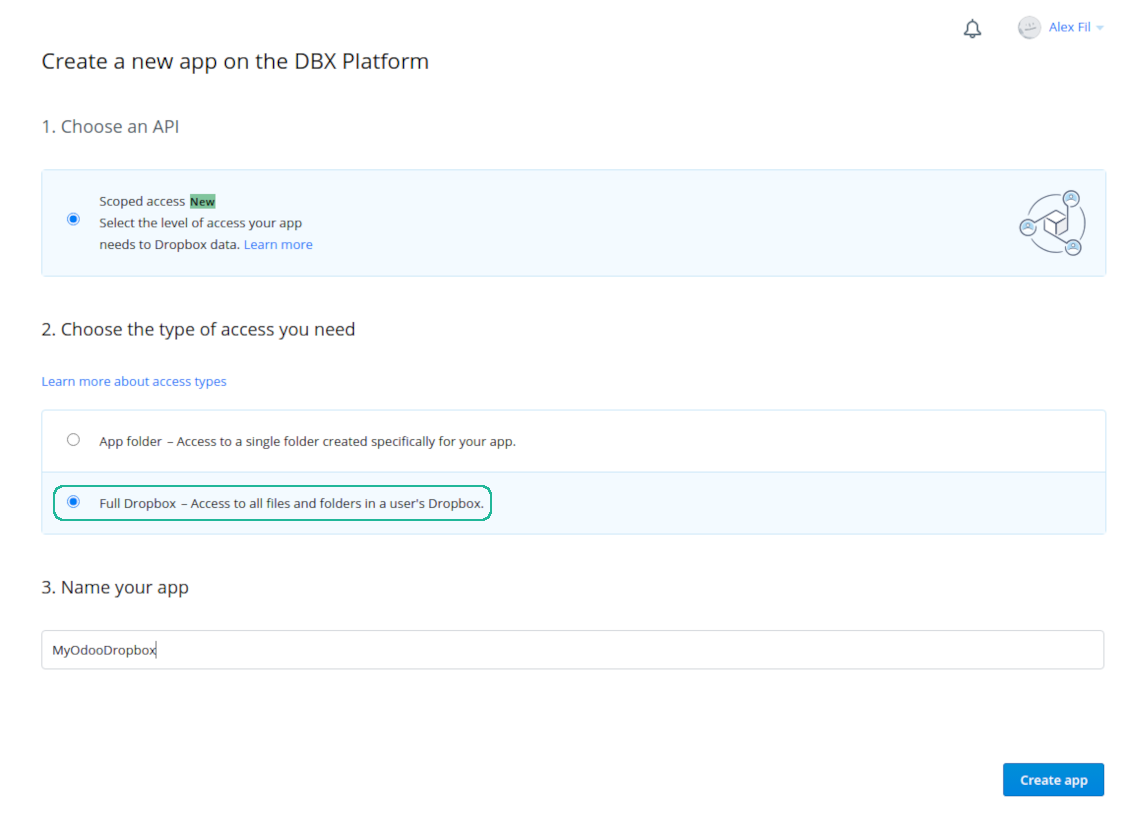
- Follow the url https://www.dropbox.com/developers/apps/create
- Choose an API as 'Scoped access'
- Choose the type of access as 'Full Dropbox'
- Select any suitable name for the app and push the button 'Create app'
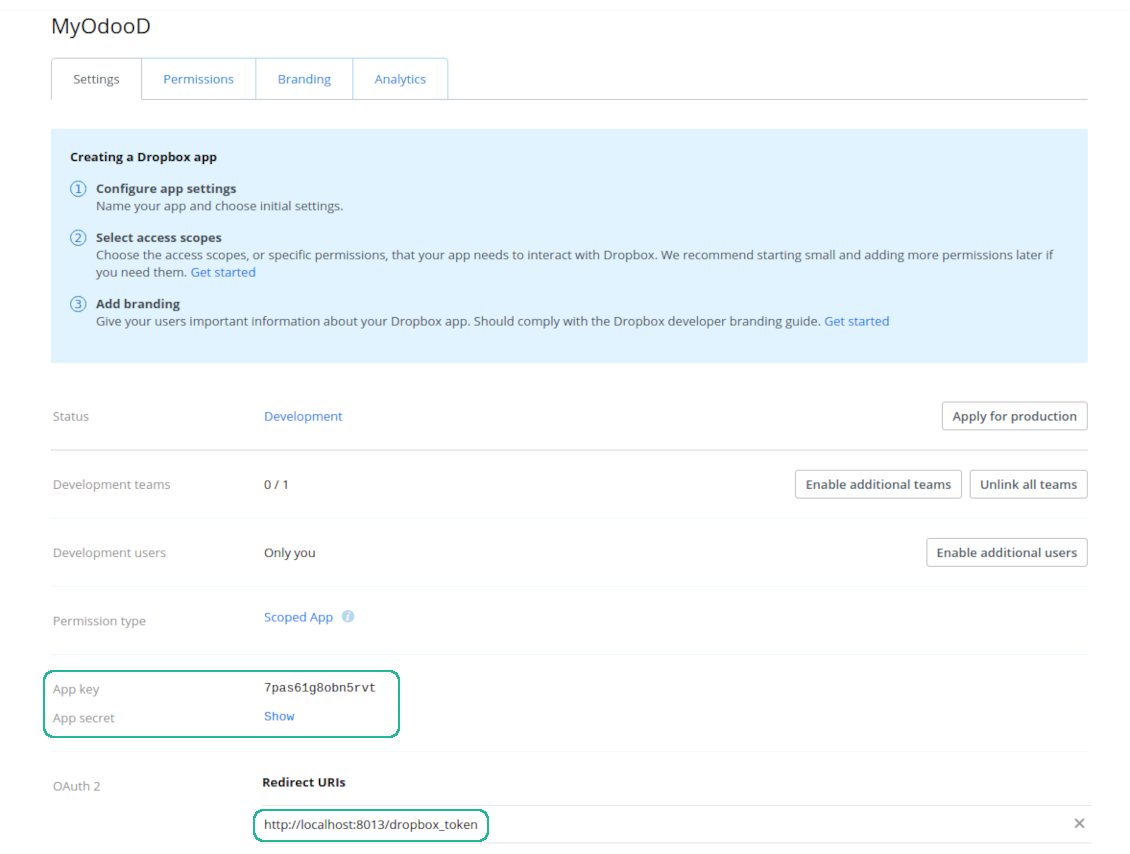
- Add the redirect URI as YOURODOOSITENAME]/dropbox_token (e.g. https://faotools.com/dropbox_token). A valid SSL certificate (https) is required
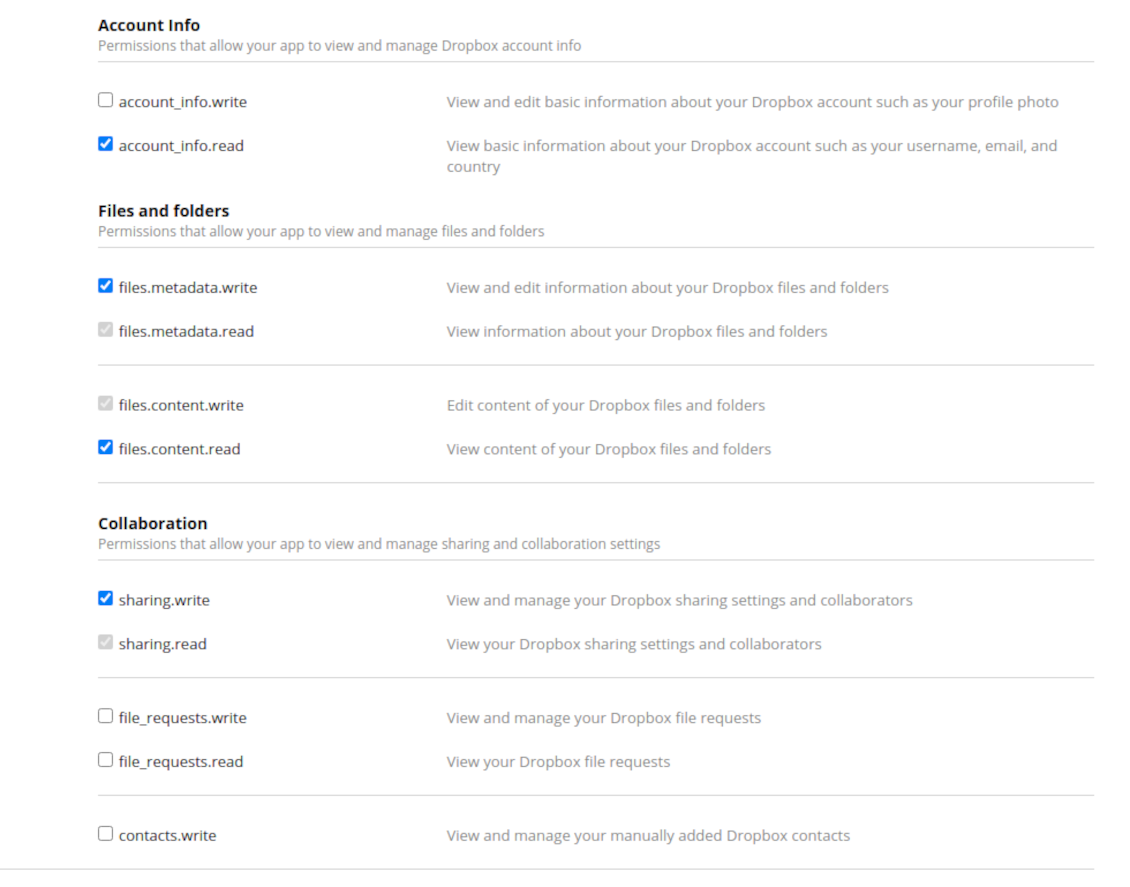
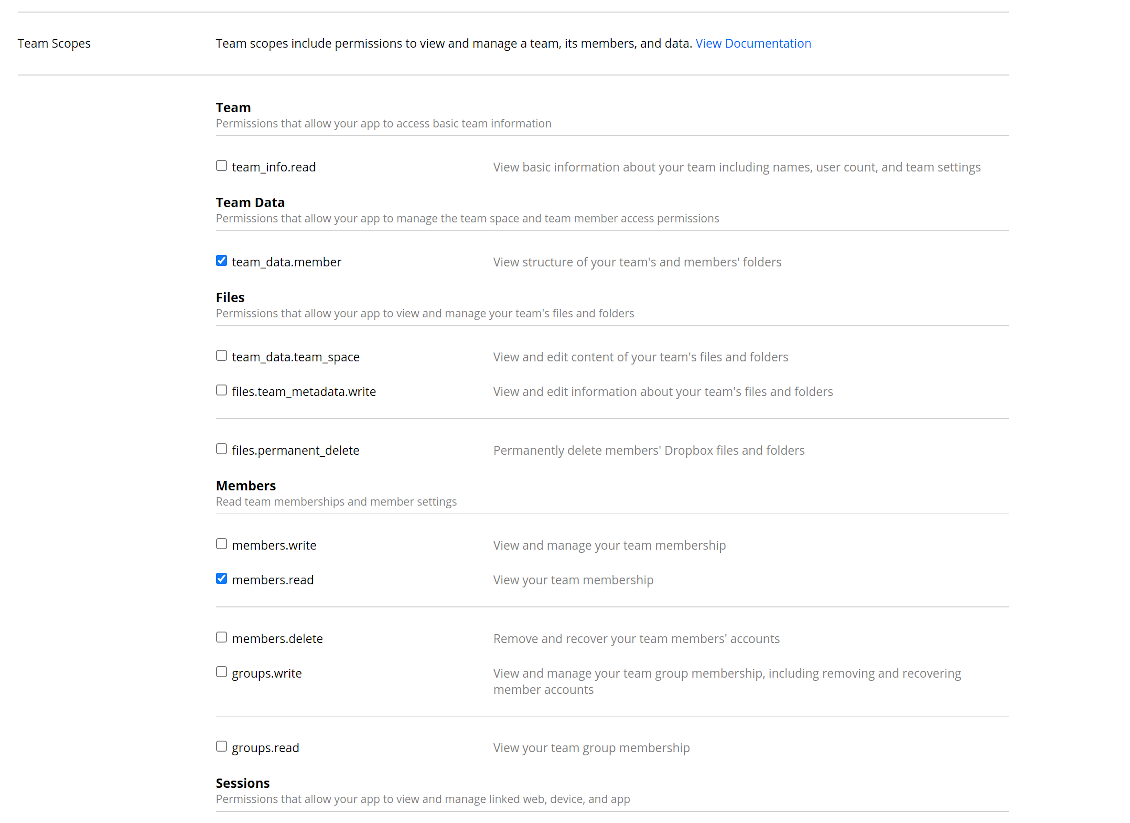
- Grant permissions to the app: 'Account Info (Read)', 'Files and folders Metadata (Write)', 'Files Content (Write)', 'Collaboration (Write)'. For team DropBox assign also 'Team Data Members', 'Members (Read)'. Make sure no other permissions are assigned.
- Submit App
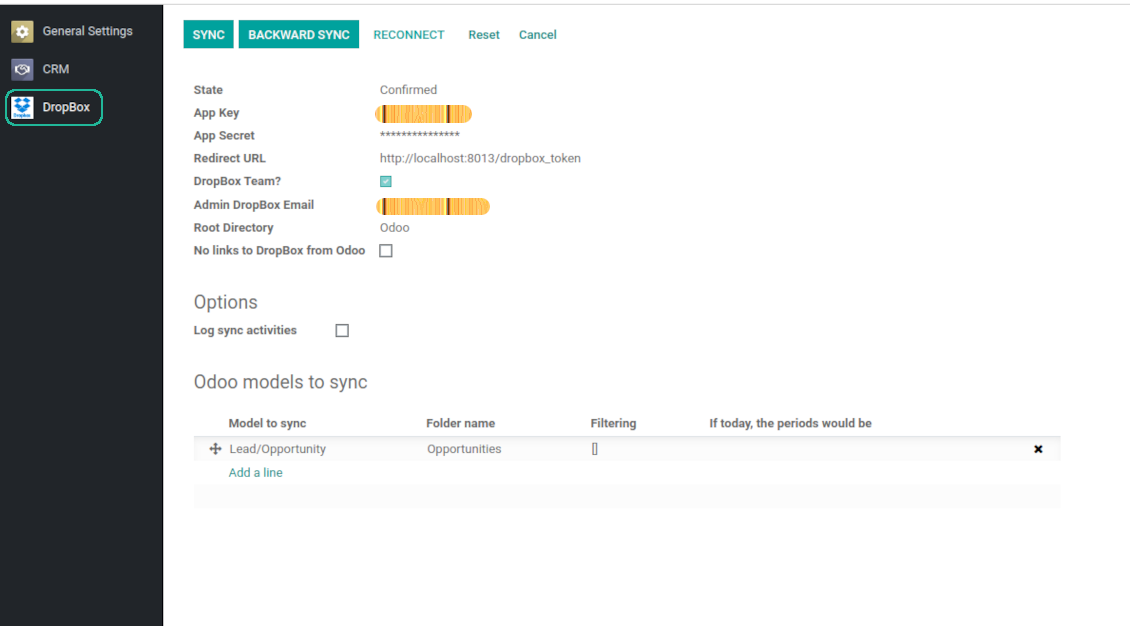
- Go to Odoo general settings - DropBox
- Copy App Key, App secret, and redirect URI to the Odoo configuration page
-
For team DropBoxes only
- Check the box 'DropBox Team'
- Set an email of DropBox user. Inside this user folder all Odoo related items would be created and only after that they are shared to all other users. Under this user all files and folders are created, changed, moved, and deleted
- Choose a suitable name for the root Odoo folder, e.g. 'Odoo' or 'ERP'
- Press Save
- Press 'Login and Confirm'
Create a DropBox app
Set up DropBox App: redirection URL
DropBox permissions for personal accounts
DropBox permissions for business accounts
Set up Odoo for DropBox integration
Odoo server configuration and cron job configuration
To make sure the synchronization works correctly apply proper timeouts to the Odoo configuration file: LIMIT_TIME_CPU, LIMIT_TIME_REAL should be more than 900 seconds.
For Odoo.sh this should not be done, since timeouts are predefined and are not configurable.
Then, timeout should be entered to your Odoo. To that goal find the section 'Settings' on the app configuration page and copy the number there.
Afterwards, it is needed to make the cron jobs suit the applied timeouts. In the debug mode go to the Settings > Technical > Automation > Scheduled Jobs:
- Set up the job 'Synchronize attachments with cloud' as (a) frequency - 2*timeout; (b) the next execution as the next hour +timeout. For example, for 900seconds timeout: frequency - as 30minutes; the next execution - at 08:15
- Set up the job 'Synchronize attachments from cloud' as (a) frequency - 2*timeout; (b) the next execution as the next hour + timeout*2. For example, for 900seconds timeout: frequency - as 30minutes; the next execution- at 08:30.
Bieži uzdotie jautājumi par DropBox Odoo Integration Odoo v.11
Vai es varu mainīt sinhronizācijas darbu biežumu?
Jā, varat. Šim nolūkam:
Ieslēdziet atkļūdošanas režīmu
Dodieties uz tehniskajiem iestatījumiem > Automatizācija > Ieplānotie darbi
Atrodiet darbus 'Synchronize attachments with cloud' un 'Update attachments from cloud'.
Nestatiet tos pārāk bieži. Vēlams, lai darbs beigtos, pirms sākas nākamais. Iestatījums ir atkarīgs no tā, cik vienumu jums ir jāsinhronizē. Parasti biežums ir no 15 minūtēm līdz 4 stundām.
Pārliecinieties arī, ka Odoo konfigurācijas failā ir pietiekami laika limiti. Parametriem LIMIT_TIME_CPU un LIMIT_TIME_REAL jābūt vienādiem ar plānoto cron darba laiku vai lielākiem. No 13. versijas ņemiet vērā arī parametru LIMIT_TIME_REAL_CRON.
Svarīgs paziņojums Odoo.sh klientiem: cron darba maksimālais laiks var būt tikai 15 minūtes.
Vai varu konfigurēt citu sinhronizēto direktoriju struktūru, nevis to, ko pieņem sinhronizācija?
Nē, šī funkcija ir pieejama tikai no 15. versijas. Pirms tās versijas modulis darbojas ar iepriekš noteiktu mapju struktūru:
Odoo - galvenā mape sinhronizācijai
Models - mapes katram Odoo dokumenta veidam. Piemēram, 'Projects', 'Partners'. Pēc domēna var būt specifiskākas mapes: piem., 'Customer 1 Projects', 'Projects of the Customer 2', 'Internal Projects' utt.
Objects - mapes katram dokumentam, piem. 'Project 1' vai 'Customer 1'
Faili un mapes, kas saistīti ar šo Odoo dokumentu un jāsinhronizē.
Rezultātā jums var būt, piemēram:
Odoo / Projects / Project 1 / faili un mapes, kas saistīti ar project 1
Odoo / Customer 1 Projects / Project 1; Odoo / Customer 2 Projects / Project 3, ...
Odoo / Customers / Customer 1 / faili un mapes, kas saistīti ar customer 1
Šī struktūra vienmēr ir plakana, tas ir, ir tikai šie hierarhijas līmeņi. Tāpēc ir pareizi, ka dažādus dokumentu veidus nevar turēt vienā struktūrā. Mapē 'Customer 1' nevaram glabāt failus, kas saistīti gan ar pārdošanas pasūtījumiem, gan rēķiniem, gan projektiem. Katram no šiem dokumenta veidiem ir sava mape (vai vairākas savas). Citādi mēs nevarētu veikt atpakaļsinhronizāciju, jo nebūtu kritērija, uz ko balstīties.
Vai man Odoo jāiestata konkrētu lietotāju piekļuves?
Nē, rīks balstās uz vienu lietotāja galapunktu. Visi sinhronizācijas procesi notiek zem viena mākoņa administratora (lietotnes). Izveidoto mapju / failu piekļuves tiesības nav automatizētas. Tās jāadministrē jūsu mākoņkrātuves risinājumā.
Kur tiek glabāti sinhronizētie lauki? Vai tie tiek dublēti Odoo un clouds?
Lietotne pieņem, ka pielikumu binārais saturs tiek glabāts Cloud Client, nevis Odoo serverī. Tādi pielikumi Odoo kļūst par URL tipa pielikumiem, un tiem varat jebkurā laikā piekļūt no pielikumu lauka vai no Cloud Client.
Pēc iestatīšanas manuālas darbības nav vajadzīgas, jo sinhronizācija ir pilnīgi automātiska. Izlemiet, kurus Odoo dokumentu tipus sinhronizēt, un katram iestatiet saistīto modeli (klienti, pārdošanas vai iepirkuma pasūtījumi, uzdevumi, projekti u. c.).
Vai varu būt dažas mapes vienam un tam pašam dokumenta veidam? Piemēram, iekšējie projekti un klientu projekti?
Jā, varat. Šim nolūkam sagatavojiet noteikumu katram un pēc tam lietojiet filtrus: piemēram pēc projekta tipa.
Mēģiniet padarīt filtrus savstarpēji izslēdzošus, lai dokumentu varētu viennozīmīgi piešķirt. Piemēram, „klients, bet ne piegādātājs“, „piegādātājs, bet ne klients“. Citādi konkrēta dokumenta mape lēkātu no viena modeļa uz citu.
Vai man vajag tikai lietotni Cloud Storage Solution?
Nē, rīks ir tikai tehniskais kodols. Jums vajag arī savu cloud client savienotāju.
Vai ir kārtībā, ja jāsinhronizē daudz objektu, piemēram, 10000?
Jā, lai gan daudzu mapju/pielikumu sinhronizācijas gadījumā process var būt lēns. Vienlaikus klienti ziņoja par vidēm ar >10k partneriem un ~5k produktu variantiem sinhronizācijai, un procesi bija pieņemami.
Daži uzsverami punkti:
- Sinhronizācija ir veidota tā, lai jebkurš vienums tiktu sinhronizēts un nezustu, kaut arī tas var nebūt ātri. To garantē FIFO rindas un katrs apstiprinātais darbs.
- Objektu skaitu var loģiski ierobežot. Modeļu konfigurācija ļauj ierobežot novecojušu vienumu sinhronizāciju (piemēram, nav jēgas sinhronizēt arhivētus partnerus vai pasūtījumus, kas veikti pirms 2 gadiem).
Vai sinhronizāciju var padarīt reāllaikā?
Nē. Mums ir pamatoti iemesli izvairīties no reāllaika sinhronizācijas:
Veiktspējas problēmas. Ja sinhronizācija ir reāllaikā, katra faila augšupielāde rādīs ielādes ekrānu.
Konfliktu problēmas. Ja 2 lietotāji vienlaikus maina vienumu, var rasties neatrisinātas situācijas. Regulāru darbu gadījumā to varam izlabot pēc tam; reāllaikā tas būtu jāsaglabā kā rinda, kas lietotājiem būtu vēl maldinošāk.
Funkcionalitātes problēmas. Īpaši vienumu pārdēvēšana un pārstrukturēšana. Atpakaļsinhronizācijā rīks stingri balstās uz katalogu loģiku, un katrā sinhronizācijā tiek pārbaudīti 100% vienumu. Ja to darītu pēc katra atjauninājuma, būtu tūkstošiem pieprasījumu sekundē. Ja nē: izmaiņas pazustu.
Vai es varu sinhronizēt pielikumus ar dažiem mākoņa klientiem
Nē, šī funkcija ir pieejama tikai no 15. versijas.
Mūsu mākoņos izmantojam īpašu redaktoru (piem., OnlyOffice, Office 365 u. c.). Vai faili tiktu atvērti tajā redaktorā?
Jā, atkarībā no jūsu cloud client konfigurācijas.
Kādas ir jūsu rīku atjaunināšanas politikas?
Saskaņā ar spēkā esošajiem Odoo Apps Store noteikumiem:
- Katrs 12.0 un vecākai versijai pirktais modulis dod piekļuvi visām versijām līdz 12.0.
- Sākot ar 13.0. versiju, katra moduļa versija jāpērk atsevišķi.
- Neatkarīgi no versijas pirkums dod tiesības uz visiem atjauninājumiem un labojumiem galvenās versijas ietvaros.
Ņemiet vērā, ka faOtools komanda šos noteikumus nekontrolē. Jautājumus adresējiet tieši Odoo Apps Store pārstāvjiem.
Kā instalēt jūsu lietotni Odoo.sh?
Visiešākā pieeja ir izmantot Odoo veikala iebūvēto darbplūsmu:
1. Atveriet moduļa lapu un noklikšķiniet pogu Deploy on odoo.sh
2. Pēc tam jūs novirzīs uz GitHub lapu. Pierakstieties kontā, pēc tam noklikšķiniet 'Create a new repo' vai izmantojiet esošu. Pārliecinieties, ka krātuve ir privāta. Lietotnes nedrīkst publicēt ar OPL-1 licenci. Ja vajag, izveidojiet jaunu repo Odoo.sh projektam
3. Pēc tam dodieties uz odoo.sh un noklikšķiniet pogu Deploy. Uznirstošajā logā iesniedziet lēmumu un noklikšķiniet 'Continue.' Šī darbība sāk instalēšanu.
Šīs darbības instalēs lietotni projekta produkcijas zarā. Ja vēlaties izvietot lietotnes citos zaros vai atjaunināt moduli, veiciet šīs darbības:
1. Augšupielādējiet lietotnes pirmkodu no Odoo veikala
2. Veiciet moduļa commit vajadzīgajā GitHub krātuvē. Pārliecinieties, ka neviens lietotnes mape/fails netiek ignorēts (t.i., nav repo .gitignore). Krātuves automātiski izveido odoo.sh, un pēc noklusējuma tajās var būt svarīgi elementi (piem., /lib). Augšupielādējiet visus moduļa katalogus, apakškatalogus un failus bez izņēmumiem
3. Izvietojiet odoo.sh projekta mērķa zaru vai, ja iestatījumi to paredz, gaidiet, līdz tas tiek automātiski būvēts.
Kā instalēt jūsu lietotni savā serverī?
2. Restartējiet Odoo serveri;
3. Ieslēdziet izstrādātāja režīmu (tehniskie iestatījumi);
4. Atjauniniet lietotņu sarakstu (lietotņu izvēlne);
5. Atrodiet lietotni un nospiediet „Activate“/„Install“;
6. Sekojiet lietotnes lapas vadlīnijām, ja tādas ir.
Pamanīju, ka jūsu lietotnei ir papildu papildinājumi. Vai varu tos iegādāties vēlāk?
Jā, protams. Vienlaikus Odoo automātiski pievieno visas atkarības grozam, tāpēc iepriekš iegādātie rīki jāizslēdz, lai izvairītos no dubultas samaksas.
Izvietoju jūsu lietotni Odoo.sh un testos redzu brīdinājumu/kļūdu
Sarkans/oranžs brīdinājums neietekmē lietotnes funkcijas. Diemžēl mūsu moduļi dažkārt neiztur standarta automātiskos testus, jo tie pieņem uzvedību, kas ir pretrunā ar lietotnes mērķiem. Piemēram, mēs mainām cenas aprēķinu, bet standarta Odoo moduļa testi salīdzina galīgo cenu ar standarta algoritmu.
Vispirms pārbaudiet izvietotās datubāzes funkcijas. Vai viss darbojas pareizi?
Ja joprojām uzskatāt, ka brīdinājums ietekmē īstas funkcijas, sazinieties ar mums un nosūtiet pilnus instalācijas žurnālus un pilnu izvietoto moduļu sarakstu (ieskaitot kodolu un trešo pušu).
Vai es varu iegādāties lietotni tieši no jūsu uzņēmuma?
Nē, rīkus izplatām tikai caur oficiālo Odoo lietotņu veikalu.
Es vēlētos saņemt atlaidi
Diemžēl mums nav tehnisku līdzekļu individuālu cenu piedāvāšanai.
Vai es varu instalēt lietotni savā Odoo Online (SaaS) datubāzē?
Nē, trešo pušu lietotnes nevar izmantot Odoo Online. Diemžēl Odoo SaaS to bloķē.
Jūsu rīkam ir atkarības no citām lietotnēm. Vai tās jāiegādājas?
Jā, rīkam ir nepieciešami visi atkarībās atzīmētie moduļi, lai darbotos pareizi. Lietotnes lapā norādītā cena jau ietver visas nepieciešamās atkarības.
Kāda ir moduļa cena ASV dolāros? Kāpēc tā mainījās?
Mūsu moduļu cena ir eiro. Odoo veikals konvertē cenas citās valūtās pēc iekšējā kursa. Tāpēc cena ASV dolāros var mainīties, kad kurss tiek atjaunināts.
Lietotnes un vietnes teksti valodās, kas nav angļu, ir sagatavoti ar MI palīdzību un saskaņoti ar oficiālajiem Odoo tulkojumiem. Ja pamanāt kļūdu, nosūtiet biļeti par tulkojumu pareizību un mēs to labosim.
Kļūdu ziņošana
Ja sastopaties ar kļūdām vai nekonsekventu uzvedību, sazinieties ar mums. Garantējam labojumus 60 dienu laikā pēc pirkuma un esam ieinteresēti rīkus uzlabot arī pēc šī perioda.
Lai sazinātos, nav vajadzīgs tālruņa numurs vai kredītkarte. Pietiek ar īsu e-pasta reģistrāciju, kas neaizņem vairāk par 30 sekundēm.
Iekļaujiet pieprasījumā pēc iespējas vairāk informācijas: ekrānuzņēmumus, Odoo servera žurnālus, pilnu problēmas atkārtošanas aprakstu u. tml. Parasti darba plāna sagatavošana (ja kļūda ir apstiprināta) vai norādījumu sniegšana (citādi) prasa dažas darba dienas.
Publiski funkciju pieprasījumi un moduļu idejas (bezmaksas izstrāde)
Mēs esam stipri motivēti uzlabot savus rīkus un būsim pateicīgi par jebkuru atsauksmi. Ja jūsu prasības ir vispārīgi noderīgas un tās var efektīvi īstenot, komanda tās iekļaus mūsu uzdevumu sarakstā.
Šāds uzdevumu saraksts tiek apstrādāts regulāri un neparedz papildu maksas. Lai gan mēs nevaram solīt termiņus un galīgo dizainu, tas var būt labs veids, kā iegūt vēlamās funkcijas bez ieguldījumiem un riskiem.
Lai sazinātos, nav vajadzīgs tālruņa numurs vai kredītkarte. Pietiek ar īsu e-pasta reģistrāciju, kas neaizņem vairāk par 30 sekundēm.


Rīks dziļas un strukturētas zināšanu bāzes veidošanai iekšējai un ārējai lietošanai. Knowledge System. KMS. Viki līdzīgas revīzijas.
398€
Rīks KPI mērķu iestatīšanai un izpildes kontrolei pa periodiem. KPI paneļi. Paneļu dizainers. KPI diagrammas

Rīks uz laiku balstītai pakalpojumu pārvaldībai no pierakstu rezervēšanas līdz pārdošanai un atsauksmēm
398€
Rīks, lai pārvaldītu Odoo no iecienītajām AI tērzētavām caur MCP. Claude. Jebkurš AI ar MCP.

Rīks Odoo pielikumu elastīgai kārtošanai mapēs un katalogu sinhronizācijai ar mākoņa klientiem: Google Drive, OneDrive/SharePoint, Nextcloud/ownCloud, Dropbox, Amazon S3, Box un NAS. DMS. Failu pārvaldnieks. Dokumentu pārvaldības sistēma
398€
Rīks Odoo pielikumu automātiskai abpusējai sinhronizācijai ar OneDrive failiem
487€
Rīks Odoo pielikumu automātiskai abpusējai sinhronizācijai ar Google Drive failiem
487€
Rīks Odoo pielikumu automātiskai abpusējai sinhronizācijai ar ownCloud/Nextcloud failiem
487€