DropBox Odoo Integration v.11
The tool to automatically synchronize Odoo attachments with DropBox files in both ways

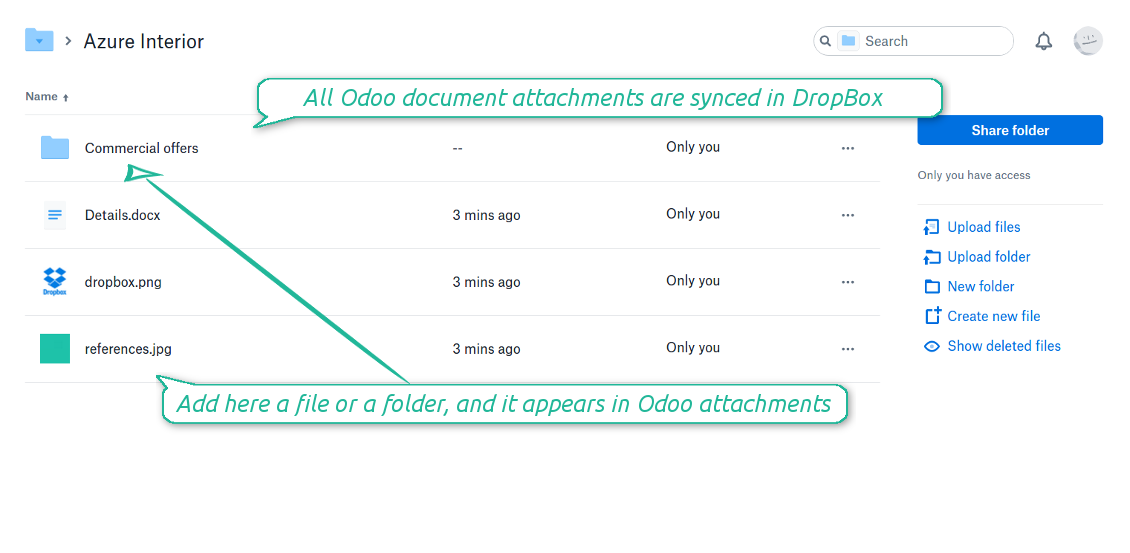



Synchronization is bilateral. All Odoo attachments are put in DropBox regularly. DropBox files create attachments in Odoo in case they are placed in a correct folder. Look at the sections From Odoo to DropBox and From DropBox to Odoo
Integration is automatic in both ways. Based on scheduled jobs, Odoo send attachments to DropBox and retrieve files from there
Any Odoo document might be synced: customers, opportunities, sale or purchase orders, tasks or issues, employees or users, etc. You decide by your own which records should be in DropBox, and which should be left in Odoo
Synchronization works for any DropBox tariff, including Personal DropBox (Basic, Plus, Family) and business DropBox (Professional, Standard, Advanced)
All synced files are easily accessible though clicking on an attachment. You might also open a whole document folder by clicking on 'Open folder' on the attachment widget. This feature migth be optionally turned off: look at the section DropBox URLs
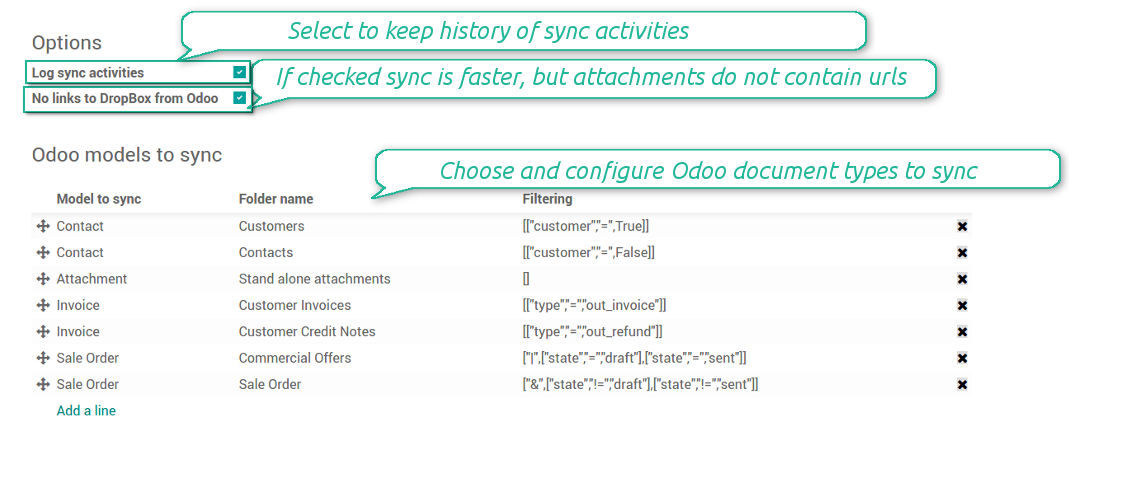
All sync activities might be logged. Control over files and folders creations, moves, name changes and removals. Just turn on the option 'Log sync activities' and access history through the button 'Sync logs'
New For each document of this type you may create a default directories' structure. When this folder is firstly synced, Odoo would generate default folders. For example, for all employees you may have pre-defined folders 'Scans', 'Scans/Official', 'Photos', etc.
The tool is compatible with Odoo reporting and mailing apps. If such an app faces a synced file, it retrieves a real content from DropBox. In particular, the reports 'always reload' feature and messages & mass mailing attachments work properly
Integration is based on a single user endpoint. It means that a single user login/password of DropBox is used. Afterwards for integrations Odoo would use that credentials disregarding an actual Odoo user
- Prepare and keep updated folders' structure in DropBox
- Upload new attachments to a correct folder
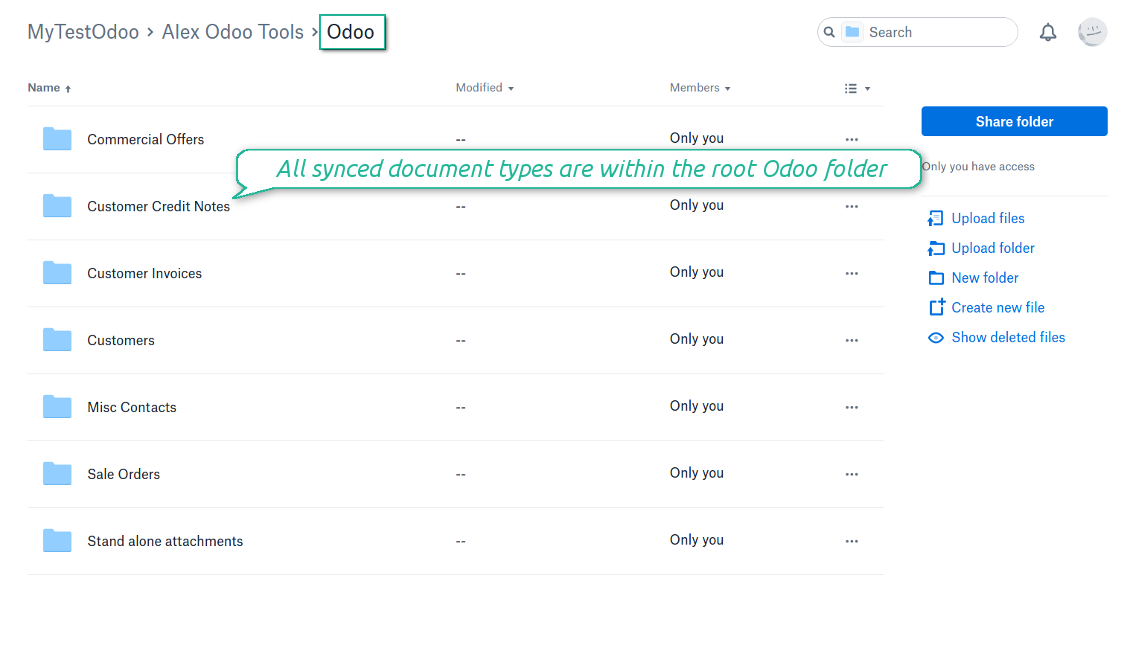
Odoo creates a convenient directory structure in DropBox: Odoo / Document type name / Document name / Files, where:
- Odoo is a central directory for Odoo Sync in your cloud storage.
- Document type is a synced Odoo model, for example, 'Sale orders', 'Opportunities', 'Customers'
- You select document types by yourself. It might be any document type
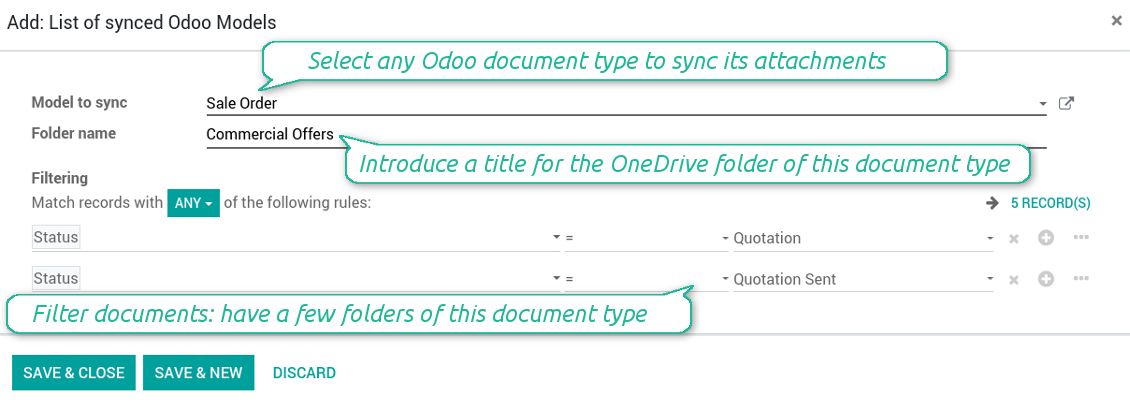
- Moreover, you might have a few folders for a single document type. Use Odoo domains to have not global 'Partners, but 'Customers' and 'Suppliers', not just 'Sale orders' but 'Commercial offers', 'To deliver', and 'Done orders'
- With each sync Odoo would try to update document types' folders. Add a new document type at any moment. It will appear in DropBox with a next sync
- You are welcome to introduce or change document types folder names at any moment in Odoo. Take into account: renaming in DropBox will be recovered to Odoo names
- If you remove a model from integration, it will not be deleted from DropBox to keep already synced files safe. However, new documents of this type would not be synced
- In case you removed a directory in DropBox, but it is still configured in Odoo, with a next sync a folder structure is going to be recovered (not files, surely).
- Document is an exact object to sync. For instance, 'Agrolait' or 'SO019'
- Documents are synced in case they relate to a synced document type and satisfy its filters. For example, you are not obliged to sync all partners, you may integrate only 'Customers' and 'Vendors' or only 'Companies', not 'Contacts'
- Odoo would generate a folder in DropBox for each suitable document even for documents without attachments. It is needed for a backward sync to easily add new files
- DropBox folder name equals a real document name. It relies upon Odoo name_get method. Thus, Odoo 'Michael Fletcher' (a contact of 'Agrolait') would be DropBox 'Agrolait, Michael Fletcher'
- If an exact document changes its document type (e.g. a quotation is now confirmed), Odoo will automatically relocate its related folder to a proper parent directory (in the example: from 'Commercial offers' to 'To deliver')
- In case a document relates to a few types (for instance, you have 'Vendors' and 'Customers', while Agrolait is both), this document folder would be put into the most prioritized document type. A document type priority is higher as closer to the top in Odoo interfaces it is
- If an Odoo document is removed, the next sync will remove a corresponding DropBox directory
- In case you remove a directory in DropBox, but it still exists in Odoo, DropBox folder structure would be recovered (while files would be unlinked in both Odoo and DropBox)
- Folders renaming in DropBox will be replaced with Odoo names, Odoo document names are more important
- Files are real files taken from Odoo attachments
The resulted path would be, for example, 'Odoo / Quotations / SO019 / commercial offer.png'.
The only exclusion of the rule are stand alone attachments which do not relate to any Odoo documents (their document type is 'ir.attachment'). Such attachments' path is 'Odoo / Stand Alone Attachments / image.png'.
The direct sync might take quite a long, since a lot of folders should be created. It is not recommended to make sync too frequent: once an hour or two hours is fine.
FilesWith each direct sync, Odoo tries to find not yet synced attachments. If such attachments suit any document type to sync, a file will be uploaded to DropBox to a proper folder. In Odoo such attachments will become of 'url' type (look also at the section DropBox URLs). It means that a file is not any more kept in Odoo server space, but now it is in DropBox. Until sync is done, Odoo attachment remains binary and stores an actual file. Such approach helps Odoo to work faster.
If you unlinked an attachment from Odoo, it would be deleted in DropBox as well.
Take into account that file names should be managed in DropBox: each backward sync would recover DropBox names, Odoo is here less important.
- If a new file is added to a proper document folder (e.g. to 'Odoo / Customers / Agrolait'), the same attachment will be added to Odoo document (in the example - to 'Agrolait')
- In document folders you can put not only files but also child folders. In that case a link for this folder (not its content) is kept in attachments
- In case you rename a file in DropBox, it will be renamed in Odoo as well
- Files' removal from DropBox leads to related Odoo attachments' removal
- If you move a file to another document folder, in Odoo a related attachment would be re-attached to this new document. Take into account: if you move a file for a not document folder, this Odoo attachment will be deleted as it has been removed from DropBox
- If you deleted a document type or document folder, their child files are deleted as well. Thus, Odoo would remove related attachments. The folders, however, will be recovered with a next direct sync. Folders' move to another directory is also considered as a removal. Avoid such situations by following the simple rule: folders are managed mostly by Odoo, files - mostly by DropBox.
Backward DropBox might take quite much time, since each folder should be checked (the more folders, the more time the backward sync requires). It is recommended to make frequency oftener than once an hour or two hours.
DropBox has a specific way to generate links for existing files and folders. In particular, there are no concepts of internal or private URLs. Instead, each DropBox item might get so-called shared URLs. Such shared links are either public or team-only. Moreover, the latter feature is available only for DropBox business account.
This tool relies upon share links' mechanics. It means, that each attachment link is either public (all personal DropBox accounts) or team-only (all business DropBox accounts).
Sometimes it is considered to be not fully safe. Although website URLs will be hardly known by external users, there is a slight chance that they become available as a result of some user actions. Besides, sharing links generation is not super fast and might make a sync process slower. That is why the feature to switch off sharing urls is introduced.
If checked, all DropBox urls in Odoo will be of type https://www.dropbox.com/home/Odoo/[PATH]. Such links will not work in quite a many cases. Thus, if you need to open DropBox files / folders from Odoo, do not switch off the feature 'No links to DropBox from Odoo'.
Configuration and Login
- Follow the url https://www.dropbox.com/developers/apps/create
- Choose an API as 'Scoped access'
- Choose the type of access as 'Full Dropbox'
- Select any suitable name for the app and push the button 'Create app'
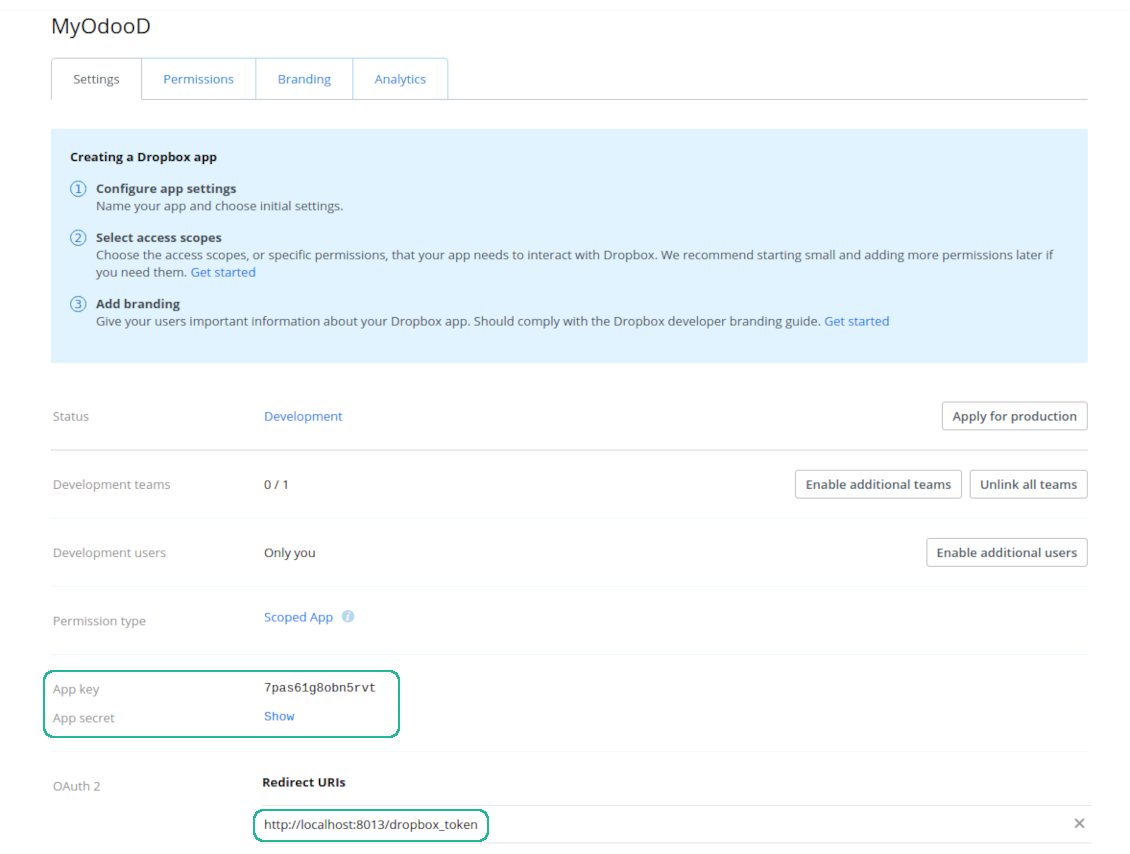
- Add the redirect URI as YOURODOOSITENAME]/dropbox_token (e.g. https://faotools.com/dropbox_token). A valid SSL certificate (https) is required
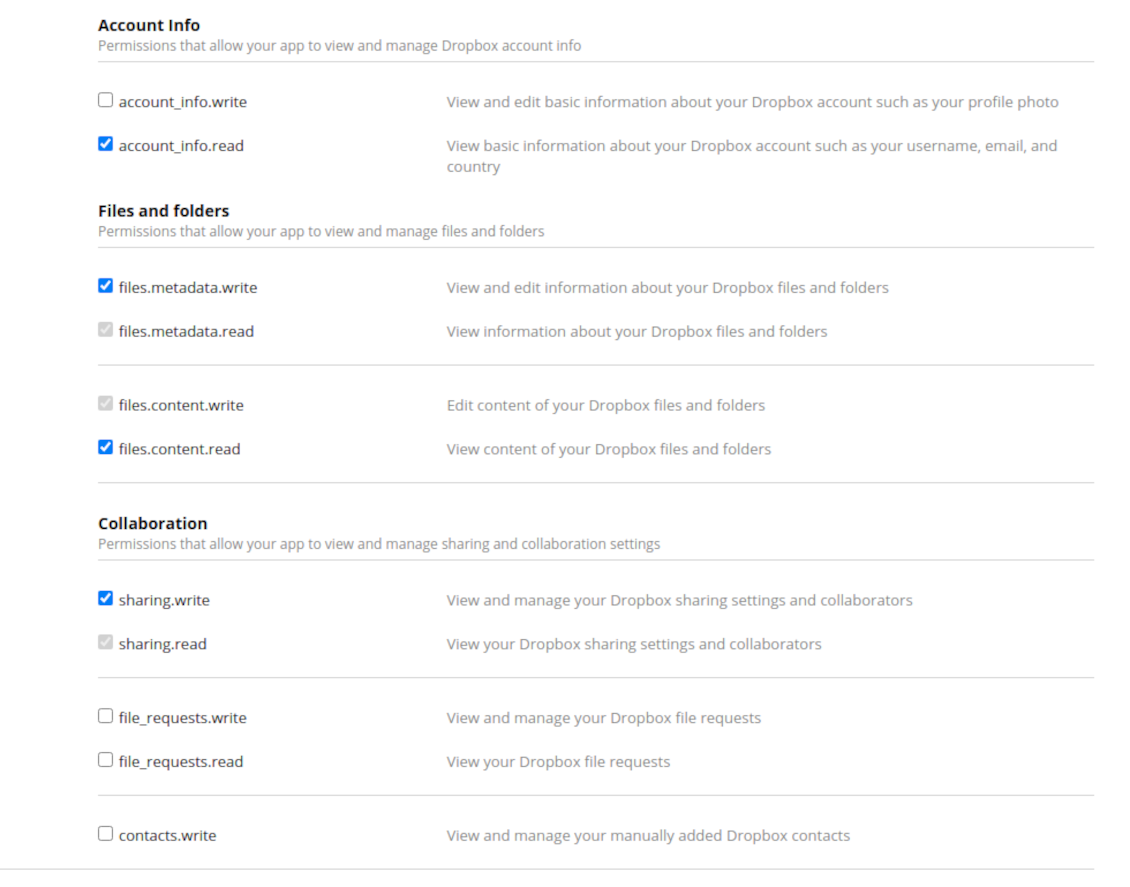
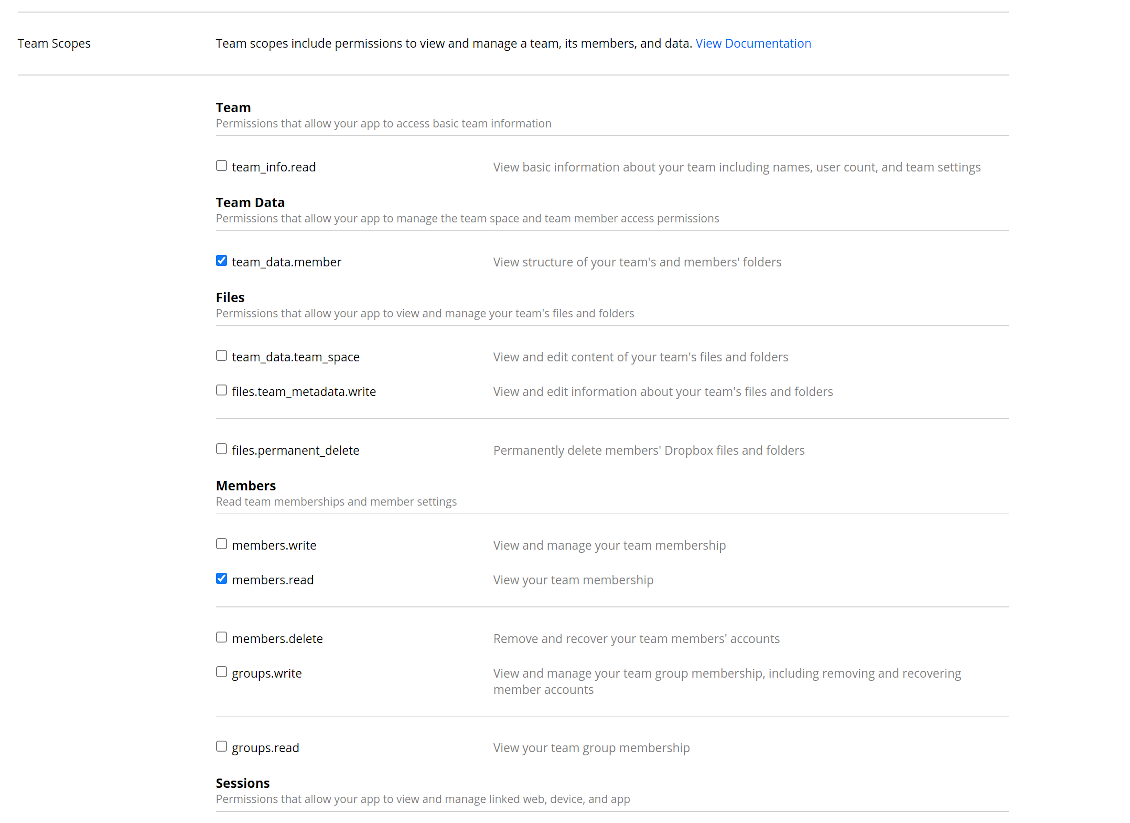
- Grant permissions to the app: 'Account Info (Read)', 'Files and folders Metadata (Write)', 'Files Content (Write)', 'Collaboration (Write)'. For team DropBox assign also 'Team Data Members', 'Members (Read)'. Make sure no other permissions are assigned.
- Submit App
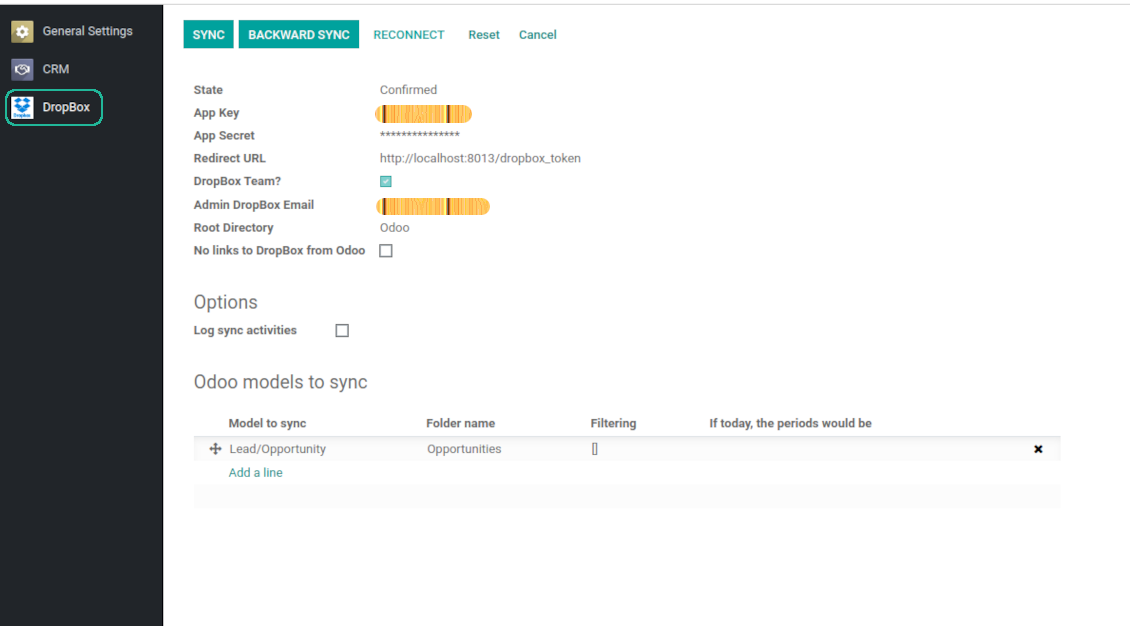
- Go to Odoo general settings - DropBox
- Copy App Key, App secret, and redirect URI to the Odoo configuration page
-
For team DropBoxes only
- Check the box 'DropBox Team'
- Set an email of DropBox user. Inside this user folder all Odoo related items would be created and only after that they are shared to all other users. Under this user all files and folders are created, changed, moved, and deleted
- Choose a suitable name for the root Odoo folder, e.g. 'Odoo' or 'ERP'
- Press Save
- Press 'Login and Confirm'
Create a DropBox app
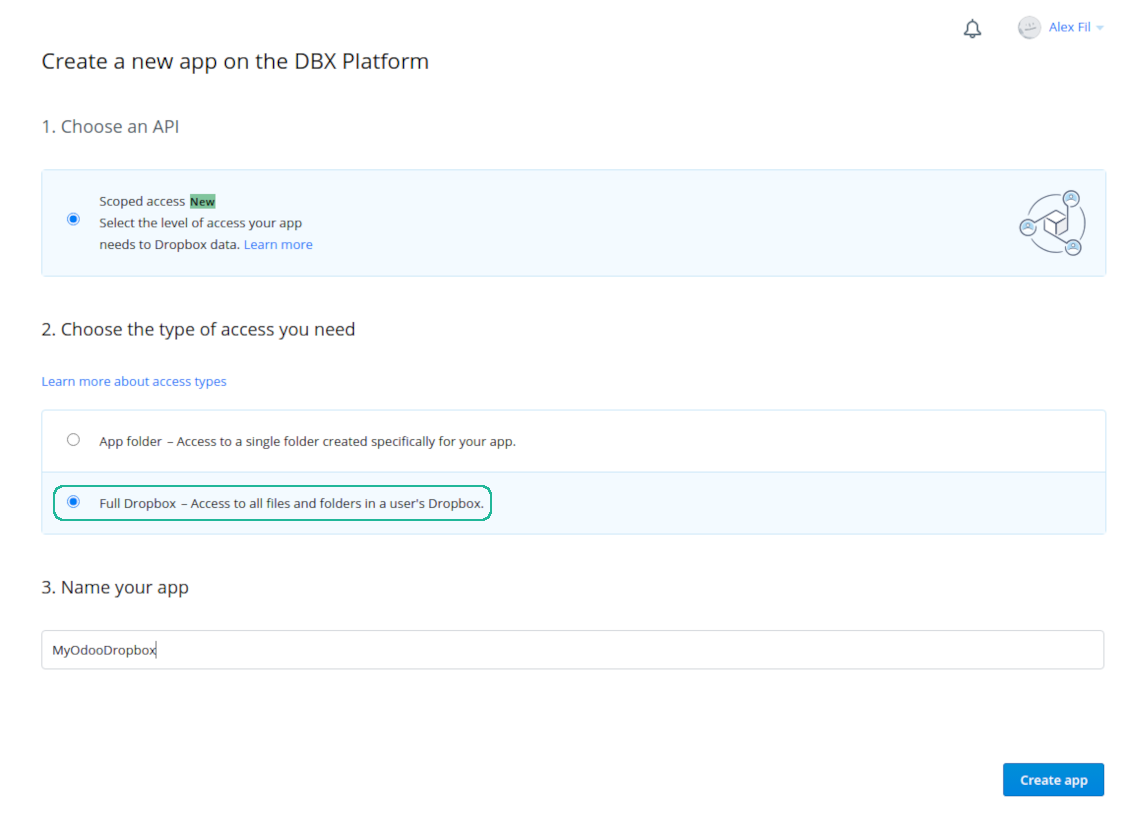
Set up DropBox App: redirection URL
DropBox permissions for personal accounts
DropBox permissions for business accounts
Set up Odoo for DropBox integration
Odoo server configuration and cron job configuration
To make sure the synchronization works correctly apply proper timeouts to the Odoo configuration file: LIMIT_TIME_CPU, LIMIT_TIME_REAL should be more than 900 seconds.
For Odoo.sh this should not be done, since timeouts are predefined and are not configurable.
Then, timeout should be entered to your Odoo. To that goal find the section 'Settings' on the app configuration page and copy the number there.
Afterwards, it is needed to make the cron jobs suit the applied timeouts. In the debug mode go to the Settings > Technical > Automation > Scheduled Jobs:
- Set up the job 'Synchronize attachments with cloud' as (a) frequency - 2*timeout; (b) the next execution as the next hour +timeout. For example, for 900seconds timeout: frequency - as 30minutes; the next execution - at 08:15
- Set up the job 'Synchronize attachments from cloud' as (a) frequency - 2*timeout; (b) the next execution as the next hour + timeout*2. For example, for 900seconds timeout: frequency - as 30minutes; the next execution- at 08:30.
Korduma kippuvad küsimused DropBox Odoo Integration Odoo v.11
Kas ma saan sünkroonimistööde sagedust muuta?
Jah, saate. Selleks:
Lülitage sisse silumisrežiim
Avage tehnilised seaded > Automatiseerimine > Ajastatud tööd
Leidke tööd 'Synchronize attachments with cloud' ja 'Update attachments from cloud'.
Ärge tehke neid liiga sagedaseks. Eelistatult peaks töö lõppema enne järgmise algust. Seadistus sõltub sellest, kui palju kirjeid on sünkroonida. Tavaliselt on sagedus 15 minuti ja 4 tunni vahel.
Veenduge ka, et Odoo konfiguratsioonifailis on piisavad ajalimiidid. Parameetrid LIMIT_TIME_CPU ja LIMIT_TIME_REAL peavad olema vähemalt planeeritud cron-töö pikkused. Alates versioonist 13 arvestage ka parameetrit LIMIT_TIME_REAL_CRON.
Oluline märkus Odoo.sh klientidele: cron-töö maksimaalne aeg võib olla vaid 15 minutit.
Kas saan seadistada sünkroonitud kataloogidele teistsuguse struktuuri, kui sünkroonimine eeldab?
Ei, see funktsioon on saadaval alles alates versioonist 15. Enne seda versiooni töötab moodul etteantud kaustastruktuuriga:
Odoo - sünkroonimise põhikaust
Models - kaustad iga Odoo dokumenditüübi jaoks. Näiteks 'Projects', 'Partners'. Domeeni järgi võivad olla täpsemad kaustad: nt 'Customer 1 Projects', 'Projects of the Customer 2', 'Internal Projects' jne.
Objects - kaustad iga dokumendi jaoks, nt 'Project 1' või 'Customer 1'
Selle Odoo dokumendiga seotud failid ja kaustad, mis sünkroonitakse.
Tulemusena võib teil olla näiteks:
Odoo / Projects / Project 1 / failid ja kaustad, mis on seotud project 1-ga
Odoo / Customer 1 Projects / Project 1; Odoo / Customer 2 Projects / Project 3, ...
Odoo / Customers / Customer 1 / failid ja kaustad, mis on seotud customer 1-ga
See struktuur on alati lame, st hierarhias on ainult need tasemed. Seega on õige, et erinevaid dokumenditüüpe ei saa hoida samas struktuuris. Kaustas 'Customer 1' ei saa hoida faile, mis kuuluvad korraga müügitellimustele, arvetele ja projektidele. Igal sellisel dokumenditüübil on oma (või mitu oma) kausta. Muidu poleks tagasisünkroonimist võimalik teha, sest puuduks kriteerium, millele toetuda.
Kas peaksin Odoos seadistama konkreetsete kasutajate juurdepääsud?
Ei, tööriist tugineb ühele kasutaja otspunktile. Kõik sünkroonimisprotsessid toimuvad ühe pilveadministraatori (rakenduse) all. Loodud kaustade / failide juurdepääsuõigusi ei automatiseerita. Neid õigusi peate haldama oma pilvesalvestuse lahenduses.
Kuhu sünkroonitud väljad salvestatakse? Kas need dubleeritakse Odoo-sse ja pilvedesse?
Rakendus eeldab, et manuste binaarsisu hoitakse Cloud Clientis, mitte Odoo serveris. Seega muutuvad sellised manused Odoos URL-tüüpi manusteks ning neile pääseb igal ajal ligi kas manuste kastist või Cloud Clientist.
Pärast seadistamist pole käsitsi toiminguid vaja, sest sünkroonimine on täielikult automaatne. Otsustage, milliseid Odoo dokumenditüüpe sünkroonida, ja seadistage igaühe jaoks seotud mudel (kliendid, müügi- või ostutellimused, ülesanded, projektid jne).
Kas saan samale dokumenditüübile mitu kausta? Näiteks siseprojektid ja kliendiprojektid?
Jah, saate. Selleks valmistage igaühele reegel ja seejärel rakendage filtrid: näiteks projekti tüübi järgi.
Püüdke teha filtrid vastastikku välistavateks, et dokument saaks üheselt määratud. Näiteks „klient, kuid mitte tarnija“, „tarnija, kuid mitte klient“. Muidu hüppab konkreetse dokumendi kaust ühelt mudelilt teisele.
Kas mul on vaja ainult rakendust Cloud Storage Solution?
Ei, tööriist on ainult tehniline tuum. Vajate ka oma cloud clienti konnektorit.
Kas on korras, kui sünkroonida tuleb palju objekte, näiteks 10000?
Jah, kuigi paljude kaustade/manuste sünkroonimisel võib protsess olla aeglane. Samas on kliendid teatanud keskkondadest, kus sünkrooniti >10k partnerit ja ~5k tootevarianti, ning protsessid olid vastuvõetavad.
Mõned rõhuasetused:
- Sünkroonimine on ehitatud nii, et iga üksus sünkroonitakse ega lähe kaduma, ehkki see ei pruugi olla kiire. Selle tagavad FIFO järjekorrad ja iga töö kinnitamine.
- Objektide arvu saab loogiliselt piirata. Mudelite seadistus võimaldab piirata aegunud üksuste sünkroonimist (nt pole mõtet sünkroonida arhiveeritud partnereid või 2 aastat vanu tellimusi).
Kas sünkroonimist saab teha reaalajas?
Ei. Meil on tugevad põhjused vältida reaalajas sünkroonimist:
Jõudlusprobleemid. Kui sünkroonimine oleks reaalajas, tööks iga faili üleslaadimine kaasa laadimisekraani.
Konfliktiprobleemid. Kui 2 kasutajat muudavad üksust korraga, võib tekkida lahendamata olukordi. Regulaarsete tööde korral saame selle hiljem parandada; reaalajas tuleks see salvestada järjekorrana, mis ajaks kasutajaid veelgi rohkem.
Funktsionaalsuse probleemid. Eelkõige üksuste ümbernimetamine ja ümberkorraldamine. Tagasisünkroonimisel tuginetakse rangelt kataloogiloogikale ning iga sünkroonimise ajal kontrollitakse 100% üksustest. Kui seda teha pärast iga uuendust, oleks tuhandeid päringuid sekundis. Kui mitte: muudatused läheksid kaduma.
Kas ma saan manuseid sünkroonida mõne pilve kliendiga
Ei, see funktsioon on saadaval alles alates versioonist 15.
Kasutame pilvedes spetsiaalset redaktorit (nt OnlyOffice, Office 365 jne). Kas failid avataks selles redaktoris?
Jah, olenevalt teie cloud client seadistusest.
Millised on teie tööriistade uuenduspoliitikad?
Kehtivate Odoo Apps Store reeglite kohaselt:
- Iga versioonile 12.0 või varasemale ostetud moodul annab juurdepääsu kõigile versioonidele kuni 12.0.
- Alates versioonist 13.0 tuleb iga mooduliversioon osta eraldi.
- Versioonist sõltumata annab ost õiguse kõigile uuendustele ja veaparandustele peamise versiooni piires.
Pange tähele, et faOtools meeskond neid reegleid ei juhi. Küsimustega pöörduge otse Odoo Apps Store esindajate poole.
Kuidas teie rakendust Odoo.sh-i installida?
Kõige lihtsam lähenemine on kasutada Odoo poe sisseehitatud töövoogu:
1. Avage mooduli leht ja klõpsake nuppu Deploy on odoo.sh
2. Seejärel suunatakse teid GitHubi lehele. Logige kontole sisse, seejärel klõpsake 'Create a new repo' või kasutage olemasolevat. Veenduge, et hoidla on privaatne. Rakendusi ei tohi OPL-1 litsentsi all avaldada. Vajadusel looge Odoo.sh projekti jaoks uus repo
3. Seejärel minge odoo.sh-i ja klõpsake nuppu Deploy. Hüpikaknas esitage otsus ja klõpsake 'Continue.' See käivitab paigalduse.
Need sammud paigaldavad rakenduse projekti tootmisharusse. Kui soovite rakendusi teistesse harudesse juurutada või moodulit uuendada, tehke järgmist:
1. Laadige rakenduse lähtekood Odoo poest üles
2. Tehke moodulile commit vajalikku GitHubi hoidlasse. Veenduge, et ühtegi rakenduse kausta/faili ei ignoreerita (st need ei ole repo .gitignore-s). Hoidlad loob odoo.sh automaatselt ja need võivad vaikimisi sisaldada olulisi kirjeid (nt /lib). Laadige üles kõik mooduli kataloogid, alamkataloogid ja failid eranditeta
3. Juurutage odoo.sh projekti sihtharu või, kui seaded seda eeldavad, oodake, kuni see automaatselt ehitatakse.
Kuidas teie rakendust oma serverisse installida?
2. Taaskäivita Odoo server;
3. Lülita sisse arendajarežiim (tehnilised seaded);
4. Värskenda rakenduste loendit (rakenduste menüü);
5. Leia rakendus ja vajuta „Activate“/„Install“;
6. Järgi rakenduse lehe juhiseid, kui need on olemas.
Märkasin, et teie rakendusel on lisasid. Kas võin need hiljem osta?
Jah, muidugi. Samal ajal lisab Odoo kõik sõltuvused automaatselt ostukorvi, seega peate varem ostetud tööriistad välja jätma, et vältida topeltmakset.
Paigaldasin teie rakenduse Odoo.sh-i ja näen testides hoiatust/viga
Punane/oranž hoiatus ei mõjuta rakenduse funktsioone. Kahjuks ei läbi meie moodulid mõnikord standardseid automaatteste, sest need eeldavad käitumist, mis on vastuolus rakenduse eesmärkidega. Näiteks muudame hinnaarvutust, samas kui standardse Odoo mooduli testid võrdlevad lõpphinda standardalgoritmiga.
Kõigepealt kontrollige juurutatud andmebaasi funktsioone. Kas kõik töötab õigesti?
Kui arvate endiselt, et hoiatus mõjutab tegelikke funktsioone, võtke meiega ühendust ja saatke täielikud paigalduslogid ning kõigi juurutatud moodulite loend (sh tuum ja kolmanda osapoole).
Kas ma saan rakenduse otse teie ettevõttelt osta?
Ei, jagame tööriistu ainult ametliku Odoo rakendustepoe.
Soovin allahindlust
Kahjuks pole meil tehnilisi vahendeid individuaalhindade pakkumiseks.
Kas ma saan rakenduse paigaldada oma Odoo Online (SaaS) andmebaasi?
Ei, kolmanda osapoole rakendusi ei saa Odoo Online’is kasutada. Kahjuks Odoo SaaS blokeerib selle.
Teie tööriist sõltub teistest rakendustest. Kas pean need ostma?
Jah, tööriist vajab kõiki sõltuvustes märgitud mooduleid, et töötada õigesti. Rakenduse lehel märgitud hind sisaldab juba kõiki vajalikke sõltuvusi.
Mis on mooduli hind USA dollarites? Miks see muutus?
Meie moodulite hind on eurodes. Odoo pood teisendab hinnad teistesse valuutadesse oma sisemise kursi järgi. Seega võib USA dollarites hind muutuda, kui kurss uueneb.
Rakenduse ja veebilehe sõnastus muudes keeltes kui inglise on tehisintellekti abil ja kooskõlas ametlike Odoo tõlgetega. Kui märkate viga, saatke pilet tõlgete õigsuse kohta ja parandame selle.
Vigadest teatamine
Kui kohtate vigu või ebajärjekindlat käitumist, võtke julgelt ühendust. Tagame parandused 60 päeva jooksul ostust ja oleme huvitatud tööriistade täiustamisest ka pärast seda perioodi.
Meiega ühenduse võtmiseks pole telefoninumbrit ega krediitkaarti vaja. Piisab lühikesest e-posti registreerimisest, mis ei kesta üle 30 sekundi.
Lisage taotlusse võimalikult palju üksikasju: kuvatõmmised, Odoo serveri logid, täielik kirjeldus probleemi taasesitamiseks jne. Tavaliselt kulub mõni tööpäev, et koostada tööplaan (kui viga kinnitatakse) või anda juhised, mida teha (muul juhul).
Avalikud funktsioonisoovid ja mooduliideed (tasuta arendus)
Oleme tugevalt motiveeritud oma tööriistu parandama ja oleme tänulikud iga tagasiside eest. Kui teie nõuded on üldkasulikud ja neid saab tõhusalt ellu viia, lisab meeskond need meie ülesannete loendisse.
Sellist ülesannete loendit töödeldakse regulaarselt ja lisatasusid ei kaasne. Kuigi me ei saa lubada tähtaegu ega lõplikku kujundust, võib see olla hea viis soovitud funktsioonide saamiseks ilma investeeringute ja riskideta.
Meiega ühenduse võtmiseks pole telefoninumbrit ega krediitkaarti vaja. Piisab lühikesest e-posti registreerimisest, mis ei kesta üle 30 sekundi.

Tööriist paroolide turvaliseks hoidmiseks Odoo-s ühiskasutuseks. Jagatud seifid

Tööriist sügava ja struktureeritud teadmusbaasi loomiseks sise- ja väliskasutuseks. Knowledge System. KMS. Wiki-laadsed redaktsioonid.
398€
Tööriist KPI eesmärkide seadmiseks ja täitmise kontrolliks perioodide kaupa. KPI töölaud. Töölaua kujundaja. KPI diagrammid

Tööriist ajapõhiseks teenusehalduseks alates kohtumiste broneerimisest kuni müügi ja arvustusteni
398€
Tööriist Odoo haldamiseks lemmik AI vestlustest MCP kaudu. Claude. Iga MCP-d toetav AI.

Tööriist Odoo manuste paindlikuks kaustadesse paigutamiseks ja kataloogide sünkroonimiseks pilveklientidega: Google Drive, OneDrive/SharePoint, Nextcloud/ownCloud, Dropbox, Amazon S3, Box ja NAS. DMS. Failihaldur. Dokumendihaldussüsteem
398€
Tööriist Odoo manuste automaatseks kahesuunaliseks sünkroonimiseks OneDrive failidega
487€
Tööriist Odoo manuste automaatseks kahesuunaliseks sünkroonimiseks Google Drive failidega
487€
Tööriist Odoo manuste automaatseks kahesuunaliseks sünkroonimiseks ownCloud/Nextcloud failidega
487€