Partner information when it is needed
You decide by your own which data codes boxes' should contain.
Where do I find color codes
You observe color codes practically everywhere where you see a partner.
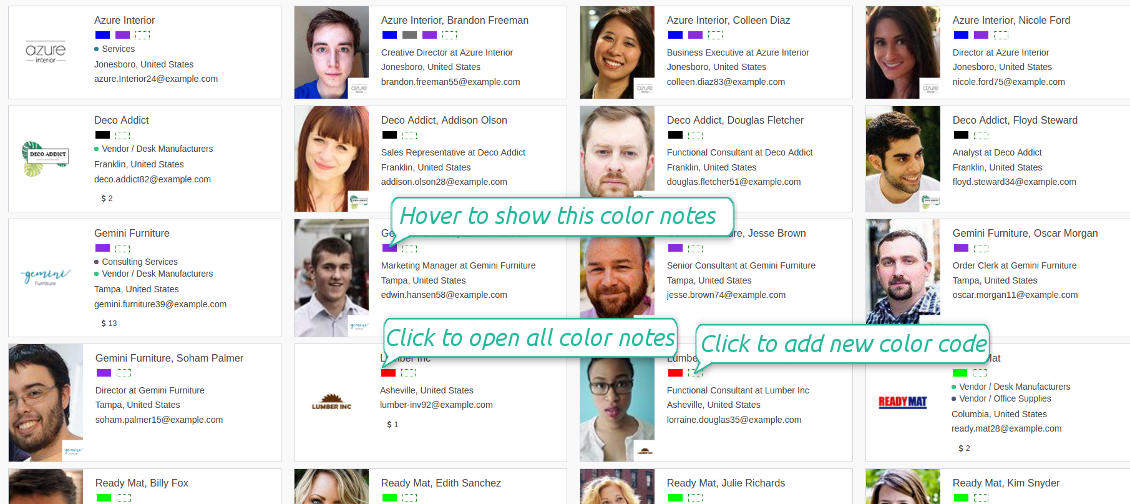
- You see color boxes on all partner views: form, kanban, tree. On default, simplified or address cards
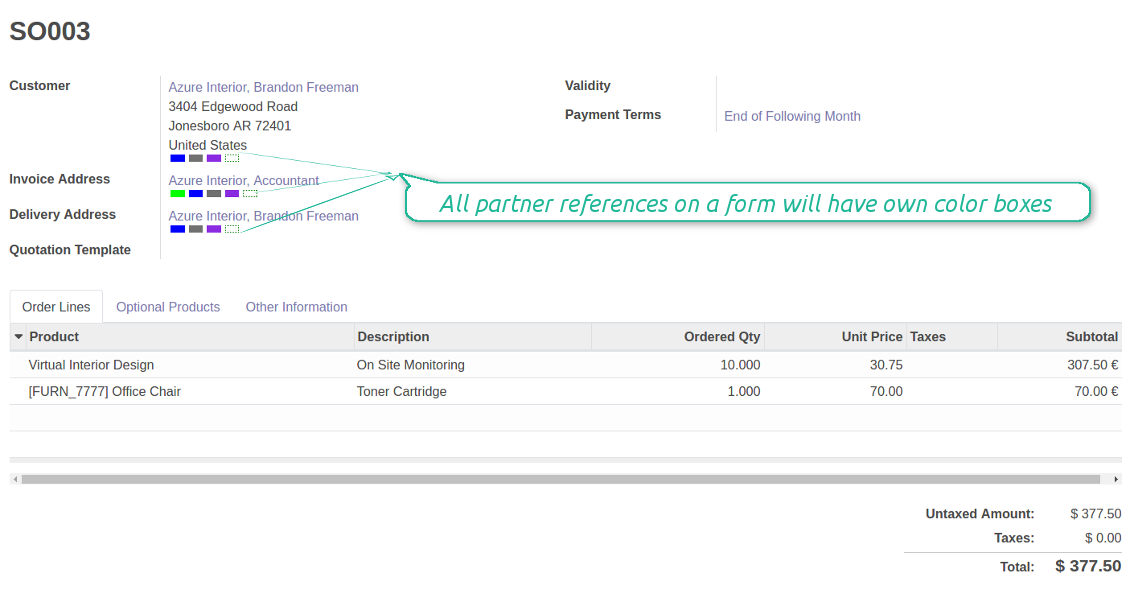
- You access linked supplier or customer color codes on all forms, where there is a reference for a contact. Depending on the modules installed, it might be sale orders, opportunities, projects and issues, purchase or delivery orders, tickets and claims. Thus any, including your custom forms or forms from community-built modules
- Color codes appear as soon as you select or open a contact. In real time. At first sight
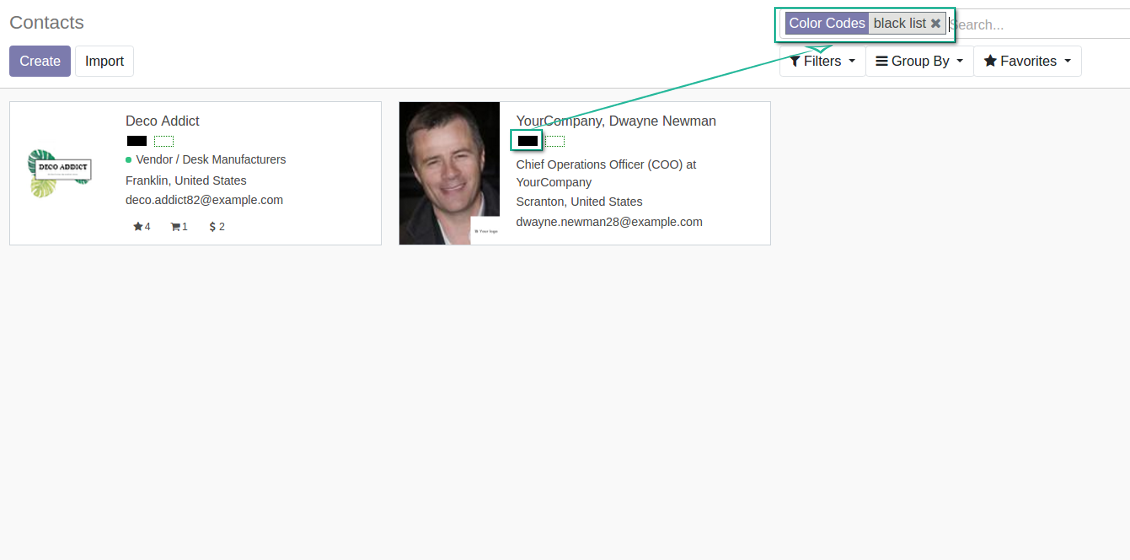
- The tool let you search contacts by a color code reference.
How the widget of color boxes works
Color codes are shown as a set of colourized boxes with user friendly behaviour to retrieve data:
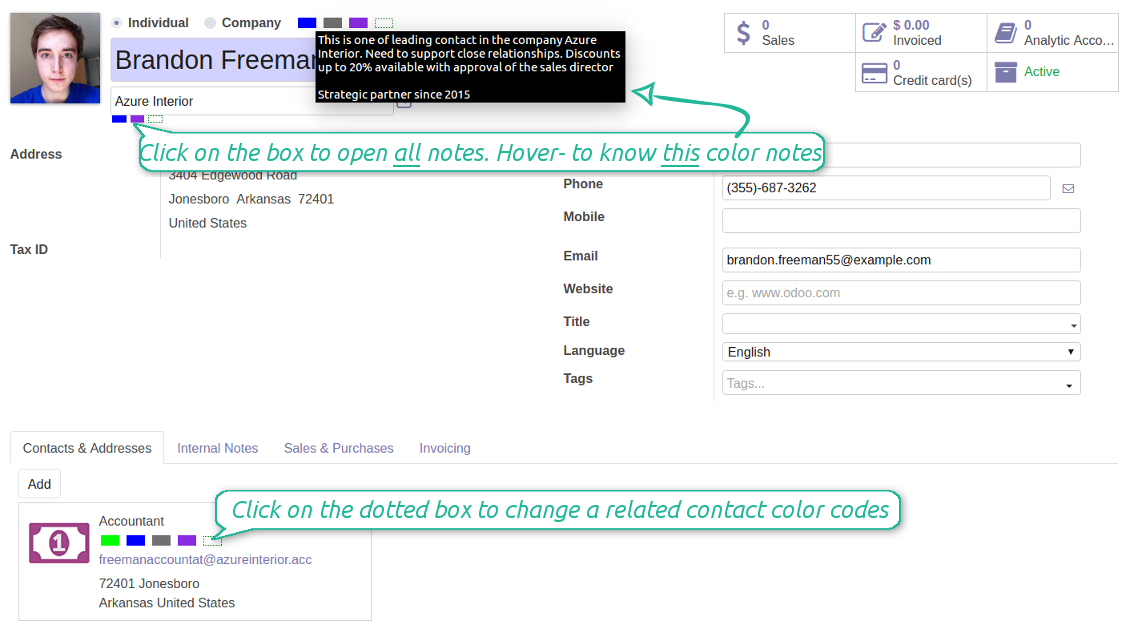
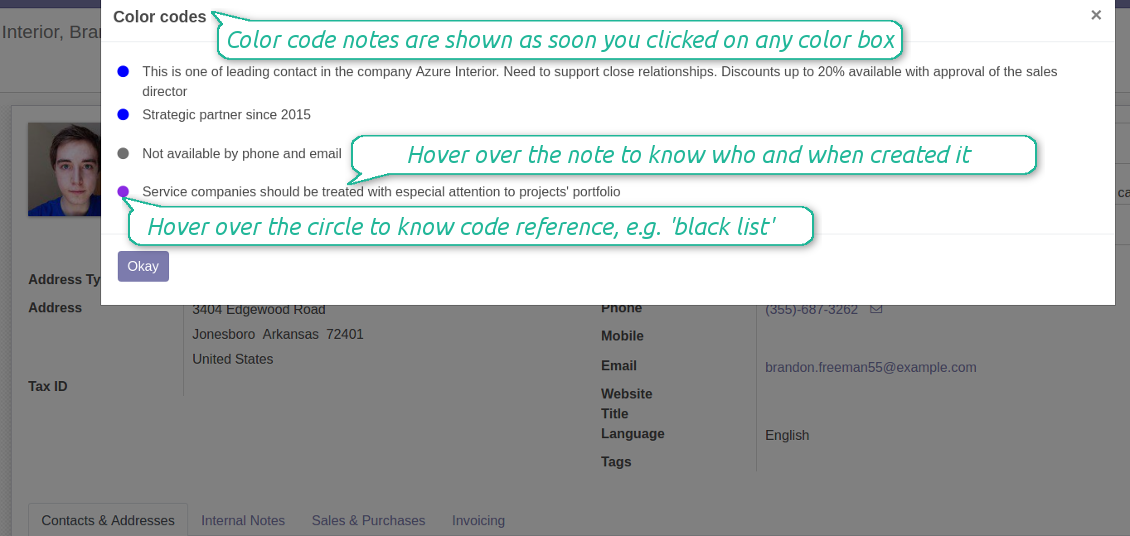
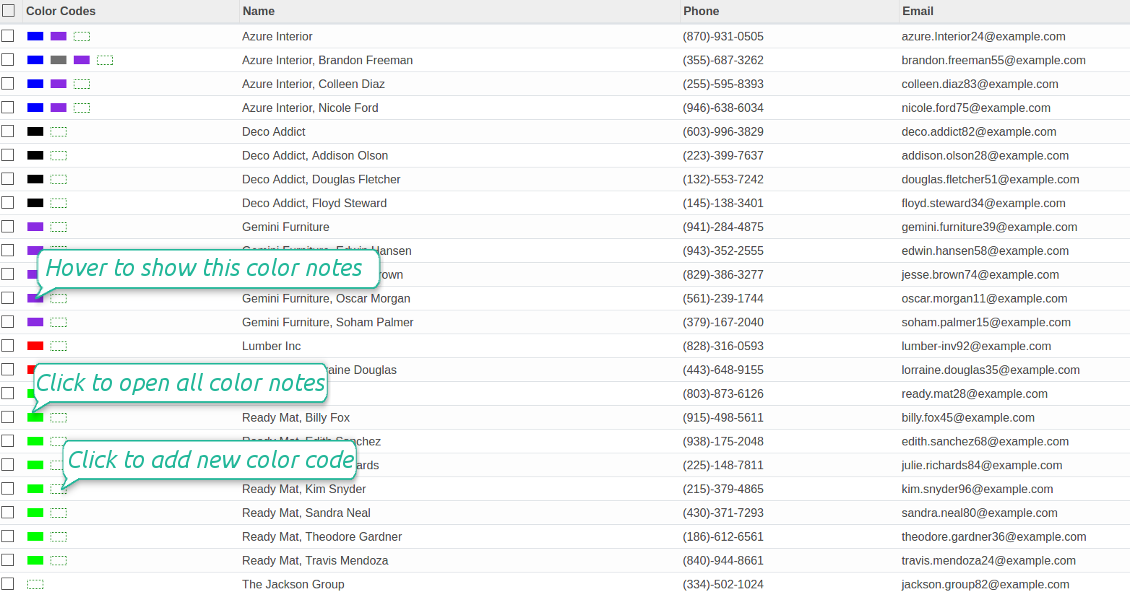
- Click on any color box to open the pop-up with all color notes
- Notes are sorted by color codes. Sequence of colors is defined as a sequence in the configured classifier
- The list aggregates notes by manual and automatic color codes
- Notes gathers hints from parent hierarchy
- Hover over a note to learn its initial author and date (for manual notes) and to which contact, this or any parent, it relates to
- Hover over a circle to know what this color means (color code reference is used)
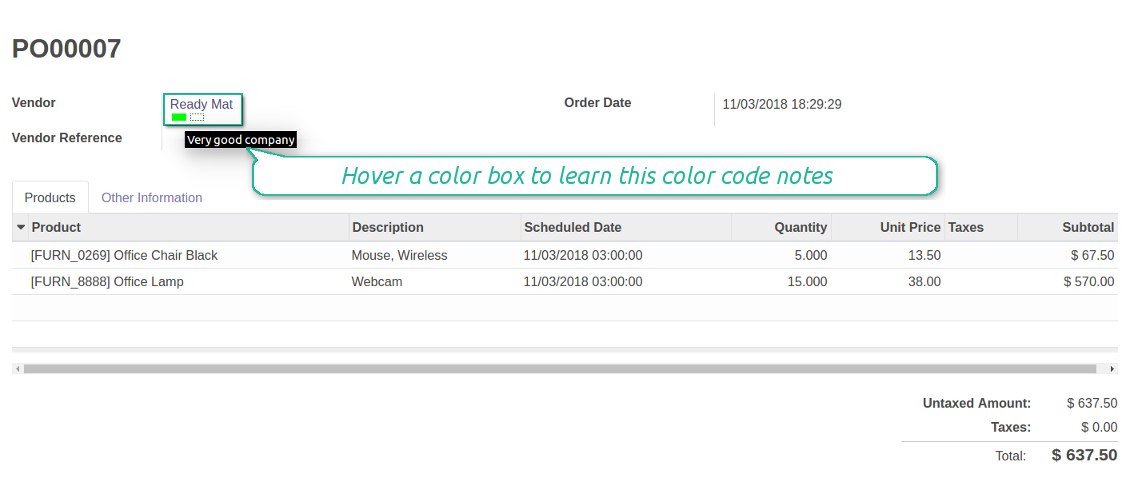
- Hover over a color box to observe related color notes
- Click on a dotted box to manage manual color codes of this contact.
스크린샷
Color codes on a contact form
Customer color coding on a sale order form
Supplier color codes on a purchase order form
Color codes for partners' kanban
Scoring details and notes
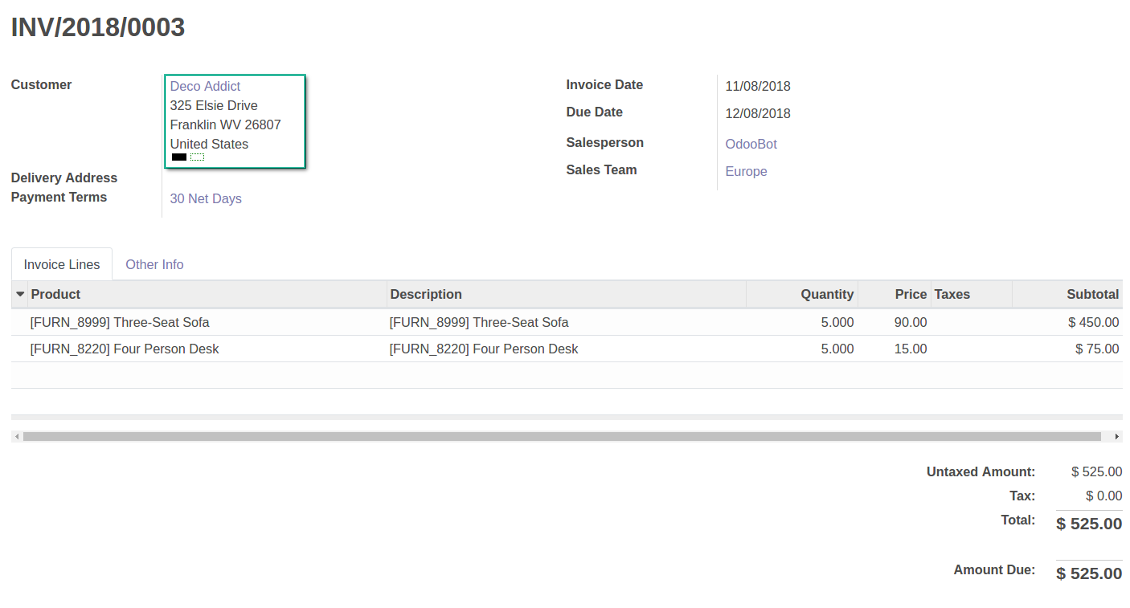
Color codes for invoices
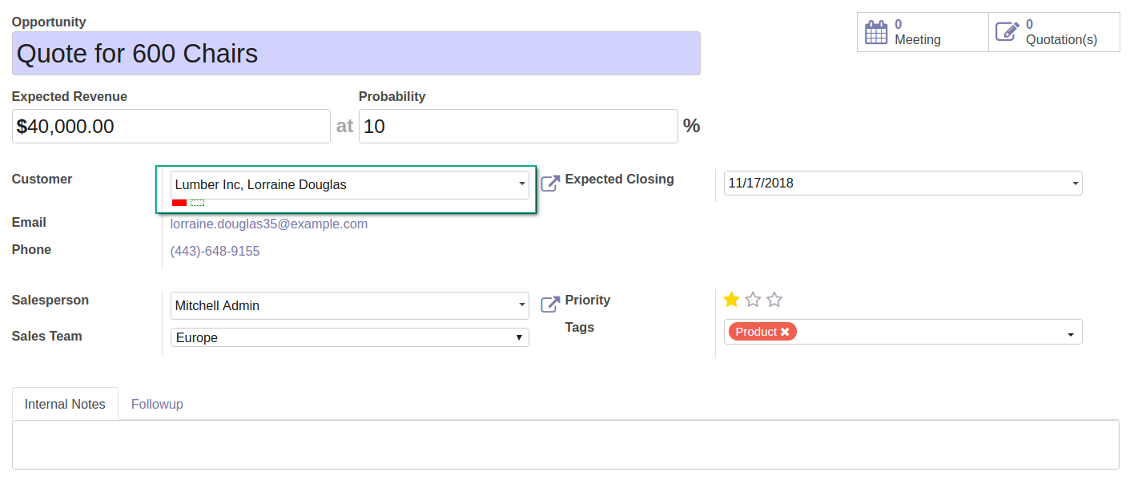
Colour codes for opportunities
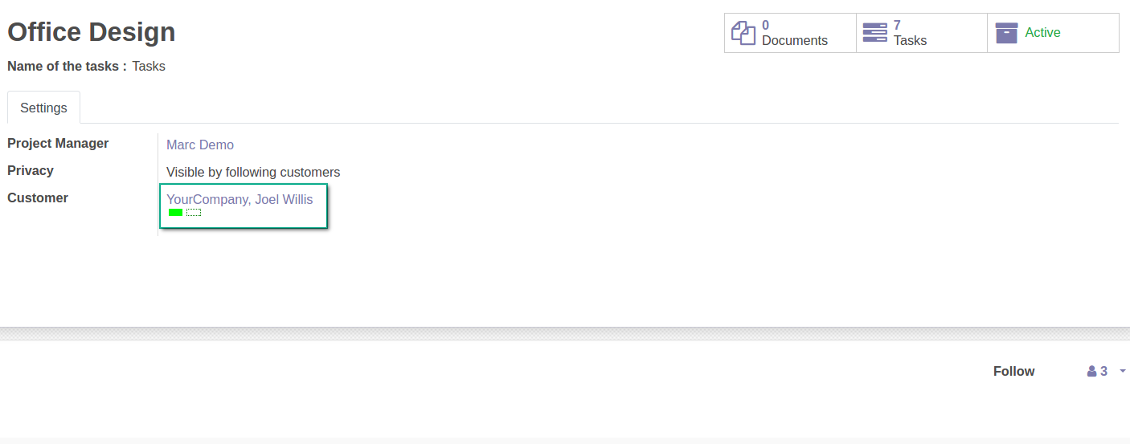
Color codes for projects
Manual and automatic color codes
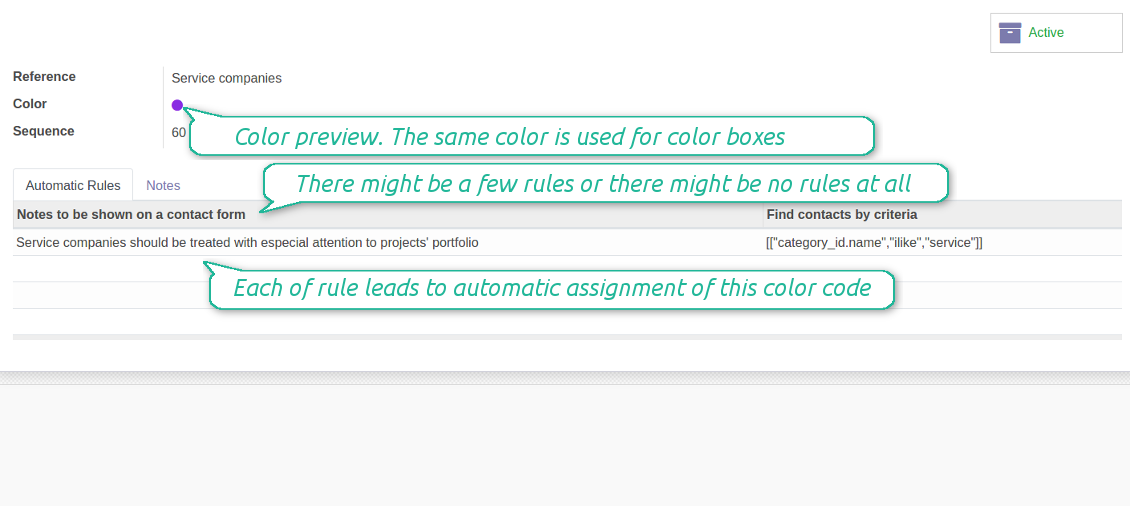
Automatic color codes do not assume any user involvement. Configure rules once, and all matched contacts will receive configured color codes.
Manual color codes can be updated from any location where you see the widget. Click on the dotted-border rectangle to open the list of a related contact own color codes. Add a new to the table, edit an existing line or fully remove a color code note.
How automatic color code rules work
Use automatic color codes in case you can strictly describe which partners receive those color codes. Thus, you should know exact field values of target customers / suppliers. Look at the use cases below.
- Define a rule as a set of criteria a contact should satisfy. You may use any partner field in the same way you define a search filter in Odoo
- There might be as many criteria combined by 'any' or 'all' operators as you like
- For a single color code you may have an unlimited number of automatic rules. Matching any of that rule will lead to this color code assignment
- Automatic rules are applied in real time. As soon as you configured a new one, open/reload any form and check contact color codes.
- A contact already has some sort of manual tag. For example, the 'Danger!' tag should lead to the red color code
- All contacts with set 'Blacklist' field should be assigned the black color code
- Customers with low credit limit (e.g. with less than $1000) receive the orange color code
- Mark grey contacts without mobile and phone entered
- Define color codes based on a country or a region, based on 'Degree of trust you have in this debtor', or based on your own custom field
- ....
스크린샷
Automatic rule for color coding
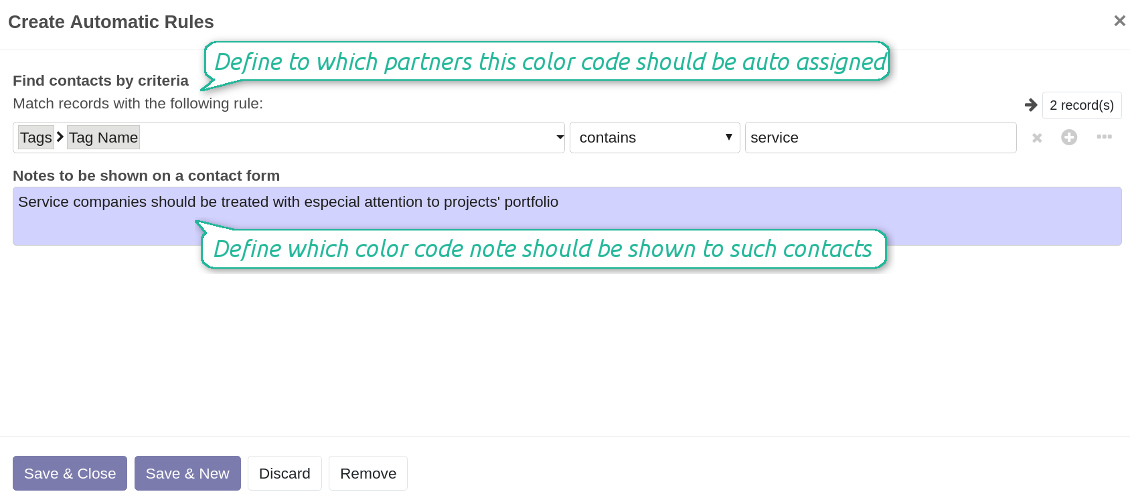
As many criteria as you need for auto rules
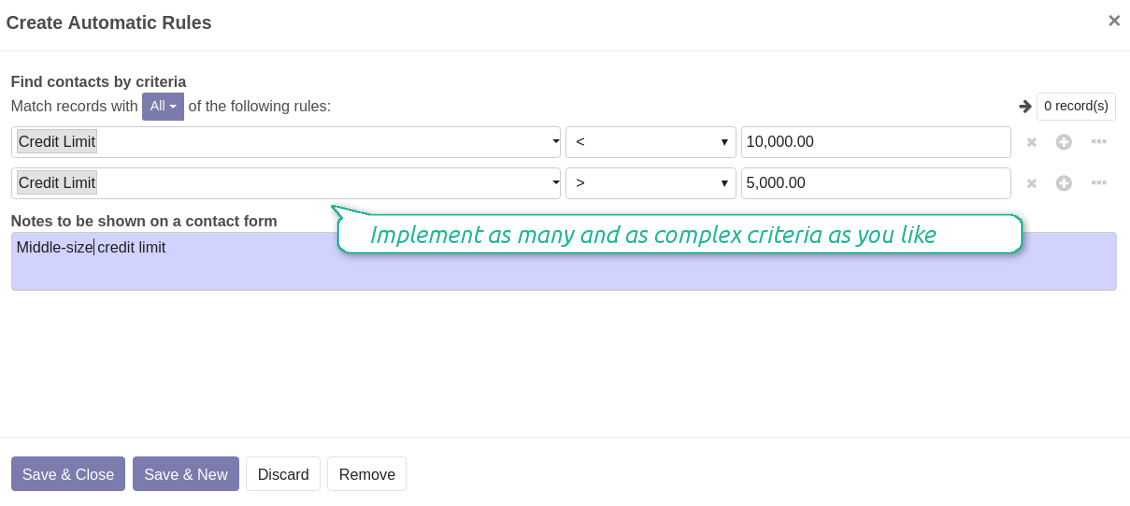
Edit manual color codes
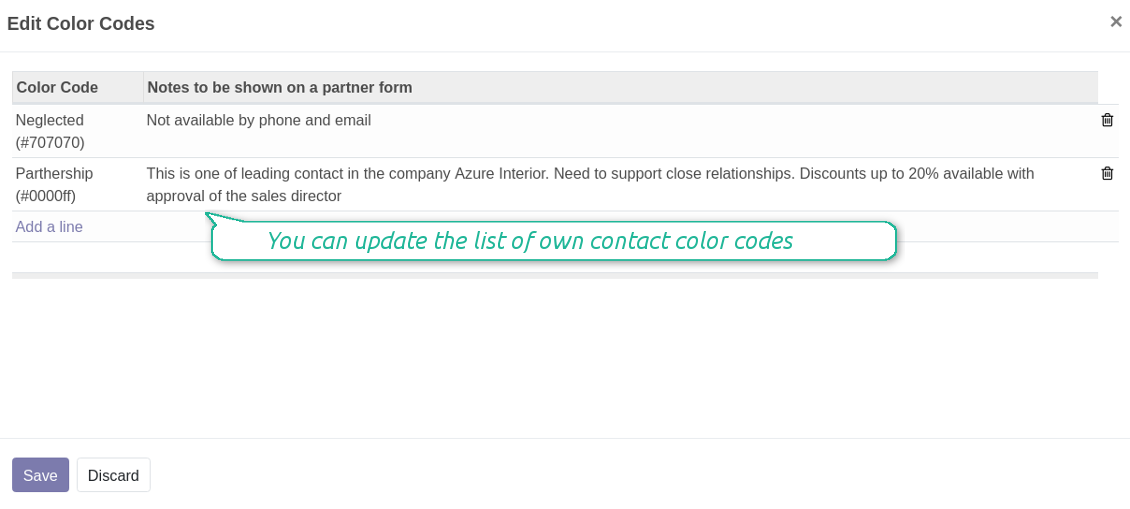
Edit manual color code notes
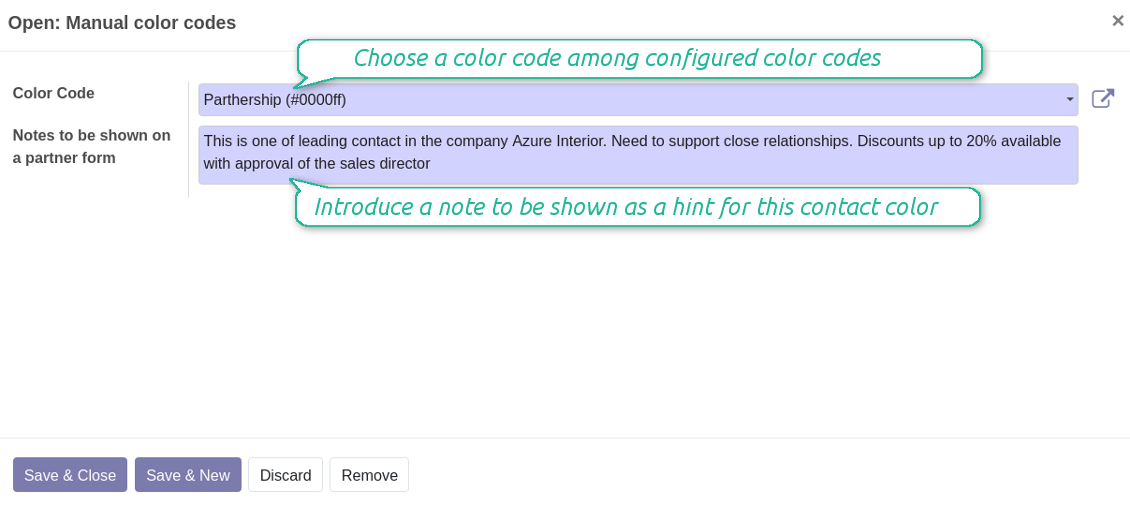
Color codes configuration: form (readonly)
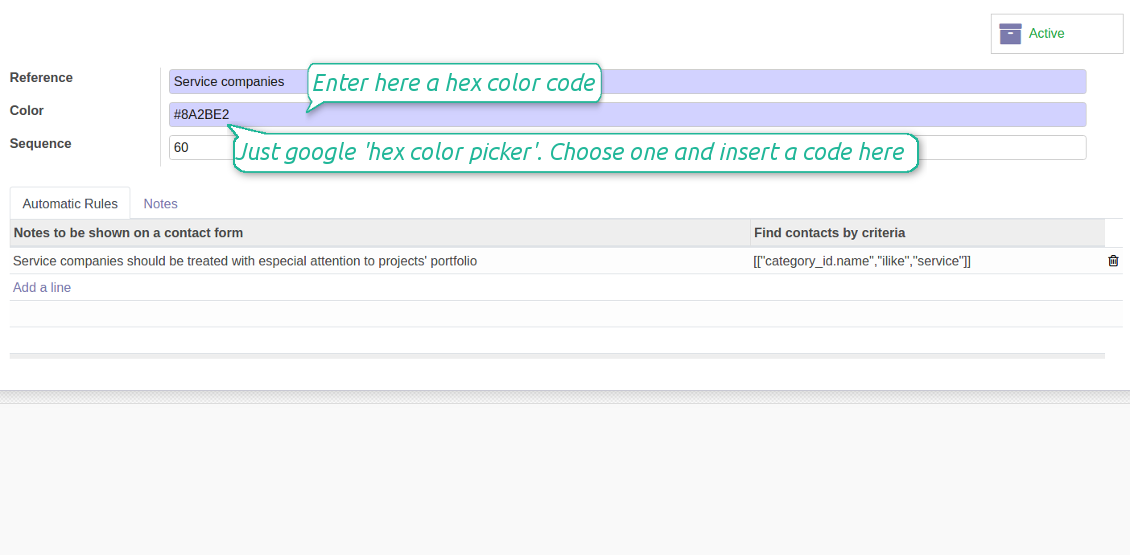
Color codes configuration: form (edit)
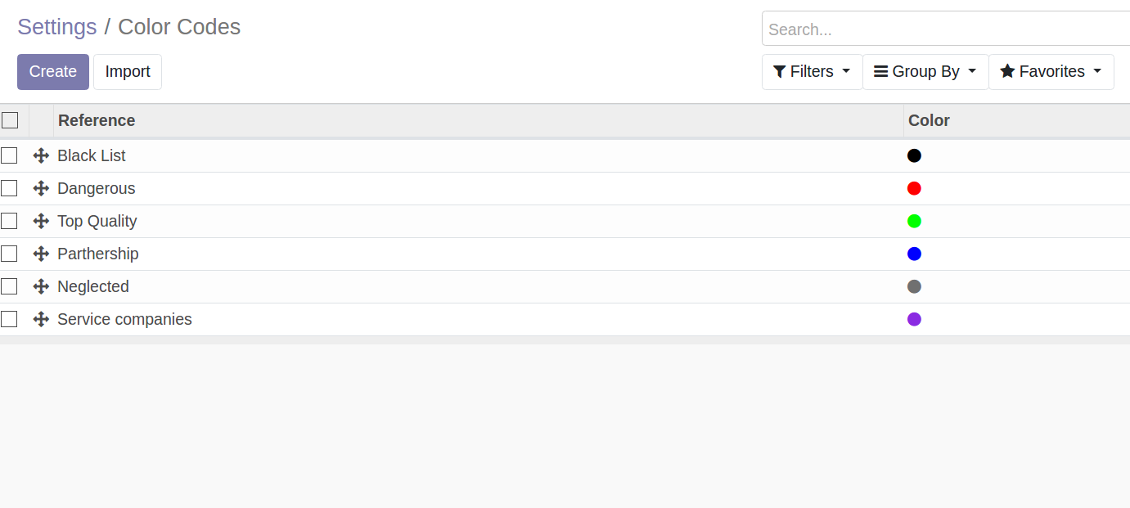
As many color codes as you need
The same color code may have a few notes. For example, 'John Brown' is black-listed since (a) his parent company has a huge debt; (b) he is not available by phone and mobile; (c) he has a tag 'potential fraud' assigned by a financial security officer.
Color codes classifier settings
It is possible to have as many color codes as you like. They may relate to any business facet. For example, introduce 'Black List', 'Not trusted', 'Strategic partners', 'Low credit limit', etc. and etc.
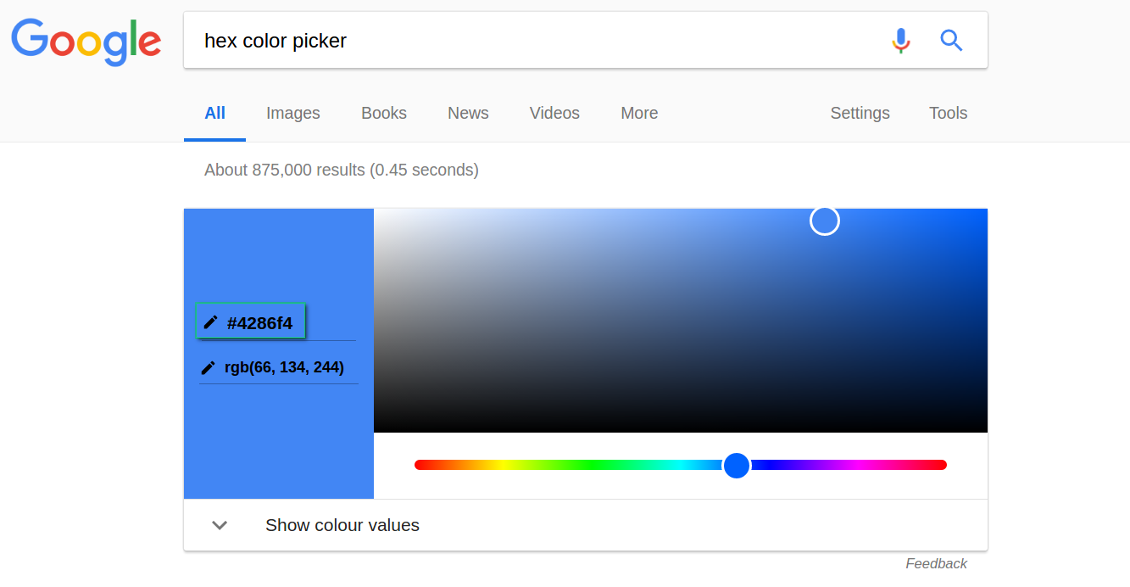
For such codes, you may use almost any color shade. Google 'hex color picker'. The search engine will let you pick a desired color. Copy the 'hex' value to the color field of a code. Click save and make sure it is a color you would like to use.
As soon as you installed the tool, Odoo would prepare a few default color codes. You may simply update or delete those codes to reflect your own color codes' logic.
스크린샷
Color codes classifier
HEX color picker
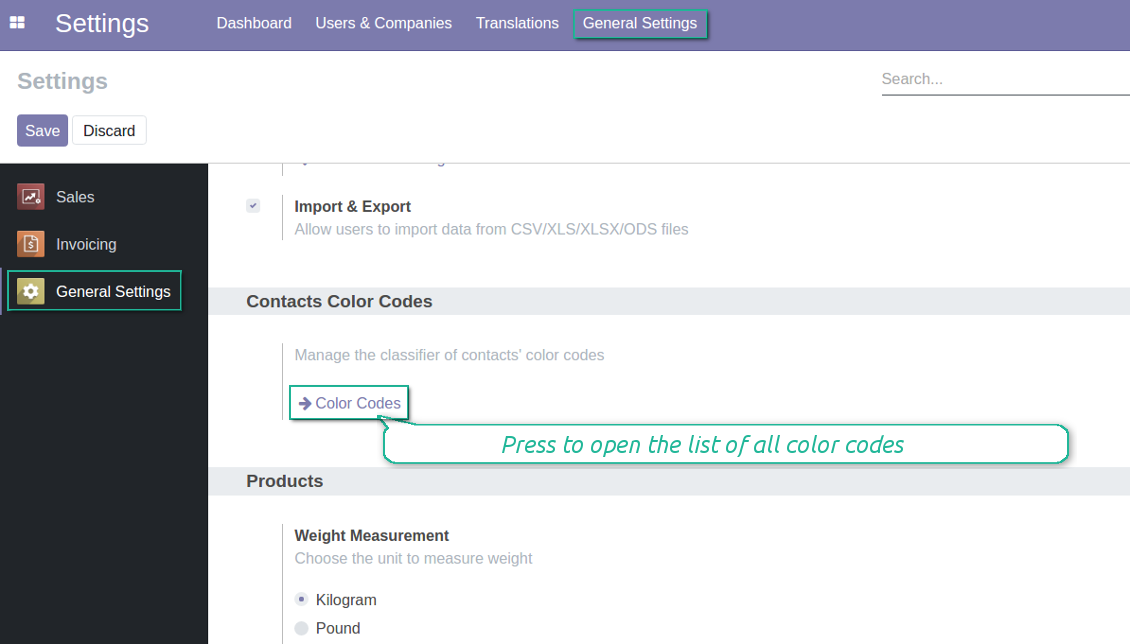
Color codes configuration menu
Color code for any contact
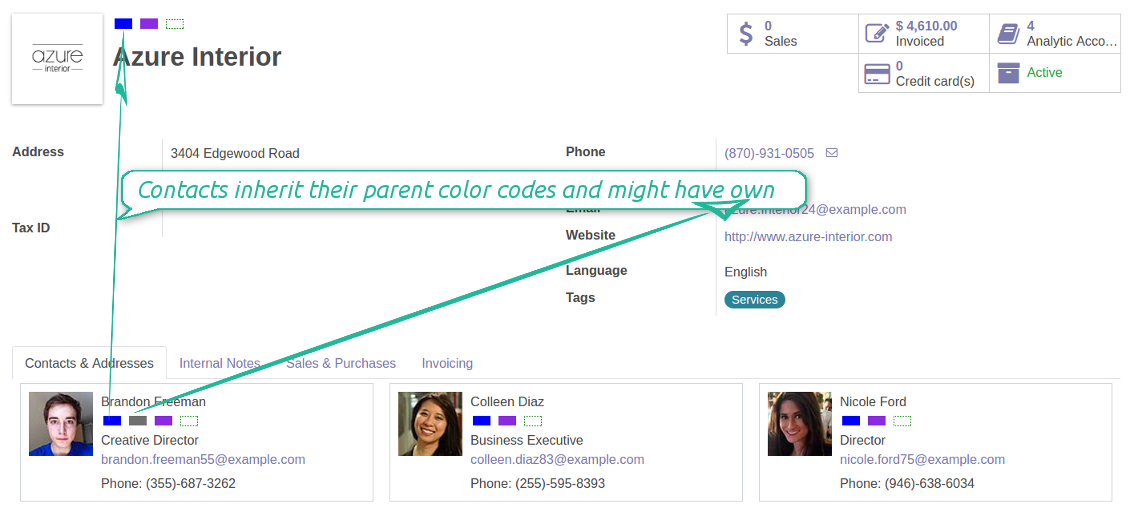
Color codes also take into account relations between partners. A contact always inherits color codes from a parent company and may have own color notes.
스크린샷
Contacts inherit their parent color codes
Partner list view
Search contacts by a color code reference
관련 자주 묻는 질문 Contacts Color Coding Odoo v.12
도구의 업데이트 정책은 무엇입니까?
현재 Odoo Apps Store 정책에 따르면:
- 버전 12.0 이하용으로 구매한 모듈은 12.0까지의 모든 버전에 접근할 수 있습니다.
- 버전 13.0부터는 모듈 버전마다 따로 구매해야 합니다.
- 버전과 관계없이 구매하면 해당 메이저 버전 내의 모든 업데이트와 버그 수정 권한이 있습니다.
faOtools 팀은 해당 정책을 통제하지 않습니다. 문의는 Odoo Apps Store 담당자에게 직접 하세요.
앱을 Odoo.sh에 어떻게 설치하나요?
가장 단순한 방법은 Odoo 스토어의 기본 제공 워크플로를 사용하는 것입니다:
1. 모듈 페이지를 열고 Deploy on odoo.sh 버튼을 클릭합니다.
2. 그러면 GitHub 페이지로 이동합니다. 계정에 로그인한 뒤 'Create a new repo'를 클릭하거나 기존 저장소를 사용하세요. 저장소는 비공개여야 합니다. OPL-1 라이선스 앱을 공개하는 것은 허용되지 않습니다. 필요하면 Odoo.sh 프로젝트용 새 repo를 만드세요.
3. 그런 다음 odoo.sh로 가서 Deploy 버튼을 클릭합니다. 팝업에서 결정을 제출하고 'Continue.'를 클릭합니다. 그러면 설치가 시작됩니다.
이 단계로 프로젝트의 프로덕션 브랜치에 앱이 설치됩니다. 다른 브랜치에 앱을 배포하거나 모듈을 업데이트하려면 다음을 수행하세요:
1. Odoo 스토어에서 앱 소스 코드를 업로드합니다.
2. 모듈을 필요한 GitHub 저장소에 커밋합니다. 앱 폴더/파일이 무시되지 않는지 확인하세요(즉 repo의 .gitignore에 넣지 마세요). 저장소는 odoo.sh가 자동 생성하며 기본적으로 중요한 항목(예: /lib)이 포함될 수 있습니다. 모듈의 모든 디렉터리, 하위 디렉터리, 파일을 예외 없이 업로드하세요.
3. odoo.sh 프로젝트의 대상 브랜치를 Deploy하거나, 설정이 그렇게 되어 있으면 자동 빌드될 때까지 기다립니다.
자체 서버에 앱은 어떻게 설치하나요?
2. Odoo 서버를 다시 시작합니다;
3. 개발자 모드를 켭니다(기술 설정);
4. 앱 목록을 업데이트합니다(앱 메뉴);
5. 앱을 찾아 'Activate'/'Install'을 누릅니다;
6. 앱 페이지에 안내가 있으면 따릅니다.
앱에 추가 기능이 있는 것을 봤습니다. 나중에 구매해도 되나요?
네, 물론입니다. 동시에 Odoo가 모든 의존성을 장바구니에 자동 추가하므로, 이중 결제를 피하려면 이미 구매한 도구를 제외하십시오.
앱을 Odoo.sh에 배포했는데 테스트에서 경고/오류가 보입니다
빨강/주황 경고는 앱 기능에 영향을 주지 않습니다. 안타깝게도 표준 자동 테스트가 앱 목표와 충돌하는 동작을 가정해 모듈이 통과하지 못할 때가 있습니다. 예를 들어 우리는 가격 계산을 바꾸는데, 표준 Odoo 모듈 테스트는 최종 가격을 표준 알고리즘과 비교합니다.
먼저 배포된 데이터베이스 기능이 정상인지 확인하십시오. 모두 올바르게 동작합니까?
그래도 경고가 실제 기능에 영향을 준다고 생각되면 연락해 주시고 전체 설치 로그와 배포된 모듈 전체 목록(코어 및 서드파티 포함)을 보내 주십시오.
앱을 귀사에서 직접 구매할 수 있나요?
아니요, 도구는 오직 공식 Odoo 앱 스토어.
할인을 받고 싶습니다
유감스럽게도 개별 가격을 제공할 기술적 수단이 없습니다.
Odoo Online (SaaS) 데이터베이스에 앱을 설치할 수 있나요?
아니요, 서드파티 앱은 Odoo Online에서 사용할 수 없습니다. 유감스럽게도 Odoo SaaS가 이를 차단합니다.
도구가 다른 앱에 의존합니다. 그것도 구매해야 합니까?
예, 도구가 올바르게 동작하려면 의존성에 표시된 모든 모듈이 필요합니다. 앱 페이지의 가격에는 필요한 의존성이 이미 포함되어 있습니다.
모듈의 미국 달러 가격은 얼마입니까? 왜 바뀌었습니까?
모듈 가격은 유로로 책정됩니다. Odoo 스토어는 내부 환율에 따라 다른 통화로 변환합니다. 따라서 환율이 갱신되면 미국 달러 가격이 바뀔 수 있습니다.
영어 이외 언어의 앱·웹사이트 문구는 AI 지원으로 작성되며 공식 Odoo 번역과 맞춥니다. 오류를 발견하시면 번역 정확성 티켓을 보내 주세요 그러면 수정하겠습니다.
버그 신고
버그나 일관되지 않은 동작을 발견하면 주저 말고 문의하세요. 구매 후 60일 이내 수정을 보장하며, 그 이후에도 도구를 개선하는 데 관심이 큽니다.
문의에 전화번호나 신용카드가 필요 없습니다. 30초가 넘지 않는 짧은 이메일 가입만 하면 됩니다.
요청에 가능한 한 많은 세부정보를 포함하세요: 스크린샷, Odoo 서버 로그, 문제 재현 방법의 전체 설명 등. 일반적으로 이슈에 대한 작업 계획 준비(버그가 확인된 경우) 또는 수행 지침 제공(그 외의 경우)에는 영업일 기준 며칠이 걸립니다.
공개 기능 요청 및 모듈 아이디어(무료 개발)
도구를 개선하려는 동기가 강하며 어떤 피드백이든 감사드립니다. 요구 사항이 공익에 맞고 효율적으로 구현될 수 있다면 팀이 할 일 목록에 넣습니다.
이런 할 일 목록은 정기적으로 처리되며 추가 요금이 없습니다. 기한과 최종 디자인을 약속할 수는 없지만, 투자와 위험 없이 원하는 기능을 얻는 좋은 방법이 될 수 있습니다.
문의에 전화번호나 신용카드가 필요 없습니다. 30초가 넘지 않는 짧은 이메일 가입만 하면 됩니다.

Odoo 첨부 파일을 폴더로 유연하게 구성하고 Google Drive, OneDrive/SharePoint, Nextcloud/ownCloud, Dropbox, Amazon S3, Box, NAS와 디렉터리를 동기화하는 도구. DMS. 파일 관리자. 문서 관리 시스템
398€

내부와 외부 모두를 위한 깊고 구조화된 지식 베이스를 구축하는 도구. Knowledge System. KMS. 위키형 개정.
398€




