Website URL shortener v.13
The tool to assign and manage short URLs for Odoo website links



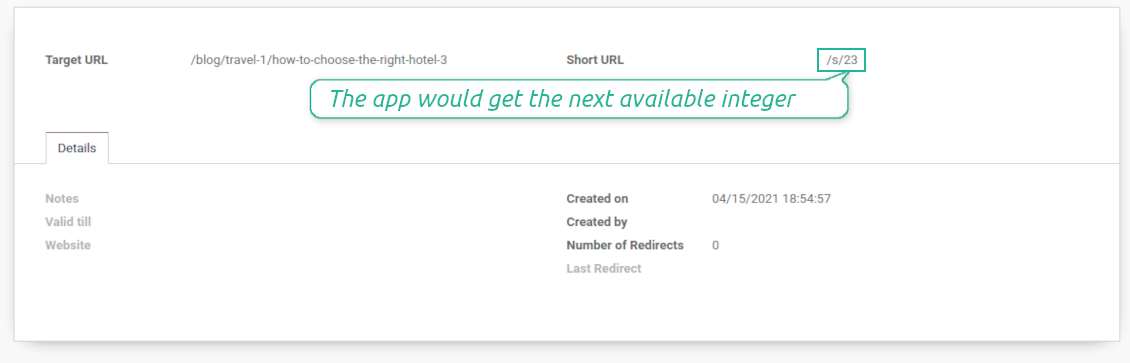

URL shortening is a well-known methodology to cope with too long and ugly looking web addresses. The app introduces this technique in Odoo by allowing website editors to manually or automatically generate, control, and administrate short URLs for any Odoo web links.
Branded links
Introduce memorable and human-readable URLs of the type '/s/[token]' for any Odoo website address. What is preferable to share: example.com/s/desk or example.com/shop/customizable-desk-config-9#attr=7,4,47?
Automatic or custom URLs
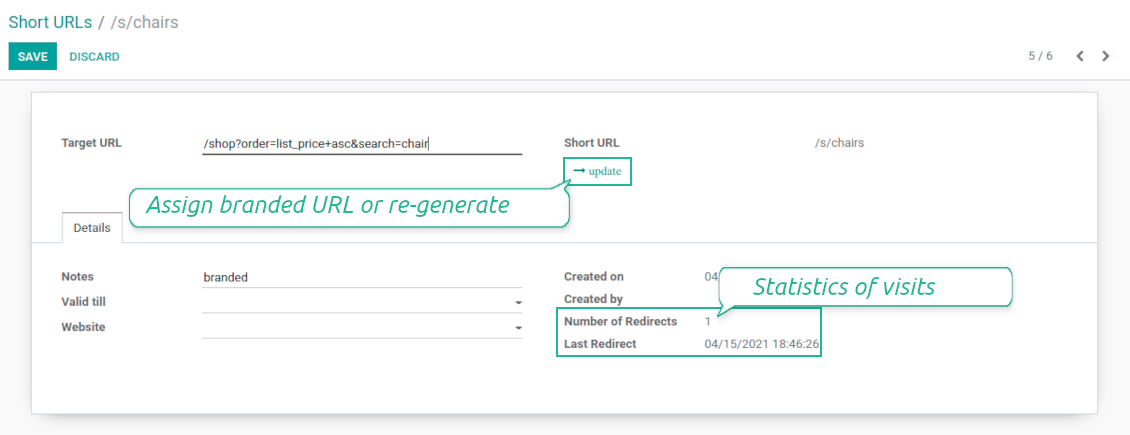
Configure the rules for automatic creation of short URLs based on iterator and token (for example, /s/12 and /s/rh72ko) or apply own key words (for example, /s/desk, /s/best-chairs).
Multi channels control
Have as many short links for a single address as it needed for various purposes. Share one in Facebook, another - in Twitter, and a special one - for specific partners. Then, count redirects for each source.
Comfortable administration
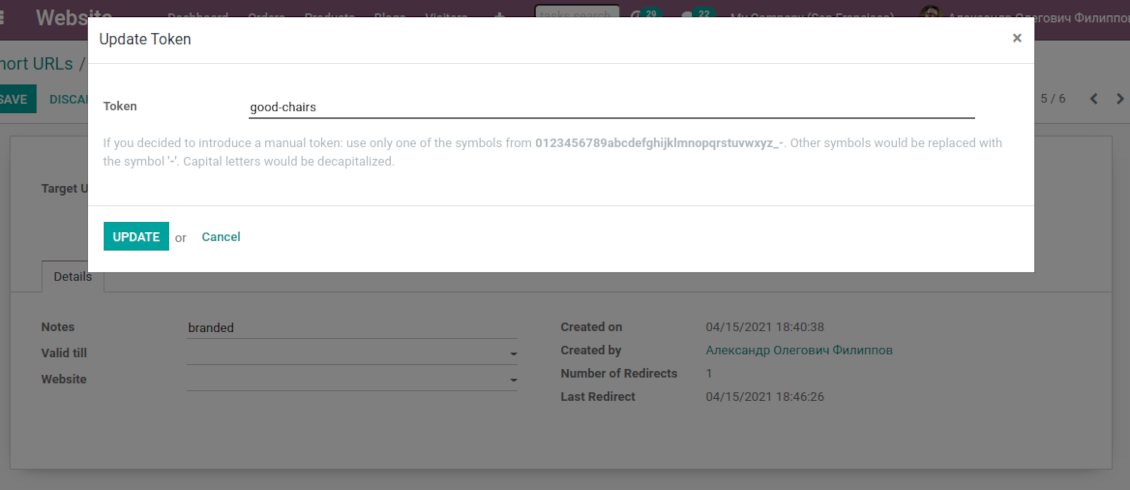
Use URL shortener right while customizing website or in Odoo advanced backend. Make a link soon expired or forever-lasting. Update token at any moment or archive a link if it is not any more valid.
Website snippet
The app introduces especial website snippet which might be added to any Odoo website inner content. Such snippet would find or create a short URL right when a visitor opens a page.
Available for scripts and custom add-ons
Developers might use the app to find or create a short URL for a target website address by applying a single Python method.
URL shortener administration
Website interface for short URLs
-
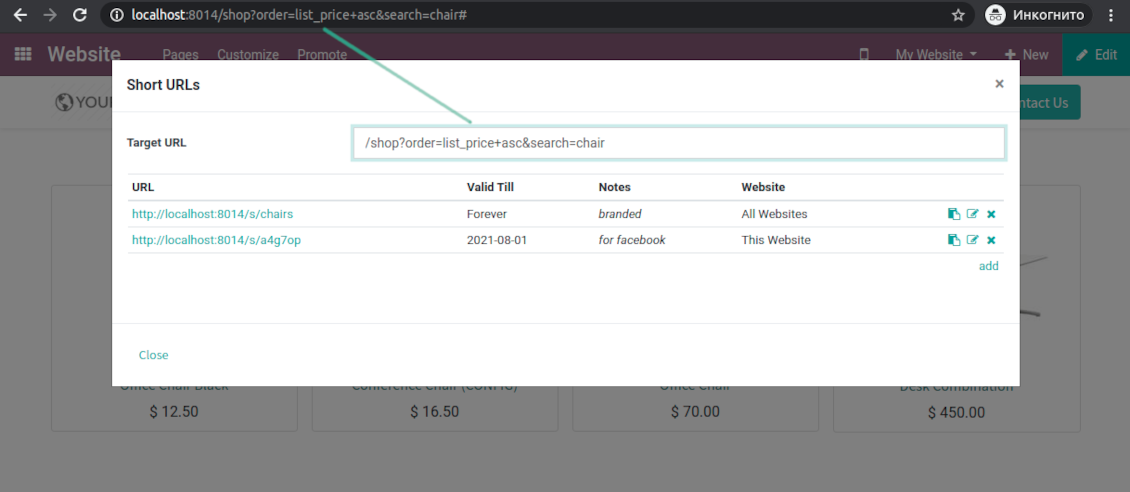
To start managing short links click on Customize > Short URLs from any page
-
The app would automatically retrieve a target web address with all search and hash parameters from a browser. Change this redirect URL if needed: available short links would be recalculated
-
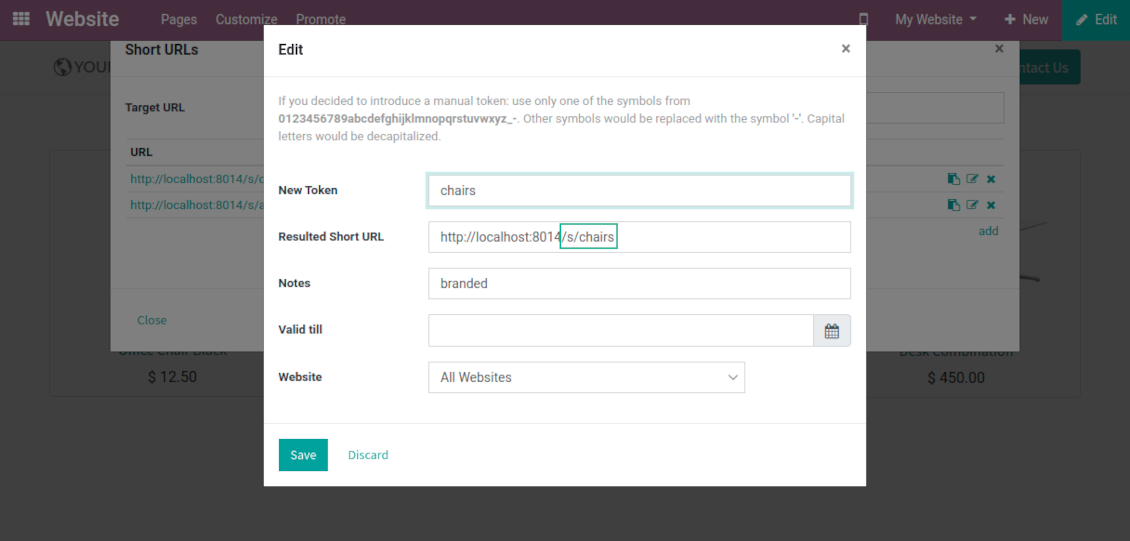
Create new short links based on default token or custom key words. Archive obsolete URLs
-
Update existing addresses: change token, assign expiration date, apply to this website or to all sites (the app fully supports Odoo multi website mode)
-
Copy a short URL to clipboard in a single click.
Advanced backend links' editor
-
Find all short links by all websites under the menu Websites > Settings > Short URLs
-
Group by website or target URL (there might be multiple short links for each). Archive or restore links in batch
-
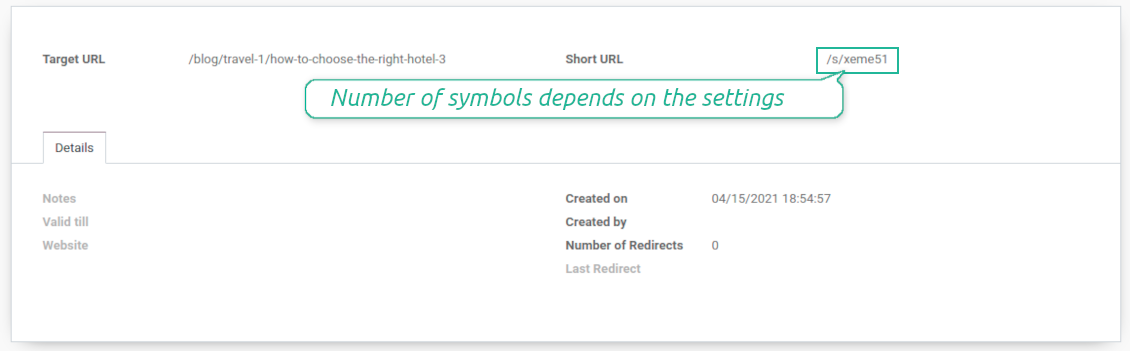
Create a new short URL in a few seconds: the only thing required is to introduce a target web address
-
Apply flexible settings: validity date to make a link auto expired, notes to always know why this URL has been introduced, website to restrict usage for a specific site or to use a link globally.
Automatic short URLs generation
-
It is not always possible to prepare a branded URL for each address. For example, when you have thousands of website pages. For such cases define a default automatic method
-
Use 'iterator' to generate a link with succeeding number at the end. For instance, 'example.com/s/112'. The app would automatically increment a number when a new short URL is registered
-
Use 'token' approach to generate a unique symbols' row of a predefined length (it should not be less than 5 symbols to have enough unique combinations). For instance, 'example.com/s/uo71jh'
-
A default short URL would be entered as soon as you decide to create a new redirection. Simultaneously, you can always change that to a custom sentence or create a new alternative short URL. Do that for the most important addresses, addresses you would like to print on your business cards, addresses which are assumed to entered manually, etc.
Short URLs for developers
Using short URLs in scripts
-
While developing a custom add-on, script, or server action you might be interested to have a short URL for certain website addresses. The tool let do that efficiently
-
To that end you should trigger the method 'action_find_surl' of the model 'short.url.redirect'
-
As arguments it should receive:
target_url- string - full path of web address. E.g. "/shop/customizable-desk-config-9#attr=7,4,47)"tocreate- boolean - whether to create a new short URL if none exists for target URLalwaysvalid- boolean - whether to search short URLs without expiration or yet valid but soon expired links are also finewebsite_id-integer - if False the app would search only global URLs, otherwise also of a specific website (applicable for mutli website mode) -
The method would return a string - a found short URL (e.g. '/s/desk') - or False if nothing is found.
-
For instance:
my_short_url = self.env["short.url.redirect"],action_find_surl("/shop/customizable-desk-config-9#attr=7,4,47", True, True, 1)
Website Snippet for auto short links
-
The website menu 'Customize' and the backend menu 'Short URLs' are available only for Odoo website designers. For certain pages you might be interested to show a short link for simple visitors as well
-
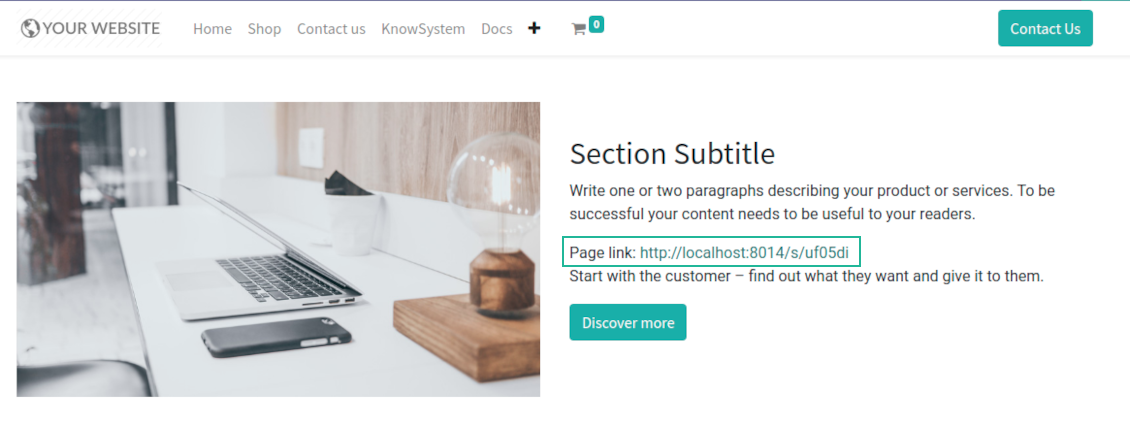
To that end you might drag and drop the special website editor snippet 'Short URLs'. Alternatively add an xml line the tag
awith the href"#"and the class"short_url_widget" -
Each time a page with such snippet is opened, a short URL would be searched and - if not found - created. In such a way, you may show a visitor a valid short URL, which he/she might copy and share
-
Take into account: the snippet searches only for always valid global short URLs.
Domande frequenti su Website URL shortener Odoo v.13
Quali sono le politiche di aggiornamento dei vostri strumenti?
Secondo le politiche attuali dell'Odoo Apps Store:
- Ogni modulo acquistato per la versione 12.0 o precedente da accesso a tutte le versioni fino alla 12.0.
- Dalla versione 13.0 ogni versione del modulo va acquistata separatamente.
- Indipendentemente dalla versione, l'acquisto da diritto a tutti gli aggiornamenti e le correzioni entro una major version.
Il team faOtools non controlla queste politiche. Per qualsiasi domanda, contattate direttamente i rappresentanti dell'Odoo Apps Store.
Come installo l'app su Odoo.sh?
L'approccio piu diretto e il flusso integrato dello store Odoo:
1. Apri la pagina del modulo e fai clic su Deploy on odoo.sh
2. Verrai reindirizzato a GitHub. Accedi e fai clic su Create a new repo o usa uno esistente. Il repository deve essere privato. Non e consentito pubblicare le app con licenza OPL-1. Se serve, crea un nuovo repo per il progetto Odoo.sh
3. Poi, in odoo.sh, fai clic su Deploy, conferma e fai clic su Continue. Parte l'installazione.
Questi passaggi installano l'app sul branch di produzione. Per altri branch o per aggiornare:
1. Scarica il codice sorgente dallo store Odoo
2. Esegui il commit del modulo nel repository GitHub. Nessuna cartella/file dell'app deve essere in .gitignore. I repo creati da odoo.sh a volte ignorano percorsi importanti (es. /lib). Carica tutte le directory e i file del modulo
3. Esegui il deploy del branch di destinazione del progetto odoo.sh oppure attendi la build automatica se previsto.
Come installo l'app sul mio server?
2. Riavvia il server Odoo;
3. Attiva la modalità sviluppatore (impostazioni tecniche);
4. Aggiorna l'elenco delle app (menu Applicazioni);
5. Trova l'app e premi Activate/Install;
6. Segui le linee guida nella pagina dell'app, se ci sono.
L'app ha componenti extra. Posso acquistarli dopo?
Si. Odoo aggiunge automaticamente le dipendenze al carrello: escludi gli strumenti gia acquistati per non pagare due volte.
Ho distribuito l'app su Odoo.sh e vedo un avviso/errore nei test
Un avviso rosso/arancione non influisce sulle funzioni dell'app. A volte i nostri moduli non superano i test automatici standard perché questi assumono un comportamento in conflitto con gli obiettivi dell'app. Ad esempio cambiamo il calcolo del prezzo, mentre i test Odoo confrontano il prezzo finale con l'algoritmo standard.
Controllate prima le funzioni del database distribuito. Funziona tutto?
Se pensate ancora che l'avviso influisca sulle funzioni reali, contattateci e inviate i log di installazione completi e l'elenco completo dei moduli distribuiti (core e di terze parti).
Posso acquistare l'app direttamente da voi?
No, distribuiamo gli strumenti solo tramite lo store ufficiale delle app Odoo.
Vorrei uno sconto
Purtroppo non abbiamo i mezzi tecnici per prezzi individuali.
Posso installare l'app sul database Odoo Online (SaaS)?
No, le app di terze parti non si possono usare su Odoo Online. Odoo SaaS blocca questa possibilità.
Lo strumento dipende da altre app. Devo acquistarle?
Si, lo strumento richiede tutti i moduli indicati nelle dipendenze. Il prezzo sulla pagina dell'app le include gia.
Qual e il prezzo del modulo in dollari USA? Perché e cambiato?
Il prezzo dei nostri moduli e in euro. Lo store Odoo converte le valute secondo il proprio tasso interno. Quindi il prezzo in dollari USA puo cambiare quando il tasso viene aggiornato.
I testi dell'app e del sito web in lingue diverse dall'inglese sono realizzati con l'assistenza dell'IA e allineati alle traduzioni ufficiali di Odoo. Se noti un errore, invia un ticket di traduzione e lo correggeremo.
Segnalazione degli errori
Se riscontri bug o comportamenti incoerenti, non esitare a contattarci. Garantiamo di fornire soluzioni entro 60 giorni dall'acquisto e siamo fortemente interessati a migliorare i nostri strumenti anche dopo questo periodo.
Non hai bisogno di un numero di telefono o di una carta di credito per contattarci. Dovresti solo effettuare una breve registrazione via e-mail, che non richiede più di 30 secondi.
Includi nella richiesta il maggior numero possibile di dettagli: schermate, registri del server Odoo, una descrizione completa di come riprodurre il problema e così via. In genere sono necessari alcuni giorni lavorativi per preparare un piano operativo relativo a un problema (se viene confermato un bug) o fornire indicazioni su cosa fare (in caso contrario).
Richieste di funzionalità pubbliche e idee per moduli (sviluppo gratuito)
Siamo fortemente motivati a migliorare i nostri strumenti e saremmo grati per qualsiasi feedback. Se le tue esigenze sono di uso pubblico e possono essere implementate in modo efficiente, il team le includerà nella nostra lista di cose da fare.
Tale elenco di cose da fare viene elaborato regolarmente e non prevede costi aggiuntivi. Sebbene non possiamo garantire scadenze e progettazione finale, potrebbe essere un buon modo per ottenere le funzionalità desiderate senza investimenti e rischi.
Non hai bisogno di un numero di telefono o di una carta di credito per contattarci. Dovresti solo effettuare una breve registrazione via e-mail, che non richiede più di 30 secondi.

Lo strumento per strutturare gli allegati Odoo in cartelle e sincronizzare con Google Drive, OneDrive/SharePoint, Nextcloud/ownCloud, Dropbox, Amazon S3, Box e NAS. Gestione file. DMS
398€
Lo strumento per sincronizzare gli allegati Odoo con OneDrive in entrambi i sensi
487€
Lo strumento per sincronizzare gli allegati Odoo con Google Drive in entrambi i sensi
487€
Lo strumento per conservare le password in Odoo in modo sicuro e condiviso. Vault

Lo strumento per una knowledge base strutturata, interna ed esterna. KMS. Revisioni tipo wiki
398€
Lo strumento per impostare target KPI e controllarne il raggiungimento per periodo. Dashboard. Grafici

Lo strumento per servizi su appuntamento, dalla prenotazione a vendite e recensioni
398€
Lo strumento per gestire Odoo dalle chat IA tramite MCP. Claude. Qualsiasi IA con MCP.

Lo strumento per tradurre gli URL delle pagine del sito Odoo
38€