Vendor Product Management v.15
The tool to administrate vendor data about products, prices and available stocks
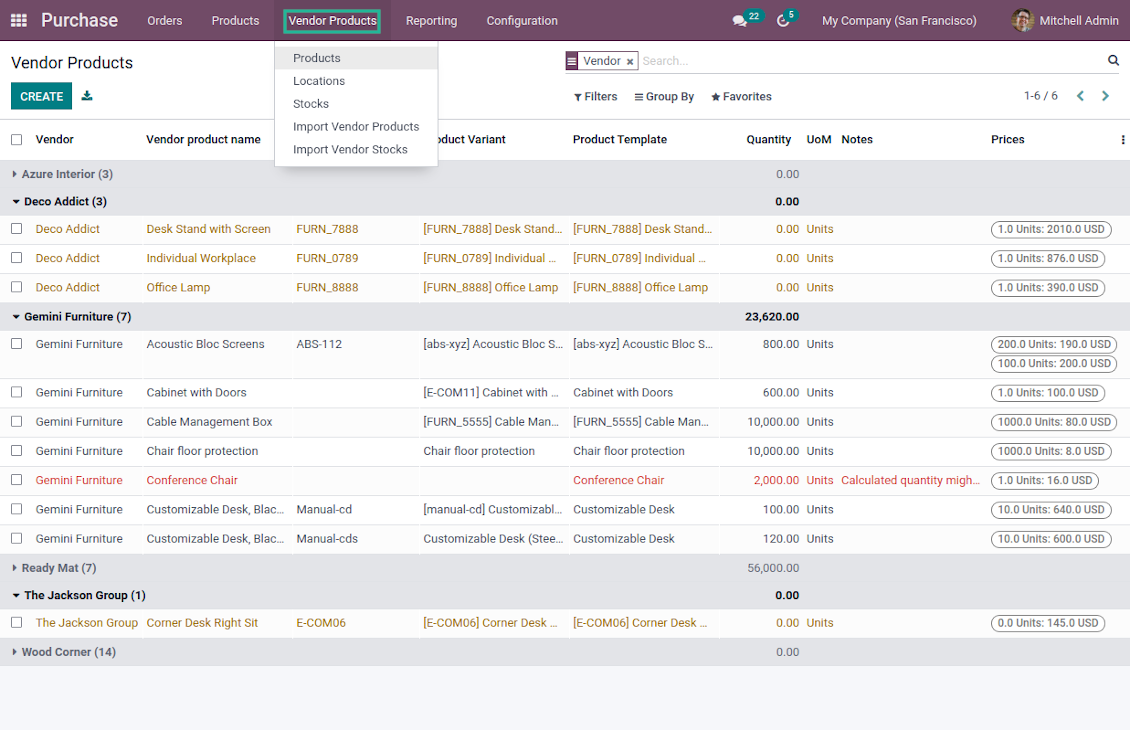
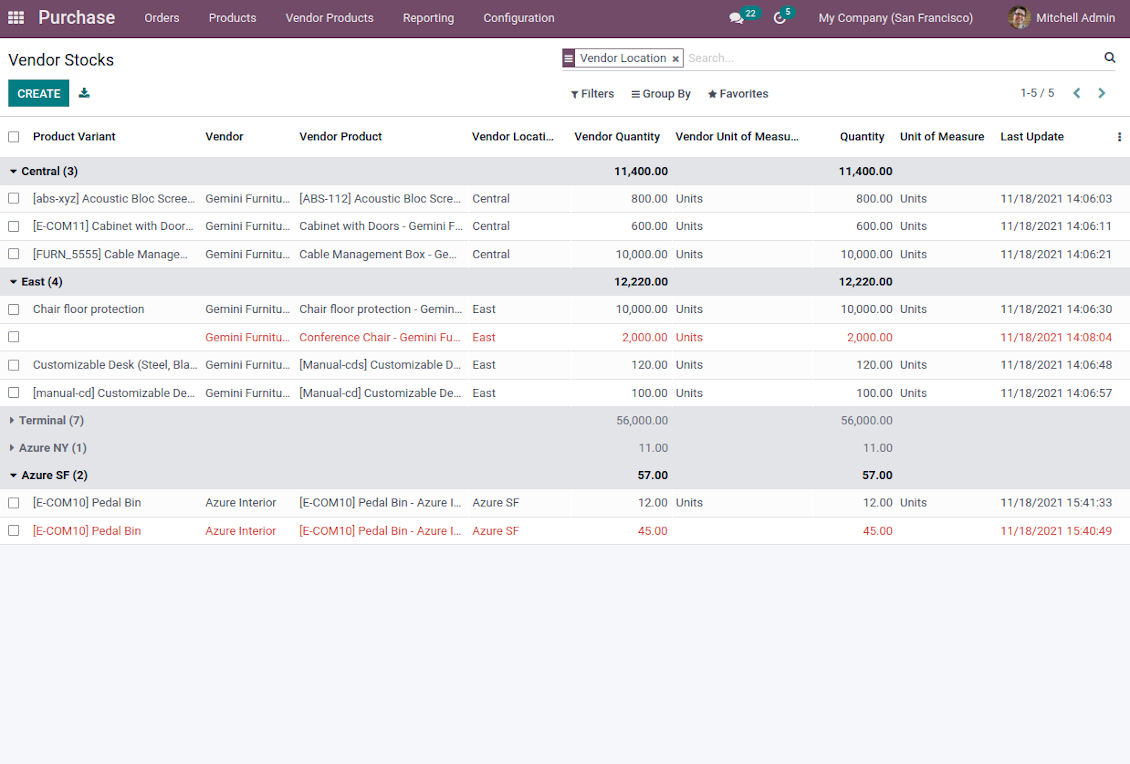
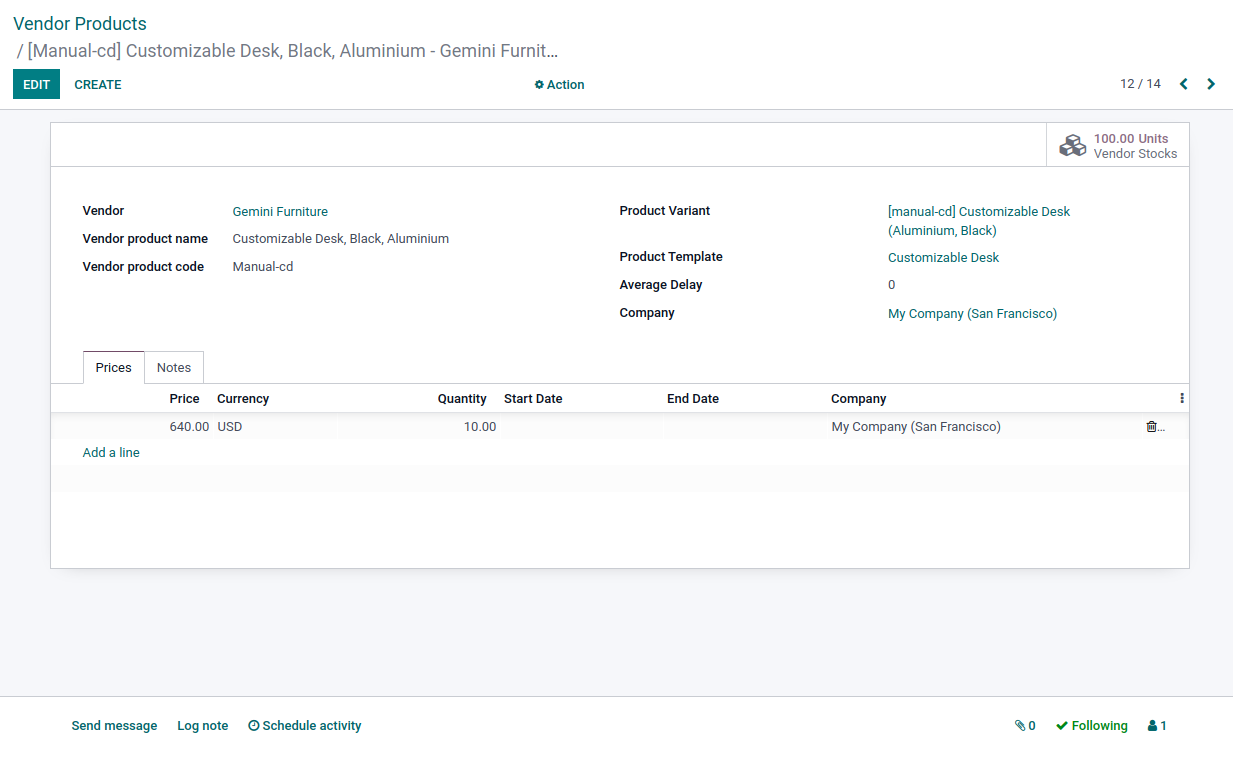
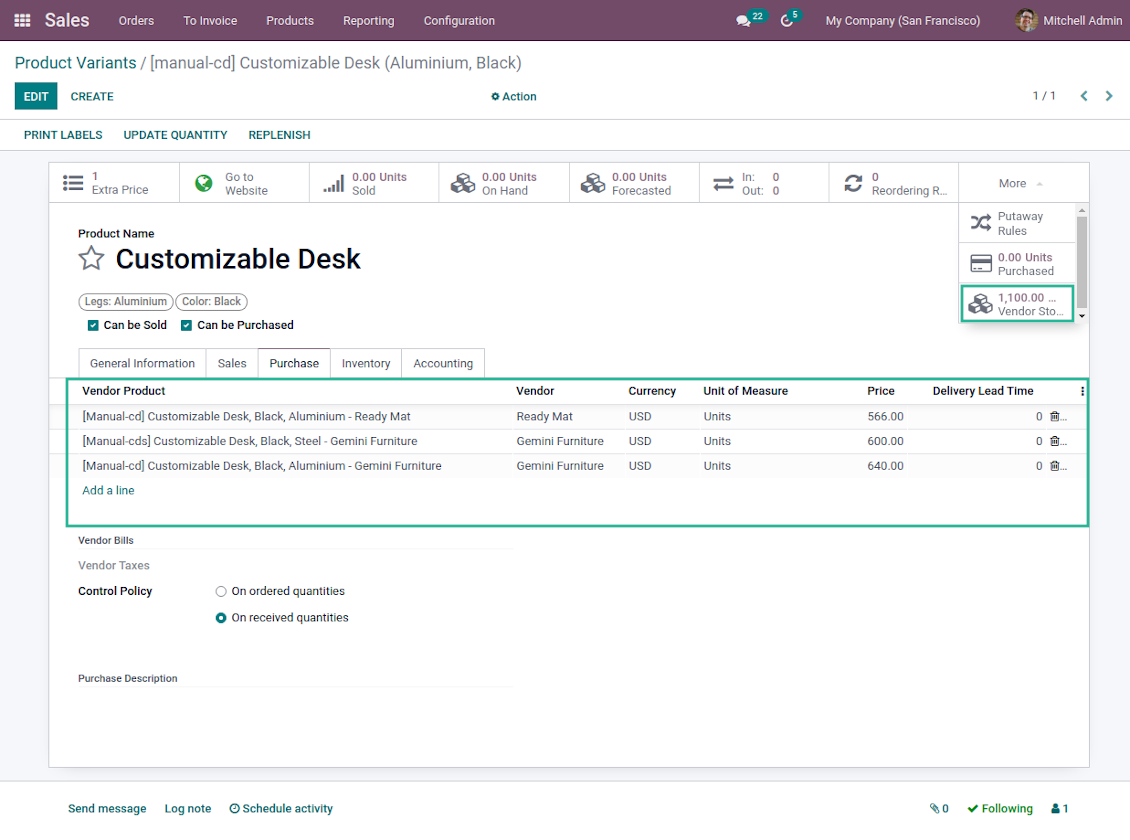
This is an Odoo tool to efficiently access, update, and import information about vendors' products, prices, and stock levels.
Vendor products catalog
The tool introduces a new stand-alone classifier of vendor products. Each supplier should have its own catalog with unique product names and codes. As installed the app automatically creates vendor products based on existing Odoo products' supplier prices
Odoo sales based on supplies
Any vendor product might be linked to any Odoo product. In such a way, a purchase manager's goal becomes to match 'their' products with 'ours'. Each of our product variants might have a few linked vendor products
Supplier prices management
Purchase managers keep and update the prices of supplied products. Those prices are considered as standard Odoo 'supplier info' which correspondingly are used in purchase orders
Vendor stocks control
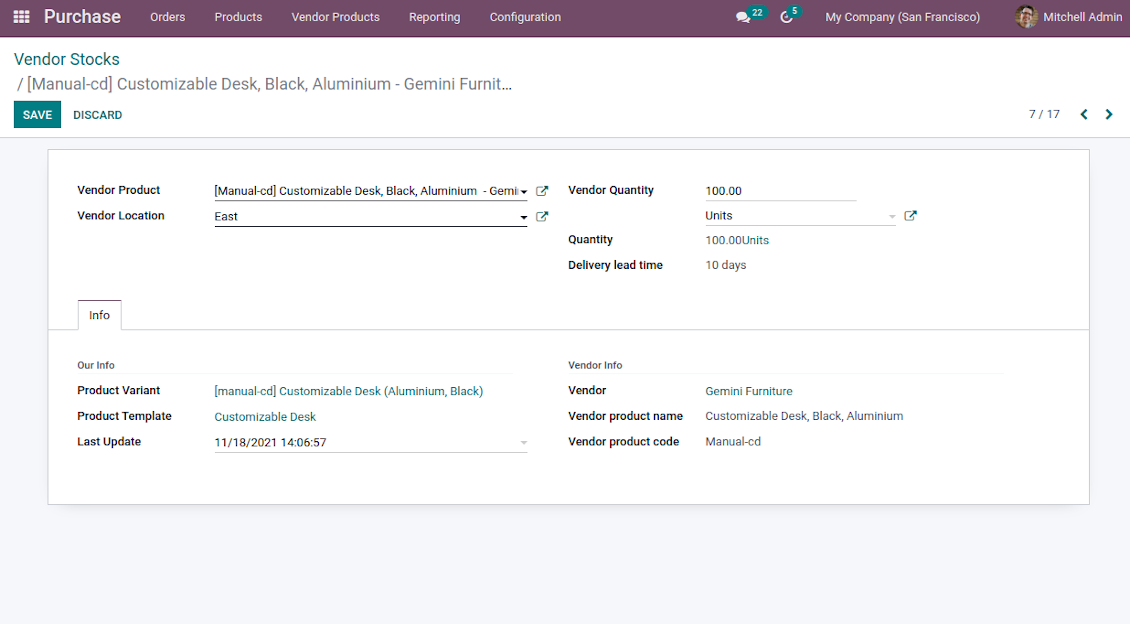
Manage vendor products' stock levels to make better decisions while selling those. Access info of vendor products' stocks right from product variant, product template, and supplier form views
Vendor data import
The tool lets import vendor products, prices, and stock levels as Excel tables of predefined formats. In such a way, it is possible to quickly process commercial offers sent by vendors
Secured access and shared use
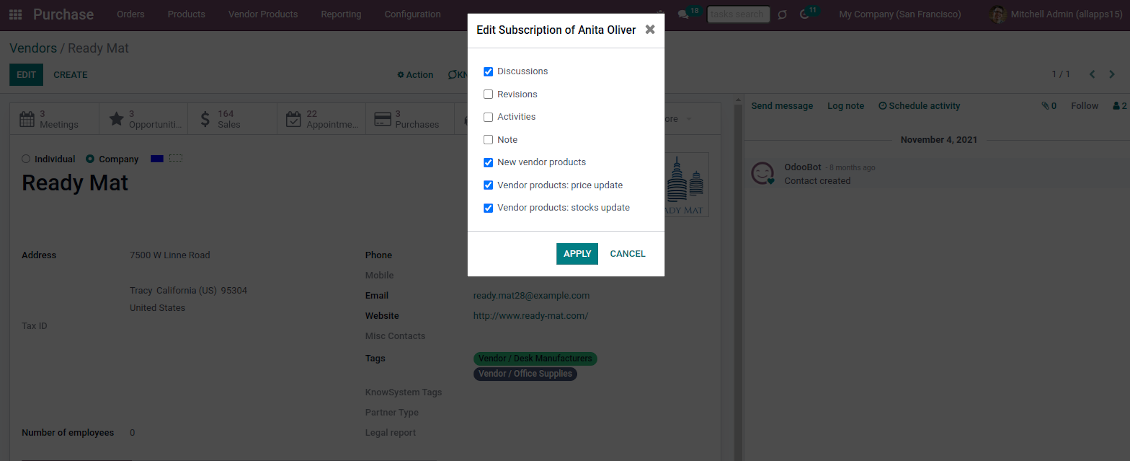
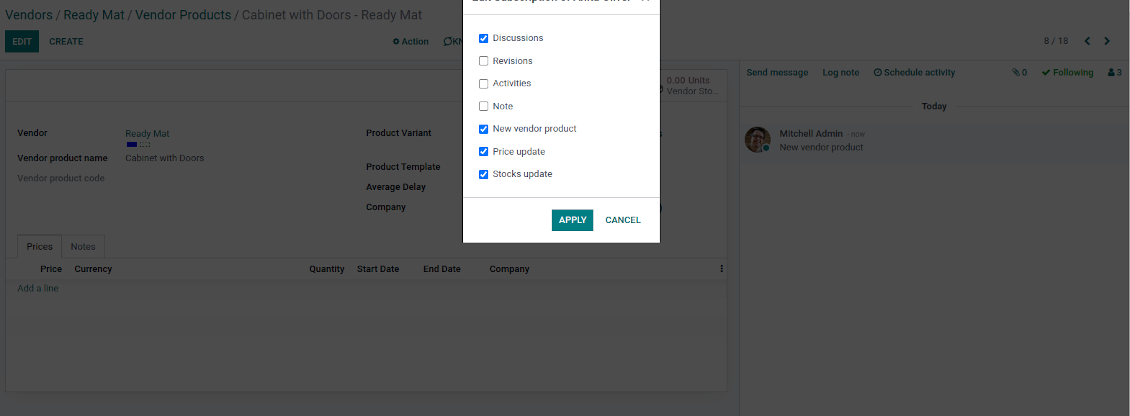
Any Odoo user with access to products might rely upon vendor data for informational purposes. Any purchase manager may create, update, and archive vendor-related objects. Such managers might also get notifications of newly registered vendor products and of their prices or inventory updates.
Vendor inventories control
-
Each vendor stock level is provided per definite vendor location (warehouse)
-
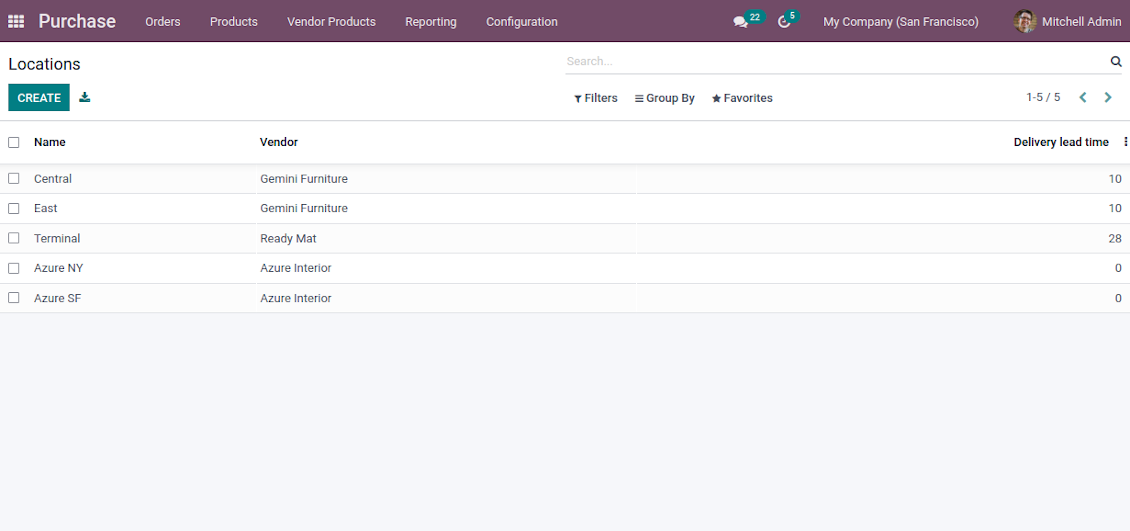
Assign an unlimited number of vendor locations per supplier. Locations are distinguished by name, address, and average delivery time
-
Keep stock levels in vendor units of measure, but make sure it has the same category as a linked Odoo product. The idea is to support conversion in order for internal users to work with habitual figures. For example, dozens and units are fine, while dozens and hours might lead to inconsistent procurement
-
Stock levels are not used in Odoo operations, but they are provided for general information. Inventory levels are updated either manually by purchase managers or through the import
-
Odoo warehouses' stocks are not linked to vendor stocks. Vendor stocks are absolutely independent since it is not possible to control supplier moves, and, hence, to support a double-entry system
-
Vendor inventories might be of special importance in case of make-to-order logistics or drop shipping.
Vendor data import
Vendor products and prices
-
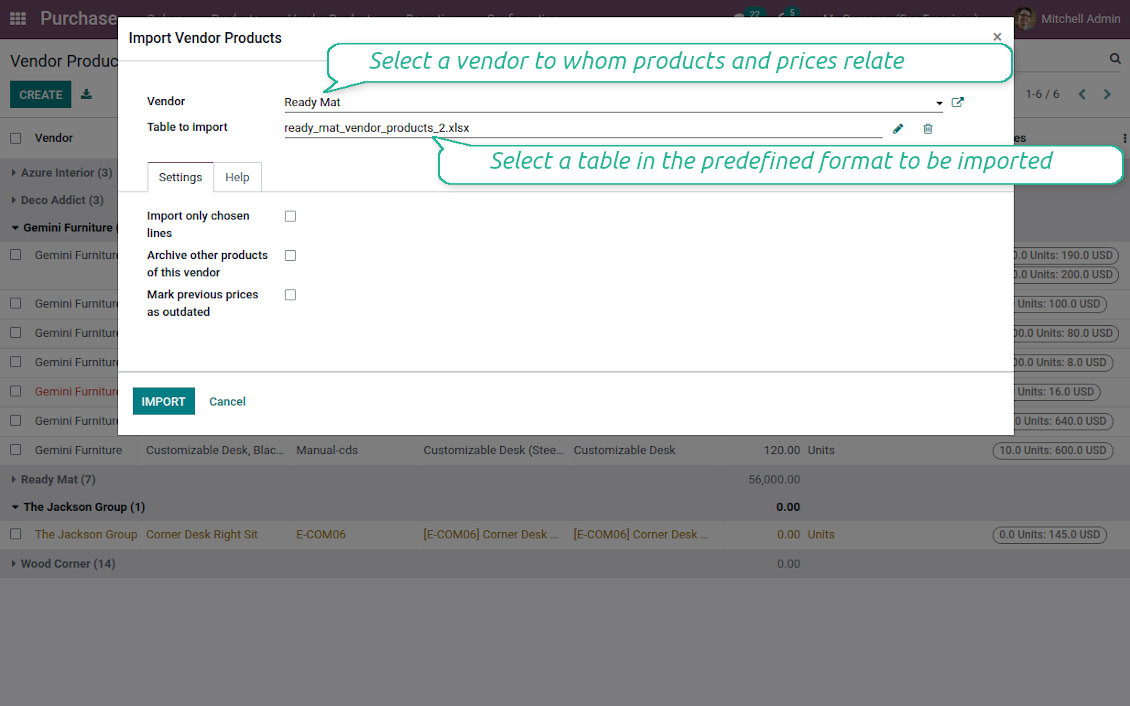
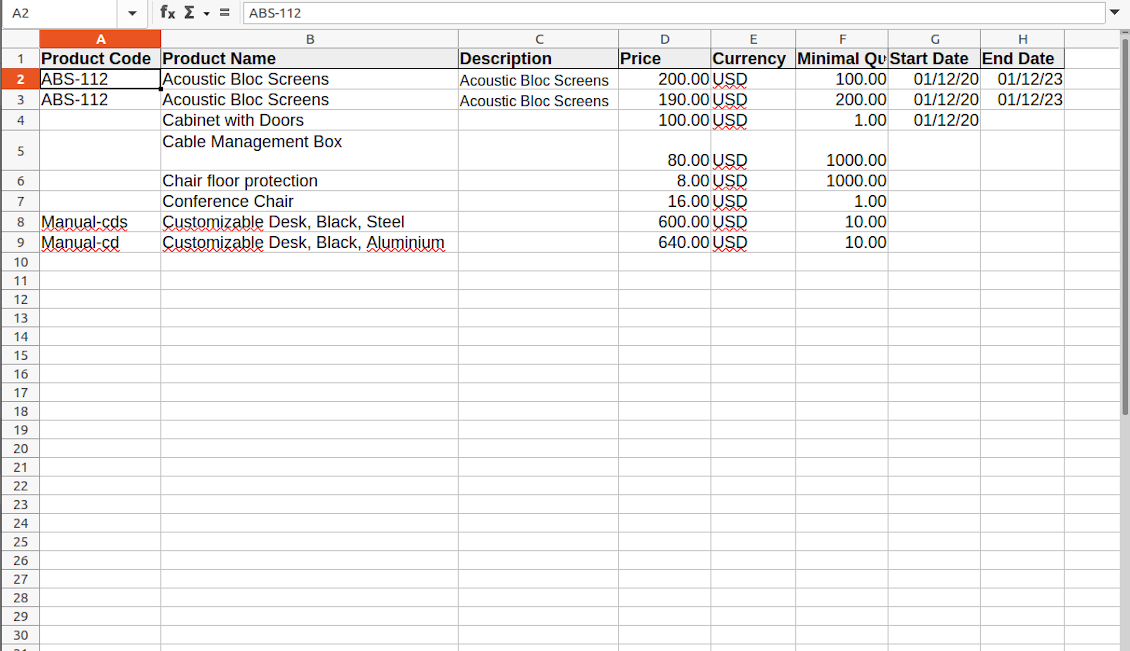
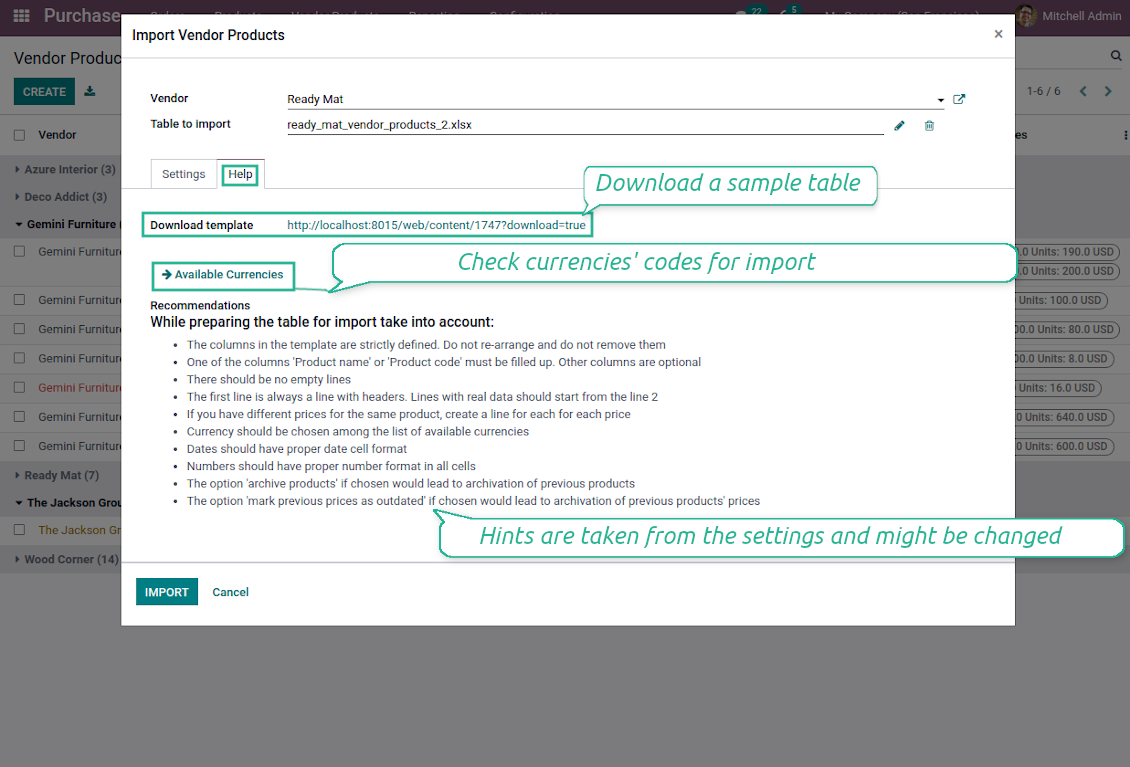
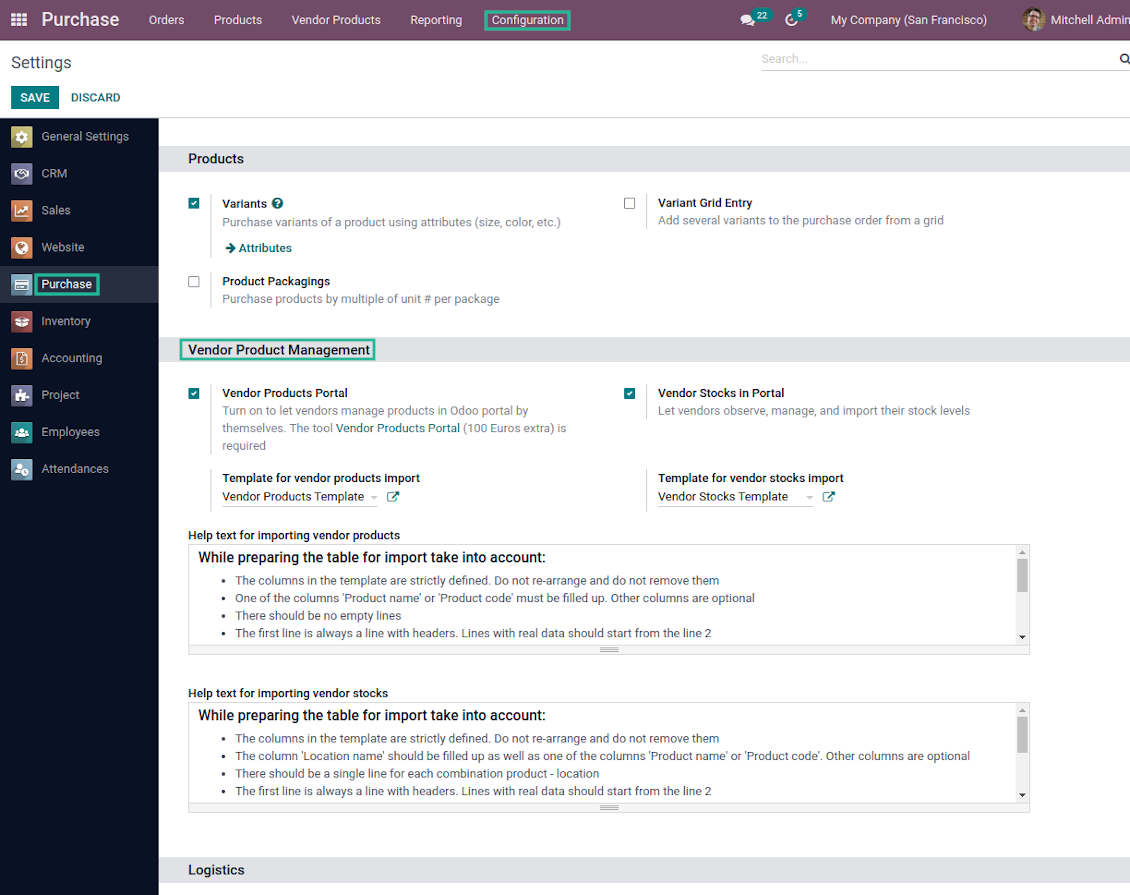
The tool lets purchase users import vendor products and supplier prices as an Excel table in the predefined format. The table format is supplied with this tool source code and would be available on the configuration page as the 'Template for vendor products import' and in the import wizard on the tab 'Help'
-
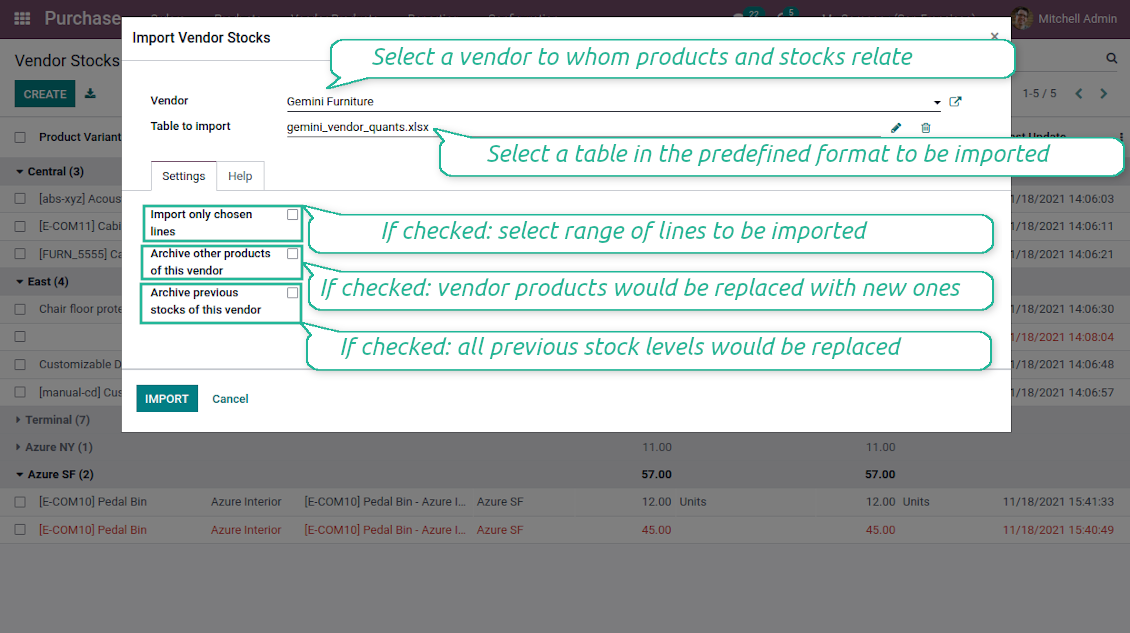
In the wizard, you can select whether previous products of this vendor should be archived. It lets you fully replace this supplier product catalog with a new one
-
In the wizard, you can select whether previous prices should be marked as outdated. It lets you remove misleading data.
Vendor products and stocks
-
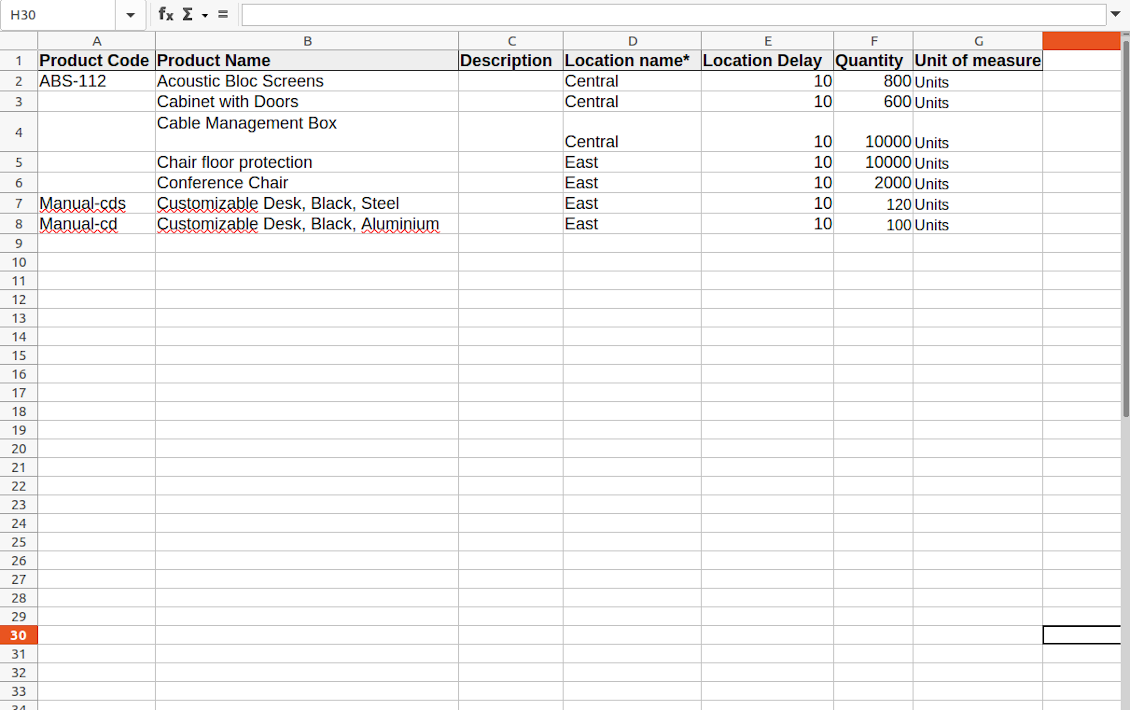
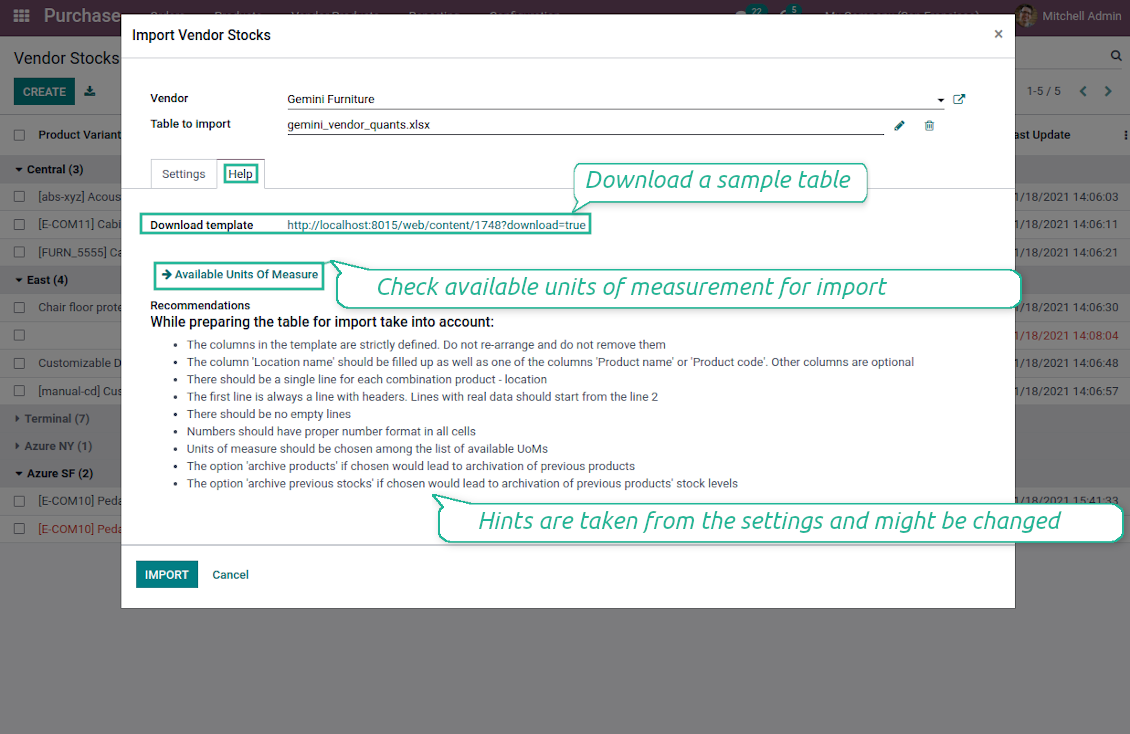
The tool lets purchase users import vendor products and stock levels as an Excel table of the predefined format. The table format is supplied with this tool source code and would be available on the configuration page as the 'Template for vendor stocks import' and in the import wizard on the tab 'Help'
-
In the wizard, you can select whether previous products of this vendor should be archived. It lets you fully replace this supplier product catalog with a new one
-
In the wizard, you can select whether previous stocks are not any more correct. It lets you have fully topical data after each import.
General import rules
-
Change the tables' content to provide more specific examples and labels. However, do not modify columns' order and do not remove those: it would lead to inevitable mistakes
-
The import wizards offer useful tips to make a correct import. You may edit those recommendations on the configuration page, but make sure you do not remove critical advice
-
Each import finishes with the special popup of the results and the errors. It lets you control of what has been actually done
-
In the wizards, you can select which table lines should be imported. It is useful in case the number of lines is too big to import them all
-
While preparing the table for import be cautious with cell formats. Dates should be dates, numbers should be numbers, currencies, and units of measure should be chosen among active in Odoo
-
In case import can't be fully finished until Odoo stops it, contact your system administrator to increase configured time-outs or split an imported table into a few ones.
Pertanyaan umum tentang Vendor Product Management Odoo v.15
Apa kebijakan pembaruan alat Anda?
Menurut kebijakan Odoo Apps Store saat ini:
- Setiap modul yang dibeli untuk versi 12.0 dan sebelumnya memberi akses ke semua versi hingga 12.0.
- Mulai versi 13.0, setiap versi modul harus dibeli terpisah.
- Terlepas dari versi, pembelian memberi hak atas semua pembaruan dan perbaikan bug dalam versi mayor.
Perhatikan bahwa tim faOtools tidak mengontrol kebijakan tersebut. Untuk pertanyaan, hubungi langsung perwakilan Odoo Apps Store.
Bagaimana memasang aplikasi Anda di Odoo.sh?
Pendekatan paling langsung adalah memakai alur bawaan toko Odoo:
1. Buka halaman modul dan klik tombol Deploy on odoo.sh
2. Setelah itu Anda akan diarahkan ke halaman GitHub. Masuk ke akun, lalu klik 'Create a new repo' atau pakai yang sudah ada. Pastikan repositori bersifat privat. Tidak diizinkan memublikasikan aplikasi di bawah lisensi OPL-1. Jika perlu, buat repo baru untuk proyek Odoo.sh
3. Lalu buka odoo.sh dan klik tombol Deploy. Di jendela pop-up, kirim keputusan dan klik 'Continue.' Tindakan ini memicu proses pemasangan.
Langkah ini akan memasang aplikasi di cabang produksi proyek. Jika ingin men-deploy aplikasi ke cabang lain atau memperbarui modul, lakukan tindakan berikut:
1. Unggah kode sumber aplikasi dari toko Odoo
2. Commit modul ke repositori GitHub yang diperlukan. Pastikan tidak ada folder/file aplikasi yang diabaikan (yaitu tidak ada di .gitignore repo). Repositori dibuat otomatis oleh odoo.sh dan secara default dapat berisi item penting (mis., /lib). Unggah semua direktori, subdirektori, dan file modul tanpa kecuali
3. Deploy cabang target proyek odoo.sh atau, jika pengaturan Anda mengasumsikan itu, tunggu hingga dibangun otomatis.
Bagaimana memasang aplikasi Anda di server saya sendiri?
2. Mulai ulang server Odoo;
3. Aktifkan mode pengembang (pengaturan teknis);
4. Perbarui daftar aplikasi (menu aplikasi);
5. Temukan aplikasi dan tekan 'Activate'/'Install';
6. Ikuti panduan di halaman aplikasi jika ada.
Saya melihat aplikasi Anda punya add-on tambahan. Boleh beli belakangan?
Ya, tentu. Pada saat yang sama Odoo otomatis menambahkan semua dependensi ke keranjang, jadi Anda harus mengecualikan alat yang sudah dibeli agar tidak membayar dua kali.
Saya men-deploy aplikasi Anda di Odoo.sh dan melihat peringatan/kesalahan di tes
Peringatan merah/oranye tidak memengaruhi fitur aplikasi. Sayangnya, modul kami kadang tidak lulus uji otomatis standar karena uji itu mengasumsikan perilaku yang bertentangan dengan tujuan aplikasi. Misalnya kami mengubah penghitungan harga, sementara uji modul Odoo standar membandingkan harga akhir dengan algoritma standar.
Pertama-tama, periksa fitur basis data yang diterapkan. Apakah semuanya berjalan benar?
Jika Anda masih menganggap peringatan memengaruhi fitur nyata, hubungi kami dan kirim log instalasi lengkap serta daftar lengkap modul yang diterapkan (termasuk inti dan pihak ketiga).
Bolehkah saya membeli aplikasi langsung dari perusahaan Anda?
Tidak, kami hanya mendistribusikan alat melalui toko aplikasi Odoo resmi.
Saya ingin mendapat diskon
Sayangnya, kami tidak punya sarana teknis untuk memberi harga individual.
Bolehkah saya memasang aplikasi di database Odoo Online (SaaS) saya?
Tidak, aplikasi pihak ketiga tidak dapat dipakai di Odoo Online. Sayangnya Odoo SaaS memblokir kemungkinan itu.
Alat Anda bergantung pada aplikasi lain. Haruskah saya membelinya?
Ya, alat memerlukan semua modul yang ditandai di dependensi agar bekerja dengan benar. Harga di halaman aplikasi sudah mencakup semua dependensi yang diperlukan.
Berapa harga modul dalam dolar AS? Mengapa berubah?
Harga modul kami ditetapkan dalam euro. Toko Odoo mengonversi harga ke mata uang lain menurut kurs internalnya. Jadi harga dalam dolar AS dapat berubah saat kurs diperbarui.
Teks aplikasi dan situs dalam bahasa selain Inggris dibantu AI dan diselaraskan dengan terjemahan resmi Odoo. Jika Anda melihat kesalahan, kirim tiket kebenaran terjemahan dan kami akan memperbaikinya.
Pelaporan bug
Jika Anda menemukan bug atau perilaku tidak konsisten, jangan ragu menghubungi kami. Kami jamin perbaikan dalam 60 hari setelah pembelian dan tetap ingin meningkatkan alat setelah periode itu.
Anda tidak perlu nomor telepon atau kartu kredit untuk menghubungi kami. Cukup pendaftaran email singkat yang tidak lebih dari 30 detik.
Sertakan sebanyak mungkin detail dalam permintaan: tangkapan layar, log server Odoo, deskripsi lengkap cara mereproduksi masalah, dan sebagainya. Biasanya butuh beberapa hari kerja untuk menyiapkan rencana kerja (jika bug dikonfirmasi) atau memberi panduan apa yang harus dilakukan (jika tidak).
Permintaan fitur publik dan ide modul (pengembangan gratis)
Kami sangat termotivasi untuk meningkatkan alat kami dan berterima kasih atas masukan apa pun. Jika kebutuhan Anda bermanfaat bagi publik dan dapat diimplementasikan secara efisien, tim akan memasukkannya ke daftar tugas kami.
Daftar tugas semacam ini diproses secara berkala dan tidak dikenai biaya tambahan. Meski kami tidak dapat menjanjikan tenggat dan desain akhir, ini bisa jadi cara baik untuk mendapatkan fitur yang diinginkan tanpa investasi dan risiko.
Anda tidak perlu nomor telepon atau kartu kredit untuk menghubungi kami. Cukup pendaftaran email singkat yang tidak lebih dari 30 detik.

Alat untuk menata lampiran Odoo secara fleksibel dalam folder dan menyinkronkan direktori dengan klien cloud: Google Drive, OneDrive/SharePoint, Nextcloud/ownCloud, Dropbox, Amazon S3, Box, dan NAS. DMS. Manajer Berkas. Sistem manajemen dokumen
398€
Alat untuk menyimpan kata sandi dengan aman di Odoo untuk penggunaan bersama. Brankas bersama

Alat untuk membangun basis pengetahuan yang dalam dan terstruktur untuk penggunaan internal dan eksternal. Knowledge System. KMS. Revisi seperti wiki.
398€
Alat untuk menyinkronkan lampiran Odoo secara otomatis dengan file OneDrive secara dua arah
487€
Alat untuk menetapkan target KPI dan mengontrol pemenuhannya per periode. Dasbor KPI. Perancang dasbor. Grafik KPI

Alat untuk menyinkronkan lampiran Odoo secara otomatis dengan file Google Drive secara dua arah
487€
Alat manajemen layanan berbasis waktu dari pemesanan janji hingga penjualan dan ulasan
398€
