Joint Calendar v.18
The tool to combine different Odoo events in a few configurable super calendars
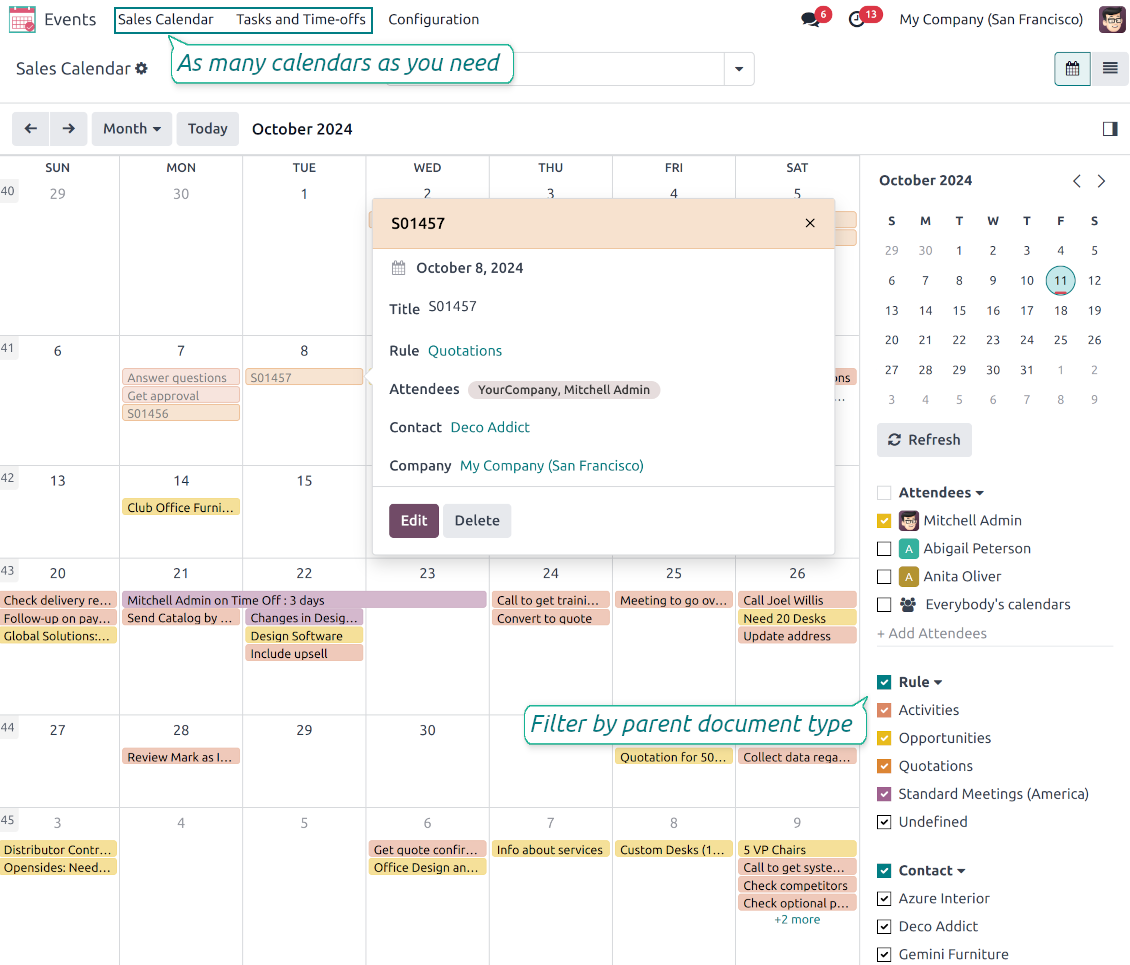
Odoo users often need to keep in mind a lot of details spread out among numerous interfaces. Switching between those is not comfortable and error-prone for planning. This tool solves the problem. The app lets configure rules to join and share various document types on a single super calendar(s) view but with easy-reachable source objects.
- the core app to merge Odoo documents in super calendars.
Az ára
98€
88€.
- the optional free extension that introduces the Odoo Enterprise Gantt view joint events. The features assumed by this add-on are marked by the icon
Any Odoo documents on the same calendar
The tool might merge any Odoo document types on the same view: opportunities, meetings, phone calls, activities, sale or purchase orders, shipments and deliveries, tasks and tickets, time offs, ...
Flexible merging rules
Define on your own what to consider a joint event title, start or stop date, who are target attendees, etc. Have even the same document twice on the same calendar just with a different start
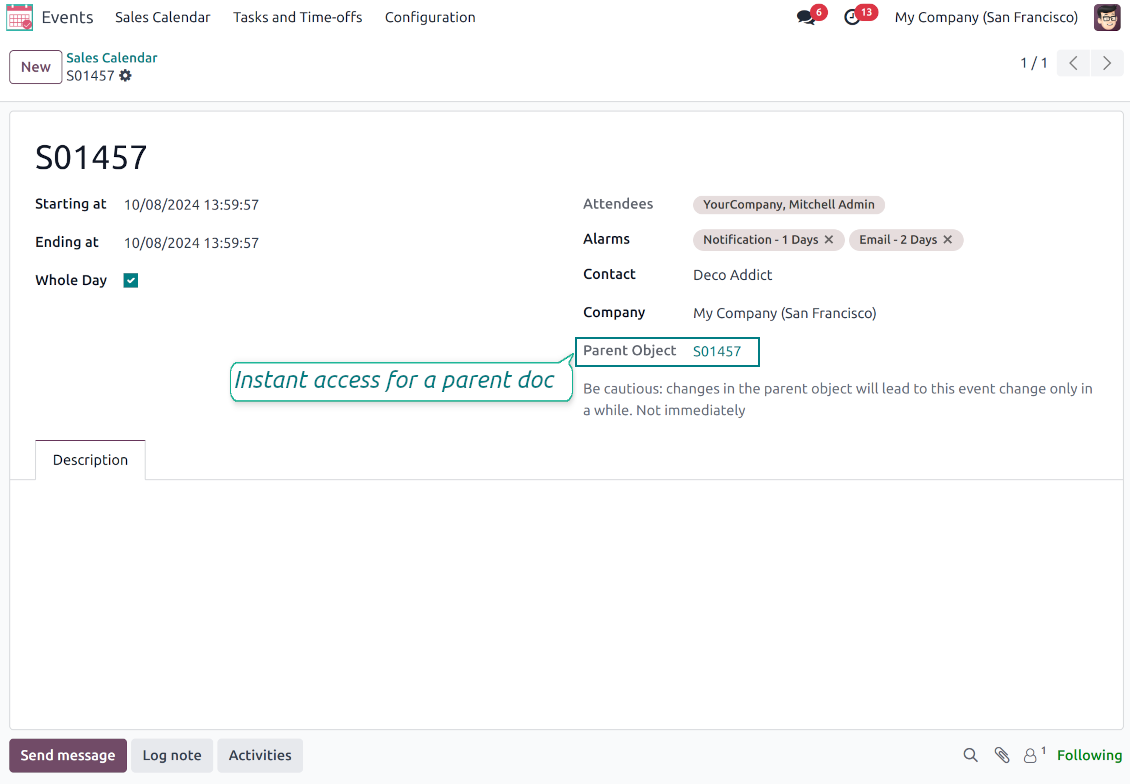
Instant access to source details
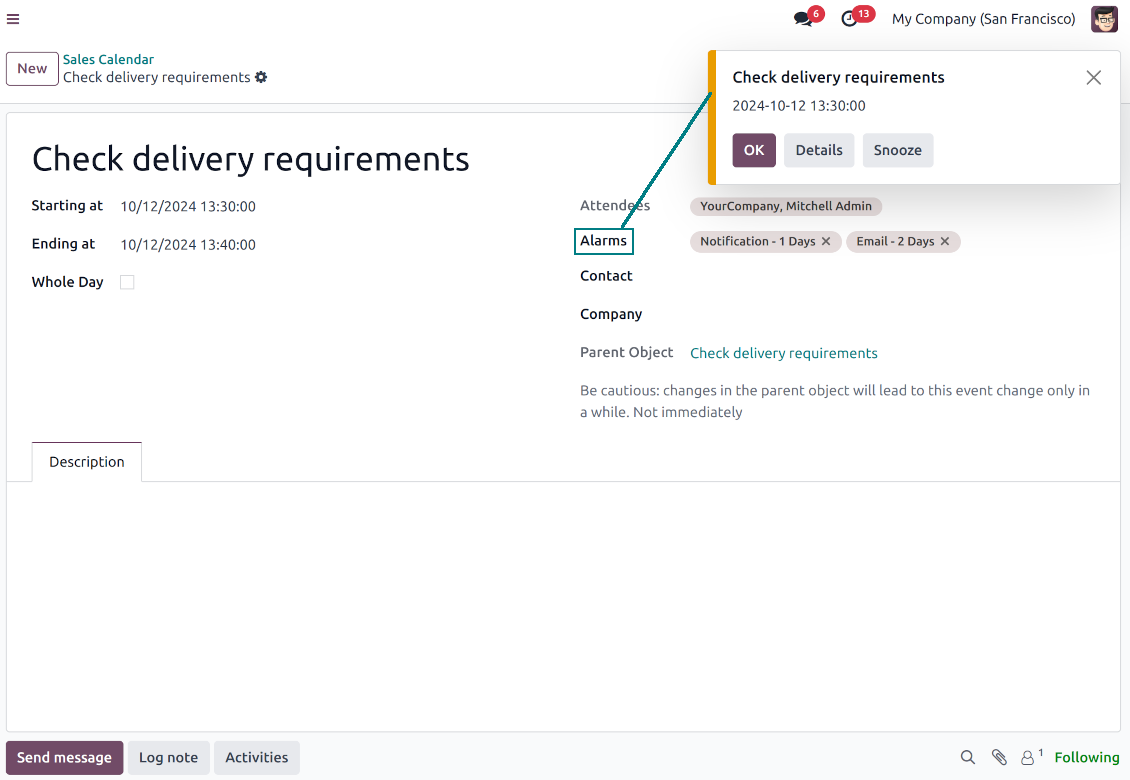
Joint events and their source documents are interrelated. Update the former, and the latter would be changed immediately. A reverse operation would be applied with the next cron job (the frequency is configurable)
Comfortable navigation
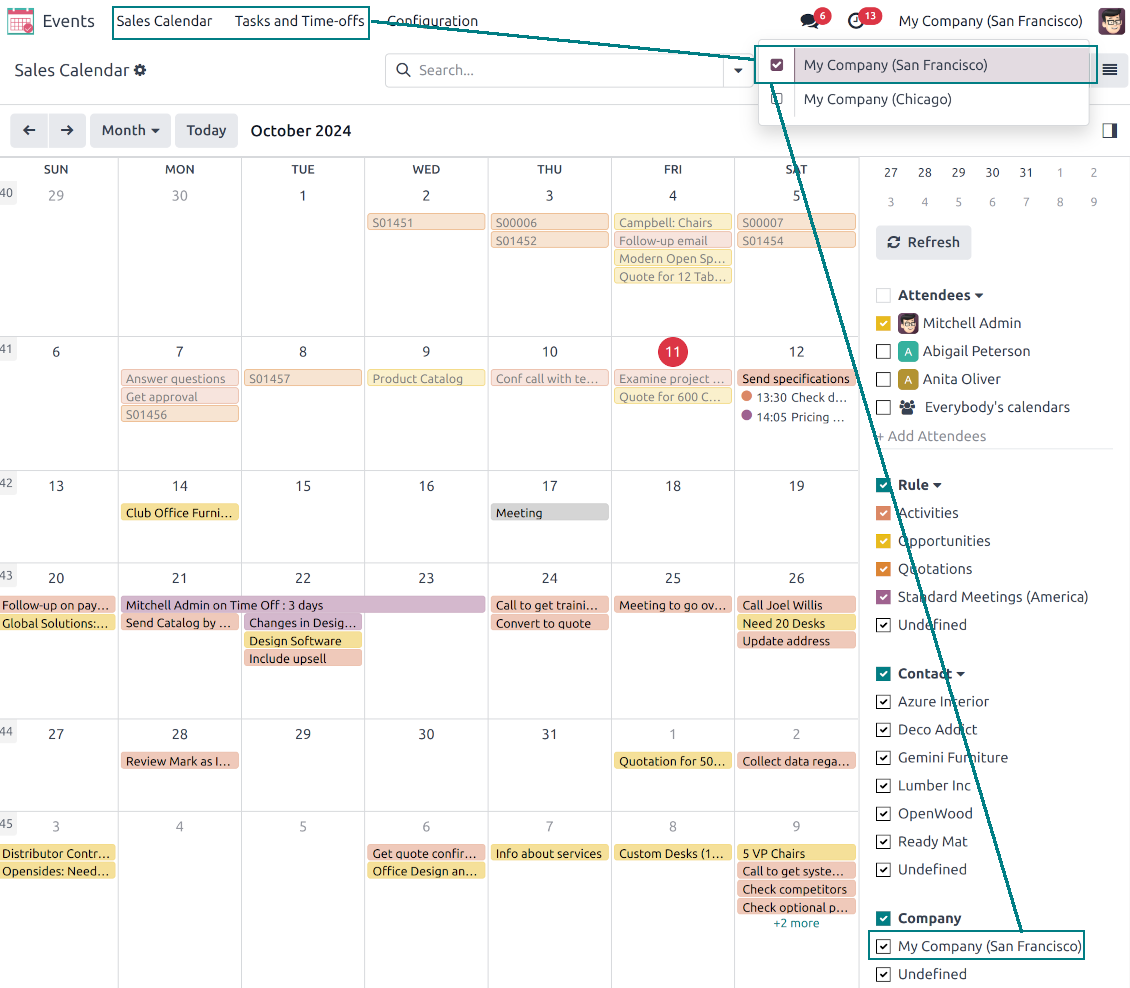
Shared calendars are especially suitable for team interactions. Users might switch between document types, participants, linked contacts, and companies in a single click. Optionally turn on the Odoo Enterprise Gantt view
Unlimited number of super calendars
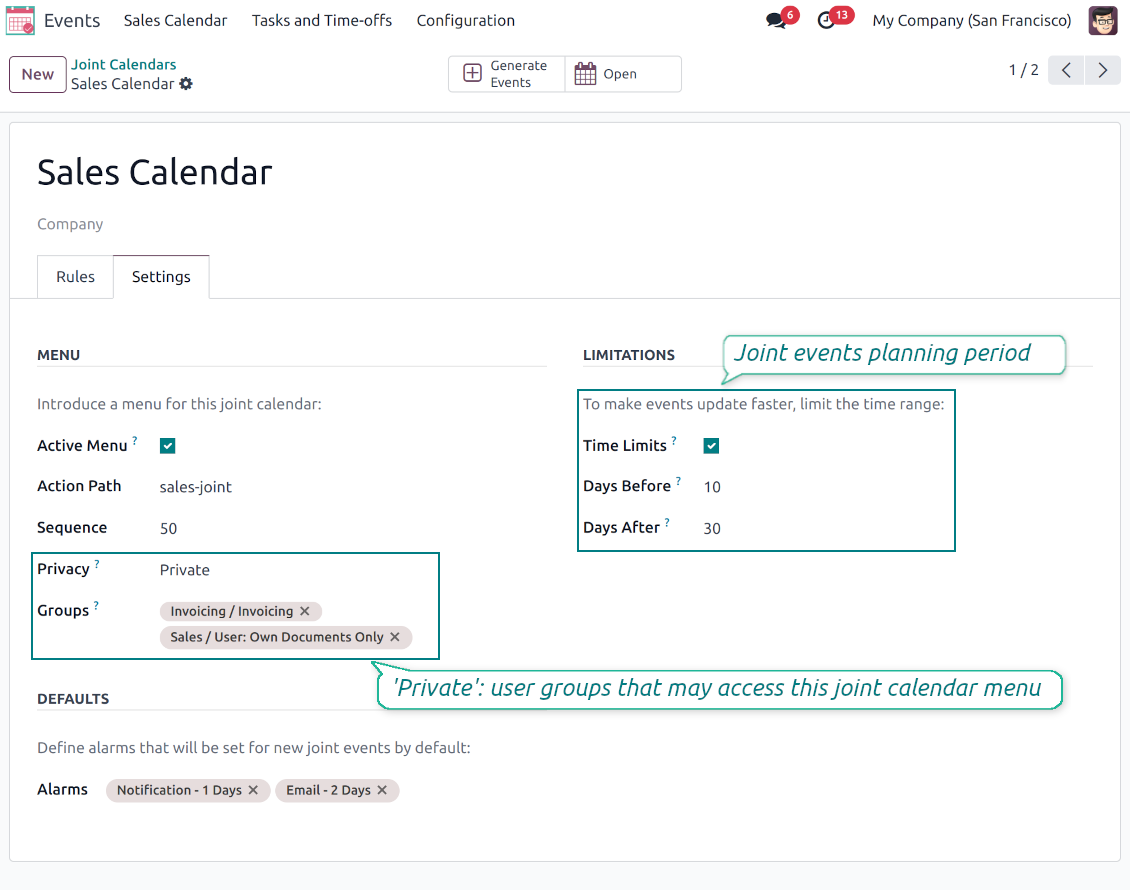
Configure as many calendars as you need: for various functional areas or for different user groups. Each joint calendar has its own menu item
Reminders for any Odoo documents
Calendar configuration lets assign default popups and email alarms. Thus, it is possible to have notification of any Odoo event or activity
Simple user rights administration
Regulate joint calendar accesses right on its form. Make it public or share it only for chosen user groups. The app fully supports multi-companies environment
Automatic shared calendar updates
Joint events are updated regularly by the cron job. It is fast, especially if you apply time frames. Refreshing is also available from the calendar interface.
Better then expected
The app does exactly what was needed. Combine all tasks from all calendars to one. And allows to manages all activities from all modules in one place.
This makes the Event Calendar so much more useful !
We bought this to combine certain project tasks with the schedules of our maintenance engineers. We now have a better overview which moments are overlapping the schedules of other events. The joining of multiple events in 1 event calendar is super easy, it should be a standard option in ODOO.
Excellent responsive team of programmers
Joint Calendar is the perfect addition to the standard Calendaring system that Odoo offers. It makes the job of setting up specific departmental calendars filled with any objects you wish very easy and Alex and the team provides fantastic after-sales support, responding in most cases within 24 hours to requests for help. Thanks for a great module.
Essential to have Activities, Tasks, Meetings etc all in one calendar and shared.
Great service support very quick and were right on with fixing the issue... I think the ability to see everything on one shared calendar is such an essential part of coordination and time management. Great product once you sort out the rules you need!
Super calendars for any business area
Use joint calendars for any functional area: CRM, project management, sales, HRM, MRP, inventory management, so and so on. Find just a few examples of rules below
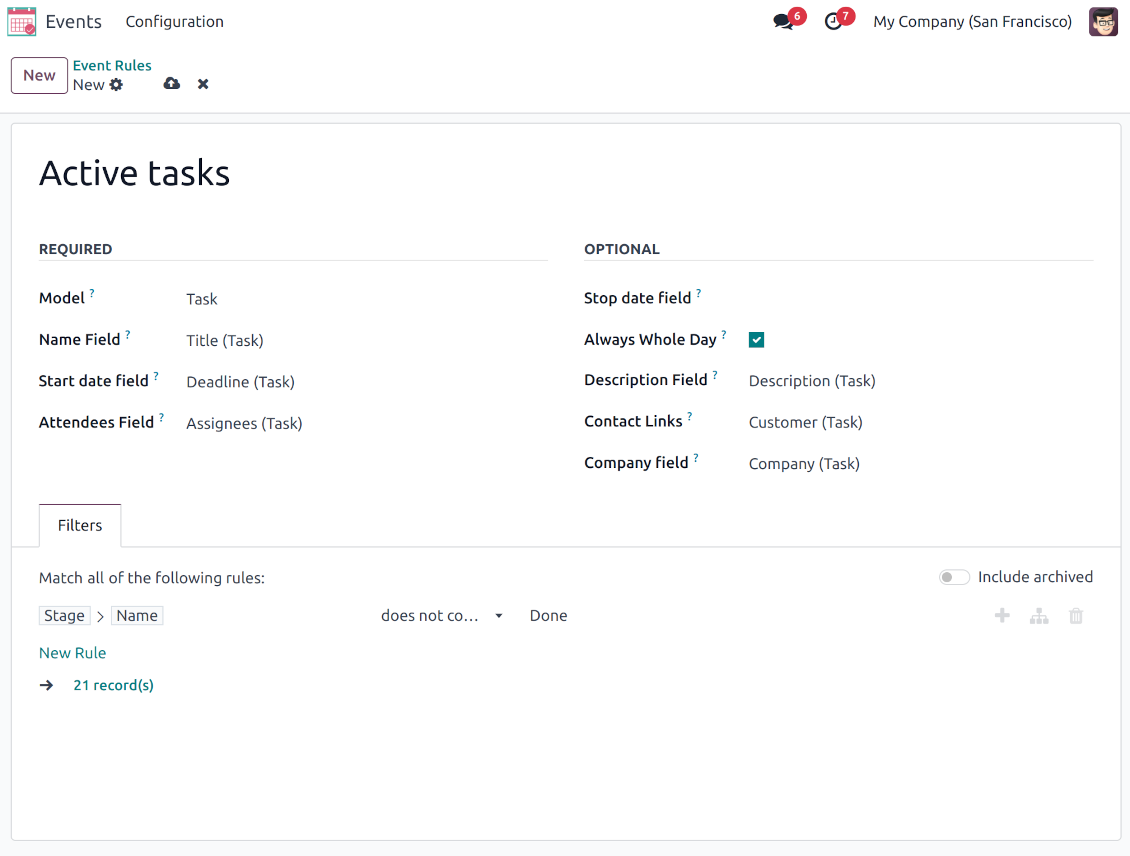
Tasks on a joint calendar
-
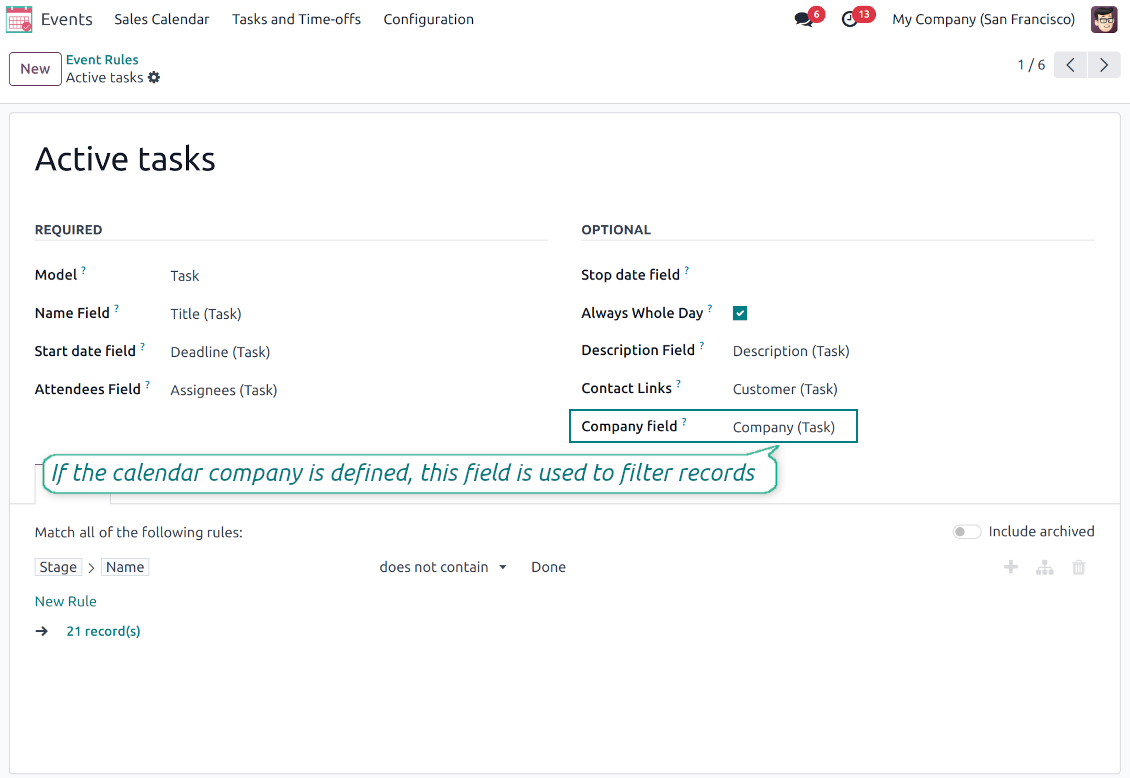
As a model use 'Task'
-
As a name use 'Title'
-
As a start date field use 'Deadline'
-
As attendees' field use 'Assignees'
-
As a domain optionally you can set definite projects
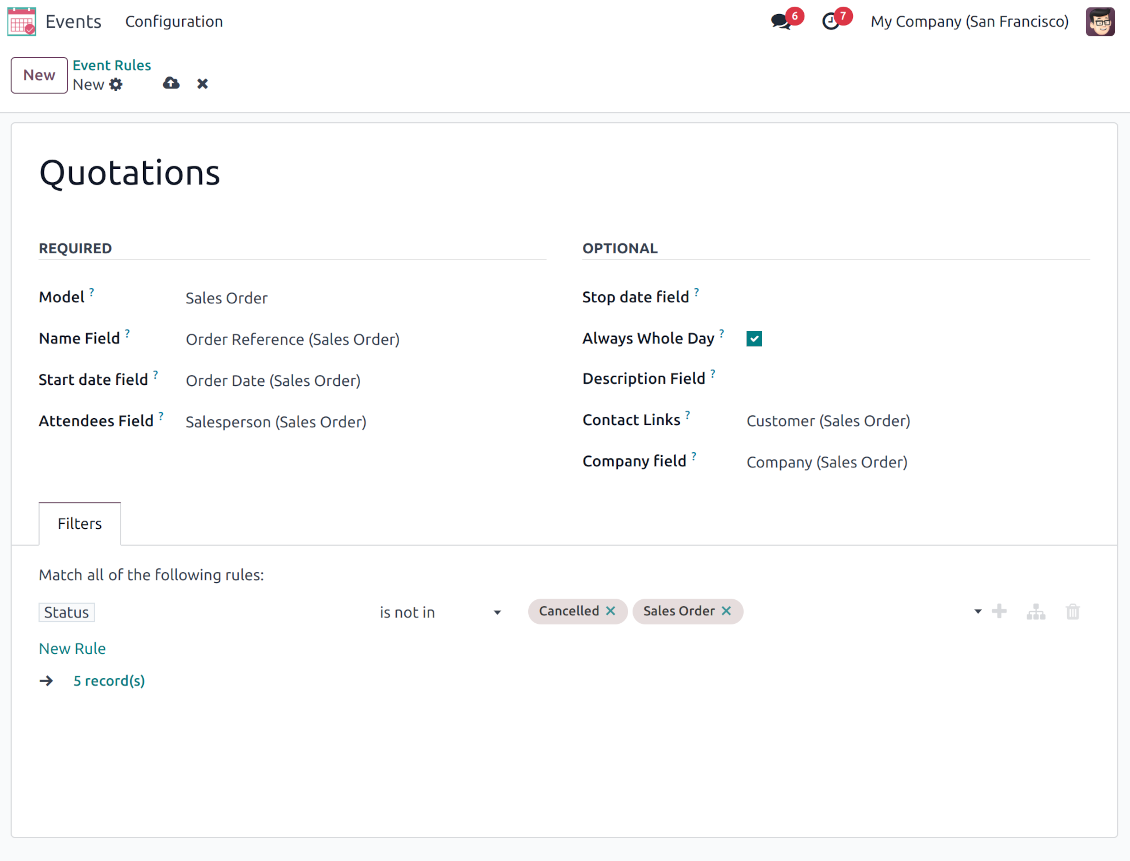
Sale orders on a shared calendar
-
As a model use 'Sales order'
-
As a name use 'Order Reference'
-
As a start date field use 'Order Date'
-
As attendees' field use 'Salesperson'
-
As a contact link use 'Customer'
-
As a domain optionally restrict quotations by sales teams.
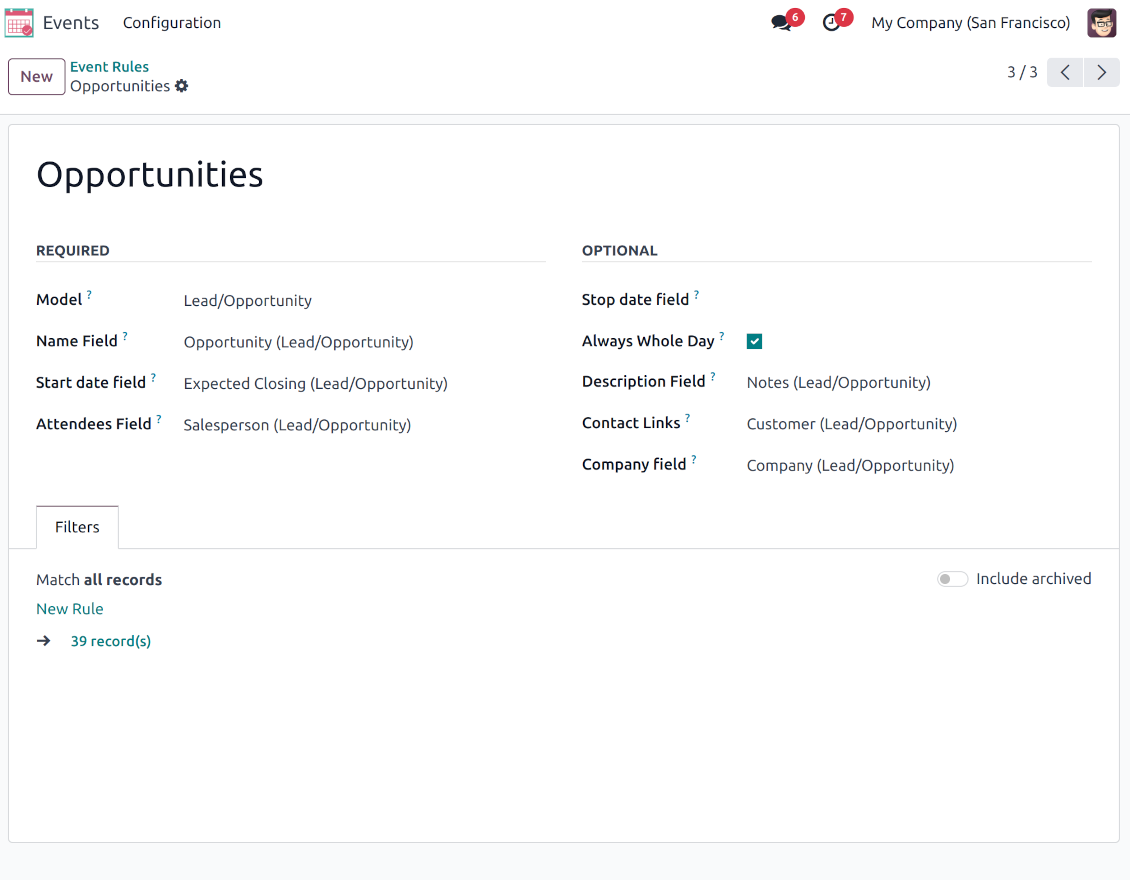
Opportunities on a super calendar
-
As a model use 'Lead/Opportunity'
-
As a name use 'Opportunity'
-
As a start date field use 'Expecting Closing'
-
As attendees' field use 'Salesperson'
-
As a contact link use 'Customer'
-
As a domain optionally restrict opportunities by sales teams.
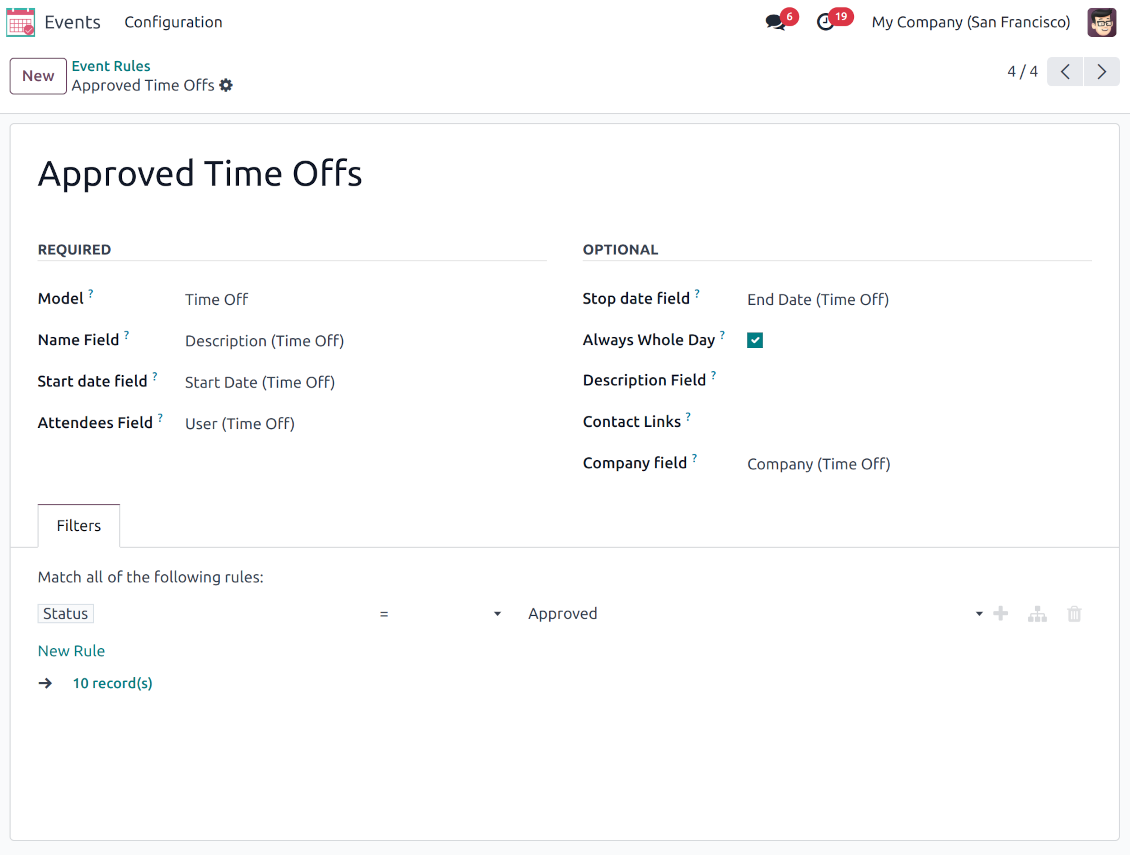
Share employees' time offs and leaves
-
As a model use 'Time Off'
-
As a name use 'Description'
-
As a start date field use 'Start Date'
-
As attendees' field use 'User'
-
As a stop date field use 'End Date'
-
As a domain filter by status: show only approved leaves.
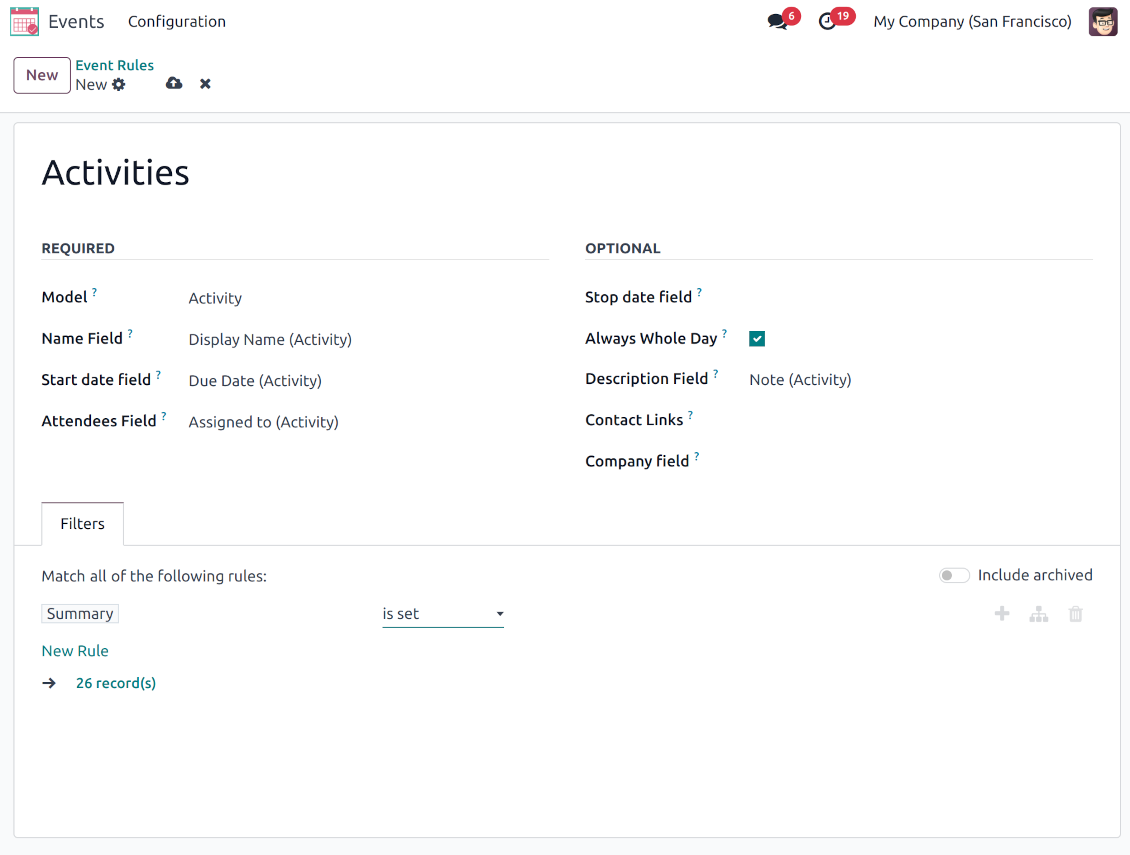
Activities by all objects
-
As a model use 'Activity'
-
As a name use 'Display Name'
-
As a start date field use 'Due Date'
-
As attendees' field use 'Assigned to'
-
As a domain apply 'Summary is set'
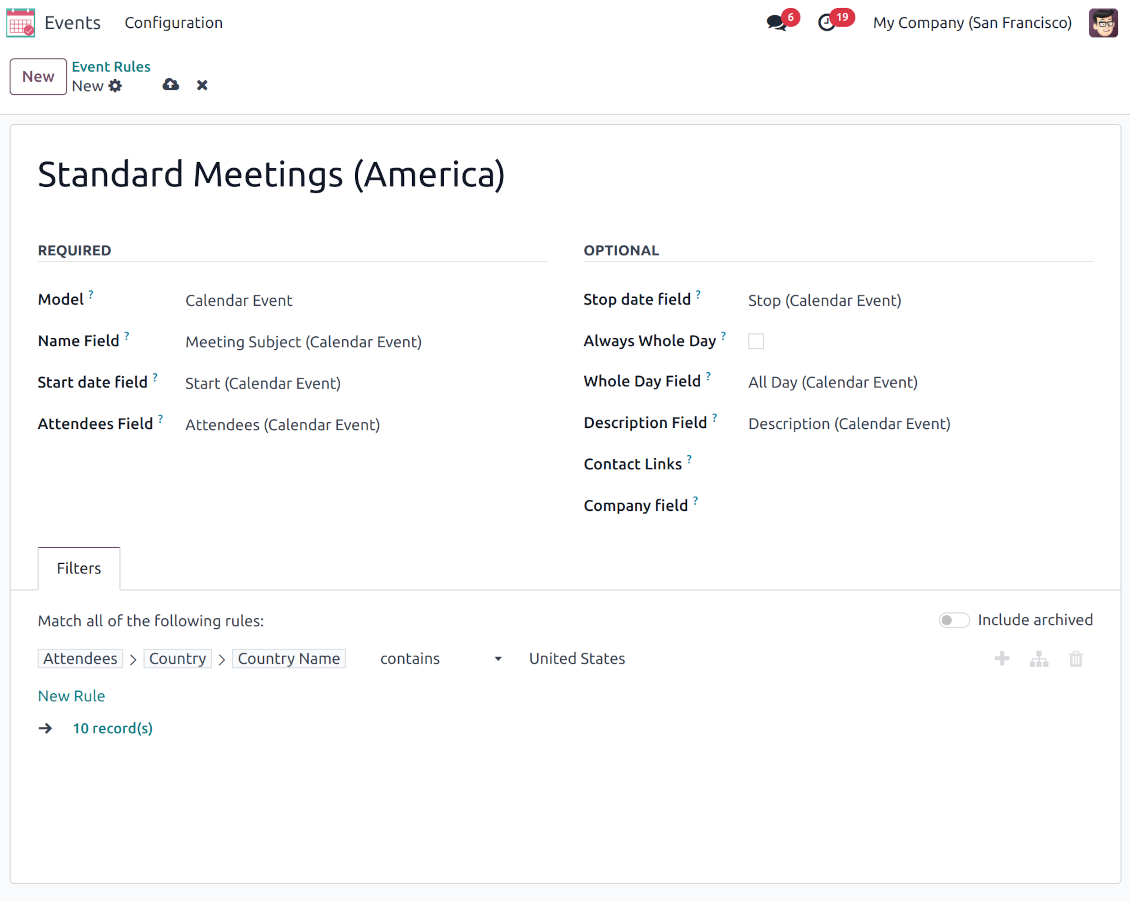
Odoo meetings to the joint calendar
-
As a model use 'Calendar Event'
-
As a name use 'Meeting Subject'
-
As a start date field use 'Start'
-
As a stop date field use 'Stop'
-
As attendees' field use 'Attendees'
-
As a whole day field 'All Day'
Flexible rules to merge Odoo documents
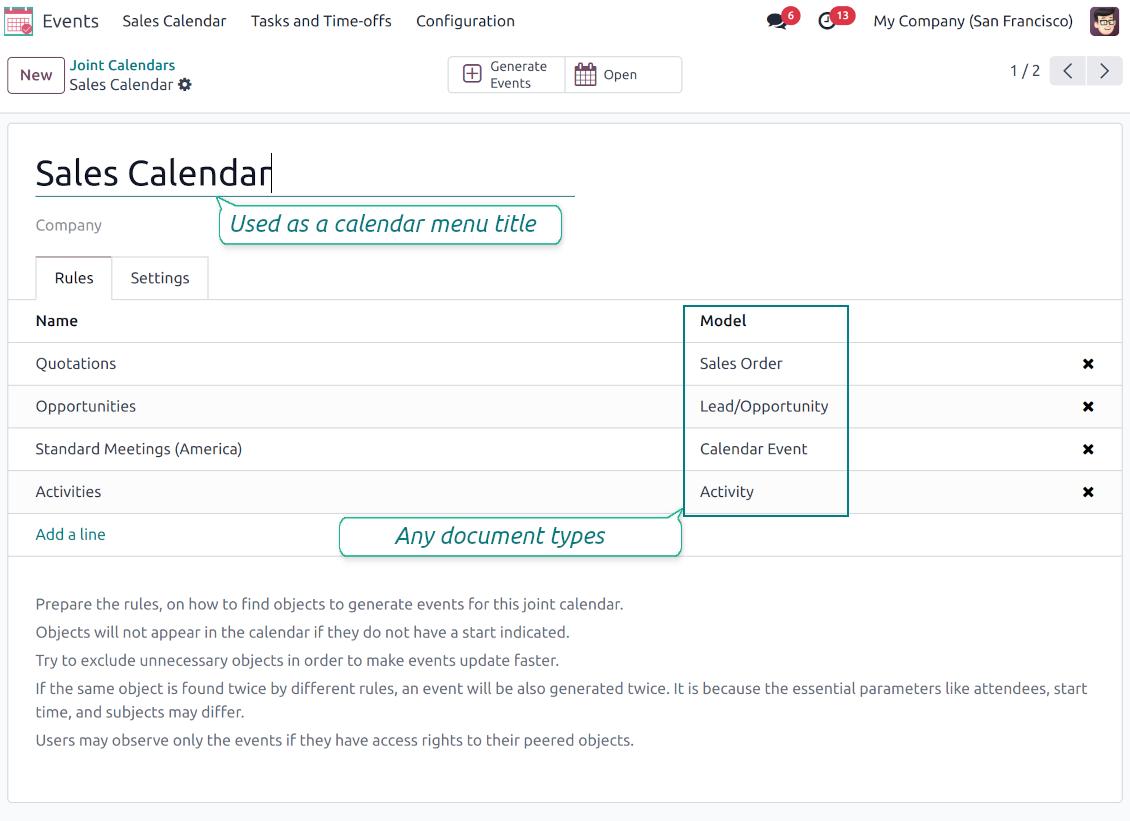
To add a new document type for a shared interface you should set up a joint calendar rule. This rule defines which Odoo objects should create events, which fields of that object should be shown, and whether any filtering should take place
-
Model - which objects to scan: opportunities, tasks, orders, meetings, activities, and so on. You can choose your custom document type (including created in Odoo Studio) as well
-
Name - what to use as a joint event name (also used as calendar event title). Usually, it is 'name', 'subject' or 'reference'
-
Start date - when an event starts. For example, 'expecting closing' for opportunities or 'order date' for quotations. It may be any date or date with time field of a source Odoo object
-
Stop date - when an event is shown as finished on a calendar
-
Attendees - who are participants (responsible persons, event owners). Usually, it is a field 'assigned to', 'a sales person' or 'attendees'. You may use even document 'followers' since it's possible to apply both users and partners
-
Description - are there any notes important for joint events? Usually, the fields like 'internal notes' or 'comments' are used
-
Always Whole Day - means that all generated events would last the whole day disregarding whether start or stop are defined with hours and minutes. Such an event would be shown at a special place on a calendar (above the timeline)
-
Whole Day - a special boolean field of the source object which indicates that a related joint event may last the whole day. This setting is usually applied to standard Odoo calendar events which both might have a definite time indicated or might be planned for a whole day
-
Contact Link - is this event linked to a specific partner? Usually, the fields like 'customer' or 'vendor' are used
-
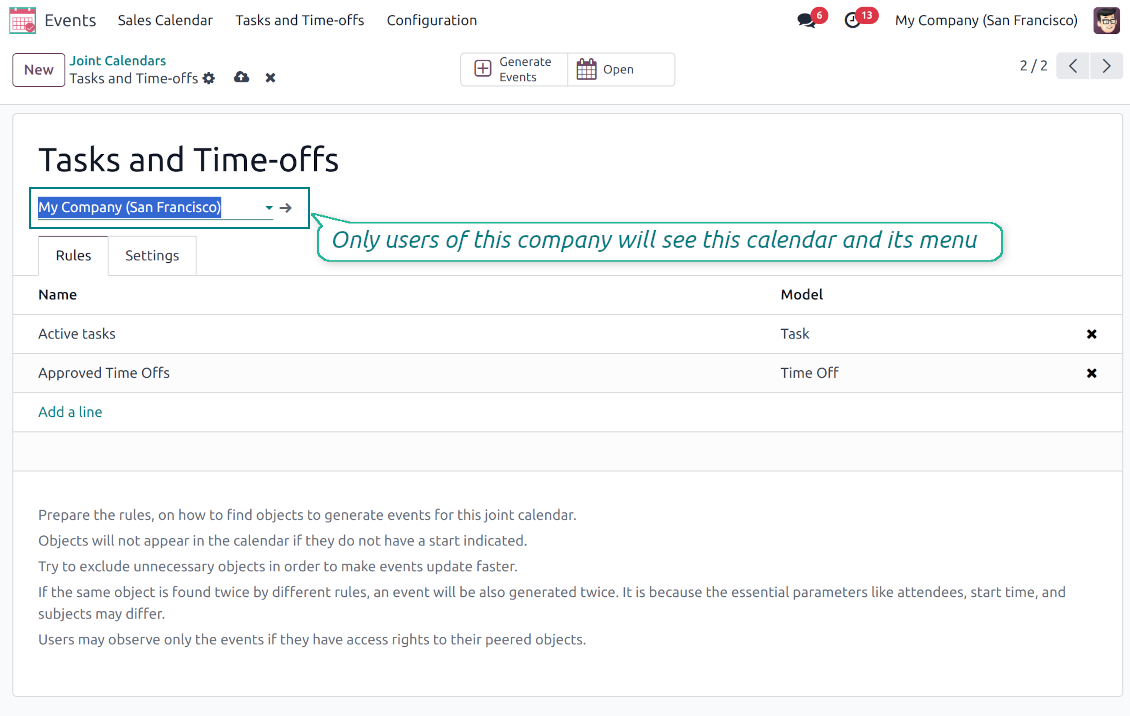
Company field - optionally define the parent document field where its company is kept. In this way, joint events would get the source company that might be used for filtering or just for information
-
Domain - the Odoo filters' constructor to include only topical documents into a joint calendar. You might apply any storable attribute. For example, show only quotations without sales orders, or show opportunities only for this sales team.
Multi companies compatibility
-
The app fully supports the multi-companies environment: each joint calendar might be linked to a specific Odoo company. If a company is not defined, it is considered as 'global', so available for all Odoo companies
-
Users access only those joint menus, which super calendars do not have a company or have one of those users available companies
-
Each joint rule might have the "Company field" defined. If that setting is configured, records will be filtered in a joint calendar company. For example, if you stated 'Company' as the 'Company field' for the tasks' rule, and the joint calendar is linked to 'San Fransisco' company, then users will see only San Fransisco or global tasks only
-
Joint events would also get the company based on the 'Company field' of the parent document. You can comfortably switch between objects of different companies using the right navigation filters
-
In addition to the 'Company field', you may also restrict records in a rule domain. For instance, to include records of a few companies but not to include others.
Combine events on Odoo Enterprise Gantt view
-
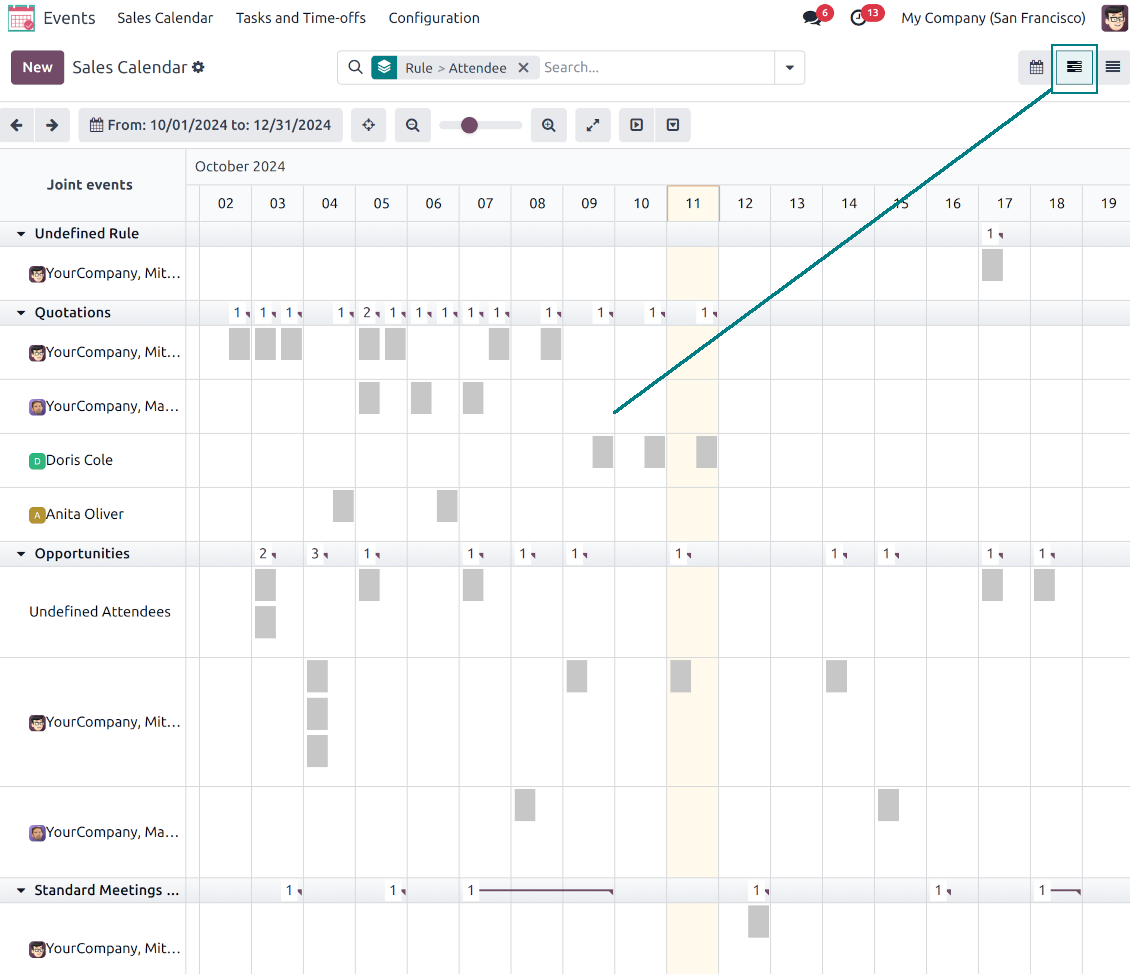
For any joint calendar, optionally add the Odoo Enterprise edition Gantt view
-
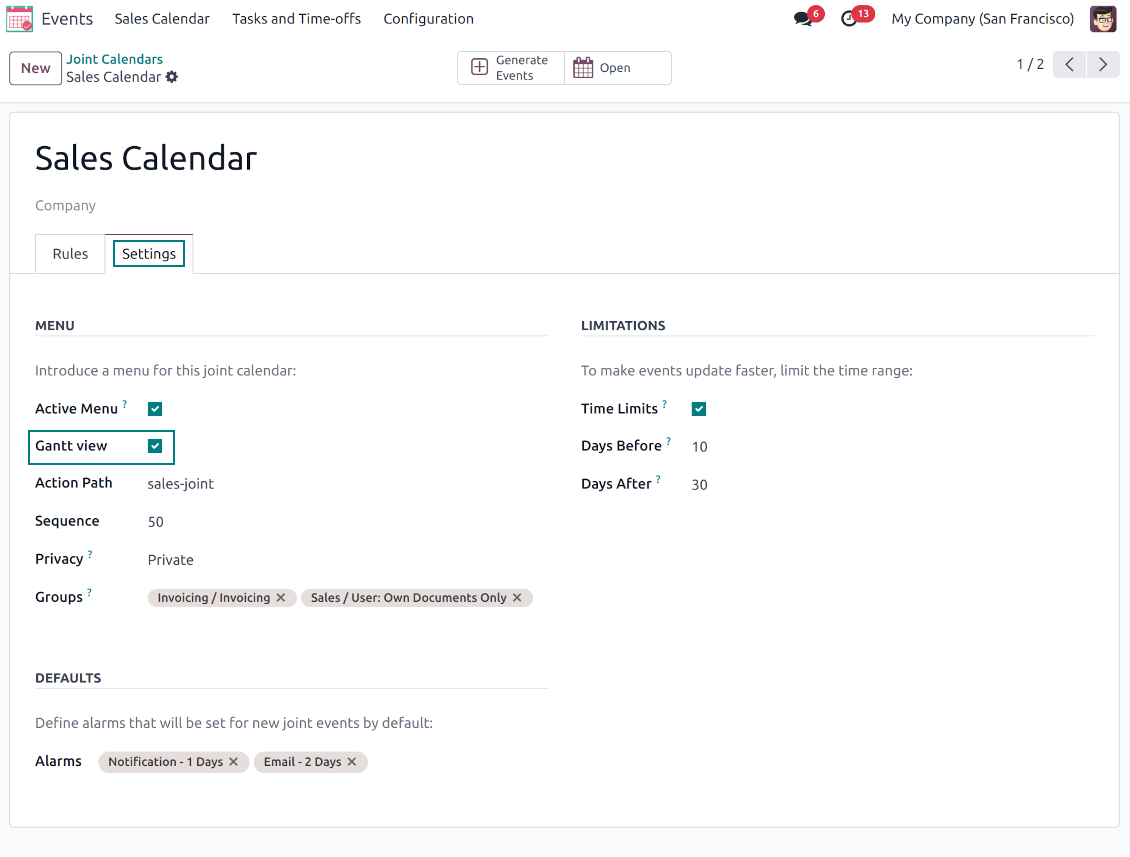
To that goal, just tick the box 'Gantt view' on the supper calendar settings
-
The app would automatically extend a target joint calendar action after you saved the changes
-
In this way, you can have a single super Gantt view for various Odoo documents
-
Manage those events in a comfortable manner: reassign responsible users, drag and drop those to change periods, etc.
Konfigurációs és telepítési tippek: Joint Calendar Odoo v.18
Joint calendar scheduled jobs
The tool lets you change the frequency of joint calendar refreshing and emails reminders' checks:
- Turn on the debug mode
- Go to technical settings > Automation > Scheduled jobs
- Find the job 'Refresh Joint Events' to change the frequency of super calendars' update
- Find the job 'Notify About Joint Event' to change the frequency of email alarms.
Gyakran ismételt kérdések: Joint Calendar Odoo v.18
Mi tortenik, ha az "Always Whole Day" be/ki van kapcsolva?
Ha az "Always Whole Day" be van kapcsolva, a szabály összes esemenye egész napos, akkor is, ha a kezdet es a veg órát tartalmaz. Az esemény a naptár külön helyen jelenik meg.
Példa: "Sale Order" modell es "Always Whole Day" esetén az esemény a napi es heti szupernaptárak idovonalanak folott van.
Ha kikapcsolja, es a kezdet vagy a veg ora/perc, az esemény adott időpontra kerül, es az ido a cim előtt látszik.
Nem latom a naptár menujet az Odooban. Mit tegyek?
Ellenőrizze:
1. Van legalább egy beállított es frissített közös naptár. A beállítás után frissítse az oldalt.
2. Van hozzáférése legalább egy naptárhoz.
Szabalyos naptárakat hoztam létre, de nem latom őket a menüben.
Több ok is lehet. A kapcsolódó cron meg nem futott: indítsa kézzel a frissítés gombbal a közös naptár jobb oszlopaban.
Nézze a Time Limits-et: különben csak egy időszak esemenyei látszanak. Példa: 'Sale Orders' naptár 10 nappal előtte es 30 után nem mutat egy 12 napja létrehozott rendelést.
Győződjön meg, hogy a szabalyokban nincs találat nélküli szűrő. Példa: 'Sale Order' szabály 'Customer = Deco Addict' szűrővel csak annak az ügyfélnek a rendeleseit mutatja.
Hány Odoo-dokumentumot (pl. vevői rendelések, projektek, tevékenységek) vonhatók össze egy közös naptárban?
Amennyi Odoo-dokumentumot szeretne, osszevonasthatja egy naptárban. Vagy több naptár között oszthatja (pl. értékesítési es projekt-, feladat- es tevékenység-naptár) es a systrayben vált.
Mi a közös naptár szabálya?
A szabályok megmondjak, mely Odoo-objektumok hoznak létre esemenyt, mely mezők látszanak, es van-e szűrés.
A szabalyban on adja meg a címet, a kezdetet vagy a Stop date-et, a resztvevoket stb.
Mire való a "Stop date" mező? Üresen hagyhatom?
Odoo A Stop date a celmodell mezője, amely megadja, mikor zárt az esemény a naptárban. Példa: "Sale Order" szabály "Delivery Date" Stop date-tel az ajánlat tervezett napjától (Start Date - Order Date) a szallitasig mutatja.
A mező nem kötelező, üresen hagyható. Ekkor az esemény csak a Start Date napján szerepel.
A naptárban "Undefined" típusú események vannak. Mit jelent?
Az esemenyt kézzel hoztak létre: nincs szuloobjektum es szabály. Az "Undefined" szűrő alatt, szín nélkül látszanak.
Aki látja a naptarat, letrehozhatja es látja az Undefined eseményeket.
Mik az eszkozeik frissítési szabalyai?
Az Odoo Apps Store aktuális szabalyai szerint:
- A 12.0-s vagy korábbi verzióhoz vásárolt modul hozzáférést ad minden 12.0-ig tarto verzióhoz.
- A 13.0-s verzitol minden modulverziot külön kell megvasarolni.
- A verzioszamtol függetlenül a vásárlás jogot ad az adott foverzion belüli összes frissitesre es hibajavitasra.
A faOtools csapat nem irányítja ezeket a szabályokat. Kerdesekkel közvetlenül az Odoo Apps Store kepviseloit keresse.
Hogyan telepitem az alkalmazást Odoo.sh-re?
A legkozvetlenebb megkozelites az Odoo-aruhaz beépített munkafolyamata:
1. Nyissa meg a modul oldalat, es kattintson a Deploy on odoo.sh gombra
2. A GitHub oldalra kerül. Jelentkezzen be, majd kattintson a Create a new repo gombra, vagy használjon egy meglévőt. A tarhaznak privatnak kell lennie. OPL-1 licencu alkalmazások nem tehetok közzé. Szükség esetén hozzon létre uj repot az Odoo.sh-projekthez
3. Ezutan az odoo.sh-en kattintson a Deploy gombra, erősítse meg, majd kattintson a Continue gombra. Elindul a telepítés.
Ezek a lépések a production agra telepitik az alkalmazást. Mas agakhoz vagy frissiteshez:
1. Töltse le a forraskodot az Odoo-aruhazbol
2. Commitolja a modult a GitHub-tarhazba. Egyik alkalmazasmappa/-fájl sem kerulhet a .gitignore-ba. Az odoo.sh által létrehozott tarhazak fontos utvonalakat (pl. /lib) hagyhatnak figyelmen kívül. Töltse fel az összes modulkonyvtarat es fájlt
3. Deployolja az odoo.sh-projekt celagat, vagy várja meg az automatikus buildet, ha a beállítások igy szolnak.
Hogyan telepitem az alkalmazást a saját szerveremre?
2. Indítsa újra az Odoo-kiszolgálót;
3. Kapcsolja be a fejlesztői uzemmodot (technikai beállítások);
4. Frissítse az alkalmazaslistat (Alkalmazások menü);
5. Keresse meg az alkalmazást, es kattintson az Activate/Install gombra;
6. Kövesse az alkalmazasoldal utmutatasait, ha vannak.
Az alkalmazásnak extra kiegeszitoi vannak. Megvehetem őket később?
Igen. Az Odoo automatikusan a kosarba teszi a fuggosegeket: zárja ki a mar megvasarolt eszközöket, hogy ne fizessen kétszer.
Telepitettem az alkalmazást Odoo.sh-re, es figyelmeztetést/hibát latok a tesztekben
A piros/narancs figyelmeztetés nem befolyásolja az alkalmazás funkcióit. Néha a moduljaink nem mennek at a standard automatikus teszteken, mert azok az alkalmazás celjaival ellentetes viselkedést várnak. Például megvaltoztatjuk az arszamitast, miközben az Odoo-tesztek a végső árat a standard algoritmussal hasonlitjak össze.
Először ellenőrizze a telepített adatbázis funkciot. Minden működik?
Ha mégis ugy gondolja, hogy a figyelmeztetés valós funkciókat érint, írjon nekünk, es küldje el a teljes telepítési naplókat es a telepített modulok teljes listajat (mag es harmadik fel).
Megvehetem az alkalmazást közvetlenül onoktol?
Nem, az eszközöket csak a hivatalos Odoo alkalmazasboltban forgalmazzuk.
Kedvezmenyt szeretnék
Sajnos nincs technikai lehetosegunk egyedi árakat adni.
Telepithetem az alkalmazást az Odoo Online (SaaS) adatbazisomra?
Nem, harmadik feles alkalmazások nem használhatók az Odoo Online-on. Az Odoo SaaS ezt blokkolja.
Az eszköz mas alkalmazasoktol függ. Meg kell vennem őket?
Igen, az eszkoznek szüksége van minden függőségként jelölt modulra. Az alkalmazasoldal ara mar tartalmazza ezeket a fuggosegeket.
Mennyi a modul ara amerikai dollarban? Miért változott?
Moduljaink ara euroban van megadva. Az Odoo-aruhaz a belső arfolyama szerint vált mas penznemekre. Ezért az amerikai dollar ar valtozhat, amikor az arfolyam frissül.
Az alkalmazás és a webhely angolon kívüli nyelveken mesterséges intelligenciával készülnek és az hivatalos Odoo-fordításokhoz igazodnak. Ha hibát talál, küldjön fordításhelyességi jegyet és kijavítjuk.
Odoo demo-adatbázisok (élő előnézetek)
Ehhez az alkalmazáshoz ingyenes személyre szabott demo-adatbázist adhatunk.
Nem kell telefonszám vagy bankkártya a kapcsolatfelvételhez. Elég egy rövid e-mailes regisztráció, ami 30 másodpercnél nem tart tovább.
Kérésére egyéni élő előnézeti adatbázist készítünk, ahol kb. két hétig tesztelhet és ellenőrizheti a feltételezéseket.
Hibajelentés
Ha hibát vagy következetlen viselkedést lát, írjon nekünk. A vásárlástól 60 napon belül javítást vállalunk, és utána is fejlesztjük az eszközöket.
Nem kell telefonszám vagy bankkártya a kapcsolatfelvételhez. Elég egy rövid e-mailes regisztráció, ami 30 másodpercnél nem tart tovább.
Adjon meg minél több részletet: képernyőképek, Odoo-kiszolgálónaplók és a hiba reprodukálásának teljes leírása. Általában néhány munkanap kell a munkatervhez (ha a hiba megerősített) vagy az iránymutatáshoz (egyébként).
Nyilvános funkcióigények és modulötletek (ingyenes fejlesztés)
Erősen motiváltak vagyunk az eszközeink fejlesztésére, és hálásak minden visszajelzésért. Ha az igények közhasznúak és hatékonyan megvalósíthatók, a csapat felveszi őket a teendők listájára.
Az ilyen teendőlista rendszeresen feldolgozásra kerül, extra díj nélkül. Bár határidőt és végleges dizájnt nem ígérhetünk, jó módja lehet a kívánt funkciók befektetés és kockázat nélküli megszerzésének.
Nem kell telefonszám vagy bankkártya a kapcsolatfelvételhez. Elég egy rövid e-mailes regisztráció, ami 30 másodpercnél nem tart tovább.

Eszköz Odoo mellékletek mappákba rendezéséhez és könyvtárak szinkronizálásához felhőklientekkel: Google Drive, OneDrive/SharePoint, Nextcloud/ownCloud, Dropbox, Amazon S3, Box és NAS. DMS. Fájlkezelő. Dokumentumkezelő rendszer
398€
The tool to automatically synchronize Odoo attachments with OneDrive files in both ways
487€
The tool to automatically synchronize Odoo attachments with Google Drive files in both ways
487€

The tool to build a deep and structured knowledge base for internal and external use. Knowledge System. KMS. Wiki-like revisions.
398€
The tool to set up KPI targets and control their fulfillment by periods. KPI dashboards. Dashboard designer. KPI charts

The tool for time-based service management from booking appointments to sales and reviews
398€
The tool to manage your Odoo from your favorite AI chats through MCP. Claude. Any MCP-supporting AI.

The tool to translate URL addresses of Odoo website pages
38€