Universal Appointments and Time Reservations v.14
The tool for time-based service management from booking appointment to sale and reviews
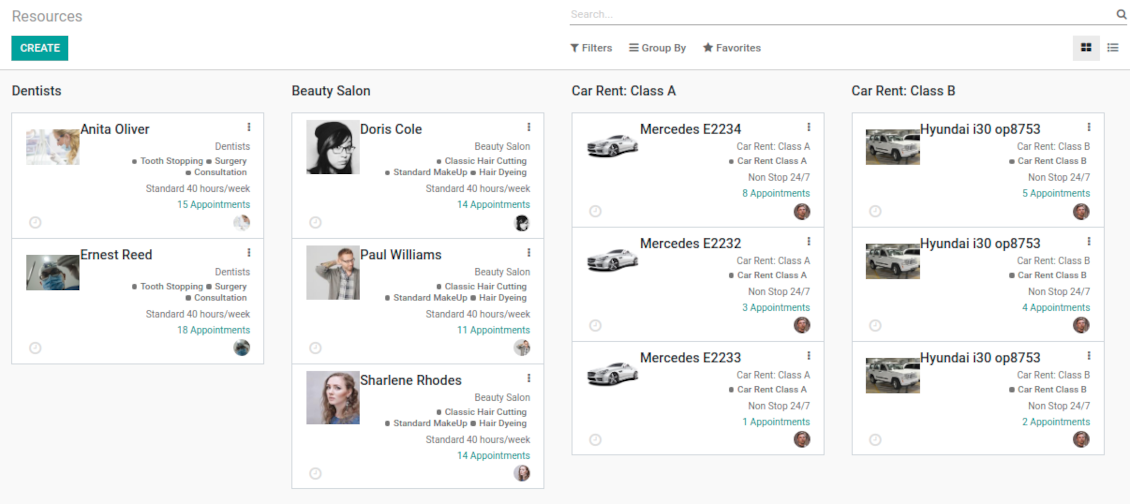
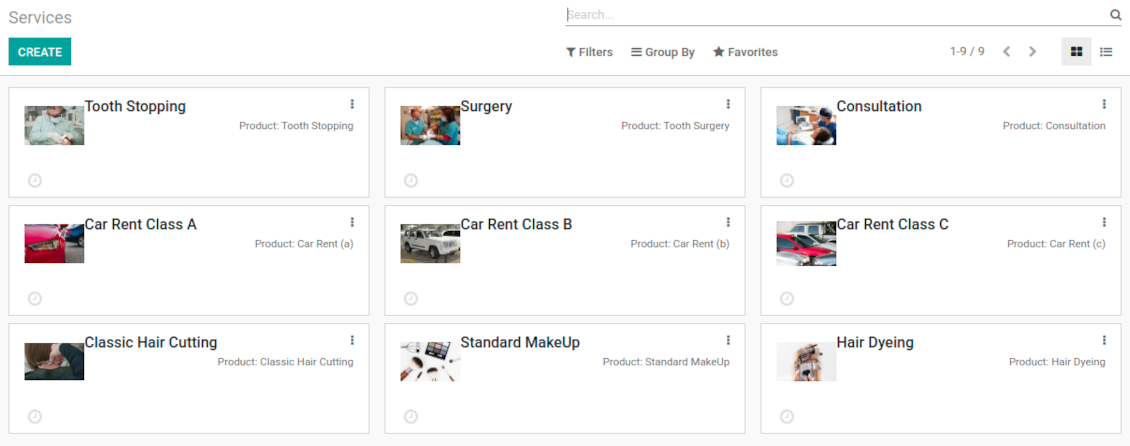
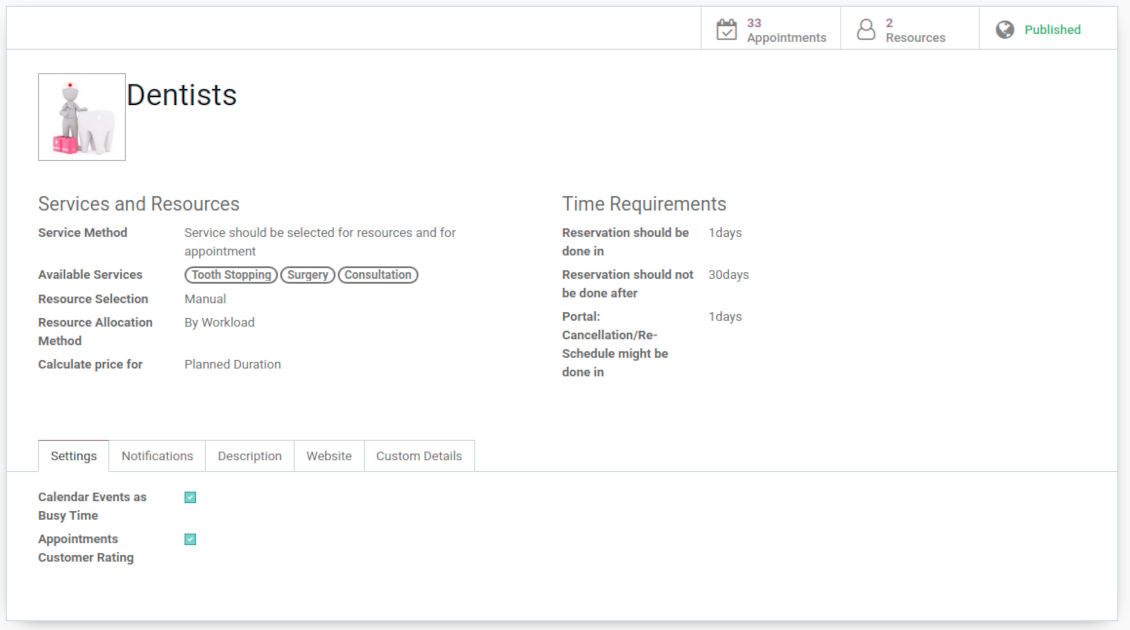
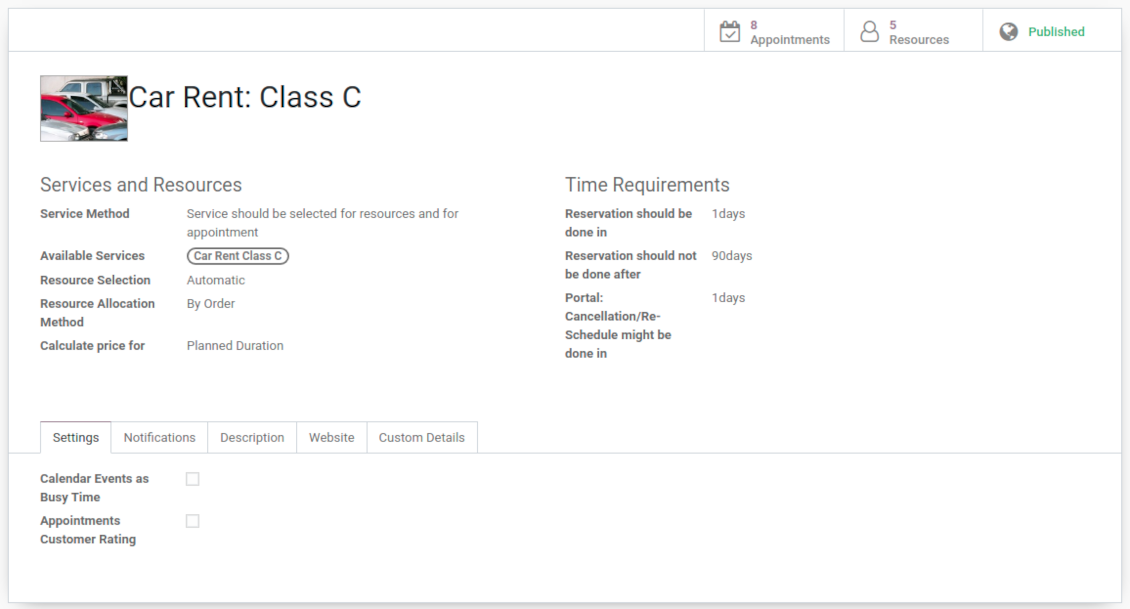
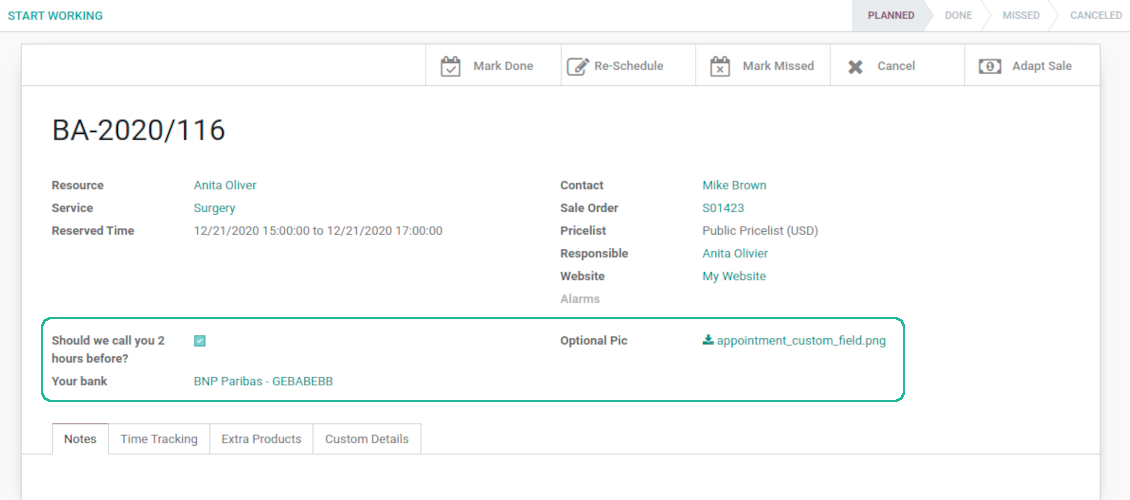
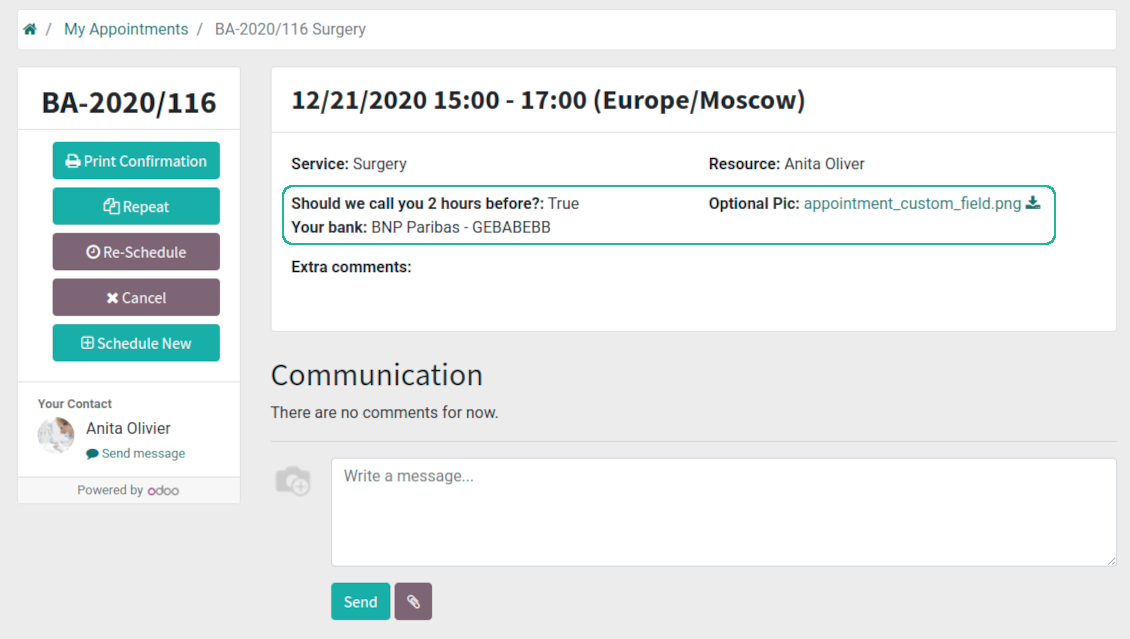

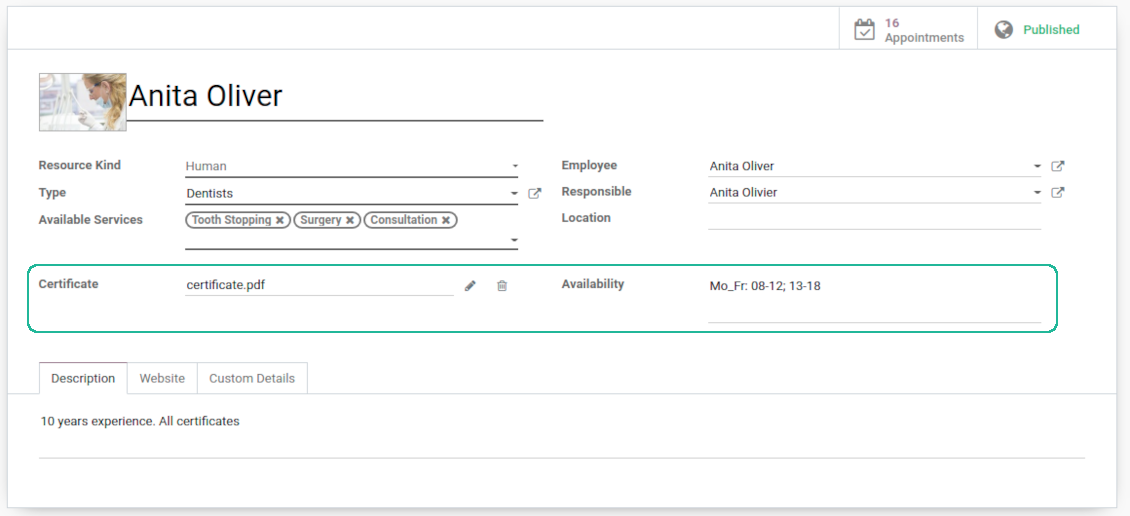
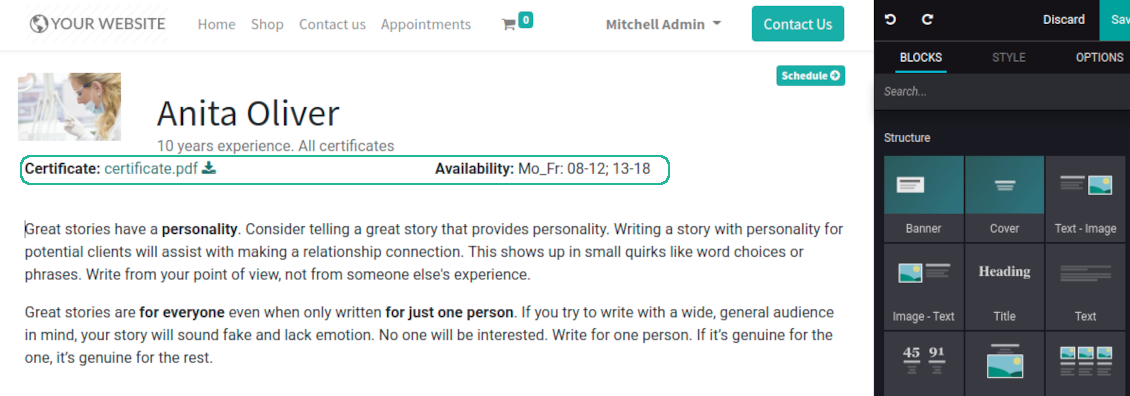
This is an Odoo full-featured app to administrate, to control, and to improve service management workflow. The tool let you organize flawless time reservations, control fulfillment, evaluate customer satisfaction, sale and upsell goods in almost any industry. With all options installed the tool represents structured e-shop for your services.
Flexible module setup allows to reflect specifics of your business or even multiple businesses: automate resources distribution or let select those; have predefined appointment duration or let choose it manually; show or hide prices; apply booking restrictions or grant full freedom. Apply own settings to automate provision of your services.
- a core app to manage bookings. It might be used stand-alone for internal control of appointments and scheduling by phone, for example. Η τιμή του είναι 398€.
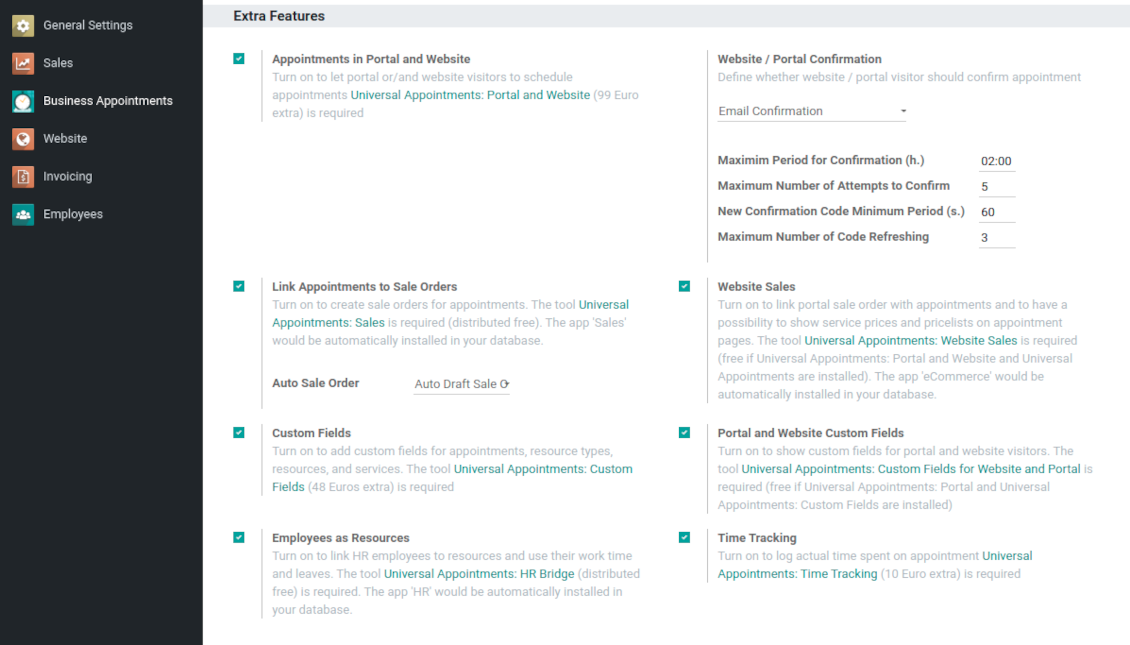
- an optional module which introduces website booking process and let external users to schedule appointments and control reservations in portal. The features assumed by this add-on are marked by the icon . Η τιμή του είναι 98€.
- an optional free module to introduce service pricing information and to link appointment with sales. The features assumed by this add-on are marked by the icon
- an optional free module to include service price lists and prices into reservation checkout process. The features assumed by this add-on are marked by 2 icons simultaneously: and
- an optional module which let you add and show custom fields for appointments and related objects. The features assumed by this add-on are marked by the icon . Η τιμή του είναι 48€.
- an optional free module which shows custom fields on website and portal pages (frontend). The features assumed by this add-on are marked by 2 icons simultaneously: and
- an optional module which allows to track time spent on each appointment. The features assumed by this add-on are marked by the icon . Η τιμή του είναι 10€.
- an optional free module which allows to consider employees as appointment resources. The features assumed by this add-on are marked by the icon
Smart time slots
Vacant slots for appointments are automatically generated based on working calendars, service peculiarities, and specifics of managed businesses
Universal reservations
Set up the structure of resources and services to reflect your company work flows. Assign specialist and equipments manually or automatically. Flexibly manage appointment duration rules
Comfortable scheduling without conflicts
The appointments scheduler allows to make a new reservation in a few clicks. It is quick and simple but with full control over potential intersections
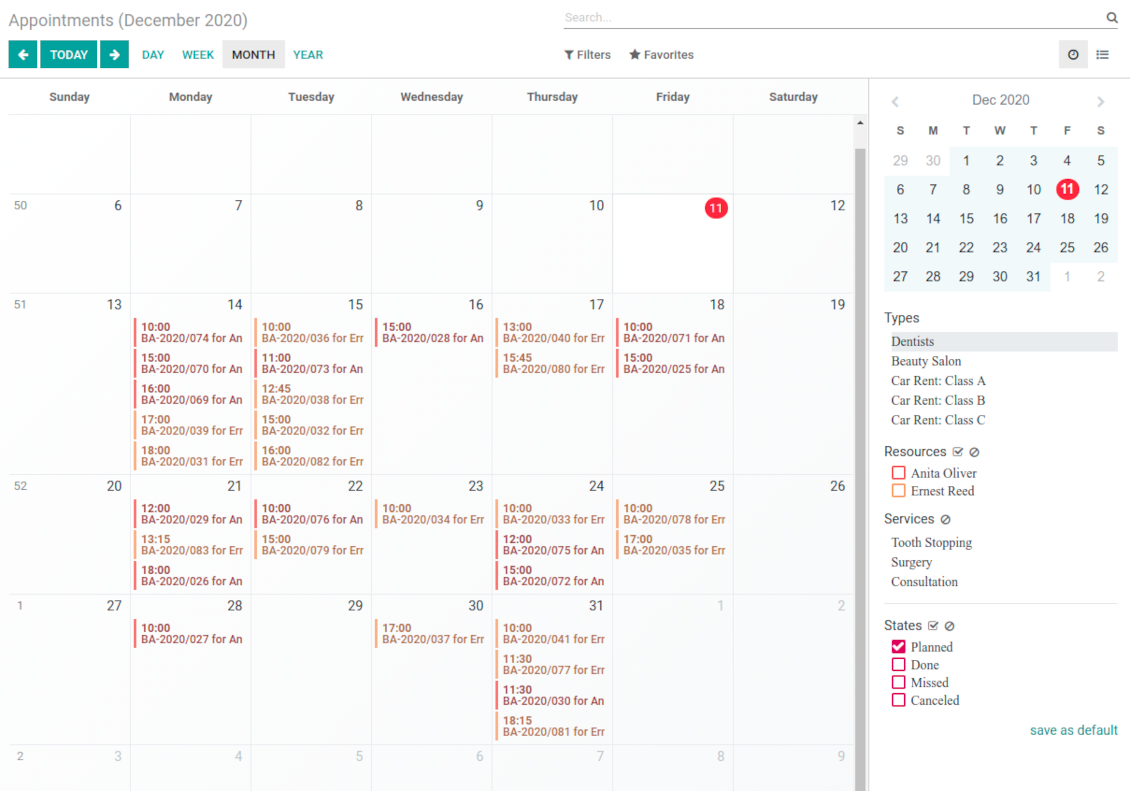
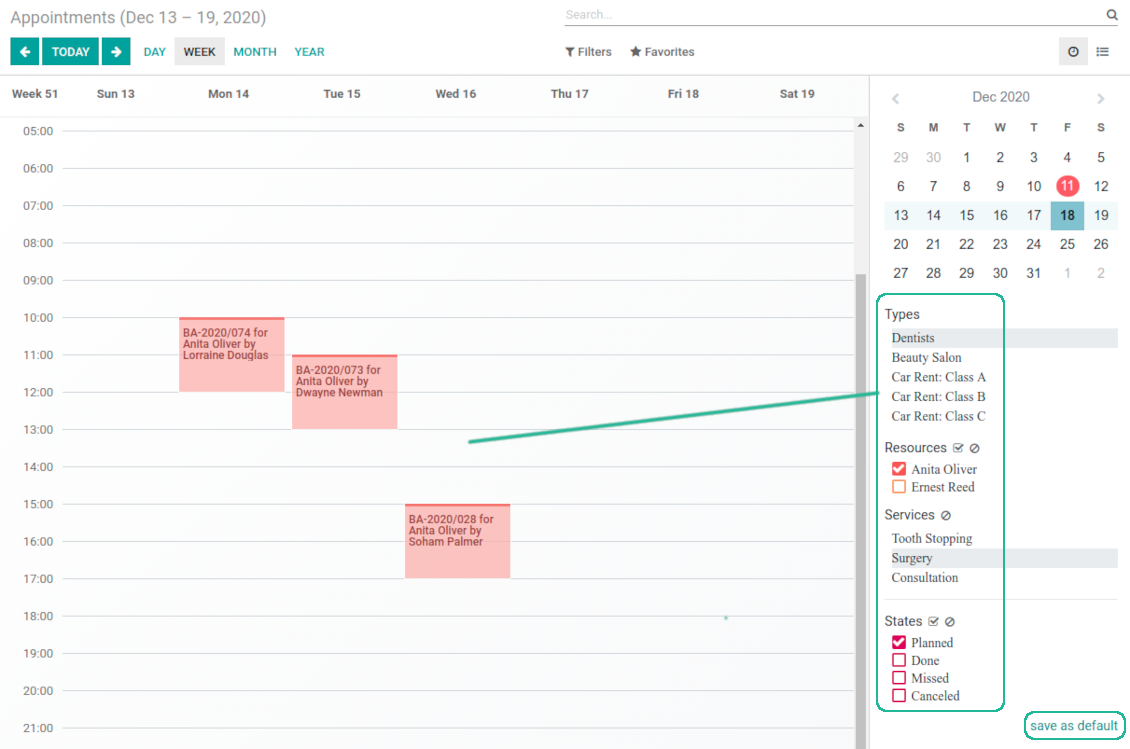
Innovative appointments calendar
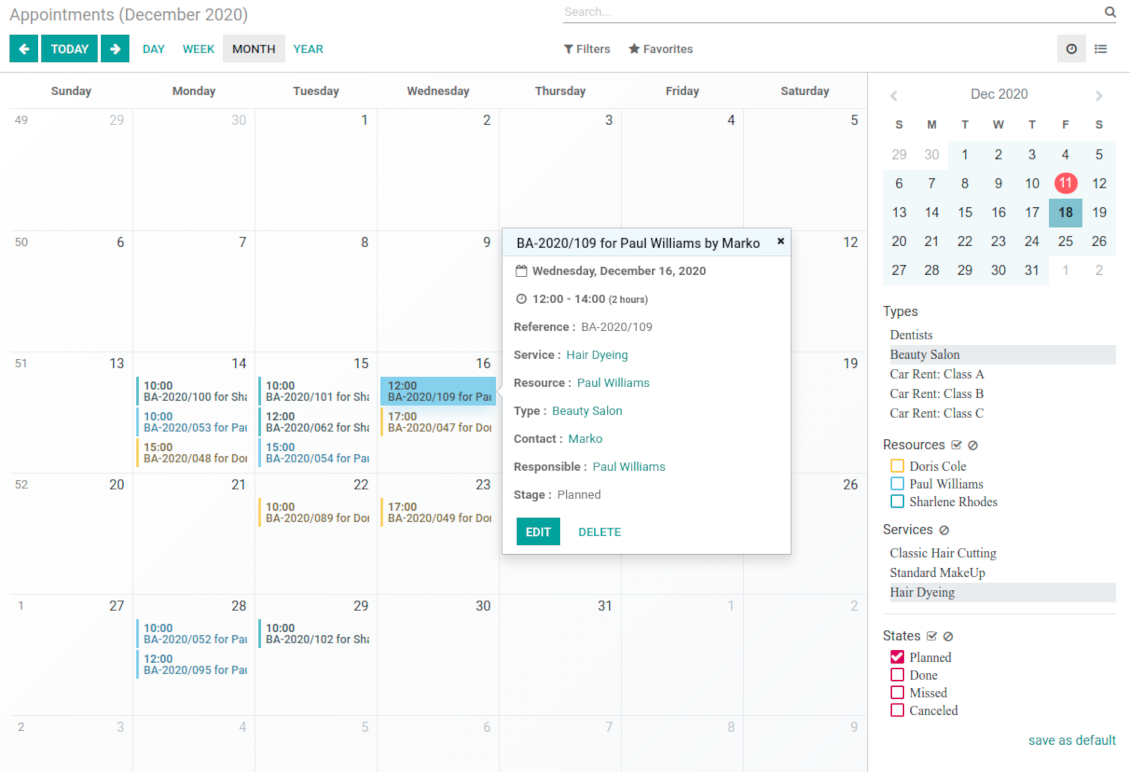
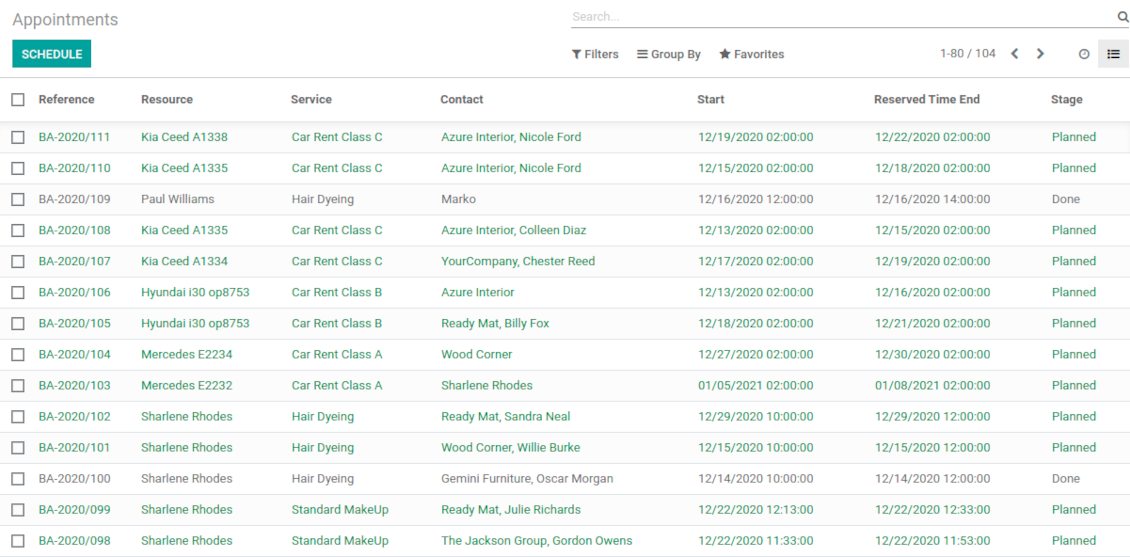
Users administrate reservations from the single calendar view: with quick filtering by appointment details and an instant access for required information
Clear website bookings
Let portal partners and website visitors to schedule an appointment through configurable multi-step process of checkout and confirmation
Sell and upsell services
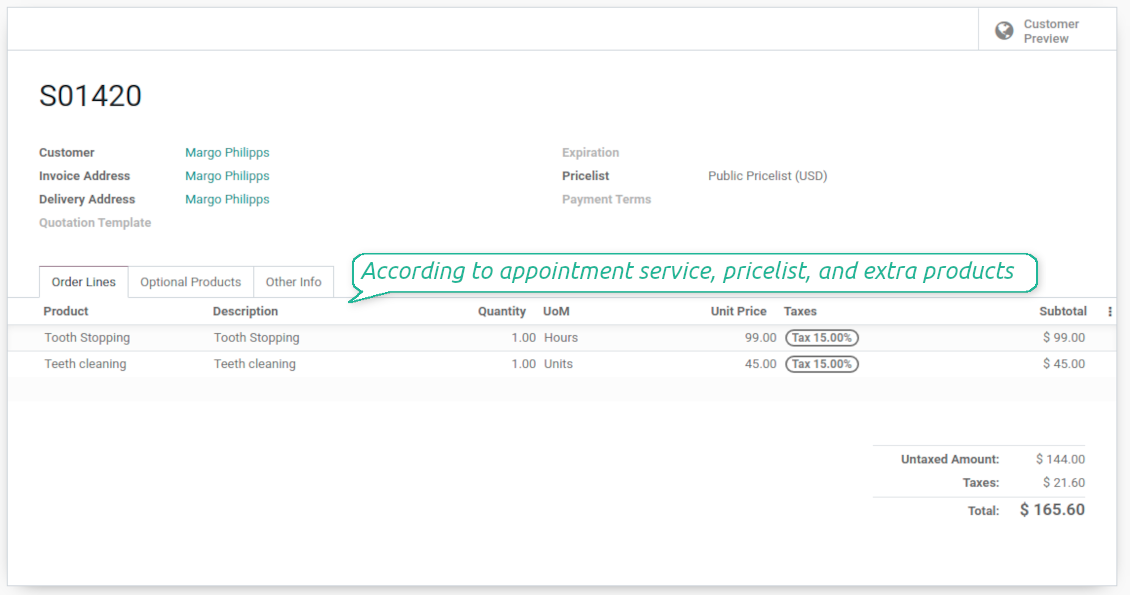
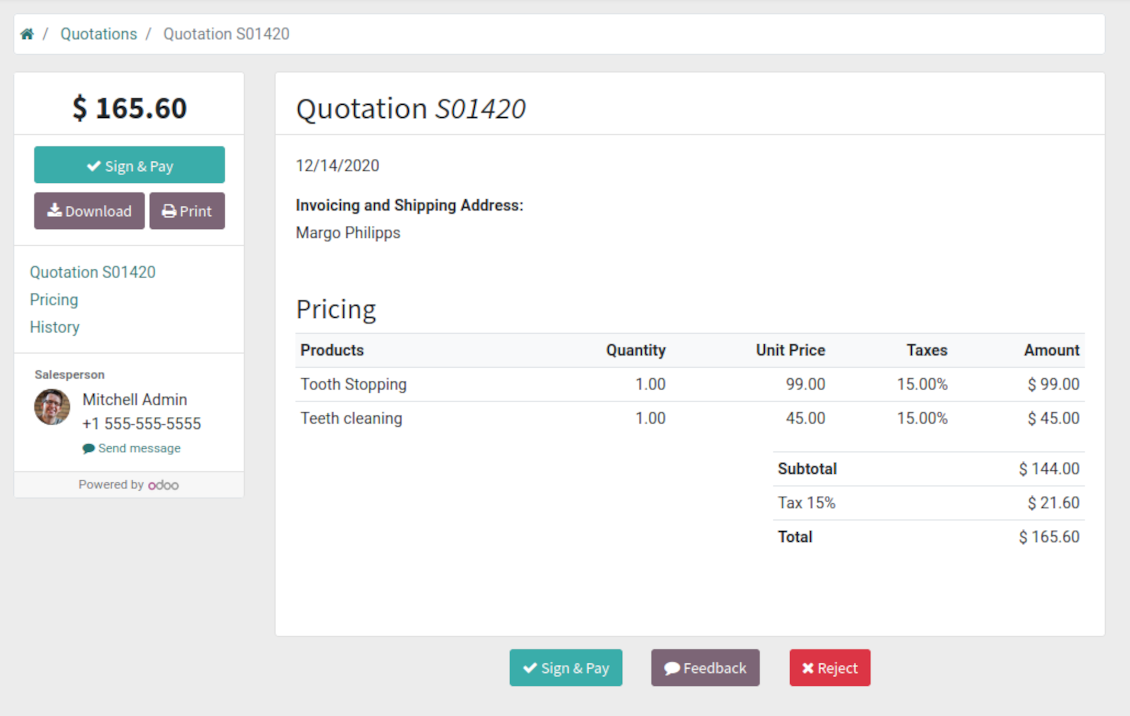
Link bookings with Odoo sale orders and price lists. Boost revenues by upselling accessories
Customer satisfaction and reports
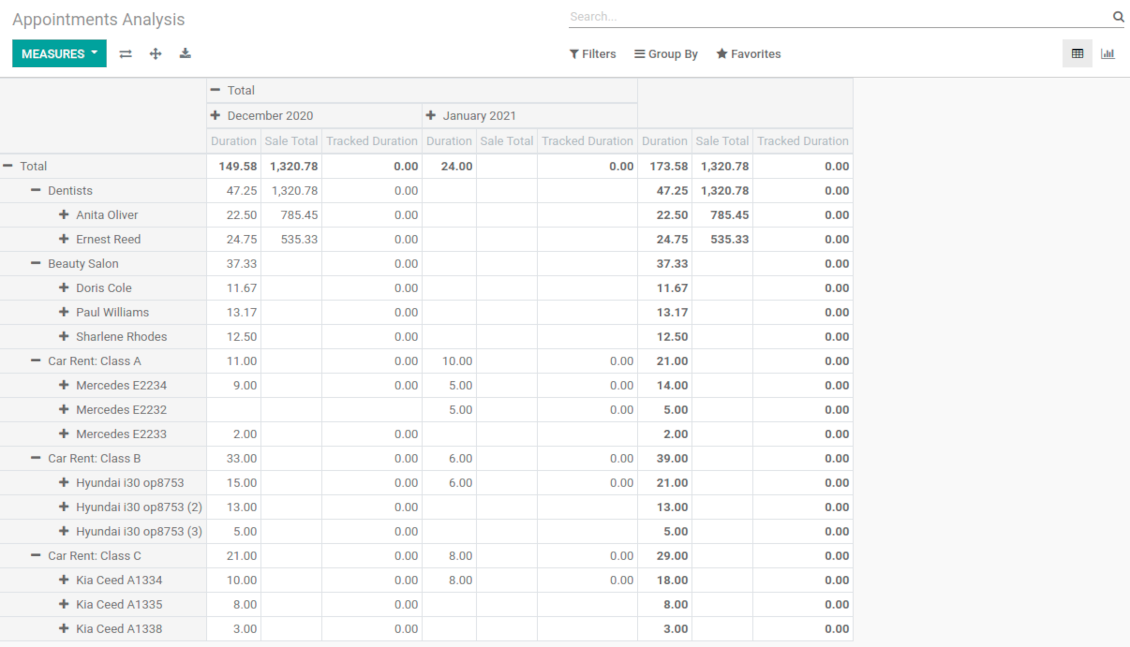
Automatically request client reviews. Analyze appointments by planned and tracked duration, generated revenue
Customizable website and portal pages
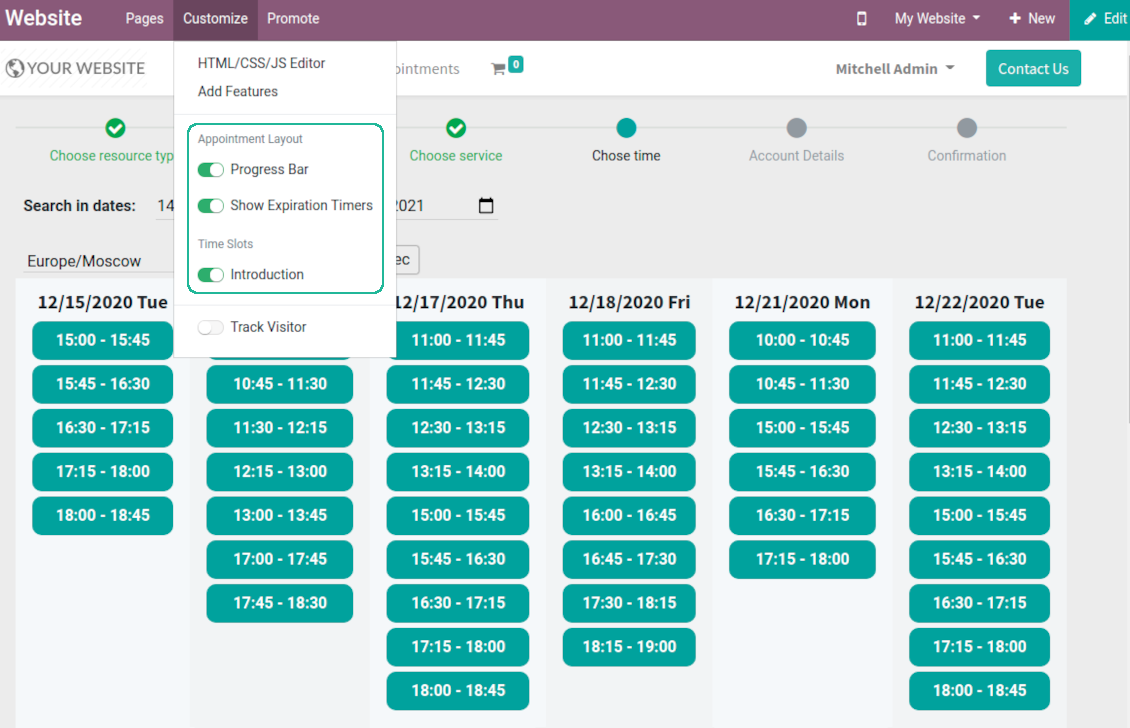
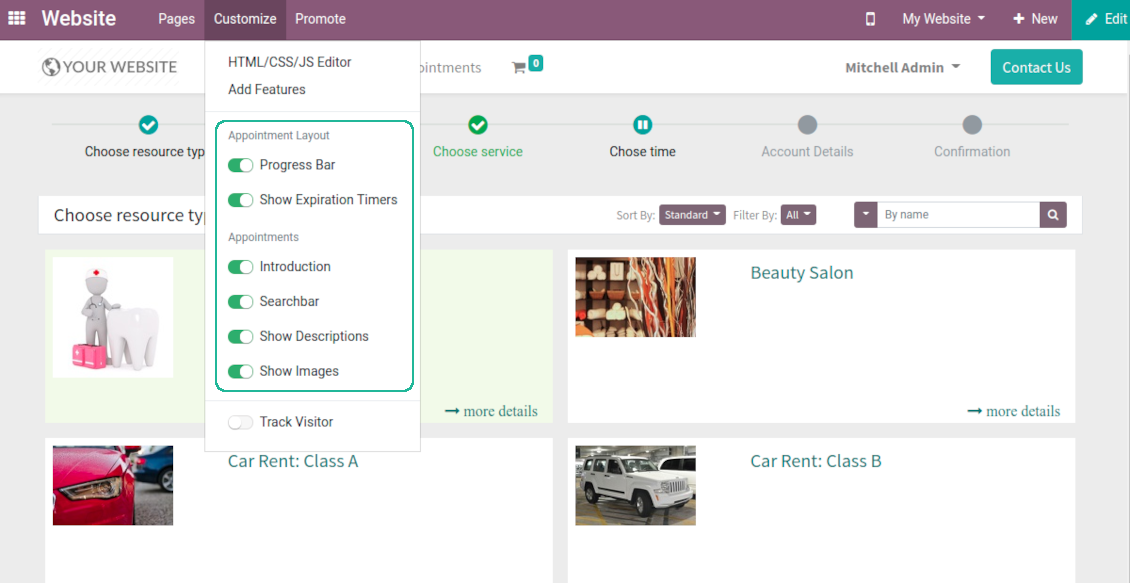
Turn on/off optional layout elements. Introduce own titles and welcome texts. Exclude booking steps
Compatible with Odoo standard features
The app is configurable for multi companies and for multi website environments. Appointment resources might be linked with employees, while reservations - with Odoo quotations
Custom details and reminders
Apply popup alarms, add success emails and SMS reminders. Introduce custom fields for reservations, resource types, resources, and services.
Comprehensive and well thought booking app
The app allows backend user to do some simple configuration to make the booking app able to fit in our different business models.
Very good support and also there is module enhancement from time to time with great usability improvements of more use cases.
Just great App and the best support you can imagine
Dear Olga and Alex
Thank you so much for this function which makes the tool perfect!
I've already installed it and tested it -- it works exactly the way the customers need it
This really makes your Appointment App the best tool available for Odoo :-)
I would also like to thank you for understanding my wishes and for taking care of them. That's exactly why I will choose and recommend faotools the nex time again.
Innovative backend scheduling
Auto time slots generation
-
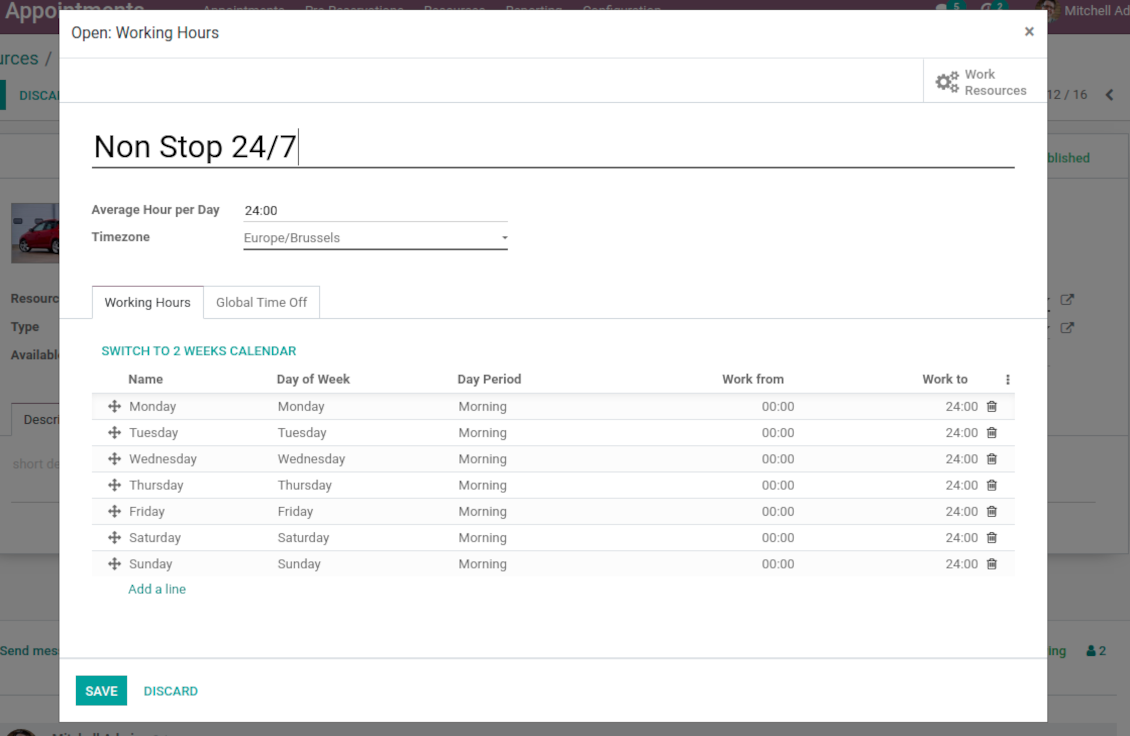
Slots are generated according to configured resource business calendars. Each resource has an own calendar and time offs: it is impossible to schedule appointment for non-working time. If configured, the app would also consider simple meetings of resource responsible users as busy for time slots
-
The algorithm takes into account service duration. Available time slots have duration depending on a chosen service or one entered manually
-
Per each resource type define when appointment might be scheduled. For example, time slot is available not later than 2 days before, and not earlier than 30 days before. Similar rules are applicable for re-scheduling and cancellations
-
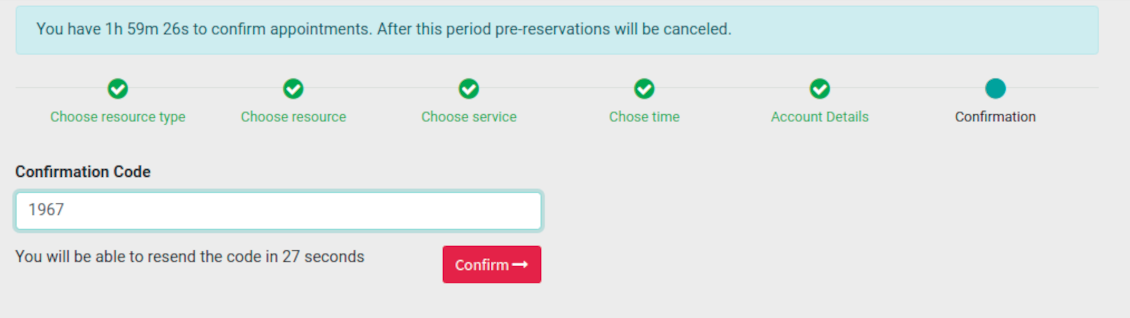
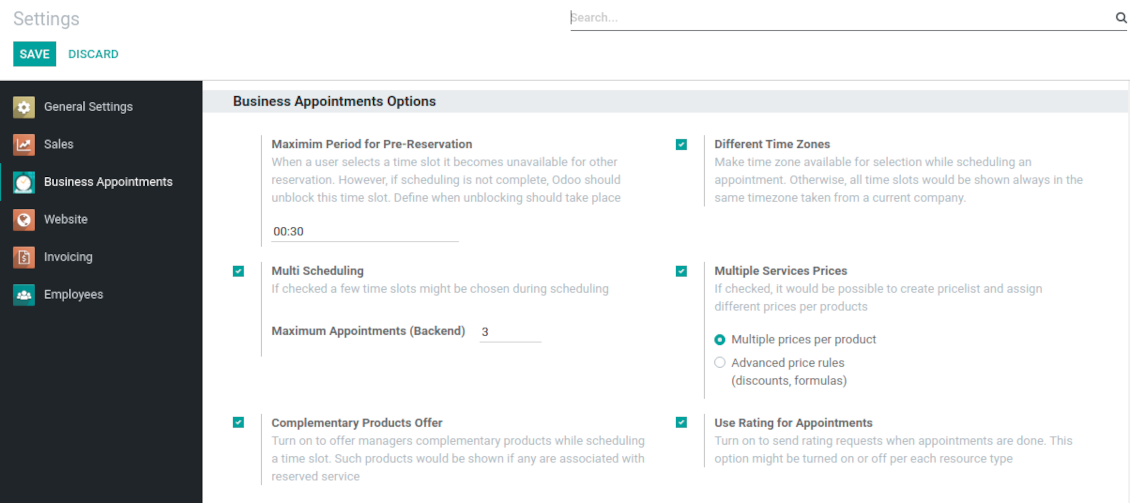
Reserved time slots are not available for other bookings. Even not yet confirmed appointments (pre-reservations) temporarily block target slots. Pre-reservation would be canceled if not done within a specified period (you may change this limit on the configuration page)
-
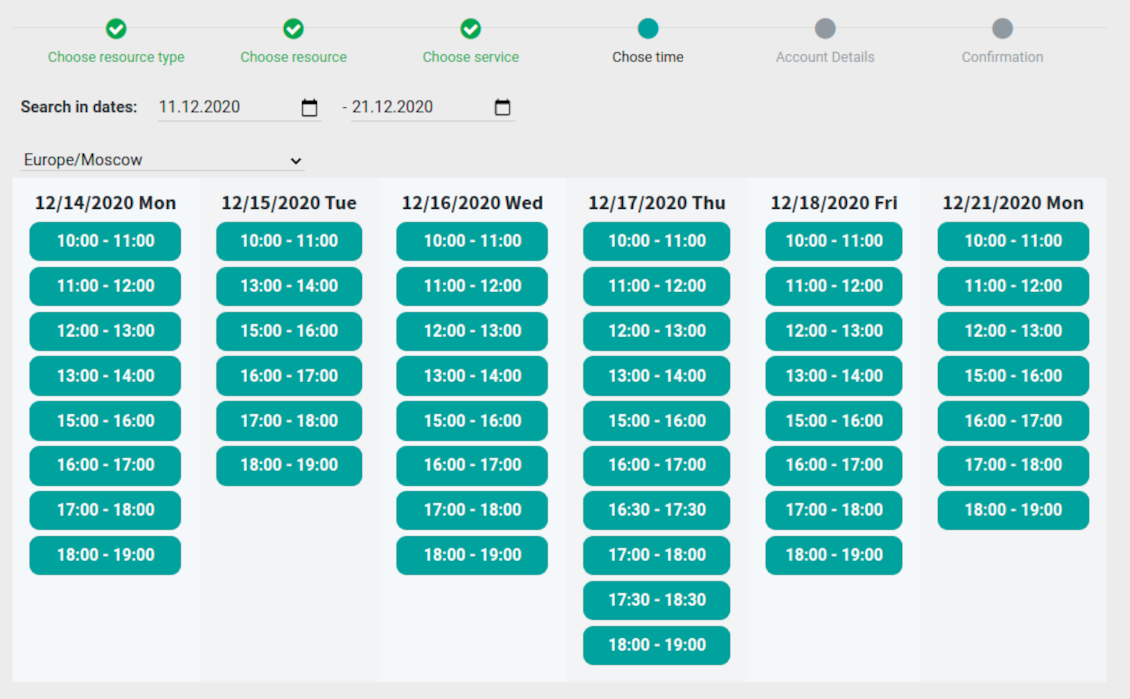
The tool is also perfect for multi timezone appointments. Either let users choose time zone by themselves (default is a browser tz), or set the same timezone for all cases
Smart Odoo reservations
-
No appointment might be entered manually, but it should be selected among available slots and according to the principles you set up
-
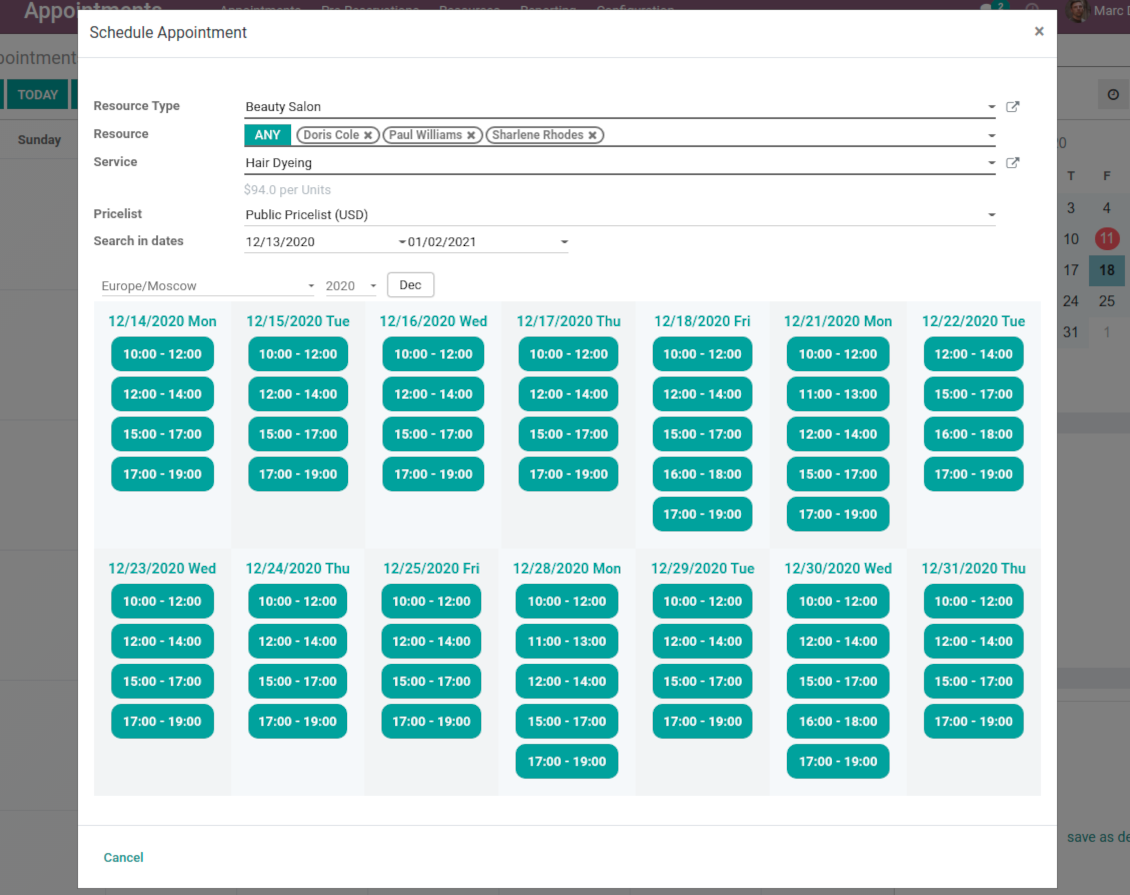
To start new scheduling pick up a required time period on calendar - the wizard would be automatically initiated. Chosen dates are used as time range for slots
-
In the wizard you can change which resource type, resource, service should be scheduled. The tool automatically checks and restricts viable options
-
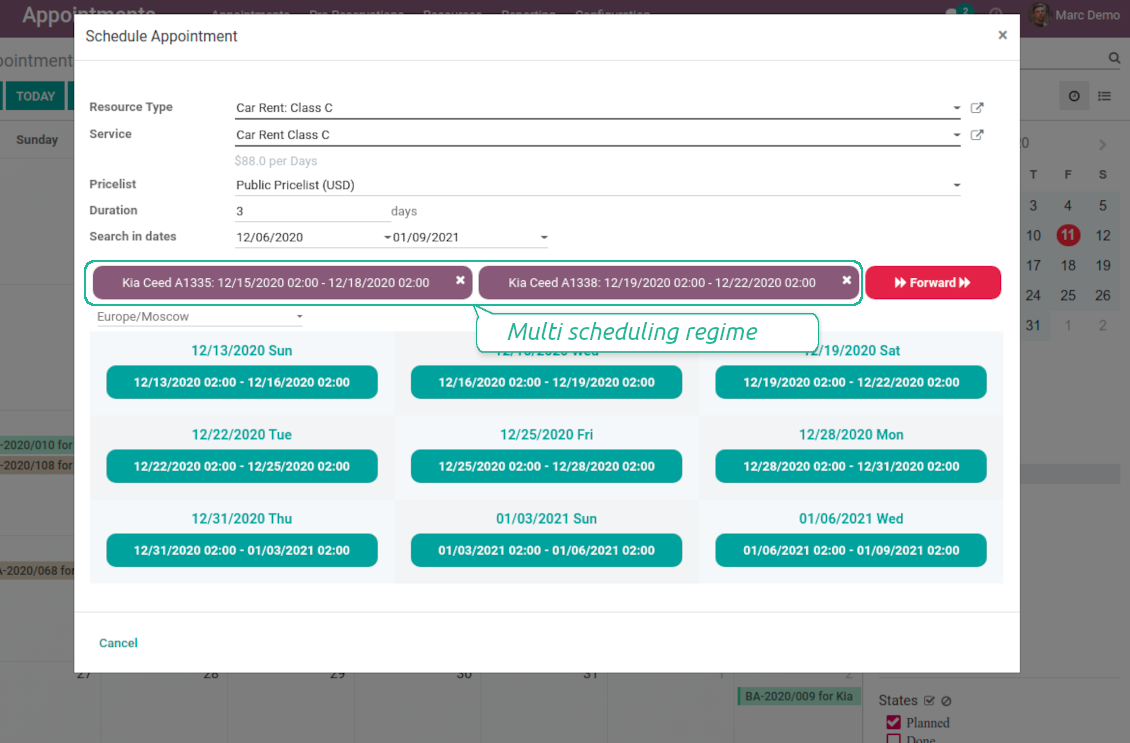
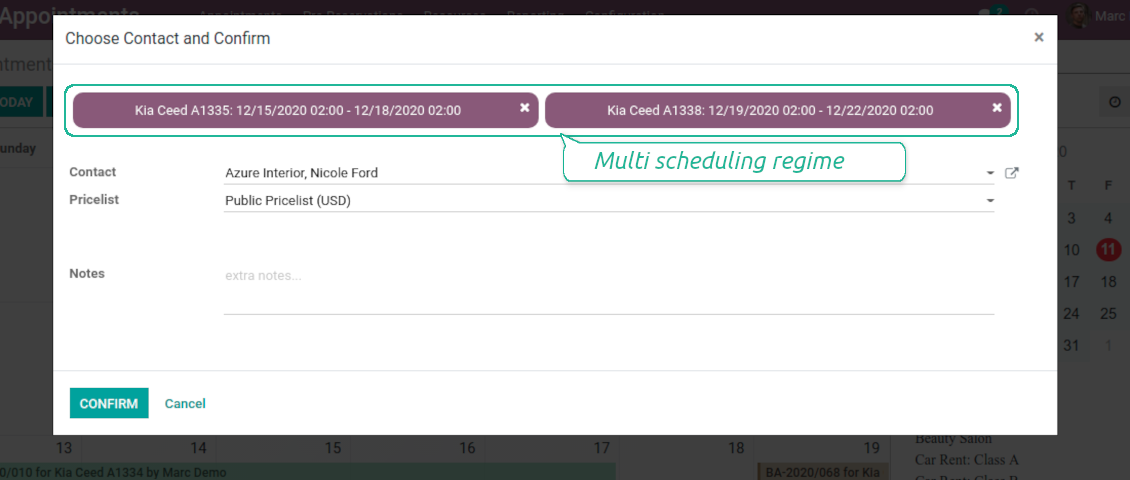
As soon as wizard details are filled up, the tool would generate and show time slots. A manager should merely select a desired one. Selection means that this slot is pre-reserved and can not be used for other bookings. You may even let schedule a few appointments simultaneously (regulated by the special setting on the configuration page)
-
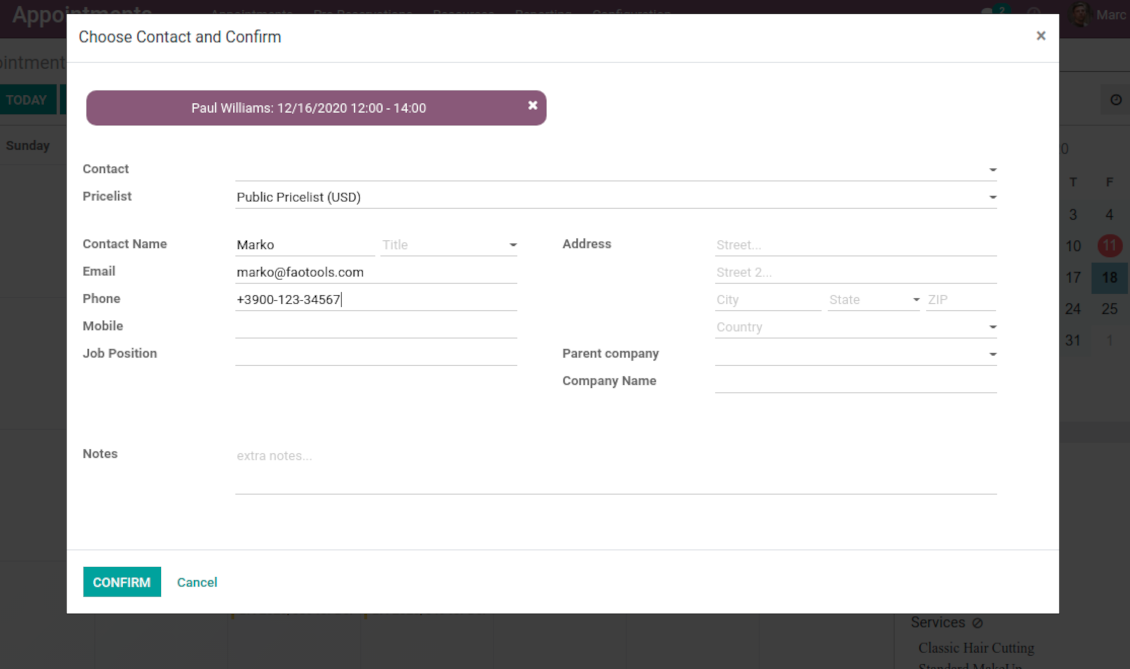
Afterwards, the only thing left is to enter client details
-
From the appointments calendar you may also re-schedule reservations. To that end just drag and drop an event, and the tool would prepare possible time slots.
Universal website bookings
-
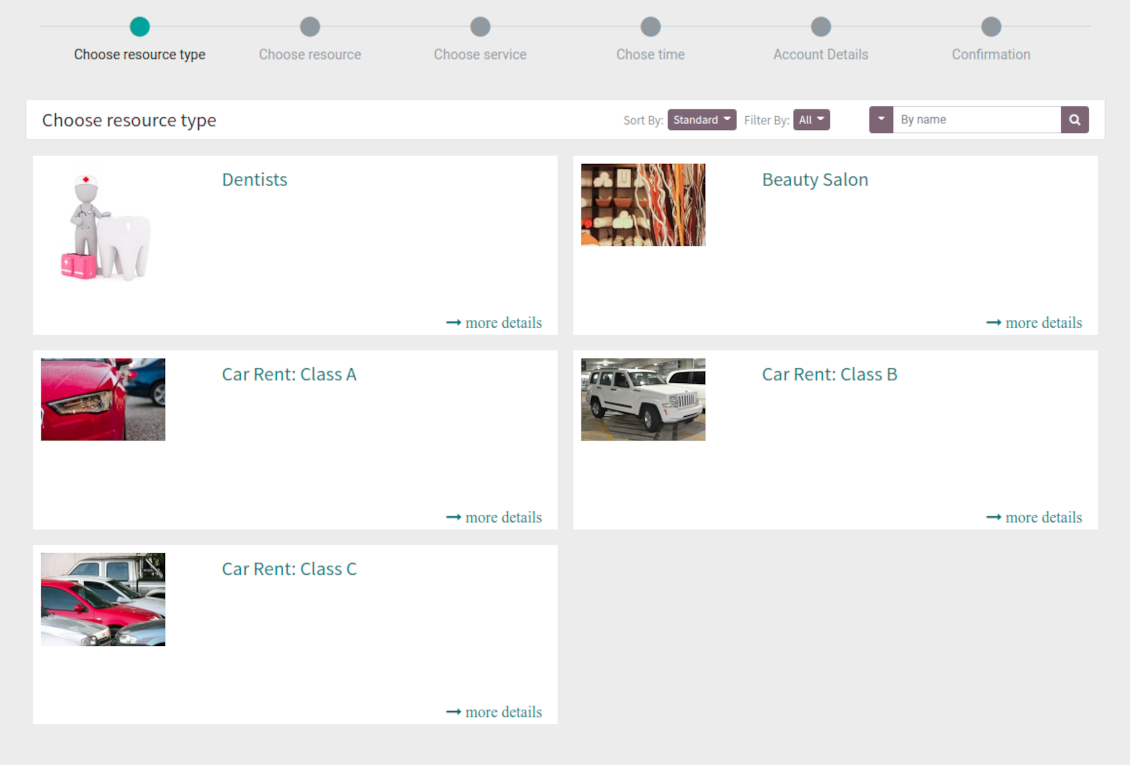
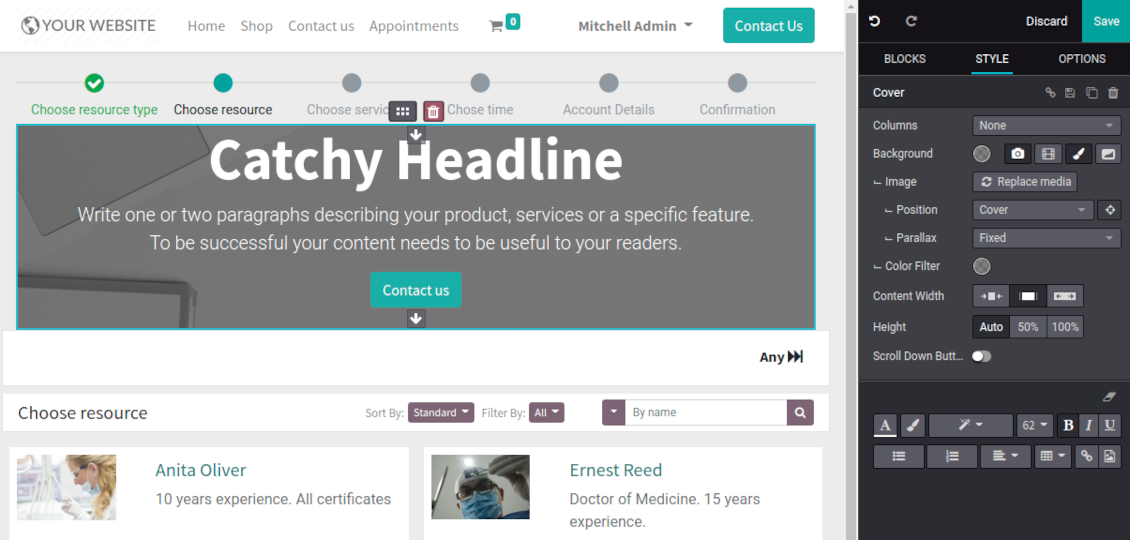
Scheduling an appointment through Odoo portal and website is organized as multi steps checkout process
-
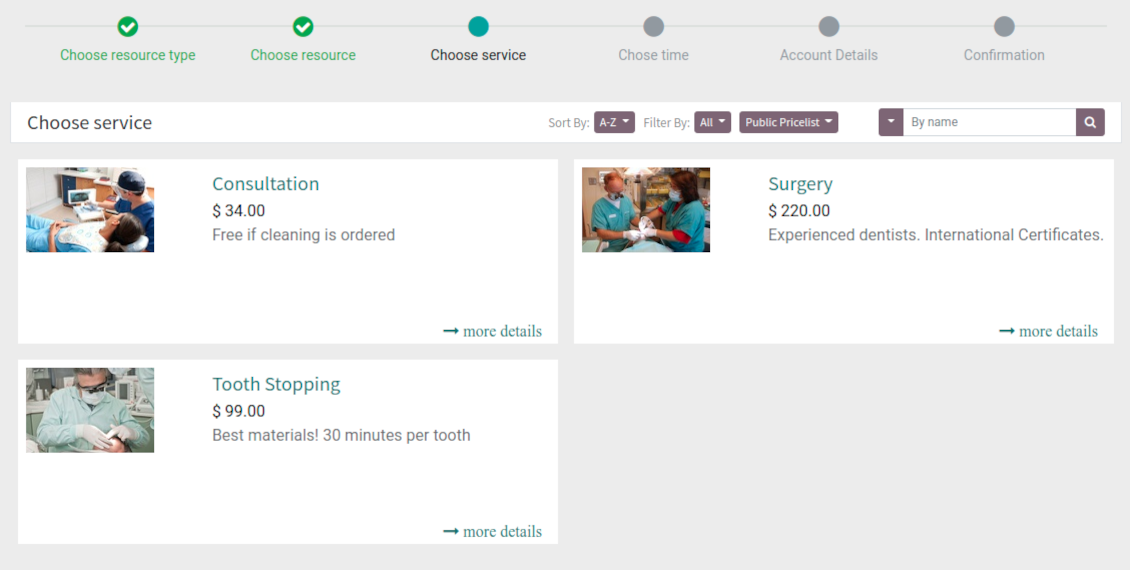
A customer searches among resource types and selects a required one. For example, "Beauty salon" or "Class C Cars". The step would not be shown if there is a single published resource type for this website
-
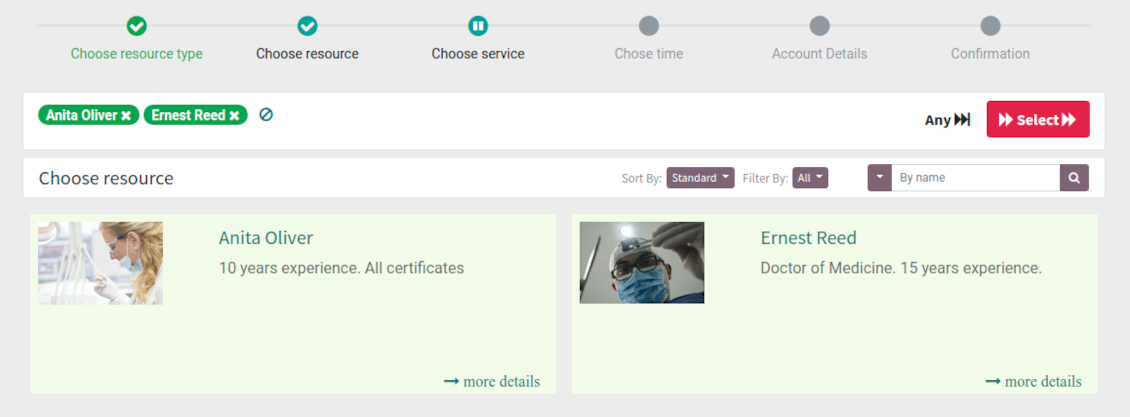
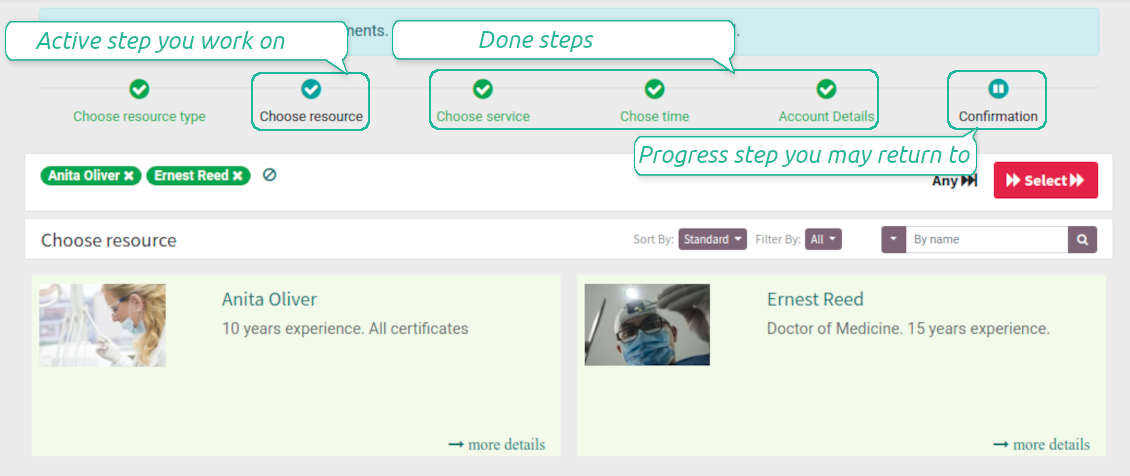
A customer navigates over available for this type resources and chooses one, a few, or apply any (all). For example, "Hair Dresser John Brown" or "Opel Astra 1234". The step is missed in case there is a single published resource, or a chosen resource type assumes automatic allocation
-
A customer chooses a desired service among provided by selected resources. For example, "Classic Hair Cutting" or "Car Rent Class C". Clients would not be asked to choose a service, if there is only one published for this website
-
A customer is shown available time slots. The interface let adopt time frames for search, change time zone, insert duration (for services with manual duration). Each action results in slots recalculation. Website visitors might be optionally allowed to book a few time slots for a chosen service
-
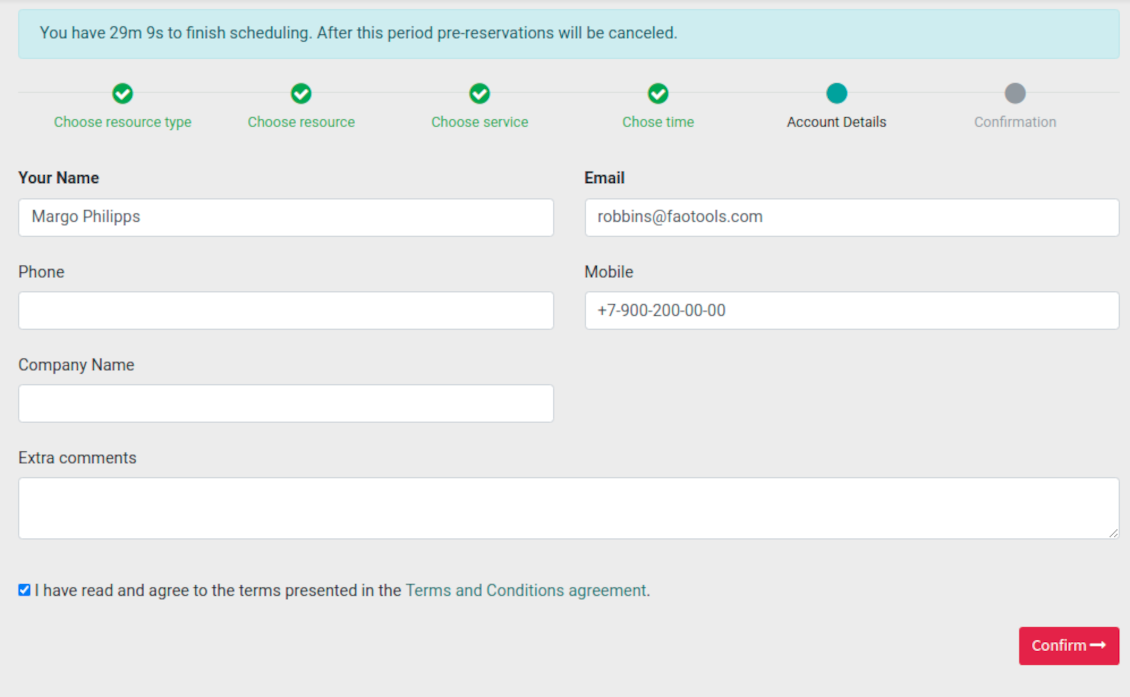
Slots selection is required and might be not missed. As soon as pre-reservation is done, nobody else can book the same slot. Simultaneously, clients have limited time to make confirmation after which pre-reservation would be canceled (the exact time is up to you)
-
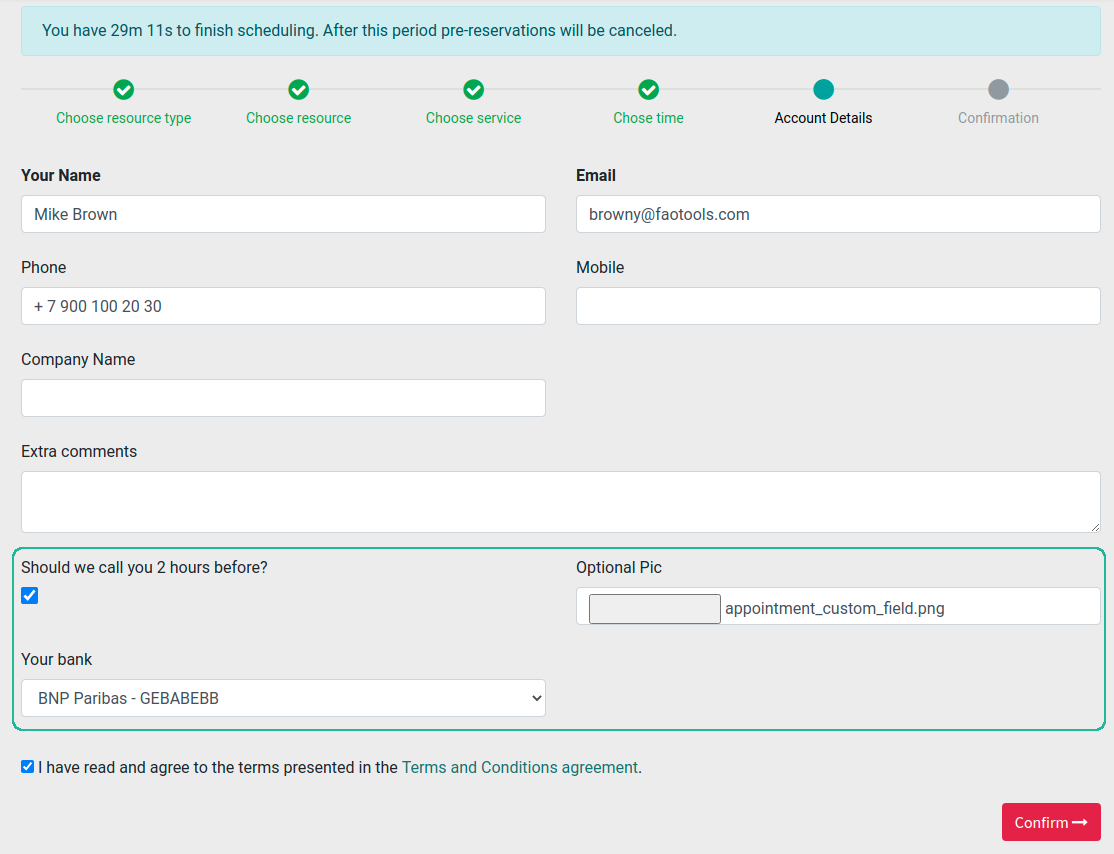
A customer should enter contact details, set of which might be configured per website. By default required ones are name and email. Previously registered (portal) users would have fields auto populated. Optionally add here a checkbox to agree with terms and conditions
-
Optionally ask customers to confirm email / mobile or phone number. If confirmation option is turned on, website visitors would be obliged to insert received codes. In case a correct code is not introduced in time (set up on the configuration page), appointments would be canceled. If you selected SMS confirmation (depends on Odoo SMS IAP), but you balance is not sufficient, a confirmation code would be forwarded by email
-
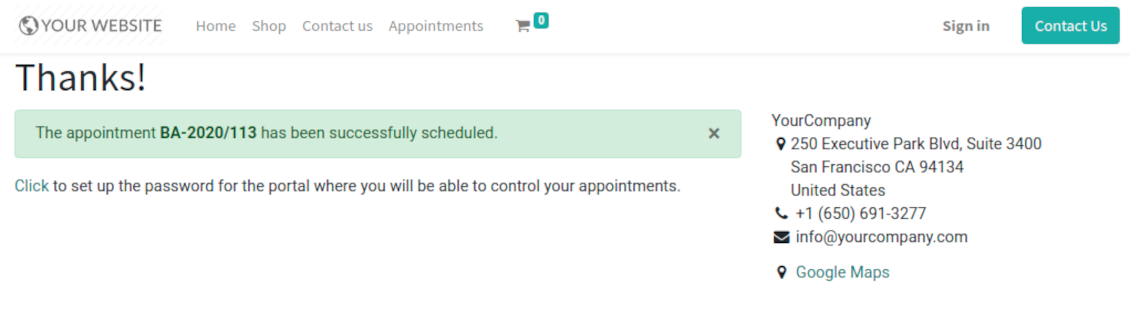
As soon as all steps are done, a customer receives a confirmation email and is redirected to the success page. For not yet registered users, Odoo would offer to enter the password for Odoo portal
-
During the whole process customers might see the progress bar (if you have not purposefully turned it off). Progress bar let safely return to any previous step.
Configurable appointment pages
-
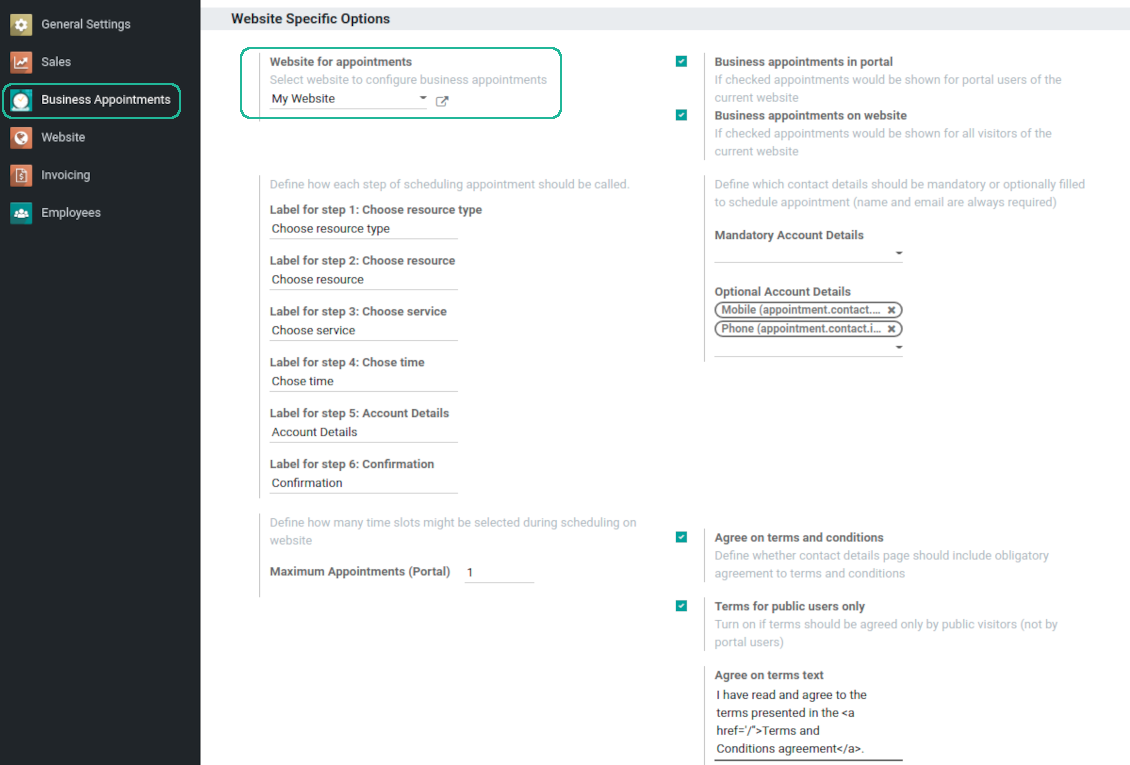
Show / hide progress bar. Introduce your own names for progress steps
-
Show / hide introduction block, images, short description for resource types, resources, and services
-
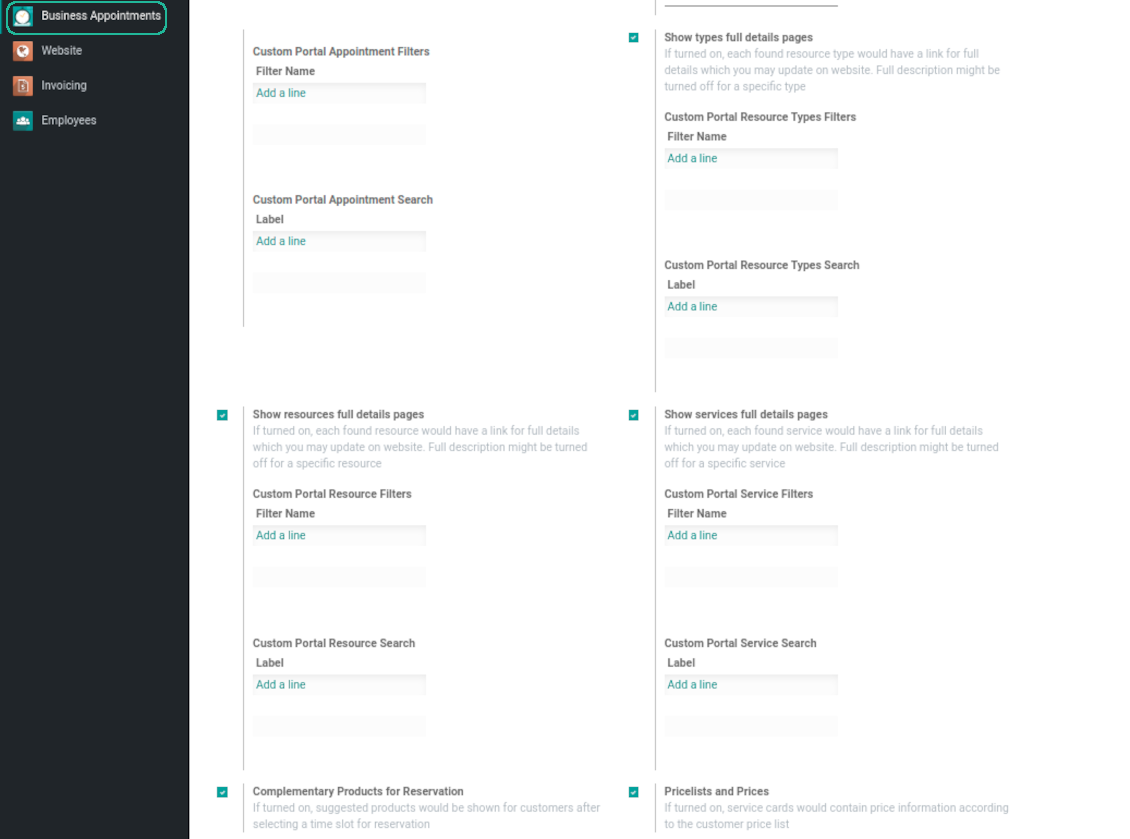
Prepare own full details pages for resource types, resources, and service using Odoo standard website builder. Show / hide links for those pages
-
Show / hide pre-reservation and confirmation timers
-
Choose contact details fields required to be entered. Define fields which should be entered for appointments
-
Define filters and sorting criteria for resource types, resources, and service pages
-
Show / hide agreement with terms and conditions for portal / public users. Introduce your own text and link for that agreement
-
Show / hide prices
Portal control of reservations
-
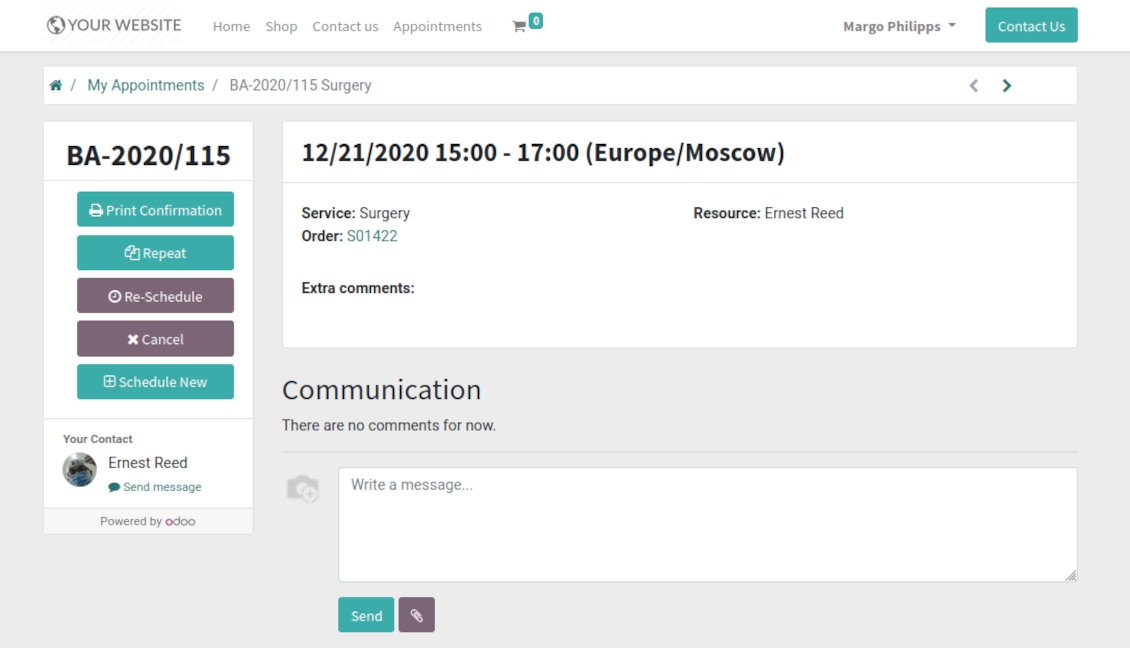
Customers may control their appointments right in the Odoo portal
-
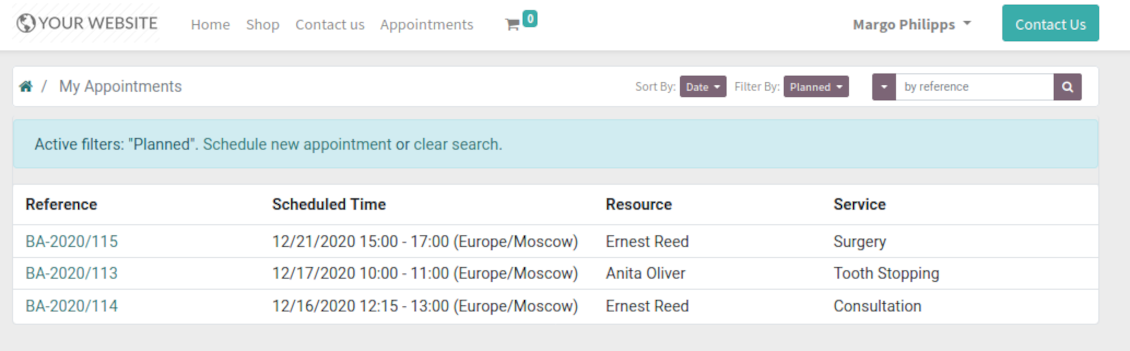
Portal users observe the list of planned and done appointments, and may check any of those
-
The Odoo portal allows to schedule new or repeat existing reservation, cancel or re-schedule planned ones
-
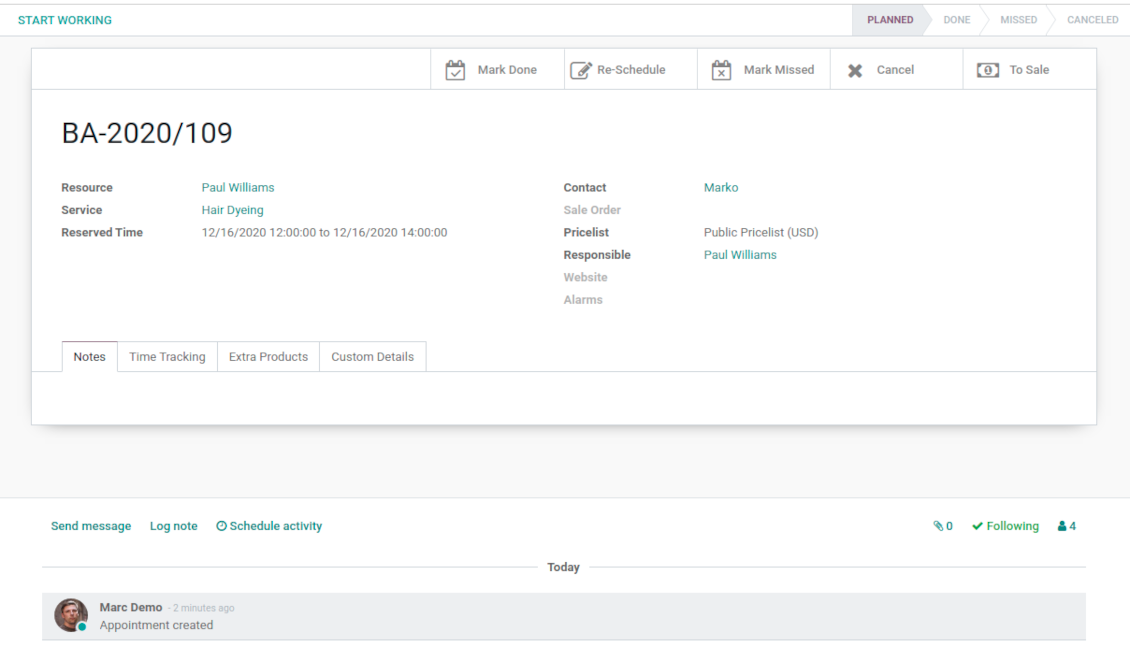
Each appointment has chatter box which allows direct communication with resource manager and other followers
-
If an appointment has a linked sale order (sent, confirmed or done) it would be also available through the standard Odoo portal entries 'Quotations' and 'Sale Orders'.
Structured service management
Resource types
-
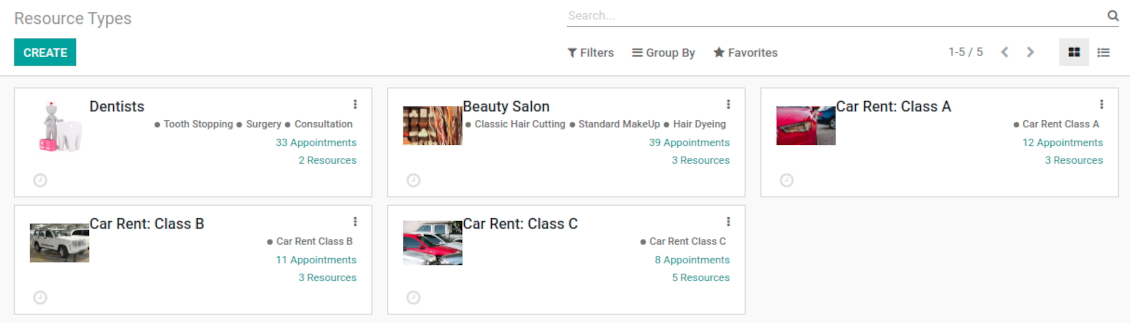
Resource types might be particular businesses you manage. For example, 'beauty salon', 'dentistry', or just 'hairdressers'
-
Another approach is to consider a resource type as a group of particular resources. For instance, 'class B cars' and 'class C cars' for rental business
-
Resource types contain main settings of how to organize service provision: how to allocate resources, how to calculate appointment total price, what are time restrictions, which services are possible, etc.
Resources
-
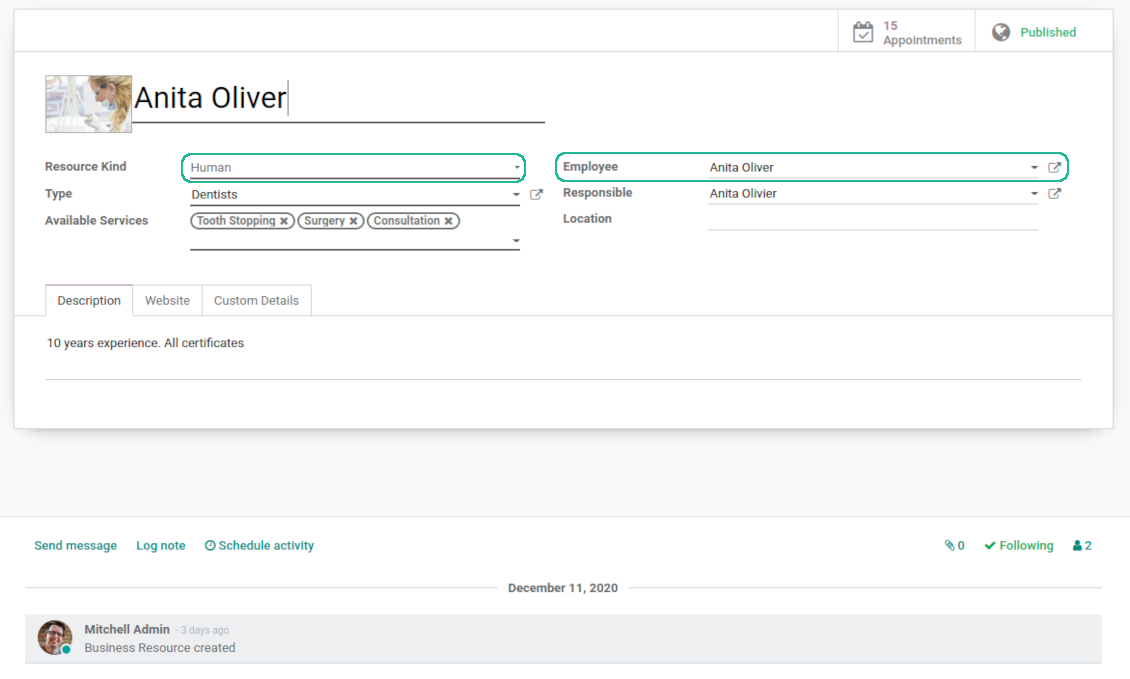
A resource in many service businesses assume certain specialists: For example, 'Dentist John Brown', 'Hairdresser Anna Green'
-
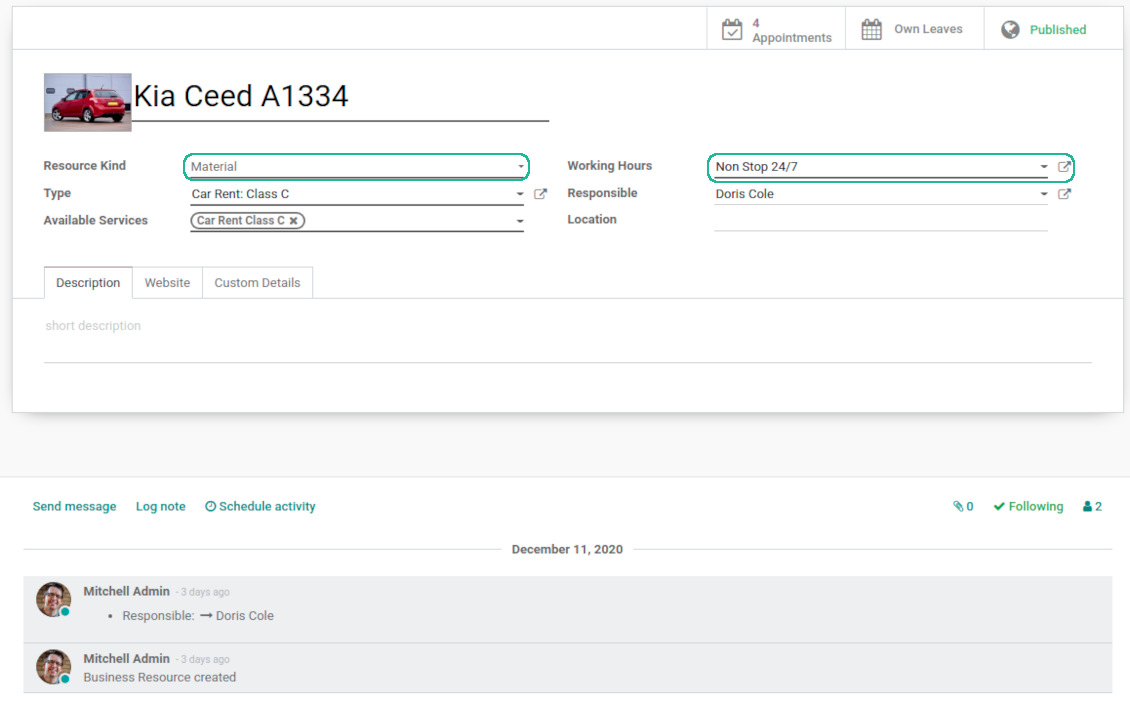
In other companies it might be a particular equipment or facility. For instance, 'Mercedes A1231', 'Room 12'
-
Resources are the Odoo object which working calender you are planning. Thus, they define available days, timetable and time offs, responsible users, etc.
Services
-
An appointment service defines what actually should be done. For instance, 'consultation', 'tooth surgery', 'classic hair cutting', 'car class C rent'
-
Services are not equal to Odoo products, but they are linked between each other to manage pricing details
-
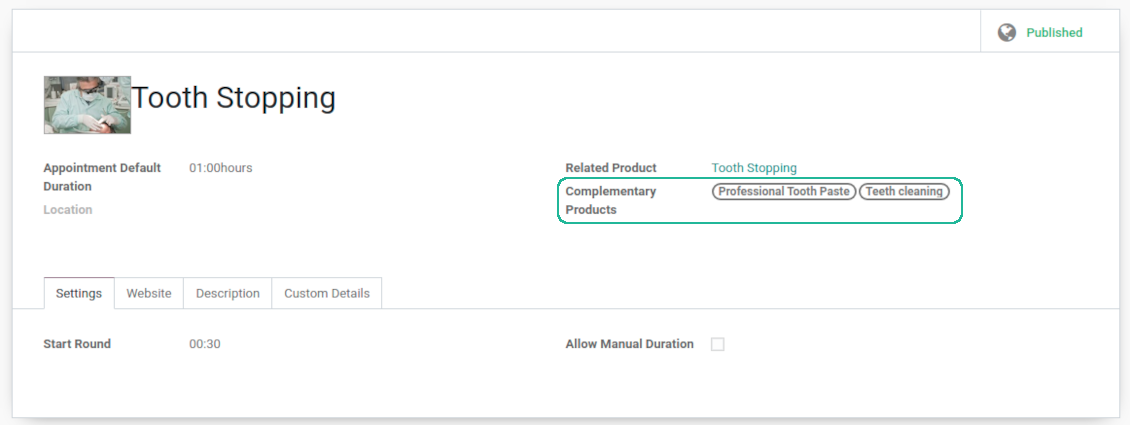
Services regulate time settings of appointments (how long should it take and when it can be started), which goods might be suggested as complementaries
3 layers to reflect specifics
-
The decision what to consider resource types, resources, and services is completely up to you. Such approach let reflect almost any service business
-
The tool does not force you to have multiple instances for each layer. In simple cases, there might be just a single representative for each step. For example, Lawyers - Attorney Chris Black - Consultation
-
If there is a single option, the app would reflect that by simplifying appointment scheduling. So, steps without actual choice are auto missed.
Sale and upsell services
Sale orders and appointments
-
The app let you link appointments and sale orders. You have 3 configuration options
-
Automatically confirmed sale orders: if chosen, a sale order would be created as soon as appointment is scheduled. The method is suitable in case your service is standard, and final sale positions and details would hardly be changed during appointment. For example, fixed-price hair cutting
-
Draft sale orders: if chosen, only a quotation would be generated. In such a way you would be more flexible in updating an order during service provision or beforehand. For example, if you want to add extra complementaries during a visit or to grant clients individual discounts
-
Manual sale orders: if chosen, managers would have to create quotations while providing service. The method might be applicable when most of sale lines become clear only during the visit itself. For example, mobile phone repair business assumes initial diagnostics and only after that offering the price
-
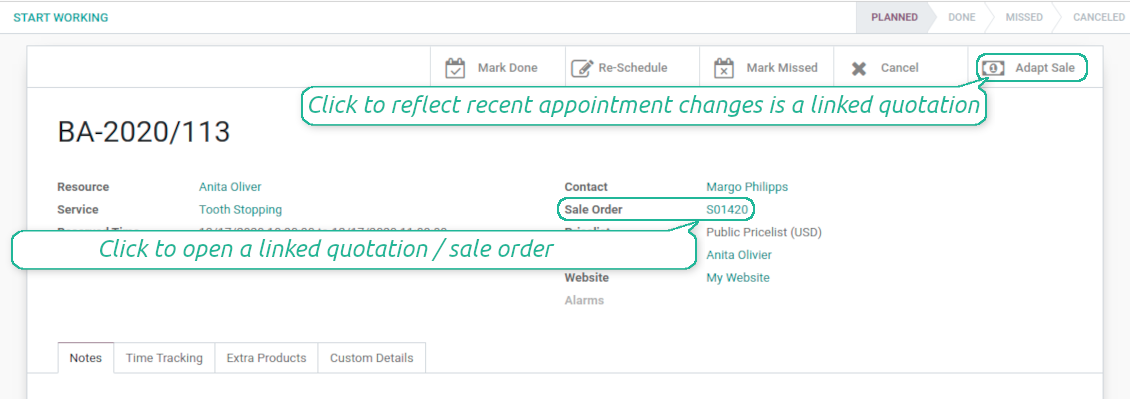
Until an appointment sale order is not confirmed, you would be also able to update that right from a reservation form. Both service, quantity and complementary products are re-calculated in that case
Service pricing
-
The tool let you configure pricing method per each resource type
-
Per planned duration: if chosen, Odoo quotations would be created based on initial reservation plans. For example, it might be suitable for car rent or massage
-
Per units: if chosen, sale orders consider appointments for the same price disregarding their duration. For example, standard haircutting or tire mounting are invoiced the same disregarding how much time they take
-
Per tracked (real) duration: when you want to invoice actual time spent on service provision. For example, the approach might be suitable for consultation or legal services
-
Prices are price list dependent. It means, that a manager might select individual conditions during scheduling. In such a way, it is possible to apply various currencies, discounts, promos
-
The latter feature is also applicable for website / portal users. In case there are a few to-select price lists, users would be able to choose the most suitable (e.g. in a correct currency). For portal user, their partner price list is selected by default
Complementaries and upselling
-
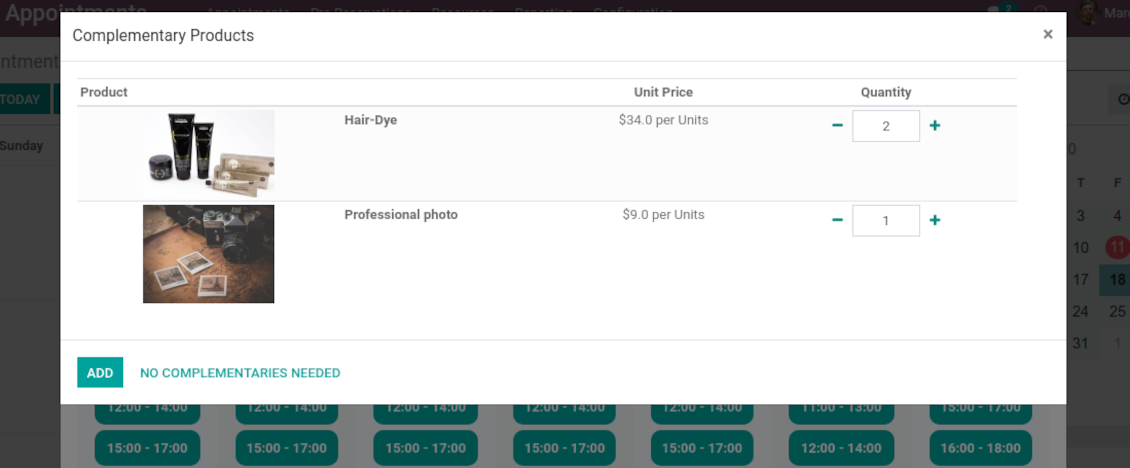
When a client finishes scheduling, it seems a good moment to increase a bill by offering complementary products. The tool aims to help you in that
-
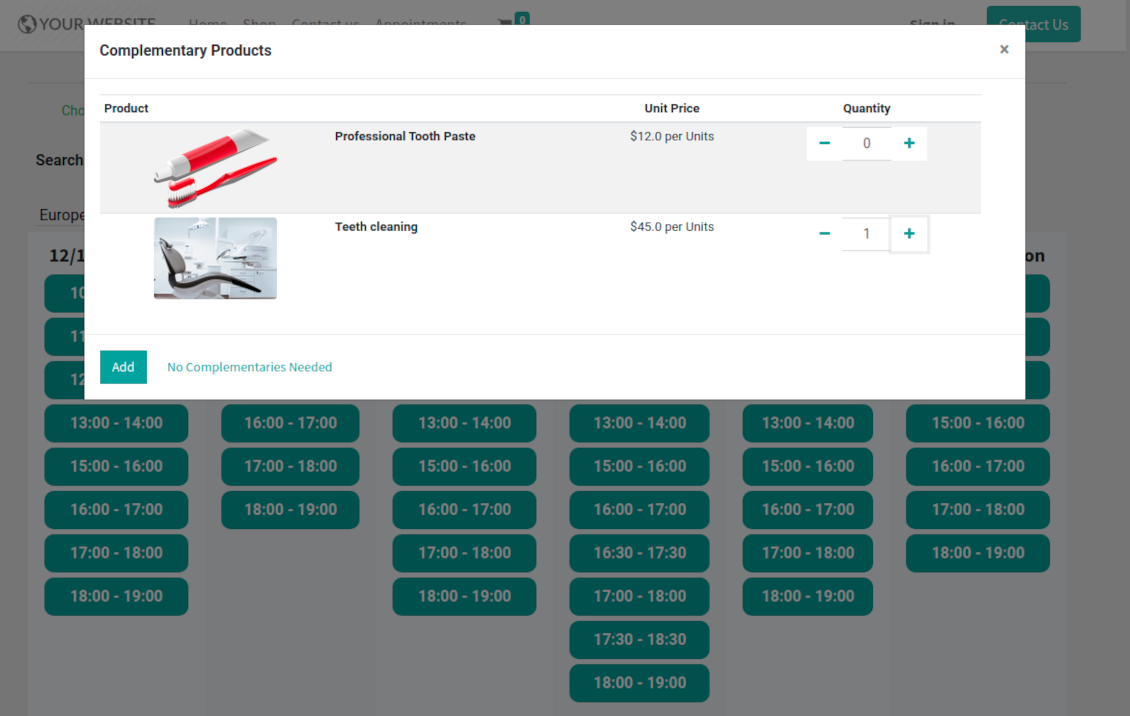
Odoo would show popup wist suggested products for backend managers immediately after reserving a time slot
-
Website visitors / portal customers would see accessories dialog also when they select time for reservation
-
The popup allows both adding one / a few of complementaries or merely miss the step if suggested products are not required
-
The feature is turned on/off on the configuration page: for backend and for each website. Popup would be shown only in case there are complementaries defined for a booked service
Flexible configuration: universal appointment application
Resource allocation
-
In case of a few resources of the same type, the challenge how to distribute appointments among those arises. There are 2 general approaches introduced by the app
-
Manual allocation - applied when each resource is unique, and you prefer to give clients a right to select among those. For example, customer would like to be consulted by a certain doctor, or to be serviced by a definite hairdresser. Manual allocation does not ask a client to select resource as obligation. This is the right, which might be simply missed by explicitly choosing "any" or a few of resources
-
Automatic allocation - applied when all resources are considered equally good for clients. For example, customer would hardly compare Opel Astra 1234 vs. Opel Astra 1235. Automatic allocation is configured per each resource type depending on your business specifics
-
Automatic distribution by resource workload let assign appointments according to the total planned duration of all open appointments. For example, it might be fair in beauty salon to equally spread tasks
-
Automatic allocation by appointments number does not take into account real duration, but only absolute quantity. For example, it might be suitable for tire mounting where price is set up not per duration but per units
-
Automatic distribution by order means that each resource has own priority, and allocation is done on a queue basis. Thus, the resource with the highest priority would be always chosen until it has available slots for the target moment. After that, the second-important resource is under consideration until it is also occupied, and so on. For example, such approach might work for facilities booking or car rental
Service duration
-
Duration is applied per each service individually according to the set of rules
-
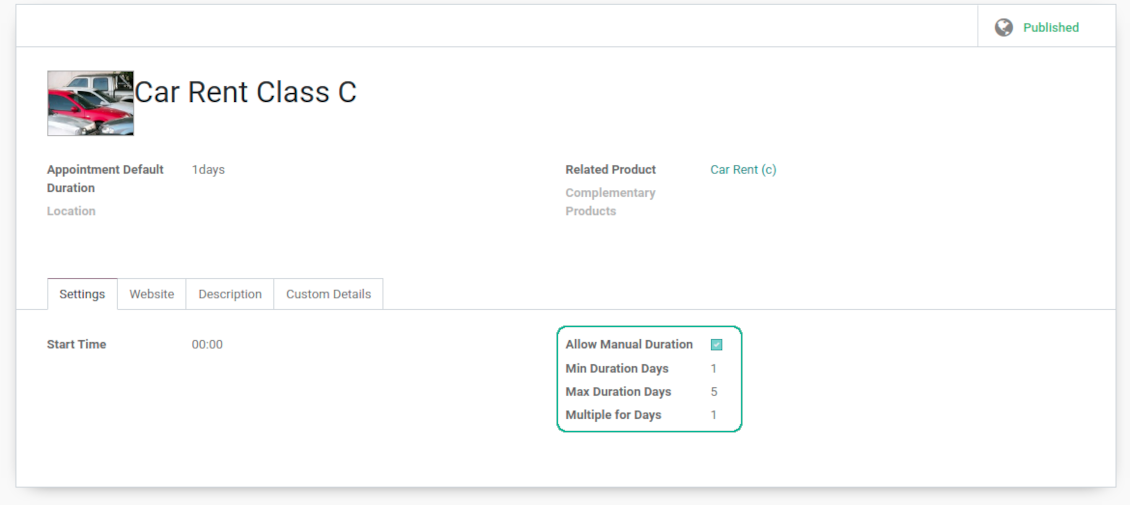
It is possible both to have rigid duration for service (for example, standard hairdressing always lasts an hour) or let clients / managers select that manually (for example car rental might take from a day or 60 days)
-
Duration is defined either in hours (for example, it might be suitable for consulting, repair) or in days (for example, applicable for equipment or room rent, conference translator services)
-
For manual duration it is possible to apply restrictions: what is the maximum/minimum order, what should be the multiplier. For instance, you can simply apply the rule: a service should last not less than an hour, not more than 8 hours, but duration should be always multiplied for 30 minutes (1:20 is not possible, while 01:00 and 01:30 are fine)
-
The app also allows to define the rule to round time slots start. Sometimes applied restrictions might result in calculated start you do not like. For example, for an hour-long service start at 12:23 is hardly good. To solve the problem you can simply set up rounding for an hour (other available options are 5, 10, 30 minutes; 2 hours; midnight or midday tomorrow)
Configurable reminders
-
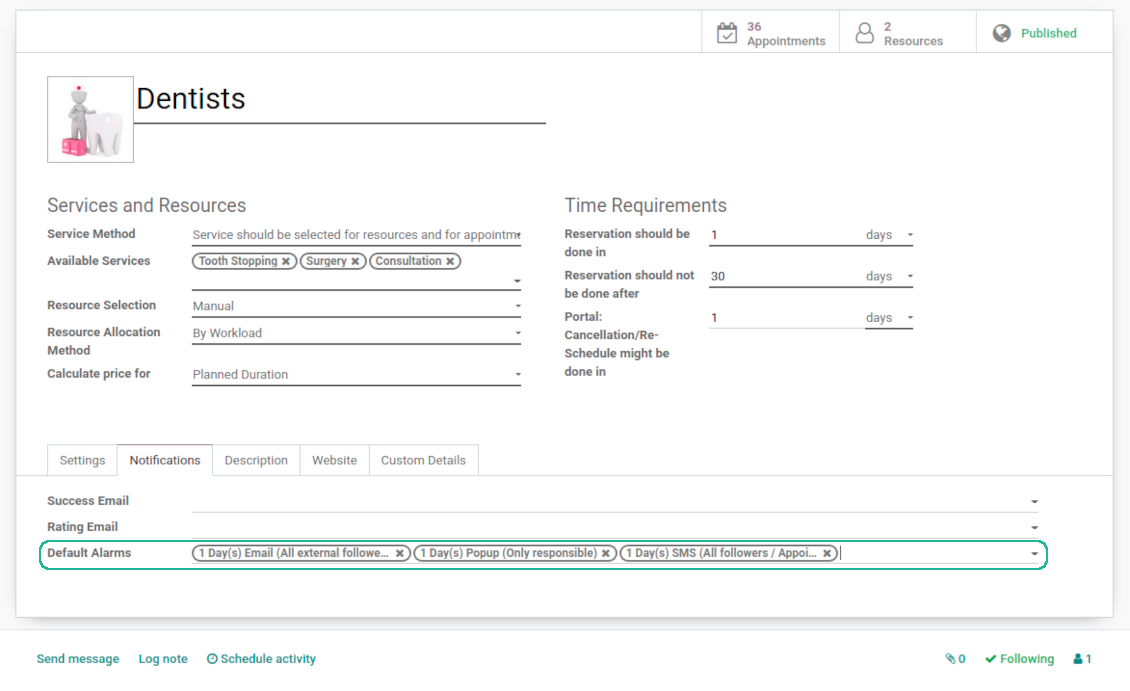
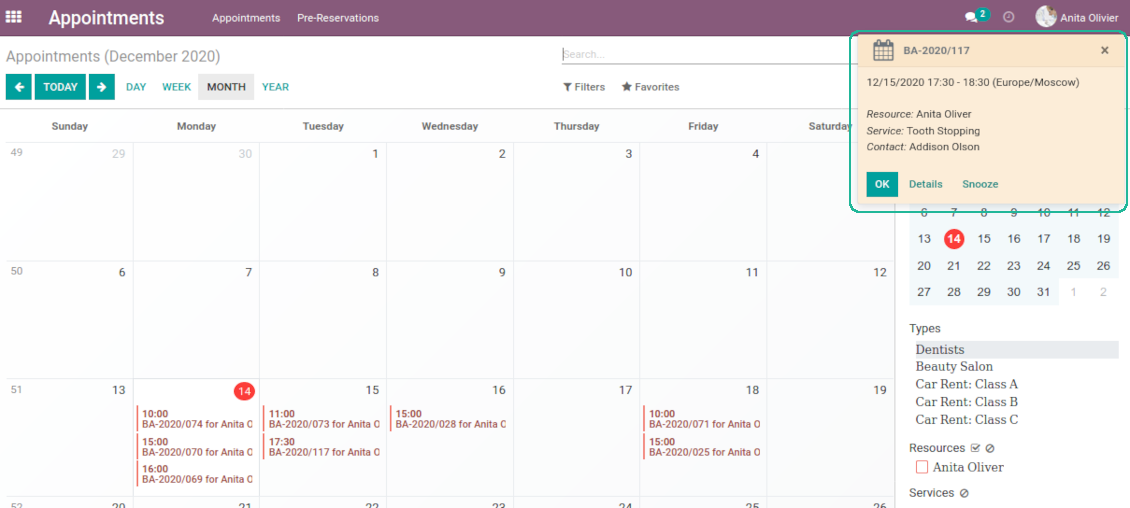
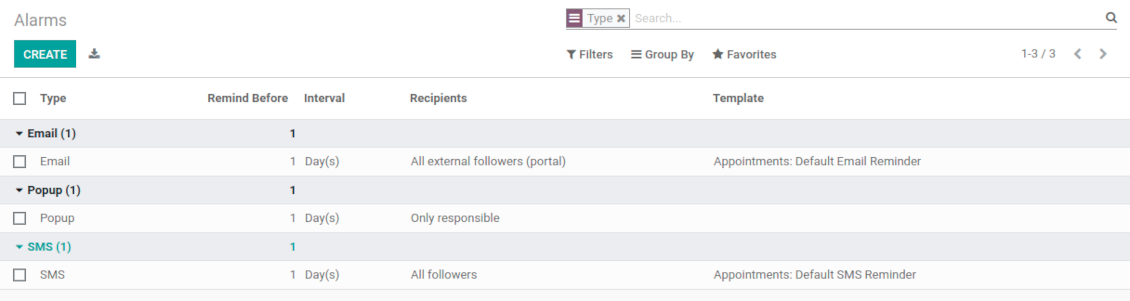
The app allows to prepare 3 types of appointment alerts: pop-ups, emails, and SMS. You can quickly create those trough the special configuration menu entry. SMS reminders are sent using the Odoo SMS server (make sure that you have sufficient balance for Odoo SMS IAP)
-
Select default alarms for each resource type. Such alarms would be automatically applied to all new appointments of this type. Otherwise, you may choose those for specific appointments
-
Define whom not notify: a responsible manager, external followers (clients), internal followers, or all followers. Popup alarms are available only for backend users
-
Specify a period for alert: it is possible to apply time range in days, hours, or minutes. For instance, 2 days before scheduled date
-
For SMS and email alarms you should also assign a template which is rendered based on appointment details
Misc options
-
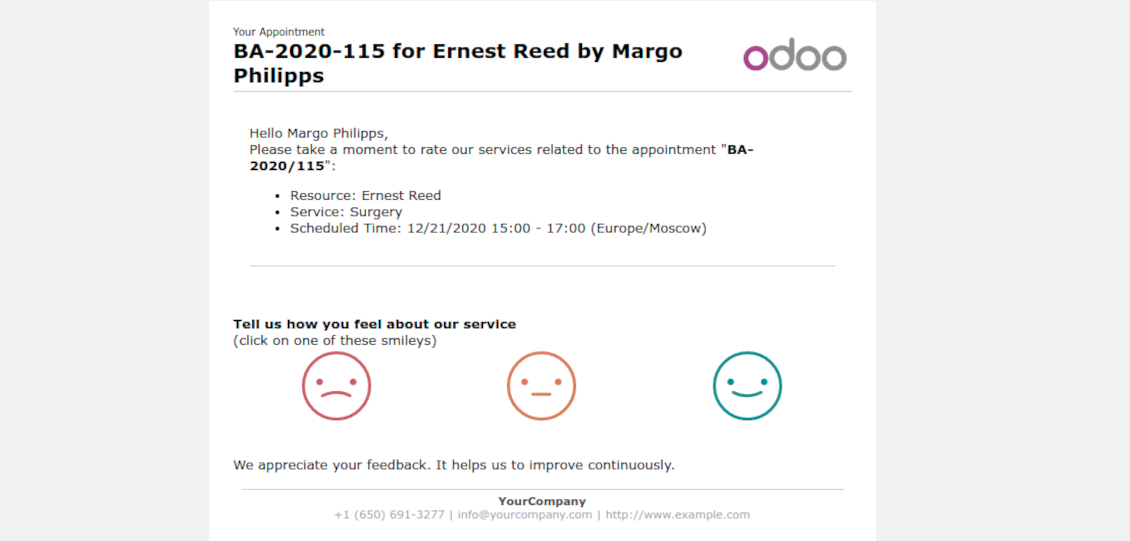
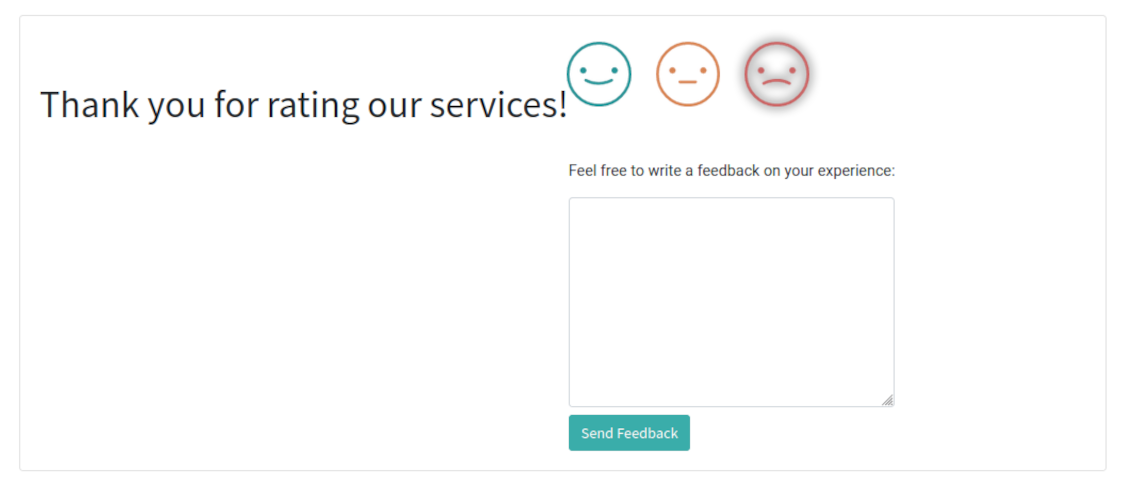
Optionally configure automatic requests for a customer review when appointment is done. Clients should select among 3 simple "smiles": satisfied, not satisfied, highly dissatisfied. Final rating is calculated for resource types, resources, and services
-
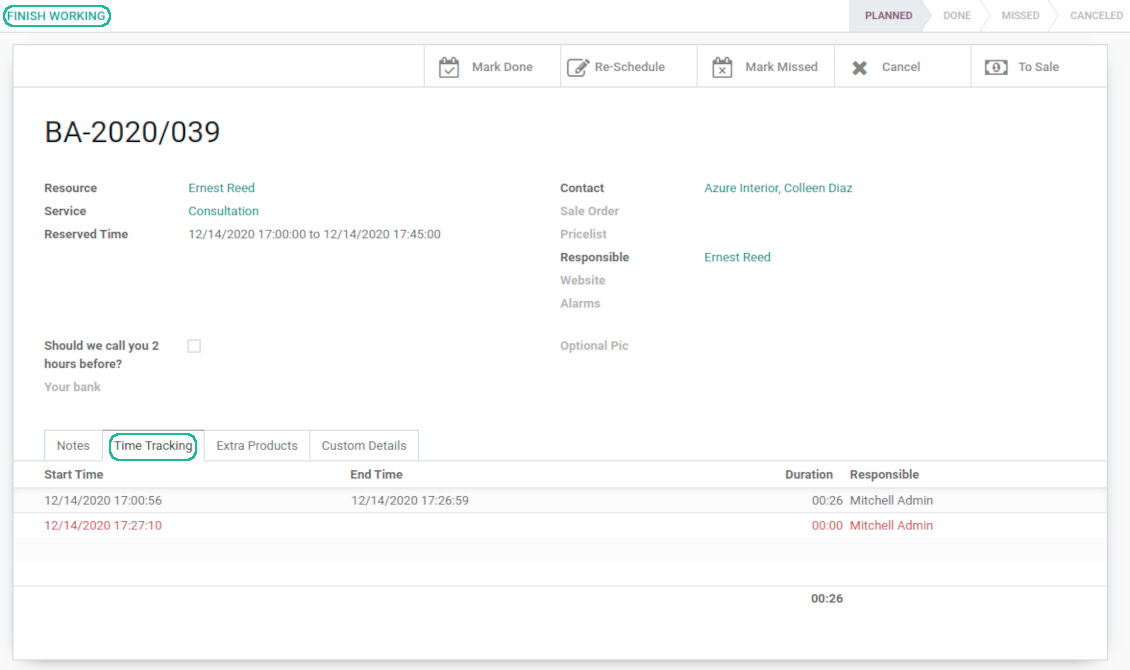
The app allows appointment managers to track time spent on providing service. This "real" time might be used not only for statistics, but also to calculate total appointment price.
-
The tool let link resources and employees to automatically apply working calendars of the latter for appointments of this resource
-
The tool has an own report view, where you can analyze appointments on pivot and graph views
-
Appointments have automatic numbering. You may change its logic (suffix, prefix, step, etc.) through configuring the related Odoo sequence
-
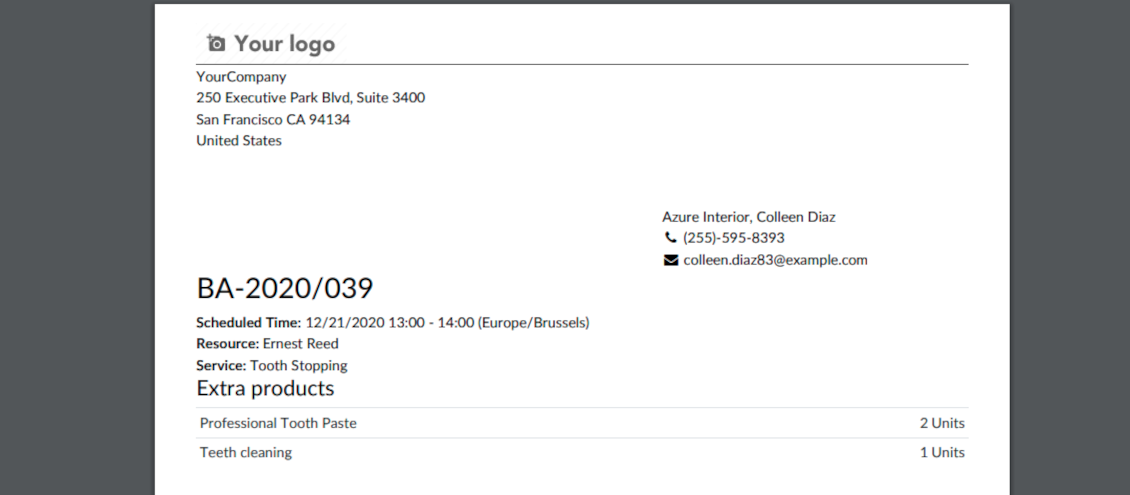
Each appointment has a printing version which might be generated in backend and optionally in portal, and which is attached to all appointment confirmation emails. The printing version relies upon standard Odoo layouts, and might be also used as a service voucher.
Secured appointments
-
The tool introduces an own user rights system to make sure business data is secured. For backend users there are 2 groups which are allowed to work with appointments: "Appointments: Only Own" and "Appointments: Administrator"
-
Appointments admins are allowed to manage all settings and update any appointment-related objects of their company(s)
-
The 'only own' group has limitations and its users has rights: (a) only to read resource types and services; (b) to observe only resources, in which they are responsible managers or which do not have such managers at all; (c) to create and to update appointments related to resources which they can observe
-
Portal and website security is managed independently
-
Resource types, resources, and services should be website published in order to become available for selection for both public and portal visitors
-
Any website visitor might schedule appointment and access resources / services without registration if you turned the option "Business appointments on website"
-
Portal users have the same rights even if the latter option is not turned on, but you switched the option "Business appointments in portal".
Custom fields
-
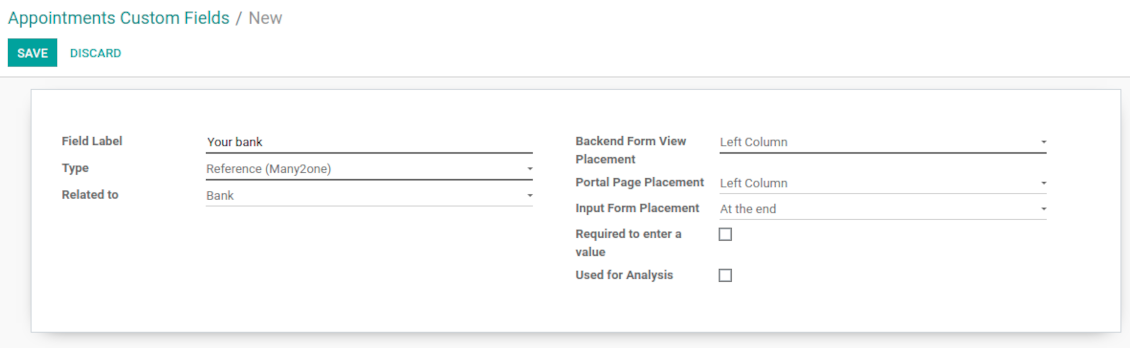
Custom attributes' creation does not require any technical knowledge. In order to show a new property, just add a new field and enter details
-
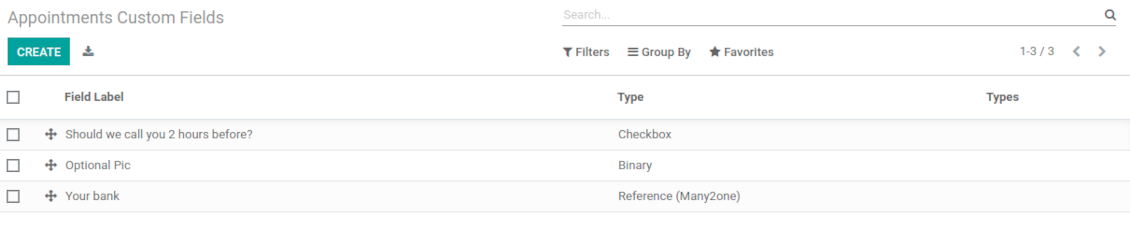
The tool let prepare new fields for resource types, resources, services, and reservations
-
It is possible to add custom fields of the following types: single line text (char), simple text without formatting (text), rich text (HTML-formatted text), integer or float numbers, drop-down choice with your own options (selection), checkbox (boolean), date or date and time, binary (a file to upload), reference to another Odoo document (e.g. for a sale order, contact; many2one)
-
The tool let you comfortably select an interface position of a custom field from a closed list of options. Optionally you may select also portal / website position to make properties visible for public users
-
For website booking process it is possible to force users select custom appointment details
-
Have different resource fields depending on resource type (for example, dentists details differ from car details).
Συμβουλές διαμόρφωσης και εγκατάστασης για Universal Appointments and Time Reservations Odoo v.14
Python dependency
The tool depends on the external Python library 'phonenumbers'. Install this library for your Odoo server through the command:
pip3 install phonenumbersΣυχνές ερωτήσεις για Universal Appointments and Time Reservations Odoo v.14
Τι είναι κουπόνι ραντεβού; Πώς το αλλάζω;
Το ραντεβού έχει δικό του συνημμένο pdf (κουπόνι). Δημιουργείται αυτόματα από πρότυπα ιστού Odoo. Με τεχνικές γνώσεις ή βοήθεια συνεργάτη/προμηθευτή Odoo μπορείτε να τροποποιήσετε το πρότυπο (όπως στα προσφορές, τιμολόγια κ.λπ. του Odoo). Από προεπιλογή χρησιμοποιεί την τυπική διάταξη εταιρείας που εισάγει η εφαρμογή.
Μπορούν να κρατηθούν ταυτόχρονα αρκετές υπηρεσίες/πόροι σε μία κράτηση;
Στο backend μπορείτε να ενεργοποιήσετε την επιλογή ‘Multi scheduling’ ώστε ο διαχειριστής να κάνει πολλές κρατήσεις για έναν πελάτη σε διαφορετικές υπηρεσίες/πόρους και να επιλέξει πολλά χρονικά διαστήματα. Στην πύλη υπάρχει η επιλογή ‘Multi scheduling’. Επιτρέπει στον πελάτη να κλείσει μία υπηρεσία/πόρο σε πολλά διαστήματα. Για περισσότερες υπηρεσίες/πόρους πρέπει να κάνει πολλές κρατήσεις.
Τι είδους ειδοποιήσεις θα/μπορεί να λαμβάνουν οι διαχειριστές ραντεβού;
Για διαχειριστές/ειδικούς μπορείτε να ρυθμίσετε συνδρομές ανά τύπο πόρου και πόρους. Π.χ. οι ειδοποιήσεις για νέα ραντεβού συνδέονται με τον υπότυπο email 'New appointments and recovering'. Επιπλέον, η εφαρμογή επιτρέπει υπενθυμίσεις για τους εμπλεκόμενους. Δείτε την εφαρμογή ραντεβού > Configurations > Reminders.
Έχουν οι πελάτες επιβεβαίωση email και εκτύπωσης για μια κράτηση;
Μόλις ολοκληρωθούν όλα τα βήματα, ο πελάτης λαμβάνει email επιβεβαίωσης και από προεπιλογή μεταφέρεται στη σελίδα επιτυχίας (στο email επισυνάπτεται pdf με voucher). Στη σελίδα επιτυχίας μπορεί επίσης να εκτυπώσει το voucher.
Τι είναι η προκράτηση στο στάδιο «Waiting for confirmation»;
Όταν ένας πελάτης αρχίζει να κρατά υπηρεσία και επιλέγει χρονική θυρίδα, αυτή γίνεται μη διαθέσιμη στους άλλους και γίνεται προ-κράτηση. Για να ξαναγίνει διαθέσιμη, ορίστε τον μέγιστο χρόνο κράτησης. Μετά από αυτόν, αν ο πελάτης δεν ολοκλήρωσε την κράτηση, η θυρίδα θα είναι ξανά διαθέσιμη.
Για να ορίσετε τον χρόνο προ-κράτησης:
1. Ανοίξτε την εφαρμογή Appointments
2. Μεταβείτε σε Διαμόρφωση>Διαμόρφωση
3. Στο 'Maximum Period for Pre-Reservation' ορίστε τον χρόνο
Αν έχουμε πολλά υποκαταστήματα, μπορούμε να χωρίσουμε τους πόρους ανάμεσά τους;
Ο διαχωρισμός των πόρων μπορεί να διαμορφωθεί διαφορετικά. Μία προσέγγιση είναι οι πολλαπλές εταιρείες Odoo. Καθώς δημιουργείτε τύπους πόρων/πόρους/υπηρεσίες, μπορείτε προαιρετικά να ορίσετε την εταιρεία στην οποία ανήκουν. Ή μπορείτε να τους κάνετε ‘global’, σχετικούς με όλες τις εταιρείες. Έτσι, το σύνολο τύπων πόρων/πόρων/υπηρεσιών μπορεί να διαφέρει ανά εταιρεία.
Είναι επίσης δυνατό να ορίσετε διαφορετικά τη διαδικασία ραντεβού σε διαφορετικούς ιστότοπους/υποκαταστήματα. Απλώς επιλέξτε τον ιστότοπο που θα εμφανίζει συγκεκριμένο τύπο πόρου/πόρους/υπηρεσίες. Τα υποκαταστήματα μπορεί ακόμη και να ανήκουν σε εντελώς διαφορετικούς τομείς, για παράδειγμα ο ένας ιστότοπος για κράτηση μαθημάτων αγγλικών και ο δεύτερος για κράτηση ώρας σε γυμναστήριο.
Ακόμη και χωρίς διαφορετικές εταιρείες ή ιστότοπους, μπορείτε να ρυθμίσετε ραντεβού για διαφορετικούς τομείς της επιχείρησής σας. Η εφαρμογή είναι σχεδιασμένη ώστε να αποφασίζετε μόνοι σας ποιο βήμα αντιστοιχεί στις δραστηριότητές σας. Για παράδειγμα, ένας τύπος πόρου μπορεί να είναι οδοντιατρείο στο κέντρο της πόλης και ο δεύτερος χειρουργική οδοντιατρική σε κατοικημένη περιοχή. Έτσι, μέσω των τύπων πόρων, διαχειρίζεστε διαφορετικά υποκαταστήματα και μοιράζετε τους πόρους ακόμη και χωρίς περιβάλλον πολλαπλών εταιρειών.
Είναι δυνατόν να επιλέξω πρώτα υπηρεσία και μετά πόρο;
Μπορεί χρήστης να κλείσει ραντεβού χωρίς λογαριασμό;
Ναι, ένας χρήστης μπορεί να δημιουργήσει ραντεβού χωρίς λογαριασμό, αλλά μόνο την πρώτη φορά. Όταν κάνει ραντεβού, το email του δεσμεύεται στη βάση και δεν μπορεί να χρησιμοποιηθεί ξανά. Για επόμενες εγγραφές ή για υπάρχουσες επαφές πρέπει να συνδεθεί για να κλείσει ραντεβού.
Ο χρήστης μπορεί να εγγραφεί από το email επιβεβαίωσης ή απευθείας στο Odoo. Ο σύνδεσμος πρόσκλησης είναι βραχύβιος· αν χάσει την ευκαιρία, θα πρέπει μετά να επαναφέρει κωδικό ή να ζητήσει τη βοήθειά σας.
Πώς μπορώ να αλλάξω τη γλώσσα των email επιτυχίας;
Για να αλλάξετε τη γλώσσα ενός προτύπου email:
1. Βεβαιωθείτε ότι οι γλώσσες-στόχοι είναι εγκατεστημένες στο Odoo σας.
2. Έπειτα ενεργοποιήστε τη λειτουργία προγραμματιστή και μεταβείτε σε Τεχνικά > Πρότυπα
3. Εκεί βρείτε το πρότυπο 'Appoints: Success Email'
4. Ξεκινήστε την επεξεργασία του προτύπου και κάντε κλικ στο εικονίδιο γλώσσας στην επάνω δεξιά γωνία του προτύπου άρθρου.
5. Θα δείτε το σώμα του άρθρου σε όλες τις γλώσσες του συστήματος. Μεταφράστε χειροκίνητα το email της γλώσσας-στόχου, αλλά μην διαγράψετε τον κώδικα. Αποθηκεύστε το αποτέλεσμα.
Μετά αλλάξτε και τη γλώσσα της επαφής στην προτιμώμενη (στην καρτέλα επαφής, πεδίο 'Γλώσσα'). Τότε αυτές οι επαφές θα λαμβάνουν το email σε αυτή τη γλώσσα.
Αν κάποιος κλείσει ραντεβού για πρώτη φορά στον ιστότοπό σας, από προεπιλογή του ανατίθεται η γλώσσα του ανοιχτού ιστότοπου. Και το email επιβεβαίωσης στέλνεται σε αυτή τη γλώσσα.
Τι σημαίνει το πεδίο «Start Round» στην κάρτα υπηρεσίας;
Το πεδίο 'Start round' στρογγυλοποιεί την ώρα σε αυτόν τον αριθμό, ώστε να μην εμφανίζονται άβολες ώρες. Π.χ. αν τώρα είναι 9:48 και πρέπει να κλείσω υπηρεσία το αργότερο μία ημέρα πριν, η πρώτη διαθέσιμη ώρα αύριο θα είναι 9:48 — όχι καλή. Αν όμως στρογγυλοποιήσετε στην ώρα (01:00), η διαθέσιμη ώρα θα είναι 10:00.
Για περισσότερες επιλογές και παραδείγματα στρογγυλοποίησης ('Help'), τοποθετήστε τον δείκτη στον τίτλο του πεδίου.
Δεν μου αρέσει η εμφάνιση των παραγόμενων email / SMS
Μπορείτε να τα προσαρμόσετε. Τα πρότυπα βρίσκονται στα μενού Διαμόρφωση > Ειδοποιήσεις > Πρότυπα email και Πρότυπα SMS.
Επιπλέον, μπορείτε να εφαρμόσετε διαφορετικά πρότυπα σε διαφορετικούς τύπους πόρων. Δείτε οποιονδήποτε τύπο πόρου > Ειδοποιήσεις.
Δεν χρειάζομαι όλα τα βήματα στην ολοκλήρωση αγοράς του ιστότοπου. Μπορώ να εξαιρέσω / αποκρύψω κάποια;
Το εργαλείο το κάνει ήδη αυτόματα για εσάς:
αν υπάρχει μόνο ένας δημοσιευμένος τύπος πόρου, το πρώτο βήμα δεν εμφανίζεται·
αν η μέθοδος κατανομής πόρων είναι αυτόματη ή υπάρχει μόνο ένας δημοσιευμένος πόρος, το δεύτερο βήμα παραλείπεται·
αν υπάρχει μόνο μία δημοσιευμένη υπηρεσία για τον επιλεγμένο τύπο πόρου / τους πόρους, το τρίτο βήμα παραλείπεται.
Το μόνο βήμα που χρειάζεται ρύθμιση είναι η σελίδα επιβεβαίωσης: μπορείτε να την ενεργοποιήσετε /απενεργοποιήσετε στη σελίδα διαμόρφωσης.
Πώς αλλάζω τον αριθμό αναφοράς ραντεβού;
Ποιες είναι οι πολιτικές ενημέρωσης των εργαλείων σας;
Σύμφωνα με τις ισχύουσες πολιτικές του Odoo Apps Store:
- Κάθε άρθρωμα που αγοράστηκε για την έκδοση 12.0 και παλαιότερα δίνει πρόσβαση σε όλες τις εκδόσεις έως την 12.0.
- Από την έκδοση 13.0 κάθε έκδοση αρθρώματος αγοράζεται χωριστά.
- Ανεξάρτητα από την έκδοση, η αγορά δίνει δικαίωμα σε όλες τις ενημερώσεις και διορθώσεις εντός μιας μείζονος έκδοσης.
Σημειώστε ότι η ομάδα faOtools δεν ελέγχει αυτές τις πολιτικές. Για ερωτήσεις επικοινωνήστε απευθείας με τους εκπροσώπους του Odoo Apps Store.
Πώς μπορώ να εγκαταστήσω την εφαρμογή σας στο Odoo.sh;
Η πιο απλή προσέγγιση είναι να χρησιμοποιήσετε την ενσωματωμένη ροή εργασίας του καταστήματος Odoo:
1. Ανοίξτε τη σελίδα της μονάδας και πατήστε το κουμπί Deploy on odoo.sh
2. Έπειτα θα ανακατευθυνθείτε στη σελίδα του GitHub. Συνδεθείτε στον λογαριασμό σας και πατήστε 'Create a new repo' ή χρησιμοποιήστε υπάρχον. Βεβαιωθείτε ότι το αποθετήριο είναι ιδιωτικό. Δεν επιτρέπεται η δημοσίευση εφαρμογών με άδεια OPL-1. Αν χρειάζεται, δημιουργήστε νέο repo για το έργο Odoo.sh
3. Έπειτα πηγαίνετε στο odoo.sh και πατήστε το κουμπί Deploy. Στο αναδυόμενο παράθυρο υποβάλετε την απόφαση και πατήστε 'Continue.' Αυτή η ενέργεια ξεκινά την εγκατάσταση.
Αυτά τα βήματα εγκαθιστούν την εφαρμογή στον κλάδο παραγωγής του έργου. Αν θέλετε να αναπτύξετε τις εφαρμογές σε άλλους κλάδους ή να ενημερώσετε τη μονάδα, ακολουθήστε τις εξής ενέργειες:
1. Ανεβάστε τον πηγαίο κώδικα της εφαρμογής από το κατάστημα Odoo
2. Κάντε commit τη μονάδα στο απαιτούμενο αποθετήριο GitHub. Βεβαιωθείτε ότι κανένας φάκελος/αρχείο της εφαρμογής δεν αγνοείται (δηλαδή δεν περιλαμβάνεται στο .gitignore του repo). Τα αποθετήρια δημιουργούνται αυτόματα από το odoo.sh και μπορεί από προεπιλογή να περιλαμβάνουν κρίσιμα στοιχεία (π.χ. /lib). Ανεβάστε όλους τους καταλόγους, υποκαταλόγους και αρχεία της μονάδας χωρίς εξαιρέσεις
3. Κάντε Deploy τον στοχευμένο κλάδο του έργου odoo.sh ή, αν το προβλέπουν οι ρυθμίσεις σας, περιμένετε μέχρι να δημιουργηθεί αυτόματα.
Πώς να εγκαταστήσω την εφαρμογή σας στον δικό μου διακομιστή;
2. Επανεκκινήστε τον διακομιστή Odoo;
3. Ενεργοποιήστε τη λειτουργία προγραμματιστή (τεχνικές ρυθμίσεις);
4. Ενημερώστε τη λίστα εφαρμογών (μενού εφαρμογών);
5. Βρείτε την εφαρμογή και πατήστε «Activate»/«Install»;
6. Ακολουθήστε τις οδηγίες στη σελίδα της εφαρμογής, αν υπάρχουν.
Παρατήρησα ότι η εφαρμογή σας έχει επιπλέον πρόσθετα. Μπορώ να τα αγοράσω αργότερα;
Ναι, βεβαίως. Ταυτόχρονα το Odoo προσθέτει αυτόματα όλες τις εξαρτήσεις στο καλάθι, οπότε πρέπει να εξαιρέσετε εργαλεία που έχετε ήδη αγοράσει για να αποφύγετε διπλή πληρωμή.
Ανάπτυξα την εφαρμογή σας στο Odoo.sh και βλέπω προειδοποίηση/σφάλμα στις δοκιμές
Μια κόκκινη/πορτοκαλί προειδοποίηση δεν επηρεάζει τις λειτουργίες της εφαρμογής. Δυστυχώς, μερικές φορές τα module μας δεν περνούν τα τυπικά αυτόματα τεστ, γιατί αυτά υποθέτουν συμπεριφορά που συγκρούεται με τους στόχους της εφαρμογής. Π.χ. αλλάζουμε τον υπολογισμό τιμής, ενώ τα τεστ του τυπικού module Odoo συγκρίνουν την τελική τιμή με τον τυπικό αλγόριθμο.
Πρώτα απ' όλα, ελέγξτε τις λειτουργίες της αναπτυγμένης βάσης. Λειτουργούν όλα σωστά;
Αν εξακολουθείτε να θεωρείτε ότι η προειδοποίηση επηρεάζει πραγματικές λειτουργίες, επικοινωνήστε μαζί μας και στείλτε πλήρη αρχεία εγκατάστασης και την πλήρη λίστα αναπτυγμένων module (πυρήνα και τρίτων).
Μπορώ να αγοράσω την εφαρμογή απευθείας από την εταιρεία σας;
Όχι, διανέμουμε τα εργαλεία μόνο μέσω του επίσημου καταστήματος εφαρμογών Odoo.
Θα ήθελα να λάβω έκπτωση
Δυστυχώς, δεν έχουμε τα τεχνικά μέσα για να προσφέρουμε ατομικές τιμές.
Μπορώ να εγκαταστήσω την εφαρμογή στη βάση Odoo Online (SaaS);
Όχι, εφαρμογές τρίτων δεν μπορούν να χρησιμοποιηθούν στο Odoo Online. Δυστυχώς το Odoo SaaS αποκλείει αυτή τη δυνατότητα.
Το εργαλείο σας εξαρτάται από άλλες εφαρμογές. Πρέπει να τις αγοράσω;
Ναι, το εργαλείο απαιτεί όλα τα module που σημειώνονται στις εξαρτήσεις για να λειτουργεί σωστά. Η τιμή στη σελίδα της εφαρμογής περιλαμβάνει ήδη όλες τις απαραίτητες εξαρτήσεις.
Ποια είναι η τιμή του αρθρώματος σε δολάρια ΗΠΑ; Γιατί άλλαξε;
Η τιμή των module μας ορίζεται σε ευρώ. Το κατάστημα Odoo μετατρέπει τις τιμές σε άλλα νομίσματα σύμφωνα με την εσωτερική ισοτιμία του. Έτσι η τιμή σε δολάρια ΗΠΑ μπορεί να αλλάξει όταν ενημερώνεται η ισοτιμία.
Το κείμενο εφαρμογής και ιστότοπου σε άλλες γλώσσες πλην των αγγλικών γίνεται με βοήθεια ΤΝ και ευθυγραμμίζεται με τις επίσημες μεταφράσεις Odoo. Αν εντοπίσετε λάθος, στείλτε αίτημα για ορθότητα μεταφράσεων και θα το διορθώσουμε.
Αναφορά σφαλμάτων
Αν αντιμετωπίσετε σφάλματα ή ασυνεπή συμπεριφορά, μη διστάσετε να επικοινωνήσετε μαζί μας. Εγγυόμαστε διορθώσεις εντός 60 ημερών από την αγορά και ενδιαφερόμαστε έντονα να βελτιώνουμε τα εργαλεία μας και μετά από αυτή την περίοδο.
Δεν χρειάζεστε αριθμό τηλεφώνου ή πιστωτική κάρτα για να επικοινωνήσετε. Αρκεί μια σύντομη εγγραφή με e-mail που δεν διαρκεί πάνω από 30 δευτερόλεπτα.
Συμπεριλάβετε όσο το δυνατόν περισσότερες λεπτομέρειες στο αίτημά σας: στιγμιότυπα οθόνης, αρχεία καταγραφής διακομιστή Odoo, πλήρη περιγραφή αναπαραγωγής του προβλήματος κ.λπ. Συνήθως χρειάζονται μερικές εργάσιμες ημέρες για να ετοιμαστεί σχέδιο εργασίας για ένα ζήτημα (αν επιβεβαιωθεί σφάλμα) ή να σας δοθούν οδηγίες για το τι πρέπει να γίνει (διαφορετικά).
Δημόσια αιτήματα λειτουργιών και ιδέες μονάδων (δωρεάν ανάπτυξη)
Έχουμε ισχυρό κίνητρο να βελτιώνουμε τα εργαλεία μας και θα εκτιμούσαμε κάθε σχόλιο. Αν οι απαιτήσεις σας είναι κοινής ωφέλειας και μπορούν να υλοποιηθούν αποδοτικά, η ομάδα θα τις εντάξει στη λίστα εργασιών μας.
Τέτοια λίστα εργασιών επεξεργάζεται τακτικά και δεν συνεπάγεται επιπλέον χρεώσεις. Αν και δεν μπορούμε να υποσχεθούμε προθεσμίες και τελικό σχεδιασμό, μπορεί να είναι καλός τρόπος να αποκτήσετε τις επιθυμητές λειτουργίες χωρίς επενδύσεις και κινδύνους.
Δεν χρειάζεστε αριθμό τηλεφώνου ή πιστωτική κάρτα για να επικοινωνήσετε. Αρκεί μια σύντομη εγγραφή με e-mail που δεν διαρκεί πάνω από 30 δευτερόλεπτα.

Το εργαλείο για να οργανώνετε ευέλικτα τα συνημμένα του Odoo σε φακέλους και να συγχρονίζετε καταλόγους με πελάτες cloud: Google Drive, OneDrive/SharePoint, Nextcloud/ownCloud, Dropbox, Amazon S3, Box και NAS. DMS. Διαχειριστής αρχείων. Σύστημα διαχείρισης εγγράφων
398€
Το εργαλείο για αυτόματο αμφίδρομο συγχρονισμό των συνημμένων του Odoo με αρχεία OneDrive
487€
Το εργαλείο για αυτόματο αμφίδρομο συγχρονισμό των συνημμένων του Odoo με αρχεία Google Drive
487€
Το εργαλείο για ασφαλή φύλαξη κωδικών στο Odoo για κοινή χρήση. Κοινά θησαυροφυλάκια

Το εργαλείο για να χτίσετε μια βαθιά και δομημένη βάση γνώσης για εσωτερική και εξωτερική χρήση. Knowledge System. KMS. Αναθεωρήσεις τύπου wiki.
398€
Το εργαλείο για να ορίζετε στόχους KPI και να ελέγχετε την εκπλήρωσή τους ανά περιόδους. Πίνακες KPI. Σχεδιαστής πινάκων. Γραφήματα KPI

Το εργαλείο για να διαχειρίζεστε το Odoo από τα αγαπημένα σας AI chats μέσω MCP. Claude. Οποιοδήποτε AI που υποστηρίζει MCP.

Το εργαλείο για μετάφραση διευθύνσεων URL σελίδων ιστότοπου Odoo
38€
Το εργαλείο για τη συνένωση διαφορετικών συμβάντων Odoo σε λίγα διαμορφώσιμα υπερ-ημερολόγια