Website URL shortener v.16
The tool to assign and manage short URLs for Odoo website links. SEO friendly URLs
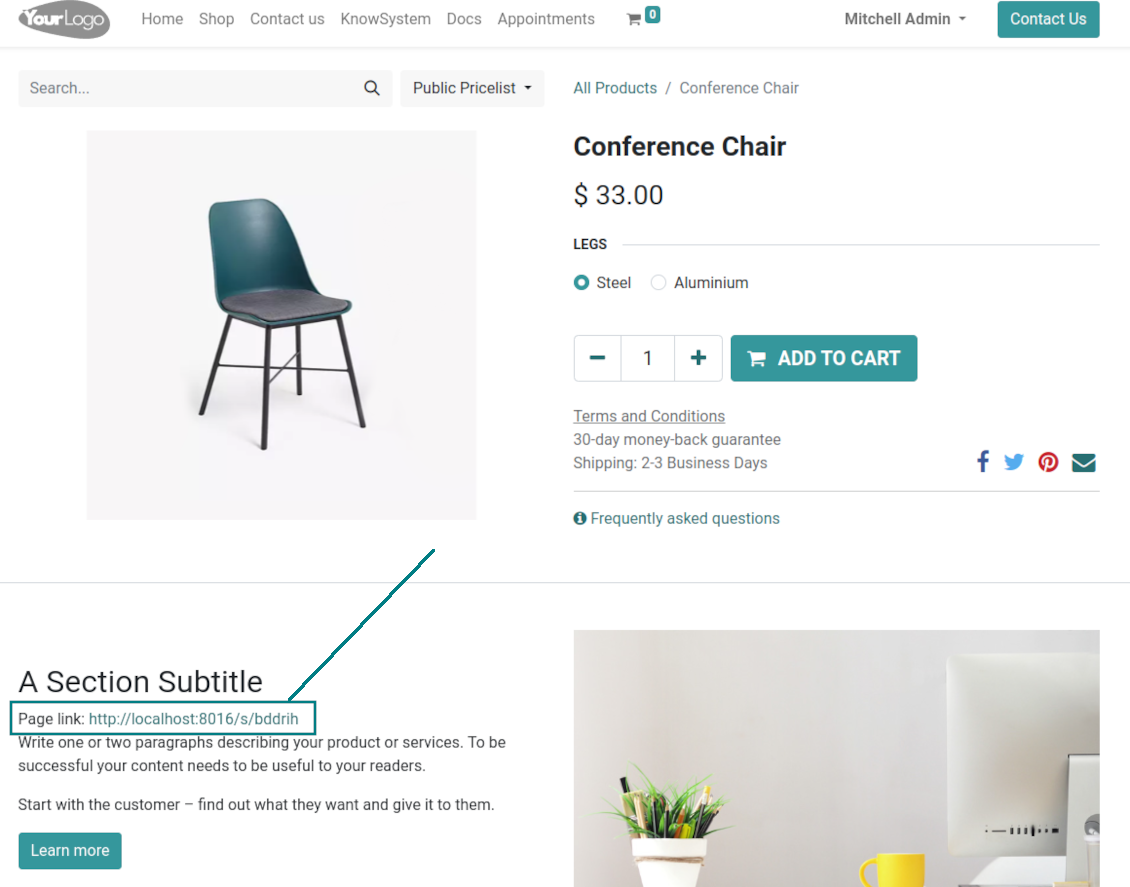
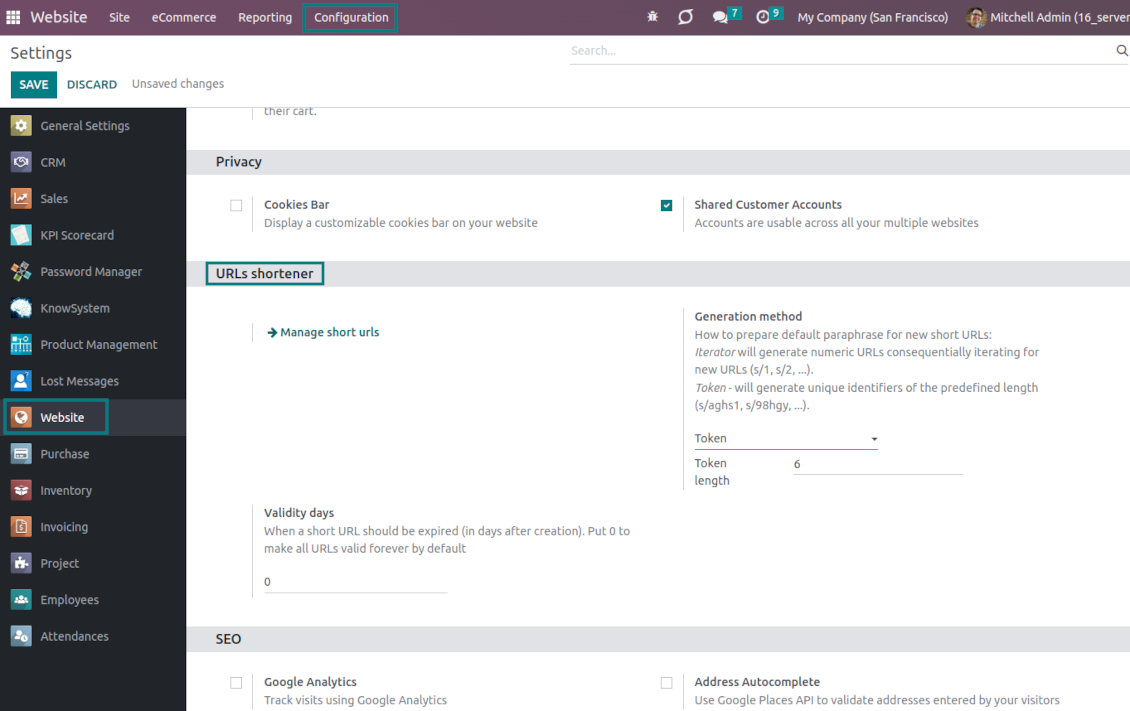
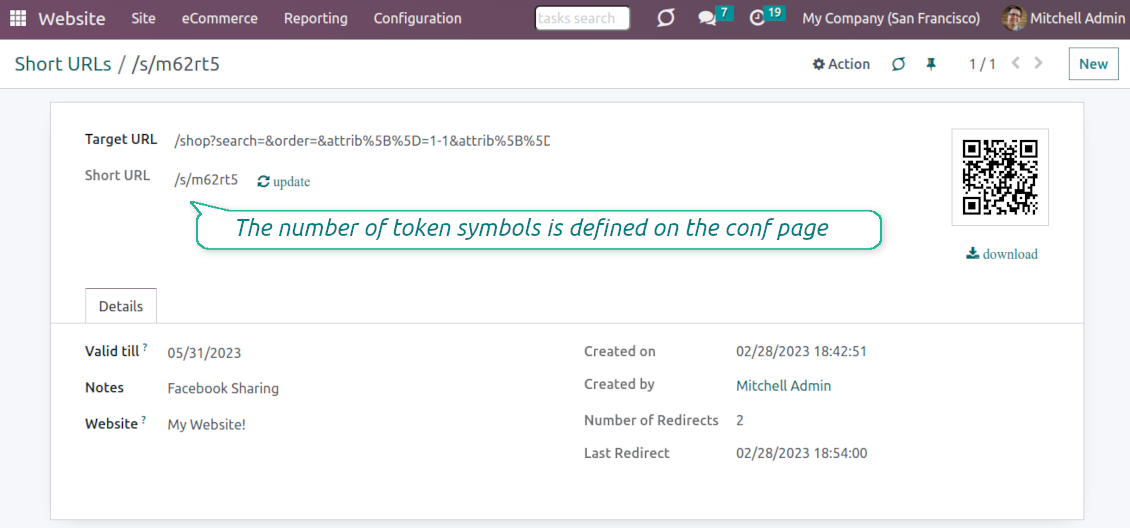
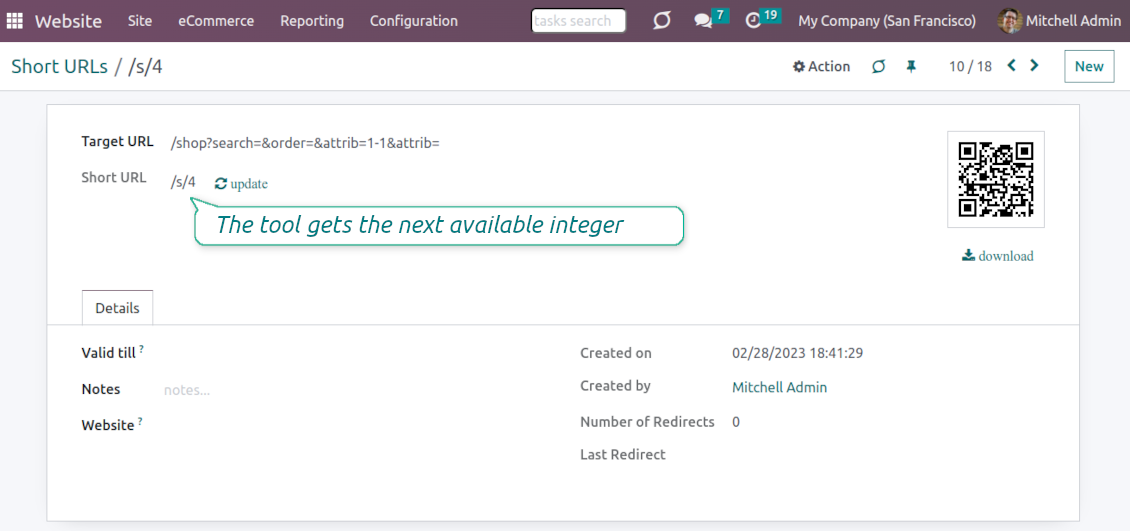
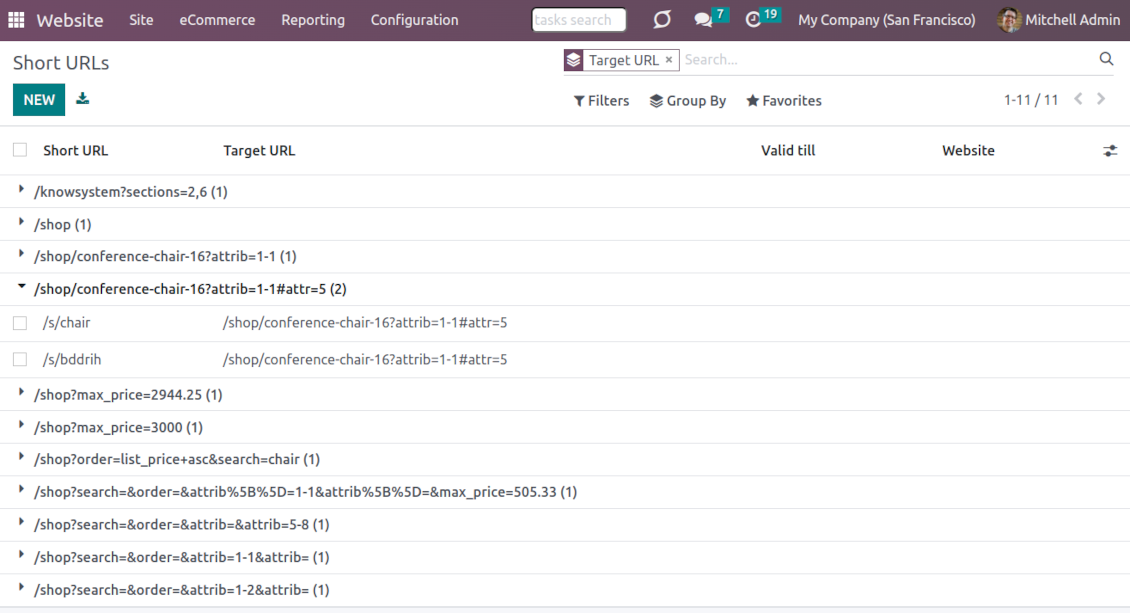
URL shortening is a well-known methodology to cope with too long and ugly-looking web addresses. The app introduces this technique in Odoo by allowing website editors to manually or automatically generate, control, and administrate short and SEO-friendly URLs for any Odoo web links.
Branded links
Introduce memorable and human-readable URLs of the type '/s/[token]' for any Odoo website address. What is preferable to share: example.com/s/desk or example.com/shop/customizable-desk-config-9#attr=7,4,47?
Automatic or custom URLs
Configure the rules for automatic creation of short URLs based on iterator and token (for example, /s/12 and /s/rh72ko) or apply your own SEO-friendly key words (for example, /s/desk, /s/best-chairs)
Short URLs for any link types
The app works equally for dynamic controllers (e.g., a product page or even store pages with chosen filters) and static website pages (including custom ones). Also, the shortener might redirect to the page translations.
QR codes for website links
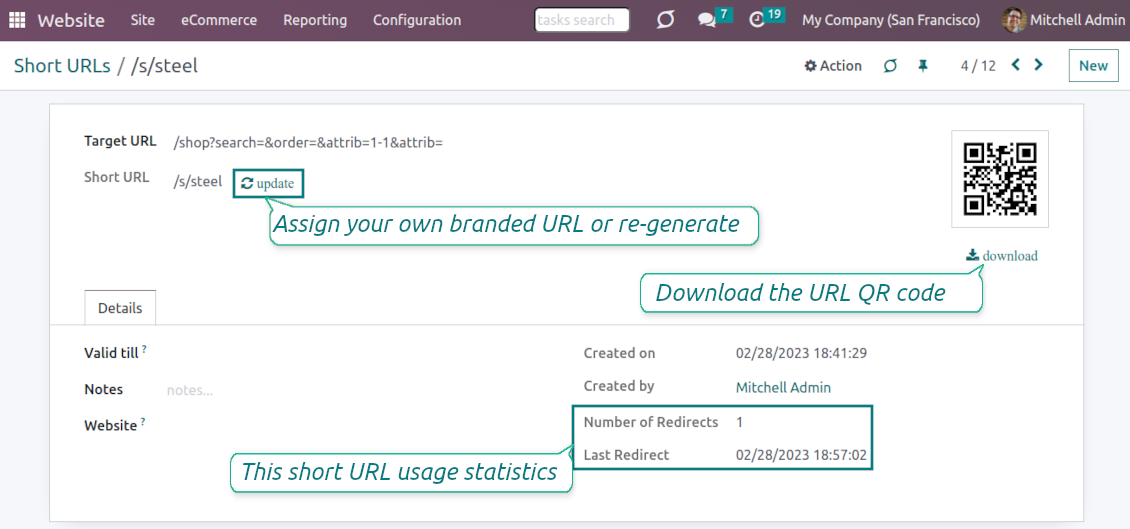
Each short URL peers with an automatic QR code image that might be downloaded, shared or added to Odoo website pages
Multi channels control
Have as many short links for a single address as needed for various purposes. Share one on Facebook, another - on Twitter, and a special one - for specific partners. Then, count redirects for each source.
Comfortable administration
Use the URL shortener right while customizing the website or in Odoo's advanced backend. Make a link soon expired or forever-lasting. Update tokens at any moment or archive short links if it is no anymore valid
Website snippets
The app introduces the special website snippets which might be added to any Odoo website's inner content. Such a snippet will find or create a short URL or URL QR code right when a visitor opens a page
Available for scripts and custom add-ons
Developers might use the app to find or create a short URL or QR code image for a target website address by applying a single Python method.
URL shortener administration
Website interface for short URLs
-
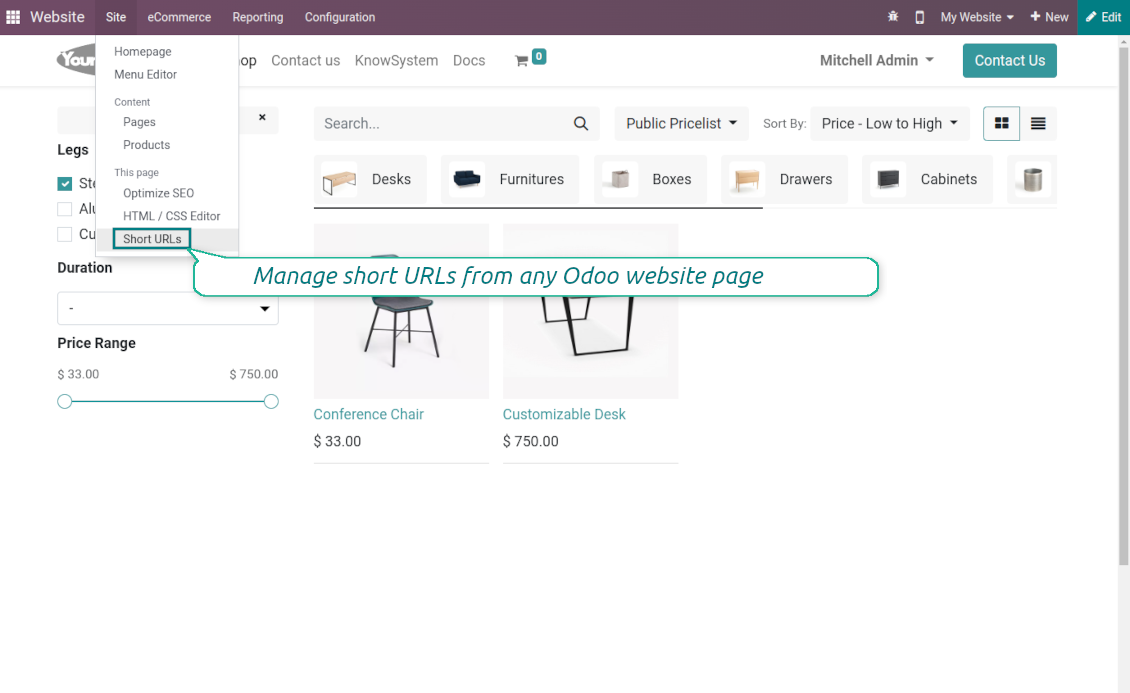
To start managing short links click on Customize > Short URLs from any page
-
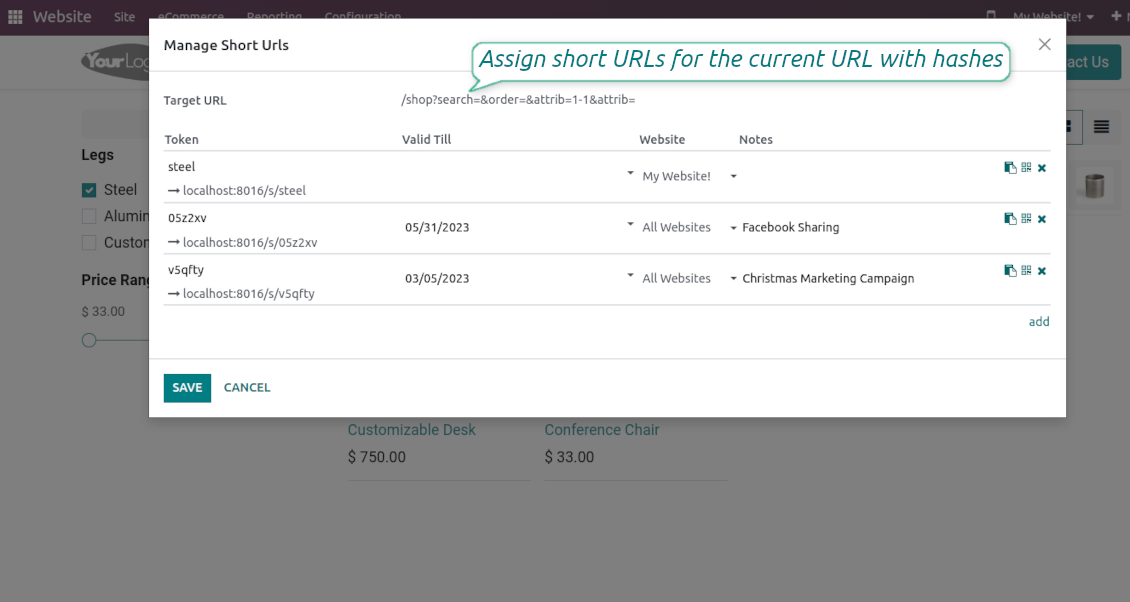
The app would automatically retrieve a target web address with all search and hash parameters from a browser. Change this redirect URL if needed: available short links would be recalculated
-
Create new short links based on the default tokens or custom keywords. Archive obsolete URLs
-
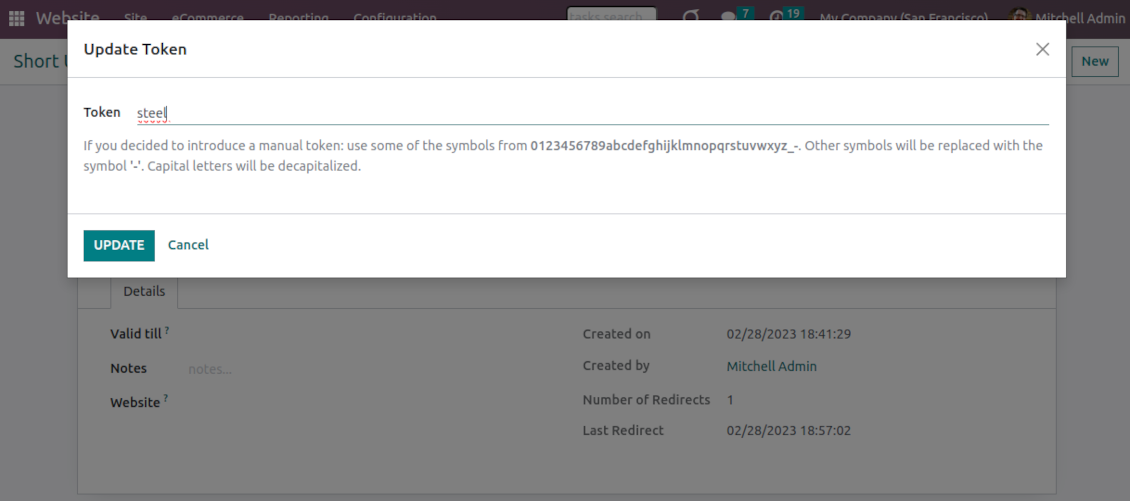
Update existing addresses: change token, assign expiration date, apply to this website or to all sites (the app fully supports Odoo multi-website mode)
Advanced backend links' editor
-
Find all short links by all websites under the menu Websites > Settings > Short URLs
-
Group by website or target URL (there might be multiple short links for each). Archive or restore links in batch
-
Create a new short URL in a few seconds: the only thing required is to introduce a target web address
-
Apply flexible settings: validity date to make a link auto expired, notes to always know why this URL has been introduced, website to restrict usage for a specific site or to use a link globally.
Automatic short URLs generation
-
It is not always possible to prepare a branded URL for each address. For example, when you have thousands of website pages. For such cases define a default automatic method
-
Use the 'iterator' to generate a link with a succeeding number at the end. For instance, 'example.com/s/112'. The app would automatically increment a number when a new short URL is registered
-
Use the 'token' approach to generate a unique symbols row of a predefined length (it should not be less than 5 symbols to have enough unique combinations). For instance, 'example.com/s/uo71jh'
-
A default short URL would be entered as soon as you decide to create a new redirection. Simultaneously, you can always change that to a custom sentence or create a new alternative short URL. Do that for the most important addresses, addresses you would like to print on your business cards, addresses that are assumed to enter manually, etc.
Short URLs for developers
Using short URLs in scripts
-
While developing a custom add-on, script, or server action you might be interested to have a short URL for certain website addresses. The tool lets us do that efficiently
-
To that end you should trigger the method 'action_find_surl' of the model 'short.url.redirect'
-
As arguments it should receive:
target_url- string - relative web path. E.g. "/shop/customizable-desk-config-9#attr=7,4,47)"tocreate- boolean - whether to create a new short URL if none exists for the target URLalwaysvalid- boolean - whether to search short URLs without expiration or yet valid but soon expired links are also finewebsite_id- integer - if False the app would search only global URLs, otherwise also of a specific website (applicable for the multi-website mode)qr_base_url- boolean - if False the method would return a final URL, if True - a QR code content. -
The method would return a string - a found short URL (e.g. '/s/desk'), a binary content of a QR code, or False if nothing is found.
-
For instance:
my_short_url = self.env["short.url.redirect"].action_find_surl("/shop/customizable-desk-config-9#attr=7,4,47", True, True, 1, False)
Website Snippet for auto short links
-
The website menu 'Customize' and the backend menu 'Short URLs' are available only for Odoo website designers. For certain pages, you might be interested to show a short link for simple visitors as well
-
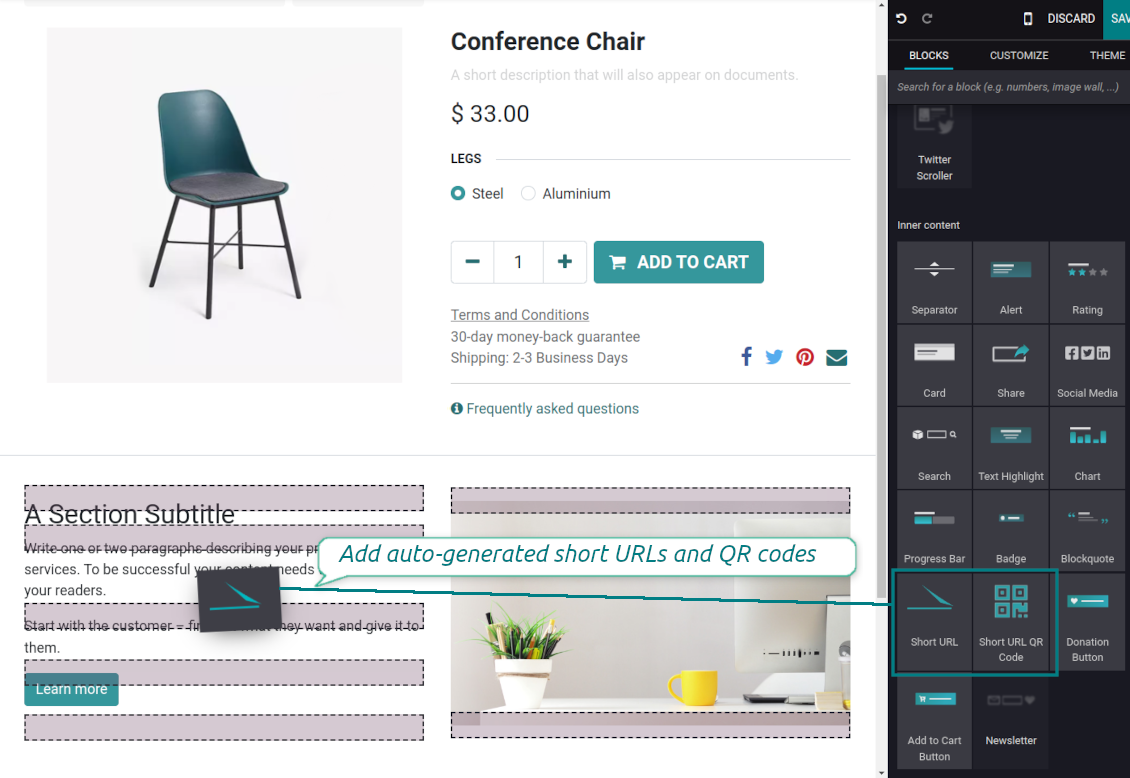
To that goal, you might drag and drop the special website editor snippets 'Short URLs' and 'Short URL QR Code'
-
The snippet 'Short URLs' adds a text block with a short link. Alternatively, you may add an XML line with the tag
awith the HREF"#"and the class"short_url_widget" -
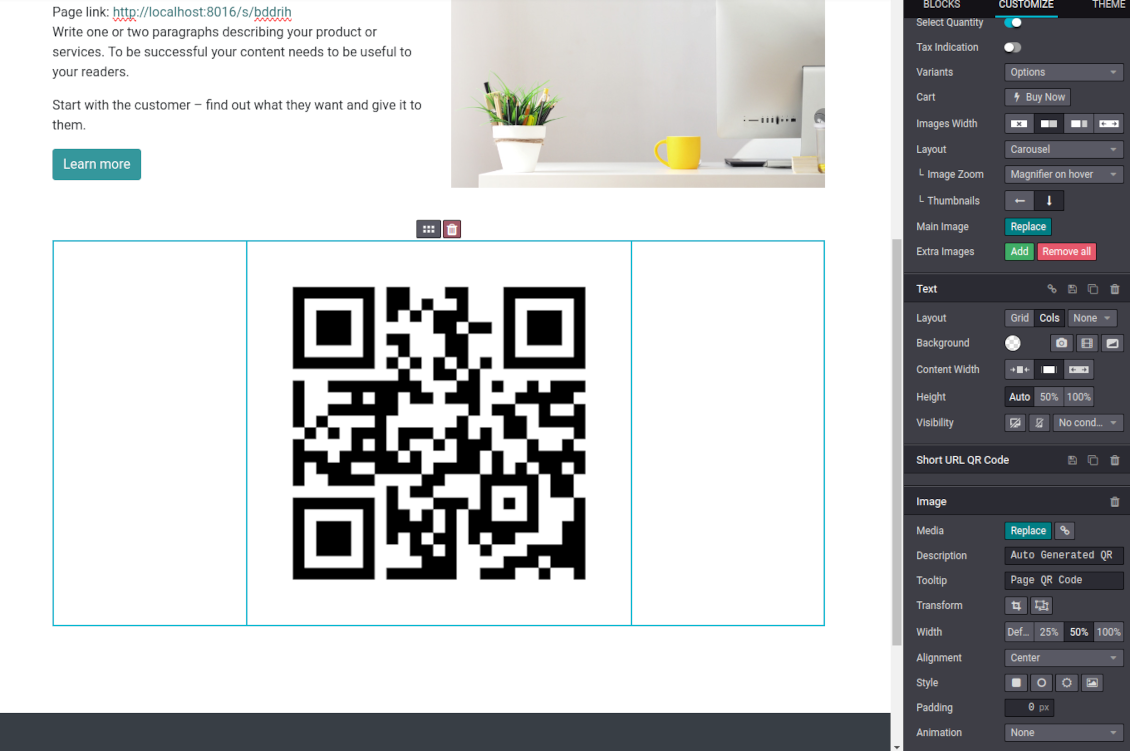
The snippet 'Short URL QR Code' adds a QR code image that you may customize using the standard Odoo website designer tools
-
Each time a page with such a snippet is opened, a short URL will be searched and - if not found - created. In this way, you may show a visitor a valid short URL or its QR code, which he/she might copy, share, and scan
-
Take into account: the snippets search only for always valid global short URLs.
الأسئلة الشائعة حول Website URL shortener Odoo v.16
ما سياسة تحديث ادواتكم؟
وفق سياسات Odoo Apps Store الحالية:
- كل وحدة مشتراة للإصدار 12.0 وما قبله تمنح الوصول إلى كل الإصدارات حتى 12.0.
- بدءا من الإصدار 13.0 تُشترى كل نسخة من الوحدة على حدة.
- بغض النظر عن الإصدار، الشراء يعطي حق كل التحديثات والإصلاحات ضمن الإصدار الرئيسي.
فريق faOtools لا يتحكم بهذه السياسات. للأسئلة تواصلوا مباشرة مع ممثلي Odoo Apps Store.
كيف اثبّت التطبيق على Odoo.sh؟
أبسط طريقة هي مسار متجر Odoo المدمج:
1. افتح صفحة الوحدة واضغط Deploy on odoo.sh
2. ستُنقل إلى GitHub. سجّل الدخول ثم Create a new repo أو استخدم مستودعا قائما. يجب أن يكون المستودع خاصا. لا يُسمح بنشر التطبيقات بترخيص OPL-1. أنشئ مستودعا جديدا لمشروع Odoo.sh عند الحاجة
3. ثم في odoo.sh اضغط Deploy وأكّد ثم Continue. يبدأ التثبيت.
هذه الخطوات تثبّت التطبيق على فرع الإنتاج. لفروع أخرى أو للتحديث:
1. نزّل الشيفرة من متجر Odoo
2. اعمل commit للوحدة في مستودع GitHub. لا تُستثنى مجلدات/ملفات التطبيق في .gitignore. مستودعات odoo.sh قد تتجاهل مسارات مهمة (مثل /lib). ارفع كل مجلدات وملفات الوحدة
3. انشر الفرع المستهدف في مشروع odoo.sh أو انتظر البناء التلقائي إن كانت الإعدادات كذلك.
كيف اثبّت التطبيق على خادمي؟
2. أعد تشغيل خادم Odoo;
3. فعّل وضع المطوّر (الإعدادات التقنية);
4. حدّث قائمة التطبيقات (قائمة التطبيقات);
5. اعثر على التطبيق واضغط Activate/Install;
6. اتبع الإرشادات في صفحة التطبيق إن وُجدت.
للتطبيق إضافات أخرى. هل اشتريها لاحقا؟
نعم. يضيف Odoo التبعيات تلقائيا إلى السلة؛ استبعد الأدوات المشتراة سابقا حتى لا تدفع مرتين.
نشرت التطبيق على Odoo.sh وأرى تحذيرا/خطأ في الاختبارات
التحذير الأحمر/البرتقالي لا يؤثر على وظائف التطبيق. أحيانا لا تتجاوز وحداتنا الاختبارات التلقائية القياسية لأنها تفترض سلوكا يتعارض مع أهداف التطبيق. مثلا نغيّر حساب السعر بينما تقارن اختبارات Odoo السعر النهائي بالخوارزمية القياسية.
تحقق أولا من وظائف قاعدة البيانات المنشورة. هل كل شيء يعمل؟
إن ظننتم أن التحذير يؤثر على وظائف حقيقية، تواصلوا معنا وأرسلوا سجلات التثبيت كاملة وقائمة الوحدات المنشورة كاملة (الأساسية والطرف الثالث).
هل يمكنني شراء التطبيق منكم مباشرة؟
لا، نوزع الأدوات فقط عبر متجر تطبيقات Odoo الرسمي.
اريد خصما
للأسف ليست لدينا وسيلة تقنية لتقديم أسعار فردية.
هل يمكن تثبيت التطبيق على قاعدة Odoo Online (SaaS)؟
لا، لا يمكن استخدام تطبيقات الطرف الثالث على Odoo Online. خدمة Odoo SaaS تمنع ذلك.
للاداة تبعيات على تطبيقات أخرى. هل اشتريها؟
نعم، تحتاج الأداة إلى كل الوحدات المذكورة في التبعيات. السعر في صفحة التطبيق يشمل هذه التبعيات.
ما سعر الوحدة بالدولار الأمريكي؟ لماذا تغيّر؟
أسعار وحداتنا باليورو. يحوّل متجر Odoo الأسعار إلى عملات أخرى حسب سعره الداخلي. لذا قد يتغيّر السعر بالدولار الأمريكي عند تحديث سعر الصرف.
تتم صياغة نصوص التطبيق والموقع الإلكتروني باللغات غير الإنجليزية بمساعدة الذكاء الاصطناعي وبما يتوافق مع ترجمات Odoo الرسمية. إذا لاحظت خطأ، أرسل تذكرة تصحيح الترجمة وسنقوم بتصحيحه.
قواعد بيانات Odoo التجريبية (معاينات)
قد نوفر لهذا التطبيق قاعدة بيانات تجريبية مخصصة مجانية.
لا تحتاج إلى رقم هاتف أو بطاقة ائتمان للاتصال بنا. يجب عليك فقط اجتياز عملية تسجيل قصيرة عبر البريد الإلكتروني, والتي لا تستغرق أكثر من 30 ثانية.
بناءً على طلبك، نُعِدّ قاعدة بيانات معاينة خاصة بك، يمكنك خلالها إجراء أي اختبارات والتحقق من افتراضاتك لمدة أسبوعين تقريبًا.
الإبلاغ عن الأخطاء
إذا واجهت أخطاء أو سلوكًا غير متسق, فلا تتردد في الاتصال بنا. نحن نضمن تقديم الإصلاحات خلال 60 يومًا من الشراء ونهتم بشدة بتحسين أدواتنا حتى بعد هذه الفترة.
لا تحتاج إلى رقم هاتف أو بطاقة ائتمان للاتصال بنا. يجب عليك فقط اجتياز عملية تسجيل قصيرة عبر البريد الإلكتروني, والتي لا تستغرق أكثر من 30 ثانية.
يرجى تضمين أكبر قدر ممكن من التفاصيل في طلبك: لقطات الشاشة وسجلات خادم Odoo ووصف كامل لكيفية إعادة إنتاج المشكلة وما الى ذلك. عادة ما يستغرق إعداد خطة عمل للمشكلة بضعة أيام عمل (اذا تأكد وجود خطا) او تزويدك بارشادات حول ما ينبغي فعله (في الحالات الأخرى).
طلبات الميزات العامة وأفكار الوحدات (تطوير مجاني)
لدينا دوافع قوية لتحسين أدواتنا وسنكون ممتنين لأي تعليقات. إذا كانت متطلباتك ذات استخدام عام ويمكن تنفيذها بكفاءة, فسيقوم الفريق بإدراج تلك المتطلبات في قائمة المهام الخاصة بنا.
تتم معالجة قائمة المهام هذه بانتظام ولا يتم فرض رسوم إضافية. على الرغم من أننا لا نستطيع أن نعد بالمواعيد النهائية والتصميم النهائي, إلا أنها قد تكون طريقة جيدة للحصول على الميزات المطلوبة دون استثمارات ومخاطر.
لا تحتاج إلى رقم هاتف أو بطاقة ائتمان للاتصال بنا. يجب عليك فقط اجتياز عملية تسجيل قصيرة عبر البريد الإلكتروني, والتي لا تستغرق أكثر من 30 ثانية.

The tool to flexibly structure Odoo attachments in folders and synchronize directories with cloud clients: Google Drive, OneDrive/SharePoint, Nextcloud/ownCloud, and Dropbox. DMS. File Manager. Document management system
398€
The tool to automatically synchronize Odoo attachments with OneDrive files in both ways
487€
The tool to automatically synchronize Odoo attachments with Google Drive files in both ways
487€

The tool to build a deep and structured knowledge base for internal and external use. Knowledge System. KMS. Wiki-like revisions.
398€
The tool to set up KPI targets and control their fulfillment by periods. KPI dashboards. Dashboard designer. KPI charts

The tool for time-based service management from booking appointments to sales and reviews
398€
اداة لإدارة Odoo من محادثات الذكاء الاصطناعي عبر MCP. Claude. اي ذكاء يدعم MCP.

The tool to combine different Odoo events in a few configurable super calendars