Dropbox Odoo Integration v.15
The tool to automatically synchronize Odoo attachments with DropBox files in both ways
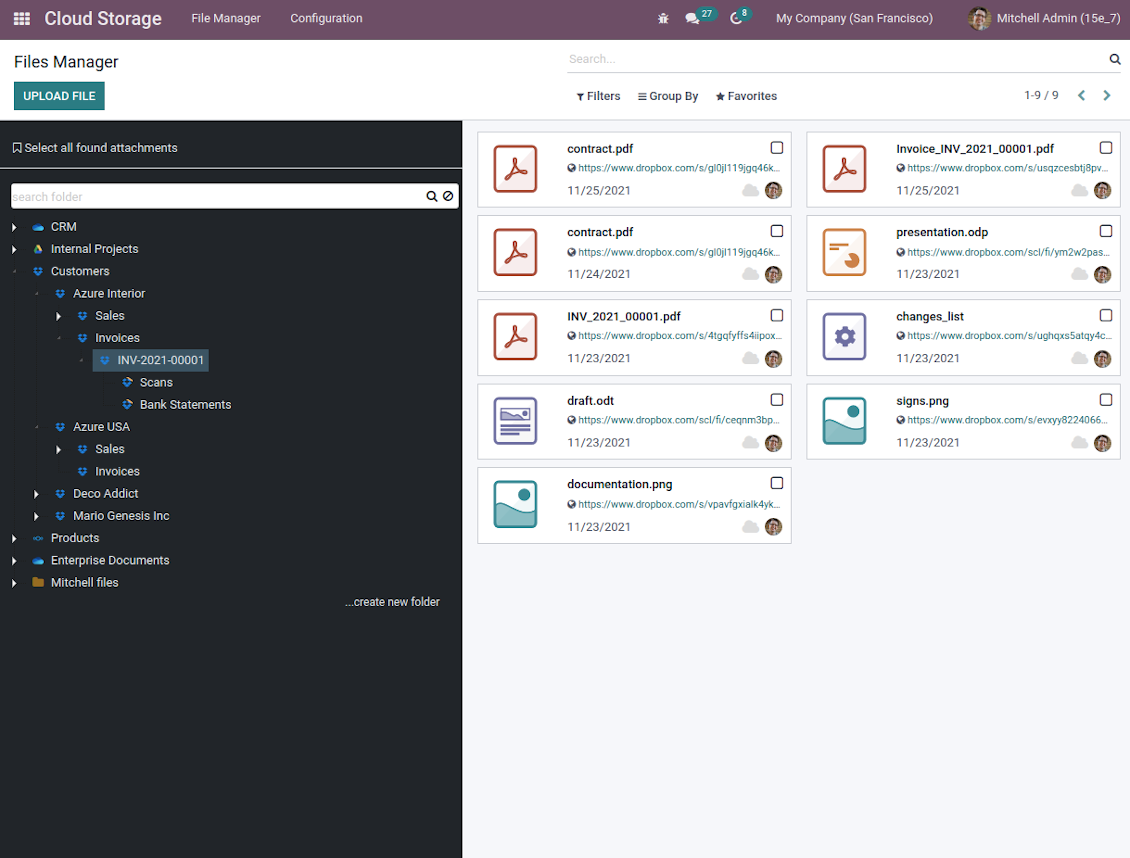
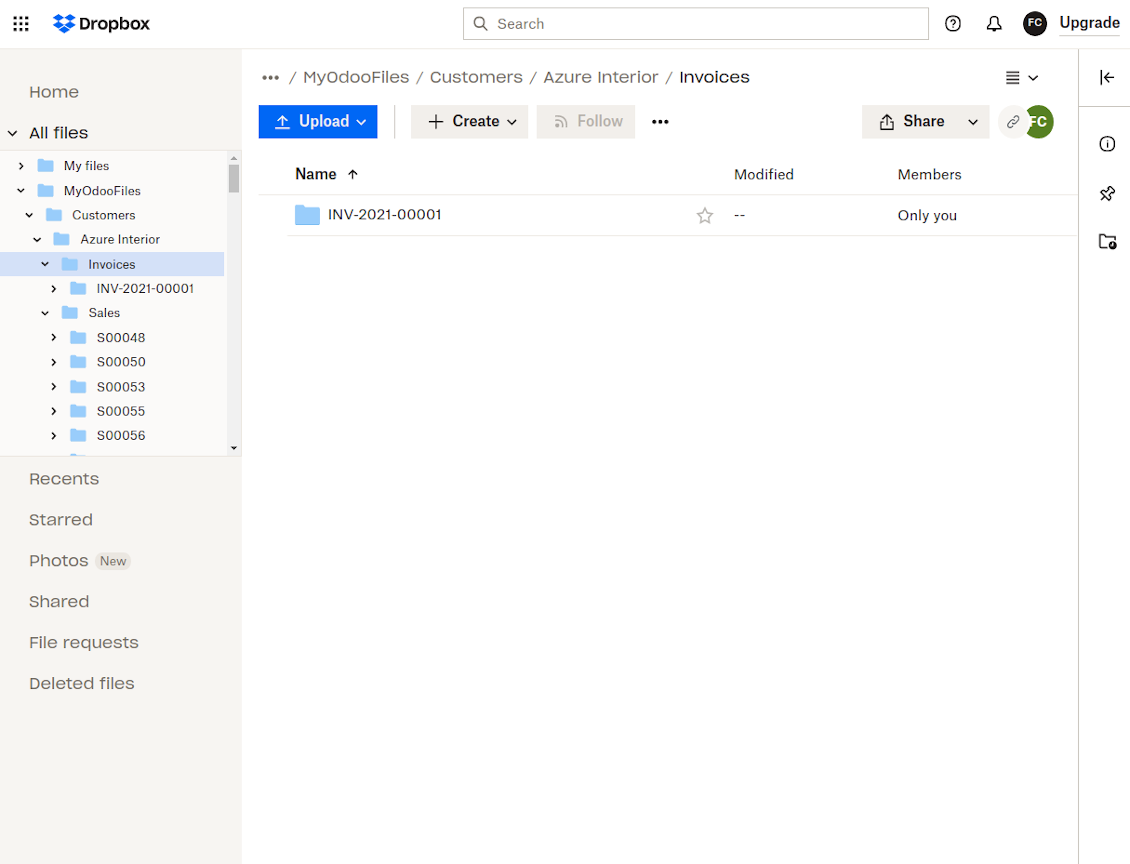
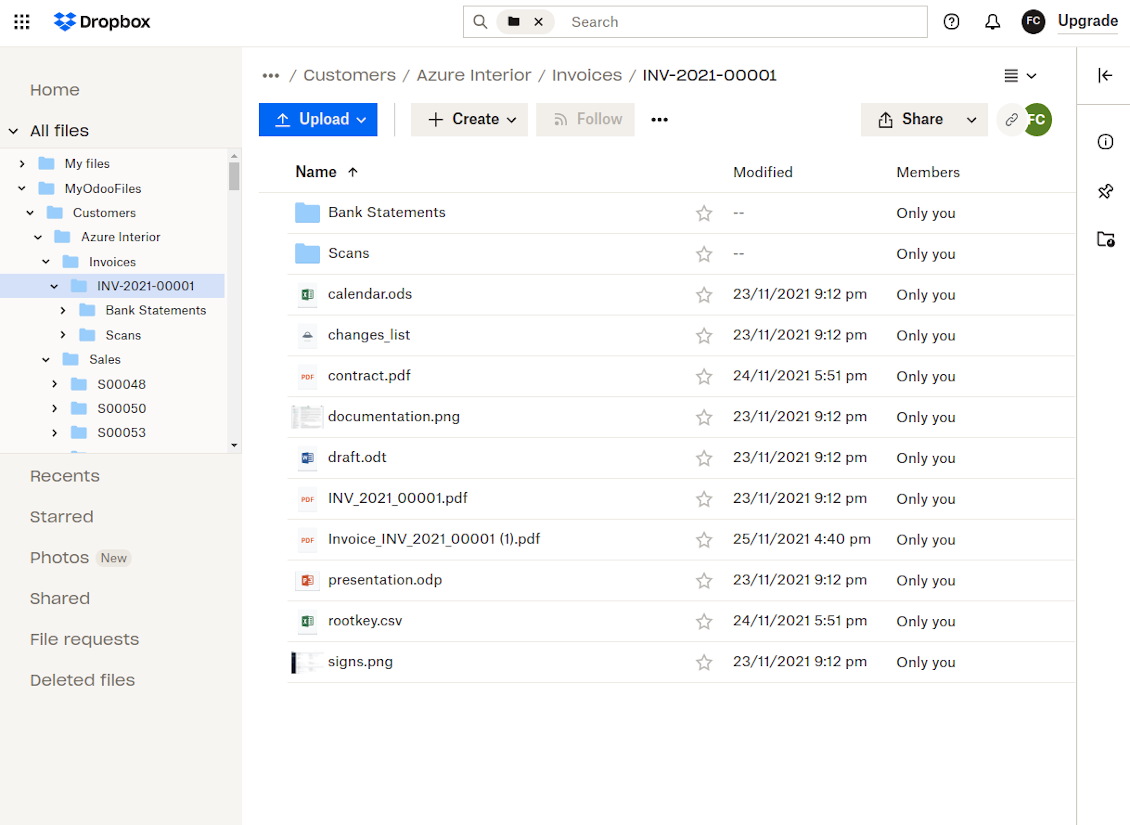
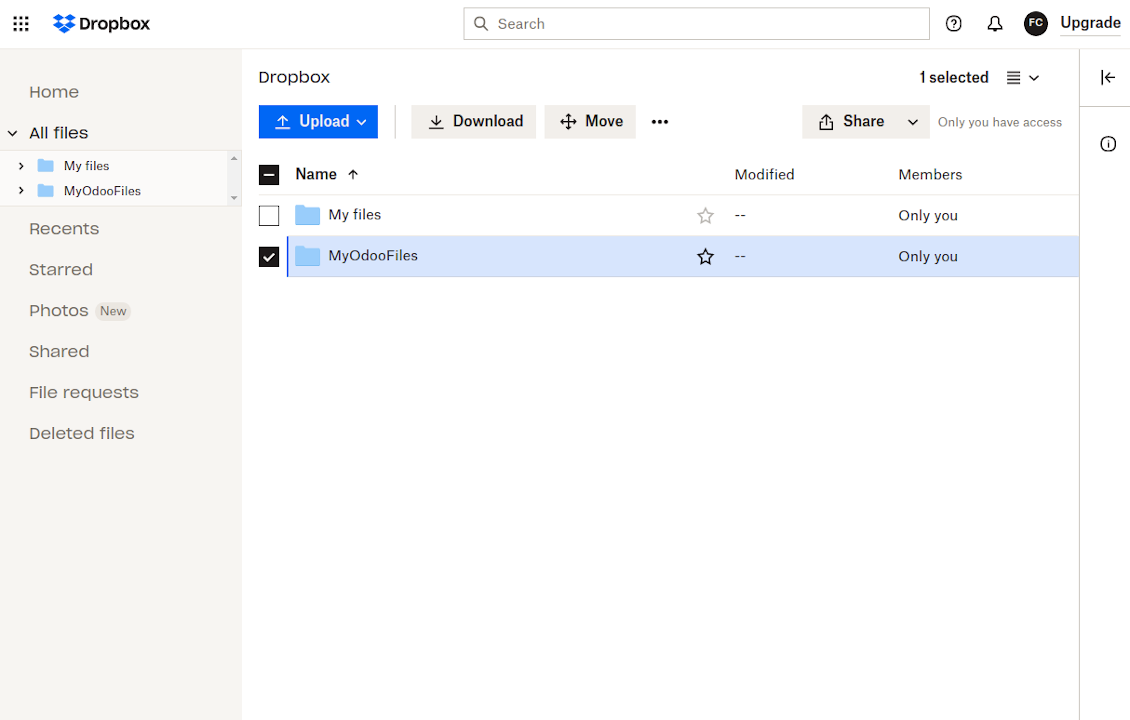
This is the tool to integrate Dropbox features with Odoo folders and files. The app automatically stores Odoo attachments and directories in Dropbox and provides instant access to them via web links.
Automatic folders' structure
Decide which Odoo document types should have their own folders trees and synchronize those to Dropbox
Automatic regular sync
Rely on auto-synchronization between Odoo and Dropbox based on scheduled jobs. No manual interaction is required
Bilateral sync
Odoo sends attachments to Dropbox and retrieves files from there. Binary content is kept in clouds, while Odoo provides direct access to synced items
Cloud synchronization history
Control Dropbox sync logs right in Odoo. Export and share those in case of any issues. Be notified of any client disconnections
File manager interface
Manage synced folders and attachments from a single Odoo view. Comfortably navigate by directories. Search and download files one by one or in batch. Upload and move attachments to folders
Attachment box
Organize files of any Odoo object in a set of subfolders. Instantly access folders and files in the attachment box and in Dropbox.
How synchronization works
Automatic two-sided sync
-
Configure sync for one or multiple Dropbox instances
-
Integration is based on scheduled jobs and is fully automatized. The app regularly checks changes in systems and runs sync operations
-
Synchronization is bilateral. Updates in Odoo are reflected in Dropbox (direct sync); changes in Dropbox modify Odoo folders and attachments (backward sync)
-
Cloud connection with Dropbox might be reset. In this way, the app assumes getting back all items back to Odoo (reverse sync)
-
Odoo folders and attachments might be re-attached to a new cloud client from Dropbox. Hence, items would be first taken back to Odoo (reverse sync) and then put to new cloud storage (direct sync)
Queue-based synchronization
-
Once in 15 minutes, the app examines updates in Odoo and Dropbox to prepare a synchronization queue
-
Folders' checks follow the First-In-First-Out (FIFO) principle. So, directories that have not been examined for the longest will be processed first
-
Once in 15 minutes, the sync queue is run by the special scheduled job. Firstly, the most important (blocking) tasks would be done
-
Control planned jobs and their fulfillment in the special Odoo logs interface (Cloud Storage > Configuration > Sync Logs). Subscribe for particular cloud clients notifications
-
If the app faces sync failures, it will re-try operations afterward. Sync queue processing would not be stopped if there are items not blocked by such failures
Odoo attachments for Dropbox: direct sync
-
Direct sync prepares the folders' hierarchy and uploads Odoo attachments for Dropbox
-
Direct sync checks whether attachments are added or deleted for synced directories. If so, they would be created or removed in Dropbox. In particular, it means that any file added to a folder-related Odoo object (e.g. Quotation), would be automatically moved to a linked cloud client
-
Direct sync makes all synced Odoo attachments change their type to a link (URL), while binary content is removed with one of the next Odoo cleaners. So, no actual files would be stored on your Odoo server
-
Direct sync checks whether a new folder is added. Disregarding whether it is done manually or automatically, the app would generate a peer directory in Dropbox
-
Direct sync checks whether there are any updates in folders. If so, such changes are reflected in Dropbox
Dropbox files and folders for Odoo: backward sync
-
Backward sync checks whether any files or subfolders are added to Dropbox folders. If so, the app would create URL attachments/subdirectories inside linked Odoo directories (and hence Odoo objects if any)
-
Backward sync checks whether there are any updates in folders or attachments. Such updates would be then reflected in Odoo
-
Backward sync checks whether any files are deleted/moved in a Dropbox document folder. If so, a linked Odoo attachment would be also unlinked or moved
-
If you deleted a Dropbox folder related to a folder rule / Odoo object, their child files would be deleted as well. Thus, Odoo would remove related attachments. The folders, however, will be recovered with a direct sync
-
In case of conflicts, direct sync changes are in general considered more important than backward updates.
Resetting or changing Dropbox: reverse sync
-
In case you decided to reset the connection with Dropbox, files would be moved back to Odoo
-
In case you decided to change the cloud client of a folder rule or a folder, files would be first taken back to Odoo, and then direct sync for a new client would be done
-
Reverse sync operations are prioritized to direct and backward sync operations
-
Not all items can be correctly reversed to Odoo due to cloud client peculiarities. For example, there are documents that may exist only in cloud storage environments. The app would try to convert such documents, but in some cases, it would require manual interactions.
Dropbox URLs
Dropbox has a specific way to generate links for existing files and folders. In particular, there are no concepts of internal or private URLs. Instead, each Dropbox item might get so-called shared URLs. Such shared links are either public or team-only. Moreover, the latter feature is available only for the Dropbox business account.
This tool relies upon shared links' mechanics. It means, that each attachment link is either public (all personal Dropbox accounts) or team-only (all business Dropbox accounts).
Sometimes it is considered to be not fully safe. Although website URLs will be hardly known by external users, there is a slight chance that they become available as a result of some user actions. Besides, sharing link generation is not super fast and might make the sync process slower. That is why the feature to switch off sharing URLs is introduced.
If checked, all Dropbox URLs in Odoo will be of the type https://www.dropbox.com/home/Odoo/[PATH]. Such links will not work in many cases. Thus, if you need to open Dropbox files/folders from Odoo, be careful with the setting 'No links to Dropbox from Odoo'.
نصائح التكوين والتثبيت لـ Dropbox Odoo Integration Odoo v.15
Python dependency
The tool depends on the external library 'dropbox'. Install this library for your Odoo server through the command:
pip3 install dropboxConfiguration and log in
- Turn on the option 'Dropbox Sync' (cloud Storage > Configuration > Configuration). The optional add-on Dropbox Odoo Integration is required
- Follow the URL https://www.dropbox.com/developers/apps/create
- Choose an API as 'Scoped access'
- Choose the type of access as 'Full Dropbox'
- Select any suitable name for the app and push the button 'Create app'
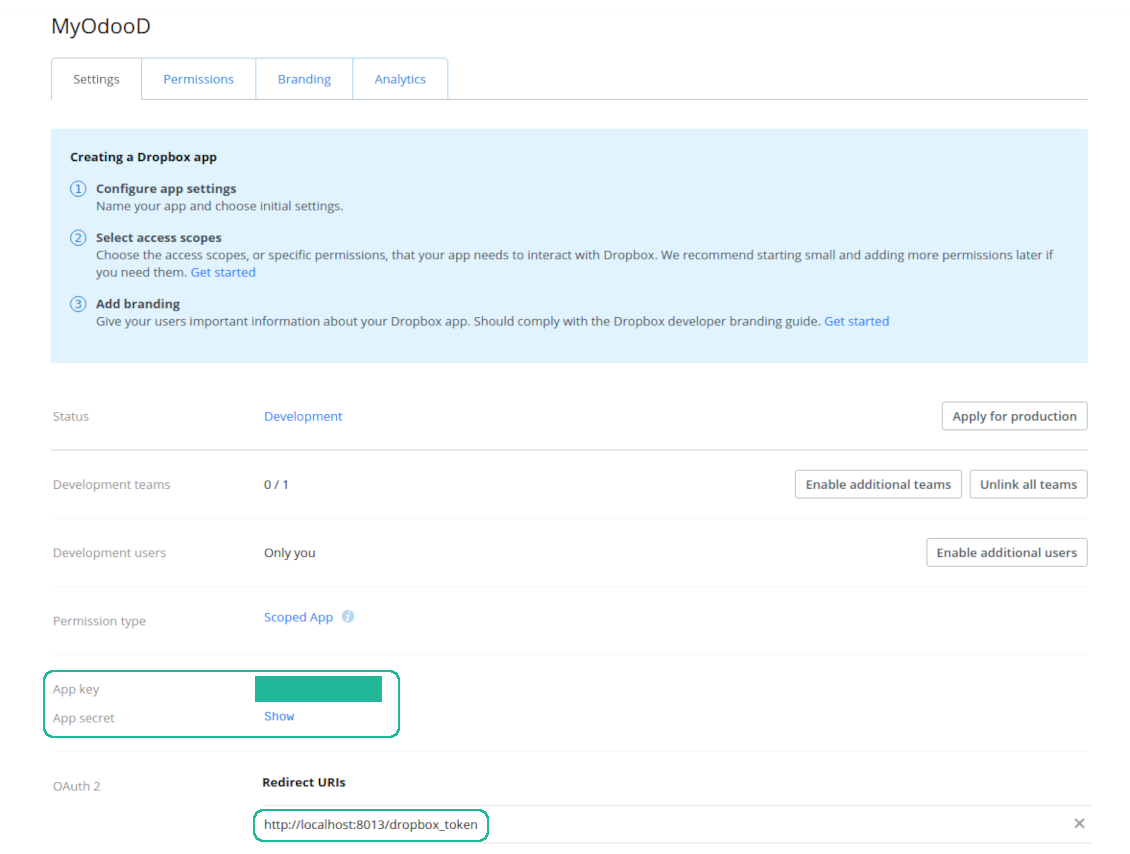
- Add the redirect URI as [YOURODOOSITENAME]/dropbox_token (e.g. https://faotools.com/dropbox_token). A valid SSL certificate (https) is required
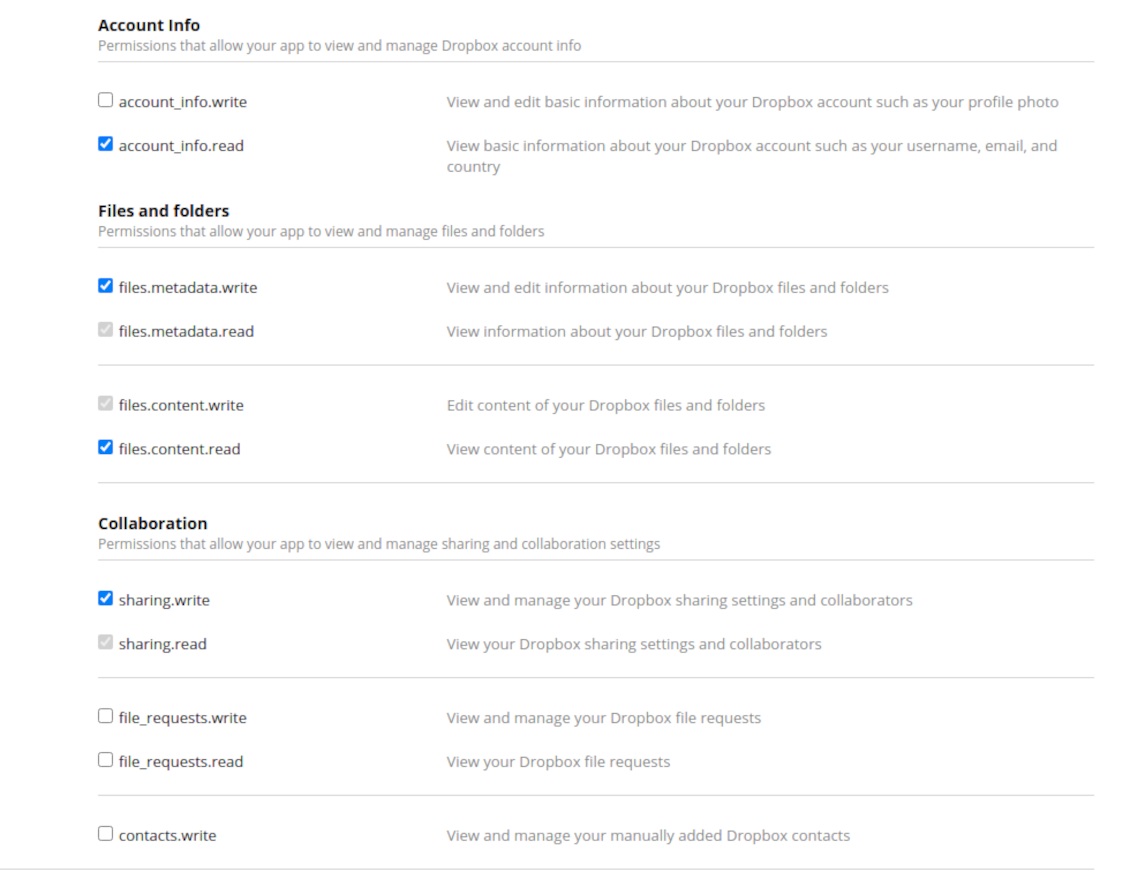
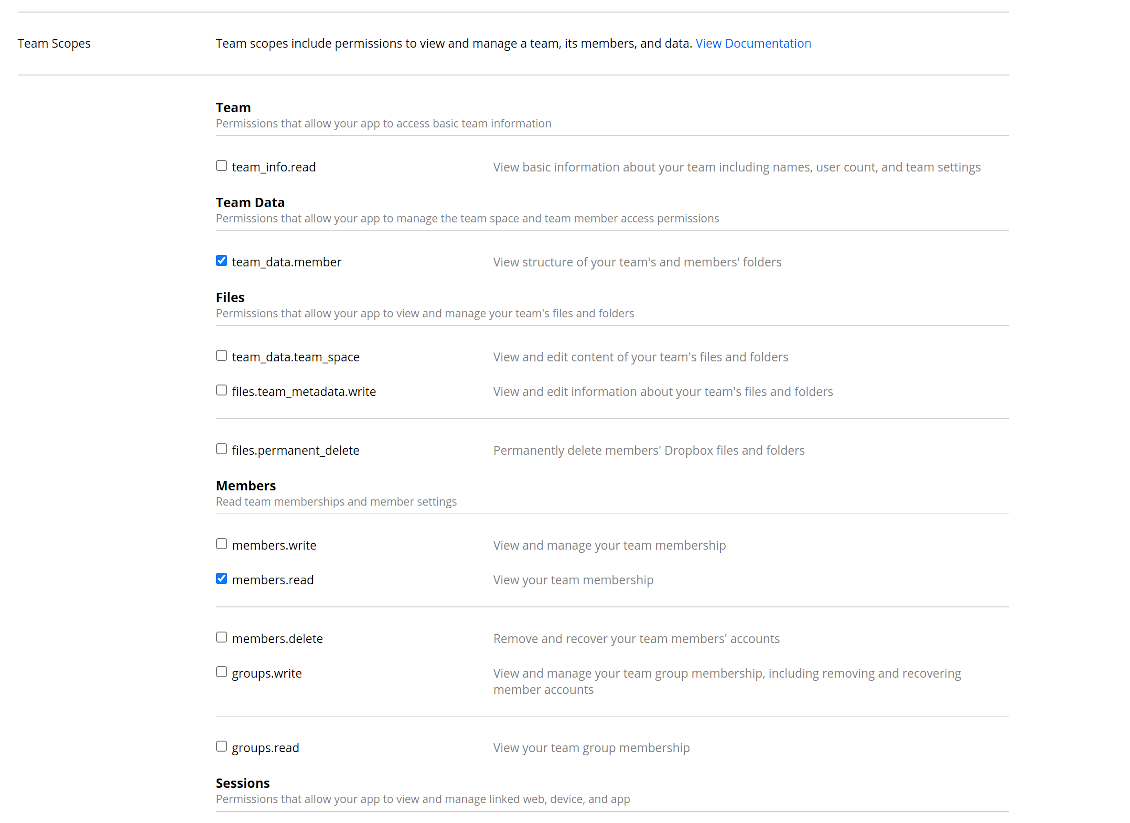
- Grant permissions to the app: 'Account Info (Read)', 'Files and folders Metadata (Write)', 'Files Content (Write)', 'Collaboration (Write)'. For team DropBox assign also 'Team Data Members', 'Members (Read)'. Make sure no other permissions are assigned.
- Submit App
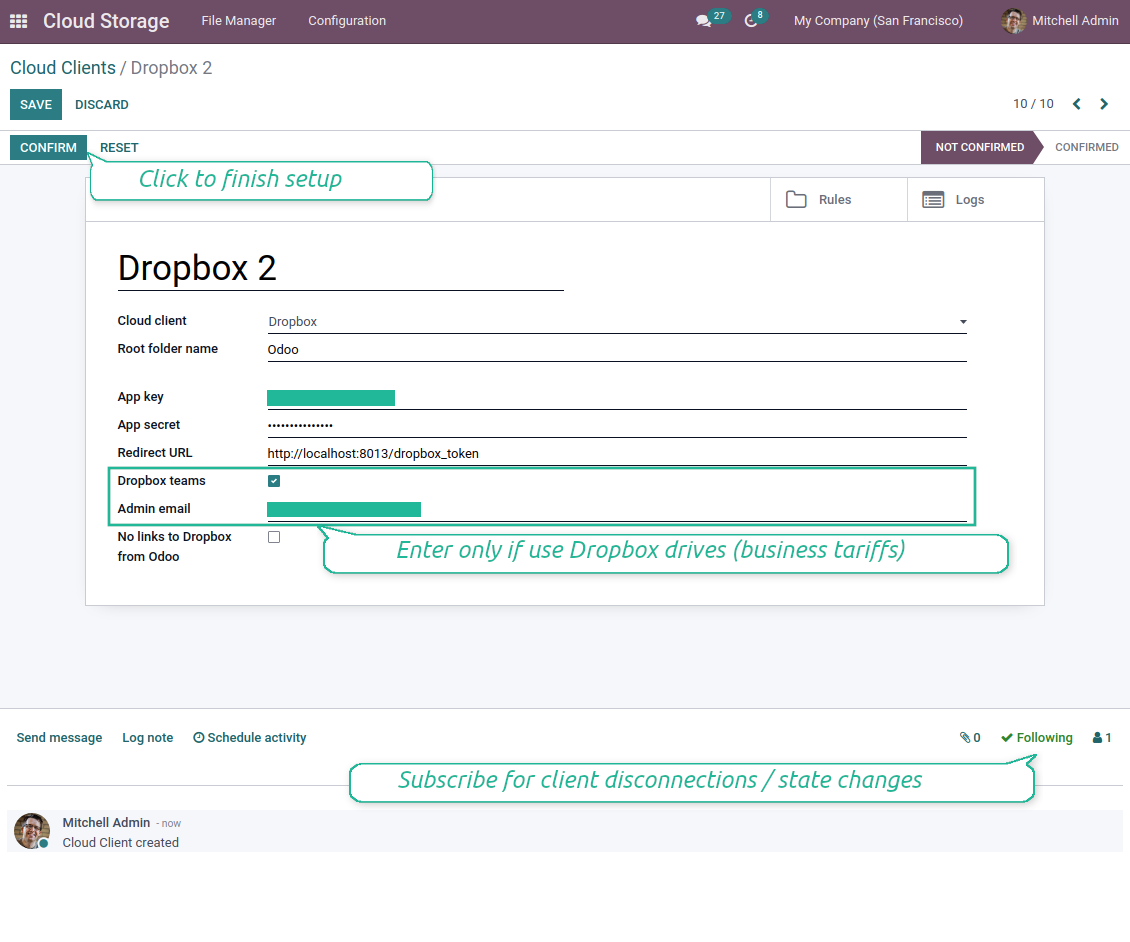
- Go to Odoo Cloud Storage > Configuration > Cloud Clients press 'Create'
- As a reference introduce any name which would be clear to all users
- As a Cloud client choose 'Dropbox'
- As a Root folder name enter a title which would be users as the parent Google Drive directory for all synced folders. For example, 'Odoo' or 'OdooERP'
- Copy 'App key' to the 'App key'
- Copy 'App Secret' into the field 'App secret'
- Insert previously generated redirect URL
- If you use Dropbox team drives
- Check the related box
- Set an email of the Dropbox user. Inside this user folder, all Odoo related items would be created, and only after that they are shared with all other users. Under this user, all files and folders are created, changed, moved, and deleted
- Press 'Confirm'. Odoo redirects you to the Dropbox login page. Check in the system, agree with all conditions, and grant all permissions asked
- After login, Dropbox redirects you back to Odoo. Dropbox - Odoo synchronization is ready to be done
- Apply the newly created cloud client to folder rules and/or manual folders which should be synced to that Dropbox instance
- Await the sync scheduled job to be started. For testing purposes only: trigger integration manually from Cloud Storage > Configuration > Configuration > the button 'Launch sync'.
Watch also the configuration video
Create a DropBox app
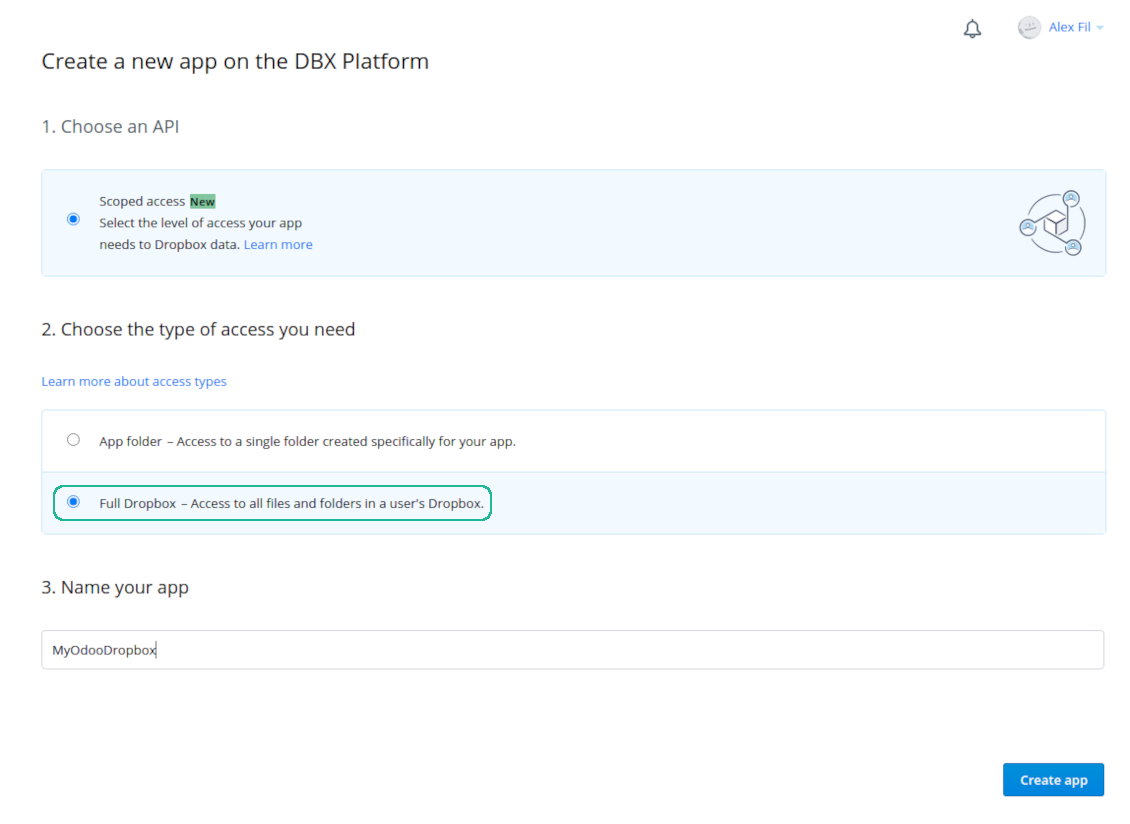
Set up DropBox App: redirection URL
DropBox permissions for personal accounts
DropBox permissions for business accounts
Set up Odoo for DropBox integration
الأسئلة الشائعة حول Dropbox Odoo Integration Odoo v.15
أين تُخزَّن الملفات المتزامنة؟ هل تُنسَخ في Odoo وفي السحابات؟
يفترض التطبيق أن المحتوى الثنائي للمرفقات يُحفَظ في Cloud Client وليس على خادم Odoo. فتصبح هذه المرفقات في Odoo من نوع URL ويمكن الوصول إليها في أي وقت من صندوق المرفقات أو من Cloud Client.
بعد الإعداد لا حاجة لإجراءات يدوية: المزامنة تلقائية بالكامل. حدّد أنواع مستندات Odoo المطلوب مزامنتها واضبط نموذجاً مرتبطاً لكل منها (العملاء، أوامر البيع أو الشراء، المهام، المشاريع، وغيرها).
هل يمكنني إنشاء عدة مجلدات لنفس نوع المستند؟ مثلاً المشاريع الداخلية ومشاريع العملاء؟
نعم، يمكنك ذلك. جهّز قاعدة لكل حالة ثم طبّق عوامل التصفية: مثلاً حسب نوع المشروع.
اجعل عوامل التصفية متنافية حتى يُسنَد المستند بوضوح. مثلاً: «عميل وليس مورّداً»، «مورّد وليس عميلاً». وإلا فستنتقل مجلد المستند من نموذج إلى آخر.
هل الأمر مقبول إذا كان لدي كائنات كثيرة للمزامنة، مثلاً 10000؟
نعم، وإن كان العملية قد تبطؤ عند كثرة المجلدات/المرفقات. ومع ذلك أبلغ عملاؤنا عن بيئات فيها >10 آلاف شريك و~5 آلاف متغير منتج، وكانت العمليات مقبولة.
نقاط للتأكيد:
- المزامنة مصممة بحيث يُزامَن أي عنصر ولا يُفقَد، وإن لم تكن سريعة. تضمن ذلك طوابير FIFO وتثبيت كل مهمة.
- يمكن تقييد عدد الكائنات منطقياً. إعداد النماذج يتيح استبعاد العناصر القديمة (مثلاً لا معنى لمزامنة الشركاء المؤرشفين أو الطلبات من سنتين).
هل يمكن جعل المزامنة فورية؟
لا. لدينا أسباب قوية لتجنب المزامنة الفورية:
الأداء. إذا كانت المزامنة فورية، فكل رفع ملف يُظهر شاشة التحميل.
التعارضات. إذا غيّر مستخدمان عنصراً في الوقت نفسه، قد يتعذر الحل. مع المهام المنتظمة يمكن الإصلاح لاحقاً؛ أما فورياً فسنحتاج طابوراً، وهذا أكثر إرباكاً.
الوظائف. خاصة إعادة التسمية وإعادة الهيكلة. تعتمد المزامنة العكسية على منطق المجلدات وتفحص 100% من العناصر في كل مزامنة. إن تم ذلك بعد كل تحديث فستكون آلاف الطلبات في الثانية. وإلا فستضيع التغييرات.
هل يمكنني تغيير الاسم الافتراضي للمجلدات في السحابات؟
يمكنك تعيين اسمك لدلائل النماذج (أوامر البيع، الفرص، المورّدين، إلخ) لأي نوع مستند.
لمجلدات الكائنات (SO-001، John Smith، إلخ) تعتمد الأداة على طريقة Odoo لبناء الاسم المعروض. يمكن تغيير ذلك بتعريف تعبير الاسم. يُستخدم نفس بناء قوالب بريد Odoo.
هل يمكنني تغيير معدل تكرار مهام المزامنة؟
لا، اعتباراً من الإصدار 15 لا ينبغي تغيير المهام المجدولة. فهي محسّنة لتعمل كل 15 دقيقة لضمان أكثر اتصال استقراراً وسرعة.
يجب أن تكون مهلات خادم Odoo 15 دقيقة على الأقل (900 ثانية).
لإيقاف المزامنة مؤقتاً، افعل ذلك في نموذج عميل السحابة المعني.
هل يمكنني مزامنة المرفقات مع عدة عملاء سحابة
نعم، اعتباراً من الإصدار 15 يمكن إعداد عدة اتصالات. هكذا تُزامَن بعض المجلدات مع عميل سحابة وبعضها مع آخر.
لاحظ أنه لا يمكن بأي حال مزامنة المجلد نفسه مع عدة مخازن سحابية في آن واحد.
نستخدم محرراً خاصاً في سحاباتنا (مثل OnlyOffice وOffice 365 وغيرها). هل تُفتَح الملفات في ذلك المحرر؟
نعم، بحسب إعداد عميل السحابة لديك.
هل أحتاج فقط إلى تطبيق Cloud Storage Solution؟
اعتباراً من الإصدار 15 يمكن استخدام التطبيق بمفرده لتنظيم المرفقات في مجلدات وتوفير واجهة مدير الملفات.
أما إن كان الهدف الاتصال بأحد عملاء السحابة، فيلزم تثبيت تطبيق اختياري واحد على الأقل خاص بالعميل.
ماذا يحدث عندما أغيّر قاعدة مجلد؟
عندما تتغير قاعدة مجلد، تتغير قائمة المجلدات أيضاً. إذا لم يعد المجلد يطابق الشروط يُزال. إن كانت الملفات مزامَنة، تعيدها المزامنة العكسية إلى Odoo وتحذفها من Cloud Client.
إن لم يطابق كائن المستند شروط قاعدة المجلد، فلن يُنشأ مجلده. وإن طابقها لاحقاً فسيُنشأ المجلد المرتبط.
ما سياسة تحديث ادواتكم؟
وفق سياسات Odoo Apps Store الحالية:
- كل وحدة مشتراة للإصدار 12.0 وما قبله تمنح الوصول إلى كل الإصدارات حتى 12.0.
- بدءا من الإصدار 13.0 تُشترى كل نسخة من الوحدة على حدة.
- بغض النظر عن الإصدار، الشراء يعطي حق كل التحديثات والإصلاحات ضمن الإصدار الرئيسي.
فريق faOtools لا يتحكم بهذه السياسات. للأسئلة تواصلوا مباشرة مع ممثلي Odoo Apps Store.
كيف اثبّت التطبيق على Odoo.sh؟
أبسط طريقة هي مسار متجر Odoo المدمج:
1. افتح صفحة الوحدة واضغط Deploy on odoo.sh
2. ستُنقل إلى GitHub. سجّل الدخول ثم Create a new repo أو استخدم مستودعا قائما. يجب أن يكون المستودع خاصا. لا يُسمح بنشر التطبيقات بترخيص OPL-1. أنشئ مستودعا جديدا لمشروع Odoo.sh عند الحاجة
3. ثم في odoo.sh اضغط Deploy وأكّد ثم Continue. يبدأ التثبيت.
هذه الخطوات تثبّت التطبيق على فرع الإنتاج. لفروع أخرى أو للتحديث:
1. نزّل الشيفرة من متجر Odoo
2. اعمل commit للوحدة في مستودع GitHub. لا تُستثنى مجلدات/ملفات التطبيق في .gitignore. مستودعات odoo.sh قد تتجاهل مسارات مهمة (مثل /lib). ارفع كل مجلدات وملفات الوحدة
3. انشر الفرع المستهدف في مشروع odoo.sh أو انتظر البناء التلقائي إن كانت الإعدادات كذلك.
كيف اثبّت التطبيق على خادمي؟
2. أعد تشغيل خادم Odoo;
3. فعّل وضع المطوّر (الإعدادات التقنية);
4. حدّث قائمة التطبيقات (قائمة التطبيقات);
5. اعثر على التطبيق واضغط Activate/Install;
6. اتبع الإرشادات في صفحة التطبيق إن وُجدت.
للتطبيق إضافات أخرى. هل اشتريها لاحقا؟
نعم. يضيف Odoo التبعيات تلقائيا إلى السلة؛ استبعد الأدوات المشتراة سابقا حتى لا تدفع مرتين.
نشرت التطبيق على Odoo.sh وأرى تحذيرا/خطأ في الاختبارات
التحذير الأحمر/البرتقالي لا يؤثر على وظائف التطبيق. أحيانا لا تتجاوز وحداتنا الاختبارات التلقائية القياسية لأنها تفترض سلوكا يتعارض مع أهداف التطبيق. مثلا نغيّر حساب السعر بينما تقارن اختبارات Odoo السعر النهائي بالخوارزمية القياسية.
تحقق أولا من وظائف قاعدة البيانات المنشورة. هل كل شيء يعمل؟
إن ظننتم أن التحذير يؤثر على وظائف حقيقية، تواصلوا معنا وأرسلوا سجلات التثبيت كاملة وقائمة الوحدات المنشورة كاملة (الأساسية والطرف الثالث).
هل يمكنني شراء التطبيق منكم مباشرة؟
لا، نوزع الأدوات فقط عبر متجر تطبيقات Odoo الرسمي.
اريد خصما
للأسف ليست لدينا وسيلة تقنية لتقديم أسعار فردية.
هل يمكن تثبيت التطبيق على قاعدة Odoo Online (SaaS)؟
لا، لا يمكن استخدام تطبيقات الطرف الثالث على Odoo Online. خدمة Odoo SaaS تمنع ذلك.
للاداة تبعيات على تطبيقات أخرى. هل اشتريها؟
نعم، تحتاج الأداة إلى كل الوحدات المذكورة في التبعيات. السعر في صفحة التطبيق يشمل هذه التبعيات.
ما سعر الوحدة بالدولار الأمريكي؟ لماذا تغيّر؟
أسعار وحداتنا باليورو. يحوّل متجر Odoo الأسعار إلى عملات أخرى حسب سعره الداخلي. لذا قد يتغيّر السعر بالدولار الأمريكي عند تحديث سعر الصرف.
تتم صياغة نصوص التطبيق والموقع الإلكتروني باللغات غير الإنجليزية بمساعدة الذكاء الاصطناعي وبما يتوافق مع ترجمات Odoo الرسمية. إذا لاحظت خطأ، أرسل تذكرة تصحيح الترجمة وسنقوم بتصحيحه.
الإبلاغ عن الأخطاء
إذا واجهت أخطاء أو سلوكًا غير متسق, فلا تتردد في الاتصال بنا. نحن نضمن تقديم الإصلاحات خلال 60 يومًا من الشراء ونهتم بشدة بتحسين أدواتنا حتى بعد هذه الفترة.
لا تحتاج إلى رقم هاتف أو بطاقة ائتمان للاتصال بنا. يجب عليك فقط اجتياز عملية تسجيل قصيرة عبر البريد الإلكتروني, والتي لا تستغرق أكثر من 30 ثانية.
يرجى تضمين أكبر قدر ممكن من التفاصيل في طلبك: لقطات الشاشة وسجلات خادم Odoo ووصف كامل لكيفية إعادة إنتاج المشكلة وما الى ذلك. عادة ما يستغرق إعداد خطة عمل للمشكلة بضعة أيام عمل (اذا تأكد وجود خطا) او تزويدك بارشادات حول ما ينبغي فعله (في الحالات الأخرى).
طلبات الميزات العامة وأفكار الوحدات (تطوير مجاني)
لدينا دوافع قوية لتحسين أدواتنا وسنكون ممتنين لأي تعليقات. إذا كانت متطلباتك ذات استخدام عام ويمكن تنفيذها بكفاءة, فسيقوم الفريق بإدراج تلك المتطلبات في قائمة المهام الخاصة بنا.
تتم معالجة قائمة المهام هذه بانتظام ولا يتم فرض رسوم إضافية. على الرغم من أننا لا نستطيع أن نعد بالمواعيد النهائية والتصميم النهائي, إلا أنها قد تكون طريقة جيدة للحصول على الميزات المطلوبة دون استثمارات ومخاطر.
لا تحتاج إلى رقم هاتف أو بطاقة ائتمان للاتصال بنا. يجب عليك فقط اجتياز عملية تسجيل قصيرة عبر البريد الإلكتروني, والتي لا تستغرق أكثر من 30 ثانية.


اداة لبناء قاعدة معرفة عميقة للاستخدام الداخلي والخارجي. KMS. مراجعات شبيهة بالويكي
398€

اداة لإدارة الخدمات بالمواعيد من الحجز حتى المبيعات والمراجعات
398€
اداة لإدارة Odoo من محادثات الذكاء الاصطناعي عبر MCP. Claude. اي ذكاء يدعم MCP.

اداة لتنظيم مرفقات Odoo في مجلدات ومزامنة الدلائل مع Google Drive وOneDrive/SharePoint وNextcloud/ownCloud وDropbox وAmazon S3 وBox وNAS. مدير الملفات. DMS
398€


اداة لمزامنة مرفقات Odoo مع ownCloud/Nextcloud في الاتجاهين
487€