Universal Appointments: Portal and Website v.16
The extension to the Universal Appointments app to schedule appointments on the Odoo website and in the Odoo portal. Online appointments. Online Bookings
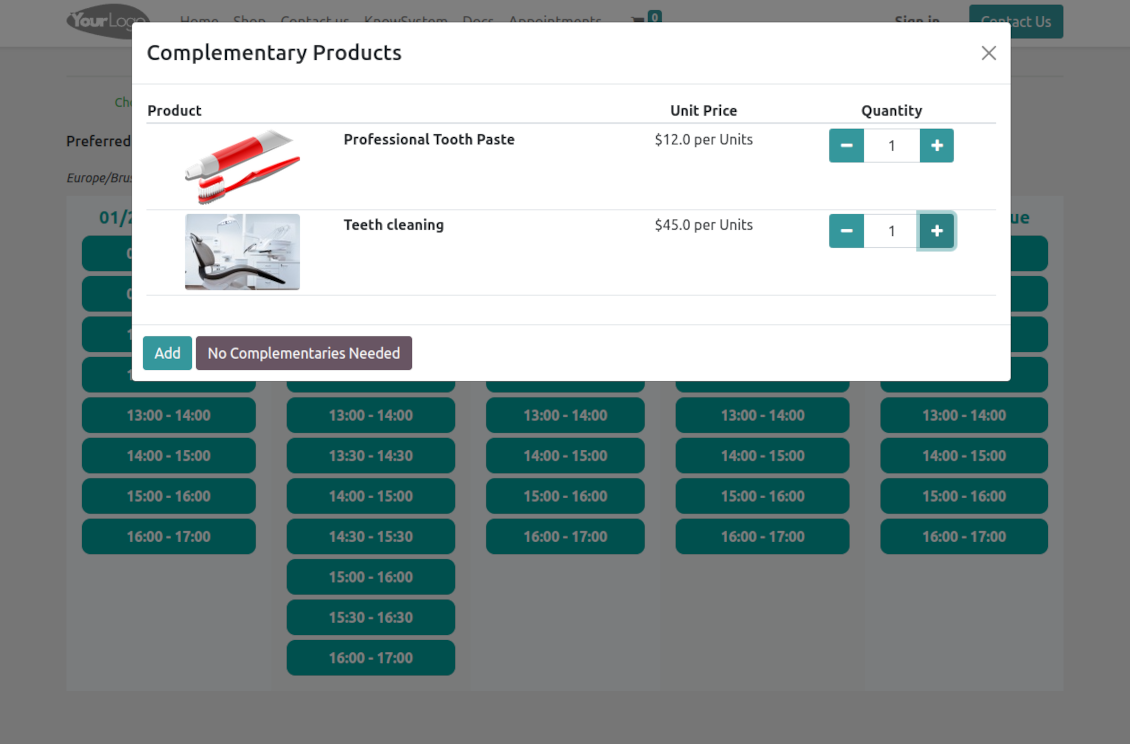
Clear website bookings
Let portal partners and website visitors schedule an appointment through the configurable multi-step process of checkout and confirmation
Full-service management details
Publish resource types, resources, and services details in the portal and website
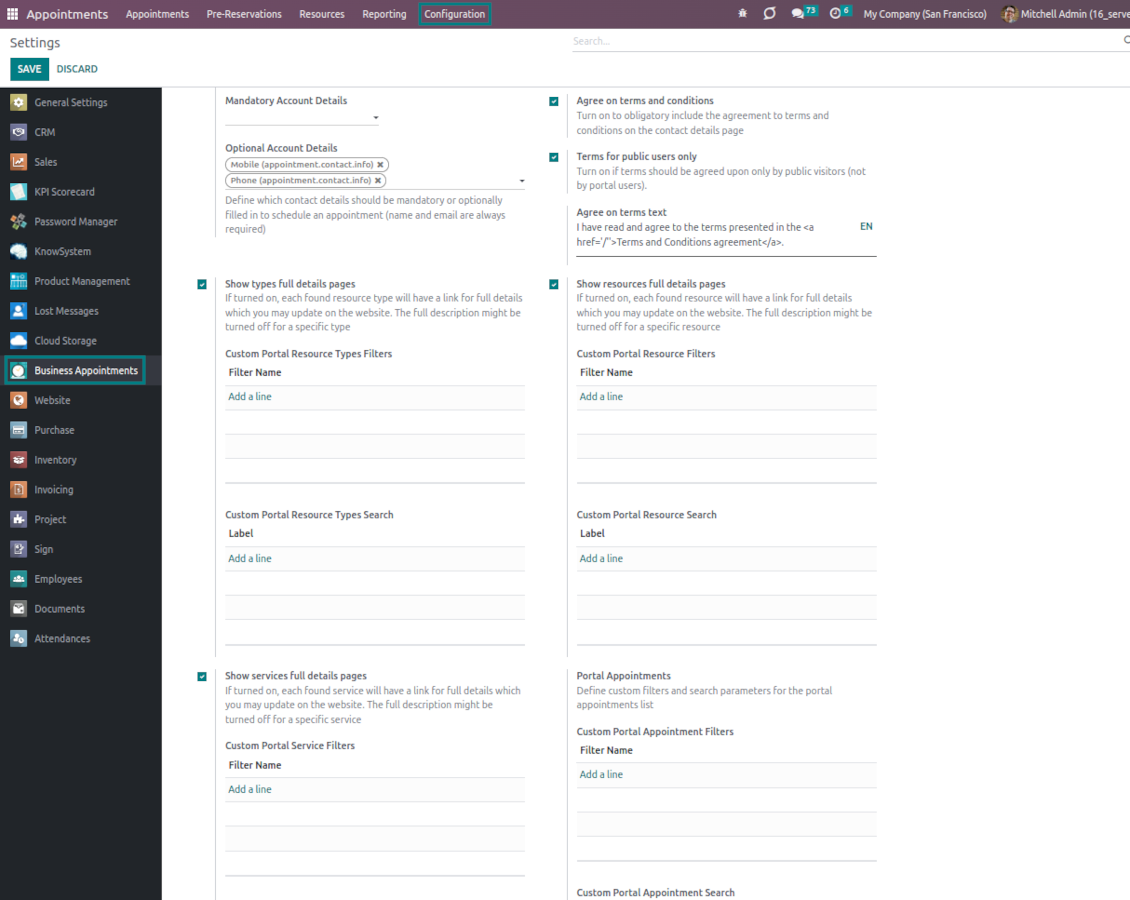
Customizable website and portal pages
Turn on/off optional layout elements. Introduce your own titles and welcome texts. Exclude booking steps
Portal control over reservations
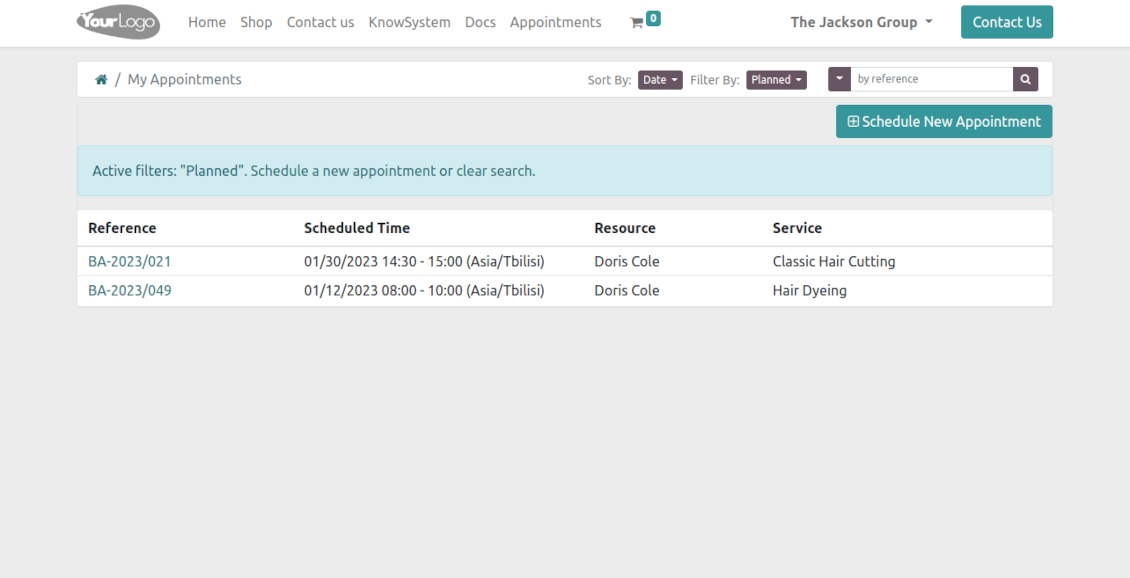
Allow portal users to control planned and made reservations.
Universal website bookings
-
Making a reservation through the Odoo portal/website represents the multi-step checkout process
-
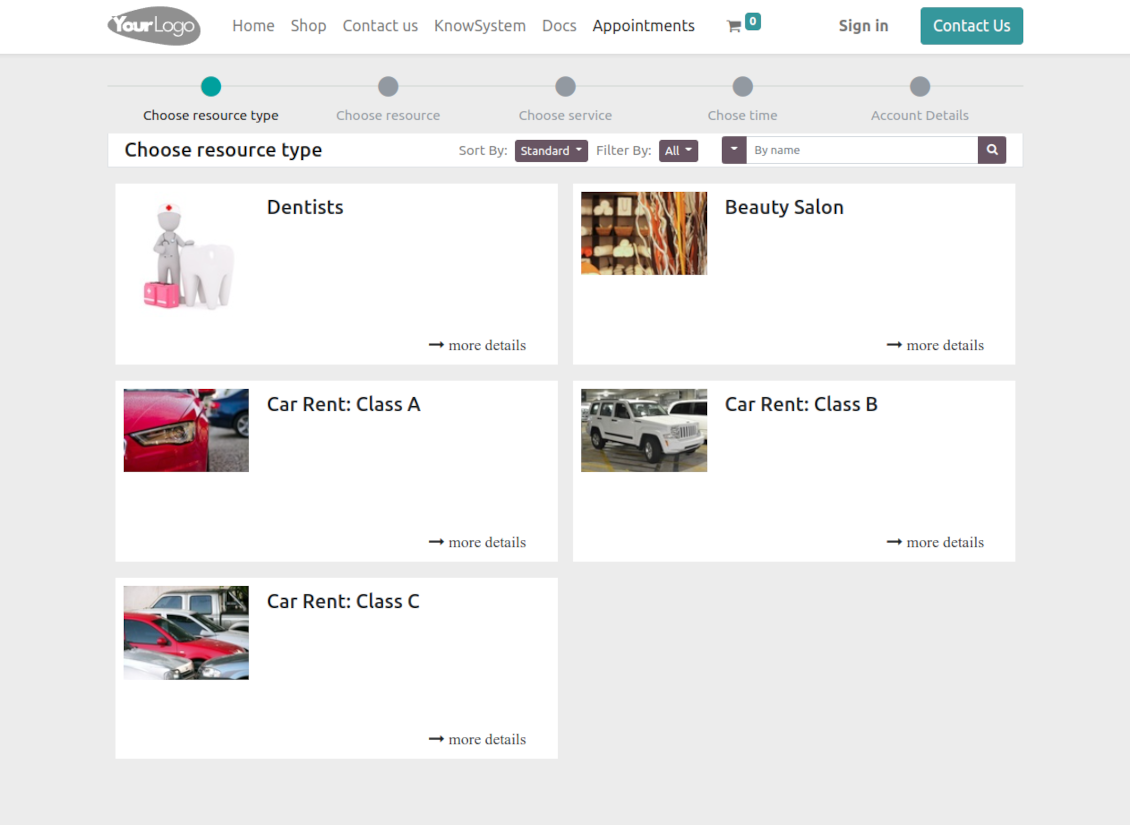
It starts with selecting a resource type. For example, "Beauty salon" or "Class A Cars". The step might be missed if there is a single published resource type for a current website
-
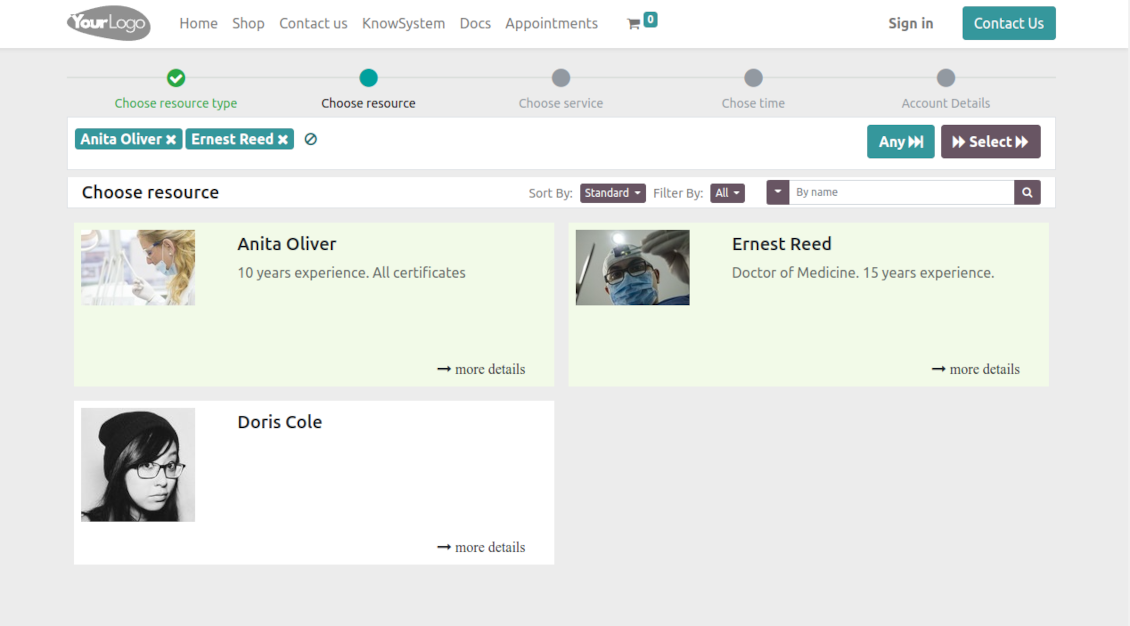
Then, a client navigates over resources of the chosen type to pick one, a few, or applies any (all). For example, "Hair Dresser John Brown" or "Tesla 1234". The step will be missed if there is a single published resource, or when the chosen resource type assumes automatic allocation
-
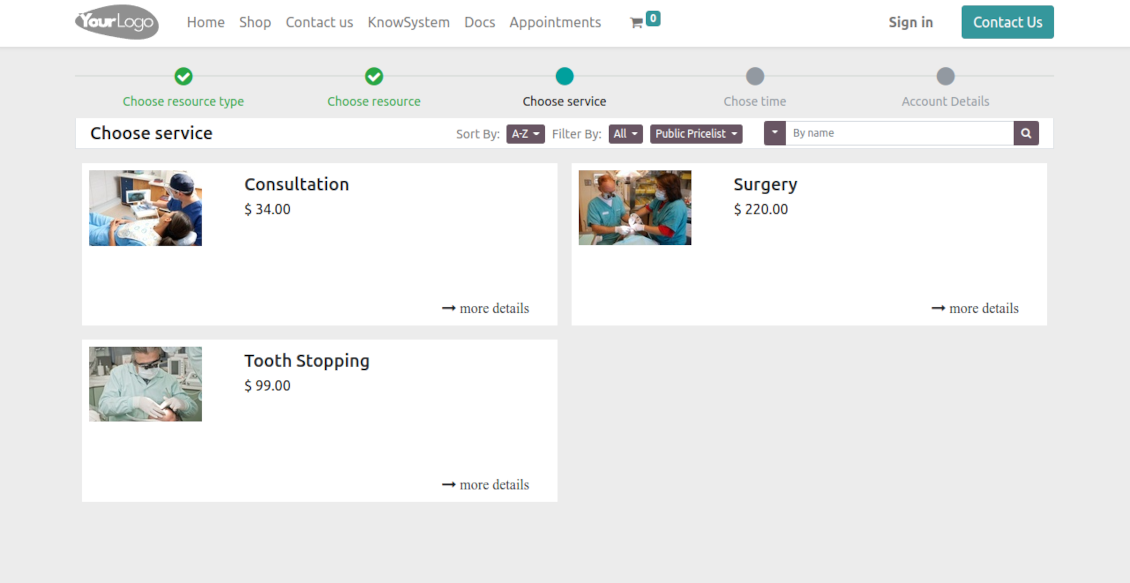
Afterward, a client chooses the desired service related to the selected resources. For example, "Makeup" or "Car Rent Class A". Users will not be forced to choose a service if there is a single published on this website for this resource
-
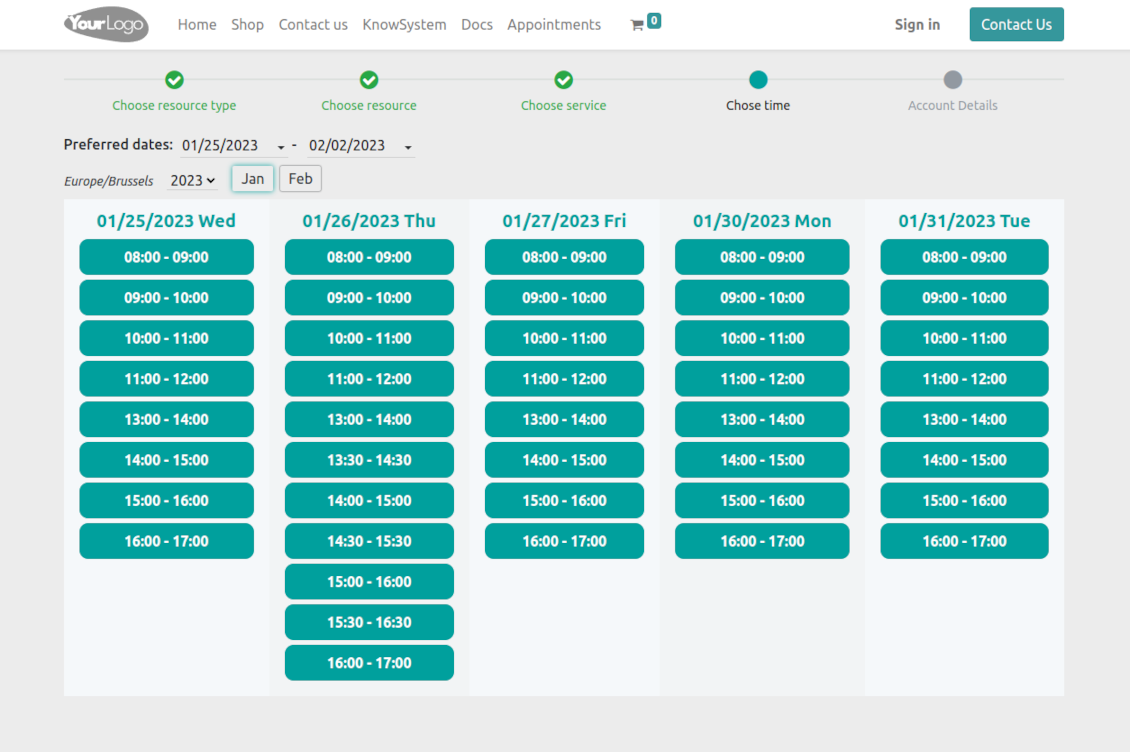
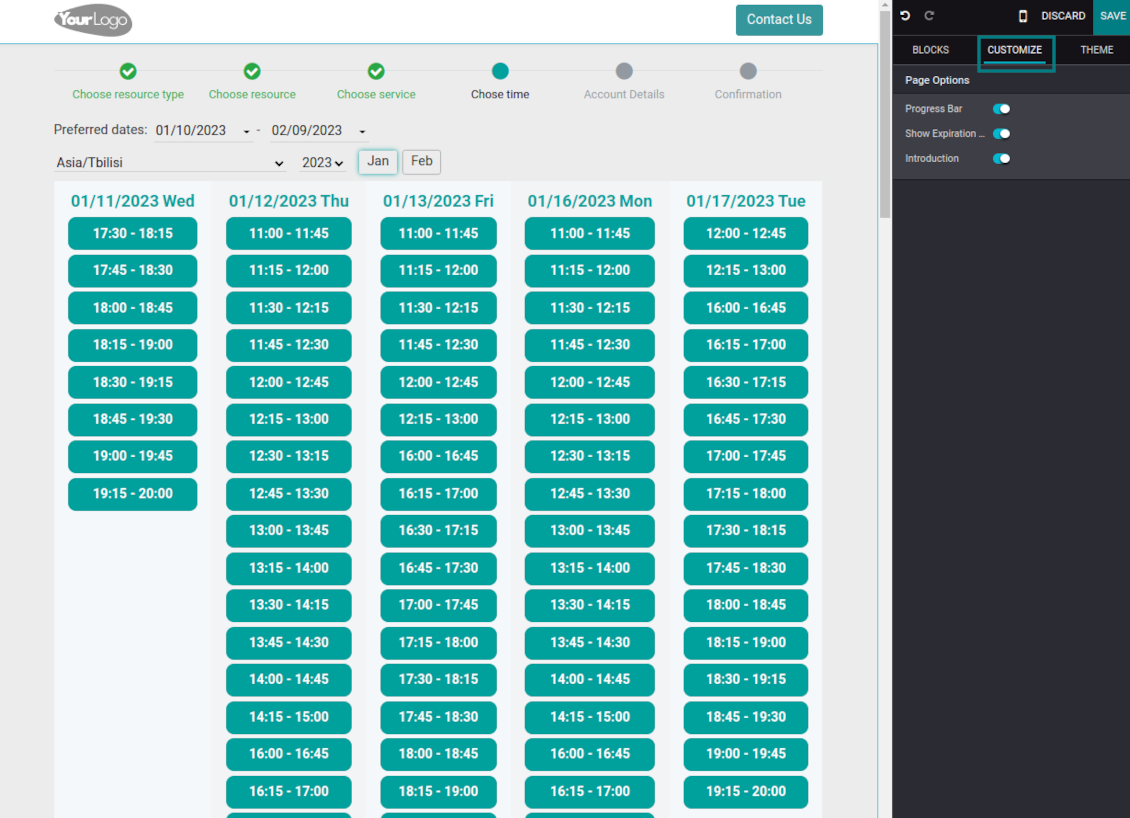
Now a client is shown available time slots. The interface allows adopting time frames of search, changing the time zone, and choosing duration (for the services with manual duration). Each action results in slots' recalculation. Website visitors might be optionally allowed to book a few time slots for a chosen service (the multi-scheduling option)
-
A time slot selection is required and can be not missed. As soon as prereservation is done, nobody else can book the same time period. Users have limited time to make confirmation after which prereservation will be canceled (the exact time is configurable)
-
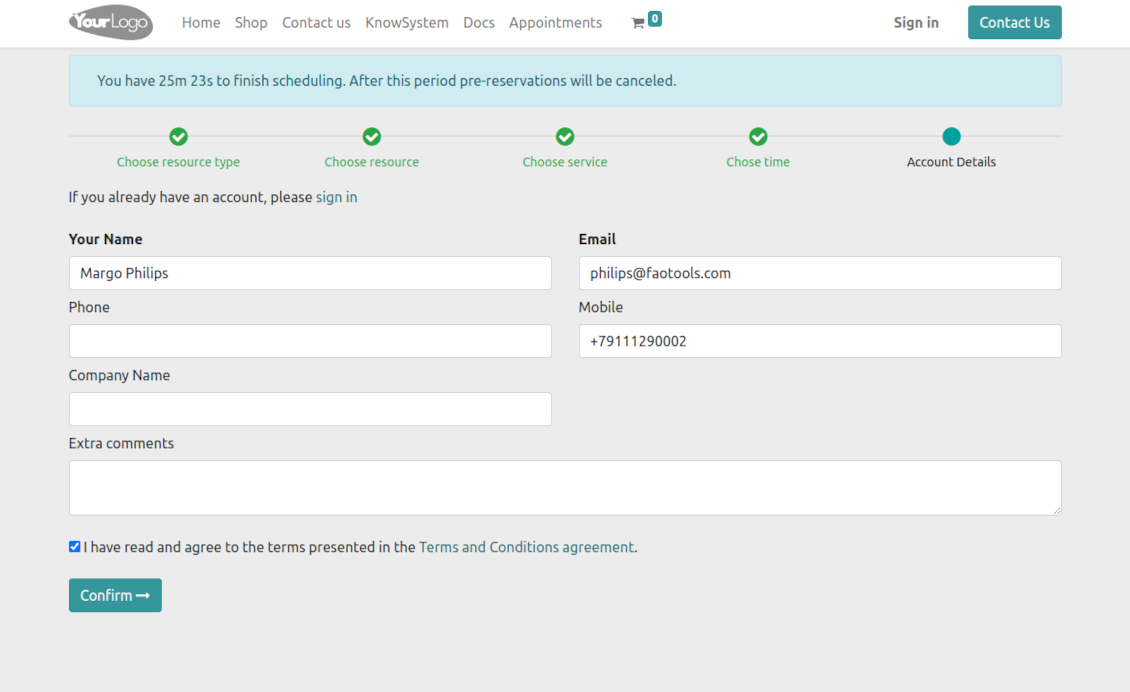
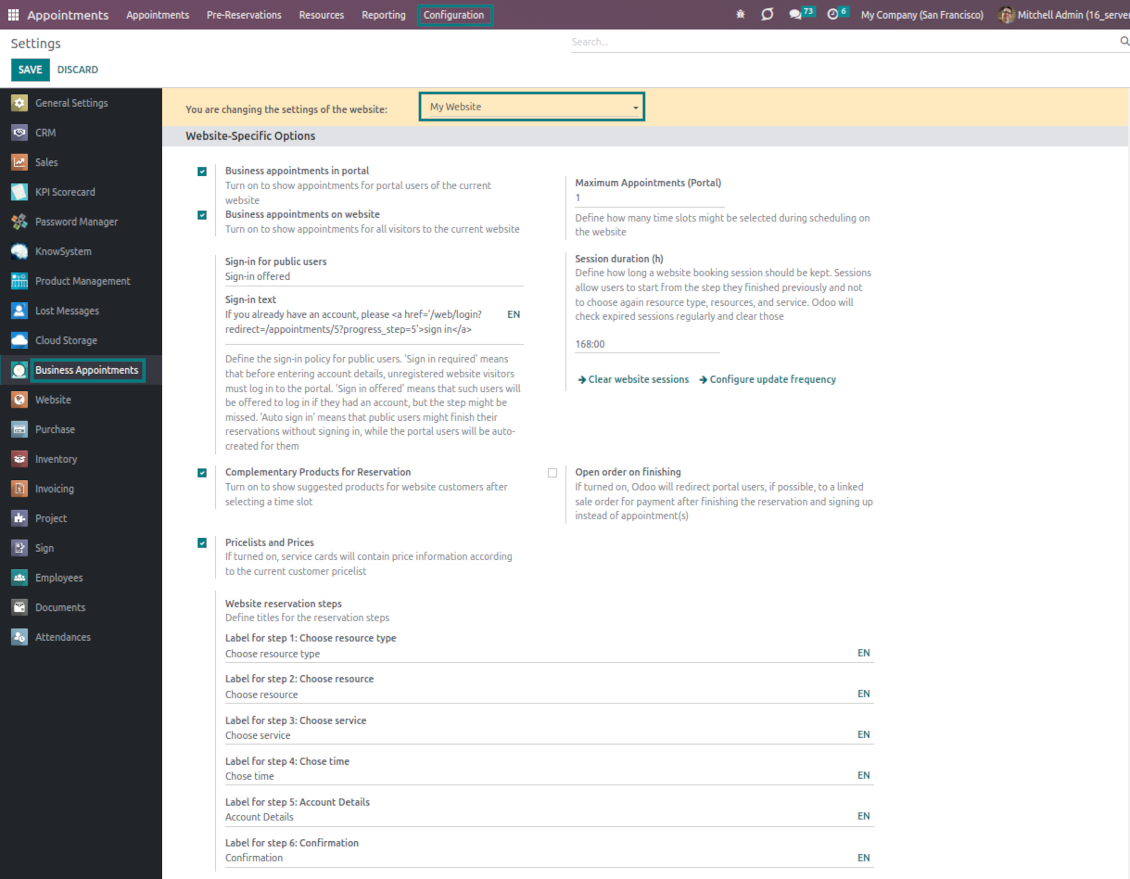
As the time slot is pre-reserved, optionally force the public (not logged-in users) to sign in, only offer to do so, or just let them enter their details
-
Then, a client should introduce his/her contact details, a set of which might be changed per website. By default, the required ones are name and email. Portal (already registered) users would have those fields auto-populated. Optionally place here a checkbox to agree with the terms and conditions
-
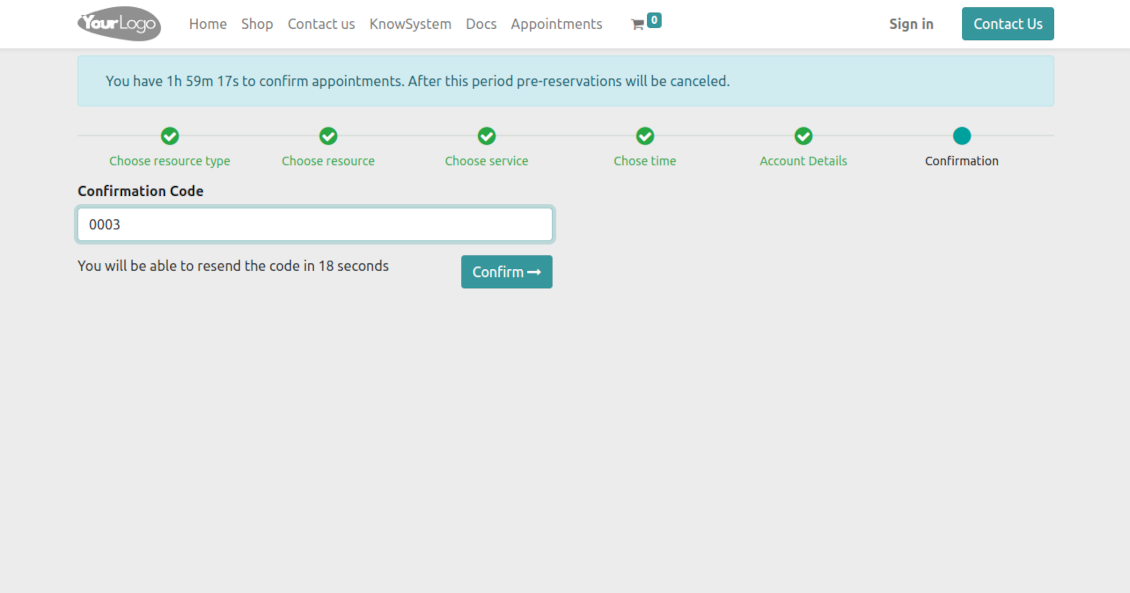
Optionally ask clients to confirm their email or mobile number. If the confirmation option is turned on, users would be obliged to insert received codes. In case a correct code is not introduced in time (the timer is set up on the configuration page), appointments would be canceled. If you selected SMS confirmation (the feature depends on Odoo SMS IAP) but your balance is not sufficient, a confirmation code would be forwarded by email
-
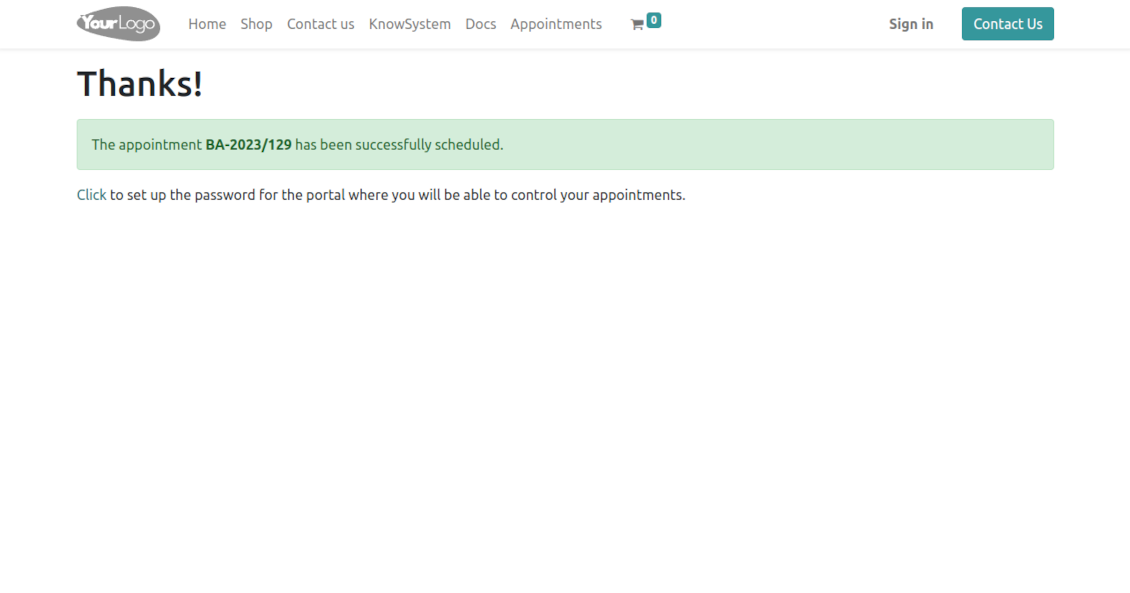
As soon as all steps are done, a client receives a confirmation email and is redirected to the success page/new appointments(s) page. For not yet-registered users, the app offers to enter the password for the Odoo portal
-
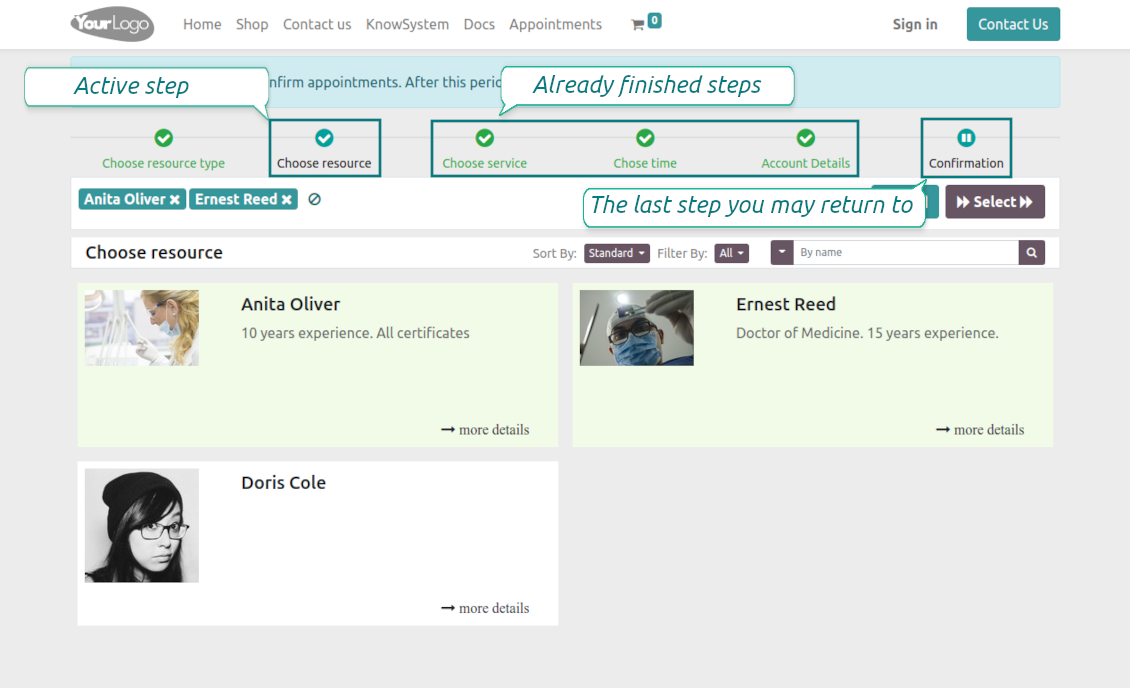
During the whole process, a client sees the progress bar (if you have not purposefully turned it off). The progress bar lets safely return to any previous step and back.
Configurable appointment pages
-
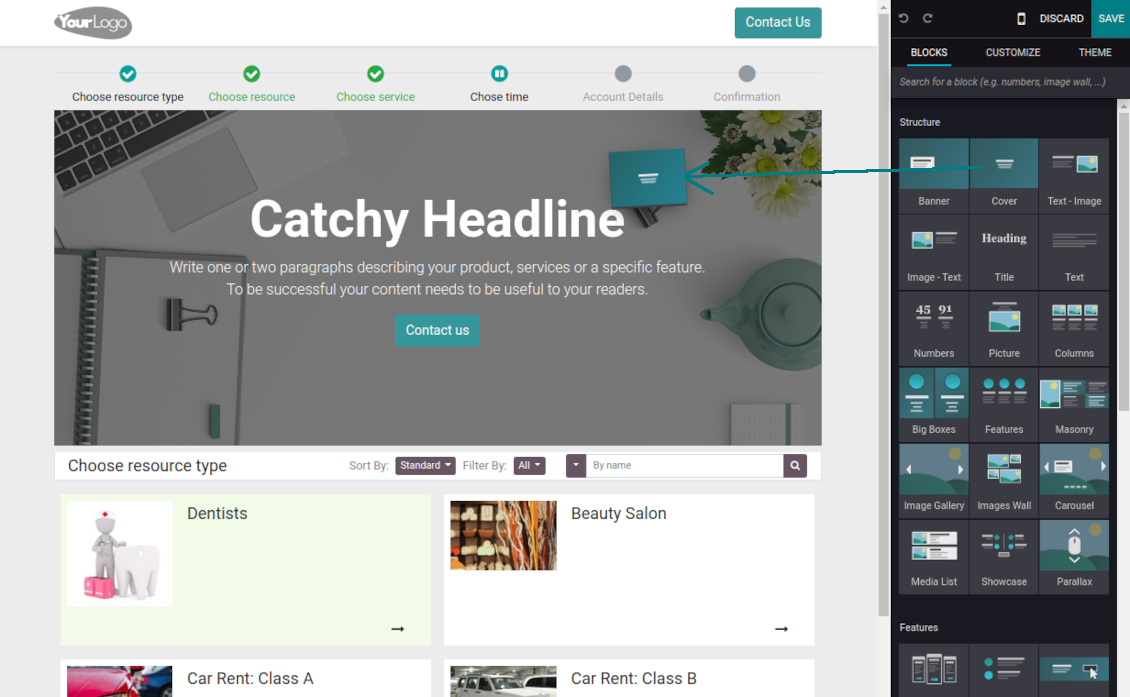
Show/hide the progress bar. Introduce your own titles for progress steps
-
Show/hide introduction blocks, images, and short descriptions for resource types, resources, and services
-
Prepare your own Odoo website full details pages for resource types, resources, and services using Odoo's standard website builder. Show/hide links for those pages
-
Show/hide timers for pre-reservation and confirmation
-
Define filters and sortings for resource types, resources, and service steps
-
Show/hide the terms and conditions link for portal/public users with your own text.
Portal control of reservations
-
Clients control their appointments right in the Odoo portal
-
Portal users observe the list of planned and done appointments and may check any of those
-
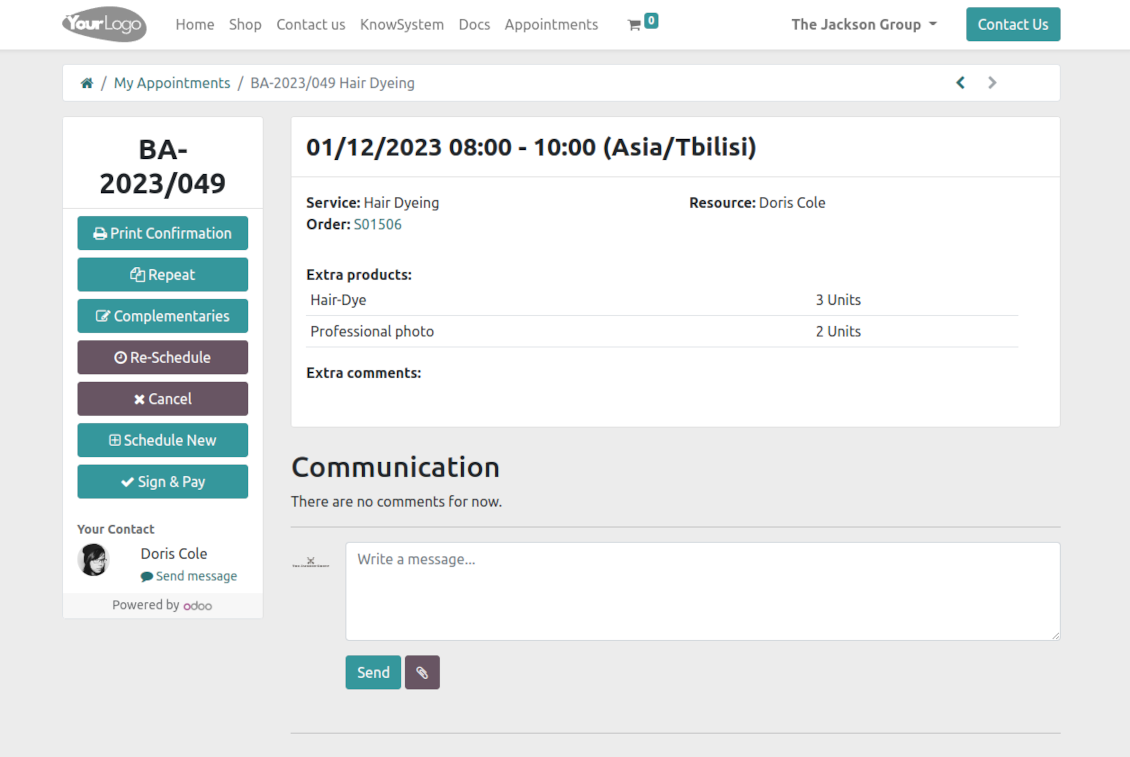
The Odoo portal lets schedule new or repeat existing reservations, cancel or re-schedule planned appointments
-
Each appointment portal page has a chatterbox that allows direct communication with the resource manager and other followers
-
From the reservation page, users can also print a voucher, so appointment confirmation.
Pogosta vprašanja o Universal Appointments: Portal and Website Odoo v.16
Kakšne so politike posodobitev vaših orodij?
Glede na veljavna pravila Odoo Apps Store:
- Vsak modul, kupljen za različico 12.0 in starejše, omogoča dostop do vseh različic do 12.0.
- Od različice 13.0 je treba vsako različico modula kupiti posebej.
- Ne glede na različico nakup daje pravico do vseh posodobitev in popravkov znotraj glavne različice.
Upoštevajte, da ekipa faOtools teh pravil ne nadzoruje. Za vprašanja se obrnite neposredno na predstavnike Odoo Apps Store.
Kako namestim vašo aplikacijo na Odoo.sh?
Najbolj neposreden pristop je uporaba vgrajenega poteka dela trgovine Odoo:
1. Odprite stran modula in kliknite gumb Deploy on odoo.sh
2. Nato boste preusmerjeni na stran GitHub. Prijavite se v račun, nato kliknite 'Create a new repo' ali uporabite obstoječega. Poskrbite, da je skladišče zasebno. Objavljanje aplikacij pod licenco OPL-1 ni dovoljeno. Po potrebi ustvarite nov repo za projekt Odoo.sh
3. Nato pojdite na odoo.sh in kliknite gumb Deploy. V pojavnem oknu potrdite odločitev in kliknite 'Continue.' To sproži namestitev.
Ti koraki namestijo aplikacijo na produkcijsko vejo projekta. Če želite aplikacije namestiti na druge veje ali posodobiti modul, opravite naslednje:
1. Naložite izvorno kodo aplikacije iz trgovine Odoo
2. Naredite commit modula v zahtevano skladišče GitHub. Poskrbite, da ni nobena mapa/datoteka aplikacije prezrta (tj. ni v .gitignore skladišča). Skladišča samodejno ustvari odoo.sh in lahko privzeto vsebujejo ključne elemente (npr. /lib). Naložite vse imenike, podimenike in datoteke modula brez izjem
3. Namestite ciljno vejo projekta odoo.sh ali, če to predvidevajo nastavitve, počakajte, da se samodejno izgradi.
Kako namestim vašo aplikacijo na lastnem strežniku?
2. Znova zaženite strežnik Odoo;
3. Vklopite način za razvijalce (tehnične nastavitve);
4. Posodobite seznam aplikacij (meni aplikacij);
5. Poiščite aplikacijo in pritisnite „Activate“/„Install“;
6. Sledite smernicam na strani aplikacije, če obstajajo.
Opazil sem, da ima vaša aplikacija dodatne dodatke. Jih smem kupiti pozneje?
Da, seveda. Hkrati Odoo samodejno doda vse odvisnosti v košarico, zato morate predhodno kupljena orodja izključiti, da se izognete dvojnemu plačilu.
Namestil sem vašo aplikacijo na Odoo.sh in v testih vidim opozorilo/napako
Rdeče/oranžno opozorilo ne vpliva na funkcije aplikacije. Žal naši moduli včasih ne opravijo standardnih samodejnih testov, ker ti predvidevajo vedenje, ki je v nasprotju s cilji aplikacije. Na primer spreminjamo izračun cene, medtem ko testi standardnega modula Odoo primerjajo končno ceno s standardnim algoritmom.
Najprej preverite funkcije nameščene zbirke. Ali vse deluje pravilno?
Če še vedno menite, da opozorilo vpliva na resnične funkcije, nas kontaktirajte in pošljite popolne dnevnike namestitve ter popoln seznam nameščenih modulov (vključno z jedrom in tretjimi).
Ali lahko kupim aplikacijo neposredno pri vašem podjetju?
Ne, orodja razširjamo samo prek uradne trgovine aplikacij Odoo.
Rad bi dobil popust
Žal nimamo tehničnih sredstev za individualne cene.
Ali lahko namestim aplikacijo v svojo zbirko Odoo Online (SaaS)?
Ne, aplikacij tretjih oseb ni mogoče uporabljati na Odoo Online. Žal Odoo SaaS to preprečuje.
Vaše orodje je odvisno od drugih aplikacij. Ali jih moram kupiti?
Da, orodje potrebuje vse module, označene v odvisnostih, da deluje pravilno. Cena na strani aplikacije že vključuje vse potrebne odvisnosti.
Kakšna je cena modula v ameriških dolarjih? Zakaj se je spremenila?
Cena naših modulov je v evrih. Trgovina Odoo pretvarja cene v druge valute po notranjem tečaju. Zato se lahko cena v ameriških dolarjih spremeni, ko se tečaj posodobi.
Besedila aplikacije in spletnega mesta v jezikih, ki niso angleščina, so pripravljena z UI in usklajena z uradnimi prevodi Odoo. Če opazite napako, pošljite zahtevek o pravilnosti prevodov in jo bomo popravili.
Predstavitvene zbirke Odoo (predogledi v živo)
Za to aplikacijo lahko zagotovimo brezplačno prilagojeno demo zbirko.
Za stik ne potrebujete telefonske številke niti kreditne kartice. Potrebna je le kratka prijava z e-pošto, ki ne traja več kot 30 sekund.
Na vašo zahtevo pripravimo individualno zbirko za predogled v živo, kjer lahko približno dva tedna izvajate teste in preverjate predpostavke.
Prijavljanje napak
Če naletite na napake ali nedosledno vedenje, nas ne oklevajte kontaktirati. Zagotavljamo popravke v 60 dneh od nakupa in tudi po tem obdobju želimo izboljševati orodja.
Za stik ne potrebujete telefonske številke niti kreditne kartice. Potrebna je le kratka prijava z e-pošto, ki ne traja več kot 30 sekund.
V zahtevo vključite čim več podrobnosti: posnetke zaslona, dnevnike strežnika Odoo, celoten opis ponovitve težave in podobno. Običajno traja nekaj delovnih dni, da pripravimo delovni načrt (če je napaka potrjena) ali smernice, kaj storiti (sicer).
Javne zahteve za funkcije in ideje modulov (brezplačen razvoj)
Močno nas žene izboljševanje orodij in hvaležni smo za vsako povratno informacijo. Če so vaše zahteve v splošno korist in jih je mogoče učinkovito uresničiti, jih bo ekipa vključila na naš seznam opravil.
Tak seznam opravil obdelujemo redno in ne predvideva dodatnih stroškov. Čeprav ne moremo obljubiti rokov in končne zasnove, je to lahko dober način, da dobite želene funkcije brez naložb in tveganj.
Za stik ne potrebujete telefonske številke niti kreditne kartice. Potrebna je le kratka prijava z e-pošto, ki ne traja več kot 30 sekund.
16.0.1.1.16
- The issue with duplicated warnings has been fixed.
16.0.1.1.16
- The issue with the untranslated warnings has been fixed.
16.0.1.1.15
- The issue with importing the slug method is fixed.
16.0.1.1.14
- The appointment-finishing algorithm is optimized to avoid concurrent updates.
16.0.1.1.13
- The access to custom filters under public and portal users is fixed.

The tool to flexibly structure Odoo attachments in folders and synchronize directories with cloud clients: Google Drive, OneDrive/SharePoint, Nextcloud/ownCloud, and Dropbox. DMS. File Manager. Document management system
398€
The tool to automatically synchronize Odoo attachments with OneDrive files in both ways
487€
The tool to automatically synchronize Odoo attachments with Google Drive files in both ways
487€

The tool to build a deep and structured knowledge base for internal and external use. Knowledge System. KMS. Wiki-like revisions.
398€
The tool to set up KPI targets and control their fulfillment by periods. KPI dashboards. Dashboard designer. KPI charts

The tool for time-based service management from booking appointments to sales and reviews
398€
Orodje za upravljanje Odoo iz priljubljenih AI klepetov prek MCP. Claude. Kateri koli AI s podporo MCP.

The tool to translate URL addresses of Odoo website pages
38€