Vendor Scoring and Evaluation v.17
The app to evaluate, score, and rank Odoo vendors
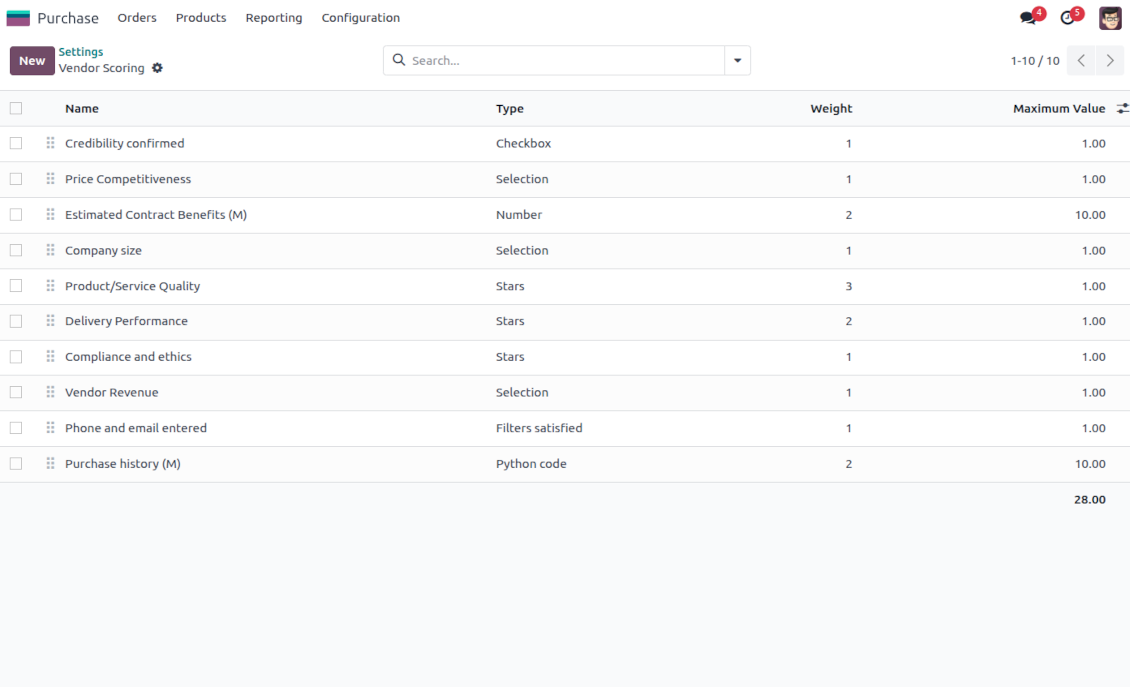
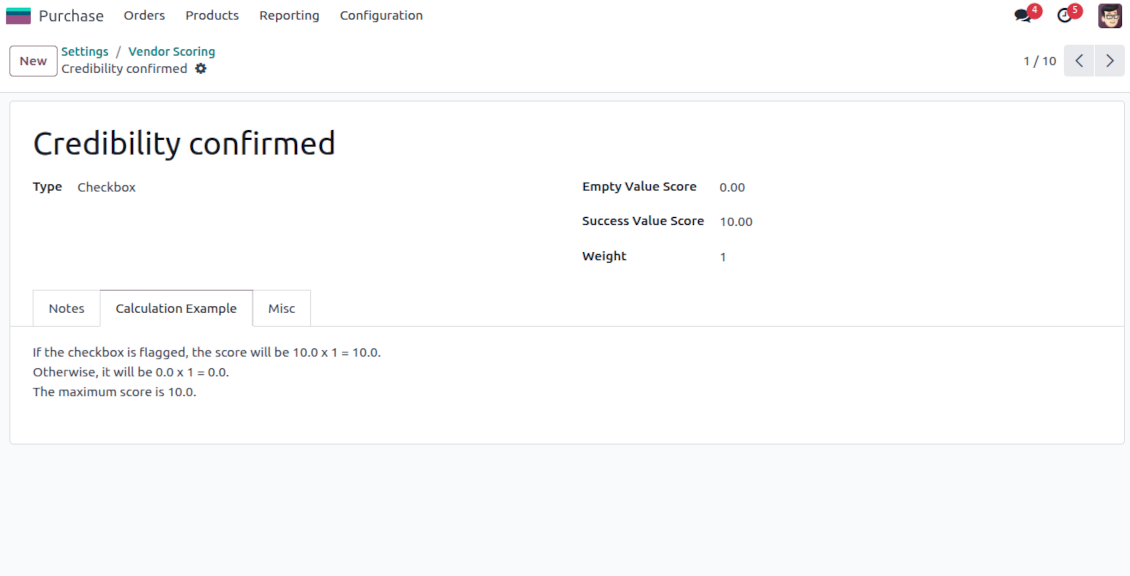
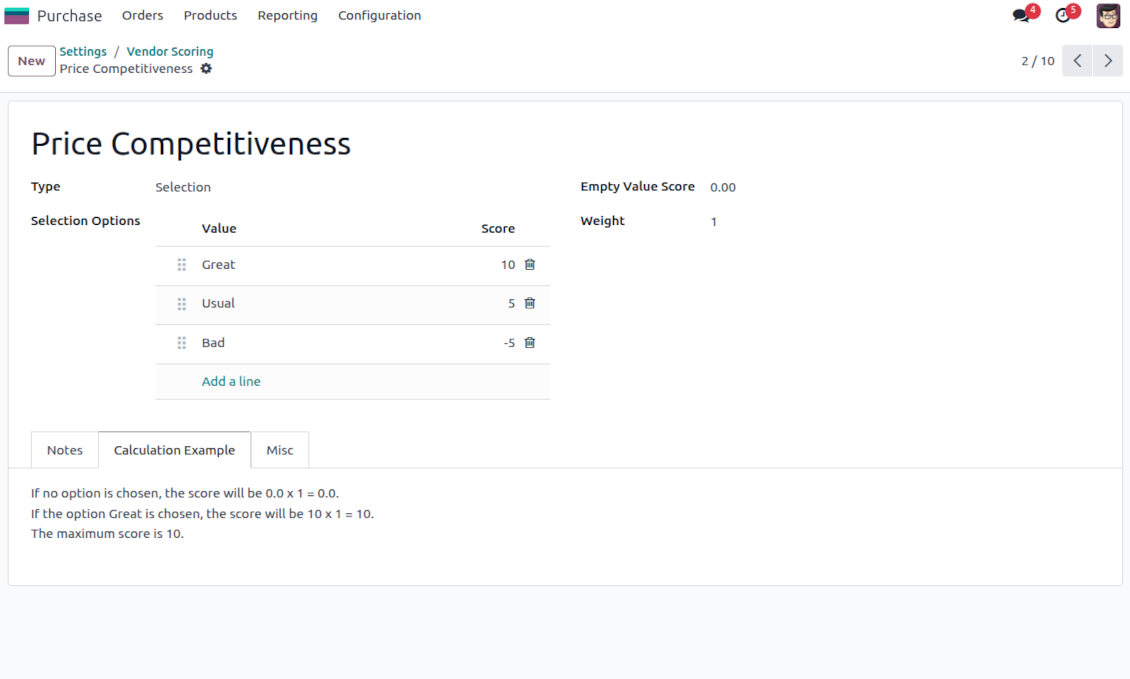
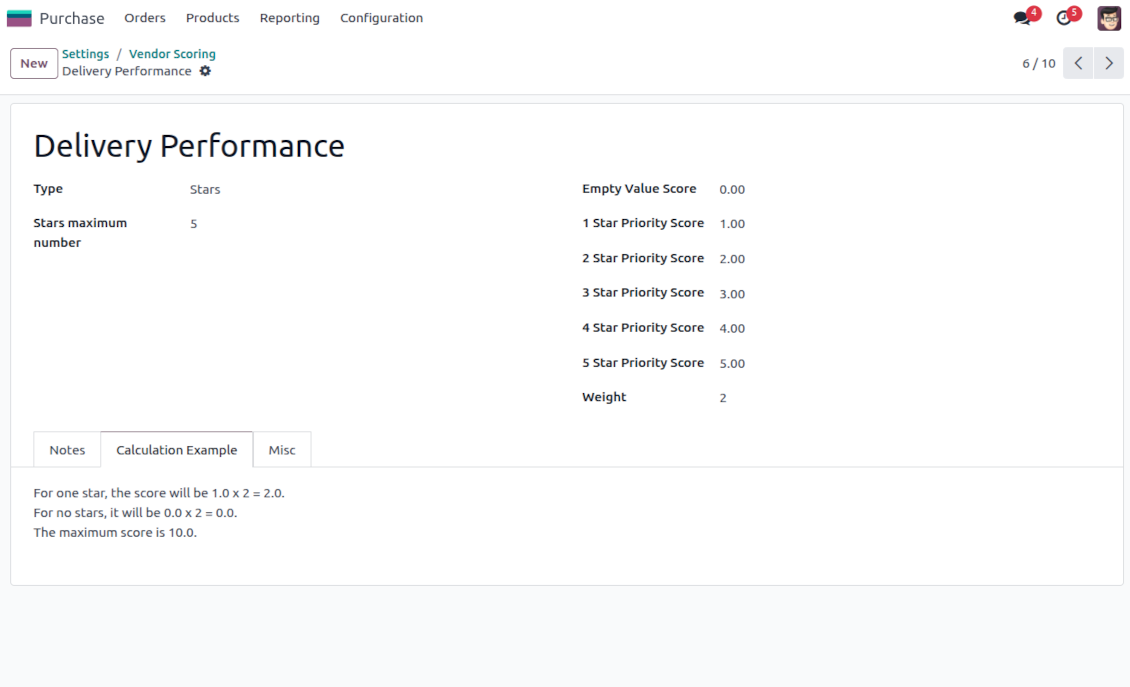
Indicative rankings
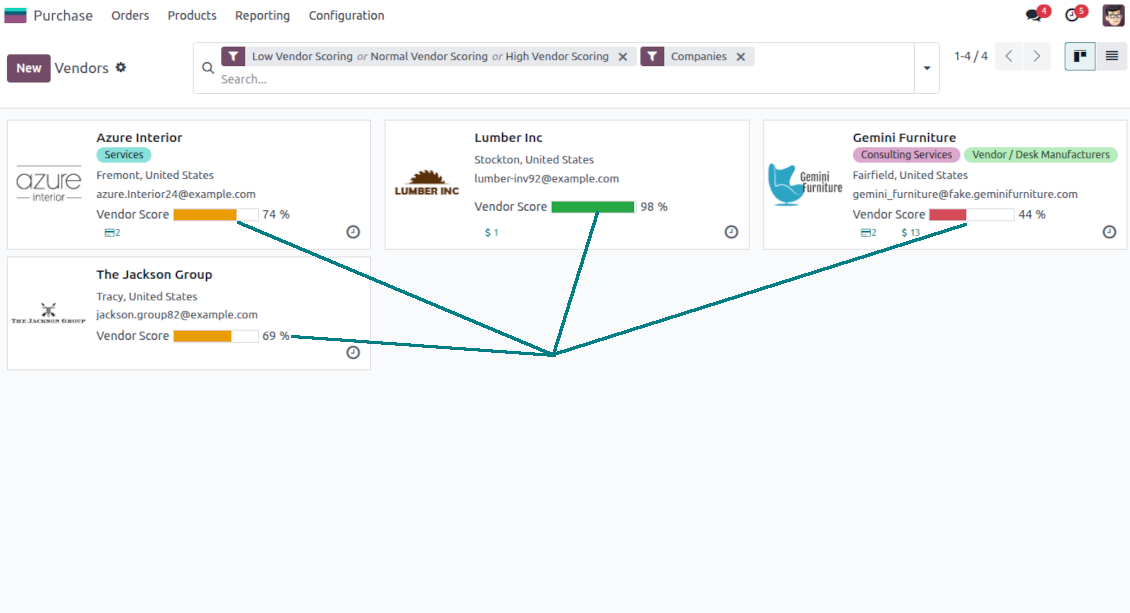
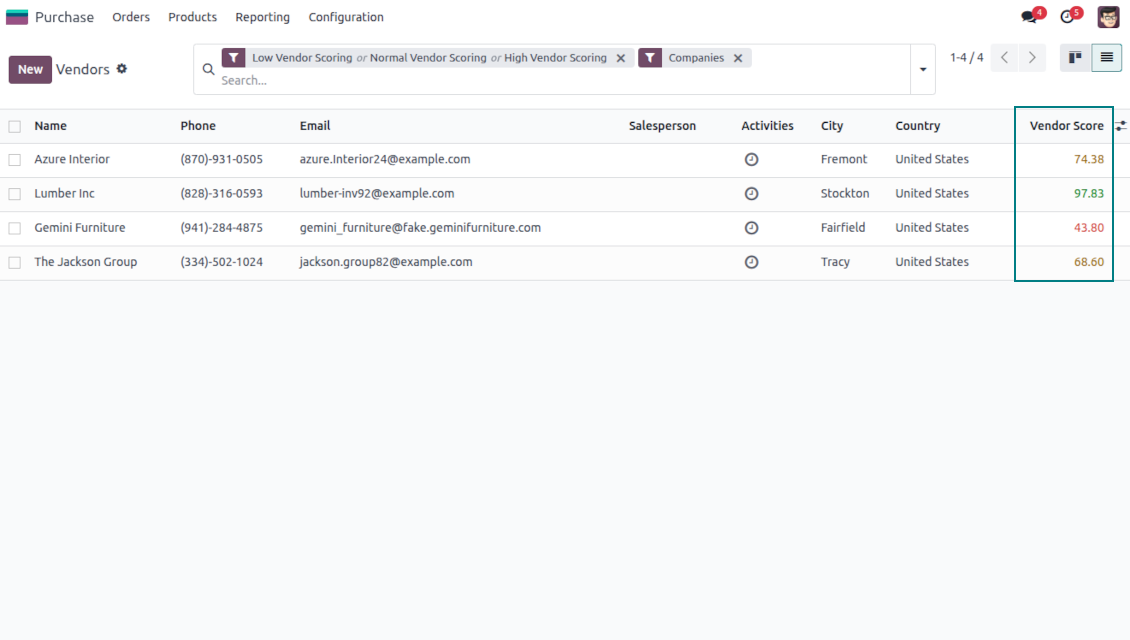
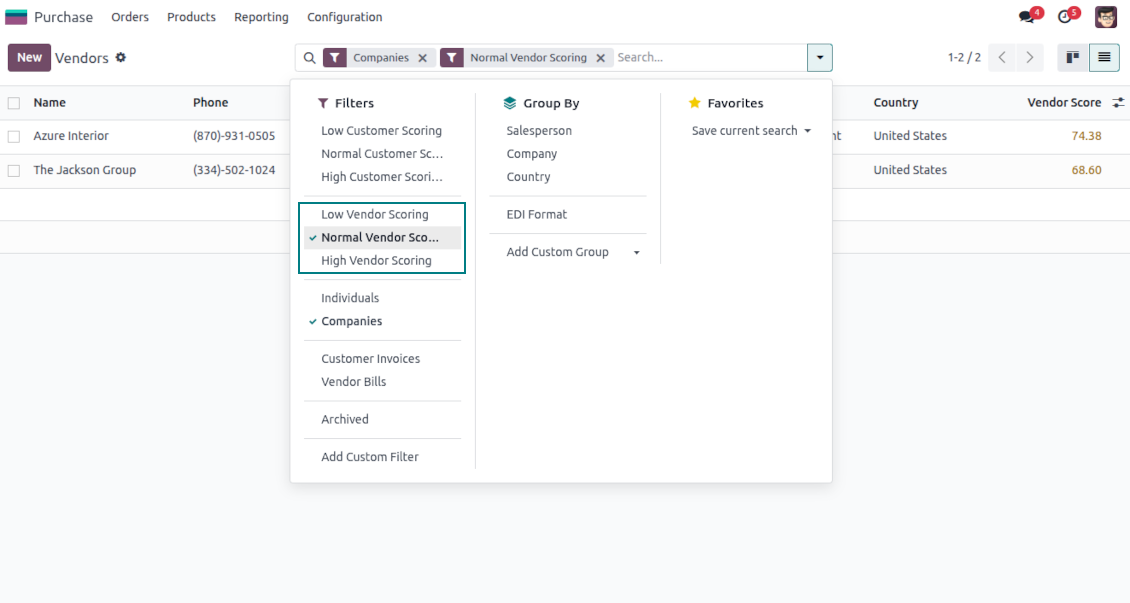
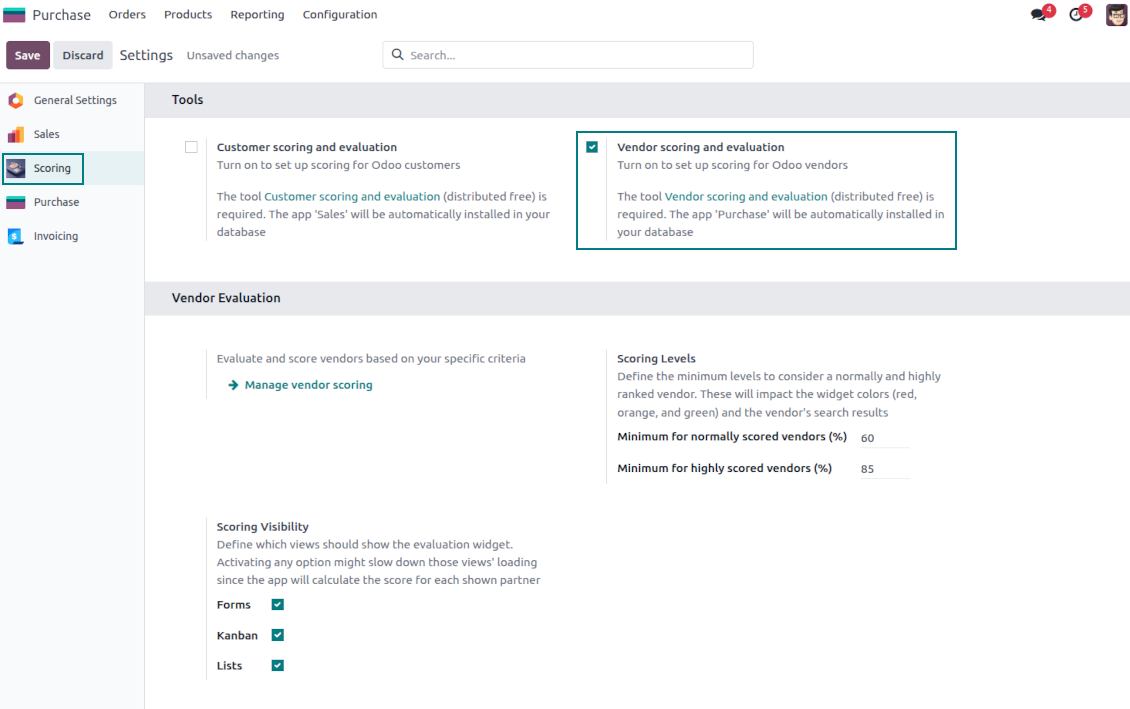
Show or hide rating progress bars on kanban, tree, and form views. Search low, normal, and high-ranked suppliers using standard Odoo filters
Unlimited and specific questions
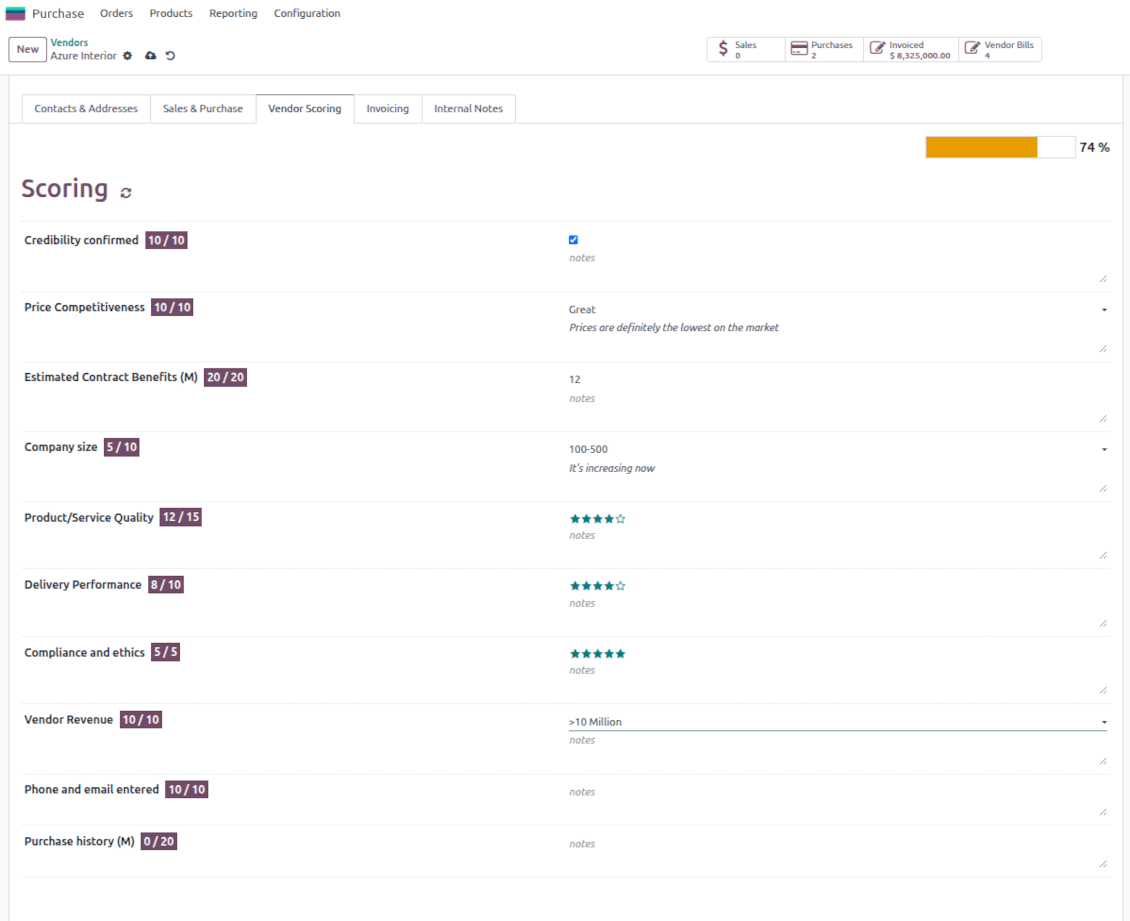
Introduce any number of evaluation points with various weights, answer bonuses, or answer penalties. Complete or change surveys right from a vendor form
Flexible survey points
Apply suitable question types: checkboxes (e.g., True - plus 5 points, False - minus 2), drop-down selections (e.g., option 1 - plus 10 points, option 2 - plus 5 points, option 3 - minus 5 points), rankings (e.g., one star - 1 point, 3 stars - 5, no stars - minus 5 points), or numbers (e.g., each 5 - plust one point, but no more than 20)
Automatic evaluation types
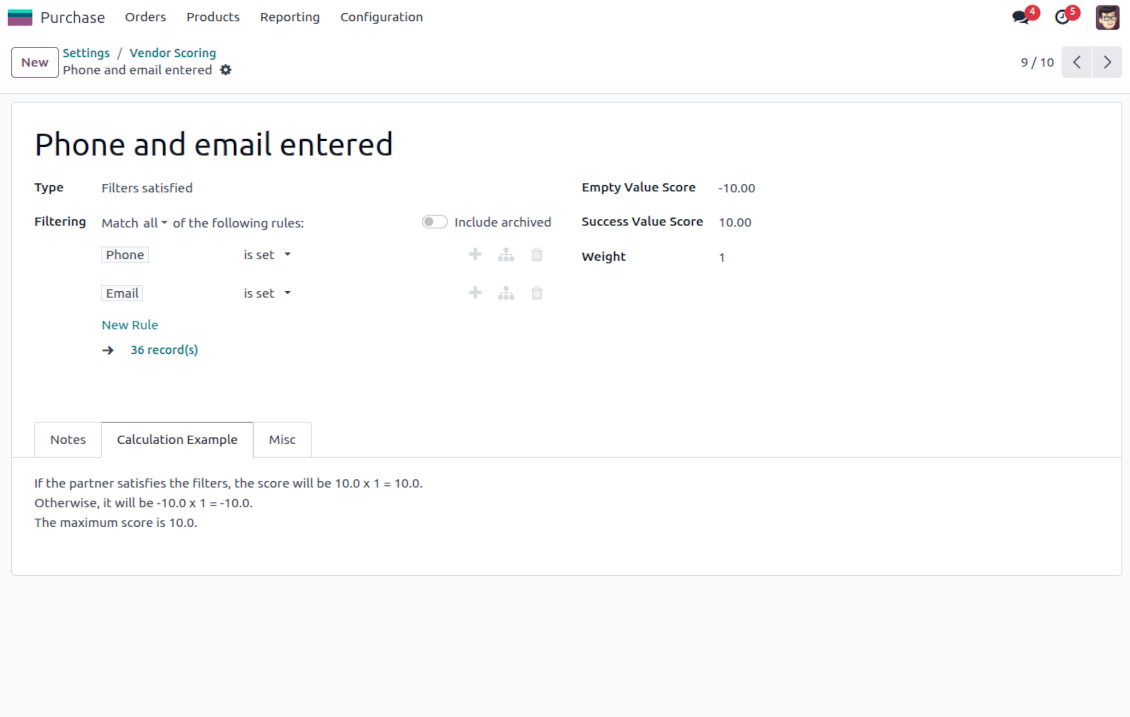
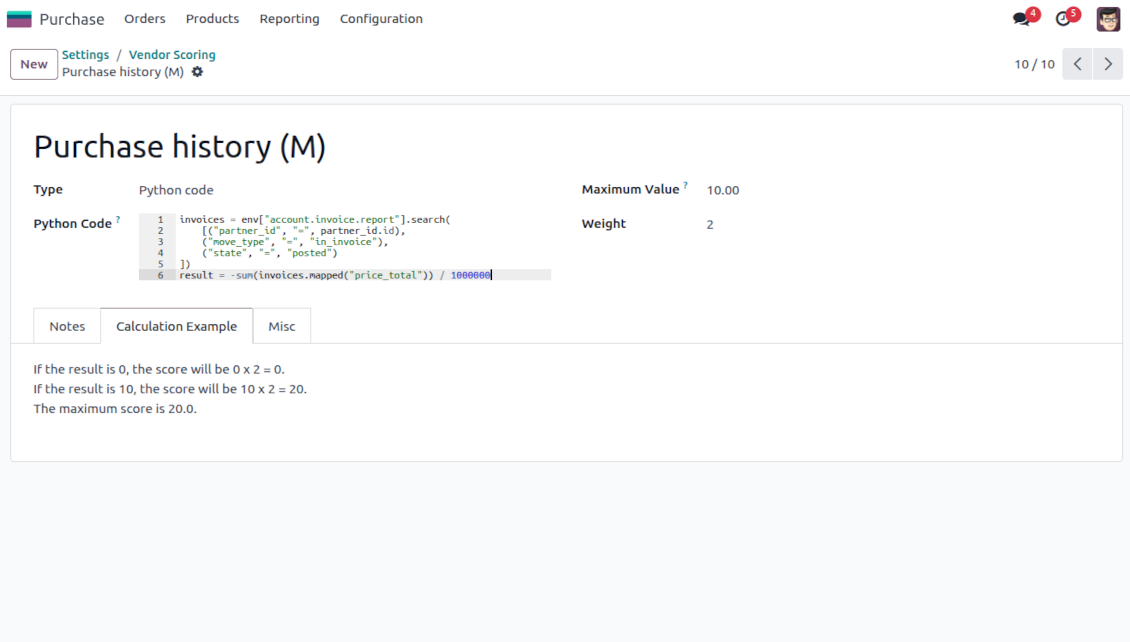
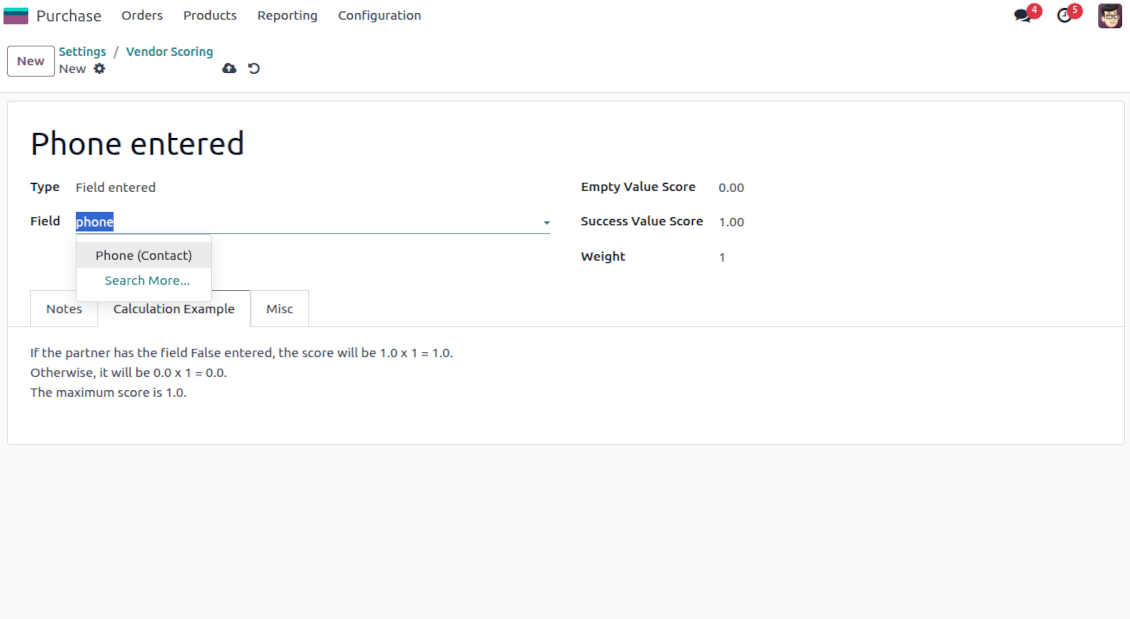
Configure the rules to assign scores based on auto rules: when a vendor suits specific filters (e.g., when a vendor has a particular tag, add 3 points), when a vendor has specific fields entered/not entered (e.g., no email or phone - minus 5 points), or calculate results based on complex and entirely flexible Python code
Your ranking levels
Define when a vendor should be ranked high, normal, or low. For example, from 80% - highly scored; from 60% - normally scored
Topical quantitative analysis
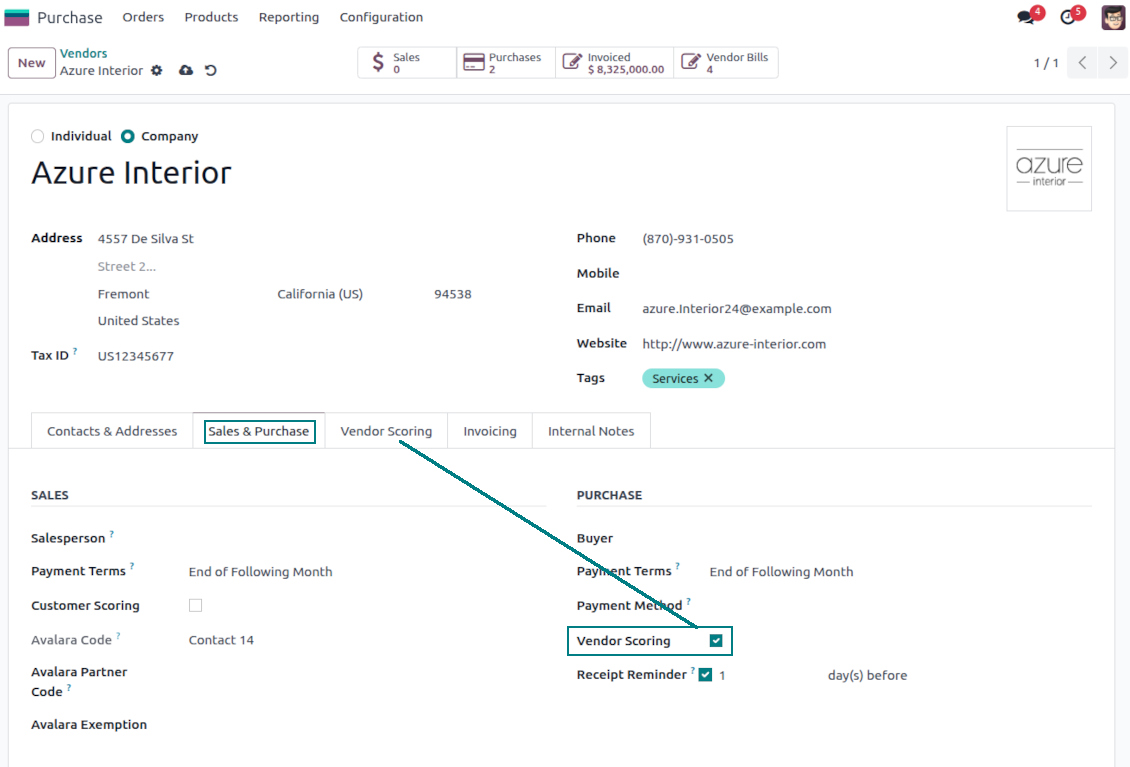
Optionally turn on evaluation for customers and/or vendors. Choose specific vendors to evaluate: others will be excluded from surveys.
Flexibly configurable surveys scoring points
Checkboxes
-
Use this question type when the answer is True or False (default)
-
Assign the score for both options: True - "Success Value Score" (e.g., +10); False - "Empty Value Score" (e.g., -5)
-
Assign the weight for this evaluation point, e.g., 2. For example, the calculated result would be -5 x 2 = -10 for the supplier with the unchecked flag
Dropdown selections
-
Use this question type when there are multiple options to select. For instance, the estimated reputation is chosen between three possible values
-
Assign the score for each option: Great (+10), Normal (+5), or Low (-5). The default value is empty (e.g., 0 points)
-
Assign the weight for this evaluation point, e.g., 3. For example, the calculated result would be 10 x 3 = 30 for a vendor with the "Great reputation"
Stars/Ratings
-
Use this question type when evaluating a specific parameter from 0 to a particular number up to 10. For example, "Compliance and ethics" to be scored from zero to three stars
-
Assign the score for each option: 1 star (-1), 2 stars (1), 3 stars (2). The default value is 0 (e.g., 0 points)
-
Assign the weight for this evaluation point, e.g., 2. For example, the calculated result would be 3 x 2 = 6 for a vendor with 3 stars
Numbers
-
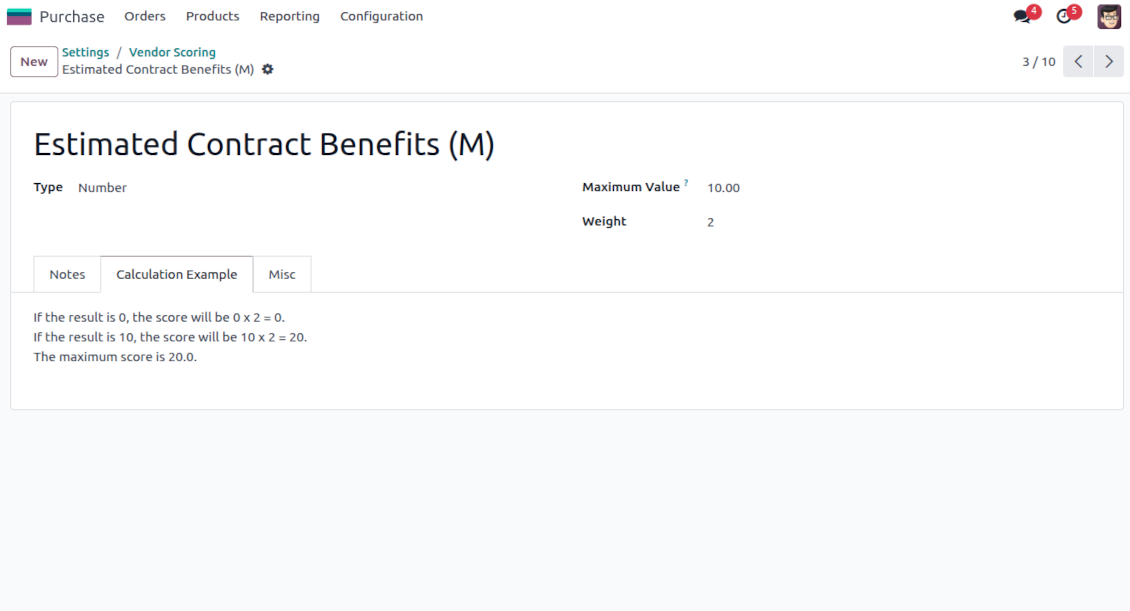
Use this question when users should enter an open-ended float number that is restricted only by a maximum. For example, the company revenue might be stated as any number in Millions, but the value for calculation is up to 10 Million
-
Assign the weight for this evaluation point, e.g., 2. For example, the calculated result would be 3.5 x 2 = 7 for a vendor with 3 million revenue. However, if the revenue is 15, it will be 10 x 2, since 10 is the maximum for calculations
Filters
-
Use this question type to automatically assign a specific score based on whether a vendor suits particular rules. For example, when a supplier has a specific tag and/or fields entered
-
Assign the score for both possibilities: True - "Success Value Score" (e.g., +5); False - "Empty Value Score" (e.g., -5)
-
Assign the weight for this evaluation point, e.g., 1. For example, the calculated result would be -5 x 1 = -5 for the supplier that doesn't satisfy the filters
Fields entered
-
Use this question type to automatically assign a specific score based on whether a vendor has a particular field entered. For example, when a supplier has a phone in Odoo
-
Assign the score for both possibilities: True - "Success Value Score" (e.g., 0); False - "Empty Value Score" (e.g., -10)
-
Assign the weight for this evaluation point, e.g., 2. For example, the calculated result would be -10 x 2 = -20 for the supplier that has an empty phone field
Python code
-
Use this question type to calculate a score point automatically based on any Odoo data. For example, to find all paid invoices of the current vendor and get their untaxed total
-
Assign the weight for this evaluation point, e.g., 2. For example, the calculated result would be 2 x 2 = 4 for a vendor with the calculated result 2
-
Assign the maximum possible result. For example, if it is set as 5, the calculated result "7" will be replaced with 5. So, the score will be 5 x 2 = 10 (instead of 7 x 2 = 14)
-
Feature description and details in short
-
In the code use the variable "partner_id" that contains the currently evaluated Odoo supplier (res.partner instance). Also, Python date, datetime, and timedelta are available
-
Apply Odoo "env" to work with database data. For example, env["purchase.order"] for RFQs or env["account.move"] for bills
-
Save the calculation total in your code to the special "result" variable
Score calculations
-
Each scoring point is summed up for a currently evaluated vendor. For example, five existing questions led to the weighted scores: +10 - 5 + 2 + 7 + 5 = 19
-
All the scoring questions also have their maximum possible values. For instance, 10 + 10 + 10 + 20 + 5 = 55
-
Then, a specific customer score is calculated as total points divided by the maximum points. So, 19/55 = 34.55%
-
Based on the calculated score, the app lets you define the high (marked green, e.g., 75%) and normal (marked yellow, e.g., 30%) levels. Others are low (marked red). Then, in our calculation, a vendor is "normally" evaluated since 34.55% is between 30% and 75%.
Часто задаваемые вопросы о Vendor Scoring and Evaluation Odoo v.17
Какова политика обновлений ваших инструментов?
По текущим правилам Odoo Apps Store:
- Модуль, купленный для версии 12.0 и ниже, даёт доступ ко всем версиям до 12.0 включительно.
- С версии 13.0 каждую версию модуля нужно покупать отдельно.
- Независимо от версии покупка даёт право на все обновления и исправления в рамках этой мажорной версии.
Команда faOtools эти правила не задаёт. Вопросы направляйте напрямую представителям Odoo Apps Store.
Как установить приложение на Odoo.sh?
Самый прямой способ - встроенный сценарий магазина Odoo:
1. Откройте страницу модуля и нажмите Deploy on odoo.sh
2. Вас перенаправит на GitHub. Войдите в аккаунт и нажмите Create a new repo или выберите существующий. Репозиторий должен быть закрытым: публиковать приложения по лицензии OPL-1 нельзя. При необходимости создайте новый репозиторий для проекта Odoo.sh
3. Затем в odoo.sh нажмите Deploy, подтвердите решение и нажмите Continue. Так запустится установка.
Эти шаги ставят приложение на production-ветку проекта. Для других веток или обновления модуля:
1. Скачайте исходный код из магазина Odoo
2. Закоммитьте модуль в нужный репозиторий GitHub. Ни одна папка или файл приложения не должны попасть в .gitignore. Репозитории, которые создаёт odoo.sh, по умолчанию могут игнорировать важные пути (например /lib). Загрузите все каталоги и файлы модуля без исключений
3. Разверните целевую ветку проекта odoo.sh или дождитесь автоматической сборки, если так настроено.
Как установить приложение на свой сервер?
2. Перезапустите сервер Odoo;
3. Включите режим разработчика (технические настройки);
4. Обновите список приложений (меню приложений);
5. Найдите приложение и нажмите Activate/Install;
6. Следуйте рекомендациям на странице приложения, если они есть.
У приложения есть дополнительные модули. Можно купить их позже?
Да. При этом Odoo сам кладёт все зависимости в корзину: исключите уже купленные инструменты, чтобы не заплатить дважды.
Я развернул приложение на Odoo.sh и вижу предупреждение или ошибку в тестах
Odoo Красное или оранжевое предупреждение не влияет на функции приложения. Иногда наши модули не проходят стандартные автотесты, потому что те ждут поведение, которое противоречит целям приложения. Например, мы меняем расчёт цены, а тесты ядра сравнивают итог со стандартным алгоритмом.
Сначала проверьте саму развёрнутую базу: всё ли работает?
Если всё же считаете, что предупреждение ломает функции, напишите нам и пришлите полные логи установки и полный список установленных модулей (ядро и сторонние).
Можно ли купить приложение напрямую у вас?
Нет, мы распространяем инструменты только через официальный магазин приложений Odoo.
Я хочу получить скидку
К сожалению, у нас нет технической возможности давать индивидуальные цены.
Можно ли поставить приложение на базу Odoo Online (SaaS)?
Нет, сторонние приложения нельзя использовать на Odoo Online. Odoo SaaS это блокирует.
У инструмента есть зависимости. Нужно ли их покупать?
Да, для корректной работы нужны все модули из зависимостей. Цена на странице приложения уже включает необходимые зависимости.
Какова цена модуля в долларах США? Почему она меняется?
Цены на наши модули заданы в евро. Магазин Odoo пересчитывает их в другие валюты по своему внутреннему курсу. Поэтому цена в долларах США может меняться при обновлении курса.
Тексты приложения и веб-сайта на языках, отличных от английского, переведены с помощью ИИ и согласованы с официальными переводами Odoo. Если вы заметили ошибку, отправьте тикет о переводе и мы исправим его.
Демонстрационные базы данных Odoo (предпросмотр)
Для этого приложения мы можем предоставить бесплатную персонализированную демонстрационную базу данных.
Чтобы связаться с нами, вам не нужен номер телефона или кредитная карта. Вам нужно всего лишь пройти короткую регистрацию по электронной почте, которая займет не более 30 секунд.
По вашему запросу мы подготовим отдельную демо базу для предпросмотра, где примерно две недели вы сможете проводить любые тесты и проверять свои предположения.
Отправка отчетов об ошибках
Если вы столкнулись с ошибками или непоследовательным поведением, не стесняйтесь обращаться к нам. Мы гарантируем предоставление исправлений в течение 60 дней с момента покупки и очень заинтересованы в улучшении наших инструментов даже по истечении этого периода.
Чтобы связаться с нами, вам не нужен номер телефона или кредитная карта. Вам нужно всего лишь пройти короткую регистрацию по электронной почте, которая займет не более 30 секунд.
Укажите в запросе как можно больше сведений: снимки экрана, журналы сервера Odoo, полное описание воспроизведения проблемы и так далее. Обычно подготовка рабочего плана по проблеме (если ошибка подтверждена) или рекомендаций по необходимым действиям (в противном случае) занимает несколько рабочих дней.
Запросы на публичные функции и идей модулей (бесплатная разработка)
Мы очень заинтересованы в улучшении наших инструментов и будем благодарны за любые отзывы. Если ваши требования общедоступны и могут быть эффективно реализованы, команда включит их в наш список дел.
Такой список дел обрабатывается регулярно и не предполагает дополнительных комиссий. Хотя мы не можем обещать сроки и окончательный дизайн, это может быть хорошим способом получить желаемые функции без вложений и рисков.
Чтобы связаться с нами, вам не нужен номер телефона или кредитная карта. Вам нужно всего лишь пройти короткую регистрацию по электронной почте, которая займет не более 30 секунд.

The tool to flexibly structure Odoo attachments in folders and synchronize directories with cloud clients: Google Drive, OneDrive/SharePoint, Nextcloud/ownCloud, Dropbox, Amazon S3, Box, and NAS. DMS. File Manager. Document management system
398€

The tool to build a deep and structured knowledge base for internal and external use. Knowledge System. KMS. Wiki-like revisions.
398€
The tool to automatically synchronize Odoo attachments with OneDrive files in both ways
487€
The tool to set up KPI targets and control their fulfillment by periods. KPI dashboards. Dashboard designer. KPI charts

The tool for time-based service management from booking appointments to sales and reviews
398€
The tool to automatically synchronize Odoo attachments with Google Drive files in both ways
487€
The tool combines users in roles and simplifies security group assigning. Access group management. Users mass updating

The tool to plan, share and control employees shifts in a form of weekly timetables. Work schedule. Work shift calendar
98€