Joint Calendar v.15
The tool to combine different Odoo events in a few configurable super calendars
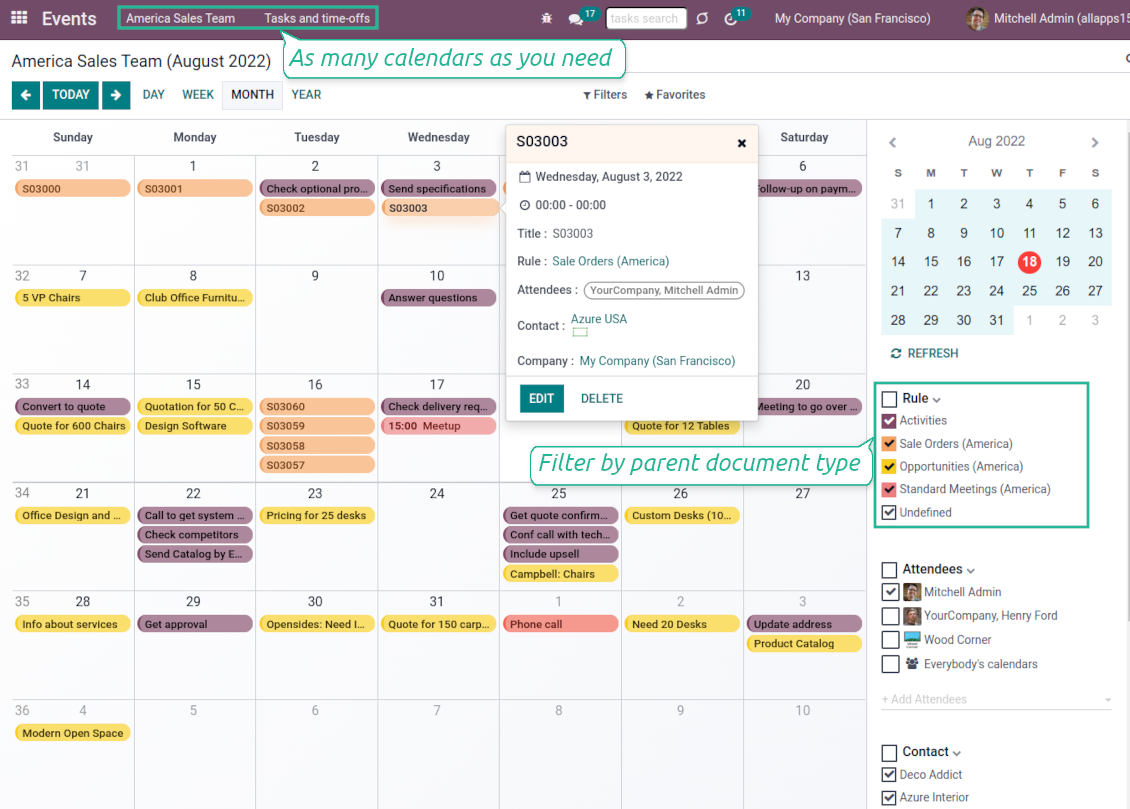


Odoo users often need to keep in mind a lot of details spread out among numerous interfaces. Switching between those is not comfortable and error-prone for planning. This tool solves the problem. The app lets configure rules to join and share various document types on a single super calendar view but with easy-reachable source objects.
- the core app to merge Odoo documents in super calendars.
Его цена
98€
88€.
- the optional free extension that introduces the Odoo Enterprise Gantt view joint events. The features assumed by this add-on are marked by the icon
Any Odoo documents on the same calendar
The tool might merge any Odoo document types on the same view: opportunities, meetings, phone calls, activities, sale or purchase orders, shipments and deliveries, tasks and tickets, time offs, ...
Flexible merging rules
Define on your own what to consider a joint event title, start or stop date, who are target attendees, etc. Have even the same document twice on the same calendar just with a different start
Instant access to source details
Joint events and their source documents are interrelated. Update the former, and the latter would be changed immediately. A reverse operation would be applied with the next cron job (the frequency is configurable)
Comfortable navigation
Shared calendars are especially suitable for team interactions. Users might switch between document types, participants, linked contacts, and companies in a single click. Optionally turn on the Odoo Enterprise Gantt view
Unlimited number of super calendars
Configure as many calendars as you need: for various functional areas or for different user groups. Each joint calendar has its own menu item
Reminders for any Odoo documents
Calendar configuration lets assign default popup and email alarms. Thus, it is possible to have notification of any Odoo event or activity
Simple user rights administration
Regulate joint calendar accesses right on its form. Make it public or share it only for chosen user groups. The app fully supports multi-companies environment
Automatic shared calendar updates
Joint events are updated regularly by the cron job. It is fast, especially if you apply time frames. Refreshing is also available from the calendar interface
Better then expected
The app does exactly what was needed. Combine all tasks from all calendars to one. And allows to manages all activities from all modules in one place.
This makes the Event Calendar so much more useful !
We bought this to combine certain project tasks with the schedules of our maintenance engineers. We now have a better overview which moments are overlapping the schedules of other events. The joining of multiple events in 1 event calendar is super easy, it should be a standard option in ODOO.
Excellent responsive team of programmers
Joint Calendar is the perfect addition to the standard Calendaring system that Odoo offers. It makes the job of setting up specific departmental calendars filled with any objects you wish very easy and Alex and the team provides fantastic after-sales support, responding in most cases within 24 hours to requests for help. Thanks for a great module.
Essential to have Activities, Tasks, Meetings etc all in one calendar and shared.
Great service support very quick and were right on with fixing the issue... I think the ability to see everything on one shared calendar is such an essential part of coordination and time management. Great product once you sort out the rules you need!
Super calendars for any business area
Use joint calendars for any functional area: CRM, project management, sales, HRM, MRP, inventory management, so and so on. Find just a few examples of rules below
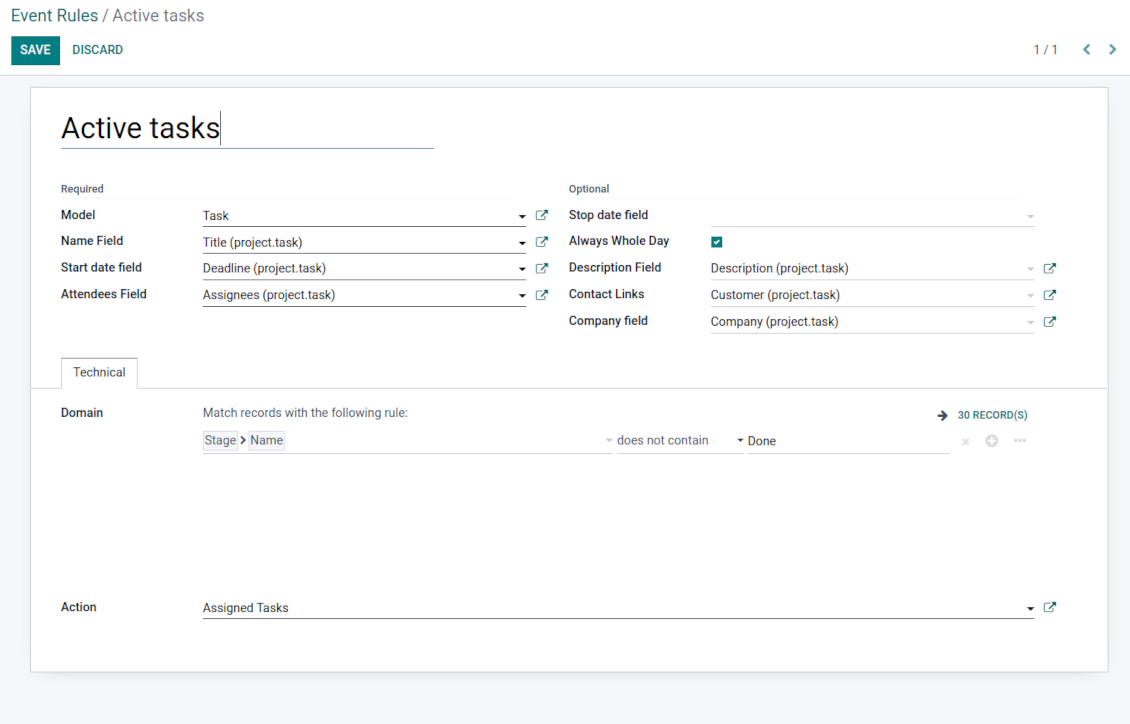
Tasks on a joint calendar
-
As a model use 'Task'
-
As a name use 'Title'
-
As a start date field use 'Deadline'
-
As attendees' field use 'Assignees'
-
As a domain optionally you can set definite projects
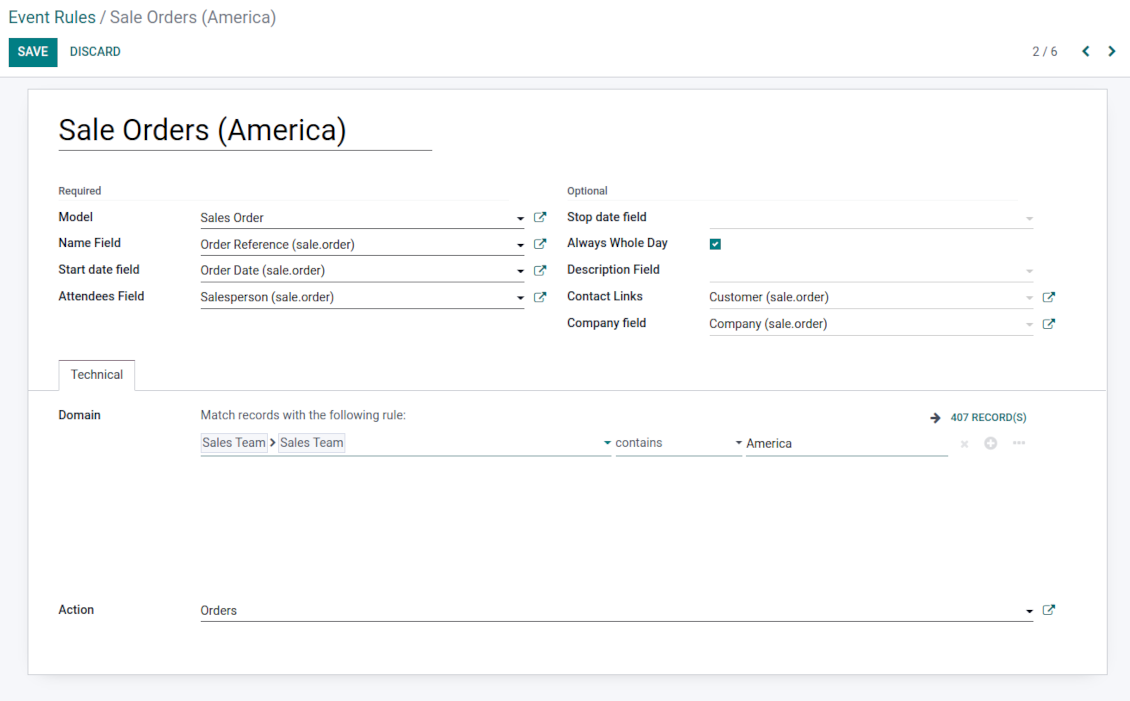
Sale orders on a shared calendar
-
As a model use 'Sales order'
-
As a name use 'Order Reference'
-
As a start date field use 'Order Date'
-
As attendees' field use 'Salesperson'
-
As a contact link use 'Customer'
-
As a domain optionally restrict quotations by sales teams.
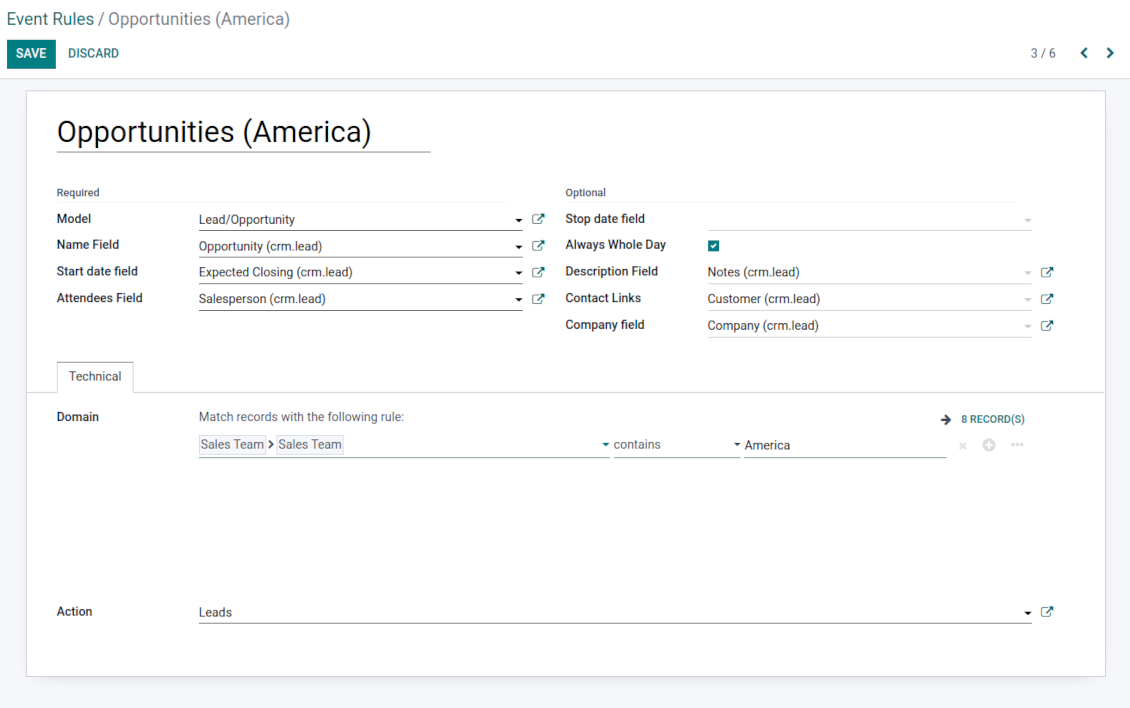
Opportunities on a super calendar
-
As a model use 'Lead/Opportunity'
-
As a name use 'Opportunity'
-
As a start date field use 'Expecting Closing'
-
As attendees' field use 'Salesperson'
-
As a contact link use 'Customer'
-
As a domain optionally restrict opportunities by sales teams.
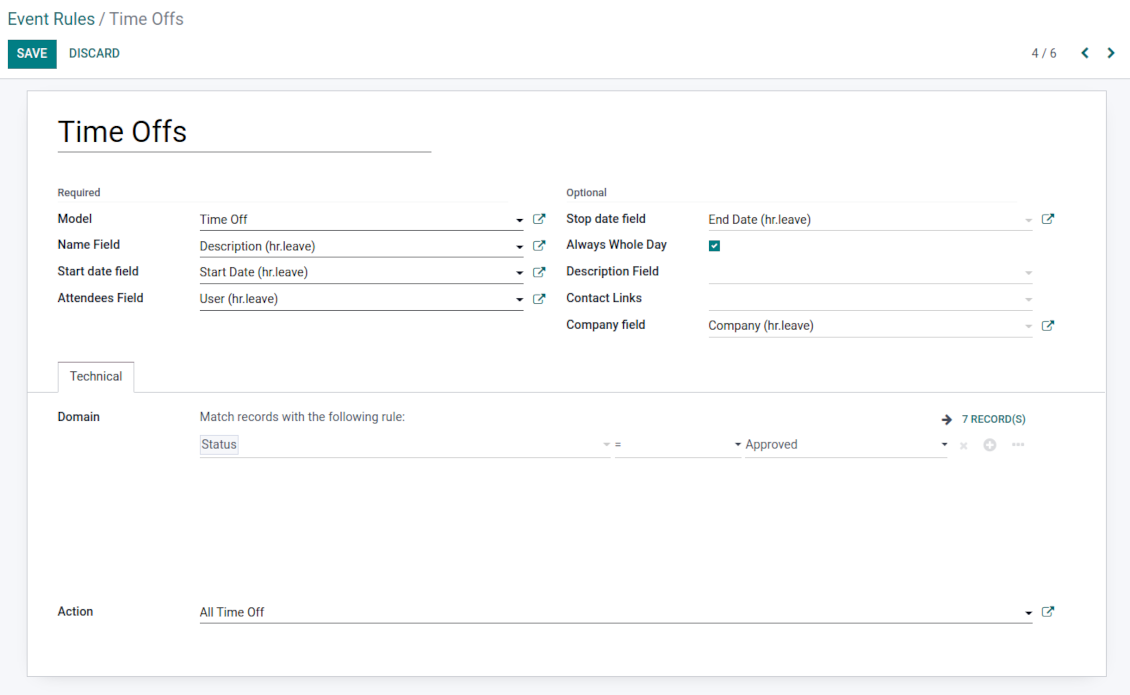
Share employees' time offs and leaves
-
As a model use 'Time Off'
-
As a name use 'Description'
-
As a start date field use 'Start Date'
-
As attendees' field use 'User'
-
As a stop date field use 'End Date'
-
As a domain filter by status: show only approved leaves.
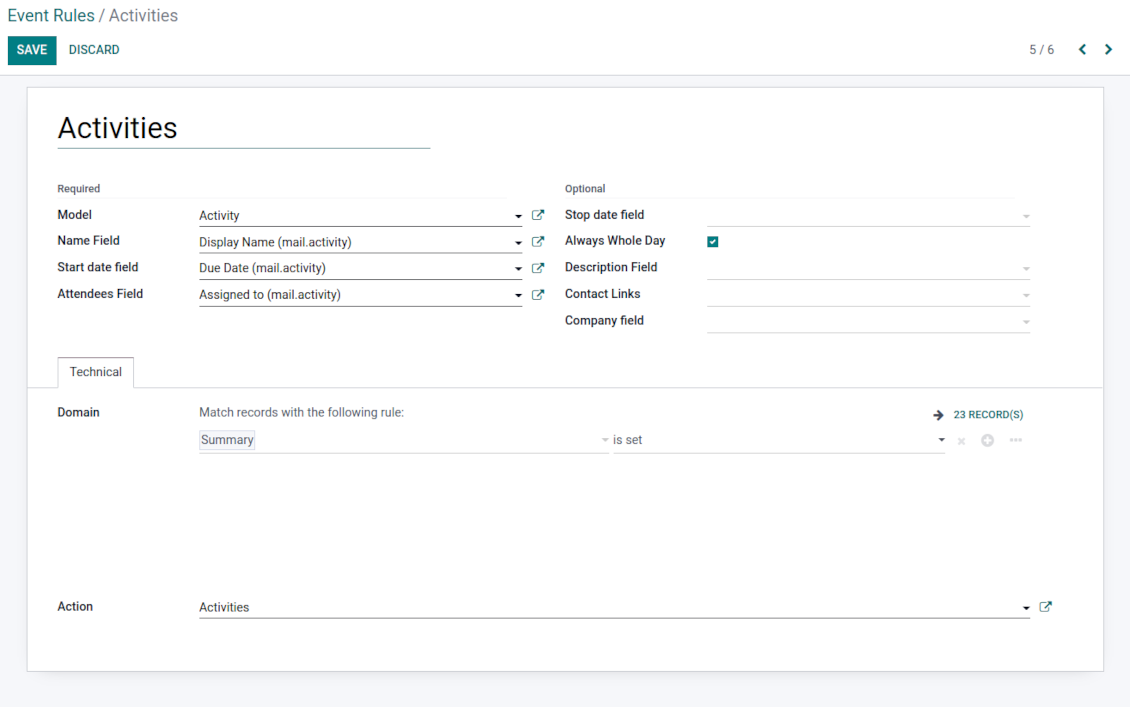
Activities by all objects
-
As a model use 'Activity'
-
As a name use 'Display Name'
-
As a start date field use 'Due Date'
-
As attendees' field use 'Assigned to'
-
As a domain apply 'Summary is set'
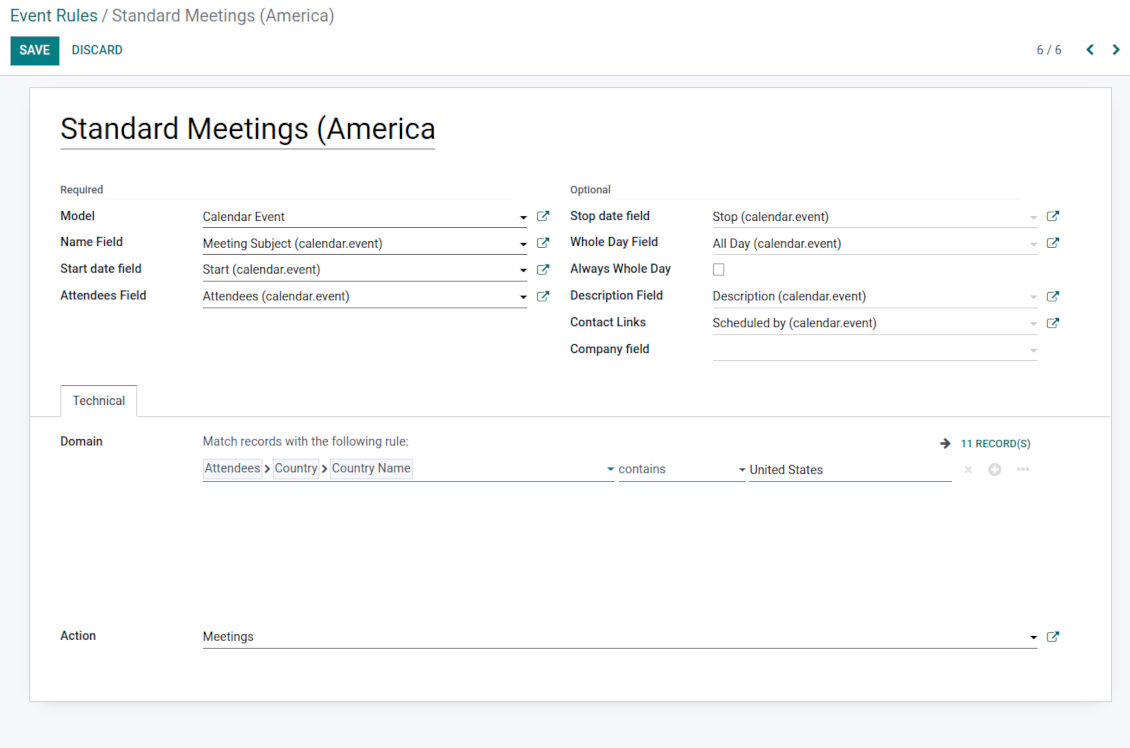
Odoo meetings to the joint calendar
-
As a model use 'Calendar Event'
-
As a name use 'Meeting Subject'
-
As a start date field use 'Start'
-
As a stop date field use 'Stop'
-
As attendees' field use 'Attendees'
-
As a whole day field 'All Day'
Flexible rules to merge Odoo documents
To add a new document type for a shared interface you should set up a joint calendar rule. This rule defines which Odoo objects should create events, which fields of that object should be shown, and whether any filtering should take place
-
Model - which objects to scan: opportunities, tasks, orders, meetings, activities, and so on. You can choose your custom document type (including created in Odoo Studio) as well
-
Name - what to use as a joint event name (also used as calendar event title). Usually, it is 'name', 'subject' or 'reference'
-
Start date - when an event starts. For example, 'expecting closing' for opportunities or 'order date' for quotations. It may be any date or date with time field of a source Odoo object
-
Stop date - when an event is shown as finished on a calendar
-
Attendees - who are participants (responsible persons, event owners). Usually, it is a field 'assigned to', 'a sales person' or 'attendees'. You may use even document 'followers' since it's possible to apply both users and partners
-
Description - are there any notes important for joint events? Usually, the fields like 'internal notes' or 'comments' are used
-
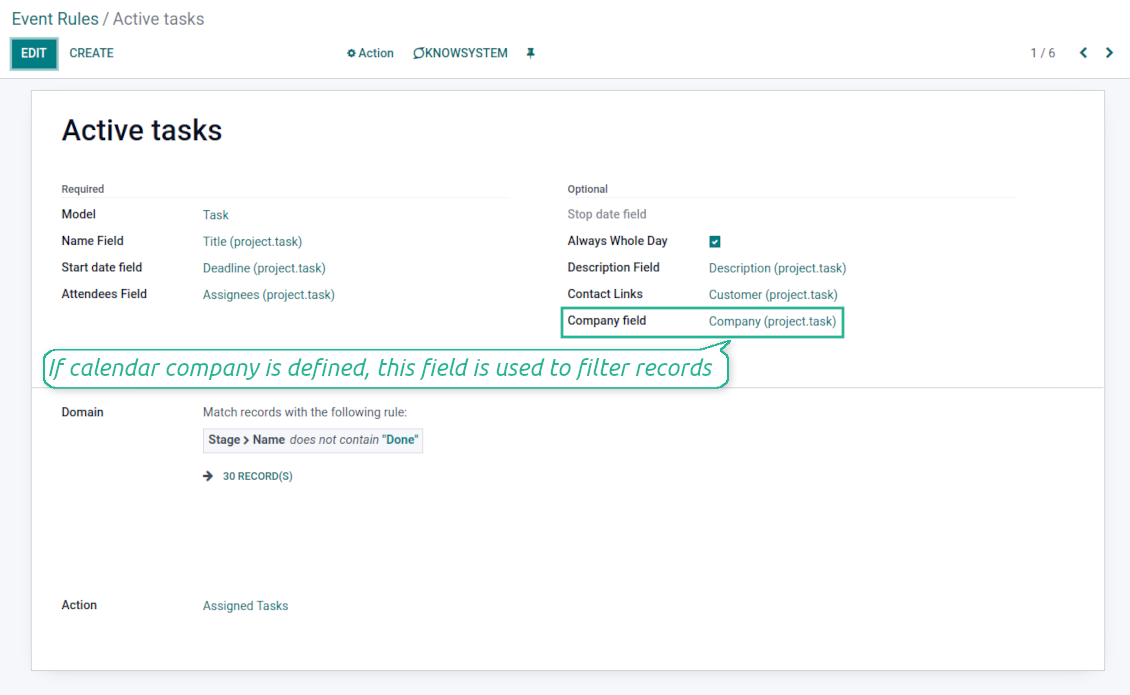
Company field - optionally define the parent document field where its company is kept. In this way, joint events would get the source company that might be used for filtering or just for information
-
Always Whole Day - means that all generated events would last the whole day disregarding whether start or stop are defined with hours and minutes. Such an event would be shown at a special place on a calendar (above the timeline)
-
Whole Day - a special boolean field of source object which indicates that a related joint event may last the whole day. This setting is usually applied to standard Odoo calendar events which both might have a definite time indicated or might be planned for a whole day
-
Contact Link - is this event linked to a specific partner? Usually, the fields like 'customer' or 'vendor' are used
-
Domain - the Odoo filters' constructor to include only topical documents into a joint calendar. You might apply any storable attribute. For example, show only quotations without sales orders, or show opportunities only for this sales team
-
Action - defines which form view should be shown when you open a source document from a joint event. It is a technical field that in most cases should not be changed in comparison to a default value.
Multi companies compatibility
-
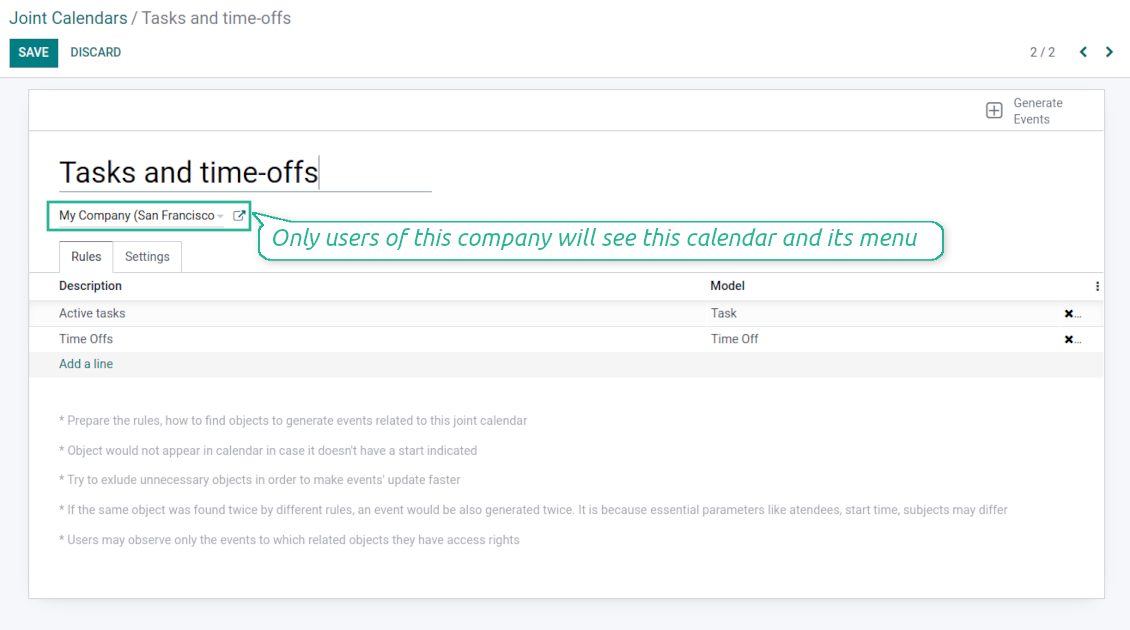
The app fully supports the multi-companies environment: each joint calendar might be linked to a specific Odoo company. If company is not defined, it is considered as 'global', so available for all Odoo companies
-
Users access only those joint menus which super calendars do not have a company or have one of those users available companies
-
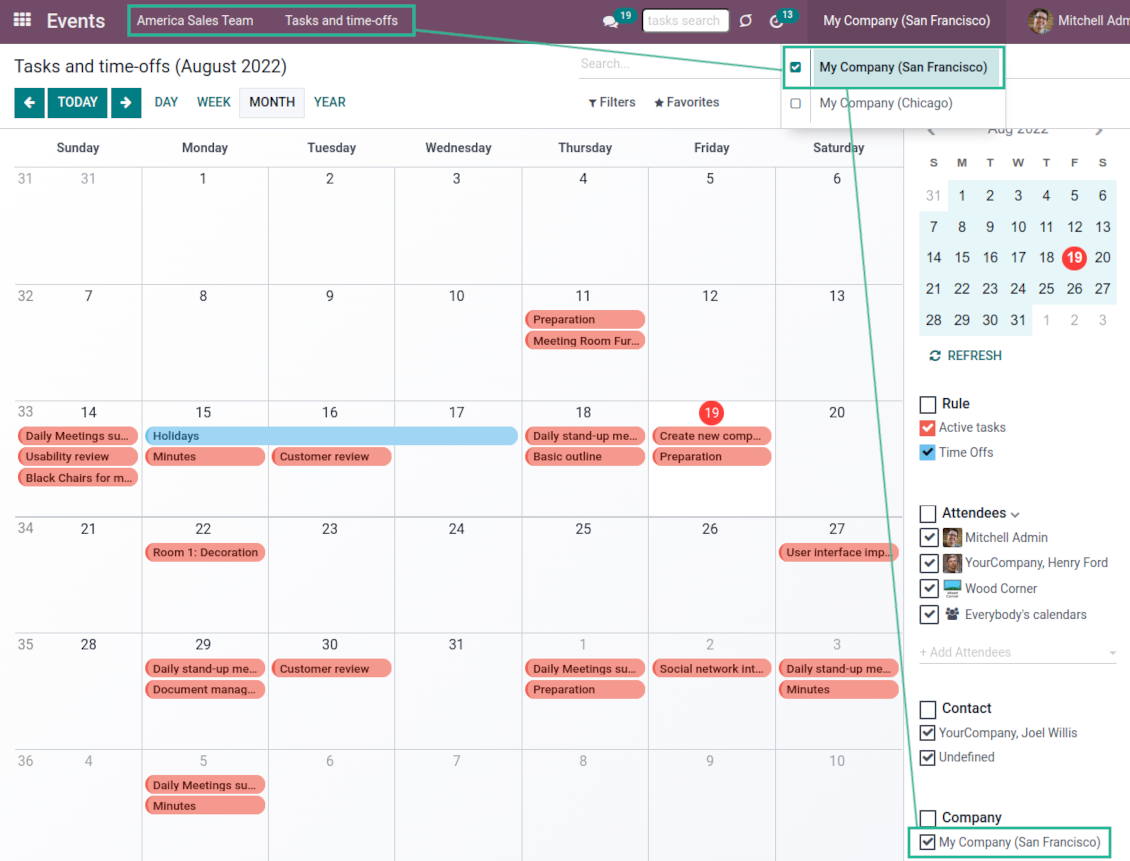
Each joint rule might have the "Company field" defined. If that setting is configured, records would be filtered in a joint calendar company. For example, if you stated 'Company' as the 'Company field' for the tasks rule, and joint calendar is linked to 'San Fransisco' company, then users would see only San Fransisco or global tasks only
-
Joint events would also get the company based on the 'Company field' of the parent document. You can comfortably switch between objects of different companies using the right navigation filters
-
In addition to the 'Company field', you may also restrict records in a rule domain. For instance, to include records of a few companies but not to include of others.
Combine events on Odoo Enterprise Gantt view
-
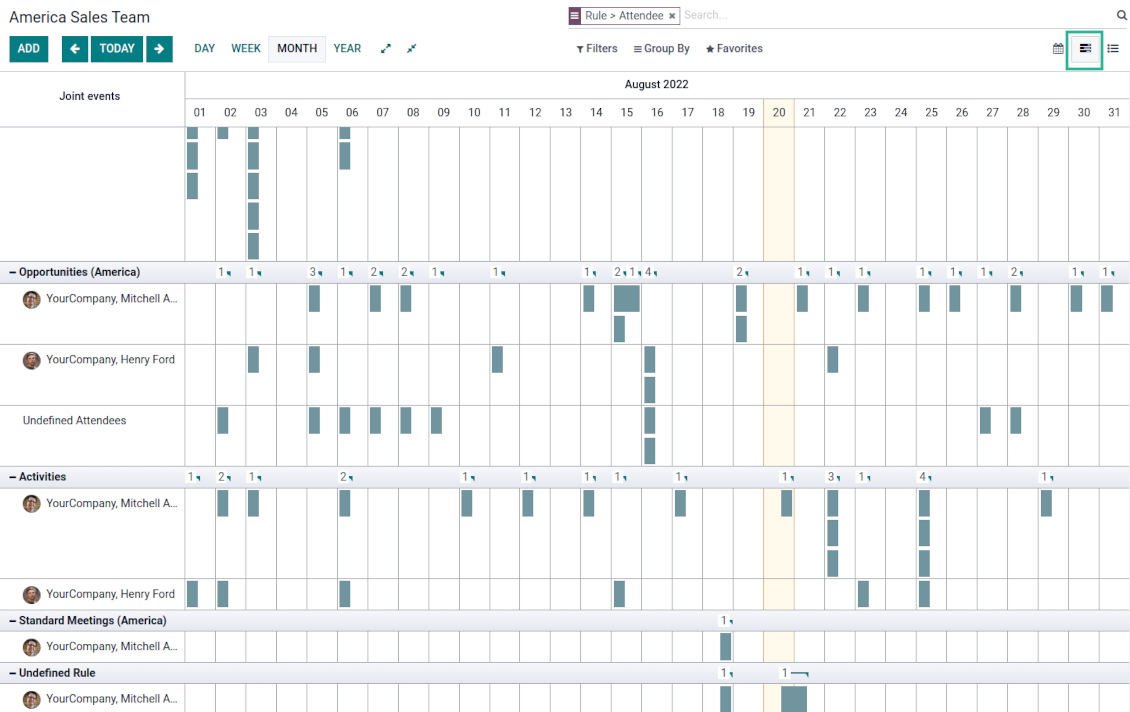
For any joint calendar, optionally add the Odoo Enterprise edition Gantt view
-
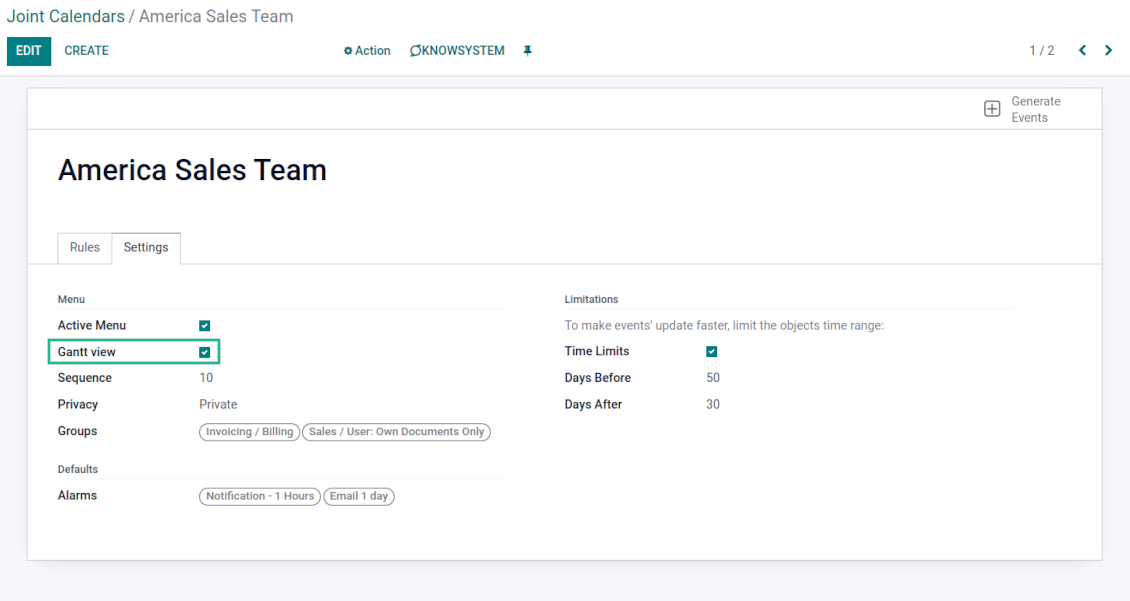
To that goal, just tick the box 'Gantt view' on the supper calendar settings
-
The app would automatically extend a target joint calendar action after you saved the changes
-
In this way, you can have a single super Gantt view for various Odoo documents
-
Manage those events in a comfortable manner: reassign responsible users, drag and drop those to change periods, etc.
Советы по настройке и установке для Joint Calendar Odoo v.15
Joint calendar scheduled jobs
The tool lets you change the frequency of joint calendar refreshing and emails reminders' checks:
- Turn on the debug mode
- Go to technical settings > Automation > Scheduled jobs
- Find the job 'Refresh Joint Events' to change the frequency of super calendars' update
- Find the job 'Notify About Joint Event' to change the frequency of email alarms.
Часто задаваемые вопросы о Joint Calendar Odoo v.15
Что будет, если включить или выключить «Always Whole Day»?
Если «Always Whole Day» включена, все события по правилу длятся весь день, даже если начало и конец заданы с часами и минутами. Такое событие показывается в особом месте календаря.
Например, правило для модели "Sale Order" с «Always Whole Day» ставит событие в дневном и недельном суперкалендаре над шкалой времени.
Если опцию выключить и начало или конец заданы с часами/минутами, событие встанет на конкретное время дня, а время будет перед заголовком.
Не вижу меню календаря в Odoo. Что делать?
Проверьте:
1. Есть хотя бы один настроенный и обновлённый совместный календарь. После настройки обновите страницу браузера.
2. У вас есть доступ хотя бы к одному календарю.
Я создал календари с правилами, но не вижу их в меню.
Причин несколько. Возможно, ещё не сработал связанный cron: запустите его вручную кнопкой обновления в правом столбце интерфейса совместного календаря.
Проверьте Time Limits: иначе видны события только в заданном диапазоне. Например, календарь 'Sale Orders' с лимитом 10 дней до и 30 после не покажет заказ, созданный 12 дней назад.
Убедитесь, что у правил нет фильтров без совпадений. Например, правило 'Sale Order' с фильтром 'Customer = Deco Addict' покажет только заказы этого клиента.
Сколько документов Odoo (например заказы на продажу, проекты, активности) можно объединить в одном совместном календаре?
В один календарь можно собрать сколько угодно документов Odoo. Или разнести их по нескольким календарям (например календарь продаж и календарь проектов, задач и активностей) и переключаться в systray.
Что такое правило совместного календаря?
Правила задают, какие объекты Odoo создают события, какие поля показывать и нужен ли фильтр.
В правиле вы сами определяете заголовок события, дату начала или Stop date, участников и т. д.
Зачем поле «Stop date»? Можно ли оставить его пустым?
Stop date — поле целевой модели Odoo, когда событие считается завершённым в календаре. Например, правило для "Sale Order" с "Delivery Date" в Stop date покажет событие с дня планирования КП (Start Date — Order Date) до дня доставки товара.
Поле необязательное, его можно оставить пустым. Тогда событие будет только в день Start Date.
В календаре есть тип событий «Undefined». Что это значит?
Это событие создано вручную: нет родительского объекта и правила. Такие события видны в фильтре «Undefined», без цвета.
Все, у кого есть доступ к календарю, могут создавать и видеть его события Undefined.
Какова политика обновлений ваших инструментов?
По текущим правилам Odoo Apps Store:
- Модуль, купленный для версии 12.0 и ниже, даёт доступ ко всем версиям до 12.0 включительно.
- С версии 13.0 каждую версию модуля нужно покупать отдельно.
- Независимо от версии покупка даёт право на все обновления и исправления в рамках этой мажорной версии.
Команда faOtools эти правила не задаёт. Вопросы направляйте напрямую представителям Odoo Apps Store.
Как установить приложение на Odoo.sh?
Самый прямой способ - встроенный сценарий магазина Odoo:
1. Откройте страницу модуля и нажмите Deploy on odoo.sh
2. Вас перенаправит на GitHub. Войдите в аккаунт и нажмите Create a new repo или выберите существующий. Репозиторий должен быть закрытым: публиковать приложения по лицензии OPL-1 нельзя. При необходимости создайте новый репозиторий для проекта Odoo.sh
3. Затем в odoo.sh нажмите Deploy, подтвердите решение и нажмите Continue. Так запустится установка.
Эти шаги ставят приложение на production-ветку проекта. Для других веток или обновления модуля:
1. Скачайте исходный код из магазина Odoo
2. Закоммитьте модуль в нужный репозиторий GitHub. Ни одна папка или файл приложения не должны попасть в .gitignore. Репозитории, которые создаёт odoo.sh, по умолчанию могут игнорировать важные пути (например /lib). Загрузите все каталоги и файлы модуля без исключений
3. Разверните целевую ветку проекта odoo.sh или дождитесь автоматической сборки, если так настроено.
Как установить приложение на свой сервер?
2. Перезапустите сервер Odoo;
3. Включите режим разработчика (технические настройки);
4. Обновите список приложений (меню приложений);
5. Найдите приложение и нажмите Activate/Install;
6. Следуйте рекомендациям на странице приложения, если они есть.
У приложения есть дополнительные модули. Можно купить их позже?
Да. При этом Odoo сам кладёт все зависимости в корзину: исключите уже купленные инструменты, чтобы не заплатить дважды.
Я развернул приложение на Odoo.sh и вижу предупреждение или ошибку в тестах
Odoo Красное или оранжевое предупреждение не влияет на функции приложения. Иногда наши модули не проходят стандартные автотесты, потому что те ждут поведение, которое противоречит целям приложения. Например, мы меняем расчёт цены, а тесты ядра сравнивают итог со стандартным алгоритмом.
Сначала проверьте саму развёрнутую базу: всё ли работает?
Если всё же считаете, что предупреждение ломает функции, напишите нам и пришлите полные логи установки и полный список установленных модулей (ядро и сторонние).
Можно ли купить приложение напрямую у вас?
Нет, мы распространяем инструменты только через официальный магазин приложений Odoo.
Я хочу получить скидку
К сожалению, у нас нет технической возможности давать индивидуальные цены.
Можно ли поставить приложение на базу Odoo Online (SaaS)?
Нет, сторонние приложения нельзя использовать на Odoo Online. Odoo SaaS это блокирует.
У инструмента есть зависимости. Нужно ли их покупать?
Да, для корректной работы нужны все модули из зависимостей. Цена на странице приложения уже включает необходимые зависимости.
Какова цена модуля в долларах США? Почему она меняется?
Цены на наши модули заданы в евро. Магазин Odoo пересчитывает их в другие валюты по своему внутреннему курсу. Поэтому цена в долларах США может меняться при обновлении курса.
Тексты приложения и веб-сайта на языках, отличных от английского, переведены с помощью ИИ и согласованы с официальными переводами Odoo. Если вы заметили ошибку, отправьте тикет о переводе и мы исправим его.
Отправка отчетов об ошибках
Если вы столкнулись с ошибками или непоследовательным поведением, не стесняйтесь обращаться к нам. Мы гарантируем предоставление исправлений в течение 60 дней с момента покупки и очень заинтересованы в улучшении наших инструментов даже по истечении этого периода.
Чтобы связаться с нами, вам не нужен номер телефона или кредитная карта. Вам нужно всего лишь пройти короткую регистрацию по электронной почте, которая займет не более 30 секунд.
Укажите в запросе как можно больше сведений: снимки экрана, журналы сервера Odoo, полное описание воспроизведения проблемы и так далее. Обычно подготовка рабочего плана по проблеме (если ошибка подтверждена) или рекомендаций по необходимым действиям (в противном случае) занимает несколько рабочих дней.
Запросы на публичные функции и идей модулей (бесплатная разработка)
Мы очень заинтересованы в улучшении наших инструментов и будем благодарны за любые отзывы. Если ваши требования общедоступны и могут быть эффективно реализованы, команда включит их в наш список дел.
Такой список дел обрабатывается регулярно и не предполагает дополнительных комиссий. Хотя мы не можем обещать сроки и окончательный дизайн, это может быть хорошим способом получить желаемые функции без вложений и рисков.
Чтобы связаться с нами, вам не нужен номер телефона или кредитная карта. Вам нужно всего лишь пройти короткую регистрацию по электронной почте, которая займет не более 30 секунд.

Инструмент, чтобы раскладывать вложения Odoo по папкам и синхронизировать каталоги с Google Drive, OneDrive/SharePoint, Nextcloud/ownCloud, Dropbox, Amazon S3, Box и NAS. Файловый менеджер. DMS
398€
Инструмент для двусторонней синхронизации вложений Odoo с OneDrive
487€
Инструмент для двусторонней синхронизации вложений Odoo с Google Drive
487€
Инструмент, чтобы безопасно хранить пароли в Odoo для совместной работы. Общие хранилища

Инструмент, чтобы строить глубокую базу знаний для своих и внешних. Knowledge System. KMS. Правки как в вики
398€
Инструмент, чтобы задавать цели KPI и контролировать выполнение по периодам. Дашборды KPI. Конструктор. Графики

Инструмент для услуг по записи: от бронирования до продаж и отзывов
398€
Инструмент, чтобы управлять Odoo из любимых AI-чатов через MCP. Claude. Любой AI с MCP.
