Website URL shortener v.16
The tool to assign and manage short URLs for Odoo website links. SEO friendly URLs
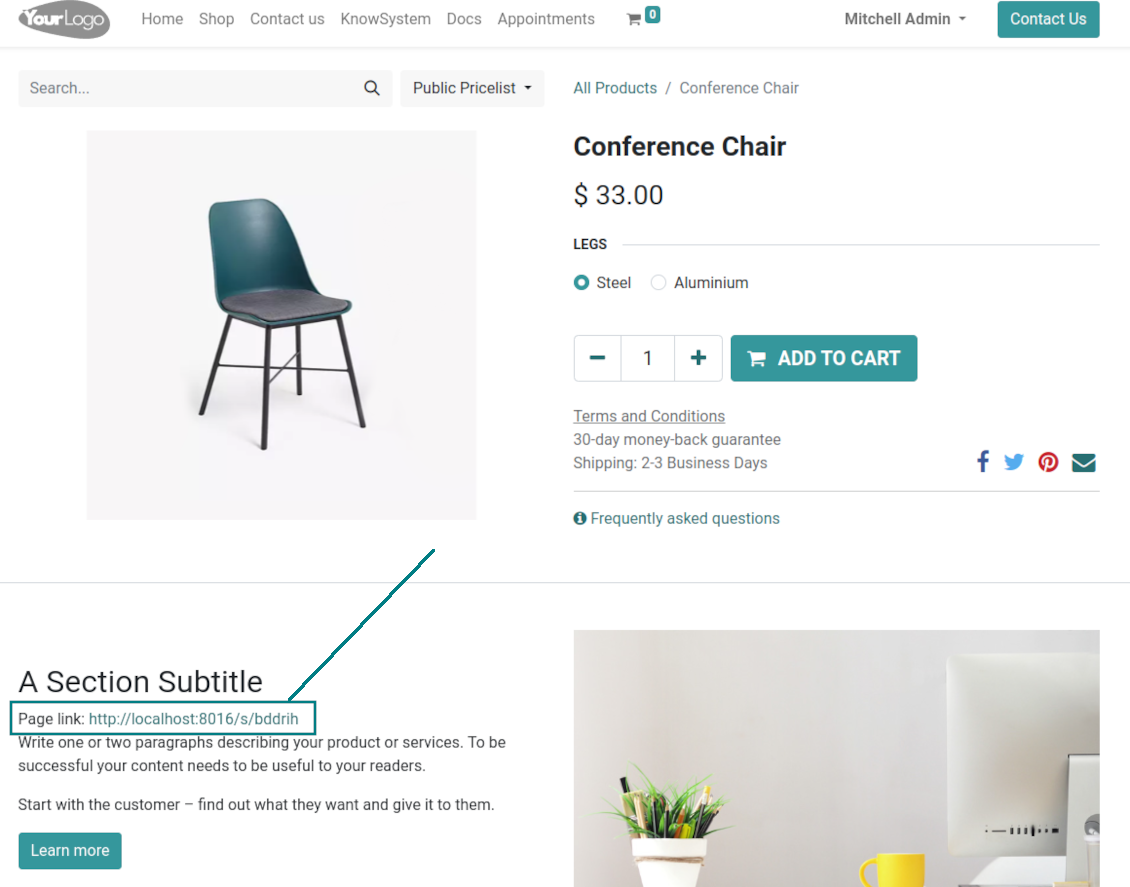
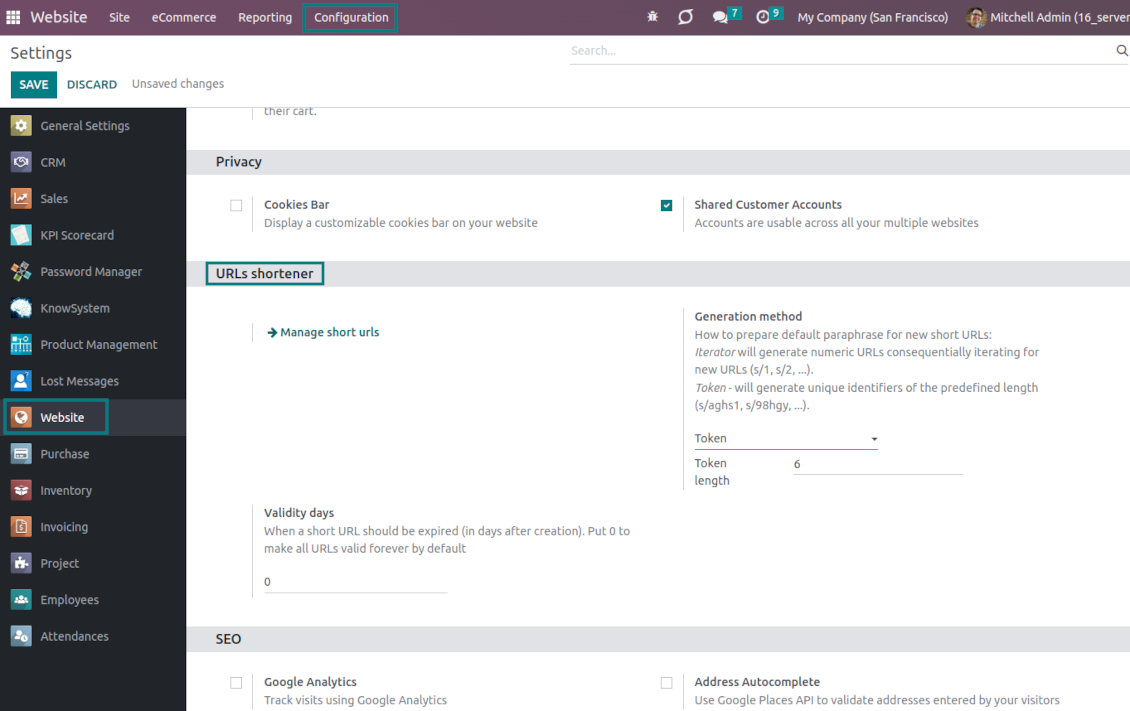
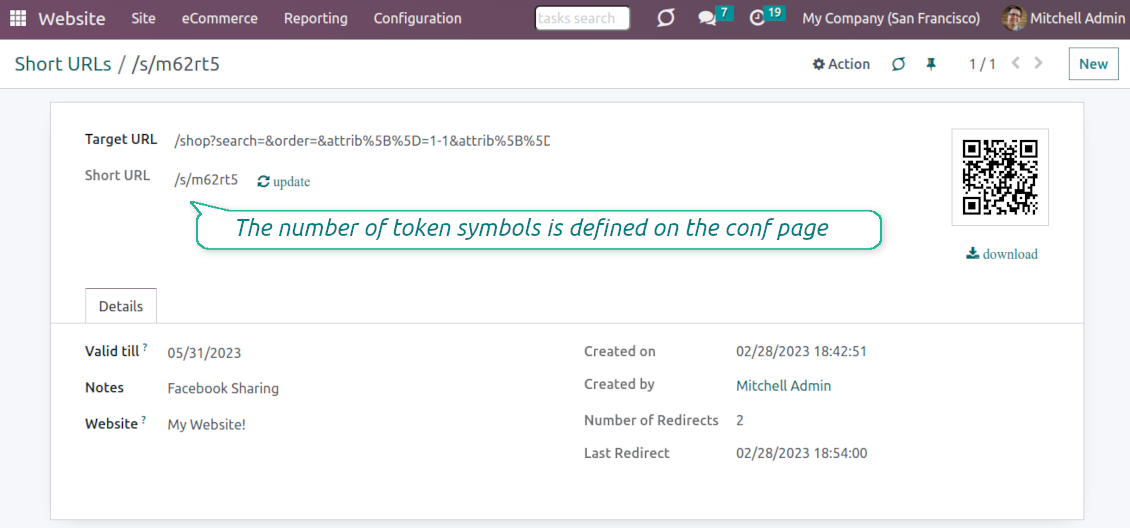
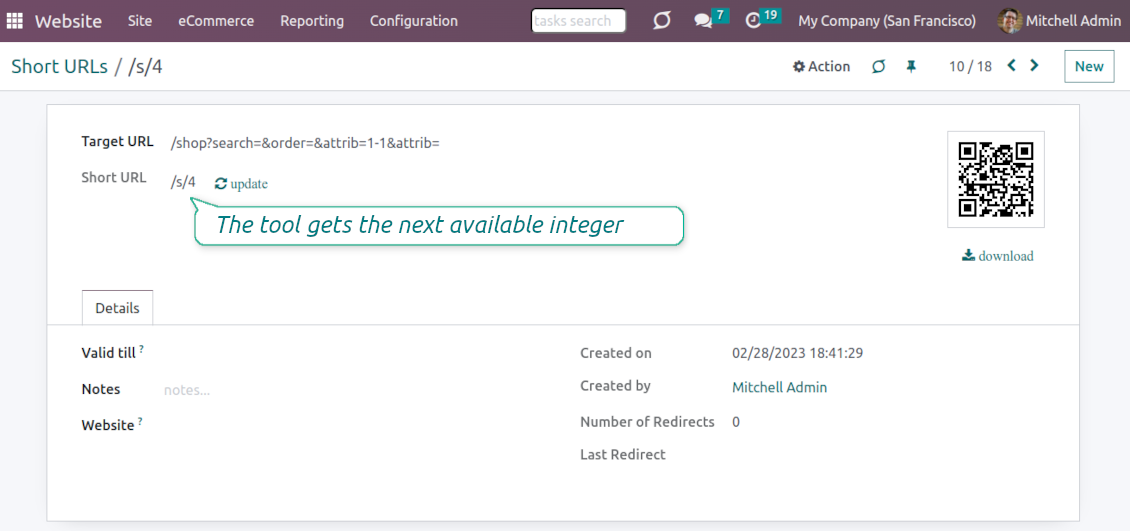
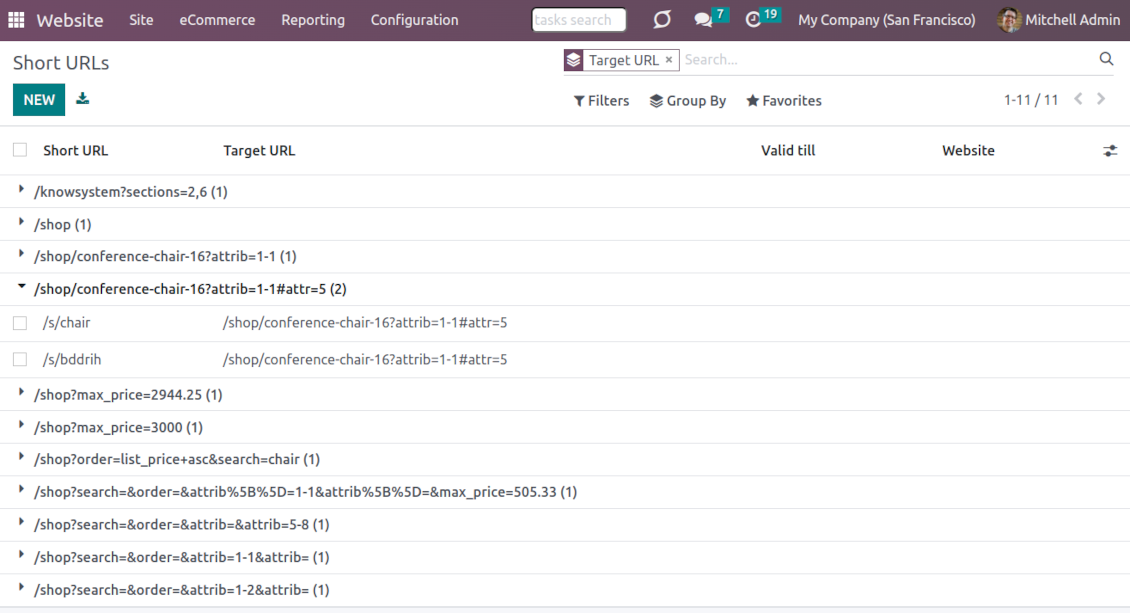
URL shortening is a well-known methodology to cope with too long and ugly-looking web addresses. The app introduces this technique in Odoo by allowing website editors to manually or automatically generate, control, and administrate short and SEO-friendly URLs for any Odoo web links.
Branded links
Introduce memorable and human-readable URLs of the type '/s/[token]' for any Odoo website address. What is preferable to share: example.com/s/desk or example.com/shop/customizable-desk-config-9#attr=7,4,47?
Automatic or custom URLs
Configure the rules for automatic creation of short URLs based on iterator and token (for example, /s/12 and /s/rh72ko) or apply your own SEO-friendly key words (for example, /s/desk, /s/best-chairs)
Short URLs for any link types
The app works equally for dynamic controllers (e.g., a product page or even store pages with chosen filters) and static website pages (including custom ones). Also, the shortener might redirect to the page translations.
QR codes for website links
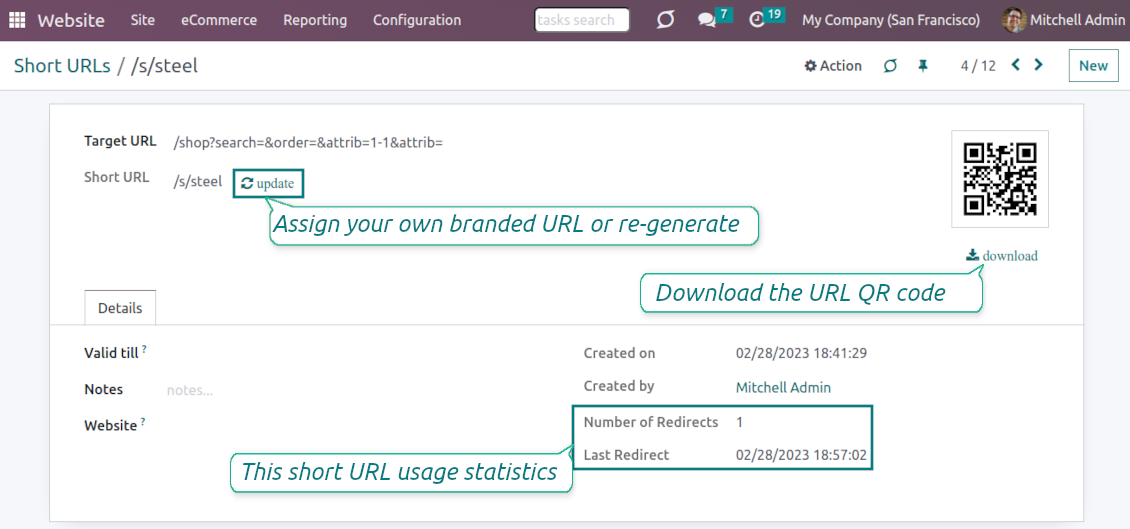
Each short URL peers with an automatic QR code image that might be downloaded, shared or added to Odoo website pages
Multi channels control
Have as many short links for a single address as needed for various purposes. Share one on Facebook, another - on Twitter, and a special one - for specific partners. Then, count redirects for each source.
Comfortable administration
Use the URL shortener right while customizing the website or in Odoo's advanced backend. Make a link soon expired or forever-lasting. Update tokens at any moment or archive short links if it is no anymore valid
Website snippets
The app introduces the special website snippets which might be added to any Odoo website's inner content. Such a snippet will find or create a short URL or URL QR code right when a visitor opens a page
Available for scripts and custom add-ons
Developers might use the app to find or create a short URL or QR code image for a target website address by applying a single Python method.
URL shortener administration
Website interface for short URLs
-
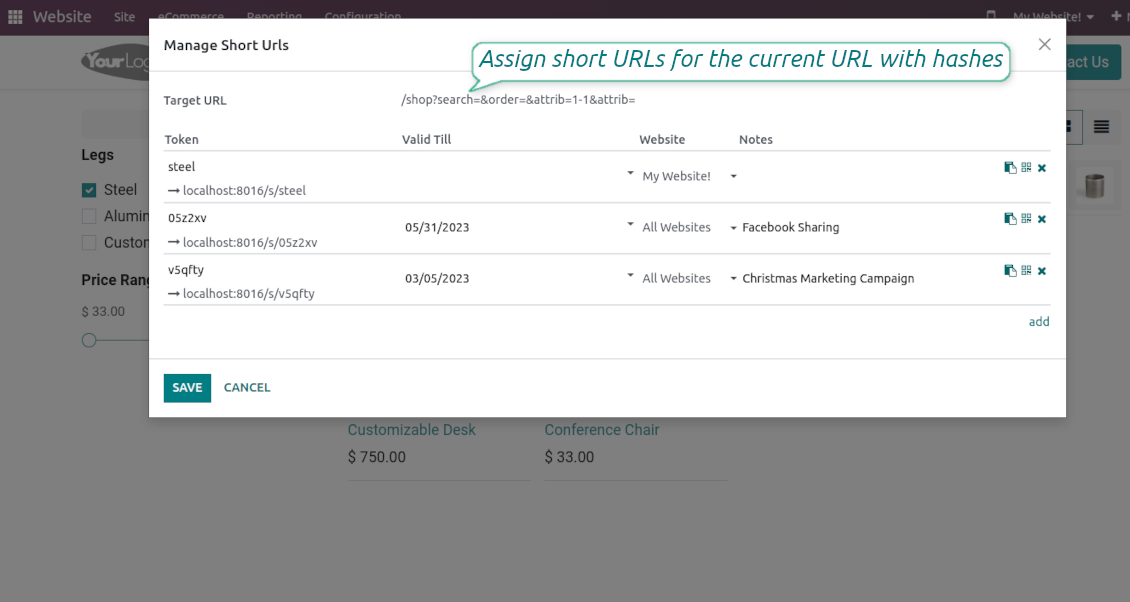
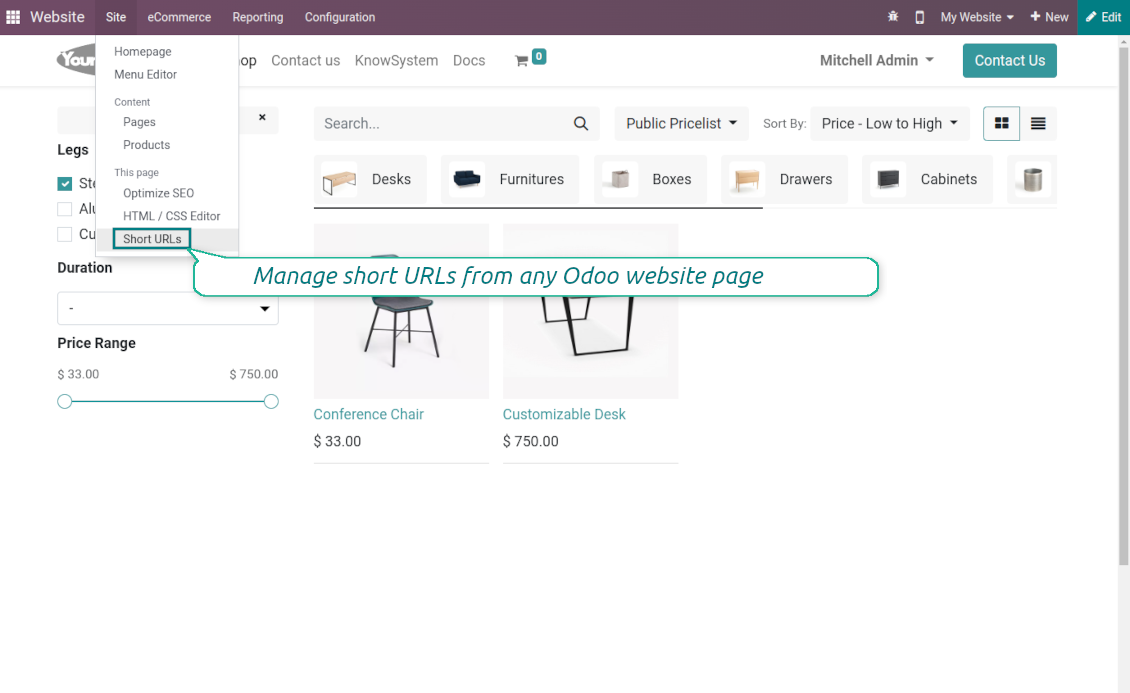
To start managing short links click on Customize > Short URLs from any page
-
The app would automatically retrieve a target web address with all search and hash parameters from a browser. Change this redirect URL if needed: available short links would be recalculated
-
Create new short links based on the default tokens or custom keywords. Archive obsolete URLs
-
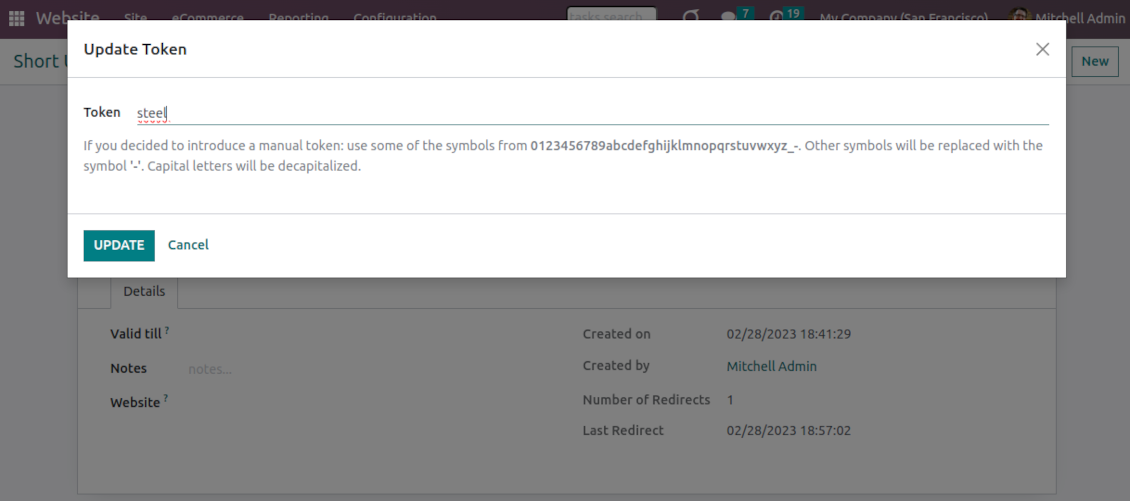
Update existing addresses: change token, assign expiration date, apply to this website or to all sites (the app fully supports Odoo multi-website mode)
Advanced backend links' editor
-
Find all short links by all websites under the menu Websites > Settings > Short URLs
-
Group by website or target URL (there might be multiple short links for each). Archive or restore links in batch
-
Create a new short URL in a few seconds: the only thing required is to introduce a target web address
-
Apply flexible settings: validity date to make a link auto expired, notes to always know why this URL has been introduced, website to restrict usage for a specific site or to use a link globally.
Automatic short URLs generation
-
It is not always possible to prepare a branded URL for each address. For example, when you have thousands of website pages. For such cases define a default automatic method
-
Use the 'iterator' to generate a link with a succeeding number at the end. For instance, 'example.com/s/112'. The app would automatically increment a number when a new short URL is registered
-
Use the 'token' approach to generate a unique symbols row of a predefined length (it should not be less than 5 symbols to have enough unique combinations). For instance, 'example.com/s/uo71jh'
-
A default short URL would be entered as soon as you decide to create a new redirection. Simultaneously, you can always change that to a custom sentence or create a new alternative short URL. Do that for the most important addresses, addresses you would like to print on your business cards, addresses that are assumed to enter manually, etc.
Short URLs for developers
Using short URLs in scripts
-
While developing a custom add-on, script, or server action you might be interested to have a short URL for certain website addresses. The tool lets us do that efficiently
-
To that end you should trigger the method 'action_find_surl' of the model 'short.url.redirect'
-
As arguments it should receive:
target_url- string - relative web path. E.g. "/shop/customizable-desk-config-9#attr=7,4,47)"tocreate- boolean - whether to create a new short URL if none exists for the target URLalwaysvalid- boolean - whether to search short URLs without expiration or yet valid but soon expired links are also finewebsite_id- integer - if False the app would search only global URLs, otherwise also of a specific website (applicable for the multi-website mode)qr_base_url- boolean - if False the method would return a final URL, if True - a QR code content. -
The method would return a string - a found short URL (e.g. '/s/desk'), a binary content of a QR code, or False if nothing is found.
-
For instance:
my_short_url = self.env["short.url.redirect"].action_find_surl("/shop/customizable-desk-config-9#attr=7,4,47", True, True, 1, False)
Website Snippet for auto short links
-
The website menu 'Customize' and the backend menu 'Short URLs' are available only for Odoo website designers. For certain pages, you might be interested to show a short link for simple visitors as well
-
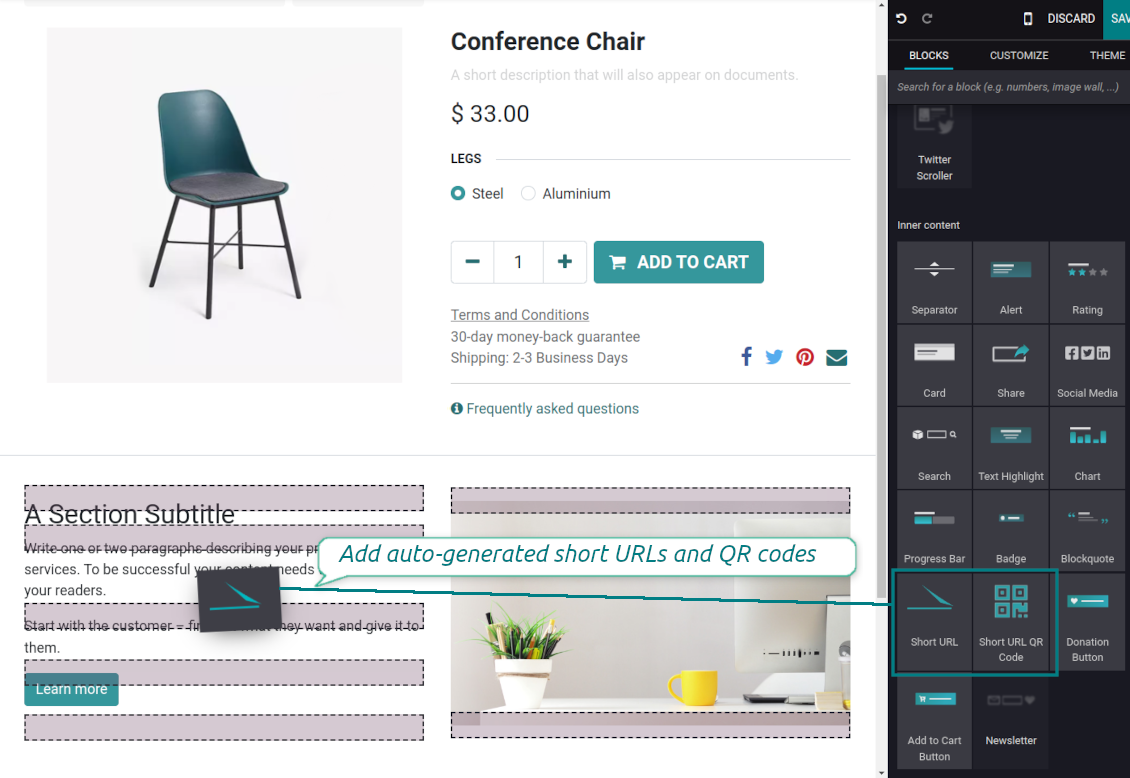
To that goal, you might drag and drop the special website editor snippets 'Short URLs' and 'Short URL QR Code'
-
The snippet 'Short URLs' adds a text block with a short link. Alternatively, you may add an XML line with the tag
awith the HREF"#"and the class"short_url_widget" -
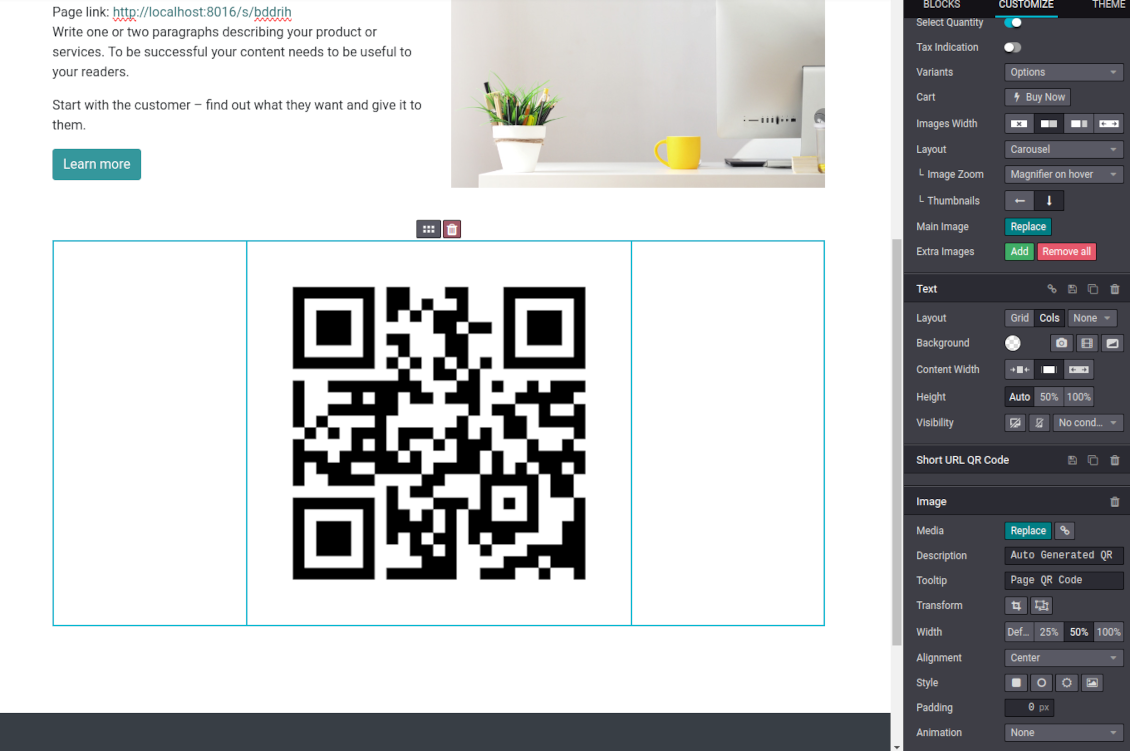
The snippet 'Short URL QR Code' adds a QR code image that you may customize using the standard Odoo website designer tools
-
Each time a page with such a snippet is opened, a short URL will be searched and - if not found - created. In this way, you may show a visitor a valid short URL or its QR code, which he/she might copy, share, and scan
-
Take into account: the snippets search only for always valid global short URLs.
Często zadawane pytania o Website URL shortener Odoo v.16
Jakie sa zasady aktualizacji Waszych narzędzi?
Zgodnie z biezacymi zasadami Odoo Apps Store:
- Modul kupiony dla wersji 12.0 lub starszej daje dostęp do wszystkich wersji do 12.0.
- Od wersji 13.0 każda wersja modulu musi byc kupiona osobno.
- Niezależnie od wersji zakup daje prawo do wszystkich aktualizacji i poprawek w ramach wersji glownej.
Zespol faOtools nie kontroluje tych zasad. Pytania kierujcie bezpośrednio do przedstawicieli Odoo Apps Store.
Jak zainstalowac aplikacje na Odoo.sh?
Najbardziej bezpośrednie podejscie to wbudowany przeplyw sklepu Odoo:
1. Otwórz stronę modulu i kliknij Deploy on odoo.sh
2. Zostaniesz przekierowany do GitHub. Zaloguj sie i kliknij Create a new repo lub użyj istniejącego. Repozytorium musi byc prywatne. Publikowanie aplikacji na licencji OPL-1 jest zabronione. W razie potrzeby utwórz nowe repo dla projektu Odoo.sh
3. Następnie w odoo.sh kliknij Deploy, potwierdź i kliknij Continue. Instalacja sie rozpoczyna.
Te kroki instaluja aplikacje na galezi production. Dla innych galezi lub aktualizacji:
1. Pobierz kod zrodlowy ze sklepu Odoo
2. Zrób commit modulu do repozytorium GitHub. Żaden folder/plik aplikacji nie może byc w .gitignore. Repo tworzone przez odoo.sh mogą ignorowac ważne ścieżki (np. /lib). Prześlij wszystkie katalogi i pliki modulu
3. Wdroz docelowa galaz projektu odoo.sh lub poczekaj na automatyczny build, jeśli tak ustawiono.
Jak zainstalowac aplikacje na wlasnym serwerze?
2. Uruchom ponownie serwer Odoo;
3. Wlacz tryb programisty (ustawienia techniczne);
4. Zaktualizuj liste aplikacji (menu Aplikacje);
5. Znajdź aplikacje i kliknij Activate/Install;
6. Postępuj zgodnie ze wskazowkami na stronie aplikacji, jeśli istnieją.
Aplikacja ma dodatkowe dodatki. Czy moge kupic je później?
Tak. Odoo automatycznie dodaje zależności do koszyka: wylacz juz zakupione narzędzia, aby nie zaplacic dwa razy.
Wdrozyłem aplikacje na Odoo.sh i widze ostrzeżenie/blad w testach
Czerwone/pomaranczowe ostrzeżenie nie wplywa na funkcje aplikacji. Czasem nasze moduly nie przechodzą standardowych testów automatycznych, bo te zakladaja zachowanie sprzeczne z celami aplikacji. Na przyklad zmieniamy obliczanie ceny, a testy Odoo porownuja cenę koncowa ze standardowym algorytmem.
Najpierw sprawdź funkcje wdroznej bazy. Czy wszystko dziala?
Jeśli nadal uwazasz, ze ostrzeżenie wplywa na rzeczywiste funkcje, skontaktuj sie z nami i prześlij pelne logi instalacji oraz pelna liste wdroznych modulow (rdzeń i firmy trzecie).
Czy moge kupic aplikacje bezpośrednio u Was?
Nie, dystrybuujemy narzędzia tylko przez oficjalny sklep aplikacji Odoo.
Chcialbym uzyskać znizke
Niestety nie mamy srodkow technicznych, by oferowac ceny indywidualne.
Czy moge zainstalowac aplikacje na bazie Odoo Online (SaaS)?
Nie, aplikacji innych firm nie można używać na Odoo Online. Odoo SaaS blokuje te mozliwosc.
Narzędzie zależy od innych aplikacji. Czy musze je kupic?
Tak, narzędzie wymaga wszystkich modulow oznaczonych jako zależności. Cena na stronie aplikacji juz je obejmuje.
Jaka jest cena modulu w dolarach amerykanskich? Dlaczego sie zmienila?
Ceny naszych modulow sa w euro. Sklep Odoo przelicza je na inne waluty wedlug wewnetrznego kursu. Dlatego cena w dolarach amerykanskich może sie zmienić po aktualizacji kursu.
Sformułowania aplikacji i witryny w językach innych niż angielski są wspomagane przez AI i zgodne z oficjalnymi tłumaczeniami Odoo. Jeśli zauważysz błąd, wyślij zgłoszenie o poprawność tłumaczeń a naprawimy to.
Bazy demonstracyjne Odoo (podglądy na żywo)
Dla tej aplikacji możemy zapewnić darmową spersonalizowaną bazę demo.
Nie potrzebujesz telefonu ani karty, by się z nami skontaktować. Wystarczy krótka rejestracja e-mail, która nie zajmuje więcej niż 30 sekund.
Na Twoją prośbę przygotujemy indywidualną bazę podglądu na żywo, w której przez około dwa tygodnie możesz testować i sprawdzać założenia.
Zgłaszanie błędów
Jeśli zauważysz błędy lub niespójne działanie, napisz do nas. Gwarantujemy poprawki w 60 dni od zakupu i dalej ulepszamy narzędzia.
Nie potrzebujesz telefonu ani karty, by się z nami skontaktować. Wystarczy krótka rejestracja e-mail, która nie zajmuje więcej niż 30 sekund.
Dołącz jak najwięcej szczegółów: zrzuty ekranu, logi serwera Odoo i pełny opis odtworzenia problemu. Zwykle kilka dni roboczych zajmuje plan (gdy błąd potwierdzono) albo wskazówki (w przeciwnym razie).
Publiczne zgłoszenia funkcji i pomysły na moduły (bezpłatny rozwój)
Jesteśmy mocno zmotywowani do ulepszania narzędzi i wdzięczni za każdą opinię. Jeśli wymagania są użyteczne publicznie i da się je sprawnie wdrożyć, zespół wpisze je na listę zadań.
Taka lista zadań jest przetwarzana regularnie i nie zakłada dodatkowych opłat. Choć nie możemy obiecać terminów i ostatecznego projektu, to dobry sposób na pożądane funkcje bez inwestycji i ryzyka.
Nie potrzebujesz telefonu ani karty, by się z nami skontaktować. Wystarczy krótka rejestracja e-mail, która nie zajmuje więcej niż 30 sekund.

The tool to flexibly structure Odoo attachments in folders and synchronize directories with cloud clients: Google Drive, OneDrive/SharePoint, Nextcloud/ownCloud, and Dropbox. DMS. File Manager. Document management system
398€
The tool to automatically synchronize Odoo attachments with OneDrive files in both ways
487€
The tool to automatically synchronize Odoo attachments with Google Drive files in both ways
487€

The tool to build a deep and structured knowledge base for internal and external use. Knowledge System. KMS. Wiki-like revisions.
398€
The tool to set up KPI targets and control their fulfillment by periods. KPI dashboards. Dashboard designer. KPI charts

The tool for time-based service management from booking appointments to sales and reviews
398€
Narzędzie do zarządzania Odoo z ulubionych czatów AI przez MCP. Claude. Każde AI z MCP.

The tool to combine different Odoo events in a few configurable super calendars