Universal Appointments: Portal and Website v.16
The extension to the Universal Appointments app to schedule appointments on the Odoo website and in the Odoo portal. Online appointments. Online Bookings
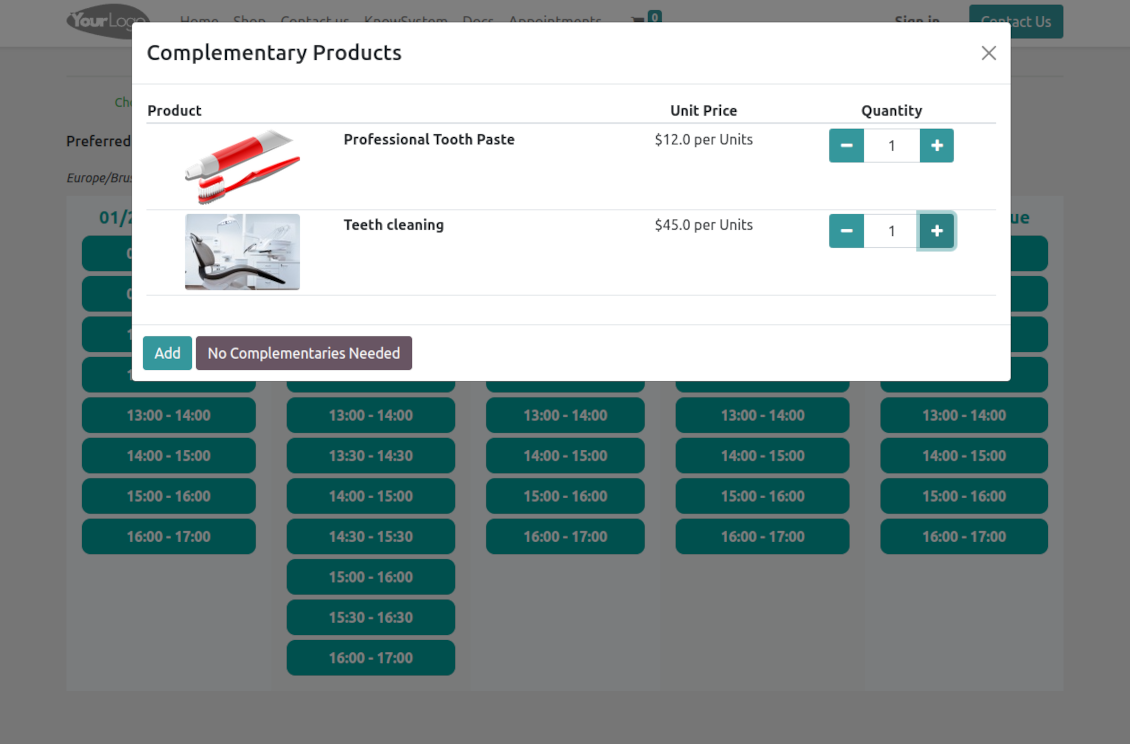
Clear website bookings
Let portal partners and website visitors schedule an appointment through the configurable multi-step process of checkout and confirmation
Full-service management details
Publish resource types, resources, and services details in the portal and website
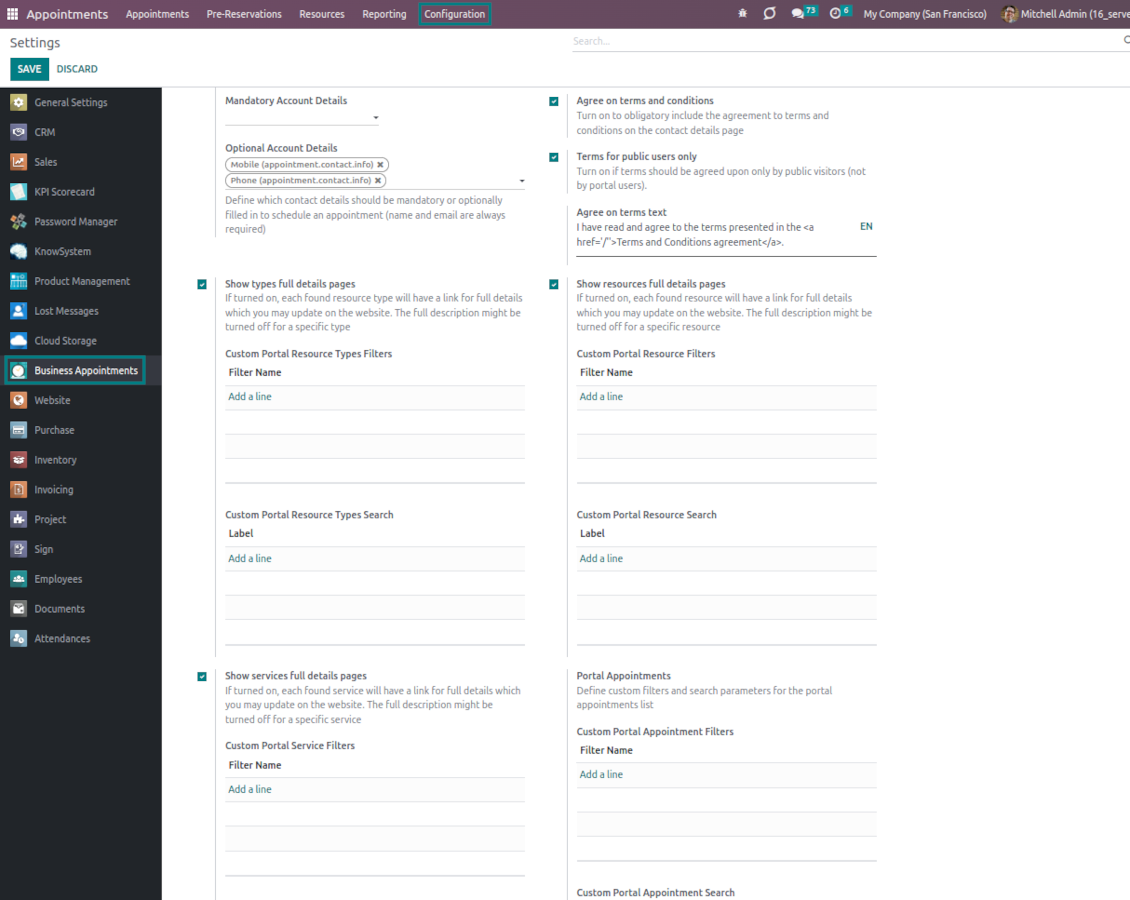
Customizable website and portal pages
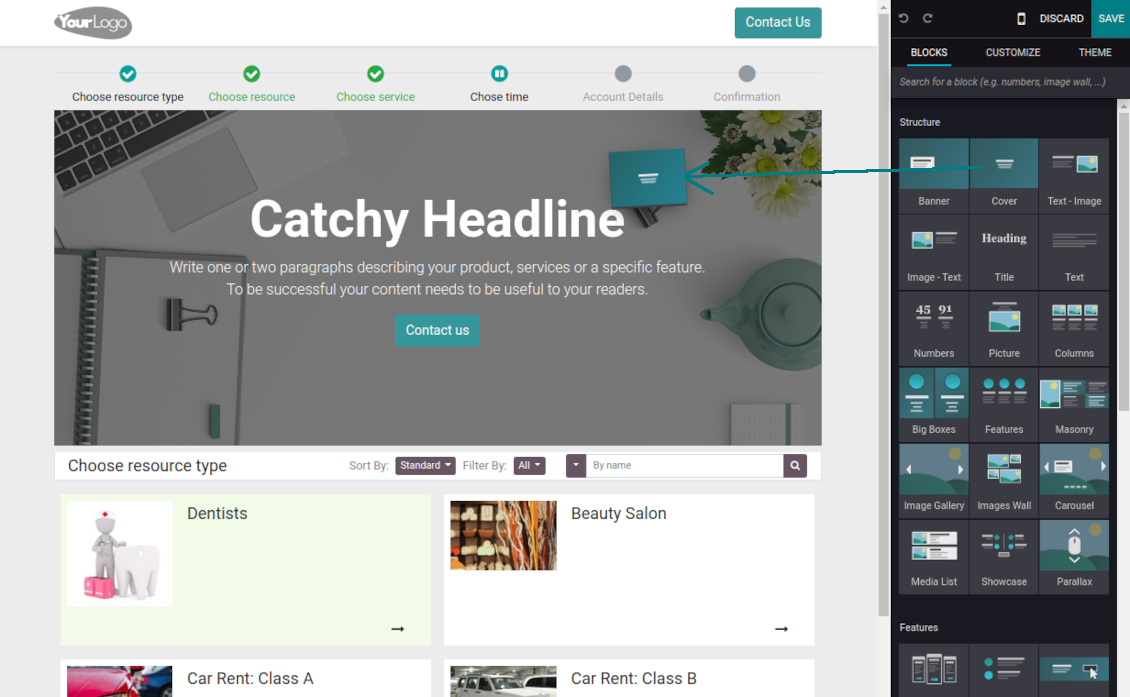
Turn on/off optional layout elements. Introduce your own titles and welcome texts. Exclude booking steps
Portal control over reservations
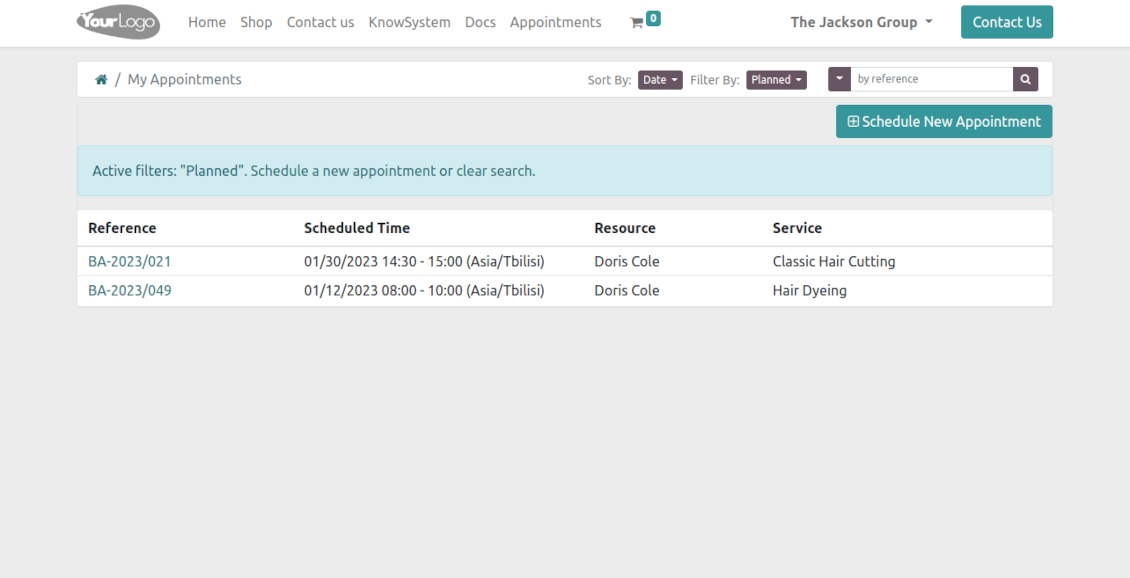
Allow portal users to control planned and made reservations.
Universal website bookings
-
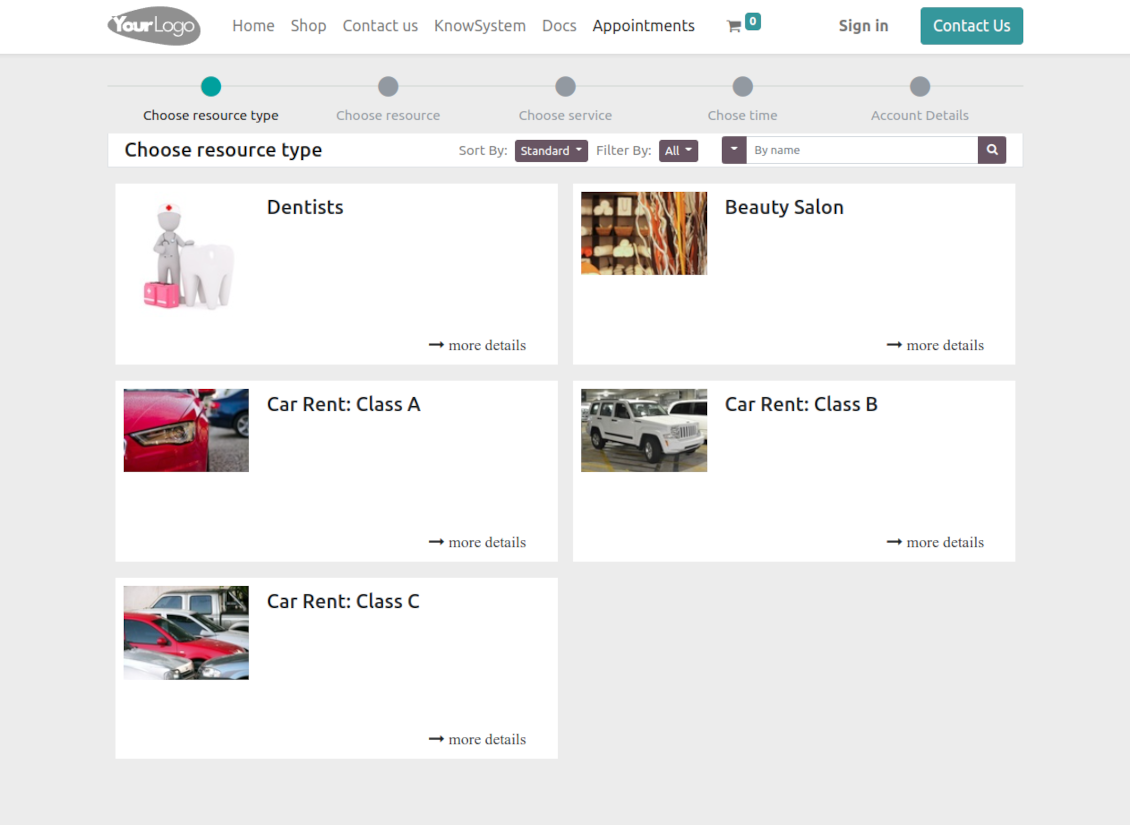
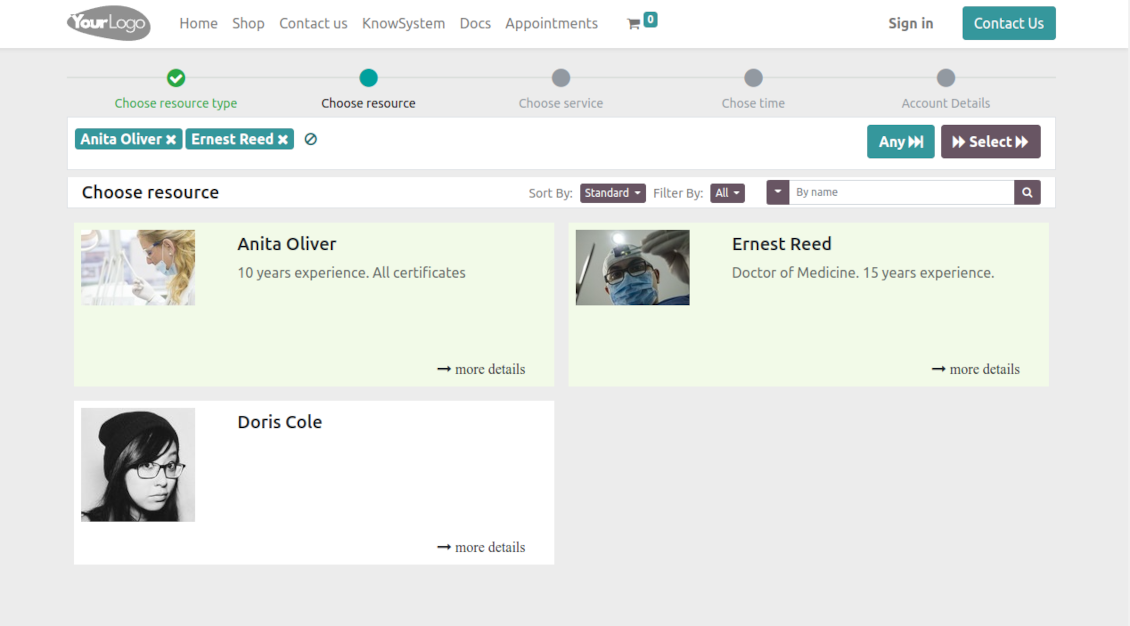
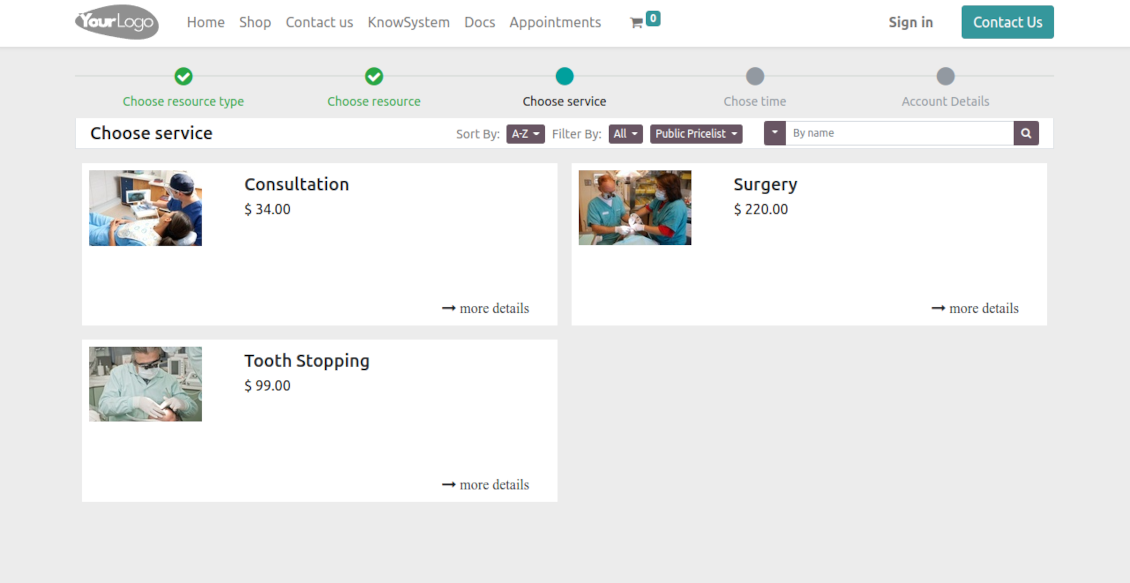
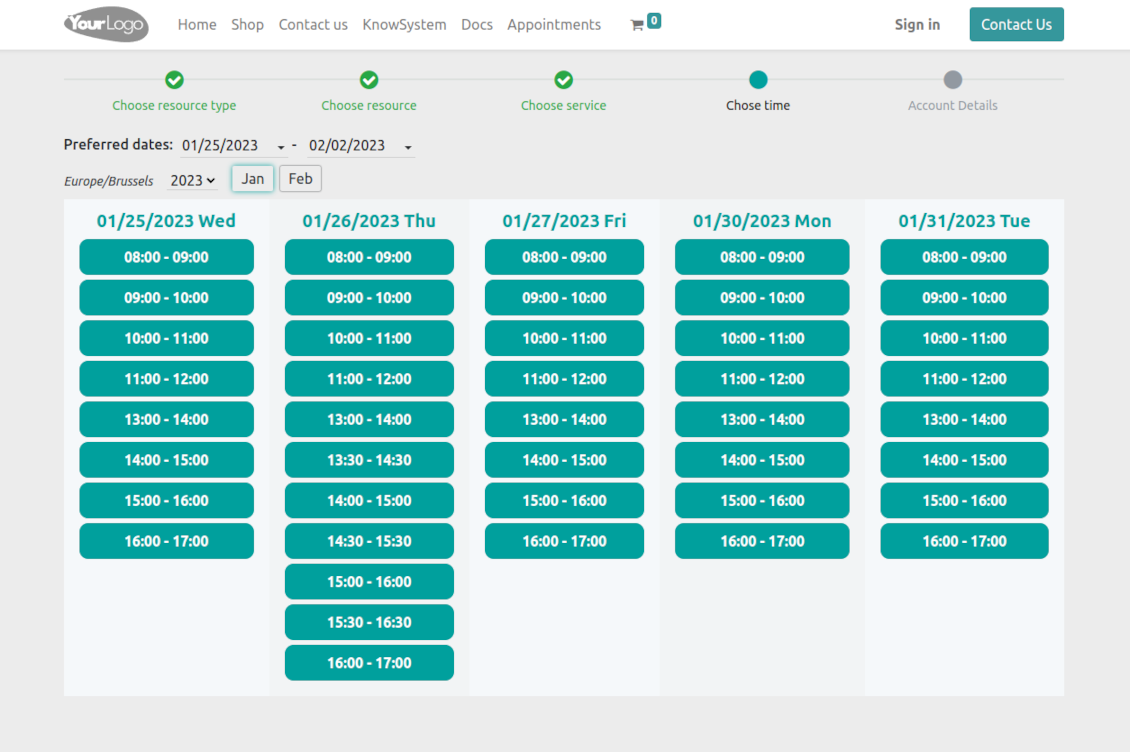
Making a reservation through the Odoo portal/website represents the multi-step checkout process
-
It starts with selecting a resource type. For example, "Beauty salon" or "Class A Cars". The step might be missed if there is a single published resource type for a current website
-
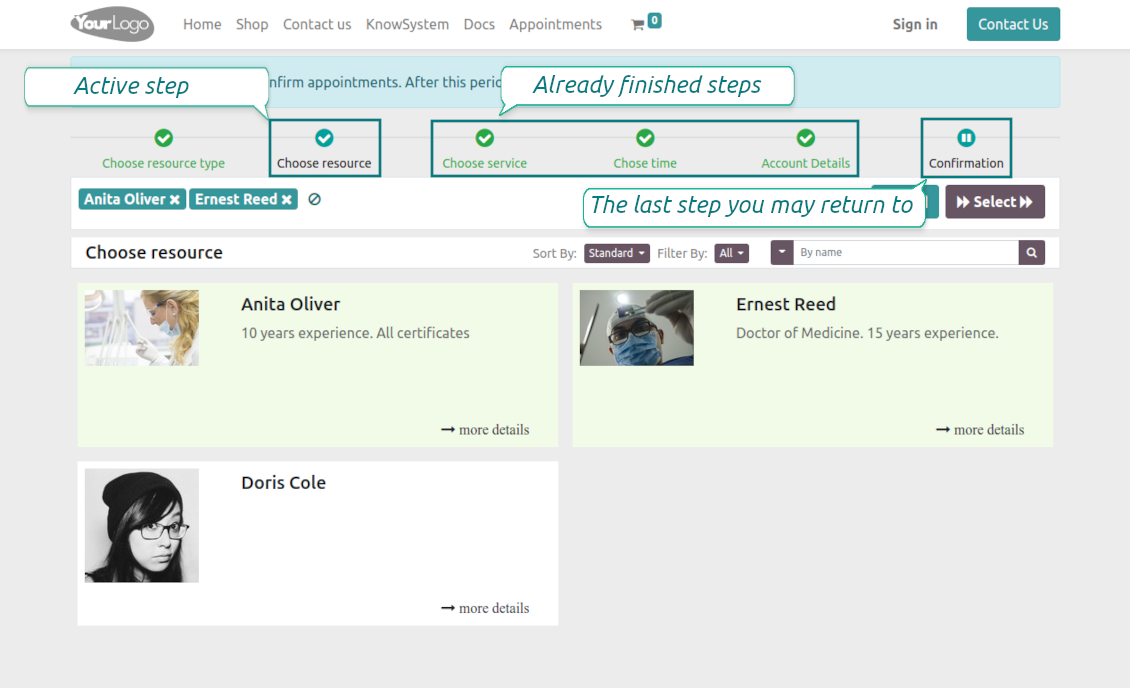
Then, a client navigates over resources of the chosen type to pick one, a few, or applies any (all). For example, "Hair Dresser John Brown" or "Tesla 1234". The step will be missed if there is a single published resource, or when the chosen resource type assumes automatic allocation
-
Afterward, a client chooses the desired service related to the selected resources. For example, "Makeup" or "Car Rent Class A". Users will not be forced to choose a service if there is a single published on this website for this resource
-
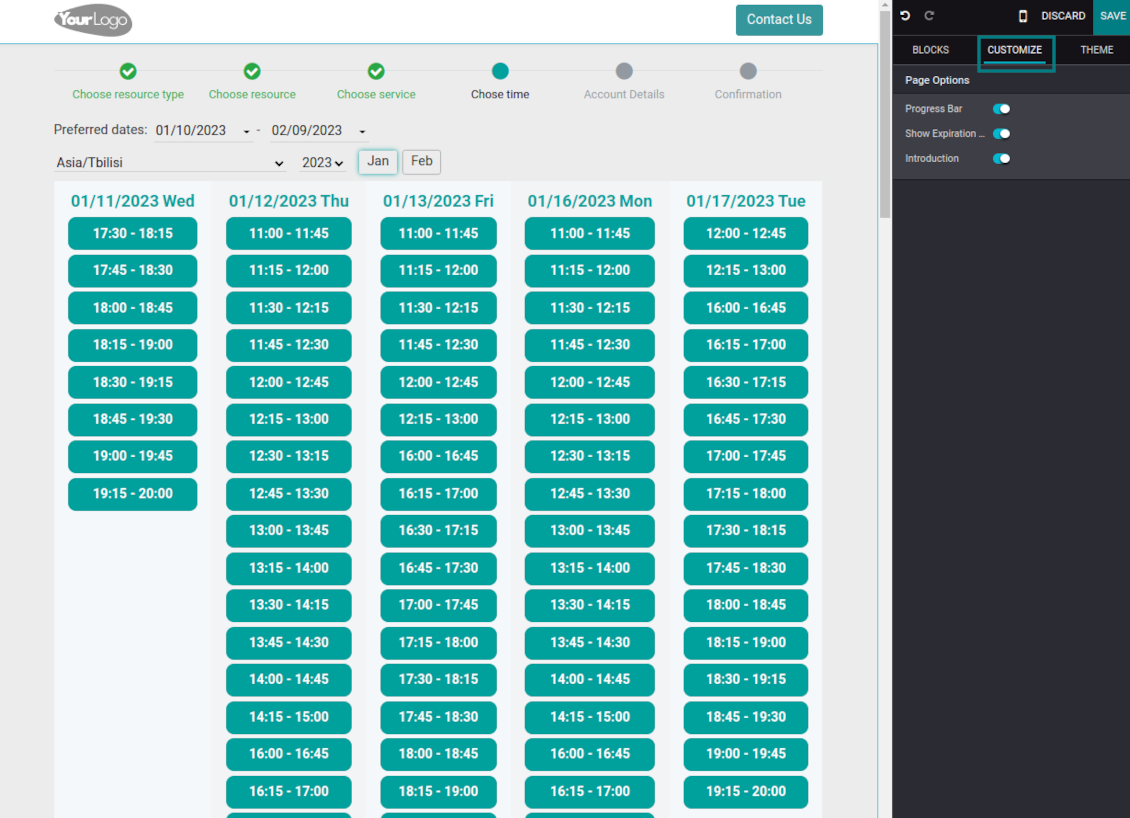
Now a client is shown available time slots. The interface allows adopting time frames of search, changing the time zone, and choosing duration (for the services with manual duration). Each action results in slots' recalculation. Website visitors might be optionally allowed to book a few time slots for a chosen service (the multi-scheduling option)
-
A time slot selection is required and can be not missed. As soon as prereservation is done, nobody else can book the same time period. Users have limited time to make confirmation after which prereservation will be canceled (the exact time is configurable)
-
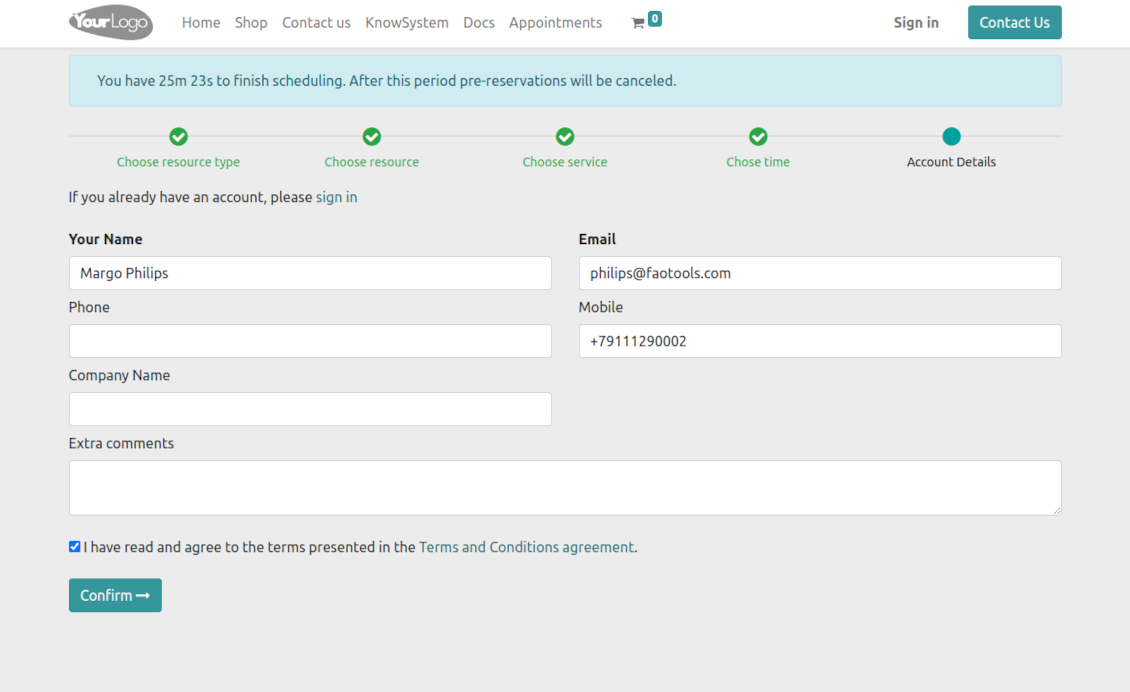
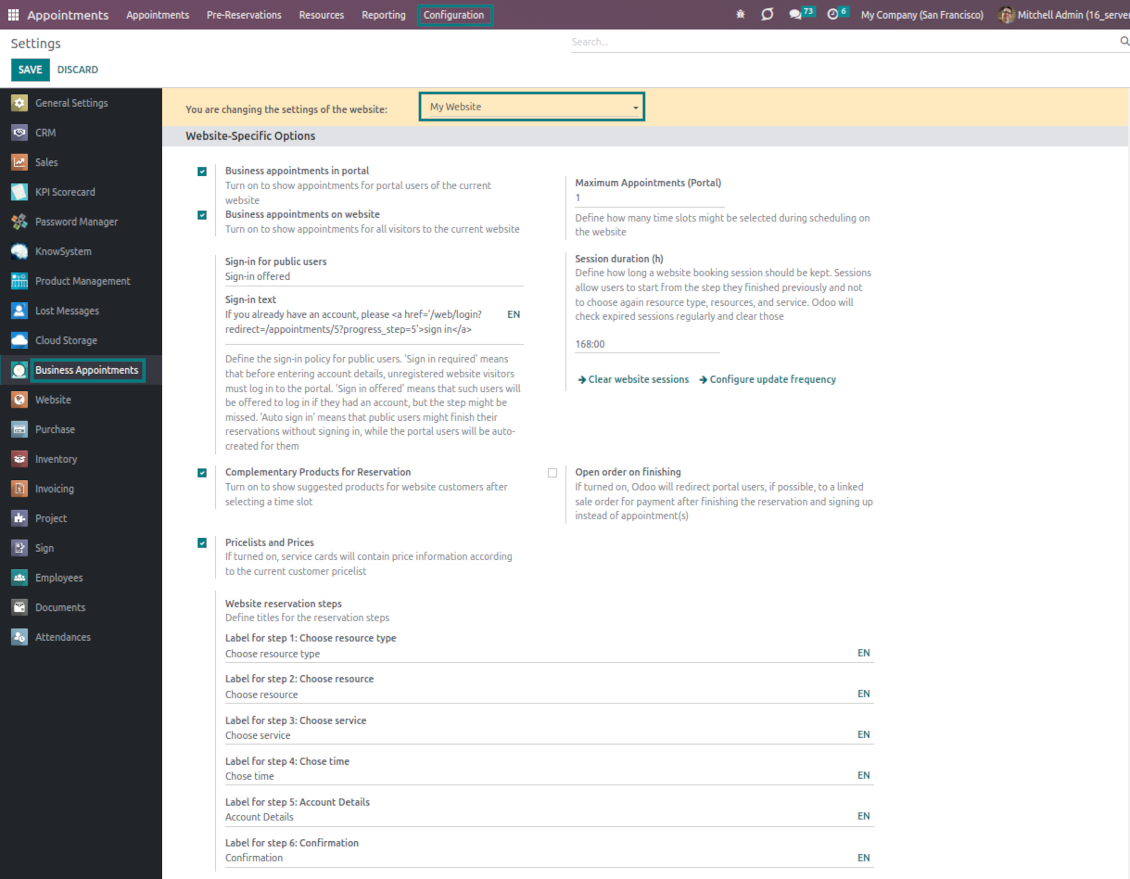
As the time slot is pre-reserved, optionally force the public (not logged-in users) to sign in, only offer to do so, or just let them enter their details
-
Then, a client should introduce his/her contact details, a set of which might be changed per website. By default, the required ones are name and email. Portal (already registered) users would have those fields auto-populated. Optionally place here a checkbox to agree with the terms and conditions
-
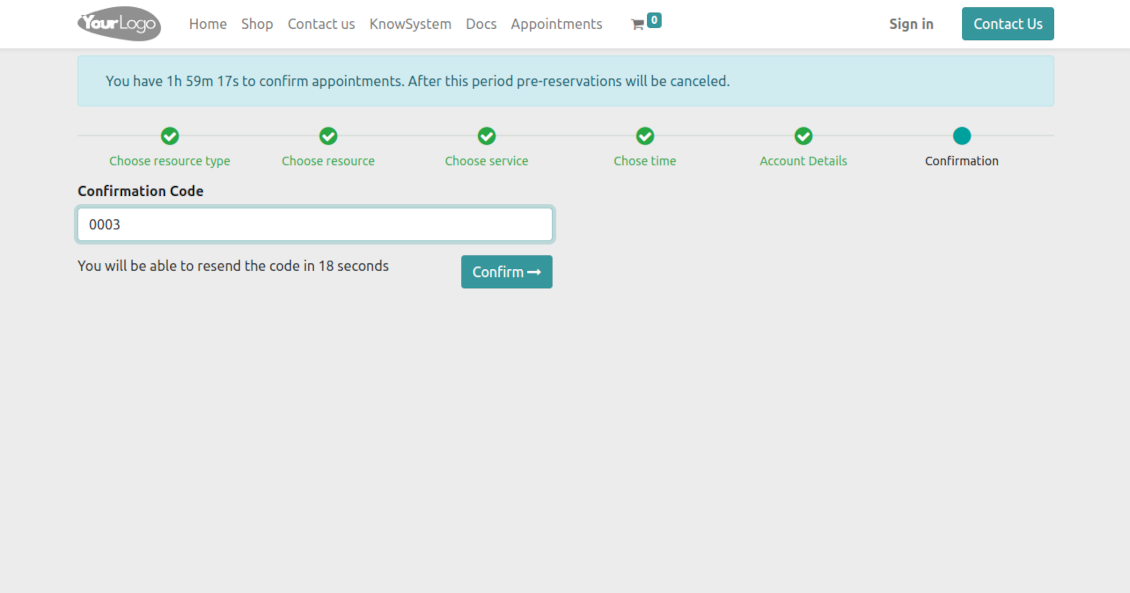
Optionally ask clients to confirm their email or mobile number. If the confirmation option is turned on, users would be obliged to insert received codes. In case a correct code is not introduced in time (the timer is set up on the configuration page), appointments would be canceled. If you selected SMS confirmation (the feature depends on Odoo SMS IAP) but your balance is not sufficient, a confirmation code would be forwarded by email
-
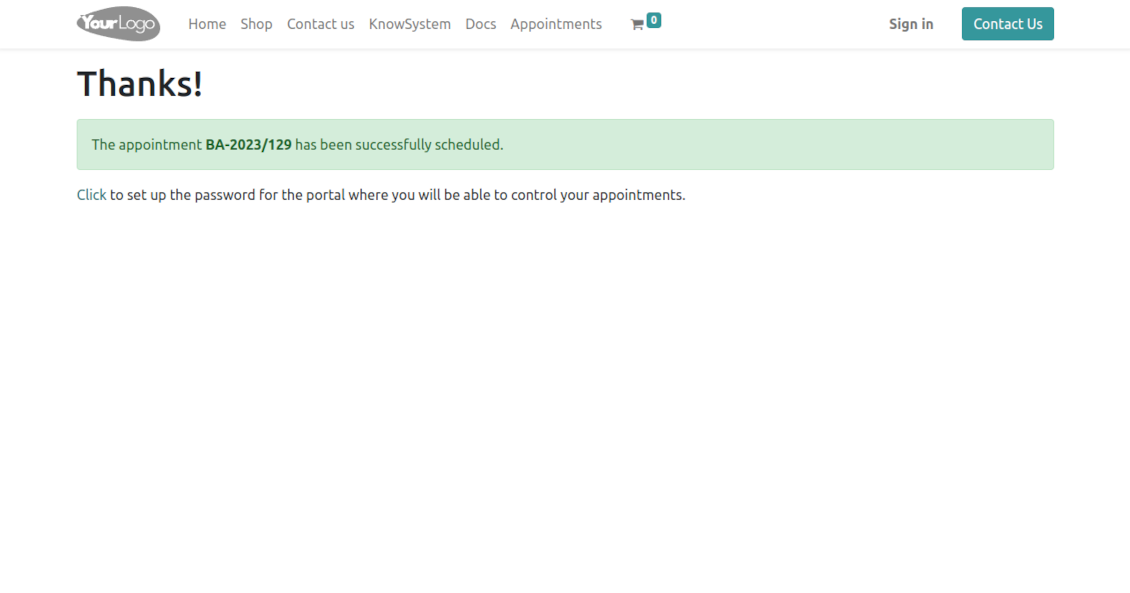
As soon as all steps are done, a client receives a confirmation email and is redirected to the success page/new appointments(s) page. For not yet-registered users, the app offers to enter the password for the Odoo portal
-
During the whole process, a client sees the progress bar (if you have not purposefully turned it off). The progress bar lets safely return to any previous step and back.
Configurable appointment pages
-
Show/hide the progress bar. Introduce your own titles for progress steps
-
Show/hide introduction blocks, images, and short descriptions for resource types, resources, and services
-
Prepare your own Odoo website full details pages for resource types, resources, and services using Odoo's standard website builder. Show/hide links for those pages
-
Show/hide timers for pre-reservation and confirmation
-
Define filters and sortings for resource types, resources, and service steps
-
Show/hide the terms and conditions link for portal/public users with your own text.
Portal control of reservations
-
Clients control their appointments right in the Odoo portal
-
Portal users observe the list of planned and done appointments and may check any of those
-
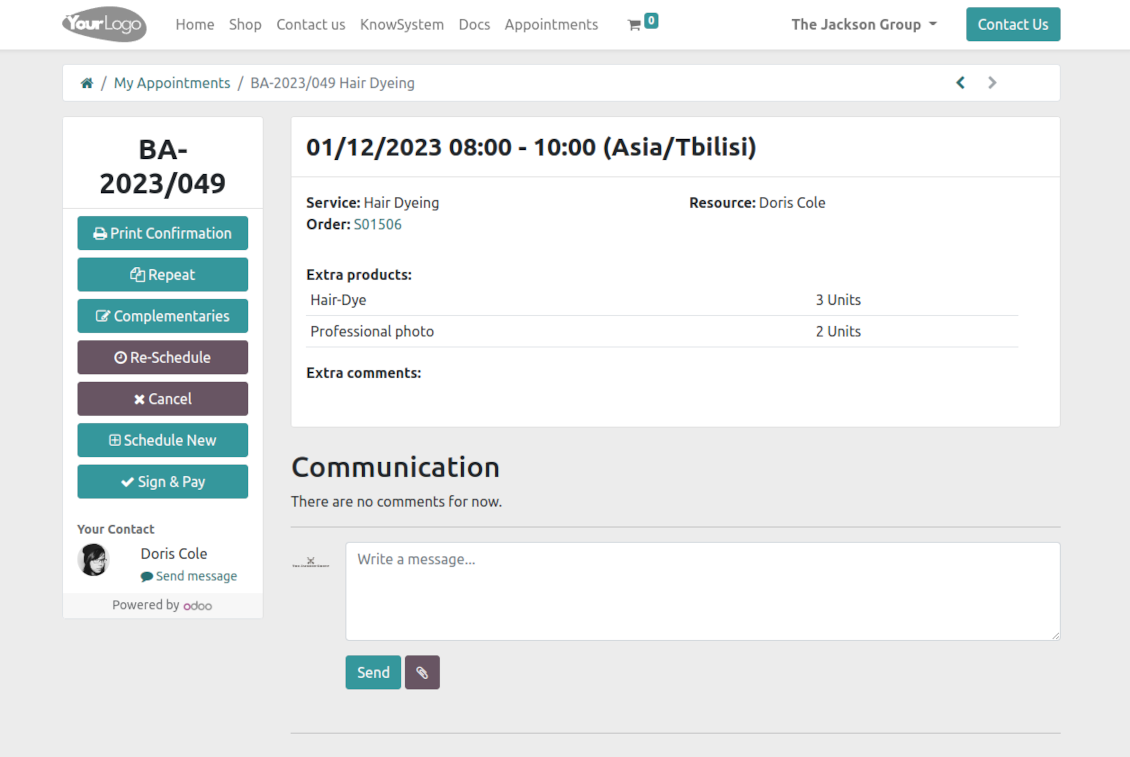
The Odoo portal lets schedule new or repeat existing reservations, cancel or re-schedule planned appointments
-
Each appointment portal page has a chatterbox that allows direct communication with the resource manager and other followers
-
From the reservation page, users can also print a voucher, so appointment confirmation.
Często zadawane pytania o Universal Appointments: Portal and Website Odoo v.16
Jakie sa zasady aktualizacji Waszych narzędzi?
Zgodnie z biezacymi zasadami Odoo Apps Store:
- Modul kupiony dla wersji 12.0 lub starszej daje dostęp do wszystkich wersji do 12.0.
- Od wersji 13.0 każda wersja modulu musi byc kupiona osobno.
- Niezależnie od wersji zakup daje prawo do wszystkich aktualizacji i poprawek w ramach wersji glownej.
Zespol faOtools nie kontroluje tych zasad. Pytania kierujcie bezpośrednio do przedstawicieli Odoo Apps Store.
Jak zainstalowac aplikacje na Odoo.sh?
Najbardziej bezpośrednie podejscie to wbudowany przeplyw sklepu Odoo:
1. Otwórz stronę modulu i kliknij Deploy on odoo.sh
2. Zostaniesz przekierowany do GitHub. Zaloguj sie i kliknij Create a new repo lub użyj istniejącego. Repozytorium musi byc prywatne. Publikowanie aplikacji na licencji OPL-1 jest zabronione. W razie potrzeby utwórz nowe repo dla projektu Odoo.sh
3. Następnie w odoo.sh kliknij Deploy, potwierdź i kliknij Continue. Instalacja sie rozpoczyna.
Te kroki instaluja aplikacje na galezi production. Dla innych galezi lub aktualizacji:
1. Pobierz kod zrodlowy ze sklepu Odoo
2. Zrób commit modulu do repozytorium GitHub. Żaden folder/plik aplikacji nie może byc w .gitignore. Repo tworzone przez odoo.sh mogą ignorowac ważne ścieżki (np. /lib). Prześlij wszystkie katalogi i pliki modulu
3. Wdroz docelowa galaz projektu odoo.sh lub poczekaj na automatyczny build, jeśli tak ustawiono.
Jak zainstalowac aplikacje na wlasnym serwerze?
2. Uruchom ponownie serwer Odoo;
3. Wlacz tryb programisty (ustawienia techniczne);
4. Zaktualizuj liste aplikacji (menu Aplikacje);
5. Znajdź aplikacje i kliknij Activate/Install;
6. Postępuj zgodnie ze wskazowkami na stronie aplikacji, jeśli istnieją.
Aplikacja ma dodatkowe dodatki. Czy moge kupic je później?
Tak. Odoo automatycznie dodaje zależności do koszyka: wylacz juz zakupione narzędzia, aby nie zaplacic dwa razy.
Wdrozyłem aplikacje na Odoo.sh i widze ostrzeżenie/blad w testach
Czerwone/pomaranczowe ostrzeżenie nie wplywa na funkcje aplikacji. Czasem nasze moduly nie przechodzą standardowych testów automatycznych, bo te zakladaja zachowanie sprzeczne z celami aplikacji. Na przyklad zmieniamy obliczanie ceny, a testy Odoo porownuja cenę koncowa ze standardowym algorytmem.
Najpierw sprawdź funkcje wdroznej bazy. Czy wszystko dziala?
Jeśli nadal uwazasz, ze ostrzeżenie wplywa na rzeczywiste funkcje, skontaktuj sie z nami i prześlij pelne logi instalacji oraz pelna liste wdroznych modulow (rdzeń i firmy trzecie).
Czy moge kupic aplikacje bezpośrednio u Was?
Nie, dystrybuujemy narzędzia tylko przez oficjalny sklep aplikacji Odoo.
Chcialbym uzyskać znizke
Niestety nie mamy srodkow technicznych, by oferowac ceny indywidualne.
Czy moge zainstalowac aplikacje na bazie Odoo Online (SaaS)?
Nie, aplikacji innych firm nie można używać na Odoo Online. Odoo SaaS blokuje te mozliwosc.
Narzędzie zależy od innych aplikacji. Czy musze je kupic?
Tak, narzędzie wymaga wszystkich modulow oznaczonych jako zależności. Cena na stronie aplikacji juz je obejmuje.
Jaka jest cena modulu w dolarach amerykanskich? Dlaczego sie zmienila?
Ceny naszych modulow sa w euro. Sklep Odoo przelicza je na inne waluty wedlug wewnetrznego kursu. Dlatego cena w dolarach amerykanskich może sie zmienić po aktualizacji kursu.
Sformułowania aplikacji i witryny w językach innych niż angielski są wspomagane przez AI i zgodne z oficjalnymi tłumaczeniami Odoo. Jeśli zauważysz błąd, wyślij zgłoszenie o poprawność tłumaczeń a naprawimy to.
Bazy demonstracyjne Odoo (podglądy na żywo)
Dla tej aplikacji możemy zapewnić darmową spersonalizowaną bazę demo.
Nie potrzebujesz telefonu ani karty, by się z nami skontaktować. Wystarczy krótka rejestracja e-mail, która nie zajmuje więcej niż 30 sekund.
Na Twoją prośbę przygotujemy indywidualną bazę podglądu na żywo, w której przez około dwa tygodnie możesz testować i sprawdzać założenia.
Zgłaszanie błędów
Jeśli zauważysz błędy lub niespójne działanie, napisz do nas. Gwarantujemy poprawki w 60 dni od zakupu i dalej ulepszamy narzędzia.
Nie potrzebujesz telefonu ani karty, by się z nami skontaktować. Wystarczy krótka rejestracja e-mail, która nie zajmuje więcej niż 30 sekund.
Dołącz jak najwięcej szczegółów: zrzuty ekranu, logi serwera Odoo i pełny opis odtworzenia problemu. Zwykle kilka dni roboczych zajmuje plan (gdy błąd potwierdzono) albo wskazówki (w przeciwnym razie).
Publiczne zgłoszenia funkcji i pomysły na moduły (bezpłatny rozwój)
Jesteśmy mocno zmotywowani do ulepszania narzędzi i wdzięczni za każdą opinię. Jeśli wymagania są użyteczne publicznie i da się je sprawnie wdrożyć, zespół wpisze je na listę zadań.
Taka lista zadań jest przetwarzana regularnie i nie zakłada dodatkowych opłat. Choć nie możemy obiecać terminów i ostatecznego projektu, to dobry sposób na pożądane funkcje bez inwestycji i ryzyka.
Nie potrzebujesz telefonu ani karty, by się z nami skontaktować. Wystarczy krótka rejestracja e-mail, która nie zajmuje więcej niż 30 sekund.
16.0.1.1.16
- The issue with duplicated warnings has been fixed.
16.0.1.1.16
- The issue with the untranslated warnings has been fixed.
16.0.1.1.15
- The issue with importing the slug method is fixed.
16.0.1.1.14
- The appointment-finishing algorithm is optimized to avoid concurrent updates.
16.0.1.1.13
- The access to custom filters under public and portal users is fixed.

The tool to flexibly structure Odoo attachments in folders and synchronize directories with cloud clients: Google Drive, OneDrive/SharePoint, Nextcloud/ownCloud, and Dropbox. DMS. File Manager. Document management system
398€
The tool to automatically synchronize Odoo attachments with OneDrive files in both ways
487€
The tool to automatically synchronize Odoo attachments with Google Drive files in both ways
487€

The tool to build a deep and structured knowledge base for internal and external use. Knowledge System. KMS. Wiki-like revisions.
398€
The tool to set up KPI targets and control their fulfillment by periods. KPI dashboards. Dashboard designer. KPI charts

The tool for time-based service management from booking appointments to sales and reviews
398€
Narzędzie do zarządzania Odoo z ulubionych czatów AI przez MCP. Claude. Każde AI z MCP.

The tool to translate URL addresses of Odoo website pages
38€