Advanced Variant Prices v.13
The tool to configure variant prices based on attributes coefficients and surpluses
Advanced formula to calculate variant price
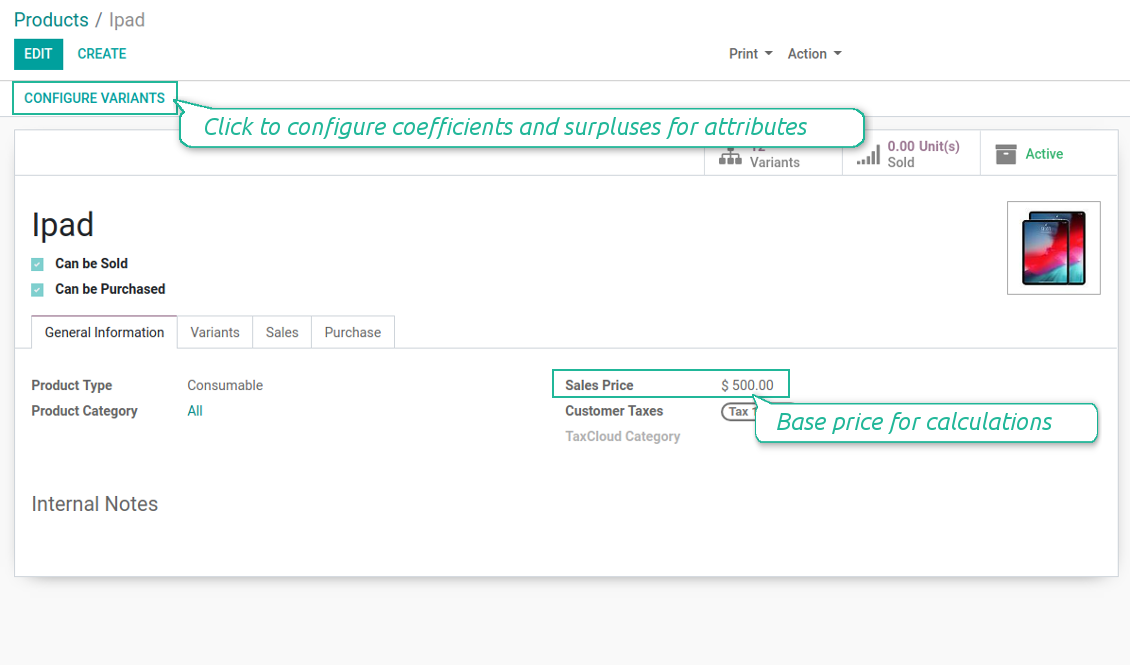
- Add an extra price for any attribute value of this product template. For instance, plus 5 Euro if color of iPad is red
- Assign a multiplier to a template attribute value: 10% extra if size of Ipad is 12.9'
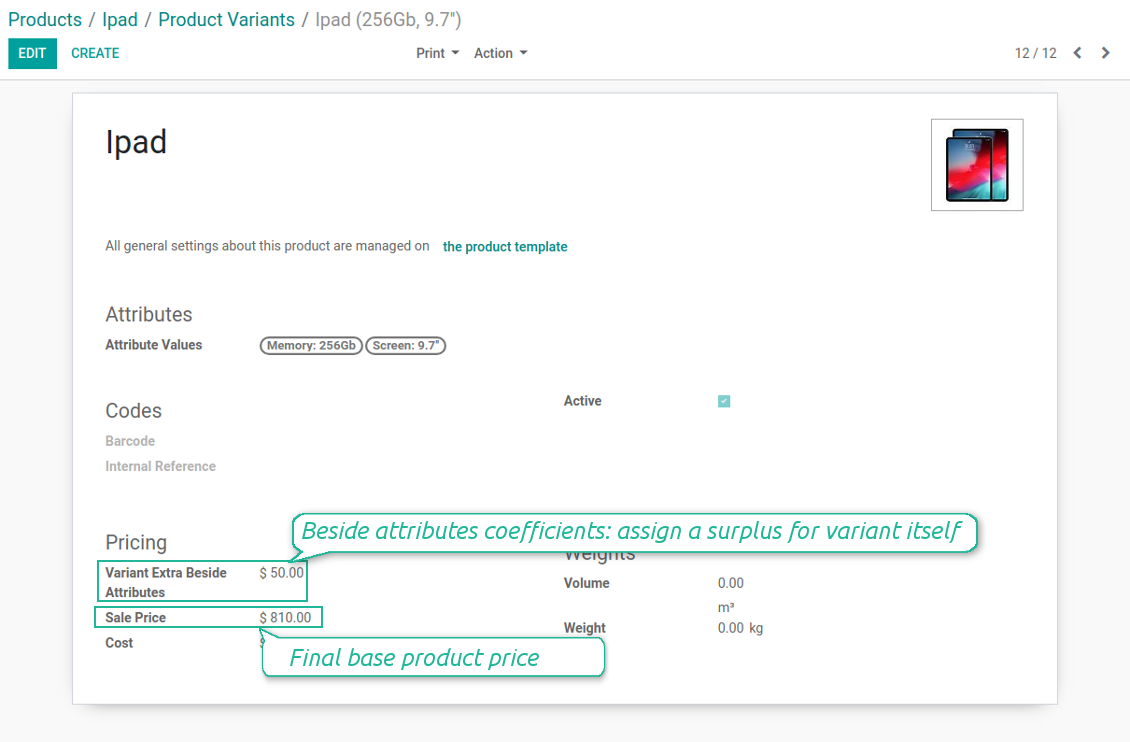
- Define independent product variant extra price. E.g. iPad 12.9' 64GB needs an extra 100 Euros in addition to attributes coefficients
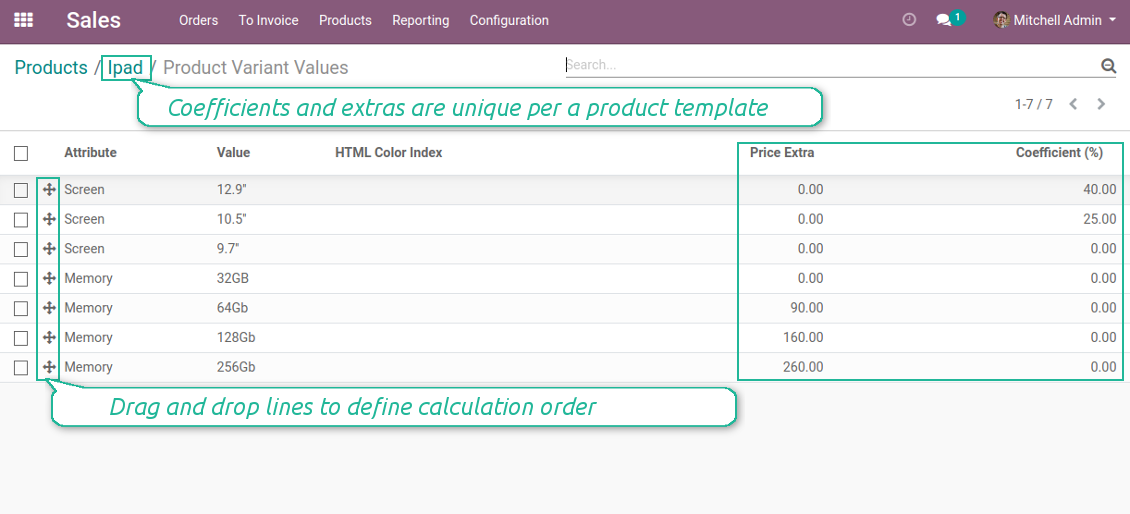
- Define values' sequence to apply coefficients priorities: firstly screen size impact, then memory, finally color.
Pricing Formula
The pricing formula is [ [(PRODUCT TEMPLATE PRICELIST PRICE + ATTRIBUTE 1 EXTRA PRICE) * (100+ATTRIBUTE 1 MULTIPLIER)/100 + ATTRIBUTE 2 EXTRA PRICE] * [100+ATTRIBUTE 2 MULTIPLIER]/100 + ATTRIBUTE 3 EXTRA PRICE ] * .... + OWN VARIANT SURPLUS
Price calculation example
- Your product is "Ice Cream", which sale price is $5
- It has 2 attributes - "Flavour" and "Mode"
- The flavour may be "Chocolate", "Vanilla" or "Strawberry". While the first 2 do not influence costs, the latter make you put fresh fruits. That's why you decide to make a price extra of $1
- You have 2 ice cream modes: "Standard" and "Premium". The latter means you are using premium milk, which costs 20% more than ordinary one. Hence, you assign 20% multiplier to this attribute
- Since flavour doesn't influence mode at all, you decide to order attributes as "Mode, Flavour"
- Then, the price of "Ice Crem, Premium, Strawberry" will be calculated as [($5 + 20%) + $1] = $7
- Be cautious: if you decided to order attributes in the opposite way the price of "Ice Crem, Premium, Strawberry" will be [($5 + $1) * (1+20%)] =$7,2
- Add a special extra for the product "Ice Cream, Premium, Strawberry" on its form - $2. Thus, the price would be $9
Screenshots
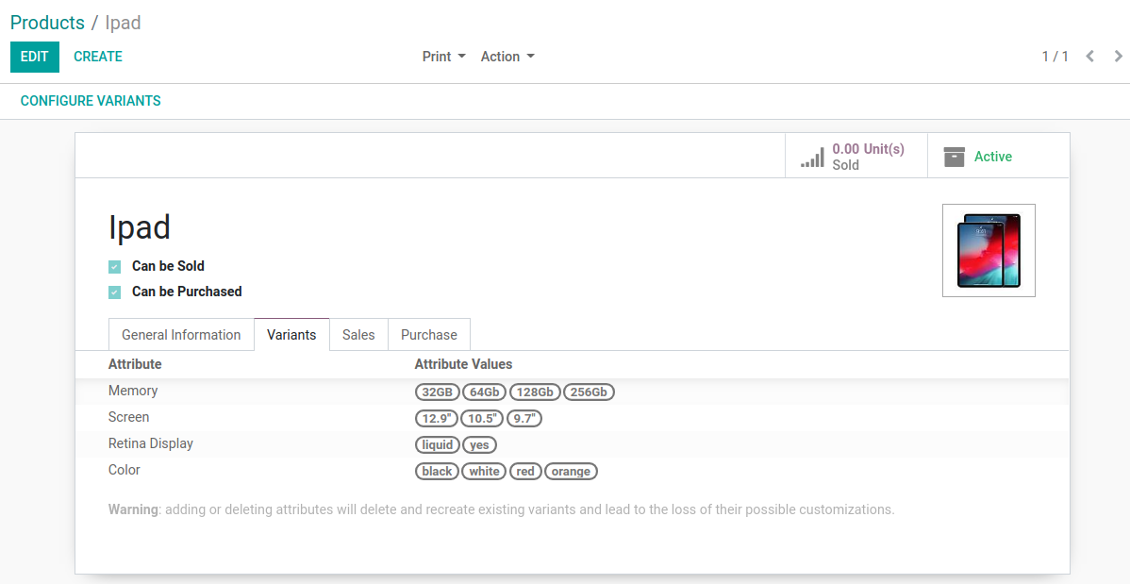
Configure price calculations on a template form
Assign coefficients and surpluses per attribute values
Variant might have an own extra price beside calculations
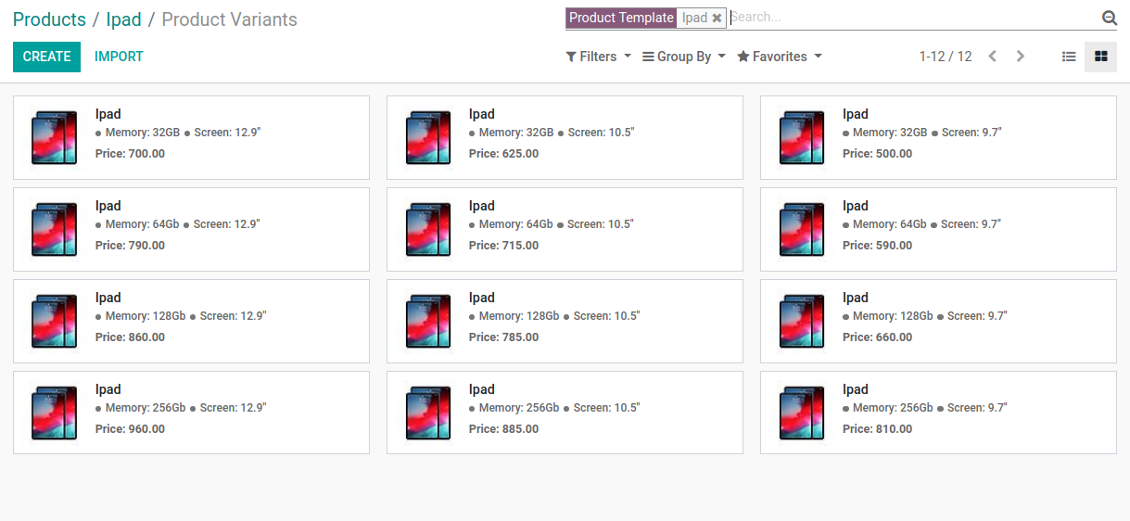
Each product variant has a unique calculated price
Different attributes coefficients for different product templates
The final price is calculated successively attribute by attribute: the order is important! Drag and drop lines to change sequence.
Compatibility with the Odoo product configurator
Screenshots
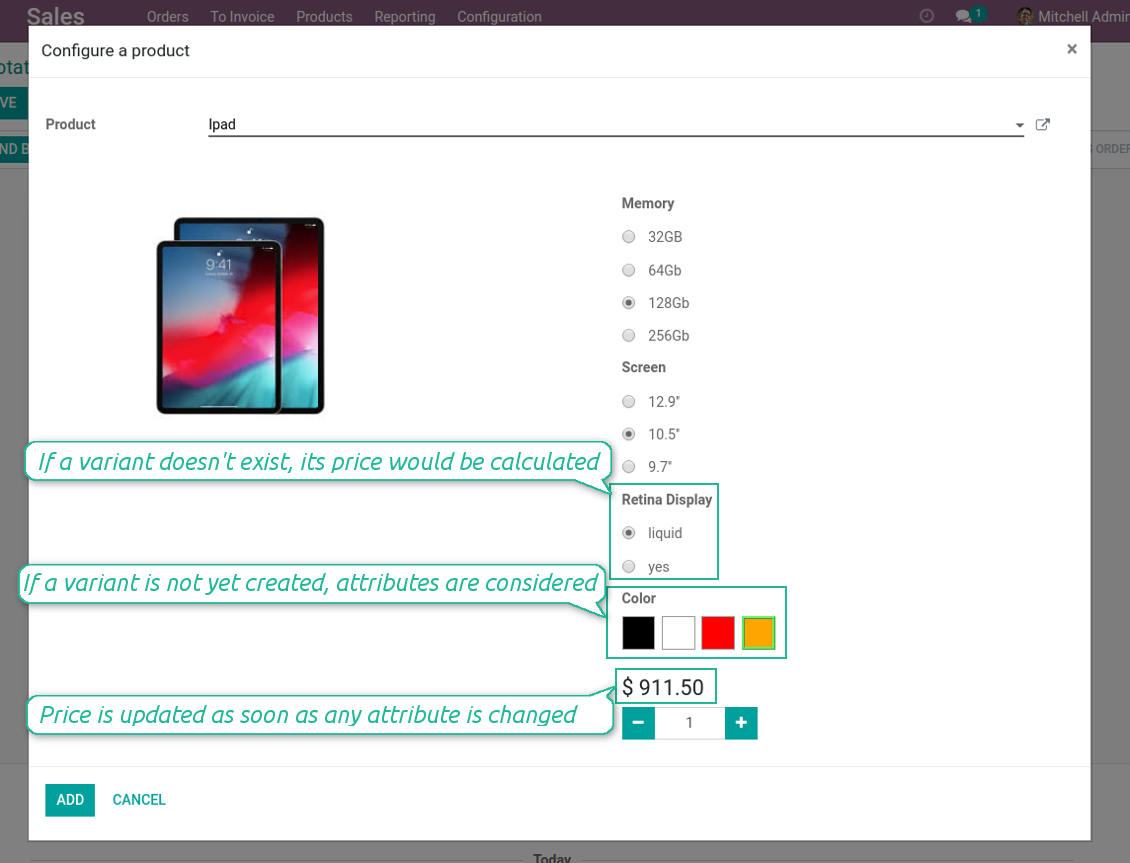
Variant price in Odoo 13 product configurator
Even 'to create' and 'never created' attributes might influence pricing
Real-time pricing in any sale
Advanced pricing as a base for Odoo pricelists
Special case: independent variant prices
Sometimes, variant prices don't have a strict correlation with template prices. In such a case there is a need to assign an own product price disregarding attributes and template core settings. The tool let you reach that goal. To configure independent price:
- Define a template price as zero
- Do not assign coefficients for attributes, but you may define surpluses (e.g. a product has 2 attribute values, one of which has 5 Euro extra)
- Make an own variant surplus as a final variant price (e.g. 100 Euro)
- The tool would calculate a final variant price as: 0 + 5 + 0 + 100 = 105 Euro. It is fully independent from a template price.
Super support team
This module is awesome, had a few minor things to fix and the dev team fixed it and update their modules within 2hours. Super service!
Quick response, helpful team. Just what I needed.
I'm very happy for finding this module. And also the support team is very prompt. Super satisfied with customer support. Will definitely check out for more modules from this reputable company. Cheers!
Veelgestelde vragen over Advanced Variant Prices Odoo v.13
Hoe werkt de module Advanced Variant Prices samen met de standaard prijslijsten? Kan ik verschillende toeslagen en coëfficiënten per prijslijst instellen?
De module is volledig compatibel met de standaard prijslijsten. De eindprijs neemt die kortingen/wijzigingen over. Eerst wordt de variantprijs berekend, daarna de prijslijstformules. Voorbeeld: 1) sjabloonprijs $10, 2) attributen maken de variant $12, 3) klantprijslijst 10 % korting: $12 - 10 % = $10,8. Toeslagen en coëfficiënten van attributen zijn prijslijstonafhankelijk; u kunt ze niet verschillend maken omdat ze eerder worden berekend.
Wat is het updatebeleid van uw tools?
Volgens het huidige beleid van de Odoo Apps Store:
- Elke module gekocht voor versie 12.0 of eerder geeft toegang tot alle versies tot 12.0.
- Vanaf versie 13.0 moet elke moduleversie apart worden gekocht.
- Ongeacht de versie geeft aankoop recht op alle updates en bugfixes binnen een hoofdversie.
Het faOtools-team bepaalt dit beleid niet. Neem voor vragen rechtstreeks contact op met vertegenwoordigers van de Odoo Apps Store.
Hoe installeer ik uw app op Odoo.sh?
De meest directe aanpak is de ingebouwde workflow van de Odoo-store:
1. Open de modulepagina en klik op Deploy on odoo.sh
2. U gaat naar GitHub. Log in en klik op Create a new repo of gebruik een bestaande. De repository moet privé zijn. Apps onder OPL-1 mogen niet openbaar. Maak zo nodig een nieuwe repo voor het Odoo.sh-project
3. Ga daarna naar odoo.sh, klik op Deploy, bevestig en klik op Continue. De installatie start.
Zo installeert u de app op de productiebranch. Voor andere branches of een update:
1. Download de broncode uit de Odoo-store
2. Commit de module naar de GitHub-repository. Geen app-mappen/bestanden in .gitignore. Repo's van odoo.sh negeren soms belangrijke paden (bijv. /lib). Upload alle modulemappen en -bestanden
3. Deploy de doelbranch van het odoo.sh-project of wacht op de automatische build.
Hoe installeer ik uw app op mijn eigen server?
2. Herstart de Odoo-server;
3. Zet de ontwikkelaarsmodus aan (technische instellingen);
4. Werk de applijst bij (Apps-menu);
5. Zoek de app en klik op Activate/Install;
6. Volg de richtlijnen op de app-pagina als die er zijn.
Uw app heeft extra add-ons. Kan ik die later kopen?
Ja. Odoo zet automatisch alle afhankelijkheden in de winkelwagen: sluit eerder gekochte tools uit om dubbel betalen te voorkomen.
Ik heb uw app op Odoo.sh gezet en zie een waarschuwing/fout in de tests
Een rode/oranje waarschuwing beinvloedt de functies van de app niet. Soms halen onze modules de standaard automatische tests niet, omdat die gedrag verwachten dat indruist tegen het doel van de app. We wijzigen bijvoorbeeld de prijscalculatie, terwijl de Odoo-tests de eindprijs met het standaardalgoritme vergelijken.
Controleer eerst de functies van de gedeployde database. Werkt alles?
Als u toch denkt dat de waarschuwing echte functies raakt, neem contact op en stuur de volledige installatielogs en de volledige lijst gedeployde modules (kern en derden).
Kan ik uw app rechtstreeks bij u kopen?
Nee, we verspreiden de tools alleen via de officiele Odoo-appwinkel.
Ik wil graag korting
Helaas hebben we geen technische mogelijkheid voor individuele prijzen.
Kan ik de app installeren op mijn Odoo Online (SaaS)-database?
Nee, apps van derden kunnen niet op Odoo Online. Odoo SaaS blokkeert die mogelijkheid.
Uw tool hangt van andere apps af. Moet ik die kopen?
Ja, de tool heeft alle modules in de afhankelijkheden nodig. De prijs op de app-pagina is inclusief die afhankelijkheden.
Wat is de prijs van de module in Amerikaanse dollars? Waarom is die veranderd?
De prijs van onze modules staat in euro. De Odoo-store rekent om volgens de interne wisselkoers. De prijs in Amerikaanse dollars kan dus wijzigen als die koers wordt bijgewerkt.
De teksten van de app en website in andere talen dan het Engels zijn met AI ondersteund en afgestemd op de officiële Odoo-vertalingen. Als u een fout ziet, een vertaalticket sturen en we corrigeren het.
Fouten melden
Als u bugs of inconsistent gedrag tegenkomt, aarzel dan niet om contact met ons op te nemen. We garanderen dat we binnen 60 dagen na aankoop oplossingen bieden en zijn zeer geïnteresseerd in het verbeteren van onze tools, zelfs na deze periode.
U heeft geen telefoonnummer of creditcard nodig om contact met ons op te nemen. U hoeft slechts een korte e-mailaanmelding door te geven, die niet langer dan 30 seconden duurt.
Vermeld zo veel mogelijk details in uw verzoek: schermafbeeldingen, Odoo-serverlogboeken, een volledige beschrijving om uw probleem te reproduceren enzovoort. Gewoonlijk kost het enkele werkdagen om een werkplan voor een probleem op te stellen (als een bug is bevestigd) of u richtlijnen te geven over wat er moet gebeuren (anders).
Aanvragen voor openbare functies en module-ideeën (gratis ontwikkeling)
We zijn sterk gemotiveerd om onze tools te verbeteren en zijn dankbaar voor alle feedback. Als uw vereisten van openbaar nut zijn en efficiënt kunnen worden geïmplementeerd, zal het team deze opnemen in onze takenlijst.
Zo'n to-dolijst wordt regelmatig verwerkt en er zijn geen extra kosten aan verbonden. Hoewel we geen deadlines en definitief ontwerp kunnen beloven, kan het een goede manier zijn om de gewenste functies te verkrijgen zonder investeringen en risico's.
U heeft geen telefoonnummer of creditcard nodig om contact met ons op te nemen. U hoeft slechts een korte e-mailaanmelding door te geven, die niet langer dan 30 seconden duurt.

De tool om Odoo-bijlagen in mappen te structureren en te synchroniseren met Google Drive, OneDrive/SharePoint, Nextcloud/ownCloud, Dropbox, Amazon S3, Box en NAS. Bestandsbeheer. DMS
398€
De tool om wachtwoorden veilig in Odoo te bewaren voor gedeeld gebruik. Kluizen

De tool om een diepe kennisbank te bouwen, intern en extern. KMS. Wiki-achtige revisies
398€
De tool om Odoo-bijlagen bidirectioneel met OneDrive te synchroniseren
487€
De tool om KPI-doelen te zetten en de realisatie per periode te controleren. Dashboards. Grafieken

De tool voor tijdgebonden diensten van boeking tot verkoop en reviews
398€
De tool om Odoo-bijlagen bidirectioneel met Google Drive te synchroniseren
487€

De tool om vraagtrends te berekenen en toekomstige vraag statistisch te voorspellen
198€