Advanced Variant Prices v.13
The tool to configure variant prices based on attributes coefficients and surpluses
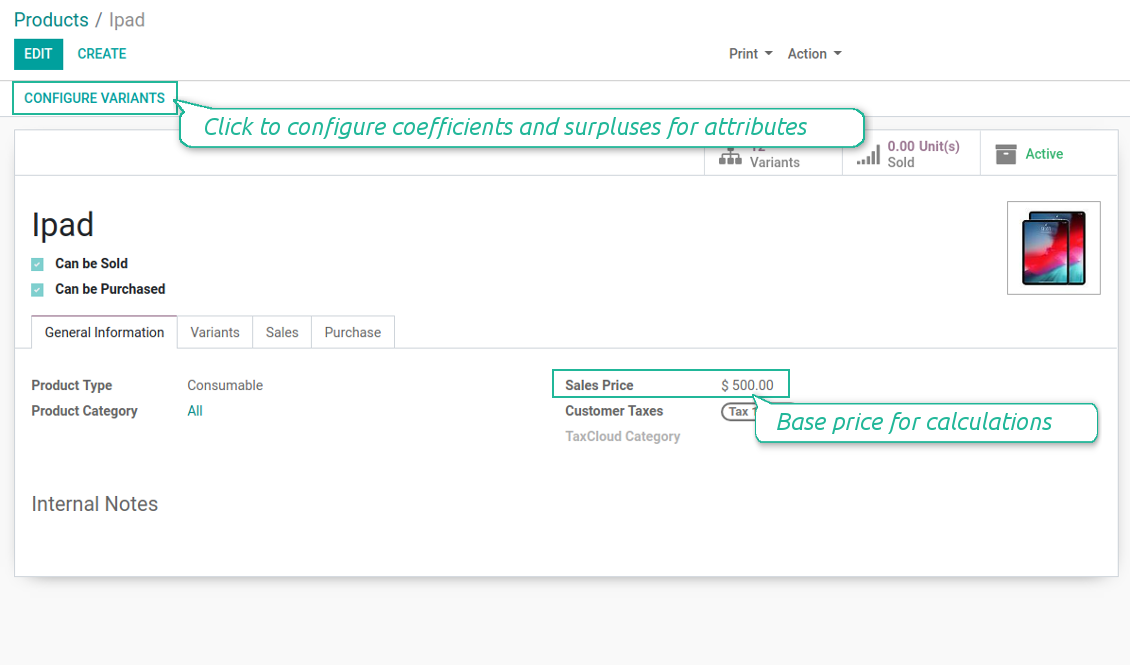
Advanced formula to calculate variant price
- Add an extra price for any attribute value of this product template. For instance, plus 5 Euro if color of iPad is red
- Assign a multiplier to a template attribute value: 10% extra if size of Ipad is 12.9'
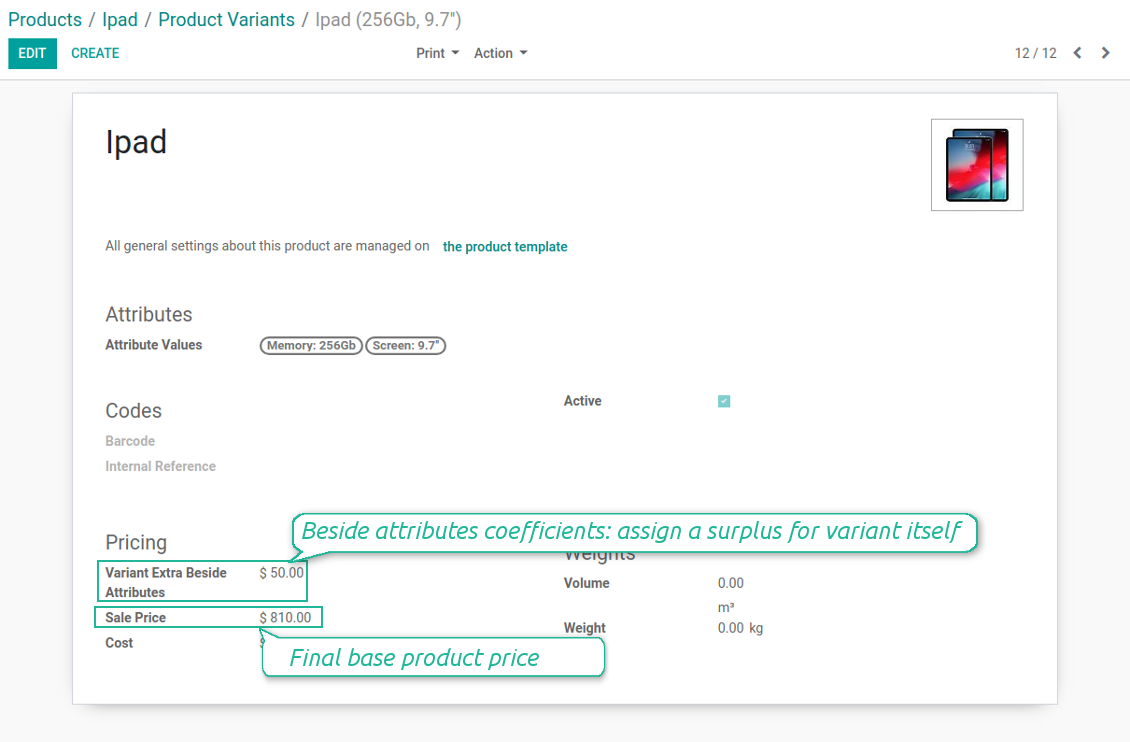
- Define independent product variant extra price. E.g. iPad 12.9' 64GB needs an extra 100 Euros in addition to attributes coefficients
- Define values' sequence to apply coefficients priorities: firstly screen size impact, then memory, finally color.
Pricing Formula
The pricing formula is [ [(PRODUCT TEMPLATE PRICELIST PRICE + ATTRIBUTE 1 EXTRA PRICE) * (100+ATTRIBUTE 1 MULTIPLIER)/100 + ATTRIBUTE 2 EXTRA PRICE] * [100+ATTRIBUTE 2 MULTIPLIER]/100 + ATTRIBUTE 3 EXTRA PRICE ] * .... + OWN VARIANT SURPLUS
Price calculation example
- Your product is "Ice Cream", which sale price is $5
- It has 2 attributes - "Flavour" and "Mode"
- The flavour may be "Chocolate", "Vanilla" or "Strawberry". While the first 2 do not influence costs, the latter make you put fresh fruits. That's why you decide to make a price extra of $1
- You have 2 ice cream modes: "Standard" and "Premium". The latter means you are using premium milk, which costs 20% more than ordinary one. Hence, you assign 20% multiplier to this attribute
- Since flavour doesn't influence mode at all, you decide to order attributes as "Mode, Flavour"
- Then, the price of "Ice Crem, Premium, Strawberry" will be calculated as [($5 + 20%) + $1] = $7
- Be cautious: if you decided to order attributes in the opposite way the price of "Ice Crem, Premium, Strawberry" will be [($5 + $1) * (1+20%)] =$7,2
- Add a special extra for the product "Ice Cream, Premium, Strawberry" on its form - $2. Thus, the price would be $9
स्क्रीनशॉट
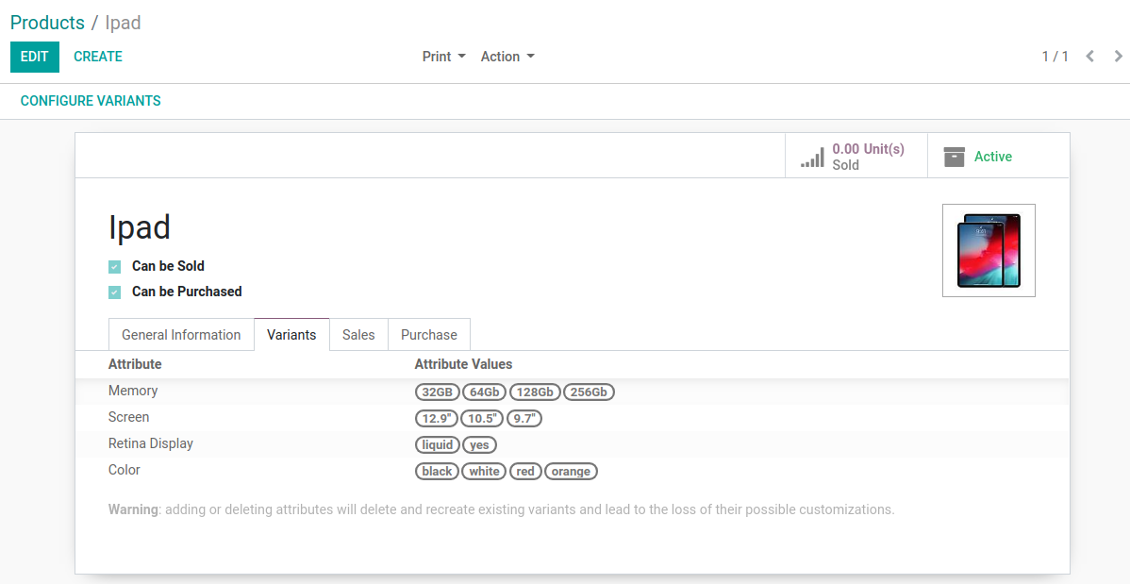
Configure price calculations on a template form
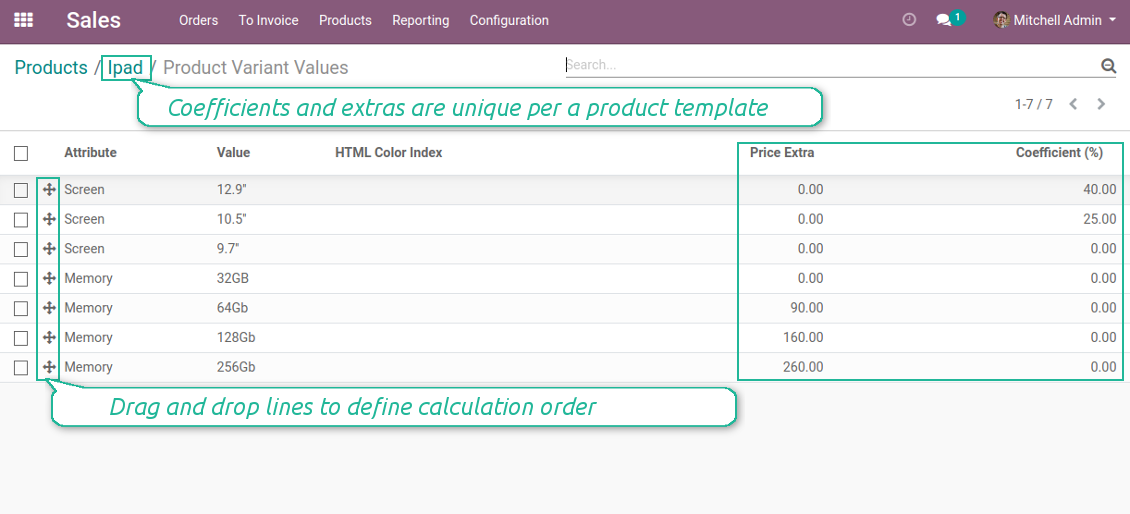
Assign coefficients and surpluses per attribute values
Variant might have an own extra price beside calculations
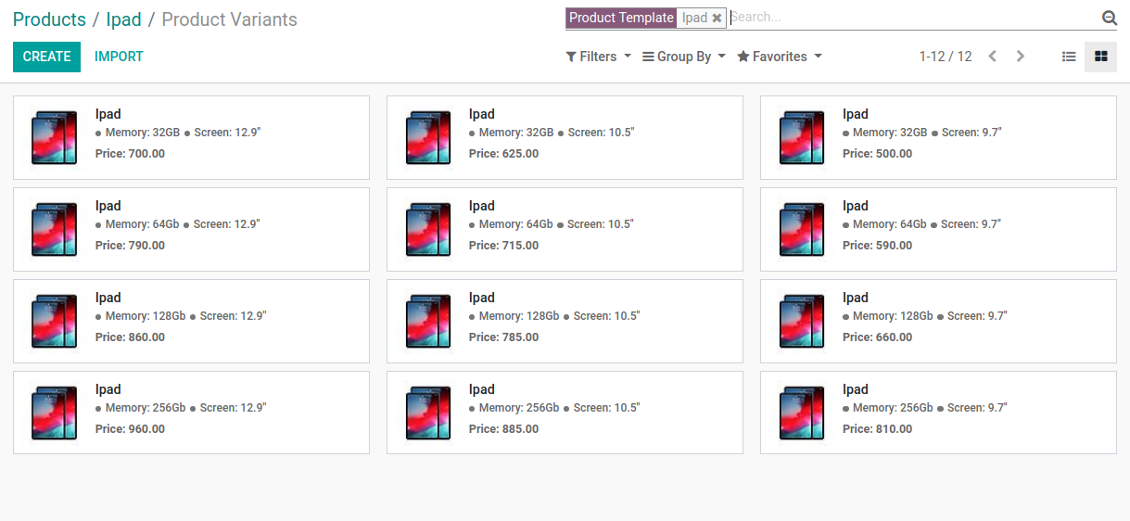
Each product variant has a unique calculated price
Different attributes coefficients for different product templates
The final price is calculated successively attribute by attribute: the order is important! Drag and drop lines to change sequence.
Compatibility with the Odoo product configurator
स्क्रीनशॉट
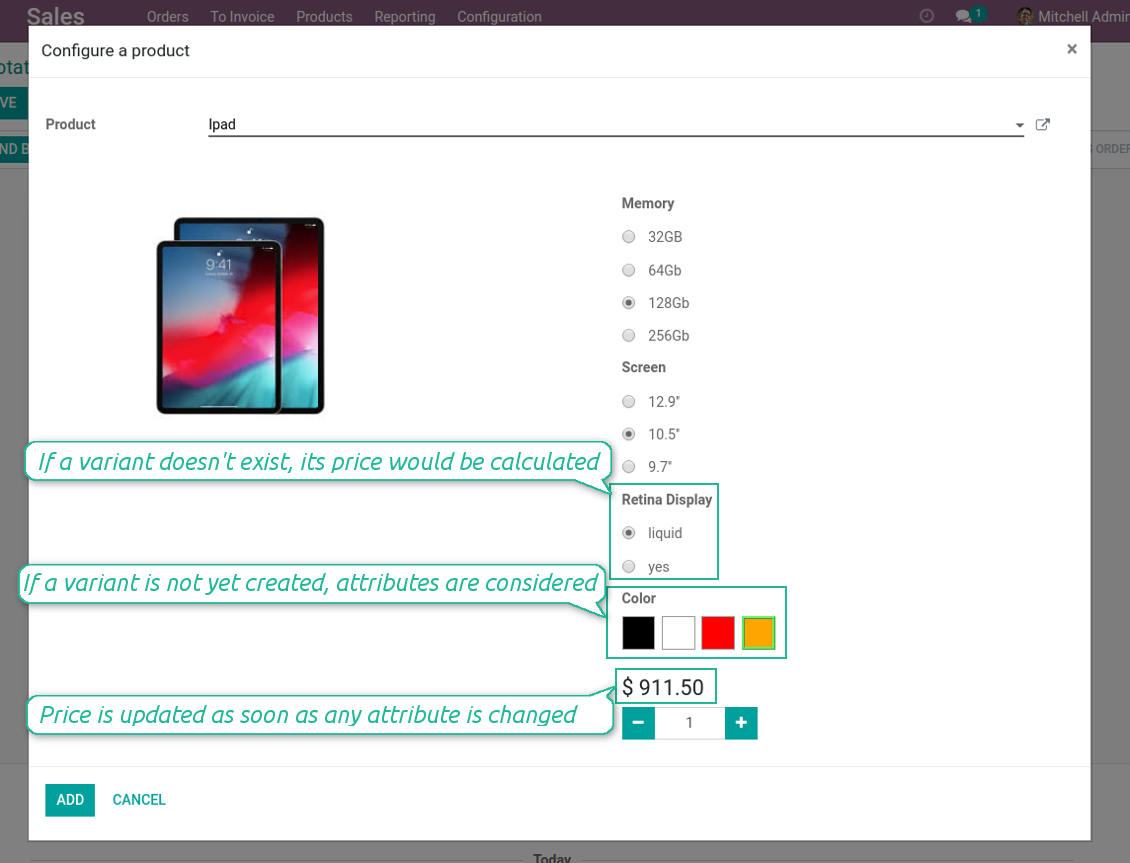
Variant price in Odoo 13 product configurator
Even 'to create' and 'never created' attributes might influence pricing
Real-time pricing in any sale
Advanced pricing as a base for Odoo pricelists
Special case: independent variant prices
Sometimes, variant prices don't have a strict correlation with template prices. In such a case there is a need to assign an own product price disregarding attributes and template core settings. The tool let you reach that goal. To configure independent price:
- Define a template price as zero
- Do not assign coefficients for attributes, but you may define surpluses (e.g. a product has 2 attribute values, one of which has 5 Euro extra)
- Make an own variant surplus as a final variant price (e.g. 100 Euro)
- The tool would calculate a final variant price as: 0 + 5 + 0 + 100 = 105 Euro. It is fully independent from a template price.
Super support team
This module is awesome, had a few minor things to fix and the dev team fixed it and update their modules within 2hours. Super service!
Quick response, helpful team. Just what I needed.
I'm very happy for finding this module. And also the support team is very prompt. Super satisfied with customer support. Will definitely check out for more modules from this reputable company. Cheers!
के बारे में अक्सर पूछे जाने वाले प्रश्न Advanced Variant Prices Odoo v.13
मॉड्यूल Advanced Variant Prices मानक मूल्य सूचियों के साथ कैसे काम करता है? क्या अलग मूल्य सूचियों के लिए अलग मूल्य extras और गुणांक सेट किए जा सकते हैं?
मॉड्यूल मानक मूल्यसूचियों के साथ पूरी तरह संगत है। अंतिम मूल्य उन छूटों/संशोधनों के अनुसार ढलता है। पहले वेरिएंट मूल्य निकलता है, फिर मूल्यसूची सूत्र लागू होते हैं। उदाहरण 1) टेम्पलेट आधार मूल्य $10, 2) गुण वेरिएंट को $12 करते हैं, 3) इस ग्राहक की सूची 10% छूट: अंतिम $12 -10% = $10,8। गुणों के अधिभार और गुणांक मूल्यसूची से स्वतंत्र हैं। उन्हें अलग नहीं कर सकते क्योंकि वे मूल्यसूची से पहले गणना होते हैं।
आपके टूल की अपडेट नीतियाँ क्या हैं?
वर्तमान Odoo Apps Store नीतियों के अनुसार:
- संस्करण 12.0 और उससे पहले के लिए खरीदा प्रत्येक मॉड्यूल 12.0 तक सभी संस्करणों तक पहुँच देता है।
- संस्करण 13.0 से प्रत्येक मॉड्यूल संस्करण अलग खरीदना होता है।
- संस्करण चाहे जो हो, खरीद से उस प्रमुख संस्करण के सभी अपडेट और बग ठीक करने का अधिकार मिलता है।
ध्यान दें कि faOtools टीम इन नीतियों को नियंत्रित नहीं करती। सभी प्रश्नों के लिए सीधे Odoo Apps Store प्रतिनिधियों से संपर्क करें।
आपका ऐप Odoo.sh पर कैसे इंस्टॉल करूँ?
सबसे सीधा तरीका Odoo स्टोर की अंतर्निहित वर्कफ़्लो का उपयोग करना है:
1. मॉड्यूल का पृष्ठ खोलें और Deploy on odoo.sh बटन पर क्लिक करें
2. उसके बाद आपको GitHub पृष्ठ पर भेजा जाएगा। अपने खाते में लॉग इन करें, फिर 'Create a new repo' पर क्लिक करें या मौजूदा का उपयोग करें। सुनिश्चित करें कि रिपॉज़िटरी निजी हो। OPL-1 लाइसेंस के तहत ऐप प्रकाशित करना अनुमति नहीं है। ज़रूरत हो तो Odoo.sh प्रोजेक्ट के लिए नया repo बनाएँ
3. फिर odoo.sh पर जाएँ और Deploy बटन पर क्लिक करें। पॉप-अप विंडो में निर्णय जमा करें और 'Continue.' पर क्लिक करें। इससे इंस्टॉलेशन शुरू होगा।
ये चरण प्रोजेक्ट की production शाखा पर ऐप इंस्टॉल करेंगे। अन्य शाखाओं पर ऐप तैनात करने या मॉड्यूल अपडेट करने के लिए ये क्रियाएँ करें:
1. Odoo स्टोर से ऐप का स्रोत कोड अपलोड करें
2. मॉड्यूल को आवश्यक GitHub रिपॉज़िटरी में commit करें। सुनिश्चित करें कि ऐप के कोई फ़ोल्डर/फ़ाइल अनदेखी न हों (यानी repo के .gitignore में न हों)। रिपॉज़िटरी odoo.sh अपने आप बनाता है और डिफ़ॉल्ट रूप से कुछ ज़रूरी चीजें शामिल हो सकती हैं (जैसे /lib)। मॉड्यूल की सभी निर्देशिकाएँ, उपनिर्देशिकाएँ और फ़ाइलें बिना अपवाद अपलोड करें
3. odoo.sh प्रोजेक्ट की लक्ष्य शाखा Deploy करें या, अगर सेटिंग्स ऐसा मानती हैं, स्वतः बनने तक प्रतीक्षा करें।
अपने सर्वर पर आपका ऐप कैसे इंस्टॉल करूँ?
2. Odoo सर्वर पुनः प्रारंभ करें;
3. डेवलपर मोड चालू करें (तकनीकी सेटिंग्स);
4. ऐप सूची अपडेट करें (ऐप्स मेनू);
5. ऐप खोजें और 'Activate'/'Install' दबाएँ;
6. ऐप पृष्ठ पर दिशानिर्देश हों तो उनका पालन करें।
आपके ऐप में अतिरिक्त ऐड-ऑन हैं। क्या बाद में खरीद सकता हूँ?
हाँ, ज़रूर। साथ ही Odoo सभी निर्भरताएँ कार्ट में अपने आप जोड़ता है, इसलिए दोहरी भुगतान से बचने के लिए पहले खरीदे टूल हटा दें।
मैंने आपका ऐप Odoo.sh पर डिप्लॉय किया और टेस्ट में चेतावनी/त्रुटि दिख रही है
लाल/नारंगी चेतावनी ऐप की सुविधाओं को प्रभावित नहीं करती। खेद है कि कभी-कभी हमारे मॉड्यूल मानक स्वचालित परीक्षण पास नहीं करते, क्योंकि वे ऐसा व्यवहार मानते हैं जो ऐप के लक्ष्यों से टकराता है। उदाहरण के लिए हम मूल्य गणना बदलते हैं, जबकि मानक Odoo मॉड्यूल परीक्षण अंतिम मूल्य की तुलना मानक एल्गोरिदम से करते हैं।
सबसे पहले तैनात डेटाबेस की सुविधाएँ जाँचें। क्या सब सही काम कर रहा है?
यदि फिर भी मानते हैं कि चेतावनी वास्तविक सुविधाओं को प्रभावित करती है, तो संपर्क करें और पूर्ण इंस्टॉलेशन लॉग तथा तैनात मॉड्यूलों की पूरी सूची (कोर और तृतीय-पक्ष सहित) भेजें।
क्या मैं ऐप आपकी कंपनी से सीधे खरीद सकता हूँ?
नहीं, हम उपकरण केवल आधिकारिक Odoo ऐप स्टोर.
मुझे छूट चाहिए
खेद है, हमारे पास व्यक्तिगत कीमतें देने के तकनीकी साधन नहीं हैं।
क्या मैं ऐप अपने Odoo Online (SaaS) डेटाबेस पर इंस्टॉल कर सकता हूँ?
नहीं, तृतीय-पक्ष ऐप Odoo Online पर नहीं चल सकते। दुर्भाग्य से Odoo SaaS यह संभावना रोकता है।
आपके टूल की अन्य ऐप पर निर्भरता है। क्या मुझे वे खरीदनी चाहिए?
हाँ, सही काम के लिए टूल को निर्भरता में चिह्नित सभी मॉड्यूल चाहिए। ऐप पृष्ठ पर दी गई कीमत में आवश्यक निर्भरताएँ पहले से शामिल हैं।
मॉड्यूल की कीमत अमेरिकी डॉलर में क्या है? यह क्यों बदली?
हमारे मॉड्यूल की कीमत यूरो में है। Odoo स्टोर आंतरिक विनिमय दर से अन्य मुद्राओं में बदलता है। इसलिए अमेरिकी डॉलर में कीमत दर अपडेट होने पर बदल सकती है।
अंग्रेज़ी के अलावा अन्य भाषाओं में ऐप और वेबसाइट का शब्द AI-सहायता से है और आधिकारिक Odoo अनुवादों से मेल खाता है। यदि आपको कोई गलती दिखे, अनुवाद शुद्धता का टिकट भेजें और हम इसे ठीक करेंगे।
बग रिपोर्टिंग
यदि आपको बग या असंगत व्यवहार मिले तो हमसे संपर्क करें। हम खरीद के 60 दिनों के भीतर सुधार देने की गारंटी देते हैं और इस अवधि के बाद भी टूल सुधारने में रुचि रखते हैं।
हमसे संपर्क करने के लिए फ़ोन नंबर या क्रेडिट कार्ड की आवश्यकता नहीं है। केवल एक छोटी ईमेल साइन-अप करनी है, जिसमें 30 सेकंड से अधिक नहीं लगता।
अपने अनुरोध में जितना संभव हो उतना विवरण शामिल करें: स्क्रीनशॉट, Odoo सर्वर लॉग, समस्या को दोहराने का पूरा वर्णन आदि। आमतौर पर किसी मुद्दे की कार्य योजना तैयार करने (यदि बग पुष्टि हो) या आगे क्या करना है इसके दिशानिर्देश देने (अन्यथा) में कुछ कार्यदिवस लगते हैं।
सार्वजनिक सुविधा अनुरोध और मॉड्यूल विचार (निःशुल्क विकास)
हम अपने टूल सुधारने के लिए दृढ़ता से प्रेरित हैं और किसी भी प्रतिक्रिया के आभारी होंगे। यदि आपकी आवश्यकताएँ सार्वजनिक उपयोग की हैं और कुशलता से लागू की जा सकती हैं, तो टीम उन्हें हमारी कार्य सूची में शामिल करेगी।
ऐसी कार्य सूची नियमित रूप से संसाधित होती है और अतिरिक्त शुल्क नहीं लगती। यद्यपि हम समय सीमा और अंतिम डिज़ाइन का वादा नहीं कर सकते, यह बिना निवेश और जोखिम के वांछित सुविधाएँ पाने का अच्छा तरीका हो सकता है।
हमसे संपर्क करने के लिए फ़ोन नंबर या क्रेडिट कार्ड की आवश्यकता नहीं है। केवल एक छोटी ईमेल साइन-अप करनी है, जिसमें 30 सेकंड से अधिक नहीं लगता।

Odoo अनुलग्नकों को फ़ोल्डरों में लचीले ढंग से व्यवस्थित करने और निर्देशिकाओं को क्लाउड क्लाइंट से सिंक करने का उपकरण: Google Drive, OneDrive/SharePoint, Nextcloud/ownCloud, Dropbox, Amazon S3, Box और NAS. DMS. फ़ाइल प्रबंधक. दस्तावेज़ प्रबंधन प्रणाली
398€

आंतरिक और बाहरी उपयोग के लिए गहरी और संरचित ज्ञान आधार बनाने का उपकरण। Knowledge System. KMS. विकि जैसी पुनरीक्षण।
398€
Odoo अनुलग्नकों को OneDrive फ़ाइलों के साथ स्वचालित रूप से दोनों दिशाओं में सिंक करने का उपकरण
487€
KPI लक्ष्य सेट करने और अवधियों के अनुसार पूर्ति नियंत्रित करने का उपकरण। KPI डैशबोर्ड। डैशबोर्ड डिज़ाइनर। KPI चार्ट

Odoo अनुलग्नकों को Google Drive फ़ाइलों के साथ स्वचालित रूप से दोनों दिशाओं में सिंक करने का उपकरण
487€
अपॉइंटमेंट बुकिंग से बिक्री और समीक्षा तक समय-आधारित सेवा प्रबंधन का उपकरण
398€

इन्वेंटरी डेटा को विश्लेषण के लिए आवश्यक और सहज बनाने वाला उपकरण। स्टॉक विश्लेषण
38€