KPI Balanced Scorecard v.12
The tool to set up KPI targets and control their fulfillment by periods
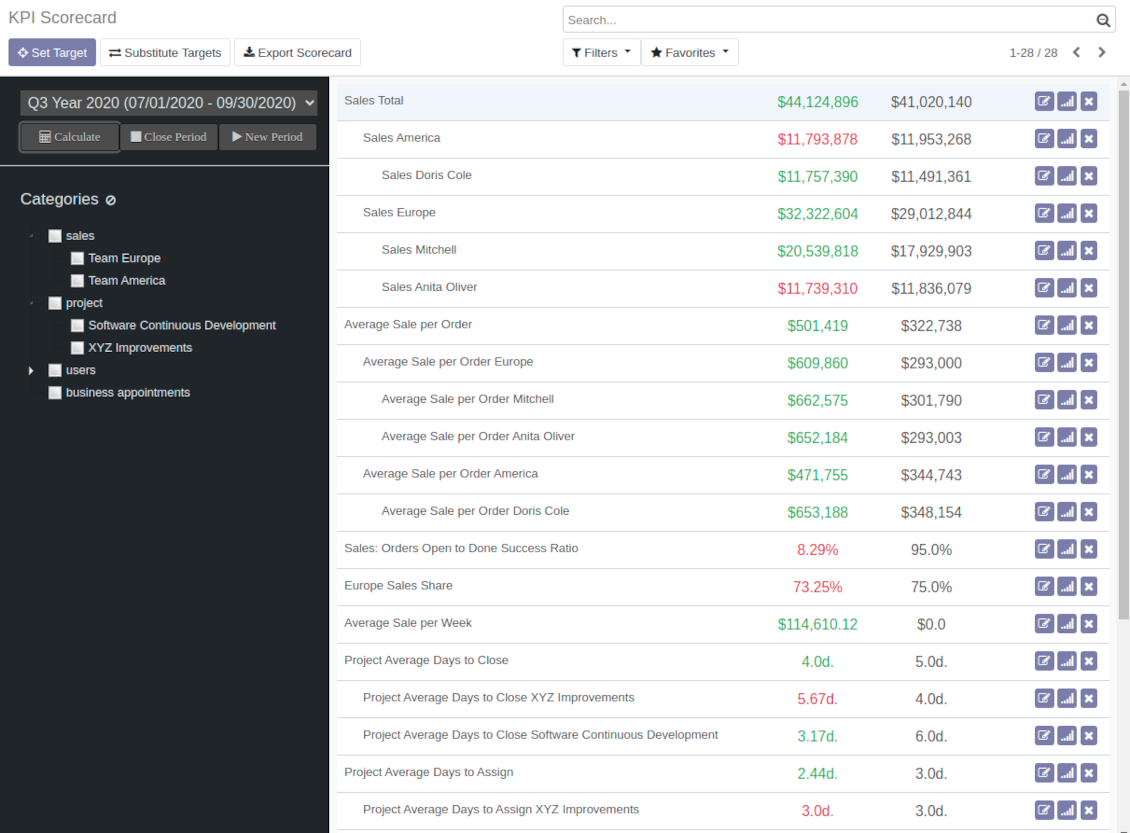
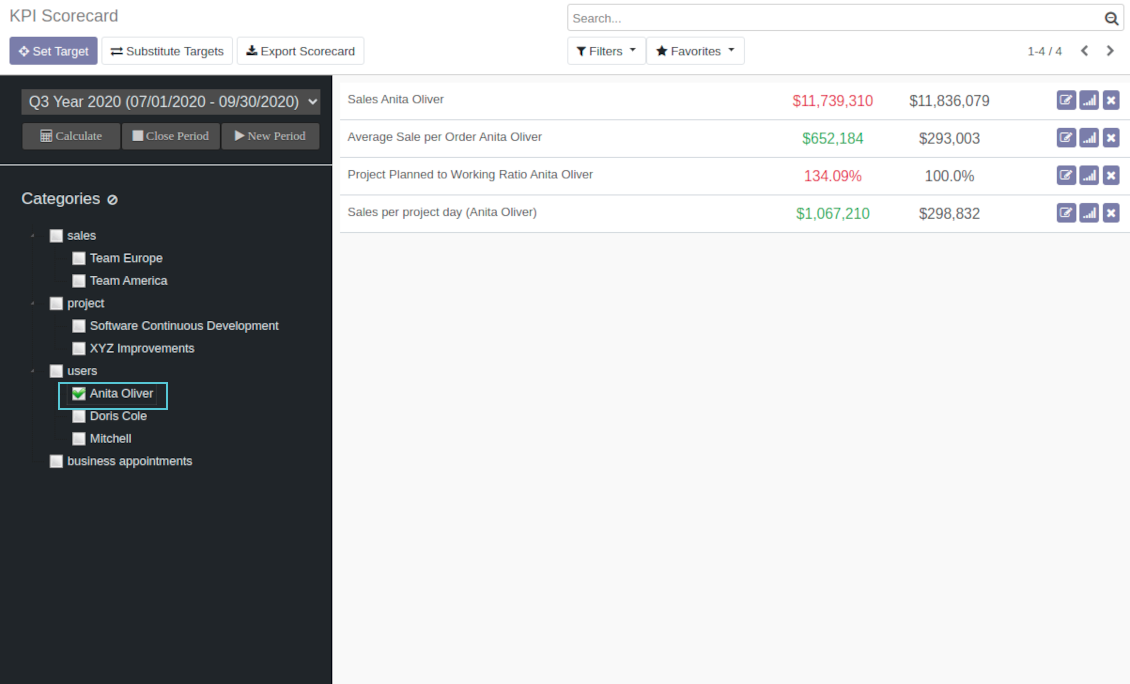
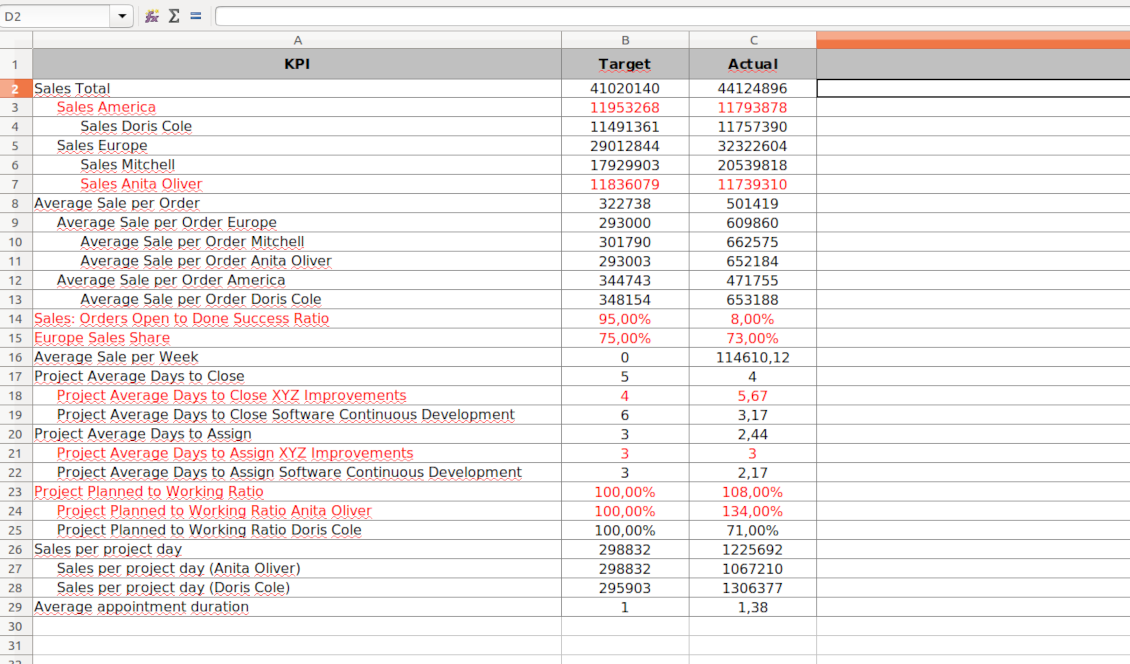
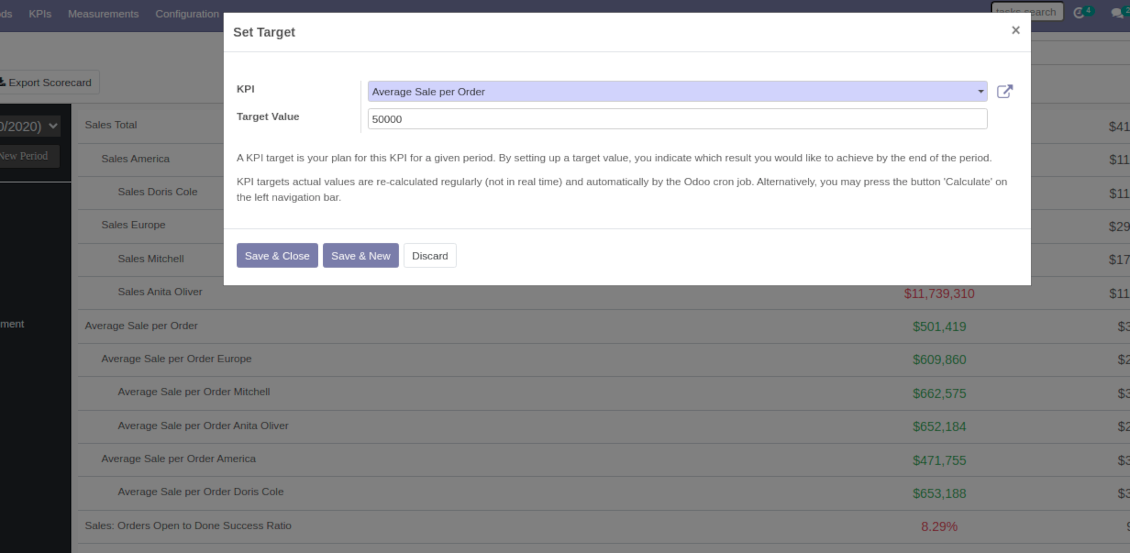

Balanced Scorecard Interface
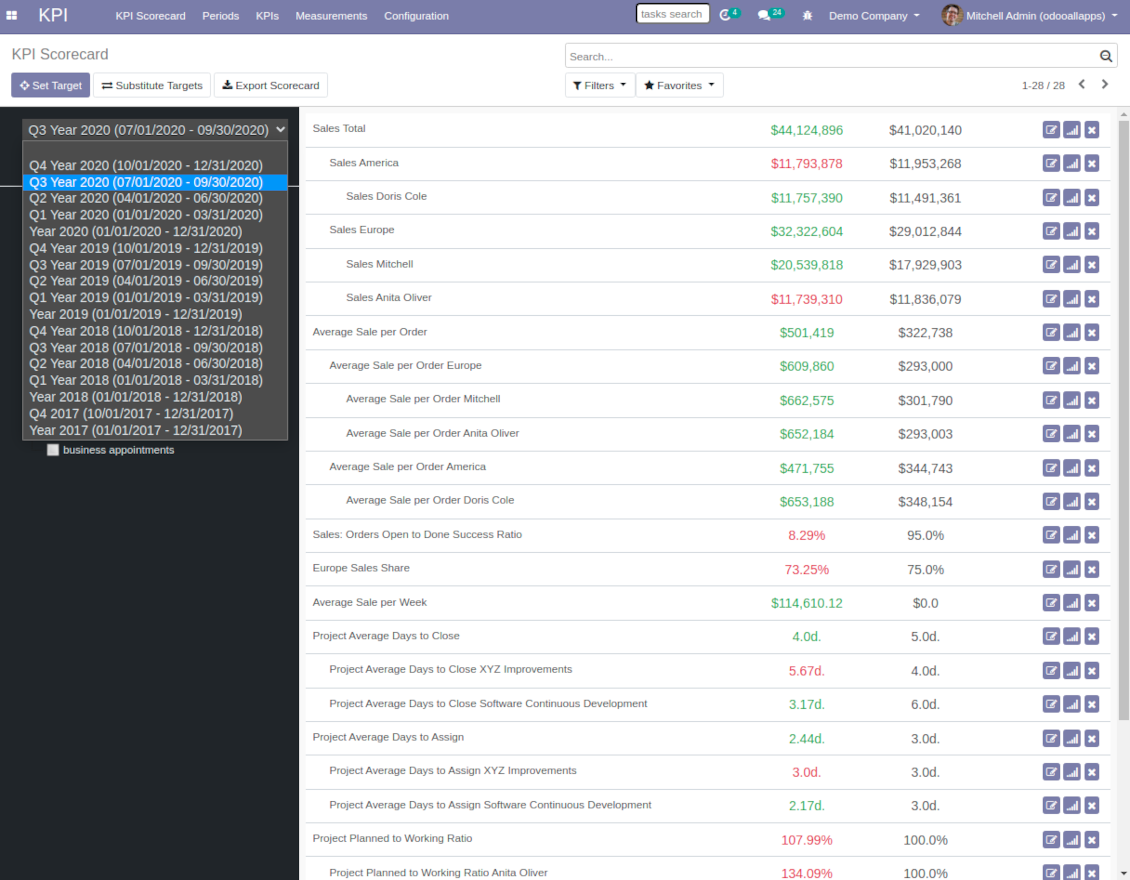
The whole list of KPI targets for a period is available from a single interface. Right from here you can set up new targets and edit existing ones, observe actual and target values, evaluate success by indicative red / green color, observe historical trends, open and close periods. It is also possible to export a whole scorecard to an Excel table.
To make navigation over targets comfortable, KPIs are structured by categories. It let quickly consider only those KPIs which are of interest at the moment. For example, to observe only sales targets or targets of a specific Odoo user. Another important peculiarity is that KPIs might have parent-children relations. For instance, 'Total company sales' > 'Sales America' > 'John Brown Sales'. Such hierarchy allows to highlight targets with indicative padding for instant overview of sub-KPIs.
It is only up to you which KPIs to add and which approach to apply for KPIs' sectioning and hierarchy.
Tangkapan skrin
KPI Balanced Scorecard
KPI targets by categories
Export Odoo KPI scorecard to Excel
Open new KPI period to set KPI targets up
Set a new Odoo KPI target
KPIs targets by periods
KPI scorecard is not just a dashboard, but it is a full-featured tool to set and control company and individual targets. Targets should be measurable and time-constrained. 'Sell as much as possible' is not a goal, while 'Generate 100,000 Euro Revenue in the year 2021' is a good target for a sales person, for example.
That is why, each goal should have a target value and should be defined for a period. In such a way, the app let you have a full picture of results to undertake corrective actions in advance.
Real-time control and historical trends
When a user opens scorecard interface, he/she is shown targets of a current period (if it exists). Actual values are re-calculated regularly and automatically by the special Odoo cron job. In such a way, it is possible to understand which KPIs require more attention in real time at a first glance.
Simultaneously, it is always possible to switch to another period to have broader picture (e.g. from monthly to yearly KPIs) or to observe the Past / the Future targets (e.g. to plan efforts efficiently).
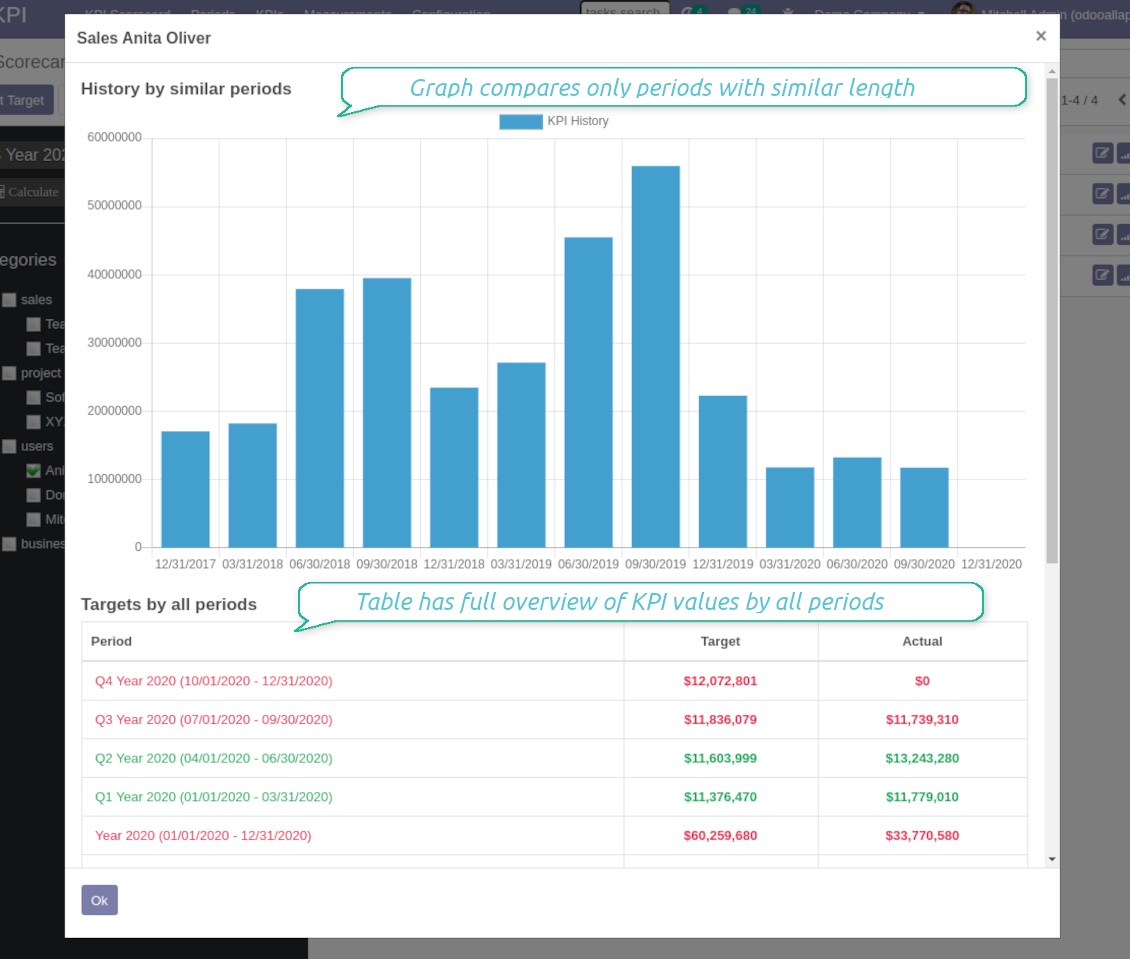
Besides, each KPI target has a special button to observe history by all periods. The latter might be useful to understand overall trends.
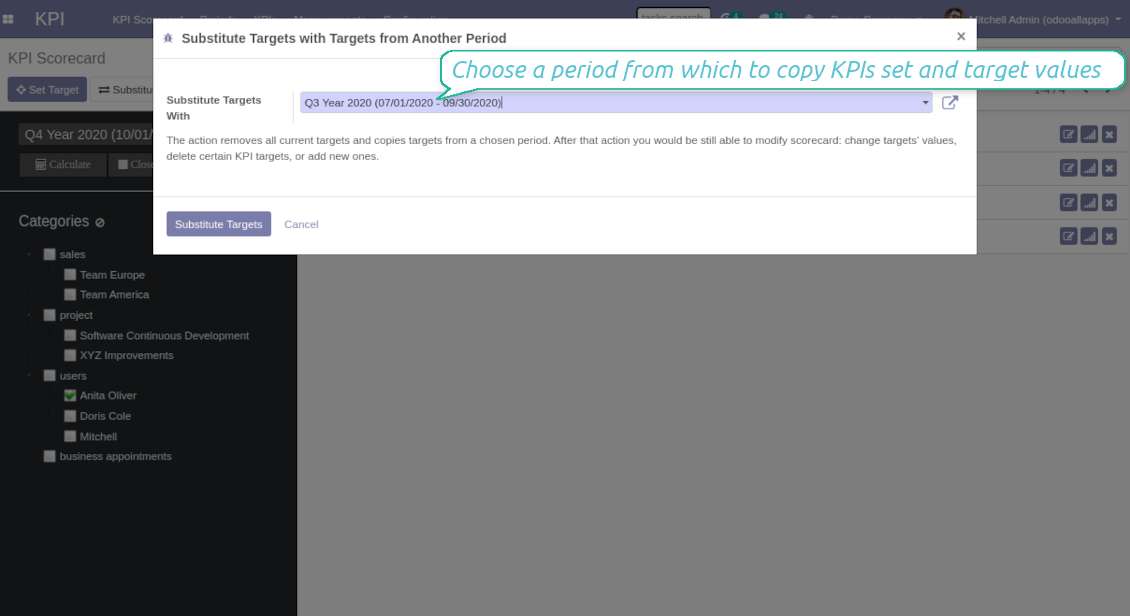
Copying targets from a period
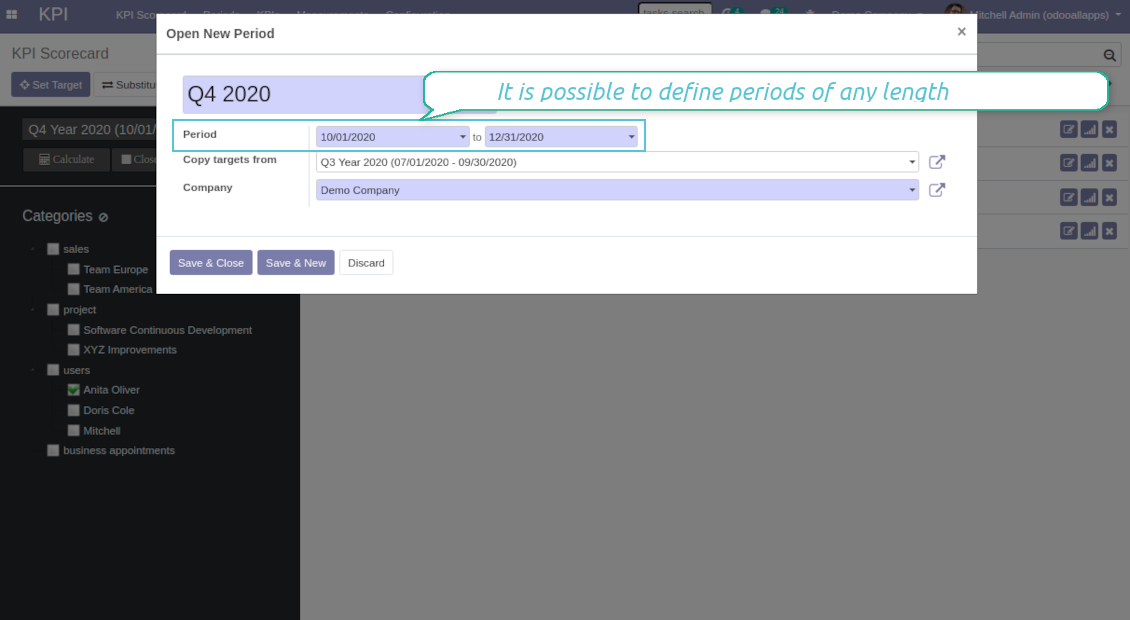
In case you have similar KPIs from a period to period, the tool let you copy targets. To that end use the field 'Copy target from' when you open a new period or the button 'Substitute' for existing ones.
Periods trends, length and tolerance
The app allows to set periods of any length including intervals which cross each other (and even the Past periods!). To open a new KPI period you should just set start and end dates. Those dates will be used to calculate KPI actual value. For example, KPI formula might include a basic KPI measurement for total amount of sale orders, while date field of this measurement is defined as 'Order date'. Then, only sale orders which order date is within the period would be taken into account. Thus, KPI scorecard would show total revenue for a given period.
It is recommended to have more or less strict logic of periods for comparability purposes. Usually, KPI targets are set for a whole year and quarterly/monthly intervals. It let not only have KPI overview, but also check historical trends. The app automatically considers various periods in order to define which might be compared to this one, and will show users a chart of actual values by a specific KPI. It is possible to define tolerance on the configuration page. For example, 2-days tolerance is needed to compare quarterly periods (since quarter might take from 90 to 92 days), and 3-days tolerance for months (unluckily, February may last 28 days).
Why to close periods
KPI periods work in a similar way as accounting / fiscal periods. The idea behind is to make sure that at a certain point KPI actual values are frozen and might be used for a final analysis of a period. It is hardly good to update December KPIs in the next August even though a sale total needs to be corrected, for example.
That is why when a period end date is already in the Past, it is preferable to close that period to avoid further updates of KPI targets actual values. Besides, it would speed up actual values' recalculations.
Tangkapan skrin
KPI targets by periods
KPI trends by similar periods and overall history
Substitute targets with KPI targets of another period
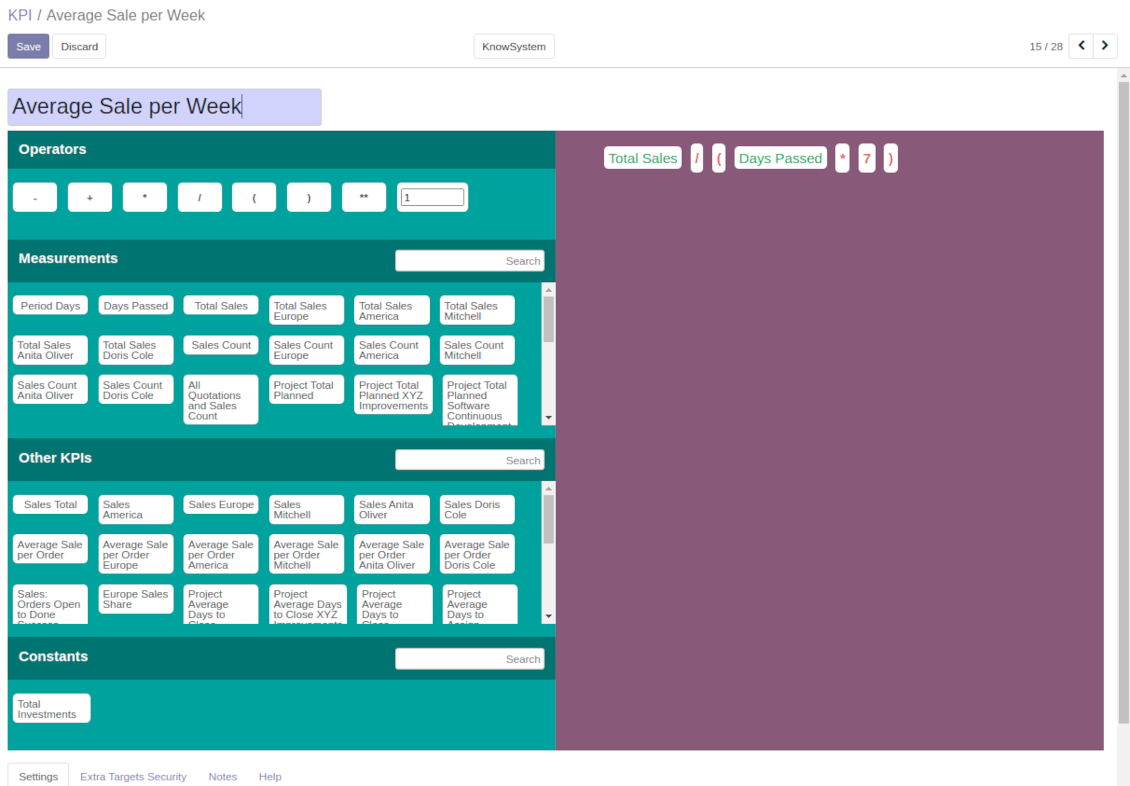
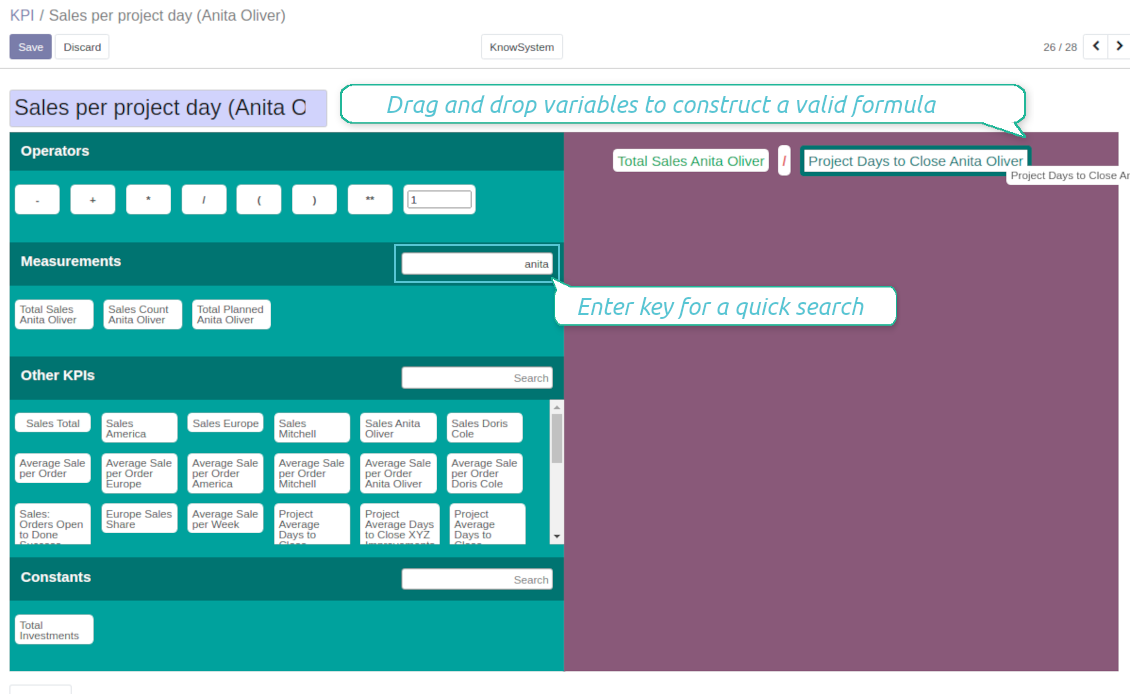
Drag-and-drop formulas for KPI calculations
A KPI (a key performance indicator) is a measurement which aims to evaluate a certain aspect of organizational or personal activities. This tool let you prepare an unlimited number of such measurements and calculations of almost any complexity.
Formula construction is as simple as it is to write down a mathematical expression: just drag and drop formula parts in a right order with correct operators. When Odoo computed actual values for a specific period, it would automatically retrieve data from a database according to parts' logic. As formula parts you can apply:
- KPI variables - rules how to calculate data from Odoo database. For example, 'total number of sales orders' or 'number of quotations of sales team Europe'.
- Other KPIs - to make derivative calculations. For example, you may have KPIs 'Sales count' and 'Opportunities count', and a derivative KPI 'Opportunity to sales success ratio'.
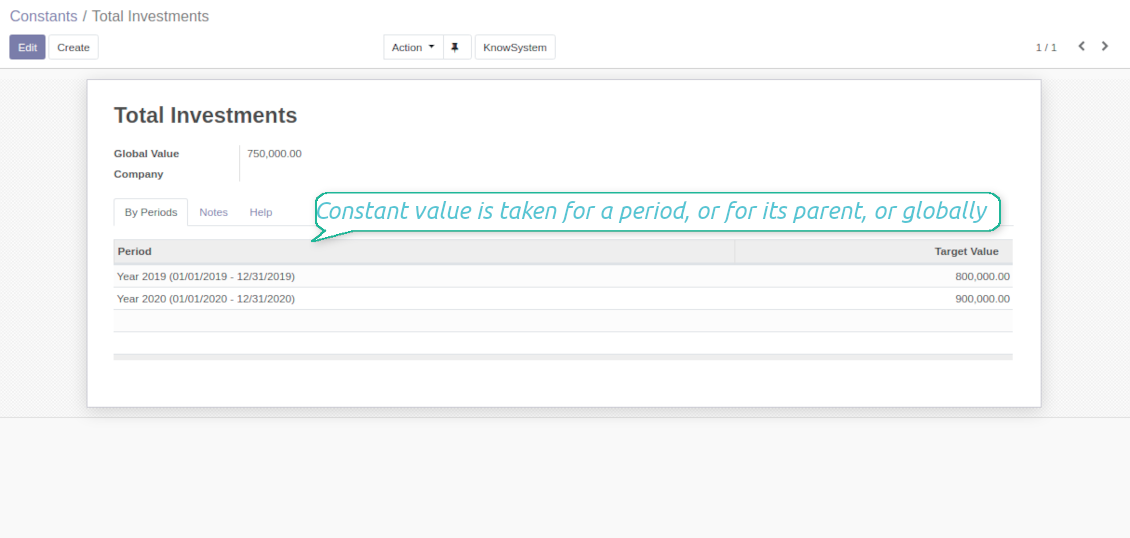
- KPI constants - figures which do not depend on actual Odoo data, but which are frozen globally or for a specific time frame. Constants allow to introduce parts which can not be retrieved from modules and/or which should remain the same during the whole period.
- 2 special variables - 'Period Days' and 'Days Passed'. Those figures are calculated not from Odoo data, but from the KPI period settings under consideration. 'Period Days' is an interval length in days. 'Days Passed' is a length between period start and today (if today is before period end; otherwise period end). Those parameters let calculate per-time KPIs, such as, for example, 'Average sales per week'.
- Mathematical operators - including subtraction, addition, multiplication, division, exponentiation, any float number.
How to configure KPI appearance
Depending of business logic of KPI formula, the final calculation result might have different form:
- Simple number: for example, 'Average sales count per week'.
- Percentage: for example, 'Sales to opportunities success ratio'.
- Monetary: for example, 'Total Sales per period'. Make sure the measurement field you used is in the same currency (usually company default currency)!
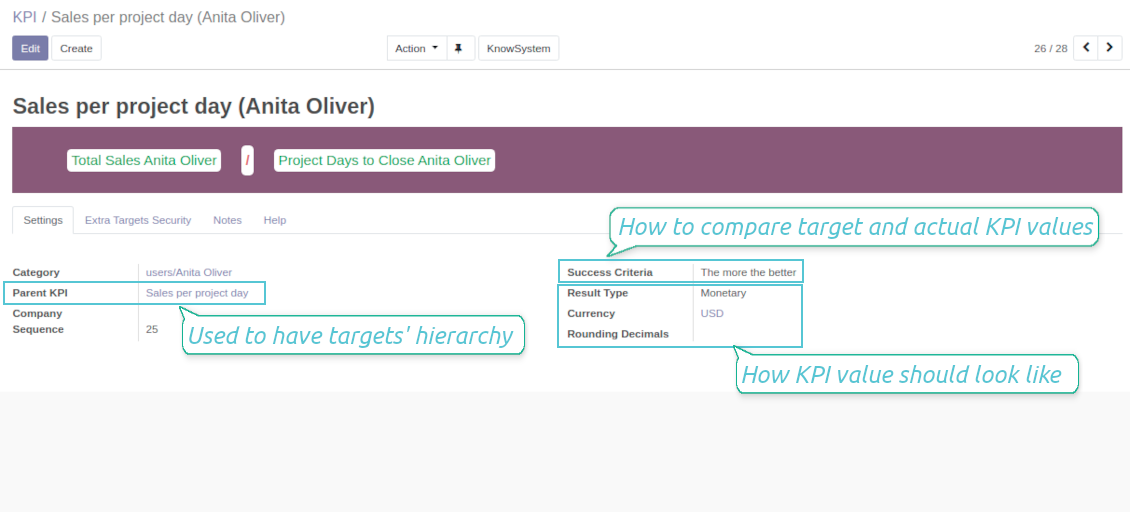
For simple numbers and percentage you may also define result suffix and prefix to make a figure nice looking (e.g. add "%" as suffix to have "88%"). For monetary result type it is recommended to define a currency, which symbol would be added to result.
Finally, you may decide how calculation result should be rounded. Available options are from 0 to 4 decimal points (1 > 1.2 > 1.23 > 1.235 > 1.2346).
Tangkapan skrin
KPI formula: overview
Drag and Drop to define KPI calculation formula
KPI formula: settings and apperance
Constants for KPI calculations
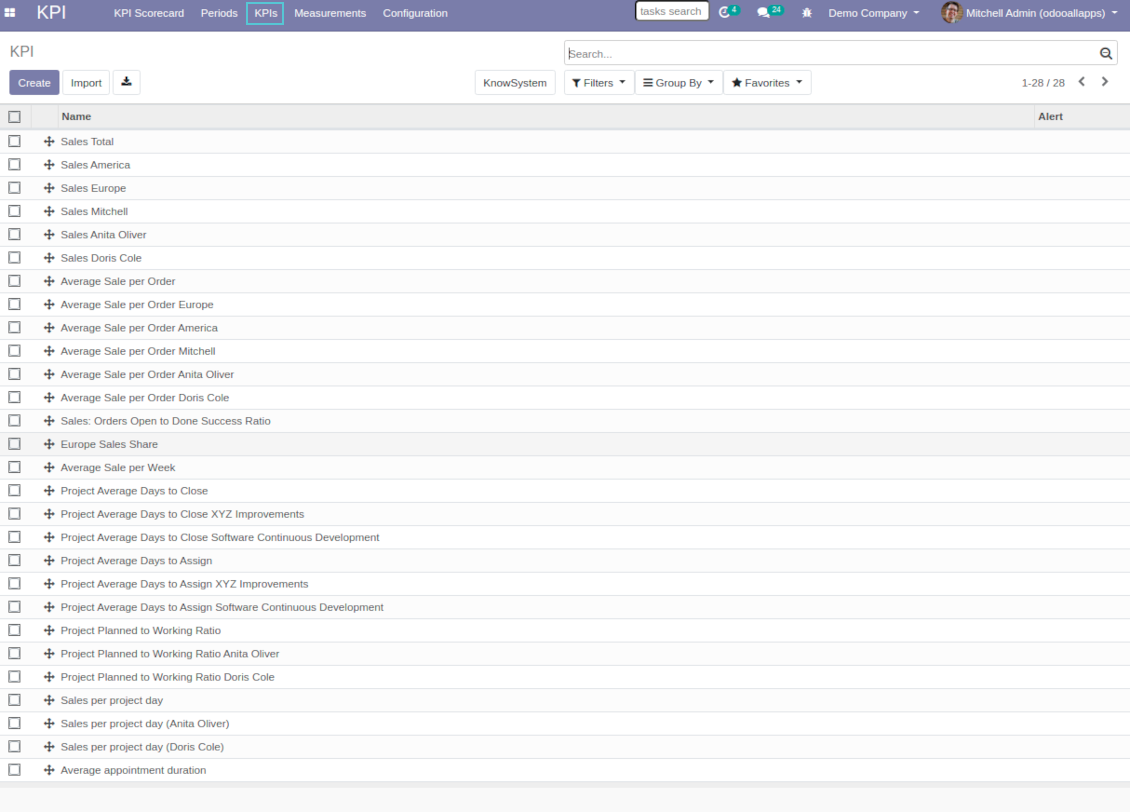
Odoo List of KPIs to set targets
KPI variables and basic measurements to retrieve Odoo data
Preparing basis for KPI calculations is not a simple task. The good news is that such job should be done only once, while results are used forever.
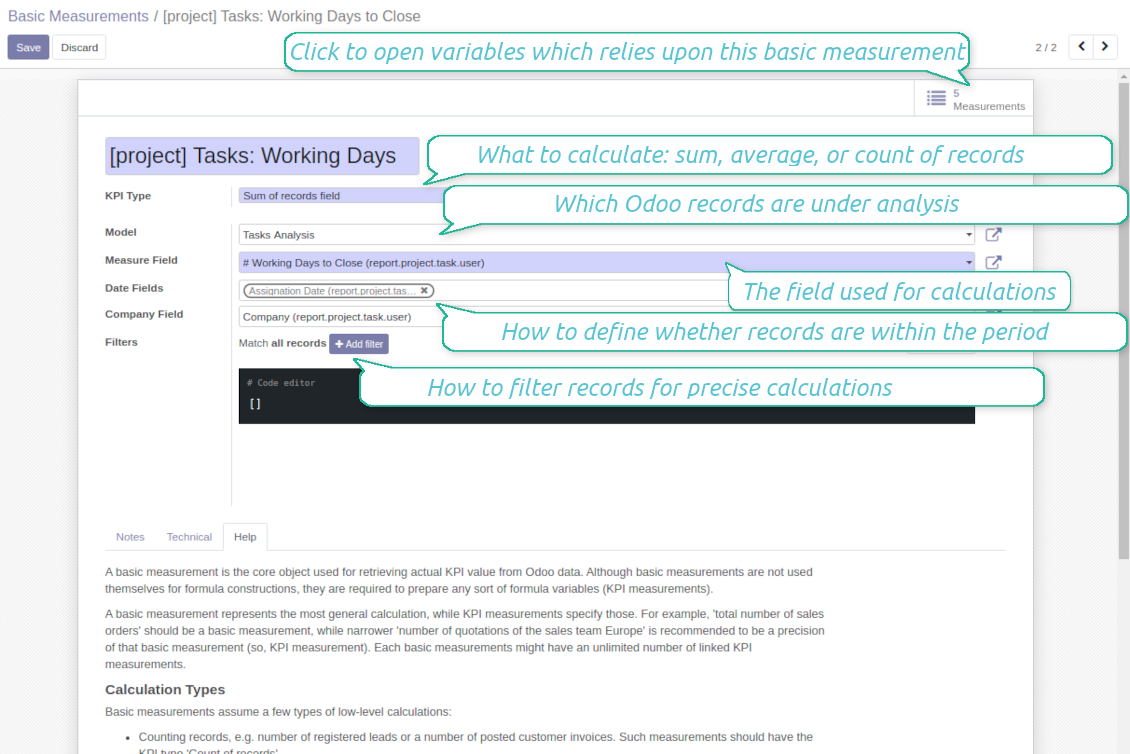
A basic measurement is the core object used for retrieving actual KPI value from Odoo database. Basic measurements represent the most general calculation, while KPI measurements specify those. For example, 'total number of sales orders' should be a basic measurement, while narrower 'number of quotations of the sales team Europe' is recommended to be a precision of that basic measurement (so, a KPI measurement or a KPI variable). Each basic measurement might have an unlimited number of linked KPI variables. In such a way, KPI variable let you prepare a formula part which might calculate:
- A total number of specified records within a given period. For example, a number of registered leads or a number of posted customer invoices.
- A sum of specified records' numeric fields. For example, sum of all orders amount total or sum of paid taxes by invoices.
- An average of specified records' numeric fields. For example, average planned hours per task or average days to assign a lead
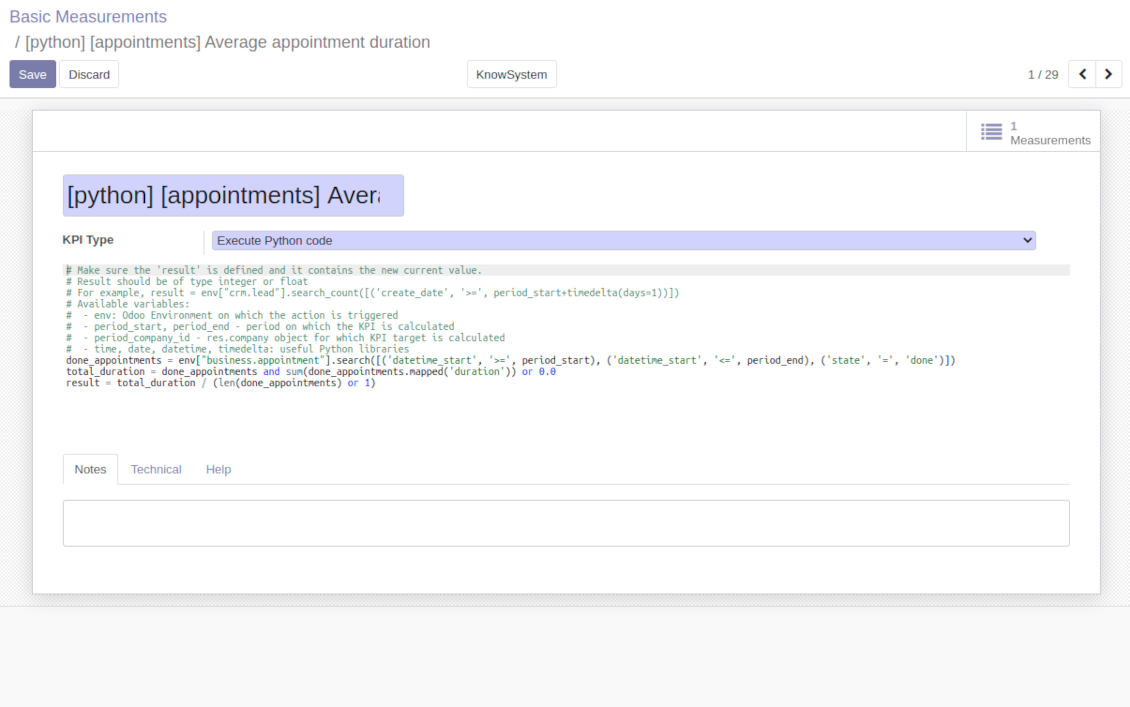
If those 3 types of calculations are not enough, basic measurements let you prepare the Python code to compute any sort of figures based on any Odoo data.
How to set up basic measurement
Basic measurements are not used themselves for formula constructions, they are required to prepare any sort of formula variables (KPI measurements). In order to create a basic measurement you should define:
- Model - is an Odoo document type from Odoo database, so with which data set you work. For, examples, 'Sales Order' or 'Task'. Here you can rely not only upon standard or custom objects (including ones created through the interface or the Odoo studio.), but also on Odoo reports. The latter is quite useful if indicators are already calculated for existing dashboard (for example, total sales amount in default currency from the 'Sales Analysis Report').
- Date fields - are required to understand whether a specific document type relates to a considered period, so, how to distribute objects by time intervals. For example, for tasks you might use 'create date' to analyze jobs registered within this KPI period. It is possible to apply a few date fields (e.g. 'Opportunities opened and won in January 2021'). If date fields are not specified, KPI period would not influence this basic measurement.
- Filters - allow you to restrict records set by any stored field. For example, you may calculate count of only won opportunities based on stage settings or only posted customer invoices based on journal entry type and state.
- Measure field - is available and required only for calculation types 'Average' and 'Sum'. It defines which figure you use for calculations. For example, total amount of Sales Analysis Report to get accumulated sales revenue or work hours of tasks to get average spent time per each task.
- Company field - would be needed for multi companies environment. According to that field, KPIs are considered only withing a KPI period target company. Take into account that records without company stated would be used for all companies' KPI calculations.
Python code measurements
'Python code' is the special type of basic measurement. This type requires technical knowledge but let you compute any sort of figures based on any Odoo data without restrictions.
Correct Python code assumes saving the value into the special variable 'result'. From other perspectives, it might be any Python basic script with possibility of SQL queries (using 'env.cr').
In your calculations you may also rely upon the special variables: 'period_start' (the first date of the period), 'period_end' (the last date of the period), 'period_company_id' - res.company object for which Odoo makes calculations at the moment (according to a KPI period under consideration).
How to configure KPI variables from basic measurements
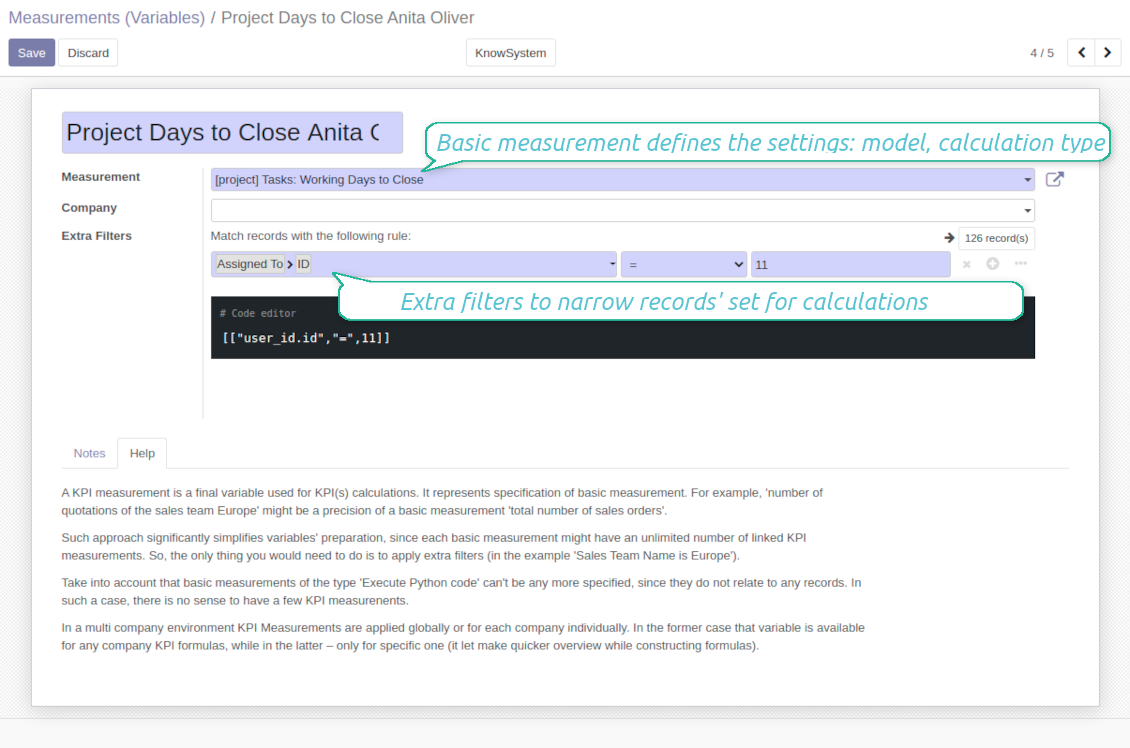
A KPI measurement is a final variable used for KPI calculations. It represents specification of basic measurement. For example, 'number of quotations of the sales team Europe' might be a precision of a basic measurement 'total number of sales orders'.
The key idea to distinct KPI variables from basic measurements is to simplify data preparation, Each basic measurement might have an unlimited number of linked KPI measurements. So, the only thing you would need to do is to apply extra filters (in the example 'Sales Team Name is Europe').
Take into account that basic measurements of the type 'Execute Python code' can't be any more specified, since they do not relate to any records. In such a case, there is no sense to have a few KPI measurements.
In a multi company environment KPI Measurements are applied globally or for each company individually. In the former case that variable is available for any company KPI formulas, while in the latter - only for specific one (it let make quicker overview while constructing formulas).
Tangkapan skrin
KPI basic measurements: Odoo data
KPI variable / KPI measurement: specify basic measurement
Execute Python code to calculate KPI actual value
Shared KPIs and self-control
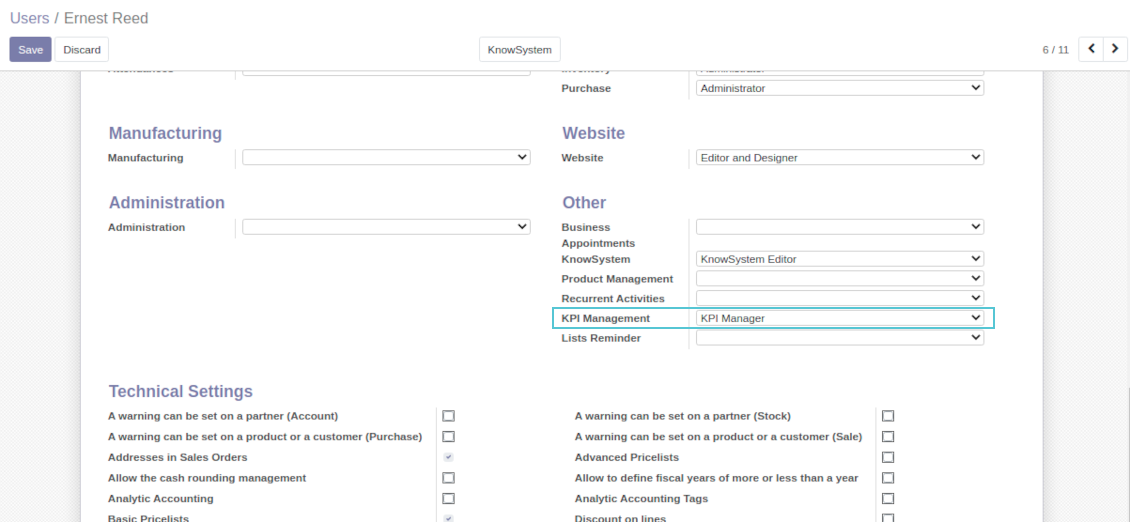
Full rights for all KPIs, targets, and settings belong to users with the right 'KPI Management - KPI manager'. Simultaneously, the tool let you share KPIs with other users as well.
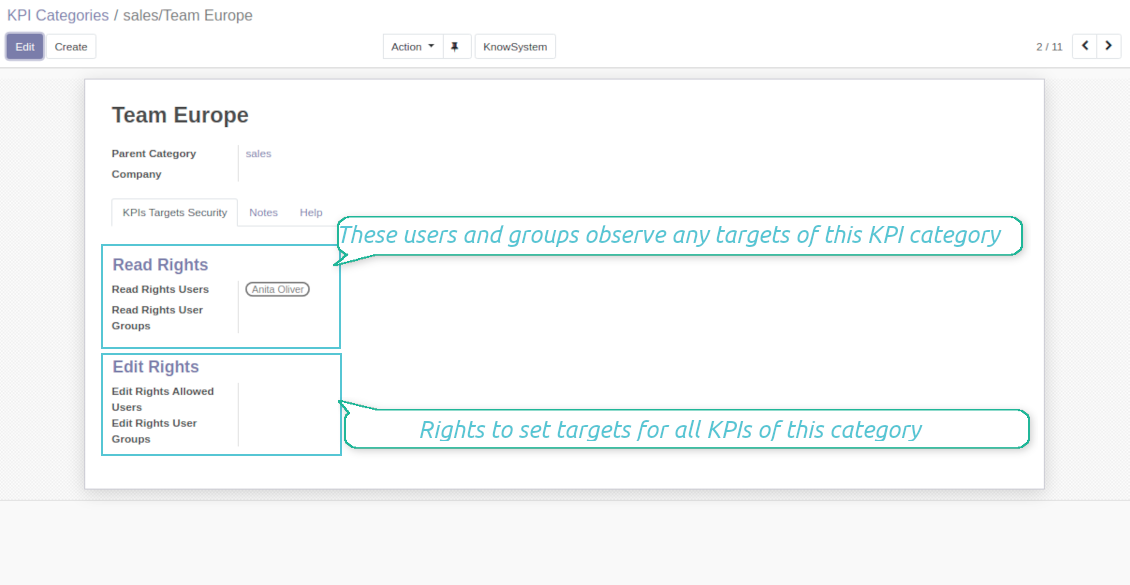
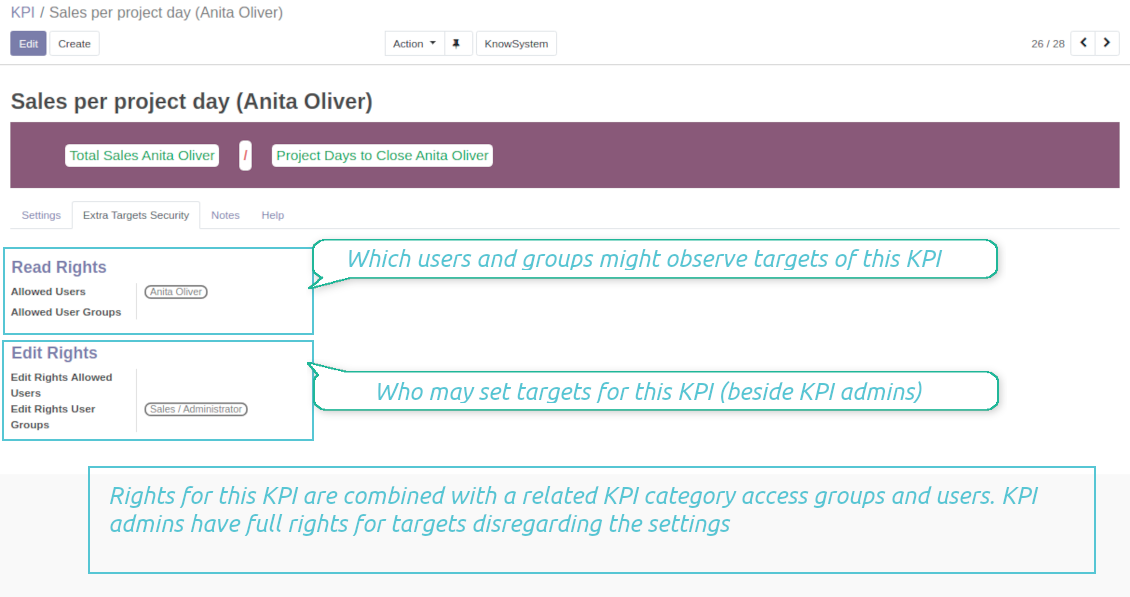
In particular, you can grant an access to observe KPIs using the 'Read rights' section on a KPI or a KPI category form. The section 'Edit rights' would not only allow to see scorecard by related KPIs, but also to set targets for those. The latter might be useful in case you ask your manager to manage goals within a department, for example.
Take into account: all security settings are additive and they are not restrictive. KPI managers would have full rights for all KPIs disregarding the settings, while other users would have rights only to KPIs which settings (or category settings) allow them so.
Tangkapan skrin
KPI manager rights
Share all KPIs of this category
Own KPI security settings
Multi companies
The tool is compatible with multi companies' environment. In particular, KPI periods and KPI targets are set up for each company individually (global targets are not possible).
KPI basic measurements assume that a company field is selected for a chosen model. It let distinguish which records are under consideration. If a company field is empty, all records would be analyzed.
Constants, KPI variables, and KPI formulas might be also assigned to a specific company. That might be used to simplify selection of formula parts when companies operate in different business areas.
Petua konfigurasi dan pemasangan untuk KPI Balanced Scorecard Odoo v.12
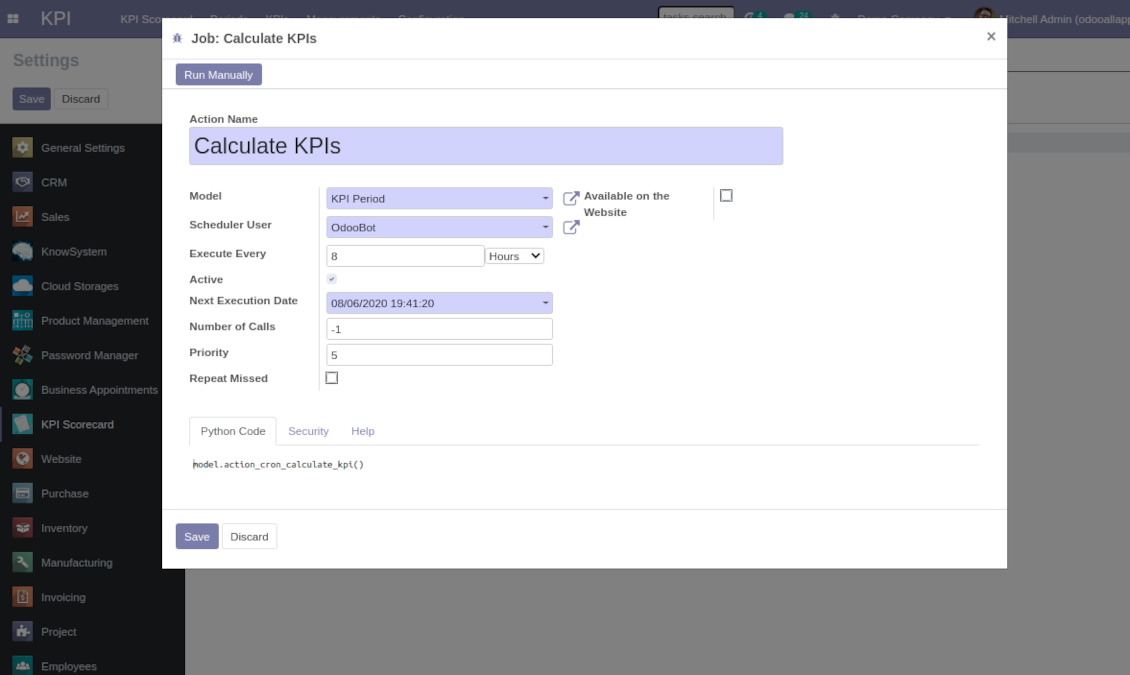
Scheduled jobs
- Turn on the debug mode.
- Go to KPI > Configuration > Settings.
- Find the button 'Configure cron job'.
- You are welcome to update the settings 'Execute Every' and 'Next Execution Date'. Please do not make it too frequent (e.g. once in 5 minutes), since operation is resource demanding, and might be not full finished within a pair of minutes.
Change frequency of KPIs re-calculatinon
Soalan lazim tentang KPI Balanced Scorecard Odoo v.12
Saya telah mencipta Basic Measurement, tetapi tidak menemuinya dalam wizard formula.
Basic Measurements tidak digunakan bersendirian untuk mencipta formula. Walaupun anda tidak mahu menambah lagi penapis pada Basic Measurement, anda masih perlu mencipta Variable yang dipautkan kepadanya. Kemudian Variable ini akan muncul dalam senarai yang tersedia untuk mencipta formula.
Data apa yang boleh digunakan untuk mencipta KPI. Adakah modul mempunyai data sendiri?
Aplikasi itu sendiri tidak memperkenalkan data sendiri (kecuali pemalar KPI yang bertujuan tepat untuk menggunakan data yang tiada) atau integrasi. Aplikasi mengira dan menyediakan antara muka berdasarkan data Odoo sedia ada. Contohnya, anda boleh mendapatkan bilangan pesanan jualan bagi tempoh tertentu daripada aplikasi Sales.
Modul bersifat sejagat dan boleh mendapatkan data daripada mana-mana modul Odoo, termasuk baki akaun. Contohnya, anda boleh kira jumlah keuntungan sebulan berdasarkan invois (entri jurnal).
Anda juga boleh mendapatkan data daripada sumber di luar Odoo dengan menyambungkannya kepada modul Odoo. Contohnya, jika anda mempunyai data Google Analytics dalam Odoo PostgreSQL, data itu boleh digunakan untuk menyediakan KPI.
Apakah perbezaan antara Basic Measurements dan Measurements (Variables)?
Measurement (Variable) — spesifikasi ukuran asas. Idea utamanya memudahkan penyediaan data. Anda tentukan 'Total Sales' sekali, kemudian gunakannya tanpa had untuk 'Sales Europe', 'Sales John Brown', 'Website Sales' dll. dengan menambah penapis tambahan.
Apakah dasar kemas kini alat anda?
Mengikut dasar Odoo Apps Store semasa:
- Setiap modul yang dibeli untuk versi 12.0 dan sebelumnya memberi akses ke semua versi sehingga 12.0.
- Bermula versi 13.0, setiap versi modul perlu dibeli berasingan.
- Tanpa mengira versi, pembelian memberi hak kepada semua kemas kini dan pembetulan pepijat dalam versi utama.
Sila ambil perhatian bahawa pasukan faOtools tidak mengawal dasar itu. Untuk soalan, hubungi terus wakil Odoo Apps Store.
Bagaimana memasang aplikasi anda di Odoo.sh?
Pendekatan paling terus ialah menggunakan aliran kerja terbina dalam kedai Odoo:
1. Buka halaman modul dan klik butang Deploy on odoo.sh
2. Selepas itu anda akan dihalakan ke halaman GitHub. Log masuk ke akaun, kemudian klik 'Create a new repo' atau guna yang sedia ada. Pastikan repositori bersifat peribadi. Tidak dibenarkan menerbitkan aplikasi di bawah lesen OPL-1. Jika perlu, cipta repo baharu untuk projek Odoo.sh
3. Kemudian pergi ke odoo.sh dan klik butang Deploy. Dalam tetingkap pop timbul, hantar keputusan dan klik 'Continue.' Tindakan ini akan mencetuskan pemasangan.
Langkah ini akan memasang aplikasi pada cabang pengeluaran projek. Jika anda mahu men-deploy aplikasi ke cabang lain atau mengemas kini modul, lakukan tindakan berikut:
1. Muat naik kod sumber aplikasi dari kedai Odoo
2. Commit modul ke repositori GitHub yang diperlukan. Pastikan tiada folder/fail aplikasi diabaikan (iaitu tidak termasuk dalam .gitignore repo). Repositori dicipta secara automatik oleh odoo.sh dan secara lalai mungkin termasuk item penting (cth., /lib). Muat naik semua direktori, subdirektori dan fail modul tanpa pengecualian
3. Deploy cabang sasaran projek odoo.sh atau, jika tetapan anda mengandaikan demikian, tunggu sehingga ia dibina secara automatik.
Bagaimana memasang aplikasi anda pada pelayan saya sendiri?
2. Mulakan semula pelayan Odoo;
3. Hidupkan mod pembangun (tetapan teknikal);
4. Kemas kini senarai aplikasi (menu aplikasi);
5. Cari aplikasi dan tekan 'Activate'/'Install';
6. Ikuti garis panduan pada halaman aplikasi jika ada.
Saya perasan aplikasi anda ada add-on tambahan. Boleh beli kemudian?
Ya, sudah tentu. Pada masa yang sama Odoo secara automatik menambah semua kebergantungan ke troli, jadi anda harus kecualikan alat yang sudah dibeli untuk elak bayaran berganda.
Saya menyebarkan aplikasi anda di Odoo.sh dan nampak amaran/ralat dalam ujian
Amaran merah/oren tidak mempengaruhi ciri aplikasi. Malangnya, modul kami kadang-kadang tidak lulus ujian automatik standard kerana ujian itu mengandaikan tingkah laku yang bercanggah dengan matlamat aplikasi. Contohnya kami mengubah pengiraan harga, manakala ujian modul Odoo standard membandingkan harga akhir dengan algoritma standard.
Pertama sekali, semak ciri pangkalan data yang dilancarkan. Adakah semuanya berfungsi dengan betul?
Jika anda masih menganggap amaran mempengaruhi ciri sebenar, hubungi kami dan hantar log pemasangan penuh serta senarai penuh modul yang dilancarkan (termasuk teras dan pihak ketiga).
Bolehkah saya membeli aplikasi terus daripada syarikat anda?
Tidak, kami hanya mengedarkan alat melalui kedai aplikasi Odoo rasmi.
Saya ingin mendapat diskaun
Malangnya, kami tidak mempunyai cara teknikal untuk memberikan harga individu.
Bolehkah saya memasang aplikasi pada pangkalan data Odoo Online (SaaS) saya?
Tidak, aplikasi pihak ketiga tidak boleh digunakan di Odoo Online. Malangnya Odoo SaaS menyekat kemungkinan itu.
Alat anda bergantung pada aplikasi lain. Patutkah saya membelinya?
Ya, alat memerlukan semua modul yang ditanda dalam kebergantungan untuk berfungsi dengan betul. Harga pada halaman aplikasi sudah merangkumi semua kebergantungan yang diperlukan.
Berapakah harga modul dalam dolar AS? Mengapa ia berubah?
Harga modul kami ditetapkan dalam euro. Kedai Odoo menukar harga ke mata wang lain mengikut kadar pertukaran dalamannya. Jadi harga dalam dolar AS mungkin berubah apabila kadar dikemas kini.
Teks aplikasi dan laman web dalam bahasa selain Inggeris dibantu AI dan diselaraskan dengan terjemahan rasmi Odoo. Jika anda nampak kesilapan, hantar tiket ketepatan terjemahan dan kami akan membetulkannya.
Pelaporan pepijat
Jika anda menemui pepijat atau tingkah laku tidak konsisten, sila hubungi kami. Kami jamin pembetulan dalam 60 hari selepas belian dan masih berminat menambah baik alat selepas tempoh itu.
Anda tidak memerlukan nombor telefon atau kad kredit untuk menghubungi kami. Hanya pendaftaran e-mel ringkas yang tidak mengambil lebih daripada 30 saat.
Sertakan sebanyak mungkin butiran dalam permintaan: tangkapan skrin, log pelayan Odoo, penerangan penuh cara menghasilkan semula masalah, dan sebagainya. Biasanya mengambil beberapa hari bekerja untuk menyediakan pelan kerja (jika pepijat disahkan) atau memberi garis panduan apa yang perlu dilakukan (jika tidak).
Permintaan ciri awam dan idea modul (pembangunan percuma)
Kami sangat bermotivasi untuk menambah baik alat kami dan berterima kasih atas sebarang maklum balas. Jika keperluan anda berguna secara awam dan boleh dilaksanakan dengan cekap, pasukan akan memasukkannya ke senarai tugasan kami.
Senarai tugasan sebegini diproses secara berkala dan tidak melibatkan yuran tambahan. Walaupun kami tidak dapat menjanjikan tarikh akhir dan reka bentuk muktamad, ini mungkin cara baik untuk mendapat ciri yang diingini tanpa pelaburan dan risiko.
Anda tidak memerlukan nombor telefon atau kad kredit untuk menghubungi kami. Hanya pendaftaran e-mel ringkas yang tidak mengambil lebih daripada 30 saat.

Alat untuk menyusun lampiran Odoo secara fleksibel dalam folder dan menyegerakkan direktori dengan klien awan: Google Drive, OneDrive/SharePoint, Nextcloud/ownCloud, Dropbox, Amazon S3, Box dan NAS. DMS. Pengurus Fail. Sistem pengurusan dokumen
398€
Alat untuk menyegerakkan lampiran Odoo secara automatik dengan fail OneDrive secara dua hala
487€
Alat untuk menyegerakkan lampiran Odoo secara automatik dengan fail Google Drive secara dua hala
487€
Alat untuk menyimpan kata laluan dengan selamat dalam Odoo untuk kegunaan bersama. Peti besi dikongsi

Alat untuk membina pangkalan pengetahuan yang mendalam dan berstruktur untuk penggunaan dalaman dan luaran. Knowledge System. KMS. Semakan seperti wiki.
398€
Alat pengurusan perkhidmatan berasaskan masa dari tempahan temu janji hingga jualan dan ulasan
398€
Alat untuk mengurus Odoo dari sembang AI kegemaran melalui MCP. Claude. Mana-mana AI yang menyokong MCP.


Alat untuk menggabungkan pelbagai acara Odoo ke beberapa kalendar super yang boleh dikonfigurasi