DropBox Odoo Integration v.14
The tool to automatically synchronize Odoo attachments with DropBox files in both ways
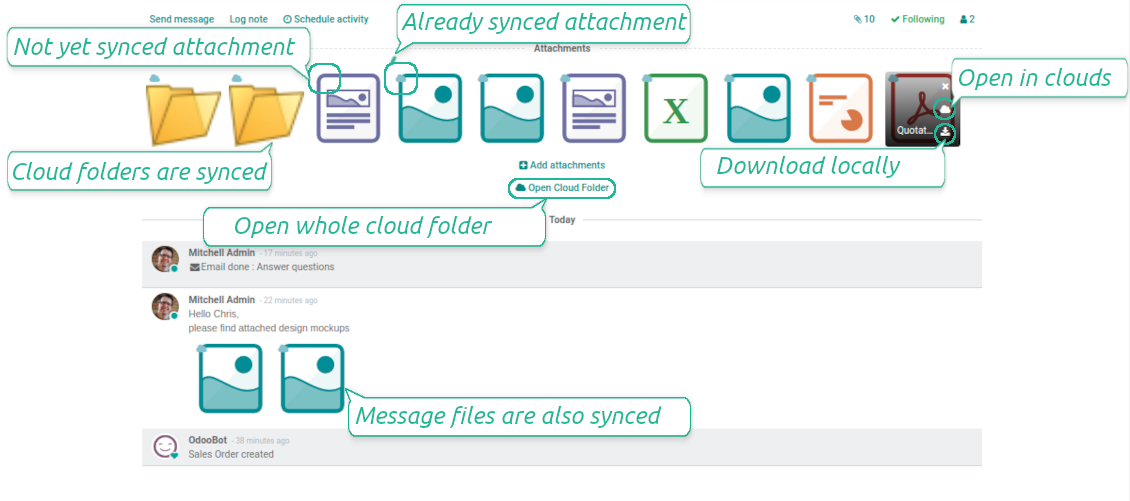
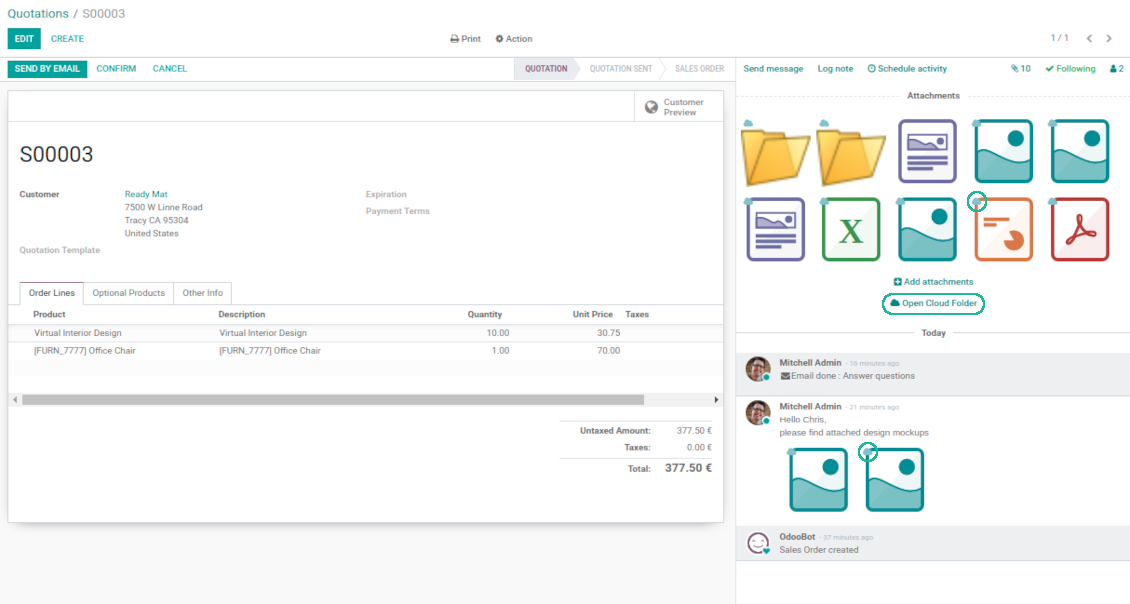
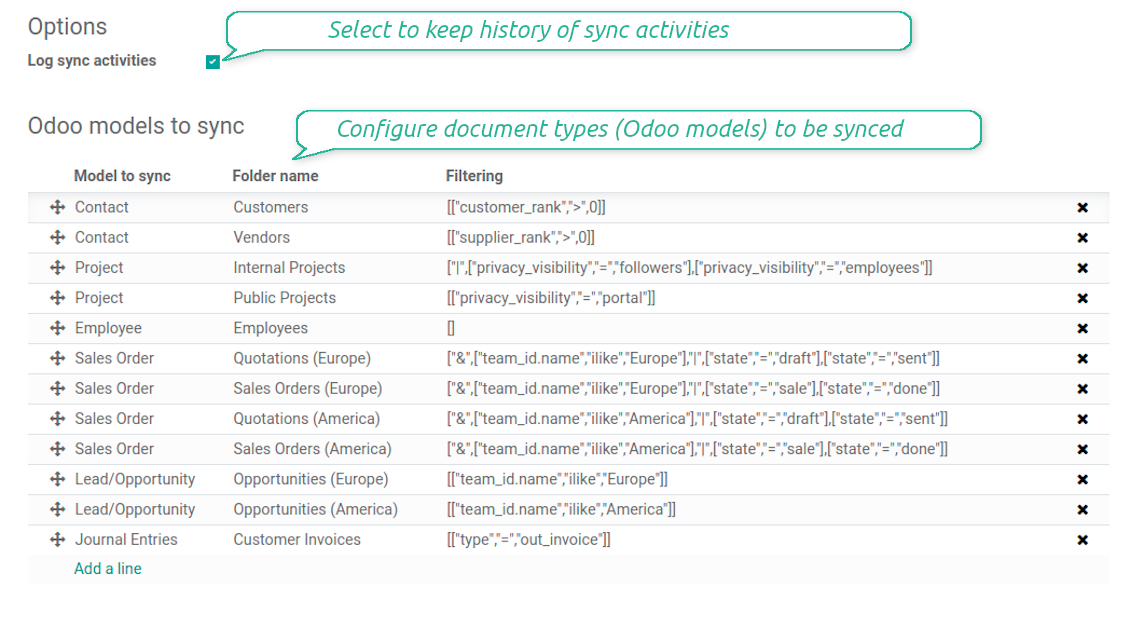
This is the tool to integrate DropBox features into your Odoo business work flow. The app automatically stores Odoo attachments in DropBox, and it provides an instant access to them via web links. In such a way users work with files comfortably in the cloud storage, while the results are fully available in Odoo.
- the technical core which provides basic mechanics of auto synchronization. This is a required module for integration.
Jo kaina yra
398€
358€.
- the connector itself which introduces links between Odoo and DropBox.
Jo kaina yra
89€
80€.
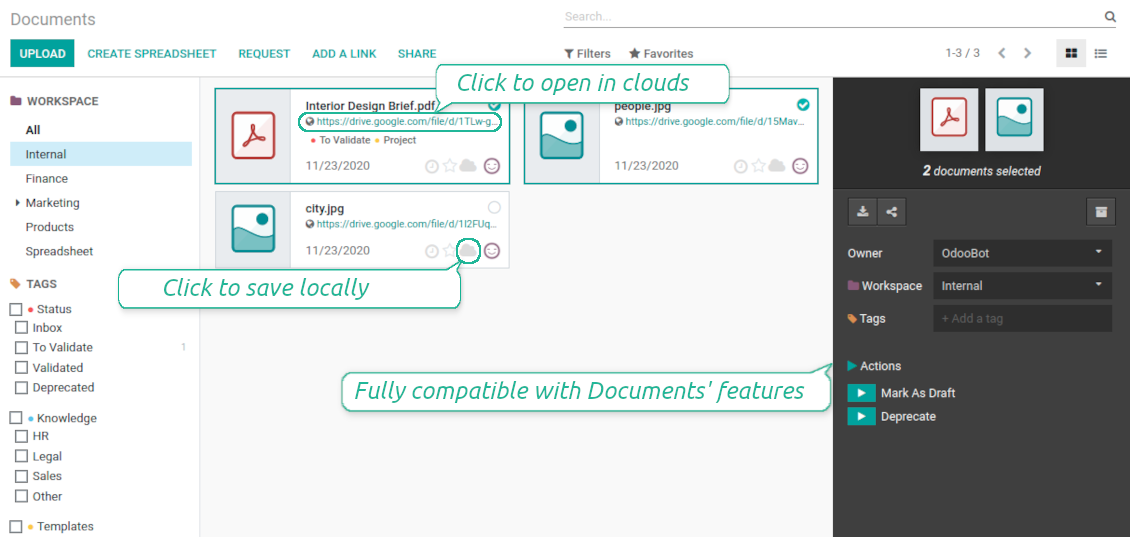
- an optional add-on to sync Odoo documents (introduced by the enterprise app 'Documents') with clouds. The features assumed by this add-on are marked by the icon .
Jo kaina yra
44€
39€.
Automatic regular sync
Synchronization between Odoo and DropBox is based on scheduled jobs. No manual interaction is required
Bilateral DropBox sync
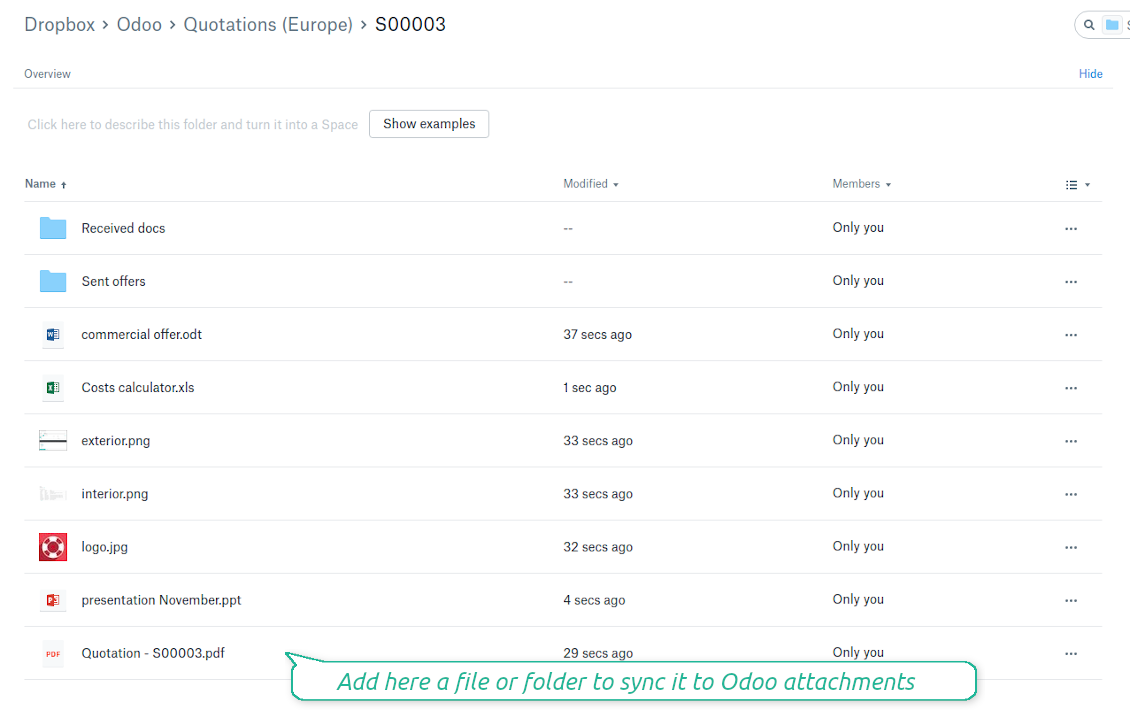
Odoo sends attachments to DropBox and retrieves files from there. Binary content is kept in clouds, while Odoo provides direct access to synced items
Any Odoo document types for sync
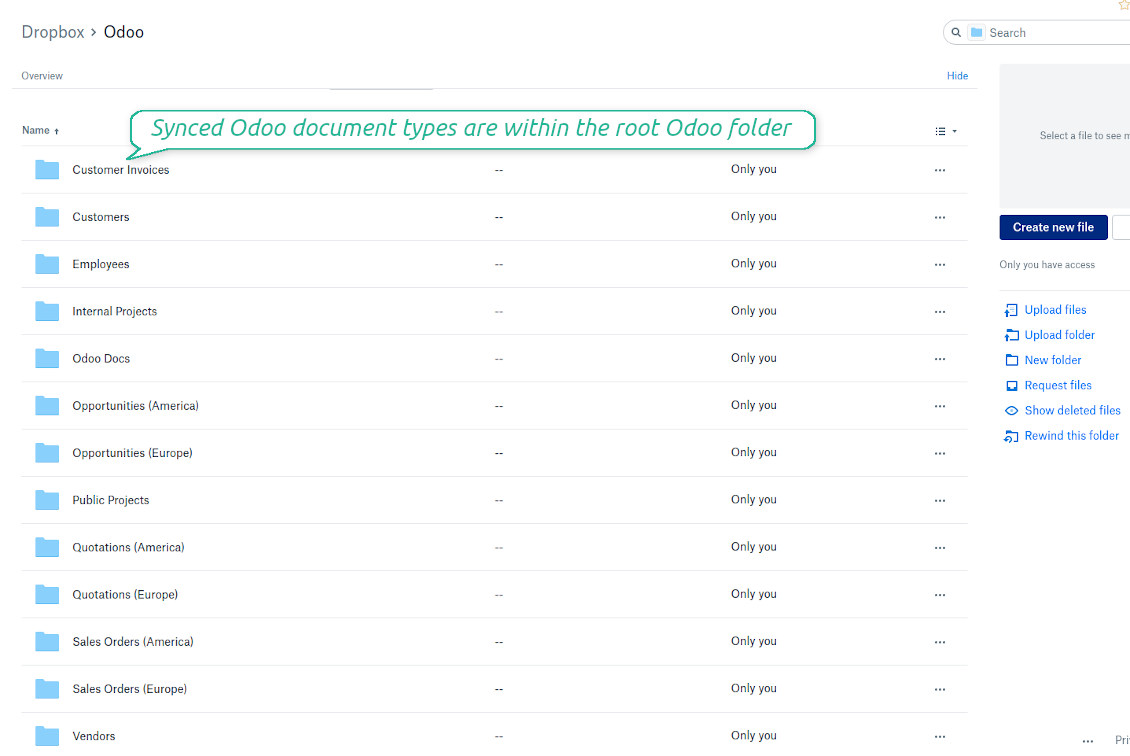
Decide which Odoo document types should be synced. Customers, opportunities, sale or purchase orders, tasks or issues, employees or users, etc. Custom models are also supported
Instant access for DropBox
The tool redefines Odoo attachments boxes to make work comfortable: download files locally without login, open files and folders in DropBox, use standard Odoo previewers
Compatible with Odoo Enterprise documents
Reflect Odoo Enterprise Documents' structure and items in DropBox. All features (including sharing, downloading, and signing) would anyway work
All DropBox tariffs
Synchronization works for any DropBox tariff, including Personal DropBox (Basic, Plus, Family) and business DropBox (Professional, Standard, Advanced)
DropBox sync history
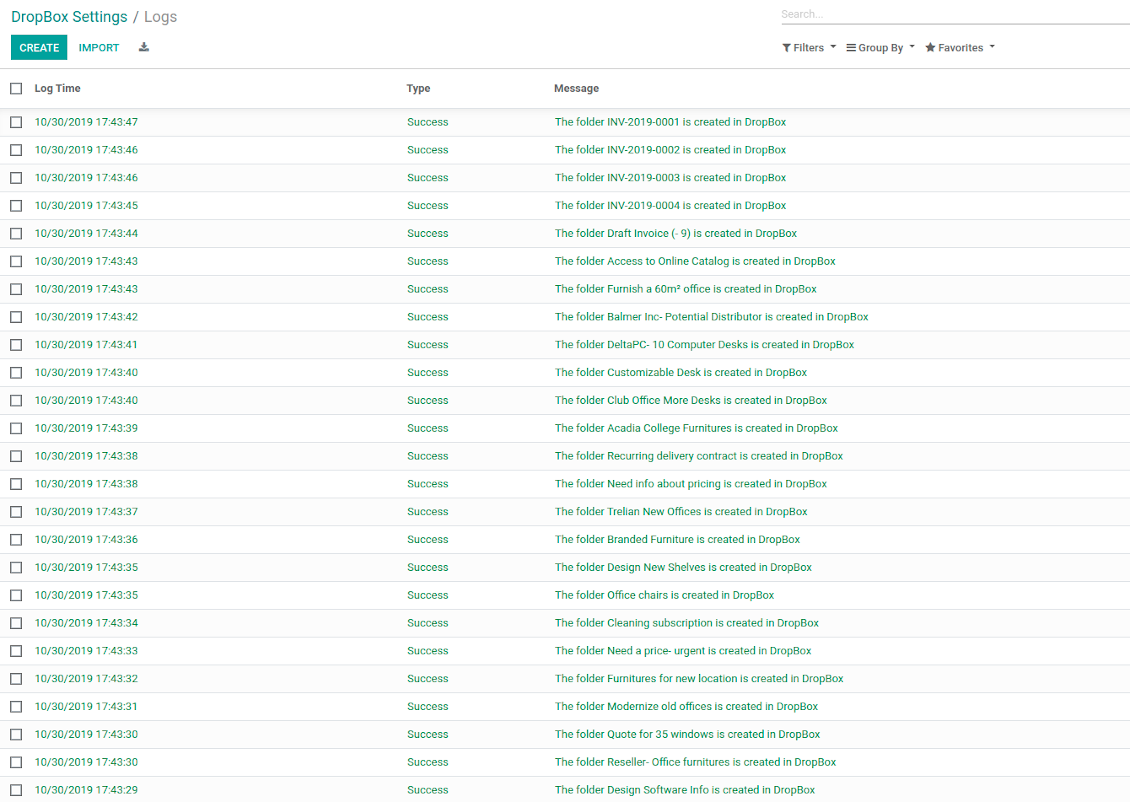
Sync activities might be logged. Control over files and folders creations, moves, name changes and removals. Just turn on the option 'Log sync activities', and you would be able to observe the history through the button 'Sync logs'
Default folders
The tool let generate default directories' structure for this document type during the very first sync of a related object. For example, for all employees you may have pre-defined folders 'Scans', 'Scans/Official', 'Photos', etc.
Sync any documents you like
Configuring models to sync
-
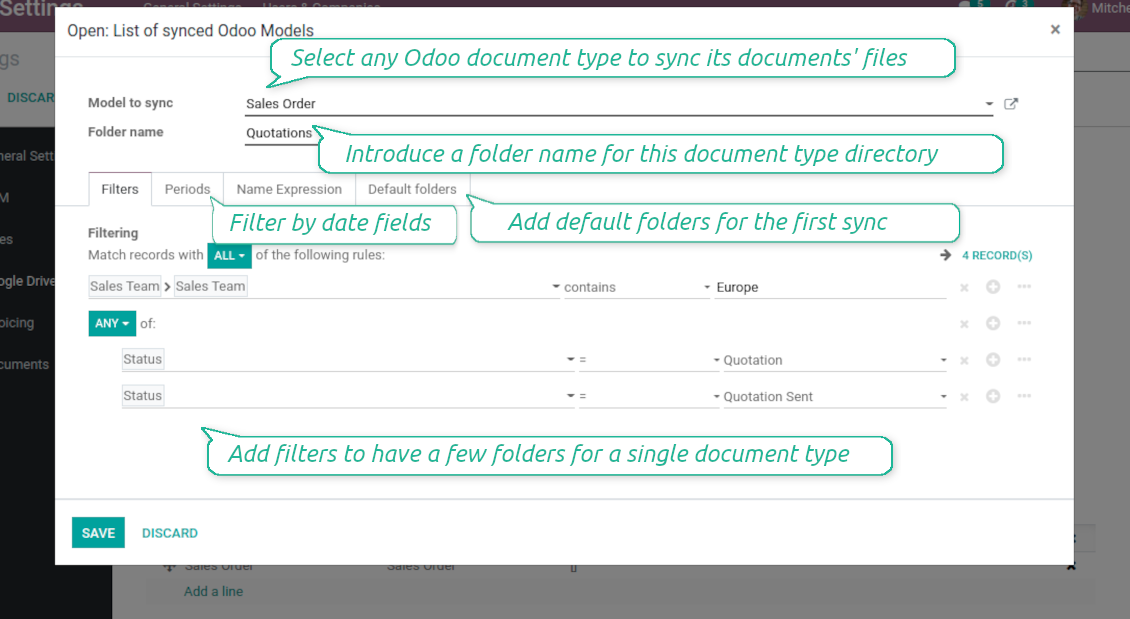
To sync a specific document type, you should add it as a model to sync. Any Odoo model might be chosen
-
The app let split models into a few folders based on selected filters. Use any document storable field to distinguish a directory. Have a separate folder for individuals and companies, for European and American opportunities, for quotations and confirmed orders, for each project, etc.
-
Limit also documents by relative periods through using date fields of linked documents. For example, leads registered in the last 3 months or invoices updated the last week
-
Define name expressions to specify titles of documents' DropBox folders. For instance, to include project name to a task directory
-
Prepare hierarchy of default folders to be created when a document directory is synced to DropBox for the first time
Typical use cases
-
Projects: have an own DropBox folder for each customer project
-
Customers: add all partner files in a single directory available both from Odoo and from DropBox. Modify those using default cloud editors and access them when working in Odoo
-
Employees: gather all files by this employee in a single cloud folder: photos, document scans, contracts. Access and upload those from Odoo and DropBox alternatively
-
Opportunities: carefully store all specifications, requirements, any files which would let you make a good offer
-
Orders: keep all printings and contracts in DropBox with instant availability from Odoo
-
Picking operations: save warehouse docs to DropBox.
How synchronization works
Direct Sync
-
Direct synchronization is based on the scheduled job 'Synchronize attachments with cloud'
-
Direct sync make all synced Odoo attachments change their type to a link (URL), while binary content is removed with a next Odoo cleaner. So, no actual files would be stored on your Odoo server
-
Direct sync checks whether attachments are added or deleted for synced documents. If so, they would be created or removed in DropBox
-
Direct sync checks whether a new document type (e.g. sale orders) is added / renamed / replaced in the to-sync-models configurations. If so, this should be reflected in DropBox
-
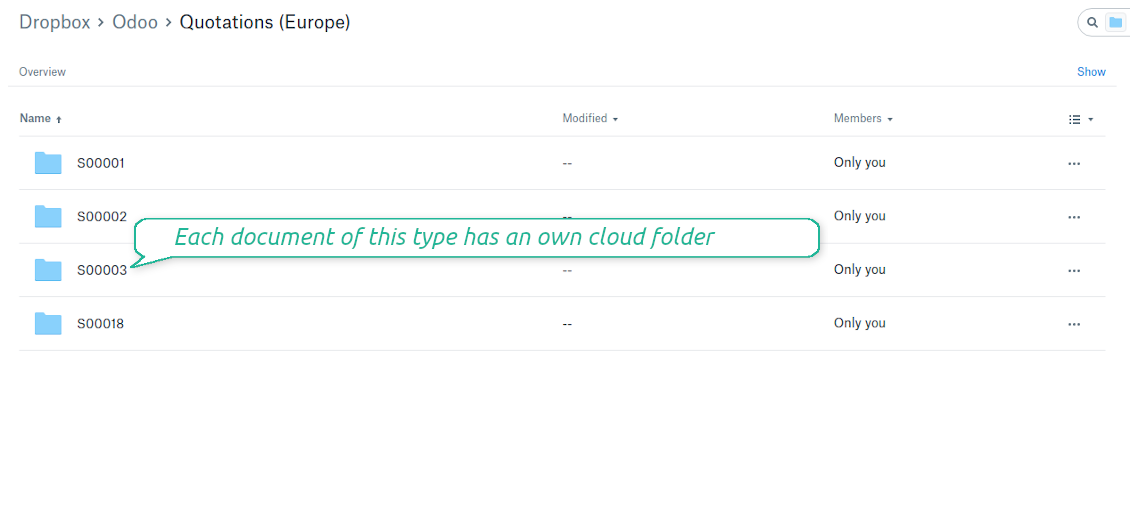
Direct sync checks whether a new document (e.g. quotation SO-001) related to a synced document type is generated / updated / unlinked. If so, the connector would make the same changes in DropBox
-
The final goal of direct DropBox integration is to have the structure 'Odoo / Document Types / Documents / Files. For example, 'Odoo / Quotations / SO019 / commercial offer.pdf'
Backward Sync
-
Backward synchronization is based on the scheduled job 'Synchronize attachments from cloud'
-
Backward sync checks whether any items are added to a DropBox document folder. If so, the app would create URL attachments for that items in a linked Odoo object
-
Backward sync checks whether any items are deleted / moved in a cloud document folder. If so, a linked Odoo attachment would be also unlinked or moved
-
Backward sync checks whether any item is renamed in DropBox. If so, a chained Odoo attachment should be also renamed
-
In DropBox folders you can put not only files but also child folders. In that case a link for this folder (not its content) would be kept in Odoo attachments
-
If you deleted a folder related to this document type or this document, their child files would be deleted as well. Thus, Odoo would remove related attachments. The folders, however, will be recovered with a next direct sync
DropBox URLs
-
DropBox has a specific way to generate links for existing files and folders. In particular, there are no concepts of internal or private URLs. Instead, each DropBox item might get so-called shared URLs. Such shared links are either public or team-only. Moreover, the latter feature is available only for DropBox business account
-
This tool relies upon share links' mechanics. It means, that each attachment link is either public (all personal DropBox accounts) or team-only (all business DropBox accounts)
-
Sometimes it is considered to be not fully safe. Although website URLs will be hardly known by external users, there is a slight chance that they become available as a result of some user actions. Besides, sharing links generation is not super fast and might make a sync process slower. That is why the feature to switch off sharing urls is introduced
-
If checked, all DropBox urls in Odoo will be of type https://www.dropbox.com/home/Odoo/[PATH]. Such links will not work in quite a many cases. Thus, if you need to open DropBox files / folders from Odoo, be careful with the setting 'No links to DropBox from Odoo'
Misc notes
-
The connector works on a queue (first in - first out) principle: it tries to firstly reflect the oldest changes
-
Each sync, especially the very first one, might take quite a long. It is not recommended to make sync too frequent: once an hour seems reasonable frequency
-
File names and content should be managed in DropBox: each backward sync would recover DropBox names, Odoo is here less important
-
Try to avoid the following symbols in folders' and files' names: *, ?, ", ', :, <, >, /, +, %, !, @, \, /,. Direct sync will replace such symbols with '-'. It is done to avoid conflicts with file systems.
Odoo Enterprise Documents
-
The special add-on 'Cloud Sync for Enterprise documents' is introduced to synchronize DropBox with the Odoo app 'Documents' (the latter is distributed under the Odoo Enterprise license)
-
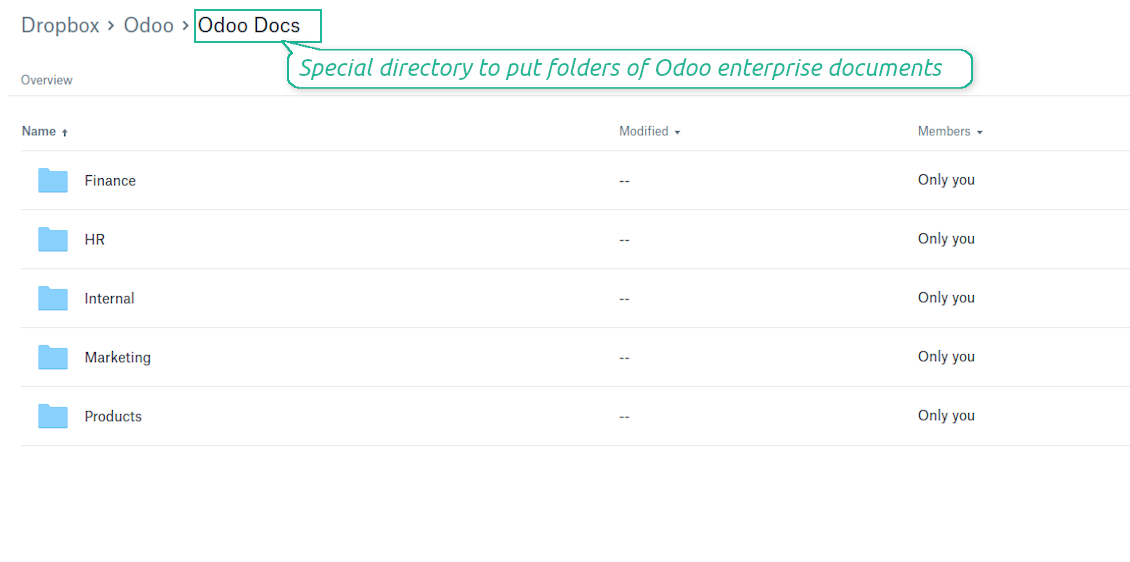
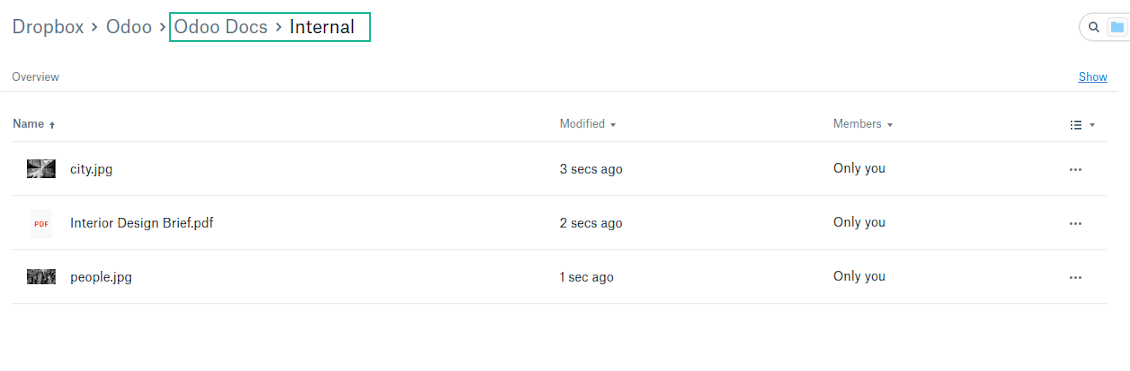
Based on that add-on the Odoo documents' hierarchy would be reflected within the folder 'Odoo / Odoo Docs'
-
Each Odoo folder would have a linked DropBox folder. Take into account that folders created in the cloud storage will be synced as Odoo attachments. The key principle is: folders are managed by Odoo, files are managed by the cloud client
-
All files are synced with the same logic as usual attachments. Files created in Odoo will be added to the cloud storage and will be replaced with links in Odoo. Files created in cloud storage will generate URL attachments within a paired documents directory
-
Standard DropBox sync and integration with Enterprise Documents are done within the same jobs. Avoid the scenarios when a single file is synced as a simple Odoo attachment and as an Odoo document simultaneously
-
Odoo spread sheet files are not synced by the connector: so, they are still manageable in Odoo
-
Please do not name synced models as 'Odoo Docs'. This is the reserved name for Odoo Enterprise Documents.
Konfigūravimo ir diegimo patarimai DropBox Odoo Integration Odoo v.14
Python dependency
The tool depends on external libraries 'dropbox'. Install this library for your Odoo server through the command:
pip3 install dropboxConfiguration and log in
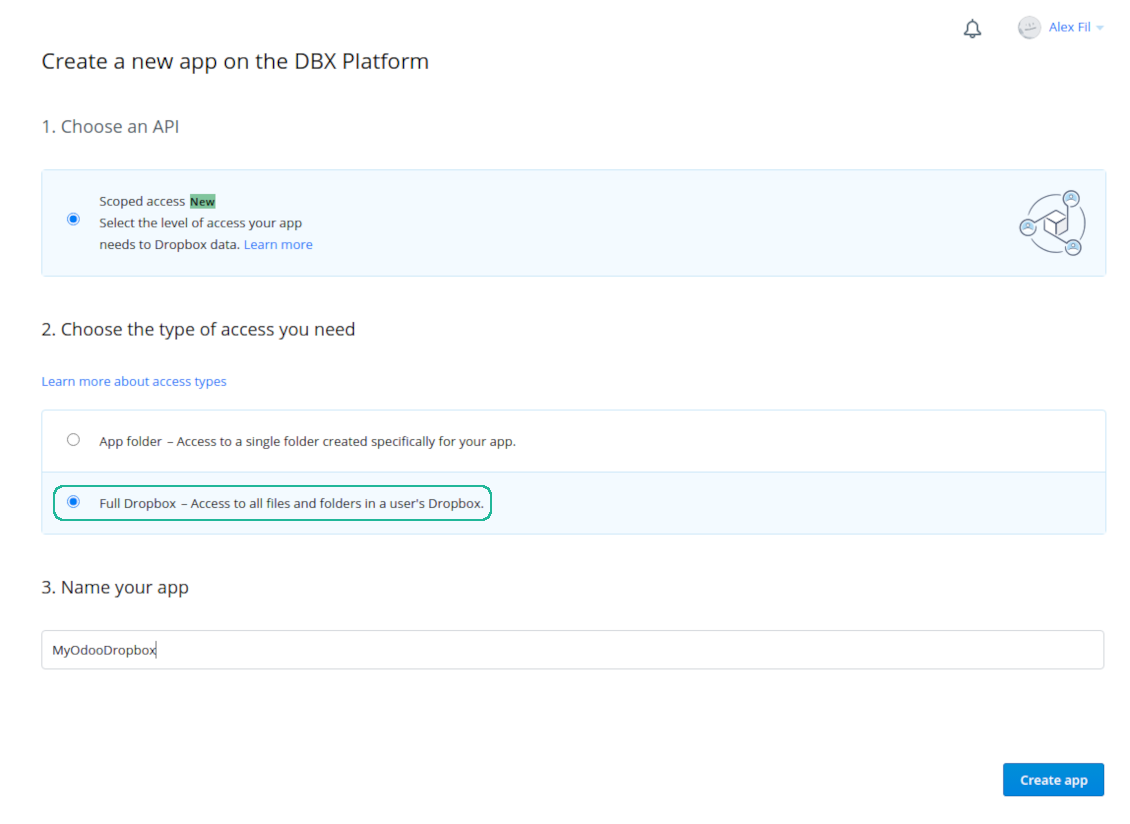
- Follow the url https://www.dropbox.com/developers/apps/create
- Choose an API as 'Scoped access'
- Choose the type of access as 'Full Dropbox'
- Select any suitable name for the app and push the button 'Create app'
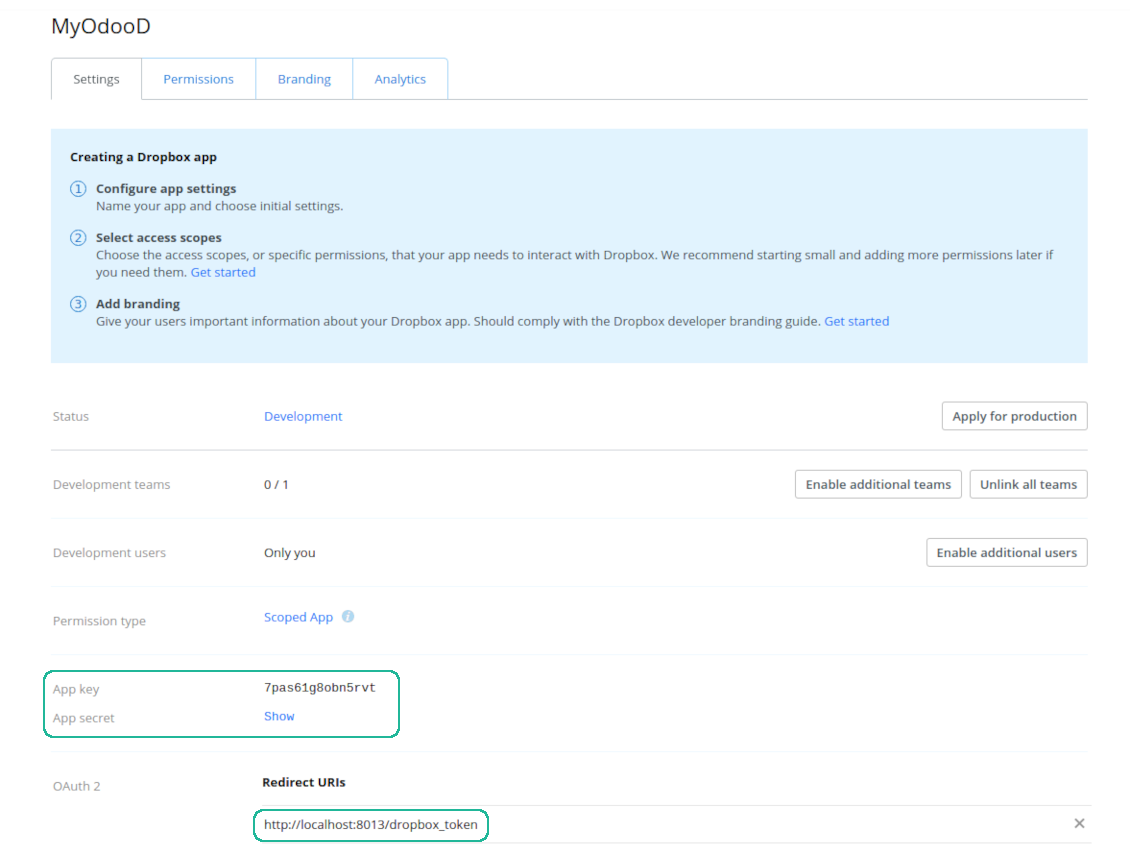
- Add the redirect URI as [YOURODOOSITENAME]/dropbox_token (e.g. https://faotools.com/dropbox_token). A valid SSL certificate (https) is required
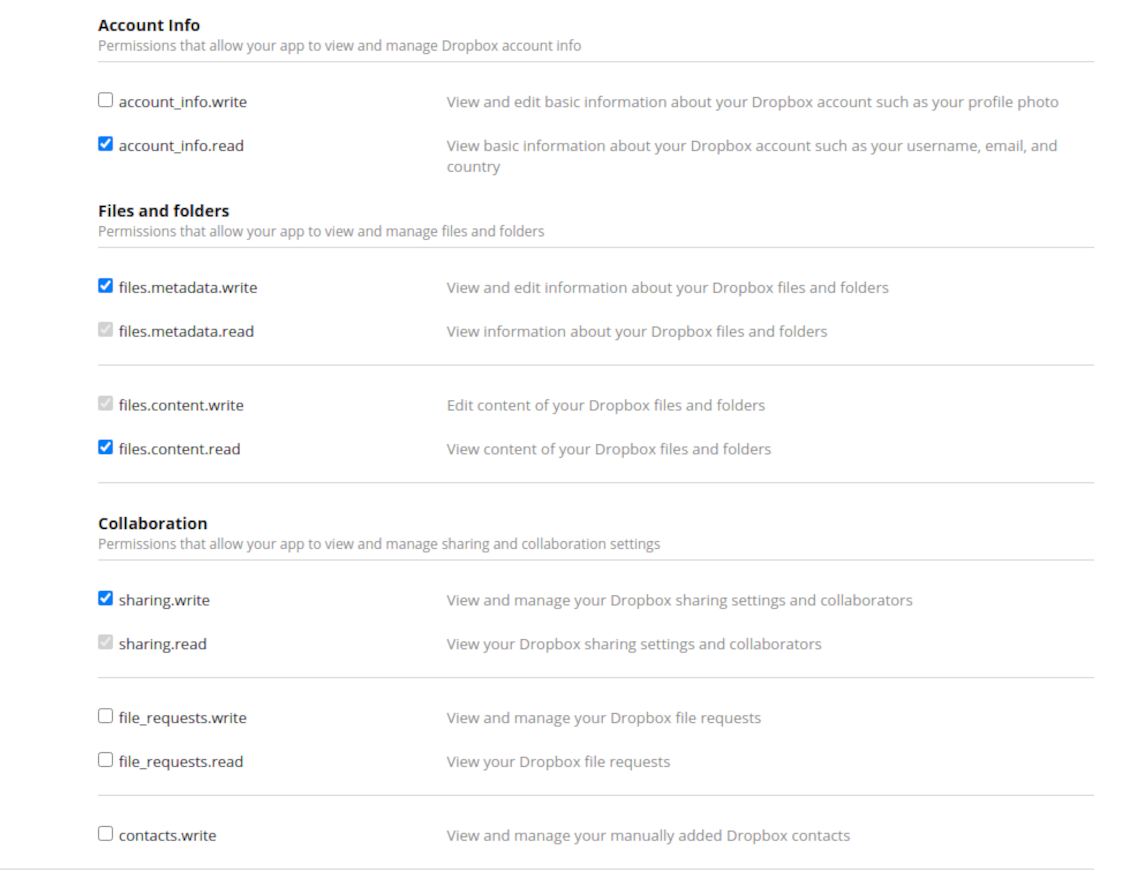
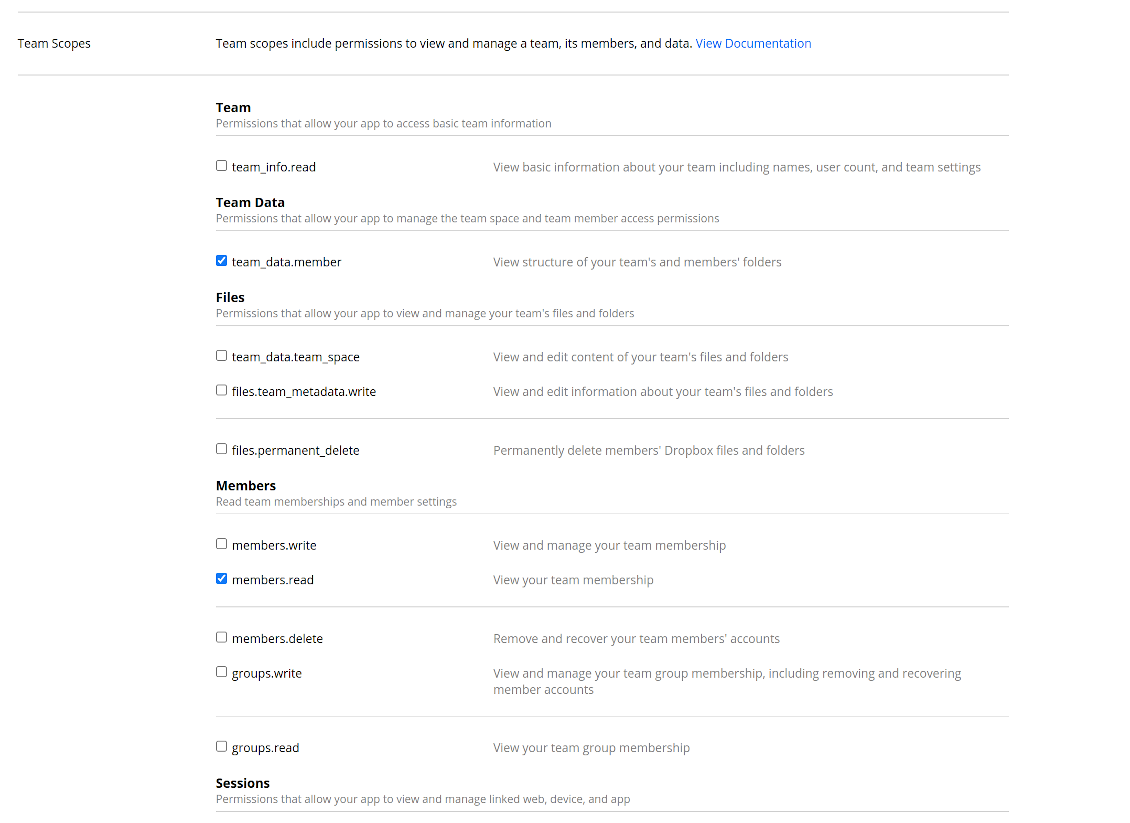
- Grant permissions to the app: 'Account Info (Read)', 'Files and folders Metadata (Write)', 'Files Content (Write)', 'Collaboration (Write)'. For team DropBox assign also 'Team Data Members', 'Members (Read)'. Make sure no other permissions are assigned.
- Submit App
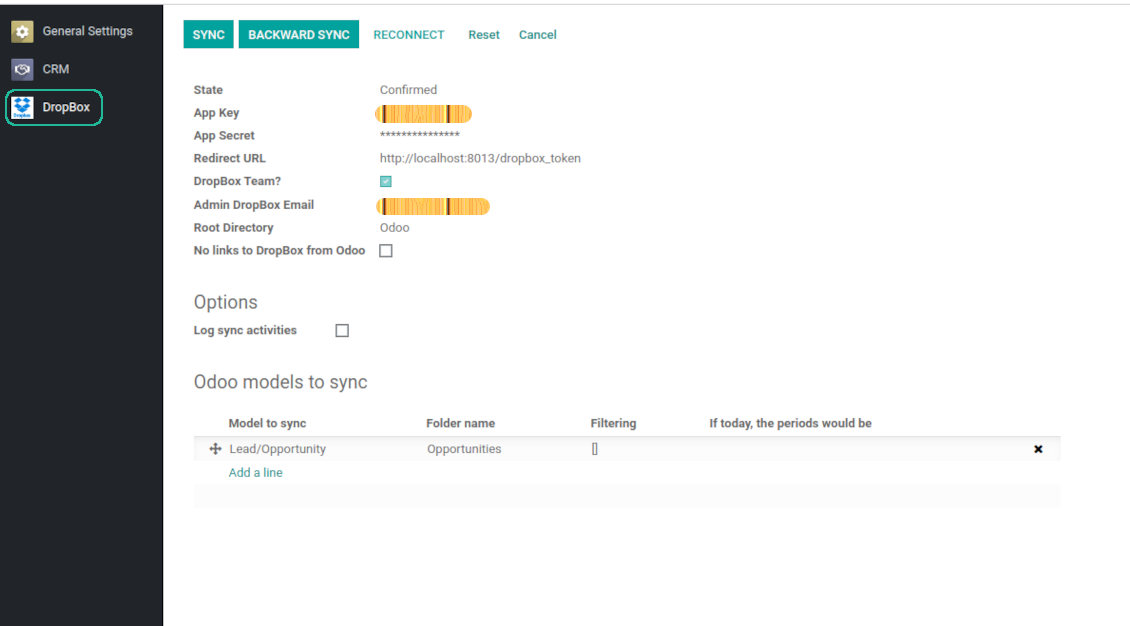
- Go to Odoo general settings - DropBox
- Copy App Key, App secret, and redirect URI to the Odoo configuration page
-
For team DropBoxes only
- Check the box 'DropBox Team'
- Set an email of DropBox user. Inside this user folder all Odoo related items would be created and only after that they are shared to all other users. Under this user all files and folders are created, changed, moved, and deleted
- Choose a suitable name for the root Odoo folder, e.g. 'Odoo' or 'ERP'
- Press Save
- Press 'Login and Confirm'
Create a DropBox app
Set up DropBox App: redirection URL
DropBox permissions for personal accounts
DropBox permissions for business accounts
Set up Odoo for DropBox integration
Odoo server configuration and cron job configuration
To make sure the synchronization works correctly apply proper timeouts to the Odoo configuration file: LIMIT_TIME_CPU, LIMIT_TIME_REAL, LIMIT_TIME_REAL_CRON should be more than 900 seconds.
For Odoo.sh this should not be done, since timeouts are predefined and are not configurable.
Then, timeout should be entered to your Odoo. To that goal find the section 'Settings' on the app configuration page and copy the number there.
Afterwards, it is needed to make the cron jobs suit the applied timeouts. In the debug mode go to the Settings > Technical > Automation > Scheduled Jobs:
- Set up the job 'Synchronize attachments with cloud' as (a) frequency - 2*timeout; (b) the next execution as the next hour +timeout. For example, for 900seconds timeout: frequency - as 30minutes; the next execution - at 08:15
- Set up the job 'Synchronize attachments from cloud' as (a) frequency - 2*timeout; (b) the next execution as the next hour + timeout*2. For example, for 900seconds timeout: frequency - as 30minutes; the next execution- at 08:30.
Reconnection
Reconnection might be required for the case a refresh token is expired and when you migrate the app from previous versions. In such a case:
- Press the button 'Reconnect'
- Press the button 'Login and confirm'
Dažnai užduodami klausimai apie DropBox Odoo Integration Odoo v.14
Ar galiu keisti sinchronizavimo užduočių dažnį?
Taip, galite. Tam reikia:
Įjunkite derinimo režimą
Eikite į techninius nustatymus > Automatizavimas > Suplanuotos užduotys
Raskite užduotis 'Synchronize attachments with cloud' ir 'Update attachments from cloud'.
Nepamirškite, kad jų neturėtumėte paleisti per dažnai. Pageidautina, kad užduotis spėtų baigtis, kol paleidžiama kita. Nustatymas priklauso nuo to, kiek elementų reikia sinchronizuoti. Paprastai dažnis būna nuo 15 minučių iki 4 valandų.
Taip pat įsitikinkite, kad Odoo konfigūracijos faile nustatėte pakankamus laiko limitus. Parametrai LIMIT_TIME_CPU ir LIMIT_TIME_REAL turi būti lygūs arba didesni už planuojamą cron užduoties laiką. Nuo 13 versijos atsižvelkite ir į parametrą LIMIT_TIME_REAL_CRON.
Svarbi pastaba Odoo.sh klientams: maksimalus cron užduoties laikas gali būti tik 15 minučių.
Ar galiu sukonfigūruoti kitokią sinchronizuojamų katalogų struktūrą nei tą, kurią daro prielaidą sinchronizacija?
Ne, ši funkcija prieinama tik nuo 15 versijos. Iki tos versijos modulis veikia su iš anksto apibrėžta aplankų struktūra:
Odoo - pagrindinis sinchronizavimo aplankas
Models - aplankai kiekvienam Odoo dokumento tipui. Pavyzdžiui, 'Projects', 'Partners'. Pagal domeną gali būti konkretesnių aplankų: pvz., 'Customer 1 Projects', 'Projects of the Customer 2', 'Internal Projects' ir t. t.
Objects - aplankai kiekvienam dokumentui, pvz. 'Project 1' arba 'Customer 1'
Failai ir aplankai, susiję su šiuo Odoo dokumentu ir sinchronizuotini.
Dėl to galite turėti pavyzdžiui:
Odoo / Projects / Project 1 / failai ir aplankai, susiję su project 1
Odoo / Customer 1 Projects / Project 1; Odoo / Customer 2 Projects / Project 3, ...
Odoo / Customers / Customer 1 / failai ir aplankai, susiję su customer 1
Ši struktūra visada plokščia, t. y. yra tik tie hierarchijos lygiai. Todėl teisinga, kad skirtingų dokumentų tipų negalima laikyti toje pačioje struktūroje. Aplanke 'Customer 1' negalime laikyti failų, susijusių ir su pardavimo užsakymais, ir su sąskaitomis, ir su projektais. Kiekvienas toks dokumento tipas turi savo (arba kelis savo) aplankus. Kitaip atgalinė sinchronizacija būtų neįmanoma, nes nebūtų kriterijaus, kuriuo remtis.
Ar turėčiau nustatyti konkrečias naudotojų prieigas Odoo?
Ne, įrankis naudoja vieną naudotojo galinį tašką. Visi sinchronizacijos procesai vyksta vieno cloud administratoriaus (programos) vardu. Sukurtų aplankų / failų prieigos teisės nėra automatizuotos. Tas teises turite administruoti savo debesies saugyklos sprendime.
Kur saugomi sinchronizuoti laukai? Ar jie dubliuojami Odoo ir debesyse?
Programa daro prielaidą, kad priedų dvejetainis turinys saugomas Cloud Client, o ne Odoo serveryje. Todėl tokie priedai Odoo tampa URL tipo ir bet kada galite juos atidaryti iš priedų lauko arba iš Cloud Client.
Po nustatymo rankinių veiksmų nereikia, nes sinchronizacija visiškai automatinė. Nuspręskite, kuriuos Odoo dokumentų tipus sinchronizuoti, ir kiekvienam jų nustatykite susijusį modelį (klientai, pardavimo ar pirkimo užsakymai, užduotys, projektai ir t. t.).
Ar galiu turėti kelis aplankus tam pačiam dokumento tipui? Pavyzdžiui, vidiniams projektams ir klientų projektams?
Taip, galite. Tam paruoškite taisyklę kiekvienam ir tada taikykite filtrus: pvz. pagal projekto tipą.
Stenkitės, kad filtrai būtų vienas kitą išskiriantys, kad dokumentą būtų galima priskirti vienareikšmiškai. Pvz. „klientas, bet ne tiekėjas“, „tiekėjas, bet ne klientas“. Kitaip konkretaus dokumento aplankas šokinės iš vieno modelio į kitą.
Ar man reikia tik programos Cloud Storage Solution?
Ne, įrankis yra tik techninė šerdis. Jums taip pat reikia jungties savo cloud client.
Ar gerai, jei sinchronizuoti reikia daug objektų, pavyzdžiui, 10000?
Taip, nors kai reikia sinchronizuoti daug aplankų/priedų, procesas gali būti lėtas. Tuo pačiu klientai pranešė apie aplinkas su >10k partnerių ir ~5k produktų variantų sinchronizavimui, ir procesai buvo priimtini.
Keletas akcentų:
- Sinchronizacija sukonstruota taip, kad bet kuris elementas būtų sinchronizuotas ir neprarastas, nors tai gali būti lėta. Tai garantuoja FIFO eilės ir kiekvieno darbo commit.
- Objektų skaičių galima logiškai apriboti. Modelių konfigūracija leidžia apriboti pasenusių elementų sinchronizaciją (pvz., nėra prasmės sinchronizuoti archyvuotų partnerių ar užsakymų prieš 2 metus).
Ar galima sinchronizaciją padaryti realiuoju laiku?
Ne. Turime svarių priežasčių vengti sinchronizacijos realiuoju laiku:
Našumo problemos. Jei sinchronizacija vyktų realiuoju laiku, kiekvienas failo įkėlimas rodytų įkėlimo ekraną.
Konfliktų problemos. Jei 2 naudotojai vienu metu pakeičia elementą, gali kilti neišsprendžiamų situacijų. Reguliarių darbų atveju galime tai pataisyti vėliau, o realiuoju laiku tektų tai saugoti kaip eilę ir tai naudotojams būtų dar painiau.
Funkcionalumo problemos. Ypač elementų pervadinimas ir struktūros keitimas. Atgalinėje sinchronizacijoje įrankis griežtai remiasi katalogų logika ir kiekvienos sinchronizacijos metu tikrinama 100 % elementų. Jei tai būtų daroma po kiekvieno atnaujinimo, tai būtų tūkstančiai užklausų per sekundę. Jei ne: pakeitimai būtų prarasti.
Ar galiu keisti numatytuosius aplankų pavadinimus debesyse?
Galite priskirti savo pavadinimą modelių katalogams (pardavimo užsakymai, galimybės, tiekėjai ir t. t.) bet kuriam dokumento tipui.
Objektų aplankams (SO-001, John Smith ir t. t.) įrankis naudoja Odoo metodą šio dokumento tipo rodymo pavadinimui sudaryti. Tai galima pakeisti apibrėžiant pavadinimo išraišką. Naudojama tiksli Odoo el. laiškų šablonų sintaksė.
Ar galiu sinchronizuoti priedus su keliais debesijos klientais
Ne, ši funkcija prieinama tik nuo 15 versijos.
Mūsų debesyse naudojame specialų redaktorių (pvz. OnlyOffice, Office 365 ir kt.). Ar failai būtų atidaromi tame redaktoriuje?
Taip, priklausomai nuo cloud client konfigūracijos.
Kokios jūsų įrankių naujinimo politikos?
Pagal dabartines Odoo Apps Store taisykles:
- Kiekvienas 12.0 ir senesnės versijos modulis suteikia prieigą prie visų versijų iki 12.0.
- Nuo 13.0 versijos kiekviena modulio versija perkama atskirai.
- Nepriklausomai nuo versijos, pirkimas suteikia teisę į visus atnaujinimus ir pataisas pagrindinės versijos ribose.
Atkreipkite dėmesį: komanda faOtools šių taisyklių nekontroliuoja. Klausimus kreipkite tiesiai Odoo Apps Store atstovams.
Kaip įdiegti jūsų programą Odoo.sh?
Tiesiausias būdas – naudoti įtaisytąją Odoo parduotuvės eigą:
1. Atidarykite modulio puslapį ir spustelėkite mygtuką Deploy on odoo.sh
2. Po to būsite nukreipti į GitHub puslapį. Prisijunkite prie paskyros ir spustelėkite 'Create a new repo' arba naudokite esamą. Įsitikinkite, kad saugykla privati. Programėlių skelbti pagal OPL-1 licenciją negalima. Prireikus sukurkite naują repo Odoo.sh projektui
3. Tada eikite į odoo.sh ir spustelėkite mygtuką Deploy. Iššokančiame lange pateikite sprendimą ir spustelėkite 'Continue.' Tai paleis diegimą.
Šie veiksmai įdiegs programėlę gamybinėje projekto šakoje. Jei norite diegti programėles kitose šakose arba atnaujinti modulį, atlikite šiuos veiksmus:
1. Įkelkite programėlės išeities kodą iš Odoo parduotuvės
2. Įrašykite modulį į reikiamą GitHub saugyklą. Įsitikinkite, kad jokie programėlės aplankai/failai nėra ignoruojami (t. y. nėra repo .gitignore). Saugyklas automatiškai sukuria odoo.sh ir pagal numatymą jose gali būti svarbių elementų (pvz., /lib). Įkelkite visus modulio katalogus, pakatalogius ir failus be išimčių
3. Įdiekite norimą odoo.sh projekto šaką arba, jei nustatymai tai numato, palaukite, kol ji bus sukurta automatiškai.
Kaip įdiegti jūsų programą savo serveryje?
2. Paleiskite Odoo serverį iš naujo;
3. Įjunkite kūrėjo režimą (techniniai nustatymai);
4. Atnaujinkite programų sąrašą (programų meniu);
5. Raskite programą ir spustelėkite „Activate“/„Install“;
6. Vadovaukitės programos puslapio gairėmis, jei jos yra.
Pastebėjau, kad jūsų programa turi papildomų priedų. Ar galiu juos įsigyti vėliau?
Taip, žinoma. Tuo pačiu Odoo automatiškai įdeda visas priklausomybes į krepšelį, todėl anksčiau pirktus įrankius reikia pašalinti, kad nemokėtumėte dukart.
Įdiegiau jūsų programą Odoo.sh ir testuose matau įspėjimą/klaidą
Raudonas/oranžinis įspėjimas nekeičia programos funkcijų. Deja, kartais mūsų moduliai neišlaiko standartinių automatinių testų, nes jie tikisi elgsenos, kuri prieštarauja programos tikslams. Pvz., keičiame kainos skaičiavimą, o standartiniai Odoo modulio testai lygina galutinę kainą su standartiniu algoritmu.
Pirmiausia patikrinkite diegtos duomenų bazės funkcijas. Ar viskas veikia teisingai?
Jei vis tiek manote, kad įspėjimas veikia tikras funkcijas, susisiekite ir atsiųskite visus diegimo žurnalus bei visą diegtų modulių sąrašą (įskaitant branduolį ir trečiųjų šalių).
Ar galiu nusipirkti programėlę tiesiogiai iš jūsų įmonės?
Ne, įrankius platiname tik per oficialią Odoo programų parduotuvę.
Norėčiau gauti nuolaidą
Deja, neturime techninių priemonių individualioms kainoms pateikti.
Ar galiu įdiegti programėlę savo Odoo Online (SaaS) duomenų bazėje?
Ne, trečiųjų šalių programų negalima naudoti Odoo Online. Deja, Odoo SaaS tai blokuoja.
Jūsų įrankis priklauso nuo kitų programų. Ar turiu jas pirkti?
Taip, įrankiui reikia visų priklausomybėse pažymėtų modulių, kad veiktų teisingai. Programos puslapyje nurodyta kaina jau apima visas būtinas priklausomybes.
Kokia modulio kaina JAV doleriais? Kodėl ji pasikeitė?
Mūsų modulių kaina nustatyta eurais. Odoo parduotuvė konvertuoja kainas į kitas valiutas pagal vidinį kursą. Todėl kaina JAV doleriais gali keistis atnaujinus kursą.
Programos ir svetainės tekstai kitomis kalbomis nei anglų parengti su DI ir suderinti su oficialiais Odoo vertimais. Jei pastebėjote klaidą, siųskite bilietą dėl vertimų teisingumo ir pataisysime.
Klaidų pranešimas
Jei susidursite su klaidomis ar nenuosekliu elgesiu, nedvejodami susisiekite. Garantuoame pataisymus per 60 dienų nuo pirkimo ir ir toliau stengiamės tobulinti įrankius po šio laikotarpio.
Norėdami susisiekti, jums nereikia telefono numerio ar kredito kortelės. Užtenka trumpos registracijos el. paštu, kuri trunka ne ilgiau kaip 30 sekundžių.
Į užklausą įtraukite kuo daugiau informacijos: ekrano nuotraukas, Odoo serverio žurnalus, išsamų problemos atkūrimo aprašymą ir pan. Paprastai darbo plano parengimas problemai (jei klaida patvirtinama) arba gairių, ką daryti (kitu atveju), pateikimas trunka kelias darbo dienas.
Vieši funkcijų prašymai ir modulių idėjos (nemokama plėtra)
Esame labai motyvuoti tobulinti savo įrankius ir būsime dėkingi už bet kokį atsiliepimą. Jei jūsų reikalavimai naudingi visiems ir gali būti efektyviai įgyvendinti, komanda įtrauks juos į mūsų darbų sąrašą.
Toks darbų sąrašas tvarkomas reguliariai ir nereiškia papildomų mokesčių. Nors negalime pažadėti terminų ir galutinio dizaino, tai gali būti geras būdas gauti norimas funkcijas be investicijų ir rizikos.
Norėdami susisiekti, jums nereikia telefono numerio ar kredito kortelės. Užtenka trumpos registracijos el. paštu, kuri trunka ne ilgiau kaip 30 sekundžių.

Įrankis slaptažodžiams saugiai laikyti Odoo bendram naudojimui. Bendros saugyklos
198€
Įrankis giliam ir struktūruotam žinių bazei kurti vidiniam ir išoriniam naudojimui. Knowledge System. KMS. Wiki tipo revizijos.
398€
Įrankis laiku grįstam paslaugų valdymui – nuo susitikimų rezervavimo iki pardavimų ir atsiliepimų

Įrankis KPI tikslams nustatyti ir jų vykdymui pagal laikotarpius kontroliuoti. KPI ataskaitų lentos. Lentų konstruktorius. KPI diagramos
198€
Įrankis valdyti Odoo iš mėgstamų AI pokalbių per MCP. Claude. Bet kuris AI su MCP.
198€
Įrankis Odoo priedams lanksčiai dėlioti į aplankus ir sinchronizuoti katalogus su debesijos klientais: Google Drive, OneDrive/SharePoint, Nextcloud/ownCloud, Dropbox, Amazon S3, Box ir NAS. DMS. Failų tvarkyklė. Dokumentų valdymo sistema

Įrankis automatinei dvikryptei Odoo priedų sinchronizacijai su OneDrive failais

Įrankis automatinei dvikryptei Odoo priedų sinchronizacijai su Google Drive failais

Įrankis automatinei dvikryptei Odoo priedų sinchronizacijai su ownCloud/Nextcloud failais