URL shortening is a well-known methodology to cope with too long and ugly-looking web addresses. The app introduces this technique in Odoo by allowing website editors to manually or automatically generate, control, and administrate short and SEO-friendly URLs for any Odoo web links.
Branded links
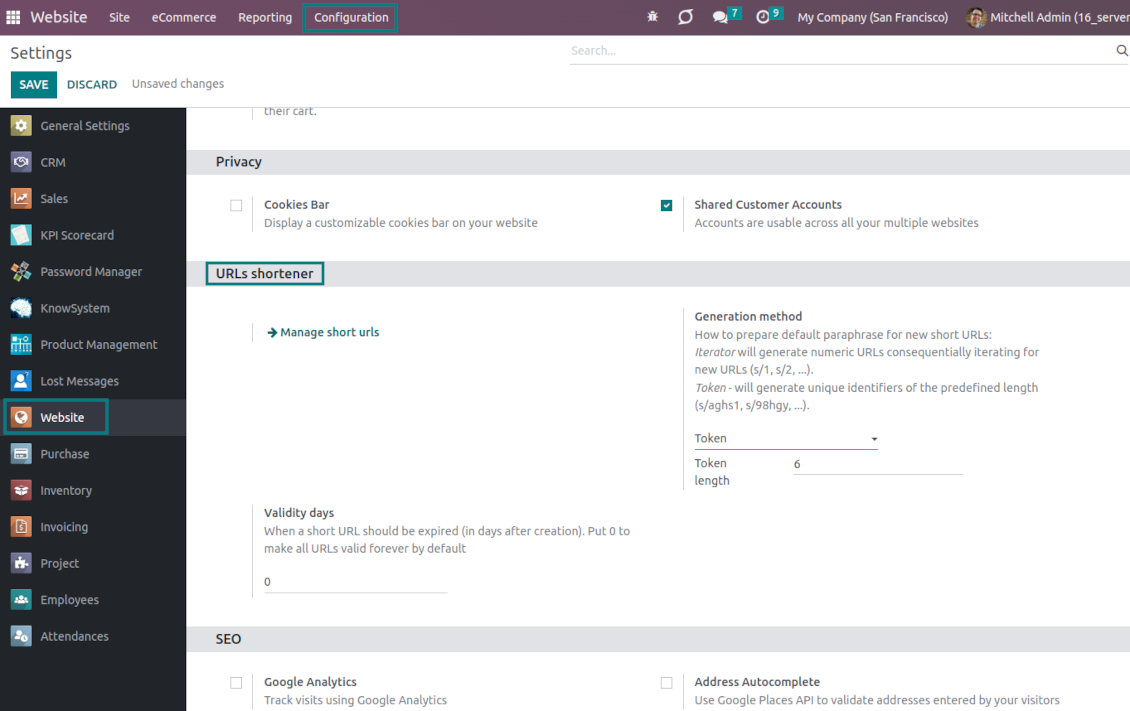
Introduce memorable and human-readable URLs of the type '/s/[token]' for any Odoo website address. What is preferable to share: example.com/s/desk or example.com/shop/customizable-desk-config-9#attr=7,4,47?
Automatic or custom URLs
Configure the rules for automatic creation of short URLs based on iterator and token (for example, /s/12 and /s/rh72ko) or apply your own SEO-friendly key words (for example, /s/desk, /s/best-chairs)
Short URLs for any link types
The app works equally for dynamic controllers (e.g., a product page or even store pages with chosen filters) and static website pages (including custom ones). Also, the shortener might redirect to the page translations.
QR codes for website links
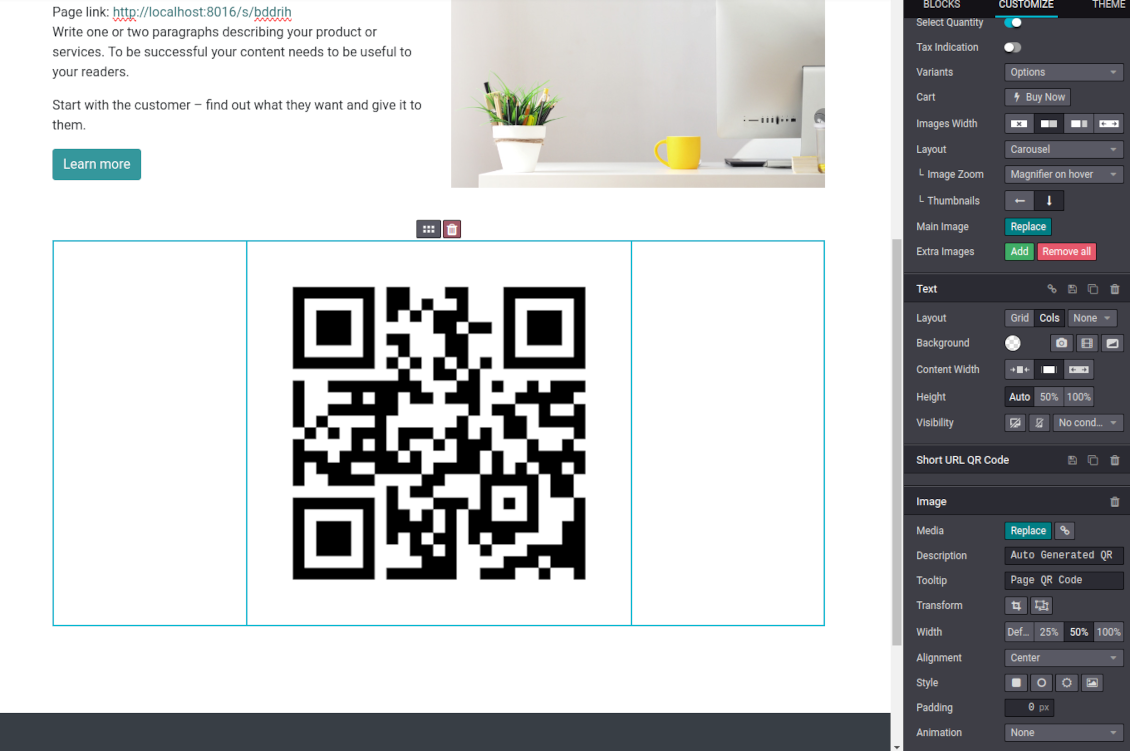
Each short URL peers with an automatic QR code image that might be downloaded, shared or added to Odoo website pages
Multi channels control
Have as many short links for a single address as needed for various purposes. Share one on Facebook, another - on Twitter, and a special one - for specific partners. Then, count redirects for each source.
Comfortable administration
Use the URL shortener right while customizing the website or in Odoo's advanced backend. Make a link soon expired or forever-lasting. Update tokens at any moment or archive short links if it is no anymore valid
Website snippets
The app introduces the special website snippets which might be added to any Odoo website's inner content. Such a snippet will find or create a short URL or URL QR code right when a visitor opens a page
Available for scripts and custom add-ons
Developers might use the app to find or create a short URL or QR code image for a target website address by applying a single Python method.
URL shortener administration
Website interface for short URLs
-
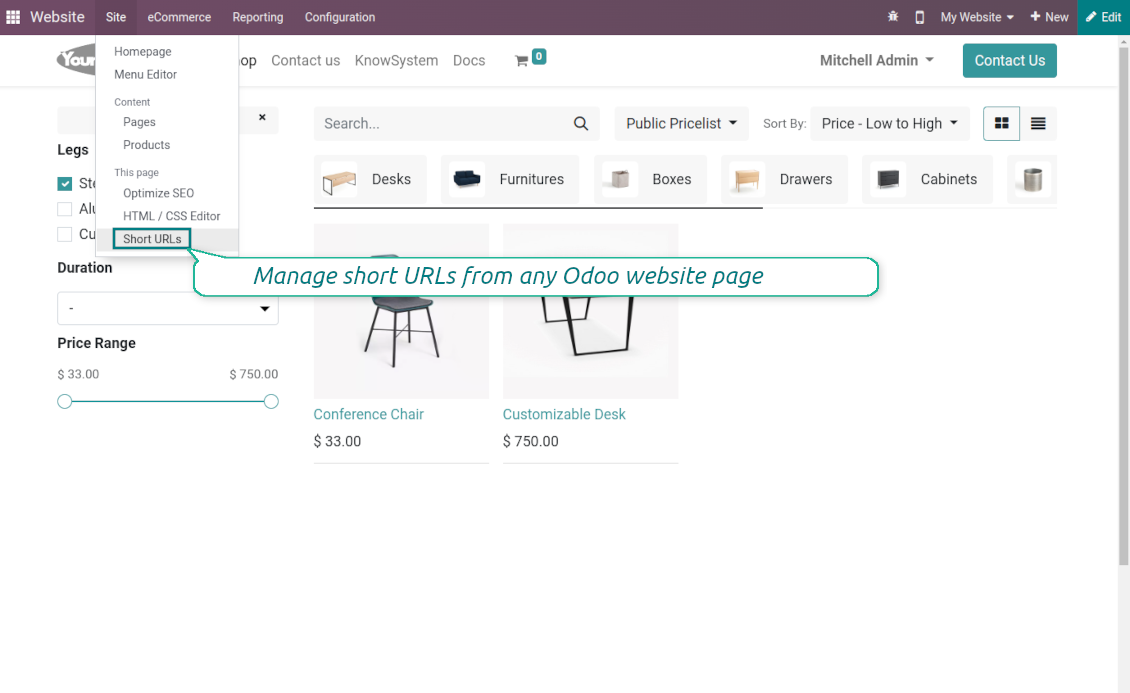
To start managing short links click on Customize > Short URLs from any page
-
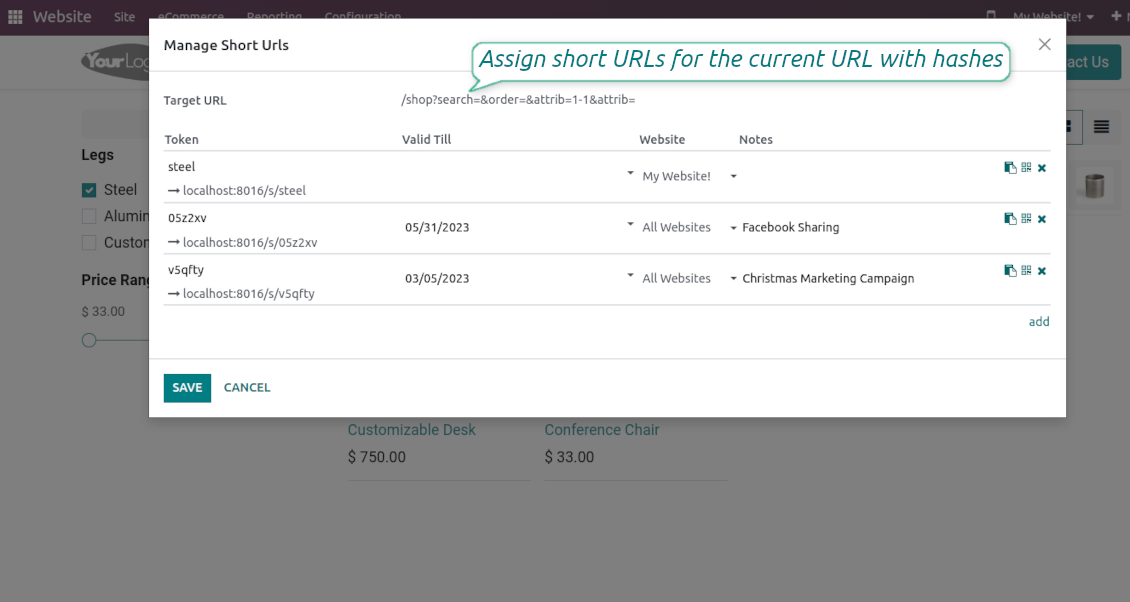
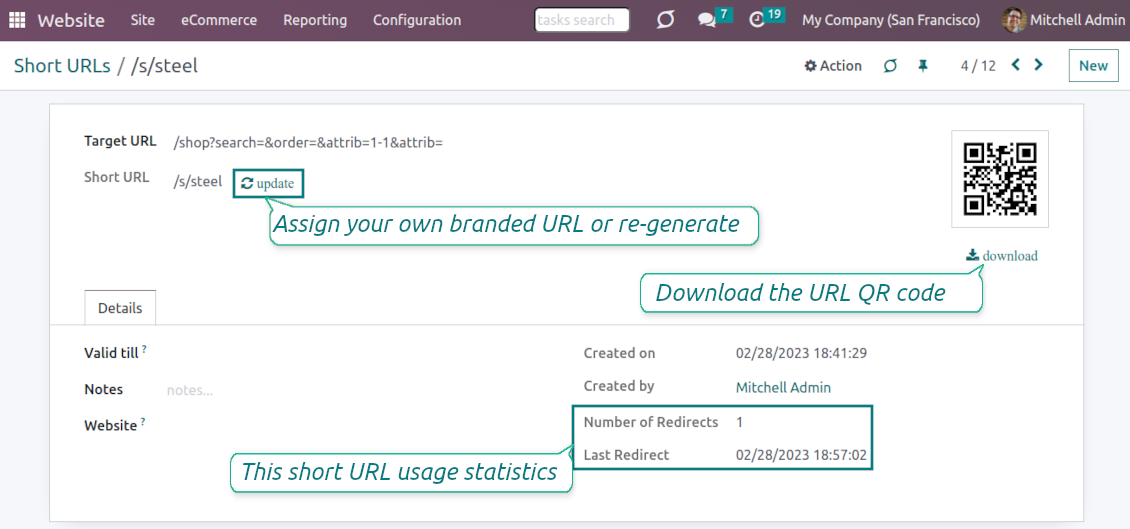
The app would automatically retrieve a target web address with all search and hash parameters from a browser. Change this redirect URL if needed: available short links would be recalculated
-
Create new short links based on the default tokens or custom keywords. Archive obsolete URLs
-
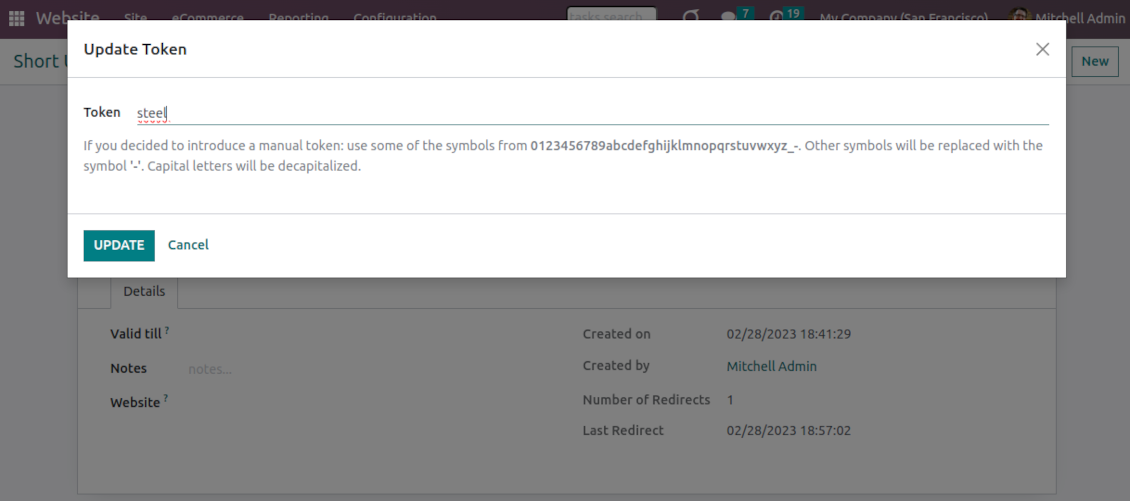
Update existing addresses: change token, assign expiration date, apply to this website or to all sites (the app fully supports Odoo multi-website mode)
Advanced backend links' editor
-
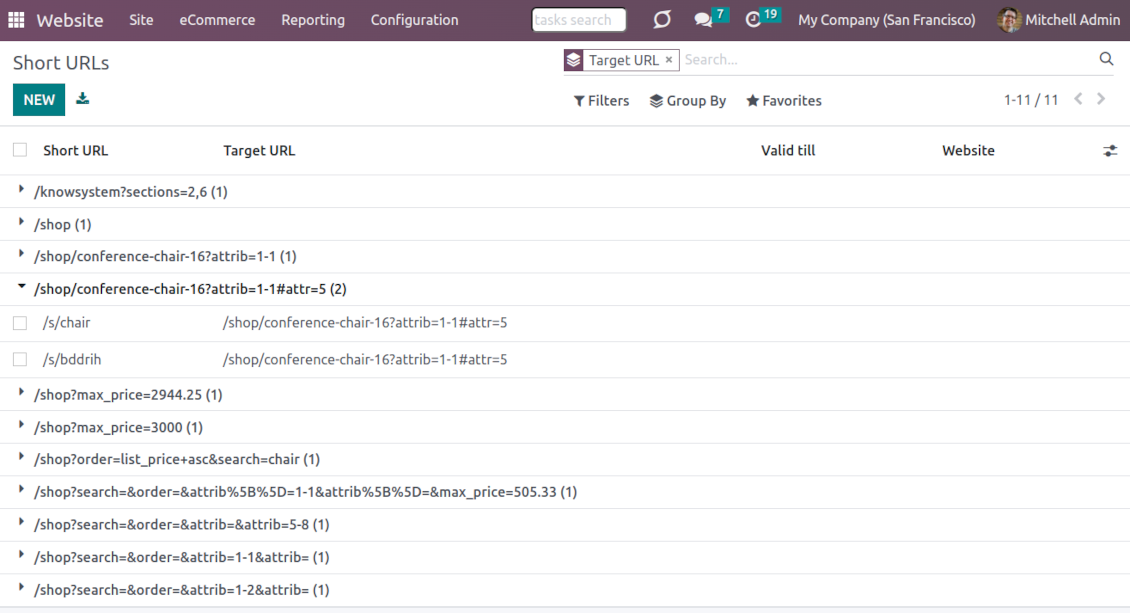
Find all short links by all websites under the menu Websites > Settings > Short URLs
-
Group by website or target URL (there might be multiple short links for each). Archive or restore links in batch
-
Create a new short URL in a few seconds: the only thing required is to introduce a target web address
-
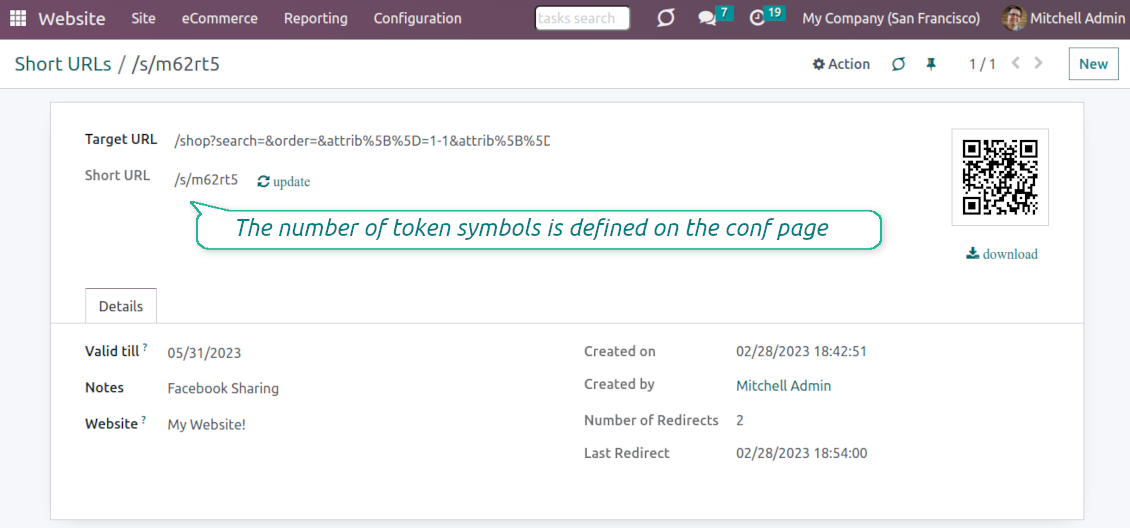
Apply flexible settings: validity date to make a link auto expired, notes to always know why this URL has been introduced, website to restrict usage for a specific site or to use a link globally.
Automatic short URLs generation
-
It is not always possible to prepare a branded URL for each address. For example, when you have thousands of website pages. For such cases define a default automatic method
-
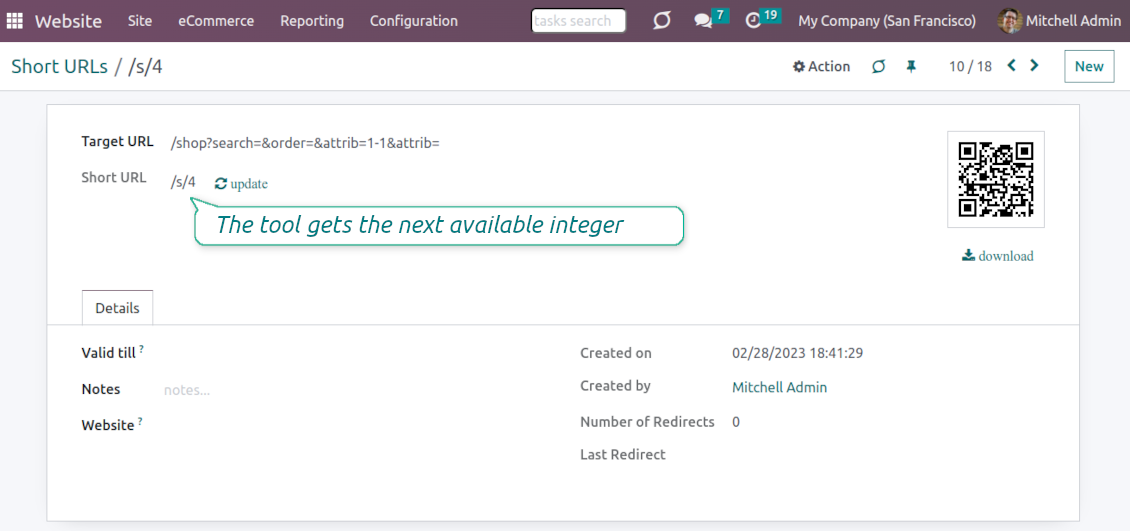
Use the 'iterator' to generate a link with a succeeding number at the end. For instance, 'example.com/s/112'. The app would automatically increment a number when a new short URL is registered
-
Use the 'token' approach to generate a unique symbols row of a predefined length (it should not be less than 5 symbols to have enough unique combinations). For instance, 'example.com/s/uo71jh'
-
A default short URL would be entered as soon as you decide to create a new redirection. Simultaneously, you can always change that to a custom sentence or create a new alternative short URL. Do that for the most important addresses, addresses you would like to print on your business cards, addresses that are assumed to enter manually, etc.
Short URLs for developers
Using short URLs in scripts
-
While developing a custom add-on, script, or server action you might be interested to have a short URL for certain website addresses. The tool lets us do that efficiently
-
To that end you should trigger the method 'action_find_surl' of the model 'short.url.redirect'
-
As arguments it should receive:
target_url- string - relative web path. E.g. "/shop/customizable-desk-config-9#attr=7,4,47)"tocreate- boolean - whether to create a new short URL if none exists for the target URLalwaysvalid- boolean - whether to search short URLs without expiration or yet valid but soon expired links are also finewebsite_id- integer - if False the app would search only global URLs, otherwise also of a specific website (applicable for the multi-website mode)qr_base_url- boolean - if False the method would return a final URL, if True - a QR code content. -
The method would return a string - a found short URL (e.g. '/s/desk'), a binary content of a QR code, or False if nothing is found.
-
For instance:
my_short_url = self.env["short.url.redirect"].action_find_surl("/shop/customizable-desk-config-9#attr=7,4,47", True, True, 1, False)
Website Snippet for auto short links
-
The website menu 'Customize' and the backend menu 'Short URLs' are available only for Odoo website designers. For certain pages, you might be interested to show a short link for simple visitors as well
-
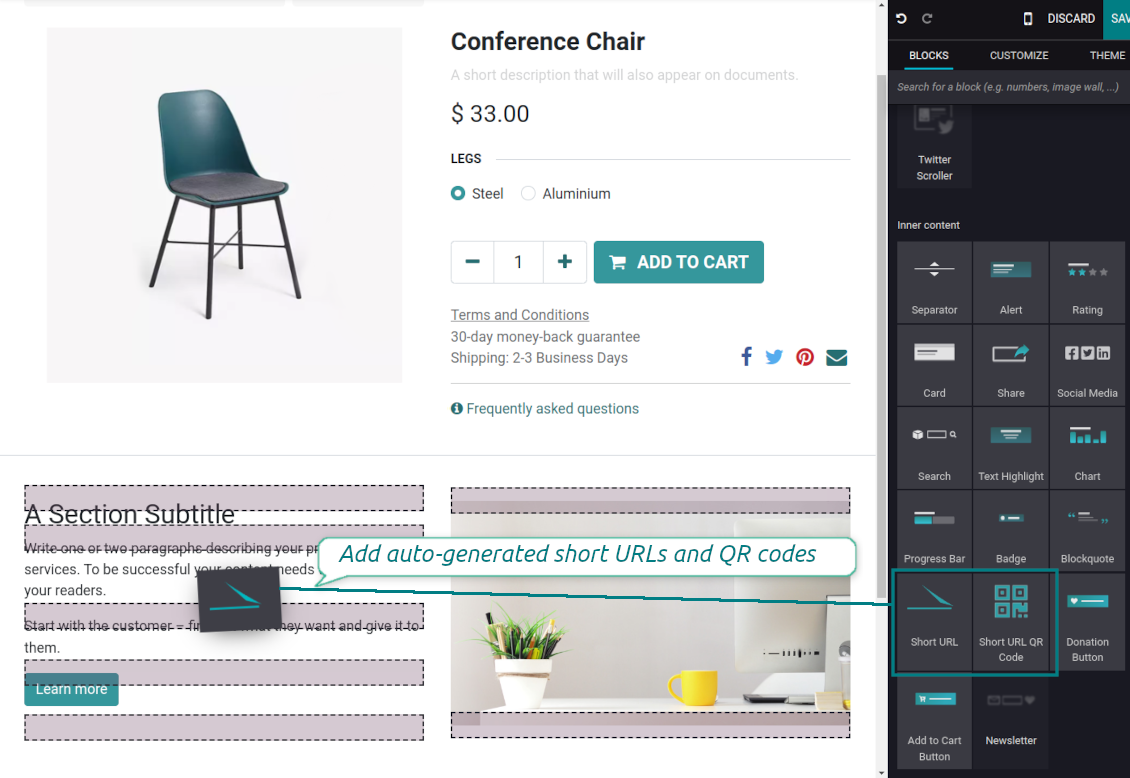
To that goal, you might drag and drop the special website editor snippets 'Short URLs' and 'Short URL QR Code'
-
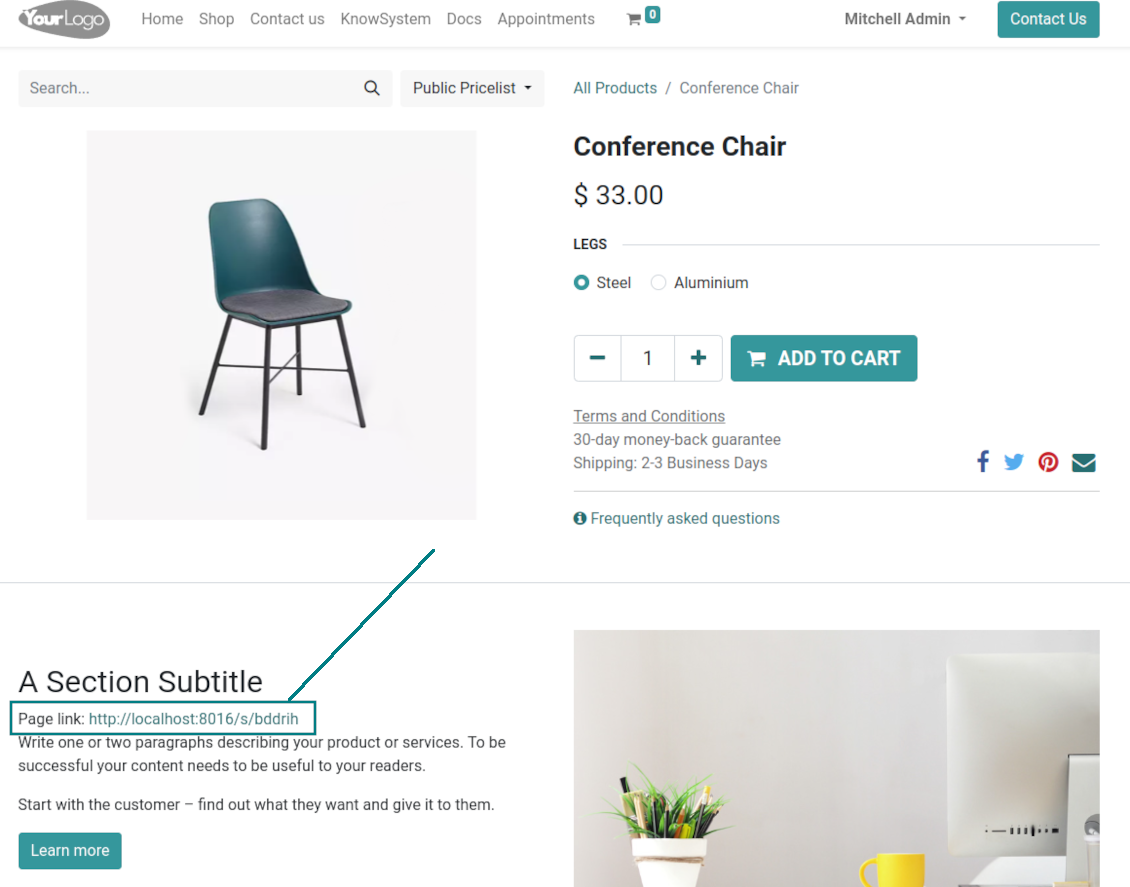
The snippet 'Short URLs' adds a text block with a short link. Alternatively, you may add an XML line with the tag
awith the HREF"#"and the class"short_url_widget" -
The snippet 'Short URL QR Code' adds a QR code image that you may customize using the standard Odoo website designer tools
-
Each time a page with such a snippet is opened, a short URL will be searched and - if not found - created. In this way, you may show a visitor a valid short URL or its QR code, which he/she might copy, share, and scan
-
Take into account: the snippets search only for always valid global short URLs.
관련 자주 묻는 질문 Website URL shortener Odoo v.16
도구의 업데이트 정책은 무엇입니까?
현재 Odoo Apps Store 정책에 따르면:
- 버전 12.0 이하용으로 구매한 모듈은 12.0까지의 모든 버전에 접근할 수 있습니다.
- 버전 13.0부터는 모듈 버전마다 따로 구매해야 합니다.
- 버전과 관계없이 구매하면 해당 메이저 버전 내의 모든 업데이트와 버그 수정 권한이 있습니다.
faOtools 팀은 해당 정책을 통제하지 않습니다. 문의는 Odoo Apps Store 담당자에게 직접 하세요.
앱을 Odoo.sh에 어떻게 설치하나요?
가장 단순한 방법은 Odoo 스토어의 기본 제공 워크플로를 사용하는 것입니다:
1. 모듈 페이지를 열고 Deploy on odoo.sh 버튼을 클릭합니다.
2. 그러면 GitHub 페이지로 이동합니다. 계정에 로그인한 뒤 'Create a new repo'를 클릭하거나 기존 저장소를 사용하세요. 저장소는 비공개여야 합니다. OPL-1 라이선스 앱을 공개하는 것은 허용되지 않습니다. 필요하면 Odoo.sh 프로젝트용 새 repo를 만드세요.
3. 그런 다음 odoo.sh로 가서 Deploy 버튼을 클릭합니다. 팝업에서 결정을 제출하고 'Continue.'를 클릭합니다. 그러면 설치가 시작됩니다.
이 단계로 프로젝트의 프로덕션 브랜치에 앱이 설치됩니다. 다른 브랜치에 앱을 배포하거나 모듈을 업데이트하려면 다음을 수행하세요:
1. Odoo 스토어에서 앱 소스 코드를 업로드합니다.
2. 모듈을 필요한 GitHub 저장소에 커밋합니다. 앱 폴더/파일이 무시되지 않는지 확인하세요(즉 repo의 .gitignore에 넣지 마세요). 저장소는 odoo.sh가 자동 생성하며 기본적으로 중요한 항목(예: /lib)이 포함될 수 있습니다. 모듈의 모든 디렉터리, 하위 디렉터리, 파일을 예외 없이 업로드하세요.
3. odoo.sh 프로젝트의 대상 브랜치를 Deploy하거나, 설정이 그렇게 되어 있으면 자동 빌드될 때까지 기다립니다.
자체 서버에 앱은 어떻게 설치하나요?
2. Odoo 서버를 다시 시작합니다;
3. 개발자 모드를 켭니다(기술 설정);
4. 앱 목록을 업데이트합니다(앱 메뉴);
5. 앱을 찾아 'Activate'/'Install'을 누릅니다;
6. 앱 페이지에 안내가 있으면 따릅니다.
앱에 추가 기능이 있는 것을 봤습니다. 나중에 구매해도 되나요?
네, 물론입니다. 동시에 Odoo가 모든 의존성을 장바구니에 자동 추가하므로, 이중 결제를 피하려면 이미 구매한 도구를 제외하십시오.
앱을 Odoo.sh에 배포했는데 테스트에서 경고/오류가 보입니다
빨강/주황 경고는 앱 기능에 영향을 주지 않습니다. 안타깝게도 표준 자동 테스트가 앱 목표와 충돌하는 동작을 가정해 모듈이 통과하지 못할 때가 있습니다. 예를 들어 우리는 가격 계산을 바꾸는데, 표준 Odoo 모듈 테스트는 최종 가격을 표준 알고리즘과 비교합니다.
먼저 배포된 데이터베이스 기능이 정상인지 확인하십시오. 모두 올바르게 동작합니까?
그래도 경고가 실제 기능에 영향을 준다고 생각되면 연락해 주시고 전체 설치 로그와 배포된 모듈 전체 목록(코어 및 서드파티 포함)을 보내 주십시오.
앱을 귀사에서 직접 구매할 수 있나요?
아니요, 도구는 오직 공식 Odoo 앱 스토어.
할인을 받고 싶습니다
유감스럽게도 개별 가격을 제공할 기술적 수단이 없습니다.
Odoo Online (SaaS) 데이터베이스에 앱을 설치할 수 있나요?
아니요, 서드파티 앱은 Odoo Online에서 사용할 수 없습니다. 유감스럽게도 Odoo SaaS가 이를 차단합니다.
도구가 다른 앱에 의존합니다. 그것도 구매해야 합니까?
예, 도구가 올바르게 동작하려면 의존성에 표시된 모든 모듈이 필요합니다. 앱 페이지의 가격에는 필요한 의존성이 이미 포함되어 있습니다.
모듈의 미국 달러 가격은 얼마입니까? 왜 바뀌었습니까?
모듈 가격은 유로로 책정됩니다. Odoo 스토어는 내부 환율에 따라 다른 통화로 변환합니다. 따라서 환율이 갱신되면 미국 달러 가격이 바뀔 수 있습니다.
영어 이외 언어의 앱·웹사이트 문구는 AI 지원으로 작성되며 공식 Odoo 번역과 맞춥니다. 오류를 발견하시면 번역 정확성 티켓을 보내 주세요 그러면 수정하겠습니다.
Odoo 데모 데이터베이스(라이브 미리보기)
이 앱에는 무료 맞춤 데모 데이터베이스를 제공할 수 있습니다.
문의에 전화번호나 신용카드가 필요 없습니다. 30초가 넘지 않는 짧은 이메일 가입만 하면 됩니다.
요청하시면 개별 라이브 미리보기 데이터베이스를 준비합니다. 약 2주 동안 테스트를 하고 가정을 확인할 수 있습니다.
버그 신고
버그나 일관되지 않은 동작을 발견하면 주저 말고 문의하세요. 구매 후 60일 이내 수정을 보장하며, 그 이후에도 도구를 개선하는 데 관심이 큽니다.
문의에 전화번호나 신용카드가 필요 없습니다. 30초가 넘지 않는 짧은 이메일 가입만 하면 됩니다.
요청에 가능한 한 많은 세부정보를 포함하세요: 스크린샷, Odoo 서버 로그, 문제 재현 방법의 전체 설명 등. 일반적으로 이슈에 대한 작업 계획 준비(버그가 확인된 경우) 또는 수행 지침 제공(그 외의 경우)에는 영업일 기준 며칠이 걸립니다.
공개 기능 요청 및 모듈 아이디어(무료 개발)
도구를 개선하려는 동기가 강하며 어떤 피드백이든 감사드립니다. 요구 사항이 공익에 맞고 효율적으로 구현될 수 있다면 팀이 할 일 목록에 넣습니다.
이런 할 일 목록은 정기적으로 처리되며 추가 요금이 없습니다. 기한과 최종 디자인을 약속할 수는 없지만, 투자와 위험 없이 원하는 기능을 얻는 좋은 방법이 될 수 있습니다.
문의에 전화번호나 신용카드가 필요 없습니다. 30초가 넘지 않는 짧은 이메일 가입만 하면 됩니다.

The tool to flexibly structure Odoo attachments in folders and synchronize directories with cloud clients: Google Drive, OneDrive/SharePoint, Nextcloud/ownCloud, and Dropbox. DMS. File Manager. Document management system
398€
The tool to automatically synchronize Odoo attachments with OneDrive files in both ways
487€
The tool to automatically synchronize Odoo attachments with Google Drive files in both ways
487€

The tool to build a deep and structured knowledge base for internal and external use. Knowledge System. KMS. Wiki-like revisions.
398€
The tool to set up KPI targets and control their fulfillment by periods. KPI dashboards. Dashboard designer. KPI charts

The tool for time-based service management from booking appointments to sales and reviews
398€
즐겨 쓰는 AI 채팅에서 MCP로 Odoo를 관리하는 도구. Claude. MCP를 지원하는 모든 AI.

The tool to combine different Odoo events in a few configurable super calendars