This app lets organize the safe passwords keeping system to structure, find and securely share password bundles.
- a core app to manage vaults and passwords. 가격은 198€.
- an extension to add custom fields for password keys. Features assumed by this app are marked by the icon . 가격은 38€.
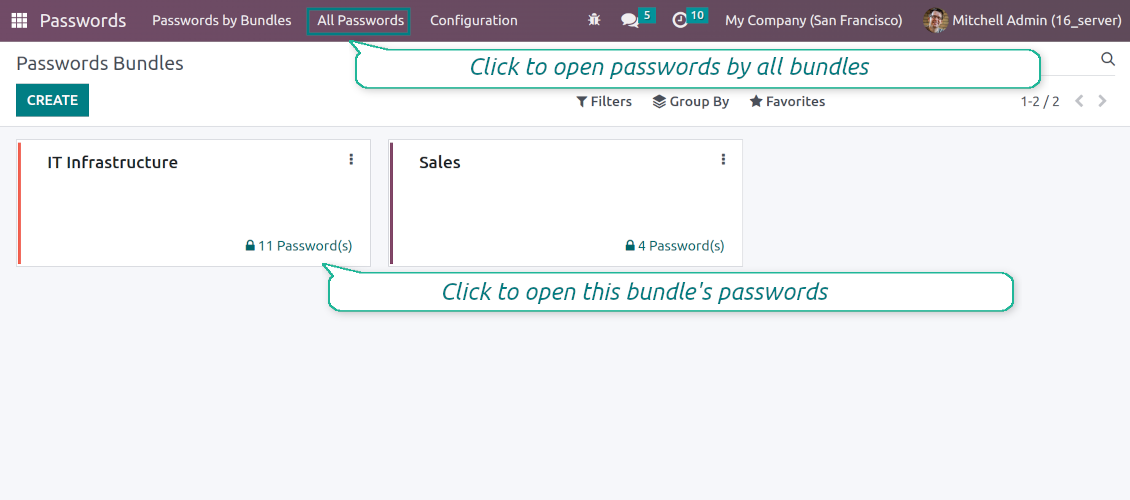
Shared passwords vaults for team use
Passwords are combined in bundles: each might be shared with any user and any user group
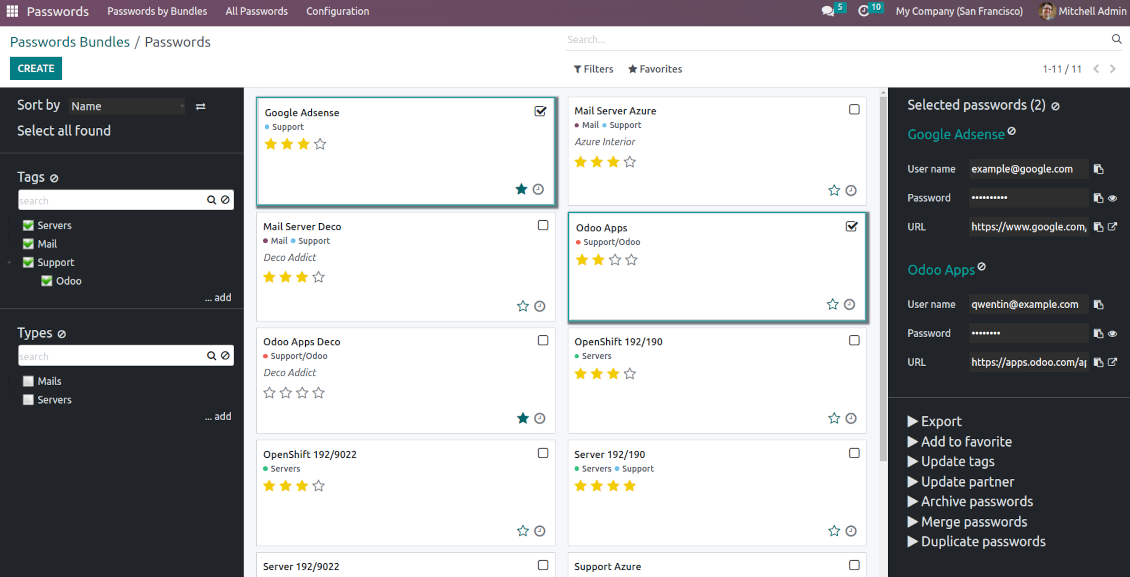
Single view interface
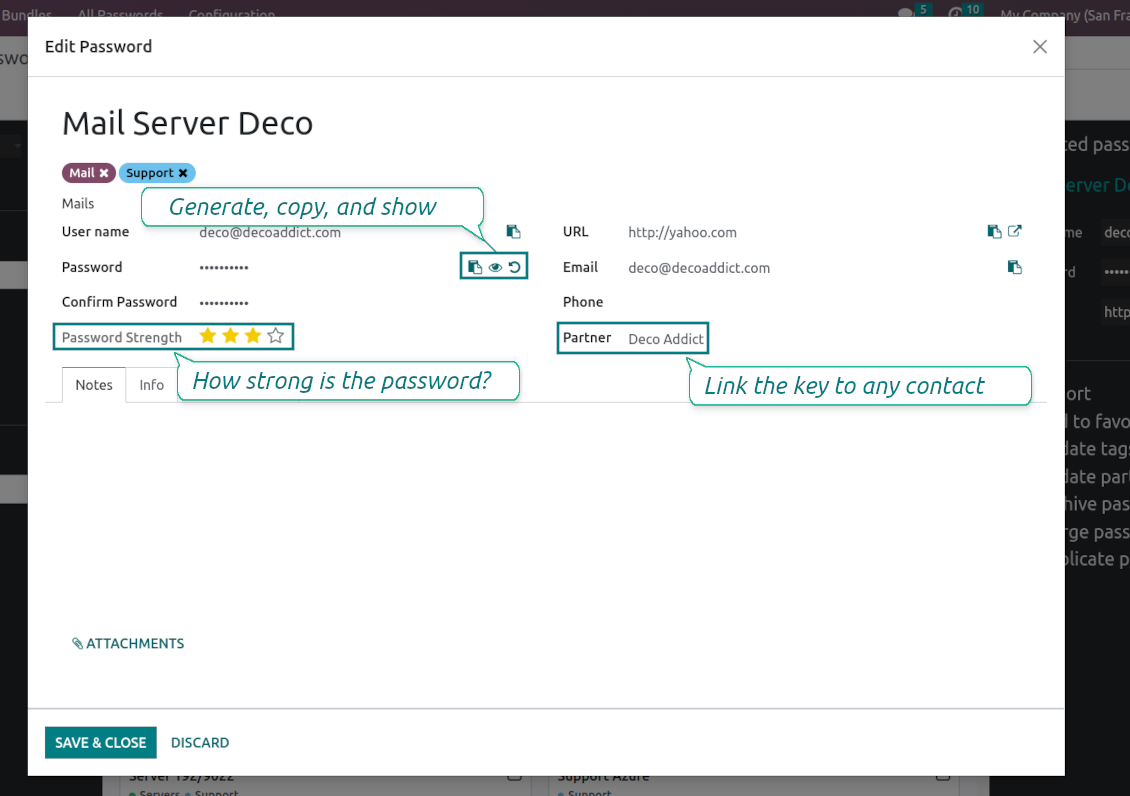
Structure vault by tags and types, sort keys, proceed with mass actions, copy credentials to the clipboard from the same interface
Encrypted and protected password manager
The tool introduces a few security layers to minimize the possibility of data leaks
Portal sharing
Optionally share passwords with Odoo portal contacts
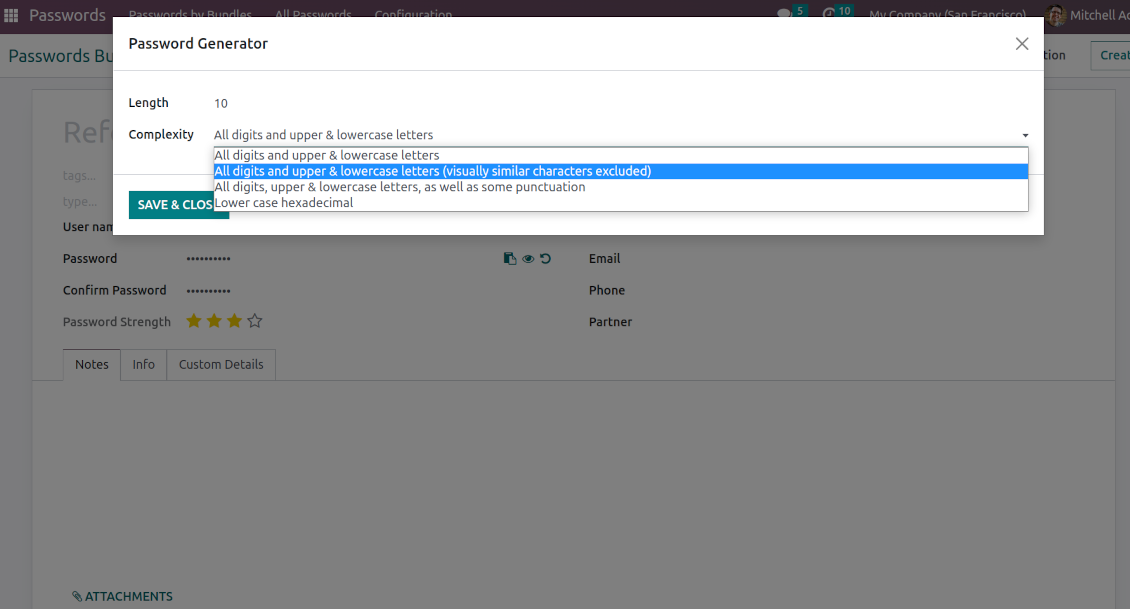
Auto generation
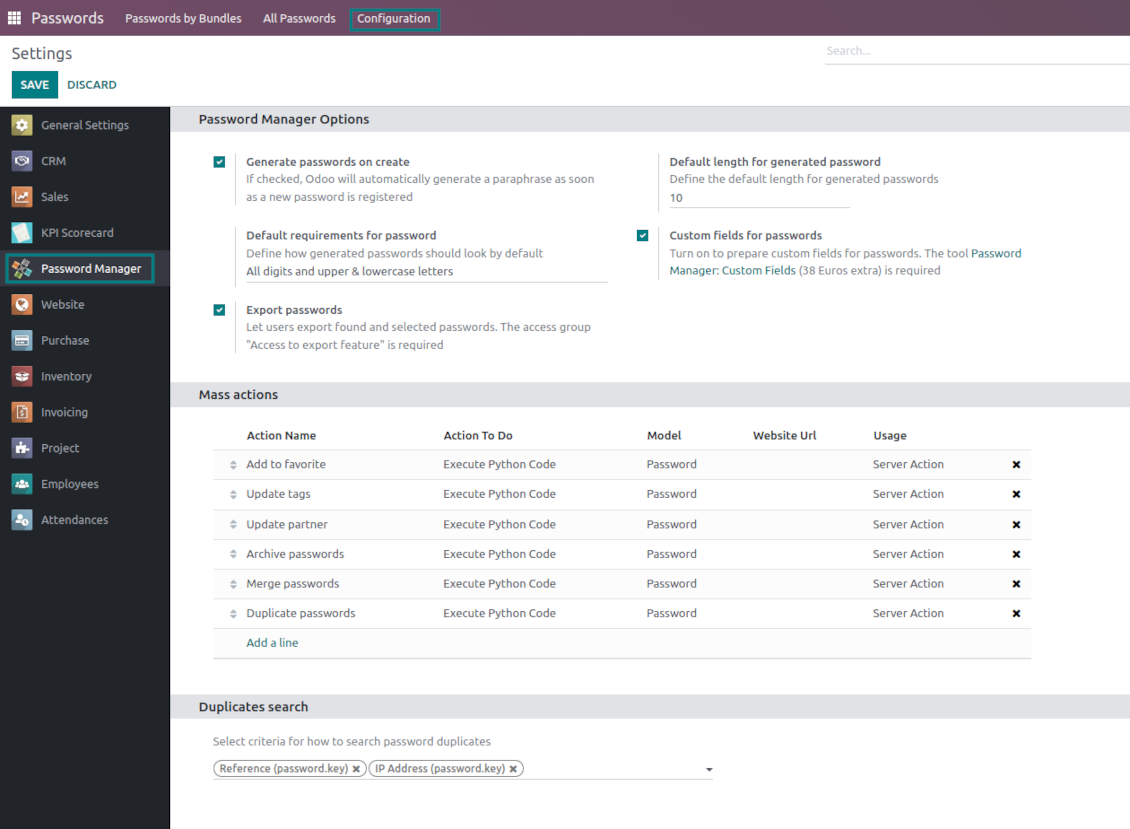
Force Odoo and let users create passwords based on chosen length and requirements
Passwords quality check
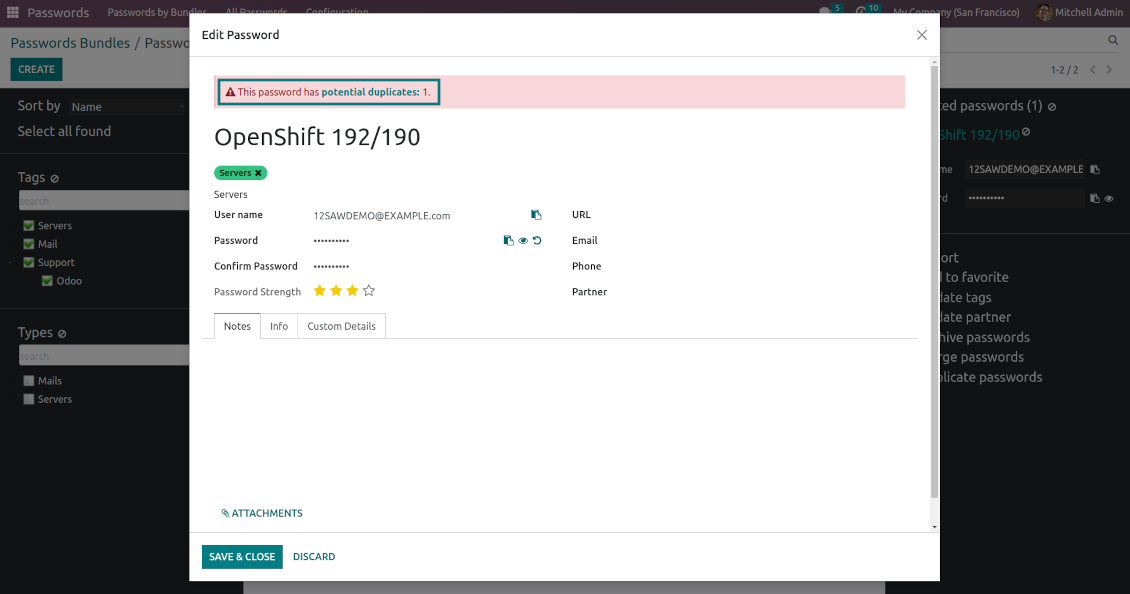
Password strength is estimated in real-time to make sure no weak passwords are introduced. Potential duplicates are easily detected
Batch update, export, and import
Configure the mass actions: export, update tags or linked partners, archive or restore, import vaults from an electronic table, etc.
Custom fields
Define passwords' typology and add custom attributes.
Very good password management module
Easy installation and quick setup
Shared use, encryption, and protection of passwords
Sharing Policies
-
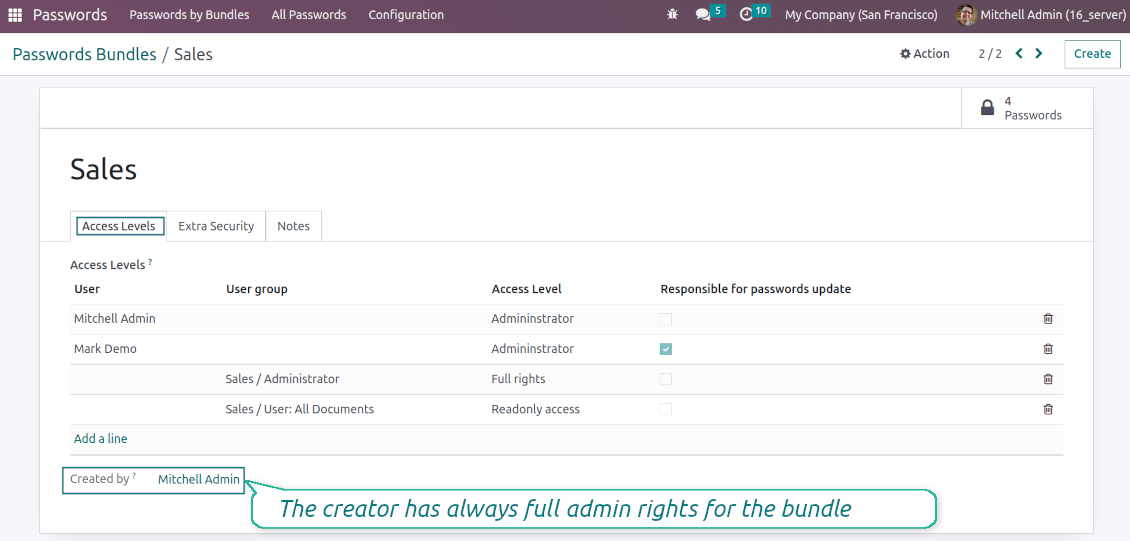
To grant access for a bundle just indicate a user or a user group in the table of access levels
-
Bundle administrators may access, update or delete the bundle, its passwords, and its tags. Admins are assumed to manage access levels, modify update policies, and set extra passwords
-
Full rights users may access, update or delete passwords and tags related to the bundle, but they can't change the vault itself, its access levels, or settings
-
Readonly access users may observe and address passwords and tags of the bundle. Such users can't modify any objects
-
The bundle creator is always its administrator. The Odoo super admin (with id 1) has full rights to all bundles and passwords
-
For bundle read-only users, it is possible to additionally restrict access to specific password keys. In particular, define the groups or/and users that may see a password. A read-only user should either have one of the mentioned groups or should be among the mentioned users. If none of the fields are defined, all bundle users can access a password
Security Layers
-
Have as many password vaults for any user group as you need
-
All passwords are symmetrically encrypted. It means that to decrypt a password, plotters should know the exact decryption algorithm and a bundle decryption key/bundle salt and password
-
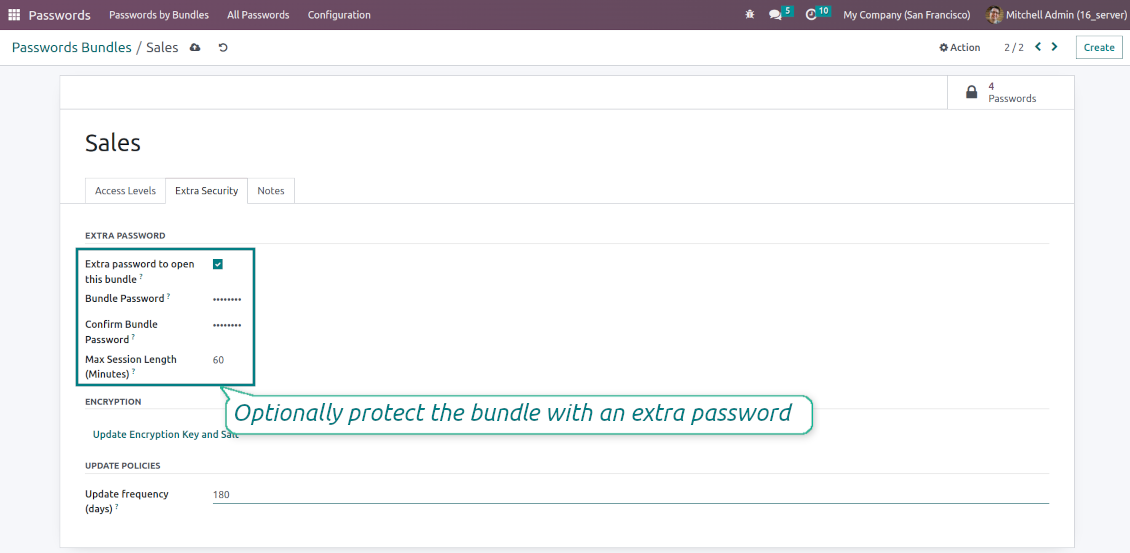
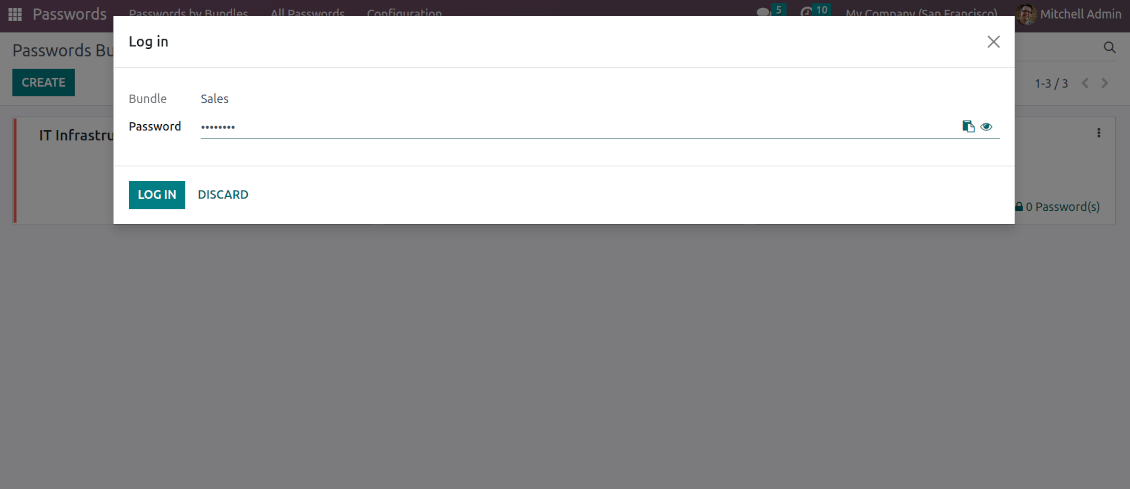
For each bundle, you can assign an extra password, which would be required to enter each time any user applies to that bundle or its passwords. The session period after successful login is set up in minutes
-
Vault extra password is also kept in the database decrypted, and might be changed by a bundle administrator (sure, if he/she enters a correct old paraphrase). If the bundle password is set, keys are encrypted by that password hashed by an auto-generated salt
-
For each bundle, it is possible to define password update policies in days. Then, the user who is set up as 'Responsible for password updates' would be assigned special activities to update keys.
Portal vaults
-
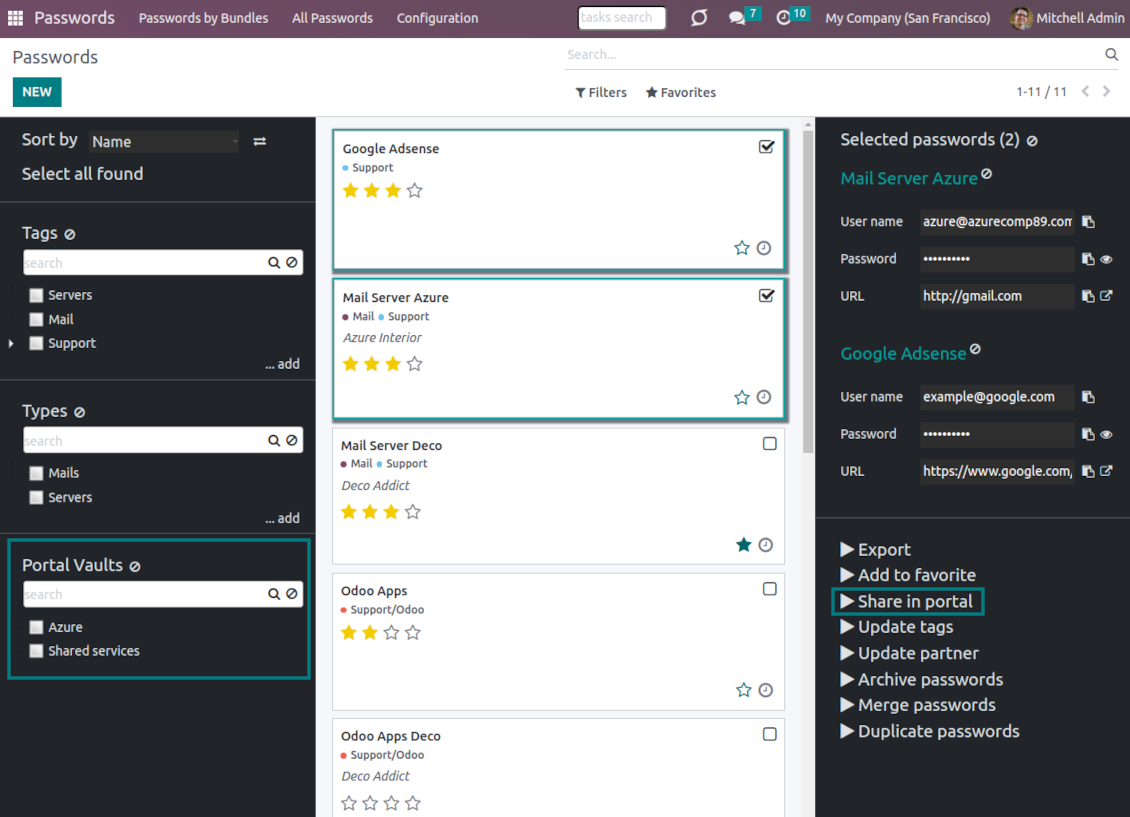
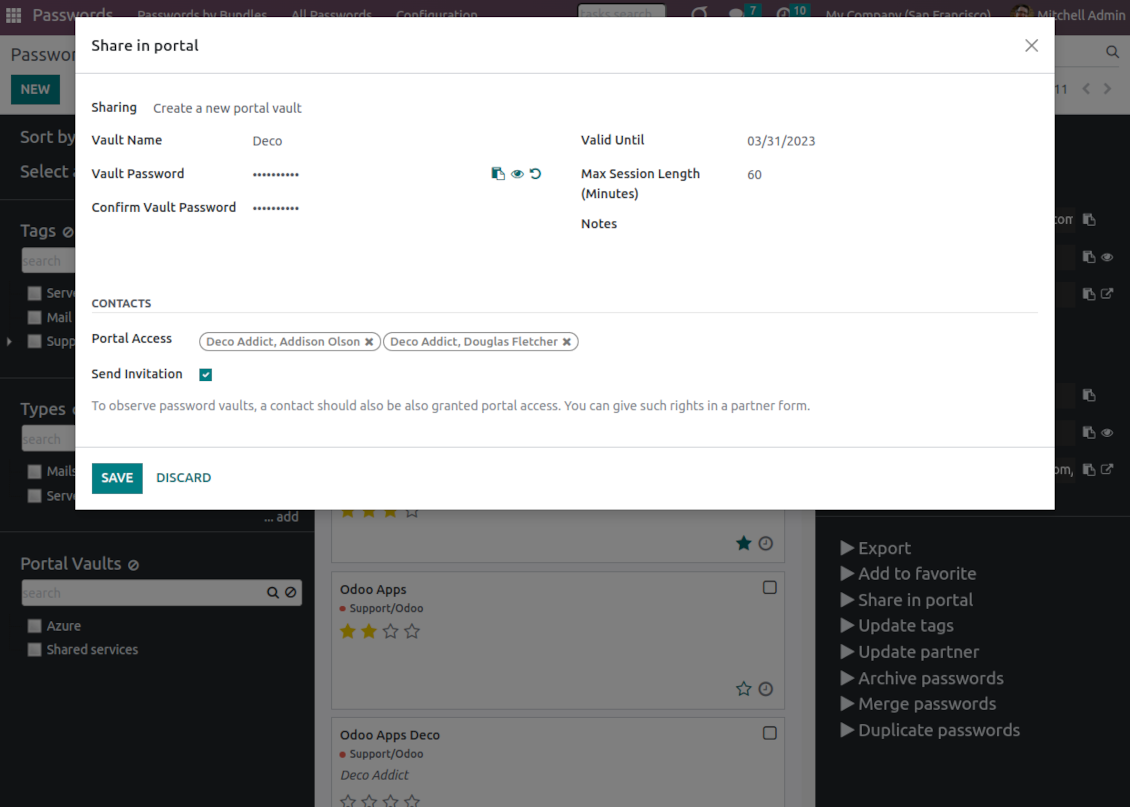
Optionally turn on password sharing with portal users. To that goal, on the configuration page tick the box "Portal vaults" and add the mass action "Share in portal"
-
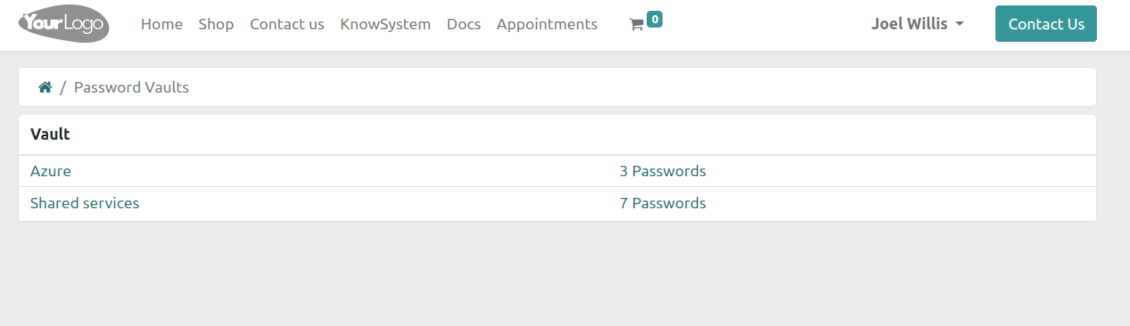
Within a password bundle, create an unlimited number of portal password vaults shared with an unlimited number of Odoo partners
-
Each bundle internal user can create or update any portal vault linked to this bundle. To add a password for a vault, select the required keys and trigger the mass action "Share in portal". Optionally send an invitation during sharing
-
Navigate over and manage available vaults right from the backend navigation panel
-
Define a validity date to auto-archive password vaults for a temporary sharing
-
A contact may access all vaults where he/she or his/her company is indicated in the field "Portal Access". Take into account that a user should have portal rights that might be granted from a partner form view (Action > "Grant portal access")
-
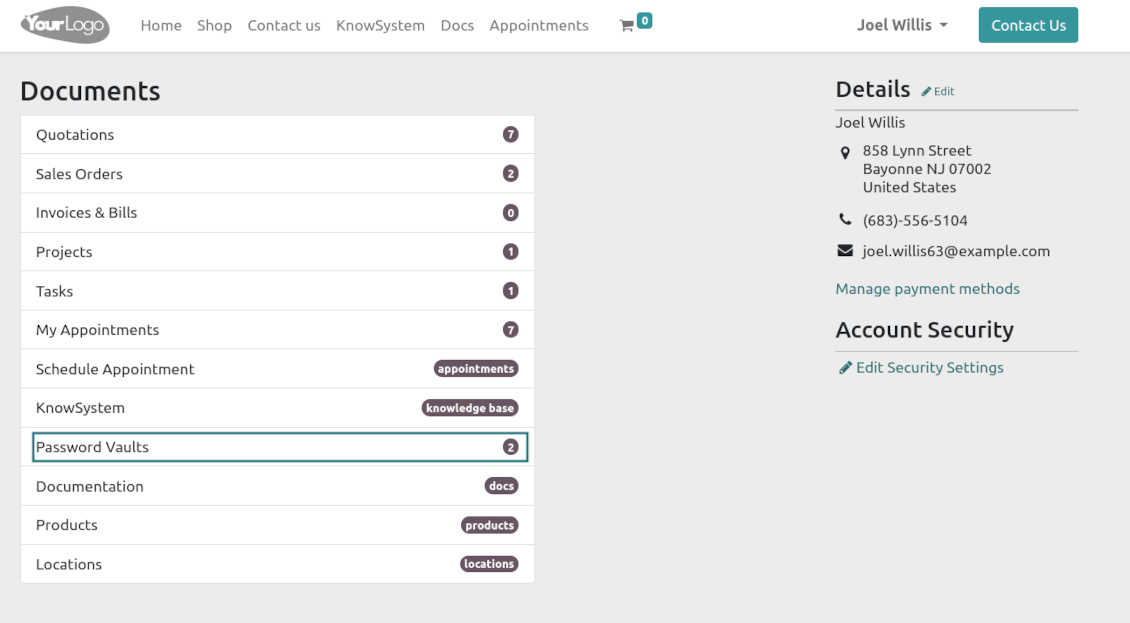
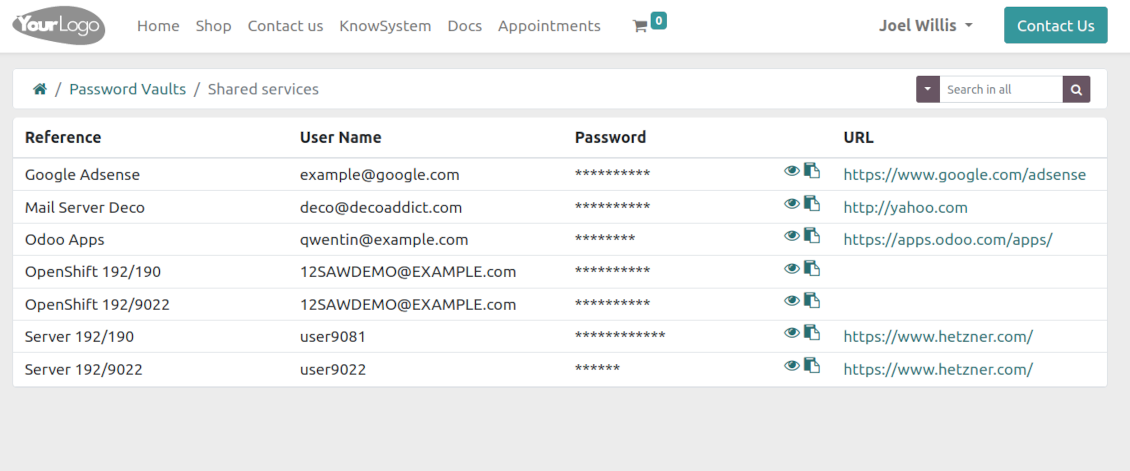
Portal users can open password vaults from the specially introduced entry in the home portal page
-
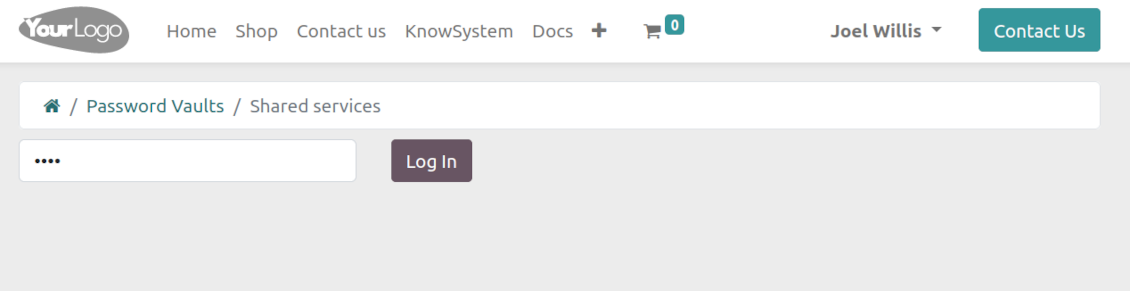
Each portal vault is obligatorily secured with a password. All keys are kept encrypted and might be decrypted only after entering the vault password. The portal session length is defined per each vault
-
By default, only a password reference, user name, and password key are shown. Optionally show an URL, phone, email, and notes
-
The tool lets portal users show/hide password keys, navigate and search by shown columns.
Custom attributes for Odoo passwords
-
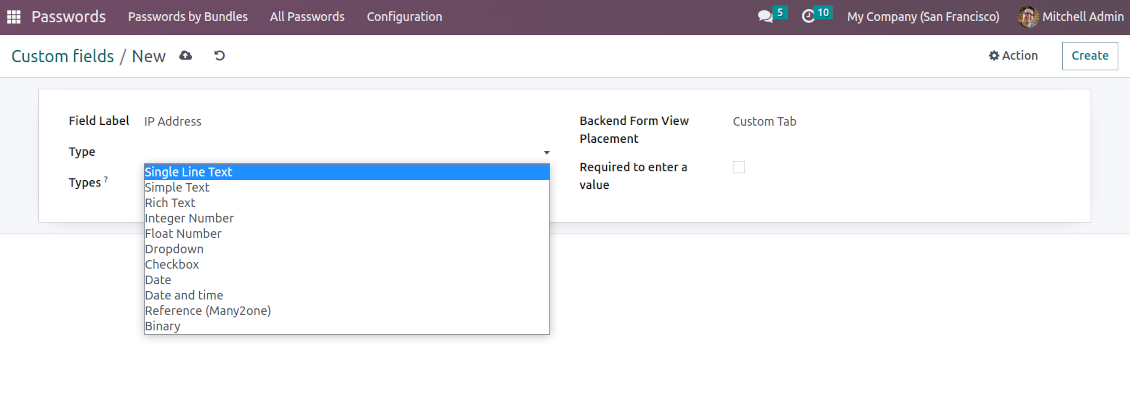
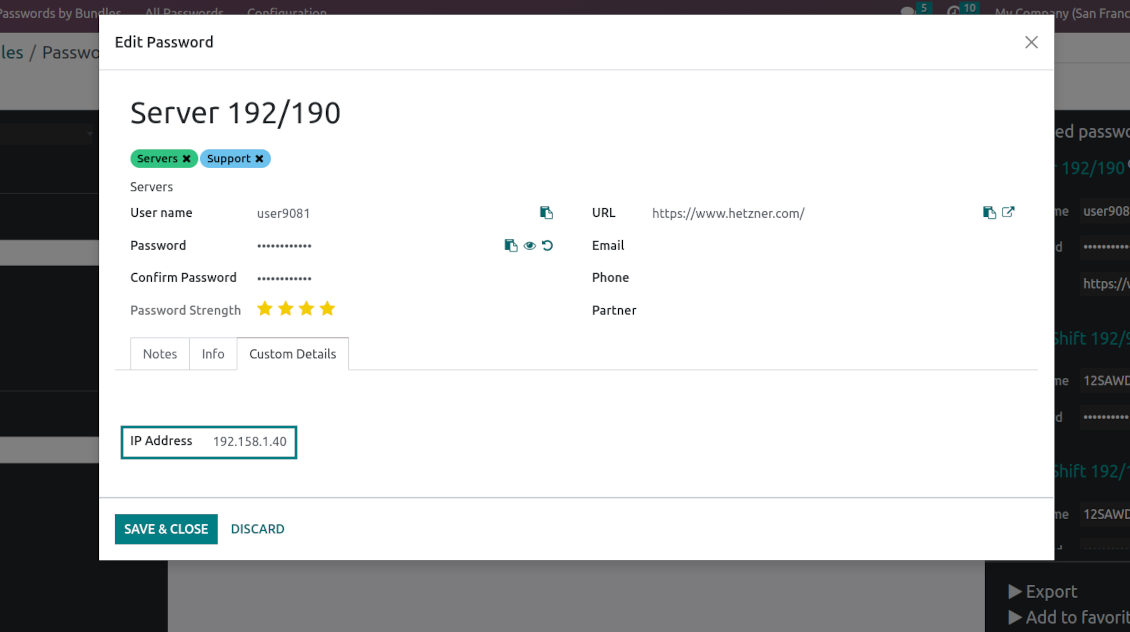
Custom attributes creation does not require any technical knowledge. In order to show a new property for passwords, just add a new field and enter the details
-
It is possible to add custom fields of the following types: single-line text (char), simple text without formatting (text), rich text (HTML-formatted text), integer or float numbers, drop-down choice with your own options (selection), checkbox (boolean), date or date and time, binary (a file to upload), reference to another Odoo document (e.g. for sale order, contact; many2one)
-
The tool lets you comfortably select an interface position of a custom field from a closed list of options
-
Distinguish passwords by type in order to show properties only for suitable ones. Thus, the set of columns for 'virtual servers' and 'email servers' might be different
-
Mark a custom field required to force users to enter values
-
Custom password fields might be imported and exported
-
The rights to create custom fields belong only to Odoo administrators.
Duplicates detection and passwords merging
-
The app introduces a configurable system to find passwords duplicates
-
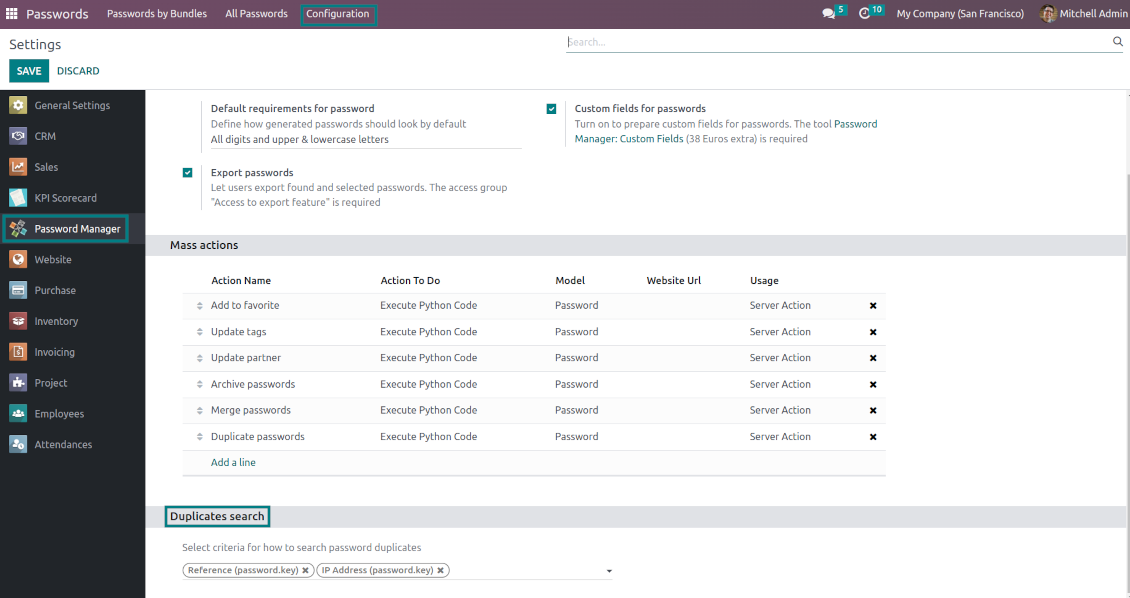
Define on your own which fields should be used to search for duplicates. Choose such fields on the app configuration page, the section 'Duplicates search'
-
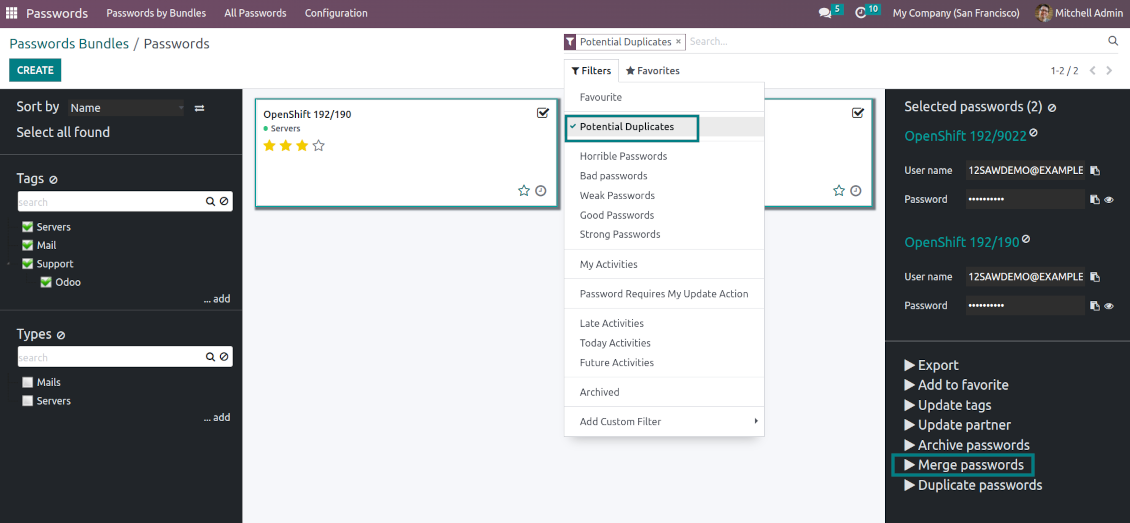
As duplicate criteria use any stored field of the following types: char (reference, user name, email, phone, etc.), text (notes), many2one (linked partner, type, etc.), date and datetime, integer, and float. Duplicates detection is possible also based on custom fields of the same types
-
For all fields, a duplicate should have absolutely the same value. For example, '123' equals '123', but '123' is not equal to '1234'. Only in the case of char fields, it is a comparison without taking into account capital letters ('Server' equals 'serVER')
-
Apply the filter 'Potential duplicates' in the passwords interface to observe candidates. You may search within a particular bundle or in all passwords simultaneously
-
When you register a new password, check also the red button on the top right corner. If it is shown, make sure you do not create a potential copy of an existing key
-
Found duplicates or just any password keys might be merged into a single record. To that end, do not forget to add the mass action 'Merge passwords' on the configuration page
-
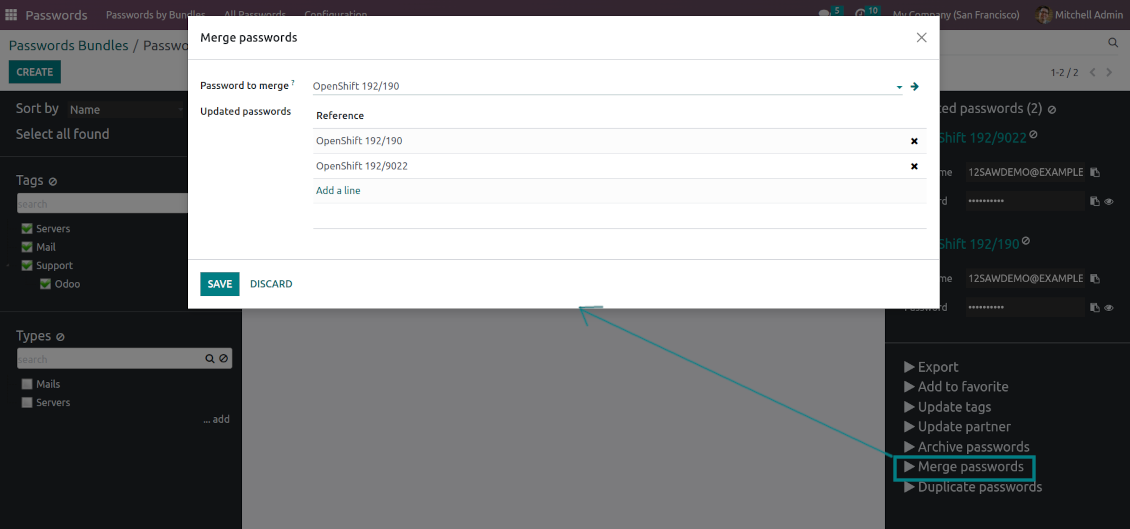
To merge passwords, select the required keys and push the mass action 'Merge passwords' on the right navigation panel
-
In the wizard, as the 'Password to merge', choose one that will be the prime source of the details. In case of conflicts, its value will be prioritized
-
In the wizard, as the 'Merged passwords', choose keys that will be used as a source of complementary details (for example, details that are missing in the main password)
-
Then, press the button 'Save'. As a result, the app will archive all the 'Merged passwords' and enrich the 'Password to merge'
-
Starting from the 'Password to merge' values, the tool will check the fields reference, bundle, user name, email, URL, phone, last password update date, and linked partner. The app will select the first found not null value
-
The app will also accumulate notes, attachments, and tags from all merged records
-
Values of custom fields will be chosen according to keys sequence starting from the 'Password to merge'. Take into account that tables (one2many and many2many fields) will be left as they are in the 'Password to merge'.
구성 및 설치 팁: Password Manager Odoo v.16
Python dependencies
To guarantee tool correct work you would need a number of Python libraries: zxcvbn, cryptography:
pip3 install zxcvbn cryptography
관련 자주 묻는 질문 Password Manager Odoo v.16
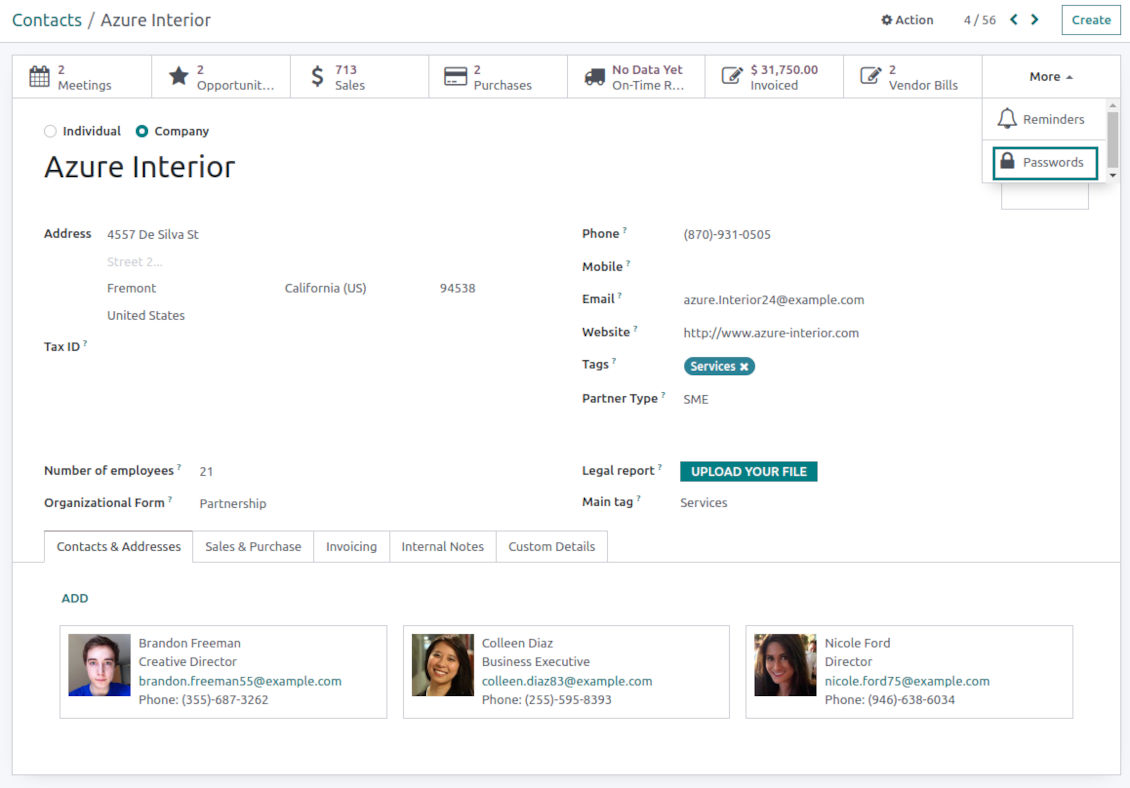
협력사의 모든 비밀번호는 어떻게 보나요?
파트너의 모든 암호를 보려면 Contacts로 가 파트너를 열고 스마트 버튼 'Passwords'를 클릭하세요. 그러면 Password manager 앱으로 이동하여 이 파트너의 모든 암호를 보게 됩니다.
비밀번호 번들(password manager)은 어떻게 삭제하나요?
보안을 위해 기본 번들 메뉴에서 'Delete' 버튼이 숨겨졌습니다. 암호 번들을 삭제하려면: 1. 번들 오른쪽 위 점 세 개 버튼을 클릭합니다 2. 번들 편집 모드로 이동한 뒤 'Save'를 클릭합니다 3. 번들 위에 'Action' 버튼이 보입니다. 클릭하고 'Delete'를 선택합니다.
도구의 업데이트 정책은 무엇입니까?
현재 Odoo Apps Store 정책에 따르면:
- 버전 12.0 이하용으로 구매한 모듈은 12.0까지의 모든 버전에 접근할 수 있습니다.
- 버전 13.0부터는 모듈 버전마다 따로 구매해야 합니다.
- 버전과 관계없이 구매하면 해당 메이저 버전 내의 모든 업데이트와 버그 수정 권한이 있습니다.
faOtools 팀은 해당 정책을 통제하지 않습니다. 문의는 Odoo Apps Store 담당자에게 직접 하세요.
앱을 Odoo.sh에 어떻게 설치하나요?
가장 단순한 방법은 Odoo 스토어의 기본 제공 워크플로를 사용하는 것입니다:
1. 모듈 페이지를 열고 Deploy on odoo.sh 버튼을 클릭합니다.
2. 그러면 GitHub 페이지로 이동합니다. 계정에 로그인한 뒤 'Create a new repo'를 클릭하거나 기존 저장소를 사용하세요. 저장소는 비공개여야 합니다. OPL-1 라이선스 앱을 공개하는 것은 허용되지 않습니다. 필요하면 Odoo.sh 프로젝트용 새 repo를 만드세요.
3. 그런 다음 odoo.sh로 가서 Deploy 버튼을 클릭합니다. 팝업에서 결정을 제출하고 'Continue.'를 클릭합니다. 그러면 설치가 시작됩니다.
이 단계로 프로젝트의 프로덕션 브랜치에 앱이 설치됩니다. 다른 브랜치에 앱을 배포하거나 모듈을 업데이트하려면 다음을 수행하세요:
1. Odoo 스토어에서 앱 소스 코드를 업로드합니다.
2. 모듈을 필요한 GitHub 저장소에 커밋합니다. 앱 폴더/파일이 무시되지 않는지 확인하세요(즉 repo의 .gitignore에 넣지 마세요). 저장소는 odoo.sh가 자동 생성하며 기본적으로 중요한 항목(예: /lib)이 포함될 수 있습니다. 모듈의 모든 디렉터리, 하위 디렉터리, 파일을 예외 없이 업로드하세요.
3. odoo.sh 프로젝트의 대상 브랜치를 Deploy하거나, 설정이 그렇게 되어 있으면 자동 빌드될 때까지 기다립니다.
자체 서버에 앱은 어떻게 설치하나요?
2. Odoo 서버를 다시 시작합니다;
3. 개발자 모드를 켭니다(기술 설정);
4. 앱 목록을 업데이트합니다(앱 메뉴);
5. 앱을 찾아 'Activate'/'Install'을 누릅니다;
6. 앱 페이지에 안내가 있으면 따릅니다.
앱에 추가 기능이 있는 것을 봤습니다. 나중에 구매해도 되나요?
네, 물론입니다. 동시에 Odoo가 모든 의존성을 장바구니에 자동 추가하므로, 이중 결제를 피하려면 이미 구매한 도구를 제외하십시오.
앱을 Odoo.sh에 배포했는데 테스트에서 경고/오류가 보입니다
빨강/주황 경고는 앱 기능에 영향을 주지 않습니다. 안타깝게도 표준 자동 테스트가 앱 목표와 충돌하는 동작을 가정해 모듈이 통과하지 못할 때가 있습니다. 예를 들어 우리는 가격 계산을 바꾸는데, 표준 Odoo 모듈 테스트는 최종 가격을 표준 알고리즘과 비교합니다.
먼저 배포된 데이터베이스 기능이 정상인지 확인하십시오. 모두 올바르게 동작합니까?
그래도 경고가 실제 기능에 영향을 준다고 생각되면 연락해 주시고 전체 설치 로그와 배포된 모듈 전체 목록(코어 및 서드파티 포함)을 보내 주십시오.
앱을 귀사에서 직접 구매할 수 있나요?
아니요, 도구는 오직 공식 Odoo 앱 스토어.
할인을 받고 싶습니다
유감스럽게도 개별 가격을 제공할 기술적 수단이 없습니다.
Odoo Online (SaaS) 데이터베이스에 앱을 설치할 수 있나요?
아니요, 서드파티 앱은 Odoo Online에서 사용할 수 없습니다. 유감스럽게도 Odoo SaaS가 이를 차단합니다.
도구가 다른 앱에 의존합니다. 그것도 구매해야 합니까?
예, 도구가 올바르게 동작하려면 의존성에 표시된 모든 모듈이 필요합니다. 앱 페이지의 가격에는 필요한 의존성이 이미 포함되어 있습니다.
모듈의 미국 달러 가격은 얼마입니까? 왜 바뀌었습니까?
모듈 가격은 유로로 책정됩니다. Odoo 스토어는 내부 환율에 따라 다른 통화로 변환합니다. 따라서 환율이 갱신되면 미국 달러 가격이 바뀔 수 있습니다.
영어 이외 언어의 앱·웹사이트 문구는 AI 지원으로 작성되며 공식 Odoo 번역과 맞춥니다. 오류를 발견하시면 번역 정확성 티켓을 보내 주세요 그러면 수정하겠습니다.
Odoo 데모 데이터베이스(라이브 미리보기)
이 앱에는 무료 맞춤 데모 데이터베이스를 제공할 수 있습니다.
문의에 전화번호나 신용카드가 필요 없습니다. 30초가 넘지 않는 짧은 이메일 가입만 하면 됩니다.
요청하시면 개별 라이브 미리보기 데이터베이스를 준비합니다. 약 2주 동안 테스트를 하고 가정을 확인할 수 있습니다.
버그 신고
버그나 일관되지 않은 동작을 발견하면 주저 말고 문의하세요. 구매 후 60일 이내 수정을 보장하며, 그 이후에도 도구를 개선하는 데 관심이 큽니다.
문의에 전화번호나 신용카드가 필요 없습니다. 30초가 넘지 않는 짧은 이메일 가입만 하면 됩니다.
요청에 가능한 한 많은 세부정보를 포함하세요: 스크린샷, Odoo 서버 로그, 문제 재현 방법의 전체 설명 등. 일반적으로 이슈에 대한 작업 계획 준비(버그가 확인된 경우) 또는 수행 지침 제공(그 외의 경우)에는 영업일 기준 며칠이 걸립니다.
공개 기능 요청 및 모듈 아이디어(무료 개발)
도구를 개선하려는 동기가 강하며 어떤 피드백이든 감사드립니다. 요구 사항이 공익에 맞고 효율적으로 구현될 수 있다면 팀이 할 일 목록에 넣습니다.
이런 할 일 목록은 정기적으로 처리되며 추가 요금이 없습니다. 기한과 최종 디자인을 약속할 수는 없지만, 투자와 위험 없이 원하는 기능을 얻는 좋은 방법이 될 수 있습니다.
문의에 전화번호나 신용카드가 필요 없습니다. 30초가 넘지 않는 짧은 이메일 가입만 하면 됩니다.
16.0.1.2.15
- The issue with the untranslated warnings has been fixed.
16.0.1.2.14
- The issue with password copying in the iOS environment has been fixed.
16.0.1.2.13
- The issue with cut portal password fields is fixed.
16.0.1.2.12
- The issue with the order of custom fields in the portal is fixed.
16.0.1.2.11
- The issue of the invalid escape sequence during app update is fixed.
16.0.1.2.10
- Access to the app configuration is restricted to the group Administration > Settings.
16.0.1.2.9
- Password key and portal bundle forms are reorganized depending on whether a linked bundle is selected.
16.0.1.2.8
- Portal password interfaces and portal keys' computation are optimized.
16.0.1.2.7
- Custom fields' visibility is fixed.

The tool to flexibly structure Odoo attachments in folders and synchronize directories with cloud clients: Google Drive, OneDrive/SharePoint, Nextcloud/ownCloud, and Dropbox. DMS. File Manager. Document management system
398€
The tool to automatically synchronize Odoo attachments with OneDrive files in both ways
487€
The tool to automatically synchronize Odoo attachments with Google Drive files in both ways
487€
The tool to build a deep and structured knowledge base for internal and external use. Knowledge System. KMS. Wiki-like revisions.
398€
The tool to set up KPI targets and control their fulfillment by periods. KPI dashboards. Dashboard designer. KPI charts
198€
The tool for time-based service management from booking appointments to sales and reviews
398€
즐겨 쓰는 AI 채팅에서 MCP로 Odoo를 관리하는 도구. Claude. MCP를 지원하는 모든 AI.
198€
The tool to translate URL addresses of Odoo website pages
38€