Advanced Menu Management v.15
The tool to efficiently hide and show menus for Odoo users, companies, and security groups
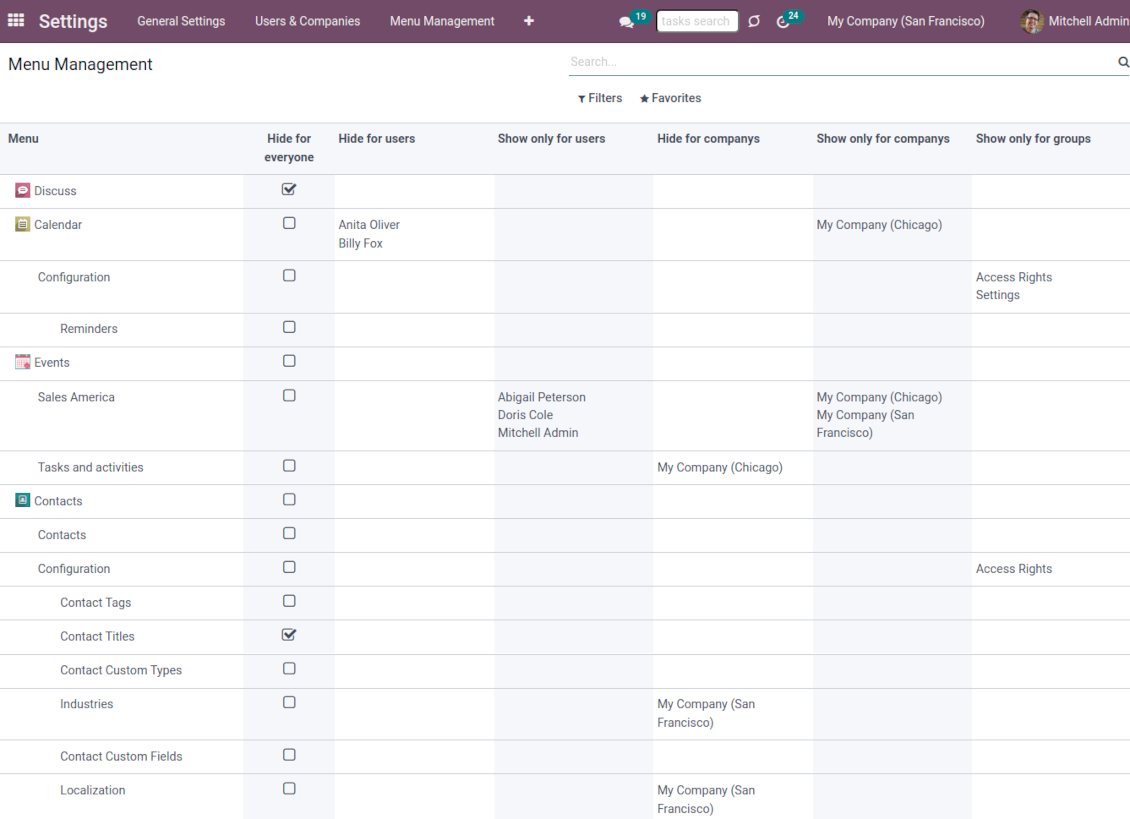
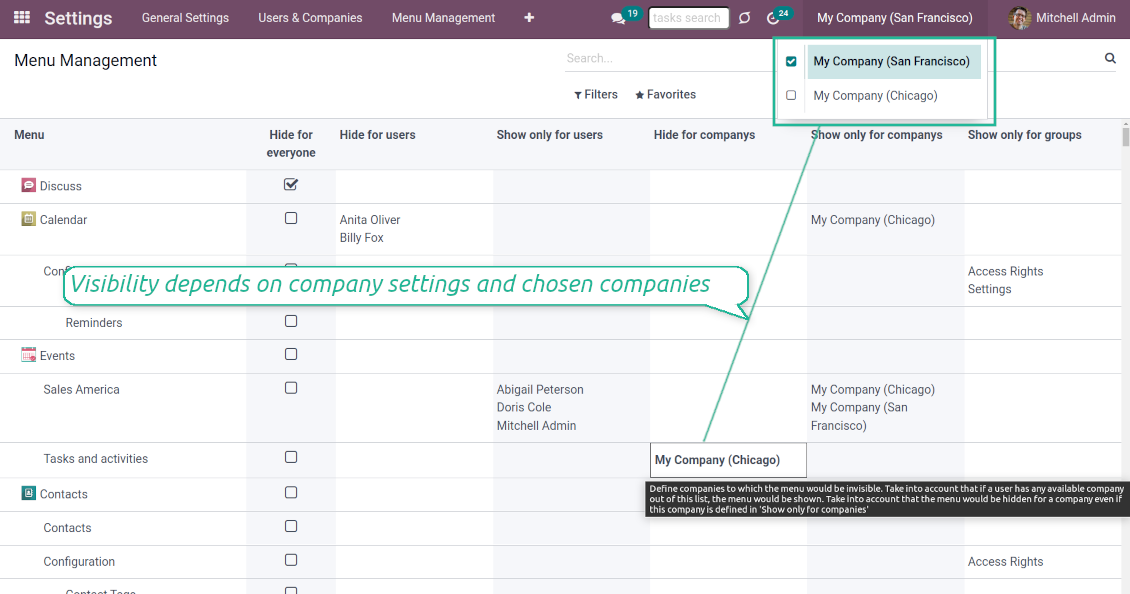
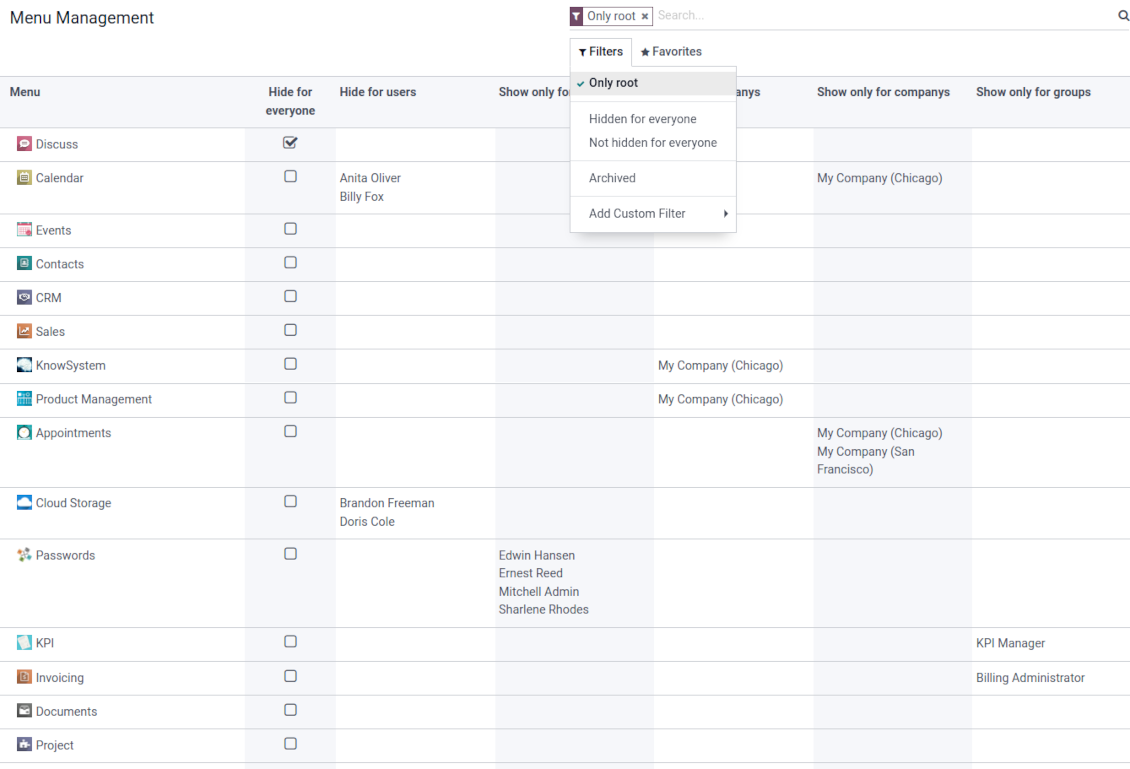
This app lets hide any Odoo menu or submenu for specific users and companies, or, vice versa, to show that for definite users, companies, or access groups.
Innovative hierarchical menus view
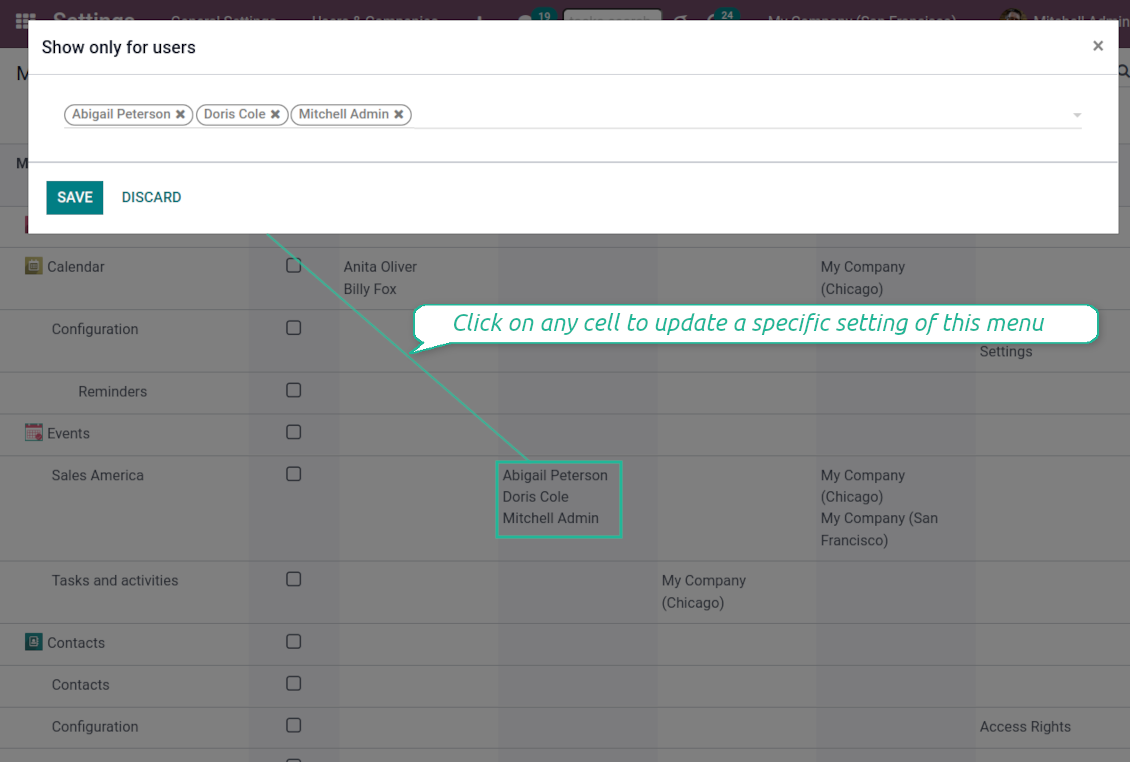
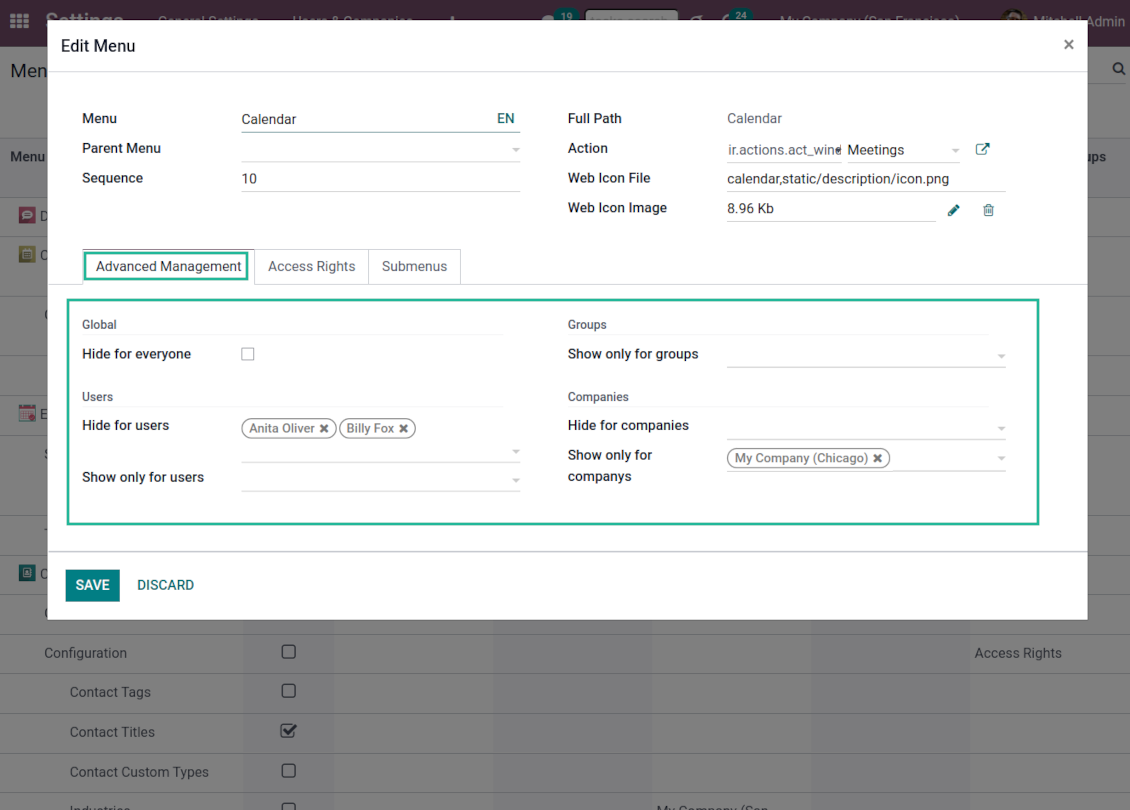
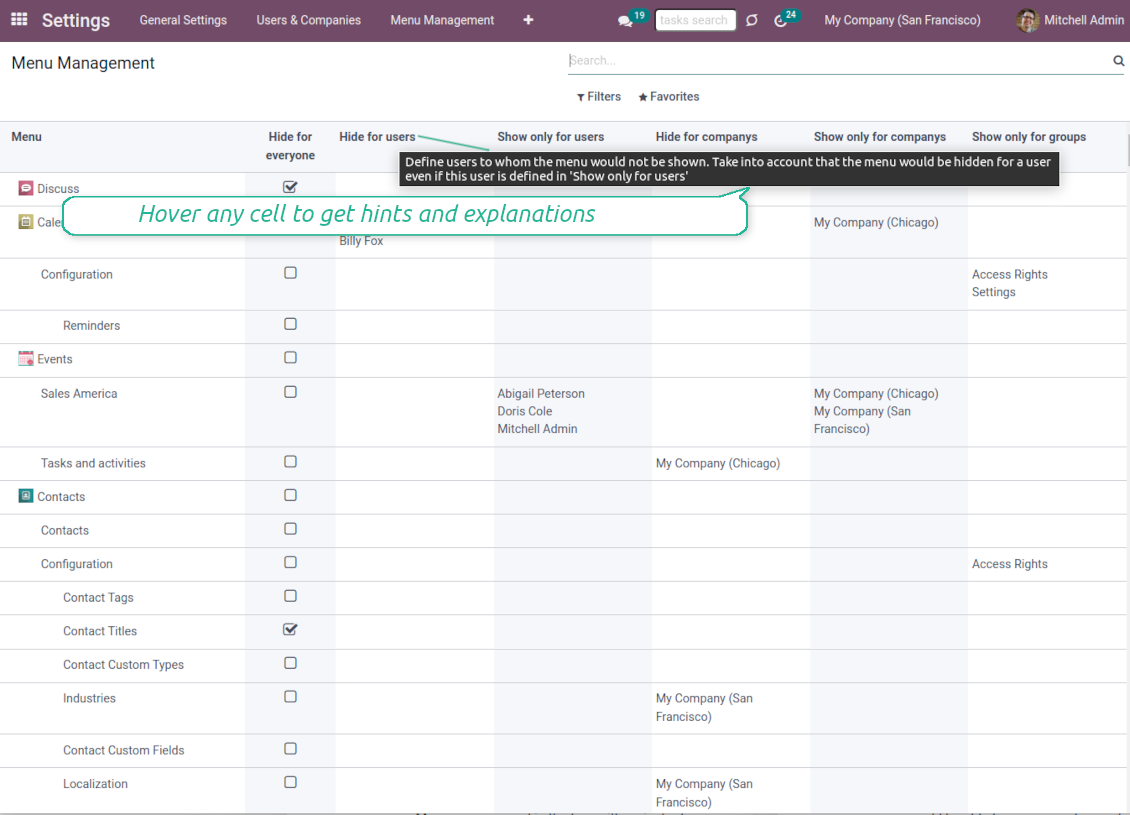
Comfortably manage access to Odoo menus in the special interface (Settings > Menu Management). Menus are grouped in the tree with an instant overview of all visibility rules and one-click access to update access settings. All options are provided with useful help hints
Hide entries globally
If any menu or submenu is not of use to your business, hide that in a single click. None of the users would be able to access such an entry. Recover visibility for that at any moment
Hide/show menus company-wise
Specify companies for which a specific menu item should become invisible. Then, a user would see that entry only in case he/she selects another company in the multi-company regime switcher.
Vice versa, define companies for which this menu should be shown. For others, it would be hidden
Hide/show menus user-wise
For any menu/submenu, specify Odoo users to whom a menu should be hidden. Then, such users would never see that entry.
Alternatively, define users who may access a particular menu item. For others, this menu becomes invisible
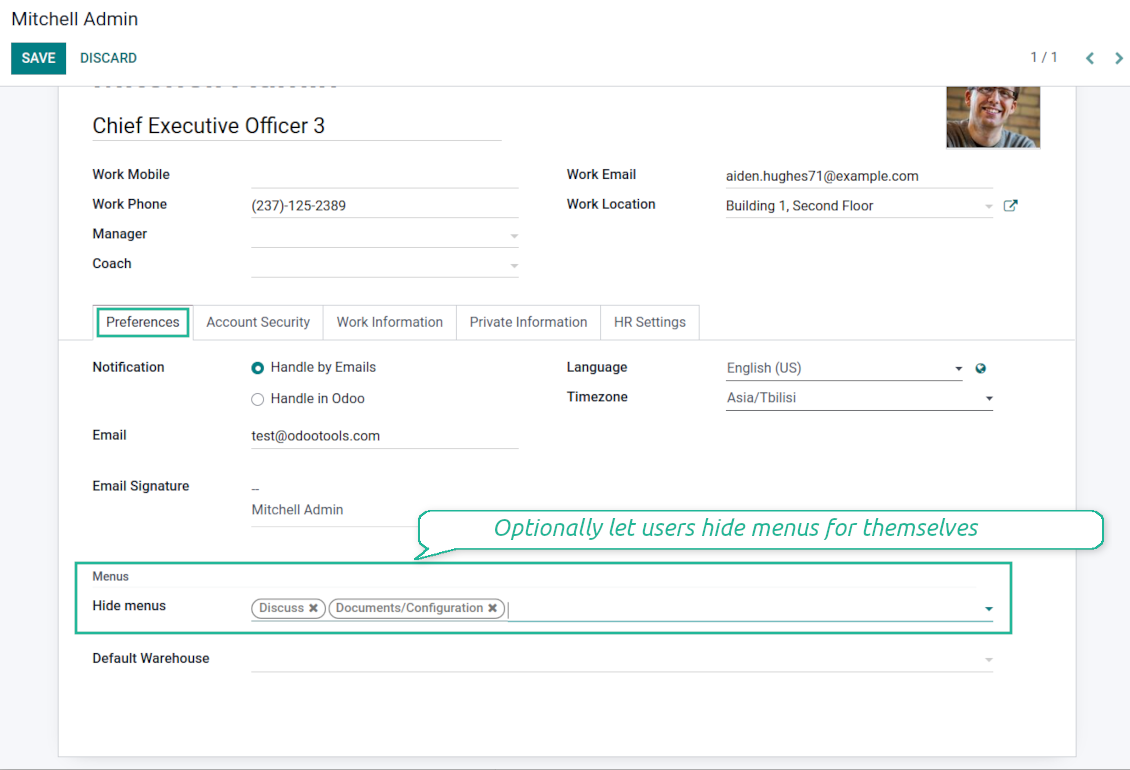
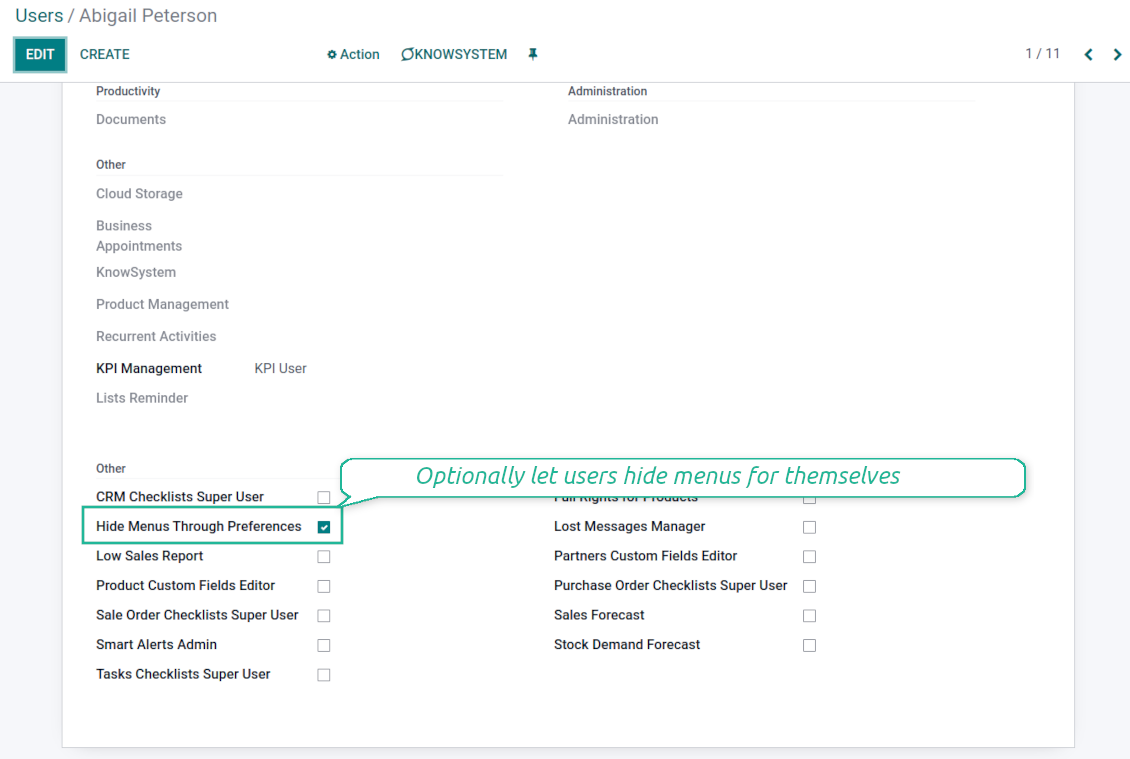
Let users hide menus for themselves
Grant the access right 'Other > Hide Menus Through Preferences' for any user. Such a user would be able to hide any menus for him/herself right through the Odoo preferences
Restrict menus access by user groups
Define user groups that exclusively see a specific menu/submenu. This restriction is cumulated with the Odoo standard menu 'Access rights'. However, in comparison to the latter, the field 'Show only for groups' would not be restored after modules' updates.
Sincere Appreciation for the "Advanced Menu Management" Module by FAOtools
The user interface design reflects a commendable level of thoughtfulness and attention to user experience, making it extraordinarily intuitive to navigate. This is a quality that greatly enhances the overall usability of the module.
One of the most impressive aspects of this module is its ability to solve a significant operational challenge with remarkable ease. What once required a complex process has been simplified to just a few clicks, thanks to the efficiency and ingenuity of the "Advanced Menu Management" module.
I am pleased to rate this module with a full five stars, as it truly deserves such acclaim. The installation process was seamless, reflective of the development team's commitment to user-friendliness.
The value that this module brings to our operations cannot be overstated. Its basic price point in no way diminishes the extensive benefits it offers. The "Advanced Menu Management" module has rapidly become an indispensable tool in our arsenal, streamlining processes and significantly enhancing efficiency.
In conclusion, I extend my sincere gratitude to the entire FAOtools team for developing a module that exemplifies excellence in design, usability, and functionality. Your commitment to delivering a superior product is evident in every facet of this module, and I am confident that it will continue to provide lasting value to our organization.
관련 자주 묻는 질문 Advanced Menu Management Odoo v.15
도구의 업데이트 정책은 무엇입니까?
현재 Odoo Apps Store 정책에 따르면:
- 버전 12.0 이하용으로 구매한 모듈은 12.0까지의 모든 버전에 접근할 수 있습니다.
- 버전 13.0부터는 모듈 버전마다 따로 구매해야 합니다.
- 버전과 관계없이 구매하면 해당 메이저 버전 내의 모든 업데이트와 버그 수정 권한이 있습니다.
faOtools 팀은 해당 정책을 통제하지 않습니다. 문의는 Odoo Apps Store 담당자에게 직접 하세요.
앱을 Odoo.sh에 어떻게 설치하나요?
가장 단순한 방법은 Odoo 스토어의 기본 제공 워크플로를 사용하는 것입니다:
1. 모듈 페이지를 열고 Deploy on odoo.sh 버튼을 클릭합니다.
2. 그러면 GitHub 페이지로 이동합니다. 계정에 로그인한 뒤 'Create a new repo'를 클릭하거나 기존 저장소를 사용하세요. 저장소는 비공개여야 합니다. OPL-1 라이선스 앱을 공개하는 것은 허용되지 않습니다. 필요하면 Odoo.sh 프로젝트용 새 repo를 만드세요.
3. 그런 다음 odoo.sh로 가서 Deploy 버튼을 클릭합니다. 팝업에서 결정을 제출하고 'Continue.'를 클릭합니다. 그러면 설치가 시작됩니다.
이 단계로 프로젝트의 프로덕션 브랜치에 앱이 설치됩니다. 다른 브랜치에 앱을 배포하거나 모듈을 업데이트하려면 다음을 수행하세요:
1. Odoo 스토어에서 앱 소스 코드를 업로드합니다.
2. 모듈을 필요한 GitHub 저장소에 커밋합니다. 앱 폴더/파일이 무시되지 않는지 확인하세요(즉 repo의 .gitignore에 넣지 마세요). 저장소는 odoo.sh가 자동 생성하며 기본적으로 중요한 항목(예: /lib)이 포함될 수 있습니다. 모듈의 모든 디렉터리, 하위 디렉터리, 파일을 예외 없이 업로드하세요.
3. odoo.sh 프로젝트의 대상 브랜치를 Deploy하거나, 설정이 그렇게 되어 있으면 자동 빌드될 때까지 기다립니다.
자체 서버에 앱은 어떻게 설치하나요?
2. Odoo 서버를 다시 시작합니다;
3. 개발자 모드를 켭니다(기술 설정);
4. 앱 목록을 업데이트합니다(앱 메뉴);
5. 앱을 찾아 'Activate'/'Install'을 누릅니다;
6. 앱 페이지에 안내가 있으면 따릅니다.
앱에 추가 기능이 있는 것을 봤습니다. 나중에 구매해도 되나요?
네, 물론입니다. 동시에 Odoo가 모든 의존성을 장바구니에 자동 추가하므로, 이중 결제를 피하려면 이미 구매한 도구를 제외하십시오.
앱을 Odoo.sh에 배포했는데 테스트에서 경고/오류가 보입니다
빨강/주황 경고는 앱 기능에 영향을 주지 않습니다. 안타깝게도 표준 자동 테스트가 앱 목표와 충돌하는 동작을 가정해 모듈이 통과하지 못할 때가 있습니다. 예를 들어 우리는 가격 계산을 바꾸는데, 표준 Odoo 모듈 테스트는 최종 가격을 표준 알고리즘과 비교합니다.
먼저 배포된 데이터베이스 기능이 정상인지 확인하십시오. 모두 올바르게 동작합니까?
그래도 경고가 실제 기능에 영향을 준다고 생각되면 연락해 주시고 전체 설치 로그와 배포된 모듈 전체 목록(코어 및 서드파티 포함)을 보내 주십시오.
앱을 귀사에서 직접 구매할 수 있나요?
아니요, 도구는 오직 공식 Odoo 앱 스토어.
할인을 받고 싶습니다
유감스럽게도 개별 가격을 제공할 기술적 수단이 없습니다.
Odoo Online (SaaS) 데이터베이스에 앱을 설치할 수 있나요?
아니요, 서드파티 앱은 Odoo Online에서 사용할 수 없습니다. 유감스럽게도 Odoo SaaS가 이를 차단합니다.
도구가 다른 앱에 의존합니다. 그것도 구매해야 합니까?
예, 도구가 올바르게 동작하려면 의존성에 표시된 모든 모듈이 필요합니다. 앱 페이지의 가격에는 필요한 의존성이 이미 포함되어 있습니다.
모듈의 미국 달러 가격은 얼마입니까? 왜 바뀌었습니까?
모듈 가격은 유로로 책정됩니다. Odoo 스토어는 내부 환율에 따라 다른 통화로 변환합니다. 따라서 환율이 갱신되면 미국 달러 가격이 바뀔 수 있습니다.
영어 이외 언어의 앱·웹사이트 문구는 AI 지원으로 작성되며 공식 Odoo 번역과 맞춥니다. 오류를 발견하시면 번역 정확성 티켓을 보내 주세요 그러면 수정하겠습니다.
버그 신고
버그나 일관되지 않은 동작을 발견하면 주저 말고 문의하세요. 구매 후 60일 이내 수정을 보장하며, 그 이후에도 도구를 개선하는 데 관심이 큽니다.
문의에 전화번호나 신용카드가 필요 없습니다. 30초가 넘지 않는 짧은 이메일 가입만 하면 됩니다.
요청에 가능한 한 많은 세부정보를 포함하세요: 스크린샷, Odoo 서버 로그, 문제 재현 방법의 전체 설명 등. 일반적으로 이슈에 대한 작업 계획 준비(버그가 확인된 경우) 또는 수행 지침 제공(그 외의 경우)에는 영업일 기준 며칠이 걸립니다.
공개 기능 요청 및 모듈 아이디어(무료 개발)
도구를 개선하려는 동기가 강하며 어떤 피드백이든 감사드립니다. 요구 사항이 공익에 맞고 효율적으로 구현될 수 있다면 팀이 할 일 목록에 넣습니다.
이런 할 일 목록은 정기적으로 처리되며 추가 요금이 없습니다. 기한과 최종 디자인을 약속할 수는 없지만, 투자와 위험 없이 원하는 기능을 얻는 좋은 방법이 될 수 있습니다.
문의에 전화번호나 신용카드가 필요 없습니다. 30초가 넘지 않는 짧은 이메일 가입만 하면 됩니다.

Odoo 첨부 파일을 폴더로 유연하게 구성하고 Google Drive, OneDrive/SharePoint, Nextcloud/ownCloud, Dropbox, Amazon S3, Box, NAS와 디렉터리를 동기화하는 도구. DMS. 파일 관리자. 문서 관리 시스템
398€


내부와 외부 모두를 위한 깊고 구조화된 지식 베이스를 구축하는 도구. Knowledge System. KMS. 위키형 개정.
398€


즐겨 쓰는 AI 채팅에서 MCP로 Odoo를 관리하는 도구. Claude. MCP를 지원하는 모든 AI.
