Joint Calendar v.14
The tool to combine different Odoo events in a few configurable super calendars. Shared calendar. Common calendar.
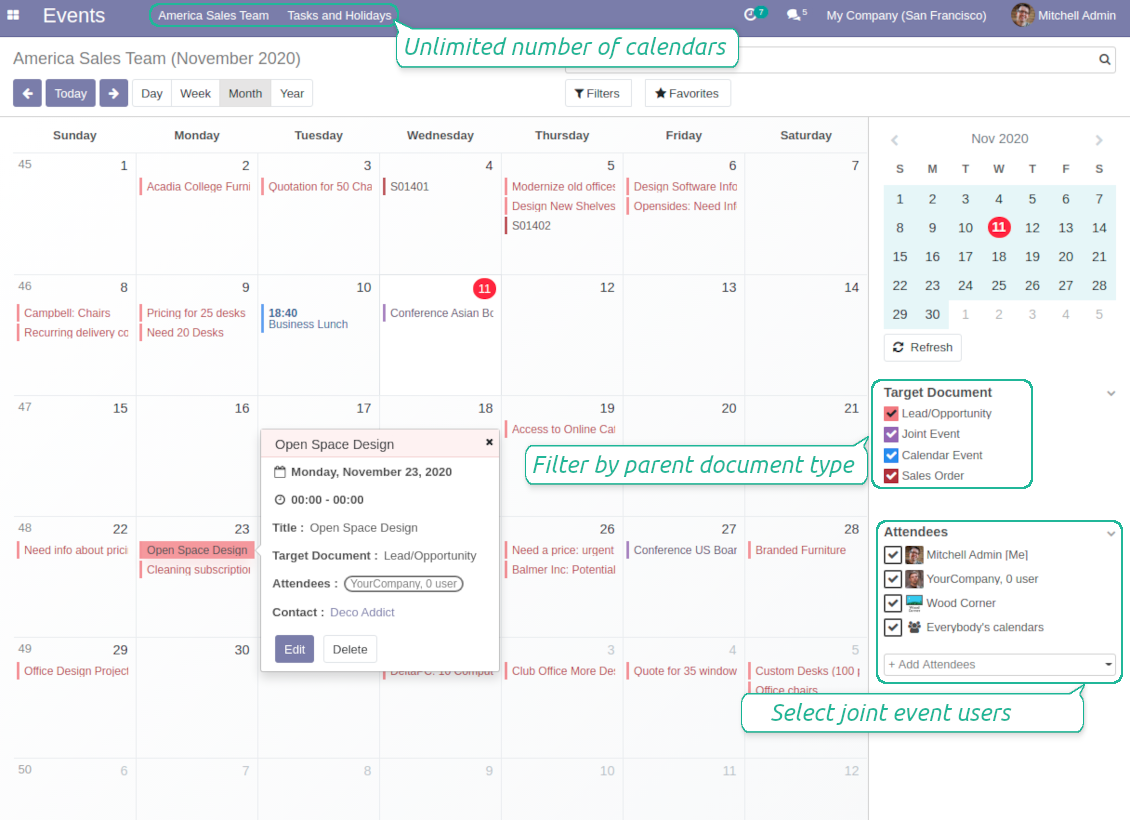
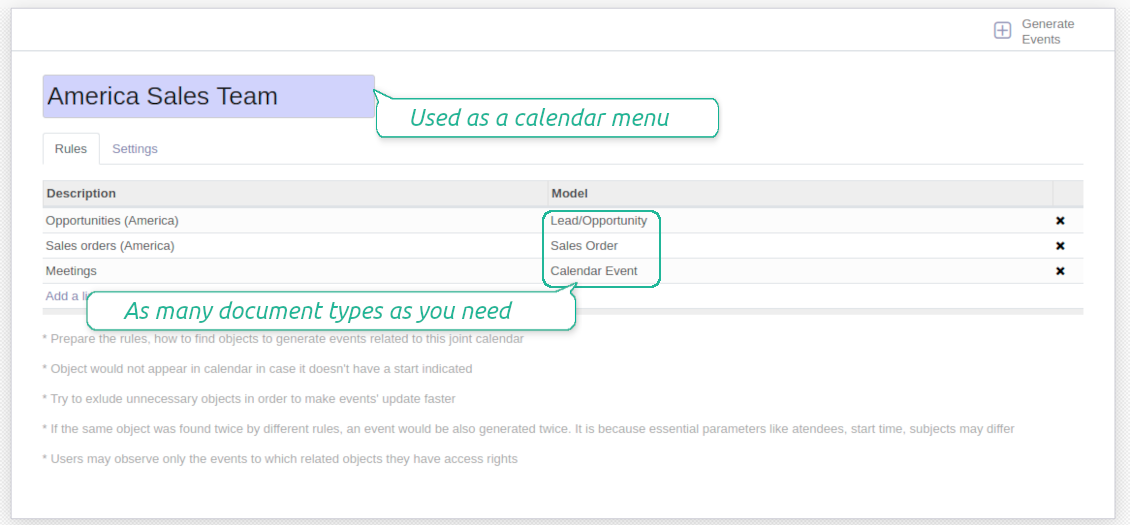
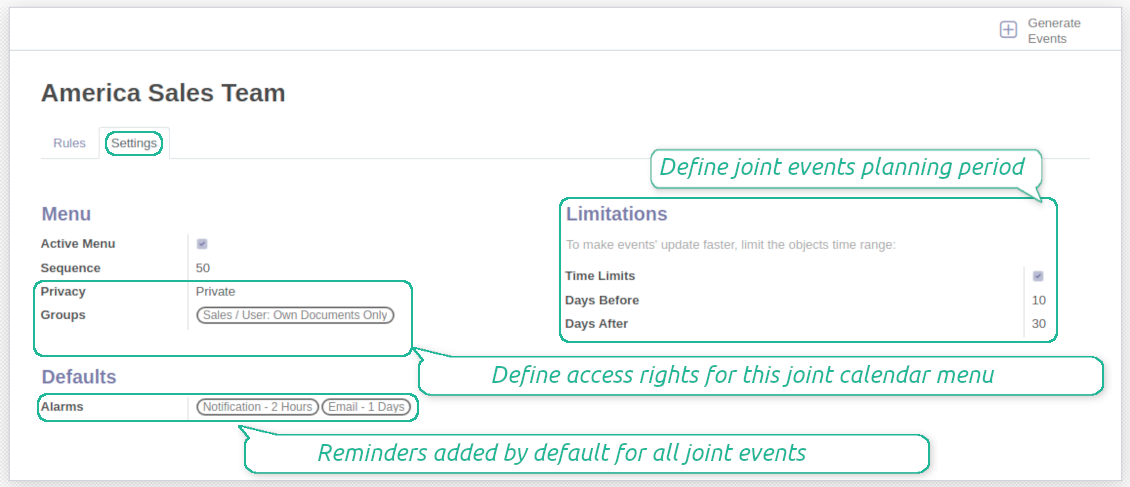
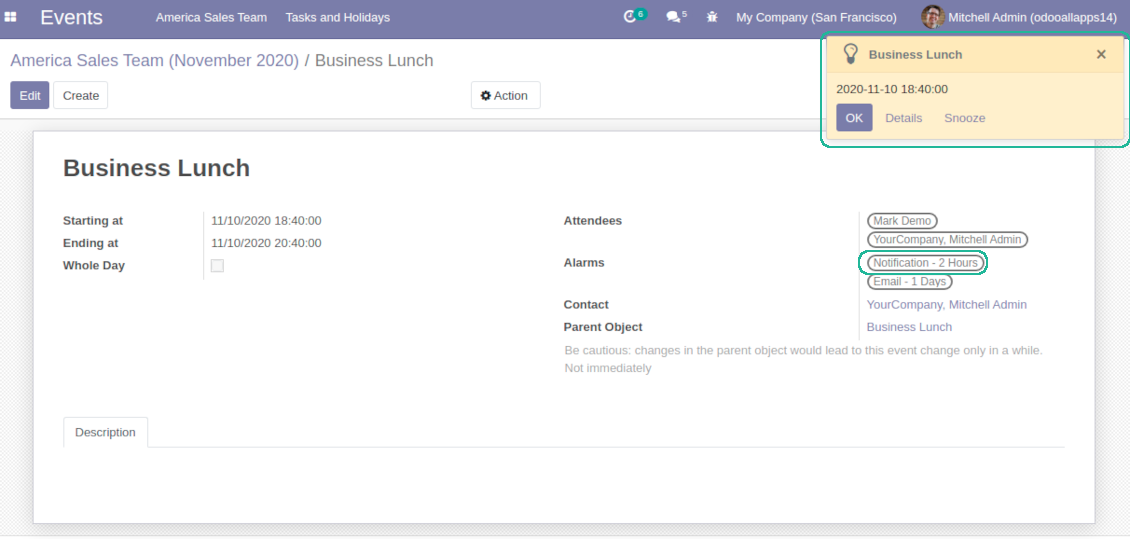

Odoo users often need to keep in mind a lot of details spread out among numerous interfaces. Switching between those is not comfortable and error-prone for planning. This tool solves the problem. The app let configure rules to join and share various document types on a single super calendar view but with easy-reachable source objects.
Any Odoo documents on the same calendar
The tool might merge any Odoo document types on the same view: opportunities, meetings, phone calls, activities, sale or purchase orders, shipments and deliveries, tasks and tickets, time offs, ...
Flexible merging rules
Define by your own what to consider a joint event title, start or stop date, who are target attendees, etc. Have even the same document twice on the same calendar just with a different start
Instant access to source details
Joint events and their source documents are interrelated. Update the former and the latter would be changed immediately. A reverse operation would be applied with the next cron
Comfortable navigation
Shared calendars are especially suitable for team interactions. Users might switch between document types and participants in a single click
Unlimited number of super calendars
Configure as many calendars as you need: for various functional areas or for different user groups. Each joint calendar has an own menu item
Reminders for any Odoo documents
Calendar configuration let assign default popup and email alarms. Thus, it is possible to have notification of any Odoo event or activity
Simple user rights administration
Regulate joint calendar accesses right on its form. Make it public or share it only for chosen user groups
Automatic shared calendar updates
Joint events are updated regularly by the cron job. It is fast, especially if you apply time frames. Refreshing is also available from the calendar interface
Better then expected
The app does exactly what was needed. Combine all tasks from all calendars to one. And allows to manages all activities from all modules in one place.
This makes the Event Calendar so much more useful !
We bought this to combine certain project tasks with the schedules of our maintenance engineers. We now have a better overview which moments are overlapping the schedules of other events. The joining of multiple events in 1 event calendar is super easy, it should be a standard option in ODOO.
Excellent responsive team of programmers
Joint Calendar is the perfect addition to the standard Calendaring system that Odoo offers. It makes the job of setting up specific departmental calendars filled with any objects you wish very easy and Alex and the team provides fantastic after-sales support, responding in most cases within 24 hours to requests for help. Thanks for a great module.
Essential to have Activities, Tasks, Meetings etc all in one calendar and shared.
Great service support very quick and were right on with fixing the issue... I think the ability to see everything on one shared calendar is such an essential part of coordination and time management. Great product once you sort out the rules you need!
Super calendars for any business area
Use joint calendars for any functional area: CRM, project management, sales, HRM, MRP, inventory management, so and so on. Find just a few examples of rules below
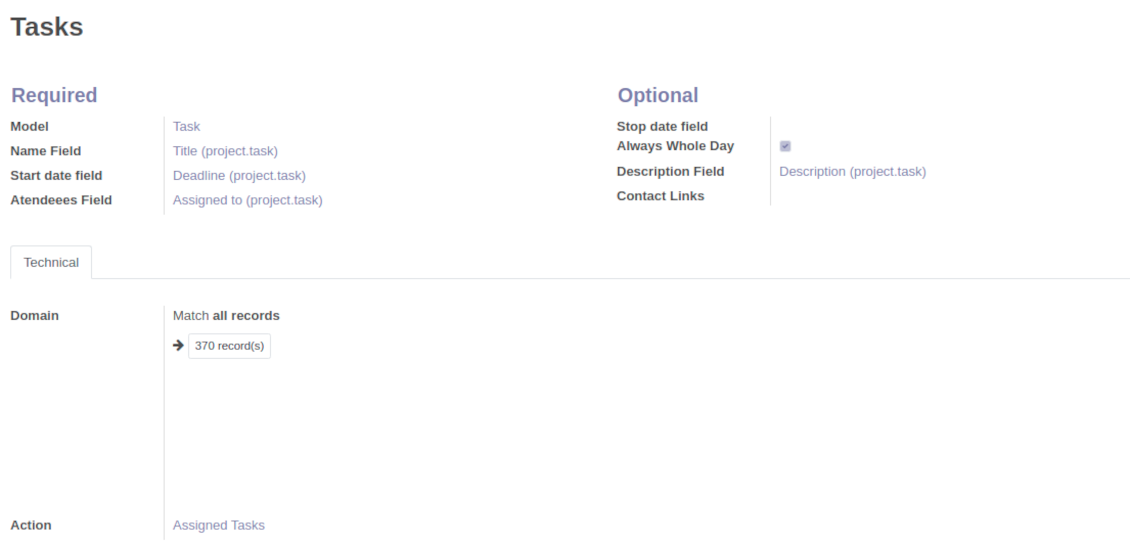
Tasks on a joint calendar
-
As a model use 'Task'
-
As a name use 'Title'
-
As a start date field use 'Deadline'
-
As attendees fields use 'Assigned to'
-
As a domain optionally you can set definite projects
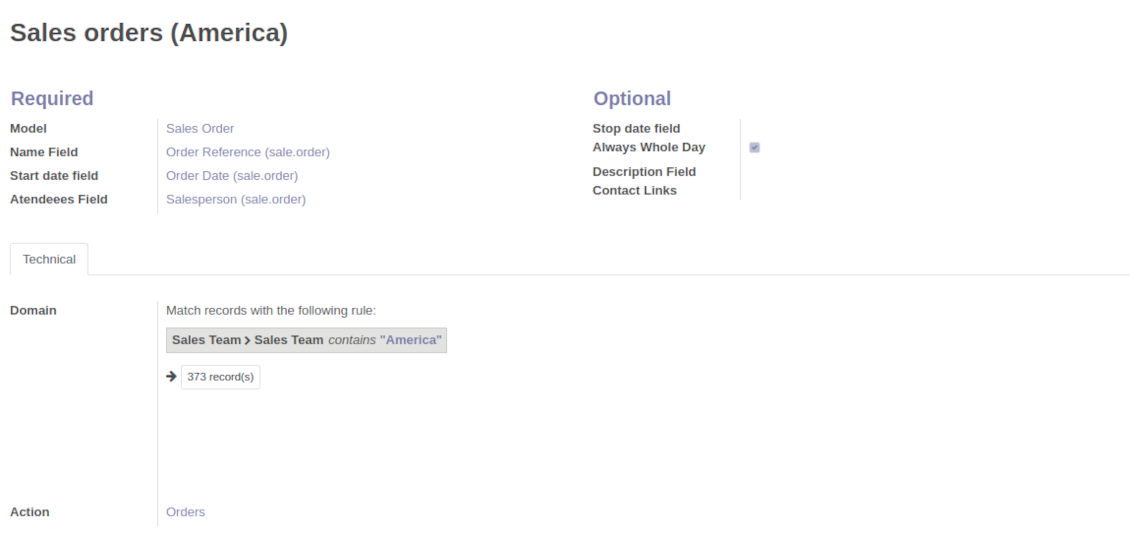
Sale orders on a shared calendar
-
As a model use 'Sales order'
-
As a name use 'Order Reference'
-
As a start date field use 'Order Date'
-
As attendees' fields use 'Salesperson'
-
As a contact link use customer
-
As a domain optionally restrict quotations by sales teams.
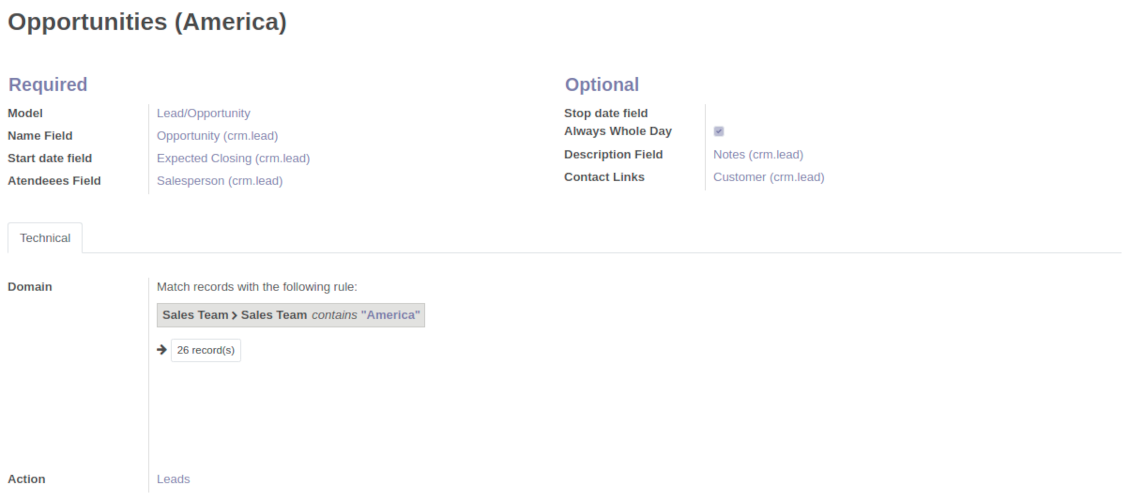
Opportunities on a super calendar
-
As a model use 'Lead / Opportunity'
-
As a name use 'Opportunity'
-
As a start date field use 'Expecting Closing'
-
As attendees' fields use 'Salesperson'
-
As a contact link use customer
-
As a domain optionally restrict opportunities by sales teams.
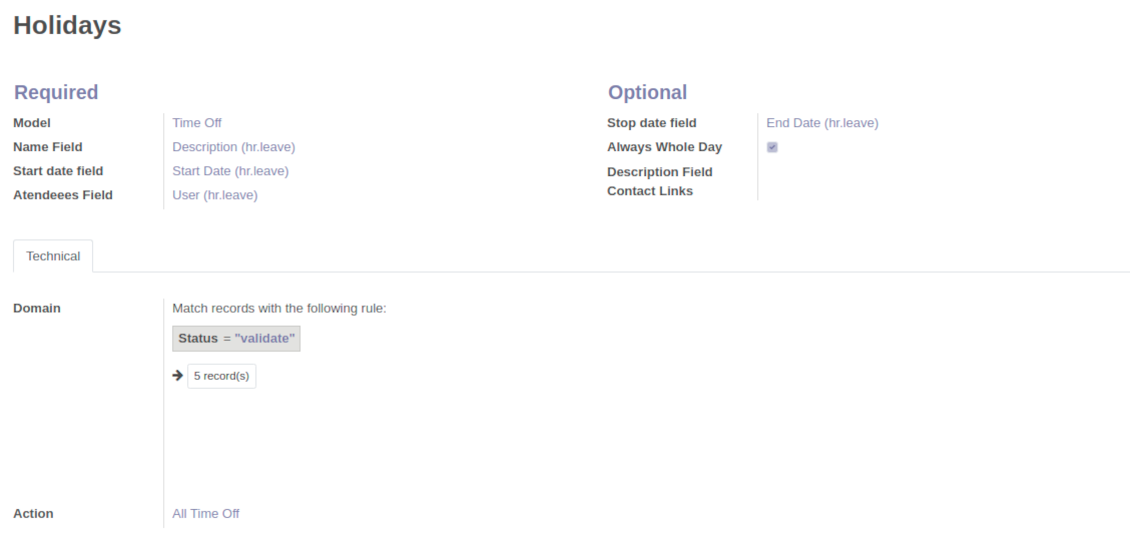
Share employees time offs and leaves
-
As a model use 'Time Off'
-
As a name use 'Description'
-
As a start date field use 'Start Date'
-
As attendees fields use 'User'
-
As a stop date field use 'End Date'
-
As a domain filter by status: show only approved leaves.
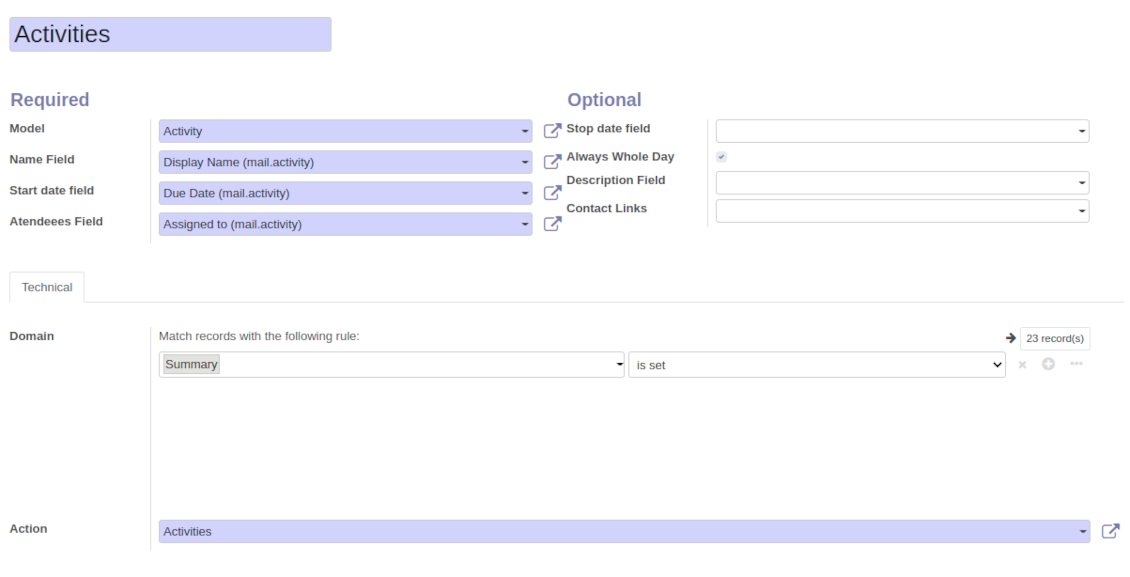
Activities by all objects
-
As a model use 'Activity'
-
As a name use 'Display Name'
-
As a start date field use 'Due Date'
-
As attendees fields use 'Assigned to'
-
As a domain apply 'Summary is set'
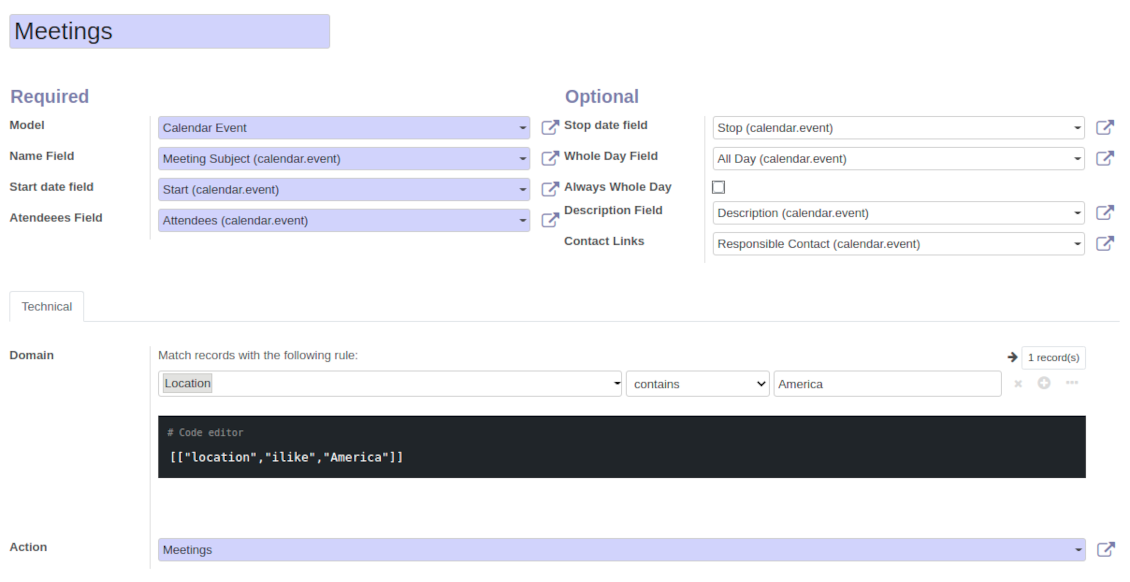
Odoo meetings to joint calendar
-
As a model use 'Calendar Event'
-
As a name use 'Meeting Subject'
-
As a start date field use 'Start'
-
As a stop date field use 'Stop'
-
As attendees fields use 'Attendees'
-
As a whole day field 'All Day'
Flexible rules to merge Odoo documents
To add a new document type for a shared interface you should set up a joint calendar rule. This rule defines which Odoo objects should create events, which fields of that object should be shown, and whether any filtering should take place
-
Model - which objects to scan: opportunities, tasks, orders, meetings, activities, and so on. You can choose your custom document type (including created in Odoo Studio) as well
-
Name - what to use as a joint event name (also used as calendar event title). Usually it is 'name', 'subject' or 'reference'
-
Start date - when an event starts. For example, 'expecting closing' for opportunities or 'order date' for quotations. It may be any date or date with time field of a source Odoo object
-
Stop date - when an even is shown as finished on a calendar
-
Attendees - who are participants (responsible persons, event owners). Usually, it is a field 'assigned to', 'a sales person' or 'attendees'. You may use even document 'followers', since it's possible to apply both users and partners
-
Description - are there any notes important for joint events? Usually the fields like 'internal notes' or 'comments' are used
-
Always Whole Day - means that all generated events would last the whole day disregarding whether start or stop are defined with hours and minutes. Such an event would be shown at a special place on a calendar (above the time line)
-
Whole Day - a special boolean field of source object which indicates that a related joint event may lasts the whole day. This setting is usually applied to standard Odoo calendar events which both might have definite time indicated or might be planned for a whole day
-
Contact Link - is this event linked to a specific partner? Usually the fields like 'customer' or 'vendor' are used
-
Domain - the Odoo filters' constructor to include only topical documents into a joint calendar. You might apply any storable attribute. For example, show only quotations without sales orders, or show opportunities only of this sales team
-
Action - defines which form view should be shown when you open a source document from a joint event. It is a technical field which in the most cases should not be changed in comparison to a default value.
구성 및 설치 팁: Joint Calendar Odoo v.14
Joint calendar scheduled jobs
The tool let you change the frequency of joint calendar refreshing and emails reminders' checks:
- Turn on the debug mode
- Go to technical settings > Automation > Scheduled jobs
- Find the job 'Refresh Joint Events' to change the frequency of super calendars' update
- Find the job 'Notify About Joint Event' to change the frequency of email alarms.
관련 자주 묻는 질문 Joint Calendar Odoo v.14
옵션 "Always Whole Day"를 켜거나 끄면 어떻게 됩니까?
옵션 "Always Whole Day"가 켜져 있으면 규칙으로 만든 모든 이벤트가 시작·종료에 시·분이 있어도 하루 종일입니다. 그런 이벤트는 캘린더의 특별한 위치에 표시됩니다.
예를 들어 모델 "Sale Order" 규칙을 만들고 "Always Whole Day"를 켜면 이벤트가 일간·주간 슈퍼 캘린더의 타임라인 위에 놓입니다.
옵션을 끄고 시작 또는 종료에 시/분이 있으면 이벤트가 그날의 특정 시각에 놓이고 제목 앞에 시간이 보입니다.
내 Odoo에 캘린더 메뉴가 안 보입니다. 어떻게 해야 하나요?
확인하세요:
1. 생성·구성·새로 고침된 공동 캘린더가 하나 이상 있어야 합니다. 공동 캘린더를 설정한 뒤 브라우저 페이지를 새로 고침하세요
2. 캘린더 중 하나 이상에 접근 권한이 있어야 합니다
규칙이 있는 캘린더를 만들었는데 메뉴에 보이지 않습니다.
이유가 여러 가지일 수 있습니다. 관련 예약 작업이 아직 실행되지 않았을 수 있습니다. 이 경우 공동 캘린더 화면 오른쪽 열의 새로 고침 단추로 cron을 수동 실행하세요.
캘린더에 Time Limits가 있는지도 확인하세요. 없으면 특정 구간 이벤트만 표시됩니다. 예: 'Sale Orders' 캘린더가 이전 10일, 이후 30일이면 12일 전에 만든 Sale Order는 표시되지 않습니다.
규칙에 일치하는 레코드가 없는 필터가 없는지 확인하세요. 예: 규칙 'Sale Order'와 필터 'Customer = Deco Addict'이면 관련 캘린더에는 이 고객의 주문만 표시됩니다.
하나의 공동 캘린더에 Odoo 문서(예: 판매주문, 프로젝트, 활동)를 몇 개까지 합칠 수 있나요?
원하는 만큼의 Odoo 문서를 하나의 캘린더로 합칠 수 있습니다. 또는 여러 캘린더(예: Sales Calendar와 Projects, Tasks and Activities Calendar)로 나누고 systray에서 전환할 수 있습니다.
공동 캘린더 규칙이란 무엇입니까?
규칙은 어떤 Odoo 개체가 일정을 만들지, 그 개체의 어떤 필드를 쓰고 표시할지, 필터링을 할지 정의합니다.
규칙을 만들 때 공동 일정 제목, 시작/종료 날짜, 대상 참석자 등을 직접 정의할 수 있습니다.
필드 "Stop date"는 무엇을 위한 것입니까? 비워 둘 수 있나요?
Stop date는 대상 Odoo 모델의 필드로, 캘린더에서 이벤트가 끝난 것으로 표시되는 시점을 정합니다. 예를 들어 모델 "Sale Order" 규칙에서 Stop date에 "Delivery Date"를 선택하면 이벤트가 견적 계획일(Start Date 필드 - Order Date)부터 제품 배송일까지 이벤트 메뉴에 표시됩니다.
선택 필드이므로 비워 둘 수 있습니다. 그러면 이벤트는 Start Date 필드의 날짜에만 놓입니다.
캘린더에 "Undefined" 유형 이벤트가 있습니다. 무슨 뜻인가요?
이 일정은 수동으로 만들어진 것입니다. 상위 개체가 없고 규칙의 적용도 받지 않습니다. 이런 공동 일정은 색 없이 필터 "Undefined"에 나타납니다.
캘린더를 볼 권한이 있는 사람은 모두 정의되지 않은 일정을 만들고 볼 수 있습니다.
도구의 업데이트 정책은 무엇입니까?
현재 Odoo Apps Store 정책에 따르면:
- 버전 12.0 이하용으로 구매한 모듈은 12.0까지의 모든 버전에 접근할 수 있습니다.
- 버전 13.0부터는 모듈 버전마다 따로 구매해야 합니다.
- 버전과 관계없이 구매하면 해당 메이저 버전 내의 모든 업데이트와 버그 수정 권한이 있습니다.
faOtools 팀은 해당 정책을 통제하지 않습니다. 문의는 Odoo Apps Store 담당자에게 직접 하세요.
앱을 Odoo.sh에 어떻게 설치하나요?
가장 단순한 방법은 Odoo 스토어의 기본 제공 워크플로를 사용하는 것입니다:
1. 모듈 페이지를 열고 Deploy on odoo.sh 버튼을 클릭합니다.
2. 그러면 GitHub 페이지로 이동합니다. 계정에 로그인한 뒤 'Create a new repo'를 클릭하거나 기존 저장소를 사용하세요. 저장소는 비공개여야 합니다. OPL-1 라이선스 앱을 공개하는 것은 허용되지 않습니다. 필요하면 Odoo.sh 프로젝트용 새 repo를 만드세요.
3. 그런 다음 odoo.sh로 가서 Deploy 버튼을 클릭합니다. 팝업에서 결정을 제출하고 'Continue.'를 클릭합니다. 그러면 설치가 시작됩니다.
이 단계로 프로젝트의 프로덕션 브랜치에 앱이 설치됩니다. 다른 브랜치에 앱을 배포하거나 모듈을 업데이트하려면 다음을 수행하세요:
1. Odoo 스토어에서 앱 소스 코드를 업로드합니다.
2. 모듈을 필요한 GitHub 저장소에 커밋합니다. 앱 폴더/파일이 무시되지 않는지 확인하세요(즉 repo의 .gitignore에 넣지 마세요). 저장소는 odoo.sh가 자동 생성하며 기본적으로 중요한 항목(예: /lib)이 포함될 수 있습니다. 모듈의 모든 디렉터리, 하위 디렉터리, 파일을 예외 없이 업로드하세요.
3. odoo.sh 프로젝트의 대상 브랜치를 Deploy하거나, 설정이 그렇게 되어 있으면 자동 빌드될 때까지 기다립니다.
자체 서버에 앱은 어떻게 설치하나요?
2. Odoo 서버를 다시 시작합니다;
3. 개발자 모드를 켭니다(기술 설정);
4. 앱 목록을 업데이트합니다(앱 메뉴);
5. 앱을 찾아 'Activate'/'Install'을 누릅니다;
6. 앱 페이지에 안내가 있으면 따릅니다.
앱에 추가 기능이 있는 것을 봤습니다. 나중에 구매해도 되나요?
네, 물론입니다. 동시에 Odoo가 모든 의존성을 장바구니에 자동 추가하므로, 이중 결제를 피하려면 이미 구매한 도구를 제외하십시오.
앱을 Odoo.sh에 배포했는데 테스트에서 경고/오류가 보입니다
빨강/주황 경고는 앱 기능에 영향을 주지 않습니다. 안타깝게도 표준 자동 테스트가 앱 목표와 충돌하는 동작을 가정해 모듈이 통과하지 못할 때가 있습니다. 예를 들어 우리는 가격 계산을 바꾸는데, 표준 Odoo 모듈 테스트는 최종 가격을 표준 알고리즘과 비교합니다.
먼저 배포된 데이터베이스 기능이 정상인지 확인하십시오. 모두 올바르게 동작합니까?
그래도 경고가 실제 기능에 영향을 준다고 생각되면 연락해 주시고 전체 설치 로그와 배포된 모듈 전체 목록(코어 및 서드파티 포함)을 보내 주십시오.
앱을 귀사에서 직접 구매할 수 있나요?
아니요, 도구는 오직 공식 Odoo 앱 스토어.
할인을 받고 싶습니다
유감스럽게도 개별 가격을 제공할 기술적 수단이 없습니다.
Odoo Online (SaaS) 데이터베이스에 앱을 설치할 수 있나요?
아니요, 서드파티 앱은 Odoo Online에서 사용할 수 없습니다. 유감스럽게도 Odoo SaaS가 이를 차단합니다.
도구가 다른 앱에 의존합니다. 그것도 구매해야 합니까?
예, 도구가 올바르게 동작하려면 의존성에 표시된 모든 모듈이 필요합니다. 앱 페이지의 가격에는 필요한 의존성이 이미 포함되어 있습니다.
모듈의 미국 달러 가격은 얼마입니까? 왜 바뀌었습니까?
모듈 가격은 유로로 책정됩니다. Odoo 스토어는 내부 환율에 따라 다른 통화로 변환합니다. 따라서 환율이 갱신되면 미국 달러 가격이 바뀔 수 있습니다.
영어 이외 언어의 앱·웹사이트 문구는 AI 지원으로 작성되며 공식 Odoo 번역과 맞춥니다. 오류를 발견하시면 번역 정확성 티켓을 보내 주세요 그러면 수정하겠습니다.
버그 신고
버그나 일관되지 않은 동작을 발견하면 주저 말고 문의하세요. 구매 후 60일 이내 수정을 보장하며, 그 이후에도 도구를 개선하는 데 관심이 큽니다.
문의에 전화번호나 신용카드가 필요 없습니다. 30초가 넘지 않는 짧은 이메일 가입만 하면 됩니다.
요청에 가능한 한 많은 세부정보를 포함하세요: 스크린샷, Odoo 서버 로그, 문제 재현 방법의 전체 설명 등. 일반적으로 이슈에 대한 작업 계획 준비(버그가 확인된 경우) 또는 수행 지침 제공(그 외의 경우)에는 영업일 기준 며칠이 걸립니다.
공개 기능 요청 및 모듈 아이디어(무료 개발)
도구를 개선하려는 동기가 강하며 어떤 피드백이든 감사드립니다. 요구 사항이 공익에 맞고 효율적으로 구현될 수 있다면 팀이 할 일 목록에 넣습니다.
이런 할 일 목록은 정기적으로 처리되며 추가 요금이 없습니다. 기한과 최종 디자인을 약속할 수는 없지만, 투자와 위험 없이 원하는 기능을 얻는 좋은 방법이 될 수 있습니다.
문의에 전화번호나 신용카드가 필요 없습니다. 30초가 넘지 않는 짧은 이메일 가입만 하면 됩니다.

Odoo 첨부 파일을 폴더로 유연하게 구성하고 Google Drive, OneDrive/SharePoint, Nextcloud/ownCloud, Dropbox, Amazon S3, Box, NAS와 디렉터리를 동기화하는 도구. DMS. 파일 관리자. 문서 관리 시스템
398€


내부와 외부 모두를 위한 깊고 구조화된 지식 베이스를 구축하는 도구. Knowledge System. KMS. 위키형 개정.
398€


즐겨 쓰는 AI 채팅에서 MCP로 Odoo를 관리하는 도구. Claude. MCP를 지원하는 모든 AI.
