Vendor Products Portal v.12
The tool to motivate vendors to prepare product catalogue in your Odoo
Vendor products catalog in portal
Any portal user may create, update, and archive products related to their company. Any purchase manager can do the same for all vendor-related objects. Any Odoo internal user with an access to products might rely upon vendor data for informational purposes.
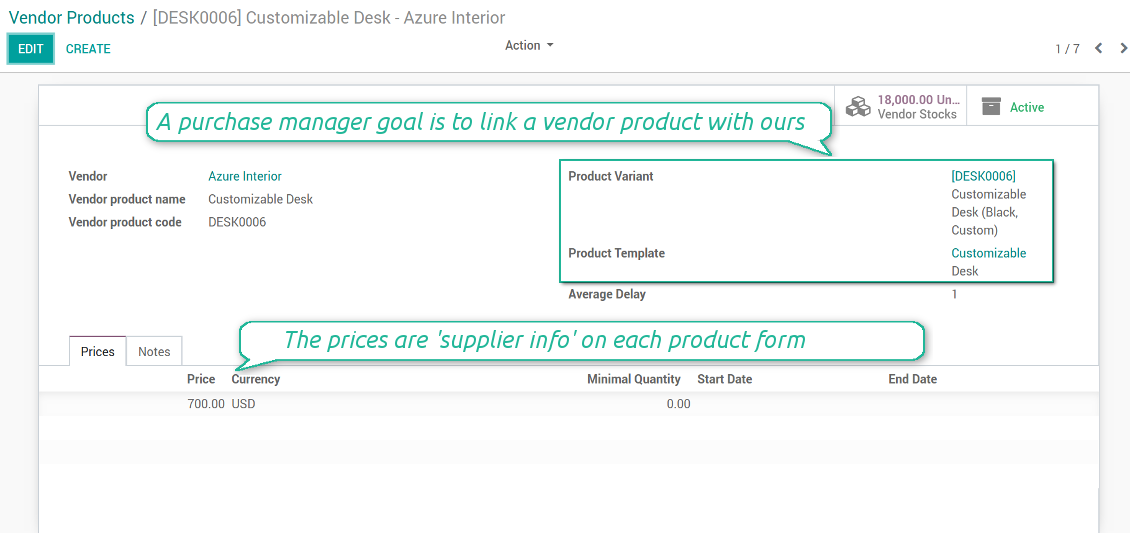
Any vendor product might be linked to your own product. In such a way a purchase manager goal becomes to match 'their' products with 'ours'. Each of our product variants might have a few related vendor products.
As soon as you installed the module, Odoo would automatically create vendor products based on existing products' supplier infos.
Schermate
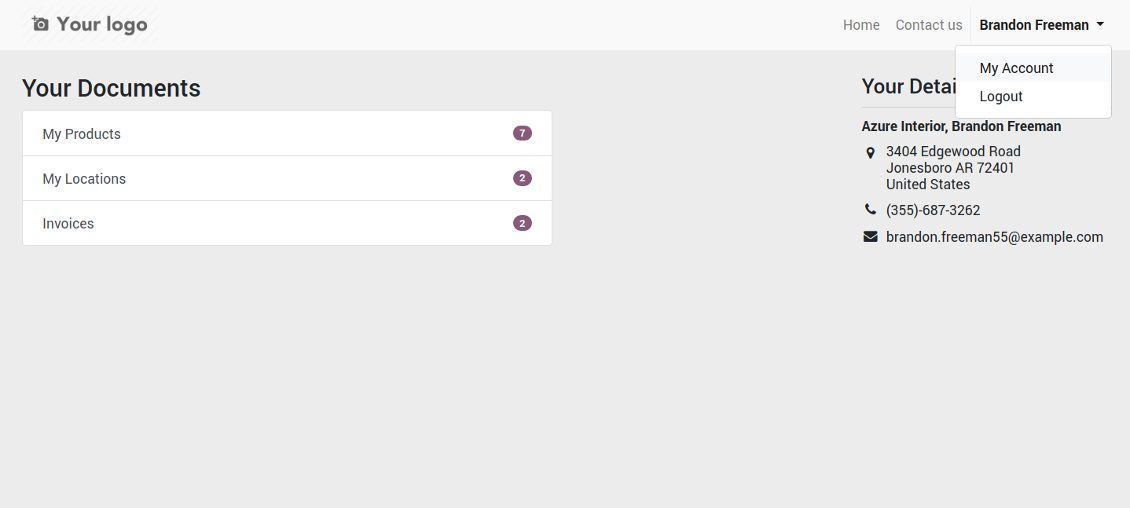
Vendor portal: main page
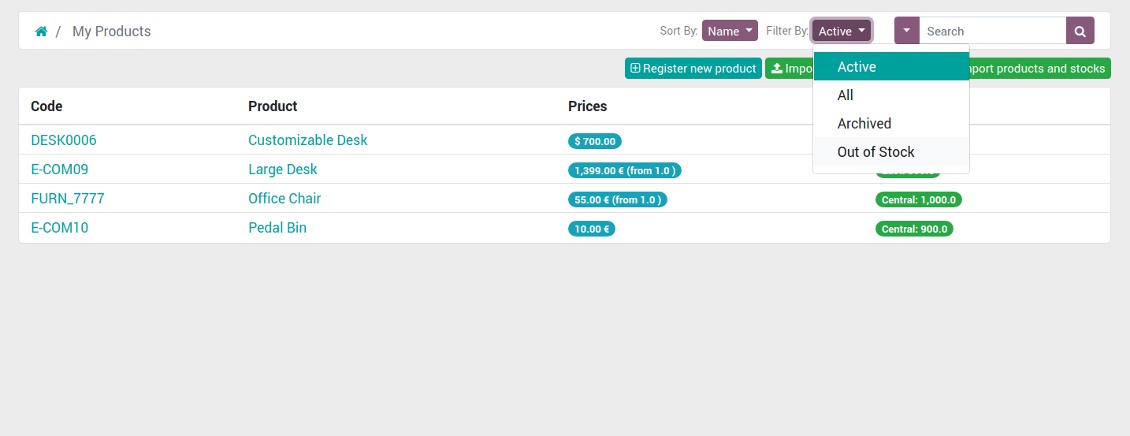
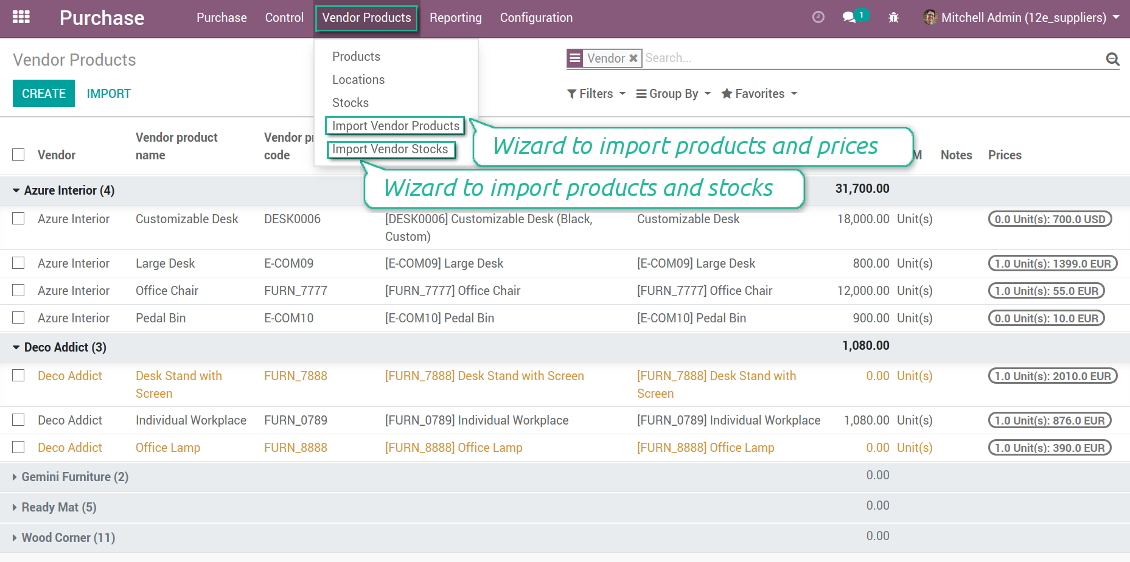
List of vendor products in portal for self-administration
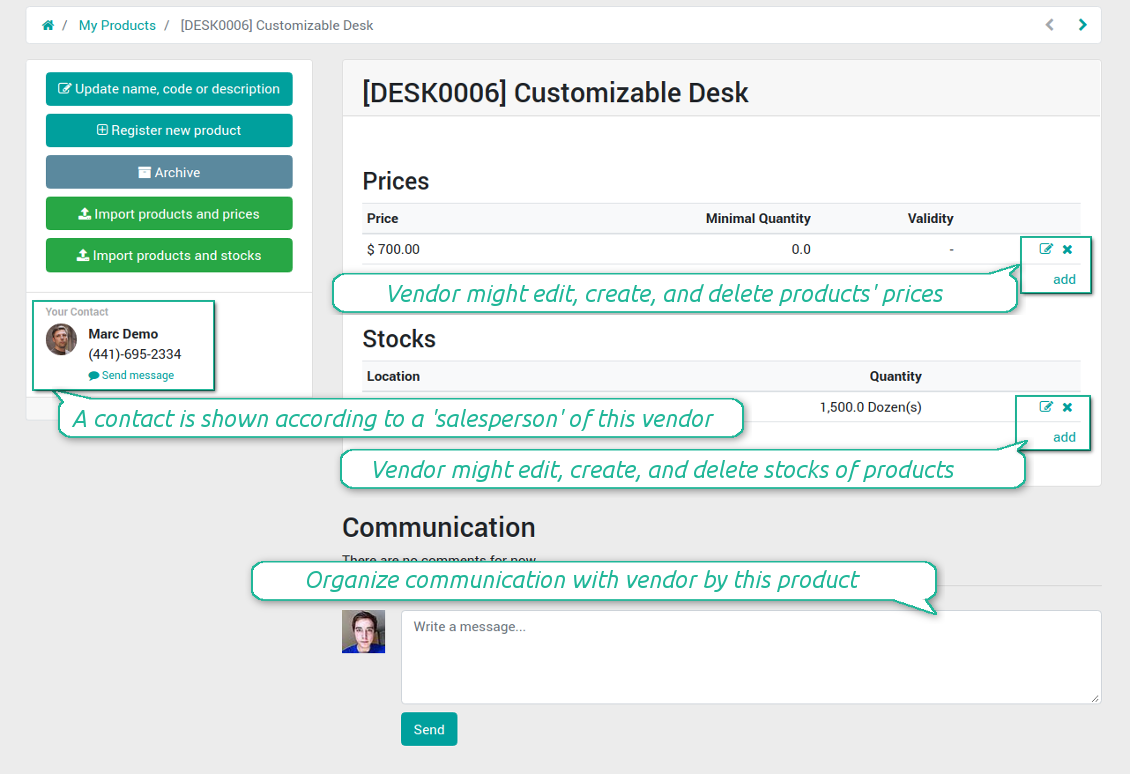
Suppliers edit product info by themselves
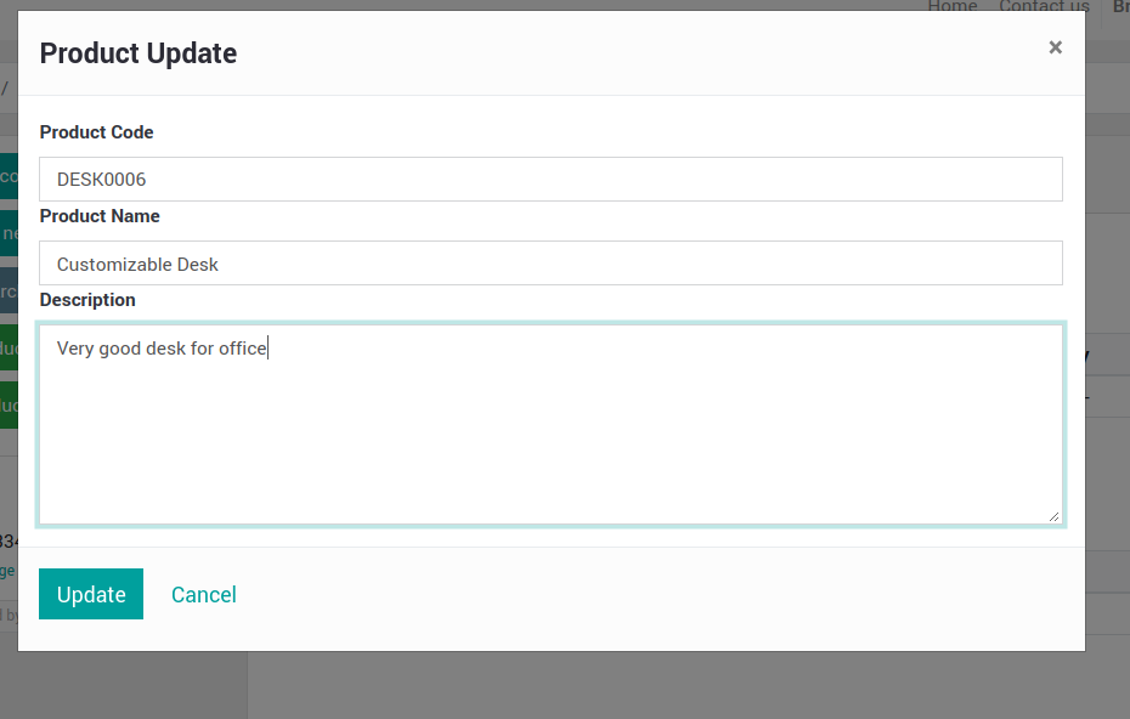
Vendor may easy change important product details
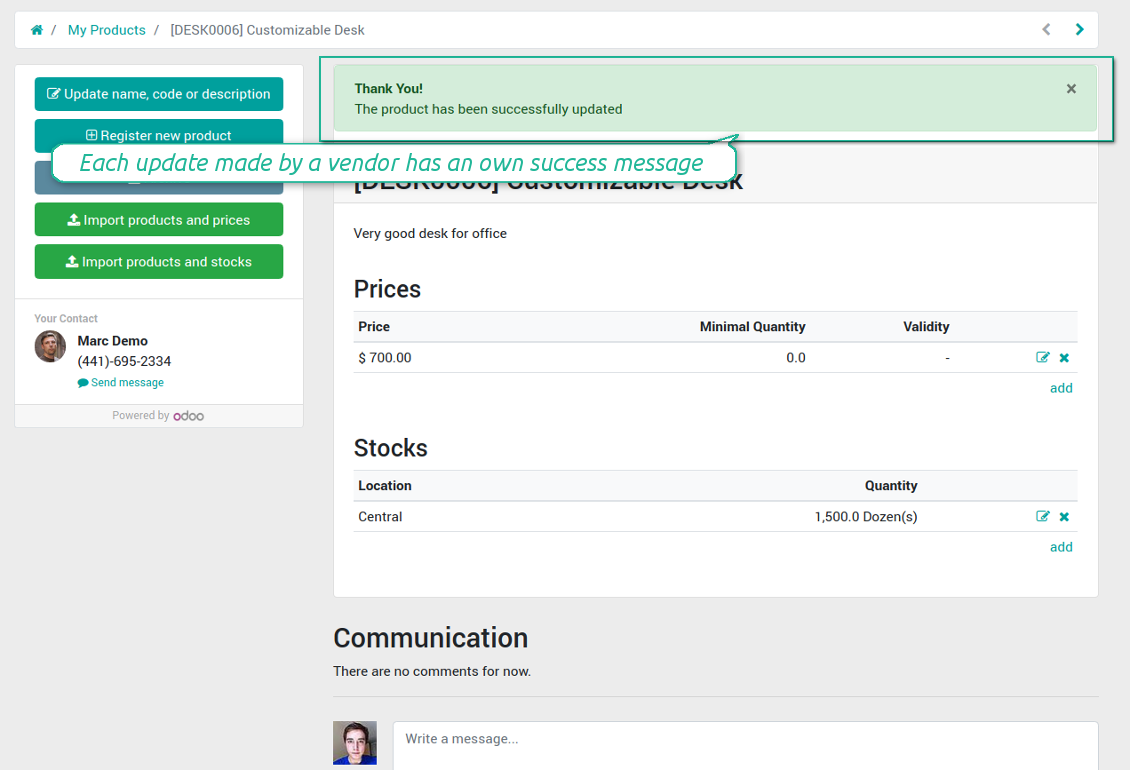
Vendors are notified about results of their actions
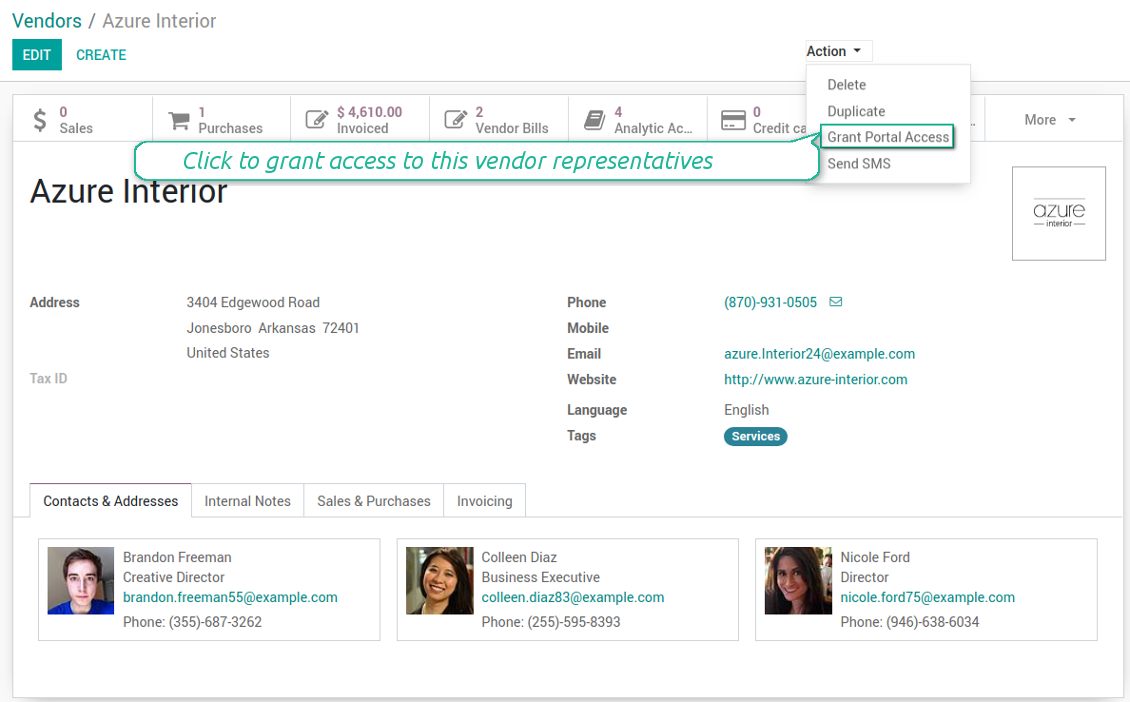
Grant vendor contacts an access to portal
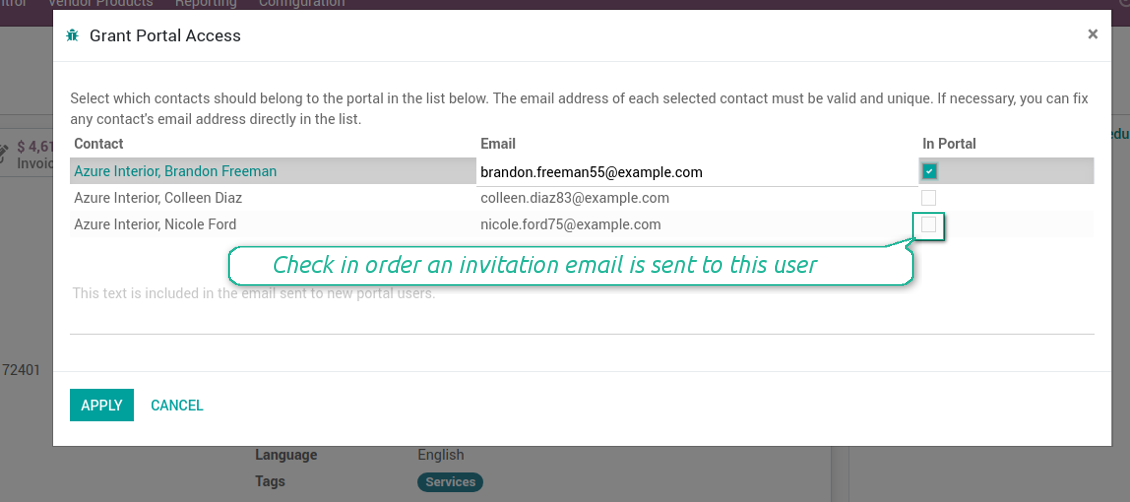
Grant vendor contacts an access to portal (2)
Vendor products interface (backend)
Vendor product form (backend)
Vendor stocks control without effort
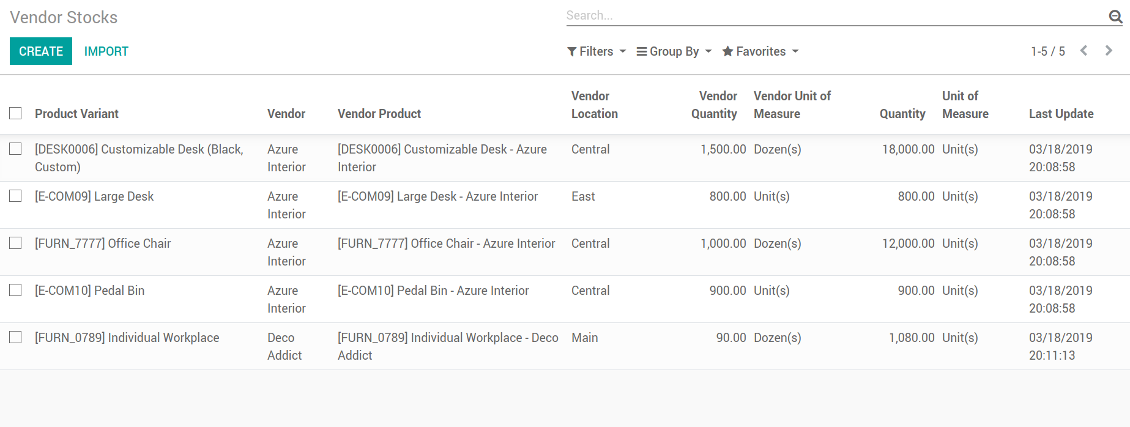
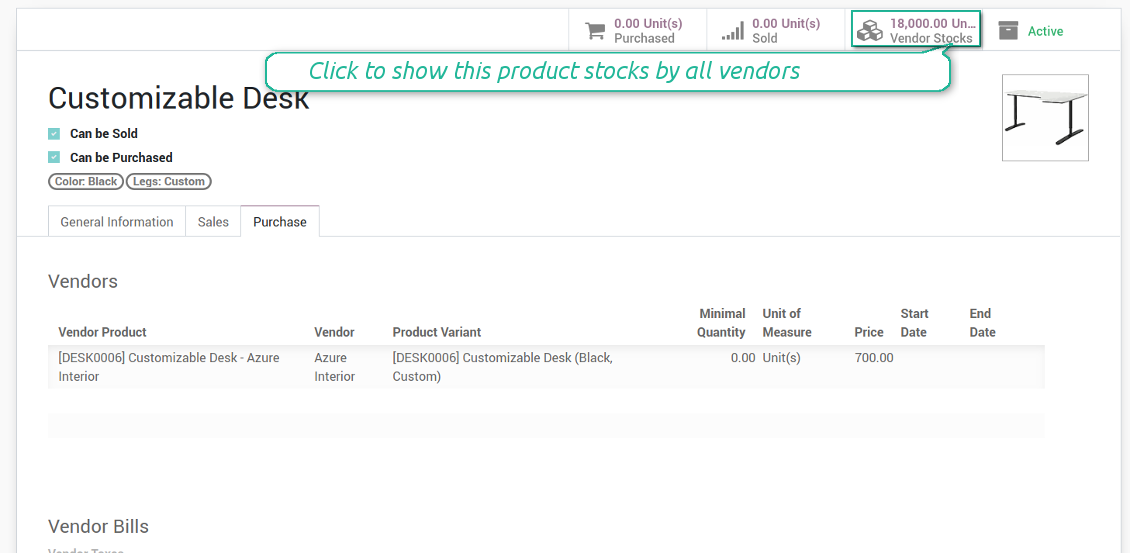
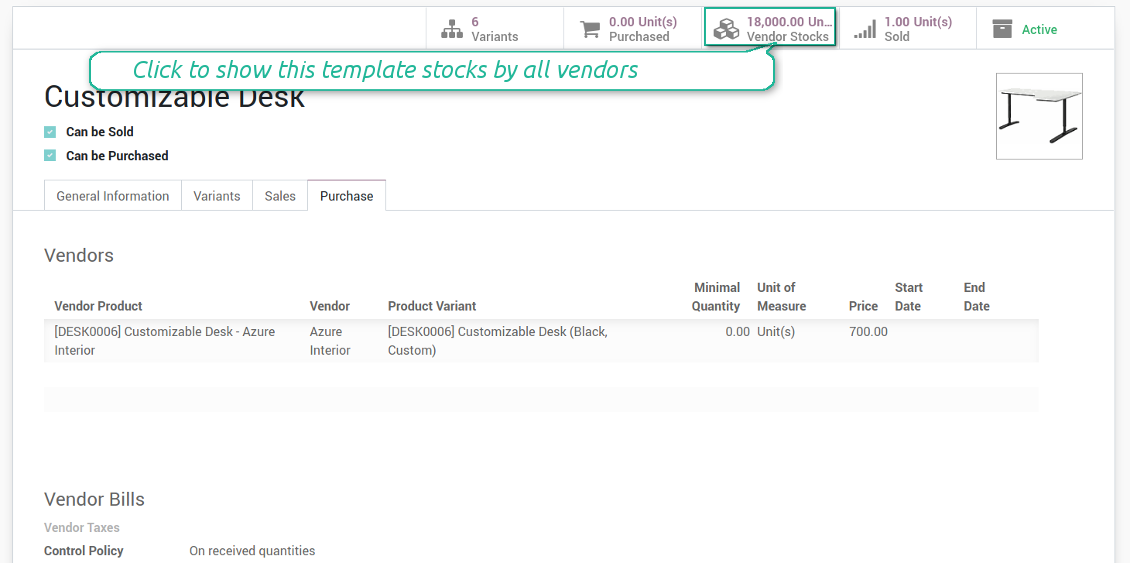
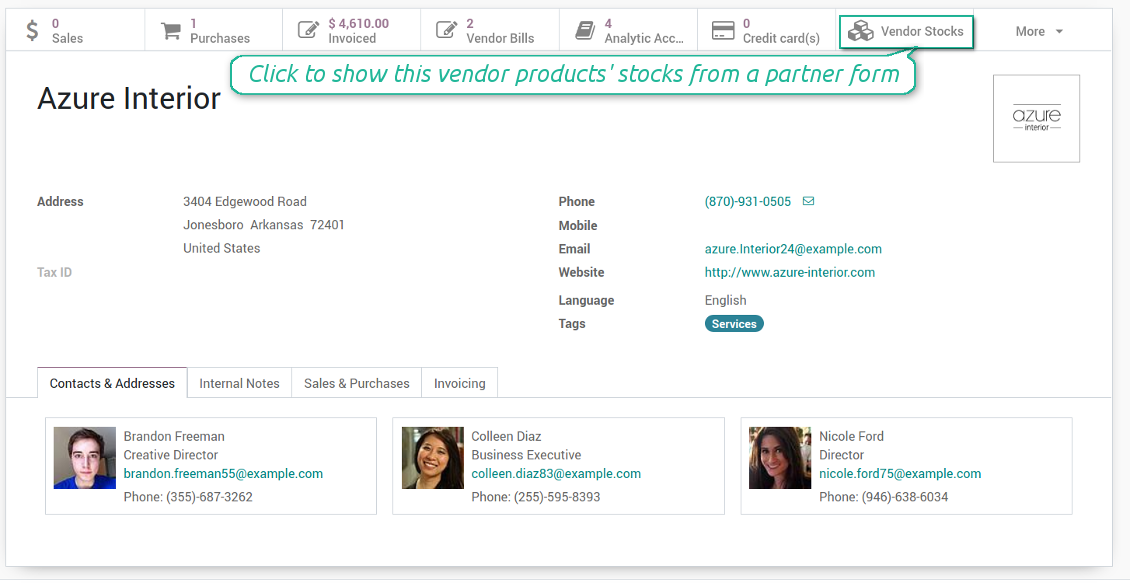
You may access info of vendor products' stocks right from product variant, product template, and supplier form views. You should just click a related button to get an overview.
How vendor stocks work
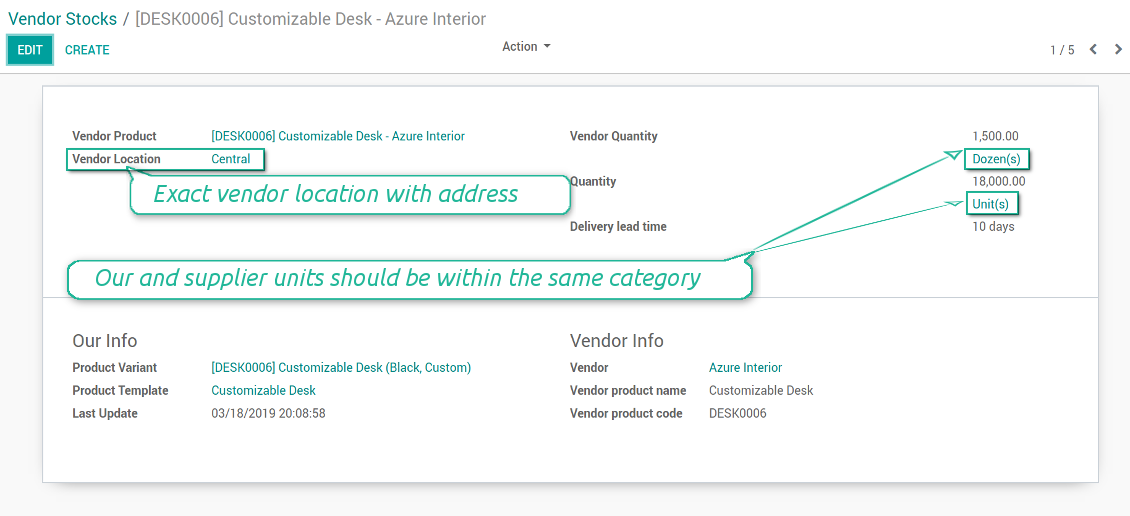
- Each stock level is provided per definite vendor location. Vendors might easily create, edit, and archive own warehouses
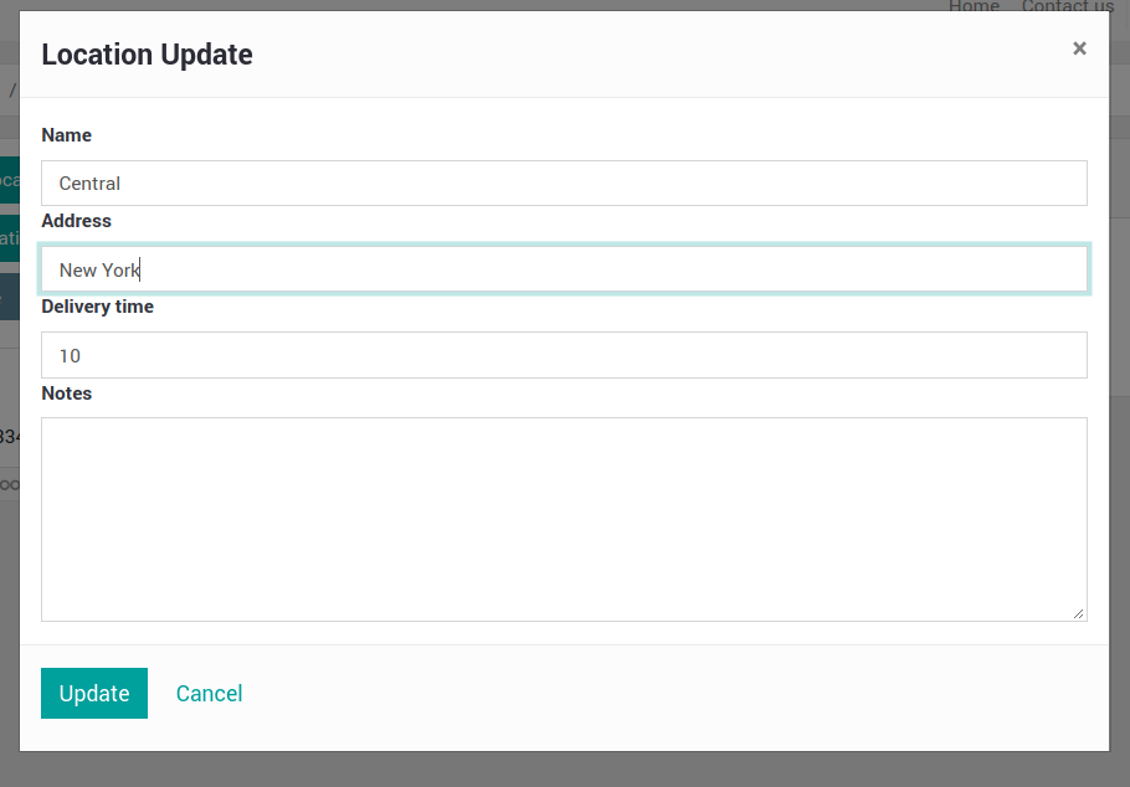
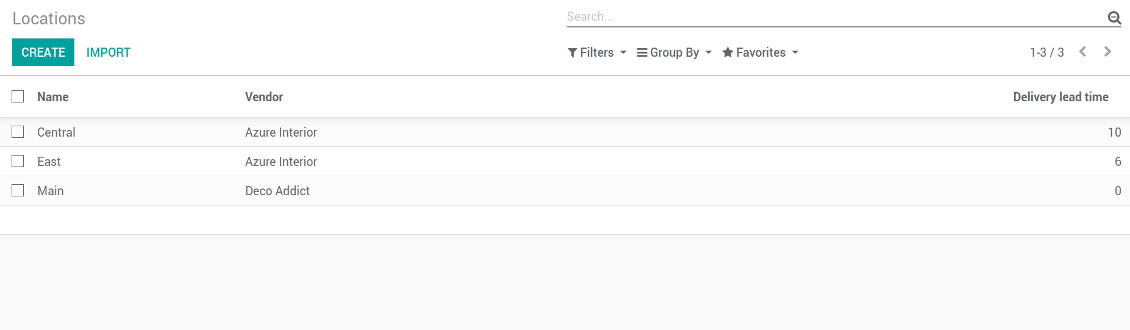
- Each vendor might have an unlimited number of locations. Locations are distinguished by name, address, and average delivery time
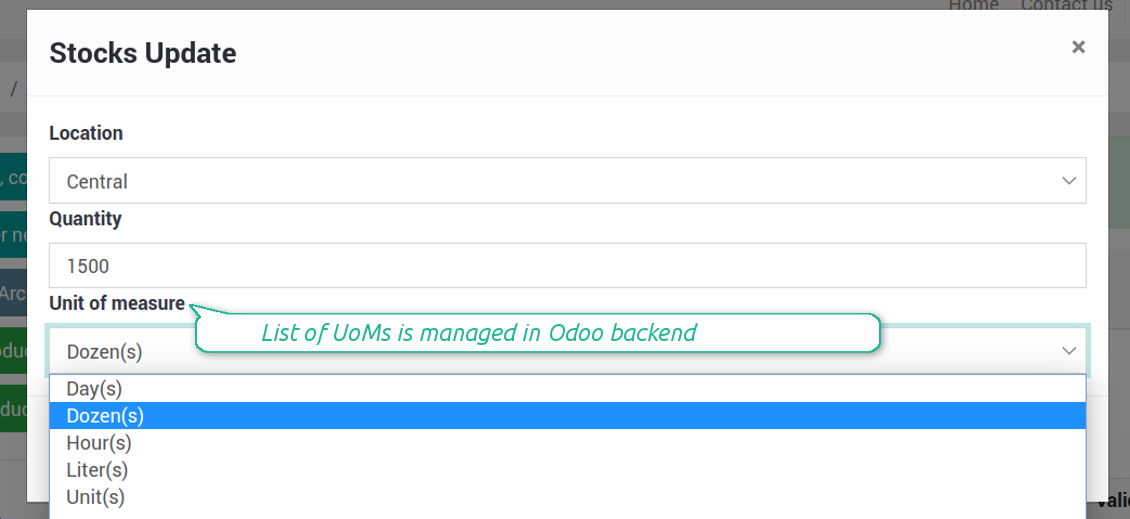
- Stock levels are manageed in vendor units of measure, but purchase managers should make sure it has the same category as our linked product. The idea is to support conversion in order internal users work with habitual figures. For example, dozens and units are fine, while dozens and hours might lead to mistakes
- Vendor stocks and locations might be switched off for portal users on the configuration page
- Stock levels are not used in our moves, but they are provided for general information. Stock levels are updated either manually or through the import process. It might be done by both portal and purchase users
Schermate
Vendors notify you about available stocks
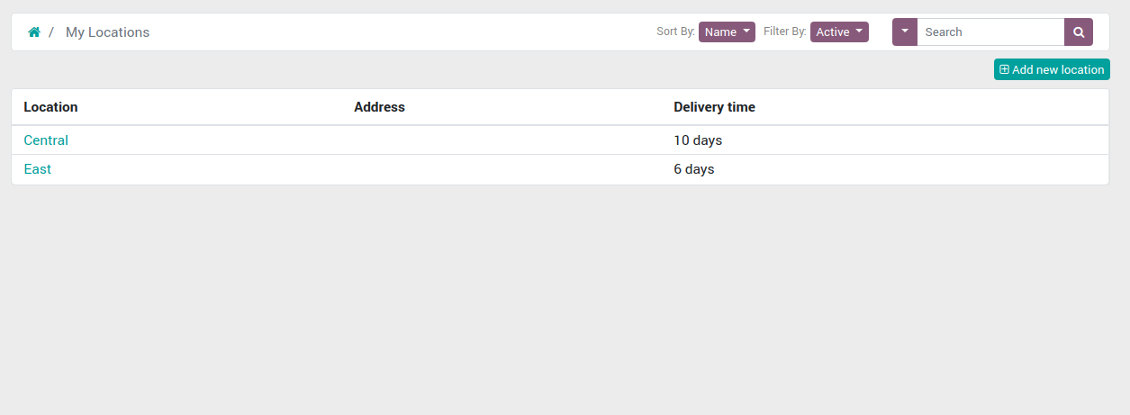
List of locations of a vendor currently logged in
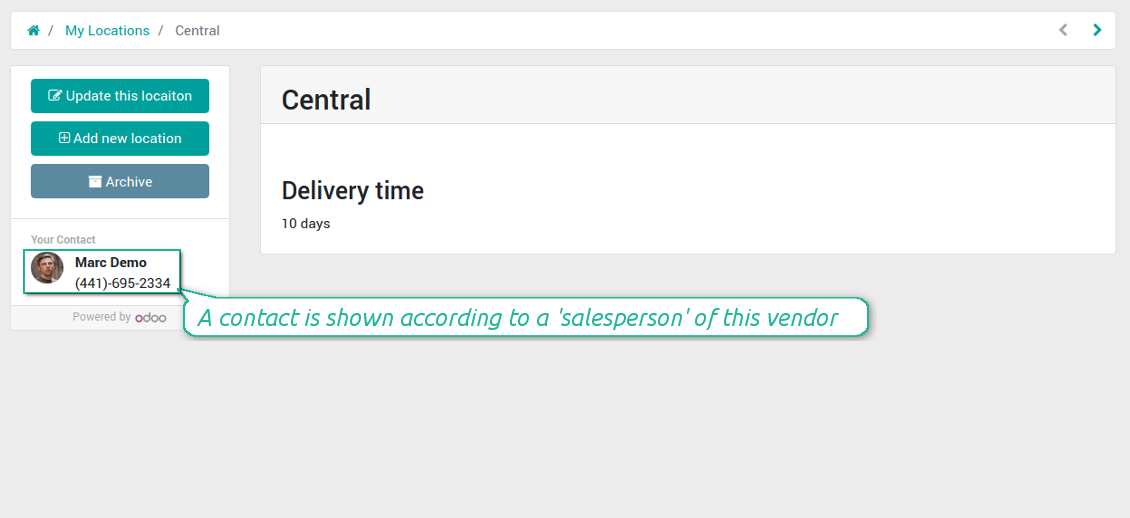
Supplier location (warehouse) in portal
Vendors might create / update their locations
Control vendor inventories per each product (backend)
Vendor stocks on a product form (backend)
Vendor stock level form per each product (backend)
Vendor locations list (not linked to our locations!)
Vendor stocks by product templates (backend)
Access stocks of this supplier from a partner form (backend)
Supplier prices management and self-management
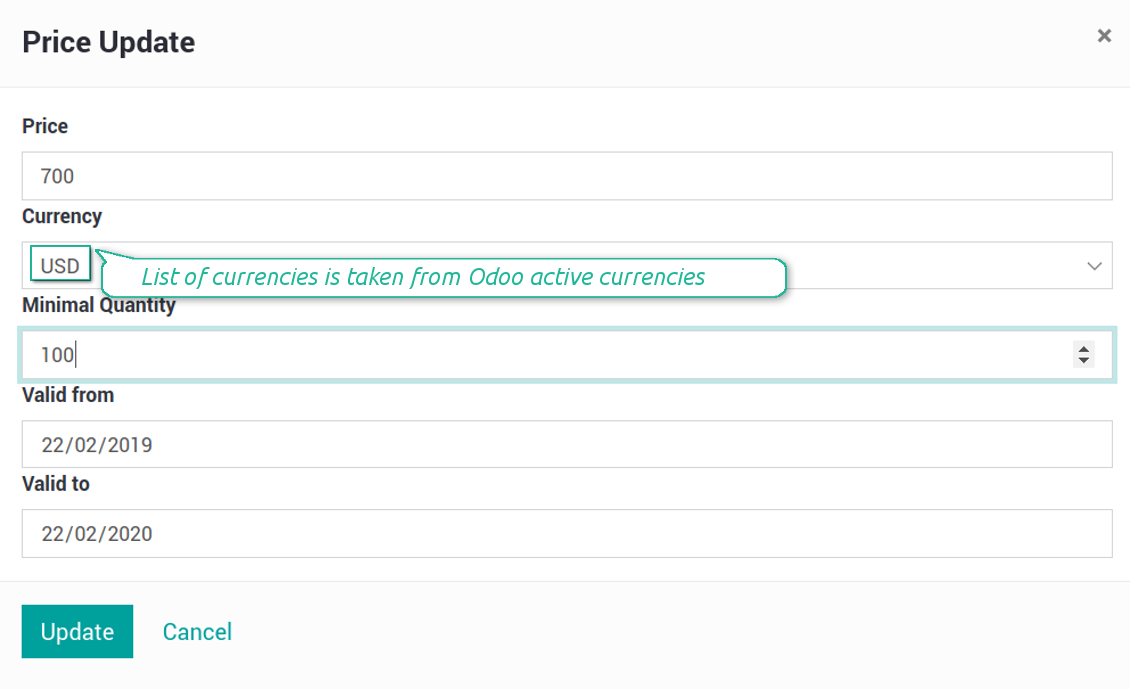
Those prices are considered as standard Odoo 'supplier info' which correspondingly are used in purchase orders.
Schermate
Suppliers keep up-to-dated prices in portal
Comfortable importing of vendor product data
In such a way vendor representatives are able to keep their product info updated.
How to import vendor products and stocks
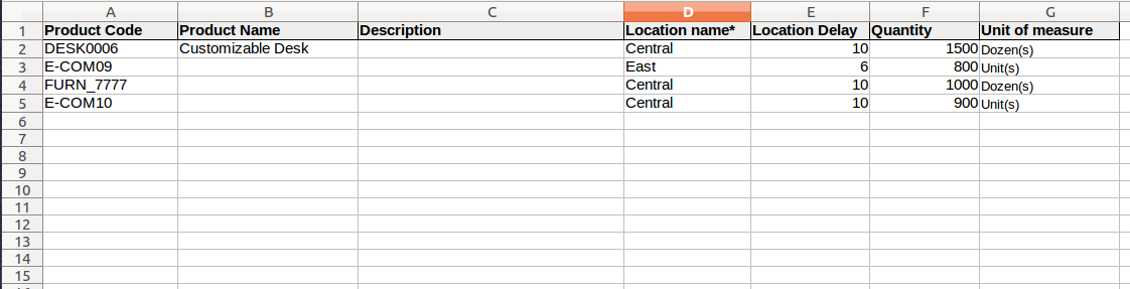
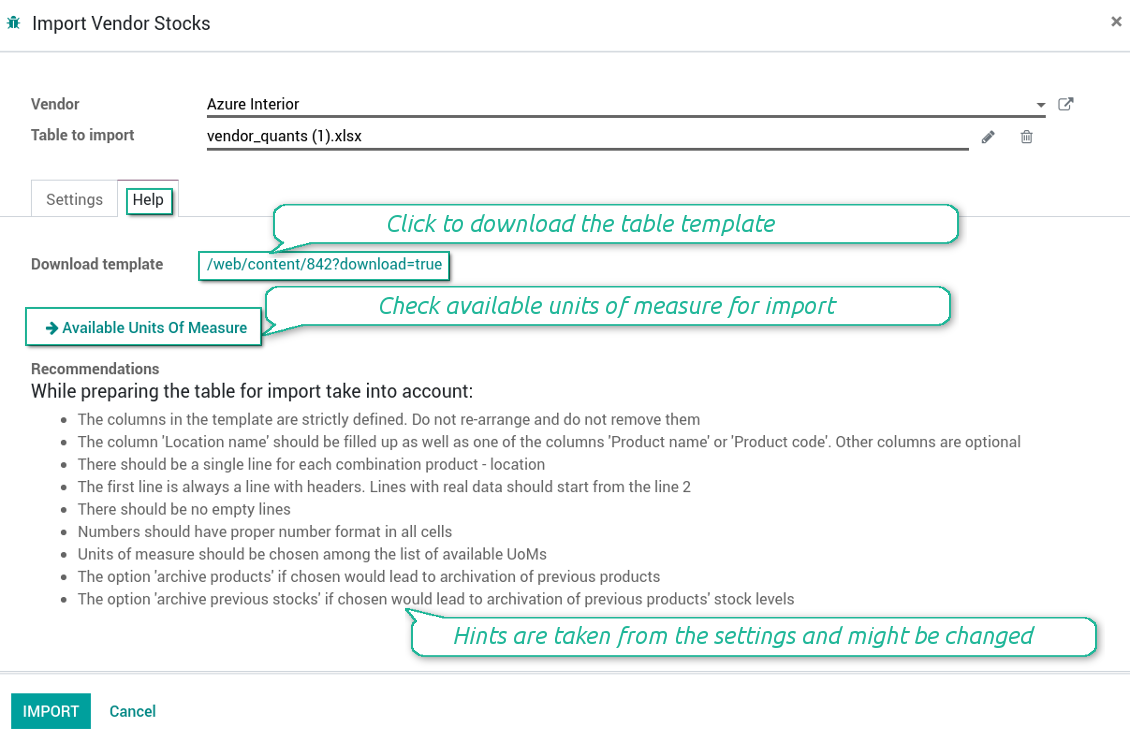
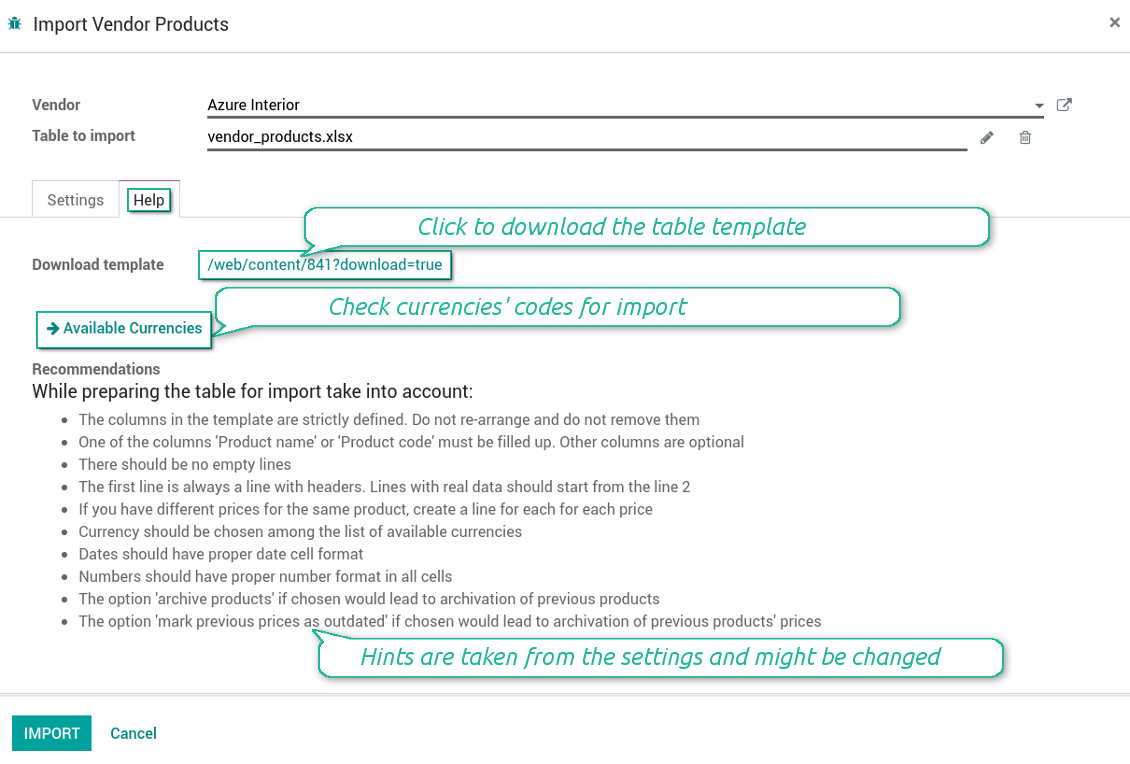
- The table format is supplied with this tool source code and would be available in the portal under the section 'Help'
- You may change the table content to provide users with more specific examples and labels. However do no not change columns' order and do not remove those: it would lead to inevitable mistakes
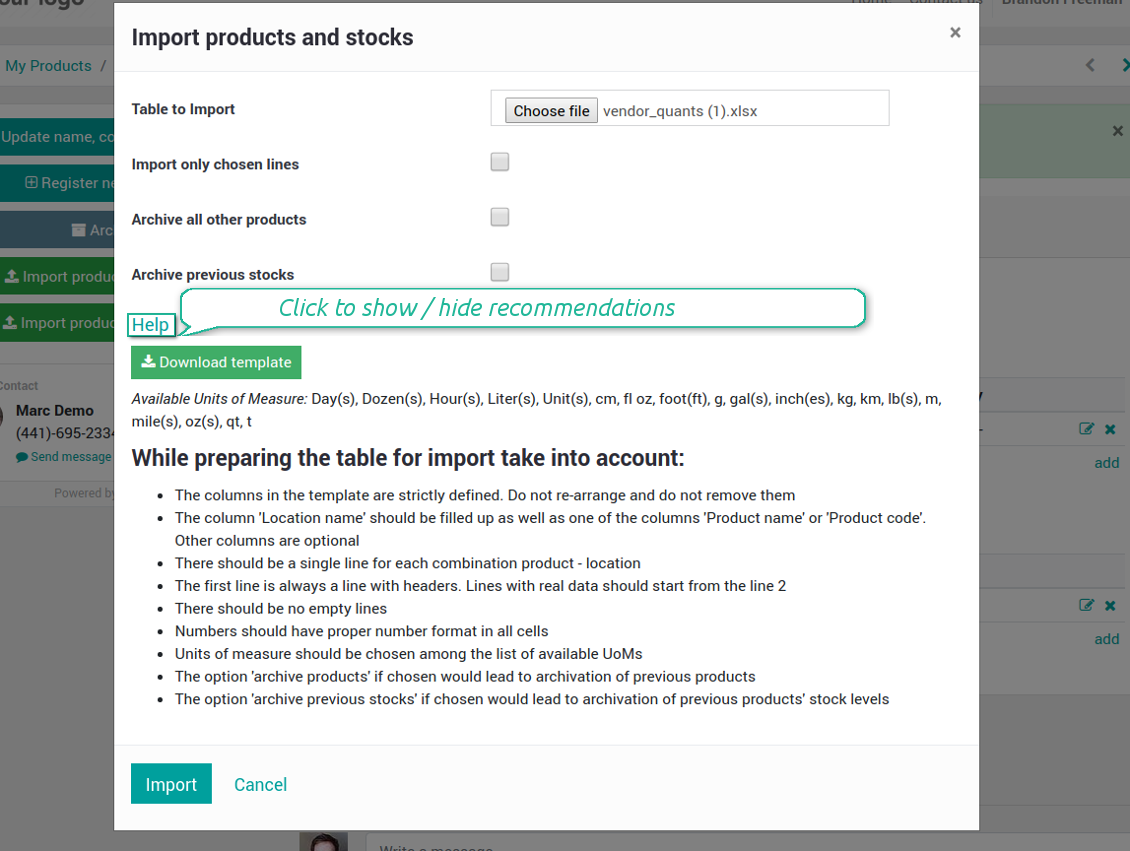
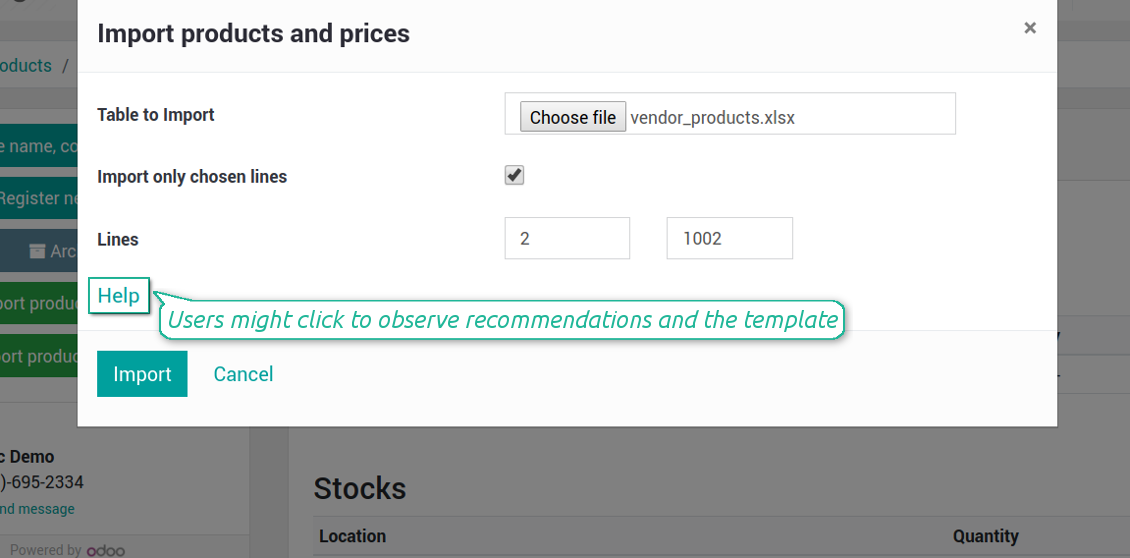
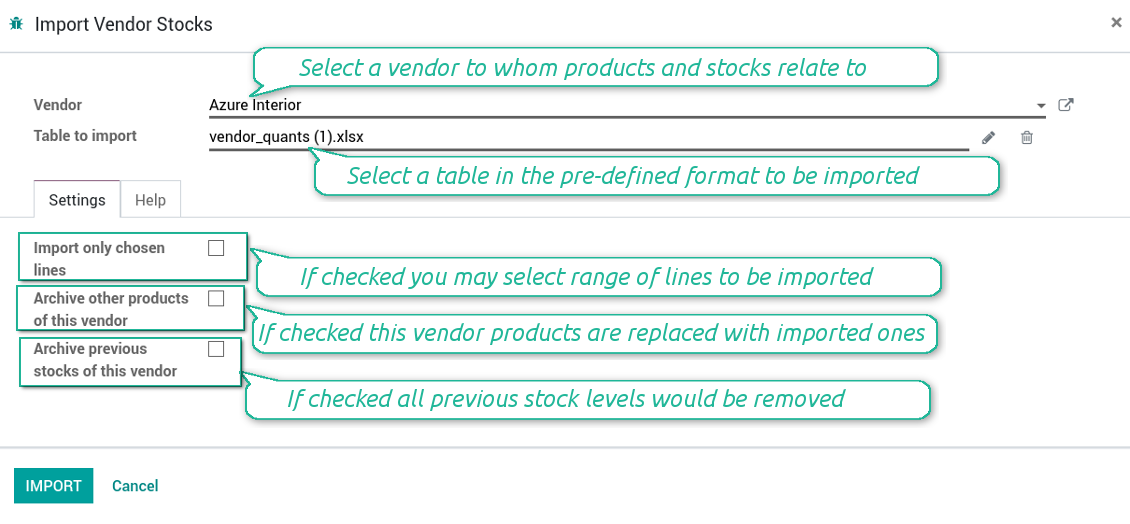
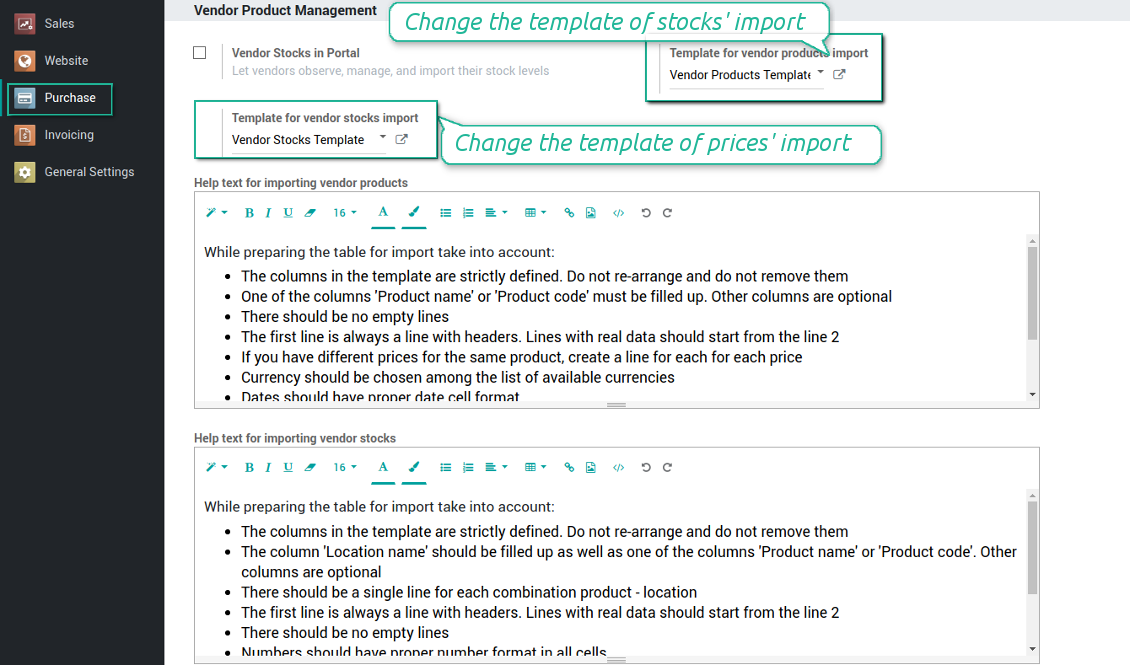
- The wizard offers useful tips to make a correct import. You may edit those recommendations on the configuration page, but make sure you do not remove critical advice
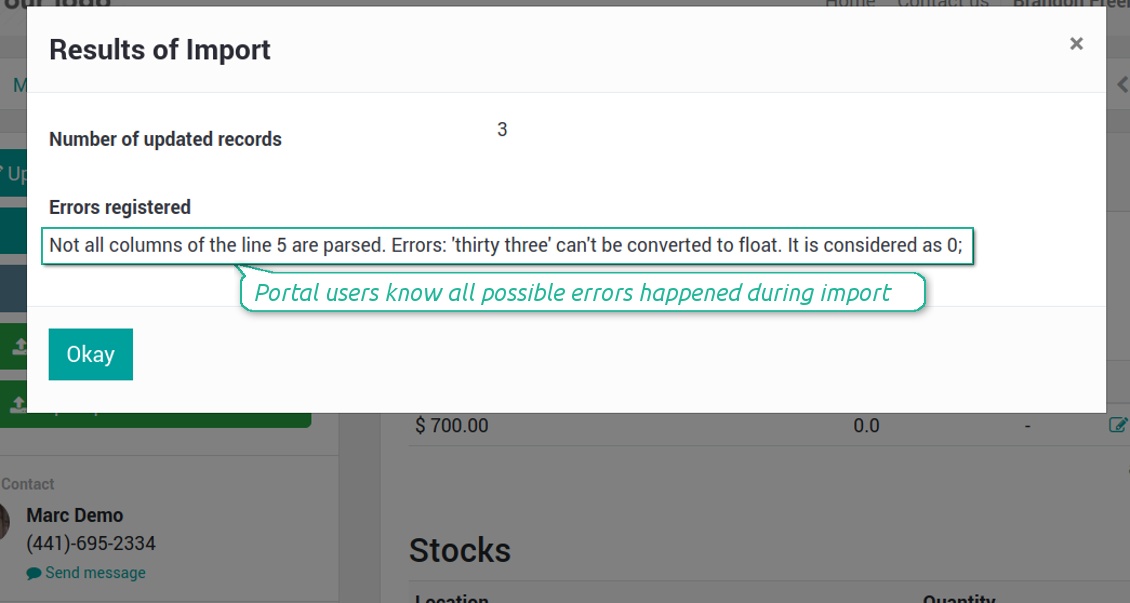
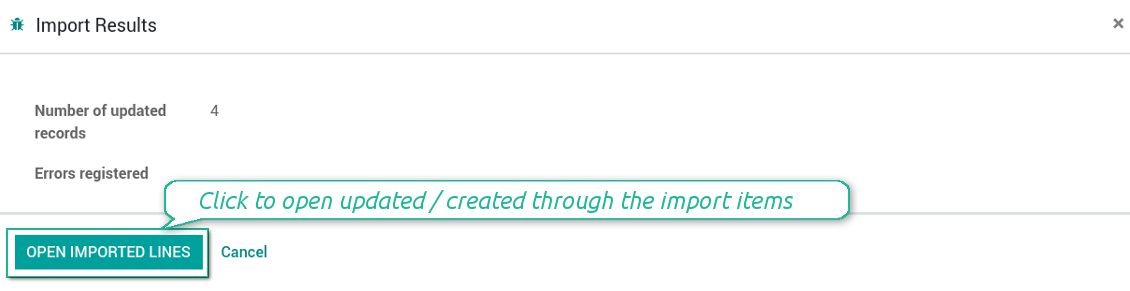
- Each import finishes with the special results' and errors' pop-up. It let users control of what has been actually done
- In the wizard users may select which table lines should be imported. It is useful in case the number of lines is too big to import them all
- In the wizard portal users can select whether their previous products' list should be archived. It let fully replace the product catalogue with a new one
- In the wizard it is possible to make previous prices outdated. It let users remove misleading data
- In case import can't be fully finished until Odoo stops it, contact your system administrator to increase configured time-outs
How to import vendor product and prices
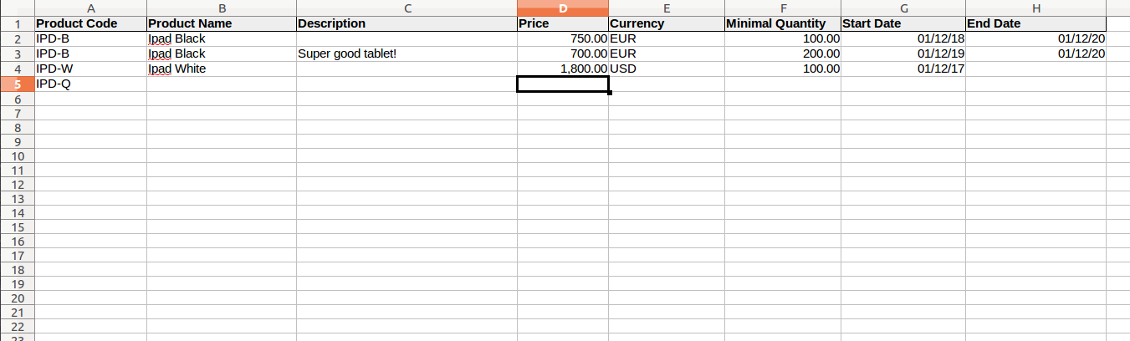
- The table format is supplied with this tool source code and would be available in the portal under the section 'Help'
- You may change the table content to provide users with more specific examples and labels. However do no not change columns' order and do not remove those: it would lead to inevitable mistakes
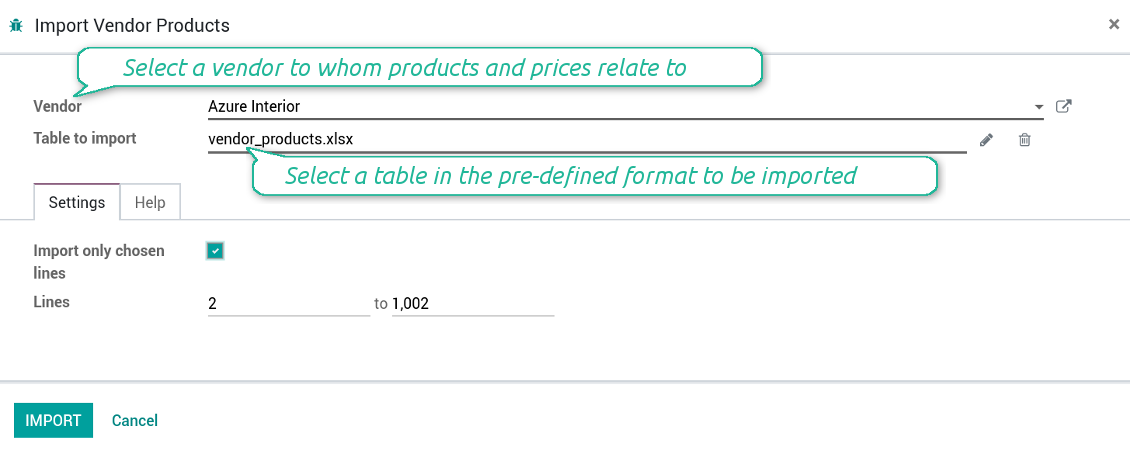
- The wizard offers useful tips to make a correct import. You may edit those recommendations on the configuration page, but make sure you do not remove critical advice
- Each import finishes with the special results' and errors' pop-up. It let users control of what has been actually done
- In the wizard users might select which table lines should be imported. It is useful in case the number of lines is too big to import them all
- In the wizard portal users can select whether their previous products' list should be archived. It let fully replace the product catalogue with a new one
- In the wizard it is possible to mark previous stocks as not any more topical
- In case import can't be fully finished until Odoo stops it, contact your system administrator to increase configured time-outs
Schermate
Vendors import products and stocks through portal
The template for vendor stock levels table (backend)
Vendors might import products and update prices
The template for vendor products' table (backend)
Import results' and errors' pop-up in portal
Import of vendor products and stocks (backend)
Stocks import wizard' recommendations (backend)
Import of vendor products and prices (backend)
Prices import wizard goes with detailed recommendations (backend)
Configure your own configurations for import (backend)
Check results and errors of import (backend)
Suggerimenti di configurazione e installazione per Vendor Products Portal Odoo v.12
Python dependency
To provide the feature of dynamic Excel table generation, install the Python library xlsxwriter:
pip install xlsxwriter
Domande frequenti su Vendor Products Portal Odoo v.12
Qual e la differenza tra Vendor Products Management e Vendors Product Portal?
Vendor Products Portal e un add-on di Vendor Products Management. Quest'ultimo gestisce prodotti fornitore, prezzi e scorte solo nel backend Odoo (utenti interni). Il primo consente agli utenti portale (fornitori) di inserire il catalogo e aggiornare/importare prezzi, magazzini e livelli. Vendor Product Management e dipendenza obbligatoria di Vendor Products Portal.
Quali sono le politiche di aggiornamento dei vostri strumenti?
Secondo le politiche attuali dell'Odoo Apps Store:
- Ogni modulo acquistato per la versione 12.0 o precedente da accesso a tutte le versioni fino alla 12.0.
- Dalla versione 13.0 ogni versione del modulo va acquistata separatamente.
- Indipendentemente dalla versione, l'acquisto da diritto a tutti gli aggiornamenti e le correzioni entro una major version.
Il team faOtools non controlla queste politiche. Per qualsiasi domanda, contattate direttamente i rappresentanti dell'Odoo Apps Store.
Come installo l'app su Odoo.sh?
L'approccio piu diretto e il flusso integrato dello store Odoo:
1. Apri la pagina del modulo e fai clic su Deploy on odoo.sh
2. Verrai reindirizzato a GitHub. Accedi e fai clic su Create a new repo o usa uno esistente. Il repository deve essere privato. Non e consentito pubblicare le app con licenza OPL-1. Se serve, crea un nuovo repo per il progetto Odoo.sh
3. Poi, in odoo.sh, fai clic su Deploy, conferma e fai clic su Continue. Parte l'installazione.
Questi passaggi installano l'app sul branch di produzione. Per altri branch o per aggiornare:
1. Scarica il codice sorgente dallo store Odoo
2. Esegui il commit del modulo nel repository GitHub. Nessuna cartella/file dell'app deve essere in .gitignore. I repo creati da odoo.sh a volte ignorano percorsi importanti (es. /lib). Carica tutte le directory e i file del modulo
3. Esegui il deploy del branch di destinazione del progetto odoo.sh oppure attendi la build automatica se previsto.
Come installo l'app sul mio server?
2. Riavvia il server Odoo;
3. Attiva la modalità sviluppatore (impostazioni tecniche);
4. Aggiorna l'elenco delle app (menu Applicazioni);
5. Trova l'app e premi Activate/Install;
6. Segui le linee guida nella pagina dell'app, se ci sono.
L'app ha componenti extra. Posso acquistarli dopo?
Si. Odoo aggiunge automaticamente le dipendenze al carrello: escludi gli strumenti gia acquistati per non pagare due volte.
Ho distribuito l'app su Odoo.sh e vedo un avviso/errore nei test
Un avviso rosso/arancione non influisce sulle funzioni dell'app. A volte i nostri moduli non superano i test automatici standard perché questi assumono un comportamento in conflitto con gli obiettivi dell'app. Ad esempio cambiamo il calcolo del prezzo, mentre i test Odoo confrontano il prezzo finale con l'algoritmo standard.
Controllate prima le funzioni del database distribuito. Funziona tutto?
Se pensate ancora che l'avviso influisca sulle funzioni reali, contattateci e inviate i log di installazione completi e l'elenco completo dei moduli distribuiti (core e di terze parti).
Posso acquistare l'app direttamente da voi?
No, distribuiamo gli strumenti solo tramite lo store ufficiale delle app Odoo.
Vorrei uno sconto
Purtroppo non abbiamo i mezzi tecnici per prezzi individuali.
Posso installare l'app sul database Odoo Online (SaaS)?
No, le app di terze parti non si possono usare su Odoo Online. Odoo SaaS blocca questa possibilità.
Lo strumento dipende da altre app. Devo acquistarle?
Si, lo strumento richiede tutti i moduli indicati nelle dipendenze. Il prezzo sulla pagina dell'app le include gia.
Qual e il prezzo del modulo in dollari USA? Perché e cambiato?
Il prezzo dei nostri moduli e in euro. Lo store Odoo converte le valute secondo il proprio tasso interno. Quindi il prezzo in dollari USA puo cambiare quando il tasso viene aggiornato.
I testi dell'app e del sito web in lingue diverse dall'inglese sono realizzati con l'assistenza dell'IA e allineati alle traduzioni ufficiali di Odoo. Se noti un errore, invia un ticket di traduzione e lo correggeremo.
Segnalazione degli errori
Se riscontri bug o comportamenti incoerenti, non esitare a contattarci. Garantiamo di fornire soluzioni entro 60 giorni dall'acquisto e siamo fortemente interessati a migliorare i nostri strumenti anche dopo questo periodo.
Non hai bisogno di un numero di telefono o di una carta di credito per contattarci. Dovresti solo effettuare una breve registrazione via e-mail, che non richiede più di 30 secondi.
Includi nella richiesta il maggior numero possibile di dettagli: schermate, registri del server Odoo, una descrizione completa di come riprodurre il problema e così via. In genere sono necessari alcuni giorni lavorativi per preparare un piano operativo relativo a un problema (se viene confermato un bug) o fornire indicazioni su cosa fare (in caso contrario).
Richieste di funzionalità pubbliche e idee per moduli (sviluppo gratuito)
Siamo fortemente motivati a migliorare i nostri strumenti e saremmo grati per qualsiasi feedback. Se le tue esigenze sono di uso pubblico e possono essere implementate in modo efficiente, il team le includerà nella nostra lista di cose da fare.
Tale elenco di cose da fare viene elaborato regolarmente e non prevede costi aggiuntivi. Sebbene non possiamo garantire scadenze e progettazione finale, potrebbe essere un buon modo per ottenere le funzionalità desiderate senza investimenti e rischi.
Non hai bisogno di un numero di telefono o di una carta di credito per contattarci. Dovresti solo effettuare una breve registrazione via e-mail, che non richiede più di 30 secondi.

Lo strumento per strutturare gli allegati Odoo in cartelle e sincronizzare con Google Drive, OneDrive/SharePoint, Nextcloud/ownCloud, Dropbox, Amazon S3, Box e NAS. Gestione file. DMS
398€
Lo strumento per conservare le password in Odoo in modo sicuro e condiviso. Vault

Lo strumento per una knowledge base strutturata, interna ed esterna. KMS. Revisioni tipo wiki
398€
Lo strumento per sincronizzare gli allegati Odoo con OneDrive in entrambi i sensi
487€
Lo strumento per impostare target KPI e controllarne il raggiungimento per periodo. Dashboard. Grafici

Lo strumento per servizi su appuntamento, dalla prenotazione a vendite e recensioni
398€
Lo strumento per sincronizzare gli allegati Odoo con Google Drive in entrambi i sensi
487€
Lo strumento per configurare i prezzi variante con coefficienti e maggiorazioni attributo
98€