Sales Trends and Forecast v.12
The tool to calculate sale trends and make prediction for future sales statistically. Sales Forecast
When this tool should be used
- You have enough historical sales data, since it is senseless to make forecast based on last 5 days of sales.
- Your sales are regular and they are not chaotic, meaning that your decisions do not have 100% impact on your sales and there is at least some correlation between market demand and your sales.
- You consider seasonal changes and/or trends, which you noticed but can't fully analyze. You understand which assumptions you try to check.
- You have clear understanding how statistics works.
Scientific approach for forecasting
Forecast as many intervals as you like, but remember that prediction for the next 10 years would be hardly reliable.
Based on your historical data and applied coefficients, sometimes Odoo is not able to reveal trends and make forecasts. In that case only historical data would be shown in reports. But even historical trends might have an analytical use.
Statistical methods for forecast
Autoregression (AutoReg)
It is the simplest but still widely used statistical method for time series forecast.
Autoregressive Distributed Lag (ARDR)
The moving average method takes into account 'errors' in previous observations.
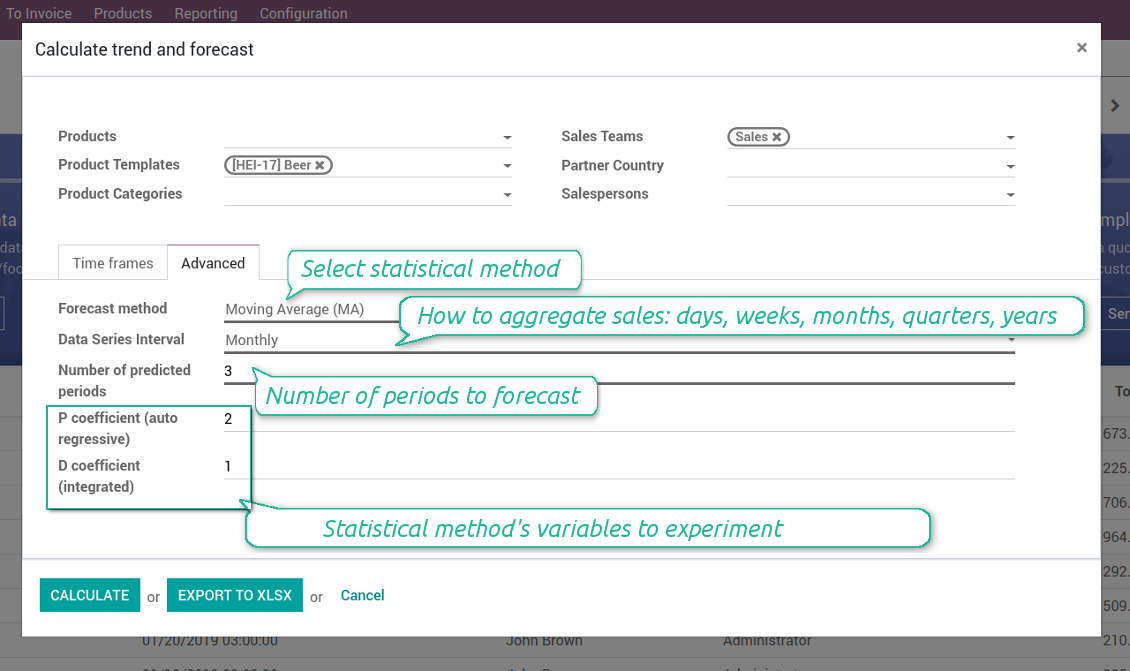
The autoregressive moving average method is a combination of both AR and MA methods. To apply the ARMA method use the MA method with auto regression coefficient (P coefficient) as 2
Autoregressive Integrated Moving Average (ARIMA)
The method which also combines the methods AR and MA, but also tries to make data stationary. It is appropriate to use for historical data with pure trend but without seasonal changes.
Seasonal Autoregressive Integrated Moving-Average (SARIMA)
The SARIMA method enriches the ARIMA method with considering seasonal changes. It is one of the most complex and wide spread methods utilized for forecasting time series now
Simple Exponential Smoothing (SES)
The SES model usage is similar to the AR method, but instead of relying upon linear function, it exploits exponential one
Holt Winter's Exponential Smoothing (HWES)
The HWES method enriches the SES method to work with time series trends and seasonal effects.
Screenshots
Experiment with various statistical models
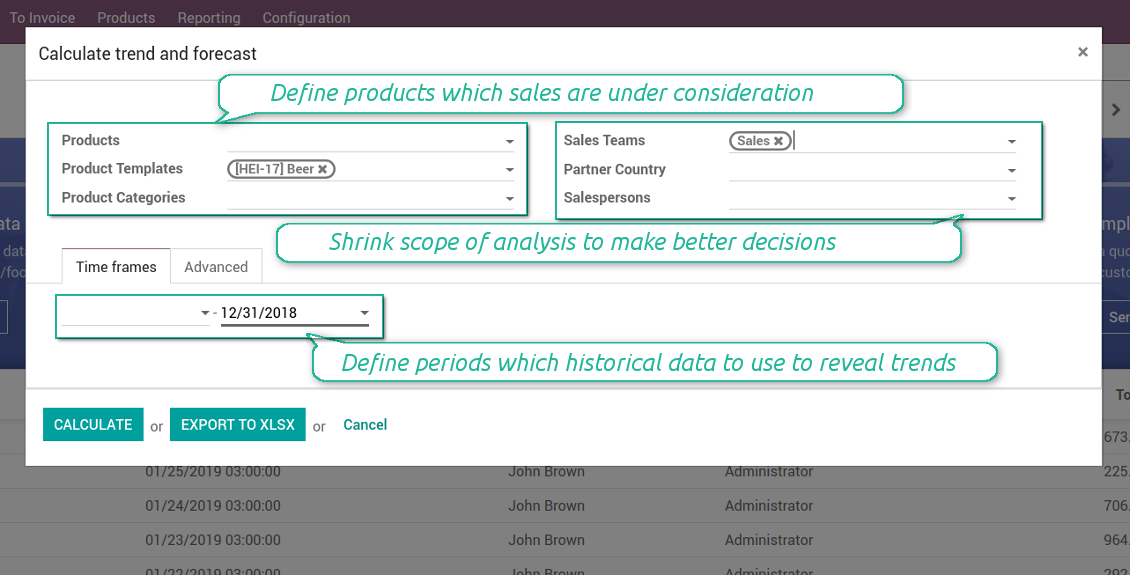
Topical data under consideration
Apply time frames of historical data which is used as an analytic basis. Forecast periods are ones which follow after the end of defined frame. In such a way you make check statistical reliability through 'predicting' actually passed intervals.
As sales per periods all sales orders in the states 'Locked' and 'Sale Order' are taken into account.
Screenshots
Target your analytics
Sales forecasting interface
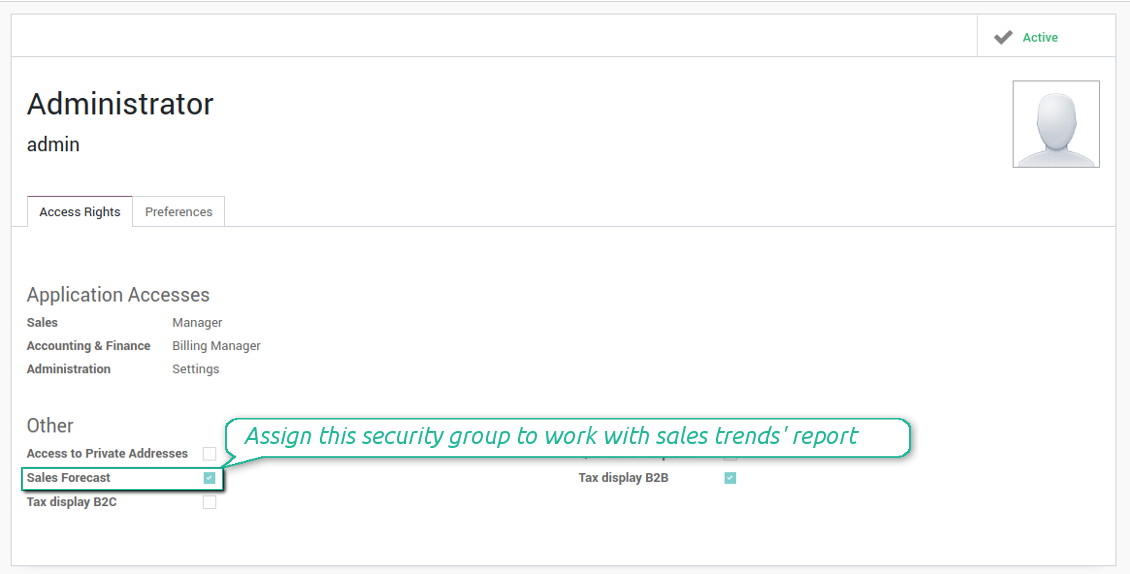
The right for trends analysis might be granted to any sales user, but be cautious: all sales of a current company will be under consideration.
Screenshots
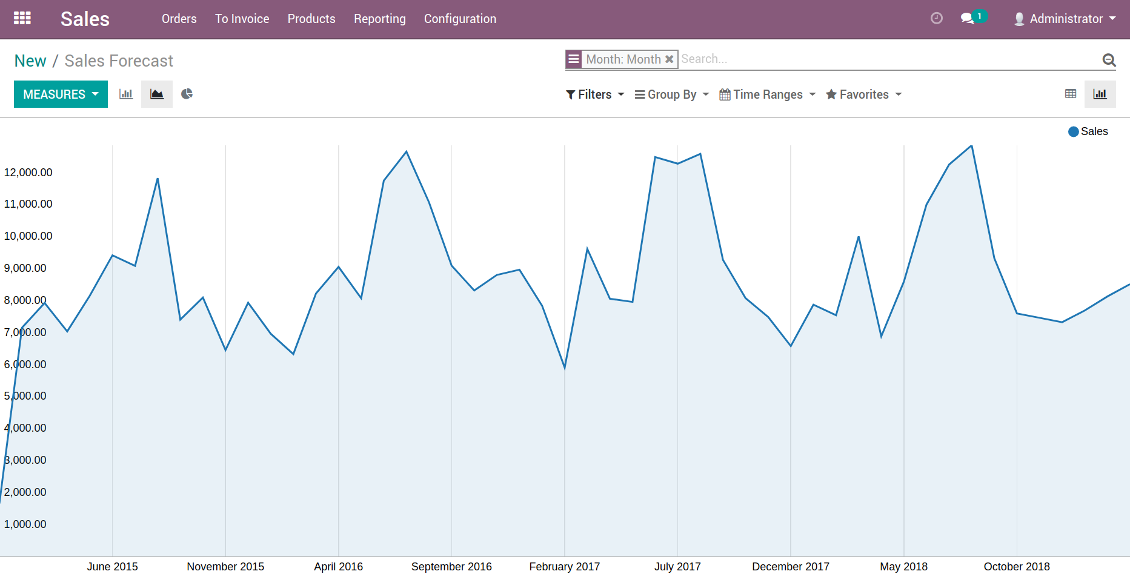
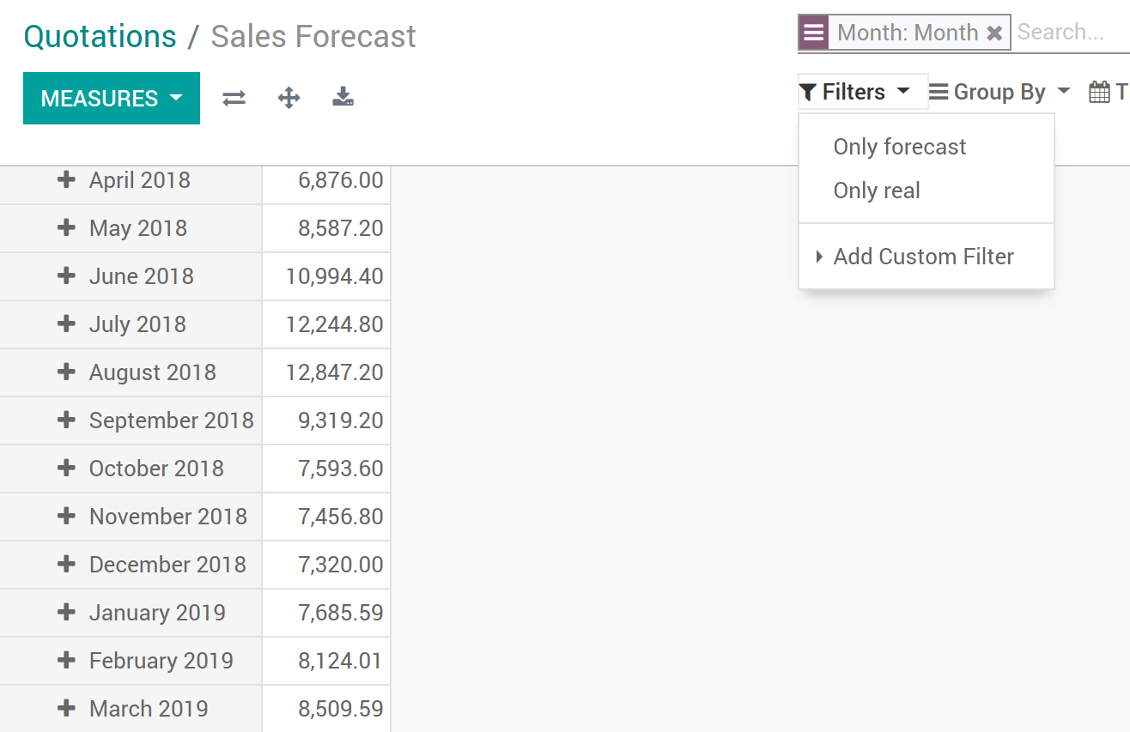
Sales trends and forecast chart
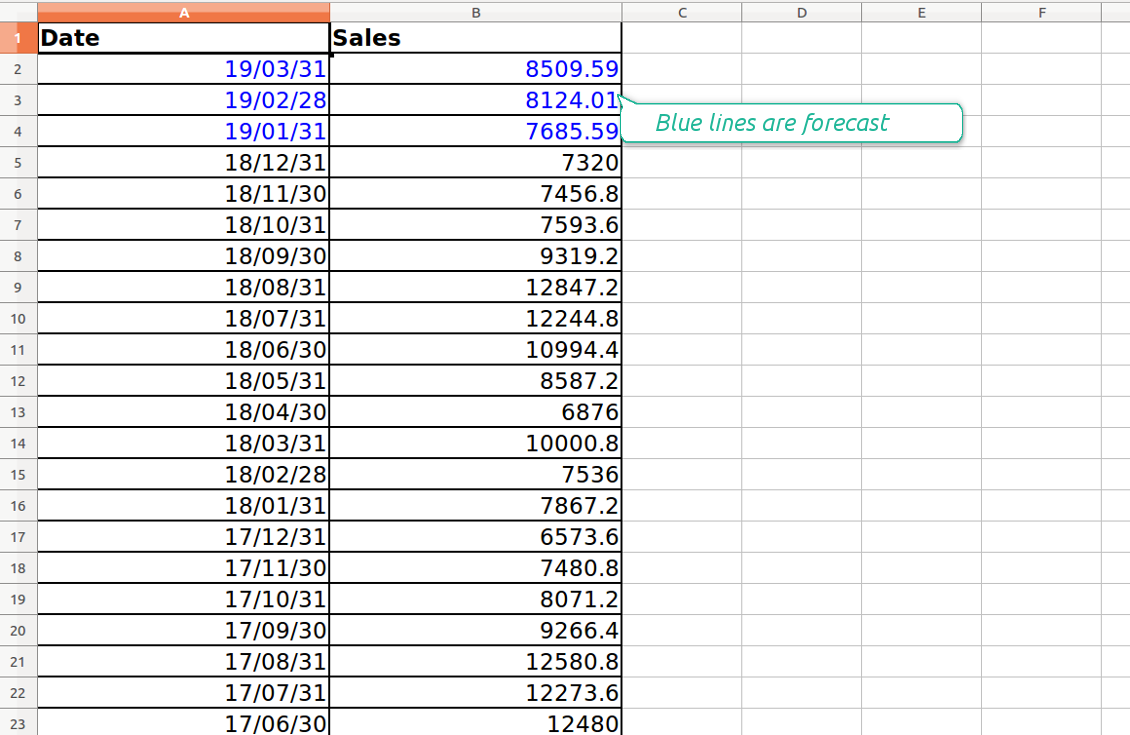
Sales trends and forecast as an xlsx table
Odoo pivot view of sales trends and forecast
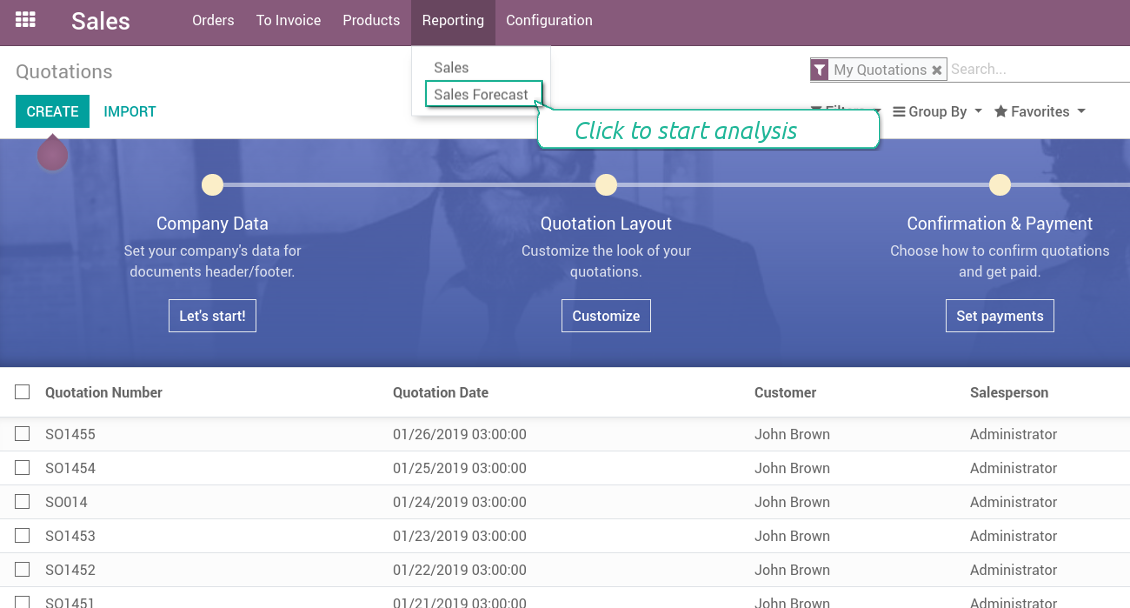
Sales forecast in a few clicks
Grant the right for the forecast report
Configuratie- en installatietips voor Sales Trends and Forecast Odoo v.12
Python dependencies
To guarantee tool correct work you would need a number of Python libraries: pandas, numpy, statsmodels, scipy, xlsxwriter. To install those packages execute the command:
pip3 install pandas numpy statsmodels scipy xlsxwriter
If you run Odoo on Python prior or equal to version 3.7, please install the following versions of the packages pandas==1.3.5, statsmodels==0.13.1
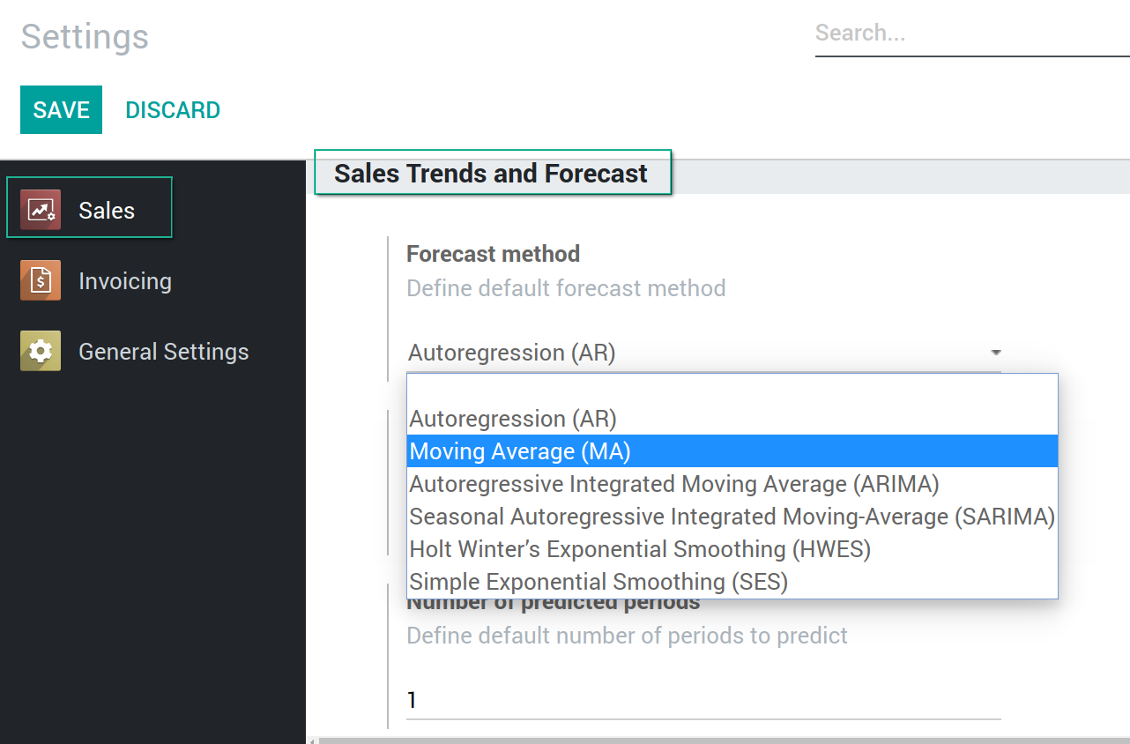
Default values
Sales trends and forecast configuration
Veelgestelde vragen over Sales Trends and Forecast Odoo v.12
Wat is het updatebeleid van uw tools?
Volgens het huidige beleid van de Odoo Apps Store:
- Elke module gekocht voor versie 12.0 of eerder geeft toegang tot alle versies tot 12.0.
- Vanaf versie 13.0 moet elke moduleversie apart worden gekocht.
- Ongeacht de versie geeft aankoop recht op alle updates en bugfixes binnen een hoofdversie.
Het faOtools-team bepaalt dit beleid niet. Neem voor vragen rechtstreeks contact op met vertegenwoordigers van de Odoo Apps Store.
Hoe installeer ik uw app op Odoo.sh?
De meest directe aanpak is de ingebouwde workflow van de Odoo-store:
1. Open de modulepagina en klik op Deploy on odoo.sh
2. U gaat naar GitHub. Log in en klik op Create a new repo of gebruik een bestaande. De repository moet privé zijn. Apps onder OPL-1 mogen niet openbaar. Maak zo nodig een nieuwe repo voor het Odoo.sh-project
3. Ga daarna naar odoo.sh, klik op Deploy, bevestig en klik op Continue. De installatie start.
Zo installeert u de app op de productiebranch. Voor andere branches of een update:
1. Download de broncode uit de Odoo-store
2. Commit de module naar de GitHub-repository. Geen app-mappen/bestanden in .gitignore. Repo's van odoo.sh negeren soms belangrijke paden (bijv. /lib). Upload alle modulemappen en -bestanden
3. Deploy de doelbranch van het odoo.sh-project of wacht op de automatische build.
Hoe installeer ik uw app op mijn eigen server?
2. Herstart de Odoo-server;
3. Zet de ontwikkelaarsmodus aan (technische instellingen);
4. Werk de applijst bij (Apps-menu);
5. Zoek de app en klik op Activate/Install;
6. Volg de richtlijnen op de app-pagina als die er zijn.
Uw app heeft extra add-ons. Kan ik die later kopen?
Ja. Odoo zet automatisch alle afhankelijkheden in de winkelwagen: sluit eerder gekochte tools uit om dubbel betalen te voorkomen.
Ik heb uw app op Odoo.sh gezet en zie een waarschuwing/fout in de tests
Een rode/oranje waarschuwing beinvloedt de functies van de app niet. Soms halen onze modules de standaard automatische tests niet, omdat die gedrag verwachten dat indruist tegen het doel van de app. We wijzigen bijvoorbeeld de prijscalculatie, terwijl de Odoo-tests de eindprijs met het standaardalgoritme vergelijken.
Controleer eerst de functies van de gedeployde database. Werkt alles?
Als u toch denkt dat de waarschuwing echte functies raakt, neem contact op en stuur de volledige installatielogs en de volledige lijst gedeployde modules (kern en derden).
Kan ik uw app rechtstreeks bij u kopen?
Nee, we verspreiden de tools alleen via de officiele Odoo-appwinkel.
Ik wil graag korting
Helaas hebben we geen technische mogelijkheid voor individuele prijzen.
Kan ik de app installeren op mijn Odoo Online (SaaS)-database?
Nee, apps van derden kunnen niet op Odoo Online. Odoo SaaS blokkeert die mogelijkheid.
Uw tool hangt van andere apps af. Moet ik die kopen?
Ja, de tool heeft alle modules in de afhankelijkheden nodig. De prijs op de app-pagina is inclusief die afhankelijkheden.
Wat is de prijs van de module in Amerikaanse dollars? Waarom is die veranderd?
De prijs van onze modules staat in euro. De Odoo-store rekent om volgens de interne wisselkoers. De prijs in Amerikaanse dollars kan dus wijzigen als die koers wordt bijgewerkt.
De teksten van de app en website in andere talen dan het Engels zijn met AI ondersteund en afgestemd op de officiële Odoo-vertalingen. Als u een fout ziet, een vertaalticket sturen en we corrigeren het.
Fouten melden
Als u bugs of inconsistent gedrag tegenkomt, aarzel dan niet om contact met ons op te nemen. We garanderen dat we binnen 60 dagen na aankoop oplossingen bieden en zijn zeer geïnteresseerd in het verbeteren van onze tools, zelfs na deze periode.
U heeft geen telefoonnummer of creditcard nodig om contact met ons op te nemen. U hoeft slechts een korte e-mailaanmelding door te geven, die niet langer dan 30 seconden duurt.
Vermeld zo veel mogelijk details in uw verzoek: schermafbeeldingen, Odoo-serverlogboeken, een volledige beschrijving om uw probleem te reproduceren enzovoort. Gewoonlijk kost het enkele werkdagen om een werkplan voor een probleem op te stellen (als een bug is bevestigd) of u richtlijnen te geven over wat er moet gebeuren (anders).
Aanvragen voor openbare functies en module-ideeën (gratis ontwikkeling)
We zijn sterk gemotiveerd om onze tools te verbeteren en zijn dankbaar voor alle feedback. Als uw vereisten van openbaar nut zijn en efficiënt kunnen worden geïmplementeerd, zal het team deze opnemen in onze takenlijst.
Zo'n to-dolijst wordt regelmatig verwerkt en er zijn geen extra kosten aan verbonden. Hoewel we geen deadlines en definitief ontwerp kunnen beloven, kan het een goede manier zijn om de gewenste functies te verkrijgen zonder investeringen en risico's.
U heeft geen telefoonnummer of creditcard nodig om contact met ons op te nemen. U hoeft slechts een korte e-mailaanmelding door te geven, die niet langer dan 30 seconden duurt.

De tool om Odoo-bijlagen in mappen te structureren en te synchroniseren met Google Drive, OneDrive/SharePoint, Nextcloud/ownCloud, Dropbox, Amazon S3, Box en NAS. Bestandsbeheer. DMS
398€
De tool om wachtwoorden veilig in Odoo te bewaren voor gedeeld gebruik. Kluizen

De tool om een diepe kennisbank te bouwen, intern en extern. KMS. Wiki-achtige revisies
398€
De tool om Odoo-bijlagen bidirectioneel met OneDrive te synchroniseren
487€
De tool om KPI-doelen te zetten en de realisatie per periode te controleren. Dashboards. Grafieken

De tool voor tijdgebonden diensten van boeking tot verkoop en reviews
398€
De tool om Odoo-bijlagen bidirectioneel met Google Drive te synchroniseren
487€
De tool om een verkooporder klaar te maken voor de volgende fase. Verkoopchecklists. Goedkeuring. Multi-offerte

De tool om verplichte taken per CRM-fase af te vinken. CRM-checklists