Joint Calendar v.15
The tool to combine different Odoo events in a few configurable super calendars
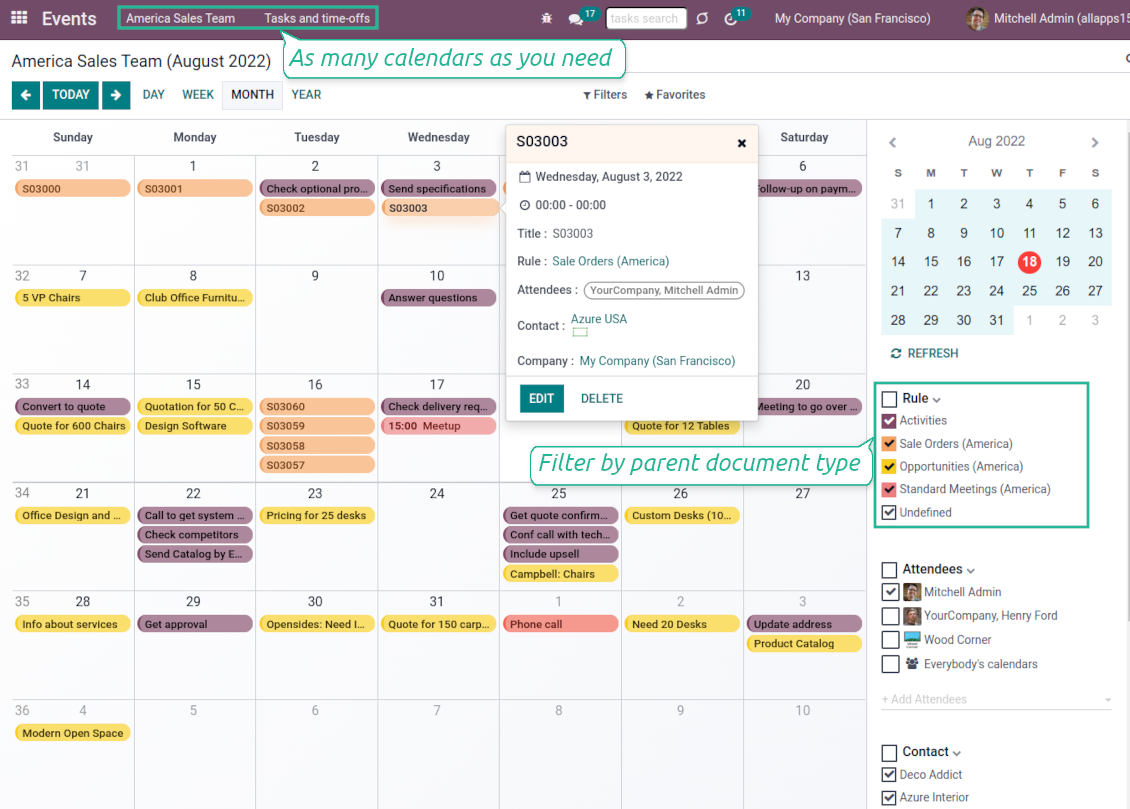


Odoo users often need to keep in mind a lot of details spread out among numerous interfaces. Switching between those is not comfortable and error-prone for planning. This tool solves the problem. The app lets configure rules to join and share various document types on a single super calendar view but with easy-reachable source objects.
- the core app to merge Odoo documents in super calendars.
Tā cena ir
98€
88€.
- the optional free extension that introduces the Odoo Enterprise Gantt view joint events. The features assumed by this add-on are marked by the icon
Any Odoo documents on the same calendar
The tool might merge any Odoo document types on the same view: opportunities, meetings, phone calls, activities, sale or purchase orders, shipments and deliveries, tasks and tickets, time offs, ...
Flexible merging rules
Define on your own what to consider a joint event title, start or stop date, who are target attendees, etc. Have even the same document twice on the same calendar just with a different start
Instant access to source details
Joint events and their source documents are interrelated. Update the former, and the latter would be changed immediately. A reverse operation would be applied with the next cron job (the frequency is configurable)
Comfortable navigation
Shared calendars are especially suitable for team interactions. Users might switch between document types, participants, linked contacts, and companies in a single click. Optionally turn on the Odoo Enterprise Gantt view
Unlimited number of super calendars
Configure as many calendars as you need: for various functional areas or for different user groups. Each joint calendar has its own menu item
Reminders for any Odoo documents
Calendar configuration lets assign default popup and email alarms. Thus, it is possible to have notification of any Odoo event or activity
Simple user rights administration
Regulate joint calendar accesses right on its form. Make it public or share it only for chosen user groups. The app fully supports multi-companies environment
Automatic shared calendar updates
Joint events are updated regularly by the cron job. It is fast, especially if you apply time frames. Refreshing is also available from the calendar interface
Better then expected
The app does exactly what was needed. Combine all tasks from all calendars to one. And allows to manages all activities from all modules in one place.
This makes the Event Calendar so much more useful !
We bought this to combine certain project tasks with the schedules of our maintenance engineers. We now have a better overview which moments are overlapping the schedules of other events. The joining of multiple events in 1 event calendar is super easy, it should be a standard option in ODOO.
Excellent responsive team of programmers
Joint Calendar is the perfect addition to the standard Calendaring system that Odoo offers. It makes the job of setting up specific departmental calendars filled with any objects you wish very easy and Alex and the team provides fantastic after-sales support, responding in most cases within 24 hours to requests for help. Thanks for a great module.
Essential to have Activities, Tasks, Meetings etc all in one calendar and shared.
Great service support very quick and were right on with fixing the issue... I think the ability to see everything on one shared calendar is such an essential part of coordination and time management. Great product once you sort out the rules you need!
Super calendars for any business area
Use joint calendars for any functional area: CRM, project management, sales, HRM, MRP, inventory management, so and so on. Find just a few examples of rules below
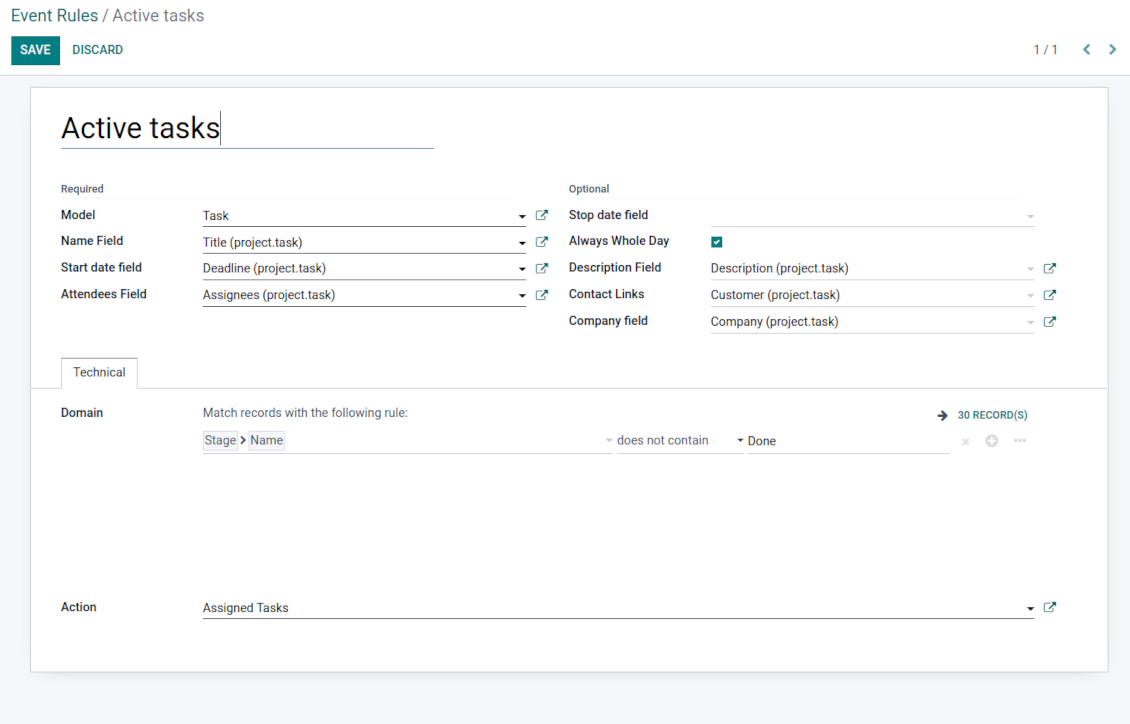
Tasks on a joint calendar
-
As a model use 'Task'
-
As a name use 'Title'
-
As a start date field use 'Deadline'
-
As attendees' field use 'Assignees'
-
As a domain optionally you can set definite projects
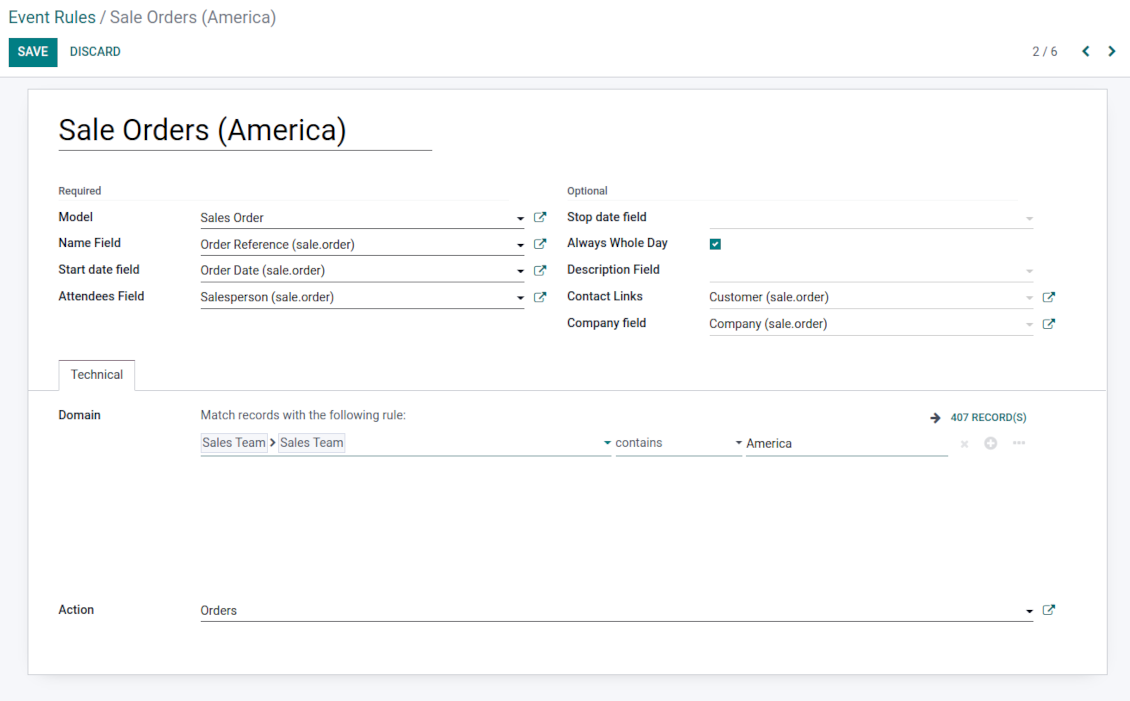
Sale orders on a shared calendar
-
As a model use 'Sales order'
-
As a name use 'Order Reference'
-
As a start date field use 'Order Date'
-
As attendees' field use 'Salesperson'
-
As a contact link use 'Customer'
-
As a domain optionally restrict quotations by sales teams.
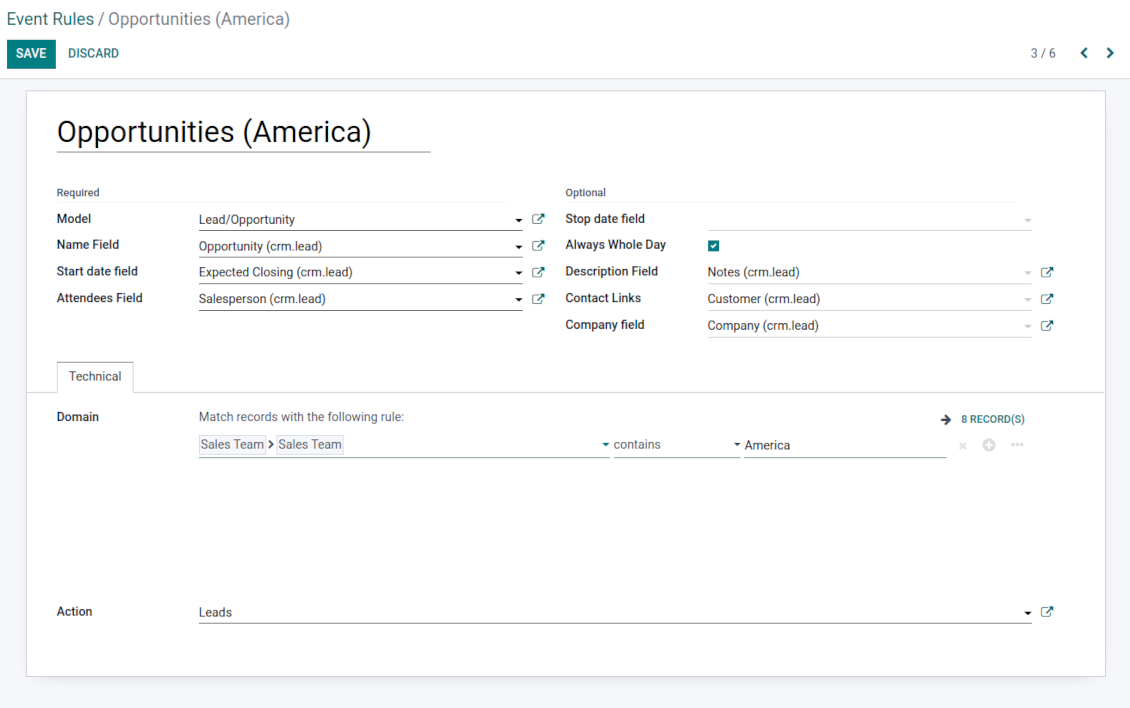
Opportunities on a super calendar
-
As a model use 'Lead/Opportunity'
-
As a name use 'Opportunity'
-
As a start date field use 'Expecting Closing'
-
As attendees' field use 'Salesperson'
-
As a contact link use 'Customer'
-
As a domain optionally restrict opportunities by sales teams.
Share employees' time offs and leaves
-
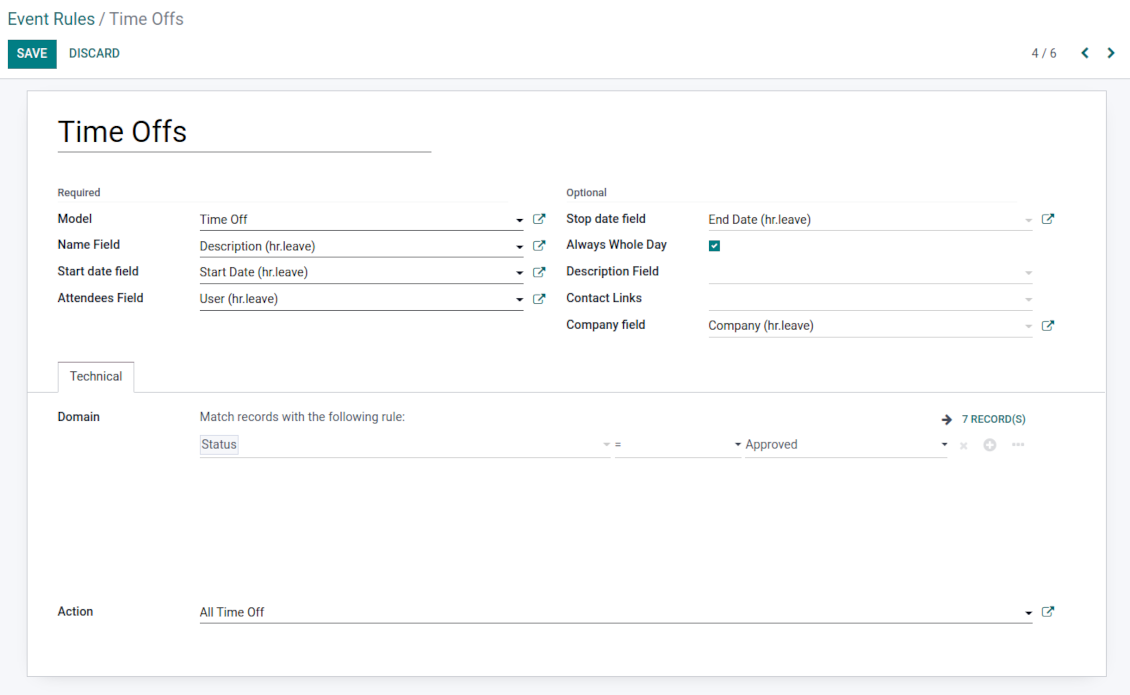
As a model use 'Time Off'
-
As a name use 'Description'
-
As a start date field use 'Start Date'
-
As attendees' field use 'User'
-
As a stop date field use 'End Date'
-
As a domain filter by status: show only approved leaves.
Activities by all objects
-
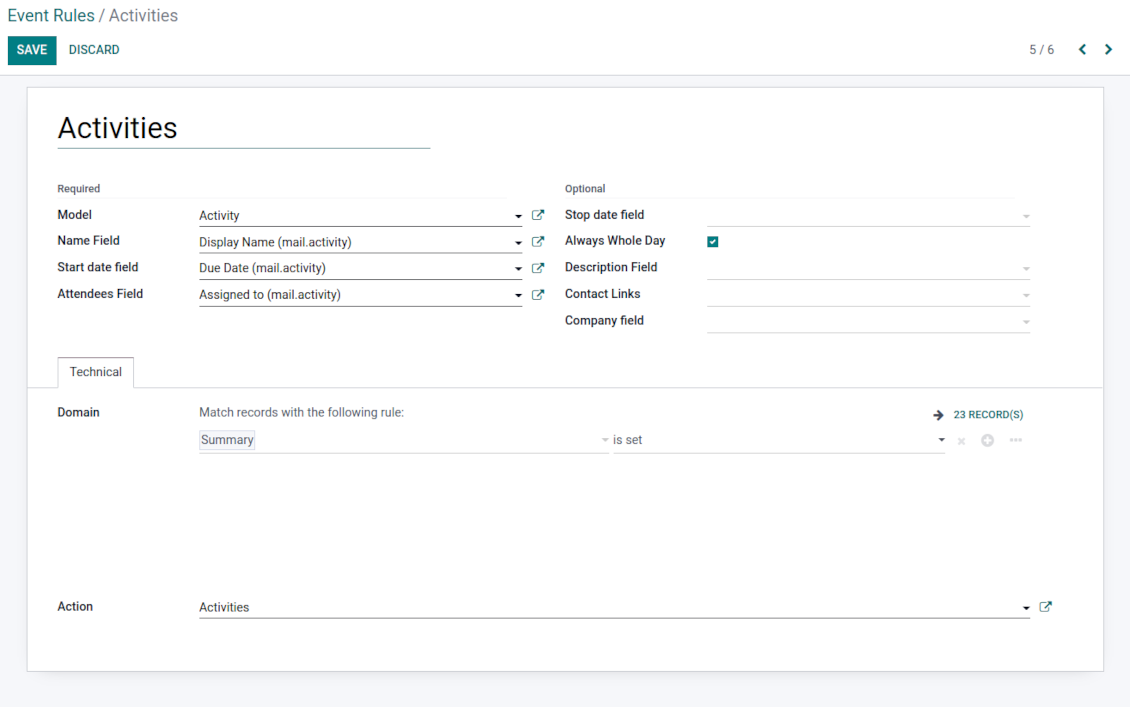
As a model use 'Activity'
-
As a name use 'Display Name'
-
As a start date field use 'Due Date'
-
As attendees' field use 'Assigned to'
-
As a domain apply 'Summary is set'
Odoo meetings to the joint calendar
-
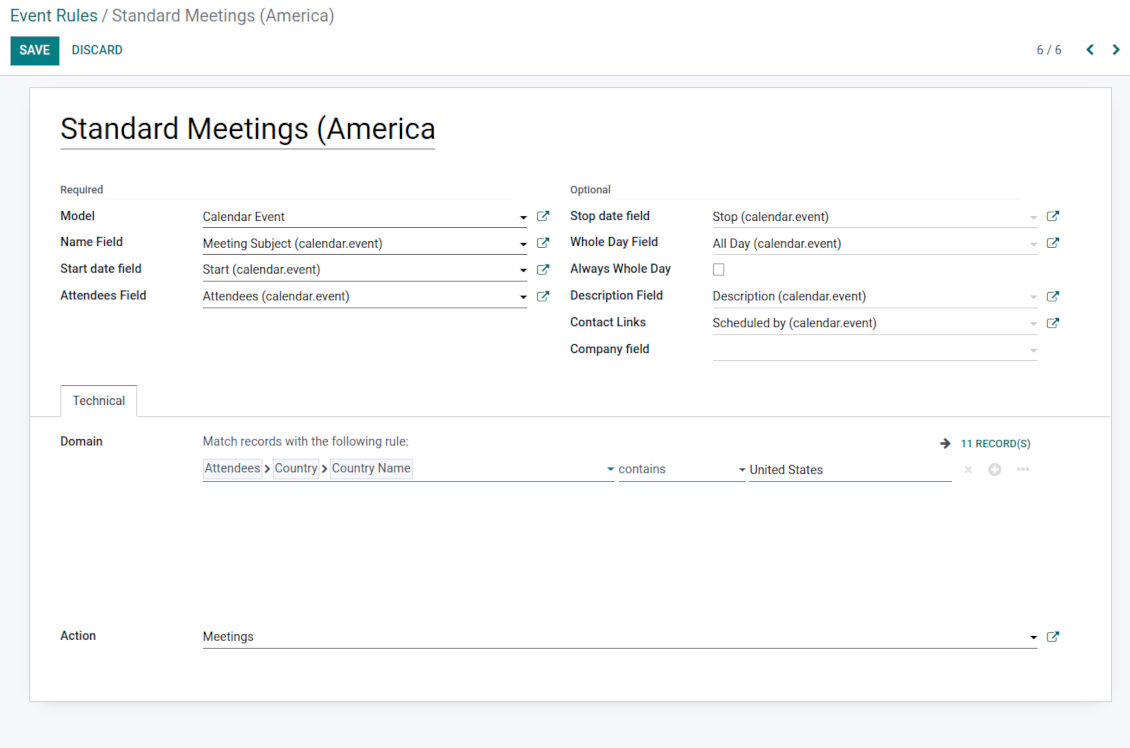
As a model use 'Calendar Event'
-
As a name use 'Meeting Subject'
-
As a start date field use 'Start'
-
As a stop date field use 'Stop'
-
As attendees' field use 'Attendees'
-
As a whole day field 'All Day'
Flexible rules to merge Odoo documents
To add a new document type for a shared interface you should set up a joint calendar rule. This rule defines which Odoo objects should create events, which fields of that object should be shown, and whether any filtering should take place
-
Model - which objects to scan: opportunities, tasks, orders, meetings, activities, and so on. You can choose your custom document type (including created in Odoo Studio) as well
-
Name - what to use as a joint event name (also used as calendar event title). Usually, it is 'name', 'subject' or 'reference'
-
Start date - when an event starts. For example, 'expecting closing' for opportunities or 'order date' for quotations. It may be any date or date with time field of a source Odoo object
-
Stop date - when an event is shown as finished on a calendar
-
Attendees - who are participants (responsible persons, event owners). Usually, it is a field 'assigned to', 'a sales person' or 'attendees'. You may use even document 'followers' since it's possible to apply both users and partners
-
Description - are there any notes important for joint events? Usually, the fields like 'internal notes' or 'comments' are used
-
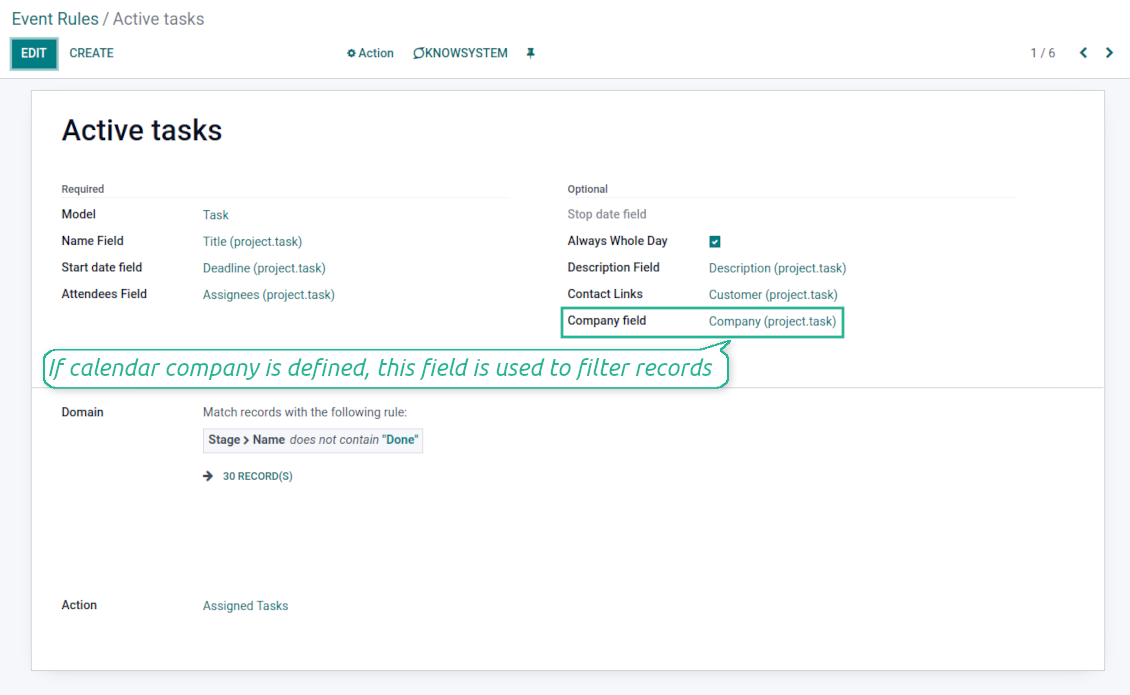
Company field - optionally define the parent document field where its company is kept. In this way, joint events would get the source company that might be used for filtering or just for information
-
Always Whole Day - means that all generated events would last the whole day disregarding whether start or stop are defined with hours and minutes. Such an event would be shown at a special place on a calendar (above the timeline)
-
Whole Day - a special boolean field of source object which indicates that a related joint event may last the whole day. This setting is usually applied to standard Odoo calendar events which both might have a definite time indicated or might be planned for a whole day
-
Contact Link - is this event linked to a specific partner? Usually, the fields like 'customer' or 'vendor' are used
-
Domain - the Odoo filters' constructor to include only topical documents into a joint calendar. You might apply any storable attribute. For example, show only quotations without sales orders, or show opportunities only for this sales team
-
Action - defines which form view should be shown when you open a source document from a joint event. It is a technical field that in most cases should not be changed in comparison to a default value.
Multi companies compatibility
-
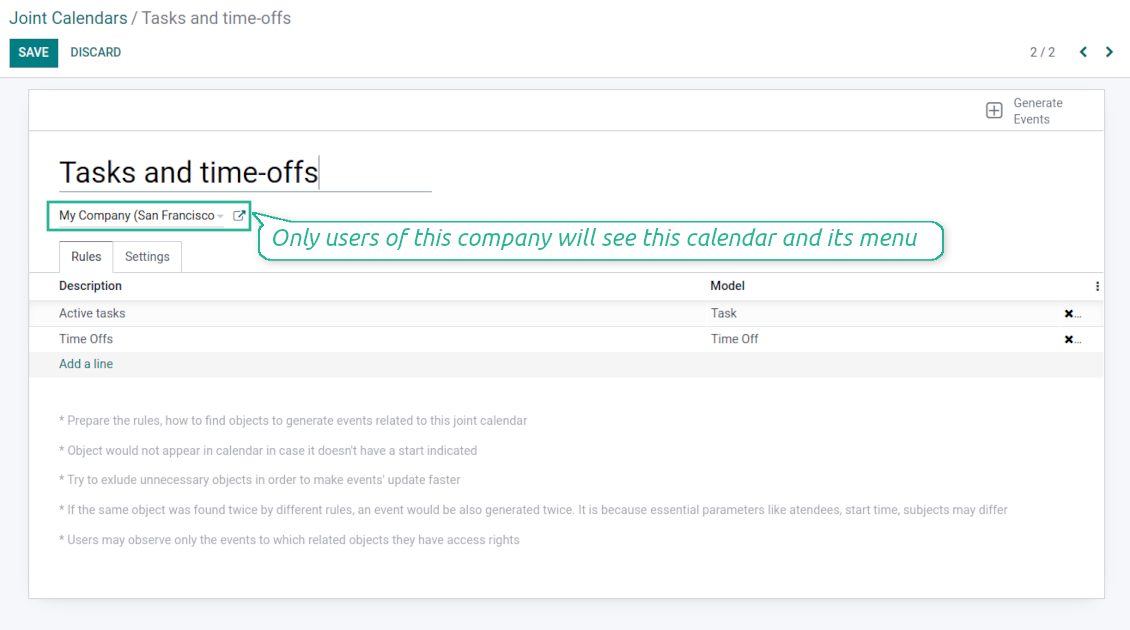
The app fully supports the multi-companies environment: each joint calendar might be linked to a specific Odoo company. If company is not defined, it is considered as 'global', so available for all Odoo companies
-
Users access only those joint menus which super calendars do not have a company or have one of those users available companies
-
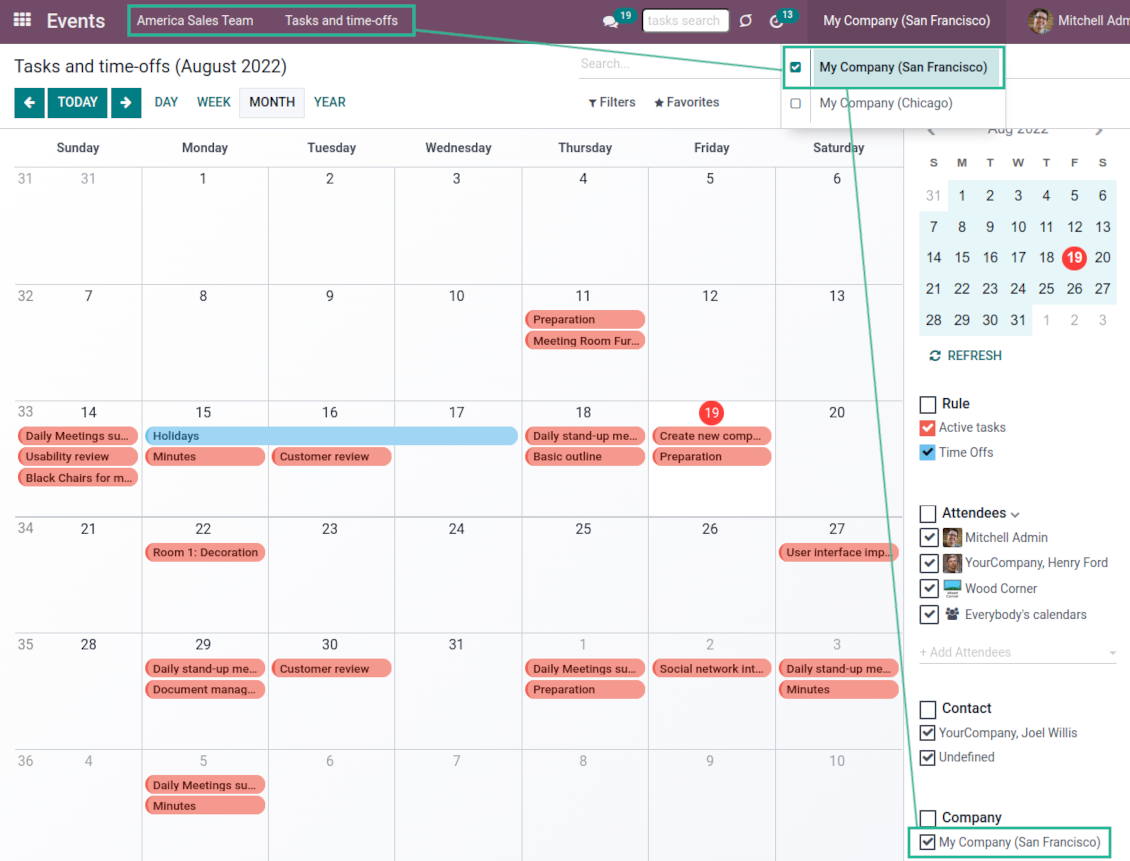
Each joint rule might have the "Company field" defined. If that setting is configured, records would be filtered in a joint calendar company. For example, if you stated 'Company' as the 'Company field' for the tasks rule, and joint calendar is linked to 'San Fransisco' company, then users would see only San Fransisco or global tasks only
-
Joint events would also get the company based on the 'Company field' of the parent document. You can comfortably switch between objects of different companies using the right navigation filters
-
In addition to the 'Company field', you may also restrict records in a rule domain. For instance, to include records of a few companies but not to include of others.
Combine events on Odoo Enterprise Gantt view
-
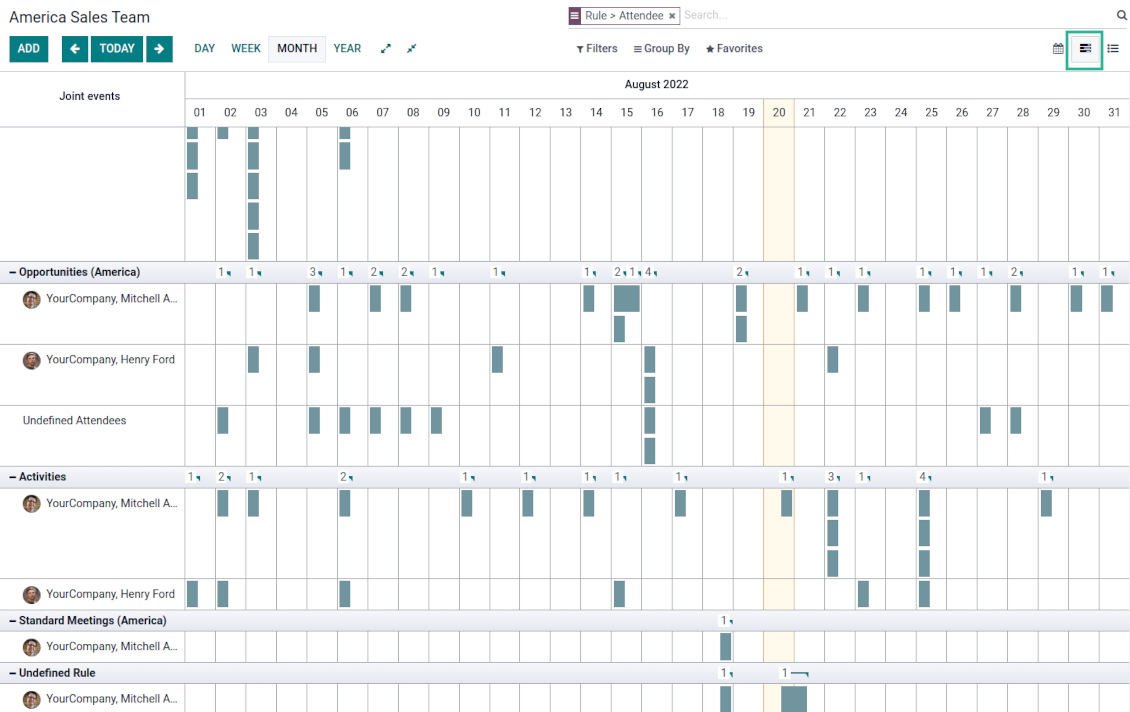
For any joint calendar, optionally add the Odoo Enterprise edition Gantt view
-
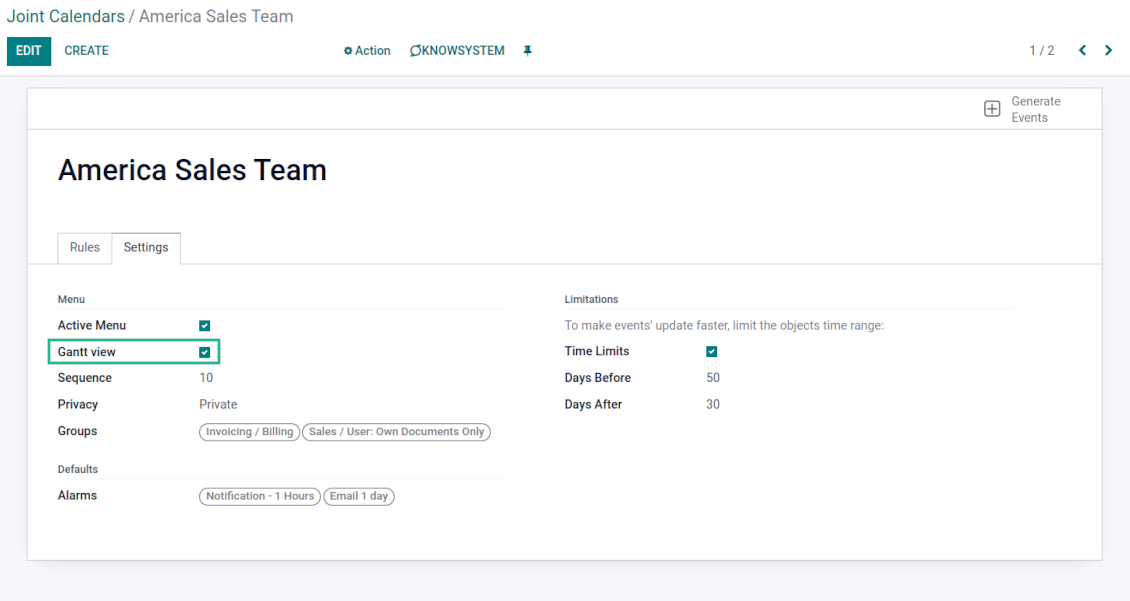
To that goal, just tick the box 'Gantt view' on the supper calendar settings
-
The app would automatically extend a target joint calendar action after you saved the changes
-
In this way, you can have a single super Gantt view for various Odoo documents
-
Manage those events in a comfortable manner: reassign responsible users, drag and drop those to change periods, etc.
Konfigurācijas un instalācijas padomi Joint Calendar Odoo v.15
Joint calendar scheduled jobs
The tool lets you change the frequency of joint calendar refreshing and emails reminders' checks:
- Turn on the debug mode
- Go to technical settings > Automation > Scheduled jobs
- Find the job 'Refresh Joint Events' to change the frequency of super calendars' update
- Find the job 'Notify About Joint Event' to change the frequency of email alarms.
Bieži uzdotie jautājumi par Joint Calendar Odoo v.15
Kas notiek, kad opcija „Always Whole Day“ tiek ieslēgta/izslēgta?
Kad opcija "Always Whole Day" ir ieslēgta, visi noteikuma notikumi ilgst visu dienu, pat ja sākumam vai beigām ir stundas un minūtes. Šāds notikums tiek rādīts īpašā kalendāra vietā.
Piemēram, ja izveidojat noteikumu modelim "Sale Order" un ieslēdzat "Always Whole Day", notikums dienas un nedēļas superkalendāros būs virs laika ass.
Ja opciju izslēdzat un sākumam vai beigām ir stundas/minūtes, notikums būs konkrētā dienas laikā, un laiks būs pirms virsraksta.
Es neredzu kalendāra izvēlni savā Odoo. Kas man jādara?
Pārliecinieties:
1. Ir vismaz viens izveidots, konfigurēts un atsvaidzināts kopīgais kalendārs. Pēc jebkura kopīgā kalendāra iestatīšanas atsvaidziniet pārlūkprogrammas lapu
2. Jums ir piekļuve vismaz vienam kalendāram
Izveidoju dažus kalendārus ar noteikumiem, bet izvēlnē tos neredzu.
Iemeslu var būt vairāki. Iespējams, saistītais plānotais darbs vēl nav izpildīts. Tad cron palaidiet manuāli, noklikšķinot atsvaidzināšanas pogu kopīgā kalendāra saskarnes labajā kolonnā.
Pārbaudiet arī, vai kalendāram ir Time Limits, citādi redzami tikai noteikta diapazona notikumi. Piemēram, kalendārs 'Sale Orders' ar robežām 10 dienas pirms un 30 pēc. Ja Sale Order izveidots, piemēram, pirms 12 dienām, tas kalendārā neparādīsies.
Pārliecinieties, ka noteikumiem nav filtru bez atbilstībām. Piemēram, noteikums 'Sale Order' ar filtru 'Customer = Deco Addict' saistītajā kalendārā rādīs tikai šī klienta pasūtījumus.
Cik Odoo dokumentu (piem. pārdošanas pasūtījumi, projekti, aktivitātes) varu apvienot vienā kopīgā kalendārā?
Vienā kalendārā varat apvienot tik daudz Odoo dokumentu, cik vēlaties. Vai arī sadalīt tos vairākos kalendāros (piemēram, Sales Calendar un Projects, Tasks and Activities Calendar) un pārslēgt systray.
Kas ir kopīga kalendāra noteikums?
Noteikumi nosaka, kuriem Odoo objektiem jārada notikumi, kuri šī objekta lauki jāizmanto un jāparāda un vai jāveic filtrēšana.
Veidojot noteikumu, varat pats definēt, ko uzskatīt par kopīgā notikuma nosaukumu, sākuma vai beigu datumu, kas ir dalībnieki utt.
Kāpēc ir lauks „Stop date“? Vai varu to atstāt tukšu?
Stop date — mērķa Odoo modeļa lauks, kas nosaka, kad notikums kalendārā tiek rādīts kā pabeigts. Piemēram, noteikums modelim "Sale Order" ar "Delivery Date" laukā Stop date rāda notikumu no piedāvājuma plānošanas dienas (lauks Start Date - Order Date) līdz preces piegādes dienai.
Lauks nav obligāts, to var atstāt tukšu. Tad notikums ir tikai Start Date dienā.
Kalendārā man ir notikumu tips “Undefined”. Ko tas nozīmē?
Tas nozīmē, ka notikums izveidots manuāli. Tam nav vecākobjekta, un to neregulē kārtula. Šādi kopīgi notikumi ir zem filtra "Undefined", bez krāsas.
Visi, kam ir piekļuve kalendāram, var veidot un redzēt tā nenoteiktos notikumus.
Kādas ir jūsu rīku atjaunināšanas politikas?
Saskaņā ar spēkā esošajiem Odoo Apps Store noteikumiem:
- Katrs 12.0 un vecākai versijai pirktais modulis dod piekļuvi visām versijām līdz 12.0.
- Sākot ar 13.0. versiju, katra moduļa versija jāpērk atsevišķi.
- Neatkarīgi no versijas pirkums dod tiesības uz visiem atjauninājumiem un labojumiem galvenās versijas ietvaros.
Ņemiet vērā, ka faOtools komanda šos noteikumus nekontrolē. Jautājumus adresējiet tieši Odoo Apps Store pārstāvjiem.
Kā instalēt jūsu lietotni Odoo.sh?
Visiešākā pieeja ir izmantot Odoo veikala iebūvēto darbplūsmu:
1. Atveriet moduļa lapu un noklikšķiniet pogu Deploy on odoo.sh
2. Pēc tam jūs novirzīs uz GitHub lapu. Pierakstieties kontā, pēc tam noklikšķiniet 'Create a new repo' vai izmantojiet esošu. Pārliecinieties, ka krātuve ir privāta. Lietotnes nedrīkst publicēt ar OPL-1 licenci. Ja vajag, izveidojiet jaunu repo Odoo.sh projektam
3. Pēc tam dodieties uz odoo.sh un noklikšķiniet pogu Deploy. Uznirstošajā logā iesniedziet lēmumu un noklikšķiniet 'Continue.' Šī darbība sāk instalēšanu.
Šīs darbības instalēs lietotni projekta produkcijas zarā. Ja vēlaties izvietot lietotnes citos zaros vai atjaunināt moduli, veiciet šīs darbības:
1. Augšupielādējiet lietotnes pirmkodu no Odoo veikala
2. Veiciet moduļa commit vajadzīgajā GitHub krātuvē. Pārliecinieties, ka neviens lietotnes mape/fails netiek ignorēts (t.i., nav repo .gitignore). Krātuves automātiski izveido odoo.sh, un pēc noklusējuma tajās var būt svarīgi elementi (piem., /lib). Augšupielādējiet visus moduļa katalogus, apakškatalogus un failus bez izņēmumiem
3. Izvietojiet odoo.sh projekta mērķa zaru vai, ja iestatījumi to paredz, gaidiet, līdz tas tiek automātiski būvēts.
Kā instalēt jūsu lietotni savā serverī?
2. Restartējiet Odoo serveri;
3. Ieslēdziet izstrādātāja režīmu (tehniskie iestatījumi);
4. Atjauniniet lietotņu sarakstu (lietotņu izvēlne);
5. Atrodiet lietotni un nospiediet „Activate“/„Install“;
6. Sekojiet lietotnes lapas vadlīnijām, ja tādas ir.
Pamanīju, ka jūsu lietotnei ir papildu papildinājumi. Vai varu tos iegādāties vēlāk?
Jā, protams. Vienlaikus Odoo automātiski pievieno visas atkarības grozam, tāpēc iepriekš iegādātie rīki jāizslēdz, lai izvairītos no dubultas samaksas.
Izvietoju jūsu lietotni Odoo.sh un testos redzu brīdinājumu/kļūdu
Sarkans/oranžs brīdinājums neietekmē lietotnes funkcijas. Diemžēl mūsu moduļi dažkārt neiztur standarta automātiskos testus, jo tie pieņem uzvedību, kas ir pretrunā ar lietotnes mērķiem. Piemēram, mēs mainām cenas aprēķinu, bet standarta Odoo moduļa testi salīdzina galīgo cenu ar standarta algoritmu.
Vispirms pārbaudiet izvietotās datubāzes funkcijas. Vai viss darbojas pareizi?
Ja joprojām uzskatāt, ka brīdinājums ietekmē īstas funkcijas, sazinieties ar mums un nosūtiet pilnus instalācijas žurnālus un pilnu izvietoto moduļu sarakstu (ieskaitot kodolu un trešo pušu).
Vai es varu iegādāties lietotni tieši no jūsu uzņēmuma?
Nē, rīkus izplatām tikai caur oficiālo Odoo lietotņu veikalu.
Es vēlētos saņemt atlaidi
Diemžēl mums nav tehnisku līdzekļu individuālu cenu piedāvāšanai.
Vai es varu instalēt lietotni savā Odoo Online (SaaS) datubāzē?
Nē, trešo pušu lietotnes nevar izmantot Odoo Online. Diemžēl Odoo SaaS to bloķē.
Jūsu rīkam ir atkarības no citām lietotnēm. Vai tās jāiegādājas?
Jā, rīkam ir nepieciešami visi atkarībās atzīmētie moduļi, lai darbotos pareizi. Lietotnes lapā norādītā cena jau ietver visas nepieciešamās atkarības.
Kāda ir moduļa cena ASV dolāros? Kāpēc tā mainījās?
Mūsu moduļu cena ir eiro. Odoo veikals konvertē cenas citās valūtās pēc iekšējā kursa. Tāpēc cena ASV dolāros var mainīties, kad kurss tiek atjaunināts.
Lietotnes un vietnes teksti valodās, kas nav angļu, ir sagatavoti ar MI palīdzību un saskaņoti ar oficiālajiem Odoo tulkojumiem. Ja pamanāt kļūdu, nosūtiet biļeti par tulkojumu pareizību un mēs to labosim.
Kļūdu ziņošana
Ja sastopaties ar kļūdām vai nekonsekventu uzvedību, sazinieties ar mums. Garantējam labojumus 60 dienu laikā pēc pirkuma un esam ieinteresēti rīkus uzlabot arī pēc šī perioda.
Lai sazinātos, nav vajadzīgs tālruņa numurs vai kredītkarte. Pietiek ar īsu e-pasta reģistrāciju, kas neaizņem vairāk par 30 sekundēm.
Iekļaujiet pieprasījumā pēc iespējas vairāk informācijas: ekrānuzņēmumus, Odoo servera žurnālus, pilnu problēmas atkārtošanas aprakstu u. tml. Parasti darba plāna sagatavošana (ja kļūda ir apstiprināta) vai norādījumu sniegšana (citādi) prasa dažas darba dienas.
Publiski funkciju pieprasījumi un moduļu idejas (bezmaksas izstrāde)
Mēs esam stipri motivēti uzlabot savus rīkus un būsim pateicīgi par jebkuru atsauksmi. Ja jūsu prasības ir vispārīgi noderīgas un tās var efektīvi īstenot, komanda tās iekļaus mūsu uzdevumu sarakstā.
Šāds uzdevumu saraksts tiek apstrādāts regulāri un neparedz papildu maksas. Lai gan mēs nevaram solīt termiņus un galīgo dizainu, tas var būt labs veids, kā iegūt vēlamās funkcijas bez ieguldījumiem un riskiem.
Lai sazinātos, nav vajadzīgs tālruņa numurs vai kredītkarte. Pietiek ar īsu e-pasta reģistrāciju, kas neaizņem vairāk par 30 sekundēm.

Rīks Odoo pielikumu elastīgai kārtošanai mapēs un katalogu sinhronizācijai ar mākoņa klientiem: Google Drive, OneDrive/SharePoint, Nextcloud/ownCloud, Dropbox, Amazon S3, Box un NAS. DMS. Failu pārvaldnieks. Dokumentu pārvaldības sistēma
398€
Rīks Odoo pielikumu automātiskai abpusējai sinhronizācijai ar OneDrive failiem
487€
Rīks Odoo pielikumu automātiskai abpusējai sinhronizācijai ar Google Drive failiem
487€

Rīks dziļas un strukturētas zināšanu bāzes veidošanai iekšējai un ārējai lietošanai. Knowledge System. KMS. Viki līdzīgas revīzijas.
398€
Rīks KPI mērķu iestatīšanai un izpildes kontrolei pa periodiem. KPI paneļi. Paneļu dizainers. KPI diagrammas

Rīks uz laiku balstītai pakalpojumu pārvaldībai no pierakstu rezervēšanas līdz pārdošanai un atsauksmēm
398€
Rīks, lai pārvaldītu Odoo no iecienītajām AI tērzētavām caur MCP. Claude. Jebkurš AI ar MCP.
