Odoo Documentation Builder v.16
The tool to create website documentation based on your knowledge base




Clear and full documentation is a way to highlight the seriousness of your project, cut costs by motivating clients for self-service, and reveal hidden organizational knowledge. However, creating and, more importantly, supporting a documentation site is a complex task. This tool aims to help with that.
With Odoo KnowSystem you gradually prepare materials that might be already used as a shared online library. Simultaneously, navigating by independent articles becomes harder, and you decide to combine knowledge into chapters. The idea is to have a single documentation website page that fully covers a definite issue or aspect. The app Odoo Documentation Builder lets you efficiently achieve that goal.
Structured and Customizable Documentation
The tool allows preparing an unlimited number of documentation pages structured by categories. You can also modify the appearance of pages: show or hide introductions and footers, turn on/off the search bar and table of contents, and add or remove preview images and texts. Comfortable for navigation, easy to maintain
Simple to Prepare and Update
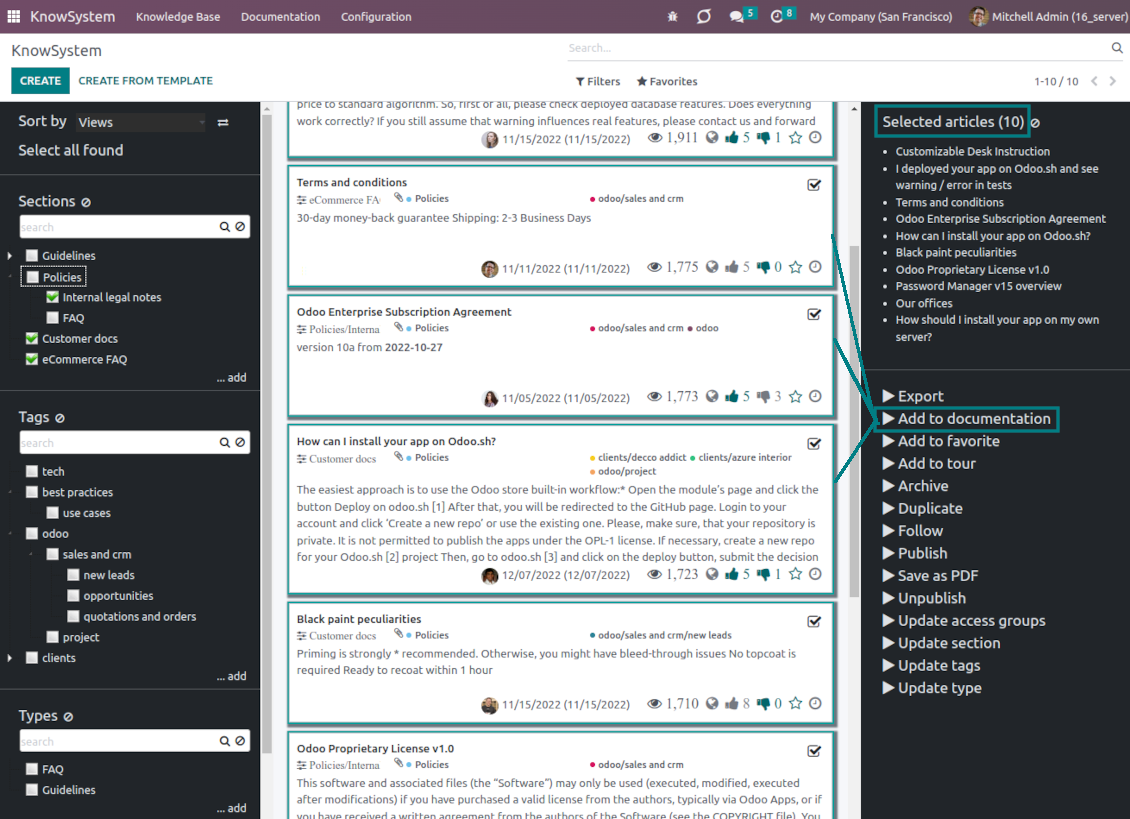
To create a new documentation section - just select and order KnowSystem articles. The app generates website pages automatically. To update this documentation set you should only add or remove a required knowledge article
Dynamic Navigation
Optionally show a table of contents that is constructed automatically according to article headers. End users navigate to a target section with a single click. Moreover, when a visitor scrolls a page - the navigation panel is dynamically updated
Instant Search
Turn on the search bar for documentation. It is possible to find matches in a whole text or only in headers, to make keywords case-sensitive or insensitive
Documentation Versioning
When you prepare specifications, user manuals, or software guidelines, you inevitably face the situation when certain articles are suitable only for definite product versions. Simultaneously, the most of materials are fine for all versions. To avoid double work - indicate to which version an article relates to
Secured and shared
The app lets flexibly share documentation categories and sections. Publish required documents to make them available for everybody, assign KnowSystem tags - to grant access to chosen Odoo partners
Knowledge management
Depending on user rights - documentation might look different. Define what to do if a documentation user does not have access to included articles: to neglect restrictions, not to show that knowledge pieces, or to show a security warning
Used for any business goals
Build documentation for any business or functional goal and for any set of Odoo apps. The app fully supports standard Odoo features including multi websites.
The easiest and most beautiful way to add content
The document builder is a great tool to add content to your website. It has a clean, well organized interface and adding content is super easy. I can highly recommend it! And very important to know too: The support of faOtools is great. Nice people that care and that go a long way to make sure you get the tool you need.
के बारे में अक्सर पूछे जाने वाले प्रश्न Odoo Documentation Builder Odoo v.16
आपके टूल की अपडेट नीतियाँ क्या हैं?
वर्तमान Odoo Apps Store नीतियों के अनुसार:
- संस्करण 12.0 और उससे पहले के लिए खरीदा प्रत्येक मॉड्यूल 12.0 तक सभी संस्करणों तक पहुँच देता है।
- संस्करण 13.0 से प्रत्येक मॉड्यूल संस्करण अलग खरीदना होता है।
- संस्करण चाहे जो हो, खरीद से उस प्रमुख संस्करण के सभी अपडेट और बग ठीक करने का अधिकार मिलता है।
ध्यान दें कि faOtools टीम इन नीतियों को नियंत्रित नहीं करती। सभी प्रश्नों के लिए सीधे Odoo Apps Store प्रतिनिधियों से संपर्क करें।
आपका ऐप Odoo.sh पर कैसे इंस्टॉल करूँ?
सबसे सीधा तरीका Odoo स्टोर की अंतर्निहित वर्कफ़्लो का उपयोग करना है:
1. मॉड्यूल का पृष्ठ खोलें और Deploy on odoo.sh बटन पर क्लिक करें
2. उसके बाद आपको GitHub पृष्ठ पर भेजा जाएगा। अपने खाते में लॉग इन करें, फिर 'Create a new repo' पर क्लिक करें या मौजूदा का उपयोग करें। सुनिश्चित करें कि रिपॉज़िटरी निजी हो। OPL-1 लाइसेंस के तहत ऐप प्रकाशित करना अनुमति नहीं है। ज़रूरत हो तो Odoo.sh प्रोजेक्ट के लिए नया repo बनाएँ
3. फिर odoo.sh पर जाएँ और Deploy बटन पर क्लिक करें। पॉप-अप विंडो में निर्णय जमा करें और 'Continue.' पर क्लिक करें। इससे इंस्टॉलेशन शुरू होगा।
ये चरण प्रोजेक्ट की production शाखा पर ऐप इंस्टॉल करेंगे। अन्य शाखाओं पर ऐप तैनात करने या मॉड्यूल अपडेट करने के लिए ये क्रियाएँ करें:
1. Odoo स्टोर से ऐप का स्रोत कोड अपलोड करें
2. मॉड्यूल को आवश्यक GitHub रिपॉज़िटरी में commit करें। सुनिश्चित करें कि ऐप के कोई फ़ोल्डर/फ़ाइल अनदेखी न हों (यानी repo के .gitignore में न हों)। रिपॉज़िटरी odoo.sh अपने आप बनाता है और डिफ़ॉल्ट रूप से कुछ ज़रूरी चीजें शामिल हो सकती हैं (जैसे /lib)। मॉड्यूल की सभी निर्देशिकाएँ, उपनिर्देशिकाएँ और फ़ाइलें बिना अपवाद अपलोड करें
3. odoo.sh प्रोजेक्ट की लक्ष्य शाखा Deploy करें या, अगर सेटिंग्स ऐसा मानती हैं, स्वतः बनने तक प्रतीक्षा करें।
अपने सर्वर पर आपका ऐप कैसे इंस्टॉल करूँ?
2. Odoo सर्वर पुनः प्रारंभ करें;
3. डेवलपर मोड चालू करें (तकनीकी सेटिंग्स);
4. ऐप सूची अपडेट करें (ऐप्स मेनू);
5. ऐप खोजें और 'Activate'/'Install' दबाएँ;
6. ऐप पृष्ठ पर दिशानिर्देश हों तो उनका पालन करें।
आपके ऐप में अतिरिक्त ऐड-ऑन हैं। क्या बाद में खरीद सकता हूँ?
हाँ, ज़रूर। साथ ही Odoo सभी निर्भरताएँ कार्ट में अपने आप जोड़ता है, इसलिए दोहरी भुगतान से बचने के लिए पहले खरीदे टूल हटा दें।
मैंने आपका ऐप Odoo.sh पर डिप्लॉय किया और टेस्ट में चेतावनी/त्रुटि दिख रही है
लाल/नारंगी चेतावनी ऐप की सुविधाओं को प्रभावित नहीं करती। खेद है कि कभी-कभी हमारे मॉड्यूल मानक स्वचालित परीक्षण पास नहीं करते, क्योंकि वे ऐसा व्यवहार मानते हैं जो ऐप के लक्ष्यों से टकराता है। उदाहरण के लिए हम मूल्य गणना बदलते हैं, जबकि मानक Odoo मॉड्यूल परीक्षण अंतिम मूल्य की तुलना मानक एल्गोरिदम से करते हैं।
सबसे पहले तैनात डेटाबेस की सुविधाएँ जाँचें। क्या सब सही काम कर रहा है?
यदि फिर भी मानते हैं कि चेतावनी वास्तविक सुविधाओं को प्रभावित करती है, तो संपर्क करें और पूर्ण इंस्टॉलेशन लॉग तथा तैनात मॉड्यूलों की पूरी सूची (कोर और तृतीय-पक्ष सहित) भेजें।
क्या मैं ऐप आपकी कंपनी से सीधे खरीद सकता हूँ?
नहीं, हम उपकरण केवल आधिकारिक Odoo ऐप स्टोर.
मुझे छूट चाहिए
खेद है, हमारे पास व्यक्तिगत कीमतें देने के तकनीकी साधन नहीं हैं।
क्या मैं ऐप अपने Odoo Online (SaaS) डेटाबेस पर इंस्टॉल कर सकता हूँ?
नहीं, तृतीय-पक्ष ऐप Odoo Online पर नहीं चल सकते। दुर्भाग्य से Odoo SaaS यह संभावना रोकता है।
आपके टूल की अन्य ऐप पर निर्भरता है। क्या मुझे वे खरीदनी चाहिए?
हाँ, सही काम के लिए टूल को निर्भरता में चिह्नित सभी मॉड्यूल चाहिए। ऐप पृष्ठ पर दी गई कीमत में आवश्यक निर्भरताएँ पहले से शामिल हैं।
मॉड्यूल की कीमत अमेरिकी डॉलर में क्या है? यह क्यों बदली?
हमारे मॉड्यूल की कीमत यूरो में है। Odoo स्टोर आंतरिक विनिमय दर से अन्य मुद्राओं में बदलता है। इसलिए अमेरिकी डॉलर में कीमत दर अपडेट होने पर बदल सकती है।
अंग्रेज़ी के अलावा अन्य भाषाओं में ऐप और वेबसाइट का शब्द AI-सहायता से है और आधिकारिक Odoo अनुवादों से मेल खाता है। यदि आपको कोई गलती दिखे, अनुवाद शुद्धता का टिकट भेजें और हम इसे ठीक करेंगे।
Odoo डेमो डेटाबेस (लाइव पूर्वावलोकन)
इस ऐप के लिए हम मुफ़्त व्यक्तिगत डेमो डेटाबेस दे सकते हैं।
हमसे संपर्क करने के लिए फ़ोन नंबर या क्रेडिट कार्ड की आवश्यकता नहीं है। केवल एक छोटी ईमेल साइन-अप करनी है, जिसमें 30 सेकंड से अधिक नहीं लगता।
आपके अनुरोध पर हम एक व्यक्तिगत लाइव पूर्वावलोकन डेटाबेस तैयार करेंगे, जहाँ आप लगभग दो सप्ताह परीक्षण और धारणाएँ जाँच सकते हैं।
बग रिपोर्टिंग
यदि आपको बग या असंगत व्यवहार मिले तो हमसे संपर्क करें। हम खरीद के 60 दिनों के भीतर सुधार देने की गारंटी देते हैं और इस अवधि के बाद भी टूल सुधारने में रुचि रखते हैं।
हमसे संपर्क करने के लिए फ़ोन नंबर या क्रेडिट कार्ड की आवश्यकता नहीं है। केवल एक छोटी ईमेल साइन-अप करनी है, जिसमें 30 सेकंड से अधिक नहीं लगता।
अपने अनुरोध में जितना संभव हो उतना विवरण शामिल करें: स्क्रीनशॉट, Odoo सर्वर लॉग, समस्या को दोहराने का पूरा वर्णन आदि। आमतौर पर किसी मुद्दे की कार्य योजना तैयार करने (यदि बग पुष्टि हो) या आगे क्या करना है इसके दिशानिर्देश देने (अन्यथा) में कुछ कार्यदिवस लगते हैं।
सार्वजनिक सुविधा अनुरोध और मॉड्यूल विचार (निःशुल्क विकास)
हम अपने टूल सुधारने के लिए दृढ़ता से प्रेरित हैं और किसी भी प्रतिक्रिया के आभारी होंगे। यदि आपकी आवश्यकताएँ सार्वजनिक उपयोग की हैं और कुशलता से लागू की जा सकती हैं, तो टीम उन्हें हमारी कार्य सूची में शामिल करेगी।
ऐसी कार्य सूची नियमित रूप से संसाधित होती है और अतिरिक्त शुल्क नहीं लगती। यद्यपि हम समय सीमा और अंतिम डिज़ाइन का वादा नहीं कर सकते, यह बिना निवेश और जोखिम के वांछित सुविधाएँ पाने का अच्छा तरीका हो सकता है।
हमसे संपर्क करने के लिए फ़ोन नंबर या क्रेडिट कार्ड की आवश्यकता नहीं है। केवल एक छोटी ईमेल साइन-अप करनी है, जिसमें 30 सेकंड से अधिक नहीं लगता।

The tool to flexibly structure Odoo attachments in folders and synchronize directories with cloud clients: Google Drive, OneDrive/SharePoint, Nextcloud/ownCloud, and Dropbox. DMS. File Manager. Document management system
398€
The tool to automatically synchronize Odoo attachments with OneDrive files in both ways
487€
The tool to automatically synchronize Odoo attachments with Google Drive files in both ways
487€

The tool to build a deep and structured knowledge base for internal and external use. Knowledge System. KMS. Wiki-like revisions.
398€
The tool to set up KPI targets and control their fulfillment by periods. KPI dashboards. Dashboard designer. KPI charts

The tool for time-based service management from booking appointments to sales and reviews
398€
पसंदीदा AI चैट से MCP के ज़रिए Odoo प्रबंधित करने का उपकरण। Claude. कोई भी MCP-समर्थित AI.

The tool to translate URL addresses of Odoo website pages
38€