Stock Demand Trends and Forecast v.17
The tool to calculate stock demand trends and make predictions for future demand statistically
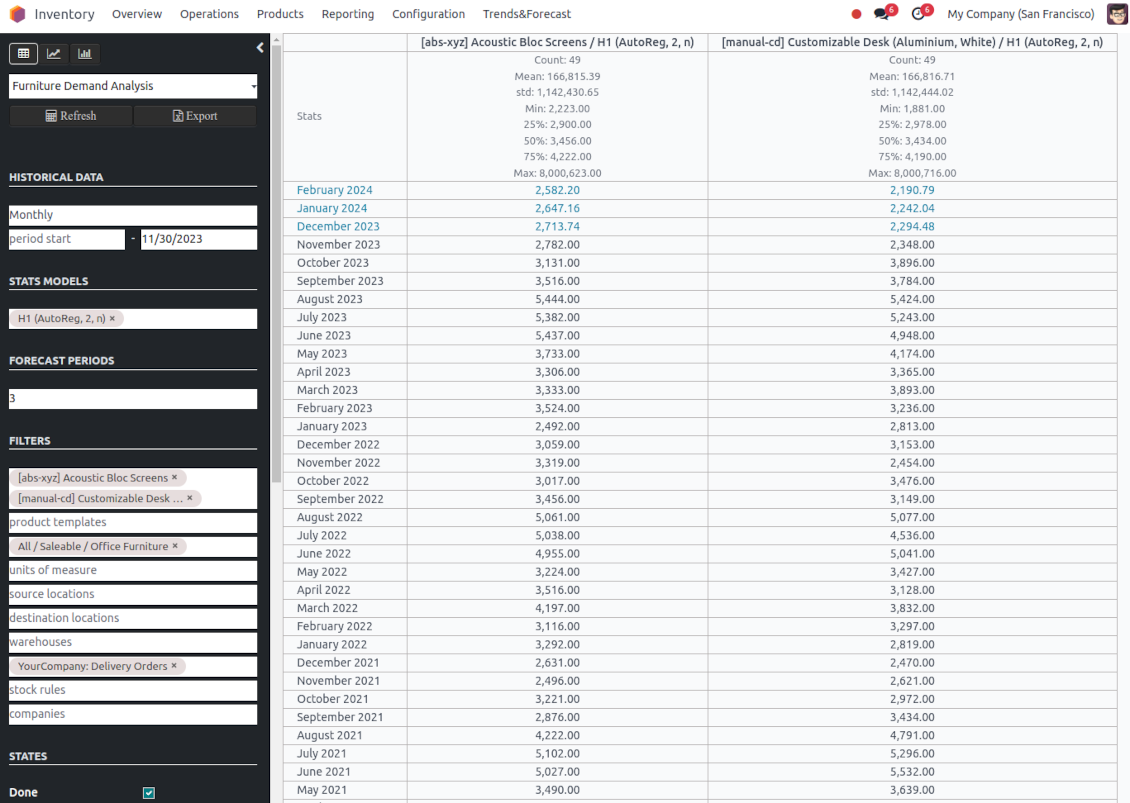
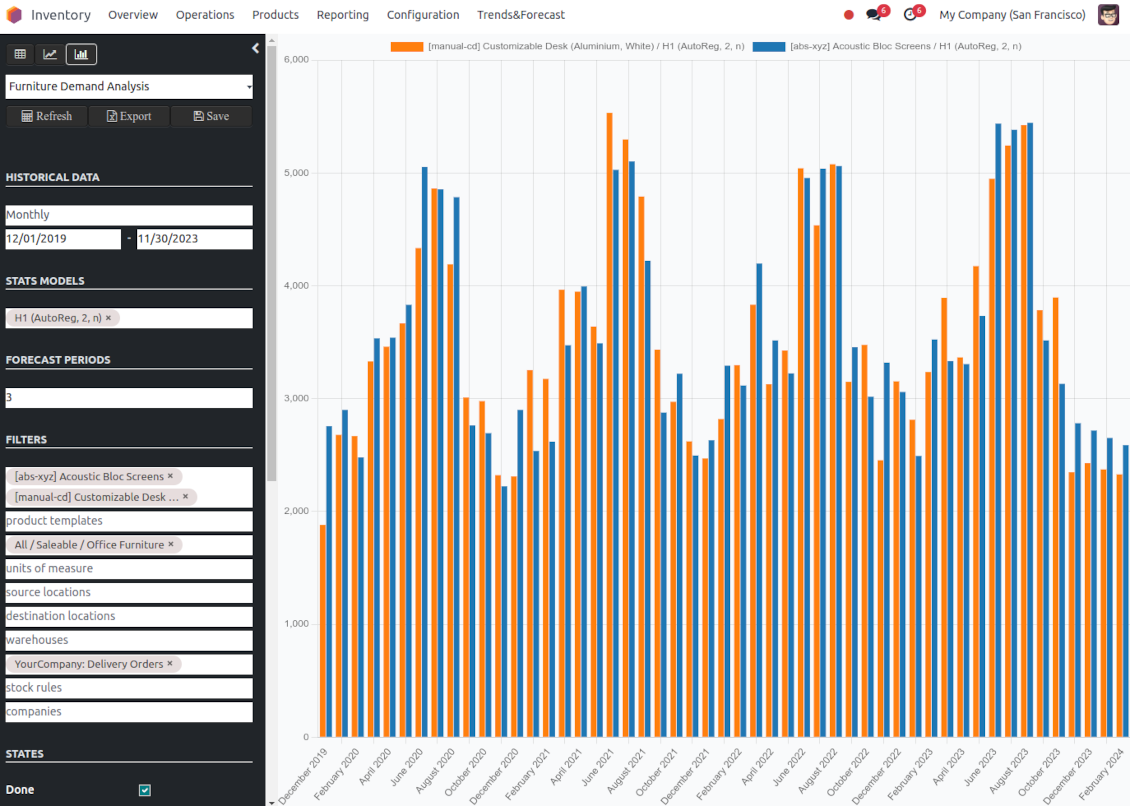
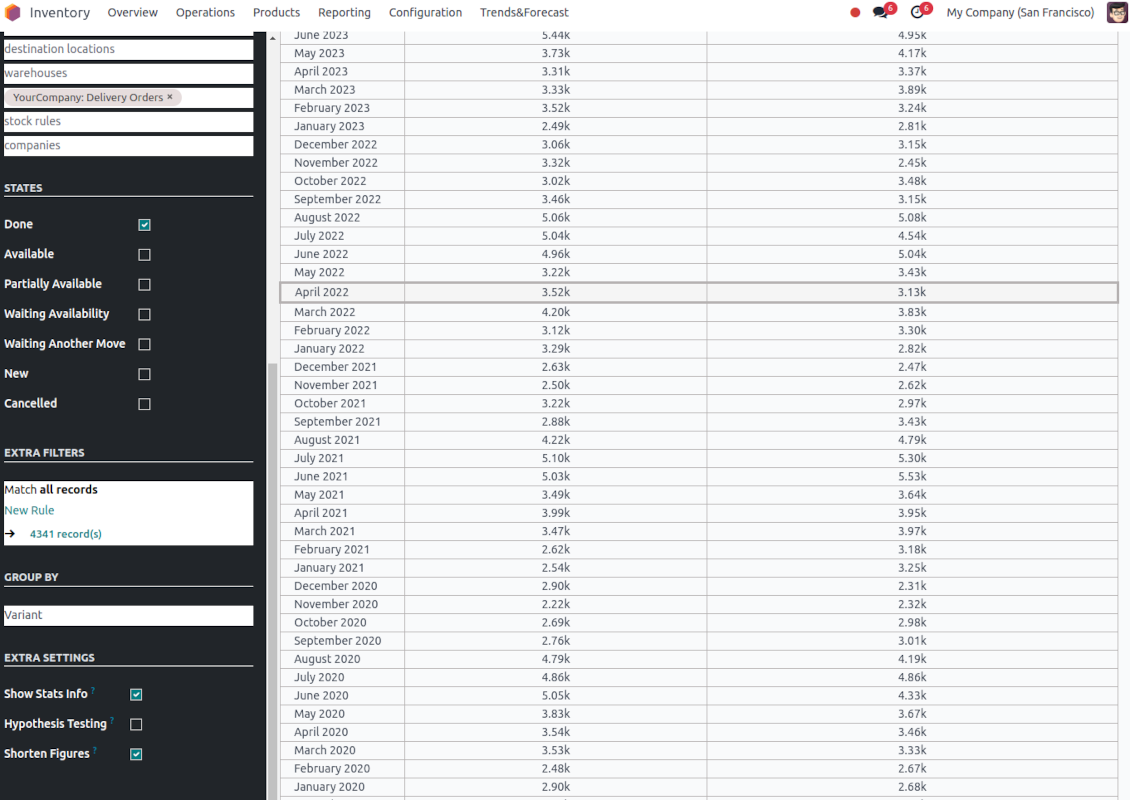
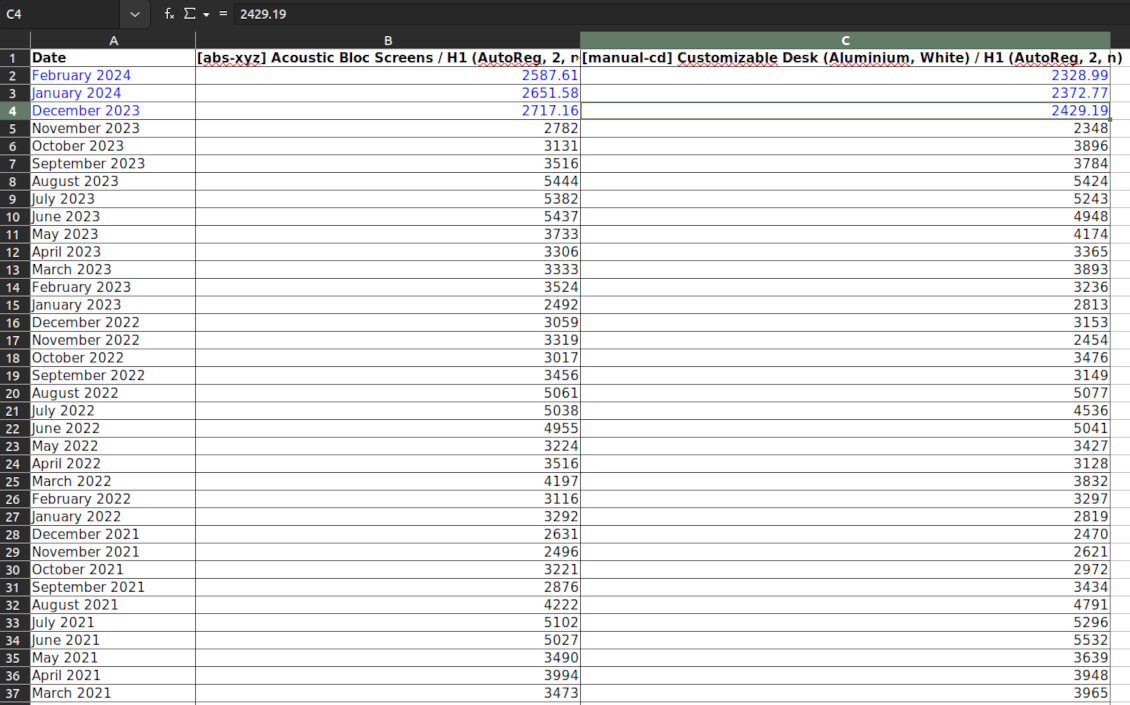
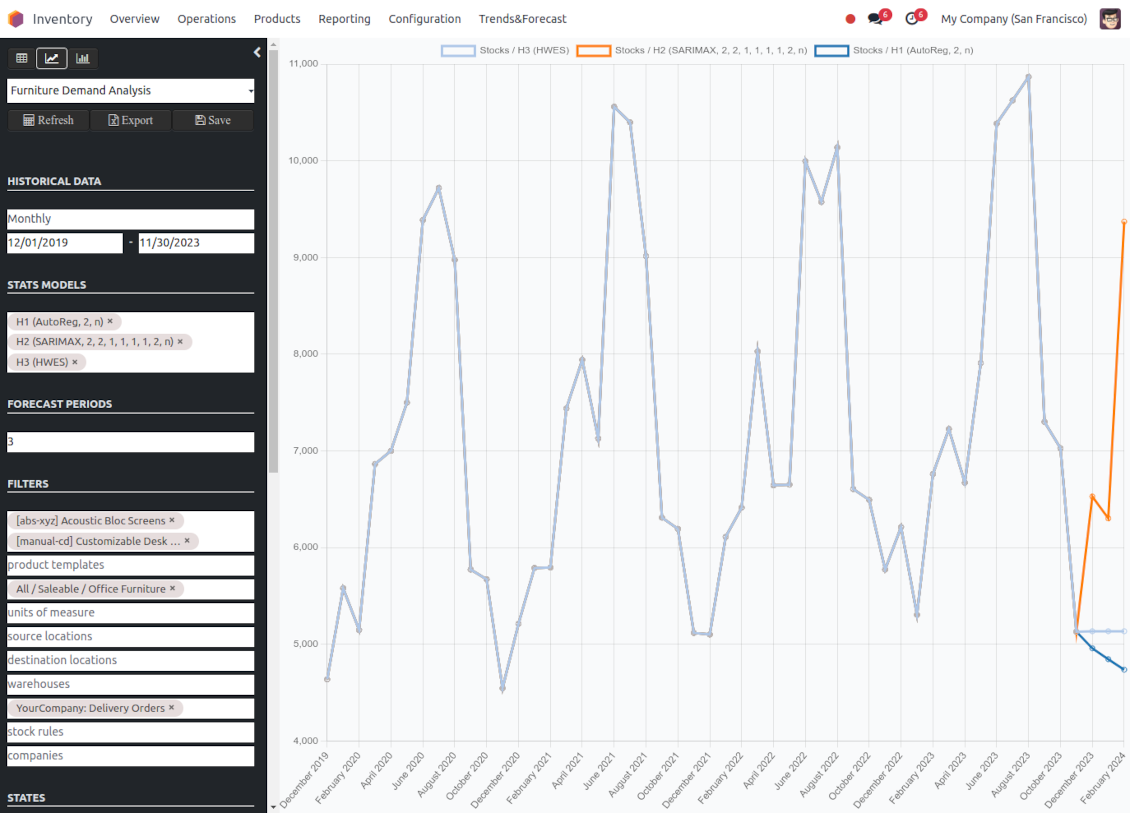
If you knew the stock demand trends of your warehouses, you would have a clue to decrease keeping costs and have a flawless supply chain. Regretfully, you can't know the future. However, you can predict it with a certain reliability. This is an Odoo tool for that goal. The app lets you construct stock demand by periods and forecast scientifically further demand based on the Python library statsmodels.
The scientific approach to forecasting
The app assumes applying statistical methods to calculate historical trends and make a forecast. Experiment with statistical models and parameters to achieve the most reliable prediction. Leverage the proven statsmodels methods
Innovative data analysis interface
The tool introduces a special interface to instantly calculate series. Flexibly switch between different reports and update settings in a few clicks. Control data in pivot, graph, or chart views. Export series as an Excel tabled
Focused analysis
Shrink considered stock operations flexibly or analyze global company inventory demand. Group data into various series
Topical data
Apply time frames for historical data and work with intervals that are of interest to your industry. Work with past and future periods.
Flexible report configuration
-
Introduce as many analytic reports as you need. Each report is based on Odoo's stock moves' data
-
Keep reports to re-use them, instantly switch between reports, or experiment with real-time changes without saving those
-
Show historical and forecast series as a table, line graph, or bar chart, or export data as an Excel table
-
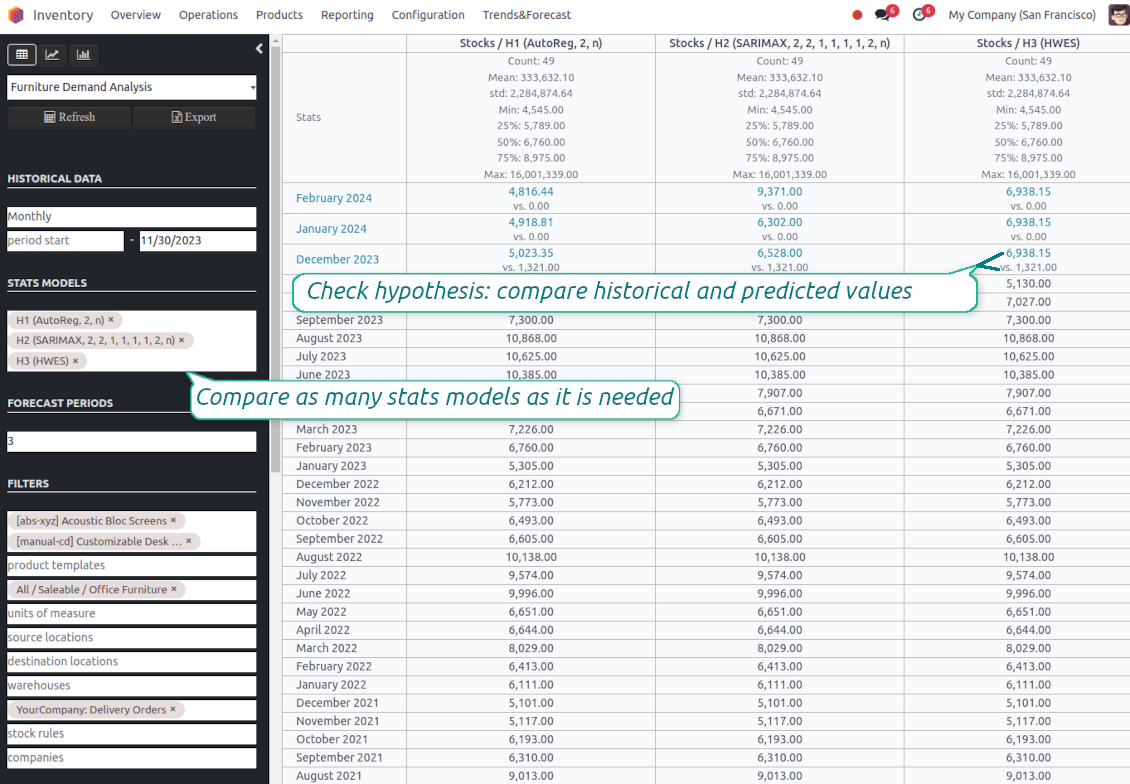
Apply as many and as different statistical models as you want to check. Each stats model will peer its own data series and prediction if the latter is possible. See also the section "Statistical models"
-
Define the data periods under analysis by entering a start and end. Only inventory data within this interval will be included in the series
-
Split data series into years, quarters, months, weeks, and days depending on seasons assumed in your industry or business area
-
Select an unlimited number of periods to predict future periods or check hypotheses
-
Grant the right to forecast tools for any WMS user (the group Inventory > Stock Demand Forecast)
-
Filter stock data by product variants, product templates, product categories, units of measurement, source or destination locations, warehouses, operation/picking types, stock rules, and companies (for multi-company regimes). Introduce your own criteria based on Odoo's dynamic domain constructor, so shrink analysis by any stock move storable fields
-
Introduce a few data series simultaneously with grouping by a product variant, a unit of measurement, a source or destination location, a warehouse, a stock move state, an operation type, a stock rule, or a company. Take into that if the report assumes products with different units of measurement, the grouping will be possible only by the units or by variants
-
Hide/show general statistical measurement of series: count, mean, standard deviation, minimum, maximum, 25%, 50%, and 75% factors
-
Optionally compare predicted values to real historical data if any. See also the section "Hypothesis Testing"
-
Make figures human readable (e.g. 192,217 as 200k) or show them precisely.
Statistical models
-
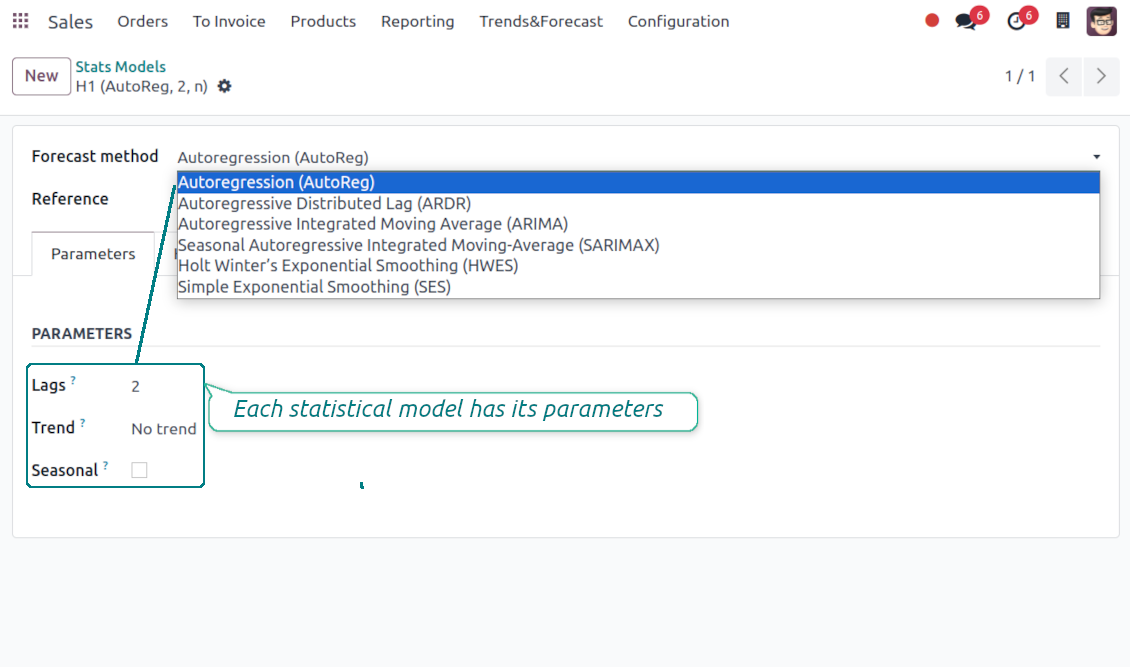
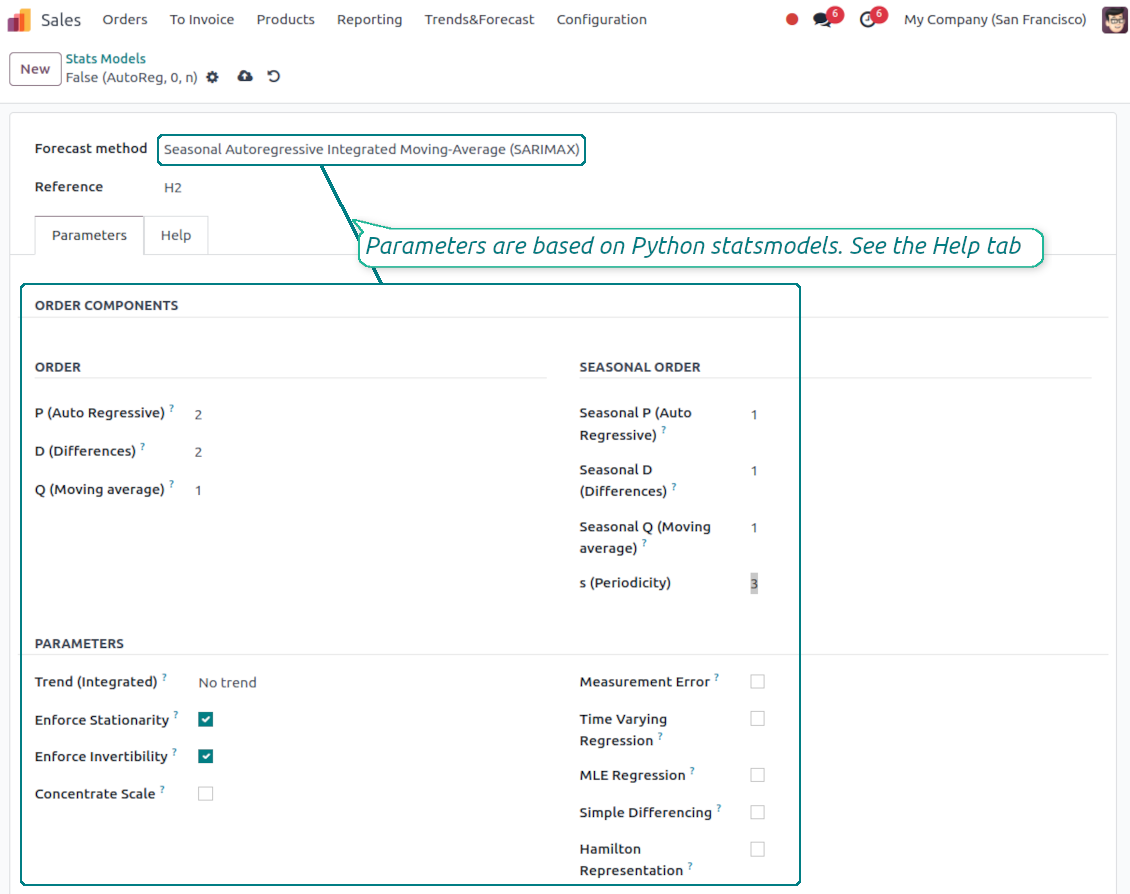
The tool allows calculating inventory demand trends based on predefined statistical models introduced by the Python package statsmodels
-
Methods have different complexity, and their own unique parameters, and might be suitable for a definite market or a specific business. The final choice of the model and related statistical parameters is only up to you. Nobody except you can better understand tendencies in your company inventory demand, and hence which methods and factors should be applied
-
Available statistical models are Autoregression (AutoReg), Autoregressive Distributed Lag (ARDR), Autoregressive Integrated Moving Average (ARIMA), Seasonal Autoregressive Integrated Moving-Average (SARIMAX), Holt Winter's Exponential Smoothing (HWES), Simple Exponential Smoothing (SES)
-
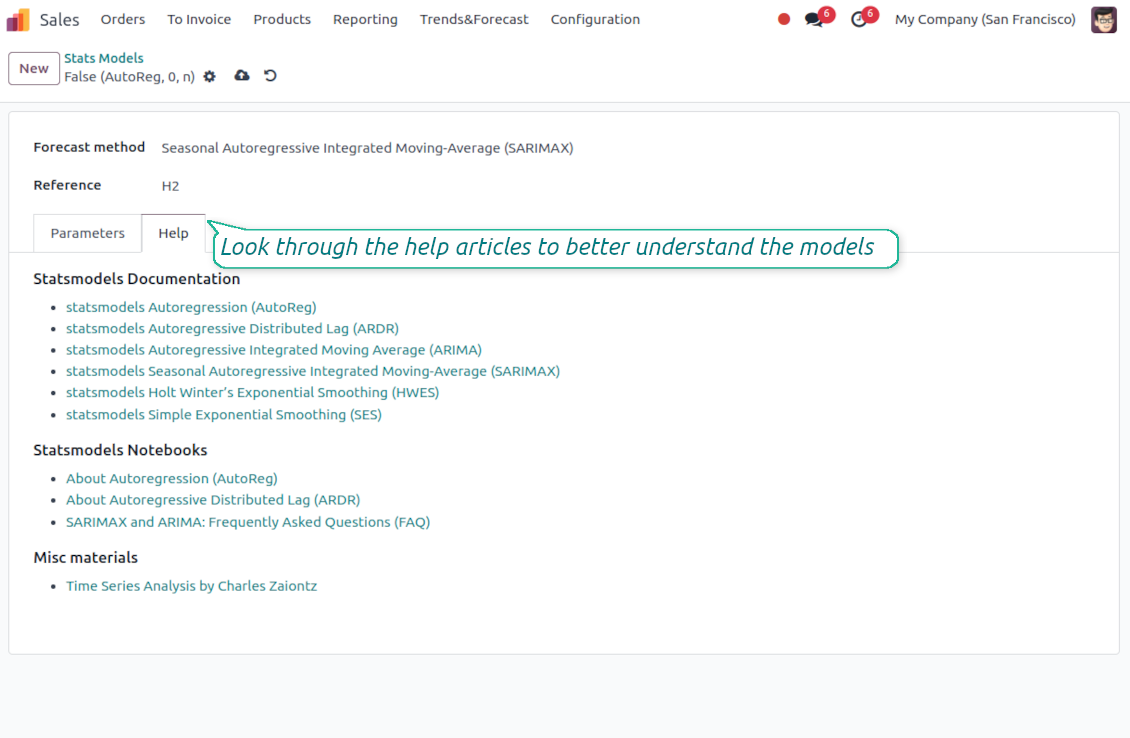
For deep details about what each stats model means and which parameters might be applied, look through the tab "Help" on the stats model form
-
Keep and use an unlimited number of stats models with various parameters. Check, compare, and update those flexibly through the forecast manager interface
-
Often models with specific parameters will not result in any prediction or the prediction will be unrealistic. This is normal, only a deep understating of trends and much experimenting might give a viable forecast for your specific case.
Hypothesis Testing
-
To get a proper prediction, it is usually needed to experiment a lot with statistical models and introduced parameters. To check the results, the app allows compare forecast data with real values
-
To check a certain assumption with historical values, you may make an analysis and prediction for some past periods, and turn on the setting "Hypothesis testing"
-
For example, you have stock moves from 2017 to 2022. Then, you can get report historical data for 2017-2021, and make the forecast for 12 months of 2022. In this way, you will get the prediction for the interval for which you already have actual values. By comparing forecast and actual values, you can decide whether a chosen model and factors are good enough
-
The app allows checking the hypotheses for a few stats models simultaneously. In this way, it is possible to reveal what is actually the most appropriate, or whether experimenting should be continued.
Usage requirements
-
To reveal trends, there should be enough historical stock moves data. It is senseless to make a forecast based on the last 5 days of operations since no trend cannot be retrieved. Take into account that data should be enough for the chosen filters and for each grouped series
-
There should be not only enough stock moves but also there should be some actual trends. Chaotic data will not result in reliable predictions. To use the app, you should understand which assumptions (e.g. seasonal changes) you check
-
To use the app, you either should have a clear understanding of how statistics works or a will to understand that. Regretfully, there is no way to make a "general" analysis, each specific case is unique and requires its own elaboration.
Conseils de configuration et d'installation pour Stock Demand Trends and Forecast Odoo v.17
Python dependencies
To guarantee the tool works correctly, a number of Python libraries are required: pandas, numpy, statsmodels, scipy, xlsxwriter. To install those packages execute the command:
pip3 install pandas numpy statsmodels scipy xlsxwriter
If you run Odoo on Python prior to or equal to version 3.7, please install the following versions of the packages pandas==1.3.5, statsmodels==0.13.1
Server memory limits
Running the statistical analysis and making the forecast is quite a resource-demanding operation. If users face the hanging interface, make sure that server memory limits and timeouts are enough. Otherwise, increase those settings.
Questions fréquentes sur Stock Demand Trends and Forecast Odoo v.17
Quelles sont les politiques de mise a jour de vos outils ?
Selon les politiques actuelles de l'Odoo Apps Store :
- Chaque module achète pour la version 12.0 et anterieure donne accès a toutes les versions jusqu'a 12.0.
- A partir de la version 13.0, chaque version du module doit être achetee séparément.
- Quel que soit le numéro, l'achat donne droit a toutes les mises a jour et corrections au sein d'une version majeure.
L'équipe faOtools ne contrôle pas ces politiques. Pour toute question, contactez directement les representants de l'Odoo Apps Store.
Comment installer votre application sur Odoo.sh ?
L'approche la plus directe est le flux integre de la boutique Odoo :
1. Ouvrez la page du module et cliquez sur Deploy on odoo.sh
2. Vous êtes redirige vers GitHub. Connectez-vous, puis cliquez sur Create a new repo ou utilisez un depot existant. Le depot doit être privé. Il est interdit de publier les applications sous licence OPL-1. Créez un nouveau depot pour le projet Odoo.sh si besoin
3. Ensuite, dans odoo.sh, cliquez sur Deploy, confirmez et cliquez sur Continue. L'installation demarre.
Ces étapes installent l'application sur la branche de production. Pour d'autres branches ou une mise a jour :
1. Téléchargez le code source depuis la boutique Odoo
2. Commitez le module dans le depot GitHub requis. Aucun dossier/fichier de l'app ne doit être ignore (.gitignore). Les depots créés par odoo.sh ignorent parfois des chemins importants (par ex. /lib). Envoyez tous les répertoires et fichiers du module
3. Deployez la branche cible du projet odoo.sh, ou attendez la construction automatique si vos paramètres le prévoient.
Comment installer votre application sur mon propre serveur ?
2. Redémarrez le serveur Odoo;
3. Activez le mode developpeur (paramètres techniques);
4. Mettez a jour la liste des applications (menu Applications);
5. Trouvez l'application et cliquez sur Activate/Install;
6. Suivez les consignes de la page de l'application s'il y en a.
Votre application a des modules complémentaires. Puis-je les acheter plus tard ?
Oui. Odoo ajoute automatiquement toutes les dépendances au panier : excluez les outils déjà achetes pour éviter un double paiement.
J'ai deploye votre application sur Odoo.sh et je vois un avertissement/erreur dans les tests
Un avertissement rouge/orange n'affecte pas les fonctions de l'application. Parfois nos modules échouent aux tests automatiques standard, car ceux-ci attendent un comportement contraire aux objectifs de l'app. Par exemple, nous changeons le calcul du prix alors que les tests Odoo comparent le prix final a l'algorithme standard.
Vérifiez d'abord les fonctions de la base deployee. Tout fonctionne-t-il ?
Si vous pensez encore que l'avertissement affecte les fonctions réelles, contactez-nous avec les journaux d'installation complets et la liste complète des modules deployes (coeur et tiers).
Puis-je acheter votre application directement auprès de vous ?
Non, nous distribuons les outils uniquement via le magasin officiel d'applications Odoo.
Je souhaiterais une reduction
Malheureusement, nous n'avons pas les moyens techniques de proposer des prix individuels.
Puis-je installer l'application sur ma base Odoo Online (SaaS) ?
Non, les applications tierces ne peuvent pas être utilisées sur Odoo Online. Odoo SaaS bloque cette possibilite.
Votre outil dépend d'autres applications. Dois-je les acheter ?
Oui, l'outil a besoin de tous les modules indiques en dépendances. Le prix affiche sur la page inclut déjà ces dépendances.
Quel est le prix du module en dollars US ? Pourquoi a-t-il change ?
Le prix de nos modules est fixe en euros. La boutique Odoo convertit les prix selon son taux de change interne. Le prix en dollars US peut donc changer lorsque ce taux est mis a jour.
Les textes de l'application et du site web dans des langues autres que l'anglais sont assistés par l'IA et alignés sur les traductions officielles d'Odoo. Si vous remarquez une erreur, envoyer un ticket de traduction et nous le corrigerons.
Bases de démonstration Odoo (aperçus)
Pour cette application, nous pouvons fournir une base de données de démonstration personnalisée gratuite.
Vous n'avez pas besoin d'un numéro de téléphone ou d'une carte de crédit pour nous contacter. Vous ne devez passer qu'une courte inscription par e-mail, qui ne prend pas plus de 30 secondes.
Sur demande, nous préparons une base d'aperçu individuelle où vous pouvez effectuer tous vos tests et vérifier vos hypothèses pendant environ deux semaines.
Signalement de bogues
Si vous rencontrez des bugs ou des comportements incohérents, n'hésitez pas à nous contacter. Nous garantissons de fournir des correctifs dans les 60 jours suivant l'achat et sommes extrêmement intéressés par l'amélioration de nos outils même après cette période.
Vous n'avez pas besoin d'un numéro de téléphone ou d'une carte de crédit pour nous contacter. Vous ne devez passer qu'une courte inscription par e-mail, qui ne prend pas plus de 30 secondes.
Veuillez inclure autant de détails que possible dans votre demande : captures d'écran, journaux du serveur Odoo, description complète de la procedure de reproduction du probleme, etc. Il faut generalement quelques jours ouvrables pour preparer un plan d'action concernant un probleme (si un bogue est confirmé) ou vous fournir des recommandations sur la marche a suivre (dans le cas contraire).
Demandes de fonctionnalités publiques et idées de modules (développement gratuit)
Nous sommes fortement motivés pour améliorer nos outils et serions reconnaissants pour tout retour. Si vos exigences sont d'utilité publique et peuvent être mises en œuvre efficacement, l'équipe les inclura dans notre liste de tâches.
Une telle liste de tâches est traitée régulièrement et n'implique pas de frais supplémentaires. Bien que nous ne puissions pas promettre de délais ni de conception finale, cela pourrait être un bon moyen d'obtenir les fonctionnalités souhaitées sans investissements ni risques.
Vous n'avez pas besoin d'un numéro de téléphone ou d'une carte de crédit pour nous contacter. Vous ne devez passer qu'une courte inscription par e-mail, qui ne prend pas plus de 30 secondes.

The tool to flexibly structure Odoo attachments in folders and synchronize directories with cloud clients: Google Drive, OneDrive/SharePoint, Nextcloud/ownCloud, Dropbox, Amazon S3, Box, and NAS. DMS. File Manager. Document management system
398€

The tool to build a deep and structured knowledge base for internal and external use. Knowledge System. KMS. Wiki-like revisions.
398€
The tool to automatically synchronize Odoo attachments with OneDrive files in both ways
487€
The tool to set up KPI targets and control their fulfillment by periods. KPI dashboards. Dashboard designer. KPI charts

The tool for time-based service management from booking appointments to sales and reviews
398€
The tool to automatically synchronize Odoo attachments with Google Drive files in both ways
487€
The tool to configure variant prices based on attributes coefficients and surpluses
98€