Product Management Interface v.15
The tool to search, select and mass update product templates
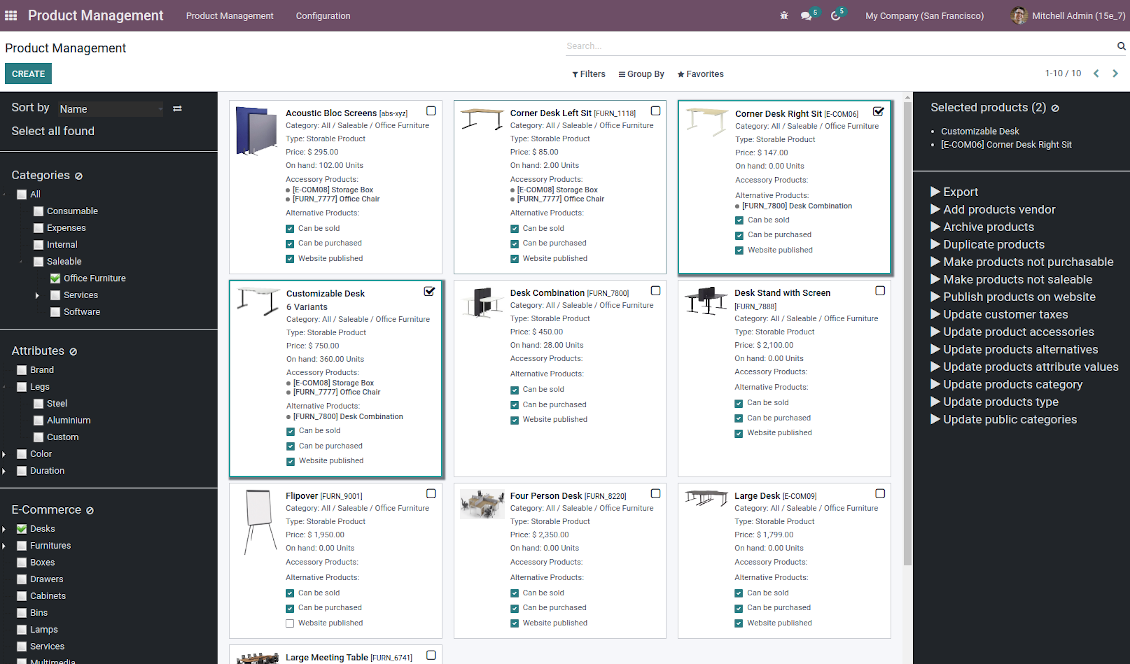


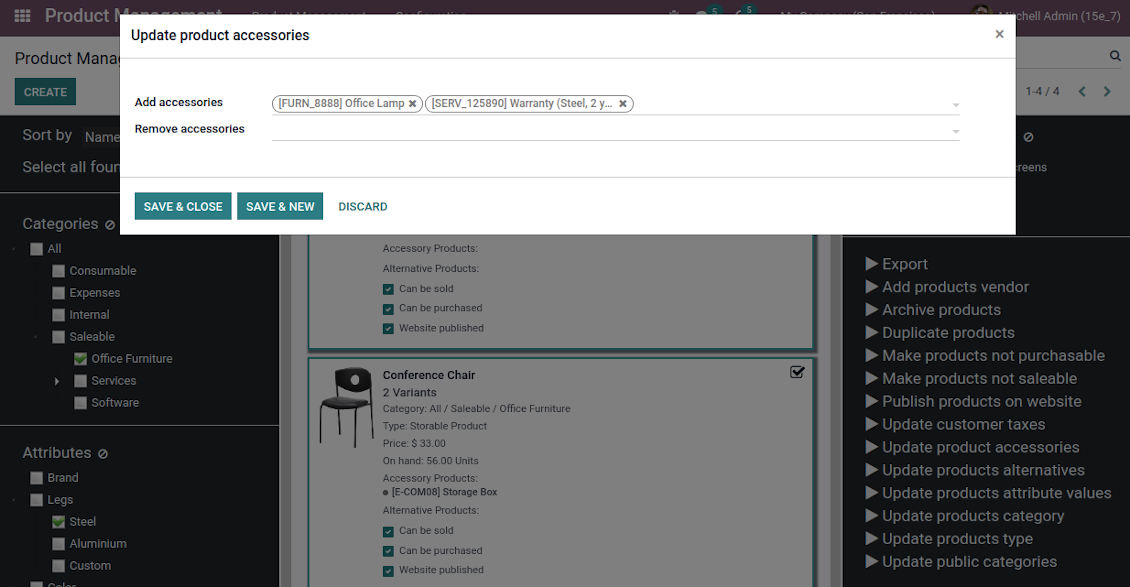
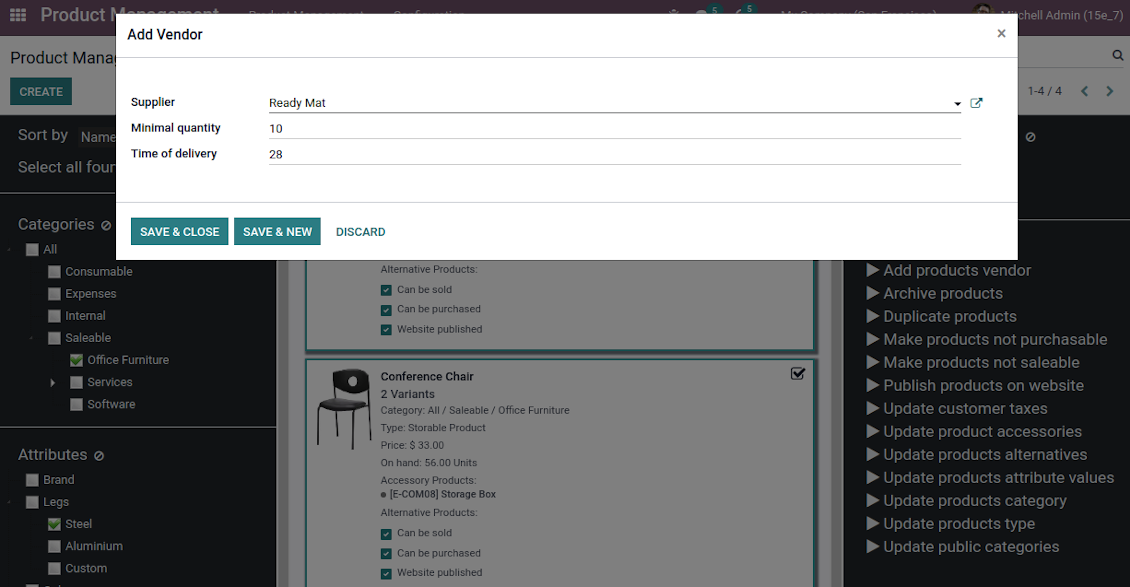
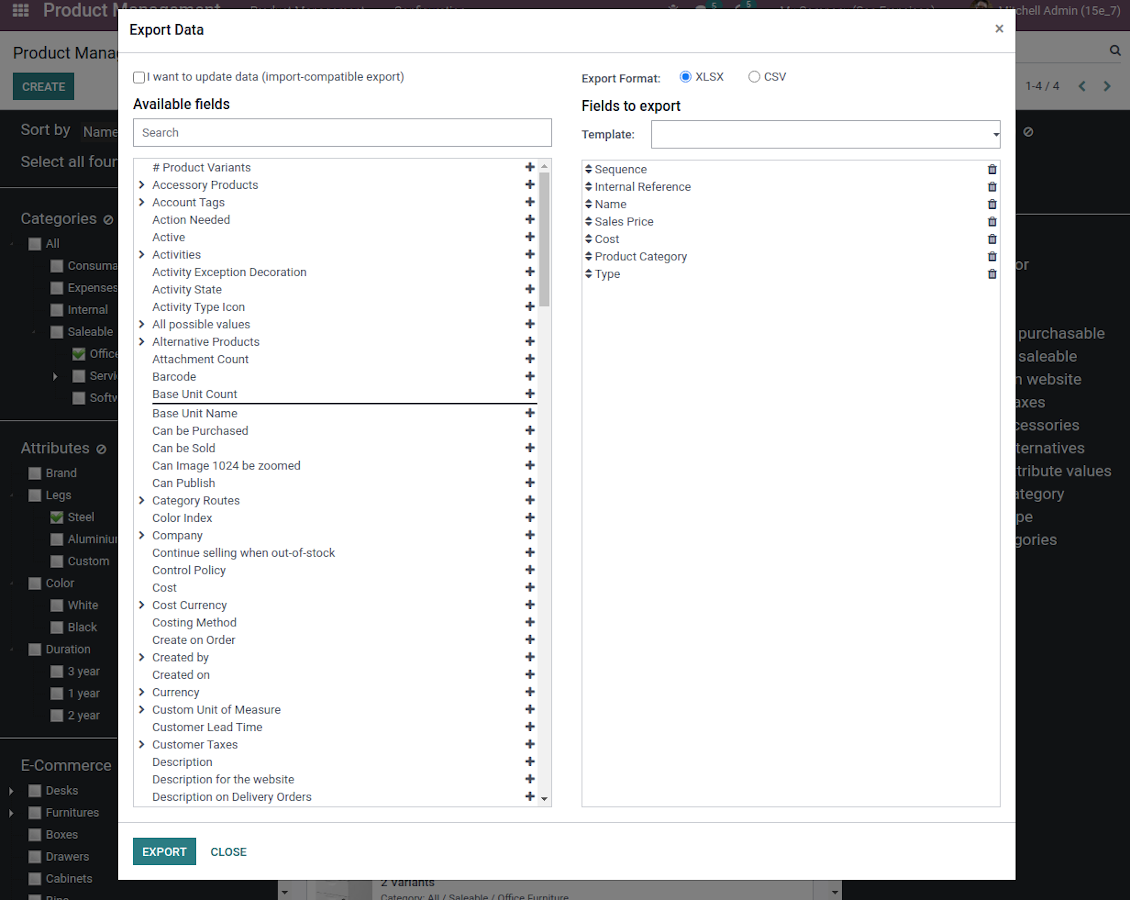
This is an Odoo product management tool aims to improve catalog administration and to simplify implementation of changes. The app introduces the innovative interface to search, to analyze, to select, and to mass edit Odoo product templates.
- the core app. It might be used stand-alone as a system to find, pick up, and update basic product fields.
Sein Preis ist
198€
178€.
- the optional module, which introduces mass products actions to change E-shop related attributes. The features assumed by this add-on are marked by the icon .
Sein Preis ist
10€
9€.
- the optional module to update in batch warehouse characteristics of product templates. The features assumed by this add-on are marked by the icon .
Sein Preis ist
10€
9€.
- the optional module to manage accounting traits of products in bulk. The features assumed by this add-on are marked by the icon .
Sein Preis ist
10€
9€.
- the optional module offering mass actions on purchase columns of products. The features assumed by this add-on are marked by the icon .
Sein Preis ist
10€
9€.
Comfortable navigation
Filter products by hierarchy of categories: select one or a few ones.
Systematize products by attributes: e.g. find both white and metal templates.
Navigate by e-commerce categories
Single view interface
Sort product templates by name, reference, category, type, price.
Apply to standard Odoo search.
Click on image to open a product form; on card - to add it for selection
Efficient multi selection and mass update
Pick products up step by step: the selection is not cleared with a new search or when you opened a record. Proceed mass action(s) for all chosen templates
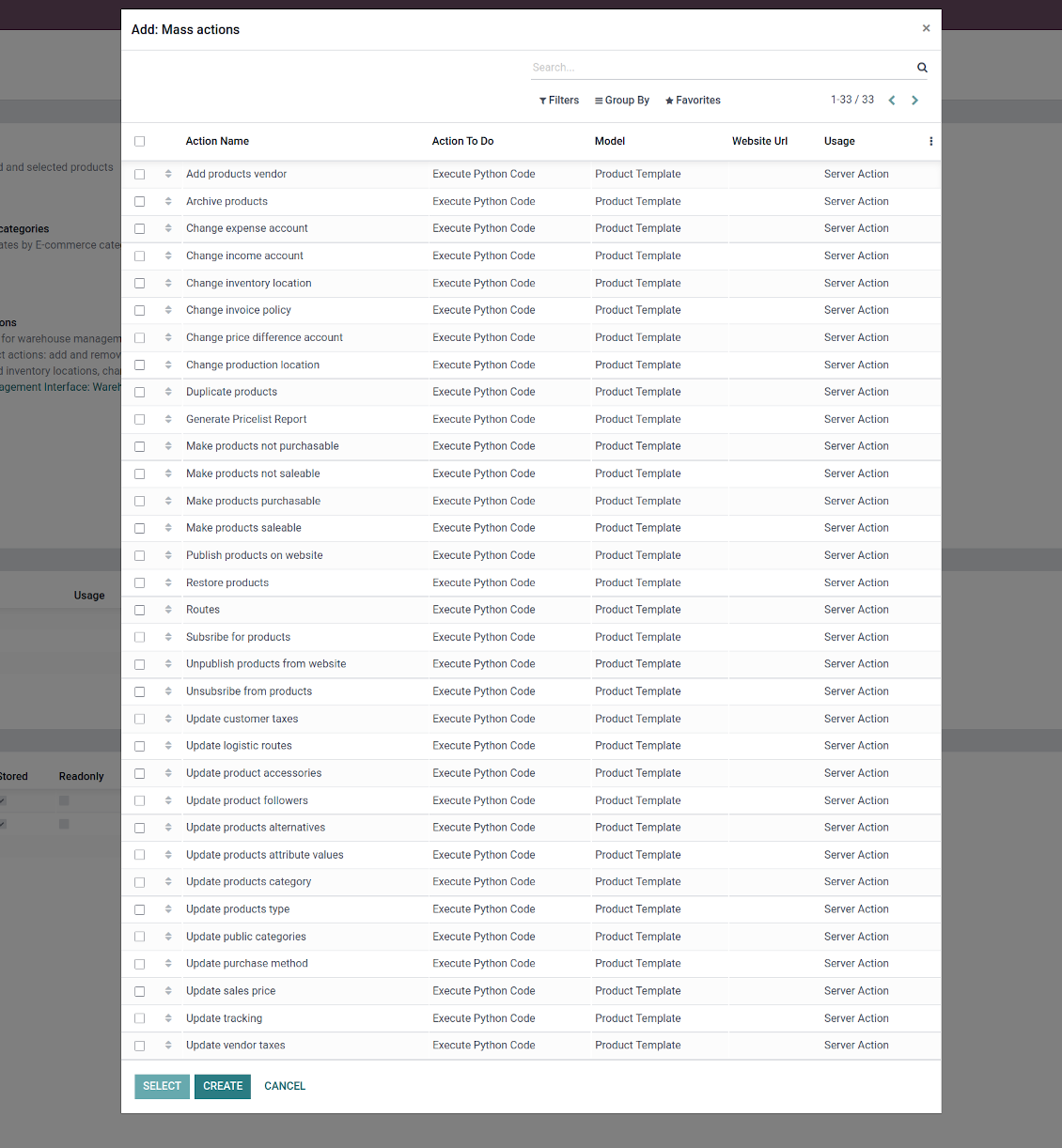
Configurable list of mass actions
Define which mass operations are available from a predefined list or prepare your own server actions. Just a few clicks to update category, to add attributes values, to withdraw from sales, to change price ...
Customizable kanban view
Add any product template fields for kanban cards for an instant overview.
Secured interface and actions
The interface is restricted for the user group Product Management > Product Manager. A user must also have rights for product management (e.g. sales, warehouse or purchase manager).
Fantastic module
This module earned itself back in the first day, a must have when working with lots of products. A minor issue with product attributes was solved within 12h, great service.
A life-changer ... and a massive time saver!
Fantastic app ... Provides a whole new view of your product database, nicely presented in editable kanban view, with the ability to filter and sort in various ways and combinations, I guess depending on the $10 add-ons you buy, and then perform mass updates and product changes, all controlled through a very simple and self-explanatory configuration. I only just installed the app but it immediately highlighted to me that I had some products that had somehow been duplicated - even though I thought I had changed the code to prevent that. But more importantly, from here you can get a nice quick overview of your products, their attributes, pricing, etc. You can easily add and delete fields to the kanban overview. And then you can easily select which records your want to update, amend or export, either individually or using 'select all' and then perform your changes in bulk at the click of a couple of buttons. Possibly you can do all these things in standard Odoo (although I'm not so sure you can) but it would take you ten times as long and involve many more steps - most probably with data export and re-import. This app cuts out all the messing around and makes life quick simple. I feel sure this app is going to make my product management so much quicker and simpler in future ! Highly recommended.
Works nice
I find it quite nice module for product management. After the enhancement of not requiring to click exactly on the checkbox it became convenient and fast to use for standard intended functions. Thanks guys!
Configurable mass actions for product templates
Mass actions are operations which might be proceeded for a number of product templates in batch. The tool offers multiple default actions, among which you can select required ones.
-
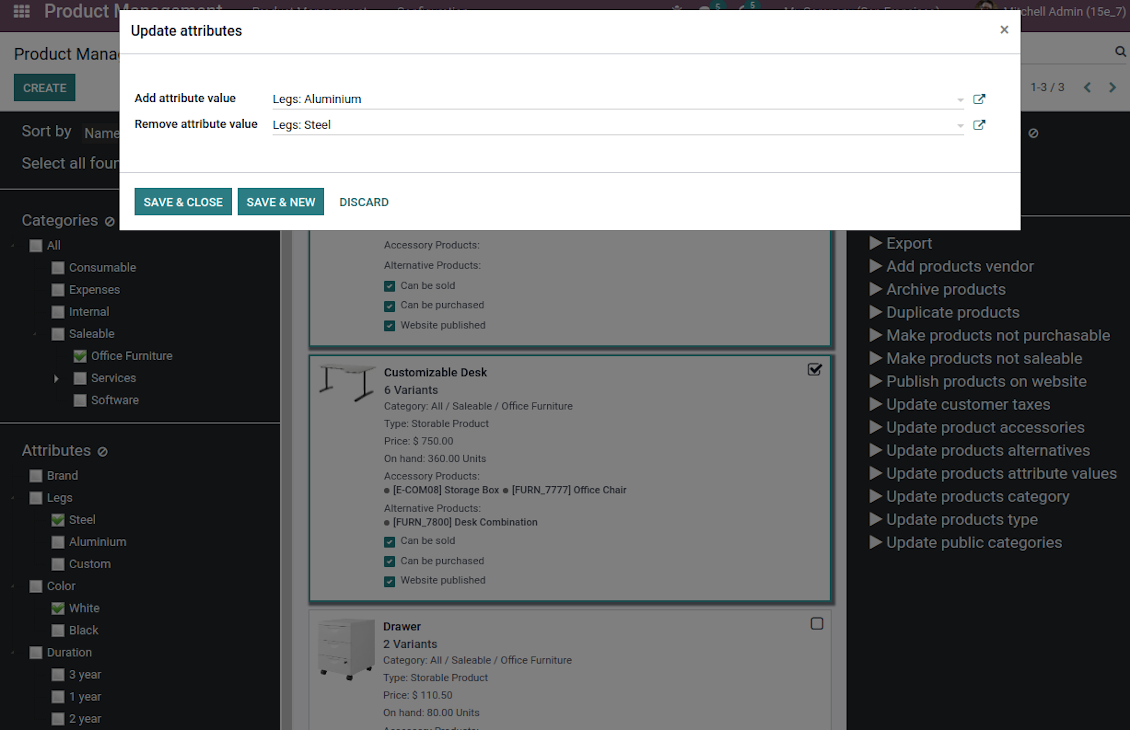
Add / remove attribute value to all found templates
-
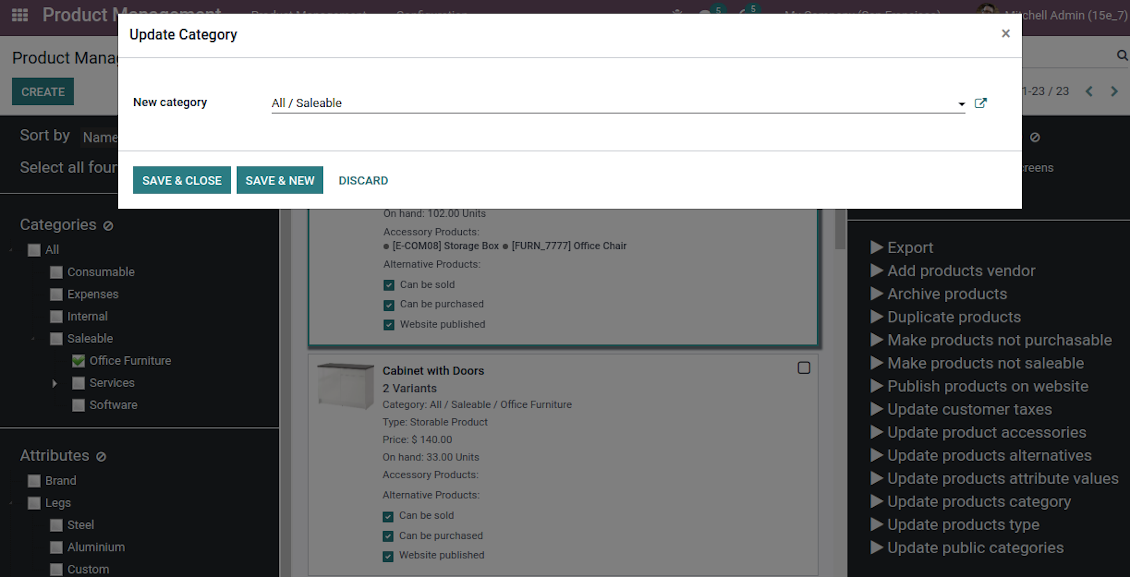
Change Odoo product category of all selected items
-
Copy any values from the master product template
-
Archive products in bulk / Restore selected products which have been previously archived
-
Export chosen items (the setting 'Export products' should be turned on)
-
Mass update sales price of Odoo product templates
-
Mass edit product type (consumable, service, storable)
-
Publish or unpublish products in batch
-
Update products to be salable / not salable
-
Update products to be purchasable / not purchasable
-
Add / remove public E-shop categories of selected templates
-
Add / remove products' alternatives
-
Add / remove products' accessories
-
Add/remove optional products (the Sales Product Configurator module should be installed)
-
Assign a new vendor to product templates in bulk and make this supplier the most prioritized
-
Add / remove logistic routes
-
Modify invoice policy ('Ordered quantities', 'Delivered quantities')
-
Duplicate a few product templates simultaneously
-
Add / remove customer taxes
-
Add / remove vendor taxes
-
Subscribe to / unsubscribe from products' discussions
-
Add / remove product templates' followers
-
Update purchase method ('On ordered quantities', 'On received quantities')
-
Update tracking method ('By Unique Serial Number', 'By Lots', 'No Tracking')
-
Change price difference account
-
Change income account of product templates
-
Change expense account of product template
-
Change inventory location
-
Change production location
Beside the list above you can also prepare your own mass actions. Look at the configuration tab.
Konfigurations- und Installationstipps für Product Management Interface Odoo v.15
Mass actions for product templates
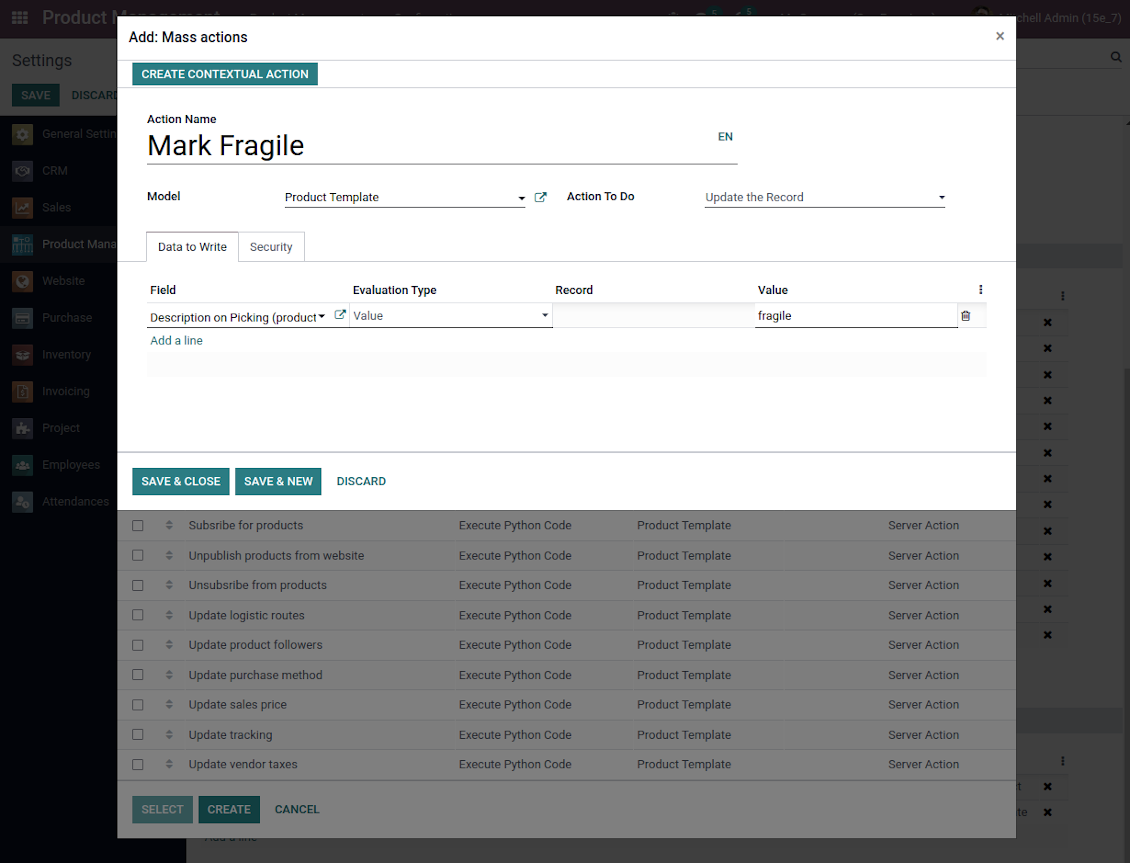
Batch actions for products templates are based on Odoo server actions. It means that you may add custom mass editing operations. Take into account the following peculiarities:
- As the model always use 'Product Template'. Otherwise you action would not be displayed in the list of operations
- In case you want to return a wizard, such a wizard should not have a footer (only standard buttons) and should have an explicitly specified view_id. Look for examples in any module of the Product Management Bundle
Example of custom mass action
Häufig gestellte Fragen zu Product Management Interface Odoo v.15
Nach der Produktwahl bleibt die Auswahl beim Seitenwechsel. Wie setze ich sie schnell zurück?
Im rechten Bereich klicken Sie auf den Produkttitel, um ihn zu entfernen. Alle Produkte entfernt das Symbol 'Reset' rechts neben 'Selected products'.
Wie sind die Update-Richtlinien Ihrer Tools?
Laut den aktuellen Richtlinien des Odoo Apps Store:
- Ein fur Version 12.0 oder früher gekauftes Modul gibt Zugang zu allen Versionen bis 12.0.
- Ab Version 13.0 muss jede Modulversion separat gekauft werden.
- Unabhängig von der Version berechtigt der Kauf zu allen Updates und Fehlerbehebungen innerhalb einer Hauptversion.
Das faOtools-Team steuert diese Richtlinien nicht. Fragen richten Sie bitte direkt an die Vertreter des Odoo Apps Store.
Wie installiere ich Ihre App auf Odoo.sh?
Der direkteste Weg ist der integrierte Ablauf des Odoo Stores:
1. Öffnen Sie die Modulseite und klicken Sie auf Deploy on odoo.sh
2. Sie werden zu GitHub weitergeleitet. Melden Sie sich an und klicken Sie auf Create a new repo oder nutzen Sie ein vorhandenes. Das Repository muss privat sein. Apps unter OPL-1 dürfen nicht öffentlich gemacht werden. Legen Sie bei Bedarf ein neues Repo fur das Odoo.sh-Projekt an
3. Gehen Sie zu odoo.sh, klicken Sie auf Deploy, bestätigen Sie und klicken Sie auf Continue. Die Installation startet.
Damit wird die App auf dem Production-Branch installiert. Fur andere Branches oder Updates:
1. Laden Sie den Quellcode aus dem Odoo Store
2. Committen Sie das Modul in das GitHub-Repository. Keine App-Ordner/Dateien dürfen in .gitignore stehen. Von odoo.sh erzeugte Repos ignorieren oft wichtige Pfade (z. B. /lib). Laden Sie alle Modulverzeichnisse und Dateien hoch
3. Deployen Sie den Ziel-Branch des odoo.sh-Projekts oder warten Sie auf den automatischen Build.
Wie installiere ich Ihre App auf meinem eigenen Server?
2. Starten Sie den Odoo-Server neu;
3. Schalten Sie den Entwicklermodus ein (technische Einstellungen);
4. Aktualisieren Sie die App-Liste (Apps-Menü);
5. Finden Sie die App und klicken Sie auf Activate/Install;
6. Folgen Sie den Hinweisen auf der App-Seite, falls vorhanden.
Ihre App hat Zusatzmodule. Kann ich sie später kaufen?
Ja. Odoo legt alle Abhängigkeiten automatisch in den Warenkorb. SchlieBen Sie bereits gekaufte Tools aus, um nicht doppelt zu zahlen.
Ich habe Ihre App auf Odoo.sh bereitgestellt und sehe eine Warnung/einen Fehler in den Tests
Eine rote/orange Warnung beeinflusst die Funktionen der App nicht. Manchmal bestehen unsere Module die Standard-Automatiktests nicht, weil diese ein Verhalten erwarten, das unseren Zielen widerspricht. Zum Beispiel ändern wir die Preisberechnung, während die Odoo-Tests den Endpreis mit dem Standardalgorithmus vergleichen.
Prüfen Sie zuerst die Funktionen der bereitgestellten Datenbank. Funktioniert alles?
Wenn Sie dennoch annehmen, dass die Warnung echte Funktionen betrifft, senden Sie uns die vollständigen Installationsprotokolle und die vollständige Liste der bereitgestellten Module (Kern und Drittanbieter).
Kann ich Ihre App direkt bei Ihnen kaufen?
Nein, wir vertreiben die Tools nur über den offiziellen Odoo Apps Store.
Ich mochte einen Rabatt
Leider haben wir keine technischen Mittel fur individuelle Preise.
Kann ich die App auf meiner Odoo Online (SaaS)-Datenbank installieren?
Nein, Drittanbieter-Apps können nicht auf Odoo Online genutzt werden. Odoo SaaS blockiert das.
Ihr Tool hängt von anderen Apps ab. Muss ich diese kaufen?
Ja, das Tool benötigt alle als Abhängigkeit markierten Module. Der Preis auf der App-Seite enthält bereits alle noetigen Abhängigkeiten.
Was kostet das Modul in US-Dollar? Warum hat sich der Preis geändert?
Die Preise unserer Module sind in Euro festgelegt. Der Odoo Store rechnet nach seinem internen Wechselkurs um. Der Preis in US-Dollar kann sich ändern, wenn der Kurs aktualisiert wird.
Die Texte der App und Website in anderen Sprachen als Englisch werden KI-gestützt erstellt und an die offiziellen Odoo-Übersetzungen angeglichen. Wenn Sie einen Fehler entdecken, ein Uebersetzungs-Ticket senden und wir korrigieren es.
Fehlermeldung
Wenn Sie auf Fehler oder inkonsistentes Verhalten stossen, zögern Sie nicht, uns zu kontaktieren. Wir garantieren eine Reparatur innerhalb von 60 Tagen nach dem Kauf und sind auch nach diesem Zeitraum stark daran interessiert, unsere Werkzeuge zu verbessern.
Sie benötigen keine Telefonnummer oder Kreditkarte, um mit uns Kontakt aufzunehmen. Sie sollten nur eine kurze E-Mail-Anmeldung durchführen, die nicht länger als 30 Sekunden dauert.
Bitte nehmen Sie moglichst viele Details in Ihre Anfrage auf: Screenshots, Odoo-Serverprotokolle, eine vollständige Beschreibung zur Reproduktion Ihres Problems usw. Normalerweise dauert es einige Werktage, einen Arbeitsplan fur ein Problem zu erstellen (wenn ein Fehler bestätigt wird) oder Ihnen Hinweise zum weiteren Vorgehen zu geben (andernfalls).
Öffentliche Funktionsanfragen und Modulideen (kostenlose Entwicklung)
Wir sind stark motiviert, unsere Tools zu verbessern und wären für jedes Feedback dankbar. Wenn Ihre Anforderungen von öffentlichem Nutzen sind und effizient umgesetzt werden könnten, nimmt das Team diese in unsere To-Do-Liste auf.
Eine solche To-Do-Liste wird regelmässig bearbeitet und erfordert keine zusätzlichen Gebühren. Obwohl wir keine Fristen und keinen endgültigen Entwurf versprechen können, könnte dies eine gute Möglichkeit sein, die gewünschten Funktionen ohne Investitionen und Risiken zu erhalten.
Sie benötigen keine Telefonnummer oder Kreditkarte, um mit uns Kontakt aufzunehmen. Sie sollten nur eine kurze E-Mail-Anmeldung durchführen, die nicht länger als 30 Sekunden dauert.

Das Werkzeug, um Odoo-Anhänge in Ordnern zu strukturieren und mit Google Drive, OneDrive/SharePoint, Nextcloud/ownCloud, Dropbox, Amazon S3, Box und NAS zu synchronisieren. Dateimanager. DMS
398€
Das Werkzeug, um Passwörter in Odoo sicher gemeinsam zu halten. Geteilte Tresore

Das Werkzeug fur eine tiefe Wissensdatenbank intern und extern. KMS. Wiki-Revisionen
398€
Das Werkzeug zum bidirektionalen Sync von Odoo-Anhängen mit OneDrive
487€
Das Werkzeug, um KPI-Ziele zu setzen und die Erfullung je Periode zu kontrollieren. Dashboards. Diagramme

Das Werkzeug fur terminbasierte Dienste von der Buchung bis Verkauf und Bewertungen
398€
Das Werkzeug zum bidirektionalen Sync von Odoo-Anhängen mit Google Drive
487€
Das Werkzeug, um Variantpreise über Attributkoeffizienten und Zuschlage zu setzen
98€
Das Werkzeug, um Nachfrage-Trends zu berechnen und den kunftigen Bedarf statistisch vorherzusagen
198€