Password Manager v.13
The tool to safely keep passwords for shared use
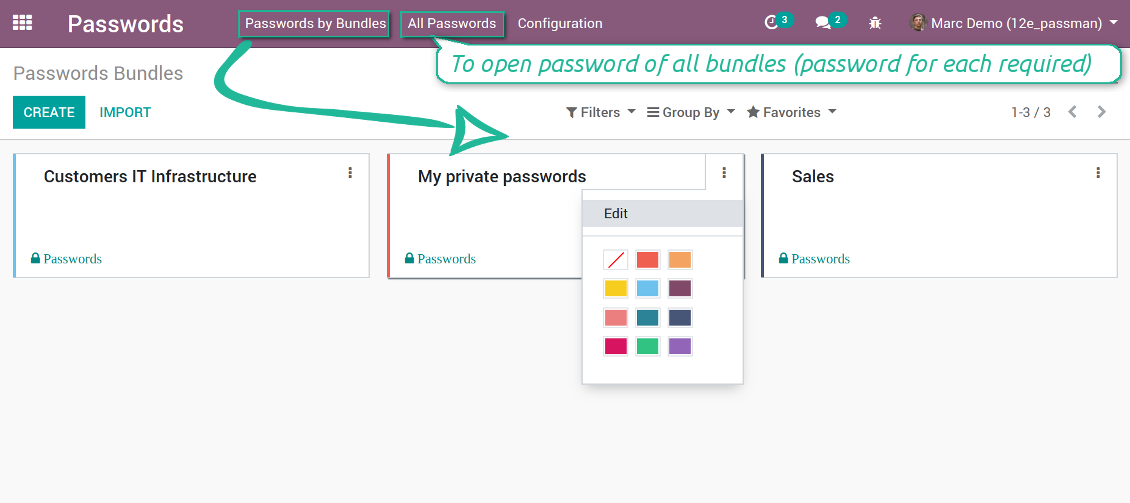
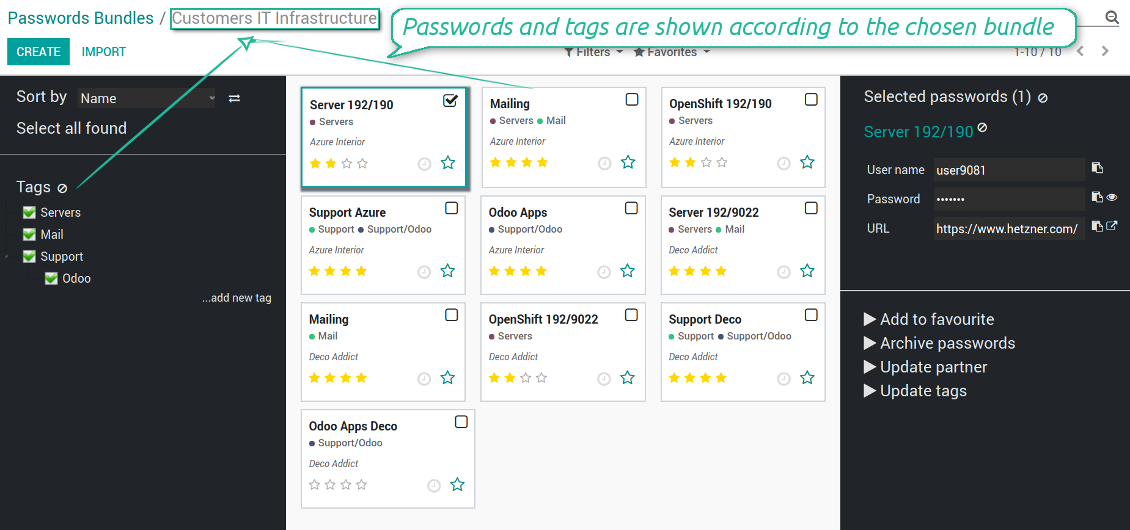

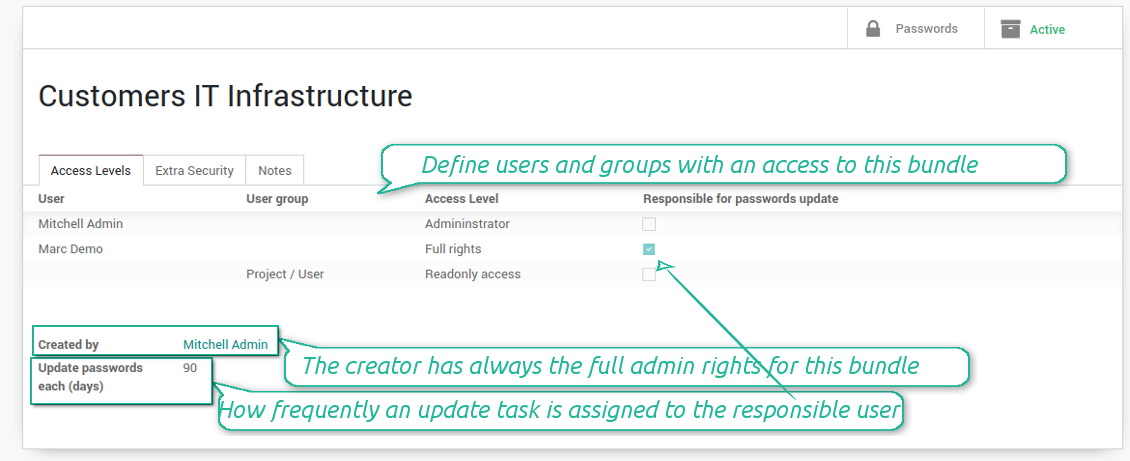

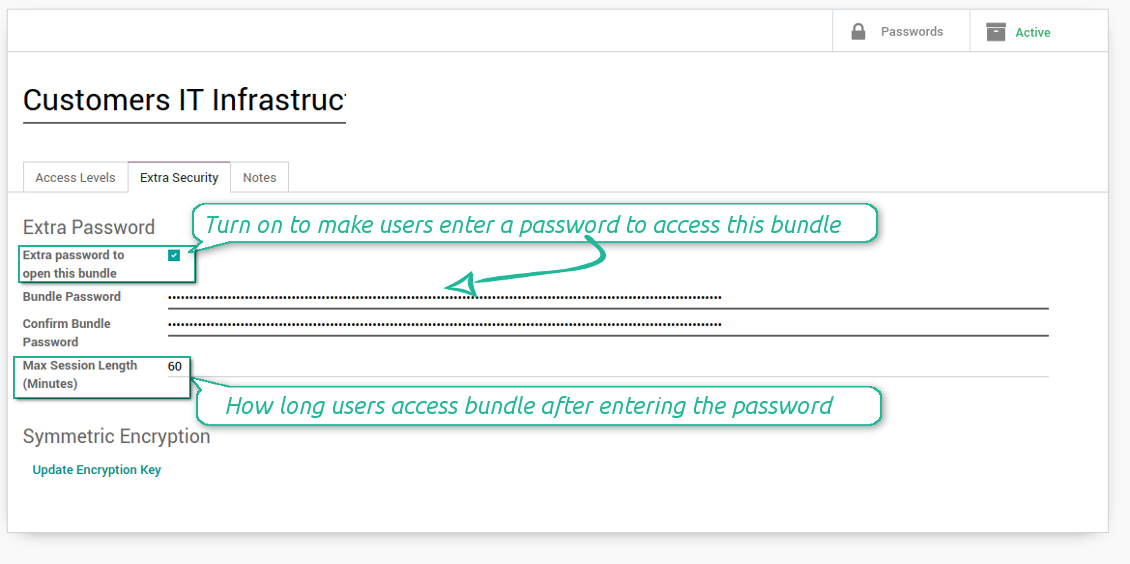





Nowadays team work assumes a shared access to multiple IT services. Such collaboration is not simple, since definite users should know some passwords and not others. Besides, such passwords should be frequently updated, and team members should learn topical authentication parameters. Often this business process becomes a total mess and results in time losses and leak of important data. The situation is especially crucial in case you administrate customers-related services.
This is the tool to solve the trouble. The app let you organize the system of safe passwords keeping with multiple security layers to efficiently structure, find, and share password bundles.
- a core app to manage vaults and passwords.
মূল্য
198€
178€.
- an extension to add custom fields for password keys. Features assumed by this app are marked by the icon .
মূল্য
38€
37€.
Shared password vaults for team use
Passwords Sharing Policies
An access to a specific password is regulated on a bundle level. You may have as many bundles as you want. To share a bundle with a definite user, you should specify that user in the access levels' table. Alternatively you can assign a user group in the same table. For example, you can have a 'sales team' bundle and share it with all users with the right 'Sales Manager', or you can have a global bundle by sharing it with a user group 'Internal user'.
3 access levels to bundles, passwords, and tags are distinguished:
- Administrator may access, update or delete this bundle, its passwords, and its tags. This user is assumed to manage access levels for this bundle, to modify update policies, and set the extra password. The bundle creator is always its administrator.
- Full rights user may access, update or delete passwords and tags related to this bundle, but he/she can't change bundle itself and can't change bundle access levels or settings
- Readonly access user may observe and address passwords and tags of this bundle. Such users can't modify any objects.
Take into account that the rules are not applied for the Odoo super user. The Odoo super admin (with id 1) has full rights for all passwords and bundles, although he is also required to enter the extra paraphrase to open a bundle.
The setting 'Responsible for password updates' allows to assign a user who should regularly change the paraphrase in passwords according to the bundle update policies. For such a user the special activity is automatically and regularly created to make sure passwords are secure. There might be only a single responsible for a bundle, and such responsible should have either the 'Administrator' or the 'Full rights' access level.
Innovative single-view interface
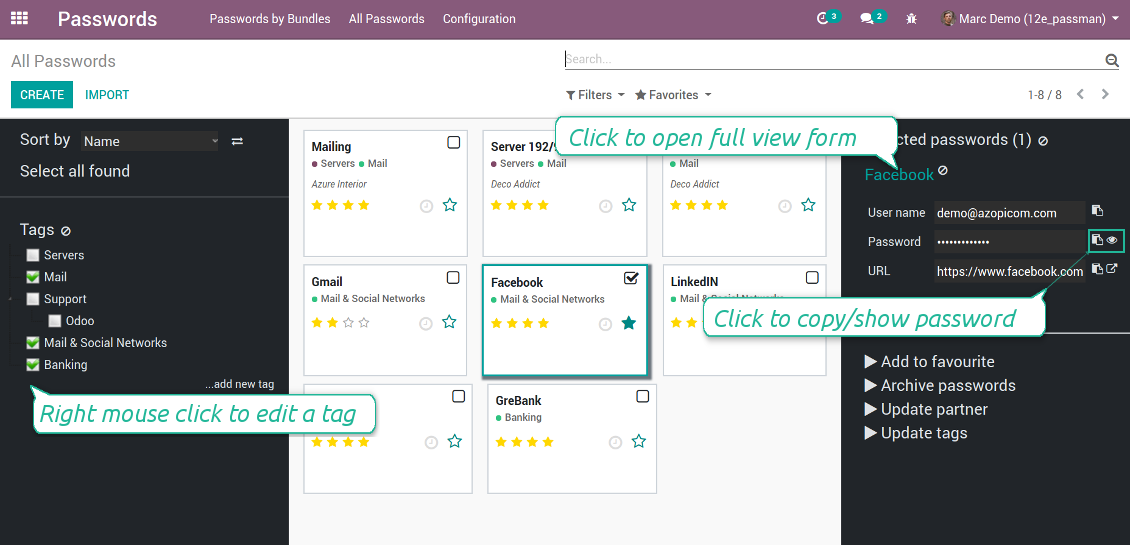
The password manager let you work with a few passwords simultaneously. Click on a password kanban card to add the key to the selection, and then address any or proceed a mass action. Possible mass actions are defined by an Odoo admin on the configuration page.
There are 2 menus to simplify working with passwords. The first - 'Passwords by bundles' - let users open keys of an exact vault. The second - 'All passwords' - let users simultaneously open all available for him/her keys. In the latter case an extra paraphrase for each bundle should be entered.
স্ক্রিনশট
Passwords are combined in bundles
Passwords single-view interface
Password form view
Password Manager configuration page
Passwords by all available for this user bundles
Passwords auto generation and check
Password strength is estimated in real-time to make sure users do not introduce too weak keys.
The app also let you import passwords from electronic tables using the standard Odoo import tools.
স্ক্রিনশট
Password generator wizard
Import passwords from tables
Encryption and protection of passwords
For each vault you can define update policies in days. If the password has not been changed during the specified period, Odoo will generate an activity for responsible users. To maximize security, change you passwords regularly!
Passwords Security Layers
Although, there is no way to provide 100% security in the Internet, this password manager tries to minimize potential risks.
The tool symmetrically encrypt all passwords. It means that to decrypt a password, plotters should know the exact decryption algorithm and a bundle decryption key.
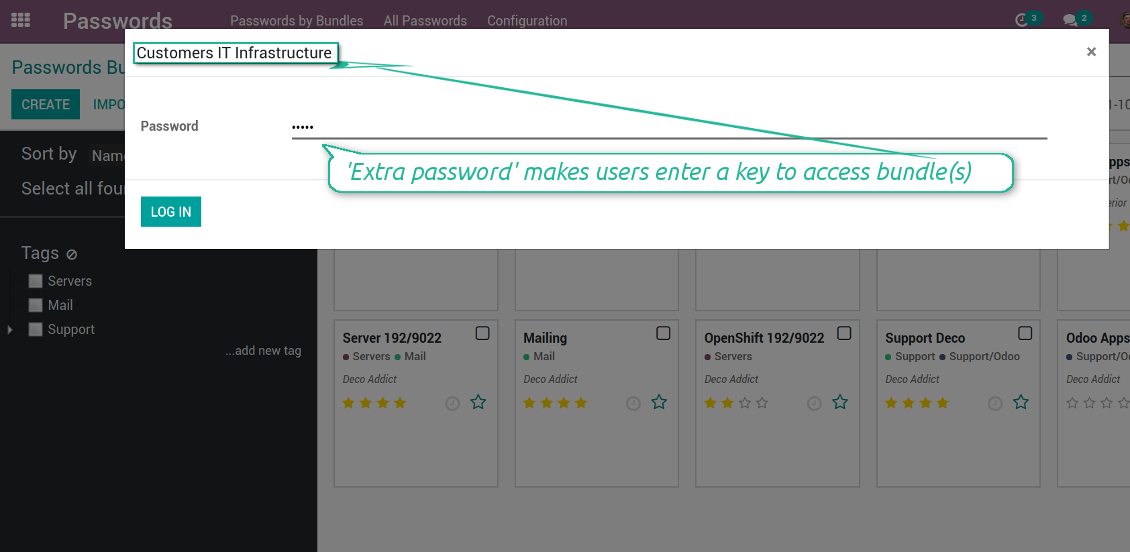
You can also assign the extra security password for any bundle. In such a case to access passwords in the interface, any user should enter a paraphrase. Even if a user has full rights for a bundle, he/she should always know that password. Besides, that paraphrase might be changed at any moment by the bundle admin (if that admin himself knows that paraphrase). Be cautious: do not forget the password. It is hashed and even the PostreSQL super user can't recover it.
স্ক্রিনশট
Passwords access levels
Extra password to open a bundle
Bundle extra paraphrase required
Custom fields and types for password keys
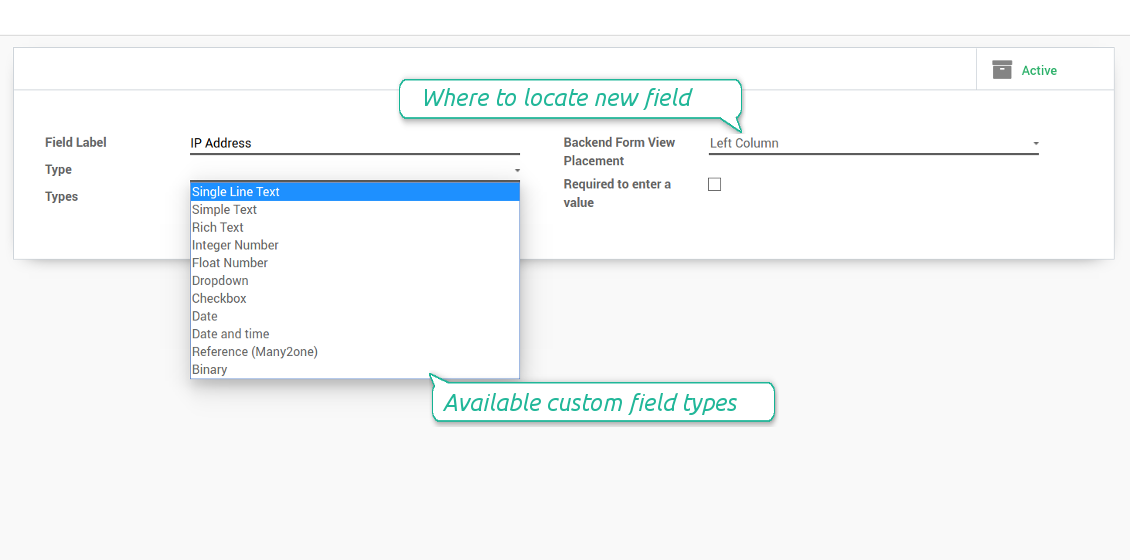
Structure passwords by special types and choose fields for each types individually. Thus, set of columns for 'virtual servers' and 'email servers' might be different.
স্ক্রিনশট
Passwords' custom fields
Custom fields on password form
Custom fields for password: add any data required
Linked to Odoo contacts
স্ক্রিনশট
Passwords by partners
Very good password management module
Easy installation and quick setup
কনফিগারেশন ও ইনস্টলেশন টিপস: Password Manager Odoo v.13
Python dependencies
To guarantee tool correct work you would need a number of Python libraries: zxcvbn, cryptography:
pip3 install zxcvbn cryptography
সম্পর্কে সাধারণ জিজ্ঞাসা Password Manager Odoo v.13
একজন অংশীদারের সব পাসওয়ার্ড কীভাবে দেখব?
কোনো পার্টনারের সব পাসওয়ার্ড দেখতে Contacts-এ যান, পার্টনার খুলুন এবং স্মার্ট বোতাম 'Passwords' ক্লিক করুন। তারপর Password manager অ্যাপে যাবেন এবং এই পার্টনারের সব পাসওয়ার্ড দেখবেন।
পাসওয়ার্ড বান্ডিল (password manager) কীভাবে মুছবেন?
নিরাপত্তার জন্য মূল বান্ডেল মেনু থেকে 'Delete' বোতাম লুকানো আছে। পাসওয়ার্ড বান্ডেল মুছতে: 1. বান্ডেলের উপরের ডান কোণে তিন বিন্দুর বোতামে ক্লিক করুন 2. সম্পাদনা মোডে যাবেন; সেখান থেকে 'Save' ক্লিক করুন 3. পাসওয়ার্ড বান্ডেলের উপরে 'Action' বোতাম দেখবেন; ক্লিক করে 'Delete' বেছে নিন।
আপনার সরঞ্জামের হালনাগাদ নীতি কী?
বর্তমান Odoo Apps Store নীতি অনুসারে:
- সংস্করণ 12.0 ও তার আগের জন্য কেনা প্রতিটি মডিউল 12.0 পর্যন্ত সব সংস্করণে প্রবেশ দেয়।
- সংস্করণ 13.0 থেকে প্রতিটি মডিউল সংস্করণ আলাদা কিনতে হয়।
- সংস্করণ যাই হোক, কেনায় সেই প্রধান সংস্করণের সব হালনাগাদ ও বাগ সংশোধনের অধিকার মেলে।
মনে রাখুন, faOtools দল এই নীতি নিয়ন্ত্রণ করে না। সব প্রশ্নে সরাসরি Odoo Apps Store প্রতিনিধিদের সাথে যোগাযোগ করুন।
আপনার অ্যাপ Odoo.sh-এ কীভাবে ইনস্টল করব?
সবচেয়ে সোজা উপায় হল Odoo স্টোরের বিল্ট-ইন ওয়ার্কফ্লো ব্যবহার করা:
1. মডিউলের পৃষ্ঠা খুলুন এবং Deploy on odoo.sh বোতামে ক্লিক করুন
2. তারপর আপনাকে GitHub পৃষ্ঠায় পাঠানো হবে। অ্যাকাউন্টে লগ ইন করুন, তারপর 'Create a new repo' ক্লিক করুন বা বিদ্যমানটি ব্যবহার করুন। রিপোজিটরি যেন প্রাইভেট হয়। OPL-1 লাইসেন্সের অধীনে অ্যাপ প্রকাশ করা অনুমোদিত নয়। প্রয়োজনে Odoo.sh প্রকল্পের জন্য নতুন repo তৈরি করুন
3. তারপর odoo.sh-এ যান এবং Deploy বোতামে ক্লিক করুন। পপ-আপ উইন্ডোতে সিদ্ধান্ত জমা দিন এবং 'Continue.' ক্লিক করুন। এতে ইনস্টলেশন শুরু হবে।
এই ধাপগুলো প্রকল্পের প্রোডাকশন শাখায় অ্যাপ ইনস্টল করবে। অন্য শাখায় অ্যাপ ডিপ্লয় বা মডিউল আপডেট করতে নিচের কাজগুলো করুন:
1. Odoo স্টোর থেকে অ্যাপের সোর্স কোড আপলোড করুন
2. মডিউলটি প্রয়োজনীয় GitHub রিপোজিটরিতে commit করুন। নিশ্চিত করুন অ্যাপের কোনো ফোল্ডার/ফাইল উপেক্ষিত নয় (অর্থাৎ repo-এর .gitignore-এ নেই)। রিপোজিটরি odoo.sh স্বয়ংক্রিয়ভাবে তৈরি করে এবং ডিফল্টে কিছু গুরুত্বপূর্ণ আইটেম থাকতে পারে (যেমন /lib)। মডিউলের সব ডিরেক্টরি, সাবডিরেক্টরি ও ফাইল ব্যতিক্রম ছাড়া আপলোড করুন
3. odoo.sh প্রকল্পের লক্ষ্য শাখা Deploy করুন অথবা, সেটিংস যদি তা ধরে নেয়, স্বয়ংক্রিয়ভাবে তৈরি হওয়া পর্যন্ত অপেক্ষা করুন।
নিজের সার্ভারে আপনার অ্যাপ কীভাবে ইনস্টল করব?
2. Odoo সার্ভার রিস্টার্ট করুন;
3. ডেভেলপার মোড চালু করুন (টেকনিক্যাল সেটিংস);
4. অ্যাপ তালিকা আপডেট করুন (অ্যাপস মেনু);
5. অ্যাপ খুঁজে 'Activate'/'Install' চাপুন;
6. অ্যাপ পৃষ্ঠায় নির্দেশিকা থাকলে অনুসরণ করুন।
আপনার অ্যাপে অতিরিক্ত অ্যাড-অন আছে। পরে কিনতে পারি?
হ্যাঁ, অবশ্যই। একই সাথে Odoo সব নির্ভরতা কার্টে স্বয়ংক্রিয় যোগ করে, তাই দ্বিগুণ অর্থ এড়াতে আগে কেনা টুল বাদ দিন।
আমি আপনার অ্যাপ Odoo.sh-এ ডিপ্লয় করেছি এবং পরীক্ষায় সতর্কতা/ত্রুটি দেখছি
লাল/কমলা সতর্কতা অ্যাপের বৈশিষ্ট্যে প্রভাব ফেলে না। দুঃখজনকভাবে আমাদের মডিউল কখনো স্ট্যান্ডার্ড স্বয়ংক্রিয় পরীক্ষা পাস করে না, কারণ সেগুলো এমন আচরণ ধরে নেয় যা অ্যাপের লক্ষ্যের সাথে সাংঘর্ষিক। যেমন আমরা মূল্য হিসাব বদলাই, অথচ স্ট্যান্ডার্ড Odoo মডিউল পরীক্ষা চূড়ান্ত মূল্যকে স্ট্যান্ডার্ড অ্যালগরিদমের সাথে তুলনা করে।
প্রথমে ডিপ্লয় করা ডাটাবেসের বৈশিষ্ট্য দেখুন। সব ঠিকঠাক কাজ করছে?
যদি তবু মনে করেন সতর্কতা আসল বৈশিষ্ট্যে প্রভাব ফেলে, যোগাযোগ করুন এবং পূর্ণ ইনস্টলেশন লগ ও ডিপ্লয় করা মডিউলের সম্পূর্ণ তালিকা (কোর ও তৃতীয় পক্ষসহ) পাঠান।
আমি কি অ্যাপটি আপনার কোম্পানি থেকে সরাসরি কিনতে পারি?
না, আমরা টুল শুধু অফিসিয়াল Odoo অ্যাপ স্টোর.
আমি ছাড় পেতে চাই
দুঃখিত, ব্যক্তিগত মূল্য দেওয়ার কারিগরি উপায় আমাদের নেই।
আমি কি অ্যাপটি আমার Odoo Online (SaaS) ডাটাবেসে ইনস্টল করতে পারি?
না, তৃতীয় পক্ষের অ্যাপ Odoo Online-এ ব্যবহার করা যায় না। দুঃখজনকভাবে Odoo SaaS সেই সম্ভাবনা আটকে দেয়।
আপনার সরঞ্জাম অন্য অ্যাপের উপর নির্ভর করে। সেগুলো কি কিনতে হবে?
হ্যাঁ, সঠিকভাবে চলতে টুলের নির্ভরতায় চিহ্নিত সব মডিউল দরকার। অ্যাপ পাতার মূল্যে প্রয়োজনীয় নির্ভরতা ইতিমধ্যে অন্তর্ভুক্ত।
মডিউলের মূল্য মার্কিন ডলারে কত? কেন বদলেছে?
আমাদের মডিউলের মূল্য ইউরোতে নির্ধারিত। Odoo স্টোর অভ্যন্তরীণ বিনিময় হার অনুযায়ী অন্য মুদ্রায় রূপান্তর করে। তাই মার্কিন ডলারে মূল্য হার আপডেট হলে বদলাতে পারে।
ইংরেজি ছাড়া অন্য ভাষায় অ্যাপ ও ওয়েবসাইটের শব্দ AI-সহায়তায় এবং অফিসিয়াল Odoo অনুবাদের সাথে মিলিয়ে। ভুল দেখলে, অনুবাদ সঠিকতার টিকিট পাঠান আর আমরা ঠিক করব।
বাগ রিপোর্টিং
বাগ বা অসঙ্গত আচরণ দেখলে আমাদের সাথে যোগাযোগ করুন। কেনার ৬০ দিনের মধ্যে সংশোধনের নিশ্চয়তা দিই এবং এই সময়ের পরেও টুল উন্নত করতে আগ্রহী।
যোগাযোগে ফোন নম্বর বা ক্রেডিট কার্ড লাগে না। শুধু একটি সংক্ষিপ্ত ইমেইল সাইন-আপ, ৩০ সেকেন্ডের বেশি লাগে না।
অনুরোধে যতটা সম্ভব বিস্তারিত দিন: স্ক্রিনশট, Odoo সার্ভার লগ, সমস্যা পুনরুৎপাদনের পূর্ণ বিবরণ ইত্যাদি। সাধারণত কোনো সমস্যার কাজের পরিকল্পনা তৈরি (বাগ নিশ্চিত হলে) বা কী করতে হবে তার নির্দেশনা দিতে (অন্যথায়) কয়েক কর্মদিবস লাগে।
পাবলিক ফিচার অনুরোধ ও মডিউল আইডিয়া (বিনামূল্যে উন্নয়ন)
আমরা আমাদের টুল উন্নত করতে দৃঢ়ভাবে অনুপ্রাণিত এবং যেকোনো মতামতের জন্য কৃতজ্ঞ। আপনার প্রয়োজনীয়তা সবার কাজে লাগে এবং দক্ষতার সঙ্গে বাস্তবায়নযোগ্য হলে দল সেগুলো আমাদের টু-ডু তালিকায় রাখবে।
এমন টু-ডু তালিকা নিয়মিত প্রক্রিয়া হয় এবং অতিরিক্ত ফি ধরে না। যদিও আমরা সময়সীমা ও চূড়ান্ত ডিজাইনের প্রতিশ্রুতি দিতে পারি না, বিনিয়োগ ও ঝুঁকি ছাড়া কাঙ্ক্ষিত ফিচার পাওয়ার এটি ভালো উপায় হতে পারে।
যোগাযোগে ফোন নম্বর বা ক্রেডিট কার্ড লাগে না। শুধু একটি সংক্ষিপ্ত ইমেইল সাইন-আপ, ৩০ সেকেন্ডের বেশি লাগে না।

Odoo সংযুক্তি ফোল্ডারে নমনীয়ভাবে সাজানো এবং ডিরেক্টরি ক্লাউড ক্লায়েন্টের সাথে সিঙ্ক করার টুল: Google Drive, OneDrive/SharePoint, Nextcloud/ownCloud, Dropbox, Amazon S3, Box এবং NAS. DMS. ফাইল ম্যানেজার. ডকুমেন্ট ম্যানেজমেন্ট সিস্টেম
398€
Odoo সংযুক্তিগুলিকে OneDrive ফাইলের সাথে স্বয়ংক্রিয়ভাবে দুই দিকে সিঙ্ক করার টুল
487€
Odoo সংযুক্তিগুলিকে Google Drive ফাইলের সাথে স্বয়ংক্রিয়ভাবে দুই দিকে সিঙ্ক করার টুল
487€
অভ্যন্তরীণ ও বাহ্যিক ব্যবহারের জন্য গভীর ও কাঠামোবদ্ধ নলেজ বেস তৈরির টুল। Knowledge System. KMS. উইকির মতো সংশোধন।
398€
KPI লক্ষ্য সেট করে সময়কাল অনুযায়ী পূরণ নিয়ন্ত্রণের টুল। KPI ড্যাশবোর্ড। ড্যাশবোর্ড ডিজাইনার। KPI চার্ট

অ্যাপয়েন্টমেন্ট বুকিং থেকে বিক্রি ও পর্যালোচনা পর্যন্ত সময়ভিত্তিক পরিষেবা ব্যবস্থাপনার টুল
398€
প্রিয় AI চ্যাট থেকে MCP দিয়ে Odoo পরিচালনার টুল। Claude. যেকোনো MCP-সমর্থিত AI.

