Password Manager v.13
The tool to safely keep passwords for shared use







Nowadays team work assumes a shared access to multiple IT services. Such collaboration is not simple, since definite users should know some passwords and not others. Besides, such passwords should be frequently updated, and team members should learn topical authentication parameters. Often this business process becomes a total mess and results in time losses and leak of important data. The situation is especially crucial in case you administrate customers-related services.
This is the tool to solve the trouble. The app let you organize the system of safe passwords keeping with multiple security layers to efficiently structure, find, and share password bundles.
- a core app to manage vaults and passwords.
Its price is
198€
178€.
- an extension to add custom fields for password keys. Features assumed by this app are marked by the icon .
Its price is
38€
37€.
Shared password vaults for team use
Passwords Sharing Policies
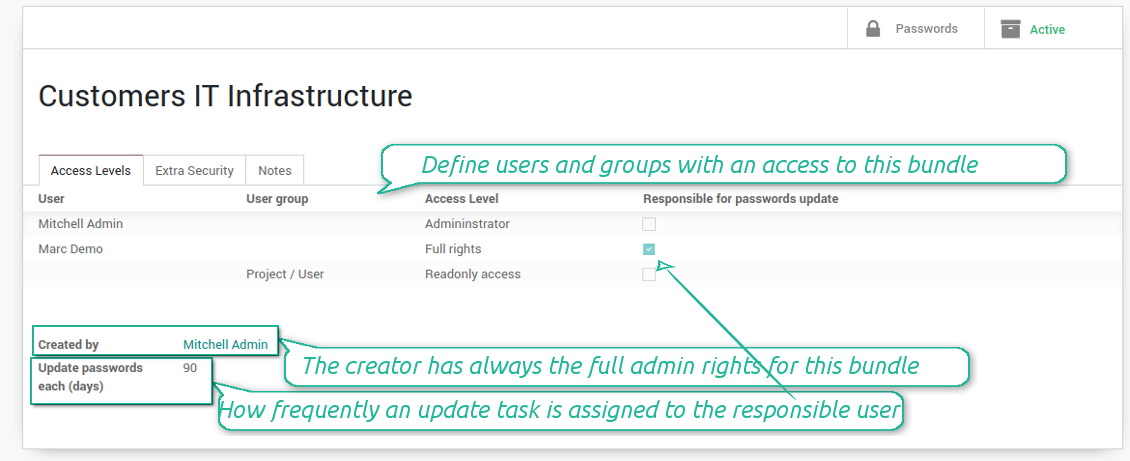
An access to a specific password is regulated on a bundle level. You may have as many bundles as you want. To share a bundle with a definite user, you should specify that user in the access levels' table. Alternatively you can assign a user group in the same table. For example, you can have a 'sales team' bundle and share it with all users with the right 'Sales Manager', or you can have a global bundle by sharing it with a user group 'Internal user'.
3 access levels to bundles, passwords, and tags are distinguished:
- Administrator may access, update or delete this bundle, its passwords, and its tags. This user is assumed to manage access levels for this bundle, to modify update policies, and set the extra password. The bundle creator is always its administrator.
- Full rights user may access, update or delete passwords and tags related to this bundle, but he/she can't change bundle itself and can't change bundle access levels or settings
- Readonly access user may observe and address passwords and tags of this bundle. Such users can't modify any objects.
Take into account that the rules are not applied for the Odoo super user. The Odoo super admin (with id 1) has full rights for all passwords and bundles, although he is also required to enter the extra paraphrase to open a bundle.
The setting 'Responsible for password updates' allows to assign a user who should regularly change the paraphrase in passwords according to the bundle update policies. For such a user the special activity is automatically and regularly created to make sure passwords are secure. There might be only a single responsible for a bundle, and such responsible should have either the 'Administrator' or the 'Full rights' access level.
Innovative single-view interface
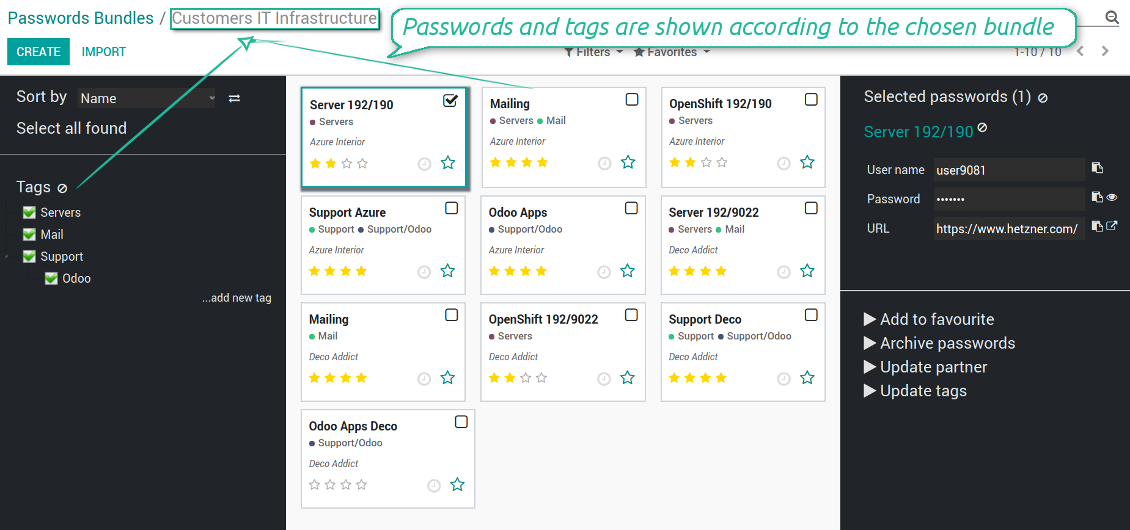
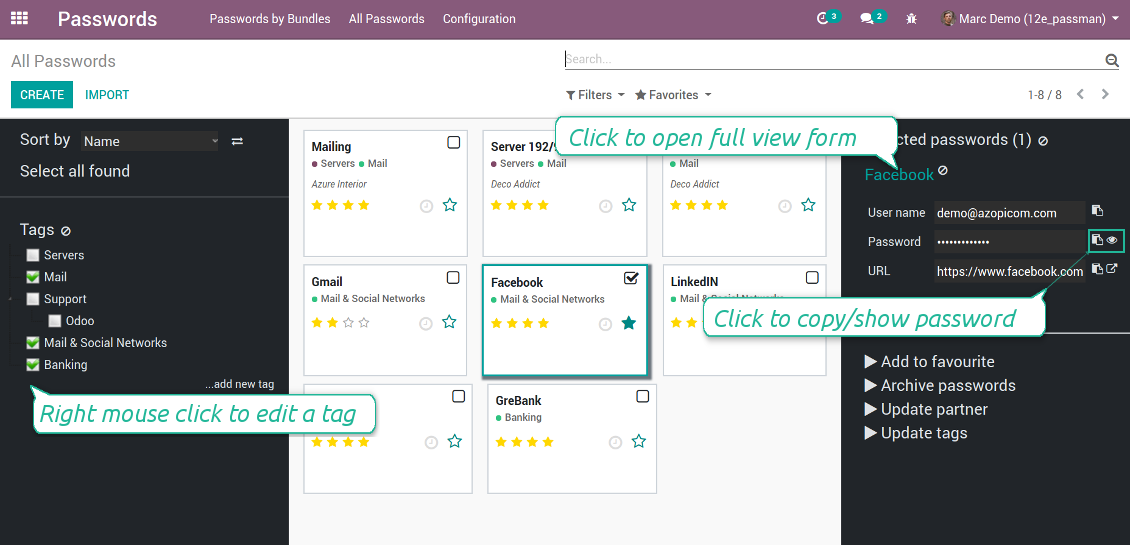
The password manager let you work with a few passwords simultaneously. Click on a password kanban card to add the key to the selection, and then address any or proceed a mass action. Possible mass actions are defined by an Odoo admin on the configuration page.
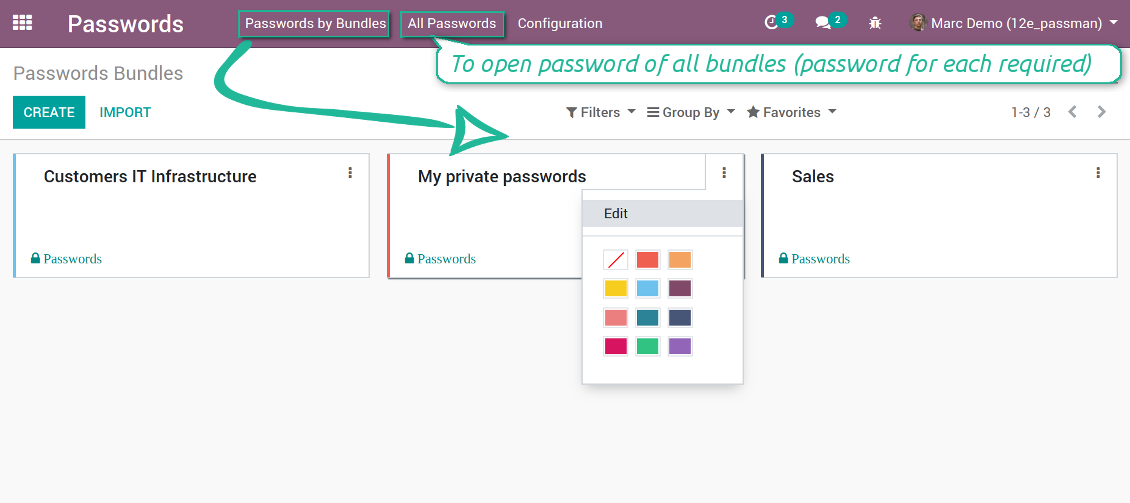
There are 2 menus to simplify working with passwords. The first - 'Passwords by bundles' - let users open keys of an exact vault. The second - 'All passwords' - let users simultaneously open all available for him/her keys. In the latter case an extra paraphrase for each bundle should be entered.
Screenshots
Passwords are combined in bundles
Passwords single-view interface
Password form view
Password Manager configuration page
Passwords by all available for this user bundles
Passwords auto generation and check
Password strength is estimated in real-time to make sure users do not introduce too weak keys.
The app also let you import passwords from electronic tables using the standard Odoo import tools.
Screenshots
Password generator wizard
Import passwords from tables
Encryption and protection of passwords
For each vault you can define update policies in days. If the password has not been changed during the specified period, Odoo will generate an activity for responsible users. To maximize security, change you passwords regularly!
Passwords Security Layers
Although, there is no way to provide 100% security in the Internet, this password manager tries to minimize potential risks.
The tool symmetrically encrypt all passwords. It means that to decrypt a password, plotters should know the exact decryption algorithm and a bundle decryption key.
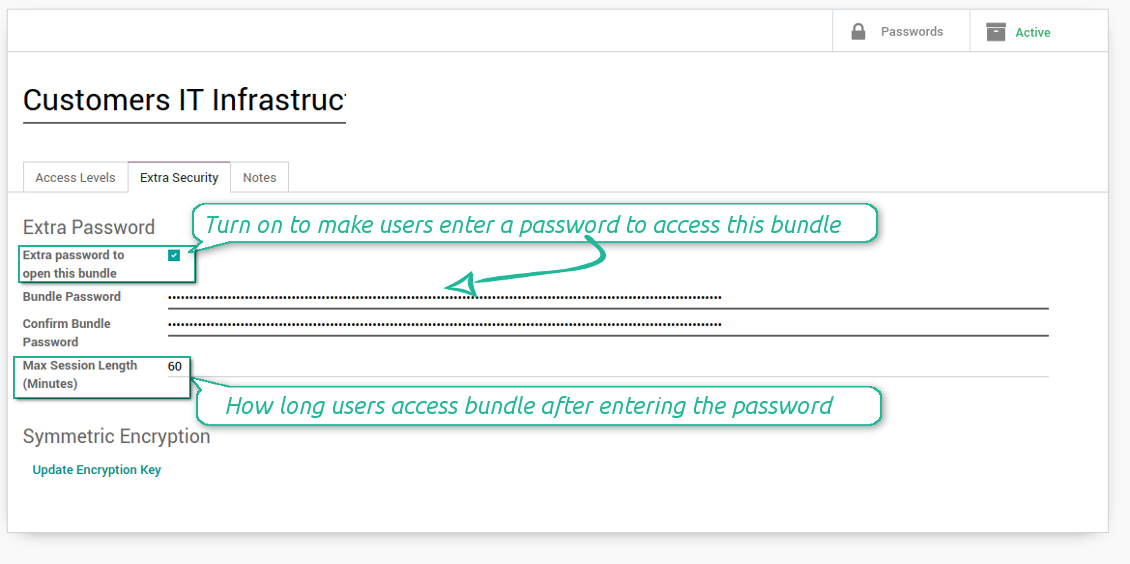
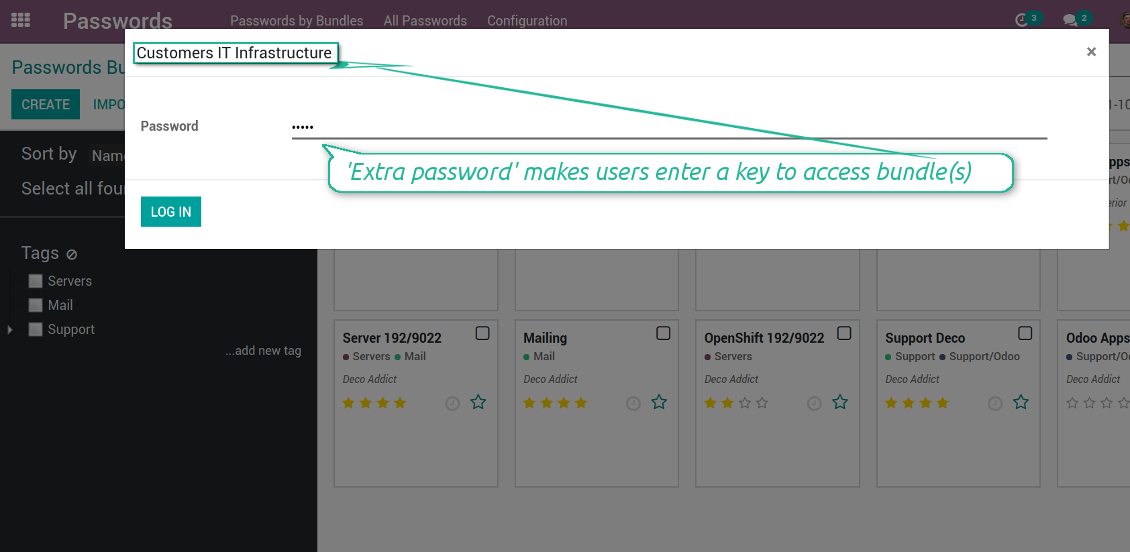
You can also assign the extra security password for any bundle. In such a case to access passwords in the interface, any user should enter a paraphrase. Even if a user has full rights for a bundle, he/she should always know that password. Besides, that paraphrase might be changed at any moment by the bundle admin (if that admin himself knows that paraphrase). Be cautious: do not forget the password. It is hashed and even the PostreSQL super user can't recover it.
Screenshots
Passwords access levels
Extra password to open a bundle
Bundle extra paraphrase required
Custom fields and types for password keys
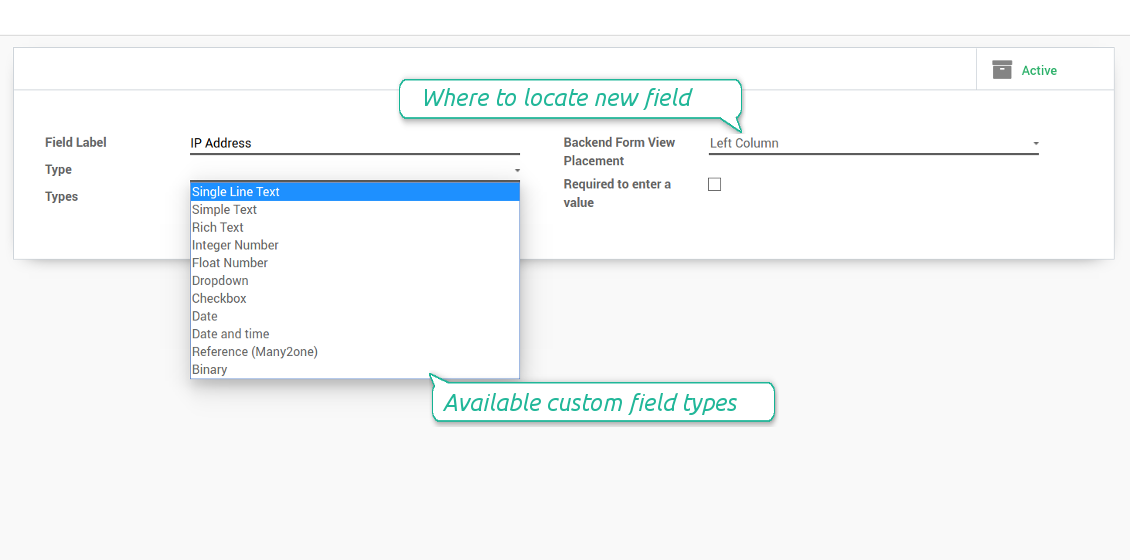
Structure passwords by special types and choose fields for each types individually. Thus, set of columns for 'virtual servers' and 'email servers' might be different.
Screenshots
Passwords' custom fields
Custom fields on password form
Custom fields for password: add any data required
Linked to Odoo contacts
Screenshots
Passwords by partners
Very good password management module
Easy installation and quick setup
Configuration and Installation Tips for Password Manager Odoo v.13
Python dependencies
To guarantee tool correct work you would need a number of Python libraries: zxcvbn, cryptography:
pip3 install zxcvbn cryptography
Frequently Asked Questions about Password Manager Odoo v.13
How can I see all passwords of a partner?
To see all passwords of a partner, go to Contacts, open the partner and click the smart button 'Passwords'. After that, you will be redirected to the Password manager app and will see all the passwords of this partner.
How to delete a passwords bundle (password manager)?
The button 'Delete' was hidden from the main bundles menu for the security purpose. To delete a passwords bundle: 1. Click on the three dots button in the top right corner of the bundle 2. You will be redirected to the editing mode of the bundle, from there, click 'Save' 3. Above the passwords bundle you will see the button 'Action', click on it and choose the option 'Delete'.
What are the update policies of your tools?
According to the current Odoo Apps Store policies:
- Every module bought for version 12.0 and prior gives you access to all versions up to 12.0.
- Starting from version 13.0, every module version should be purchased separately.
- Disregarding the version, purchasing a tool grants you a right to all updates and bug fixes within a major version.
Please note that the faOtools team does not control those policies. For all questions, please contact the Odoo Apps Store representatives directly.
How can I install your app on Odoo.sh?
The most straightforward approach is to use the Odoo store's built-in workflow:
1. Open the module's page and click the button Deploy on odoo.sh
2. After that, you will be redirected to the GitHub page. Log in to your account, then click 'Create a new repo' or use an existing one. Please ensure your repository is private. It is not permitted to publish the apps under the OPL-1 license. If necessary, create a new repo for your Odoo.sh project
3. Then, go to odoo.sh and click the Deploy button. In the pop-up window, submit the decision and click 'Continue.' This action will trigger the installation process.
These steps will install the app for your project's production branch. If you want to deploy the apps for other branches or update the module, you should undertake the following actions:
1. Upload the source code for the app from the Odoo store
2. Commit the module to a required GitHub repository. Ensure none of the app folders/files are ignored (i.e., not included in your repo's .gitignore). Repositories are automatically created by odoo.sh and may include some crucial items by default (e.g., /lib). You should upload all module directories, subdirectories, and files without exceptions
3. Deploy a target branch of the odoo.sh project or, if your settings assume that, wait until it is automatically built.
How should I install your app on my own server?
2. Re-start the Odoo server;
3. Turn on developer mode (technical settings);
4. Update the apps' list (the apps' menu);
5. Find the app and push the button 'Activate'/'Install';
6. Follow the guidelines on the app's page if those exist.
I noticed that your app has extra add-ons. May I purchase them afterwards?
Yes, sure. Simultaneously, Odoo automatically adds all dependencies to a cart, so you should exclude previously purchased tools to avoid double payment.
I deployed your app on Odoo.sh and see warning/error in tests
A red/orange warning does not influence the app's features. Regretfully, sometimes our modules do not pass standard automatic tests since the latter assume behaviour that conflicts with our app's goals. For example, we change the price calculation, while the standard Odoo module tests compare the final price to a standard algorithm.
So, first of all, please check the deployed database features. Does everything work correctly?
If you still assume that the warning influences real features, please contact us and forward full installation logs and the full list of deployed modules (including core and third-party ones).
May I buy your app from your company directly?
No, we only distribute the tools through the official Odoo apps store.
I would like to get a discount
Regretfully, we do not have the technical means to provide individual prices.
May I install the app on my Odoo Online (SaaS) database?
No, third-party apps can not be used on Odoo Online. Unfortunately, Odoo SaaS blocks such a possibility.
Your tool has dependencies on other app(s). Should I purchase those?
Yes, our tool requires all modules marked in dependencies to work correctly. The price marked on the app page already includes all necessary dependencies.
What is the price for the module in US Dollars? Why did it change?
The price for our modules is set in euros. The Odoo store converts prices to other currencies according to its internal exchange rate. Thus, the price in US Dollars may change when the exchange rate is updated.
App and website wording in languages other than English is AI-assisted and aligned with official Odoo translations. If you spot a mistake, send a translations-correctness ticket and we will fix it.
Bug reporting
If you encounter bugs or inconsistent behaviour, do not hesitate to contact us. We guarantee to provide fixes within 60 days of purchase and are intensely interested in improving our tools even after this period.
You do not need a phone number or credit card to contact us. You should only pass a short email sign-up, which does not take more than 30 seconds.
Please include as many details as possible in your request: screenshots, Odoo server logs, a full description of how to reproduce your problem, and so on. Usually, it takes a few business days to prepare a working plan for an issue (if a bug is confirmed) or provide you with guidelines on what should be done (otherwise).
Public features requests and module ideas (free development)
We are strongly motivated to improve our tools and would be grateful for any feedback. If your requirements are of public use and might be efficiently implemented, the team will include those in our to-do list.
Such a to-do list is processed regularly and does not assume extra fees. Although we cannot promise deadlines and final design, it might be a good way to get desired features without investments and risks.
You do not need a phone number or credit card to contact us. You should only pass a short email sign-up, which does not take more than 30 seconds.

The tool to flexibly structure Odoo attachments in folders and synchronize directories with cloud clients: Google Drive, OneDrive/SharePoint, Nextcloud/ownCloud, Dropbox, Amazon S3, Box, and NAS. DMS. File Manager. Document management system
398€
The tool to automatically synchronize Odoo attachments with OneDrive files in both ways
487€
The tool to automatically synchronize Odoo attachments with Google Drive files in both ways
487€
The tool to build a deep and structured knowledge base for internal and external use. Knowledge System. KMS. Wiki-like revisions.
398€
The tool to set up KPI targets and control their fulfillment by periods. KPI dashboards. Dashboard designer. KPI charts

The tool for time-based service management from booking appointments to sales and reviews
398€
The tool to manage your Odoo from your favourite AI chats through MCP. Claude. Any MCP-supporting AI.

The tool to combine different Odoo events in a few configurable super calendars

The tool to translate URL addresses of Odoo website pages
38€