Universal Appointments: Sales v.15
The extension to the Universal Appointments app to link appointments and sale orders
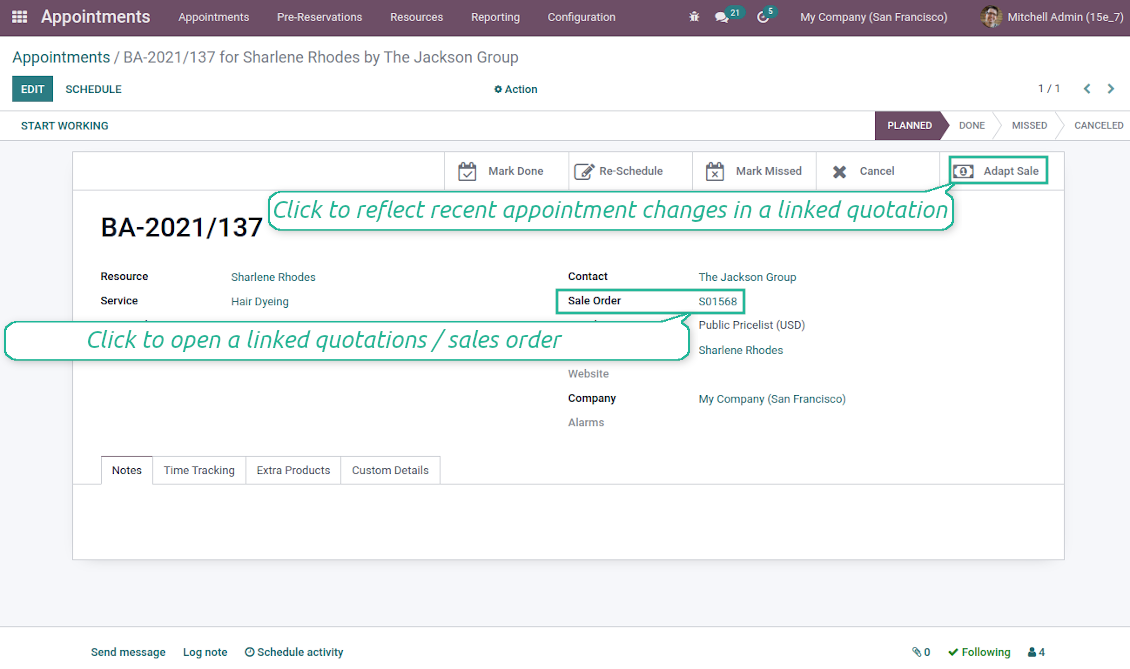
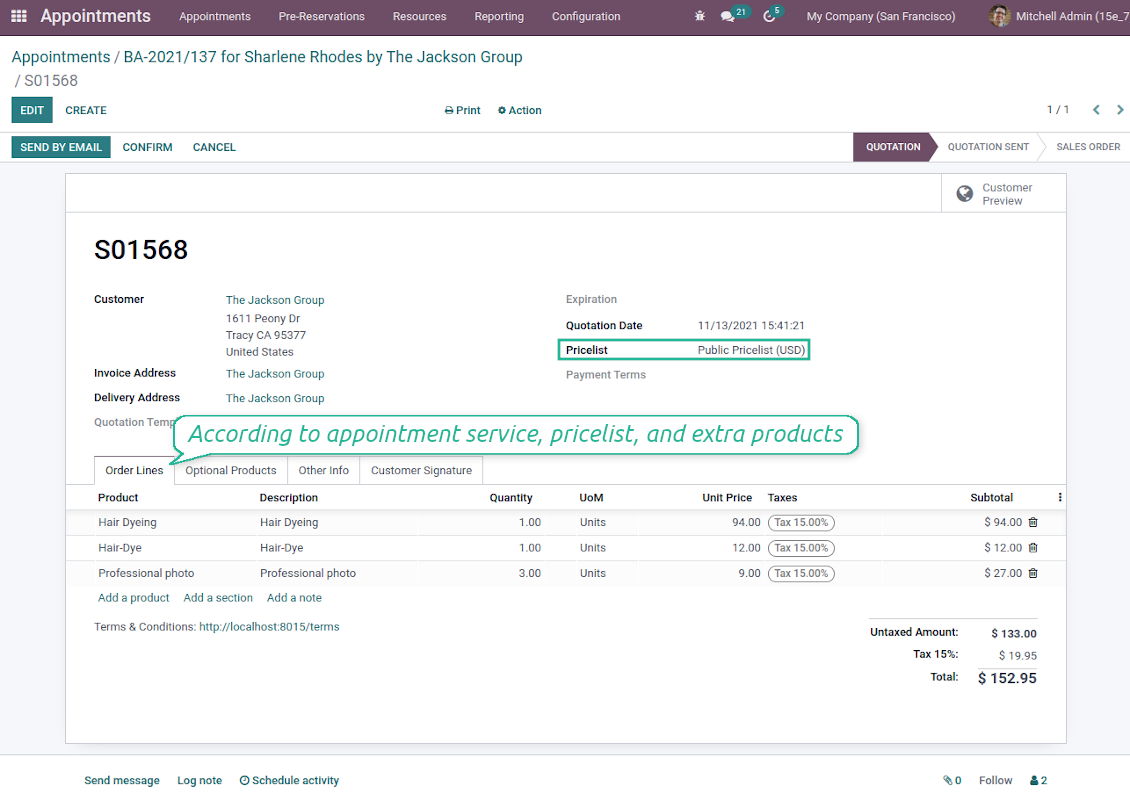
Sale orders and appointments
-
The app lets you link appointments and sale orders. There are 4 configuration options
-
Sent sale orders: if chosen, a sent quotation would be prepared based on the reservation
-
Confirmed sale orders: if chosen, an Odoo sale order would be created as soon as a reservation is scheduled. The method is suitable if your service is standard, while final sale positions and details would hardly be modified after the appointment. For example, fixed-price hair cutting
-
Draft quotations: if chosen, only a quotation in the state 'Draft' would be prepared. In this way, you have more flexibility in updating an order during service provision or beforehand. For example, if you wanted to add extra complementaries or to provide individual discounts
-
Manual orders: if chosen, managers have to create quotations while providing service. The method might be applicable when actual sale lines become clear only during the visit itself. For example, a mobile phone repair business assumes initial diagnostics and only after the price is offered
-
Until an appointment sale order is not confirmed, you can update that from a reservation form. Both service, quantity, and complementary products are re-calculated in this case
Service pricing
-
The tool allows configuring the pricing method per each resource type
-
Per planned duration: Odoo quotations are created based on initial reservation plans. For example, it might be suitable for car rent or massage
-
Per units: sale orders consider appointments for the same price disregarding their duration. For example, standard haircutting or tire mounting is invoiced the same disregarding how much time they actually take
-
Per tracked (real) duration (the extension Universal Appointments: Time Tracking is required): invoice actual time spent on service. For example, the approach is suitable for consultation or legal services
-
Prices are price list dependent. Thus, an Odoo manager might select individual conditions during scheduling. In this way, it is possible to apply various currencies, discounts, promos
Complementaries and upselling
-
When a customer finishes scheduling, it is a good moment to increase a bill by offering complementary products. The tool has built-in features for that
-
Odoo may show the popup wist suggested products for backend managers immediately after reserving a time slot
-
The popup allows both adding one or a few complementaries or merely missing the step if suggested products are not required
-
The feature might be turned on/off on the configuration page. The popup would be shown only in case there are complementaries defined for a booked service
-
Chosen complementaries would be added to a quotation/sales order during its automatic creation or adaptation from the reservation page.
De teksten van de app en website in andere talen dan het Engels zijn met AI ondersteund en afgestemd op de officiële Odoo-vertalingen. Als u een fout ziet, een vertaalticket sturen en we corrigeren het.
Fouten melden
Als u bugs of inconsistent gedrag tegenkomt, aarzel dan niet om contact met ons op te nemen. We garanderen dat we binnen 60 dagen na aankoop oplossingen bieden en zijn zeer geïnteresseerd in het verbeteren van onze tools, zelfs na deze periode.
U heeft geen telefoonnummer of creditcard nodig om contact met ons op te nemen. U hoeft slechts een korte e-mailaanmelding door te geven, die niet langer dan 30 seconden duurt.
Vermeld zo veel mogelijk details in uw verzoek: schermafbeeldingen, Odoo-serverlogboeken, een volledige beschrijving om uw probleem te reproduceren enzovoort. Gewoonlijk kost het enkele werkdagen om een werkplan voor een probleem op te stellen (als een bug is bevestigd) of u richtlijnen te geven over wat er moet gebeuren (anders).
Aanvragen voor openbare functies en module-ideeën (gratis ontwikkeling)
We zijn sterk gemotiveerd om onze tools te verbeteren en zijn dankbaar voor alle feedback. Als uw vereisten van openbaar nut zijn en efficiënt kunnen worden geïmplementeerd, zal het team deze opnemen in onze takenlijst.
Zo'n to-dolijst wordt regelmatig verwerkt en er zijn geen extra kosten aan verbonden. Hoewel we geen deadlines en definitief ontwerp kunnen beloven, kan het een goede manier zijn om de gewenste functies te verkrijgen zonder investeringen en risico's.
U heeft geen telefoonnummer of creditcard nodig om contact met ons op te nemen. U hoeft slechts een korte e-mailaanmelding door te geven, die niet langer dan 30 seconden duurt.

De tool om Odoo-bijlagen in mappen te structureren en te synchroniseren met Google Drive, OneDrive/SharePoint, Nextcloud/ownCloud, Dropbox, Amazon S3, Box en NAS. Bestandsbeheer. DMS
398€
De tool om Odoo-bijlagen bidirectioneel met OneDrive te synchroniseren
487€
De tool om Odoo-bijlagen bidirectioneel met Google Drive te synchroniseren
487€
De tool om wachtwoorden veilig in Odoo te bewaren voor gedeeld gebruik. Kluizen

De tool om een diepe kennisbank te bouwen, intern en extern. KMS. Wiki-achtige revisies
398€
De tool om KPI-doelen te zetten en de realisatie per periode te controleren. Dashboards. Grafieken

De tool voor tijdgebonden diensten van boeking tot verkoop en reviews
398€
De tool om Odoo vanuit AI-chats via MCP te beheren. Claude. Elke MCP-AI.

De tool om verschillende Odoo-events in een paar configureerbare superkalenders te combineren