Google Drive Odoo Integration v.16
The tool to automatically synchronize Odoo attachments with Google Drive files in both ways
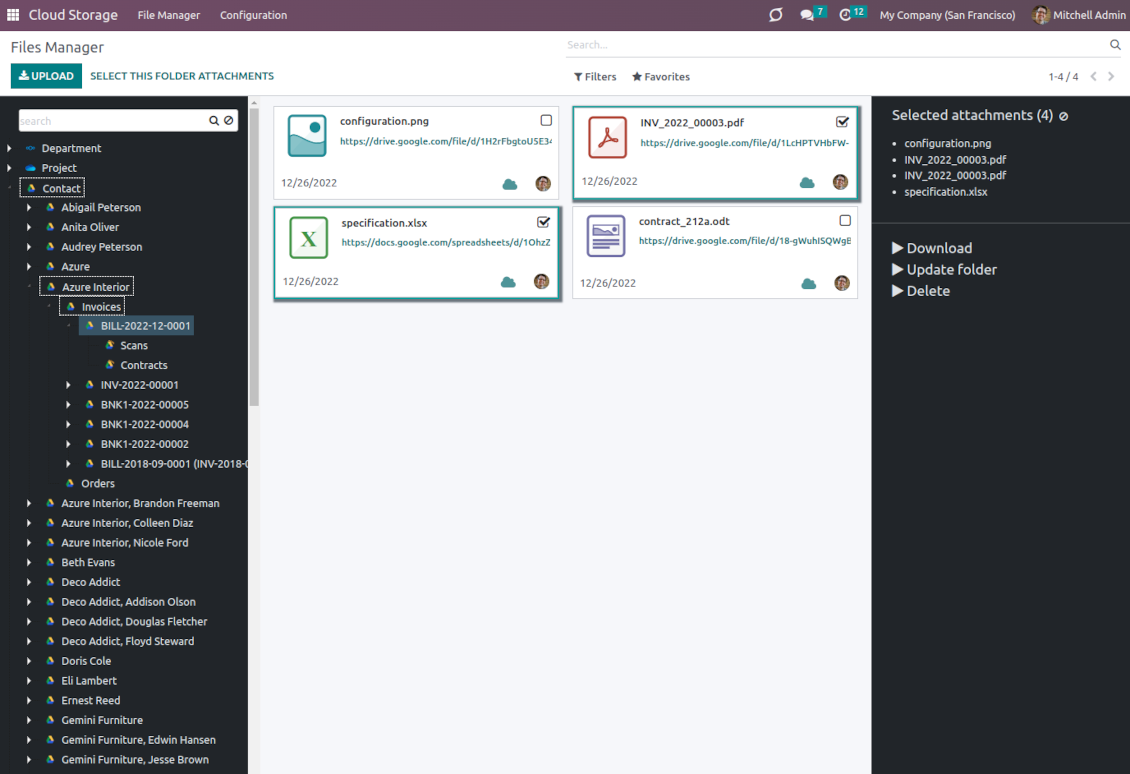
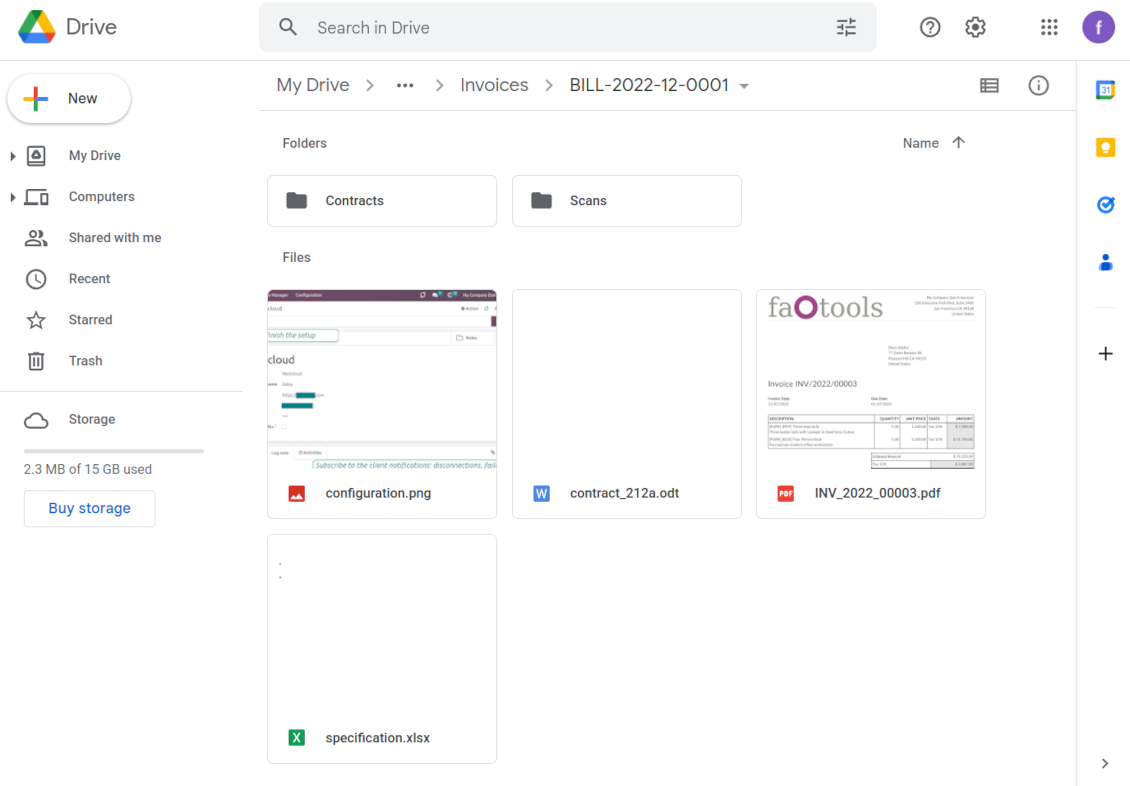
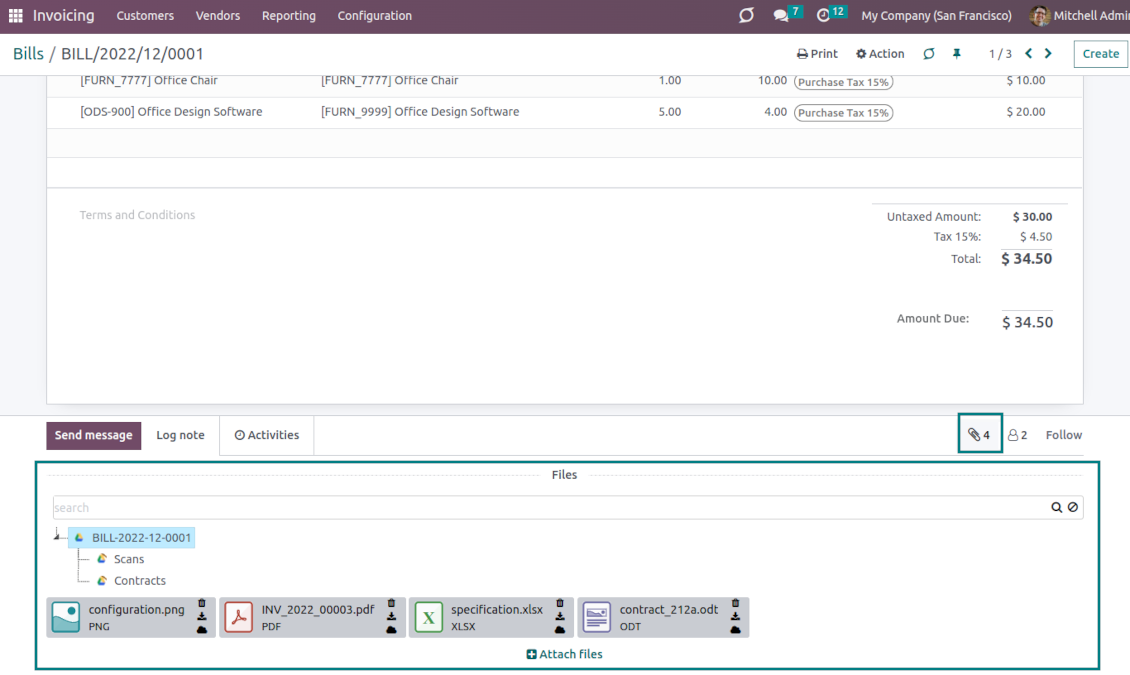
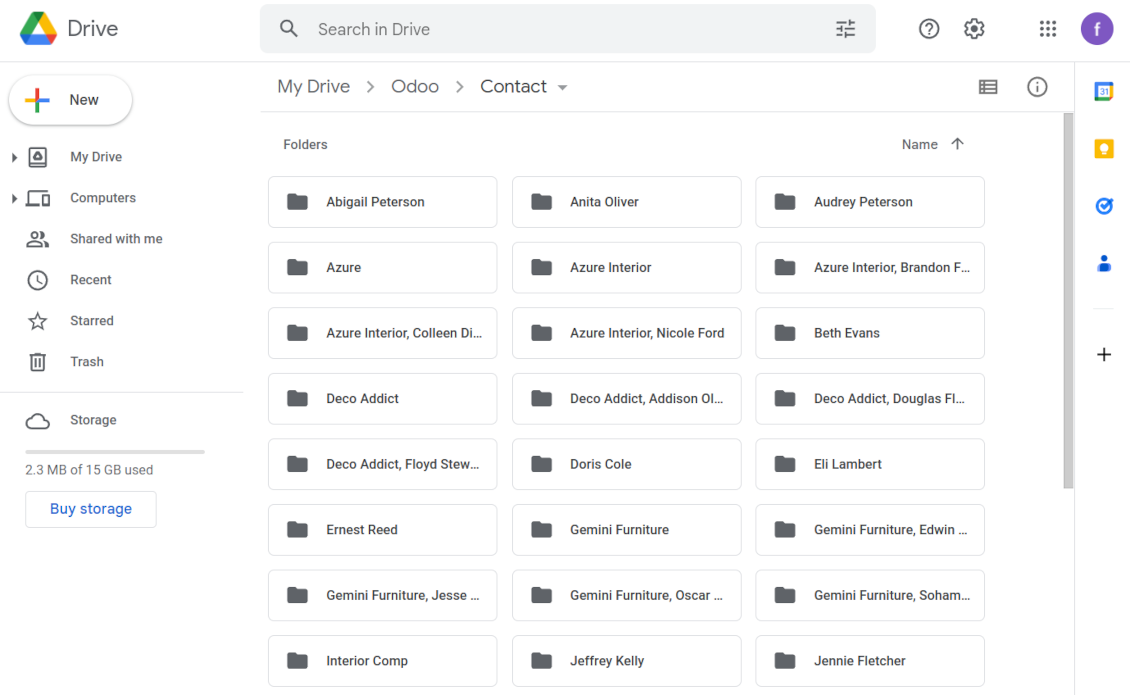
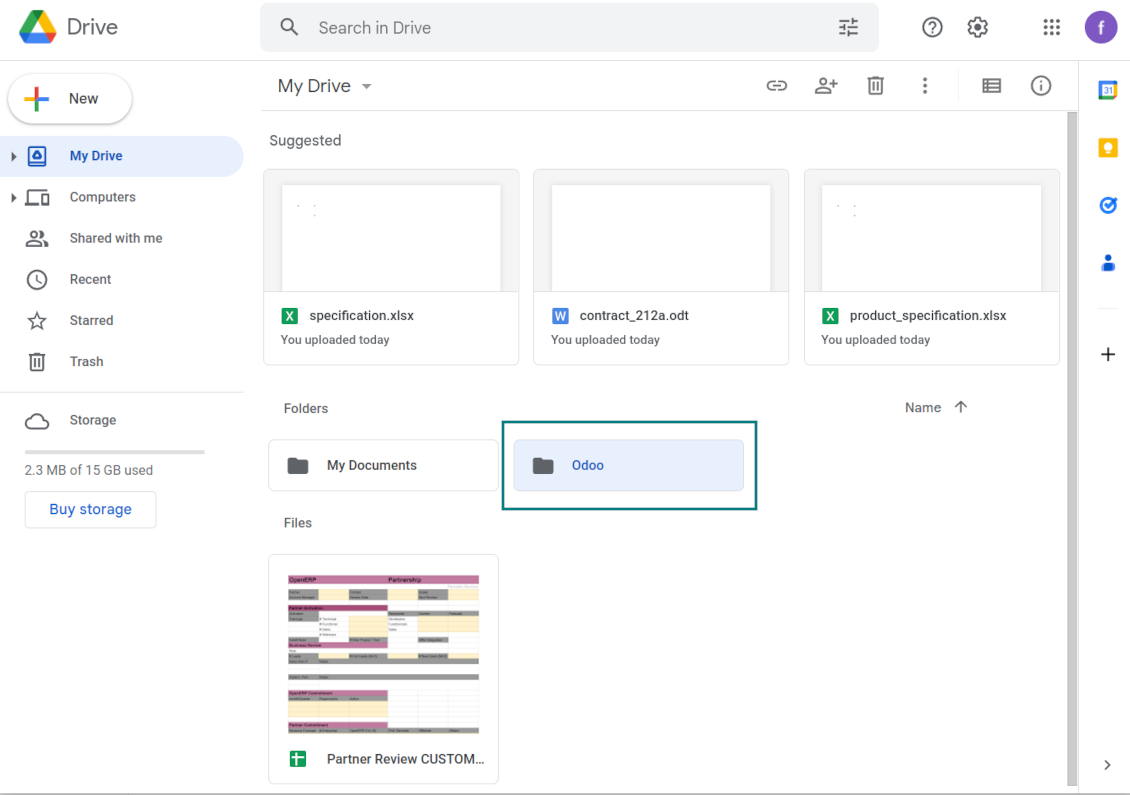
This is the tool to integrate Google Drive features with Odoo folders and files. The app automatically stores Odoo attachments and directories in Google Drive and provides instant access to them via web links.
Automatic folders' structure
Decide which Odoo document types should have their own folders trees and synchronize those to Google Drive
Automatic regular sync
Rely on auto-synchronization between Odoo and Google Drive based on scheduled jobs. No manual interaction is required
Bilateral sync
Odoo sends attachments to Google Drive and retrieves files from there. Binary content is kept in clouds, while Odoo provides direct access to synced items
Cloud synchronization history
Control Google Drive sync logs right in Odoo. Export and share those in case of any issues. Be notified of any client disconnections
File manager interface
Manage synced folders and attachments from a single Odoo view. Comfortably navigate by directories. Search and download files one by one or in batch. Upload and move attachments to folders
Attachment box
Organize files of any Odoo object in a set of subfolders. Instantly access folders and files in the attachment box and in Google Drive.
Tricky setup, but works perfectly now
Really solid module. We managed to get a very flexible folder structure (sorted by clients) and synced all our sales orders, invoices and tasks by projects to Google Drive.
Initial setup was a bit of a pain and kinda tricky to configure everything at first, but now it's running smoothly and works perfectly. The faotools team helped a lot. Def worth it if u need to keep your docs organized in Odoo and Google Drive.
Recommended!
Excellent !!!
Great App and great Service from faOtools.
Best module for integration with google drive
The module performs its function correctly and faOtools responds quickly to any problem and, in case of detecting any bug, quickly apply the changes. Its support is 10 stars.
How synchronization works
Automatic two-sided sync
-
Configure sync for one or multiple Google Drive instances
-
Integration is based on scheduled jobs and is fully automatized. The app regularly checks changes in systems and runs sync operations
-
Synchronization is bilateral. Updates in Odoo are reflected in Google Drive (direct sync); changes in Google Drive modify Odoo folders and attachments (backward sync)
-
Cloud connection with Google Drive might be reset. In this way, the app assumes getting back all items back to Odoo (reverse sync)
-
Odoo folders and attachments might be re-attached to a new cloud client from Google Drive. Hence, items will be first taken back to Odoo (reverse sync) and then will be put into the new cloud storage (direct sync)
Queue-based synchronization
-
Once in 15 minutes, the app examines updates in Odoo and Google Drive to prepare a synchronization queue
-
Folders' checks follow the First-In-First-Out (FIFO) principle. So, directories that have not been examined for the longest will be processed first
-
Once in 15 minutes, the sync queue is run by the special scheduled job. Firstly, the most important (blocking) tasks would be done
-
Control planned jobs and their fulfillment in the special Odoo logs interface (Cloud Storage > Configuration > Sync Logs). Subscribe for particular cloud clients notifications
-
If the app faces sync failures, it will re-try operations afterward. Sync queue processing would not be stopped if there are items not blocked by such failures
Odoo attachments for Google Drive: direct sync
-
Direct sync prepares the folders' hierarchy and uploads Odoo attachments for Google Drive
-
Direct sync checks whether attachments are added or deleted for synced directories. If so, they will be created in Google Drive or removed from there. In particular, it means that any file added to a folder-related Odoo object (e.g. Quotation), would be automatically moved to a linked cloud client
-
Direct sync makes all synced Odoo attachments change their type to a link (URL), while binary content is removed with one of the next Odoo cleaners. So, no actual files would be stored on your Odoo server
-
Direct sync checks whether a new folder is added. Disregarding whether it is done manually or automatically, the app would generate a peer directory in Google Drive
-
Direct sync checks whether there are any updates in folders. If so, such changes are reflected in Google Drive
Google Drive files and folders for Odoo: backward sync
-
Backward sync checks whether any files or subfolders are added to Google Drive folders. If so, the app would create URL attachments/subdirectories inside linked Odoo directories (and hence Odoo objects if any)
-
Backward sync checks whether there are any updates in folders or attachments. Such updates would be then reflected in Odoo
-
Backward sync checks whether any files are deleted/moved in a Google Drive document folder. If so, a linked Odoo attachment would be also unlinked or moved
-
If you deleted a Google Drive folder related to a folder rule / Odoo object, their child files would be deleted as well. Thus, Odoo would remove related attachments. The folders, however, will be recovered with a direct sync
-
In case of conflicts, direct sync changes are in general considered more important than backward updates.
Resetting or changing Google Drive: reverse sync
-
In case you decided to reset the connection with Google Drive, files would be moved back to Odoo
-
In case you decided to change the cloud client of a folder rule or a folder, files would be first taken back to Odoo, and then direct sync for a new client would be done
-
Reverse sync operations are prioritized to direct and backward sync operations
-
Not all items can be correctly reversed to Odoo due to cloud client peculiarities. For example, there are documents that may exist only in cloud storage environments (e.g. Google Sheets). The app would try to convert such documents, but in some cases, it will require manual interactions.
Conseils de configuration et d'installation pour Google Drive Odoo Integration Odoo v.16
Configuration and log in
- Turn on the option 'Google Drive Sync' (cloud Storage > Configuration > Configuration). The optional add-on Google Drive Odoo Integration is required
- Go to the Google Cloud Console via the URL https://console.cloud.google.com
- Select or create a project
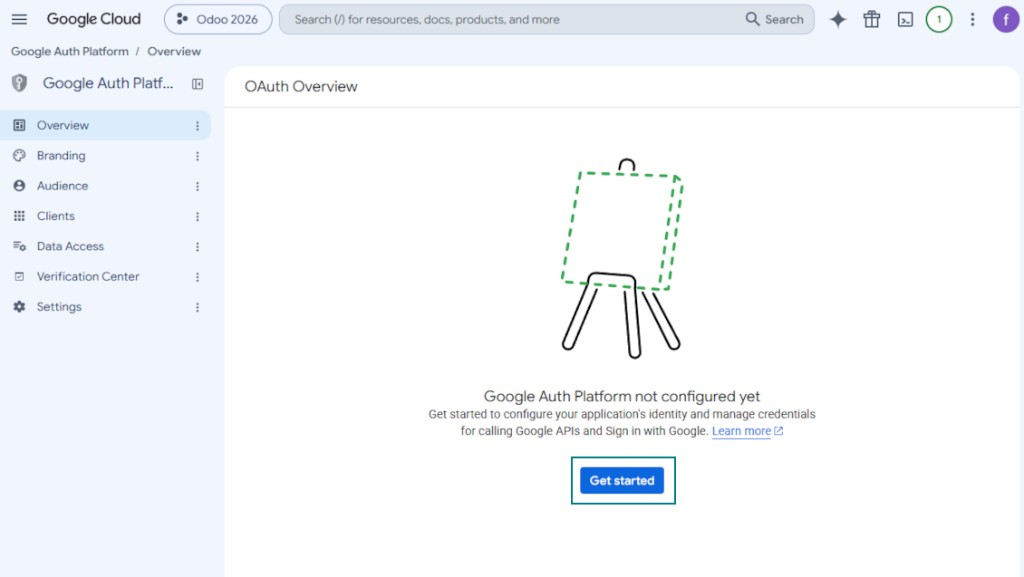
- After the project is selected, the console opens the Google Auth Platform. Press 'Get Started'
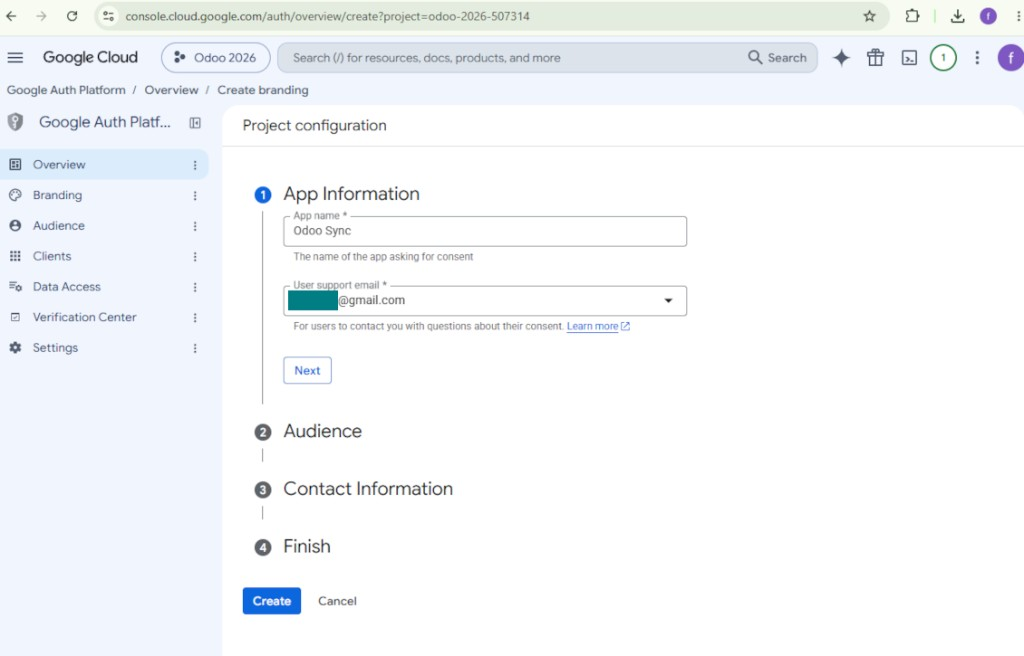
- Add app information
- As an app name select any suitable
- As a user support email select your email address
- Press 'Next'
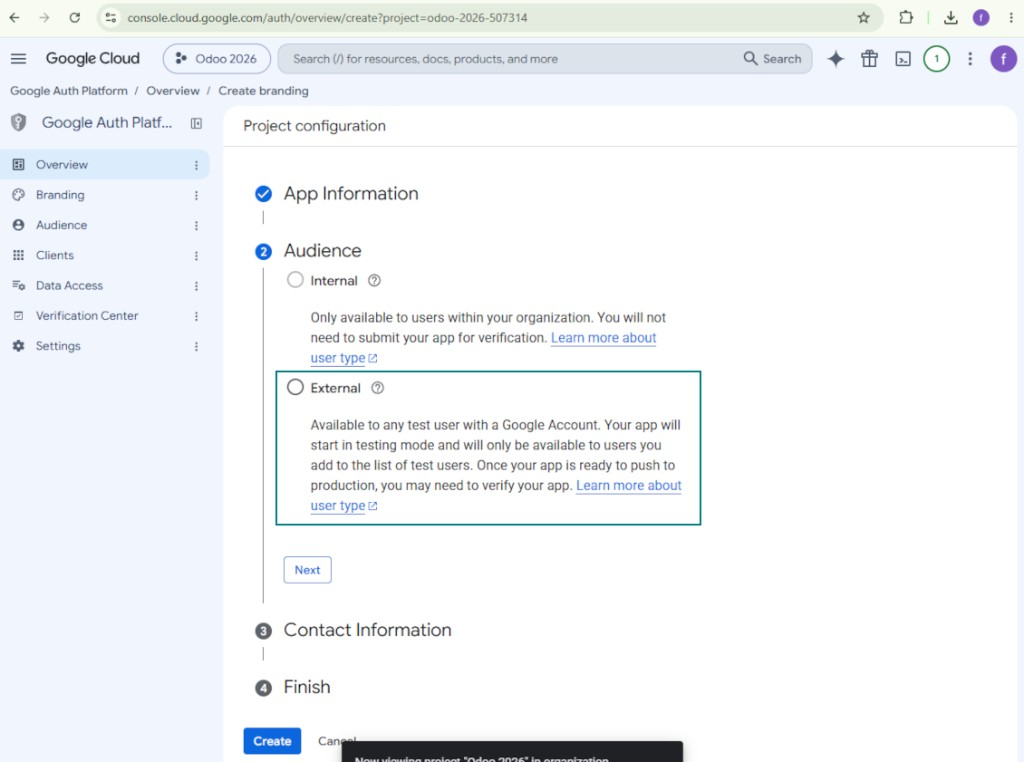
- As the audience select 'External' and press 'Next'. Note: you are anyway going to use this app only for your own Odoo connection
- As the contact information enter your Google or Google Workspace email address and press 'Next'
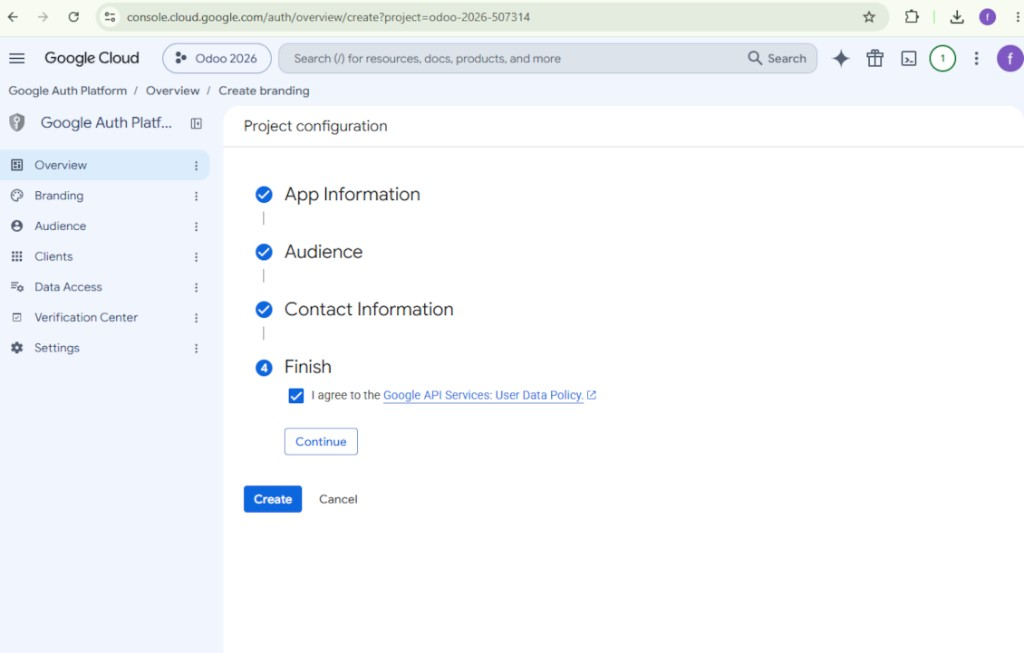
- Agree with the Google API Services User Data Policy, press 'Continue', and then press 'Create'
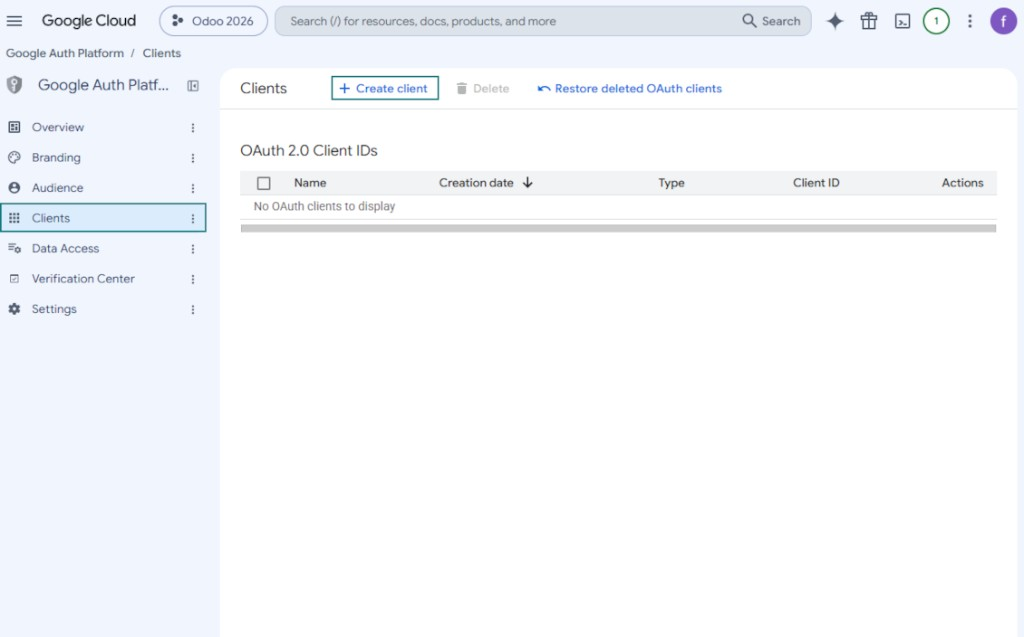
- Go to 'Clients' and press 'Create client'
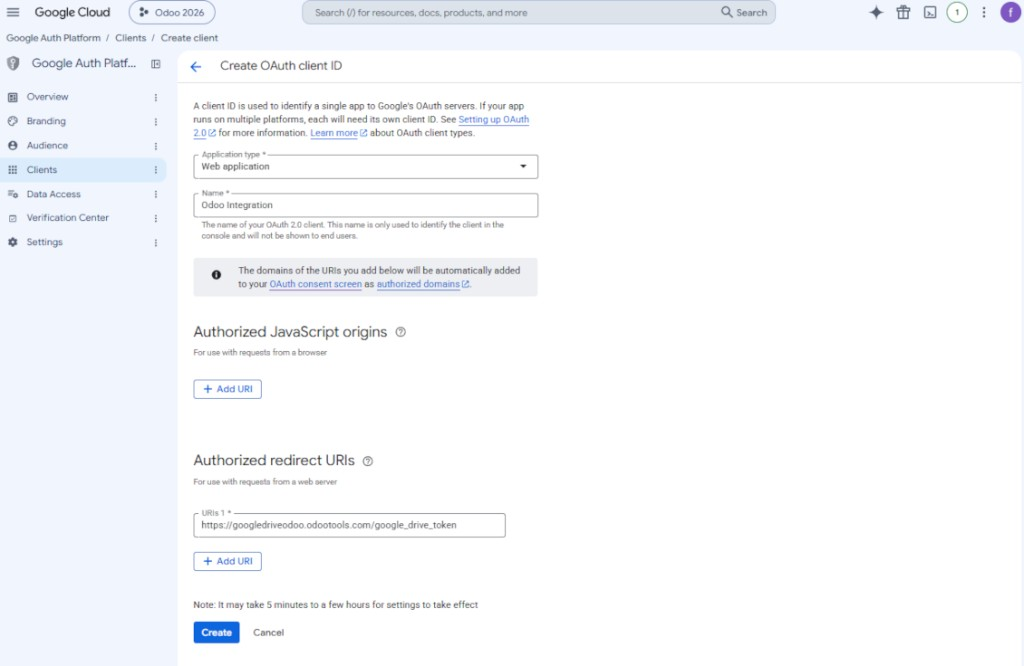
- As the application type select 'Web application'
- As a name select any suitable
- As the authorized redirect URI, add the link in a format [YOURODOOSITENAME]/google_drive_token (e.g. https://odootools.com/google_drive_token).
- Press 'Create'
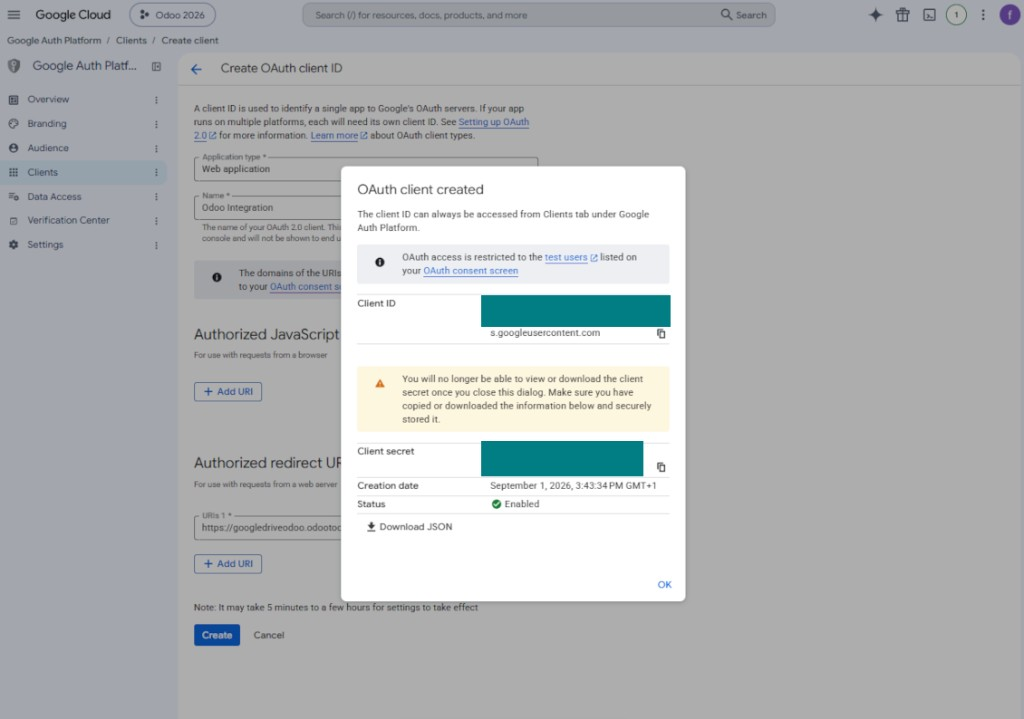
- Copy and safely store 'Client ID' and 'Client secret'. The client secret is shown only once
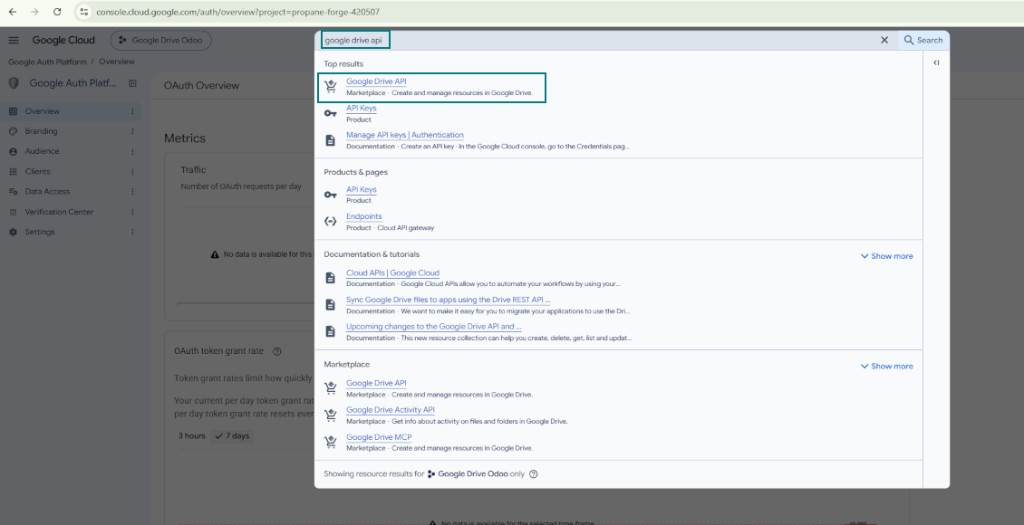
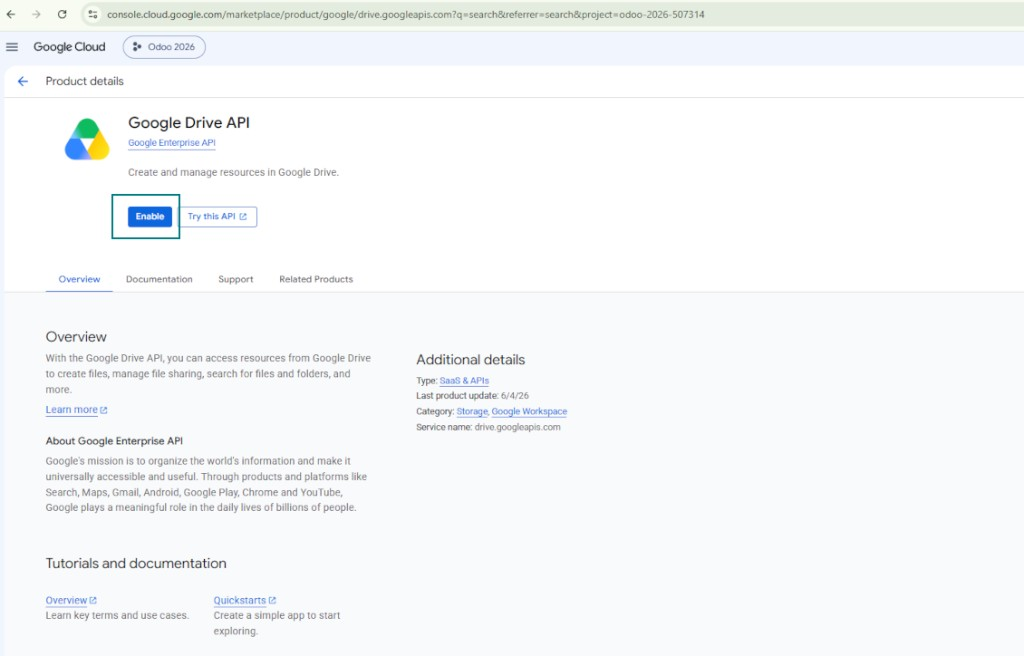
- Enable the Google Drive API for this project: type 'Google Drive API' in the top search box, open the found product, and press 'Enable'
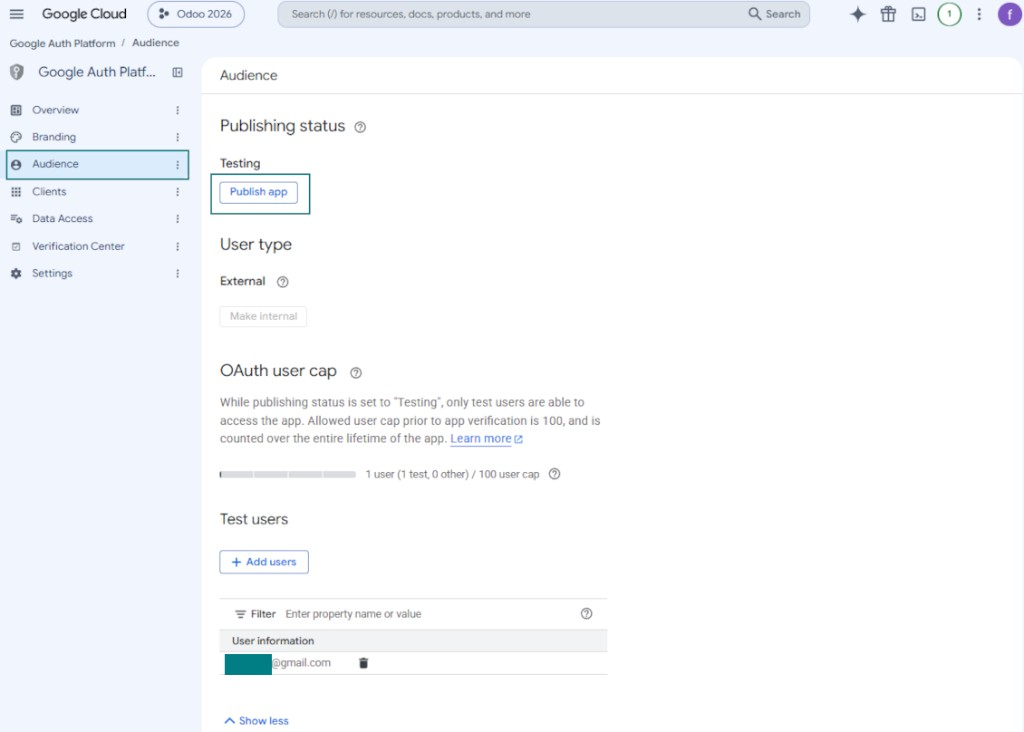
- Go to 'Audience' and add your email address as a test user
- Publish the app. Otherwise, the app stays in the testing state and its token expires every 7 days
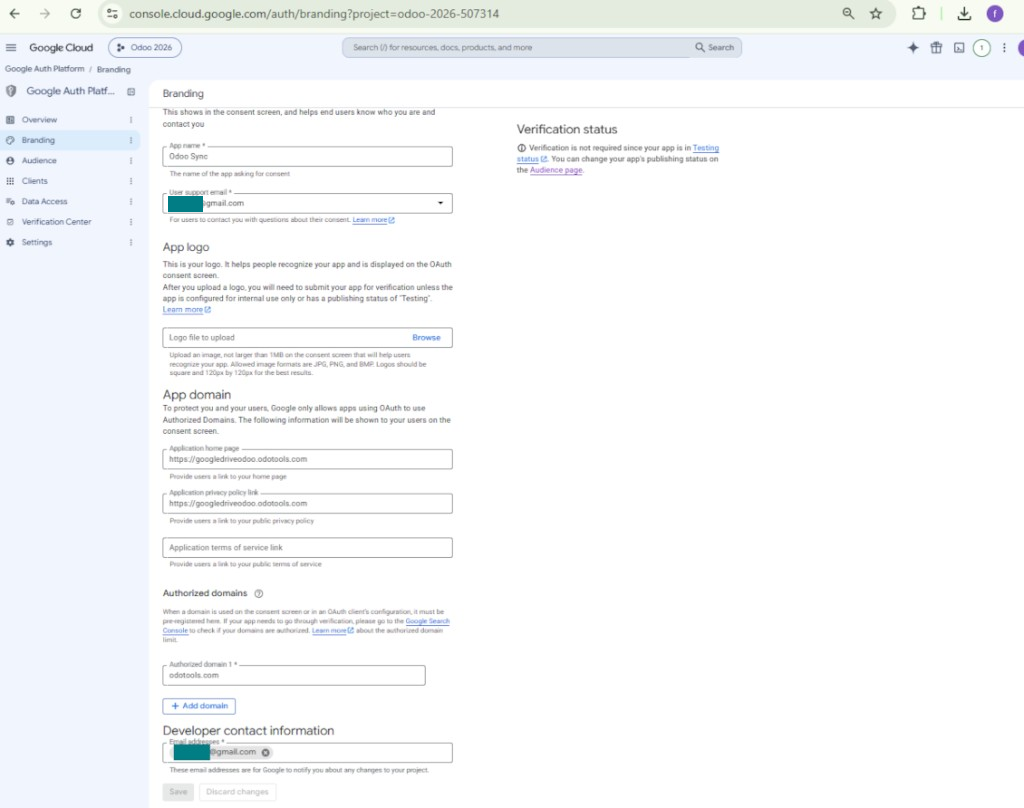
- Open 'Branding' and fill in the application home page and the application privacy policy link (for example, the links to your Odoo website). Add the domains of those links as the authorized domains
- Open 'Audience' and press 'Publish app'
- Do not upload an app logo. This would invoke a long and complex Google verification process that is of no actual need to you
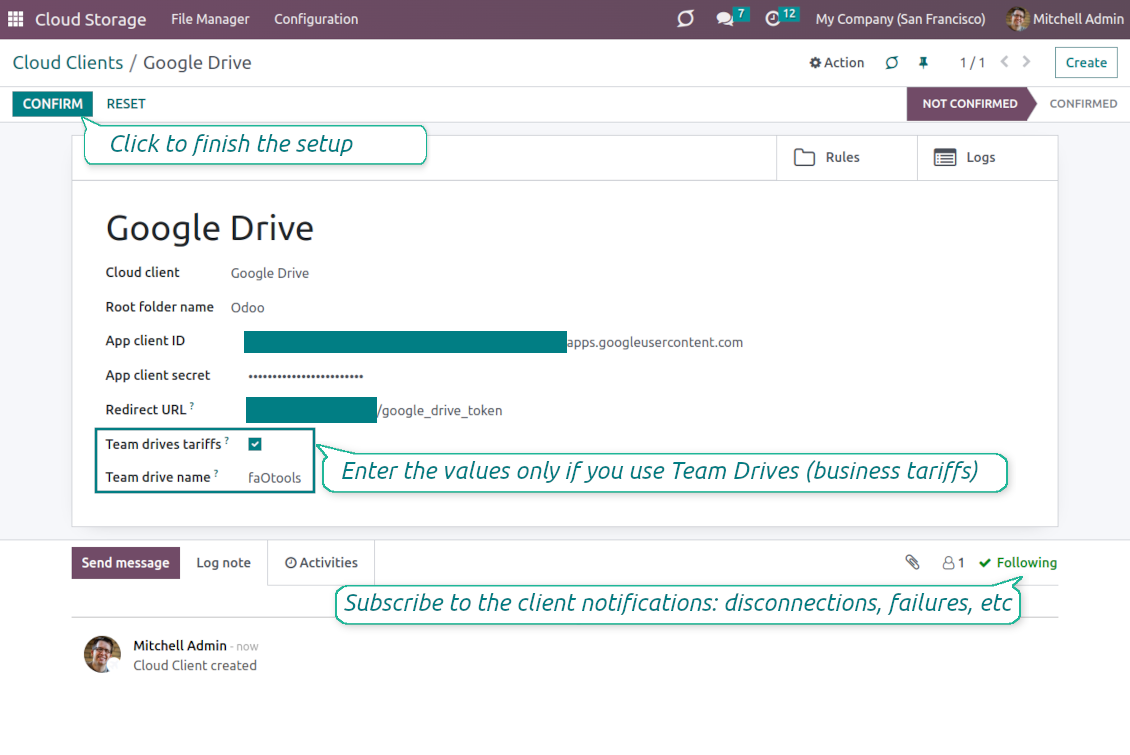
- Go to Odoo Cloud Storage > Configuration > Cloud Clients press 'Create'
- As a reference, introduce any name which would be clear to all users
- As a Cloud client, choose 'Google Drive'
- As a Root folder name, enter a title that will be used as the parent Google Drive directory for all synced folders. For example, 'Odoo' or 'OdooERP'
- Copy 'Client ID' from step 9 into the field 'App client ID'
- Copy 'Client secret' from step 9 into the field 'App client secret'
- Insert the redirect URL you entered in step 9
- If you use team drives, check the related box. Make sure you really use team drives. In your Google Drive you should find the item 'Team Drives' in the left sidebar. This feature is available only for business and enterprise tariffs
- If the option 'Team Drive' is enabled, introduce its name. It should be absolutely the same as you see it in your Google Drive. Make sure that your user has full rights to all Google drives (usually, it is the same user who configures your team Google Drive)
- Press 'Confirm'. Odoo redirects you to the Google login page. Check in the system, agree with all conditions, and grant all permissions asked
- After login, Google redirects you back to Odoo. Google Drive - Odoo synchronization is ready to be done
- Apply the newly created cloud client to folder rules and/or manual folders which should be synced to that Google Drive
- Await the sync scheduled job to be started. For testing purposes only: trigger integration manually from Cloud Storage > Configuration > Configuration > the button 'Launch sync'.
Watch also the configuration video, Note: the Google console part of the video is outdated; follow the steps above instead
Open the Google Auth Platform
Add app information
Select the external audience
Add contact information
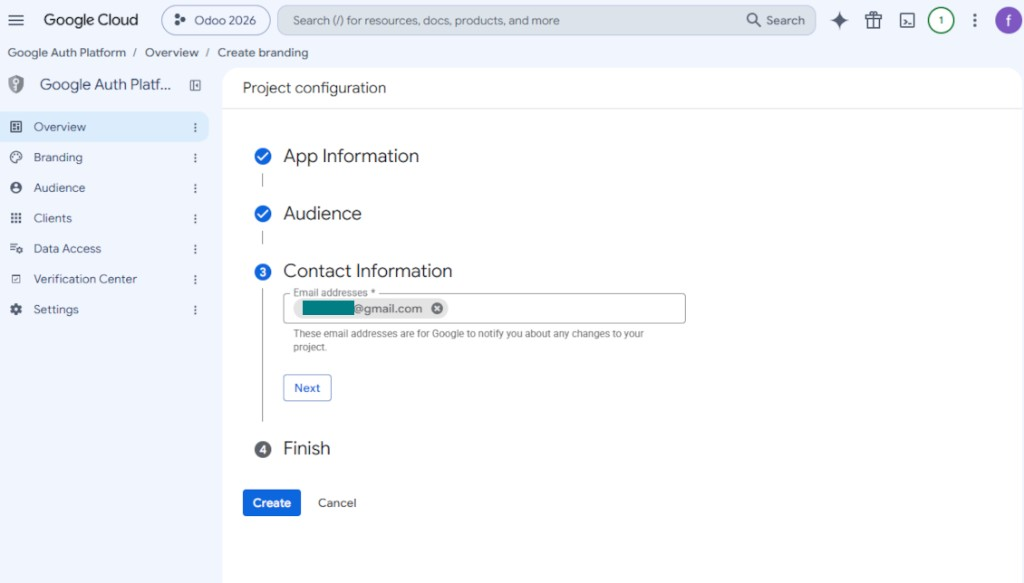
Agree with the policies and create the app
Create an OAuth client
Configure the web application client
Copy the client ID and client secret
Find the Google Drive API
Enable the Google Drive API
Fill in branding to publish the app
Add test users and publish the app
Enter Google app credentials to Odoo
Questions fréquentes sur Google Drive Odoo Integration Odoo v.16
Les dossiers Google Drive générés sont-ils automatiquement partagés entre les utilisateurs Odoo ?
L'application elle-même ne gère pas les droits côté Google Drive. Il faut le faire manuellement. Odoo crée les dossiers cibles dans Google Drive ; par défaut ils ne sont pas partagés, mais vous pouvez changer les droits de n'importe quel dossier. Par exemple, droits complets sur le répertoire «Odoo» ou sur «Odoo > Sale Orders» ou «Odoo > Sale Orders > SO-001».
L'application fonctionne avec un seul point de terminaison utilisateur. Toutes les opérations de synchro se font sous le même utilisateur Google Drive (selon l'application Google API configurée).
J'ai supprimé un fichier dans Google Drive, mais il est toujours dans Odoo
Pour supprimer un fichier complètement, videz aussi la corbeille dans Google Drive.
Gardez aussi à l'esprit que le fichier peut encore être dans Odoo, car la synchro inverse n'a pas encore traité la pièce jointe. C'est un processus planifié, il faut un peu de temps.
Google me facturera-t-il en fonction des requêtes API ?
Le module n'utilise que l'API gratuite, Google ne vous facturera donc pas.
Où sont stockés les fichiers synchronisés ? Sont-ils dupliqués dans Odoo et dans les clouds ?
L'application suppose que le contenu binaire des pièces jointes est conservé dans le Cloud Client plutôt que sur le serveur Odoo. Ces pièces jointes deviennent de type URL dans Odoo, et vous pouvez y accéder à tout moment depuis la zone des pièces jointes ou depuis le Cloud Client.
Après la configuration, aucune action manuelle n'est requise : la synchronisation est entièrement automatique. Choisissez quels types de documents Odoo synchroniser et configurez un modèle lié pour chacun (clients, commandes de vente ou d'achat, tâches, projets, etc.).
Puis-je avoir plusieurs dossiers pour le même type de document ? Par exemple, des projets internes et des projets clients ?
Oui, c'est possible. Pour cela, préparez une règle pour chacune, puis appliquez des filtres : par exemple selon le type de projet.
Rendez les filtres mutuellement exclusifs pour qu'un document soit clairement attribué. Par exemple : « client mais pas fournisseur », « fournisseur mais pas client ». Sinon, le dossier d'un document passerait d'un modèle à un autre.
Est-ce acceptable si j'ai beaucoup d'objets à synchroniser, par exemple 10000 ?
Oui, même si avec beaucoup de dossiers/pièces jointes le processus peut être lent. Des clients ont toutefois signalé des environnements avec >10k partenaires et ~5k variantes de produits, et les processus restaient acceptables.
Quelques points à souligner :
- La synchro est conçue pour qu'aucun élément ne soit perdu, même si ce n'est pas toujours rapide. Des files FIFO et la validation de chaque tâche le garantissent.
- Le nombre d'objets peut être limité logiquement. La configuration des modèles permet d'exclure les éléments obsolètes (par ex. pas de synchro des partenaires archivés ou des commandes de 2 ans).
Est-il possible de rendre la synchronisation en temps réel ?
Non. Nous avons de solides raisons d'éviter une synchro en temps réel :
Performances. Si la synchro est en temps réel, chaque envoi de fichier affiche un écran de chargement.
Conflits. Si 2 utilisateurs modifient un élément en même temps, la situation peut devenir insoluble. Avec des tâches régulières, on peut corriger ensuite ; en temps réel, il faudrait une file d'attente, encore plus déroutante.
Fonctionnalités. Notamment le renommage et la restructuration. La synchro inverse s'appuie strictement sur la logique des répertoires et, à chaque synchro, 100 % des éléments sont contrôlés. Après chaque mise à jour, ce seraient des milliers de requêtes par seconde. Sinon, les changements seraient perdus.
Puis-je modifier le nom par défaut des dossiers dans les clouds ?
Vous pouvez donner votre nom aux répertoires des modèles (commandes de vente, opportunités, fournisseurs, etc.) pour tout type de document.
Pour les dossiers d'objets (SO-001, John Smith, etc.), l'outil s'appuie sur la méthode Odoo qui construit le nom d'affichage. Vous pouvez le changer en définissant une expression de nom. La syntaxe est celle des modèles d'e-mail Odoo.
Puis-je modifier la fréquence des tâches de synchronisation ?
Non, à partir de la version 15, ne modifiez pas les tâches planifiées. Elles sont optimisées pour s'exécuter toutes les 15 minutes afin d'assurer la connexion la plus stable et rapide.
Les délais d'attente du serveur Odoo doivent être d'au moins 15 minutes (900 secondes).
Pour interrompre la synchro un moment, faites-le sur le formulaire du client cloud concerné.
Puis-je synchroniser les pièces jointes vers plusieurs clients cloud
Oui, à partir de la version 15 vous pouvez configurer plusieurs connexions. Ainsi, certains dossiers se synchronisent vers un client cloud et d'autres vers un autre.
Notez qu'il n'est en aucun cas possible de synchroniser le même dossier vers plusieurs stockages cloud en même temps.
Nous utilisons un éditeur spécial dans nos clouds (p. ex. OnlyOffice, Office 365, etc.). Les fichiers s'ouvriraient-ils dans cet éditeur ?
Oui, selon la configuration de votre client cloud.
Ai-je besoin uniquement de l'application Cloud Storage Solution ?
À partir de la version 15, l'application peut servir seule pour structurer les pièces jointes en dossiers et offrir une interface de gestionnaire de fichiers.
Si votre objectif est une connexion avec l'un de ses clients cloud, il faut installer au moins une application optionnelle liée au client.
Que se passe-t-il lorsque je modifié une règle de dossier ?
Quand une règle de dossier change, la liste des dossiers change aussi. Si un dossier ne correspond plus aux conditions, il est retiré. Si les fichiers étaient synchronisés, la synchro inverse les ramène dans Odoo et les supprimé du Cloud Client.
Si l'objet d'un document ne correspond pas à une règle de dossier, son dossier n'est pas créé. S'il y correspond plus tard, le dossier lié sera généré.
Quelles sont les politiques de mise a jour de vos outils ?
Selon les politiques actuelles de l'Odoo Apps Store :
- Chaque module achète pour la version 12.0 et anterieure donne accès a toutes les versions jusqu'a 12.0.
- A partir de la version 13.0, chaque version du module doit être achetee séparément.
- Quel que soit le numéro, l'achat donne droit a toutes les mises a jour et corrections au sein d'une version majeure.
L'équipe faOtools ne contrôle pas ces politiques. Pour toute question, contactez directement les representants de l'Odoo Apps Store.
Comment installer votre application sur Odoo.sh ?
L'approche la plus directe est le flux integre de la boutique Odoo :
1. Ouvrez la page du module et cliquez sur Deploy on odoo.sh
2. Vous êtes redirige vers GitHub. Connectez-vous, puis cliquez sur Create a new repo ou utilisez un depot existant. Le depot doit être privé. Il est interdit de publier les applications sous licence OPL-1. Créez un nouveau depot pour le projet Odoo.sh si besoin
3. Ensuite, dans odoo.sh, cliquez sur Deploy, confirmez et cliquez sur Continue. L'installation demarre.
Ces étapes installent l'application sur la branche de production. Pour d'autres branches ou une mise a jour :
1. Téléchargez le code source depuis la boutique Odoo
2. Commitez le module dans le depot GitHub requis. Aucun dossier/fichier de l'app ne doit être ignore (.gitignore). Les depots créés par odoo.sh ignorent parfois des chemins importants (par ex. /lib). Envoyez tous les répertoires et fichiers du module
3. Deployez la branche cible du projet odoo.sh, ou attendez la construction automatique si vos paramètres le prévoient.
Comment installer votre application sur mon propre serveur ?
2. Redémarrez le serveur Odoo;
3. Activez le mode developpeur (paramètres techniques);
4. Mettez a jour la liste des applications (menu Applications);
5. Trouvez l'application et cliquez sur Activate/Install;
6. Suivez les consignes de la page de l'application s'il y en a.
Votre application a des modules complémentaires. Puis-je les acheter plus tard ?
Oui. Odoo ajoute automatiquement toutes les dépendances au panier : excluez les outils déjà achetes pour éviter un double paiement.
J'ai deploye votre application sur Odoo.sh et je vois un avertissement/erreur dans les tests
Un avertissement rouge/orange n'affecte pas les fonctions de l'application. Parfois nos modules échouent aux tests automatiques standard, car ceux-ci attendent un comportement contraire aux objectifs de l'app. Par exemple, nous changeons le calcul du prix alors que les tests Odoo comparent le prix final a l'algorithme standard.
Vérifiez d'abord les fonctions de la base deployee. Tout fonctionne-t-il ?
Si vous pensez encore que l'avertissement affecte les fonctions réelles, contactez-nous avec les journaux d'installation complets et la liste complète des modules deployes (coeur et tiers).
Puis-je acheter votre application directement auprès de vous ?
Non, nous distribuons les outils uniquement via le magasin officiel d'applications Odoo.
Je souhaiterais une reduction
Malheureusement, nous n'avons pas les moyens techniques de proposer des prix individuels.
Puis-je installer l'application sur ma base Odoo Online (SaaS) ?
Non, les applications tierces ne peuvent pas être utilisées sur Odoo Online. Odoo SaaS bloque cette possibilite.
Votre outil dépend d'autres applications. Dois-je les acheter ?
Oui, l'outil a besoin de tous les modules indiques en dépendances. Le prix affiche sur la page inclut déjà ces dépendances.
Quel est le prix du module en dollars US ? Pourquoi a-t-il change ?
Le prix de nos modules est fixe en euros. La boutique Odoo convertit les prix selon son taux de change interne. Le prix en dollars US peut donc changer lorsque ce taux est mis a jour.
Les textes de l'application et du site web dans des langues autres que l'anglais sont assistés par l'IA et alignés sur les traductions officielles d'Odoo. Si vous remarquez une erreur, envoyer un ticket de traduction et nous le corrigerons.
Bases de démonstration Odoo (aperçus)
Pour cette application, nous pouvons fournir une base de données de démonstration personnalisée gratuite.
Vous n'avez pas besoin d'un numéro de téléphone ou d'une carte de crédit pour nous contacter. Vous ne devez passer qu'une courte inscription par e-mail, qui ne prend pas plus de 30 secondes.
Sur demande, nous préparons une base d'aperçu individuelle où vous pouvez effectuer tous vos tests et vérifier vos hypothèses pendant environ deux semaines.
Signalement de bogues
Si vous rencontrez des bugs ou des comportements incohérents, n'hésitez pas à nous contacter. Nous garantissons de fournir des correctifs dans les 60 jours suivant l'achat et sommes extrêmement intéressés par l'amélioration de nos outils même après cette période.
Vous n'avez pas besoin d'un numéro de téléphone ou d'une carte de crédit pour nous contacter. Vous ne devez passer qu'une courte inscription par e-mail, qui ne prend pas plus de 30 secondes.
Veuillez inclure autant de détails que possible dans votre demande : captures d'écran, journaux du serveur Odoo, description complète de la procedure de reproduction du probleme, etc. Il faut generalement quelques jours ouvrables pour preparer un plan d'action concernant un probleme (si un bogue est confirmé) ou vous fournir des recommandations sur la marche a suivre (dans le cas contraire).
Demandes de fonctionnalités publiques et idées de modules (développement gratuit)
Nous sommes fortement motivés pour améliorer nos outils et serions reconnaissants pour tout retour. Si vos exigences sont d'utilité publique et peuvent être mises en œuvre efficacement, l'équipe les inclura dans notre liste de tâches.
Une telle liste de tâches est traitée régulièrement et n'implique pas de frais supplémentaires. Bien que nous ne puissions pas promettre de délais ni de conception finale, cela pourrait être un bon moyen d'obtenir les fonctionnalités souhaitées sans investissements ni risques.
Vous n'avez pas besoin d'un numéro de téléphone ou d'une carte de crédit pour nous contacter. Vous ne devez passer qu'une courte inscription par e-mail, qui ne prend pas plus de 30 secondes.


The tool to build a deep and structured knowledge base for internal and external use. Knowledge System. KMS. Wiki-like revisions.
398€
The tool to set up KPI targets and control their fulfillment by periods. KPI dashboards. Dashboard designer. KPI charts

The tool for time-based service management from booking appointments to sales and reviews
398€
L'outil pour piloter Odoo depuis vos chats IA via MCP. Claude. Toute IA compatible MCP.

The tool to flexibly structure Odoo attachments in folders and synchronize directories with cloud clients: Google Drive, OneDrive/SharePoint, Nextcloud/ownCloud, and Dropbox. DMS. File Manager. Document management system
398€
The tool to automatically synchronize Odoo attachments with OneDrive files in both ways
487€
The tool to automatically synchronize Odoo attachments with ownCloud/Nextcloud files in both ways
487€
L'outil pour synchroniser les pièces jointes Odoo avec un NAS dans les deux sens. Synology, QNAP, TrueNAS, WebDAV
487€