Vendor Product Management v.12
The tool to administrate vendor data about products, prices and available stocks
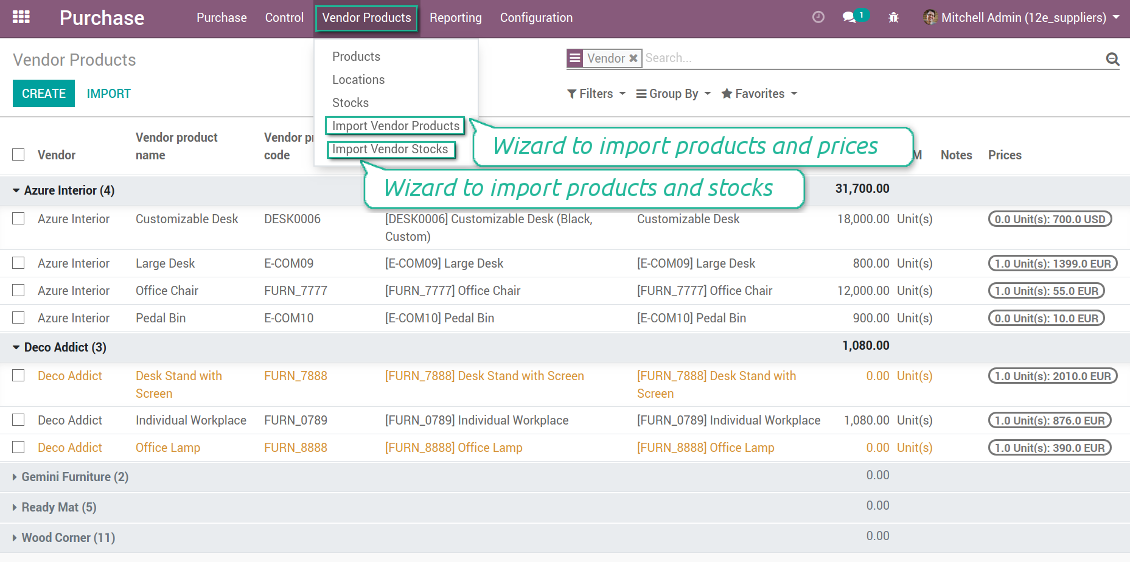
Vendor products catalog
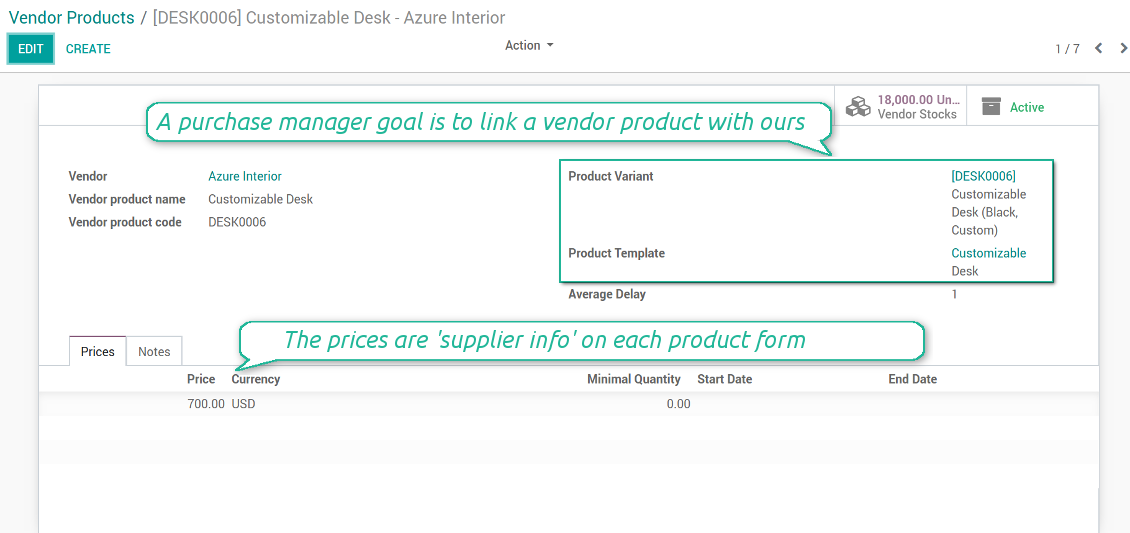
Any vendor product might be linked to your own product. In such a way a purchase manager goal becomes to match 'their' products with 'ours'. Each of our product variants might have a few related vendor products.
Any purchase manager may create, update, and archive vendor-related objects. Any Odoo user with an access to products might rely upon vendor data for informational purposes.
As soon as you installed the module, Odoo would automatically create vendor products based on existing products' supplier infos.
স্ক্রিনশট
Vendor products interface
Vendor product form
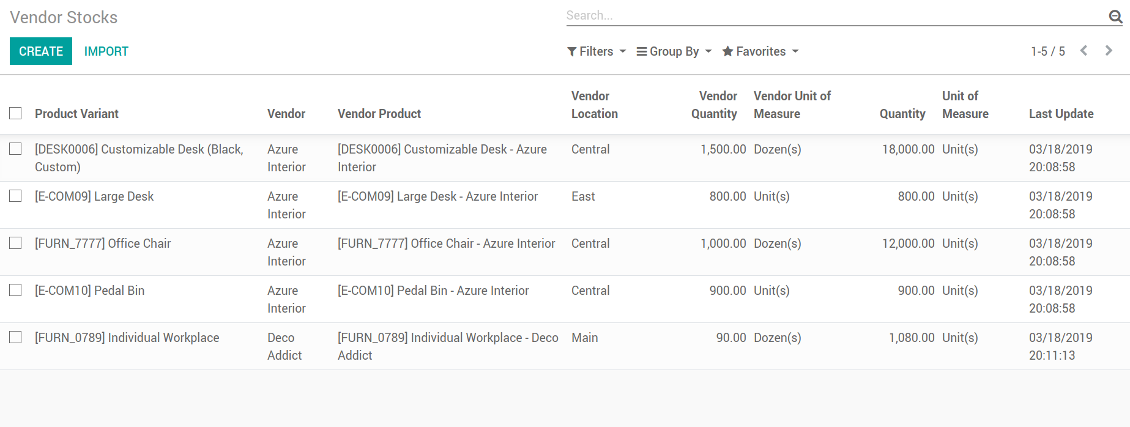
Vendor stocks control
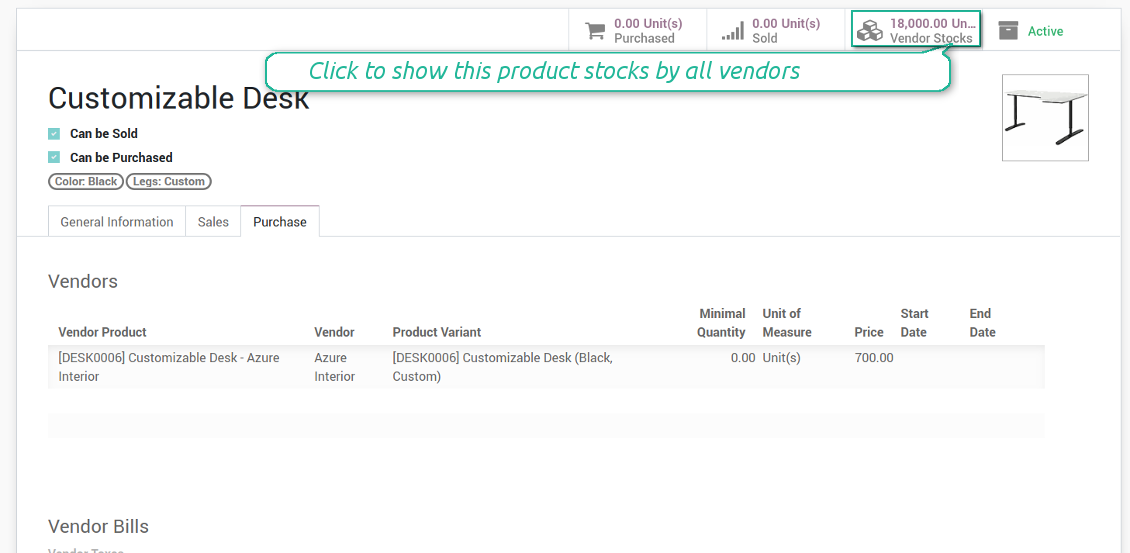
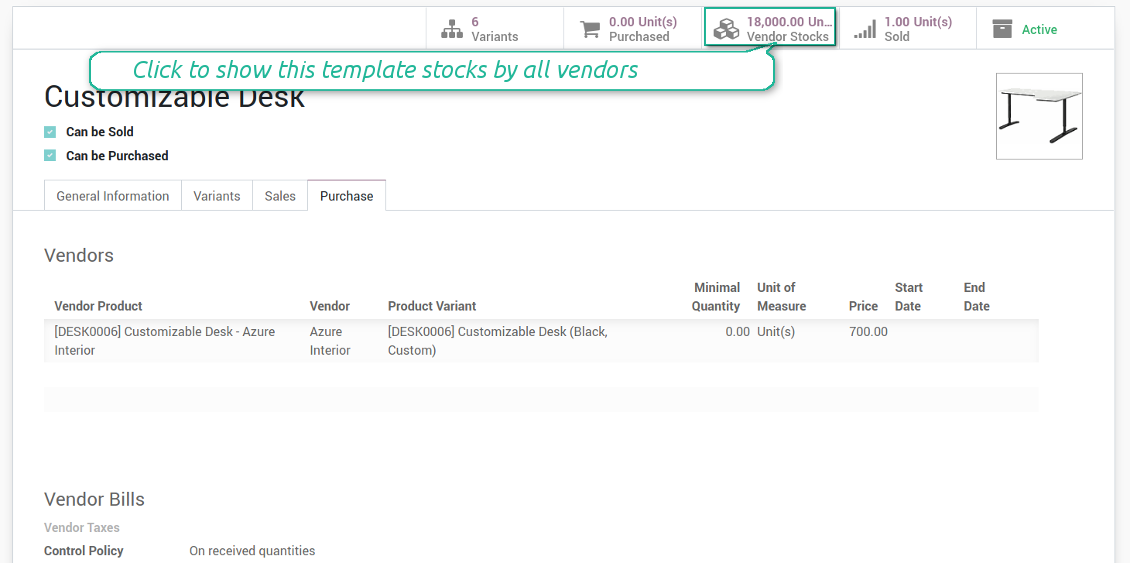
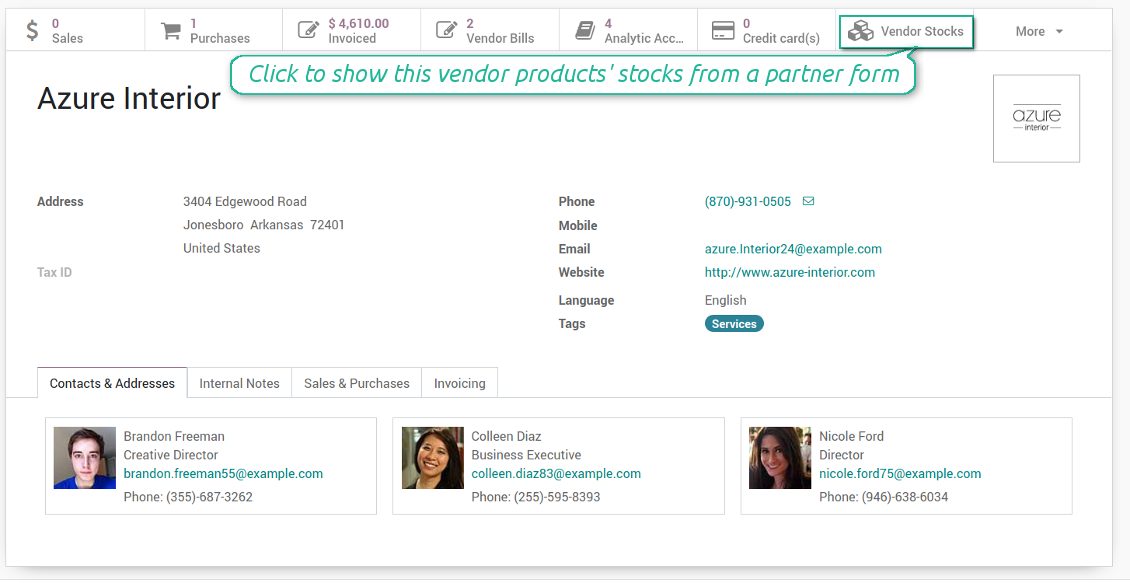
You may access info of vendor products' stocks right from product variant, product template, and supplier form views. You should just click a related button to get an overview.
How vendor stocks work
- Each stock level is provided per definite vendor location (warehouse)
- Assign an unlimited number of vendor locations per each supplier. Locations are distinguished by name, address, and average delivery time
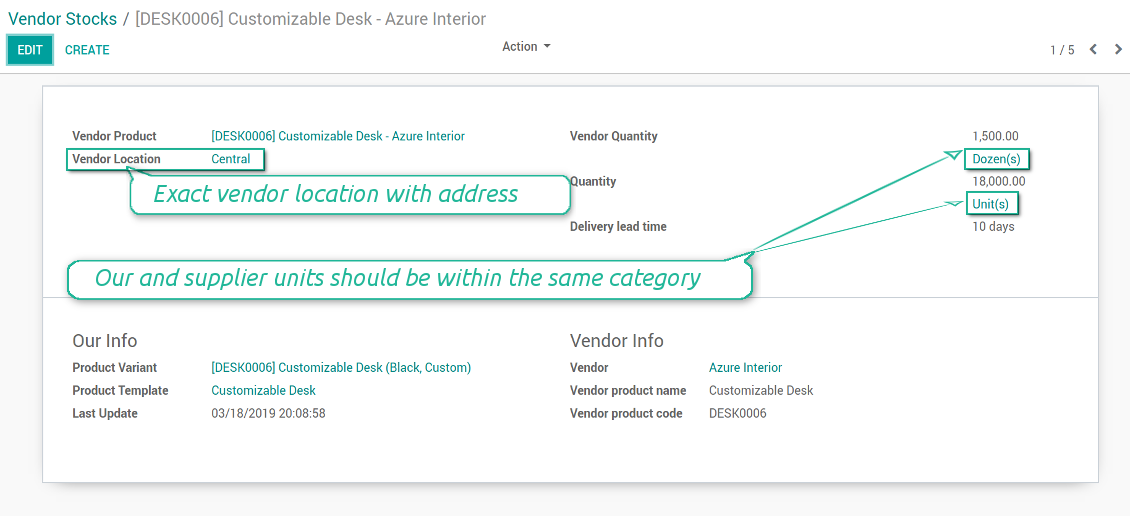
- Keep stock levels in vendor units of measure, but make sure it has the same category as our linked product. The idea is to support conversion in order internal users work with habitual figures. For example, dozens and units are fine, while dozens and hours might lead to mistakes
- Stock levels are not used in our moves, but they are provided for general information. Stock levels are updated either manually by purchase managers or through the import process
স্ক্রিনশট
Control vendor inventories per each product
Vendor stocks on a product form
Vendor stock level form per each product
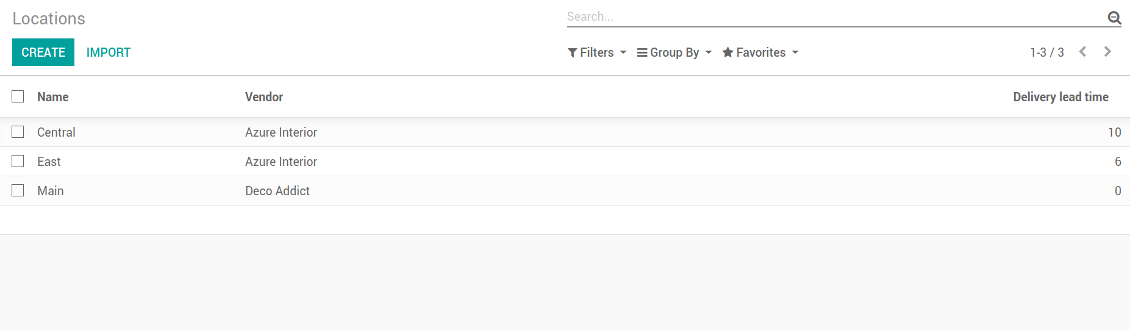
Vendor locations list (not linked to our locations!)
Vendor stocks by product templates
Access stocks of this supplier from a partner form
Supplier prices management
Those prices are considered as standard Odoo 'supplier info' which correspondingly are used in purchase orders.
Comfortable importing of vendor product data
How to import vendor product and prices
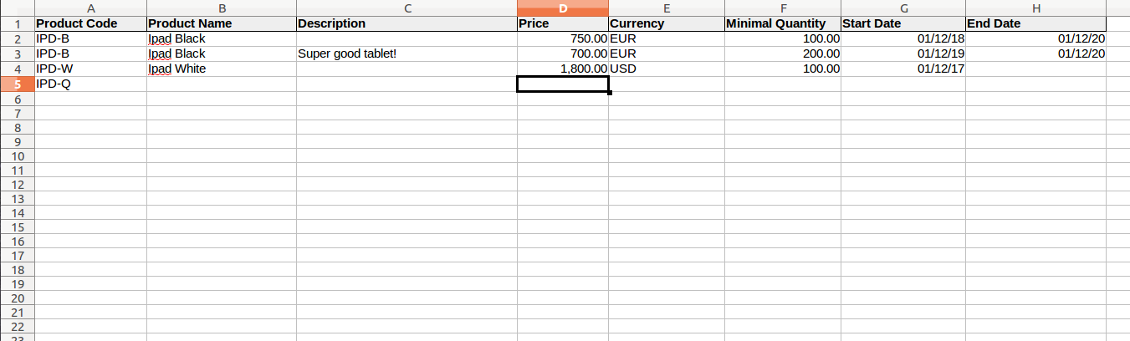
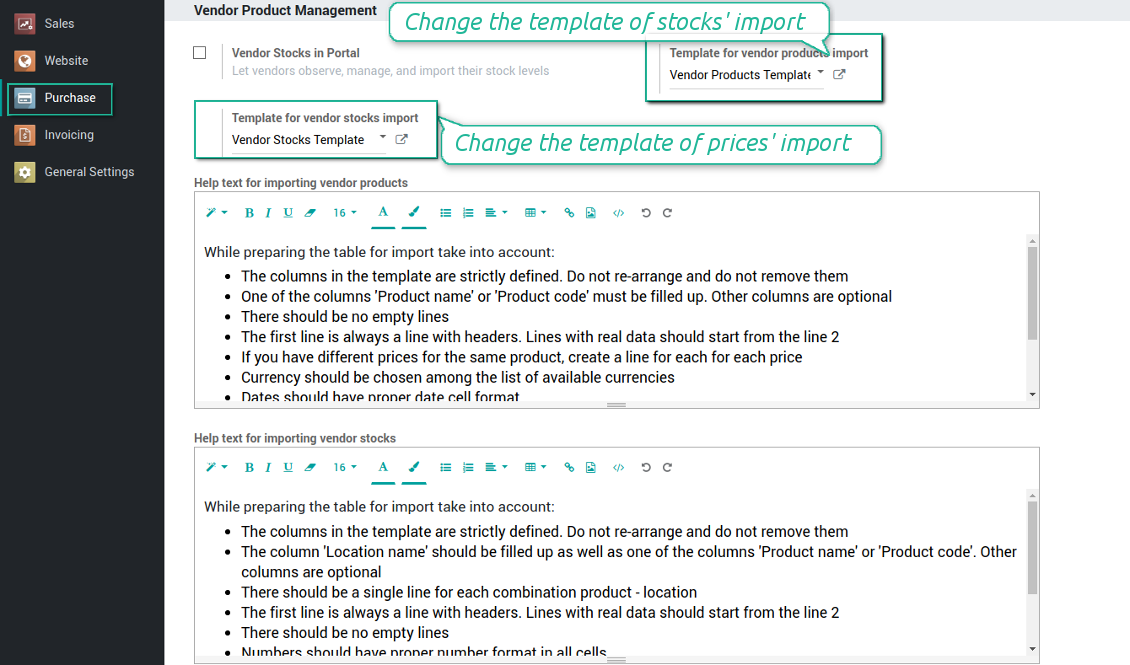
- The table format is supplied with this tool source code and would be available for you on the configuration page as the 'Template for vendor products import' and in the import wizard on the tab 'Help'
- You may change the table content to provide users with more specific examples and labels. However do no not change columns' order and do not remove those: it would lead to inevitable mistakes
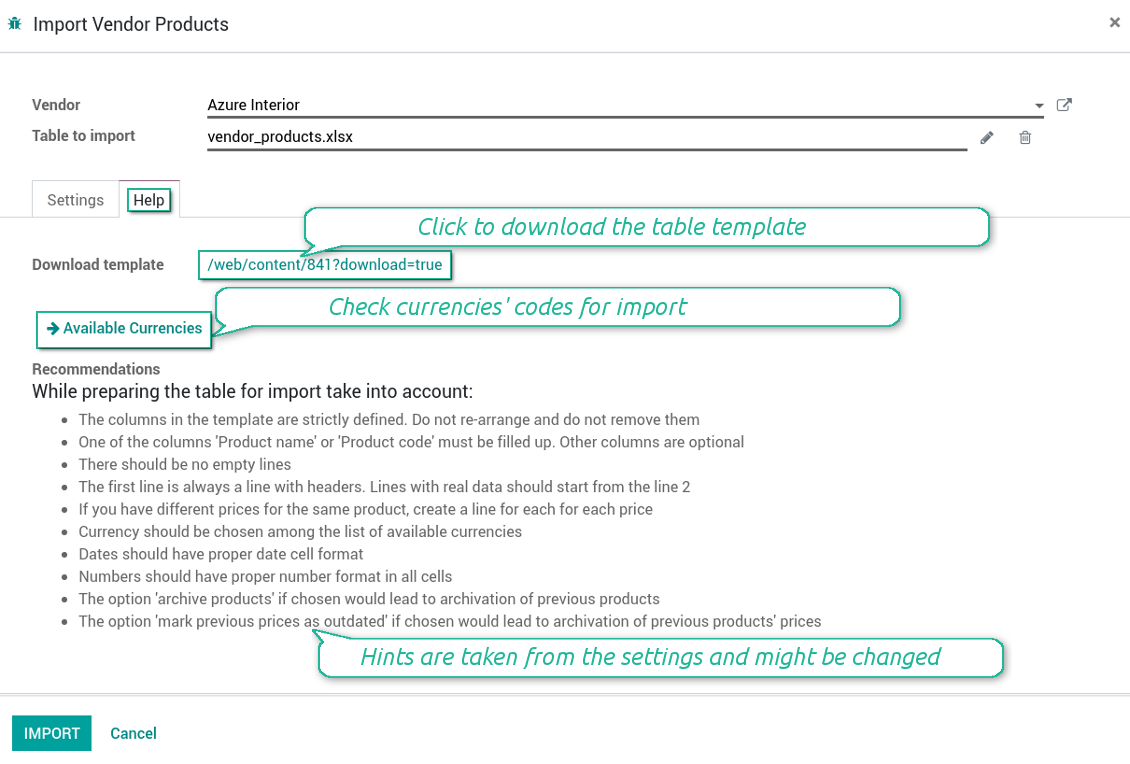
- The wizard offers useful tips to make a correct import. You may edit those recommendations on the configuration page, but make sure you do not remove critical advice
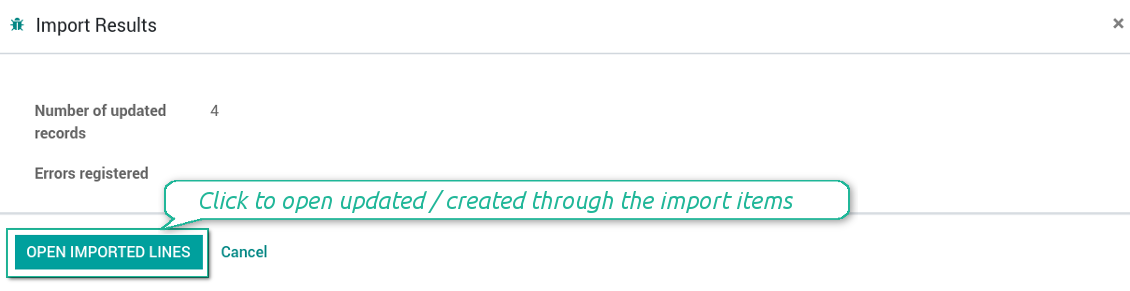
- Each import finishes with the special results' and errors' pop-up. It let you control of what has been actually done
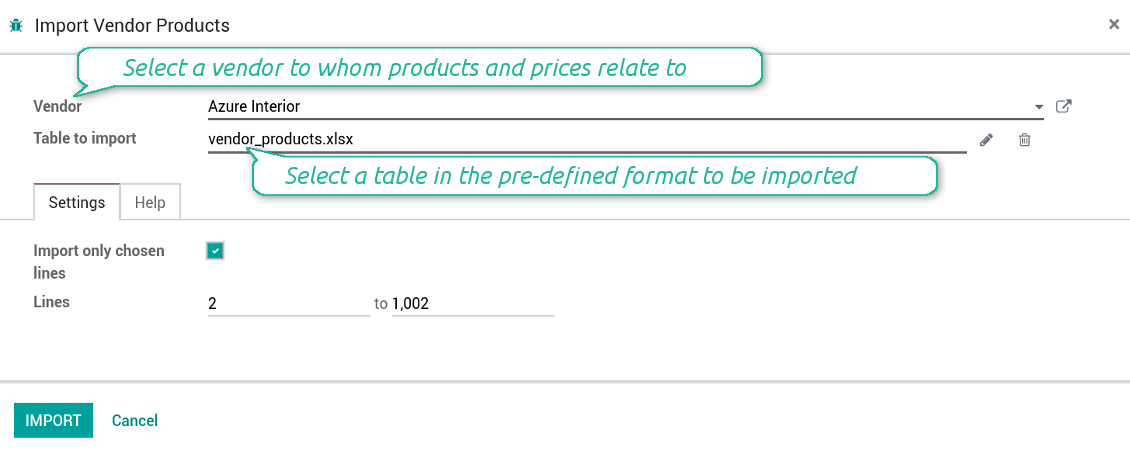
- In the wizard you can select which table lines should be imported. It is useful in case the number of lines is too big to import them all
- In the wizard you can select whether previous products of this vendor should be archived. It let you fully replace this supplier product catalogue with a new one
- In the wizard you can select whether previous prices should be marked as outdated. It let you remove misleading data
- While preparing the table for import be cautious with cell formats. Dates should be dates, numbers should be numbers, currency should be chosen among active ones
- In case import can't be fully finished until Odoo stops it, contact your system administrator to increase configured time-outs
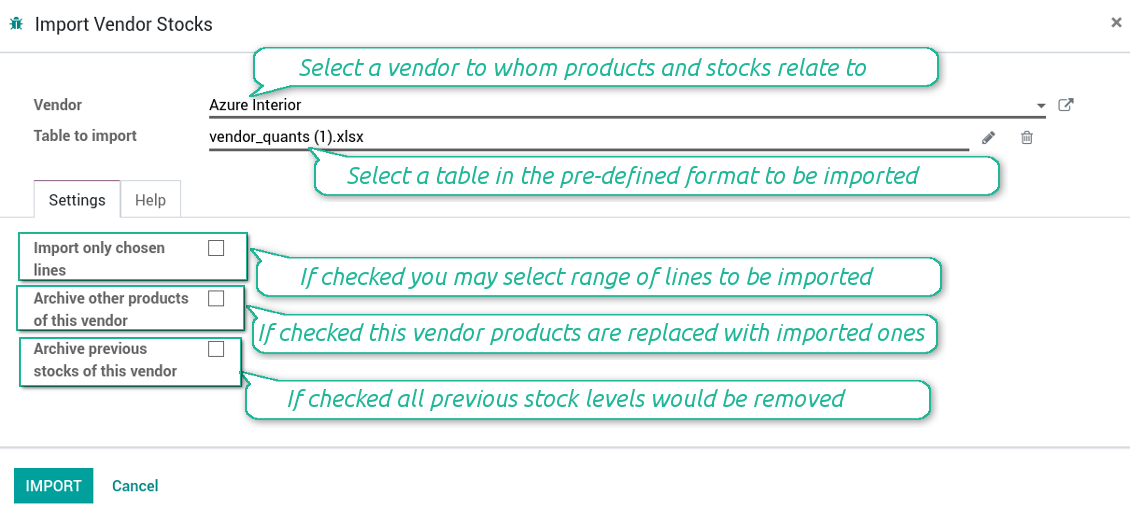
How to import vendor products and stocks
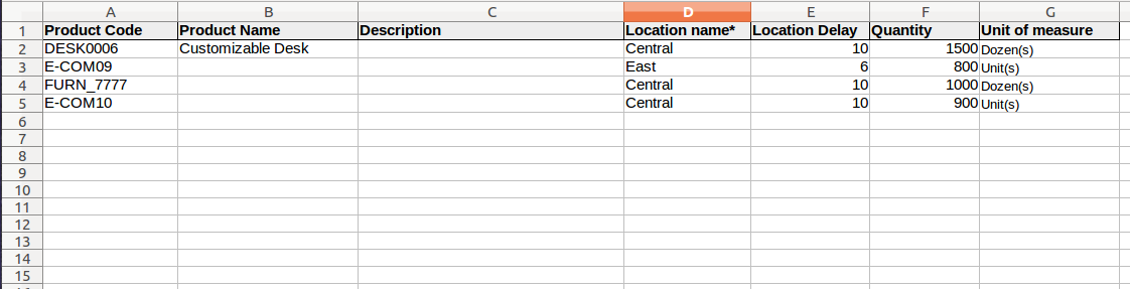
- The table format is supplied with this tool source code and would be available for you on the configuration page as the 'Template for vendor stocks import' and in the import wizard on the tab 'Help'
- You may change the table content to provide users with more specific examples and labels. However do no not change columns' order and do not remove those: it would lead to inevitable mistakes
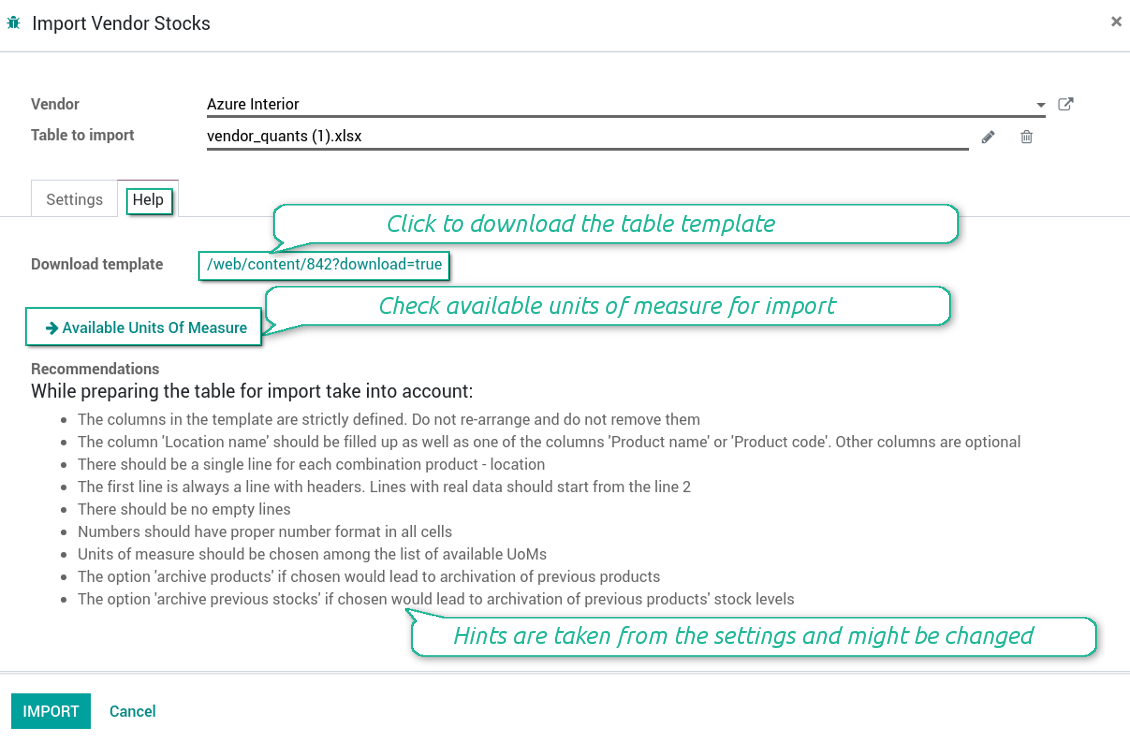
- The wizard offers useful tips to make a correct import. You may edit those recommendations on the configuration page, but make sure you do not remove critical advice
- Each import finishes with the special results' and errors' pop-up. It let you control of what has been actually done
- In the wizard you can select which table lines should be imported. It is useful in case the number of lines is too big to import them all
- In the wizard you can select whether previous products of this vendor should be archived. It let you fully replace this supplier product catalogue with a new one
- In the wizard you can select whether previous stocks are not any more correct. It let you have fully topical data after each import
- While preparing the table for import be cautious with cell formats. Numbers should be numbers, units of measure should be chosen among existing ones
- In case import can't be fully finished until Odoo stops it, contact your system administrator to increase configured time-outs
স্ক্রিনশট
Import of vendor products and stocks
The template for vendor stock levels table
Stocks import wizard' recommendations
Import of vendor products and prices
The template for vendor products' table
Prices import wizard goes with detailed recommendations
Configure your own configurations for import
Check results and errors of import
কনফিগারেশন ও ইনস্টলেশন টিপস: Vendor Product Management Odoo v.12
Python dependency
To provide the feature of dynamic Excel table generation, install the Python library xlsxwriter:
pip install xlsxwriter
সম্পর্কে সাধারণ জিজ্ঞাসা Vendor Product Management Odoo v.12
আপনার সরঞ্জামের হালনাগাদ নীতি কী?
বর্তমান Odoo Apps Store নীতি অনুসারে:
- সংস্করণ 12.0 ও তার আগের জন্য কেনা প্রতিটি মডিউল 12.0 পর্যন্ত সব সংস্করণে প্রবেশ দেয়।
- সংস্করণ 13.0 থেকে প্রতিটি মডিউল সংস্করণ আলাদা কিনতে হয়।
- সংস্করণ যাই হোক, কেনায় সেই প্রধান সংস্করণের সব হালনাগাদ ও বাগ সংশোধনের অধিকার মেলে।
মনে রাখুন, faOtools দল এই নীতি নিয়ন্ত্রণ করে না। সব প্রশ্নে সরাসরি Odoo Apps Store প্রতিনিধিদের সাথে যোগাযোগ করুন।
আপনার অ্যাপ Odoo.sh-এ কীভাবে ইনস্টল করব?
সবচেয়ে সোজা উপায় হল Odoo স্টোরের বিল্ট-ইন ওয়ার্কফ্লো ব্যবহার করা:
1. মডিউলের পৃষ্ঠা খুলুন এবং Deploy on odoo.sh বোতামে ক্লিক করুন
2. তারপর আপনাকে GitHub পৃষ্ঠায় পাঠানো হবে। অ্যাকাউন্টে লগ ইন করুন, তারপর 'Create a new repo' ক্লিক করুন বা বিদ্যমানটি ব্যবহার করুন। রিপোজিটরি যেন প্রাইভেট হয়। OPL-1 লাইসেন্সের অধীনে অ্যাপ প্রকাশ করা অনুমোদিত নয়। প্রয়োজনে Odoo.sh প্রকল্পের জন্য নতুন repo তৈরি করুন
3. তারপর odoo.sh-এ যান এবং Deploy বোতামে ক্লিক করুন। পপ-আপ উইন্ডোতে সিদ্ধান্ত জমা দিন এবং 'Continue.' ক্লিক করুন। এতে ইনস্টলেশন শুরু হবে।
এই ধাপগুলো প্রকল্পের প্রোডাকশন শাখায় অ্যাপ ইনস্টল করবে। অন্য শাখায় অ্যাপ ডিপ্লয় বা মডিউল আপডেট করতে নিচের কাজগুলো করুন:
1. Odoo স্টোর থেকে অ্যাপের সোর্স কোড আপলোড করুন
2. মডিউলটি প্রয়োজনীয় GitHub রিপোজিটরিতে commit করুন। নিশ্চিত করুন অ্যাপের কোনো ফোল্ডার/ফাইল উপেক্ষিত নয় (অর্থাৎ repo-এর .gitignore-এ নেই)। রিপোজিটরি odoo.sh স্বয়ংক্রিয়ভাবে তৈরি করে এবং ডিফল্টে কিছু গুরুত্বপূর্ণ আইটেম থাকতে পারে (যেমন /lib)। মডিউলের সব ডিরেক্টরি, সাবডিরেক্টরি ও ফাইল ব্যতিক্রম ছাড়া আপলোড করুন
3. odoo.sh প্রকল্পের লক্ষ্য শাখা Deploy করুন অথবা, সেটিংস যদি তা ধরে নেয়, স্বয়ংক্রিয়ভাবে তৈরি হওয়া পর্যন্ত অপেক্ষা করুন।
নিজের সার্ভারে আপনার অ্যাপ কীভাবে ইনস্টল করব?
2. Odoo সার্ভার রিস্টার্ট করুন;
3. ডেভেলপার মোড চালু করুন (টেকনিক্যাল সেটিংস);
4. অ্যাপ তালিকা আপডেট করুন (অ্যাপস মেনু);
5. অ্যাপ খুঁজে 'Activate'/'Install' চাপুন;
6. অ্যাপ পৃষ্ঠায় নির্দেশিকা থাকলে অনুসরণ করুন।
আপনার অ্যাপে অতিরিক্ত অ্যাড-অন আছে। পরে কিনতে পারি?
হ্যাঁ, অবশ্যই। একই সাথে Odoo সব নির্ভরতা কার্টে স্বয়ংক্রিয় যোগ করে, তাই দ্বিগুণ অর্থ এড়াতে আগে কেনা টুল বাদ দিন।
আমি আপনার অ্যাপ Odoo.sh-এ ডিপ্লয় করেছি এবং পরীক্ষায় সতর্কতা/ত্রুটি দেখছি
লাল/কমলা সতর্কতা অ্যাপের বৈশিষ্ট্যে প্রভাব ফেলে না। দুঃখজনকভাবে আমাদের মডিউল কখনো স্ট্যান্ডার্ড স্বয়ংক্রিয় পরীক্ষা পাস করে না, কারণ সেগুলো এমন আচরণ ধরে নেয় যা অ্যাপের লক্ষ্যের সাথে সাংঘর্ষিক। যেমন আমরা মূল্য হিসাব বদলাই, অথচ স্ট্যান্ডার্ড Odoo মডিউল পরীক্ষা চূড়ান্ত মূল্যকে স্ট্যান্ডার্ড অ্যালগরিদমের সাথে তুলনা করে।
প্রথমে ডিপ্লয় করা ডাটাবেসের বৈশিষ্ট্য দেখুন। সব ঠিকঠাক কাজ করছে?
যদি তবু মনে করেন সতর্কতা আসল বৈশিষ্ট্যে প্রভাব ফেলে, যোগাযোগ করুন এবং পূর্ণ ইনস্টলেশন লগ ও ডিপ্লয় করা মডিউলের সম্পূর্ণ তালিকা (কোর ও তৃতীয় পক্ষসহ) পাঠান।
আমি কি অ্যাপটি আপনার কোম্পানি থেকে সরাসরি কিনতে পারি?
না, আমরা টুল শুধু অফিসিয়াল Odoo অ্যাপ স্টোর.
আমি ছাড় পেতে চাই
দুঃখিত, ব্যক্তিগত মূল্য দেওয়ার কারিগরি উপায় আমাদের নেই।
আমি কি অ্যাপটি আমার Odoo Online (SaaS) ডাটাবেসে ইনস্টল করতে পারি?
না, তৃতীয় পক্ষের অ্যাপ Odoo Online-এ ব্যবহার করা যায় না। দুঃখজনকভাবে Odoo SaaS সেই সম্ভাবনা আটকে দেয়।
আপনার সরঞ্জাম অন্য অ্যাপের উপর নির্ভর করে। সেগুলো কি কিনতে হবে?
হ্যাঁ, সঠিকভাবে চলতে টুলের নির্ভরতায় চিহ্নিত সব মডিউল দরকার। অ্যাপ পাতার মূল্যে প্রয়োজনীয় নির্ভরতা ইতিমধ্যে অন্তর্ভুক্ত।
মডিউলের মূল্য মার্কিন ডলারে কত? কেন বদলেছে?
আমাদের মডিউলের মূল্য ইউরোতে নির্ধারিত। Odoo স্টোর অভ্যন্তরীণ বিনিময় হার অনুযায়ী অন্য মুদ্রায় রূপান্তর করে। তাই মার্কিন ডলারে মূল্য হার আপডেট হলে বদলাতে পারে।
ইংরেজি ছাড়া অন্য ভাষায় অ্যাপ ও ওয়েবসাইটের শব্দ AI-সহায়তায় এবং অফিসিয়াল Odoo অনুবাদের সাথে মিলিয়ে। ভুল দেখলে, অনুবাদ সঠিকতার টিকিট পাঠান আর আমরা ঠিক করব।
বাগ রিপোর্টিং
বাগ বা অসঙ্গত আচরণ দেখলে আমাদের সাথে যোগাযোগ করুন। কেনার ৬০ দিনের মধ্যে সংশোধনের নিশ্চয়তা দিই এবং এই সময়ের পরেও টুল উন্নত করতে আগ্রহী।
যোগাযোগে ফোন নম্বর বা ক্রেডিট কার্ড লাগে না। শুধু একটি সংক্ষিপ্ত ইমেইল সাইন-আপ, ৩০ সেকেন্ডের বেশি লাগে না।
অনুরোধে যতটা সম্ভব বিস্তারিত দিন: স্ক্রিনশট, Odoo সার্ভার লগ, সমস্যা পুনরুৎপাদনের পূর্ণ বিবরণ ইত্যাদি। সাধারণত কোনো সমস্যার কাজের পরিকল্পনা তৈরি (বাগ নিশ্চিত হলে) বা কী করতে হবে তার নির্দেশনা দিতে (অন্যথায়) কয়েক কর্মদিবস লাগে।
পাবলিক ফিচার অনুরোধ ও মডিউল আইডিয়া (বিনামূল্যে উন্নয়ন)
আমরা আমাদের টুল উন্নত করতে দৃঢ়ভাবে অনুপ্রাণিত এবং যেকোনো মতামতের জন্য কৃতজ্ঞ। আপনার প্রয়োজনীয়তা সবার কাজে লাগে এবং দক্ষতার সঙ্গে বাস্তবায়নযোগ্য হলে দল সেগুলো আমাদের টু-ডু তালিকায় রাখবে।
এমন টু-ডু তালিকা নিয়মিত প্রক্রিয়া হয় এবং অতিরিক্ত ফি ধরে না। যদিও আমরা সময়সীমা ও চূড়ান্ত ডিজাইনের প্রতিশ্রুতি দিতে পারি না, বিনিয়োগ ও ঝুঁকি ছাড়া কাঙ্ক্ষিত ফিচার পাওয়ার এটি ভালো উপায় হতে পারে।
যোগাযোগে ফোন নম্বর বা ক্রেডিট কার্ড লাগে না। শুধু একটি সংক্ষিপ্ত ইমেইল সাইন-আপ, ৩০ সেকেন্ডের বেশি লাগে না।

Odoo সংযুক্তি ফোল্ডারে নমনীয়ভাবে সাজানো এবং ডিরেক্টরি ক্লাউড ক্লায়েন্টের সাথে সিঙ্ক করার টুল: Google Drive, OneDrive/SharePoint, Nextcloud/ownCloud, Dropbox, Amazon S3, Box এবং NAS. DMS. ফাইল ম্যানেজার. ডকুমেন্ট ম্যানেজমেন্ট সিস্টেম
398€
ভাগ করে ব্যবহারের জন্য Odoo-তে পাসওয়ার্ড নিরাপদে রাখার সরঞ্জাম। শেয়ার করা ভল্ট

অভ্যন্তরীণ ও বাহ্যিক ব্যবহারের জন্য গভীর ও কাঠামোবদ্ধ নলেজ বেস তৈরির টুল। Knowledge System. KMS. উইকির মতো সংশোধন।
398€
Odoo সংযুক্তিগুলিকে OneDrive ফাইলের সাথে স্বয়ংক্রিয়ভাবে দুই দিকে সিঙ্ক করার টুল
487€
KPI লক্ষ্য সেট করে সময়কাল অনুযায়ী পূরণ নিয়ন্ত্রণের টুল। KPI ড্যাশবোর্ড। ড্যাশবোর্ড ডিজাইনার। KPI চার্ট

Odoo সংযুক্তিগুলিকে Google Drive ফাইলের সাথে স্বয়ংক্রিয়ভাবে দুই দিকে সিঙ্ক করার টুল
487€
অ্যাপয়েন্টমেন্ট বুকিং থেকে বিক্রি ও পর্যালোচনা পর্যন্ত সময়ভিত্তিক পরিষেবা ব্যবস্থাপনার টুল
398€

ইনভেন্টরি ডেটাকে বিশ্লেষণের জন্য প্রয়োজনীয় ও আরামদায়ক করে তোলার টুল। স্টক বিশ্লেষণ
38€