Website URL Shortener v.18
The tool to assign and manage short URLs for Odoo website links. SEO friendly URLs
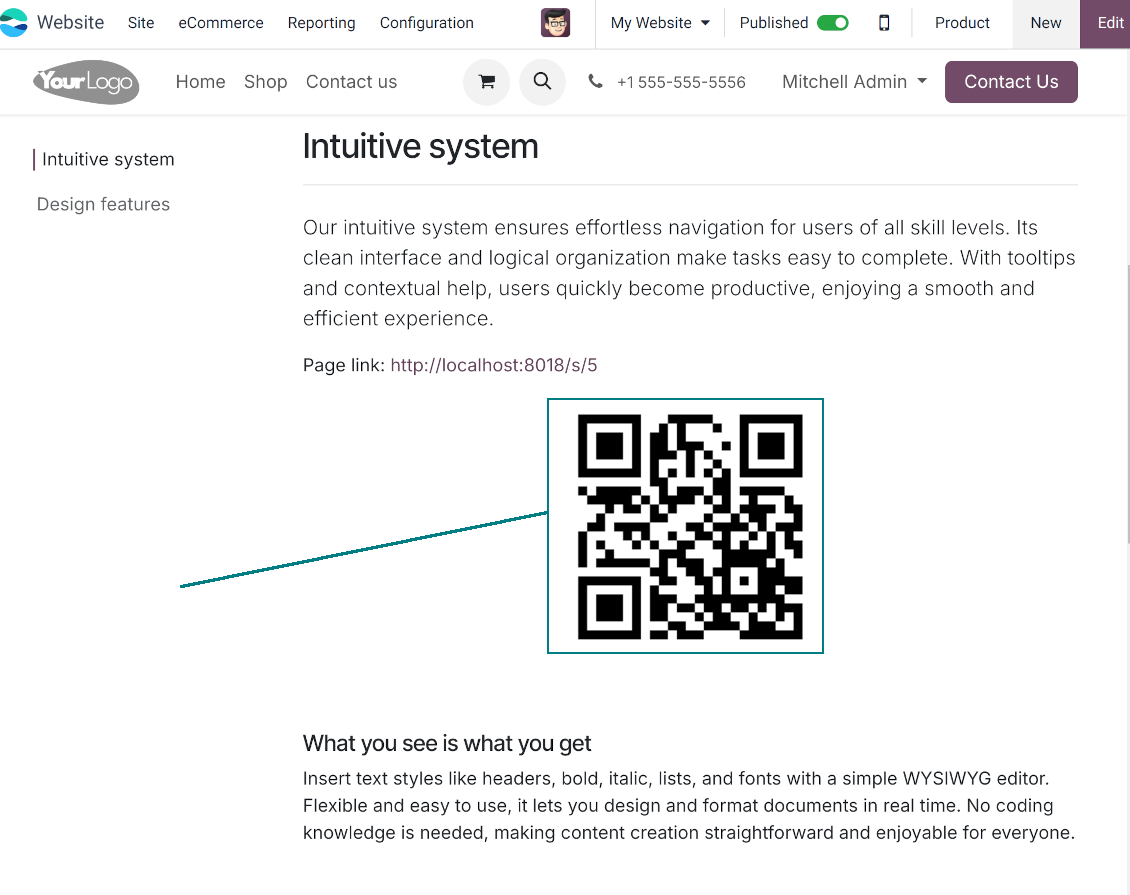
URL shortening is a well-known methodology to cope with too long and ugly-looking web addresses. The app introduces this technique in Odoo by allowing website editors to manually or automatically generate, control, and administrate short and SEO-friendly URLs for any Odoo web links.
Branded links
Introduce memorable and human-readable URLs of the type '/s/[token]' for any Odoo website address. What is preferable to share: example.com/s/desk or example.com/shop/customizable-desk-config-9#attr=7,4,47?
Automatic or custom URLs
Configure the rules for automatic creation of short URLs based on iterator and token (for example, /s/12 and /s/rh72ko) or apply your own SEO-friendly key words (for example, /s/desk, /s/best-chairs)
Short URLs for any link types
The app works equally for dynamic controllers (e.g., a product page or even store pages with chosen filters) and static website pages (including custom ones). Also, the shortener might redirect to the page translations.
QR codes for website links
Each short URL peers with an automatic QR code image that might be downloaded, shared or added to Odoo website pages
Multi channels control
Have as many short links for a single address as needed for various purposes. Share one on Facebook, another - on Twitter, and a special one - for specific partners. Then, count redirects for each source.
Comfortable administration
Use the URL shortener right while customizing the website or in Odoo's advanced backend. Make a link soon expired or forever-lasting. Update tokens at any moment or archive short links if it is no anymore valid
Website snippets
The app introduces the special website snippets which might be added to any Odoo website's inner content. Such a snippet will find or create a short URL or URL QR code right when a visitor opens a page
Available for scripts and custom add-ons
Developers might use the app to find or create a short URL or QR code image for a target website address by applying a single Python method.
URL shortener administration
Website interface for short URLs
-
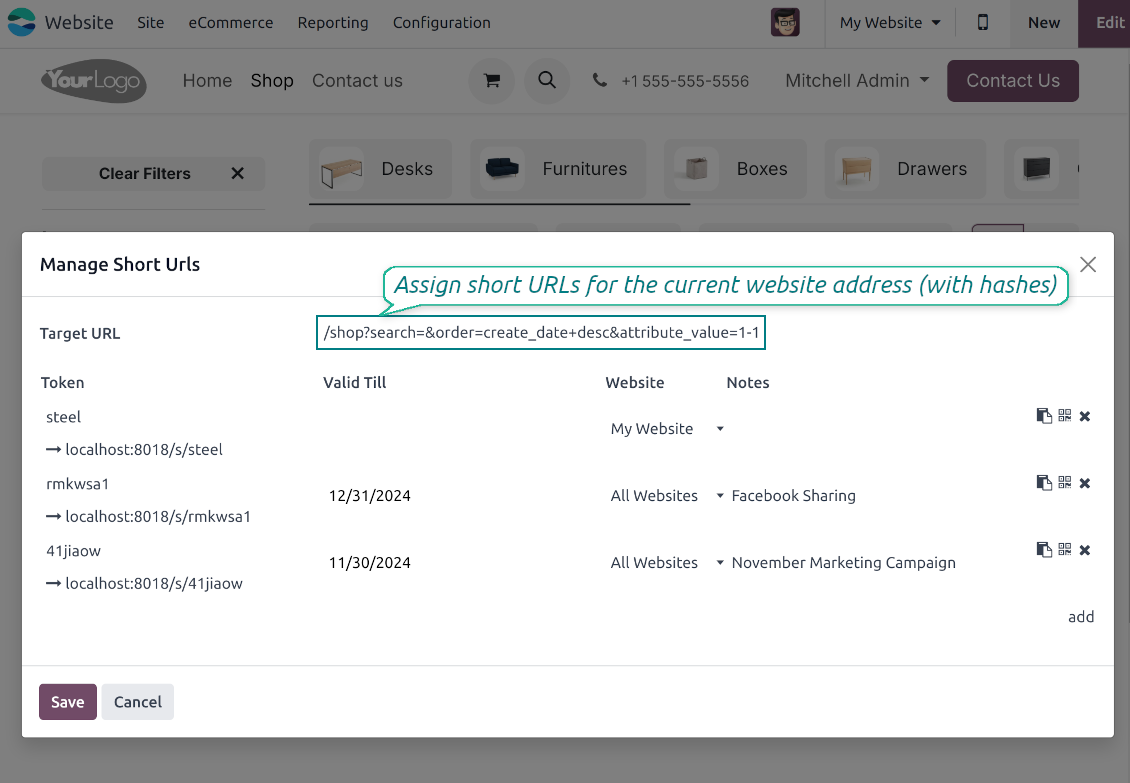
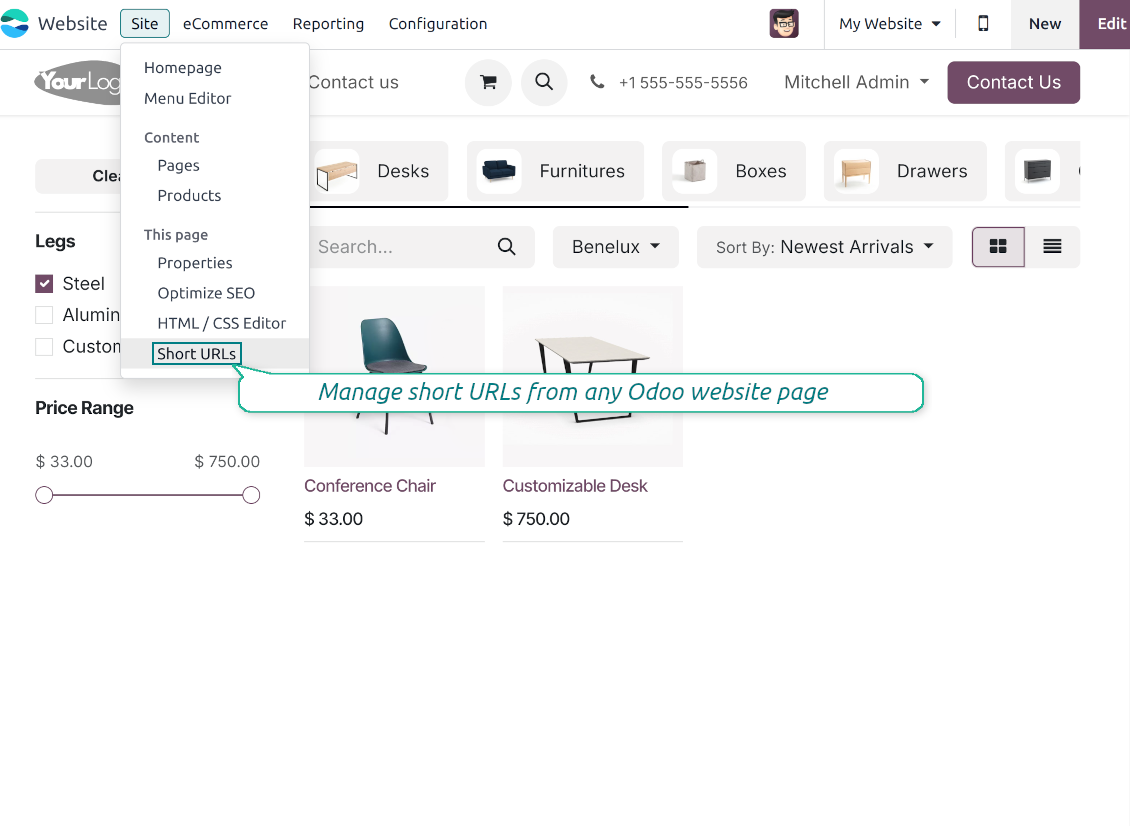
To start managing short links click on Customize > Short URLs from any page. It might be any link, including a dynamic controller (e.g. a blog post) and a static and custom website page
-
The app would automatically retrieve a target web address with all search and hash parameters from a browser. Change this redirect URL if needed: available short links would be recalculated
-
Create new short links based on the default tokens or custom keywords. Archive obsolete URLs
-
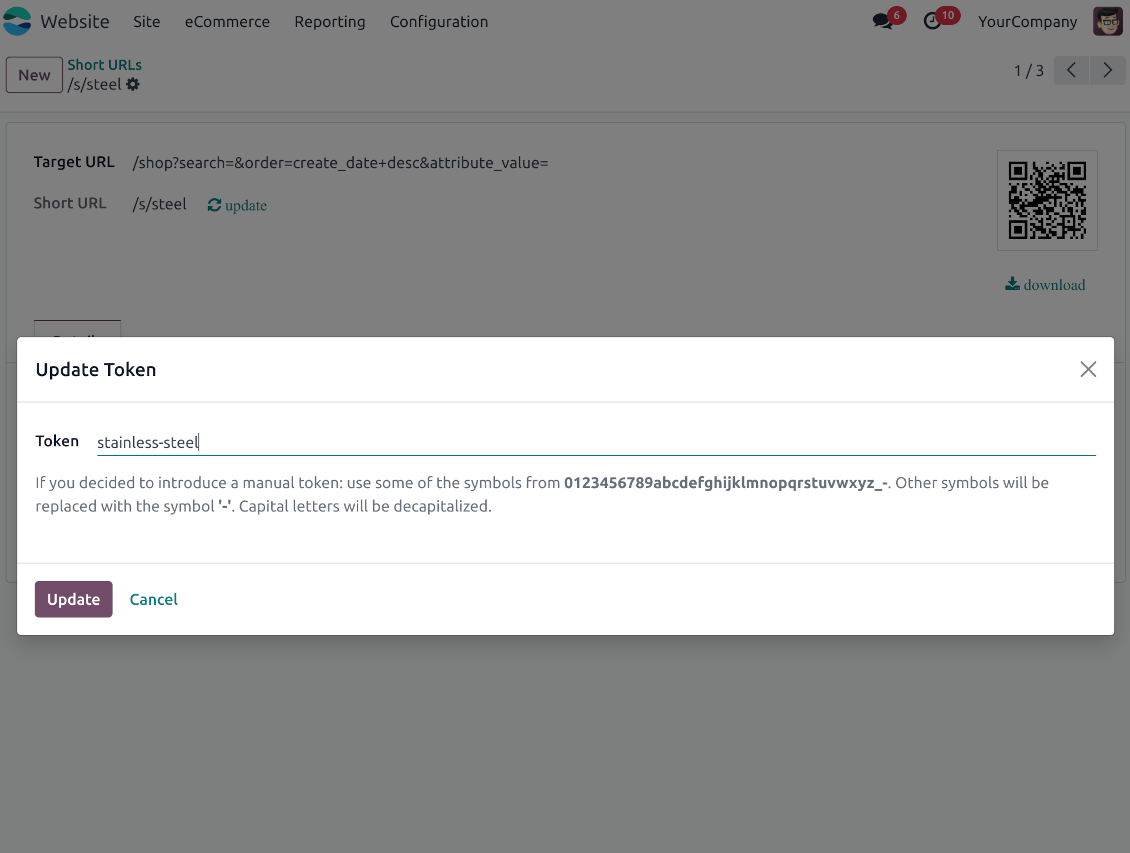
Update existing addresses: change token, assign expiration date, apply to this website or to all sites (the app fully supports Odoo multi-website mode)
Advanced backend links' editor
-
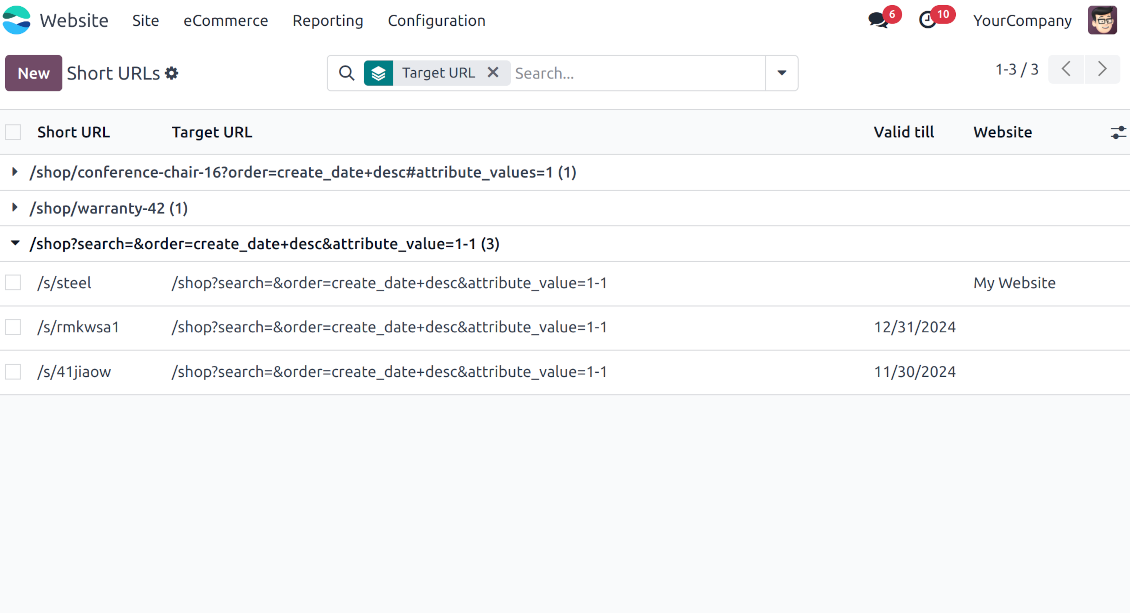
Find all short links by all websites under the menu Websites > Settings > Short URLs
-
Group by website or target URL (there might be multiple short links for each). Archive or restore links in batch
-
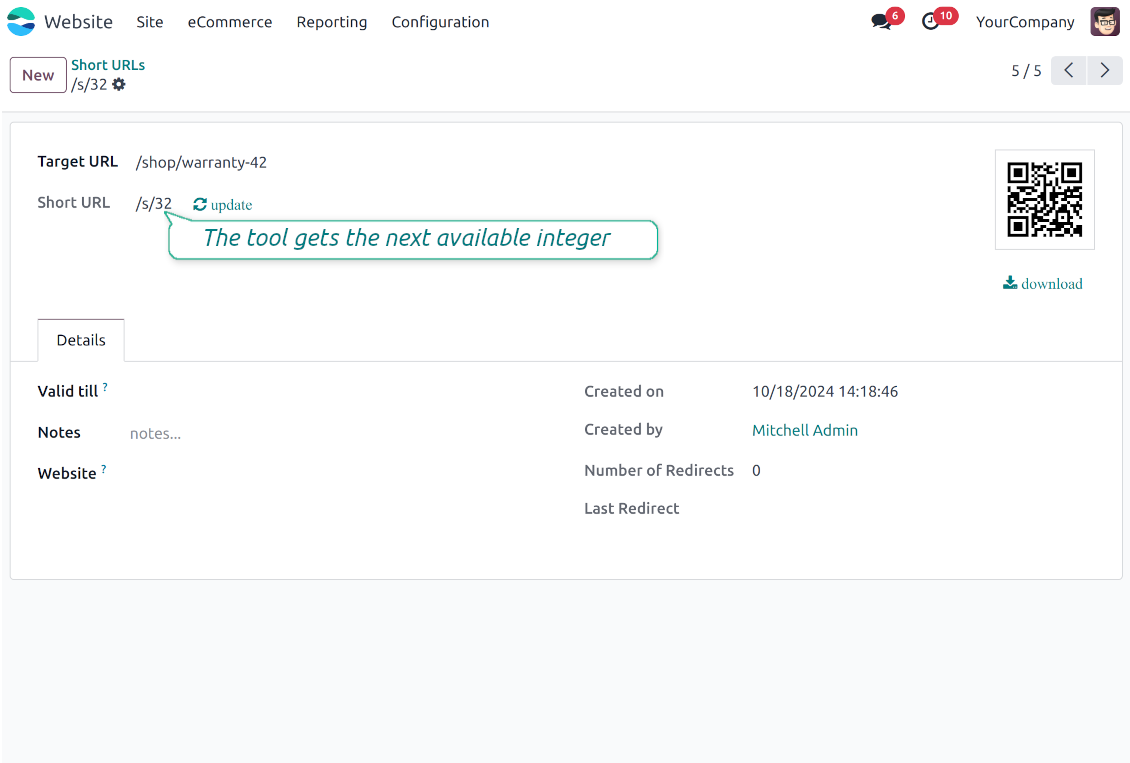
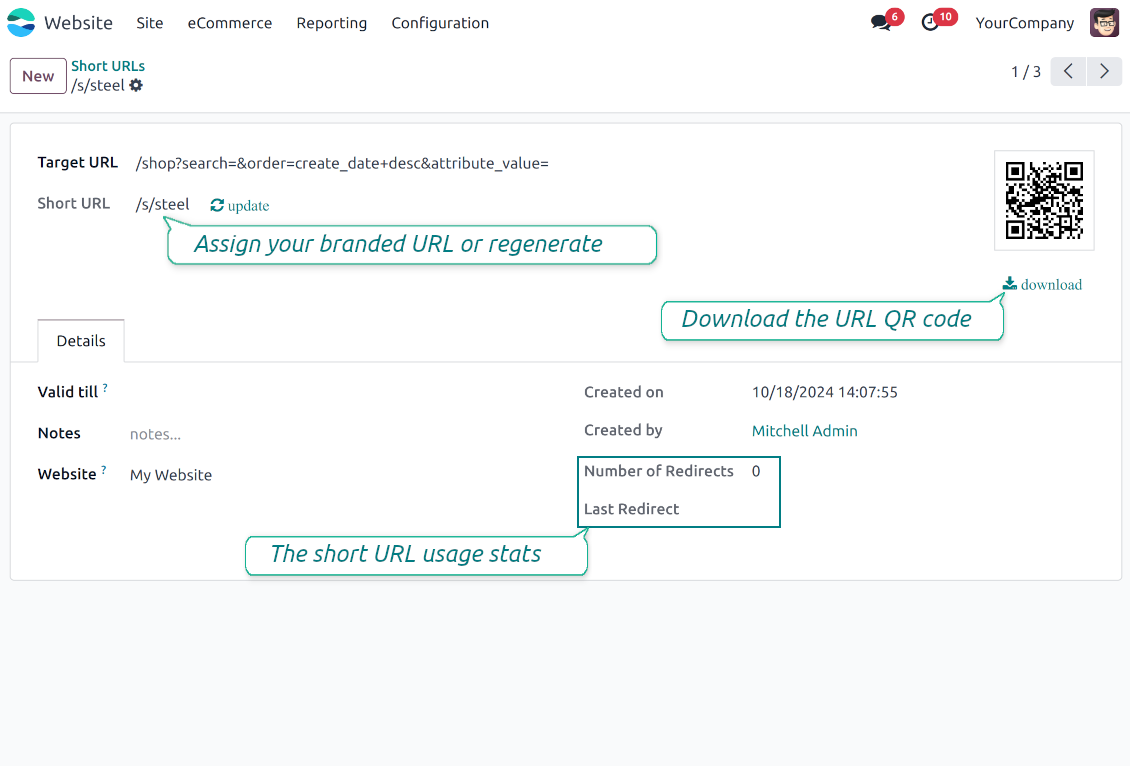
Create a new short URL in a few seconds: the only thing required is to introduce a target web address
-
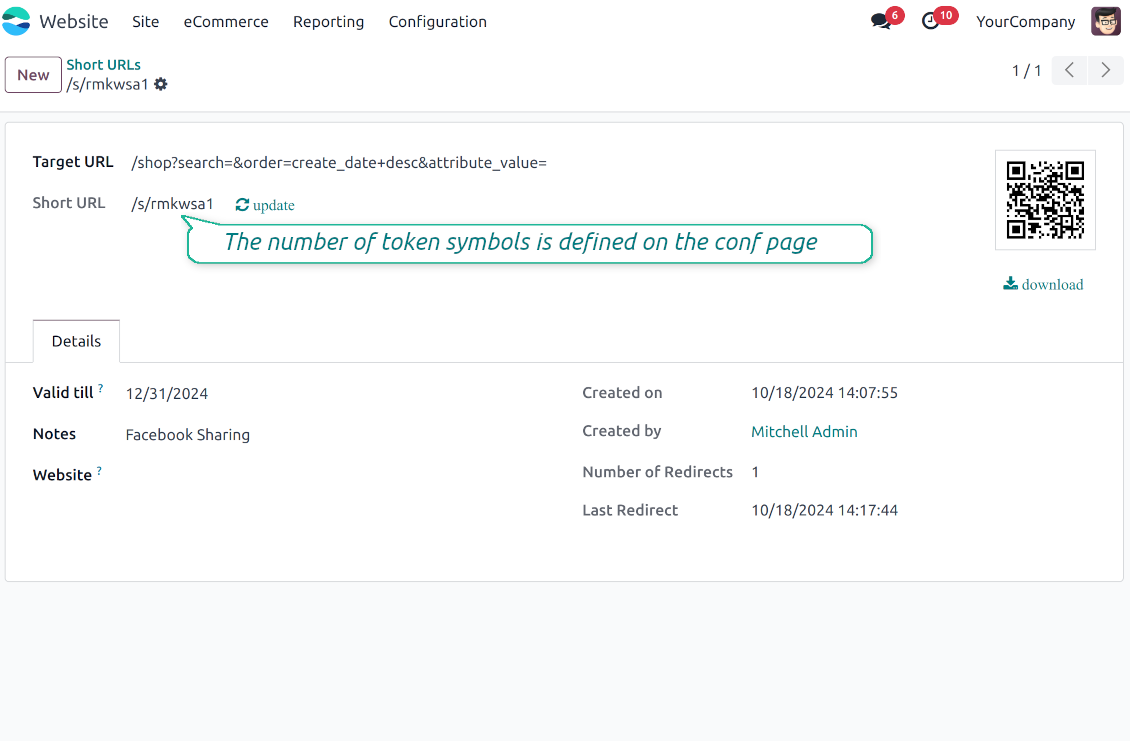
Apply flexible settings: validity date to make a link auto expired, notes to always know why this URL has been introduced, website to restrict usage for a specific site or to use a link globally.
Automatic short URLs generation
-
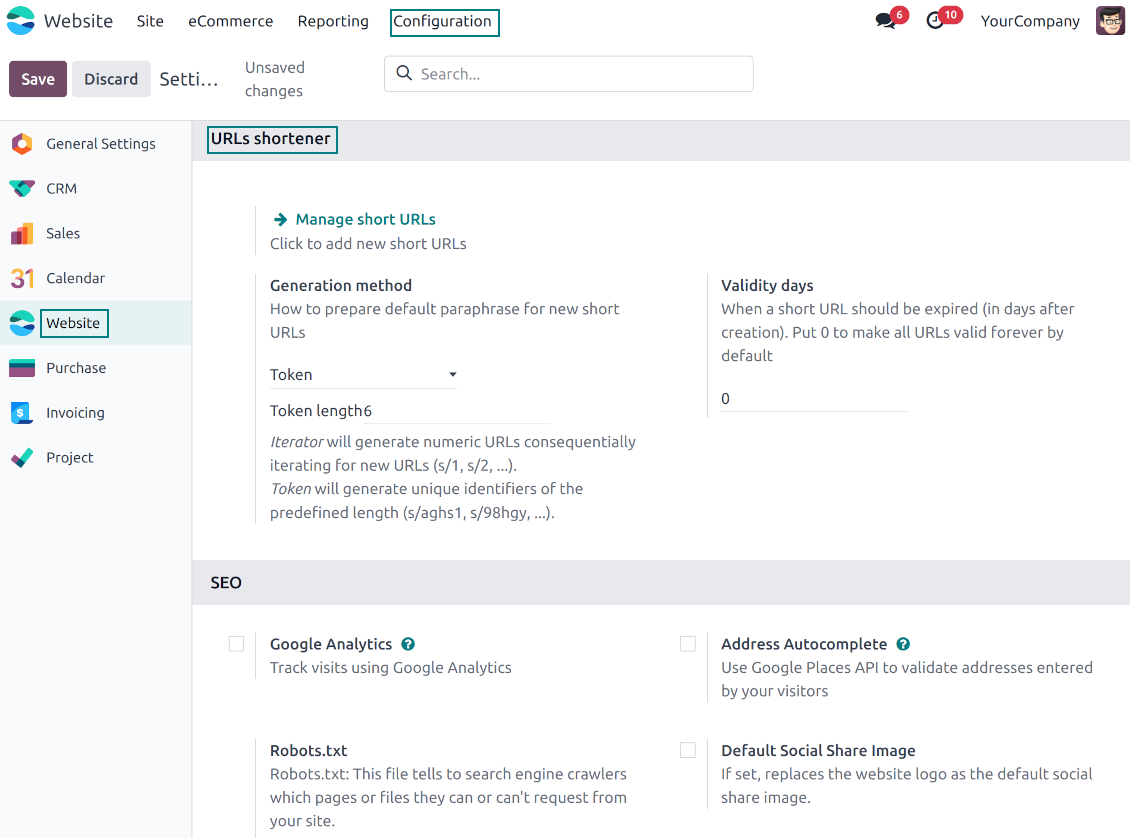
It is not always possible to prepare a branded URL for each address. For example, when you have thousands of website pages. For such cases define a default automatic method
-
Use the 'iterator' to generate a link with a succeeding number at the end. For instance, 'example.com/s/112'. The app would automatically increment a number when a new short URL is registered
-
Use the 'token' approach to generate a unique symbols row of a predefined length (it should not be less than 5 symbols to have enough unique combinations). For instance, 'example.com/s/uo71jh'
-
A default short URL would be entered as soon as you decide to create a new redirection. Simultaneously, you can always change that to a custom sentence or create a new alternative short URL. Do that for the most important addresses, addresses you would like to print on your business cards, addresses that are assumed to enter manually, etc.
Short URLs for developers
Using short URLs in scripts
-
While developing a custom add-on, script, or server action you might be interested to have a short URL for certain website addresses. The tool lets us do that efficiently
-
To that end you should trigger the method 'action_find_surl' of the model 'short.url.redirect'
-
As arguments it should receive:
target_url- string - relative web path. E.g. "/shop/customizable-desk-config-9#attr=7,4,47)"tocreate- boolean - whether to create a new short URL if none exists for the target URLalwaysvalid- boolean - whether to search short URLs without expiration or yet valid but soon expired links are also finewebsite_id- integer - if False the app would search only global URLs, otherwise also of a specific website (applicable for the multi-website mode)qr_base_url- boolean - if False the method would return a final URL, if True - a QR code content. -
The method would return a string - a found short URL (e.g. '/s/desk'), a binary content of a QR code, or False if nothing is found.
-
For instance:
my_short_url = self.env["short.url.redirect"].action_find_surl("/shop/customizable-desk-config-9#attr=7,4,47", True, True, 1, False)
Website Snippet for auto short links
-
The website menu 'Customize' and the backend menu 'Short URLs' are available only for Odoo website designers. For certain pages, you might be interested to show a short link for simple visitors as well
-
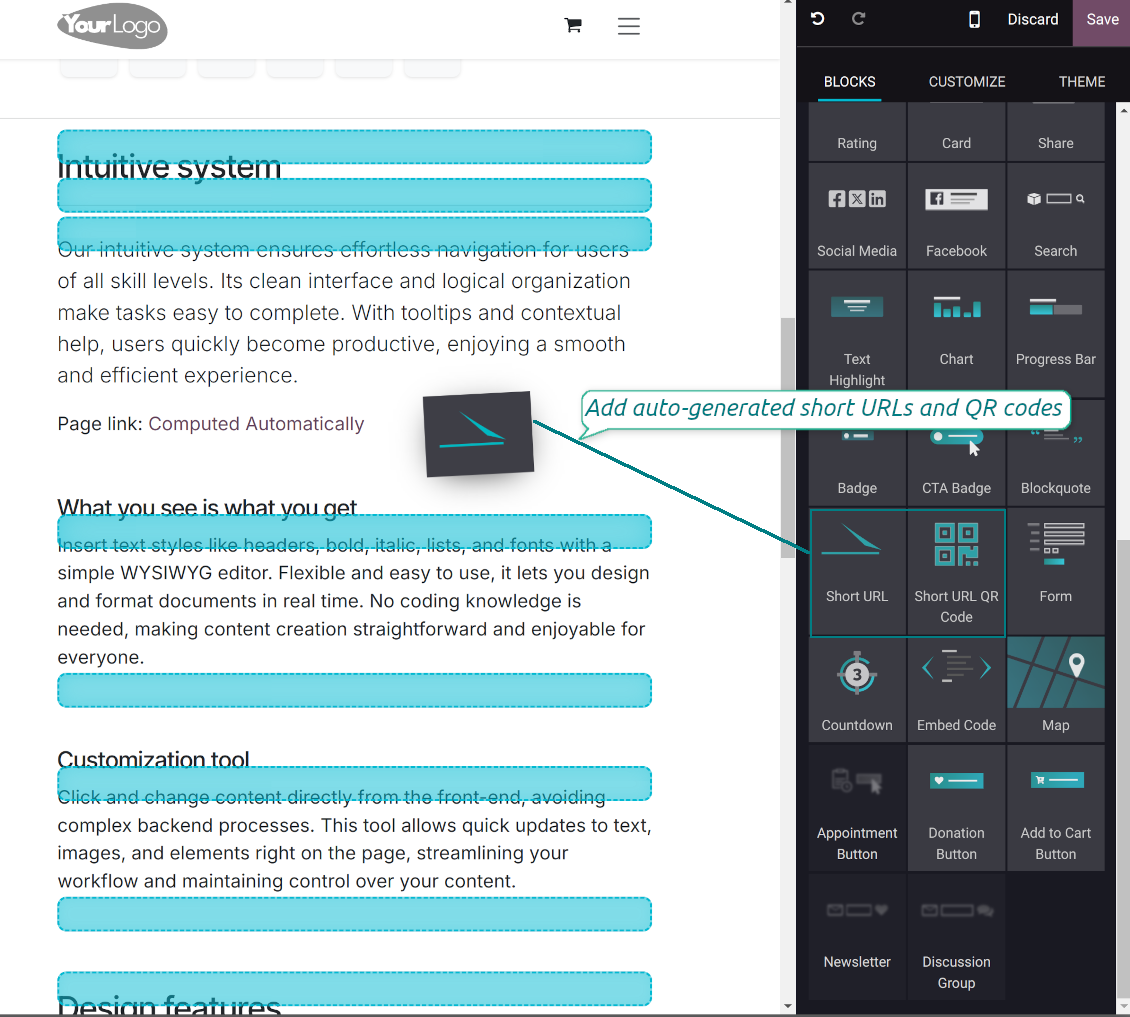
To that goal, you might drag and drop the special website editor snippets 'Short URLs' and 'Short URL QR Code'
-
The snippet 'Short URLs' adds a text block with a short link. Alternatively, you may add an XML line with the tag
awith the HREF"#"and the class"short_url_widget" -
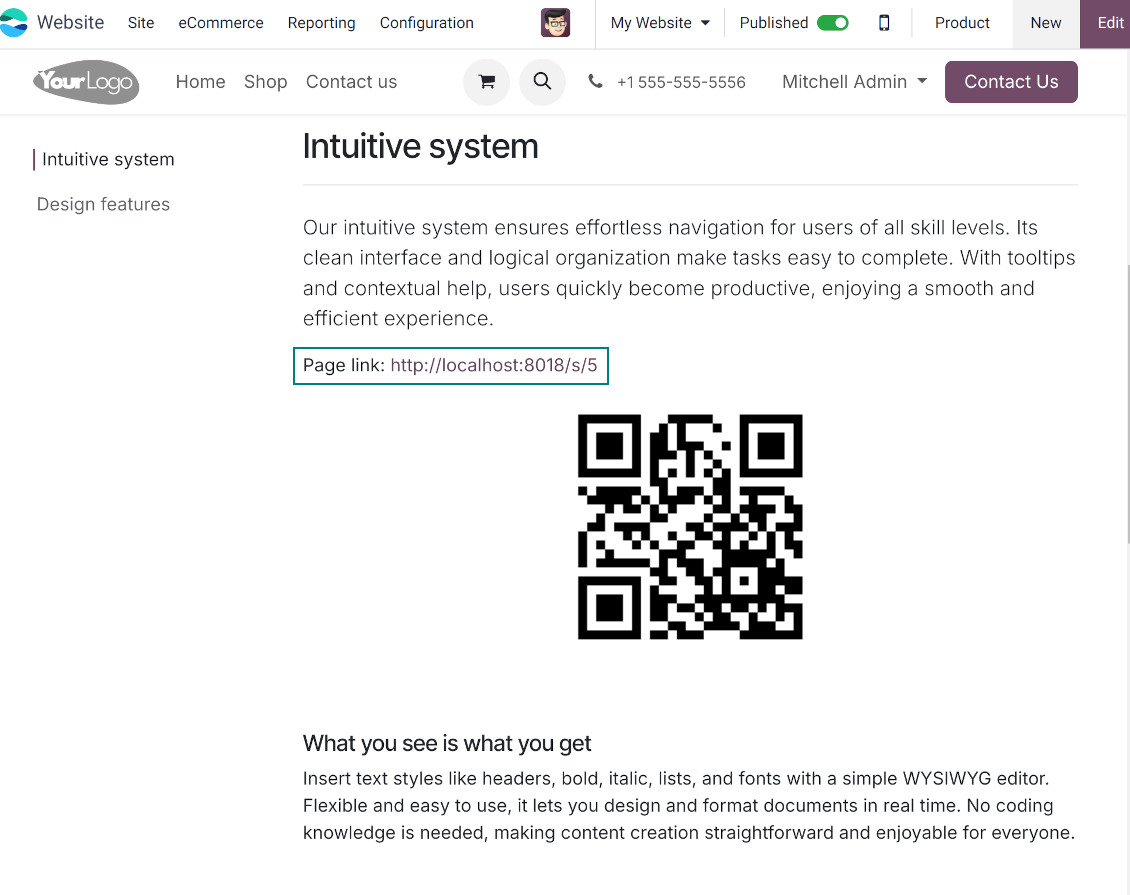
The snippet 'Short URL QR Code' adds a QR code image that you may customize using the standard Odoo website designer tools
-
Each time a page with such a snippet is opened, a short URL will be searched and - if not found - created. In this way, you may show a visitor a valid short URL or its QR code, which he/she might copy, share, and scan
-
Take into account: the snippets search only for always valid global short URLs.
Veelgestelde vragen over Website URL Shortener Odoo v.18
Wat is het updatebeleid van uw tools?
Volgens het huidige beleid van de Odoo Apps Store:
- Elke module gekocht voor versie 12.0 of eerder geeft toegang tot alle versies tot 12.0.
- Vanaf versie 13.0 moet elke moduleversie apart worden gekocht.
- Ongeacht de versie geeft aankoop recht op alle updates en bugfixes binnen een hoofdversie.
Het faOtools-team bepaalt dit beleid niet. Neem voor vragen rechtstreeks contact op met vertegenwoordigers van de Odoo Apps Store.
Hoe installeer ik uw app op Odoo.sh?
De meest directe aanpak is de ingebouwde workflow van de Odoo-store:
1. Open de modulepagina en klik op Deploy on odoo.sh
2. U gaat naar GitHub. Log in en klik op Create a new repo of gebruik een bestaande. De repository moet privé zijn. Apps onder OPL-1 mogen niet openbaar. Maak zo nodig een nieuwe repo voor het Odoo.sh-project
3. Ga daarna naar odoo.sh, klik op Deploy, bevestig en klik op Continue. De installatie start.
Zo installeert u de app op de productiebranch. Voor andere branches of een update:
1. Download de broncode uit de Odoo-store
2. Commit de module naar de GitHub-repository. Geen app-mappen/bestanden in .gitignore. Repo's van odoo.sh negeren soms belangrijke paden (bijv. /lib). Upload alle modulemappen en -bestanden
3. Deploy de doelbranch van het odoo.sh-project of wacht op de automatische build.
Hoe installeer ik uw app op mijn eigen server?
2. Herstart de Odoo-server;
3. Zet de ontwikkelaarsmodus aan (technische instellingen);
4. Werk de applijst bij (Apps-menu);
5. Zoek de app en klik op Activate/Install;
6. Volg de richtlijnen op de app-pagina als die er zijn.
Uw app heeft extra add-ons. Kan ik die later kopen?
Ja. Odoo zet automatisch alle afhankelijkheden in de winkelwagen: sluit eerder gekochte tools uit om dubbel betalen te voorkomen.
Ik heb uw app op Odoo.sh gezet en zie een waarschuwing/fout in de tests
Een rode/oranje waarschuwing beinvloedt de functies van de app niet. Soms halen onze modules de standaard automatische tests niet, omdat die gedrag verwachten dat indruist tegen het doel van de app. We wijzigen bijvoorbeeld de prijscalculatie, terwijl de Odoo-tests de eindprijs met het standaardalgoritme vergelijken.
Controleer eerst de functies van de gedeployde database. Werkt alles?
Als u toch denkt dat de waarschuwing echte functies raakt, neem contact op en stuur de volledige installatielogs en de volledige lijst gedeployde modules (kern en derden).
Kan ik uw app rechtstreeks bij u kopen?
Nee, we verspreiden de tools alleen via de officiele Odoo-appwinkel.
Ik wil graag korting
Helaas hebben we geen technische mogelijkheid voor individuele prijzen.
Kan ik de app installeren op mijn Odoo Online (SaaS)-database?
Nee, apps van derden kunnen niet op Odoo Online. Odoo SaaS blokkeert die mogelijkheid.
Uw tool hangt van andere apps af. Moet ik die kopen?
Ja, de tool heeft alle modules in de afhankelijkheden nodig. De prijs op de app-pagina is inclusief die afhankelijkheden.
Wat is de prijs van de module in Amerikaanse dollars? Waarom is die veranderd?
De prijs van onze modules staat in euro. De Odoo-store rekent om volgens de interne wisselkoers. De prijs in Amerikaanse dollars kan dus wijzigen als die koers wordt bijgewerkt.
De teksten van de app en website in andere talen dan het Engels zijn met AI ondersteund en afgestemd op de officiële Odoo-vertalingen. Als u een fout ziet, een vertaalticket sturen en we corrigeren het.
Odoo-demodatabases (voorbeelden)
Voor deze app kunnen we een gratis gepersonaliseerde demodatabase aanbieden.
U heeft geen telefoonnummer of creditcard nodig om contact met ons op te nemen. U hoeft slechts een korte e-mailaanmelding door te geven, die niet langer dan 30 seconden duurt.
Op verzoek richten wij een eigen voorbeelddatabase in waarin u ongeveer twee weken lang naar wens kunt testen en aannames kunt controleren.
Fouten melden
Als u bugs of inconsistent gedrag tegenkomt, aarzel dan niet om contact met ons op te nemen. We garanderen dat we binnen 60 dagen na aankoop oplossingen bieden en zijn zeer geïnteresseerd in het verbeteren van onze tools, zelfs na deze periode.
U heeft geen telefoonnummer of creditcard nodig om contact met ons op te nemen. U hoeft slechts een korte e-mailaanmelding door te geven, die niet langer dan 30 seconden duurt.
Vermeld zo veel mogelijk details in uw verzoek: schermafbeeldingen, Odoo-serverlogboeken, een volledige beschrijving om uw probleem te reproduceren enzovoort. Gewoonlijk kost het enkele werkdagen om een werkplan voor een probleem op te stellen (als een bug is bevestigd) of u richtlijnen te geven over wat er moet gebeuren (anders).
Aanvragen voor openbare functies en module-ideeën (gratis ontwikkeling)
We zijn sterk gemotiveerd om onze tools te verbeteren en zijn dankbaar voor alle feedback. Als uw vereisten van openbaar nut zijn en efficiënt kunnen worden geïmplementeerd, zal het team deze opnemen in onze takenlijst.
Zo'n to-dolijst wordt regelmatig verwerkt en er zijn geen extra kosten aan verbonden. Hoewel we geen deadlines en definitief ontwerp kunnen beloven, kan het een goede manier zijn om de gewenste functies te verkrijgen zonder investeringen en risico's.
U heeft geen telefoonnummer of creditcard nodig om contact met ons op te nemen. U hoeft slechts een korte e-mailaanmelding door te geven, die niet langer dan 30 seconden duurt.
18.0.1.0.12
- Enhance URL redirection with X-Robots-Tag header for SEO protection.
18.0.1.0.11
- De website-korte-URL-widget is opgelost.
18.0.1.0.10
- Het programmatisch genereren van links is geoptimaliseerd.
18.0.1.0.9
- Geselecteerde datums in niet-Latijnse formaten zijn opgelost.
18.0.1.0.7
- De ontbrekende hash van de doel-URL is opgelost.
18.0.1.0.7
- De app is gepubliceerd voor versie 18.
17.0.1.0.8
- De ontbrekende hash van de doel-URL is opgelost.

De tool om Odoo-bijlagen in mappen te structureren en te synchroniseren met Google Drive, OneDrive/SharePoint, Nextcloud/ownCloud, Dropbox, Amazon S3, Box en NAS. Bestandsbeheer. DMS
398€
The tool to automatically synchronize Odoo attachments with OneDrive files in both ways
487€
The tool to automatically synchronize Odoo attachments with Google Drive files in both ways
487€

The tool to build a deep and structured knowledge base for internal and external use. Knowledge System. KMS. Wiki-like revisions.
398€
The tool to set up KPI targets and control their fulfillment by periods. KPI dashboards. Dashboard designer. KPI charts

The tool for time-based service management from booking appointments to sales and reviews
398€
The tool to manage your Odoo from your favorite AI chats through MCP. Claude. Any MCP-supporting AI.

The tool to translate URL addresses of Odoo website pages
38€