En bref
Security User Roles est une application Odoo 19 Outils extra. L'outil regroupe les utilisateurs en rôles et simplifie l'affectation des groupes. Gestion des accès. Maj en masse.
À mesure qu'une base Odoo grandit, l'accès utilisateur est plus dur à garder cohérent : chaque nouvelle app, service ou employé ajoute des groupes de sécurité à vérifier. Security User Roles permet aux administrateurs de gérer l'accès par rôle plutôt que de configurer chaque personne une à une. Définissez des rôles réutilisables, assignez-les aux utilisateurs en toute combinaison, et mettez à jour beaucoup d'utilisateurs en secondes quand politiques, équipes ou modules installés changent.
Idéal pour
Équipes en croissance
Pour les entreprises où nouveaux employés, services et apps rendent la configuration manuelle de l'accès lente et sujette aux erreurs.
Accès temporaires
Pour les remplacements de congés, employés intérimaires, projets courts et rôles saisonniers qui n'ont besoin d'accès que pour des périodes précises.
Bases Odoo multi-apps
Pour les administrateurs qui ont besoin d'une façon cohérente de gérer les groupes de sécurité des modules standard, tiers et personnalisés.
Prêt à évaluer ?
Commencez par une demande de démo gratuite ou achetez dans l'Odoo Apps Store.
Base de démonstration personnalisée gratuite. Aucun numéro de téléphone ni carte de crédit requis. Mises à jour gratuites à vie et support expert pendant la version majeure d'Odoo.
Pourquoi les équipes le choisissent
Les avantages clés avant d'entrer dans le détail
2 clics pour appliquer les droits
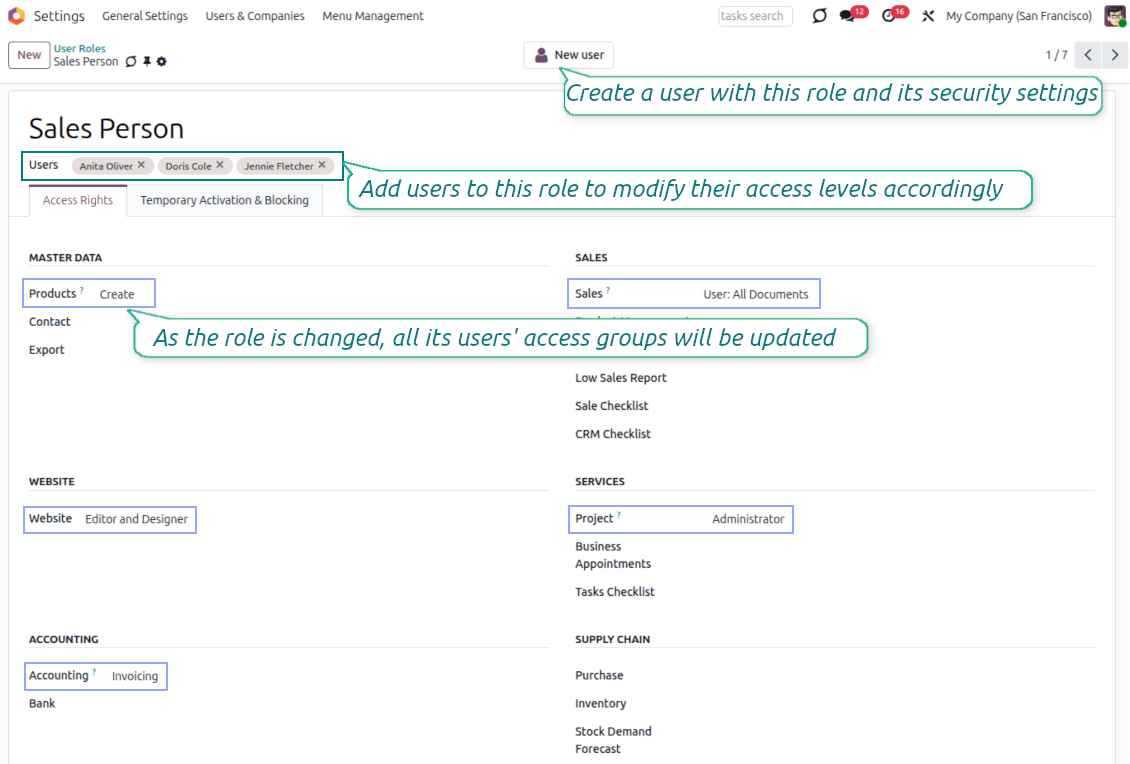
Assignez un rôle à un utilisateur et Odoo ajoute automatiquement les groupes de sécurité requis. Les administrateurs n'ont plus à mémoriser chaque case d'accès pour chaque employé.
Plusieurs rôles par utilisateur
Combinez les rôles pour refléter les vraies responsabilités : ventes, projets, comptabilité, support ou apps personnalisées. Les utilisateurs peuvent rester sans rôle si une configuration manuelle précise est nécessaire.
Sûr dans un environnement changeant
Mettez à jour un rôle de sécurité pour recalculer les droits de tous les utilisateurs liés. Il ne faut que quelques secondes pour refléter les changements de politique ou les apps nouvellement installées, avec bien moins d'erreurs d'accès.
Simple à démarrer
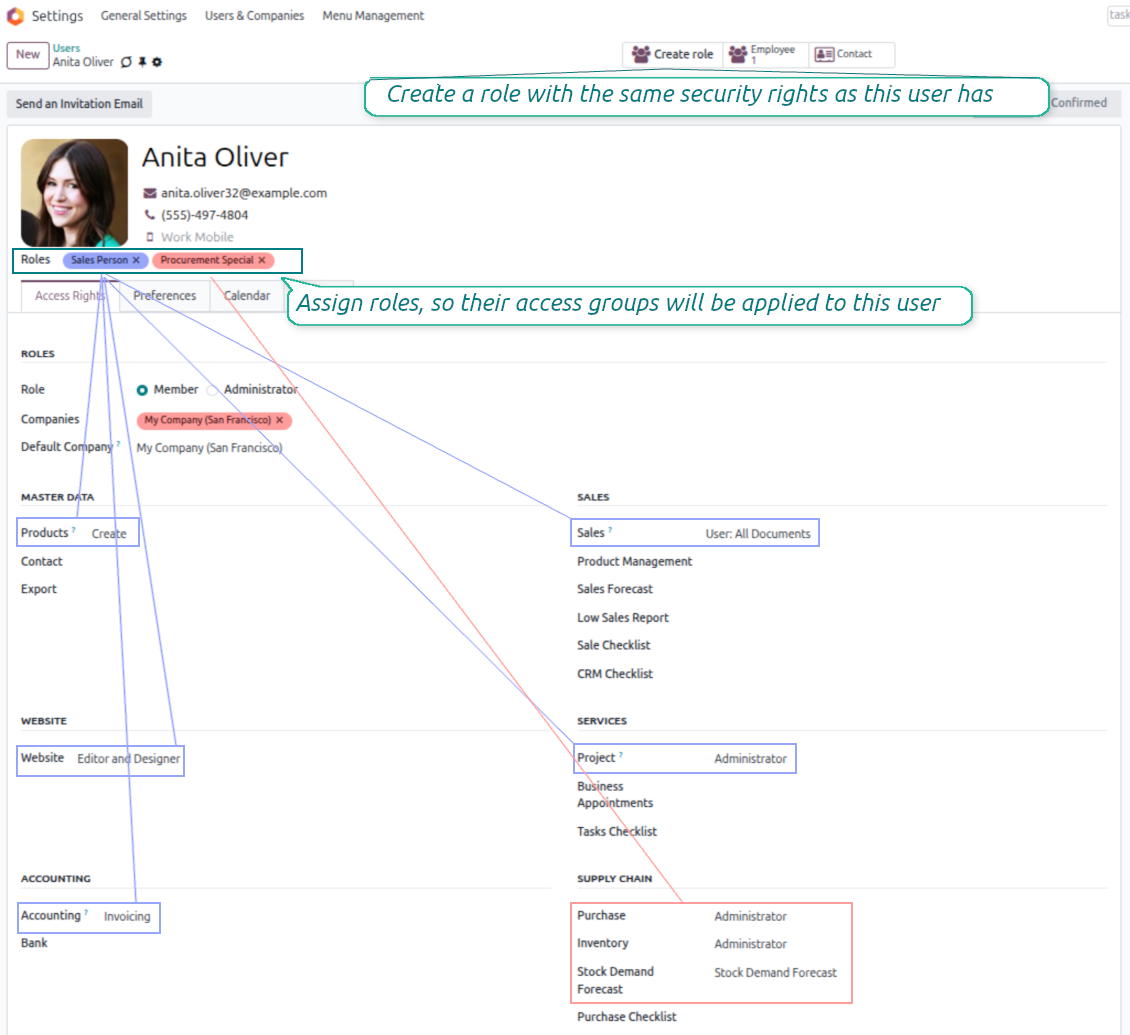
Gérez les rôles de sécurité avec la même logique que les utilisateurs Odoo standard. Construisez un rôle à partir d'un utilisateur existant, ou créez un nouvel utilisateur directement depuis un rôle préparé.
Mises à jour dynamiques
Configurez des règles qui ajoutent ou retirent temporairement des utilisateurs des rôles. Accordez à un remplaçant un accès de courte durée ou bloquez un rôle pendant les congés sans suivi manuel.
Tous les groupes d'accès modules
Utilisez les rôles avec les groupes de sécurité des apps Odoo standard, des modules tiers et des développements personnalisés. La logique d'accès reste familière aux administrateurs Odoo.
Avis de l'Odoo Apps Store
Ce que les clients disent de l'application
Very powerful but simple
Provides excellent usability for a complicated topic.
Lars Weiler
Blocage et activation temporaires
Planifiez un accès rôle de courte durée
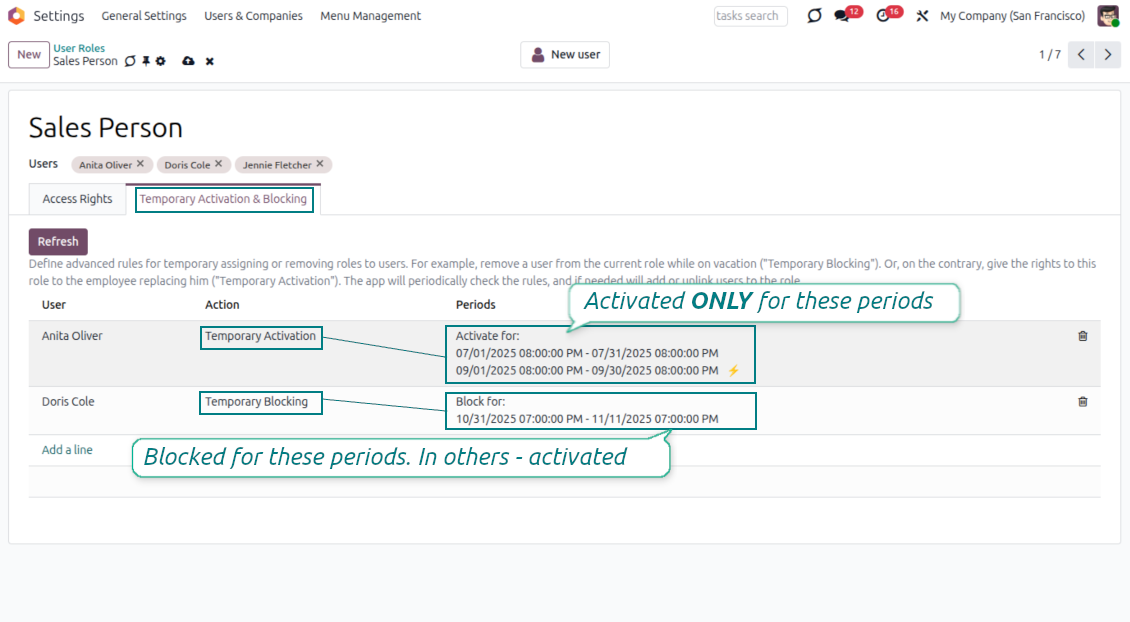
- Définissez des règles avancées pour assigner temporairement un utilisateur à un rôle, ou retirer ce rôle pour une période planifiée.
- Ajoutez la règle depuis l'onglet Temporary Activation and Blocking du formulaire de rôle.
- Gardez une règle par utilisateur et rôle, puis ajoutez autant de périodes que cette règle nécessite.
Activez ou bloquez automatiquement
- Utilisez des périodes de blocage pour les congés : l'utilisateur perd le rôle seulement pendant ces intervalles et le retrouve ensuite.
- Utilisez des périodes d'activation pour remplaçants, employés temporaires ou projets courts qui n'ont besoin d'accès que dans une fenêtre définie.
- Le job planifié [Security User Roles] Activate/Block Users for Roles vérifie les périodes automatiquement ; un rôle peut aussi être rafraîchi manuellement.
Prêt à évaluer ?
Commencez par une demande de démo gratuite ou achetez dans l'Odoo Apps Store.
Base de démonstration personnalisée gratuite. Aucun numéro de téléphone ni carte de crédit requis. Mises à jour gratuites à vie et support expert pendant la version majeure d'Odoo.
Rôles depuis de vrais utilisateurs
Transformez une configuration d'accès existante en modèle de sécurité réutilisable
Partez d'un utilisateur existant
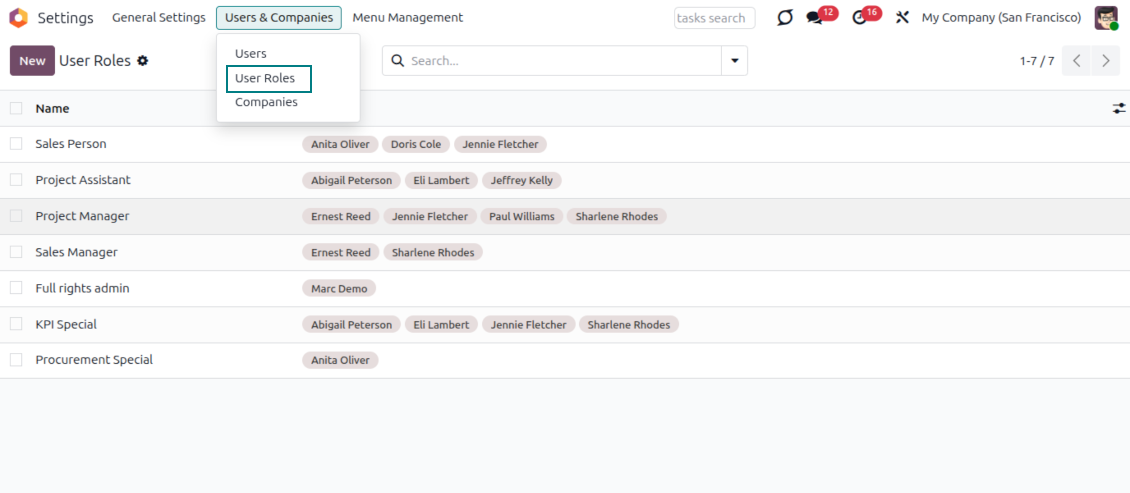
- Ouvrez un utilisateur configuré et cliquez sur Create Rôle pour préparer un rôle avec les mêmes groupes d'accès.
- Ajustez le rôle avant d'enregistrer, sans modifier l'utilisateur d'origine utilisé comme modèle.
Créez des utilisateurs depuis des rôles préparés
- Créez un nouvel utilisateur directement depuis un rôle de sécurité, avec groupes et rôle déjà préremplis.
- Configurez l'accès du rôle via l'interface familière des droits utilisateur Odoo, pour que les administrateurs n'apprennent pas un modèle de sécurité séparé.
Contrôle multi-rôles d'un coup d'œil
Combinez les droits par rôle et gardez les affectations utilisateur-rôle visibles
Combinez les rôles sans conflits
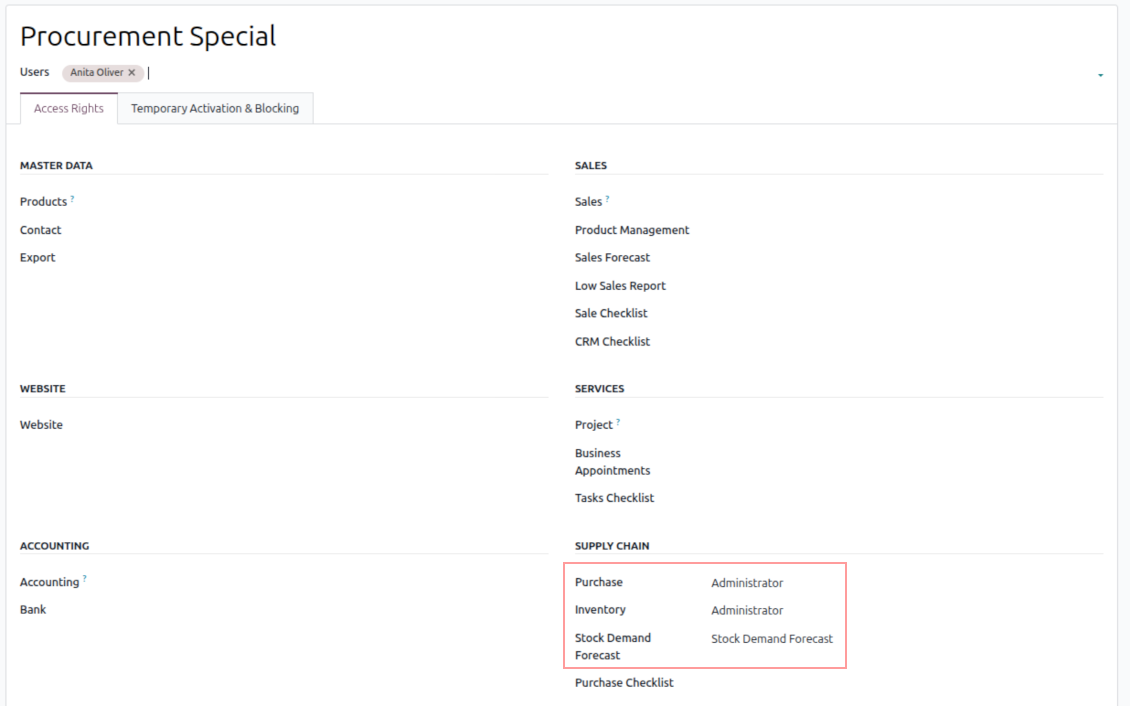
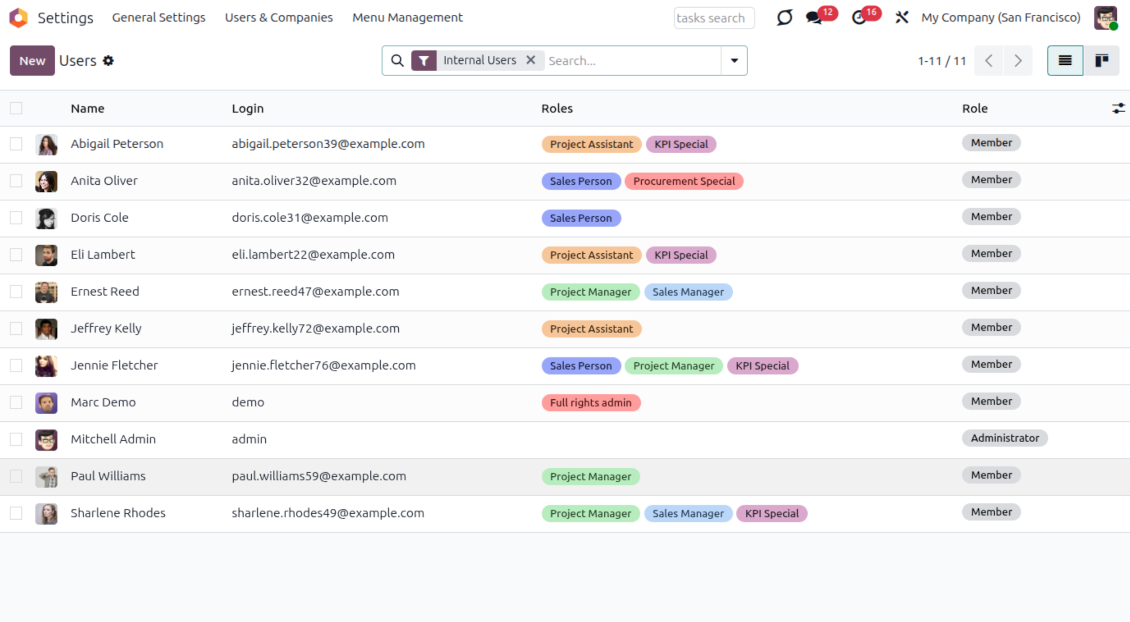
- Assignez plusieurs rôles au même utilisateur lorsqu'un poste combine plusieurs responsabilités.
- Quand les rôles touchent la même zone d'accès, Odoo applique le droit le plus élevé disponible et recalcule automatiquement les groupes de l'utilisateur.
Voir les rôles sur les utilisateurs
- Le kanban Utilisateurs affiche les rôles assignés, pour que les administrateurs comprennent plus vite les sources d'accès.
- Les couleurs de rôle peuvent mettre en avant des affectations importantes, ou être masquées du kanban lorsqu'un rôle doit rester visuellement discret.
Questions fréquentes sur Security User Roles Odoo v.19
Comment forcer la réception des notifications dans Odoo ?
Pour forcer les notifications dans Odoo, activez "Receive notifications in Odoo" en mode developpeur a la création ou l'édition d'un rôle. A l'assignation du rôle, les paramètres de l'utilisateur s'adaptent.
Pourquoi les utilisateurs reçoivent-ils toujours les notifications dans Odoo ?
Les utilisateurs reçoivent toujours les notifications dans Odoo si, dans l'un des rôles assignés, le paramètre "Receive notifications in Odoo" est active. Vous le voyez et le gérez en mode developpeur a la création ou l'édition d'un rôle.
Et si l'utilisateur n'a aucun rôle ?
Sans rôle, Odoo fonctionne comme si l'application n'était pas installée : vous assignez les groupes vous-même. Cela convient a des utilisateurs spéciaux, par exemple les administrateurs Odoo.
Que se passe-t-il si plusieurs rôles sont assignés a un utilisateur ?
Si plusieurs rôles sont assignés, tous leurs groupes de sécurité s'appliquent. Exemple : le rôle 'Dev/Helpdesk' a 'Show SLA Policies' et 'Use Subtasks', le rôle 'Sales Assistant' a 'Advanced Pricelists' : l'utilisateur aura les trois droits.
Comment ajouter un nouveau groupe/droit a plusieurs utilisateurs ?
Deux actions suffisent :
1. Créez un rôle avec le groupe/niveau voulu, ou ajoutez-les a un rôle existant.
2. Ajoutez le rôle aux utilisateurs cibles.
Ensuite, l'ajout ou le retrait d'un droit s'applique a tous les utilisateurs du rôle.
Si vous ajoutez ce rôle a un nouvel utilisateur, tous les groupes du rôle lui sont ajoutes.
Que se passe-t-il si je change les rôles après avoir ajoute un groupe ?
Si l'utilisateur a des rôles, un groupe ajoute a la main n'est pas retire tout de suite. Il le sera quand vous ajoutez/retirez des rôles ou changez leurs groupes. Donc n'ajoutez jamais de groupes manuellement si l'utilisateur a des rôles. L'application suppose qu'il n'a que les groupes de ses rôles.
Quelles sont les politiques de mise a jour de vos outils ?
Selon les politiques actuelles de l'Odoo Apps Store :
- Chaque module achète pour la version 12.0 et anterieure donne accès a toutes les versions jusqu'a 12.0.
- A partir de la version 13.0, chaque version du module doit être achetee séparément.
- Quel que soit le numéro, l'achat donne droit a toutes les mises a jour et corrections au sein d'une version majeure.
L'équipe faOtools ne contrôle pas ces politiques. Pour toute question, contactez directement les representants de l'Odoo Apps Store.
Comment installer votre application sur Odoo.sh ?
L'approche la plus directe est le flux integre de la boutique Odoo :
1. Ouvrez la page du module et cliquez sur Deploy on odoo.sh
2. Vous êtes redirige vers GitHub. Connectez-vous, puis cliquez sur Create a new repo ou utilisez un depot existant. Le depot doit être privé. Il est interdit de publier les applications sous licence OPL-1. Créez un nouveau depot pour le projet Odoo.sh si besoin
3. Ensuite, dans odoo.sh, cliquez sur Deploy, confirmez et cliquez sur Continue. L'installation demarre.
Ces étapes installent l'application sur la branche de production. Pour d'autres branches ou une mise a jour :
1. Téléchargez le code source depuis la boutique Odoo
2. Commitez le module dans le depot GitHub requis. Aucun dossier/fichier de l'app ne doit être ignore (.gitignore). Les depots créés par odoo.sh ignorent parfois des chemins importants (par ex. /lib). Envoyez tous les répertoires et fichiers du module
3. Deployez la branche cible du projet odoo.sh, ou attendez la construction automatique si vos paramètres le prévoient.
Comment installer votre application sur mon propre serveur ?
2. Redémarrez le serveur Odoo;
3. Activez le mode developpeur (paramètres techniques);
4. Mettez a jour la liste des applications (menu Applications);
5. Trouvez l'application et cliquez sur Activate/Install;
6. Suivez les consignes de la page de l'application s'il y en a.
Votre application a des modules complémentaires. Puis-je les acheter plus tard ?
Oui. Odoo ajoute automatiquement toutes les dépendances au panier : excluez les outils déjà achetes pour éviter un double paiement.
J'ai deploye votre application sur Odoo.sh et je vois un avertissement/erreur dans les tests
Un avertissement rouge/orange n'affecte pas les fonctions de l'application. Parfois nos modules échouent aux tests automatiques standard, car ceux-ci attendent un comportement contraire aux objectifs de l'app. Par exemple, nous changeons le calcul du prix alors que les tests Odoo comparent le prix final a l'algorithme standard.
Vérifiez d'abord les fonctions de la base deployee. Tout fonctionne-t-il ?
Si vous pensez encore que l'avertissement affecte les fonctions réelles, contactez-nous avec les journaux d'installation complets et la liste complète des modules deployes (coeur et tiers).
Puis-je acheter votre application directement auprès de vous ?
Non, nous distribuons les outils uniquement via le magasin officiel d'applications Odoo.
Je souhaiterais une reduction
Malheureusement, nous n'avons pas les moyens techniques de proposer des prix individuels.
Puis-je installer l'application sur ma base Odoo Online (SaaS) ?
Non, les applications tierces ne peuvent pas être utilisées sur Odoo Online. Odoo SaaS bloque cette possibilite.
Votre outil dépend d'autres applications. Dois-je les acheter ?
Oui, l'outil a besoin de tous les modules indiques en dépendances. Le prix affiche sur la page inclut déjà ces dépendances.
Quel est le prix du module en dollars US ? Pourquoi a-t-il change ?
Le prix de nos modules est fixe en euros. La boutique Odoo convertit les prix selon son taux de change interne. Le prix en dollars US peut donc changer lorsque ce taux est mis a jour.
Les textes de l'application et du site web dans des langues autres que l'anglais sont assistés par l'IA et alignés sur les traductions officielles d'Odoo. Si vous remarquez une erreur, envoyer un ticket de traduction et nous le corrigerons.
Bases de démonstration Odoo (aperçus)
Pour cette application, nous pouvons fournir une base de données de démonstration personnalisée gratuite.
Vous n'avez pas besoin d'un numéro de téléphone ou d'une carte de crédit pour nous contacter. Vous ne devez passer qu'une courte inscription par e-mail, qui ne prend pas plus de 30 secondes.
Sur demande, nous préparons une base d'aperçu individuelle où vous pouvez effectuer tous vos tests et vérifier vos hypothèses pendant environ deux semaines.
Signalement de bogues
Si vous rencontrez des bugs ou des comportements incohérents, n'hésitez pas à nous contacter. Nous garantissons de fournir des correctifs dans les 60 jours suivant l'achat et sommes extrêmement intéressés par l'amélioration de nos outils même après cette période.
Vous n'avez pas besoin d'un numéro de téléphone ou d'une carte de crédit pour nous contacter. Vous ne devez passer qu'une courte inscription par e-mail, qui ne prend pas plus de 30 secondes.
Veuillez inclure autant de détails que possible dans votre demande : captures d'écran, journaux du serveur Odoo, description complète de la procedure de reproduction du probleme, etc. Il faut generalement quelques jours ouvrables pour preparer un plan d'action concernant un probleme (si un bogue est confirmé) ou vous fournir des recommandations sur la marche a suivre (dans le cas contraire).
Demandes de fonctionnalités publiques et idées de modules (développement gratuit)
Nous sommes fortement motivés pour améliorer nos outils et serions reconnaissants pour tout retour. Si vos exigences sont d'utilité publique et peuvent être mises en œuvre efficacement, l'équipe les inclura dans notre liste de tâches.
Une telle liste de tâches est traitée régulièrement et n'implique pas de frais supplémentaires. Bien que nous ne puissions pas promettre de délais ni de conception finale, cela pourrait être un bon moyen d'obtenir les fonctionnalités souhaitées sans investissements ni risques.
Vous n'avez pas besoin d'un numéro de téléphone ou d'une carte de crédit pour nous contacter. Vous ne devez passer qu'une courte inscription par e-mail, qui ne prend pas plus de 30 secondes.
19.0.1.1.12
- Les données de demonstration ne sont plus livrées dans le module public.
19.0.1.1.11
- Les traductions assistees par IA pour 25 langues ont ete introduites.
19.0.1.1.10
- Le probleme des tests invisible a ete corrige.
19.0.1.1.9
- L'option standard Odoo "Administrator" a ete prise en compte.
19.0.1.1.7
- L'application est publiee pour la version 19.
18.0.1.1.7
- Les avertissements non traduits sont corriges.
18.0.1.1.5
- Le ruban Archived est ajoute au formulaire des rôles utilisateur.
18.0.1.1.4
- L'application est publiee pour la version 18.
17.0.1.1.4
- Les utilisateurs gardent leurs préférences de notification après la mise a jour des rôles.
17.0.1.1.3
- La mise a jour des groupes selon les rôles capte les erreurs inattendues.
17.0.1.1.2
- L'app a sa propre page de configuration.
- On peut afficher les groupes techniques sur les formulaires de rôles sans mode developpeur.
17.0.1.0.5
- L'application est publiee pour la version 17.

L'outil pour classer les pièces jointes Odoo en dossiers et synchroniser avec Google Drive, OneDrive/SharePoint, Nextcloud/ownCloud, Dropbox, Amazon S3, Box et NAS. Gestionnaire de fichiers. DMS
398€
L'outil pour garder les mots de passe dans Odoo en usage partage. Coffres partages

L'outil pour construire une base de connaissances structurée, interne et externe. KMS. Révisions type wiki
398€
L'outil pour synchroniser les pièces jointes Odoo avec OneDrive dans les deux sens
487€
L'outil pour fixer des cibles KPI et controler leur atteinte par période. Tableaux de bord. Graphiques

L'outil pour gérer des services sur créneaux, de la réservation aux ventes et avis
398€
L'outil pour synchroniser les pièces jointes Odoo avec Google Drive dans les deux sens
487€
L'outil pour planifier, partager et controler les shifts en tableaux hebdomadaires. Planning
98€
L'app pour evaluer, scorer et classer clients et fournisseurs Odoo