En bref
Lost Messages Routing est une application Odoo 19 Discussions. L'outil pour s'assurer qu'aucun message entrant n'est perdu.
Lost Messages Routing veille à ce que les e-mails entrants ne disparaissent pas lorsque Odoo ne peut pas les rattacher à un fil de document. Les messages non routés sont collectés dans un menu Lost Messages dédié où des managers autorisés inspectent, recherchent, suppriment ou rattachent manuellement un ou plusieurs e-mails à l'enregistrement Odoo correct. Restreignez les modèles cibles, notifiez les responsables dès qu'un message est perdu, et laissez les administrateurs rerouter des messages Odoo ordinaires lorsqu'une conversation a été attachée au mauvais fil.
Idéal pour
Équipes ventes et support pilotées par e-mail
Idéal pour les équipes qui reçoivent les réponses clients via des adresses catchall et ont besoin que chaque demande, changement de devis, réclamation ou e-mail de suivi soit rattaché au bon document Odoo.
Sociétés qui rattrapent les échecs de routage mail
Idéal lorsque fetchmail, les alias catchall ou le rapprochement des réponses échouent parfois et que les managers ont besoin d'une file fiable pour revoir et router les messages avant que les clients n'attendent.
Administrateurs Odoo ayant besoin d'un routage contrôlé
Utile aux admins qui veulent des restrictions de modèles, un accès réservé aux managers, des règles de notification et l'option de rerouter des messages stockés lorsque les conversations atterrissent sur le mauvais fil.
Prêt à évaluer ?
Commencez par une demande de démo gratuite ou achetez dans l'Odoo Apps Store.
Base de démonstration personnalisée gratuite. Aucun numéro de téléphone ni carte de crédit requis. Mises à jour gratuites à vie et support expert pendant la version majeure d'Odoo.
Pourquoi les équipes le choisissent
Les avantages clés avant d'entrer dans le détail
Attraper les e-mails entrants perdus
Empêchez les échecs catchall et fetch de disparaître. Lorsque Odoo ne peut pas apparier un e-mail entrant à un fil, l'app le marque comme message perdu au lieu de le laisser passer inaperçu.
Une file claire à revoir
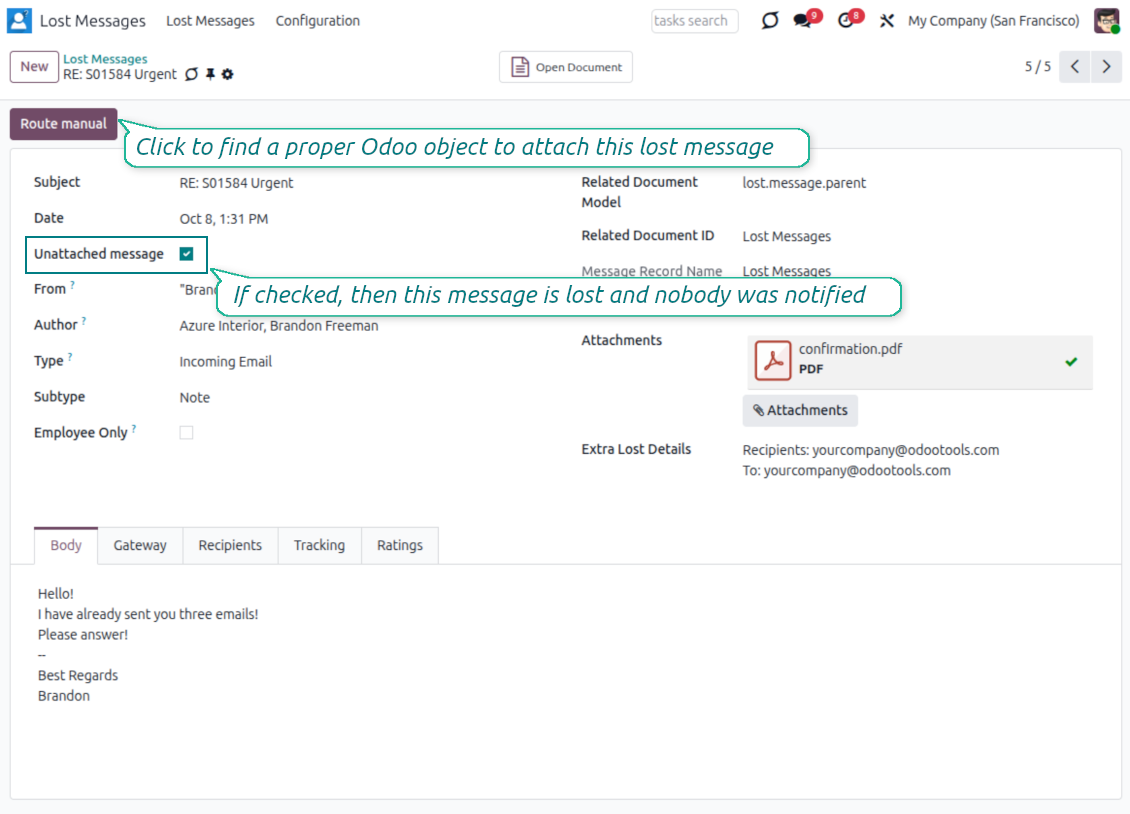
Offrez aux managers un espace de travail ciblé. Les messages non rattachés apparaissent dans le menu Lost Messages avec expéditeur, objet, date, corps et outils de recherche pour identifier la bonne destination.
Attacher les messages aux enregistrements
Routez chaque e-mail vers le fil Odoo approprié. Sélectionnez le modèle et l'enregistrement cibles, rattachez le message, et gardez la conversation client là où votre équipe l'attend.
Traiter les messages en masse
Nettoyez la file plus vite. Sélectionnez plusieurs messages perdus dans la liste et routez-les ensemble vers le même document Odoo via l'assistant d'action de masse.
Contrôler les destinations autorisées
Gardez le routage manuel discipliné. Restreignez le routage aux modèles mail-thread sélectionnés, ou laissez le paramètre vide lorsque les managers peuvent utiliser tout objet à fil accessible.
Notifier les bons utilisateurs
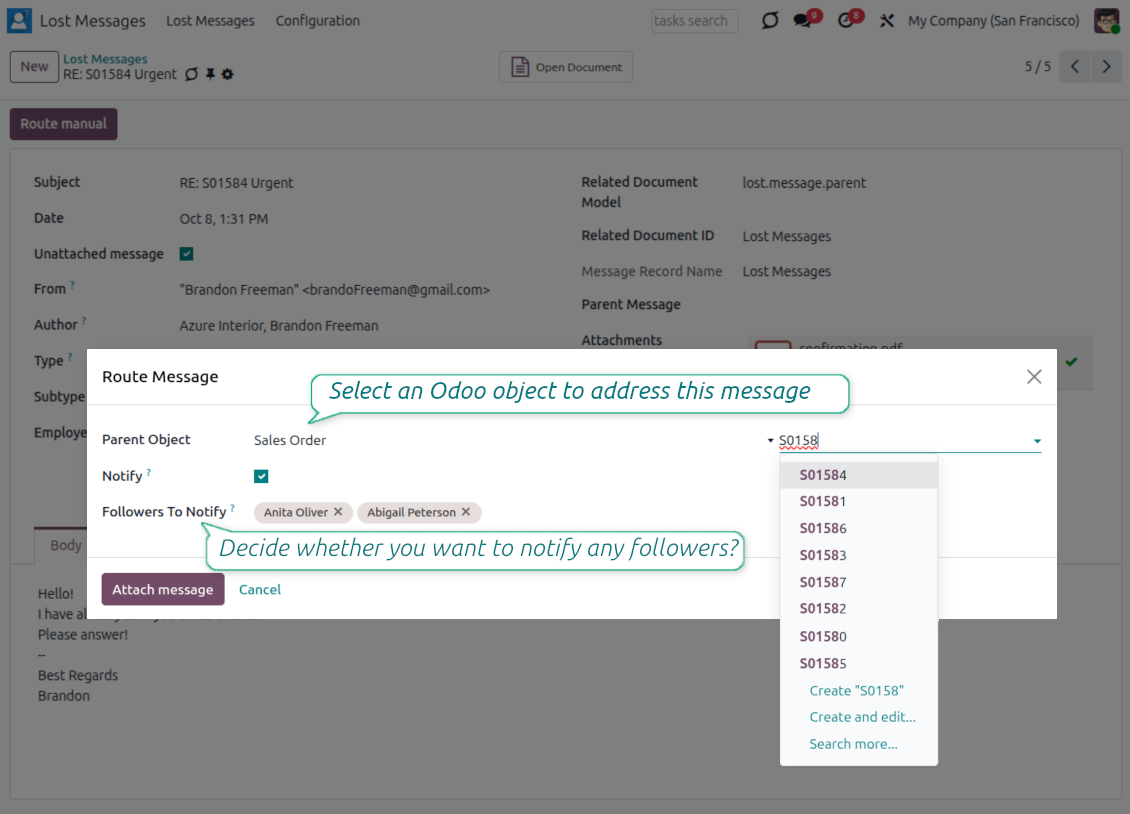
Réagissez avant que les clients n'attendent. Activez les notifications de message perdu et choisissez les utilisateurs internes qui doivent recevoir un e-mail dès qu'un nouveau message non rattaché apparaît.
Avis de l'Odoo Apps Store
Ce que les clients disent de l'application
Amazing App and fantastic support
I bought the addon for v10. At the beginnig the addon did not work well. Then I requested an improvement feature, they did it in just A FEW HOURS. I am very happy, the addon is working perfectly, is just what I was looking for. Very excelent support Thanks a lot Odoo Tools Team
Jesus Astuvilca
A must have
With the help of this app you will never lose any messages again. We are very happy with the functionality and also with the responsive and quick support! They take our ideas and wishes serious. This is the way it should! Thumbs up!
David Fuchs
Awesome app! MUST BUY if you use Odoo!!!
The app helped us alot. Some our customers send us an email and got lost in the process. with Lost messages routing the messages got stored and we can place the mail into the correct corresponding process. plus excellent support from Odoo Tools with adding a new feature to send an e-mail to selected users whenever a lost message is found. 10/10!!
Okan Hollander
It does his job
All previously lost messages are monitored and a convenient notification is received.
Josep Anton Belchi Riera
It works very well
It is very useful, it helps us to efficiently serve our customers.
Oriana Maita
Prêt à évaluer ?
Commencez par une demande de démo gratuite ou achetez dans l'Odoo Apps Store.
Base de démonstration personnalisée gratuite. Aucun numéro de téléphone ni carte de crédit requis. Mises à jour gratuites à vie et support expert pendant la version majeure d'Odoo.
Contrôler chaque message perdu
Un espace dédié pour les e-mails qu'Odoo n'a pas pu rattacher automatiquement
Une file pour les e-mails non rattachés
- Attrapez les échecs de routage. Les messages qu'Odoo ne peut pas apparier à un fil existant sont marqués comme perdus au lieu d'être ignorés.
- Utilisez un menu dédié. Les Lost Messages Managers ont un endroit clair pour revoir et nettoyer la file.
- Gardez les messages ordinaires séparés. Une fois routé, le message quitte la file perdue et reste disponible dans les messages Odoo.
Inspecter avant de router
- Relisez le corps du message. Ouvrez un e-mail perdu pour vérifier le contenu et comprendre à quel document client il appartient.
- Conservez Extra Lost Détails. L'app préserve les indices de routage techniques tels que Recipients, To, CC et In Reply To lorsque Odoo les fournit.
- Recherchez par champs utiles. Naviguez par contenu, objet et auteur pour trouver le message qui demande de l'attention.
- Traitez le spam délibérément. Supprimez les enregistrements hors sujet ou décochez simplement le drapeau non rattaché lorsqu'un message n'est pas vraiment perdu.
Router les e-mails vers le bon document
Attacher un message ou plusieurs messages au fil Odoo correct
Assistant de route manuelle
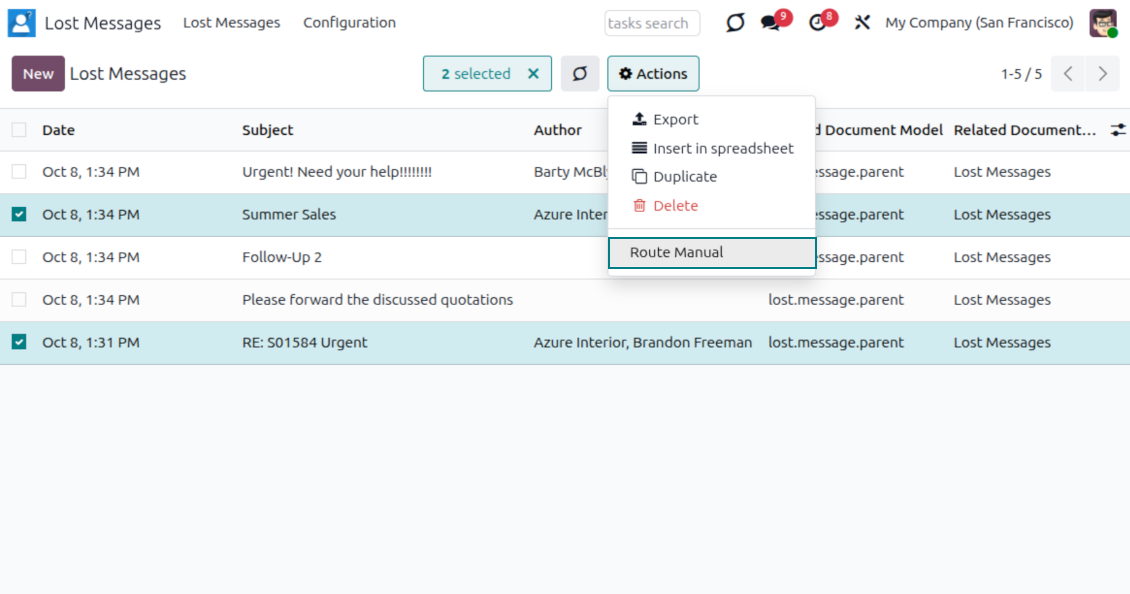
- Ouvrez Route Manual. Lancez l'assistant depuis un formulaire de message ou depuis l'action de masse de la liste.
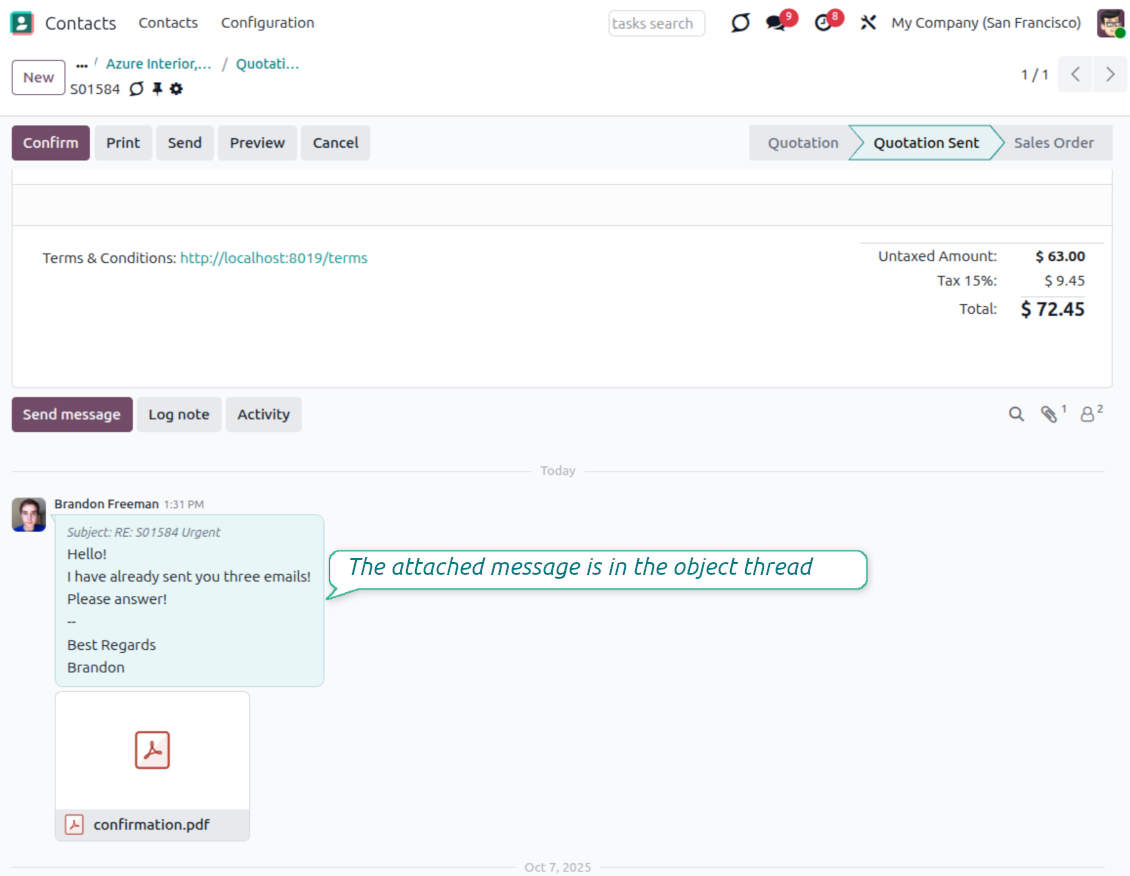
- Sélectionnez l'objet parent. Choisissez le modèle et l'enregistrement cibles, puis rattachez le message à ce fil de document.
- Récupérez la conversation. L'e-mail fait partie de l'historique de l'enregistrement sélectionné pour le suivi futur.
Routage groupé vers le même enregistrement
- Sélectionnez plusieurs messages. Routez un, plusieurs ou tous les messages perdus visibles depuis la vue liste.
- Attachez en une action. Ajoutez un lot d'e-mails liés au même commande client, piste, contact ou autre objet à fil.
- Gardez les pièces jointes avec le message. Les pièces jointes liées sont déplacées vers l'enregistrement sélectionné avec l'e-mail routé.
Restreindre où les messages peuvent être routés
Laisser les managers router seulement vers des modèles Odoo approuvés
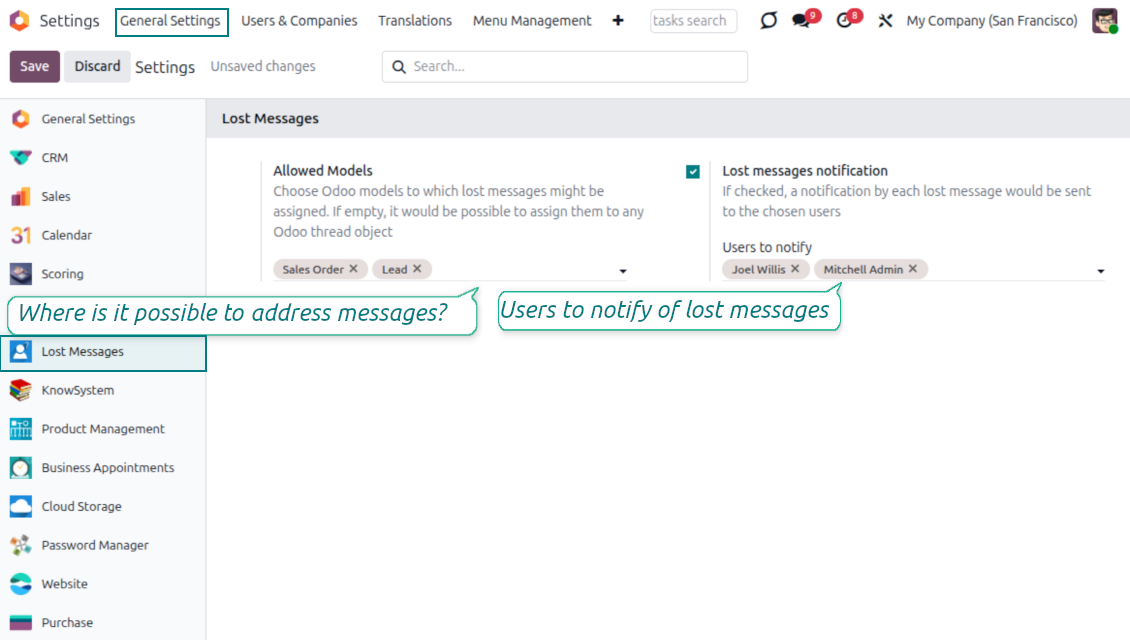
Paramètre Allowed Models
- Définissez les destinations de routage. Choisissez les modèles qui peuvent recevoir des messages routés manuellement.
- Soutenez de vrais flux métier. Utilisez des commandes client, opportunités, contacts ou tout modèle personnalisé avec une discussion Odoo.
- Restez flexible. Laissez la liste vide lorsque les responsables doivent pouvoir router vers tout objet accessible avec discussion.
Respecter l'accès aux objets
- Ne contournez pas les règles sur les enregistrements. L'utilisateur doit toujours avoir accès à l'objet cible pour qu'il apparaisse dans l'assistant.
- Réduisez les mauvais choix. Les responsables ne voient que les destinations autorisées pour le routage et visibles pour eux.
- Gardez l'administration simple. La configuration se trouve dans la zone de paramètres Lost Messages.
Prêt à évaluer ?
Commencez par une demande de démo gratuite ou achetez dans l'Odoo Apps Store.
Base de démonstration personnalisée gratuite. Aucun numéro de téléphone ni carte de crédit requis. Mises à jour gratuites à vie et support expert pendant la version majeure d'Odoo.
Soyez notifié dès qu'un message est perdu
Alertez les utilisateurs responsables avant qu'un e-mail sans réponse ne devienne un incident client
Alertes configurables
- Activez les notifications. Activez les alertes de messages perdus dans la configuration de l'app.
- Choisissez les destinataires. Sélectionnez les utilisateurs internes à alerter pour chaque nouveau message perdu.
- Passez à l'action. La notification oriente vers le message à router.
Contenu de notification utile
- Voyez le sujet. L'objet de l'e-mail indique quel message examiner.
- Lisez le corps. L'alerte inclut le contenu du message pour juger rapidement l'urgence.
- Ouvrir et router. Un lien direct mène le responsable au formulaire du message perdu pour l'étape suivante.
Administration sécurisée des messages perdus
Donnez les droits de routage uniquement aux personnes qui doivent gérer les e-mails non rattachés
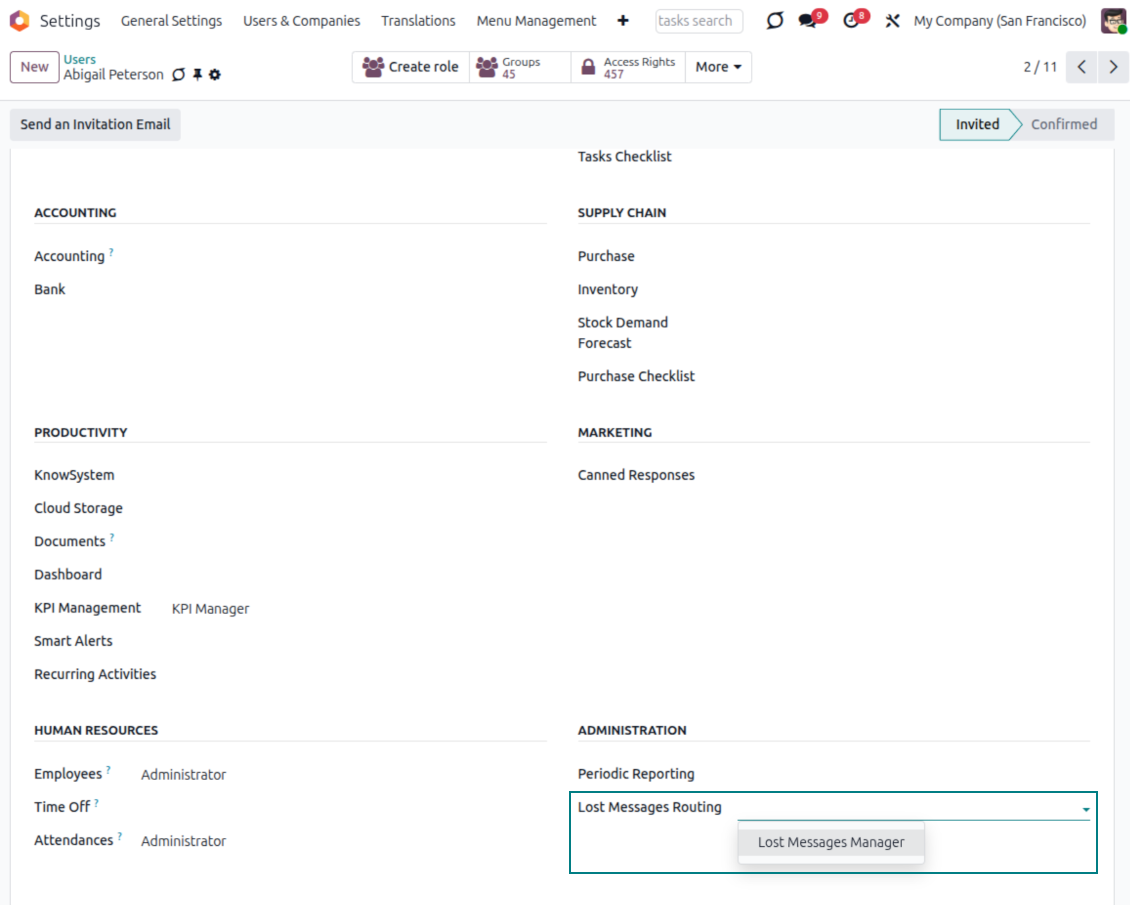
Groupe Lost Messages Manager
- Droit d'accès dédié. Seuls les utilisateurs du groupe Lost Messages Manager peuvent ouvrir et gérer le menu de l'app.
- Disponible sans mode développeur. Les responsables assignés ont un menu opérationnel normal pour le traitement quotidien.
- Assignez avec soin. Les responsables des messages perdus voient les e-mails non rattachés : limitez le groupe aux utilisateurs de confiance.
Les droits restent essentiels
- Les enregistrements cibles restent protégés. Un utilisateur ne peut pas router vers un document auquel il n'a pas accès.
- Les administrateurs gardent le contrôle technique. Ils peuvent aussi router depuis le menu technique Messages en mode développeur.
- Opérationnel et sûr. Les responsables du quotidien ont la file, tandis que les règles d'accès Odoo continuent de gouverner les enregistrements de destination.
Re-routez les messages lorsque les discussions changent
Déplacez au besoin les messages Odoo déjà stockés vers la bonne conversation
Pas seulement les messages perdus
- Routez aussi les messages ordinaires. Les administrateurs peuvent utiliser la même action de routage manuel depuis le menu technique Messages.
- Corrigez les mauvaises discussions. Déplacez un message s'il a d'abord été rattaché à la mauvaise commande, piste, contact ou autre document.
- Gardez l'historique utilisable. Placez le message existant là où le prochain utilisateur cherchera naturellement la conversation.
Utile pour les flux client complexes
- Plusieurs documents, un client. Corrigez les conversations lorsqu'un client a plusieurs enregistrements ouverts et qu'un e-mail arrive sur le mauvais.
- Le même assistant contrôlé. Les destinations disponibles suivent toujours les modèles configurés et les droits d'accès Odoo.
- Des enregistrements de communication plus clairs. Gardez un historique de messages utile aux équipes commerciales, support et administration.
Prêt à évaluer ?
Commencez par une demande de démo gratuite ou achetez dans l'Odoo Apps Store.
Base de démonstration personnalisée gratuite. Aucun numéro de téléphone ni carte de crédit requis. Mises à jour gratuites à vie et support expert pendant la version majeure d'Odoo.
Questions fréquentes sur Lost Messages Routing Odoo v.19
J'ai rattaché un message au mauvais fil. Comment le deplacer ?
Après le routage, le message rejoint les autres. Vous le trouvez dans le menu technique « Messages » et pouvez le rerouter vers le bon fil.
La liste des modèles de routage est trop longue. Peut-on n'en garder que ceux dont on a besoin ?
Vous définissez les modèles dans les paramètres : onglet 'Configuration', section 'Lost messages allowed models', indiquez les modèles et cliquez sur 'Save'. Ensuite, seuls ces modèles restent disponibles pour rattacher un message.
Peut-on router un message qui n'est pas perdu, mais rattaché au mauvais fil ?
Oui, tout message Odoo. En mode développeur, l'admin va dans Paramètres > Technique > Discussion > Messages ; sélectionné les messages, Action > Route Manual.
Quelles sont les politiques de mise a jour de vos outils ?
Selon les politiques actuelles de l'Odoo Apps Store :
- Chaque module achète pour la version 12.0 et anterieure donne accès a toutes les versions jusqu'a 12.0.
- A partir de la version 13.0, chaque version du module doit être achetee séparément.
- Quel que soit le numéro, l'achat donne droit a toutes les mises a jour et corrections au sein d'une version majeure.
L'équipe faOtools ne contrôle pas ces politiques. Pour toute question, contactez directement les representants de l'Odoo Apps Store.
Comment installer votre application sur Odoo.sh ?
L'approche la plus directe est le flux integre de la boutique Odoo :
1. Ouvrez la page du module et cliquez sur Deploy on odoo.sh
2. Vous êtes redirige vers GitHub. Connectez-vous, puis cliquez sur Create a new repo ou utilisez un depot existant. Le depot doit être privé. Il est interdit de publier les applications sous licence OPL-1. Créez un nouveau depot pour le projet Odoo.sh si besoin
3. Ensuite, dans odoo.sh, cliquez sur Deploy, confirmez et cliquez sur Continue. L'installation demarre.
Ces étapes installent l'application sur la branche de production. Pour d'autres branches ou une mise a jour :
1. Téléchargez le code source depuis la boutique Odoo
2. Commitez le module dans le depot GitHub requis. Aucun dossier/fichier de l'app ne doit être ignore (.gitignore). Les depots créés par odoo.sh ignorent parfois des chemins importants (par ex. /lib). Envoyez tous les répertoires et fichiers du module
3. Deployez la branche cible du projet odoo.sh, ou attendez la construction automatique si vos paramètres le prévoient.
Comment installer votre application sur mon propre serveur ?
2. Redémarrez le serveur Odoo;
3. Activez le mode développeur (paramètres techniques);
4. Mettez a jour la liste des applications (menu Applications);
5. Trouvez l'application et cliquez sur Activate/Install;
6. Suivez les consignes de la page de l'application s'il y en a.
Votre application a des modules complémentaires. Puis-je les acheter plus tard ?
Oui. Odoo ajoute automatiquement toutes les dépendances au panier : excluez les outils déjà achetes pour éviter un double paiement.
J'ai deploye votre application sur Odoo.sh et je vois un avertissement/erreur dans les tests
Un avertissement rouge/orange n'affecte pas les fonctions de l'application. Parfois nos modules échouent aux tests automatiques standard, car ceux-ci attendent un comportement contraire aux objectifs de l'app. Par exemple, nous changeons le calcul du prix alors que les tests Odoo comparent le prix final a l'algorithme standard.
Vérifiez d'abord les fonctions de la base deployee. Tout fonctionne-t-il ?
Si vous pensez encore que l'avertissement affecte les fonctions réelles, contactez-nous avec les journaux d'installation complets et la liste complète des modules deployes (coeur et tiers).
Puis-je acheter votre application directement auprès de vous ?
Non, nous distribuons les outils uniquement via le magasin officiel d'applications Odoo.
Je souhaiterais une reduction
Malheureusement, nous n'avons pas les moyens techniques de proposer des prix individuels.
Puis-je installer l'application sur ma base Odoo Online (SaaS) ?
Non, les applications tierces ne peuvent pas être utilisées sur Odoo Online. Odoo SaaS bloque cette possibilite.
Votre outil dépend d'autres applications. Dois-je les acheter ?
Oui, l'outil a besoin de tous les modules indiques en dépendances. Le prix affiche sur la page inclut déjà ces dépendances.
Quel est le prix du module en dollars US ? Pourquoi a-t-il change ?
Le prix de nos modules est fixe en euros. La boutique Odoo convertit les prix selon son taux de change interne. Le prix en dollars US peut donc changer lorsque ce taux est mis a jour.
Les textes de l'application et du site web dans des langues autres que l'anglais sont assistés par l'IA et alignés sur les traductions officielles d'Odoo. Si vous remarquez une erreur, envoyer un ticket de traduction et nous le corrigerons.
Bases de démonstration Odoo (aperçus)
Pour cette application, nous pouvons fournir une base de données de démonstration personnalisée gratuite.
Vous n'avez pas besoin d'un numéro de téléphone ou d'une carte de crédit pour nous contacter. Vous ne devez passer qu'une courte inscription par e-mail, qui ne prend pas plus de 30 secondes.
Sur demande, nous préparons une base d'aperçu individuelle où vous pouvez effectuer tous vos tests et vérifier vos hypothèses pendant environ deux semaines.
Signalement de bogues
Si vous rencontrez des bugs ou des comportements incohérents, n'hésitez pas à nous contacter. Nous garantissons de fournir des correctifs dans les 60 jours suivant l'achat et sommes extrêmement intéressés par l'amélioration de nos outils même après cette période.
Vous n'avez pas besoin d'un numéro de téléphone ou d'une carte de crédit pour nous contacter. Vous ne devez passer qu'une courte inscription par e-mail, qui ne prend pas plus de 30 secondes.
Veuillez inclure autant de détails que possible dans votre demande : captures d'écran, journaux du serveur Odoo, description complète de la procedure de reproduction du probleme, etc. Il faut generalement quelques jours ouvrables pour preparer un plan d'action concernant un probleme (si un bogue est confirmé) ou vous fournir des recommandations sur la marche a suivre (dans le cas contraire).
Demandes de fonctionnalités publiques et idées de modules (développement gratuit)
Nous sommes fortement motivés pour améliorer nos outils et serions reconnaissants pour tout retour. Si vos exigences sont d'utilité publique et peuvent être mises en œuvre efficacement, l'équipe les inclura dans notre liste de tâches.
Une telle liste de tâches est traitée régulièrement et n'implique pas de frais supplémentaires. Bien que nous ne puissions pas promettre de délais ni de conception finale, cela pourrait être un bon moyen d'obtenir les fonctionnalités souhaitées sans investissements ni risques.
Vous n'avez pas besoin d'un numéro de téléphone ou d'une carte de crédit pour nous contacter. Vous ne devez passer qu'une courte inscription par e-mail, qui ne prend pas plus de 30 secondes.
19.0.1.2.18
- Le probleme des e-mails entrants journalises en integralite au niveau INFO a ete corrige.
19.0.1.2.17
- Le probleme des notifications de rebond manquantes pour l'adresse catchall a ete corrige.
19.0.1.2.16
- Les traductions assistees par IA pour 25 langues ont ete introduites.
19.0.1.2.15
- Le scénario des emails bounce en faux positif a ete corrige.
19.0.1.2.14
- Le module sélectionné les documents par recherche avancée plutôt que par sélection simple.
19.0.1.2.13
- Le code a ete refondu pour distinguer messages ecartees et messages perdus.
- Les suivis des messages perdus sont aussi traités comme messages perdus.
19.0.1.2.12
- La fonction pour autoriser optionnellement la notification des abonnés internes a ete ajoutee.
19.0.1.2.11
- Les messages bounce ne créent plus a tort des messages perdus.
19.0.1.2.10
- Les modèles indisponibles pendant le routage ont ete corriges.
19.0.1.2.9
- Les contrôles de sécurité sont evites pendant le routage pour gagner en performance
19.0.1.2.8
- L'application est adaptee aux nouvelles exigences des tests "invisible".
19.0.1.2.7
- L'application est publiee pour la version 19.
18.0.1.2.7
- Les enregistrements inexistants issus de la recherche active_id sont corriges.
18.0.1.2.6
- L'application est publiee pour la version 18.
17.0.1.2.6
- Les détails "Recipients", "To", "CC" et "In Reply To" (s'il y en a) sont enregistrés dans "Extra Lost Détails".

L'outil pour classer les pièces jointes Odoo en dossiers et synchroniser avec Google Drive, OneDrive/SharePoint, Nextcloud/ownCloud, Dropbox, Amazon S3, Box et NAS. Gestionnaire de fichiers. DMS
398€
L'outil pour garder les mots de passe dans Odoo en usage partage. Coffres partages

L'outil pour construire une base de connaissances structurée, interne et externe. KMS. Révisions type wiki
398€
L'outil pour synchroniser les pièces jointes Odoo avec OneDrive dans les deux sens
487€
L'outil pour fixer des cibles KPI et controler leur atteinte par période. Tableaux de bord. Graphiques

L'outil pour gérer des services sur créneaux, de la réservation aux ventes et avis
398€
L'outil pour synchroniser les pièces jointes Odoo avec Google Drive dans les deux sens
487€

L'outil pour securiser et enrichir l'édition et la suppression des messages Odoo
28€