Kurz gesagt
Smart Alerts ist eine Odoo 19 Produktivitat App. Das Werkzeug lenkt den Blick auf wesentliche Dokumentdetails und Warnungen.
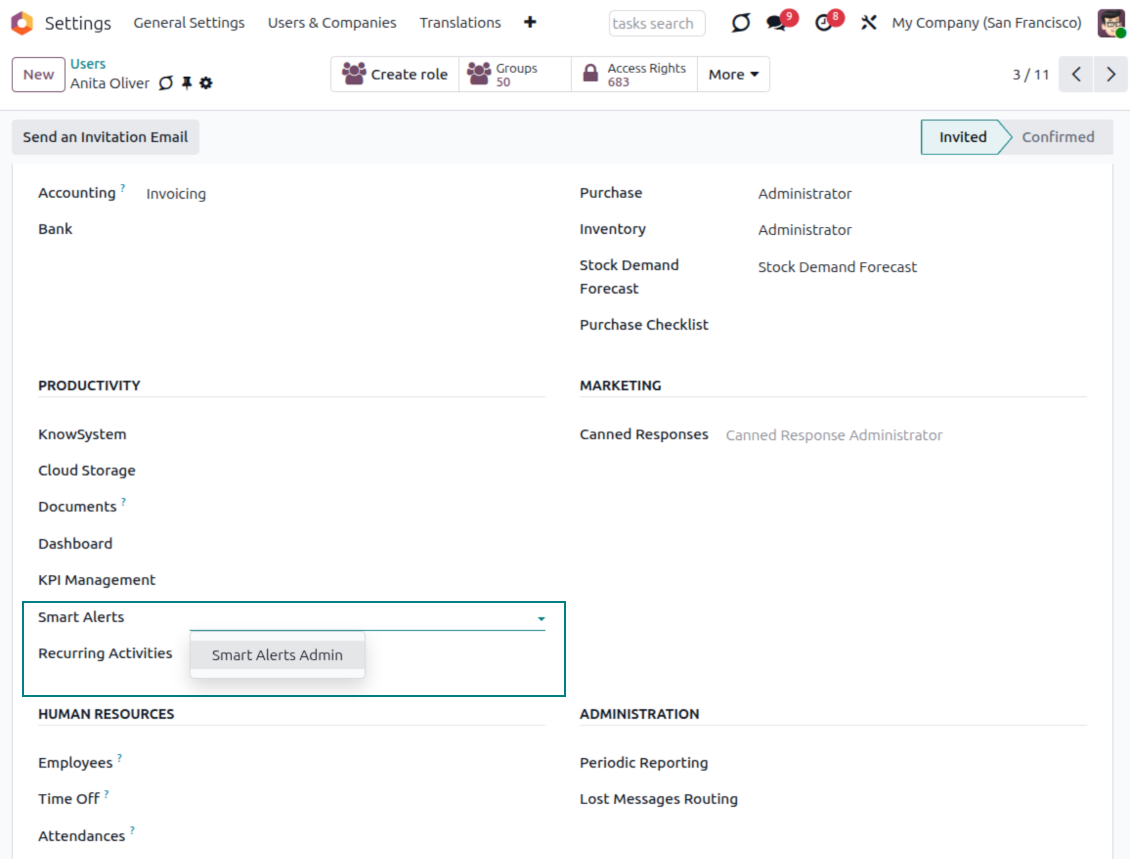
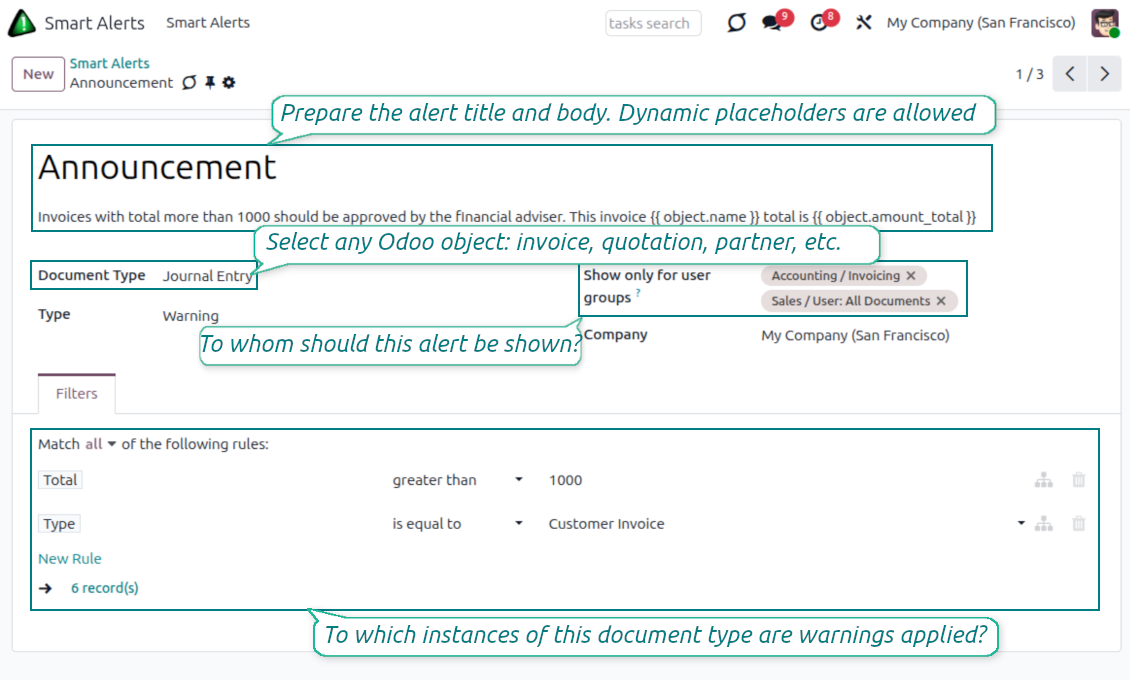
Smart Alerts setzt eine klare, auffällige Meldung ganz oben in jedes Odoo-Formular - genau dann, wenn es zählt: beim Öffnen, Speichern oder Wechseln von Dokumenten. Konfigurieren Sie unbegrenzt viele Alerts für jeden Dokumenttyp, zielen Sie mit Filtern, wählen Sie danger / warning / info / success und ziehen Sie Live-Werte per {{ placeholders }} aus dem Datensatz - alles ohne Entwicklung.
Ideal für
Teams, die nichts übersehen dürfen
Zeigen Sie ausgelaufene Produkte, Kreditsperren oder Freigabeschwellen direkt am Dokument, damit nichts Kritisches übersehen wird.
Prozess- und Compliance-Verantwortliche
Senden Sie interne Richtlinien und Erinnerungen an die richtigen Rollen - ohne jedes Formular anzupassen oder Code zu schreiben.
Admins, die No-Code-Alerts wollen
Bauen Sie gezielte, gestylte, datenbewusste Meldungen von einem Konfigurationsbildschirm - gefiltert, begrenzt und übersetzt.
Bereit zur Bewertung?
Starten Sie mit einer kostenlosen Demo-Anfrage oder kaufen Sie im Odoo Apps Store.
Kostenlose personalisierte Demo-Datenbank. Keine Telefonnummer oder Kreditkarte nötig. Lebenslange Updates und Experten-Support innerhalb der Odoo-Hauptversion.
Warum Teams es wählen
Die wichtigsten Vorteile der App
Alerts auf jedem Odoo-Dokument
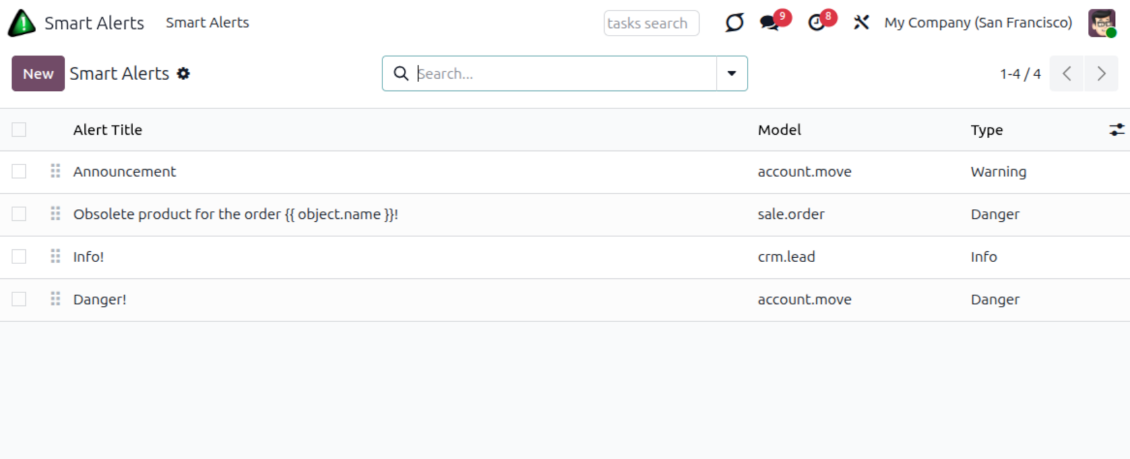
Erstellen Sie Alerts für jeden Dokumenttyp - Verkaufsaufträge, Rechnungen, Chancen, Kontakte, Kommissionierungen und mehr - unbegrenzt viele Alerts je Modell.
Allgemein oder präzise gezielt
Fügen Sie einen Filter auf jedes gespeicherte Feld hinzu, damit ein Alert nur dort erscheint, wo er soll - Angebote aber keine Aufträge, Rechnungen zwischen 500 und 1000, nur Lieferanten usw.
Unmöglich zu übersehen
Alerts sitzen oben im Formular und aktualisieren sich bei jedem Öffnen, Speichern oder Wechsel des Datensatzes - die Meldung steht immer vor dem Benutzer.
Vier Stile, reiche Formatierung
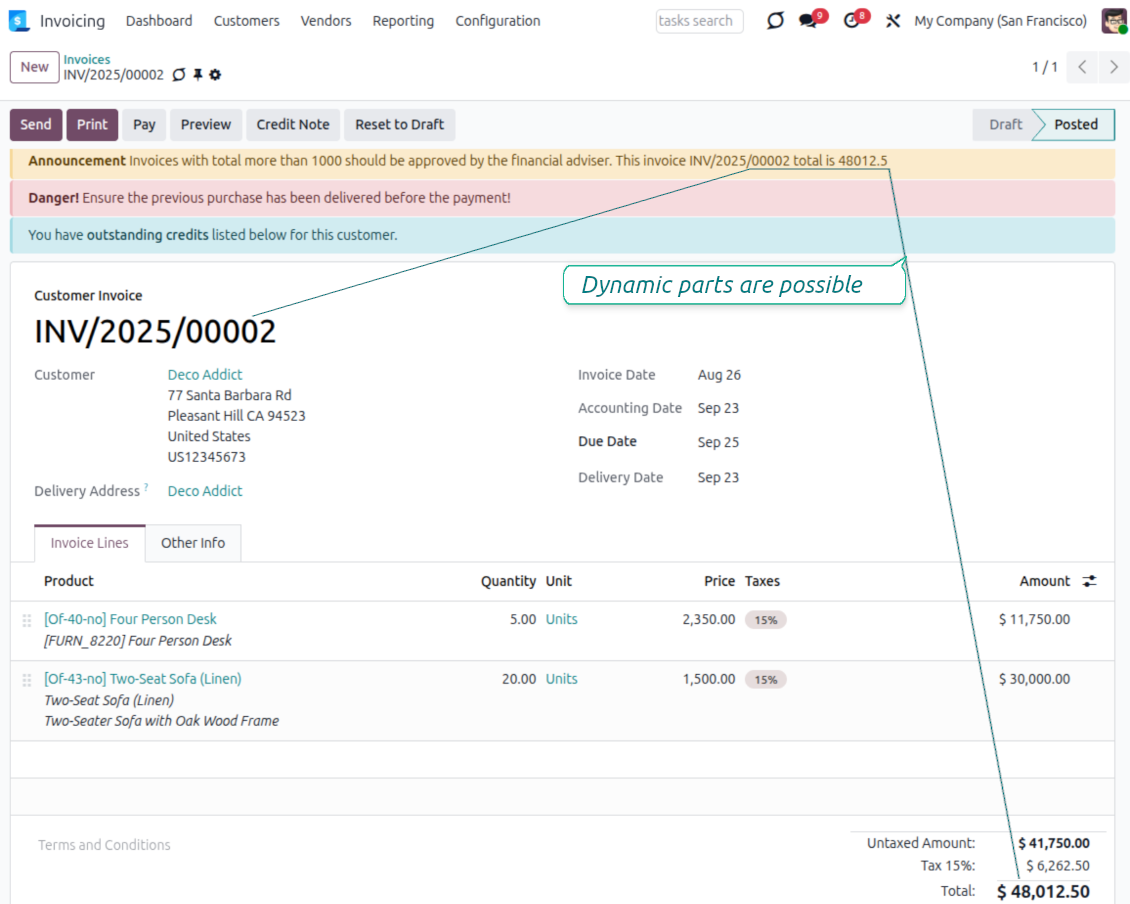
Wählen Sie danger-, warning-, info- oder success-Farben und nutzen Sie sicheres HTML in Titel und Text - fett, Links und FontAwesome-Icons.
Dynamischer, datensatzbewusster Text
Ziehen Sie Live-Werte aus dem Dokument mit derselben Platzhalter-Syntax wie Odoo-E-Mail-Vorlagen - z. B. {{ object.amount_total }}, um die Angebotssumme zu zeigen.
Abgegrenzt, mandantenfähig, übersetzbar
Zeigen Sie einen Alert nur gewählten Benutzergruppen, führen Sie eine eigene Liste je Unternehmen und übersetzen Sie Meldungen, damit jeder sie in seiner Sprache sieht.
Typische Anwendungsfälle
Vertrieb, Einkauf und Finanzen
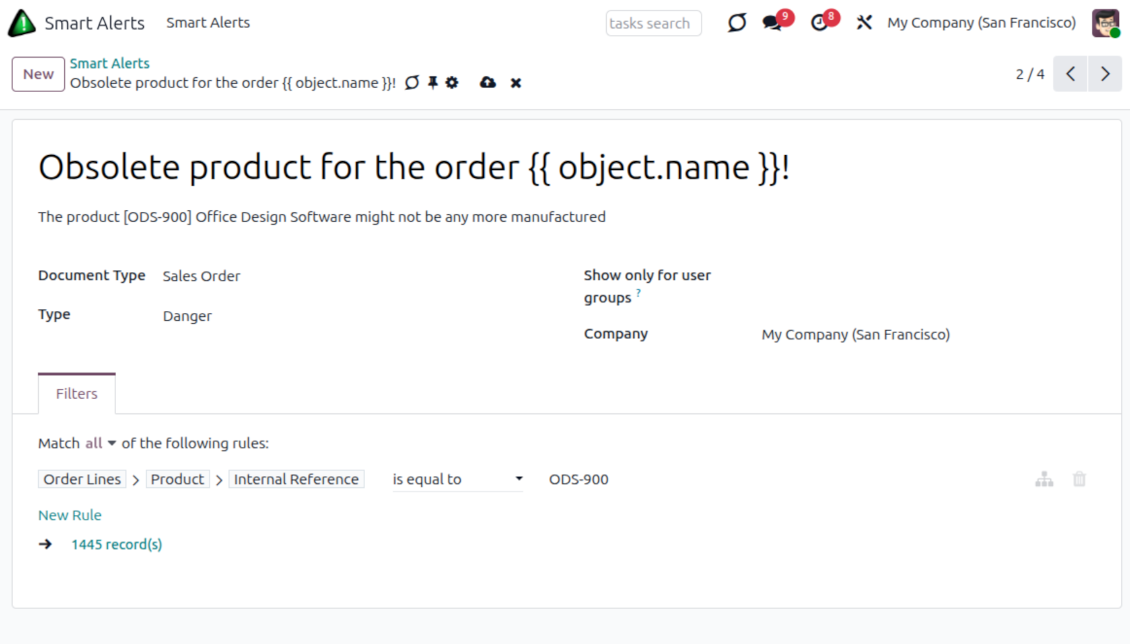
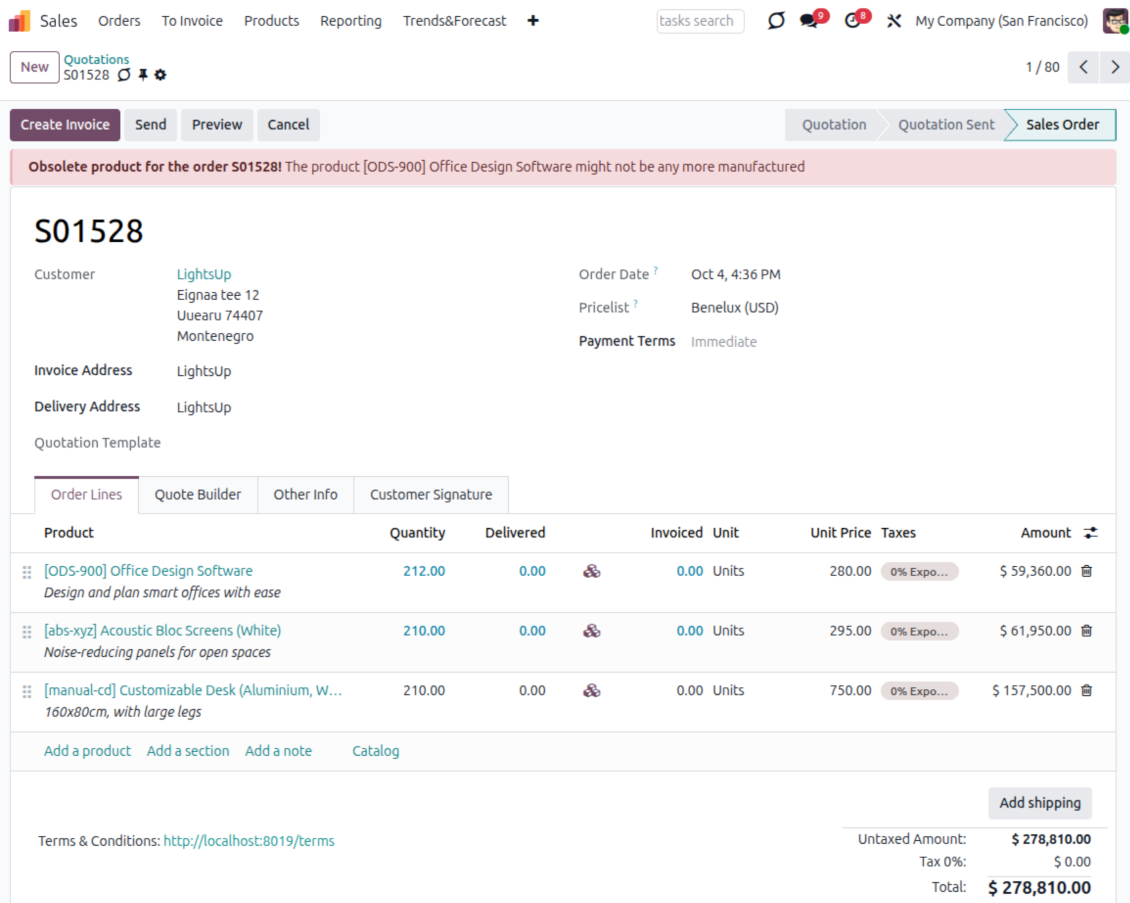
- Verkaufsaufträge: markieren Sie Produktspezifika - zum Beispiel einen Artikel, der nicht mehr gefertigt wird und nur noch aus Restbestand verkauft werden kann.
- Einkauf und Rechnungen: erinnern Sie Buchhalter daran, dass eine Rechnung über 5,000 vor der Validierung von einem Finanzverantwortlichen genehmigt werden muss.
CRM, Kontakte und Fertigung
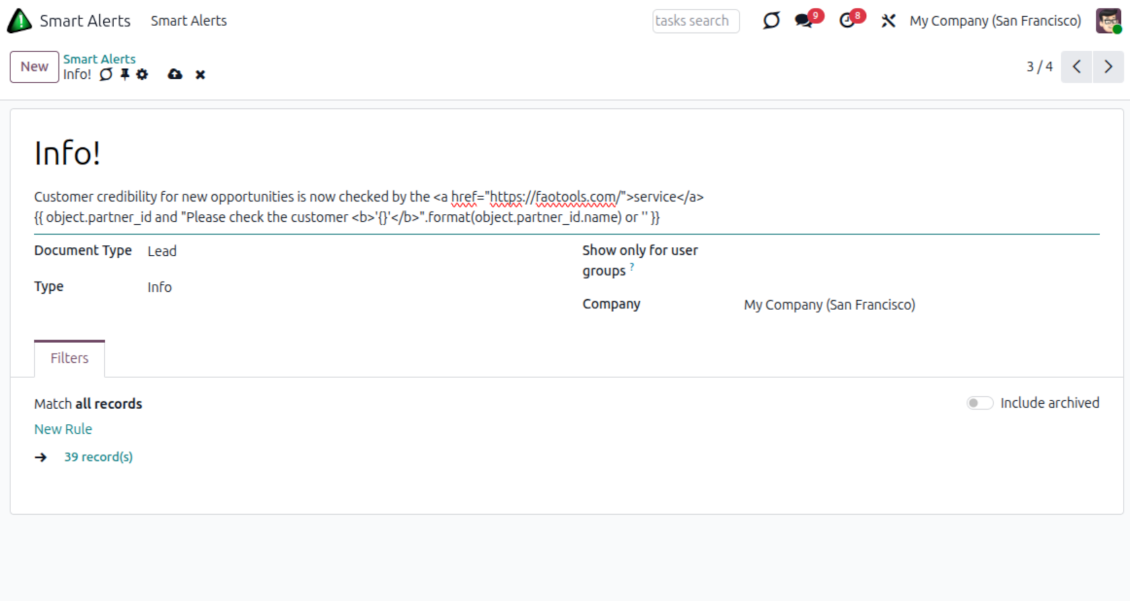
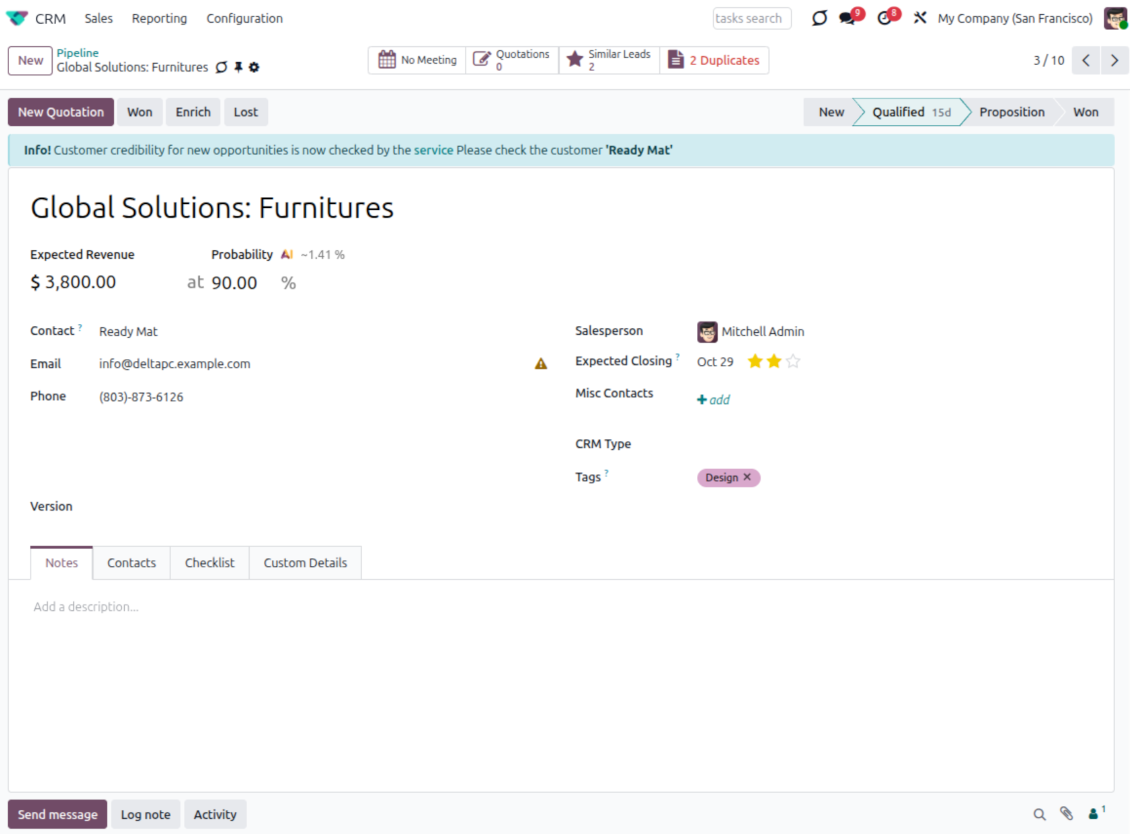
- Chancen: zeigen Sie die Unternehmensrichtlinie für einen bestimmten Kunden oder Deal-Typ.
- Kontakte: weisen Sie Benutzer an, bestimmte Angaben einzugeben oder erneut zu prüfen.
- Fertigung: erinnern Sie Operatoren an eine neue Produktionstechnologie beim Bau eines bestimmten Produkts.
Bereit zur Bewertung?
Starten Sie mit einer kostenlosen Demo-Anfrage oder kaufen Sie im Odoo Apps Store.
Kostenlose personalisierte Demo-Datenbank. Keine Telefonnummer oder Kreditkarte nötig. Lebenslange Updates und Experten-Support innerhalb der Odoo-Hauptversion.
Häufig gestellte Fragen zu Smart Alerts Odoo v.19
Wie sind die Update-Richtlinien Ihrer Tools?
Laut den aktuellen Richtlinien des Odoo Apps Store:
- Ein fur Version 12.0 oder früher gekauftes Modul gibt Zugang zu allen Versionen bis 12.0.
- Ab Version 13.0 muss jede Modulversion separat gekauft werden.
- Unabhängig von der Version berechtigt der Kauf zu allen Updates und Fehlerbehebungen innerhalb einer Hauptversion.
Das faOtools-Team steuert diese Richtlinien nicht. Fragen richten Sie bitte direkt an die Vertreter des Odoo Apps Store.
Wie installiere ich Ihre App auf Odoo.sh?
Der direkteste Weg ist der integrierte Ablauf des Odoo Stores:
1. Öffnen Sie die Modulseite und klicken Sie auf Deploy on odoo.sh
2. Sie werden zu GitHub weitergeleitet. Melden Sie sich an und klicken Sie auf Create a new repo oder nutzen Sie ein vorhandenes. Das Repository muss privat sein. Apps unter OPL-1 dürfen nicht öffentlich gemacht werden. Legen Sie bei Bedarf ein neues Repo fur das Odoo.sh-Projekt an
3. Gehen Sie zu odoo.sh, klicken Sie auf Deploy, bestätigen Sie und klicken Sie auf Continue. Die Installation startet.
Damit wird die App auf dem Production-Branch installiert. Fur andere Branches oder Updates:
1. Laden Sie den Quellcode aus dem Odoo Store
2. Committen Sie das Modul in das GitHub-Repository. Keine App-Ordner/Dateien dürfen in .gitignore stehen. Von odoo.sh erzeugte Repos ignorieren oft wichtige Pfade (z. B. /lib). Laden Sie alle Modulverzeichnisse und Dateien hoch
3. Deployen Sie den Ziel-Branch des odoo.sh-Projekts oder warten Sie auf den automatischen Build.
Wie installiere ich Ihre App auf meinem eigenen Server?
2. Starten Sie den Odoo-Server neu;
3. Schalten Sie den Entwicklermodus ein (technische Einstellungen);
4. Aktualisieren Sie die App-Liste (Apps-Menü);
5. Finden Sie die App und klicken Sie auf Activate/Install;
6. Folgen Sie den Hinweisen auf der App-Seite, falls vorhanden.
Ihre App hat Zusatzmodule. Kann ich sie später kaufen?
Ja. Odoo legt alle Abhängigkeiten automatisch in den Warenkorb. SchlieBen Sie bereits gekaufte Tools aus, um nicht doppelt zu zahlen.
Ich habe Ihre App auf Odoo.sh bereitgestellt und sehe eine Warnung/einen Fehler in den Tests
Eine rote/orange Warnung beeinflusst die Funktionen der App nicht. Manchmal bestehen unsere Module die Standard-Automatiktests nicht, weil diese ein Verhalten erwarten, das unseren Zielen widerspricht. Zum Beispiel ändern wir die Preisberechnung, während die Odoo-Tests den Endpreis mit dem Standardalgorithmus vergleichen.
Prüfen Sie zuerst die Funktionen der bereitgestellten Datenbank. Funktioniert alles?
Wenn Sie dennoch annehmen, dass die Warnung echte Funktionen betrifft, senden Sie uns die vollständigen Installationsprotokolle und die vollständige Liste der bereitgestellten Module (Kern und Drittanbieter).
Kann ich Ihre App direkt bei Ihnen kaufen?
Nein, wir vertreiben die Tools nur über den offiziellen Odoo Apps Store.
Ich mochte einen Rabatt
Leider haben wir keine technischen Mittel fur individuelle Preise.
Kann ich die App auf meiner Odoo Online (SaaS)-Datenbank installieren?
Nein, Drittanbieter-Apps können nicht auf Odoo Online genutzt werden. Odoo SaaS blockiert das.
Ihr Tool hängt von anderen Apps ab. Muss ich diese kaufen?
Ja, das Tool benötigt alle als Abhängigkeit markierten Module. Der Preis auf der App-Seite enthält bereits alle noetigen Abhängigkeiten.
Was kostet das Modul in US-Dollar? Warum hat sich der Preis geändert?
Die Preise unserer Module sind in Euro festgelegt. Der Odoo Store rechnet nach seinem internen Wechselkurs um. Der Preis in US-Dollar kann sich ändern, wenn der Kurs aktualisiert wird.
Die Texte der App und Website in anderen Sprachen als Englisch werden KI-gestützt erstellt und an die offiziellen Odoo-Übersetzungen angeglichen. Wenn Sie einen Fehler entdecken, ein Uebersetzungs-Ticket senden und wir korrigieren es.
Odoo-Demo-Datenbanken (Vorschauen)
Für diese App können wir eine kostenlose personalisierte Demo-Datenbank bereitstellen.
Sie benötigen keine Telefonnummer oder Kreditkarte, um mit uns Kontakt aufzunehmen. Sie sollten nur eine kurze E-Mail-Anmeldung durchführen, die nicht länger als 30 Sekunden dauert.
Auf Anfrage richten wir eine eigene Vorschau-Datenbank ein, in der Sie rund zwei Wochen lang beliebig testen und Ihre Annahmen prüfen können.
Fehlermeldung
Wenn Sie auf Fehler oder inkonsistentes Verhalten stoßen, zögern Sie nicht, uns zu kontaktieren. Wir garantieren eine Reparatur innerhalb von 60 Tagen nach dem Kauf und sind auch nach diesem Zeitraum stark daran interessiert, unsere Werkzeuge zu verbessern.
Sie benötigen keine Telefonnummer oder Kreditkarte, um mit uns Kontakt aufzunehmen. Sie sollten nur eine kurze E-Mail-Anmeldung durchführen, die nicht länger als 30 Sekunden dauert.
Bitte nehmen Sie moglichst viele Details in Ihre Anfrage auf: Screenshots, Odoo-Serverprotokolle, eine vollständige Beschreibung zur Reproduktion Ihres Problems usw. Normalerweise dauert es einige Werktage, einen Arbeitsplan fur ein Problem zu erstellen (wenn ein Fehler bestätigt wird) oder Ihnen Hinweise zum weiteren Vorgehen zu geben (andernfalls).
Öffentliche Funktionsanfragen und Modulideen (kostenlose Entwicklung)
Wir sind stark motiviert, unsere Tools zu verbessern und wären für jedes Feedback dankbar. Wenn Ihre Anforderungen von öffentlichem Nutzen sind und effizient umgesetzt werden könnten, nimmt das Team diese in unsere To-Do-Liste auf.
Eine solche To-Do-Liste wird regelmäßig bearbeitet und erfordert keine zusätzlichen Gebühren. Obwohl wir keine Fristen und keinen endgültigen Entwurf versprechen können, könnte dies eine gute Möglichkeit sein, die gewünschten Funktionen ohne Investitionen und Risiken zu erhalten.
Sie benötigen keine Telefonnummer oder Kreditkarte, um mit uns Kontakt aufzunehmen. Sie sollten nur eine kurze E-Mail-Anmeldung durchführen, die nicht länger als 30 Sekunden dauert.
19.0.1.0.15
- Die KI-unterstuetzten Uebersetzungen fuer 25 Sprachen wurden eingefuehrt.
19.0.1.0.14
- Die Leistung der intelligenten Warnungen wurde optimiert.
19.0.1.0.13
- Das Problem mit nicht verfuegbaren Modellen wurde behoben.
19.0.1.0.12
- Die App wurde fuer Version 19 veroeffentlicht.
18.0.1.0.12
- Die App folgt der neuen Domain-Logik mit dynamischen Teilen.
18.0.1.0.11
- Domains erlauben Python-Bibliotheken: datetime ('date', 'datetime', 'time', 'timedelta', 'timezone', 'tzinfo', 'MAXYEAR', 'MINYEAR'), time ('time', 'strptime', 'strftime') sowie context_today (kurz fuer datetime.now) und relativedelta.
18.0.1.0.10
- Das Archived-Band erscheint auf dem Formular der Smart-Alert-Regeln.
18.0.1.0.9
- Die App wurde fuer Version 18 veroeffentlicht.

Das Werkzeug, um Odoo-Anhänge in Ordnern zu strukturieren und mit Google Drive, OneDrive/SharePoint, Nextcloud/ownCloud, Dropbox, Amazon S3, Box und NAS zu synchronisieren. Dateimanager. DMS
398€
Das Werkzeug zum bidirektionalen Sync von Odoo-Anhangen mit OneDrive
487€
Das Werkzeug zum bidirektionalen Sync von Odoo-Anhangen mit Google Drive
487€
Das Werkzeug, um Passwörter in Odoo sicher gemeinsam zu halten. Geteilte Tresore

Das Werkzeug fur eine tiefe Wissensdatenbank intern und extern. KMS. Wiki-Revisionen
398€
Das Werkzeug, um KPI-Ziele zu setzen und die Erfullung je Periode zu kontrollieren. Dashboards. Diagramme

Das Werkzeug fur terminbasierte Dienste von der Buchung bis Verkauf und Bewertungen
398€
Das Werkzeug, um Odoo aus Ihren KI-Chats per MCP zu steuern. Claude. Jede MCP-KI.

Das Werkzeug, um URL-Adressen von Odoo-Website-Seiten zu übersetzen
38€